

10 Best AI BPM Tools Reviewed in 2026

Best AI BPM Tools Shortlist


The best AI BPM (Business Process Management) tools use artificial intelligence to automate repetitive tasks, identify bottlenecks, and optimize workflows so you can reduce delays, prevent manual errors, and boost execution without chasing approvals or tracking down status updates. When workflows rely on spreadsheets, disconnected tools, or outdated processes, teams struggle with inconsistent handoffs, poor visibility, and stalled progress.
I’ve personally tested over 30 AI BPM platforms across real business environments to evaluate how well they adapt to changing inputs, automate decisions, and scale across teams and departments. My focus has been on practical, measurable performance improvements, not hype.
In this guide, I’ll walk you through the most effective AI BPM tools available today so you can find the right solution to streamline operations and make smarter decisions with less oversight.
Why Trust Our Software Recommendations
Our team has been testing and reviewing software since 2012. As project managers ourselves, we know how difficult—and important—it is to choose the right software.
For this guide, we evaluated tools using hands-on testing and independent research, scoring tools using our selection criteria. We also draw on insights from industry thought leaders and practicing project management experts.
Our reviews reflect our human editorial judgment, not a sales pitch.
Expert reviewers:
AI BPM Tools Comparison Table
This comparison table summarizes pricing details for my top AI BPM tool selections.
| Tool | Best For | Trial Info | Price | ||
|---|---|---|---|---|---|
| 1 | Best for secure multi-party workflows | Free demo available | From $5,000/year (billed annually) | Website | |
| 2 | Best for AI-powered natural language app creation | Free demo available | $40/user/month | Website | |
| 3 | Best for AI-powered resource allocation | Free plan available; 14-day free trial | From $9/user/month (billed annually) | Website | |
| 4 | Best with prebuilt connectors | 30-day free trial | Pricing upon request | Website | |
| 5 | Best for AI document processing | Free trial available + free demo | Pricing upon request | Website | |
| 6 | Best for AI-driven process documentation | Free plan + free demo available | From $12/seat/month (billed annually) | Website | |
| 7 | Best for customizable BPM solutions | Free demo available | Pricing upon request | Website | |
| 8 | Best for checklist-based workflows | Free demo available | Pricing upon request | Website | |
| 9 | Best for developer-friendly BPM | 30-day free trial | Pricing upon request | Website | |
| 10 | Best for cloud integration processes | 30-day free trial | From $99/month | Website |


Best AI BPM Tool Reviews
Below are my detailed summaries of the best AI BPM tools that made it onto my shortlist. My reviews offer a detailed look at the key features, pros & cons, integrations, and ideal use cases of each tool to help you find the best one for you.

Moxo
Best for secure multi-party workflows
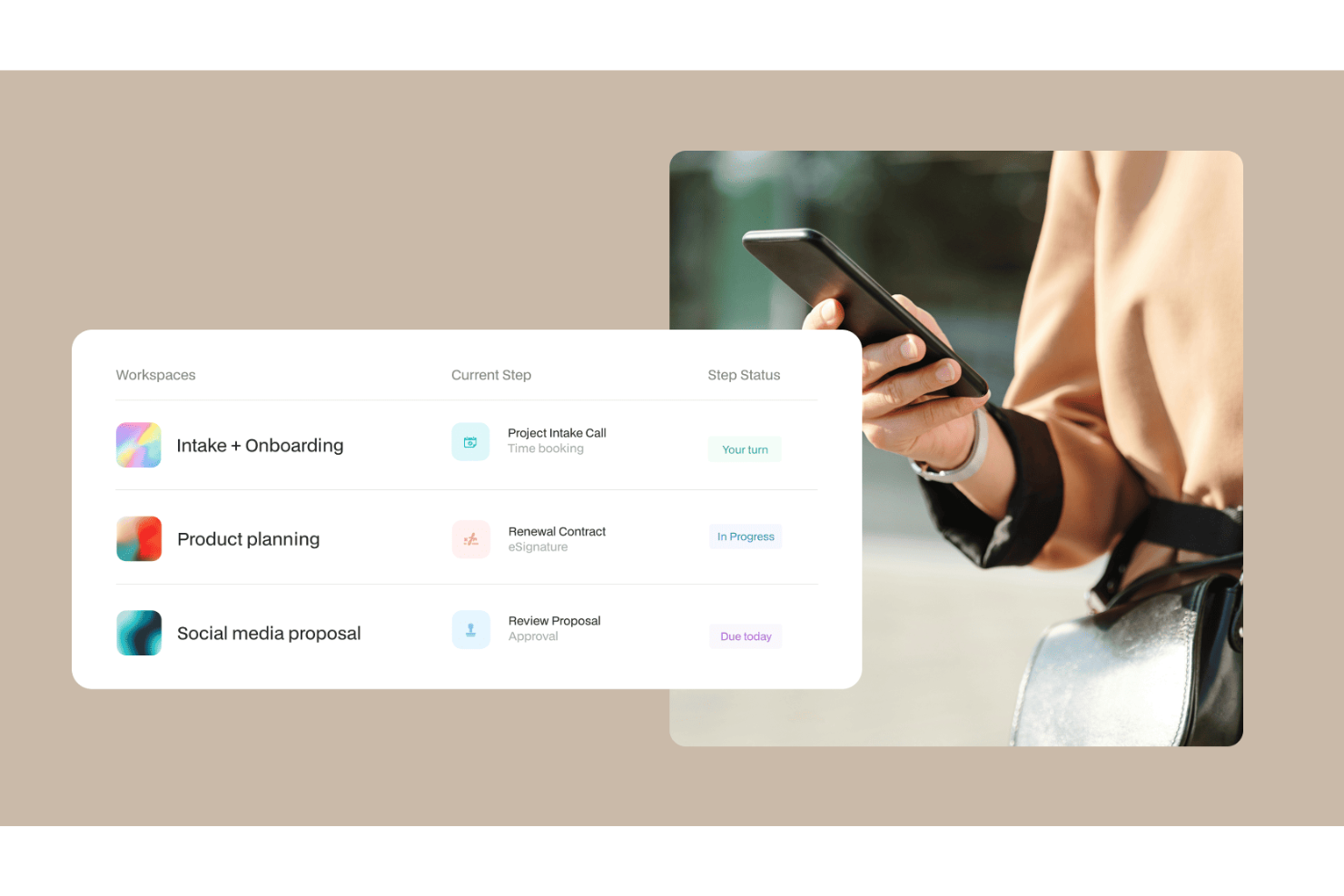
Moxo is an AI-powered business process management platform that combines workflow orchestration, AI agents, multi-party coordination, and client interaction management in a single environment.
Who Is Moxo Best For?
Moxo is a strong fit for professional services firms in finance, legal, and consulting that run structured, multi-party client processes.
Why I Picked Moxo
I picked Moxo as one of the best because of how seriously it treats security across every layer of a multi-party process. When a workflow involves external clients, third-party vendors, and internal teams, access control matters: Moxo's granular role-based permissions ensure each participant sees only what's relevant to their step. On top of that, every action, document, decision, and message is logged in a detailed audit trail with timestamps, which is essential in regulated industries like financial services or legal. Add SOC 2 Type II certification, GDPR compliance, and a 7+ year audit trail, and you get a platform built for processes where security isn't optional.
Moxo Key Features
- AI workflow agents: Moxo's AI agents handle tasks like document validation, data extraction, and step routing without requiring manual handoffs.
- Conditional workflow branching: Build flows with parallel paths, rework loops, and rule-based routing so the right action triggers at the right step automatically.
- Native eSignatures and forms: Collect signatures, approvals, and structured data directly within workflow steps using built-in form and eSign tools.
- SLA timers and escalations: Set deadlines on individual workflow steps and configure automatic escalations when tasks are overdue.
Moxo Integrations
Moxo offers native data sync connectors with Salesforce, HubSpot, Microsoft Dynamics, Zoho, Wealthbox, Redtail, Filevine, Global Relay, Smarsh, Xero, and Follow Up Boss. It also supports file uploads from Google Drive, Dropbox, Box, and OneDrive, calendar sync with Google Calendar and Outlook, and integration actions with DocuSign and Jumio that can be embedded directly into workflow steps. Moxo connects with Zapier and provides a REST API and webhooks for custom integrations.
Pros and Cons
Pros:
- AI agents handle routing and follow-ups
- SOC 2 Type II and GDPR compliant
- Built-in eSignatures, forms, and approvals per step
Cons:
- Limited internal project management depth
- No built-in time tracking for tasks

Best for AI-powered natural language app creation
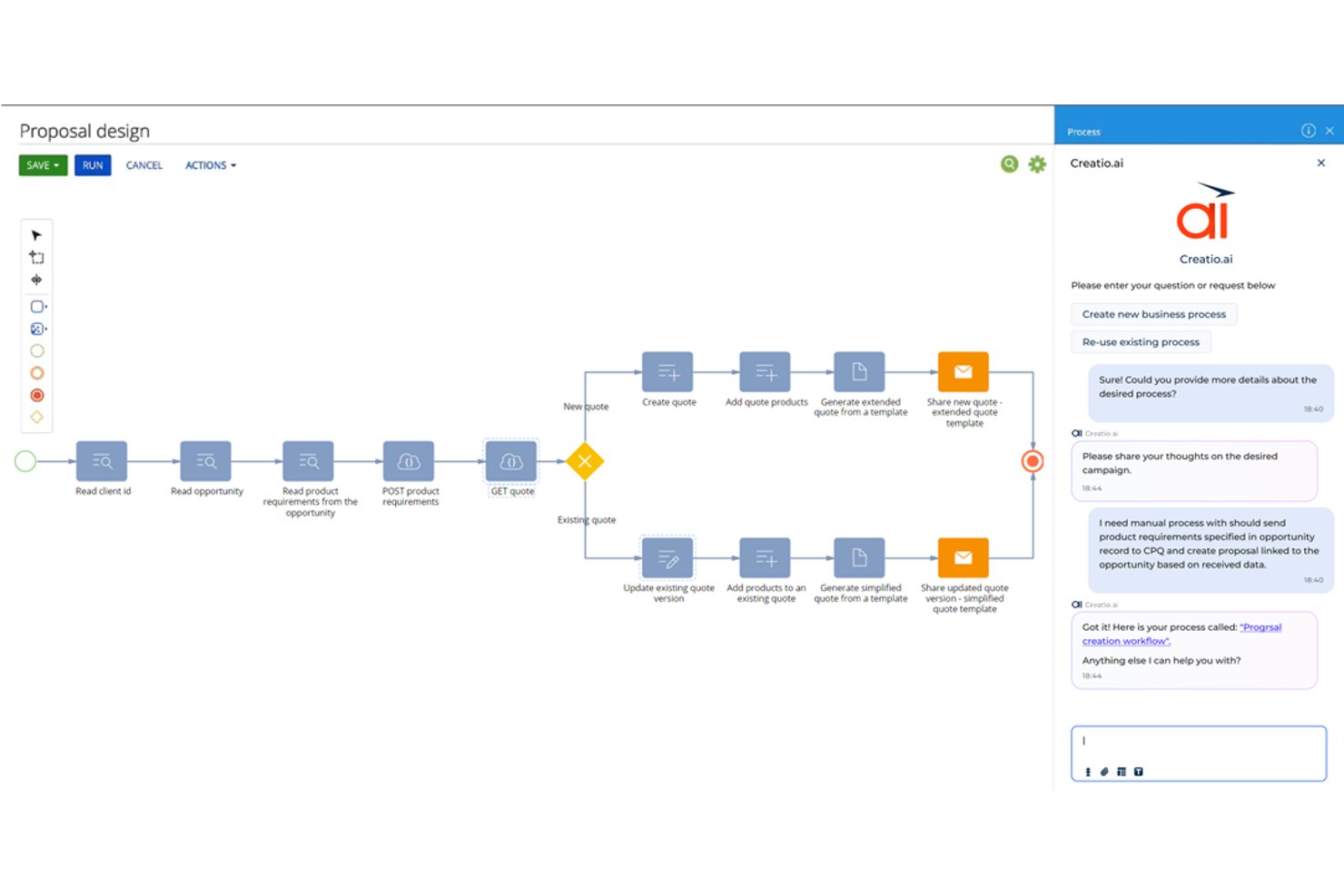
Creatio Studio is a no-code AI BPM platform that combines BPMN-based process modeling, agentic workflow automation, and AI-assisted application development in a unified visual environment.
Who Is Creatio Studio Best For?
Creatio Studio is a strong fit for operations and process managers at mid-to-large enterprises who need to automate complex workflows without relying heavily on developer resources.
Why I Picked Creatio Studio
I picked Creatio Studio as one of the best because its natural language app creation genuinely changes how process work gets done. Instead of manually mapping every workflow in a designer, I can describe a process in plain text, and the platform generates BPMN-structured flows automatically. Its AI-driven process generation pairs with an AI-assisted UI/UX tool, so my team goes from process idea to deployed application without writing a single line of code.
Creatio Studio Key Features
- BPMN 2.0 process designer: Build and edit complex business processes visually using standard BPMN notation.
- Reusable component marketplace: Access hundreds of ready-made connectors, apps, and templates from the Creatio Marketplace.
- No-code governance automation: Enforce compliance and manage data governance across all automated workflows.
- Multi-channel integration support: Connect with leading email, CRM, communication, and analytics platforms using native connectors.
Creatio Studio Integrations
Creatio Studio offers native integrations with Power BI, Microsoft 365, Twilio, WhatsApp, Zoom, Formstack, Avaya, and more. An API is available for custom integrations.
Pros and Cons
Pros:
- Broad marketplace for no-code components
- Advanced process modeling with AI assistance
- Natural language to BPMN workflow generation
Cons:
- Steep learning curve for complex workflows
- Advanced process mining requires third-party add-ons
New Product Updates from Creatio AI Studio
Creatio Studio Expands AI App-Building Capabilities
Creatio Studio adds expanded AI coding agents, AI-generated pivot tables, and built-in analytics for generated apps. These updates let users build more UI, logic, and reporting components from natural-language prompts. For more information, visit Creatio Studio’s official site.

Best for AI-powered resource allocation
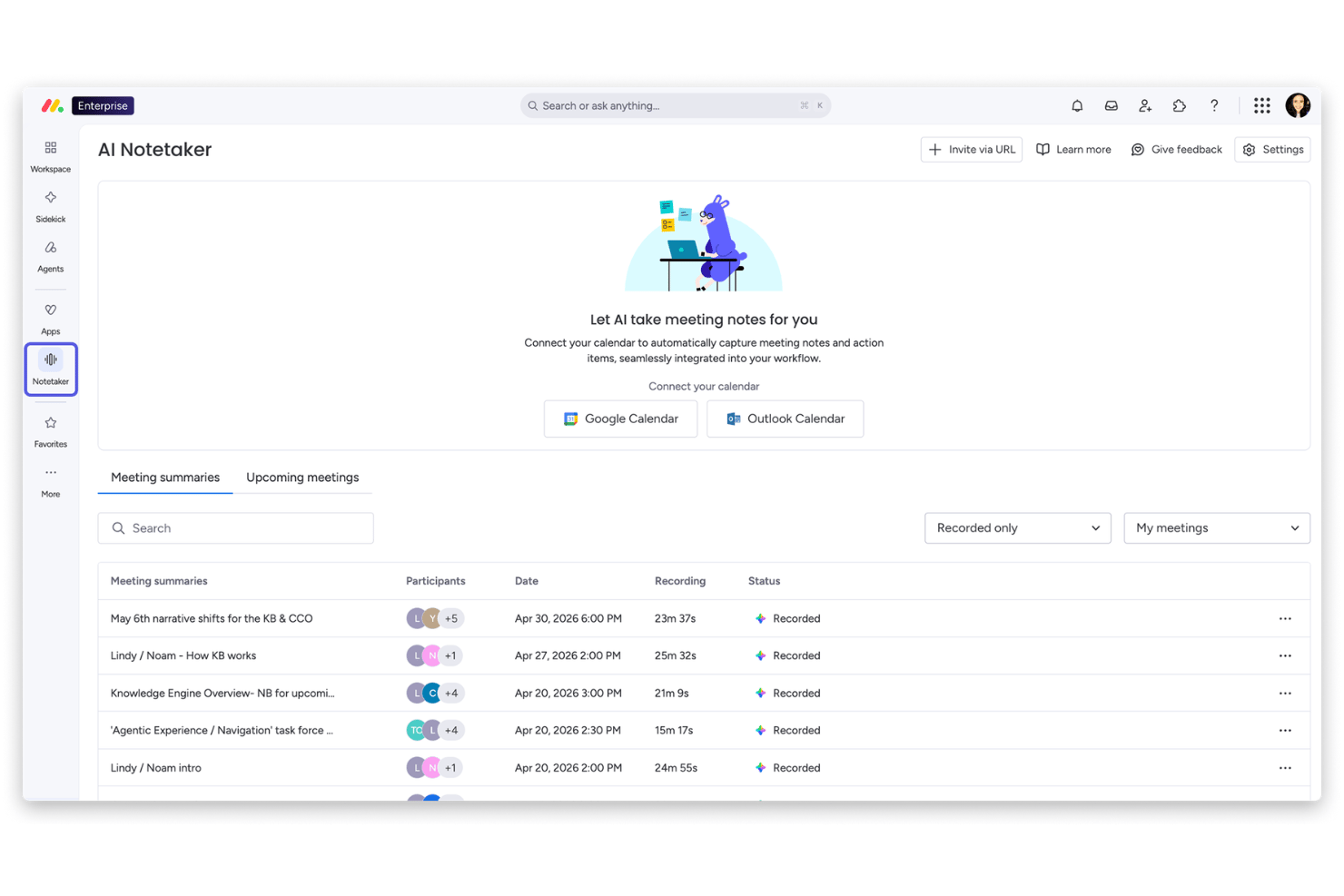
monday AI Workspace is an AI-powered work management platform that combines workflow automation, agentic AI, cross-functional process orchestration, and resource management to help teams plan, track, and execute projects at scale.
Who Is monday AI Workspace Best For?
It's a strong fit for mid-size to enterprise teams where PMO directors and operations managers need to coordinate work across multiple departments and project pipelines simultaneously.
Why I Picked monday AI Workspace
I picked monday AI Workspace as one of the best because its AI-powered Resource Management module flags over-allocation before it becomes a delivery problem. The AI analyzes live project data across boards to surface capacity conflicts, so my team can rebalance workloads without waiting for a status meeting to catch the issue. Paired with Portfolio Management's real-time health snapshots, I can see exactly where people and priorities are stretched across every active initiative.
monday AI Workspace Key Features
- Sidekick AI assistant: An AI-powered copilot available on every board for real-time process support and workflow queries.
- AI workflow builder: Create, orchestrate, and automate workflows across teams using drag-and-drop logic with AI-powered triggers.
- Portfolio management: Visualize project health, risks, and milestones across initiatives using cross-project dashboards.
- MCP for external AI tools: Connect and manage external AI solutions alongside monday-native workflows for broader automation.
monday AI Workspace Integrations
monday AI Workspace offers native integrations with Slack, Gmail, Google Calendar, Microsoft Teams, GitHub, Dropbox, Trello, Salesforce, and HubSpot. It also supports Zapier and provides an API for custom integrations.
Pros and Cons
Pros:
- AI sidekick answers workflow questions in context
- Process automation includes natural language workflow builder
- AI detects resource constraints before deadlines slip
Cons:
- Process mining features are limited compared to peers
- No formal BPMN modeling for complex processes
New Product Updates from monday AI Workspace
monday AI Workspace Adds Human Approval Routing
monday AI Workspace adds a human-in-the-loop approval block to AI Workflows, sending approval requests and routing workflow paths based on responses. For more information, visit monday AI Workspace's official site.

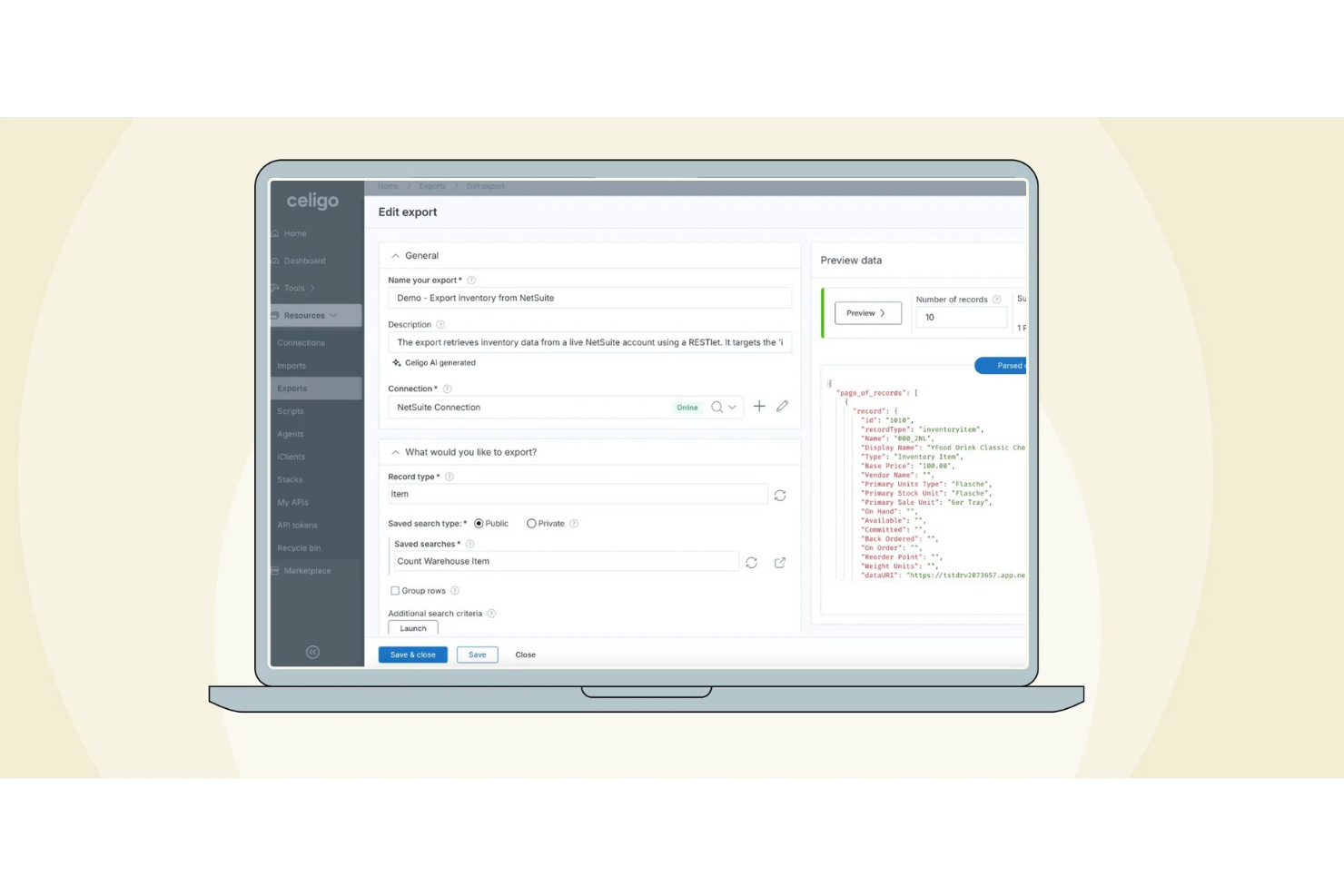
Celigo is an AI-powered business process automation platform that combines workflow orchestration, integration, and process monitoring for teams managing complex digital operations.
Who Is Celigo Best For?
Celigo is a good fit for IT and operations teams at mid-sized to large enterprises that need to automate and connect business processes across multiple cloud applications.
Why I Picked Celigo
I picked Celigo as one of the best because I rely on its extensive library of prebuilt connectors for major apps like Salesforce, NetSuite, and Shopify. My team is able to quickly automate cross-platform workflows without building custom integrations from scratch. I like that we can map data fields visually and deploy new automations in hours, not weeks.
Celigo Key Features
- AI-guided error management: Get automated suggestions and resolutions for integration errors as they occur.
- Visual workflow builder: Design, edit, and manage business process automations with a drag-and-drop interface.
- Role-based access controls: Set granular permissions for users and teams to manage integrations securely.
- Real-time process monitoring: Track workflow status and integration health with live dashboards and alerts.
Celigo Integrations
Celigo offers 1,000+ native integrations, including Salesforce, Microsoft Dynamics 365 Business Central, Oracle NetSuite, SAP, Snowflake, Acumatica, Walmart, ADP, Adobe, and 3PL providers. Universal connectors are available for custom integrations using protocols like HTTP, FTP, JDBC, AS2, and GraphQL.
Pros and Cons
Pros:
- Built-in compliance features for regulated industries
- Supports complex, multi-step workflow automations
- Real-time monitoring dashboard for integration health
Cons:
- Initial setup can be time-consuming for large projects
- Occasional delays in connector updates for new app versions
New Product Updates from Celigo
Celigo Adds SuiteTax and Variant Publishing for Shopify–NetSuite
Celigo adds NetSuite SuiteTax support and variant-level sales channel publishing to its Shopify–NetSuite integration. These updates improve tax handling and give merchants more control over how product variants are published. For more information, visit Celigo’s official site.
 .
.
TrailHQ
Best for AI document processing

Nanonets is an AI-driven document processing platform designed to automate data extraction and simplify document workflows. It serves businesses across various industries, offering AI capabilities to increase accuracy and efficiency in handling documents.
Why I picked Nanonets: Nanonets excels in AI document processing, making it easy for your team to automate data extraction from documents. Its AI features include machine learning algorithms that improve accuracy over time. The platform's ability to handle various document types allows you to process invoices, receipts, and more efficiently. With its focus on reducing manual data entry, Nanonets helps your team save time and minimize errors.
Standout Features & Integrations:
Features include custom model creation that lets you tailor AI models to your specific needs. The platform supports multiple document formats, ensuring versatility in document handling. Batch processing capabilities allow you to handle large volumes of documents quickly.
Integrations include Zapier, QuickBooks, Salesforce, Google Drive, Dropbox, Slack, HubSpot, Microsoft Excel, Airtable, and Asana.
Pros and Cons
Pros:
- Reduces manual data entry
- Supports multiple document formats
- Improves accuracy with machine learning
Cons:
- Requires setup for custom models
- Higher cost for small businesses

Scribe
Best for AI-driven process documentation

Scribe is an AI-powered documentation tool designed for operations, sales, HR, and IT teams to create and manage guides and tutorials efficiently. It offers AI-generated content and real-time documentation to simplify the documentation process.
Why I picked Scribe: Scribe is ideal for AI-driven process documentation, offering features like AI-generated content and real-time documentation. It automatically updates linked documents, which helps keep your guides current. Its automatic updates help keep content accurate as workflows evolve, and AI-generated text fills in descriptions for clearer explanations across real-world use cases.
Standout Features & Integrations:
Features include real-time documentation that captures processes as you work. AI-generated content helps create guides quickly, saving you time. Automatic updates for linked documents ensure your guides stay current without extra effort.
Integrations include Microsoft Office, Google Workspace, Slack, Jira, Salesforce, Trello, Asana, Confluence, monday.com, and Zendesk.
Pros and Cons
Pros:
- Quick capture of on-screen steps
- AI text generation for guides
- Auto-updates linked documents
Cons:
- Limited offline functionality
- Complex interface

Quixy
Best for customizable BPM solutions

Quixy is a no-code BPM and application development platform that helps teams build workflows, automate processes, and support digital transformation across industries.
Why I picked Quixy: Quixy is ideal for creating customizable BPM solutions with its no-code platform that empowers your team to build applications without technical skills. Its AI features help automate repetitive tasks, saving time and reducing errors. The platform's flexibility allows you to tailor workflows to fit your specific business needs. You can easily adapt processes as your business grows, ensuring long-term scalability.
Standout Features & Integrations:
Features include a drag-and-drop interface that simplifies app building for non-technical users. Workflow automation ensures your team can focus on critical tasks instead of repetitive ones. Real-time analytics provide insights into process efficiency, helping you make informed decisions.
Integrations include Microsoft Teams, Slack, Google Workspace, Salesforce, Zapier, Dropbox, OneDrive, QuickBooks, Trello, and Mailchimp.
Pros and Cons
Pros:
- Real-time analytics for process efficiency
- Flexible workflows for various industries
- No-code platform for easy app creation
Cons:
- Limited advanced customization options
- May require initial workflow planning

Best for checklist-based workflows

Process Street is a business process automation tool tailored for teams that need to document and automate workflows efficiently. It serves industries looking to simplify recurring tasks, leveraging AI to boost operational productivity.
Why I picked Process Street: Process Street excels in checklist-based workflows, providing a simple yet effective way to manage recurring tasks. Its AI capabilities automate routine processes, reducing the workload on your team. The platform allows you to create dynamic checklists that adapt to different scenarios. This flexibility ensures your team can handle tasks efficiently, regardless of changes in workflow requirements.
Standout Features & Integrations:
Features include conditional logic that lets you create dynamic checklists based on task requirements. The drag-and-drop editor makes it easy to design workflows without technical skills. Task assignments and due dates ensure accountability within your team.
Integrations include Zapier, Slack, Google Workspace, Salesforce, Microsoft Teams, Dropbox, OneDrive, Trello, Asana, and HubSpot.
Pros and Cons
Pros:
- Automates routine processes
- Simple drag-and-drop workflow editor
- Flexible dynamic checklists
Cons:
- Limited customization for unique needs
- May lack advanced features for complex workflows

Best for developer-friendly BPM

Camunda is a developer-focused BPM and orchestration platform built around BPMN and DMN standards. It supports end-to-end automation across distributed systems.z
Why I picked Camunda Platform: Camunda Platform is ideal for developer-friendly BPM because it provides technical teams with full control over workflow logic, microservice orchestration, and automation at scale. Its modeling tools, event-driven engine, and natural language form design features support complex business initiatives across industries
Standout Features & Integrations:
Features BPMN/DMN modeling, a decision engine, real-time monitoring, and support for both orchestration and multi-system workflows.
Integrations include Apache Kafka, Spring Boot, Elasticsearch, Microsoft Azure, AWS, Kubernetes, Docker, Java, Node.js, and Python.
Pros and Cons
Pros:
- Real-time process visibility
- Flexible architecture
- Standards-based modeling
Cons:
- May be complex for non-developers
- Requires technical expertise for setup

Boomi
Best for cloud integration processes

Boomi is an integration platform as a service (iPaaS) that helps businesses connect applications, data, and people across various environments. It serves organizations looking to improve data flow and automate business processes with AI-driven insights.
Why I picked Boomi: Boomi is tailored for cloud integration processes, offering a unified platform to connect your applications and data with ease. Its AI capabilities help automate complex workflows, reducing manual effort for your team. Boomi's low-code interface allows you to build integrations quickly without extensive technical skills. Real-time data synchronization ensures your systems are always up-to-date, enhancing operational efficiency.
Standout Features & Integrations:
Features include a low-code development environment that simplifies building integrations. Real-time data synchronization keeps your systems updated and aligned. The platform's pre-built connectors help you connect various applications with ease.
Integrations include Salesforce, SAP, NetSuite, Microsoft Dynamics 365, Workday, Google Cloud, AWS, Oracle, Slack, and ServiceNow.
Pros and Cons
Pros:
- Wide connector ecosystem
- Real-time data syncing
- Low-code integration builder
Cons:
- May need technical support for complex setups
- Requires initial setup time
Other AI BPM Tools
Here are some additional AI BPM tools options that didn’t make it onto my shortlist, but are still worth checking out:
- Gluu
For team collaboration on processes
- Pipedrive
For sales pipeline automation
- Decisions Workflow Manager
For no-code workflow automation
- Rierino
For retail process optimization
- Wrike
For real-time collaborative editing
- Qntrl
For workflow orchestration
- Kintone
For custom app building
- Prime BPM
For process mapping and analysis


How I Evaluate AI BPM Tools
Every tool on this list needs to go beyond slapping an "AI" label onto a basic workflow builder—I look for platforms where AI actually surfaces bottlenecks, predicts risks, or autonomously routes work across project pipelines. I split my evaluation into two layers: the core BPM functionality a tool must have to qualify, and the differentiators that separate good options from great ones.
Core Functionality (Table Stakes For This List)
When I'm selecting tools for my list, I rank each one on a scale from 0 (does not offer the functionality) to 5 (excels in this area) for each core functionality listed below. Then, I calculate the tool's total score into a percentage. Each tool needs to achieve a minimum total score of 65% to be considered for inclusion.
- Process Modeling & Mapping: I check whether a tool supports BPMN 2.0 or equivalent standards for designing workflows, like mapping a multi-stage approval chain across departments.
- AI-Driven Workflow Automation: The ability to go beyond static if/then rules matters here—I look for AI that learns routing patterns or auto-assigns tasks from historical data.
- Process Mining & Analytics: I evaluate how well each platform analyzes execution data to flag bottlenecks, like identifying where handoffs between engineering and QA consistently stall.
- Predictive Insights & Recommendations: Tools should forecast outcomes like SLA breaches or timeline slippage and suggest corrective actions before issues escalate.
- Generative AI Assistance: I look for practical GenAI features such as natural language process creation or AI copilots that help PMs query process data conversationally.
- Integration & Orchestration: A tool's connector library and API depth determine whether it fits into real tech stacks—I check for links to tools like Jira, SAP, and Slack.
Once I have a list of tools that meet this criteria, I consider what sets each platform apart.
Differentiating Factors (What Sets Vendors Apart)
Here's how I compare and contrast different vendors:
Standout Features
Process simulation and digital twins are a big differentiator—I look for tools that let you model "what-if" scenarios before pushing changes to a live delivery pipeline. No-code AI builders also matter, especially for PMOs where analysts need to create automations without waiting on engineering. I evaluate whether a platform offers real-time process intelligence with anomaly detection, so teams catch SLA risks as they emerge rather than in a retrospective.
Beyond Features
AI governance is a factor I weigh carefully—I check whether a platform provides audit trails and explainability for AI-driven decisions, which matters when PMO leaders need to justify automated routing or risk scores to leadership. Implementation timelines also vary widely; I look for vendors that offer prebuilt process templates so teams aren't building from scratch. Pricing transparency around AI usage is worth evaluating too, since hidden compute or token-based costs can quietly inflate total cost of ownership at scale.
How to Choose AI BPM Tools
It’s easy to get bogged down in long feature lists and complex pricing structures. To help you stay focused as you work through your unique software selection process, here’s a checklist of factors to keep in mind:
| Factor | What to Consider |
|---|---|
| Scalability | Will the tool grow with your team? Consider user limits and data capacity. Ensure it can handle increased workflow demands as your business expands. |
| Integrations | Does it connect with your existing systems? Look for easy integration with software you already use, like CRM or ERP systems, to avoid workflow silos. |
| Customizability | Can you tailor the tool to your needs? Ensure you can adjust workflows, fields, and dashboards to fit your processes without technical skills. |
| Ease of Use | Will your team adopt it easily? Look for intuitive interfaces and minimal training requirements to ensure quick adoption and efficiency. |
| Implementation and Onboarding | How quickly can you get started? Check for available resources like tutorials, templates, and support to simplify the setup process. |
| Cost | Does it fit your budget? Compare pricing plans, and consider hidden costs like add-ons or user fees. Ensure it offers good value for the features provided. |
| Security Safeguards | How secure is your data? Ensure the tool complies with data protection standards and offers encryption, user access controls, and regular audits. |
| Support Availability | Will you get help when needed? Look for 24/7 support options, multiple contact methods, and a responsive support team to resolve issues quickly. |
What Are AI BPM Tools?
AI BPM tools are software solutions that automate and optimize business processes using artificial intelligence. Professionals like project managers, operations teams, and business analysts use these tools to improve efficiency and make data-driven decisions.
Automated workflows, predictive analytics, and real-time data processing help with identifying bottlenecks, improving decision-making, and reducing manual tasks. Overall, these tools save time and increase productivity by simplifying complex processes.
Features
When selecting AI BPM tools, keep an eye out for the following key features:
- Automated workflows: Simplify repetitive tasks by automating them, saving time for your team.
- Predictive analytics: Uses AI to forecast outcomes and trends, helping you make informed decisions.
- Real-time data processing: Provides immediate insights into business operations, allowing for quick adjustments.
- Customizable dashboards: Let you tailor the interface to fit your workflow needs and preferences.
- AI-driven insights: Offers data analysis and recommendations to improve efficiency and performance.
- Integration capabilities: Ensures easy connection with existing systems, enhancing workflow continuity.
- Process mapping: Visualizes workflows for better understanding and optimization of business processes.
- Compliance tracking: Monitors and ensures adherence to regulatory standards, reducing risk.
- Decision automation: Automates complex decision-making processes, reducing manual intervention.
- User access controls: Manages permissions and access to sensitive data, enhancing security.
Benefits
Implementing AI BPM tools provides several benefits for your team and your business. Here are a few you can look forward to:
- Increased efficiency: Automates repetitive tasks, freeing up time for more strategic work.
- Improved decision-making: Uses predictive analytics to provide insights, helping you make informed choices.
- Improved data accuracy: Reduces manual data entry errors by automating data processing.
- Greater flexibility: Customizable workflows adapt to your business needs, ensuring processes fit your requirements.
- Better compliance: Tracks regulatory standards automatically, reducing the risk of non-compliance.
- Scalability: Supports growth by handling increased data and user demands without compromising performance.
- Cost savings: Reduces operational costs by automating processes and minimizing manual work.
Costs and Pricing
Selecting AI BPM tools requires an understanding of the various pricing models and plans available. Costs vary based on features, team size, add-ons, and more. The table below summarizes common plans, their average prices, and typical features included in AI BPM tools solutions:
Plan Comparison Table for AI BPM Tools
| Plan Type | Average Price | Common Features |
|---|---|---|
| Free Plan | $0 | Basic workflow automation, limited integrations, and standard support. |
| Personal Plan | $15-$499/user/month | Customizable dashboards, task management, and basic analytics. |
| Business Plan | $30-$500/user/month | Advanced analytics, AI-driven insights, increased integrations, and priority support. |
| Enterprise Plan | $70-$6000/user/month | Unlimited users, dedicated account management, advanced security features, and compliance tracking. |
AI BPM Tools FAQs
Here are some answers to common questions about AI BPM tools:
How do AI BPM tools integrate with existing systems?
AI BPM tools integrate with existing systems through APIs and pre-built connectors. Before purchasing, check if the tool supports integration with your current software, like CRM, ERP, or accounting systems. This will ensure quick and easy data flow and reduce manual data entry. If your team uses custom applications, look for tools offering flexible API options. Testing integrations during a trial period can help you assess compatibility and performance.
Can AI BPM tools improve compliance management?
Yes, AI BPM tools can improve compliance management by automating monitoring and reporting tasks. They track regulatory changes and ensure your processes meet current standards. Set up alerts and notifications to keep your team informed of compliance issues. Some tools offer audit trails, making it easier to review past actions and decisions. Regularly update your compliance settings to match evolving regulations.
What should I consider when scaling AI BPM tools?
When scaling AI BPM tools, consider user limits, data capacity, and performance under load. Ensure the tool can handle increased workflow demands as your business grows. Review pricing tiers to understand the cost implications of adding users or features. Check if the vendor offers scalable infrastructure, like cloud-based solutions, to accommodate growth. Testing scalability during the trial can provide insights into potential challenges.