2026’nın En İyi 10 Ücretsiz Kaynak Yönetimi Yazılımı

10 En İyi Ücretsiz Kaynak Yönetimi Yazılımları Kısa Listesi


Hangi ekip üyesinin hangi projelerde çalıştığını anlamakta, ekibinizin işlerine öncelik vermekte veya proje teslim tarihlerini karşılamakta zorlanıyor ancak gelişmiş yazılımlara yatırım yapacak bütçeniz mi yok? Bütçesi kısıtlı ekipler ve kuruluşlar için pek çok ücretsiz kaynak yönetimi yazılımı aracı mevcut.
Piyasadaki en iyi ücretsiz kaynak yönetimi yazılımı araçları için seçtiklerimi ve doğru seçeneği bulma sürecini kolaylaştırmanıza yardımcı olmak amacıyla her birini kullanma konusundaki kişisel deneyimlerime ilişkin notlarımı burada bulabilirsiniz.
Why Trust Our Software Recommendations
Our team has been testing and reviewing software since 2012. As project managers ourselves, we know how difficult—and important—it is to choose the right software.
For this guide, we evaluated tools using hands-on testing and independent research, scoring tools using our selection criteria. We also draw on insights from industry thought leaders and practicing project management experts.
Our reviews reflect our human editorial judgment, not a sales pitch.
Expert reviewers:
Ücretsiz Kaynak Yönetimi Yazılımları Karşılaştırma Tablosu
En iyi ücretsiz kaynak yönetimi yazılımı seçimlerimin fiyatlandırma ayrıntılarını bu karşılaştırma tablosunda özetledim:
Score legend (out of 5)
- Excellent 4.5–5
- Good 4–4.4
- Average 3–3.9
- Below average 2–2.9
- Poor 1–1.9
| Tool | Starting Price | Website | |||||||
|---|---|---|---|---|---|---|---|---|---|
| Best for profitable resource management | — | — | 4 | 3 | 4 | 5 | 4 | $7/scheduled user/month Free trial available | Book Demo |
| Best for visual workload management | 3.3 out of 5 | 1 | 4 | 4 | 3 | 4 | 4 | $9/user/month Free plan + 14-day trial available | Book Demo |
| Best for multiple resource views | 3.2 out of 5 | 1 | 4 | 3 | 3 | 4 | 4 | $10/user/month Free plan + 14-day trial + demo available | Book Demo |
| Best for capturing time in project apps | 3.0 out of 5 | 1 | 3 | 4 | 3 | 4 | 3 | $4.99/user/month Free plan + 7-day trial + demo available | Website |
| Best for connecting projects to resource apps | 3.0 out of 5 | 1 | 4 | 3 | 2 | 4 | 4 | $10.99/user/month Free plan + trial + demo available | Website |
| Best for carrying bookings into timesheets | 3.5 out of 5 | 3 | 4 | 4 | 3 | 4 | 3 | $11.95/month Free plan + 14-day free trial available | Website |
| Best for matching skills to assignments | 4.0 out of 5 | 4 | 4 | 4 | 4 | 4 | 4 | $5.27/resource/year 14-day free trial | Website |
| Best for utilization and overtime reporting | 3.3 out of 5 | 3 | 3 | 4 | 3 | 4 | 3 | $2/user/month Free plan + 14-day free trial + free demo available | Website |
| Best for hiring from project pipelines | — | — | 4 | 4 | 3 | 4 | 4 | $9.50/user/month 30-day free trial | Website |
| Best for testing capacity planning | 3.0 out of 5 | 3 | 3 | 2 | 2 | 4 | 4 | $12/user/month Free plan + free demo available | Book Demo |
En İyi Ücretsiz Kaynak Yönetimi Yazılımlarına Genel Bakış
Listemde yer alan ücretsiz kaynak yönetimi araçlarının her birinin kısa açıklamasını burada bulabilirsiniz. Her birinin en iyi yaptığı işi ve bazı özelliklerini sergileyen ekran görüntülerini ekledim.

Best for profitable resource management
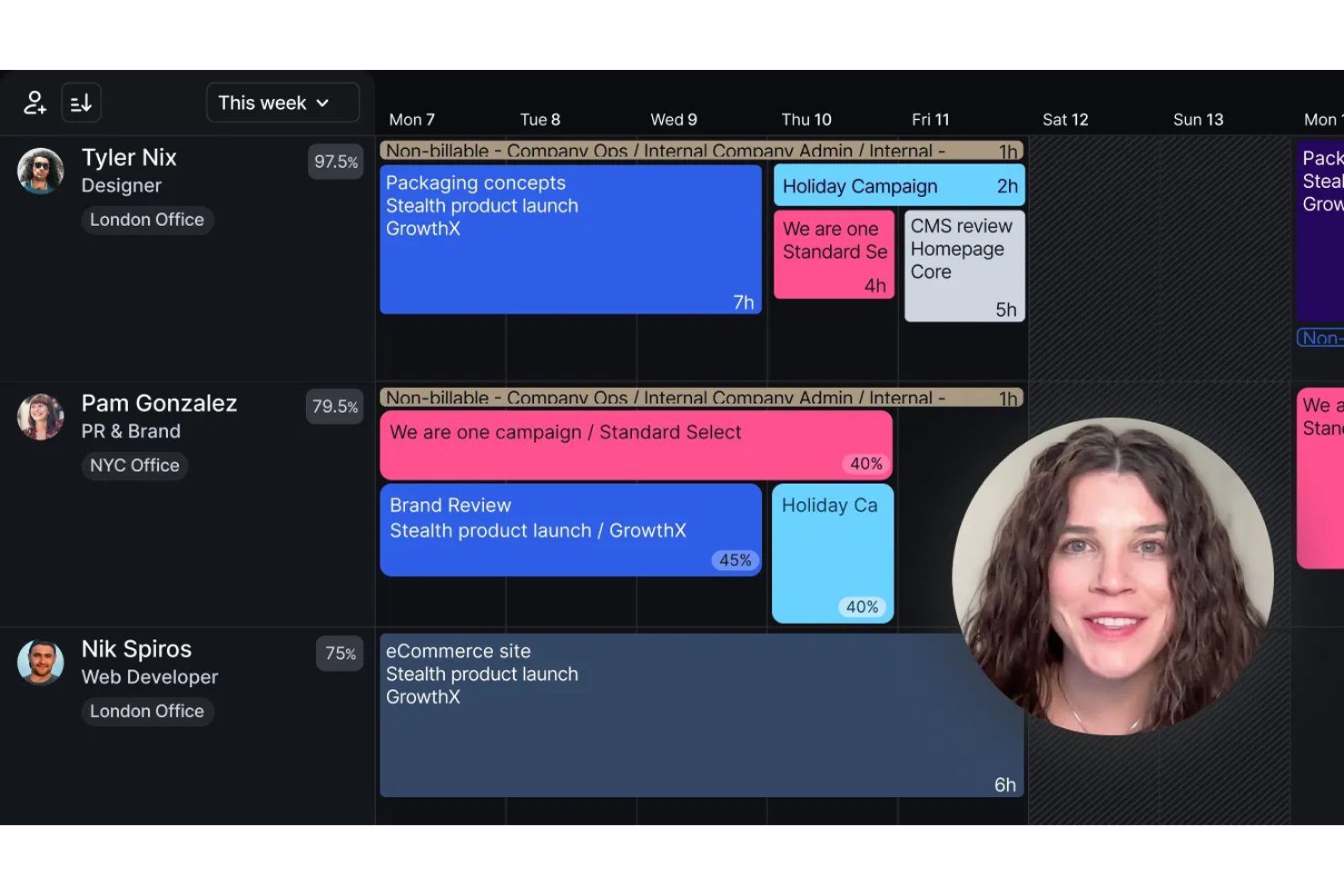
Float is resource management software for scheduling people across projects, planning capacity, tracking time and costs, and monitoring utilization; it offers a 30-day trial rather than a permanent free plan.
Who Is Float Best For?
Float is a good fit for resource and project managers at project-based teams balancing staffing capacity with project budgets and margins.
Why I Picked Float
I picked Float for its focus on keeping staffing plans tied to project margins, not just availability. I like that scenario planning compares timelines, roles, and budgets, while live utilization and over-capacity signals help me spot when to rebalance work. One caveat for this free-software list: Float offers a 30-day Pro trial, not a permanent free plan.
Float Key Features
- Project phases and milestones: Organize project work into phases, milestones, and tasks.
- Time-off approvals: Set leave policies and approval workflows for team members.
- Role and skill tags: Label people by role, skills, seniority, or location.
- Prefilled timesheets: Pro users can populate timesheets from scheduled allocations.
Float Integrations
Float has native integrations with Google Calendar, Outlook Calendar, and Slack. It also integrates with Jira, Asana, ClickUp, Linear, and Trello through Zapier, and offers a REST API for custom integrations.
What's Free?
Float offers a 30-day Pro trial, not a free-forever plan. The free access ends after the trial.
Pros and Cons
Pros:
- Drag-and-drop changes support quick rebalancing
- Cross-project views help prevent conflicts
- Visual schedules expose capacity gaps
Cons:
- Reports offer limited historical depth and customization
- No permanent free plan
New Product Updates from Float.com

Float Adds Rate Cards and Multi-Currency Billing
Float introduced centralized rate cards to standardize bill rates across projects and added multi-currency support to bill clients consistently across regions. For more information, visit Float's official site.
 .

Best for visual workload management
monday AI Workspace is a no-code work management platform that combines board-based task assignment, workload views, Gantt and timeline scheduling, and AI-assisted automation to help teams plan, allocate, and track resources across projects.
Who Is monday AI Workspace Best For?
It's a strong fit for project managers and operations leads at growing teams who need a visual, flexible way to manage workloads across multiple concurrent projects.
Why I Picked monday AI Workspace
monday AI Workspace earns its spot on my shortlist because I genuinely appreciate how its Workload view makes capacity problems impossible to miss. Color-coded bars turn red the moment a team member is over-allocated, so I can rebalance assignments before things go sideways. I also use the drag-and-drop Timeline view to shift tasks across weeks without ever leaving the scheduling screen.
monday AI Workspace Key Features
- Skills and role tagging: Assign tags for skills, roles, or certifications to match the right resource with the right work.
- Multi-project dashboards: View consolidated resource data and status updates from multiple projects on shareable custom dashboards.
- Leave and PTO management: Track time off directly in the system, automatically updating capacity and preventing scheduling conflicts.
- Native time tracking column: Log actual hours worked per task with a dedicated column, making utilization reporting easier.
monday AI Workspace Integrations
monday AI Workspace offers hundreds of native integrations through its built-in integrations and marketplace, including Slack, Salesforce, HubSpot, Google Workspace, Microsoft Teams, Jira, Asana, Trello, GitHub, and Zoom. It also supports Zapier and provides an API for custom integrations.
What's Free?
monday AI Workspace offers a free-forever plan for up to 2 seats, with access to up to 3 boards, basic docs, and 200+ templates. Key features like automation, time tracking, advanced reporting, and integrations are locked behind paid plans, so the free tier works best for individuals or very small teams doing light project tracking.
Pros and Cons
Pros:
- AI-assisted automations reduce manual scheduling work
- Drag-and-drop timeline spans multiple projects
- Workload view catches over-allocations instantly
Cons:
- Time tracking locked behind paid tiers
- Free plan caps at only two seats
New Product Updates from monday AI Workspace
monday AI Workspace Adds Human Approval Routing
monday AI Workspace adds a human-in-the-loop approval block to AI Workflows, sending approval requests and routing workflow paths based on responses. For more information, visit monday AI Workspace's official site.
 .

Wrike
Best for multiple resource views
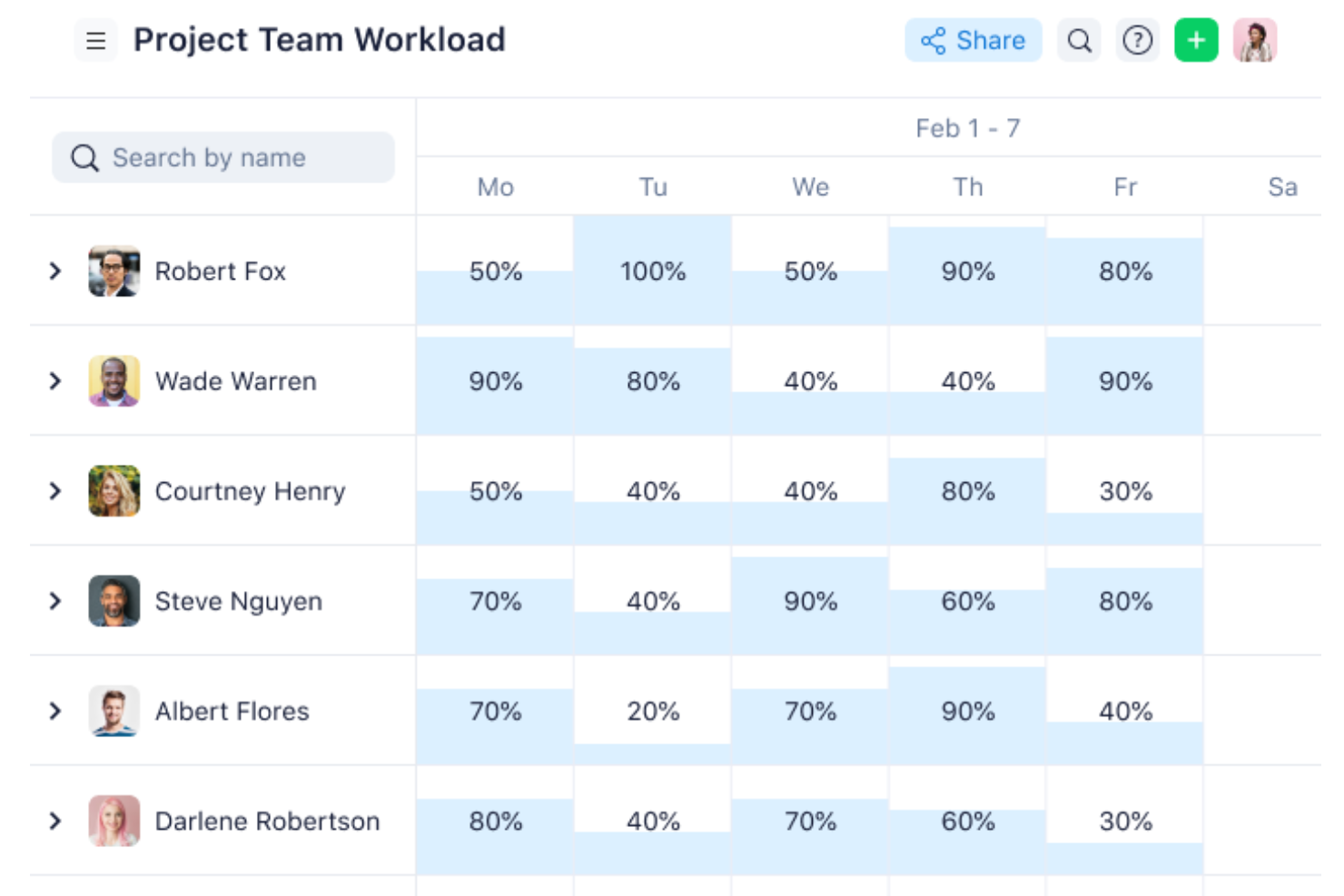
Wrike is a project and resource management platform with task scheduling, effort bookings, and multi-project workload views; its Workload charts and Resources view require Business or higher, not the free plan.
Who Is Wrike Best For?
Wrike suits project and resource managers coordinating concurrent projects who need multiple workload views; its Workload charts and Resources view require Business or higher.
Why I Picked Wrike
I rate Wrike “Best for multiple resource views” because its Workload charts flag overcapacity, while Resources view compares scheduled effort across up to 100 projects. Those resource views require Business or higher, so Wrike’s Free plan doesn’t provide these core resource-management tools.
Wrike Key Features
- Work schedules: Record PTO, non-working days, and capacity changes.
- Time tracking: Log project time from Business; Wrike doesn’t calculate billing or profitability.
- Budgeting: Compare planned and actual costs from Pinnacle.
- Free plan limits: Includes unlimited users, 2 GB of storage, and 200 active tasks, but no Workload charts or Resources view.
Wrike Integrations
Wrike offers 400+ pre-built native integrations, including Slack, Jira, Google Calendar, and Tableau. It also provides an open REST API and Wrike Integrate for custom connections and workflow automation.
What's Free?
Wrike has a free-forever plan with unlimited users, 2 GB of storage, and 200 active tasks. It excludes Workload charts and the Resources view; a 14-day free trial is also available.
Pros and Cons
Pros:
- Drag-and-drop scheduling supports quick rebalancing
- Color coding flags overloaded team members
- Multiple views reveal cross-project workload
Cons:
- Advanced capacity planning requires higher tiers
- Free plan excludes core resource views
New Product Updates from Wrike

Wrike Redesigns Workspace Search With New Filters
Wrike introduces a redesigned Workspace Search interface with recent search shortcuts, item type and location filters, and parent-task context. These updates help users find relevant work items and navigate search results efficiently. For more information, visit Wrike’s official site.
 .

Clockify
Best for capturing time in project apps
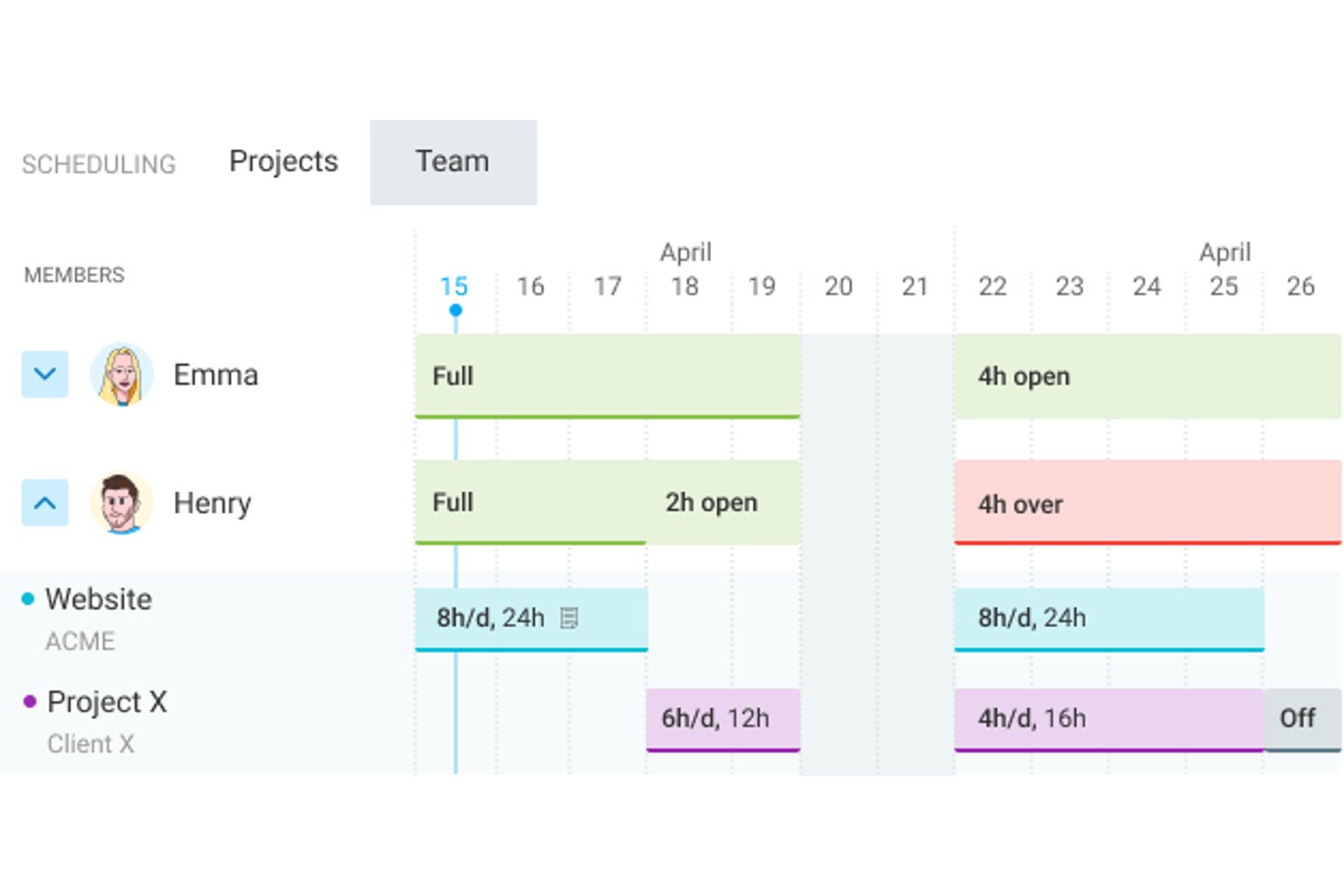
Clockify is a time-tracking platform with paid resource-planning features for scheduling project assignments, viewing team capacity, and comparing scheduled with tracked hours; its free plan doesn’t include resource scheduling.
Who Is Clockify Best For?
Clockify suits project managers in tech and digital teams who want to capture work hours directly from project and development apps.
Why I Picked Clockify
I picked Clockify as “Best for capturing time in project apps” because its browser tools can start timers from Jira issues and GitHub issues. The free plan supports up to five active users and unlimited time tracking, giving small teams a way to record actual project hours. Resource schedules and capacity views require Pro or Enterprise, so free users can track work but can’t plan assignments in Clockify.
Clockify Key Features
- Time-off policies: Standard and higher plans support vacation, sick leave, holiday requests, approvals, and balances.
- Project forecasting: Pro and higher plans forecast project performance using estimates, tracked hours, and scheduled hours.
- Timesheet approvals: Standard and higher plans let managers review and approve submitted timesheets.
- Budget alerts: Pro and higher plans track project budgets and estimates, with alerts as projects approach their limits.
Clockify Integrations
Clockify has native integrations with Jira, GitHub, Azure DevOps, Asana, Google Calendar, Outlook, and Google Sheets. It also offers a REST API and webhooks for custom integrations.
What’s Free?
Clockify has a free-forever plan for up to five active users with unlimited time tracking. Resource scheduling and capacity views aren’t included, so you’ll need a paid plan to plan assignments in Clockify.
Pros and Cons
Pros:
- Straightforward time entry helps capture actual hours
- Timeline assignments support quick schedule adjustments
- Reports reveal workload distribution across projects
Cons:
- Eight-week schedule limits longer-range planning
- Free tier excludes scheduling and capacity views
Asana
Best for connecting projects to resource apps
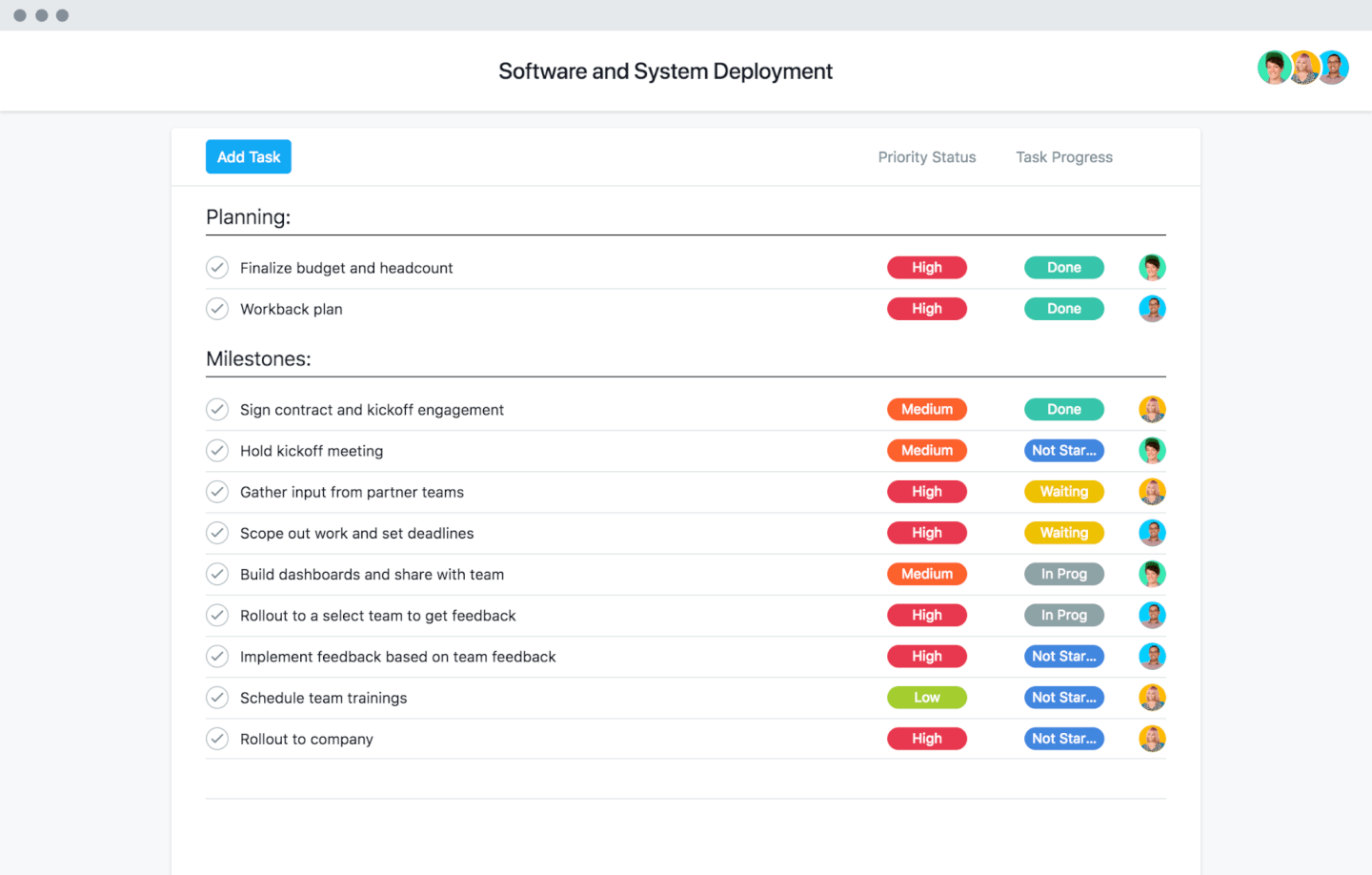
Asana combines project and resource management, with workload views, cross-project capacity planning, and task allocation on paid tiers; its free Personal plan supports projects and tasks but excludes Workload and capacity planning.
Who Is Asana Best For?
Asana suits project managers in cross-functional tech teams who want project work connected to resource-planning apps and can use paid workload features.
Why I Picked Asana
I picked Asana for connecting projects to resource apps: Float can turn Asana project data into a capacity timeline, while Mosaic imports employee, project, and task data for planning. Asana’s Portfolio Workload adds cross-project visibility on Advanced, but the free Personal plan lacks Workload and capacity planning, so free resource management is limited.
Asana Key Features
- Task assignments: Assign tasks to owners and set due dates.
- Timeline and Gantt views: Map task dates, dependencies, and milestones.
- Work request forms: Collect requests and turn submissions into project tasks.
- Custom fields: Track details such as priority, status, or effort.
Asana Integrations
Asana lists 100+ free integrations, including marketplace integrations with Float and Mosaic for connecting project and task data to resource-planning workflows. It also offers an API for custom integrations.
What’s Free?
Asana’s Personal plan is free forever for up to two users and includes unlimited tasks, projects, and 100+ integrations. It doesn’t include Workload or capacity planning, so resource management features require a paid plan.
Pros and Cons
Pros:
- Effort-based capacity views flag over-allocation
- Portfolio views reveal cross-project workload
- Named task owners clarify responsibility
Cons:
- Two-seat limit restricts team resource coordination
- Free Personal excludes workload and capacity planning
Avaza
Best for carrying bookings into timesheets
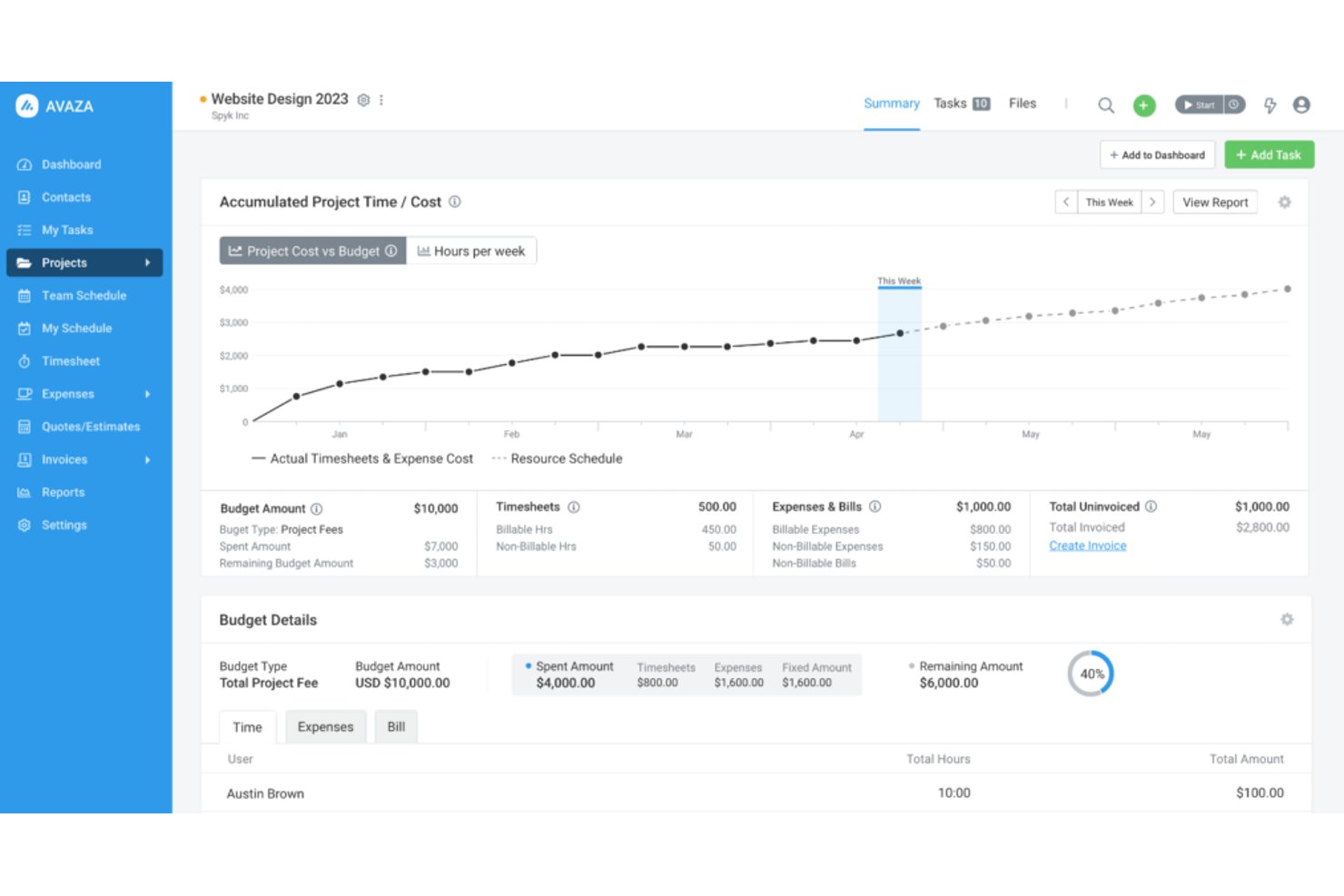
Avaza is a free resource management platform with project scheduling, capacity views, and time tracking; its free plan includes one Scheduling User, and the broader platform also covers expenses and invoicing.
Who Is Avaza Best For?
Avaza suits resource managers at professional-services firms who want project bookings to carry into timesheets and support billable-work tracking.
Why I Picked Avaza
I picked Avaza for its “Best for carrying bookings into timesheets” focus: scheduled bookings appear in the timesheet day view and can become time entries. I also use scheduled-versus-tracked hours to spot gaps between planned and actual effort. The free plan includes one Scheduling User and five active projects.
Avaza Key Features
- Skill and tag filters: Filter schedules by skills, expertise, location, department, or job title.
- Team and project views: Review bookings by person or project, with filters for customers and project categories.
- Leave and working hours: Set individual working hours, leave, and account-wide public holidays to inform availability.
- Schedule Details report: Group and filter booking hours, costs, and billable amounts across a selected date range.
Avaza Integrations
Avaza provides a calendar feed for Google Calendar and Outlook, plus a REST API and Zapier connectivity to 7,000+ apps. Native integrations include GitHub, Xero, and QuickBooks Online.
What’s Free?
Avaza offers a free plan, not just a time-limited trial. It includes one Scheduling User and up to five active projects.
Pros and Cons
Pros:
- Availability filters help compare project allocations
- Scheduled bookings can become timesheet entries
- Utilization reports clarify billable workload and delivery
Cons:
- Reviewers report cumbersome resource booking workflows
- Free plan schedules only one user

Ganttic
Best for matching skills to assignments
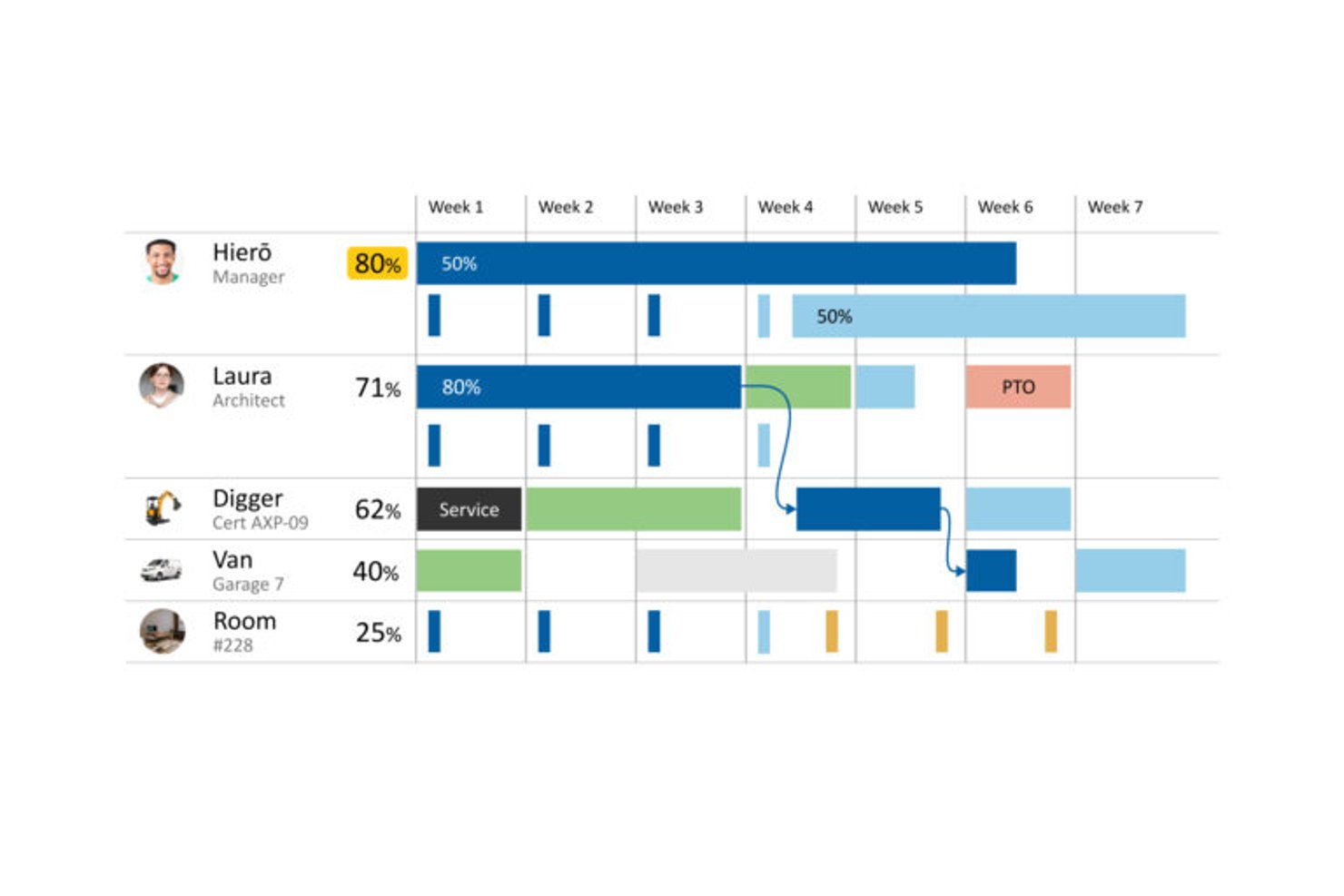
Ganttic is free resource management software for scheduling people and equipment across projects, with Gantt and Kanban views, utilization tracking, time-off planning, and reports.
Who Is Ganttic Best For?
Ganttic is a good fit for resource and operations managers who need to match staff skills to project requirements and balance capacity across concurrent work.
Why I Picked Ganttic
I picked Ganttic for matching skills to assignments: I can record resource skills and task requirements in custom fields, then filter for people whose skills and availability fit the work. I can schedule those matches on Gantt views and check utilization across projects. Its ongoing free plan supports up to 10 resources and unlimited users, though it warns about overloads without blocking overlapping bookings.
Ganttic Key Features
- Time-off scheduling: Add recurring or one-time leave, breaks, and equipment maintenance to resource timelines.
- Calendar sync: Sync resource calendars with Google Calendar or Outlook in one or two directions.
- Task dependencies: Link tasks to show which work must finish before another task begins.
- Report exports: Export resource, task, or project reports as CSV or PDF.
Ganttic Integrations
Native integrations include Google Calendar and Microsoft Outlook Calendar, with one- or two-way sync. Ganttic also integrates with Microsoft Project, supports Zapier, and offers API access on paid plans.
What's Free?
Ganttic has an ongoing free plan for up to 10 resources and unlimited users. It warns about overloaded schedules but doesn’t block overlapping bookings.
Pros and Cons
Pros:
- Group schedules by departments and custom fields
- See availability across concurrent projects
- Match skills and task requirements
Cons:
- Free planner stops at ten resources
- Overlapping bookings need manual oversight

Teamdeck
Best for utilization and overtime reporting
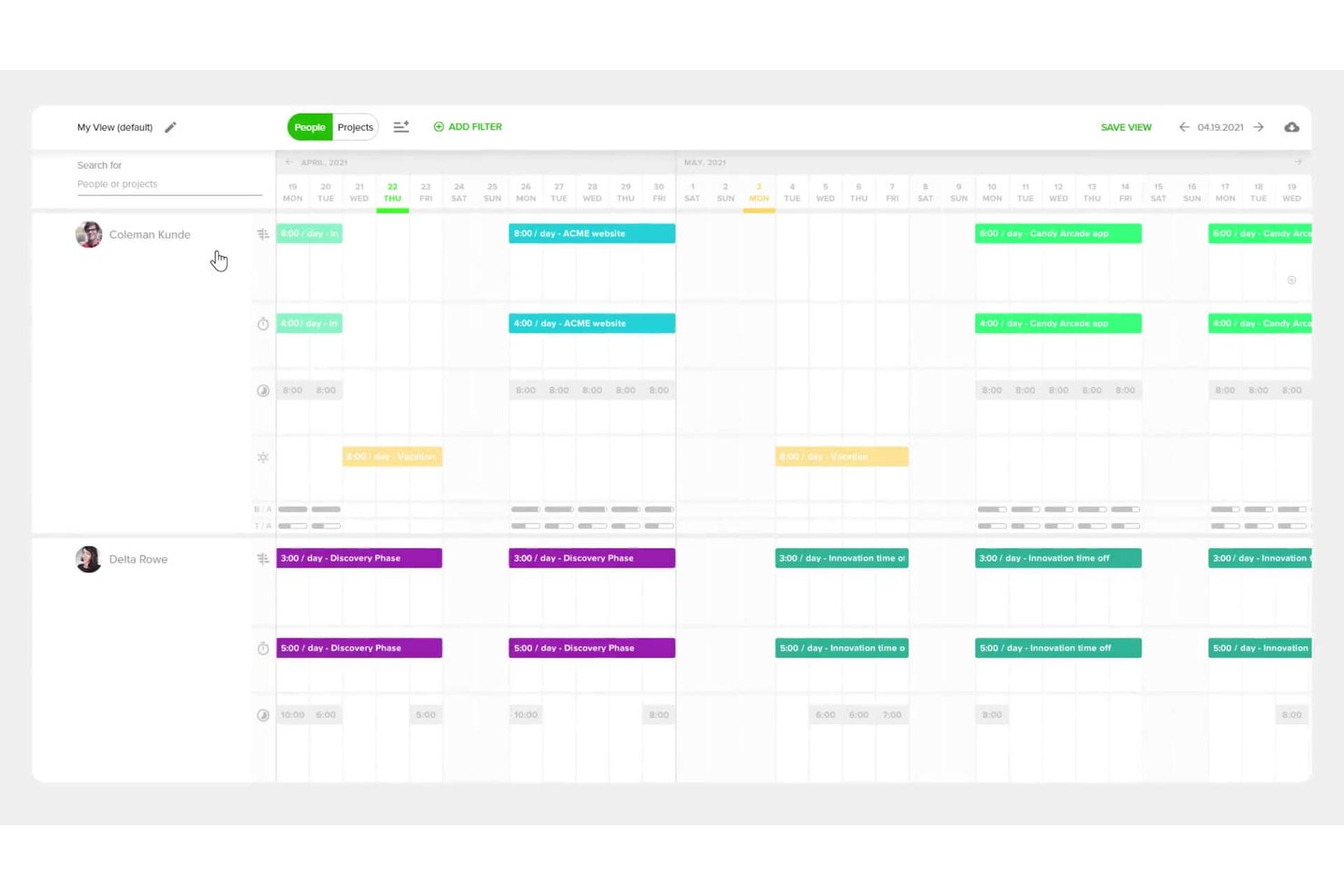
Teamdeck is a resource management platform with a free Startup Plan for up to two full members, covering project scheduling, availability and leave tracking, timesheets, and reporting.
Who Is Teamdeck Best For?
Resource managers and project leads at small digital teams can use Teamdeck to coordinate assignments and monitor availability across concurrent projects.
Why I Picked Teamdeck
I picked Teamdeck as Best for utilization and overtime reporting. Its free Startup Plan includes scheduling and reporting for up to two Full Members. The Team Utilization Report shows booking time, availability, utilization, and overtime, while red Calendar indicators flag overbooking or recorded overtime.
Teamdeck Key Features
- Vacation requests: Team members can submit time-off requests for manager approval.
- Recurring availability: Set daily availability to repeat on selected days through an end date.
- Tags: Label bookings, timesheet entries, and projects, then use tags to filter information.
- Mobile time tracking: Start and stop time recording in the mobile app, with timesheets synced to Teamdeck.
Teamdeck Integrations
Teamdeck lists native integrations with Google Calendar, Slack, Sage HR, and Podio. Its REST API with webhooks and Zapier are also documented; API access and built-in integrations are Business Plan features, while Startup Plan access to Zapier isn’t specified.
What’s Free?
Teamdeck offers a free Startup Plan for up to two Full Members, with scheduling, availability and leave tracking, timesheets, and reporting; it also offers a 14-day free trial. Built-in integrations and API access are Business Plan features, and Zapier access on the Startup Plan isn’t specified.
Pros and Cons
Pros:
- Reviewers praise quick workload adjustments
- Calendar shows assignments across concurrent projects
- Utilization reports expose overtime and availability
Cons:
- Reviewers flag report accuracy and flexibility
- Free plan stops at two full members
Best for hiring from project pipelines
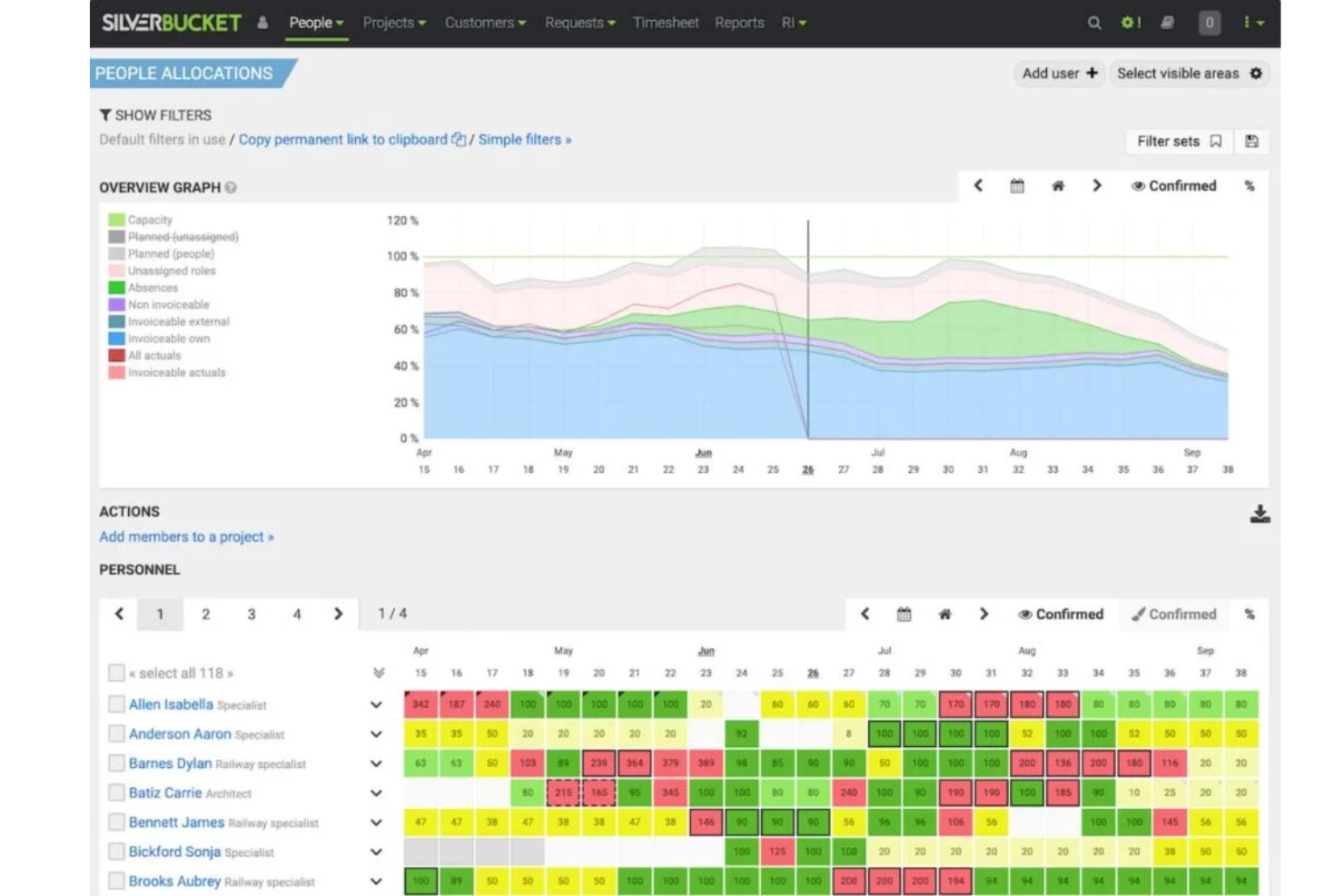
EG Silverbucket is a resource management platform with a 30-day free trial, offering people and role allocation, Gantt-based planning, capacity views, scenario planning, and utilization reporting; it has no ongoing free plan.
Who Is Silverbucket Best For?
Silverbucket suits resource managers and project leads at project-driven firms; its niche is Best for hiring from project pipelines, with capacity and hiring forecasts tied to incoming work.
Why I Picked Silverbucket
I rate Silverbucket as Best for hiring from project pipelines because scenario planning lets me model unconfirmed projects and spot capacity gaps before committing work. I can compare pipeline scenarios, track tentative allocations, and use forecast demand to plan hiring. Its 30-day trial is free, but there’s no ongoing free plan.
Silverbucket Key Features
- Interactive Gantt timeline: Plan project tasks against resource availability.
- Resourcing requests: Submit resource needs for owners to review and match with available people.
- Skill-based matching: Compare candidates using availability, competencies, and role criteria.
- Utilization reports: Review current and future team utilization and compare actual hours with allocations.
Silverbucket Integrations
Silverbucket connects with Power BI for live dashboards and Excel for scheduled exports. Its REST API supports custom integrations and inbound and outbound data flows; bulk imports are available through CSV and XLSX templates.
What’s Free?
Silverbucket offers a 30-day free trial, not a free-forever plan. Pricing is available upon request.
Pros and Cons
Pros:
- Straightforward allocations across multiple projects
- Scenario planning helps forecast hiring needs
- Clear visibility into team capacity and conflicts
Cons:
- Utilization reports offer limited customization
- No lasting free plan for ongoing use

ClickUp
Best for testing capacity planning
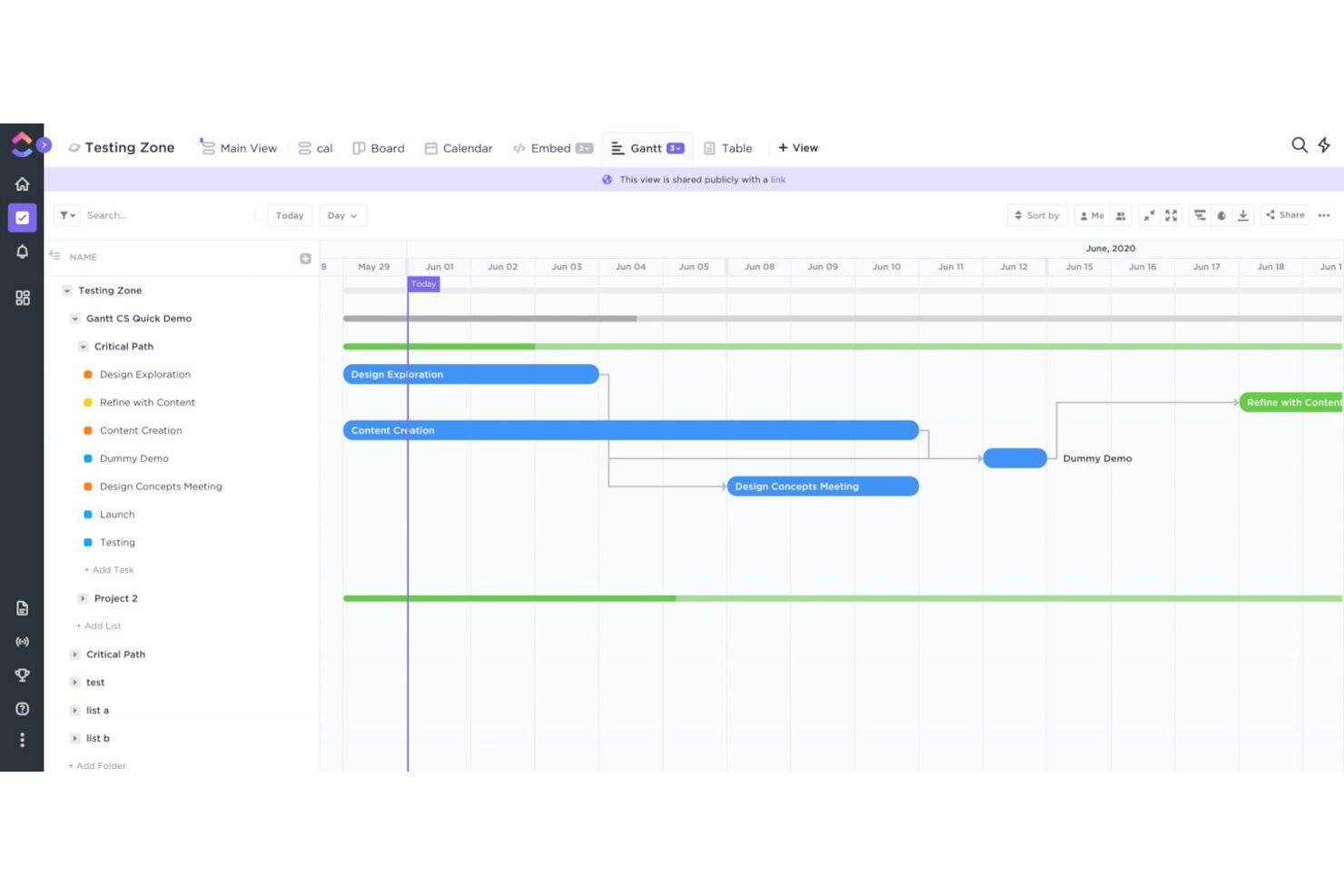
ClickUp is resource management software with a free plan, combining task assignment and scheduling with Workload views that compare estimated work against team capacity.
Who Is ClickUp Best For?
Project managers coordinating product, engineering, and design work can use ClickUp to keep delivery tasks and team assignments in one workspace.
Why I Picked ClickUp
I picked ClickUp for “Best for testing capacity planning” because Workload view compares assigned work with capacity by day, week, or month. I can review estimates as a percentage of capacity, then drag tasks to change dates or reassign them when a product sprint overloads an engineer. The free plan includes 60 Workload uses, but they don’t reset.
ClickUp Key Features
- Task dependencies: Mark tasks as blocking or waiting on other tasks.
- Time tracking: Log time with a timer or manual entries, then add notes and tags.
- Work schedules: Set the Workspace’s default working days and hours.
- Resources Dashboard card: Add a free card to view resource information on a Dashboard.
ClickUp Integrations
ClickUp lists 50+ native integrations, including Google Calendar, Slack, Microsoft Teams, and GitHub. Its API and webhooks support custom connections.
What’s Free?
ClickUp has a free-forever plan with unlimited users, but its Workload view is limited to 60 uses that don’t reset.
Pros and Cons
Pros:
- Shared views help track cross-team projects
- Drag tasks to change dates or assignees
- Workload compares estimates with capacity over time
Cons:
- Time-off tracking and utilization cards require upgrades
- Free Workload access ends after 60 uses
New Product Updates from ClickUp
ClickUp Adds List Automations, Time Off Scheduling, and Org Charts
ClickUp adds template-based List automations, personal time off scheduling, a unified picker, automatic task date syncing, and Org Charts. These updates help teams automate project setup, manage availability, and organize work. For more information, visit ClickUp’s official site.
 .
Diğer Ücretsiz Kaynak Yönetimi Yazılımları
İlk 20’ye giremeyen ancak yukarıdaki seçenekler arasında sizin için doğru olanı bulamadıysanız göz atmaya değer bazı araçları burada bulabilirsiniz.
- GoodDay
For start to paid workload planning
- OpenProject
For on-premises resource planning
- Toggle Plan
For capacity planning around time off


İlgili İncelemeler
Test edip değerlendirdiğimiz ve proje yönetimi yazılımlarıyla yakından ilişkili olan bu araçlara göz atın:
- Kaynak Yönetimi Yazılımı
- İş Akışı Yönetimi Yazılımı
- Zaman Takibi Yazılımı
- Görev Yönetimi Yazılımı
- İş Birliği Araçları
- Verimlilik Araçları
- Kaynak Planlama Yazılımı
- Ajanslar İçin Kaynak Yönetimi Yazılımı
- Planlama İçin Proje Yönetimi Takvimi Araçları
- Açık Kaynaklı Kaynak Yönetimi Yazılımı
- Redmine Alternatifleri
- Ücretsiz Proje Yönetimi Yazılımı
- Medya Kaynak Yönetimi Yazılımı
How I Evaluate Free Resource Management Software
First, I define what counts as free. A qualifying plan stays free indefinitely, not just for a trial, and supports ongoing resource management, even if users or features are capped. From there, I weigh core functionality most, including cross-project assignments and workload visibility; standout features, like capacity heatmaps; and free-tier scalability.
Core Functionality (Table Stakes For This List)
In addition to my free plan requirements, I use a scoring system to select tools for my list. I score each one on a scale from 0 (does not offer the functionality) to 5 (excels in this area) for each core functionality listed below, based on what's available on the free plan. I then convert the total into a percentage to help assess each tool's overall fit, with extra weight on any functionalities I've deemed essential.
- Resource Scheduling & Allocation (Essential): I look for a timeline or calendar that shows who’s assigned to each project and makes schedule changes easy to track.
- Capacity & Workload Views: I check whether workload views reveal over- or under-allocation, such as when several projects need the same designer.
- Availability & Time-Off Tracking: I look for scheduling views that account for time off and holidays when planning work across the team.
- Multi-Project Resource Views: I evaluate whether one view shows assignments across concurrent projects, so team leads can spot competing demands.
- Utilization Reporting: I check for basic summaries of allocation or utilization by person or project to help teams review workload balance.
Once I have a list of tools that meet the criteria, I consider what sets each platform apart.
Differentiating Factors (What Sets Vendors Apart)
Here's how I compare and contrast different vendors:
Standout Features
Color-coded heatmaps are the first thing I check. A quick visual showing who's overloaded and who has room saves me from clicking through individual profiles. I also look for custom working hours and calendar support, since a team split across time zones or mixed full-time and part-time schedules needs capacity math that reflects real availability. Drag-and-drop rebalancing matters too. When a conflict surfaces mid-sprint, I want to reassign hours on the timeline without rebuilding the plan.
Beyond Features
I check whether free plans cap integrations with existing project or calendar tools, since siloed resource data leads to double-bookings fast. Team size limits matter too. Most free tiers restrict users, so I look at whether contractors or guests count against that cap before recommending a tool to agency teams. I also evaluate export options, because if you can't pull utilization data into a client report or leadership deck, the planning work stays trapped inside the tool.
Ücretsiz Kaynak Yönetimi Yazılımı Nasıl Seçilir?
Ücretsiz bir kaynak yönetimi yazılımı aracı seçerken aklınızda bulundurmanız gereken bazı faktörler şunlardır:
| Faktör | Dikkat Edilmesi Gerekenler |
|---|---|
| Ücretsiz Teklifin Kapsamı | Yazılımın ücretsiz sürümüne nelerin dahil olduğunu değerlendirin. Ekibinizin temel ihtiyaçlarını karşıladığından emin olmak için kullanıcı sınırı, depolama alanı veya eksik özellikler gibi kısıtlamaları inceleyin. |
| Ölçeklenebilirlik | Yazılımın ekibinizle birlikte büyüyüp büyüyemeyeceğini göz önünde bulundurun. Ücretli planlar veya modüler yükseltmeler sunan araçlar, daha sonra platform değiştirmenize gerek kalmasını önler. |
| Entegrasyonlar | İş akışlarınızı kolaylaştırmak için yazılımın Slack, Google Workspace veya Trello gibi hâlihazırda kullandığınız araçlarla entegre olduğundan emin olun. |
| Kullanım Kolaylığı | Kullanıcı dostu bir arayüz, öğrenme eğrisini azaltır. Ekibiniz için sezgisel panolar ve hızlı işe alıştırma sunan araçları tercih edin. |
| Özelleştirme | Ekibinizin kendine özgü süreçlerine uyum sağlayan özel iş akışları, etiketler veya panolar gibi özellikleri arayın. |
| İş Birliği | Ekibinizi aynı hizaya getirmek için paylaşılan takvimler, gerçek zamanlı güncellemeler ve görev atamaları gibi özellikleri kontrol edin. |
| Raporlama | Ücretsiz planda bile görsel raporlar veya panolar aracılığıyla net ve eyleme dönüştürülebilir içgörüler sunan bir yazılım seçin. |
| Destek Seçenekleri | Ücretsiz araçlarda müşteri desteği genellikle bulunmaz. Ekibinizin sorunları gidermesine yardımcı olacak bilgi tabanları, forumlar veya eğitimler gibi kendi kendine hizmet kaynaklarını kontrol edin. |
Ücretsiz Kaynak Yönetimi Yazılımı Nedir?
Ücretsiz kaynak yönetimi yazılımı, yazılımın kendisi için herhangi bir ücret ödemeden kaynakları planlamanıza, tahsis etmenize ve optimize etmenize olanak tanıyan araçları ifade eder. Bu çözümler özellikle küçük ve orta ölçekli işletmeler, kâr amacı gütmeyen kuruluşlar ve bütçe kısıtlamaları olan yeni girişimler için değerlidir.
Ücretsiz kaynak yönetimi yazılımı genellikle proje ve kaynak planlama, görev atama, zaman takibi ve iş birliği araçları gibi özellikleri içerir. Bu tür araçlar, ücretli muadillerine kıyasla özellikler, depolama alanı veya kullanıcı sayısı bakımından genellikle sınırlamalarla birlikte gelir; ancak proje ve kaynak yönetimi süreçlerini iyileştirmenin uygun maliyetli yollarını arayan ekipler için yine de değerli yetenekler sunar.
Ücretsiz Kaynak Yönetimi Yazılımının Özellikleri
Kaynak yönetimi yazılımında yaygın olarak bulunan özellikleri ve bunlardan hangilerinin genellikle ücretsiz ve ücretli planlara dahil edildiğini inceleyelim.
Genellikle Ücretsiz Kaynak Yönetimi Yazılımı Özellikleri
- Temel planlama araçları: Sürükle ve bırak işleviyle kaynakları görevlere ve projelere atamanıza olanak tanır.
- Kaynak uygunluğunu takip etme: Hangi ekip üyelerinin veya varlıkların mevcut ya da gelecekteki görevlendirmeler için uygun olduğunu izlemeye yardımcı olur.
- Basit raporlama: Kaynakların verimli kullanıldığından emin olabilmeniz için kaynak kullanımına ve tahsisine ilişkin temel içgörüler sunar.
- Yaygın araçlarla entegrasyon: İş akışlarını kolaylaştırmak için Google Calendar veya Slack gibi popüler platformlara bağlanır.
- Mobil erişim: Mobil uygulamalar aracılığıyla planları veya görevlendirmeleri hareket hâlindeyken kontrol etme olanağı sunar.
- Ekip iş birliği araçları: Herkesi bilgilendirmek ve aynı hizaya getirmek için paylaşılan takvimler ve görev panoları içerir.
- Kullanıcı yönetimi: Belirli kaynaklara, örneğin BT hizmetlerine, kimlerin erişebileceğini kontrol etmek için kullanıcı eklemenize veya kaldırmanıza ve roller atamanıza olanak tanır.
Genellikle Ücretli Kaynak Yönetimi Yazılımı Özellikleri
- Gelişmiş öngörü araçları: Geçmiş verilere ve proje portföylerine dayanarak gelecekteki kaynak ihtiyaçlarını tahmin etmenize olanak tanır.
- Özelleştirilebilir panolar: Her ekibin veya işletmenin gereksinimlerine uygun kişiselleştirilmiş görünümler ve metrikler sunar.
- Detaylı analizler: Daha iyi karar verme için kaynak performansı, maliyetleri ve kullanımı hakkında derinlemesine içgörüler sunar.
- Role dayalı izinler: Kullanıcı rollerine göre özelliklere veya veri görünürlüğüne erişimi sınırlayarak güvenli erişim sağlar.
- Otomasyon özellikleri: Kaynakların yeniden tahsis edilmesi veya bildirim tetikleyicileri gibi tekrarlayan görevleri azaltır.
- Ücretli araçlarla entegrasyon: CRM sistemleri, muhasebe yazılımları veya ERP çözümleri gibi gelişmiş platformlara bağlanır.
- Zaman takibi ve faturalandırma: Faturalandırılabilir saatleri takip eder ve müşterilere fatura kesmek için doğrudan faturalandırma araçlarıyla entegre olur.
- Öncelikli destek: Sorun giderme için daha hızlı yanıt sürelerini ve özel destek ekiplerine erişimi garanti eder.
Ücretsiz Kaynak Yönetimi Yazılımının Faydaları
Ücretsiz kaynak yönetimi yazılımını uygulamak, ekibiniz ve işletmeniz için çeşitli faydalar sağlar. İşte yararlanabileceğiniz birkaç fayda:
- Maliyet tasarrufu: Giderlerinizi artırmadan temel kaynak yönetimi araçlarına sahip olun; bu da yazılımı küçük ekipler veya yeni girişimler için ideal kılar.
- Gelişmiş organizasyon: Projeleri ve kaynakları tek bir yerde tutmak için planlama ve görev yönetimi özelliklerini kullanın; böylece karmaşa azalır.
- Daha iyi kaynak görünürlüğü: Ekip üyelerinin aşırı görevlendirilmesini veya yeterince kullanılmamasını önlemek için kimin müsait olduğunu ve üzerinde ne çalışıldığını takip edin.
- Kolay iş birliği: Paylaşılan takvimler ve ekip araçları, herkesin gelişmelerden haberdar olmasını kolaylaştırır.
- Hızlı kurulum: Birçok ücretsiz araç, minimum çabayla başlamanızı sağlayan kullanıcı dostu arayüzlere ve şablonlara sahiptir.
- Temel entegrasyonlar: Mevcut iş akışınıza uyum sağlamak için Google Calendar veya Slack gibi popüler araçlara bağlanın.
- Hareket hâlinde erişim: Mobil uygulamalar, programları her yerden kontrol etmenize ve görevleri yönetmenize olanak tanır; böylece siz ve ekibiniz üretken kalabilirsiniz.
Daha fazlasını okuyun: Envanter kaynaklarınızı yönetmek mi istiyorsunuz? Envanter kaynak yönetimi yazılımlarının tam listesine göz atın.
Ücretsiz Kaynak Yönetimi Yazılımının Maliyetleri ve Fiyatlandırması
Bu makaleye ücretsiz olarak sunulan en iyi kaynak yönetimi yazılımı seçeneklerini aradığınız için geldiğinizi biliyorum. Ancak ücretsiz planlar yalnızca sınırlı özellikler sunduğundan, gelecekte planınızı yükseltmeniz gerekme ihtimali oldukça yüksektir.
Aşağıdaki tablo, kaynak yönetimi yazılımı çözümlerinde yaygın planları, bunların ortalama fiyatlarını ve genellikle sunulan özellikleri özetlemektedir:
Kaynak Yönetimi Yazılımı İçin Plan Karşılaştırma Tablosu
| Plan Türü | Ortalama Fiyat | Yaygın Özellikler |
|---|---|---|
| Ücretsiz Plan | $0 | Temel planlama araçları, kaynak uygunluğu takibi, basit raporlama ve ekip iş birliği özellikleri. |
| Bireysel Plan | $5–$25/kullanıcı/ay | Gelişmiş planlama, üçüncü taraf araçlarla entegrasyonlar, özel görünümler ve mobil uygulama erişimi. |
| İşletme Planı | $25–$50/kullanıcı/ay | Ayrıntılı analizler, zaman takibi, role dayalı izinler ve özelleştirilebilir panolar. |
| Kurumsal Plan | $50–$100+/kullanıcı/ay | Gelişmiş tahmin, otomasyon özellikleri, öncelikli destek ve kurumsal düzeyde entegrasyonlar. |
Ücretsiz Kaynak Yönetimi Yazılımı Hakkında Sıkça Sorulan Sorular
Bu konu hakkında başkalarının sorduğu yaygın soruların yanıtlarını bulun.
En iyi kaynak yönetimi yazılımı hangisidir?
En iyi kaynak yönetimi yazılımı, mevcut kaynaklarınızdan en iyi şekilde yararlanmanıza yardımcı olan yazılımdır. Bazı ekipler için bu, proje ekiplerinin üyeleri olan çalışanlar anlamına gelir. Diğerleri içinse serbest çalışanlar ve diğer harici katkıda bulunanlar buna dahildir.
Sizin için önemli olan tüm bu kaynakları tek bir yerde görüntülemenizi sağlayan bir araç bulmaya çalışın. Ücretli araçlara geçmeye hazırsanız, en iyi kaynak yönetimi yazılımları listesindeki seçenekleri değerlendirebilirsiniz.
Kaynak yönetimi yazılımında hangi temel özellikleri aramalıyım?
Çoğu kaynak yönetimi yazılımı benzer özelliklere sahiptir. Ancak bu listedeki araçlar ücretsiz olduğundan, bunların tümüne erişmeniz pek olası değildir. Yazılım seçerken hangi özelliklerin ekibiniz için en önemli olduğunu değerlendirin ve bunlara öncelik verin.
- Görev yönetimi: Kaynak yönetimi yazılımları genellikle görev yönetimi işlevine sahiptir. Bu işlev; görev oluşturma, görevleri ekip üyelerine atama, bağımlılıkları belirleme ve alt görevler oluşturma özelliklerini içerebilir. Uzaktan çalışan ekipler için mükemmeldir.
- Proje takibi: Takip, bir projenin nasıl ilerlediğine dair eksiksiz bir genel bakış sağlar. Belirli bir proje kapsamındaki tüm görevleri ve her birine ne kadar zaman ve para harcadığınızı izleyebilirsiniz.
- Birden fazla görünüm: Gantt grafikleri, takvim görünümleri ve Kanban panoları, işletmenizin yürüttüğü çalışmalar hakkında içgörü ve görünürlük sağlar. Bu, proje kaynaklarını daha etkili bir şekilde yönetmenize yardımcı olur.
- Zaman takibi: Bu listedeki bazı araçlar, çalışanların belirli bir projede harcadıkları zamanı takip etmelerine yardımcı olur. Diğer araçlar ise aynı işlevi sunmak için zaman takip yazılımlarıyla entegre olur.
- Öngörüler: Öngörüler ve tahminler, bir projeyi tamamlamak için gereken kaynakları belirler. Bu, bir projenin planlandığı şekilde ilerleyip ilerlemediğini veya bütçeyi aşıp aşmadığını gösterebilir.
Kaynak yönetimi yazılımının faydaları nelerdir?
Kaynak yönetimini kullanmak çeşitli faydalar sağlayabilir:
- Mevcut kaynak tahsislerini görüntüler
- Gerçek kaynak kapasitesini belirlemenize yardımcı olur
- Kaynak kullanımını takip eder
- Gelecekteki kaynak kullanılabilirliğini öngörür
- Gereksiz bekleme sürelerini azaltır
- İşe alım kararlarını iyileştirir