
29 Best Free Workflow Software For Small Teams In 2026

20 Best Free Workflow Software Shortlist
Here's my pick of the 20 best software from the 29 tools reviewed.


The best free workflow software enables you to visualize tasks, assign team members, and track progress—all in one place and at no cost. While relying on spreadsheets, email chains, or isolated task lists may seem budget-friendly, these methods often hinder visibility and make it challenging to keep your team aligned.
Many tools offer limited free plans, which can make it tough to find one that balances usability with core functionality like task dependencies, automation, and real-time collaboration. With over 20 years in digital project management and a decade as a software reviewer, I know what to look for to shortlist the most reliable free options.
I’ve tested more than 40 free workflow tools to create this comprehensive list. In this article, I’ll guide you through the top free workflow tools available today, highlighting their standout features, weaknesses, and tips for choosing the best fit for your team.
Why Trust Our Software Reviews
We’ve been testing and reviewing workflow management software since 2012. As project managers ourselves, we know how critical and difficult it is to make the right decision when selecting software.
We invest in deep research to help our audience make better software purchasing decisions. We’ve tested more than 2,000 tools for different project management use cases and written over 1,000 comprehensive software reviews. Learn how we stay transparent & our software review methodology.
The 10 Best Free Workflow Software Comparison Chart
Here is a convenient table with all the tools we just discussed, so you can compare them. If you want to expand your research, we have additional options below this table.
| Tool | Best For | Trial Info | Price | ||
|---|---|---|---|---|---|
| 1 | Best for clear data collection processes | Free plan available | From $19.50/month (billed annually) | Website | |
| 2 | Best for customization | Free plan available | From $9/seat/month (billed annually) | Website | |
| 3 | Best for collaboration | Free plan + free demo available | From $7/user/month (billed annually) | Website | |
| 4 | Best for scalable workflow automation | 15-day free trial | From $19/user/month (billed annually) | Website | |
| 5 | Best for intelligent document processing | Free trial available + free demo | Pricing upon request | Website | |
| 6 | Best for flexibility and user-friendliness | Free plan available | From $3/user/month (billed annually) | Website | |
| 7 | Best for no-code workflow automation | 14-day free trial + free demo available | Pricing upon request | Website | |
| 8 | Best for document workflows | Free demo available | Pricing upon request | Website | |
| 9 | Best cross-system workflow integrations | 30-day free trial | Pricing upon request | Website | |
| 10 | Best for handling complex workflows | Free demo available | From $7,500/month | Website |


-

Insightful
Visit WebsiteThis is an aggregated rating for this tool including ratings from Crozdesk users and ratings from other sites.4.8 -
Accelo
Visit WebsiteThis is an aggregated rating for this tool including ratings from Crozdesk users and ratings from other sites.4.4 -
Wrike
Visit WebsiteThis is an aggregated rating for this tool including ratings from Crozdesk users and ratings from other sites.4.2





Best Free Workflow Software Reviews
Here’s a brief description of each free workflow platform to showcase each tool’s best use case and noteworthy features.


Jotform Workflows gives small teams in any industry a simple way to automate repetitive tasks and manage approvals using customizable forms and drag-and-drop workflow tools.
Who Is Jotform Workflows Best For?
Jotform Workflows is a strong fit for small teams that rely on form-based data collection to trigger approvals, route requests, or manage recurring processes.
Why I Picked Jotform Workflows
Jotform Workflows earns its spot on my shortlist because of how tightly it connects form-based data collection to automated process flows. I like that every workflow is triggered by a form submission, which means data collection and the workflow happen in the same step. My team uses conditional logic to split workflows based on what a form respondent submits—so purchase requests over a certain amount automatically route to a different approver than smaller requests. The parallel processing feature also helps when multiple team members need to review the same submission simultaneously, without waiting for one another.
Jotform Workflows Key Features
- Workflow templates: Choose from 200+ pre-built templates covering use cases like employee onboarding, expense reimbursement, and order processing.
- E-signature collection: Request legally binding e-signatures directly within a workflow, without needing a separate signing tool.
- Task assignment with comments: Assign checklist-style tasks to team members, who can comment and upload documents directly on the task page.
- Automated reminders and due dates: Set due dates and automatic email reminders for pending approvals or tasks so nothing gets missed.
Jotform Workflows Integrations
Integrations include Google Drive, Slack, Airtable, Dropbox, Microsoft Teams, Square, PayPal, Stripe, Authorize.Net, and Box.
What's Free?
Jotform Workflows offers a free-forever plan that includes up to 5 forms, 100 monthly submissions, and 1,000 monthly form views. The free plan also limits storage and access to some advanced features.

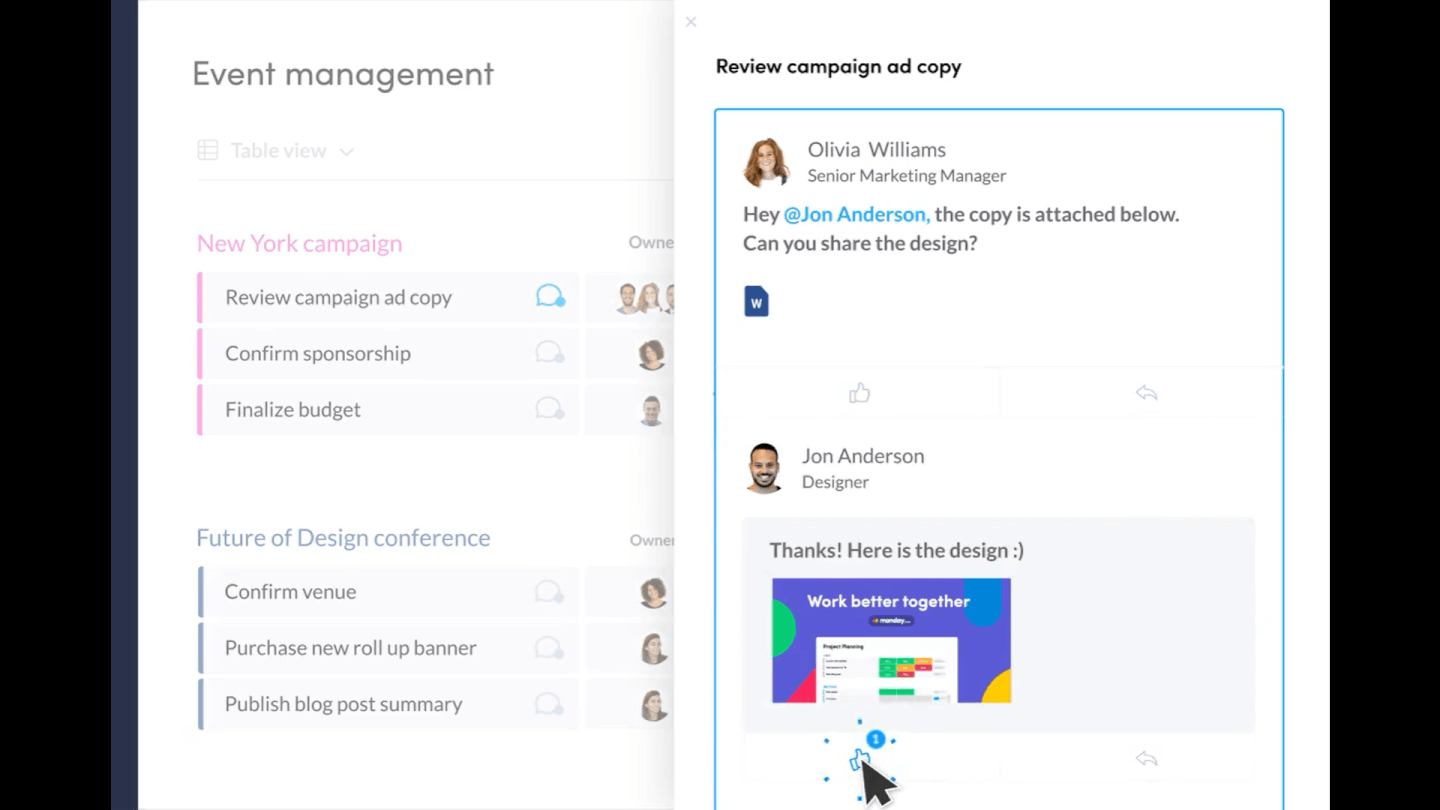
monday.com gives small teams in tech, marketing, and creative fields a flexible platform to organize workflows, manage tasks, and collaborate in real time—all with a visual interface that helps you adapt processes as your team grows.
Who Is monday.com Best For?
monday.com is a great fit for small teams that need a no-code workflow tool they can shape around their own processes, without relying on IT or a dedicated ops function.
Why I Picked monday.com
I picked monday.com as one of the best because of how far its customization goes beyond just renaming columns. I love that you can build entirely custom board structures with different column types—dropdowns, formulas, timelines, dependency links—so a content team and a dev team can each have a workflow that reflects how they work. The no-code automation builder lets my team set up conditional triggers, like automatically moving a task to "In Review" when a status changes, without writing a single line of code. On top of that, the template library covers over 200 use cases, which means you're not starting from scratch every time a new workflow type comes up.
monday.com Key Features
- Kanban and Gantt views: Switch between board, timeline, and Gantt views to track tasks and deadlines across different project types.
- Workdocs: Create and embed live documents directly inside boards so your team can collaborate on briefs, notes, and plans without leaving the platform.
- Guest access: Invite external collaborators like clients or contractors to specific boards without giving them access to your full workspace.
- Mobile app: Manage tasks, update statuses, and communicate with your team from iOS and Android devices while away from your desk.
monday.com Integrations
Integrations include Slack, Gmail, Google Calendar, Outlook, Microsoft Teams, Salesforce, QuickBooks, HubSpot, Zendesk, and GitHub.
What's Free?
monday.com offers a free-forever plan for up to 2 users. The free plan includes up to 3 boards, limited integrations, and basic features suitable for small teams getting started.
New Product Updates from monday.com

monday.com's AI Blocks Now Available to All Users
monday.com AI Blocks are now available to all users, enabling teams to integrate AI directly into workflows. This rollout helps automate tasks and improve productivity across projects. For more information, visit monday.com's official site.


ClickUp gives small teams in tech, marketing, and creative fields a flexible workspace to organize tasks, manage projects, and keep everyone aligned without hitting paywalls for core workflow features.
Who Is ClickUp Best For?
ClickUp is a good fit for small, cross-functional teams that need a single place to manage tasks, docs, and communication across product, design, and engineering work.
Why I Picked ClickUp
ClickUp earns its spot on my shortlist because of how well it handles team collaboration without requiring a paid plan to unlock the features that actually matter. I like that my team can leave threaded comments directly on tasks, tag teammates, and resolve threads to keep feedback loops tight and traceable. ClickUp Docs also lets us draft briefs, specs, or meeting notes and link them directly to related tasks, so context never gets lost in a separate tool. For small teams juggling multiple workstreams, that kind of connected collaboration is hard to replicate at no cost.
ClickUp Key Features
- Custom workflow statuses: Define your own task statuses to match exactly how your team moves work through a pipeline.
- Multiple project views: Switch between list, board, Gantt, and calendar views to see work in whatever format fits the task.
- Built-in time tracking: Log time directly on tasks without needing a third-party timer tool.
- Recurring tasks: Set tasks to repeat on a schedule so routine work gets created automatically.
ClickUp Integrations
Integrations include Slack, GitHub, HubSpot, Google Drive, OneDrive, Dropbox, Outlook, Google Calendar, Figma, and Zoom.
What's Free?
ClickUp offers a free-forever plan with unlimited tasks and members. Some advanced features, like custom permissions and advanced reporting, are only available on paid plans.
New Product Updates from ClickUp

ClickUp Enhances Task Management and Introduces AI Notetaker
ClickUp introduces an AI Notetaker for meetings and improves task type management in views. These updates help teams capture meeting insights automatically and organize work more efficiently. For more information, visit ClickUp’s official site.
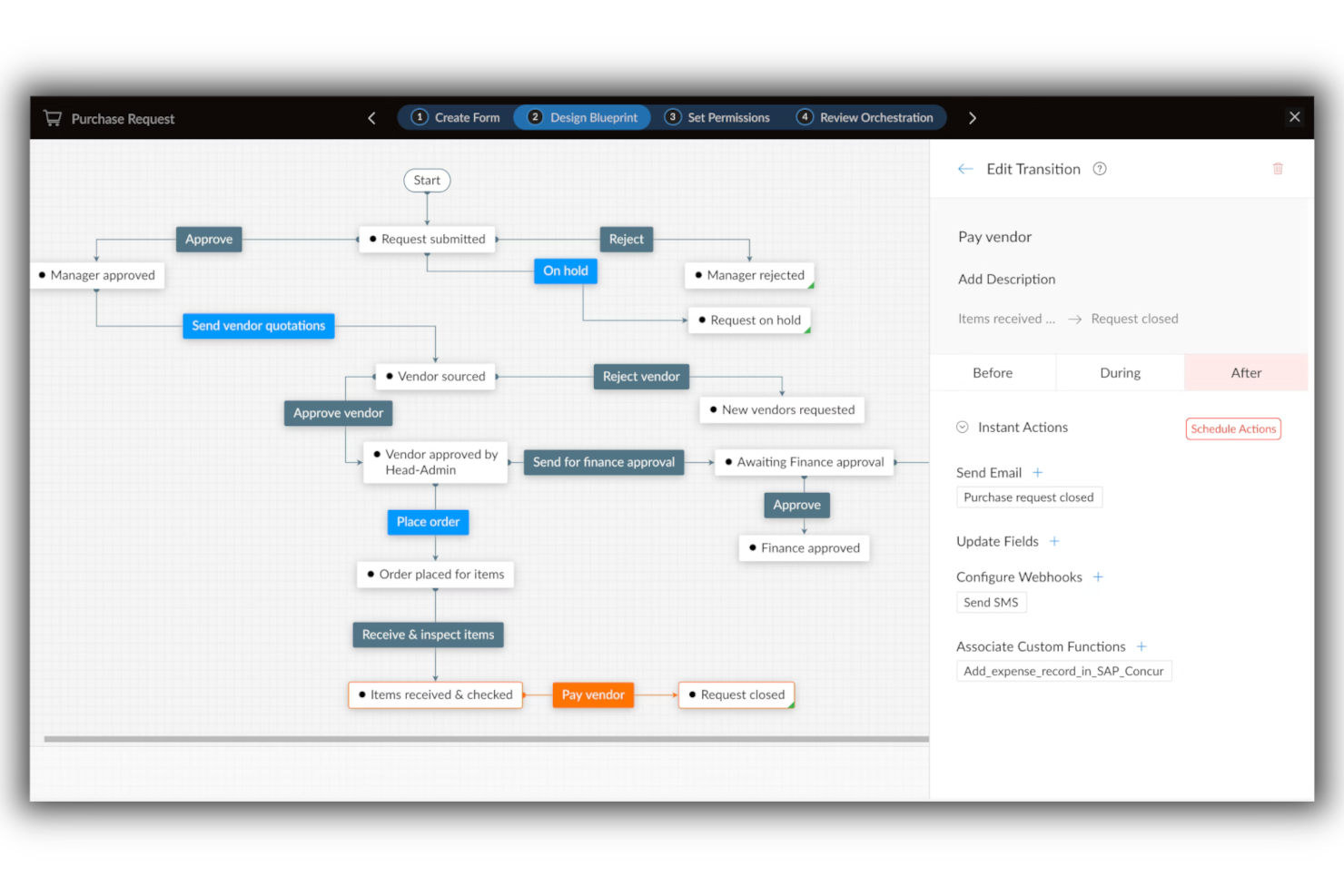
Qntrl lets small teams in tech, operations, and project management automate and track workflows with customizable forms, process mapping, and role-based controls, helping teams organize requests and approvals without complex setup.
Who Is Qntrl Best For?
Qntrl is a strong fit for small operations and project management teams that need structured process automation and expect their workflow complexity to grow over time.
Why I Picked Qntrl
Qntrl earns its spot on my shortlist because it's built specifically around process orchestration, not just task tracking. I like how you can design multi-stage workflows with conditional branching, so a single intake form can automatically route requests to different team members based on the response. My team is able to start with a simple approval flow and layer in additional stages, roles, and automation rules as our processes get more complex. That incremental scalability is rare in free-tier tools.
Qntrl Key Features
- Centralized request submission: A single portal where team members submit all work requests, keeping intake organized across functions.
- Real-time status updates: Live visibility into where each request sits in the workflow, so no one needs to chase updates manually.
- SLA tracking: Built-in service level agreement monitoring flags overdue tasks and helps teams stay on top of deadlines.
- Custom reports: Generate workflow duration and usage reports to identify bottlenecks and measure process performance over time.
Qntrl Integrations
Integrations include Zoho CRM, Zoho Books, Zoho People, Zoho Desk, Google Drive, Dropbox, SAP, Oracle, Active Directory, and Slack.
What's Free?
Qntrl offers a free demo, but the site doesn't list a free-forever plan or free trial, or details about user or feature restrictions.


Nanonets is an AI-driven automation platform designed for small teams and businesses that need to streamline document-heavy workflows and reduce manual data entry.
Who Is Nanonets Best For?
Nanonets is a strong fit for small teams in finance, operations, or logistics that process high volumes of documents like invoices, receipts, or forms.
Why I Picked Nanonets
I picked Nanonets because it handles intelligent document processing well for small teams overwhelmed by manual data entry. It uses AI-powered OCR to automatically extract structured data from invoices, purchase orders, and receipts, and doesn't require a developer to set it up. My team is able to build custom document workflows that validate extracted data against predefined rules before routing it for approval. Pre-trained document models run accurately out of the box on common document types.
Nanonets Key Features
- Human-in-the-loop approval workflows: Add manual review and approval stages at any point in a document workflow to catch errors before they move downstream.
- No-code workflow builder: Use natural language to build and configure automated workflows without writing any code.
- Multi-source data ingestion: Pull in documents from emails, databases, and file uploads into a single unified workflow.
- Support for 300+ document types: Process a wide range of document formats out of the box, from bank statements to purchase orders.
Nanonets Integrations
Integrations include SAP, QuickBooks, Salesforce, Microsoft Dynamics 365, NetSuite, Zoho, FreshBooks, Xero, HubSpot, and Oracle.
What's Free?
Nanonets offers a free-forever plan that includes $200 in credits when you sign up, allowing you to use all core features until the credits run out. Some premium features and integrations require a paid plan or additional credits.
Pros and Cons
Pros:
- Enterprise-grade compliance
- Template-free data extraction
- No-code automation
Cons:
- Custom integrations available on higher-tier plans
- Limited offline functionality

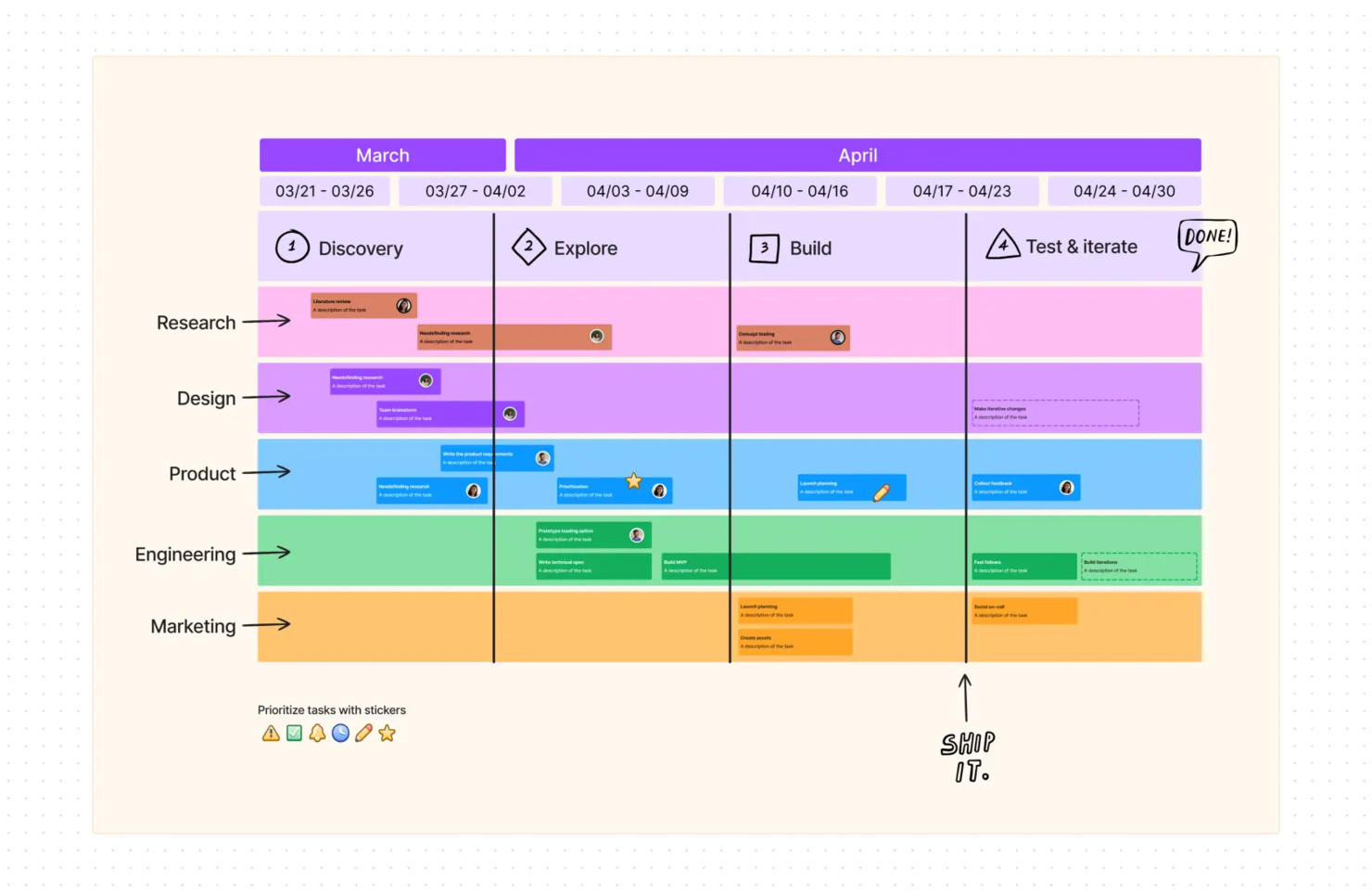
FigJam gives small teams in tech, design, and digital spaces a collaborative online whiteboard to map workflows, brainstorm ideas, and organize projects visually in real time.
Who Is FigJam Best For?
FigJam is a great fit for small product, design, and engineering teams that need a lightweight, visual space for planning and collaboration.
Why I Picked FigJam
FigJam is on my shortlist because of how much it lets you do without locking you into a rigid structure. I love that the canvas adapts to whatever my team needs—whether we're mapping a sprint workflow with snap-to-grid connectors and shapes, or running a retro with sticky notes and voting. The 300+ ready-made templates mean I can spin up a project kickoff, a flowchart, or a roadmap review in seconds, without starting from scratch. FigJam's AI features let me sort sticky notes into themes or generate a custom template from a single prompt, keeping sessions moving.
FigJam Key Features
- Section frames: Organize your canvas into distinct zones to separate workstreams, teams, or project phases within a single board.
- Cursor chat: Team members type messages directly on the canvas during live sessions without switching to a separate chat tool.
- Embed support: Drop in live links, files, and media from external tools directly onto the board to keep reference materials in context.
- Timer widget: Run time-boxed activities like standups or brainstorms with a built-in countdown timer visible to all participants.
FigJam Integrations
Integrations include Asana, Jira, Slack, GitHub, Microsoft Teams, Zoom, Dropbox, Google Drive, Trello, and Miro.
What's Free?
FigJam offers a free-forever Starter plan with unlimited drafts and up to 3 FigJam files per user. Advanced features and unlimited files require a paid plan.

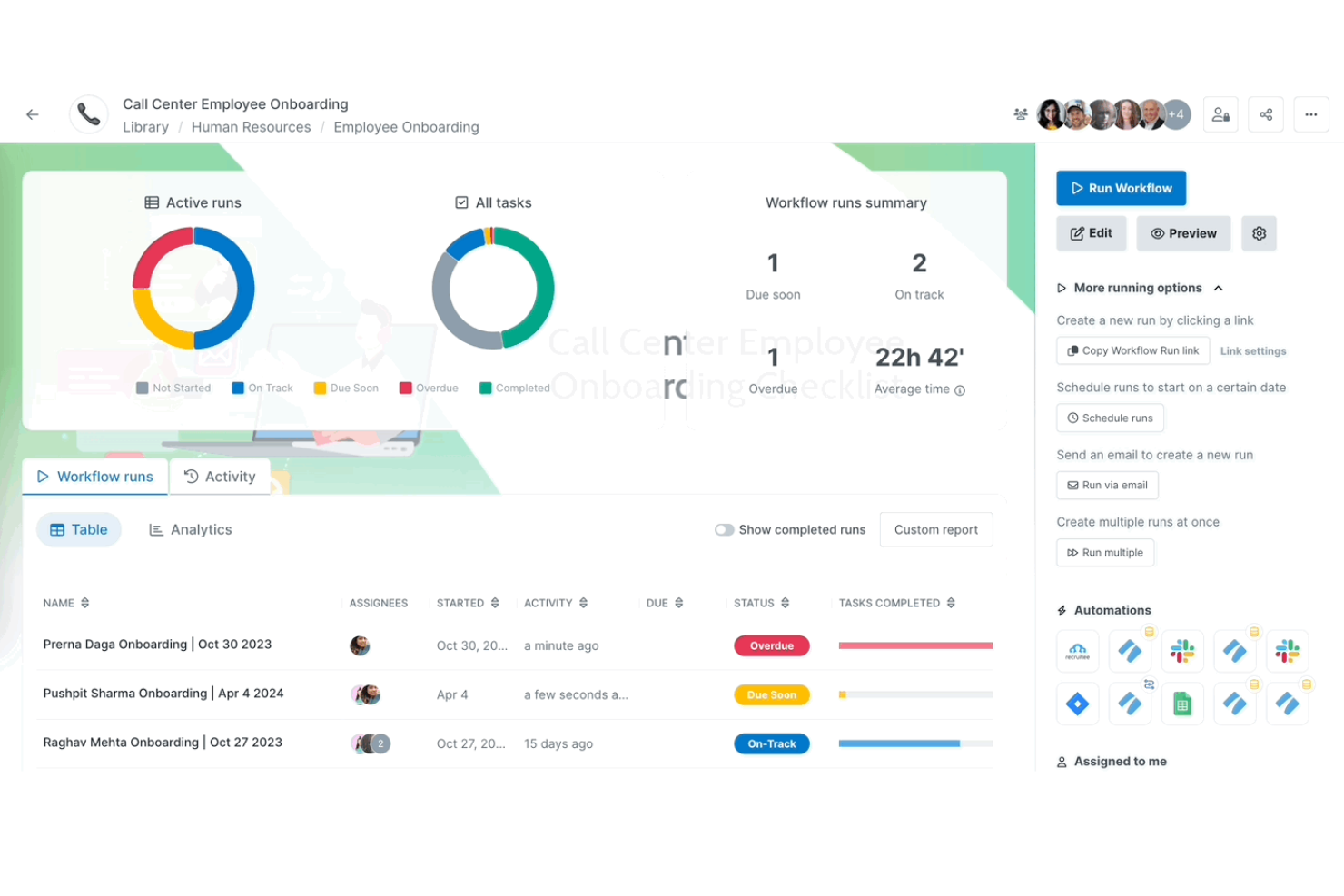
Process Street gives small teams in tech, operations, and service-based businesses a way to organize, automate, and track recurring workflows using simple checklists and collaborative process templates.
Who Is Process Street Best For?
Process Street suits small operations and customer success teams that need to standardize and manage repeatable processes without relying on a developer.
Why I Picked Process Street
Process Street earns its spot as one of the best on my shortlist because of how well its no-code workflow builder handles recurring processes without requiring any technical setup. I like that you can build a fully automated workflow—complete with conditional logic, task assignments, and approval steps—just by filling out a form-style editor. For example, my team can automate a client onboarding process, where tasks are routed to the right person based on responses collected earlier in the workflow. The AI workflow generator is also a real time-saver: you describe the process you need, and it builds out the full workflow structure, including due dates and stop tasks, in seconds.
Process Street Key Features
- Pre-built workflow templates: Access a library of ready-made process templates for common workflows like employee onboarding, client onboarding, and SOPs that you can deploy immediately.
- Process dashboard: Monitor real-time workflow run status, task completion rates, and team performance across all active processes from a single customizable view.
- Data sets: Collect and manage structured data across workflows using forms with linked dropdowns, saved views, and system-of-record sync to keep inputs consistent.
- Projects: Track execution across multiple workflow runs, manage task dependencies, and surface bottlenecks before they stall delivery.
Process Street Integrations
Integrations include Salesforce, Slack, Microsoft Teams, Google Sheets, Jira, DocuSign, HubSpot, Mailchimp, Stripe, and Greenhouse.
What's Free?
Process Street offers a free-forever plan for up to 5 active workflows and unlimited users. Some advanced features and most integrations are only available on paid plans.


DocuWare is a document management and workflow automation platform built for small teams and businesses that need to organize, route, and secure digital documents while automating approval processes and reducing manual paperwork.
Who Is DocuWare Best For?
DocuWare is a good fit for small teams in document-heavy industries like finance, healthcare, and legal that need structured workflows around approvals, routing, and compliance.
Why I Picked DocuWare
DocuWare earns its spot on my shortlist because of how tightly it connects document storage to workflow automation. I like that when my team stores an incoming invoice, DocuWare can automatically trigger an approval workflow—routing the document to the right person, blocking it from duplicate processing, and escalating it if a deadline is missed. The Workflow Designer lets me map out those steps visually without writing any code, which matters when you're a small team without dedicated IT support. I also rely on the substitution rules, which automatically reassign tasks when someone is out, so document-centric processes don't stall waiting on one person.
DocuWare Key Features
- Intelligent indexing: AI automatically converts document content into searchable index terms, eliminating manual data entry when filing documents.
- DocuWare Forms: Customizable web forms capture data directly from team members or external contacts and feed it into document workflows.
- Document versioning: Automatically saves edited documents as new versions and maintains a full document history for audit and review purposes.
- Control dashboard: Tracks the progress of active workflows in real time, showing where each document sits in the process at any given moment.
DocuWare Integrations
Integrations include Microsoft Outlook, Microsoft Teams, SAP, Sage, QuickBooks, Microsoft Dynamics, SharePoint, OQLIS, VERTOSUITE, and Microsoft Dynamics 365 Business Central.
What's Free?
DocuWare offers a free demo, but there is no free-forever plan or limited-time free trial available. Access to full features and user seats requires a paid subscription.

Camunda Platform is an open-source workflow automation tool built for teams who need to design, automate, and optimize complex business processes across multiple systems and applications.
Who Is Camunda Platform Best For?
Camunda Platform is a strong fit for developer-led teams that need to automate and coordinate workflows spanning multiple systems, services, or microservices.
Why I Picked Camunda Platform
Camunda Platform earns its spot on my shortlist because of how well it handles cross-system workflow integrations using its Connectors framework. I've used it to wire together REST APIs, messaging systems like Apache Kafka, and internal microservices within a single BPMN process diagram—without writing orchestration logic from scratch. I also like that Camunda's outbound and inbound Connectors let my team trigger workflows from external events, so a webhook from a third-party app can kick off a multi-step process automatically. That level of integration depth is genuinely hard to replicate in lighter-weight tools.
Camunda Platform Key Features
- BPMN process modeling: Design and visualize workflows using standard Business Process Model and Notation diagrams directly in the Camunda Web Modeler.
- Human task management: Assign, claim, and complete manual tasks through Tasklist, keeping human-in-the-loop steps tracked within automated workflows.
- Decision engine (DMN): Build and execute decision tables using Decision Model and Notation to automate rule-based logic within your processes.
- Process instance monitoring: Track the state of running workflow instances in real time using Operate, Camunda's built-in monitoring dashboard.
Camunda Platform Integrations
Integrations include SAP, ServiceNow, Apache Kafka, Amazon Web Services, Google Cloud Platform, Microsoft Azure, Salesforce, Slack, Jira, and Twilio.
What's Free?
Camunda Platform offers a free-forever Community Edition with core workflow automation features. This version is self-managed, open source, and does not include advanced enterprise features or official support.


Next Matter gives small teams in operations, compliance, and service roles a no-code platform to automate, track, and manage multi-step workflows, helping them coordinate tasks and reduce manual follow-up across distributed processes.
Who Is Next Matter Best For?
Next Matter is a strong fit for small operations and compliance teams that need to manage structured, multi-step processes across multiple people or departments.
Why I Picked Next Matter
Next Matter earns its spot on my shortlist because of how well it handles workflows that aren't just a straight line from A to B. These include processes with conditional branching, nested steps, and approval gates that change depending on earlier steps—like a KYC onboarding process that routes differently based on risk tier. The visual drag-and-drop builder lets me map those conditions without writing any code. I also like the conditional assignment feature, which automatically routes tasks to the right person or team based on workflow logic, so nothing stalls waiting for a manual handoff.
Next Matter Key Features
- Manager dashboard: A live dashboard that tracks active workflow progress, step deadlines, and SLA status across all running processes.
- Audit logs and version control: Timestamped audit logs and version-controlled workflows that make compliance reporting and process traceability straightforward.
- Event-based triggers: Automated triggers that kick off workflow steps based on specific events, reducing the need for manual handoffs between tasks.
- Guest interfaces: Public-facing forms and portals that let external users like customers or partners take action within a workflow without needing a full account.
Next Matter Integrations
Integrations include Zendesk, Airtable, Asana, BambooHR, Box, Calendly, Confluence, DocuSign, Dropbox, and Figma.
What's Free?
Next Matter offers a free demo so you can see the platform in action, but there is no free-forever plan or time-limited free trial. Access to the full product requires a paid subscription.

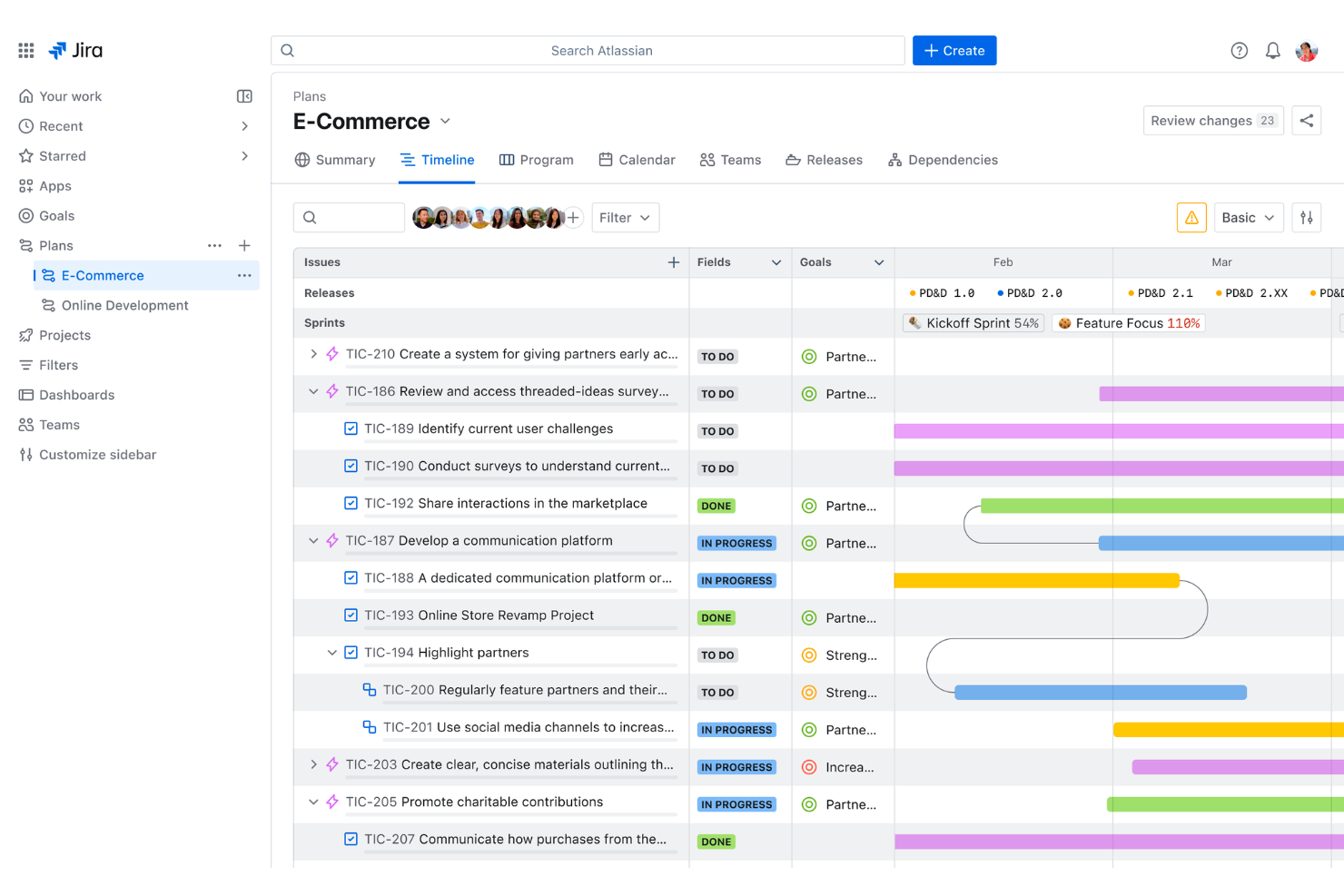
Jira gives small teams in tech, business, and creative fields a flexible way to organize tasks, track progress, and manage workflows, making it easier to keep projects moving and everyone aligned.
Who Is Jira Best For?
Jira is a strong fit for small software and business teams that need structured workflows, sprint planning, and issue tracking built into a single tool.
Why I Picked Jira
Jira earns its spot on my shortlist because it's one of the few free workflow tools built to handle both business and software team workflows without forcing you to choose a single methodology. I like how you can run Scrum sprints for your dev team while a marketing team runs a Kanban board in the same workspace. Dependency mapping is another feature I rely on heavily—it lets you connect engineering, product, and marketing tasks so cross-functional launches don't fall apart at the handoff. The customizable workflow automation also means my team isn't manually updating ticket statuses every time something moves through a pipeline.
Jira Key Features
- Project templates: Choose from pre-built templates for agile sprints, marketing campaigns, and more to get new projects started with minimal setup.
- Multiple project views: Switch between board, list, timeline, and calendar views to track work in whatever format suits your team.
- Request forms: Let partner teams submit requests and track progress through structured forms without needing full project access.
- Goal tracking: Link tasks and projects directly to company goals so your team always has visibility into how their work connects to bigger priorities.
Jira Integrations
Integrations include Confluence, Trello, Bitbucket, Slack, Microsoft Teams, Google Workspace, Zoom, Tempo Timesheets, Zephyr, and Loom.
What's Free?
Jira offers a free-forever plan for up to 10 users. The free plan includes basic features but limits storage to 2 GB and does not include advanced support or audit logs.

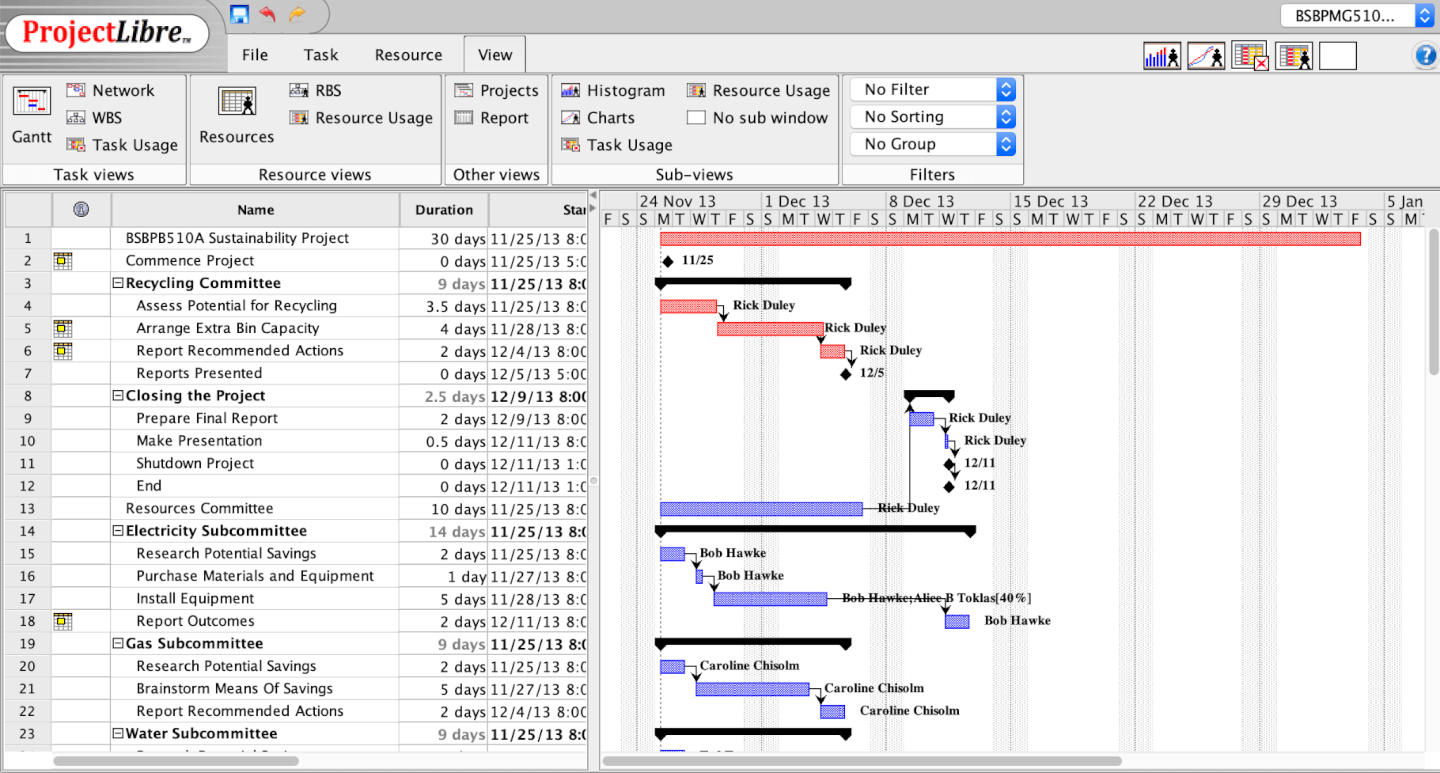
ProjectLibre is an open-source project management tool designed for small teams who need structured workflows, offering features like task tracking, resource allocation, and project scheduling to help manage projects without the cost or complexity of enterprise software.
Who Is ProjectLibre Best For?
ProjectLibre is a good fit for small teams and independent project managers who need desktop-based project planning tools without a subscription cost.
Why I Picked ProjectLibre
ProjectLibre earns its spot on my shortlist because it lets you create unlimited Gantt charts across unlimited projects without ever hitting a paywall. I like that the Gantt charts are fully interactive—you can set task dependencies, define milestones, and adjust durations directly on the chart, which makes replanning mid-project much faster than working through a task list. I also use the critical path analysis alongside the Gantt view to immediately see which tasks are driving the timeline, so I know exactly where delays will hurt. For small teams that need structured, visual project planning without paying per user or per project, that combination is hard to beat.
ProjectLibre Key Features
- Work breakdown structure (WBS): Break projects into hierarchical components that you can plan, track, and report on independently.
- Resource histogram: View workload distribution across team members to spot over-allocation before it becomes a scheduling problem.
- Earned value management: Track project performance by combining cost and schedule data to catch budget or timeline issues early.
- Microsoft Project file compatibility: Open and edit existing .mpp files directly in ProjectLibre without any conversion or reformatting.
ProjectLibre Integrations
Integrations include Microsoft Project, Project-Open, and Microsoft Excel.
What's Free?
ProjectLibre offers a free-forever desktop version with no user or project limits. All core project management features are included, but cloud-based collaboration and integrations are not available in the free version.


Bitrix24 gives small teams a unified workspace for managing tasks, projects, and team communication, making it easier to organize workflows and collaborate without switching between multiple tools.
Who Is Bitrix24 Best For?
Bitrix24 is a strong fit for small teams that need an all-in-one platform covering project management, communication, and CRM without paying for separate tools.
Why I Picked Bitrix24
Multiple project views is where Bitrix24 genuinely earns its spot on my shortlist. I like that my team can flip between a Kanban board, Gantt chart, list view, and calendar view within the same project—without rebuilding anything. When we're in sprint planning mode, the Scrum board gives us a structured backlog and sprint workflow, while the Gantt chart lets us map dependencies and deadlines across tasks. That kind of flexibility means different team members can work in the view that makes sense for them, whether that's a designer checking the calendar or a project lead tracking milestones on the Gantt.
Bitrix24 Key Features
- Task automation: Set up recurring tasks and automation rules and triggers to handle routine workflow steps without manual input.
- Time tracking: Log time directly on individual tasks to monitor how long work takes across your team's projects.
- Workload management: View task distribution across team members to spot bottlenecks and rebalance assignments before deadlines slip.
- Built-in team chat: Message teammates directly within tasks and projects, keeping conversations tied to the work they're about.
Bitrix24 Integrations
Integrations include WhatsApp, Telegram, Instagram, Stripe, WordPress, MailChimp, Twilio, RingCentral, Asterisk, and Google Analytics.
What's Free?
Bitrix24 offers a free-forever plan for unlimited users with core project management, task, and communication features. Some advanced tools, storage, and integrations are only available on paid plans.

Nutcache gives small teams and project-based businesses a way to organize tasks, track time, and manage budgets in one place, helping keep projects moving and everyone on the same page.
Who Is Nutcache Best For?
Nutcache suits freelancers and small project-based teams who need to manage tasks, log time, and handle invoicing without juggling multiple tools.
Why I Picked Nutcache
Nutcache earns its spot on my shortlist because it covers the full billing cycle that freelancers deal with daily—from logging hours on a task to sending a polished invoice. I like that you can run a real-time timer directly on a task and then pull those hours straight into a client invoice, which cuts out the manual reconciliation step. The progressive billing feature lets you invoice by project phase or by individual task as work moves forward, rather than waiting until the end of a project to bill. For freelancers juggling multiple clients, the overdue invoice tracking and automated reminders mean you're not chasing payments manually.
Nutcache Key Features
- Gantt chart with task dependencies: Visualize project timelines and link tasks with dependencies to track progress against deadlines.
- Recurring task creation: Set tasks to repeat on a daily, weekly, or monthly schedule to ensure recurring work is scheduled.
- Subtasks and checklists: Break individual tasks into smaller steps using subtasks, checklists, and to-do lists.
- Expense tracking: Log and categorize project-related expenses directly within a project for accurate cost control.
Nutcache Integrations
Integrations include QuickBooks Online, Slack, Google Drive, PayPal, Stripe, 2Checkout, and GitHub.
What's Free?
Nutcache offers a free-forever plan for up to 2 users, with limits of 10 clients, 10 projects, 200 estimates, 200 invoices, 50 expenses, 500 time entries, and 100 MB storage. AI capabilities are included with 25 credits on the free plan.


nTask Manager gives small teams in tech, marketing, and creative fields a way to organize projects, assign tasks, and collaborate in one place, making it easier to manage workflows and keep everyone on the same page.
Who Is nTask Manager Best For?
nTask Manager suits small teams and freelancers who need to manage multiple projects across separate workspaces without paying for a premium plan.
Why I Picked nTask Manager
nTask Manager earns its spot on my shortlist because of how much it gives you on the free plan, especially unlimited workspaces. I like that my team can set up separate workspaces for different clients, departments, or project types without hitting a paywall. Within each workspace, you get task lists, Kanban boards, and meeting management tools that keep work organized by context. Running multiple workspaces without upgrading is uncommon at this price point.
nTask Manager Key Features
- Issue tracking: Log bugs or blockers, set severity levels, assign statuses, and link issues directly to related tasks or projects.
- Time tracking and timesheets: Record time manually or with an automatic timer, mark entries as billable or non-billable, and submit timesheets for approval.
- Risk management: Assess and monitor project risks using a risk matrix, assign mitigation plans, and track risk updates across projects.
- Meeting management: Schedule meetings with built-in agenda and discussion notes, sync with calendar apps, and log follow-up actions and decisions.
nTask Manager Integrations
Integrations include Microsoft Teams, Google Calendar, Outlook, Zoom, Slack, Google Drive, Dropbox, OneDrive, Skype, HubSpot, and Zapier.
What's Free?
nTask Manager offers a free-forever plan for up to 5 users. The free plan includes unlimited workspaces, tasks, and meetings, but some advanced features and integrations are only available on paid plans.
Pros and Cons
Pros:
- Effective task management capabilities enhance organization.
- Interactive Gantt charts provide visual project tracking.
- Comprehensive project management features offer extensive capabilities.
Cons:
- Some features may be overwhelming for smaller teams.
- The learning curve can be steep for new users.


Pneumatic Workflow is a free workflow software that allows helps small teams create and manage workflows quickly and easily through its intuitive drag-and-drop interface and pre-built templates.
Why I picked Pneumatic Workflow: You can use it to create custom workflows tailored to your needs, and collaborate with your colleagues on projects in real-time from anywhere worldwide.
Its powerful analytics tools will give you valuable insights into your project performance by tracking task completion times. This data can identify bottlenecks in your workflow process so you can make adjustments accordingly, helping you complete your projects on time and within budget.
Pneumatic Workflow’s task management features include the ability to assign tasks with due dates, manage assignees, identify task dependencies, and flag priorities. You can view and organize tasks according to their status on their built-in task boards. Recurring tasks can also be created so that repetitive tasks are taken care of automatically without manually entering them each time. This feature helps keep teams on track without constant reminders or manual input.
Pneumatic Workflow Standout Features & Integrations
Standout Features include advanced automation and a template generator. Advanced automation capabilities allow you to build complex workflows by connecting different actions with simple drag-and-drop functionality. You can create custom rules that trigger automated tasks based on certain conditions, such as when an individual completes a job, or a deadline is approaching. The template generator, on the other hand, lets you generate custom workflow templates based on specific needs, accelerating process setup.
Integrations are available through third-party connections using Zapier and Make. Additionally, you can build custom integrations using the Pneumatic API.


OpenProject is open-source project management software. Download the software and install it on Linux distributions or Docker containers to provide your entire team or organization with access.
Why I picked OpenProject: You can create projects for each of your teams or departments. You can create hierarchies to structure projects in a way that makes sense. You can then break a project down into smaller tasks and start to create plans and workflows that help you complete them.
Additionally, you can view these projects in a Gantt chart to visualize how work is progressing and identify and remove bottlenecks. You can also create dependencies, milestones, tasks, and phases to further organize each project. All this information is displayed in the Gantt chart. You can also view it as calendar or task lists.
The downside to OpenProject is that you are in charge of maintaining your software installation. And while it’s free, you will need to pay for servers or use existing ones. OpenProject does provide the option to install and host the software for you.
OpenProject Standout Features & Integrations
Features include a team planner with workload information, custom fields, help texts for additional information about features, placeholder users, and advanced agile boards.
Integrations can be built using its API. This can help you connect to any other tool on your tech stack.


Pivotal Tracker is an agile project management software that provides you with its entire feature set, regardless of the plan you have.
Why I picked Pivotal Tracker: The features in this software are well thought out and developed. The stories feature lets you see functionality from a different perspective as it encourages thinking from a user perspective. Additionally, once your team starts working on items, the software will measure the speed at which the team is completing tasks. Therefore, giving you information about the velocity of their work.
Pivotal Tracker Standout Features & Integrations
Features include stories to describe a certain functionality from a user perspective, team velocity stats, analytics, file sharing, and project history.
Integrations are built by the community and shared with everyone. They include apps like Jenkins, Slack, Jira, Zendesk, Clockly, ZapUp, Braid, roadmap, and status hero.
Pivotal Tracker Plans & Pricing
The free version has all features and a limit of 5 projects. There are three other plans and pricing starts at $10/month.


Tom’s Planner is software with a single goal: to make creating Gantt charts easy. Setting up is simple—just create a new chart for your project and then list everything you need to do to finish it. Mark out when you expect this work to be completed on the calendar and add people to each task.
The software stands out due to its ease of use. Its focus on Gantt charts means it isn’t as complicated as some other tools and the intuitive drag-and-drop interface is a pleasure to use. But there are still plenty of customization options to ensure you get a clear overview of your project.
The free version of the tool lets you create a single chart for your own personal use. If you want access to more charts and the ability to invite people, you can get up to 20 for $9.95 per month or unlimited charts for $19.95.


Miro is a free workflow software that suits small teams looking for a visual and interactive platform.
Why I picked Miro: I selected Miro for this list because it supports the import of existing charts from platforms like Visio and Lucid, enabling teams to expand and refine their projects within Miro's versatile environment. The platform's infinite canvas also provides an expansive area for mapping out detailed and intricate workflows. Miro additionally stands out for its capacity to facilitate a rich expression of ideas, incorporating diverse elements such as text, images, videos, and brand elements into workflows for clear legends and color coding.
Miro also facilitates real-time communication through tools like voting, stickies, and comments. Moreover, Miro integrates with project management applications such as Notion and Asana, allowing for seamless incorporation of visual workflows into daily tasks. This setup promotes clarity and teamwork in hybrid work environments.
Miro Standout Features & Integrations
Standout Features include templates and AI features. Miro has over 1,000 templates including mind maps, Kanban boards, Gantt charts, product wireframes, research boards, and flowcharts, as well as TalkTrack, which allows users to record process explanation videos that can be viewed asynchronously. AI features like Intelligent Canvas can help you structure your content and find clarity for your workflows.
Integrations include Zoom, Figma, Asana, Microsoft Teams, Jira, Slack, Google Drive, Box, Airtable, Notion, Confluence, Monday.com, Azure, and Webex. Some integrations are limited to paid plans only.
Pros and Cons
Pros:
- Built-in communication features for streamlined collaboration
- Intuitive and easy setup
- Free forever plan available
Cons:
- Free version does not allow high-quality export to pdf
- Zooming can be jumpy on larger projects
- Visitor/guest accounts locked to paid plans only
When to Use Free Workflow Software
Free workflow software helps teams organize, automate, and track recurring tasks without the overhead of enterprise tools or upfront costs. If any of the scenarios below sound familiar, it might be exactly what your team needs:
- Your team is tracking work across too many tools: You're juggling Slack threads, email chains, and a shared spreadsheet to manage who's doing what. Free workflow software pulls tasks and handoffs into one place, so nothing slips through the cracks.
- Approval cycles are delaying projects: A simple asset review, say a blog post or design file, is stuck waiting on three stakeholders with no clear process. Workflow automation routes approvals automatically and cuts turnaround from days to hours.
- You're onboarding new team members repeatedly: Every time someone joins, you're rebuilding the same checklist from scratch and manually assigning tasks. A repeatable workflow template standardizes the process so new hires hit the ground running faster.
- Managing client deliverables is getting chaotic: You have five active projects, multiple vendors, and no single view of what's due when or who owns it. Free workflow software gives you visibility across all of them without paying for a full PM suite.
- It's taking too long to spot where work is getting stuck: Bottlenecks are invisible until a deadline is already missed. Workflow tools surface blockers in real time, so you can reassign work or adjust timelines before things go sideways.
Other Free Workflow Software
Here are a few more free workflow management solutions that didn’t make the top list, but worth considering if you want to expand your research.
- Lucidchart
For real-time workflow collaboration
- Wrike
For unlimited users
- altaFlow
For smart document routing
- Asana
For integrations
- Podio
Low-code tool builder
- Agantty
Unlimited free software
- dotProject
Volunteer supported open source tool
- TeamGantt
For powerful Gantt charts
- GanttProject
Desktop app


Selection Criteria for Free Workflow Software
When selecting the best free workflow software to include in this list, I considered common buyer needs and pain points like limited budgets and the necessity for seamless team collaboration. I also used the following framework to keep my evaluation structured and fair:
Core Functionality (25% of total weighting score)
To be considered for inclusion in this list, each solution had to fulfill these common use cases:
- Automate task assignments
- Manage deadlines
- Collaborate with team members
- Track project progress
- Share files and documents
Additional Standout Features (25% of total weighting score)
To help further narrow down the competition, I also looked for unique features, such as:
- Integrations with third-party tools
- Support for mobile apps
- Customizable workflows
- Real-time notifications
- Analytics and reporting
Usability (10% of total weighting score)
To get a sense of the usability of each system, I considered the following:
- Intuitive drag-and-drop interfaces
- Easy-to-navigate dashboards
- Minimal setup for common tasks
- Customization without complexity
- Quick access to frequently used tools
Onboarding (10% of total weighting score)
To evaluate the onboarding experience for each platform, I considered the following:
- Step-by-step product tours
- Extensive tutorials
- Interactive walkthroughs
- Pre-built workflow templates
- Access to live or recorded webinars
Customer Support (10% of total weighting score)
To assess each software provider’s customer support services, I considered the following:
- Live chat support
- Detailed knowledge base articles
- Quick email response times
- 24/7 support availability
- Active community forums
Value For Money (10% of total weighting score)
To evaluate the value for money of each platform, I considered the following:
- A fully functional free tier
- Transparent pricing for paid tiers
- Amount of free features as compared to competitors
- Affordable upgrade options
- No hidden fees or extra costs
Customer Reviews (10% of total weighting score)
To get a sense of overall customer satisfaction, I considered the following when reading customer reviews:
- Feedback highlighting ease of use
- Positive experiences with customer support
- High ratings on value for money
- Satisfaction with core features
- Scalability for growing teams
How to Choose Free Workflow Software
It’s easy to get bogged down in long feature lists and complex pricing structures. To help you stay focused as you work through your unique software selection process, here’s a checklist of factors to keep in mind:
| Factor | What to Consider |
|---|---|
| Scalability | Will this software grow with your team’s needs? |
| Integrations | Does it connect with the tools your team already uses? |
| Customizability | Can you tailor workflows to suit your team’s processes? |
| Ease of Use | Will your team be able to adopt the software quickly? |
| Budget | Does the software meet your cost constraints for the long term? |
| Security Safeguards | Does the software provide the necessary protection for your data? |
| Collaboration Features | Does the software support smooth teamwork and communication? |
| Mobile Access | Can you manage workflows on the go? |
| Value | Does the software's free version offer all the features you need? |
Use this checklist to keep your software selection process organized and focused.
Trends in Free Workflow Software
In my research, I sourced countless product updates, press releases, and release logs from different free workflow software vendors. Here are some of the emerging trends I’m keeping an eye on:
- AI-Powered Task Recommendations: Workflow management software is increasingly incorporating AI to suggest task prioritization, deadlines, and team assignments based on historical data and patterns. This can help teams optimize their workflows and make smarter decisions faster.
- Low-Code Workflow Builders: Free workflow management tools often offer low-code or no-code workflow designer tools, which allow users to build custom workflows without needing deep technical skills. This trend enables more teams to create tailored business workflows that fit their unique processes.
- Data-Driven Insights: Digital process automation software is increasingly integrating with data analytics to provide insights on productivity bottlenecks, resource allocation, and task completion rates. This helps teams optimize their business workflow management using real-time data.
- Cross-Department Collaboration: More free workflow solutions are focusing on breaking down silos between departments by offering features that allow marketing workflow management software, content workflow software, and project management tools to coexist on a single platform.
- Gamification Elements: Some workflow automation software platforms are now incorporating gamification features, such as task completion rewards and team performance metrics, to encourage engagement and foster a more dynamic work environment across teams using workflow tracker tools.
What is Free Workflow Software?
Free workflow software is a tool that lets teams create, manage, and track multi-step processes at no cost. This type of tool comes either as an open-source product or the lowest tier of a paid tool.
It’s commonly used by project managers, operations leads, and team admins to streamline repetitive tasks, assign responsibilities, automate handoffs, and ensure nothing slips through the cracks. These tools help standardize how work gets done so teams can scale processes, reduce delays, and improve overall accountability.
Features of Free Workflow Software
When selecting free workflow software, keep an eye out for the following key features:
- Task automation: This feature lets you set up repeatable processes where software automatically moves tasks forward, assigns responsibilities, or triggers reminders for you, so you don’t need to chase people or remember every little step.
- Visual workflow designer: With an intuitive, drag-and-drop interface, you can map out your processes visually, turning what could be a confusing list into a clear, easy-to-follow flow that anyone on your team can understand in seconds.
- Collaboration tools: Collaboration features allow you and your teammates to comment directly on tasks, tag each other, and share updates, cutting down on endless email chains and keeping everyone on the same page.
- Deadline and notification management: You can set deadlines and get automatic notifications, so you stay on top of tasks and nothing slips through the cracks—think of it as your personal nagging assistant, minus the attitude.
- Document attachment and sharing: Attach files right to workflow tasks so you and your team always have the right docs in context, no more searching in email threads or cloud drives.
- Role-based permissions: This lets you choose who can see or edit each workflow or task, protecting sensitive projects and keeping the right people focused on the right work.
- Reporting and analytics: Get insights into how your processes are running with built-in reports and dashboards—see what’s working, what’s bottlenecked, and where you could squeeze out more efficiency.
- Integration options: Connect your workflow software to the other tools you rely on, like email, calendars, or project management apps, so you don’t have to constantly switch tabs or platforms.
AI Features
Many free workflow software solutions now include AI-powered features to help you work even smarter:
- Smart task suggestions: AI can analyze your workflow history and recommend next steps or automate routine tasks, saving you time on repetitive work.
- Natural language processing: Create or update tasks just by typing or speaking your instructions—AI translates your plain English into actionable items.
- Predictive analytics: Get forecasts on project timelines or spot potential bottlenecks before they become problems, thanks to AI-driven insights.
- Automated prioritization: AI can help you identify which tasks are most urgent or important, making it easier to focus on what matters most.
- Intelligent notifications: Instead of generic reminders, AI tailors notifications based on your habits and workload, so you only get nudged when it really counts.
Benefits of Free Workflow Software
Implementing free workflow software can provide several benefits for your team and your business. Here are a few you can look forward to:
- Improved task organization: Workflow tools can help keep tasks and projects organized in one place, making it easier to track progress and deadlines.
- Increased team collaboration: With workflow management software, teams can easily collaborate by sharing updates, files, and comments in real time.
- Time-saving automation: Many workflow programs include basic automation features that handle repetitive tasks, saving time and reducing manual work.
- Easier project tracking: Online workflow management systems give you clear visibility into project timelines, so you can track progress and spot potential issues early.
- Access from anywhere: Online workflow software allows your team to work and manage projects remotely, improving flexibility for distributed teams.
- Cost-effective solution: Free versions of workflow management applications provide essential tools without the need for a paid plan, helping small teams or startups reduce costs.
- Scalability for growing teams: Workflow manager software in its free version can still grow with your team, supporting more users and tasks without switching platforms.
Paid versions of workflow software usually offer advanced features not found in free versions. These include unlimited users, more storage, and premium integrations with third-party apps like CRMs and accounting tools. Paid plans also provide advanced automation, detailed analytics, and priority customer support. Enhanced security, custom branding, and more granular permissions can additionally make them better suited for larger teams looking to scale efficiently.
Costs & Pricing of Workflow Software
While free plans are a great starting point, here's what you can expect paid versions will cost based on your needs. The table below summarizes common plans, their average prices, and typical features included in workflow software solutions:
Plan Comparison Table for Workflow Software
| Plan Type | Average Price | Common Features |
|---|---|---|
| Free Plan | $0 | Basic task management, limited users, limited integrations, and community support. |
| Personal Plan | $5-$15/user/month | Task management, limited automation, custom workflows, and basic integrations. |
| Business Plan | $20-$40/user/month | Advanced automation, team collaboration, reporting tools, and premium support. |
| Enterprise Plan | $50-$100/user/month | Full automation, enterprise-grade security, advanced reporting, and dedicated support. |
Free Workflow Software FAQs
Find answers to common questions other people ask about this topic.
What features do free workflow software tools not include?
Free workflow software usually limits users, storage, advanced automations, and integrations. You may not get detailed analytics, custom branding, or priority support. For many small projects or simple workflows, these free options work well, but as your team grows or processes get more complex, you may need features found only in paid plans.
How do I choose the right free workflow software for my team?
Start by listing your team’s must-haves, like user roles, notifications, and integrations. Test each tool’s interface with a real workflow and check if it fits with your existing processes. Read reviews from other project managers in similar industries. Prioritize software that offers upgrade paths in case your needs grow.
Can free workflow software scale with my business?
Free workflow software can support small businesses and growing teams up to a point. As your processes get more complex or your team expands, you’ll likely hit feature or user limits. Most platforms offer paid upgrades so you can scale without switching tools, but be sure to check upgrade costs and migration options before you commit.
Which free workflow tools integrate best with popular project management apps?
Many free workflow tools offer basic integrations with popular apps, but the depth varies. Check the integration lists for each shortlisted tool and test the features you’ll use most. Sometimes, deeper integrations require a paid plan.
Do free workflow tools offer mobile accessibility?
Yes, most free workflow tools have mobile apps or mobile-friendly websites. However, some features might be limited or less user-friendly than on desktop. If your team relies on mobile access, make sure you test the mobile version for essential tasks before adopting any tool.
Can free workflow tools handle complex approvals or multi-step processes?
Some free workflow software can handle simple multi-step approvals, but advanced features like conditional logic or multi-level sign-offs are often limited. If you need complex routing, try the tool’s free plan first to see if it meets your requirements or consider a trial of their paid version.
Is my data secure when using free workflow software?
Most reputable free workflow tools use standard encryption and security practices to protect your data. However, free tiers may not include advanced protections like single sign-on or audit logs. Always review the provider’s security documentation and don’t store sensitive business data unless you’re comfortable with their policies.
What's Next?
Want to connect with other digital project managers to share resources and best practices? Join our membership community and get access to 100+ templates, samples, and examples and connect with 100s of other digital project managers in Slack.