

10 Project Reporting Software Options for 2026

10 Best Project Reporting Software Shortlist


Selecting the right project reporting software can be daunting given the myriad options. You're looking for a way to simplify project oversight and enhance decision-making, but finding the perfect tool seems overwhelming. I understand this challenge deeply. I researched and wrote this list to make that decision easier for you as you pick the best project reporting software.
Why Trust Our Software Recommendations
Our team has been testing and reviewing software since 2012. As project managers ourselves, we know how difficult—and important—it is to choose the right software.
For this guide, we evaluated tools using hands-on testing and independent research, scoring tools using our selection criteria. We also draw on insights from industry thought leaders and practicing project management experts.
Our reviews reflect our human editorial judgment, not a sales pitch.
Expert reviewers:
Project Reporting Software Comparison Table
This comparison table summarizes pricing details for my top project reporting software selections:
| Tool | Best For | Trial Info | Price | ||
|---|---|---|---|---|---|
| 1 | Best for real-time reporting visibility | 14-day free trial | From $10/user/month (billed annually) | Website | |
| 2 | Best for enterprise agency dashboards | Free demo available | Pricing upon request | Website | |
| 3 | Best for complex project planning | 30-day free trial | From $10/user/month (billed annually) | Website | |
| 4 | Best for combined project docs and tasks | Free plan available | From $10/user/month (billed annually) | Website | |
| 5 | Best for all-in-one project management | Free plan + free demo available | From $7/user/month (billed annually) | Website | |
| 6 | Best for centralized project communication | 14-day free trial + free demo available | From $45/month (billed annually) | Website | |
| 7 | Best for client and agency projects | 14-day free trial | From $9.99/user/month (billed annually) | Website | |
| 8 | Best for real-time agency performance reporting | Free 7-day trial available | From $9/user/month (billed annually) | Website | |
| 9 | Best for customizable project apps | 30-day free trial + free plan + free demo available | From $11.20/user/month (billed annually) | Website | |
| 10 | Best for Kanban board simplicity | Free plan available | From $5/user/month (billed annually) | Website |


Best Project Reporting Software Reviews
Dive into our comprehensive analysis and overviews of top project reporting software, where we dissect the advantages and limitations of each tool, detail their key features, and highlight optimal use scenarios. These reviews are crafted to guide you in identifying the software that best aligns with your project management needs and goals.
Here’s my take on each of the best project reporting software:

Wrike
Best for real-time reporting visibility
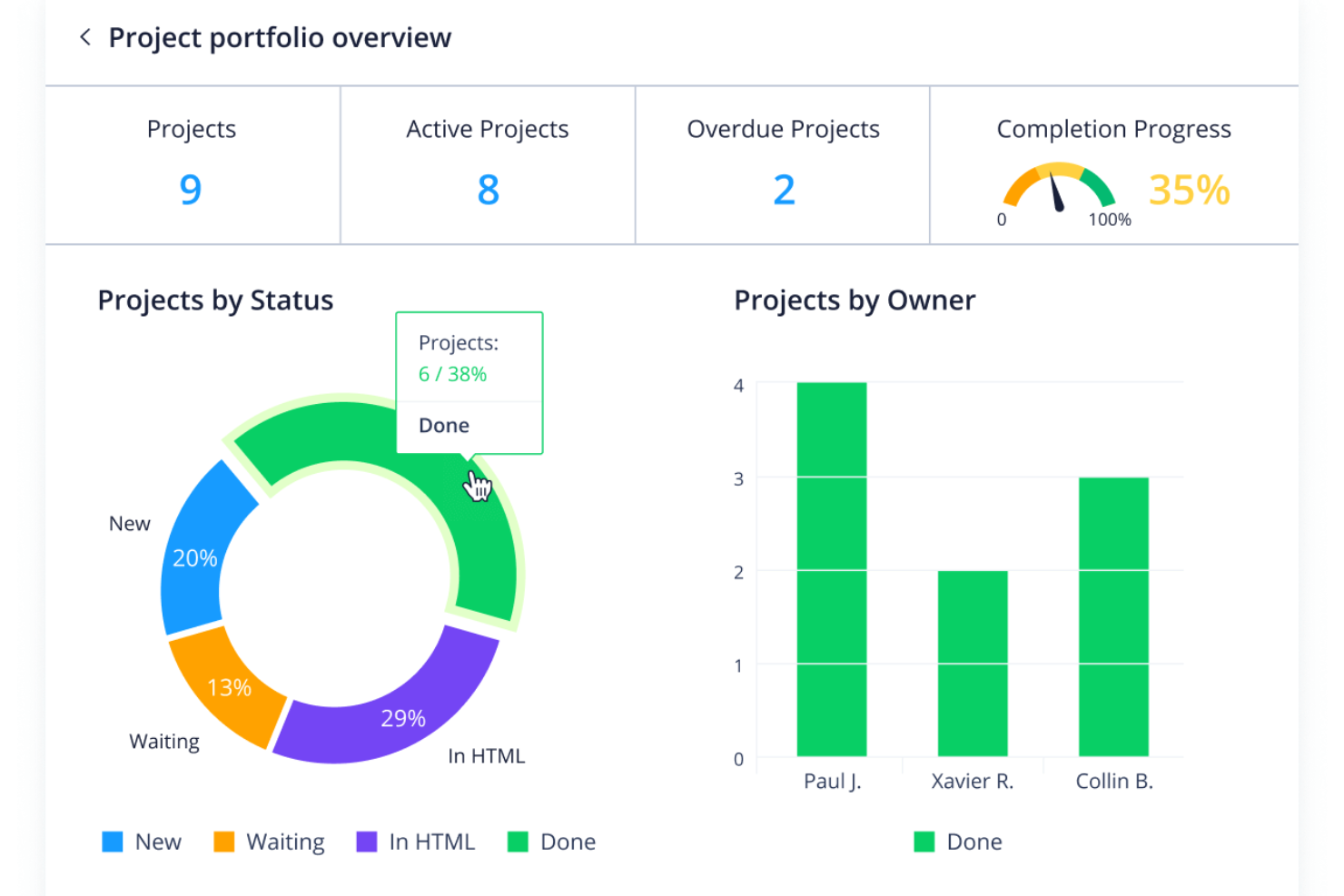
Wrike earns its spot here for making live project data instantly available to anyone who needs it, which is something I rarely see handled this well. What stands out in practice are Wrike’s interactive dashboards and custom report builder—I’ve built reports that update right as projects move, which is a huge advantage when you need to spot trends before they become issues. If your team wants to keep all levels of stakeholders up to speed without chasing status, I think you’ll find this reporting setup makes a real difference.
Wrike’s Best For
- Teams that need live project reporting dashboards
- PMOs and managers coordinating multiple complex projects
Wrike’s Not Great For
- Small teams with basic tracking needs
- People seeking a simple, minimalist reporting tool
What Sets Wrike Apart
Wrike is built for organizations that expect every project to go through a formal review and tracking process. Unlike ClickUp, which leaves a lot up to individual preference, Wrike really assumes you want clear responsibility, automated updates, and high accountability across teams. This tends to work best where audit trails, approvals, and real-time project status aren’t just nice to have, but required.
Tradeoffs with Wrike
Wrike optimizes for structured, multi-layered visibility and control, but the extra process can feel heavy if you’re looking for something quick or ultra-customizable. For teams who want to keep things lightweight, that overhead tends to get in the way.
Pros and Cons
Pros:
- Customizable dashboards
- Advanced workflow automation
- Real-time reporting
Cons:
- Lack of in-app chat without integrations
- Learning curve for new users
New Product Updates from Wrike

Wrike Adds Quick Search to Table View
Wrike adds Quick Search to Table View with full-table search across titles, descriptions, and fields, plus highlighted matches. This helps users find tasks faster in large tables. For more information, visit Wrike’s official site.

Best for enterprise agency dashboards
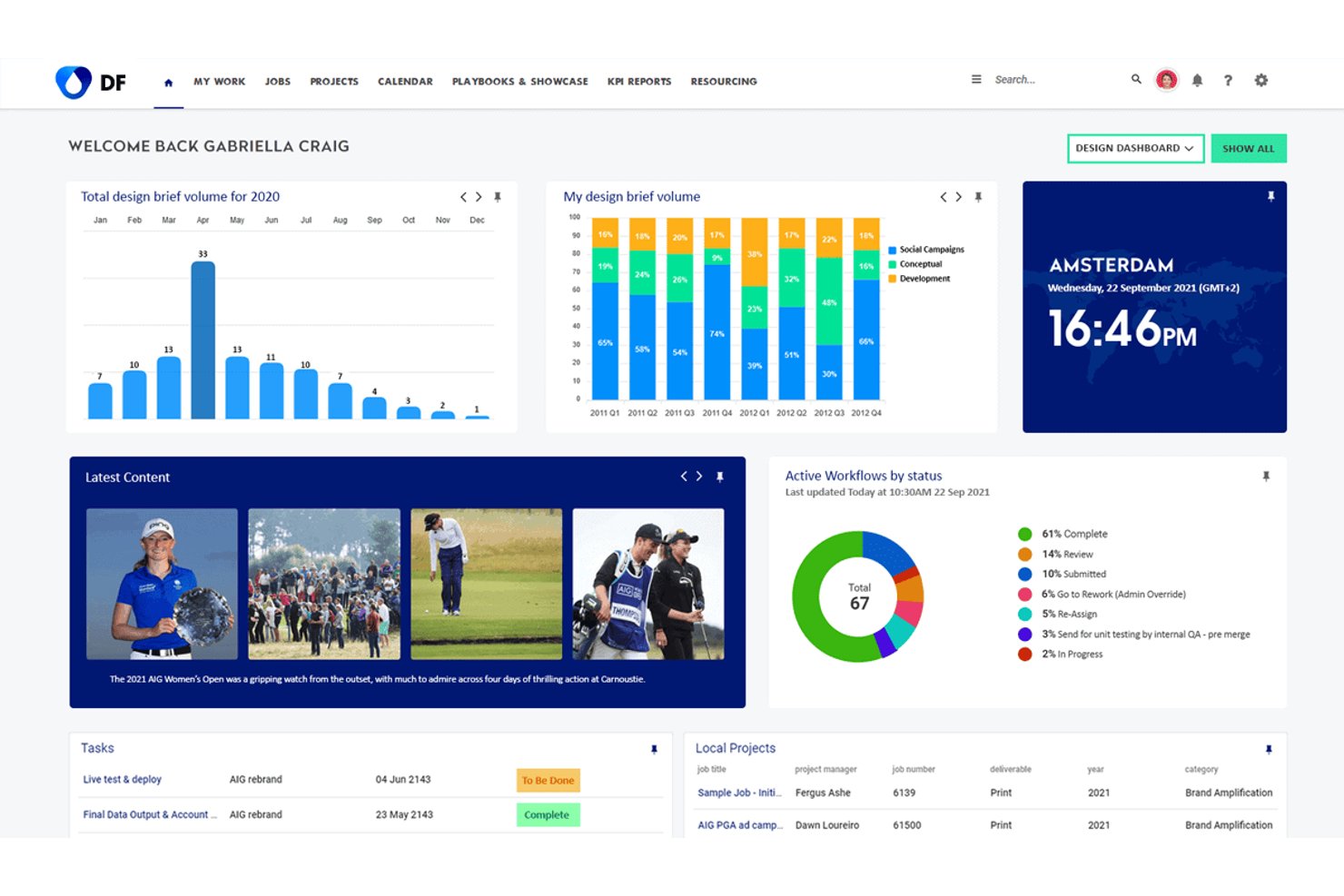
Screendragon is an enterprise workflow and project reporting platform built for marketing teams and agencies, combining real-time dashboards, custom automated reports, resource management, and multi-project visibility in one configurable system.
Who Is Screendragon Best For?
Screendragon suits enterprise marketing departments and large agencies managing high volumes of creative work across multiple brands, clients, or regions.
Why I Picked Screendragon
I picked Screendragon as one of the best because its dashboard layer is built specifically for agency-scale reporting complexity. Each dashboard is personalized and pulls live project data, so a portfolio director can track cross-brand campaign status without chasing down manual updates. I also like that its automated reports run on the account's own data sets, meaning the output reflects how your agency actually structures work rather than forcing data into generic templates.
Screendragon Key Features
- No-code workflow builder: Allows users to design project workflows with custom steps and approval logic without coding.
- Dynamic forms: Lets teams capture project details through configurable forms that trigger specific workflows.
- Resource utilization reporting: Provides reporting views to monitor team capacity, allocation, and workload across projects.
- Granular permissions management: Offers field-level access and routing controls for sensitive project data and stakeholder groups.
Screendragon Integrations
Screendragon offers native integrations with HubSpot, Microsoft Power BI, Ziflow, Brandfolder, Workato, and Smartsheet. An API is available for custom integrations.
Pros and Cons
Pros:
- Resource utilization reports built into the platform
- Automated report scheduling across multiple projects
- Configurable dashboards for portfolio-wide reporting
Cons:
- Report customization steep for non-technical users
- Initial configuration requires significant admin time
New Product Updates from Screendragon
Screendragon Unveils New AI Hub
Screendragon introduced AI Hub, a new capability that lets teams build and manage AI agents directly within workflows. The update helps marketing teams automate tasks, maintain governance controls, and scale AI-driven operations more efficiently. For more information, visit Screendragon's official site.

Best for complex project planning
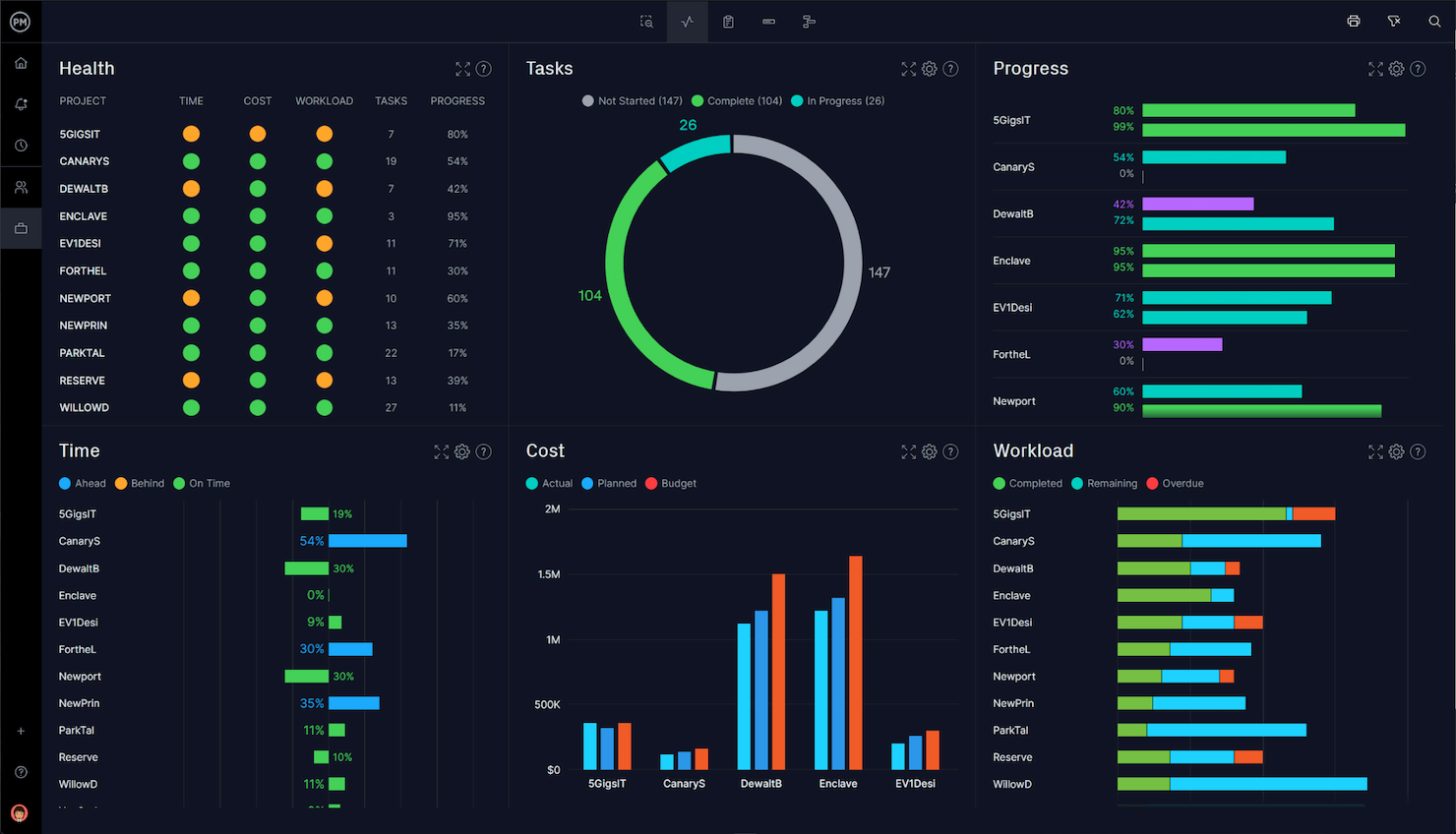
Microsoft Project makes the list because it handles complex project hierarchies and dependencies far beyond what simple task tools can manage. I reference it when teams need executive-ready reporting with custom dashboards, advanced Gantt charts, and detailed resource modeling. What I appreciate here is how you can model interlinked portfolios and surface program-level insights, all from the same set of project data.
Microsoft Project’s Best For
- Program and portfolio managers overseeing complex dependencies
- PMO teams needing executive-ready reporting and resource modeling
Microsoft Project’s Not Great For
- Small teams seeking a lightweight project reporting tool
- Teams with basic needs who want minimal setup and configuration
What sets Microsoft Project apart
Microsoft Project expects you to plan, sequence, and track work using detailed hierarchies and dependencies (more like Primavera than lighter tools such as Asana or Trello). It’s designed around the mindset that projects should have defined structures, resource allocations, and centralized controls. In practice, I see it working best where you need granular oversight at the portfolio or program level and reporting layers that are consistent with enterprise governance standards.
Tradeoffs with Microsoft Project
Microsoft Project optimizes for control and detailed reporting, but this makes setup and workflow management heavy and rigid, so day-to-day changes and fast pivots take more effort.
Pros and Cons
Pros:
- Comprehensive resource management
- Deep integration with Microsoft 365 suite
- Advanced project planning and scheduling
Cons:
- Primarily suited for Windows users
- Can be costly for larger teams
- Steep learning curve for new users

Notion
Best for combined project docs and tasks

Notion makes my list because it gives you a single place to manage both project reports and all related documentation. I've seen teams really benefit when they bring project dashboards, deliverable tracking, and documentation together in custom workspaces. What I like most is how easy it is to combine report templates with embedded timelines or linked tasks, so everyone has the details and the context in one spot.
Notion’s Best For
- Teams that want docs and project reports in one workspace
- Groups who need flexible project dashboards with linked tasks
Notion’s Not Great For
- Organizations with complex, compliance-driven reporting needs
- Teams that require advanced, automated report generation
What sets Notion apart
Notion is designed around the idea that your project docs and reporting live together, not in separate silos. Unlike Asana or Jira, which separate tasks and documentation, Notion expects you to blend wikis, dashboards, and project updates in the same space. In practice, this fits best when you want to create custom reporting layouts and keep all supporting context and decisions visible at a glance.
Tradeoffs with Notion
Notion optimizes for flexibility and unified docs, but that flexibility means it lacks the strict reporting logic and automation you get in dedicated project reporting tools—so routine or compliance-driven reporting tends to become manual and inconsistent.
Pros and Cons
Pros:
- Clean, user-friendly interface
- Highly customizable and flexible
- Unified system for docs and tasks
Cons:
- Limited advanced project management features
- Performance can lag with large databases
- Steep learning curve for new users

ClickUp
Best for all-in-one project management
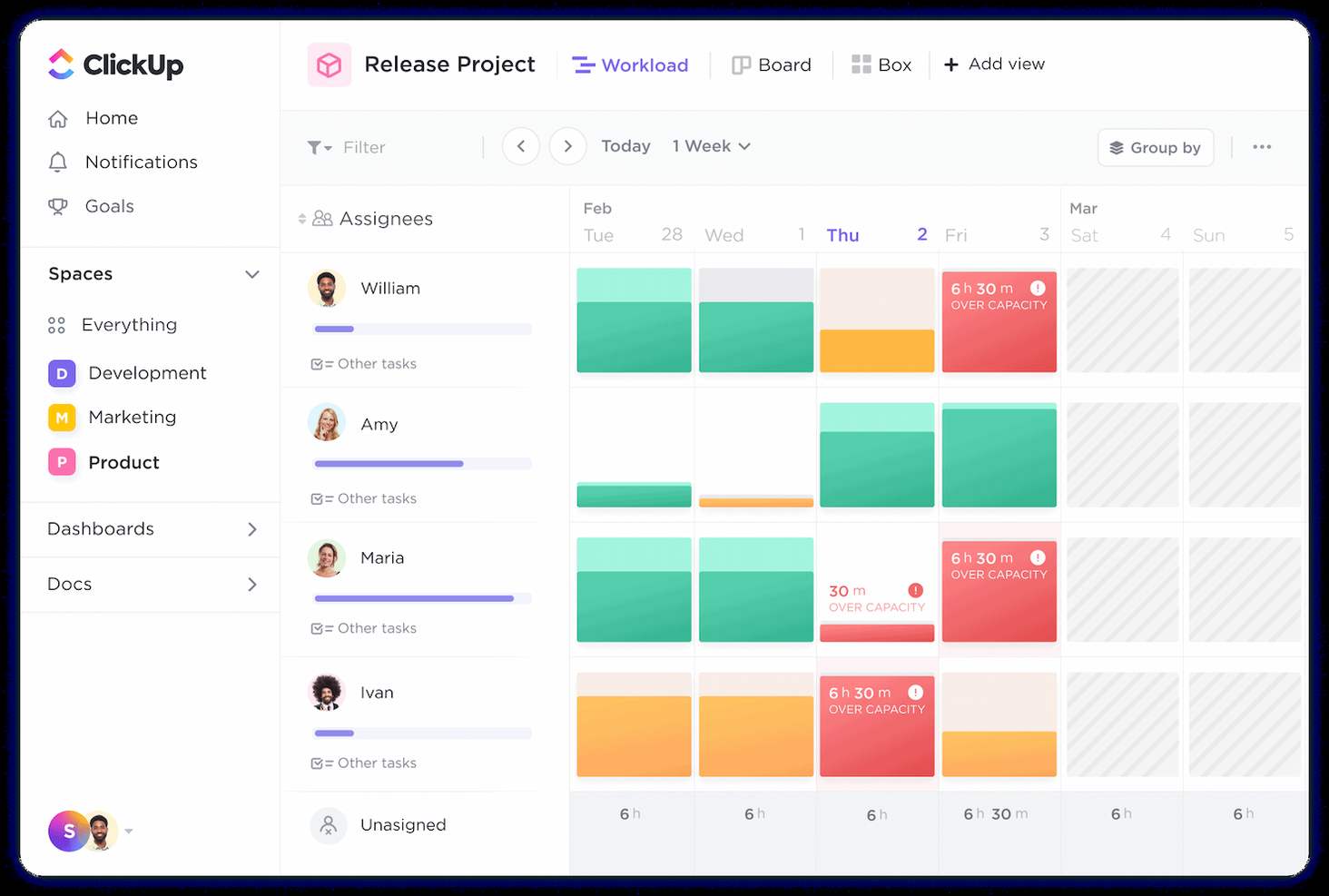
ClickUp makes my shortlist because it covers nearly every project reporting need in one place. I like that you get everything from customizable dashboards to granular workload reports, all layered into a single platform. What stands out to me is how ClickUp lets teams pull real-time insights from tasks, docs, and goals without switching between apps. This is my pick for teams who want to centralize project planning, tracking, and reporting in a unified workspace.
ClickUp’s Best For
- Teams centralizing project tasks, docs, and reporting
- Product and digital teams needing customizable dashboards
ClickUp’s Not Great For
- Teams focused on financial or advanced resource analytics
- Organizations with strict, regulated reporting requirements
What sets ClickUp apart
ClickUp takes an all-in-one approach by bringing tasks, docs, and reporting into a single workspace. Unlike Asana, which separates tasks and documents, I find ClickUp expects everyone to work from one platform and share the same source of truth. This works especially well when you want your reports to pull live data from every corner of your projects without jumping between tools.
Tradeoffs with ClickUp
ClickUp optimizes for centralization, but that can make it feel cluttered and overwhelming as you try to scale reporting for complex or heavily regulated use cases.
Pros and Cons
Pros:
- Wide range of integrations
- Comprehensive all-in-one solution
- Extensive customization options
Cons:
- Notifications can be overwhelming
- Performance can lag with heavy use
- Steep learning curve due to complexity
New Product Updates from ClickUp
ClickUp Adds Meetings Hub, Super Agent Templates, and ZoomInfo Integration
ClickUp adds a searchable Meetings Hub, new ways to clone and template Super Agents, and a ZoomInfo integration through the App Center. These updates improve meeting retrieval, agent reuse, and access to sales intelligence. For more information, visit ClickUp’s official site.

ProofHub
Best for centralized project communication

ProofHub makes my list because it keeps all project communication, updates, and files visible in one place (something most reporting tools miss!). When I work with teams who complain about fragmented updates and lost discussions in chat apps, this unified workspace fixes it. I really like how discussions, project notes, and custom reports stay accessible, making status reporting and accountability much clearer for distributed teams.
ProofHub’s Best For
- Teams centralizing discussion, files, and project updates in one hub
- Managers needing quick, accessible reporting on project progress
ProofHub’s Not Great For
- Organizations needing granular, advanced analytics
- Teams that require automated, highly customizable dashboards
What sets ProofHub apart
ProofHub is built with the expectation that project work, discussions, and file sharing all live in a single workspace. Unlike tools like Slack or Google Workspace, you don’t need to jump between messaging, docs, and reporting—everything funnels into the same place where you organize and review progress. In practice, this works best when you want every team conversation and status detail to directly inform project reporting.
Tradeoffs with ProofHub
ProofHub optimizes for centralized visibility, but you lose the ability to customize advanced reporting or automate analytics, so granular data analysis is out of reach.
Pros and Cons
Pros:
- Comprehensive project management features
- Flat pricing model for unlimited users
- Centralized communication tools
Cons:
- Specific integrations and advanced features may be lacking
- Limited customization options compared to some competitors
- May have a learning curve for new users

Best for client and agency projects
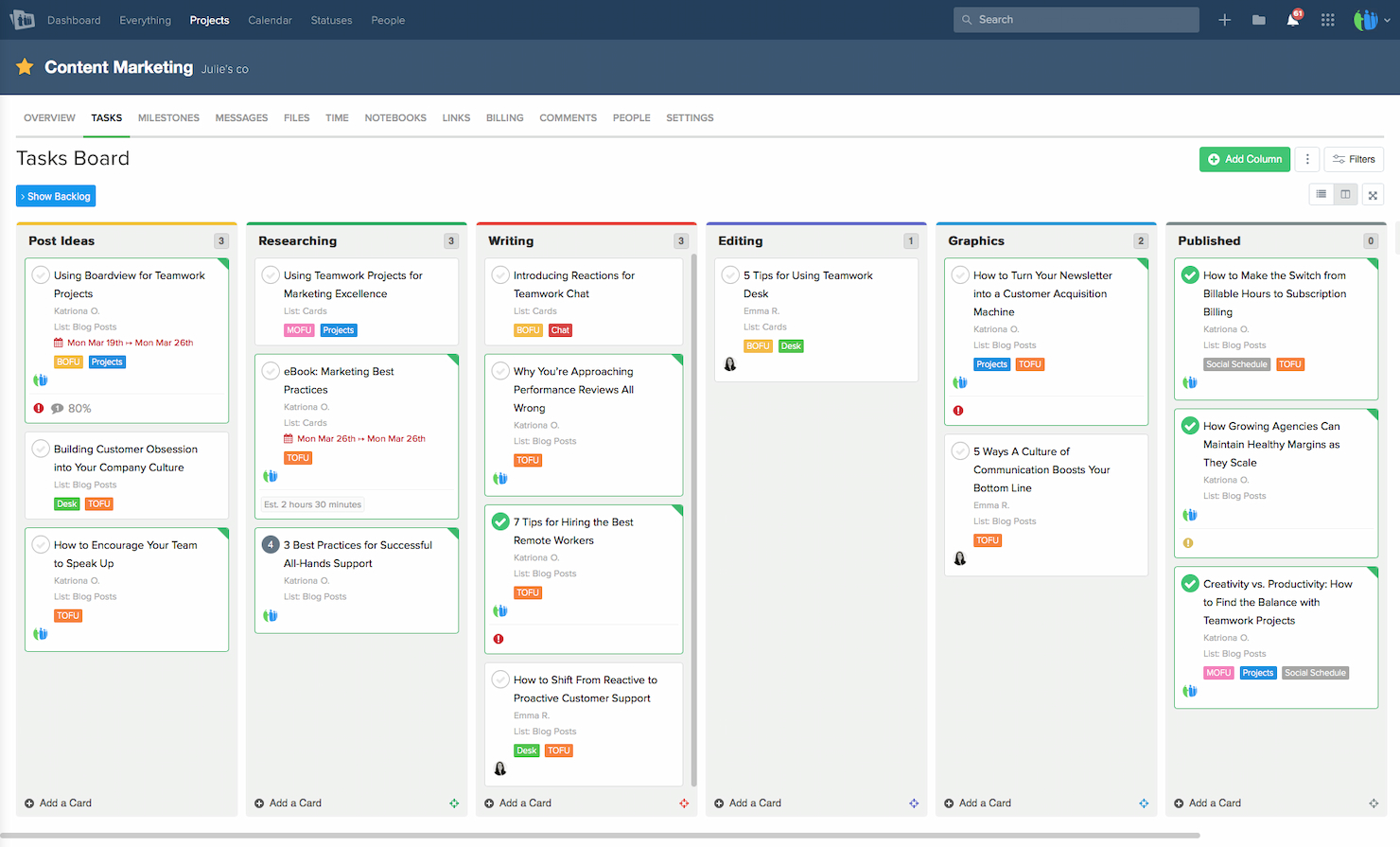
Teamwork.com makes my list because it's built for managing agency and client work where reporting has to double as proof of delivery. I like how granular the project analytics get—every task, milestone, and billable hour can filter into comprehensive client-ready reports. Teams working with multiple clients tend to find value in branded reporting and the ability to share progress updates without exposing internal details.
Teamwork.com’s Best For
- Agencies managing projects and client-facing reporting
- Teams needing branded, detailed project analytics
Teamwork.com’s Not Great For
- Internal IT or product teams without client focus
- Projects that require deep customization of reporting dashboards
What sets Teamwork.com apart
Teamwork.com is built for agencies and client services teams that need to keep billable work and reporting tightly connected. Unlike ClickUp, which emphasizes flexibility for internal projects, Teamwork.com assumes you’ll be juggling multiple clients, each with their own reporting needs. I see this working well when you want branded client reports and cleaner separation between internal notes and what clients see.
Tradeoffs with Teamwork.com
Teamwork.com optimizes for agency reporting, but this focus means its dashboards and reporting setup can feel rigid if you need heavy customization or complex internal metrics.
Pros and Cons
Pros:
- Seamless integrations with essential tools
- Comprehensive project management features
- Dedicated client portals for collaboration
Cons:
- Some features may be redundant for non-agency use
- Can become expensive for larger teams
- Learning curve for new users

Best for real-time agency performance reporting
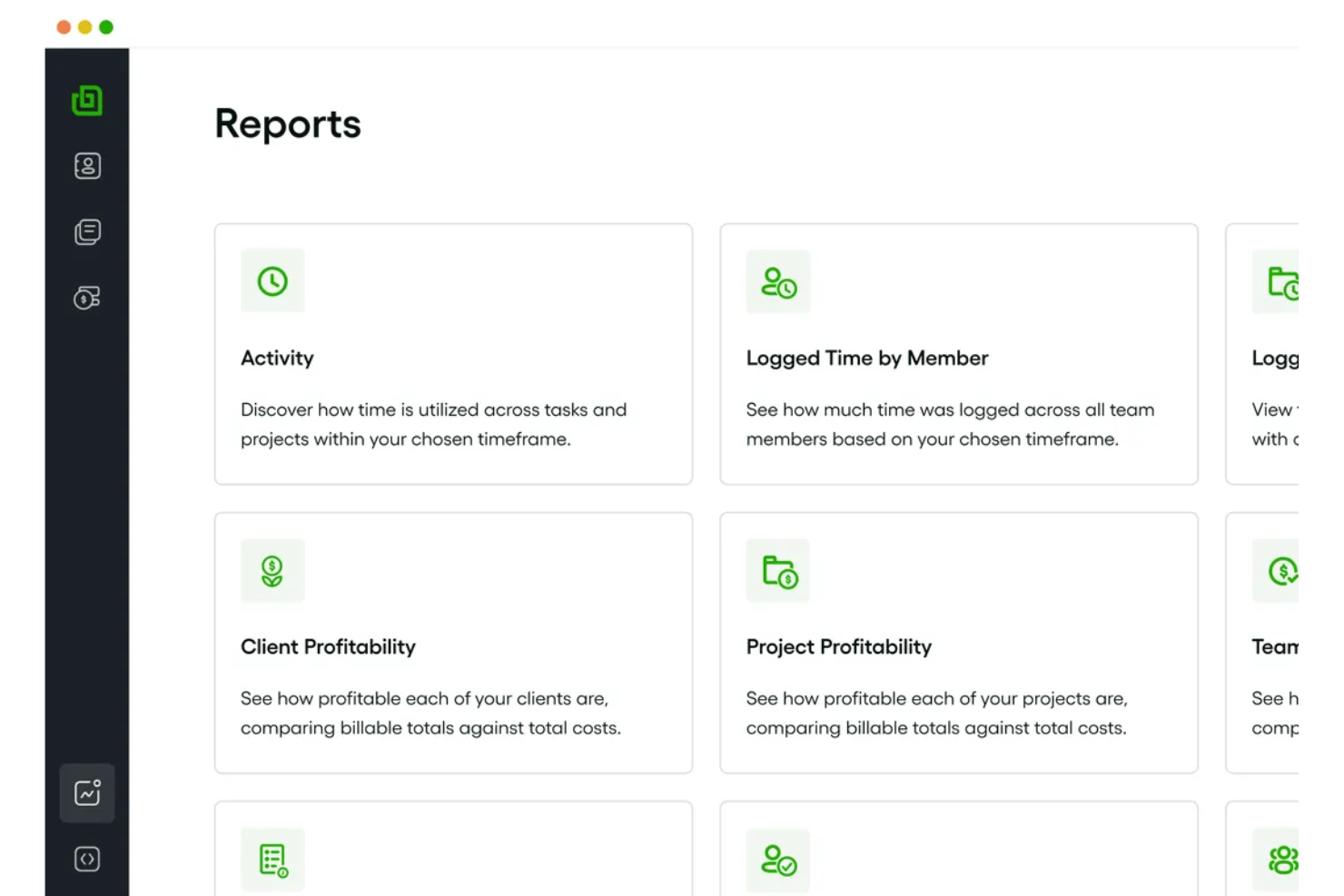
Bonsai Agency Software makes my list for its real-time agency performance dashboards and custom project reporting. I recommend it when teams need up-to-date insights into project margins, utilization, and resource allocation without pulling manual reports. What I appreciate most is how Bonsai lets you drill into revenue data and project health at a glance, which helps agencies manage delivery and profitability in fast-moving environments.
Bonsai Agency Software’s Best For
- Agencies seeking real-time performance tracking and reporting
- Teams who need to track project margins and resource allocation
Bonsai Agency Software’s Not Great For
- Companies needing deep financial analytics or forecasting
- Large enterprises with complex, multi-entity organizational structures
What sets Bonsai Agency Software apart
Bonsai Agency Software takes a dashboard-centric approach, prioritizing up-to-the-minute visibility into project performance and agency-wide metrics. Unlike something like ClickUp, which emphasizes task customization and broad use cases, Bonsai expects you to manage projects with a focus on revenue, profitability, and overall delivery health. I find this works best when you need to make business decisions quickly based on live data rather than sifting through manual reports.
Tradeoffs with Bonsai Agency Software
Bonsai optimizes for real-time agency reporting, but that focus means you lose out on detailed budgeting, forecasting, or robust workload planning, which you find in larger enterprise PM tools.
Pros and Cons
Pros:
- Ability to automate workflows and tasks
- Wide range of templates for client documentation
- Integrated project, client, and financial management
Cons:
- Capacity planning features limited to higher-tier plans
- Mobile app has limitations
Podio
Best for customizable project apps

Podio makes sense for this list because it lets you build exactly the kind of project and reporting apps you need, without being boxed in by pre-designed templates. I like how you can create your own dashboards and reporting layouts to track project KPIs, tasks, or requests. What stands out is being able to automate data collection and reporting flows, so teams get tailored views that actually fit how they work.
Podio’s Best For
- Teams building custom project tracking or reporting apps
- Organizations needing flexible data collection and dashboards
Podio’s Not Great For
- Groups wanting ready-made project reporting templates
- Teams that avoid tool configuration and customization
What sets Podio apart
Podio approaches work by letting you assemble your own project and reporting systems from the ground up. Unlike tools like Jira or Asana, which push you toward built-in structures, Podio expects you to design the way your team tracks progress, collects feedback, and visualizes projects. This tends to work well when off-the-shelf solutions don’t fit and you want full control over your data model and reporting.
Tradeoffs with Podio
Podio optimizes for customization, but building and maintaining those custom apps takes ongoing effort, which means I see teams getting slowed down when they want quick, out-of-the-box reporting.
Pros and Cons
Pros:
- Wide range of native integrations
- Integrated communication tools
- Highly customizable apps and workflows
Cons:
- Basic plan may lack advanced features needed for larger organizations
- Customization requires time and effort to set up
- Can be overwhelming for new users due to complexity


Trello earns its place on this list because its Kanban board system keeps project reporting visual and easy to organize. I pick it when teams want a highly visual, drag-and-drop way to track project status, dependencies, and sprint progress at a glance. What I really value is how you can filter cards by label or member, which makes daily stand-ups and status reporting much smoother. This works best when you need fast, transparent tracking and status sharing without extra layers.
Trello’s Best For
- Teams that want simple Kanban-based project tracking
- Visual status reporting across sprints or ongoing projects
Trello’s Not Great For
- Projects needing complex, multi-layered reporting
- Teams requiring granular permissions or audit trails
What sets Trello apart
Trello focuses on visualizing tasks using boards, lists, and cards, based on the Kanban method. Instead of giving you rigid workflows like Jira, it lets you move items around easily and just see where everything stands. This approach makes status changes and progress transparent without enforcing complex structure. In practice, I see teams use Trello when they want to communicate work visually and keep updates light.
Tradeoffs with Trello
Trello optimizes for simplicity and board visualization, but detailed reporting and advanced workflow controls take a back seat—so you’ll hit limits if you need layered project metrics or strict process rules.
Pros and Cons
Pros:
- Wide range of integrations
- Customizable boards and cards
- Intuitive Kanban board interface
Cons:
- Lacks advanced reporting features
- Can become cluttered with extensive use
- Limited functionality for complex projects
Other Tools To Consider
Below is a list of additional tools that we shortlisted, but did not make it to the top list. Definitely worth checking them out.
- Jira
For agile software development teams
- Smartsheet
For real-time portfolio reporting
- Celoxis
For dynamic PPM with advanced custom reporting
- Zoho Projects
For integration with Zoho Suite
- GoodDay
For real-time project reporting
- TaskRay
With Salesforce-native data security
- Asana
For workflow customization
- Basecamp
For team collaboration features
- Adobe Workfront
Enterprise work management for teams
- Planview AdaptiveWork
Enterprise project and portfolio management
- monday AI Workspace
With AI-driven risk detection and reporting
- ProjectManager
Real-time project planning and tracking
- Scoro
Comprehensive business management suite
- Quickbase
App-building platform for custom solutions
- Redbooth
Streamlined task and project management
- Airtable
For database-driven project management
- Nifty
Project management with milestone tracking
- Tempo Portfolio Manager
Dynamic project planning and analytics


How I Evaluate Project Reporting Software
I split my evaluation into two layers: the baseline a tool must clear—things like multi-project rollups and scheduled reporting—and the differentiators that set one PMO tool apart.
Core Functionality (Table Stakes For This List)
When I'm selecting tools for my list, I rank each one on a scale from 0 (does not offer the functionality) to 5 (excels in this area) for each core functionality listed below. Then, I calculate the tool's total score into a percentage. Each tool needs to achieve a minimum total score of 65% to be considered for inclusion.
- Customizable Report Templates: I look for a solid library of pre-built templates—status updates, budget summaries, risk logs—plus the ability to tailor layouts and fields to match your PMO's reporting cadence.
- Real-Time Dashboards: The dashboard experience matters. I evaluate whether widgets update with live data and let you drill down from a portfolio health overview into individual project metrics.
- Multi-Project Data Aggregation: Tools like monday.com and Smartsheet handle cross-project rollups differently, so I check how each platform consolidates schedules, budgets, and milestones into a single portfolio view.
- Automated Report Scheduling: I look for recurring delivery options—weekly status digests sent to a steering committee's inbox, for example—without requiring someone to manually generate and attach each report.
- Data Integrations: Most teams pull project data from multiple sources. I evaluate native connectors to tools like Jira, Asana, and time-tracking platforms, plus whether an open API supports custom data pipelines.
- Export & Sharing Options: Stakeholders consume reports in different ways, so I check for PDF, Excel, and CSV exports alongside shareable dashboard links with viewer-level permissions for external sponsors.
Once I have a list of tools that meet this criteria, I consider what sets each platform apart.
Differentiating Factors (What Sets Vendors Apart)
Here's how I compare and contrast different vendors:
Standout Features
Baseline and variance tracking is a major differentiator—I look for tools that automatically flag deviations from the planned schedule or budget so PMs aren't manually comparing snapshots. Stakeholder portals also matter. Giving a sponsor a live, branded view of project health without requiring a paid license changes how you communicate progress. I also evaluate custom KPI builders, since every PMO defines success differently, and the ability to create calculated metrics tied to your reporting framework saves hours of spreadsheet work.
Beyond Features
Integration depth matters beyond just having connectors. I evaluate whether a tool syncs bidirectionally with your PM stack—pulling Jira sprint data into a portfolio dashboard, for instance—or just offers one-way imports. Pricing transparency is another factor I weigh, especially how vendors handle viewer licenses. When a PMO distributes weekly reports to dozens of stakeholders, per-viewer costs add up fast. I also check for SOC 2 compliance and role-based access controls, since project reports often contain sensitive budget and resource data that leadership expects to stay locked down.
How to Choose Project Reporting Software
As you work through your own unique software selection process, keep the following points in mind:
- Integration Capabilities: Ensure the project reporting software can seamlessly integrate with existing tools and systems your team uses. This consideration addresses the pain point of disparate systems causing data silos. For instance, if your team uses Jira for issue tracking and Slack for communication, the chosen software should be able to integrate with these platforms for streamlined reporting.
- Customization and Scalability: The software should offer a high level of customization to tailor reports to specific project or organizational needs. This is crucial for industries with unique reporting requirements, such as construction or healthcare. Scalability ensures the tool grows with your project sizes and complexities.
- User-Friendly Interface: A straightforward and intuitive interface reduces the learning curve and ensures all team members can effectively use the software. This is particularly important in fast-paced environments where time spent on training is a significant concern.
- Real-time Data and Analytics: Choose software that provides real-time data and analytics, vital for timely decision-making and identifying project bottlenecks. For instance, marketing agencies might require up-to-the-minute data on campaign performance to adjust strategies swiftly.
- Security and Compliance: Given the sensitive nature of project data, the software must adhere to industry-standard security protocols and compliance requirements, especially for industries like finance and healthcare, where data security is paramount.
Trends in Project Reporting Software
Here are some current and interesting trends I’m noticing in project reporting software technology.
Enhanced Integration Capabilities
- Wider Integration with Third-Party Tools: Project reporting software is increasingly offering more extensive integrations with external tools and platforms, such as CRMs, communication apps, and financial software, to provide a more unified project management ecosystem. This reflects the need for seamless data flow and accessibility across different business functions.
- API Improvements: There's a noticeable enhancement in API offerings, allowing for more customizable integrations. This trend caters to the growing need for tailored solutions that fit specific organizational workflows and processes.
Advanced Analytics and AI
- Predictive Analytics: The use of AI and machine learning to predict project outcomes and suggest improvements is becoming more prevalent. This functionality aims to provide project managers with foresight into potential risks and opportunities, enabling more proactive project planning.
- Automated Reporting: AI-driven features for automatic generation of reports and insights are rapidly evolving, reducing manual effort and providing real-time data analysis. This trend addresses the demand for timely and accurate project insights.
User Experience and Customization
- Enhanced Customization: There's a shift towards more flexible user interfaces and customizable reporting dashboards, allowing users to tailor the software to their specific needs. This trend is driven by the diverse nature of projects and the need for personalized data visualization.
- Mobile Optimization: With the increasing need for on-the-go access to project data, project reporting software is focusing more on mobile-friendly interfaces and functionalities, ensuring that project managers and team members can stay informed anytime, anywhere.
Collaborative Features
- Real-time Collaboration: The emphasis on features that support real-time collaboration within project reports, such as commenting and task updating, is growing. This functionality facilitates better teamwork and decision-making based on the latest project data.
- Integration with Communication Platforms: Direct integrations with popular communication tools are becoming more common, streamlining the process of discussing and acting on report insights.
As these trends develop, certain features like static reporting and isolated data silos are becoming less sought after. Project professionals are looking for dynamic, integrated solutions that provide comprehensive insights and foster collaboration.
What Is Project Reporting Software?
Project reporting software is a tool designed to aggregate, analyze, and present data related to various aspects of project performance. It is primarily used by project managers, team leaders, and stakeholders to track progress, monitor resource utilization, identify risks, and make informed decisions based on comprehensive project insights.
The core components of project reporting software include data visualization tools like dashboards and charts, customizable report templates, real-time data updates, and integration capabilities with other project management tools. This software aims to provide a clear and concise overview of project metrics, facilitating transparent communication and enabling teams to maintain alignment with project goals and timelines.
Features
Here are the core features any great project reporting software should have:
- Customizable Dashboards: Tailor information presentation to specific project needs or stakeholder preferences. Customizable dashboards–such as branded reports, common in white label dashboard software–ensure that relevant project metrics are front and center, aiding in quick assessment and decision-making.
- Real-Time Data Updates: Ensure project data is current and accurate. Having access to real-time data is vital for making informed decisions and keeping all team members and stakeholders updated on the latest project developments.
- Advanced Data Analytics: Transform raw data into actionable insights. Advanced analytics tools within project reporting software can highlight trends, predict potential bottlenecks, and uncover insights that might not be immediately apparent.
- Automated Report Generation: Save time and reduce manual errors. Automation in report generation allows for regular updates without the need for continuous manual intervention, ensuring consistency and reliability in project updates.
- Integration Capabilities: Connect with other tools and systems to streamline workflows. Seamless integration with other project management, CRM, or ERP systems ensures that data flows freely between platforms, reducing duplication and maintaining data integrity.
- Collaboration Tools: Facilitate communication among project team members and stakeholders. Embedded collaboration tools help teams discuss reports, share insights, and make collective decisions based on the latest data.
- Task and Milestone Tracking: Monitor progress towards key project milestones. This feature enables project managers to keep track of individual tasks and overall project milestones, ensuring that the project remains on schedule.
- Resource Allocation Insights: View how resources are distributed and utilized across projects. Understanding resource allocation is crucial for balancing workloads, optimizing resource use, and forecasting future project needs.
- Risk Management Tools: Identify and mitigate potential project risks. Risk management features help in anticipating potential issues that could impact the project timeline or budget, allowing for preemptive action.
- Custom Report Filters: Slice and dice project data as needed. Custom filters allow users to view specific data segments, making it easier to drill down into the details and analyze specific aspects of the project.
- Dependencies: This feature tracks the relationships between tasks to manage the sequence of completion.
- Custom fields: This allows users to add specialized fields to tailor the software to specific needs.
- Due dates: This sets deadlines for tasks to ensure timely completion.
- Priority flags: This function helps users prioritize tasks in order of importance or urgency.
- User Permissions: This controls who can view or edit various parts of the project.
- Project templates: This provides pre-set frameworks to simplify the setup of new projects.
- Subtasks: This breaks tasks down into smaller, manageable parts for detailed tracking.
Selecting project reporting software with these features ensures that project managers and teams have the tools they need to manage projects effectively. These capabilities not only streamline the reporting process but also enhance the overall strategic management of projects by providing comprehensive insights, facilitating collaboration, and enabling proactive project management.
Benefits
Project reporting software offers a myriad of advantages that streamline project management processes, enhancing both efficiency and effectiveness for teams and organizations. By integrating such software into your operations, you stand to gain insights and tools that can transform how projects are managed, communicated, and completed.
- Enhanced Decision Making: Make informed decisions based on real-time data. Project reporting software provides comprehensive insights and analytics, enabling managers and stakeholders to make data-driven decisions that align with project goals and organizational strategies.
- Increased Transparency: Maintain visibility into all aspects of the project. This software ensures that every team member and stakeholder has access to the latest project information, fostering a culture of openness and accountability.
- Improved Efficiency: Streamline project management processes. Automating report generation and data aggregation saves time, reduces errors, and allows teams to focus on more strategic tasks rather than getting bogged down in administrative work.
- Better Resource Management: Optimize the allocation and utilization of resources. With clear insights into how resources are being used, organizations can make adjustments to ensure that human and financial resources are allocated effectively, reducing waste and increasing project ROI.
- Risk Mitigation: Identify and address potential issues before they escalate. Early identification of risks and bottlenecks allows teams to take corrective action proactively, minimizing the impact on project timelines and budgets.
Leveraging project reporting software empowers teams and organizations to manage projects more effectively, ensuring that goals are met with greater precision and efficiency.
Costs and Pricing
Navigating the costs and pricing options of project reporting software can seem daunting for those new to such tools. Generally, these platforms offer a paid plan for different business sizes to accommodate the diverse needs and sizes of teams and projects.
| Plan Type | Average Price | Common Features |
| Free Plan | $0 | Basic reporting, limited projects, task management |
| Basic | $10-15/user/month | Enhanced reporting, unlimited projects, task and time tracking |
| Professional | $20-30/user/month | Advanced reporting features, resource allocation, integration capabilities |
| Enterprise | Custom pricing | Custom reports, full customization, dedicated support, advanced security |
When considering project reporting software, it's essential to assess the scope and complexity of your projects against the features and limitations of each plan. Opting for a plan that scales with your organizational growth while providing the necessary functionalities for efficient project management is crucial.
FAQs
Here are some commonly asked questions about project reporting software:
How does project reporting software improve project management?
It enhances visibility into project progress, facilitates better communication among team members, streamlines the reporting process, and aids in identifying risks and opportunities early on.
Can project reporting software integrate with other tools?
Yes, most project reporting platforms offer integration capabilities with a variety of other business and project management tools, including task management software, CRMs, and financial systems.
Is project reporting software suitable for small teams?
Absolutely. Many project reporting tools offer scalable solutions that cater to teams of all sizes, including free or low-cost plans for smaller teams or startups.
How secure is project reporting software?
Reputable project reporting software providers implement robust security measures, including data encryption, secure data storage, and compliance with industry standards, to protect your project data.
Can I customize reports to suit my project's needs?
Yes, customization is a core functionality of project reporting software, allowing you to tailor reports and dashboards to meet the specific requirements of your project or stakeholders.
What kind of support can I expect with project reporting software?
Most providers offer a range of support options, including online resources, live chat, email support, and in some cases, dedicated account management, to assist you with any queries or issues.