

10 Best Time Tracking Software for Architects Reviewed in 2026

Best Time Tracking Software for Architects Shortlist


Managing architectural projects means balancing blueprints, budgets, and client expectations all at once. One minute you’re sketching concepts, the next you’re fielding revision requests, coordinating with engineers, and somehow trying to make sure the hours actually line up with payroll. Time tracking is rarely the fun part of the job, but it is one of the few things that keeps projects profitable and teams sane.
That is where time tracking software becomes more than a nice-to-have. The right tool helps you separate billable from non-billable work, track all those design revisions clients “quickly” ask for, and keep payroll accurate without digging through old emails or guessing who did what and when.
I’ve tested and reviewed the top tools built for architecture and project-driven teams so you don’t have to wade through options that don’t fit your workflow. My goal is to help you find a system that supports the way architects actually work, not just how software companies think they work.
In this article, you’ll find my top picks for time tracking software for architects, along with insights into features, usability, and how each option can help you stay on schedule, stay within budget, and save your team some headaches along the way.
Why Trust Our Software Recommendations
Our team has been testing and reviewing software since 2012. As project managers ourselves, we know how difficult—and important—it is to choose the right software.
For this guide, we evaluated tools using hands-on testing and independent research, scoring tools using our selection criteria. We also draw on insights from industry thought leaders and practicing project management experts.
Our reviews reflect our human editorial judgment, not a sales pitch.
Expert reviewers:
Best Time Tracking Software for Architects Summary
This comparison chart summarizes pricing details for my top time tracking software for architects selections to help you find the best one for your budget and business needs.
| Tool | Best For | Trial Info | Price | ||
|---|---|---|---|---|---|
| 1 | Best for AI-powered resource planning | 14-day free trial + free demo available | From $10/month (billed annually) | Website | |
| 2 | Best with custom reporting dashboards | Free plan + 30-day free trial + free demo available | From $9/user/month (billed annually) | Website | |
| 3 | Best for project and budget tracking | Free plan + 30-day free trial + free demo available | From $6/user/month (billed annually) | Website | |
| 4 | Best for multi-office architecture firm billing | 14-day free trial | From $19.90/user/month (billed annually) | Website | |
| 5 | Best with integrated resource and phase planning | Free demo available | Pricing upon request | Website | |
| 6 | Best for billable architect project hours | Free plan available | From $4.99/user/month | Website | |
| 7 | Best for remote teams | 14-day free trial + free plan + free demo available | From $3.99/user/month (billed annually) | Website | |
| 8 | Best for budgeting | Free demo available. | Pricing upon request | Website | |
| 9 | Best for contract work | Free demo + 7-day free trial | From $9/user/month (billed annually) | Website | |
| 10 | Best for payroll | Free plan available | From $5.50/user/month | Website |


Best Time Tracking Software for Architect Reviews
Below are my detailed summaries of the best time tracking software for architects that made it onto my shortlist. My reviews offer a detailed look at the key features, pros & cons, integrations, and ideal use cases of each tool to help you find the best one for you.

Best for AI-powered resource planning
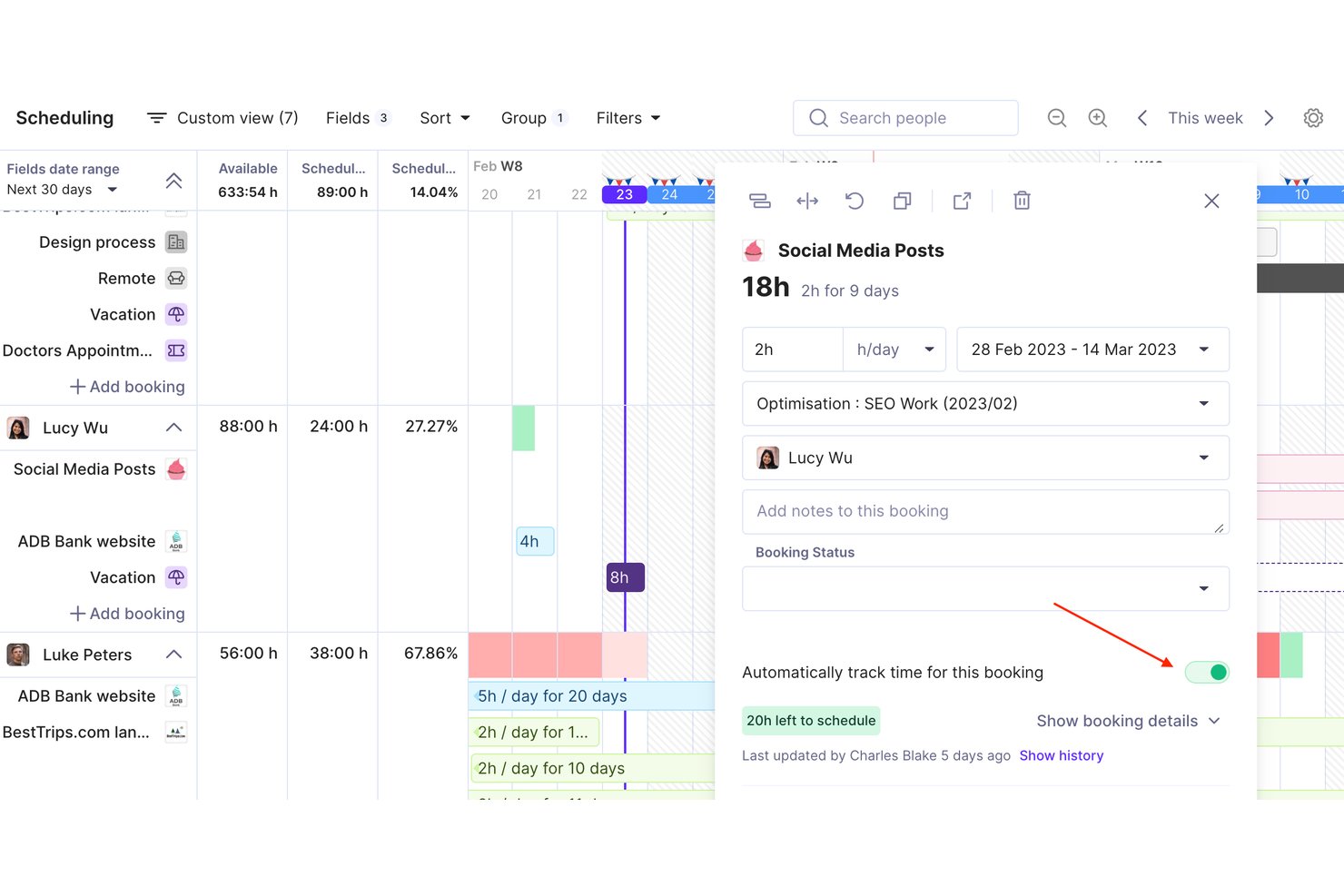
Productive is an agency and professional services management platform that combines time tracking, resource planning, project budgeting, and invoicing in a single tool built for billable-hour businesses like architecture firms.
Who Is Productive Best For?
Productive suits architecture and engineering studios that manage multi-phase projects across mixed teams and need one place to connect time, budgets, and billing.
Why I Picked Productive
I picked Productive as one of the best because its AI-powered resource planning connects directly to time tracking in a way most tools don't. The AI Time Tracking feature suggests time entries based on existing resource bookings, so I'm not chasing my team for missing timesheets at week's end. On top of that, the Scenario Builder lets me stress-test staffing decisions before locking a project plan, which is especially useful when balancing architects across overlapping SD and CD phases.
Productive Key Features
- Rate cards: Set different billing rates by project, client, or team member for precise fee calculations.
- Multi-level project budgeting: Track budgets at the project, phase, and service level.
- Time off management: Capture planned absences and holidays for accurate resource planning.
- Integrated invoicing: Generate and send invoices directly within the platform, linked to actual billable hours.
Productive Integrations
Productive offers native integrations with GitHub, Slack, HubSpot, Notion, Amplitude, Stripe, Linear, Xero, Sage, Jira, and more. It also connects with Zapier, and has an API for custom integrations.
Pros and Cons
Pros:
- Project-level profitability and utilization insights
- Visual resource planning across projects and phases
- AI time tracking suggests entries automatically
Cons:
- US-based retainage billing format not supported
- No prebuilt AIA phase templates
New Product Updates from Productive

Productive Adds Agent Triggers, Teams Integration, and Time Controls
Productive adds automated agent triggers, broader AI file support, Microsoft Teams integration, Resource Planner improvements, and new time entry controls. These updates expand automation while improving scheduling, collaboration, and time tracking. For more information, visit Productive’s official site.

Toggl
Best with custom reporting dashboards
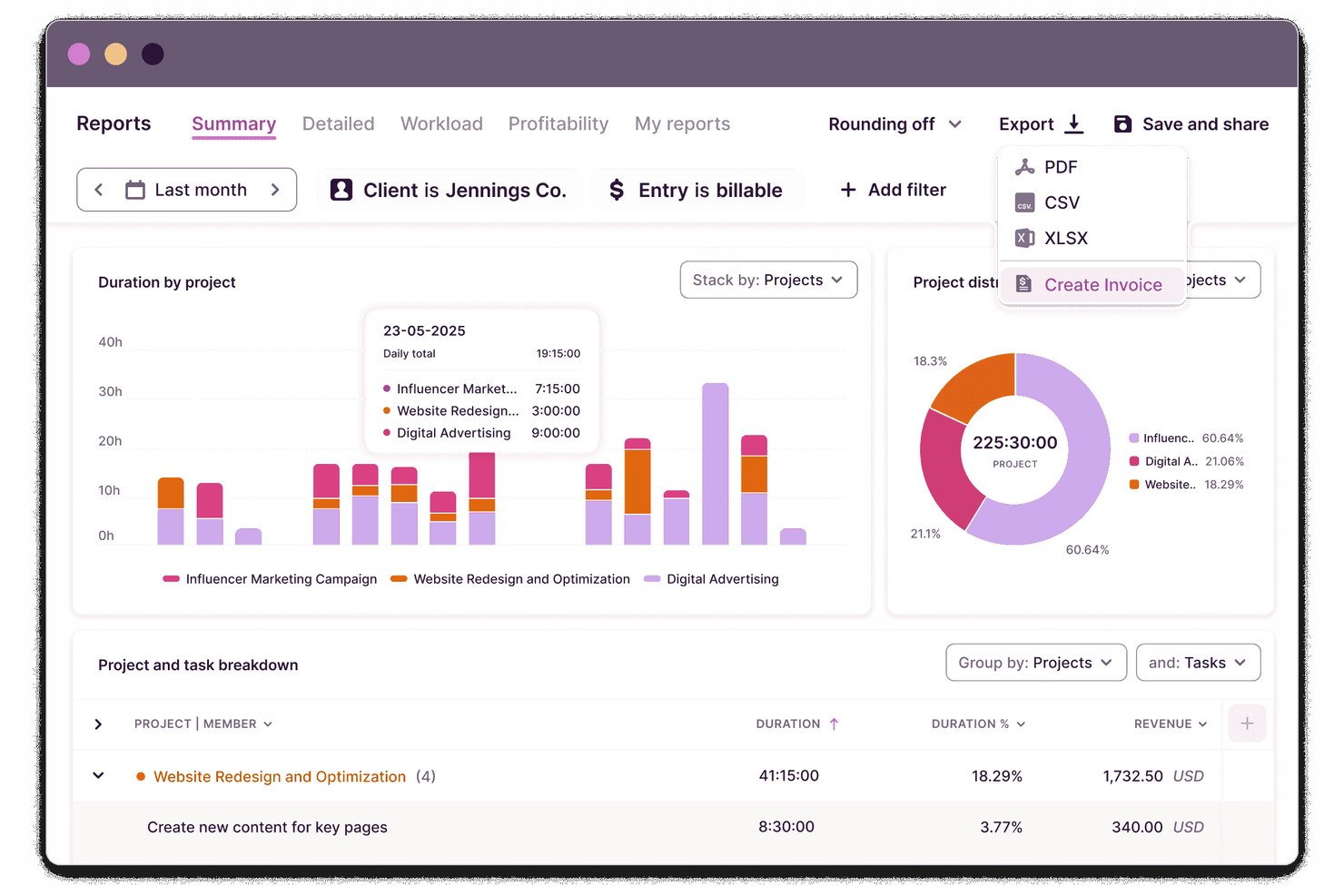
Toggl is a time tracking and capacity planning platform for architects that lets you manage tasks and projects, log billable hours, schedule work across teams, track budgets, and create detailed reports for architectural workflows.
Who Is Toggl Best For?
Architectural firms and studios needing a flexible, cloud-based tool to track project time, budgets, and staff hours across multiple clients and phases.
Why I Picked Toggl
I picked Toggl as one of the best because I can build custom reporting dashboards that break down time by project, phase, and team member. I use this flexibility to generate visual reports that support precise client billing and resource planning.
Toggl Key Features
- Real-time timer tracking: Log time as you work across devices and platforms.
- Multi-project and client management: Organize and assign hours to specific projects and clients.
- Billable rates and labor cost gates: Set unique rates for roles, users, or project types.
- Approval workflows for timesheets: Managers can review and approve timesheets before submission.
Toggl Integrations
Toggl offers native integrations with Asana, Trello, Jira, Basecamp, Notion, Google Calendar, and Slack, connects with Zapier, and provides an API for custom integrations.
Pros and Cons
Pros:
- Supports team-based timesheet approvals
- Flexible project and phase time tracking
- Drag-and-drop calendar event time tracking
Cons:
- Lacks built-in AIA billing support
- No native architecture phase templates

actiTIME
Best for project and budget tracking
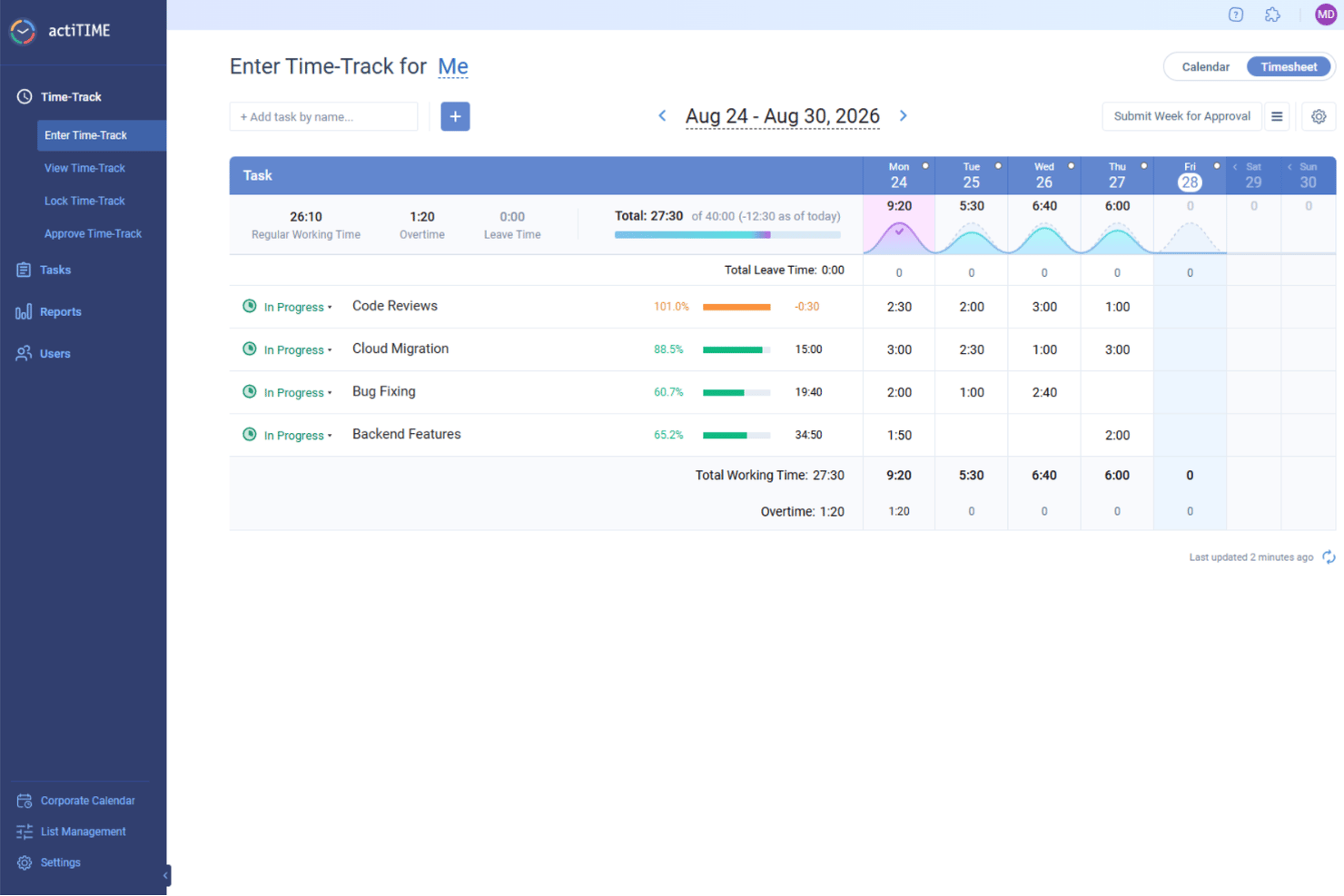
For architects seeking a reliable time tracking solution, actiTIME stands out as a versatile tool that caters to the unique demands of project management within the architecture industry. It offers an array of features designed to streamline workflows, manage budgets, and ensure efficient time allocation, addressing the complex needs of architectural projects. Architects and design professionals can benefit from its robust capabilities in tracking project progress and managing resources, helping to maintain timelines and foster client satisfaction.
Why I Picked actiTIME
I picked actiTIME because it excels in providing detailed project and budget tracking, which are crucial for architects managing multiple projects and resources. Its time tracking feature allows you to record time spent on various tasks, offering insights into project timelines and resource allocation. Additionally, the software’s budget management capabilities enable you to monitor project expenses and compare them against initial estimates, helping to keep projects financially on track. These features address the critical need for precise time and budget oversight in architectural projects.
actiTIME Key Features
In addition to its project and budget tracking capabilities, I also found several other features valuable for architects:
- Reporting: Generate comprehensive reports on time usage and project progress, which are essential for assessing project status and making informed decisions.
- Billing: Create accurate billing reports and client invoices based on tracked time and services, ensuring transparency and accountability in client relationships.
- Team Management: Assign tasks, monitor team performance, and coordinate efforts to enhance collaboration and efficiency within your architectural team.
- Leave Management: Automate PTO tracking and manage leave policies, ensuring seamless team operations and resource availability.
actiTIME Integrations
Integrations include actiPLANS, QuickBooks, and Zapier. An API is also available for custom integrations.
Pros and Cons
Pros:
- Reporting provides detailed project insights
- Project management organizes complex tasks
- Time tracking improves task accuracy
Cons:
- No automatic time tracking feature
- Mobile app lacks offline functionality
New Product Updates from actiTIME

actiTIME Visual Hour Indicator and Time-Track Report Redesign
actiTIME adds a wave-style hour indicator to the Timesheet and Calendar views and refreshes the Time-Track report for smoother navigation and clearer visuals. For more information, visit actiTIME's official site.

Scoro
Best for multi-office architecture firm billing
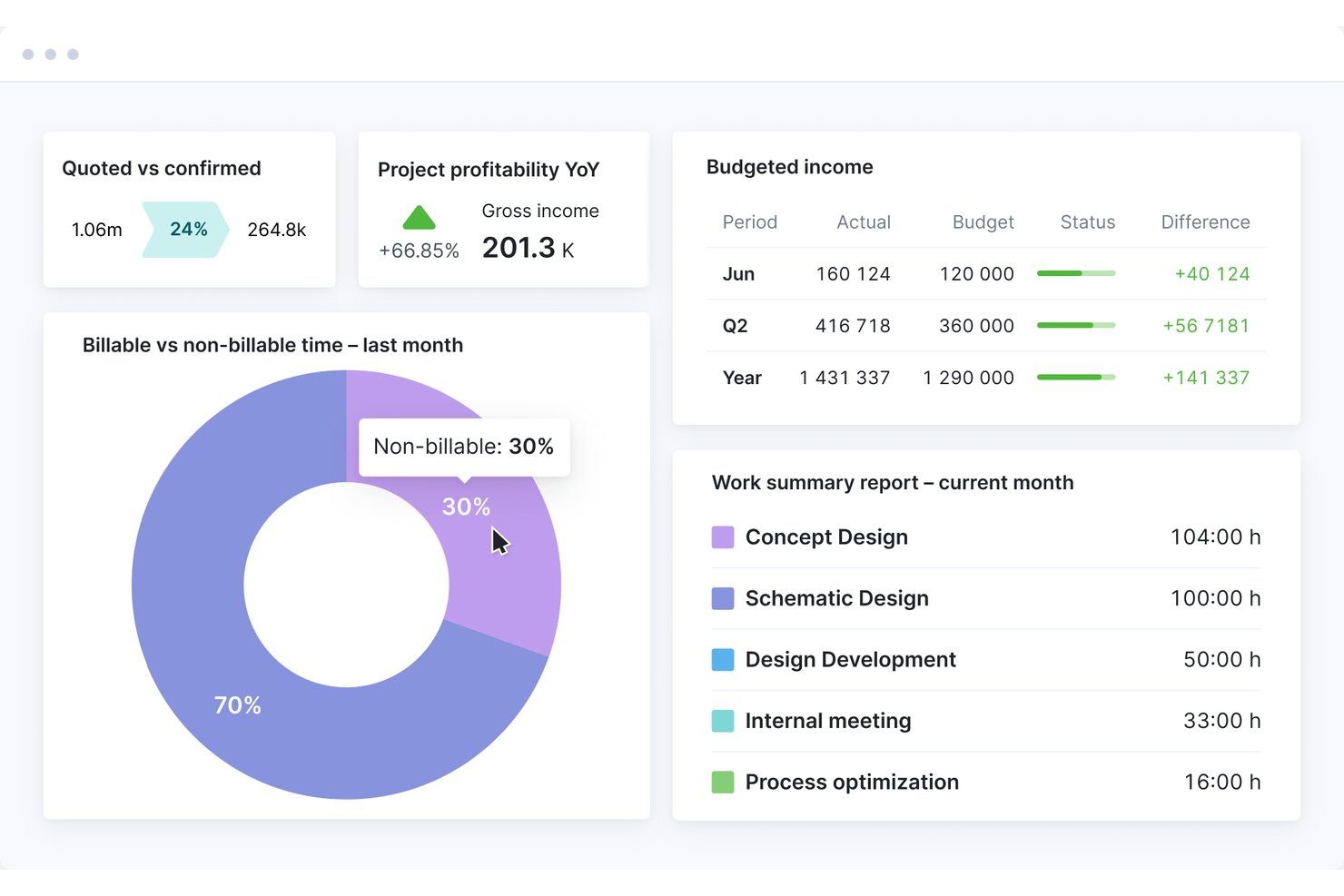
Scoro is a professional services automation (PSA) platform that combines time tracking, project and phase management, resource planning, budget burn monitoring, WIP reporting, and invoicing in a single system.
Who Is Scoro Best For?
Scoro suits growing and mid-size architecture firms that manage multiple offices, sub-consultants, and complex billing across concurrent projects.
Why I Picked Scoro
I've included Scoro in my top picks because it handles multi-office billing complexity better than most tools in this category. Across concurrent projects, it tracks quoted versus actual costs at the phase and role level in real time, so you always know where fee burn stands before it becomes a problem. I also like its PO tracking for sub-consultants, which keeps external spending visible inside the same budget dashboard.
Scoro Key Features
- Role-based labor costing: Assign different cost rates to each team role so every time entry automatically carries the correct labor cost across your projects.
- ELI AI assistant: Query live project and financial data in plain language to pull filtered reports, chase missing timesheets, or surface budget alerts.
- Multi-level timesheet approval: Route submitted timesheets through manager review before any time is invoiced, with time locking to prevent edits after approval.
- Visual capacity planner: See confirmed and tentative bookings for your full team in a single view, with waiting-list flags for staff booked beyond capacity.
Scoro Integrations
Scoro offers documented integrations with Xero, QuickBooks Online, Sage Intacct, Exact, Expensify, Salesforce, HubSpot, Google Calendar, Microsoft Outlook, and Slack. It also provides an open REST API and Zapier, but no native Revit, AutoCAD, or BIM 360 integrations.
Pros and Cons
Pros:
- AI assistant for live project reporting
- Visual capacity planning for multi-office teams
- Real-time budget burn tracking at phase level
Cons:
- Mobile app is unreliable for time entry
- No native AIA invoice format support
New Product Updates from Scoro

Scoro Adds Time Mobile App and ELI Improvements
Scoro adds the Scoro Time mobile app for iOS/Android to track time anywhere and expands ELI with attachments, smarter filtering, and trigger-based actions. For more information, visit Scoro's official site.

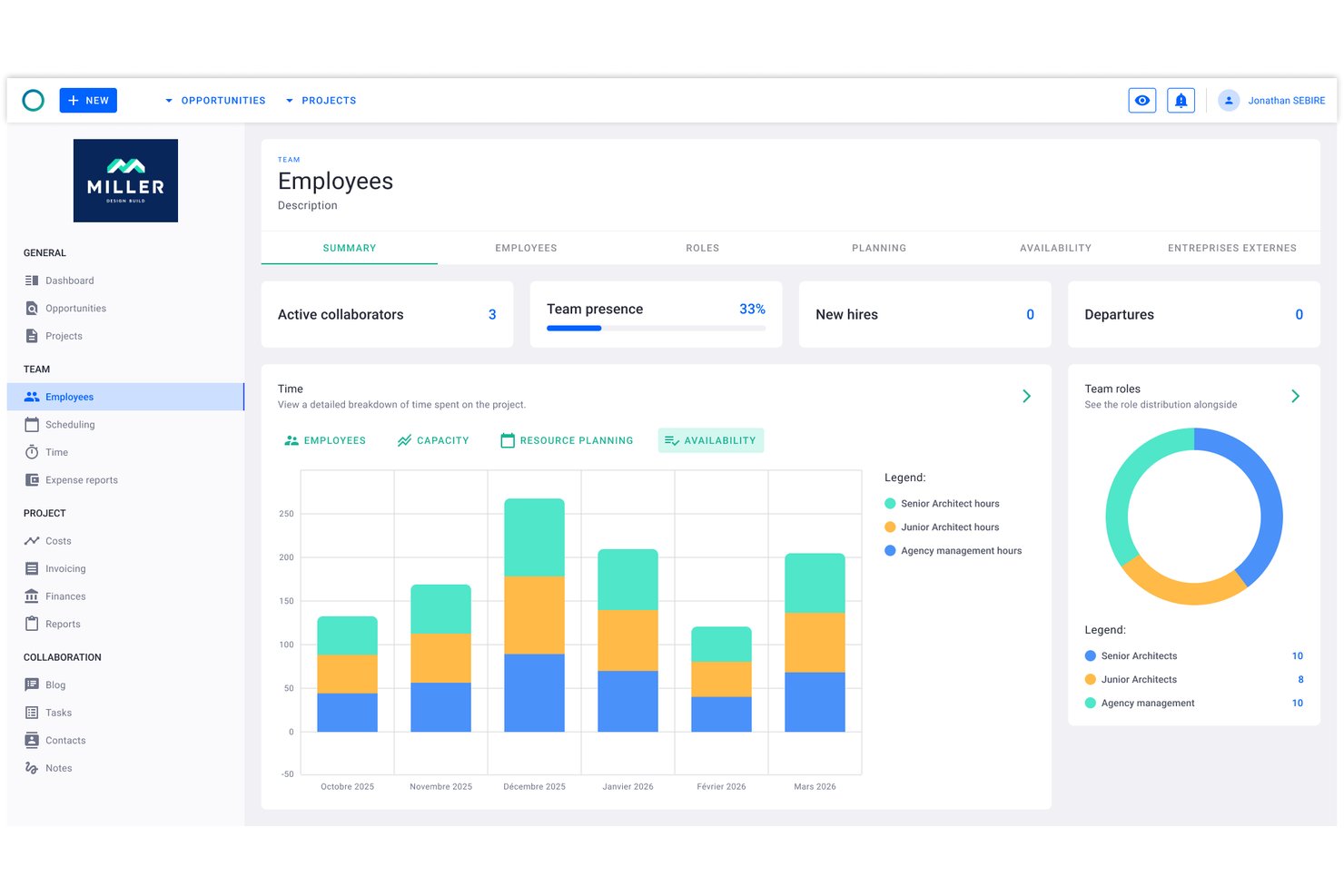
Project Flow by Milient is a project management and time tracking platform built for architecture and engineering firms, combining phase-based project planning, timekeeping, resource management, and invoicing in one system.
Who Is Project Flow by Milient Best For?
Architectural and engineering studios of any size will find it well-suited, particularly those outgrowing spreadsheets and needing connected time, budget, and resource tracking in one place.
Why I Picked Project Flow by Milient
Project Flow by Milient earns its spot on my shortlist because of how tightly it connects phase-level project planning with resource allocation and time tracking. I can break a project into detailed phases, assign team members to each one, and watch hours logged against budgeted time in real time. The live budget vs. actuals dashboard means I'm not waiting until month-end to find out a project has gone over fee.
Project Flow by Milient Key Features
- Resource planning & management: Assign team members to projects and visualize workload across concurrent phases.
- Customizable reporting suite: Generate project hours, utilization, and forecasting reports tailored for architectural practices.
- Integrated invoicing module: Convert tracked time and project data directly into client-ready invoices.
- Mobile time tracking app: Record work hours and manage project tasks from iOS and Android devices.
Project Flow by Milient Integrations
Project Flow by Milient offers native integrations with Xero, QuickBooks, Sage, Visma, Fortnox, Tripletex, and Microsoft Business Central. An API is available for custom integrations.
Pros and Cons
Pros:
- Resource planning synced with project phase timelines
- Invoicing generated directly from tracked project hours
- Phase-level time and budget tracking combined
Cons:
- Mobile app lacks full desktop functionality
- Limited name recognition outside Scandinavian markets

Clockify
Best for billable architect project hours

Clockify is a time tracking software that caters to freelancers, small businesses, and larger organizations. It allows users to track work hours, manage projects, and analyze productivity without any cost barriers.
Why I picked Clockify: I selected Clockify because it provides architects and firm leads with precise control over phase-by-phase project tracking and billable hourly rates. Architectural workflows rely heavily on tracking fixed-fee and hourly milestones across distinct phases like Schematic Design, Construction Documentation, and Contract Administration. Clockify makes it easy to set custom hourly rates per principal, architect, or draftsman, monitor real-time phase burn rates against overall project caps, and export detailed time breakdowns to maintain healthy profit margins.
Standout Features & Integrations
Features include project tracking that allows you to categorize and manage your work efficiently. Customizable reports let you analyze time usage in detail. The tool also provides a time audit feature to ensure accuracy in your logged hours.
Integrations include Trello, Asana, Jira, Monday.com, GitHub, Google Calendar, and Notion.
Pros and Cons
Pros:
- Detailed reporting features
- Budget-friendly
- Allows free time tracking for up to five users
Cons:
- Fewer customization options
- Requires manual entry

TimeCamp
Best for remote teams
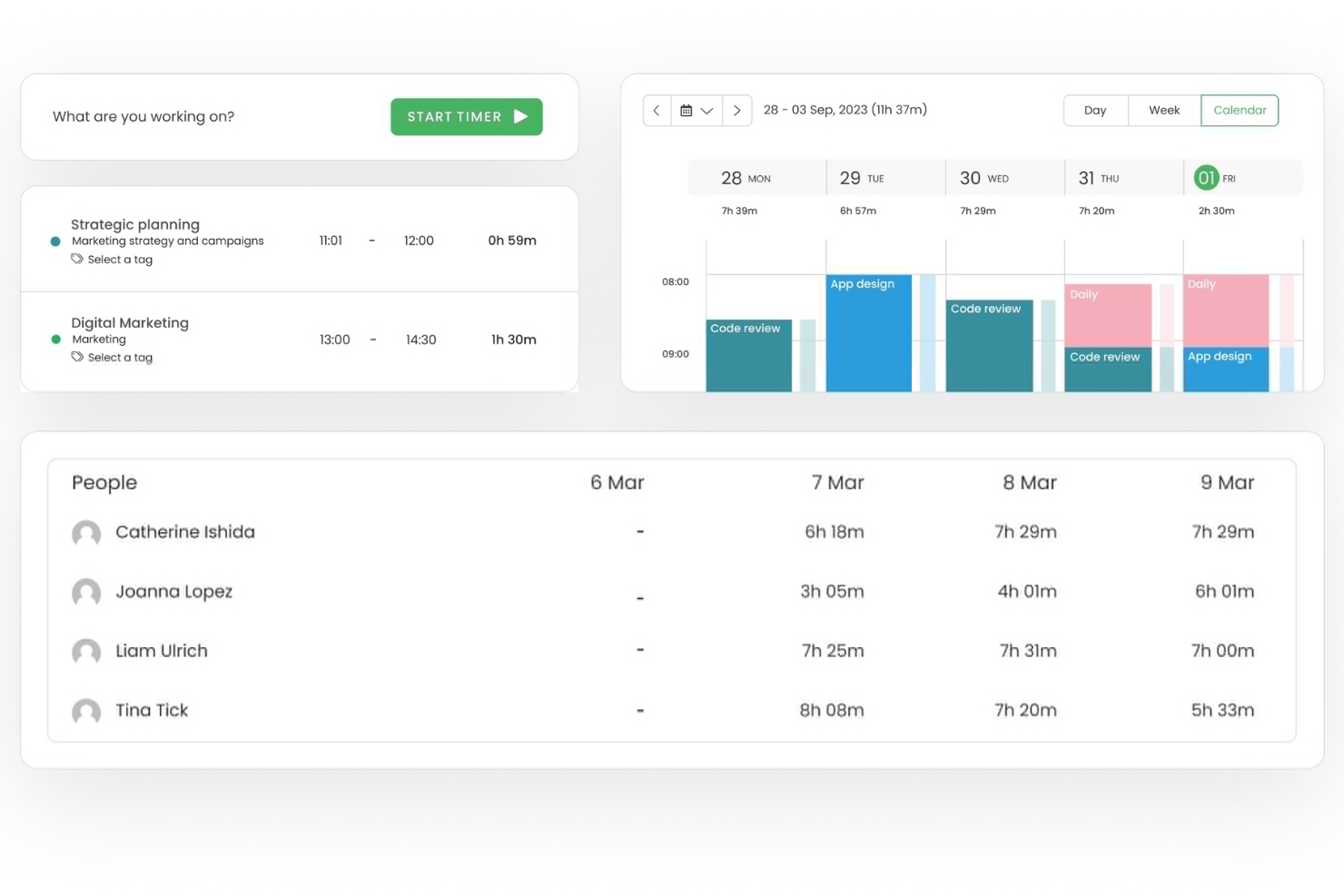
TimeCamp is a time tracking software tailored for remote teams and freelancers. It provides tools for tracking billable hours, managing projects, and generating reports to boost productivity and accountability.
Why I picked TimeCamp: It's ideal for remote teams, offering features that facilitate remote work management and collaboration. Automatic time tracking ensures your team stays productive without constant oversight. You can categorize time entries to track billable and non-billable hours effectively. Its reporting capabilities offer insights into how your team spends their time, helping you make informed decisions.
Standout Features & Integrations
Features include GPS tracking to monitor remote work locations, productivity tracking to assess team performance, and invoicing to streamline client billing. These features help you manage remote teams efficiently and maintain productivity.
Integrations include Trello, Asana, Slack, Jira, monday.com, QuickBooks, Xero, Salesforce, Microsoft Teams, and Google Calendar.
Pros and Cons
Pros:
- GPS location monitoring
- Detailed productivity tracking
- Automatic time tracking
Cons:
- Limited offline functionality
- Limited customization options

Best for budgeting
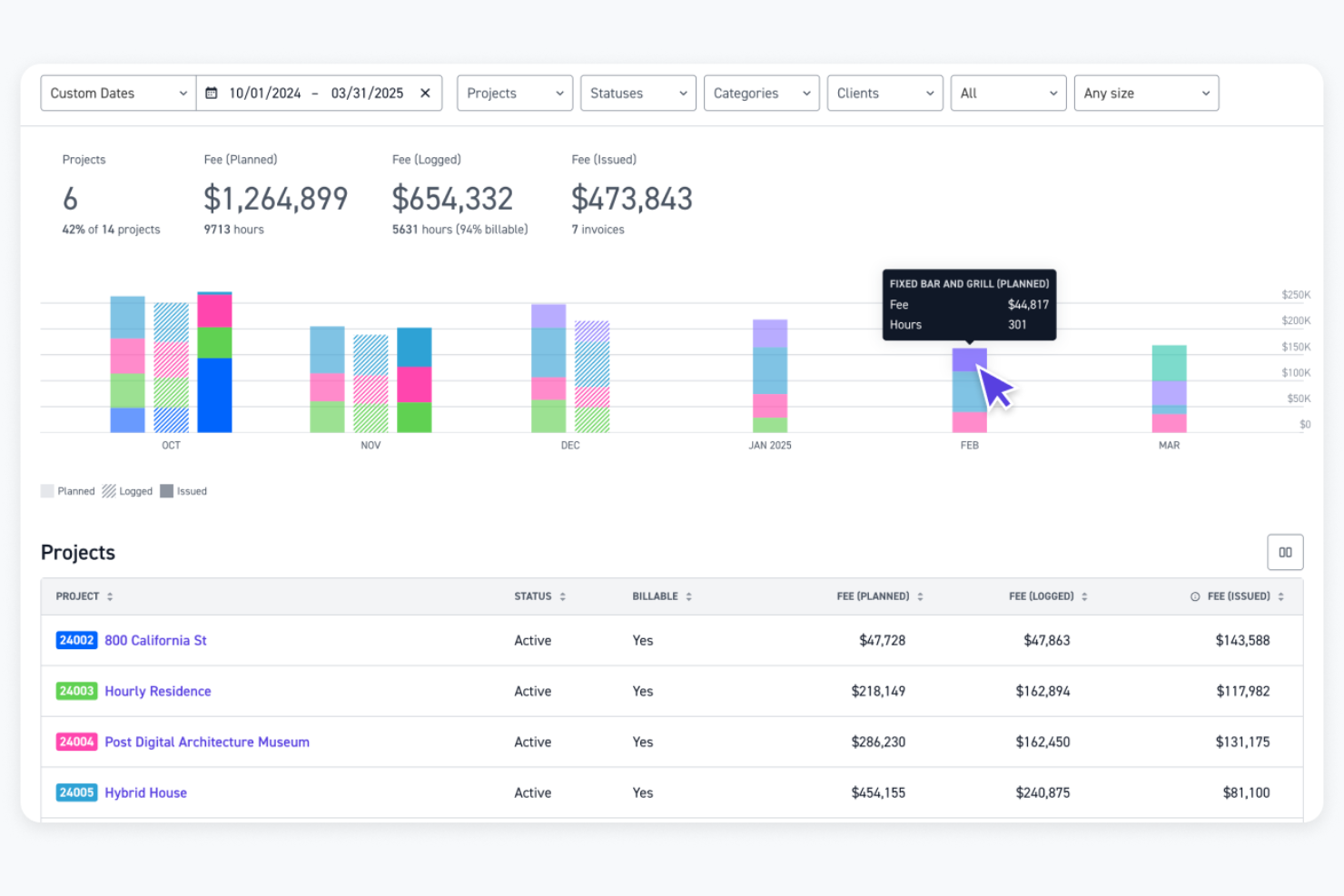
Monograph is a project management software designed specifically for architects and engineers. It helps users with budgeting, staff assignment, project tracking, and accounting.
Why I picked Monograph: It focuses on the needs of architects, offering features like trackable phase budgets and automatic staff assignment to timesheets. This specialization ensures your team can manage projects efficiently. The platform also provides performance forecasting and consultant collaboration, enhancing project outcomes. Its design-centric reports aid in making informed decisions.
Standout Features & Integrations
Features include project tracking for instant visibility, performance forecasting for future planning, and consultant collaboration to manage timelines and deliverables. These tools help you stay on top of your projects and improve overall efficiency.
Integrations include QuickBooks Online, Google Workspace, and Outlook.
Pros and Cons
Pros:
- Includes performance forecasting tools
- Facilitates consultant collaboration
- Intuitive Gantt and visual scheduling
Cons:
- Limited integrations
- Plan options feel expensive for smaller A&E firms

Bonsai
Best for contract work
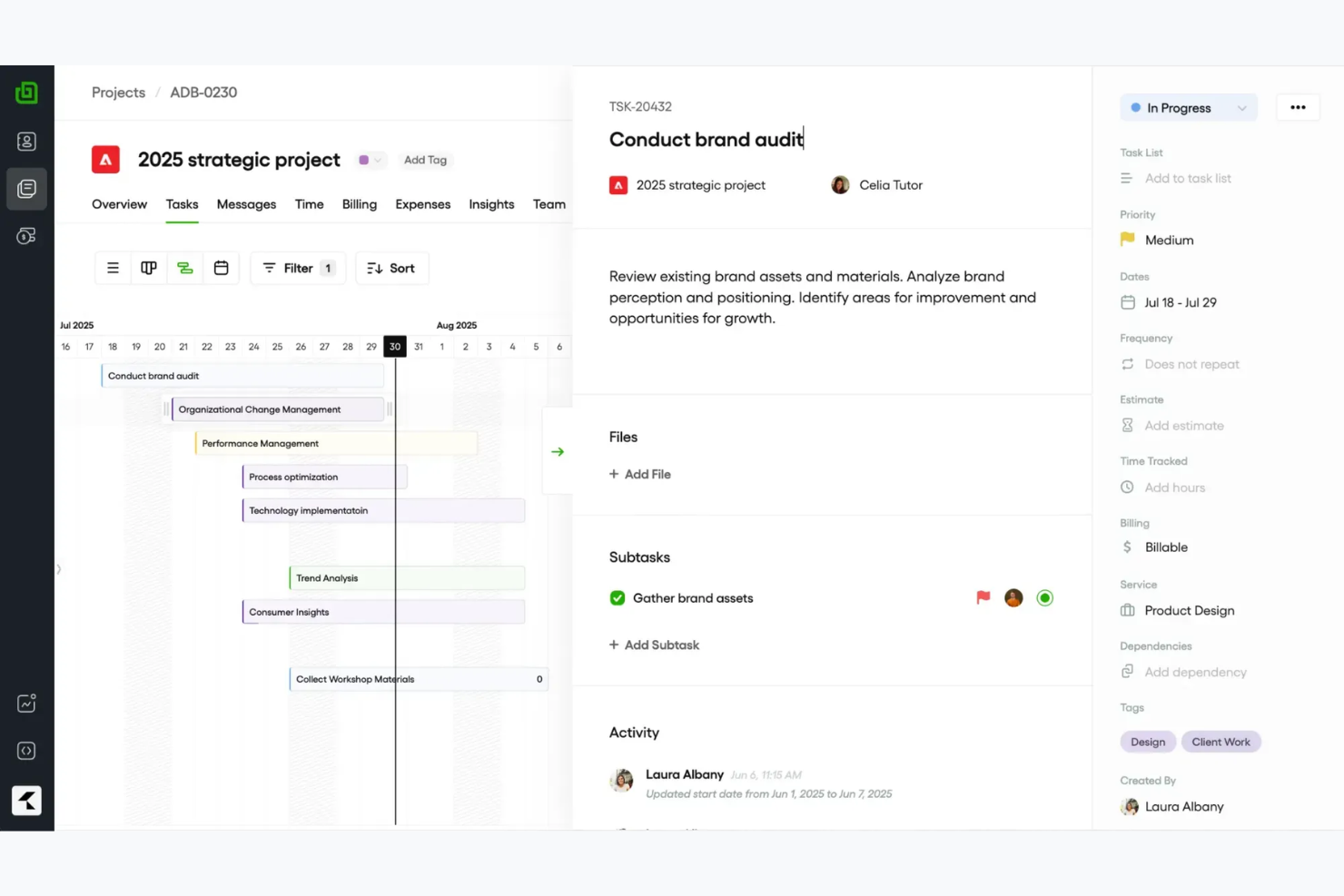
Bonsai is an all-in-one business management software designed for freelancers and small agencies. It offers tools for contract management, invoicing, and time tracking to help users manage their business operations efficiently.
Why I picked Bonsai: It's ideal for contract work, providing features like customizable contract templates and e-signatures. These tools make it easy for you to manage agreements and ensure everything is legally sound. Bonsai also includes time tracking and invoicing capabilities, allowing you to keep track of billable hours and send professional invoices. Additionally, its user-friendly interface simplifies the process of managing multiple projects.
Standout Features & Integrations
Features include customizable proposals to tailor your offerings to clients, automated reminders to ensure timely payments, and a client portal to keep communication organized. These features help you manage your business operations smoothly and maintain strong client relationships.
Integrations include QuickBooks, Xero, Zapier, Calendly, and HiBob.
Pros and Cons
Pros:
- Simplifies project management
- Automated payment reminders
- Strong contract management tools
Cons:
- Limited scalability for large teams
- Basic time-tracking and project reports

Best for payroll

Timesheets.com is a time tracking and payroll management tool designed for small to medium-sized businesses. It helps users track employee hours, manage attendance, and handle payroll tasks efficiently.
Why I picked Timesheets.com: It's especially useful for payroll management, providing features that simplify processing and ensure accuracy. You can track employee hours and manage attendance seamlessly. The tool also offers features to handle overtime calculations, making payroll processing straightforward. Additionally, its reporting capabilities help you gain insights into workforce management.
Standout Features & Integrations
Features include GPS tracking for remote employees, expense tracking to monitor project costs, and detailed reporting for workforce analysis. These features help you manage time and payroll tasks efficiently.
Integrations include QuickBooks, Sage, Paychex, and SurePayroll.
Pros and Cons
Pros:
- Detailed reporting options
- Supports overtime calculations
- Effective payroll management
Cons:
- Lacks advanced features for complex workflows
- Interface can feel dated
Other Time Tracking Software for Architects
Here are some additional time tracking software for architects options that didn’t make it onto my shortlist, but are still worth checking out:
- Deltek Replicon Time
For compliance
- TimeTracker
For small firms
- Houzz Pro
For design projects
- Harvest
For integrations
- Xero
For accounting integration
- Teamhood
For Agile teams
- TimeClick
For desktop tracking
- CMap
For project forecasting


How I Evaluate Time Tracking Software for Architects
I evaluate these tools in two layers: core features like phase-based billing and timesheet approvals that every tool must have, then the differentiators that matter most to architectural studios.
Core Functionality (Table Stakes For This List)
When I'm selecting tools for my list, I rank each one on a scale from 0 (does not offer the functionality) to 5 (excels in this area) for each core functionality listed below. Then, I calculate the tool's total score into a percentage. Each tool needs to achieve a minimum total score of 55% to be considered for inclusion.
- Project & Phase Time Tracking: I check whether hours can be logged against specific project phases like SD, DD, CD, and CA rather than just top-level project names.
- Billable Hours & Rate Configuration: Each tool should let you set different billing rates by role, project, or client so a principal's time bills differently than a junior designer's.
- Timesheet Submission & Approval: I look for structured timesheet workflows where staff submit entries and managers review them before hours flow into billing or payroll.
- Budget & Fee Monitoring: Tracking fee burn against a fixed project budget matters here—I evaluate how clearly each tool shows where a project stands relative to its contracted fee.
- Invoicing & Billing Export: Whether it's a native invoice generator or a sync with QuickBooks or Xero, the tool should move billable time into client invoices without manual re-entry.
- Reporting & Utilization Insights: Good reporting means more than hour totals—I look for views into staff utilization, project profitability, and allocation across active engagements.
Once I have a list of tools that meet this criteria, I consider what sets each platform apart.
Differentiating Factors (What Sets Vendors Apart)
Here's how I compare and contrast different vendors:
Standout Features
Resource forecasting is a big one—I look for visual capacity planning that shows who's available across upcoming projects so principals can staff new work without overloading their team. Mobile time capture also matters because architects split time between the studio, job sites, and client meetings, and offline entry keeps timesheets accurate. I also evaluate whether a tool includes pre-built AIA phase templates, which save setup time on every new project.
Beyond Features
Integration with accounting platforms like QuickBooks, Xero, or Sage Intacct is one of the first things I check, because a tool that can't sync billable hours into your invoicing workflow creates double entry. I also evaluate firm size fit—a five-person studio needs something lean, while a 200-person multi-office practice needs role-based permissions and cost center separation. Compliance with AIA billing formats matters too, especially for firms that submit percent-complete invoices on public or institutional projects.
How to Choose Time Tracking Software for Architects
It’s easy to get bogged down in long feature lists and complex pricing structures. To help you stay focused as you work through your unique software selection process, here’s a checklist of factors to keep in mind:
| Factor | What to Consider |
|---|---|
| Scalability | Can the tool grow with your firm? Consider if it supports additional users and projects as your business expands. Look for flexible plans that cater to growth. |
| Integrations | Does it connect with your current tools? Check if it integrates with software like CAD, project management, and financial apps to reduce manual data entry. |
| Customizability | Can you tailor it to your workflows? Evaluate if the tool allows you to customize reports, dashboards, and settings to fit your specific needs. |
| Ease of use | Is it easy for your team to adopt? Look for an intuitive interface and clear instructions to reduce training time and improve user satisfaction. |
| Implementation and onboarding | How quickly can you get started? Assess the availability of training materials, setup assistance, and support to ensure a smooth transition. |
| Cost | Does it fit your budget? Compare pricing plans and consider hidden costs like upgrades or add-ons that could affect your overall expenditure. |
| Security safeguards | Is your data protected? Ensure the tool has encryption, regular backups, and access controls to safeguard sensitive information. |
| Compliance requirements | Does it meet industry standards? Verify if the software complies with relevant regulations, especially if you operate in regions with strict data laws. |
What Is Time Tracking Software?
Time tracking software is a tool that helps manage and record the time spent on various projects. Architects, designers, and project managers generally use these tools to keep track of billable hours, manage project budgets, and ensure efficient resource allocation. Features like project tracking, timesheet generation, and budget monitoring help with accurate time logging and financial management. Overall, these tools provide valuable insights that help improve project efficiency and profitability.
Features
When selecting time tracking software for architects, keep an eye out for the following key features:
- Project tracking: Allows you to monitor the progress of each project, ensuring deadlines and budgets are met.
- Timesheet generation: Automatically compiles hours worked into comprehensive timesheets for easy payroll and billing.
- Budget monitoring: Helps you keep track of project expenses and stay within budget, preventing overspending.
- Customizable reporting: Provides detailed insights into time usage and productivity, tailored to your specific needs.
- Integration capabilities: Connects with other tools like CAD software and project management apps to streamline workflows.
- GPS tracking: Allows you to track remote work locations, ensuring transparency and accountability.
- Client communication tools: Facilitates collaboration and keeps clients informed about project progress and updates.
- Expense tracking: Monitors project-related costs and simplifies the invoicing process.
- Invoicing capabilities: Generates professional invoices based on tracked hours and expenses, speeding up payment processes.
- Security safeguards: Protects sensitive data with encryption and access controls, ensuring compliance with industry standards.
Benefits
Implementing time tracking software for architects provides several benefits for your team and your business. Here are a few you can look forward to:
- Improved project management: By tracking time and budgets, you can ensure projects stay on schedule and within financial limits.
- Increased productivity: With detailed reports on time usage, you can identify inefficiencies and optimize your team's workflow.
- Accurate billing: Automatically generated timesheets and invoices ensure clients are billed correctly for the hours worked.
- Enhanced client communication: Tools that facilitate updates and collaboration keep your clients informed and satisfied.
- Cost control: Monitoring expenses helps prevent overspending and keeps your projects profitable.
- Data security: With encryption and access controls, your sensitive project data stays protected and compliant with industry standards.
- Easy integration: Connecting with existing tools streamlines your processes and reduces manual data entry.
Costs and Pricing of Time Tracking Software for Architects
Selecting time tracking software for architects requires an understanding of the various pricing models and plans available. Costs vary based on features, team size, add-ons, and more. The table below summarizes common plans, their average prices, and typical features included in time tracking software for architects solutions:
Plan Comparison Table for Time Tracking Software
| Plan Type | Average Price | Common Features |
|---|---|---|
| Free Plan | $0 | Basic time tracking, limited reporting, and essential integrations. |
| Personal Plan | $5-$15/user/month | Time tracking, project management, invoicing, and basic reporting. |
| Business Plan | $20-$40/user/month | Advanced reporting, budget tracking, expense management, and enhanced integrations. |
| Enterprise Plan | $50-$100/user/month | Customizable features, dedicated support, advanced security, and comprehensive analytics. |
Time Tracking Software for Architects FAQs
Here are some answers to common questions about time tracking software for architects:
Is it difficult to implement time tracking software?
No, most time tracking software for architects is designed to be user-friendly with straightforward implementation. Look for tools that offer training resources, tutorials, and customer support to help your team get up to speed quickly. A smooth onboarding process can minimize disruptions and ensure your team is comfortable using the new tool.
Can time tracking software integrate with other tools?
Yes, many time tracking solutions offer integrations with popular tools for project management, accounting, and communication. Before selecting software, check if it integrates with the tools you already use, like CAD software or accounting platforms, to improve your processes and reduce manual data entry.
How secure is time tracking software?
Time tracking software for architects typically includes security measures like encryption and access controls to protect your data. When evaluating options, inquire about the provider’s security protocols and compliance with industry standards. Choosing a tool with advanced security features ensures your sensitive information remains safe.
What’s Next:
If you're in the process of researching time tracking software for architects, connect with a SoftwareSelect advisor for free recommendations.
You fill out a form and have a quick chat where they get into the specifics of your needs. Then you'll get a shortlist of software to review. They'll even support you through the entire buying process, including price negotiations.