

10 Best AI Project Risk Management Software Reviewed in 2026

Best AI Project Risk Management Software Shortlist


Keeping projects on track often means anticipating potential issues before they arise. Between shifting deadlines, limited resources, and changing priorities, risks can pile up quickly.
That's where AI project risk management software comes in. These tools use AI to predict risks, helping you make informed decisions and keep projects on track. In my experience, AI features like predictive analytics and automated alerts can save you time and reduce the stress of risk management.
Throughout this article, I'll share my unbiased insights on the best AI project risk management solutions available. I'll highlight their unique AI capabilities and how they can benefit your team. Let's dive in and find the right tool for you.
Why Trust Our Software Recommendations
Our team has been testing and reviewing software since 2012. As project managers ourselves, we know how difficult—and important—it is to choose the right software.
For this guide, we evaluated tools using hands-on testing and independent research, scoring tools using our selection criteria. We also draw on insights from industry thought leaders and practicing project management experts.
Our reviews reflect our human editorial judgment, not a sales pitch.
Expert reviewers:
AI Project Risk Management Software Comparison Table
This comparison table summarizes pricing details for my top AI project risk management software selections.
| Tool | Best For | Trial Info | Price | ||
|---|---|---|---|---|---|
| 1 | Best for portfolio-level risk insights | Free plan available | From $9/user/month (billed annually) | Website | |
| 2 | Best for AI features at no extra cost | 14-day free trial | From $10/user/month (billed annually) | Website | |
| 3 | Best for task and timeline visibility | 30-day free trial | From $10/user/month (billed annually) | Website | |
| 4 | Best for team collaboration | 14-day free trial + free demo available | From $45/month (billed annually) | Website | |
| 5 | Best for enterprise scalability | Free trial available | Pricing upon request | Website | |
| 6 | Best for healthcare risk management | Free demo available | From $25/user/month (billed annually, min 5 seats) | Website | |
| 7 | Best for AI-driven resource planning | 14-day free trial | Pricing upon request | Website | |
| 8 | Best for construction projects | Free demo available | Pricing upon request | Website | |
| 9 | Best for risk identification tools | 30-day free trial | From $8.25/month | Website | |
| 10 | Best for compliance tracking | Not available | Pricing upon request | Website |


Best AI Project Risk Management Software Review
Below are my detailed summaries of the best AI project risk management software that made it onto my shortlist. My reviews offer a detailed look at the key features, pros & cons, integrations, and ideal use cases of each tool to help you find the best one for you.

Best for portfolio-level risk insights
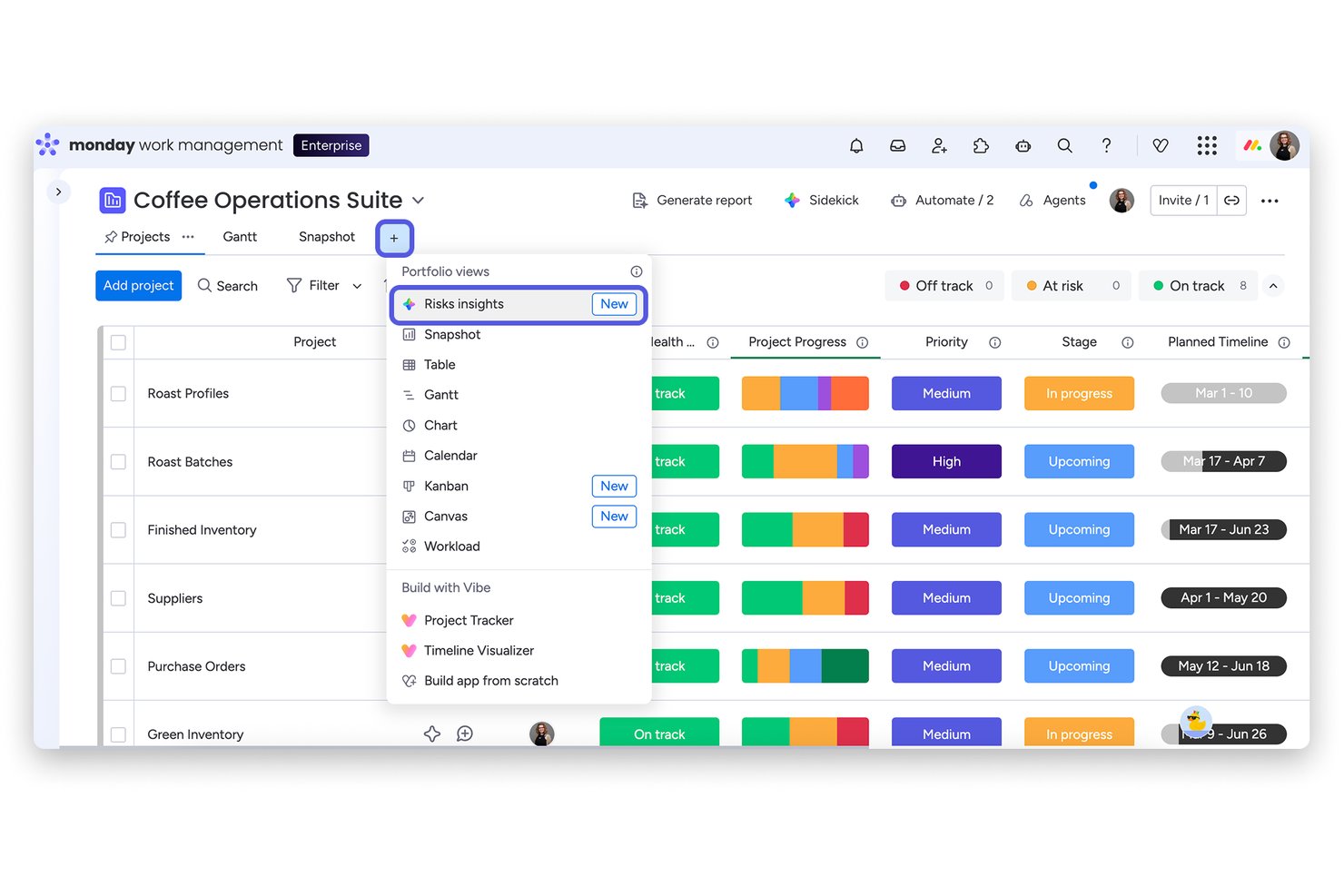
monday AI Workspace is an AI-powered work management platform that scans project boards, flags risks by severity, and monitors portfolio health across all active initiatives in a single view.
Who Is monday AI Workspace Best For?
It's a strong fit for PMO directors and portfolio managers at mid-to-large organizations running multiple concurrent projects who need centralized, AI-driven risk visibility.
Why I Picked monday AI Workspace
monday AI Workspace earns its spot on my shortlist because of how it handles risk at the portfolio level. I love that the Portfolio Risk Insights view scans every linked project board daily, reviewing item names, column values, updates, and activity logs to generate a severity-ranked risk list. In practice, that means I can see at a glance which projects need immediate attention, then notify the project owner with one click using an AI-generated summary that already links the relevant tasks.
monday AI Workspace Key Features
- AI-powered workflow automation: Lets you create smart automations to handle recurring project risk tasks and notifications.
- Customizable risk dashboards: Build tailored dashboards that visualize risk data, AI insights, and project metrics side by side.
- Multi-source project integration: Connects with Jira, Salesforce, Slack, and more to ingest project signals for centralized risk tracking.
- AI sidekick productivity assistant: Use the AI sidekick to draft project briefs, rewrite status updates, and convert meeting notes into task lists.
monday AI Workspace Integrations
monday AI Workspace offers over 200 native integrations, including Jira, Salesforce, Slack, HubSpot, Google Workspace, Microsoft Teams, GitHub, Zoom, Dropbox, Trello, and connects with Zapier. An API is available for custom integrations.
Pros and Cons
Pros:
- Customizable risk dashboards for reporting
- AI auto-summarizes and classifies risks daily
- Portfolio-level risk visualization for all projects
Cons:
- Lacks contract and document risk extraction
- No Monte Carlo or advanced scenario simulation
New Product Updates from monday AI Workspace
monday AI Workspace Adds Human Approval Routing
monday AI Workspace adds a human-in-the-loop approval block to AI Workflows, sending approval requests and routing workflow paths based on responses. For more information, visit monday AI Workspace's official site.

Wrike
Best for AI features at no extra cost

Wrike is an AI-driven work management software designed for teams of all sizes, focusing on enhancing productivity and collaboration. It offers key functionalities such as task management, visual tools, and analytics, all powered by AI to aid in efficient project handling.
Why I picked Wrike: Wrike includes AI features like Wrike Copilot and AI Agents, which automate workflows and provide personalized support. These AI capabilities come at no extra cost, differentiating Wrike from others. The platform allows you to customize AI agents, which can be integrated into your processes to improve outcomes. With its focus on providing AI-driven productivity enhancements, Wrike offers value without additional expenses.
Standout Features & Integrations:
Features include customizable dashboards that let you organize your workspace, time tracking to monitor your team’s productivity, and resource management tools to allocate tasks efficiently. The request forms simplify task initiation and ensure that all necessary details are captured. Real-time editing and notifications keep your team informed and engaged.
Integrations include Salesforce, Microsoft Teams, Slack, Google Workspace, Dropbox, Microsoft OneDrive, Box, GitHub, Adobe Creative Cloud, and Jira.
Pros and Cons
Pros:
- Advanced analytics for decision-making
- Customizable workflows for different teams
- AI tools are included at no extra cost
Cons:
- Limited offline access functionality
- Complexity may require a learning curve
New Product Updates from Wrike

Wrike Adds Quick Search to Table View
Wrike adds Quick Search to Table View with full-table search across titles, descriptions, and fields, plus highlighted matches. This helps users find tasks faster in large tables. For more information, visit Wrike’s official site.

Best for task and timeline visibility

Microsoft Project is a planning and collaboration tool designed to help teams break down work, assign responsibilities, and monitor progress across tasks. It supports structured task schedules, dependencies, and visualization of timelines to clarify how pieces of a project fit together.
Why I picked Microsoft Project: You’ll find that it gives your team a clear line of sight into what tasks are due when and how they relate to each other. It supports features like task dependencies, milestone markers, and workload balancing to help you keep projects on track. The timeline (Gantt) view gives you a visual map of all tasks across time so you can see where overlaps or gaps might occur. Because you can spot sequencing issues and overallocations early, you can prevent conflicts before they materialize.
Standout Features & Integrations:
Features include baseline setting so you can compare planned versus actual, resource leveling to balance how your team is assigned, and critical path highlighting to show which tasks drive your schedule. Its AI features include predictive scheduling and resource management, which adapt to changes in project timelines. These help you keep your timeline visible and manageable.
Integrations include Microsoft Teams, SharePoint, Power BI, OneDrive, Outlook, Azure DevOps, Planner, Project Server, and Excel.
Pros and Cons
Pros:
- Resource leveling avoids overloads
- Baseline comparisons across project phases
- Clear task dependency visualizations
Cons:
- May feel rigid for iterative projects
- Limited flexibility outside the timeline view

ProofHub
Best for team collaboration

ProofHub is a project management and collaboration tool designed for teams across various industries. It serves project managers and team members by providing tools for task management, communication, and file sharing.
Why I picked ProofHub: It performs exceptionally well in team collaboration with features like discussions and chat that keep your team connected. The tool offers task management and Kanban boards, allowing you to organize and prioritize work efficiently. With its file-sharing capabilities, your team can easily store and access documents. This makes it ideal for teams looking to enhance their collaboration and communication.
Standout Features & Integrations:
Features include a built-in chat tool that facilitates instant communication among team members. The online proofing feature lets you review and approve designs quickly. You can also use the time tracking feature to monitor the time spent on tasks, helping manage workloads effectively.
Integrations include Google Drive, Dropbox, Box, OneDrive, FreshBooks, QuickBooks, iCal, Outlook, and Slack.
Pros and Cons
Pros:
- Centralized file storage
- Flexible Kanban boards
- Strong focus on team collaboration
Cons:
- Limited customization options
- Basic reporting capabilities


Digital.ai is an enterprise-focused project management and risk management platform tailored for large organizations needing to manage complex projects and risks. It serves IT departments, project managers, and business leaders by providing AI-powered analytics and extensive tools for planning, execution, and risk mitigation.
Why I picked Digital.ai: It stands out in enterprise scalability, allowing your team to handle large-scale projects with ease. The platform’s AI-driven analytics help you anticipate delivery challenges. You can customize workflows to fit your organization's processes, ensuring flexibility and adaptability. This makes it ideal for enterprises needing a scalable and adaptable solution.
Standout Features & Integrations:
Features include advanced analytics that provide deep insights into project data. Customizable workflows let you tailor the platform to your specific needs. The software also offers reporting tools that help you track project progress and risks effectively.
Integrations include Jira, ServiceNow, SAP, Salesforce, Microsoft Azure, AWS, GitHub, Bitbucket, Jenkins, and Docker.
Pros and Cons
Pros:
- Detailed reporting for project tracking
- Automation features enhance workflow efficiency
- AI-driven analytics for software delivery
Cons:
- Requires technical expertise for customization
- Complicated integration with legacy systems


Riskonnect is a risk management software tailored for healthcare organizations looking to manage risks and ensure patient safety. It serves healthcare administrators and risk managers by providing tools to track and mitigate risks associated with patient care and compliance.
Why I picked Riskonnect: It offers specialized features for healthcare risk management, enabling your team to track patient safety incidents and compliance issues effectively. The software includes incident reporting and analytics that help you identify trends and prevent future occurrences. Risk assessments and mitigation plans are easily managed, ensuring your organization meets industry standards. This focus on healthcare makes it an ideal choice for teams in the medical field.
Standout Features & Integrations:
Features include a centralized incident management system that captures and analyzes safety incidents. The software provides proactive analytics tools to identify risk trends and drive improvements. Customizable dashboards allow you to view key risk metrics and track your organization’s performance in real-time.
Integrations include Salesforce, Microsoft Dynamics, Oracle, SAP, Workday, IBM Watson, Tableau, Power BI, NetSuite, and Zendesk.
Pros and Cons
Pros:
- Focus on patient safety
- Predictive analytics for proactive risk management
- Specialized for the healthcare industry
Cons:
- Limited non-healthcare functionality
- High implementation effort


Forecast.app is a project management platform aimed at businesses seeking efficient resource planning and task management. Its AI capabilities help teams optimize resource allocation and predict project timelines.
Why I picked Forecast.app: Forecast.app is particularly effective in AI-driven resource planning, making it ideal for teams that need precise resource management. Its AI engine predicts project delivery dates and suggests optimal resource allocation. These features enhance your team's efficiency by minimizing resource waste and improving project timelines. The platform's AI capabilities help automate much of the planning process, aligning with its USP.
Standout features & integrations:
Features include project timeline visualization, data-driven decisions, task prioritization, and budget tracking. These tools help you keep projects on schedule and within budget. Forecast.app also offers real-time analytics to give you insights into project performance.
Integrations include Jira, Salesforce, Slack, Google Workspace, Microsoft Teams, QuickBooks, HubSpot, Xero, GitHub, and Trello.
Pros and Cons
Pros:
- Efficient task prioritization features
- Real-time analytics for project insights
- AI-driven resource allocation suggestions
Cons:
- Limited customization options for reports
- Steeper learning curve for new users


ALICE is a construction risk management tool designed for construction companies and project managers who need to optimize project schedules and manage risks. It helps in planning, scheduling, and simulating construction projects to improve efficiency and reduce delays.
Why I picked ALICE: It specializes in construction projects with its ability to simulate different project scenarios and optimize schedules. Your team can use its simulation features to test various project plans and identify potential risks before they occur. ALICE provides AI-driven tools like ALICE Plan, ALICE Optimize, and ALICE Model to enhance project visualization and scheduling. Its detailed scheduling tools allow you to adjust timelines and resources dynamically. This makes it particularly useful for construction projects where time and resource management are key.
Standout Features & Integrations:
Features include advanced simulation capabilities that let you explore different project scenarios. The tool's dynamic scheduling helps you adapt to changes quickly and efficiently. It also offers resource optimization features to ensure that your project stays on track and within budget.
Integrations include Procore, Autodesk BIM 360, Oracle Primavera, Microsoft Project, PlanGrid, Bluebeam, Aconex, P6, Revit, and Navisworks.
Pros and Cons
Pros:
- Dynamic scheduling tools
- Advanced project simulation
- Specialized for the construction industry
Cons:
- Limited functionality outside construction
- It may be overwhelming for small teams

Best for risk identification tools

RAIDLOG is an AI-driven project management tool focused on improving project risk management for project managers. It offers key functionalities such as an AI-powered risk register and decision-making support to enhance project outcomes.
Why I picked RAIDLOG: RAIDLOG shows impressive results with its AI-driven risk identification tools, making it perfect for teams needing detailed risk assessments. Its AI-powered risk register helps categorize and respond to risks effectively. The platform provides risk heat maps and action item tracking for more informed decision-making. RAIDLOG's focus on collaboration and communication aids in keeping projects on track.
Standout features & integrations:
Features include action item tracking, real-world issue resolution, and risk heat maps. These tools help you manage risks effectively and improve project outcomes. RAIDLOG also offers training and certification opportunities to enhance your team's skills.
Integrations include Jira, Trello, Asana, Microsoft Teams, Slack, Google Workspace, monday.com, Basecamp, ClickUp, and Smartsheet.
Pros and Cons
Pros:
- Access to educational resources
- Customizable dashboards for industry needs
- Compliance-focused AI for risk management
Cons:
- Limited offline functionality
- May require time to fully implement


Protecht is a risk management software designed for organizations needing to ensure compliance and manage risks effectively. Its primary users include compliance officers and risk managers who require extensive oversight of risk factors impacting their organizations.
Why I picked Protecht: It offers specialized compliance tracking features that help your team stay aligned with industry regulations. The software provides detailed risk assessments and reporting capabilities to give you a clear view of your compliance status. You can customize risk categories to suit your organization’s specific needs. This focus on compliance tracking sets it apart for teams prioritizing regulatory adherence.
Standout Features & Integrations:
Features include a centralized risk register that consolidates all risk data in one place. Automated risk assessments help you identify and evaluate potential threats. The software also offers detailed reporting tools, making it easier to generate compliance reports and share them with stakeholders.
Integrations include Microsoft Excel, Power BI, SAP, Salesforce, Oracle, Workday, IBM Cognos, Tableau, QuickBooks, and NetSuite.
Pros and Cons
Pros:
- Automated risk assessments
- Customizable risk categories
- Detailed compliance tracking
Cons:
- Minimal customization for dashboards
- Limited mobile functionality
Other AI Project Risk Management Software
Here are some additional AI project risk management software options that didn’t make it onto my shortlist, but are still worth checking out:
- Requs AI Predict Risk Identification
For early risk detection
- Asana
For task management and tracking
- OneTrust
For programmatic enforcement


How I Evaluate AI Project Risk Management Software
I look for tools that go beyond slapping an "AI" label on basic risk registers—they need to surface risks you'd actually miss and predict impacts that change how you plan. My evaluation splits into two layers: the core functionality a tool must have to qualify and the differentiating factors that separate a good option from the best fit for your team.
Core Functionality (Table Stakes For This List)
When I'm selecting tools for my list, I rank each one on a scale from 0 (does not offer the functionality) to 5 (excels in this area) for each core functionality listed below. Then, I calculate the tool's total score into a percentage. Each tool needs to achieve a minimum total score of 65% to be considered for inclusion.
- AI-Driven Risk Identification: I check whether the tool can automatically surface risks from project data rather than relying on manual entry—like flagging resource conflicts buried in a sprint backlog.
- Predictive Risk Analytics: I look for AI models that forecast how a flagged risk will affect cost, schedule, or scope, not just confirm that a risk exists.
- Risk Register & Scoring: The tool should maintain a centralized register where AI assists with scoring and prioritization, so teams aren't manually ranking dozens of risks each week.
- AI Mitigation Recommendations: I evaluate whether the platform suggests actionable response plans based on the specific risk context, like recommending schedule buffers for weather-prone construction phases.
- Real-Time Monitoring & Alerts: Continuous tracking of live project signals matters here—I look for anomaly detection that warns you before a deadline slips, not after.
- Project Management Integration: Tools need to connect with the PM platforms teams already use (Jira, MS Project, Primavera, Smartsheet) to pull in the data that powers risk analysis.
Once I have a list of tools that meet this criteria, I consider what sets each platform apart.
Differentiating Factors (What Sets Vendors Apart)
Here's how I compare and contrast different vendors:
Standout Features
Portfolio-level risk aggregation is a big differentiator for me. Program managers overseeing dozens of projects need to spot systemic risks that don't surface at the individual project level. I also evaluate explainable AI—the tool should show why it flagged a risk and what data drove the score, which matters during steering committee reviews. Natural language querying is another separator, letting you ask "which projects have the highest schedule risk this sprint?" instead of clicking through dashboards.
Beyond Features
Data security and AI governance top my list here. I check whether the vendor clearly states how customer project data is handled in model training and whether tenant isolation is in place. Implementation speed matters too—some tools take months to onboard because the AI needs historical data to calibrate, while others ship with pre-built risk libraries that deliver insights within weeks. I also evaluate scalability, especially for PMOs running hundreds of concurrent projects where per-seat pricing can quietly balloon total cost of ownership.
How to Choose AI Project Risk Management Software
It’s easy to get bogged down in long feature lists and complex pricing structures. To help you stay focused as you work through your unique software selection process, here’s a checklist of factors to keep in mind:
| Factor | What to Consider |
|---|---|
| Scalability | Can the software grow with your team? Consider if it supports increasing project sizes and complexity without compromising performance. |
| Integrations | Does it connect with your existing tools? Check for compatibility with your current software stack to ensure smooth workflows. |
| Customizability | How flexible is the tool? Look for options to tailor workflows, dashboards, and reports to match your specific needs. |
| Ease of Use | Is the interface intuitive? Ensure team members can quickly learn and navigate the software without extensive training. |
| Implementation and Onboarding | How long will it take to get started? Evaluate the resources and time needed for setup and training your team. |
| Cost | Does the pricing fit your budget? Compare the tool's cost against its features and benefits. Watch for hidden fees or required add-ons. |
| Security Safeguards | Is your data secure? Check for encryption, compliance with data protection standards, and regular security updates. |
| Support Availability | Is help readily accessible? Consider the quality and hours of support, and whether there are multiple ways to contact the vendor. |
What Is AI Project Risk Management Software?
AI project risk management software is a tool designed to identify, assess, and mitigate risks in projects using artificial intelligence. Project managers, risk analysts, and team leaders typically use these tools to enhance decision-making and ensure project success.
Automated risk reporting, real-time monitoring, and predictive analytics help with early risk detection and resource allocation. Overall, these tools provide users with the ability to manage project uncertainties more effectively, ensuring smoother project execution.
Features
When selecting AI project risk management software, keep an eye out for the following key features:
- Risk identification: Automatically detect potential risks in projects to address them early.
- Predictive analytics: Use AI to forecast future risks and project outcomes for better planning.
- Real-time monitoring: Keep track of project risks and progress continuously to make timely adjustments.
- Automated reporting: Generate risk reports quickly to share insights with stakeholders and make informed decisions.
- Resource allocation: Efficiently assign resources based on risk assessments to optimize project execution.
- Customizable dashboards: Tailor your view to focus on the most relevant data and metrics for your team.
- Scenario planning: Simulate different project scenarios to prepare for various risk outcomes.
- Integration capabilities: Connect with existing tools and software to unify project management efforts.
- User-friendly interface: Ensure ease of use for team members to improve adoption and productivity.
- Security safeguards: Protect sensitive project data with encryption and compliance with data protection standards.
Benefits
Implementing AI project risk management software provides several benefits for your team and your business. Here are a few you can look forward to:
- Early risk detection: Identify potential project risks before they become issues, allowing for proactive management.
- Improved decision-making: Use predictive analytics to make informed decisions based on data-driven insights.
- Efficient resource use: Allocate resources effectively by understanding risk impacts, optimizing project execution.
- Enhanced collaboration: Share real-time reports and dashboards with stakeholders to keep everyone on the same page.
- Time savings: Automate routine tasks like reporting, freeing up your team to focus on strategic activities.
- Increased project success: Mitigate risks effectively to improve the likelihood of completing projects on time and within budget.
Costs and Pricing
Selecting AI project risk management software requires an understanding of the various pricing models and plans available. Costs vary based on features, team size, add-ons, and more. The table below summarizes common plans, their average prices, and typical features included in AI project risk management software solutions:
Plan Comparison Table for AI Project Risk Management Software
| Plan Type | Average Price | Common Features |
|---|---|---|
| Free Plan | $0 | Basic risk tracking, limited users, and basic reporting |
| Personal Plan | $5-$25/user/month | Risk assessment tools, single user, and basic analytics |
| Business Plan | $30-$75/user/month | Advanced risk management, multiple users, and integration capabilities |
| Enterprise Plan | $80-$150/user/month | Customizable dashboards, dedicated support, and detailed analytics and reporting |
AI Project Risk Management Software FAQs
Here are some answers to common questions about AI project risk management software:
What are the common pitfalls when using AI project risk management software?
Common pitfalls include over-reliance on automated predictions and generative AI while ignoring human insights. Ensure your team understands how to interpret AI-generated data. Regularly update the software to keep up with new risks, maintain data accuracy and prevent disruptions.
How can AI project risk management software improve project outcomes?
This software can improve project outcomes by providing early risk detection, allowing for proactive risk management processes. It helps allocate resources efficiently and supports better decision-making with data-driven insights, ultimately contributing to project success.
Can AI project risk management software integrate with other tools?
Yes, most AI project risk management software can integrate with other tools like project management platforms, communication apps, and data analytics software. This integration helps enhance workflows and ensures a unified approach to managing risk mitigation strategies.
How does AI project risk management software handle data security?
Data security is a priority for these tools. They typically offer encryption for datasets and sensitive information, regulatory compliance with data protection standards, and regular security updates. Always ensure the software you choose meets your organization’s security requirements.
Is training required to use AI project risk management software effectively?
Training is often necessary to use AI-driven risk management tools effectively. Many vendors offer training resources like videos, webinars, and product tours to help your team understand how to leverage the software’s features fully.
What’s Next:
If you're in the process of researching AI project risk management software, connect with a SoftwareSelect advisor for free recommendations.
You fill out a form and have a quick chat where they get into the specifics of your needs. Then you'll get a shortlist of software to review. They'll even support you through the entire buying process, including price negotiations.