

10 Best AI Enterprise Project Management Software Reviewed in 2026

Best AI Enterprise Project Management Software Shortlist


AI project management software helps eliminate miscommunication and reduce overlapping conversations by pointing out risks early, handling routine work, and providing real-time dashboards and status updates so you can track progress and bottlenecks across your projects.
In my experience testing these platforms, I’ve seen how AI features can deliver measurable impact, such as reduced meeting times, fewer manual errors, and faster turnaround on tasks while keeping complex projects on track.
In this list, I break down the tools that stand out, describe their key AI capabilities, integrations, and how they support your workflow, detailing how they can help your team plan with intelligent scheduling, execute with automated task management, and adapt by flagging risk and suggesting adjustments.
Why Trust Our Software Recommendations
Our team has been testing and reviewing software since 2012. As project managers ourselves, we know how difficult—and important—it is to choose the right software.
For this guide, we evaluated tools using hands-on testing and independent research, scoring tools using our selection criteria. We also draw on insights from industry thought leaders and practicing project management experts.
Our reviews reflect our human editorial judgment, not a sales pitch.
Expert reviewers:
AI Enterprise Project Management Software Comparison Table
This comparison table summarizes pricing details for my top AI enterprise project management software selections.
| Tool | Best For | Trial Info | Price | ||
|---|---|---|---|---|---|
| 1 | Best for AI-driven project prioritization | 14-day free trial | From $10/user/month (billed annually) | Website | |
| 2 | Best for customizable project dashboards | 14-day free trial | From $10/user/month (billed annually) | Website | |
| 3 | Best for AI project automation | Free plan available | From $9/user/month (billed annually) | Website | |
| 4 | Best for AI time tracking | Free 14-day trial + free demo available | From $9/user/month (billed annually) | Website | |
| 5 | Best for AI-driven productivity | Free plan available | From $4/user/month (billed annually) | Website | |
| 6 | Best for simple AI task automation | 14-day free trial | From $5/user/month (billed annually) | Website | |
| 7 | Best for AI meeting summaries | Free plan available | From $10.99/user/month (billed annually) | Website | |
| 8 | Best for AI workflow automation | Free demo available | Pricing upon request | Website | |
| 9 | Best for AI-powered scheduling | Free trial available | From $19/user/month (billed annually) | Website | |
| 10 | Best for AI resource planning | Free demo available | From €5/license/month (billed annually) | Website |


Best AI Enterprise Project Management Software Review
Below are my detailed summaries of the best AI enterprise project management software that made it onto my shortlist. My reviews offer a detailed look at the key features, pros & cons, integrations, and ideal use cases of each tool to help you find the best one for you.

Wrike
Best for AI-driven project prioritization
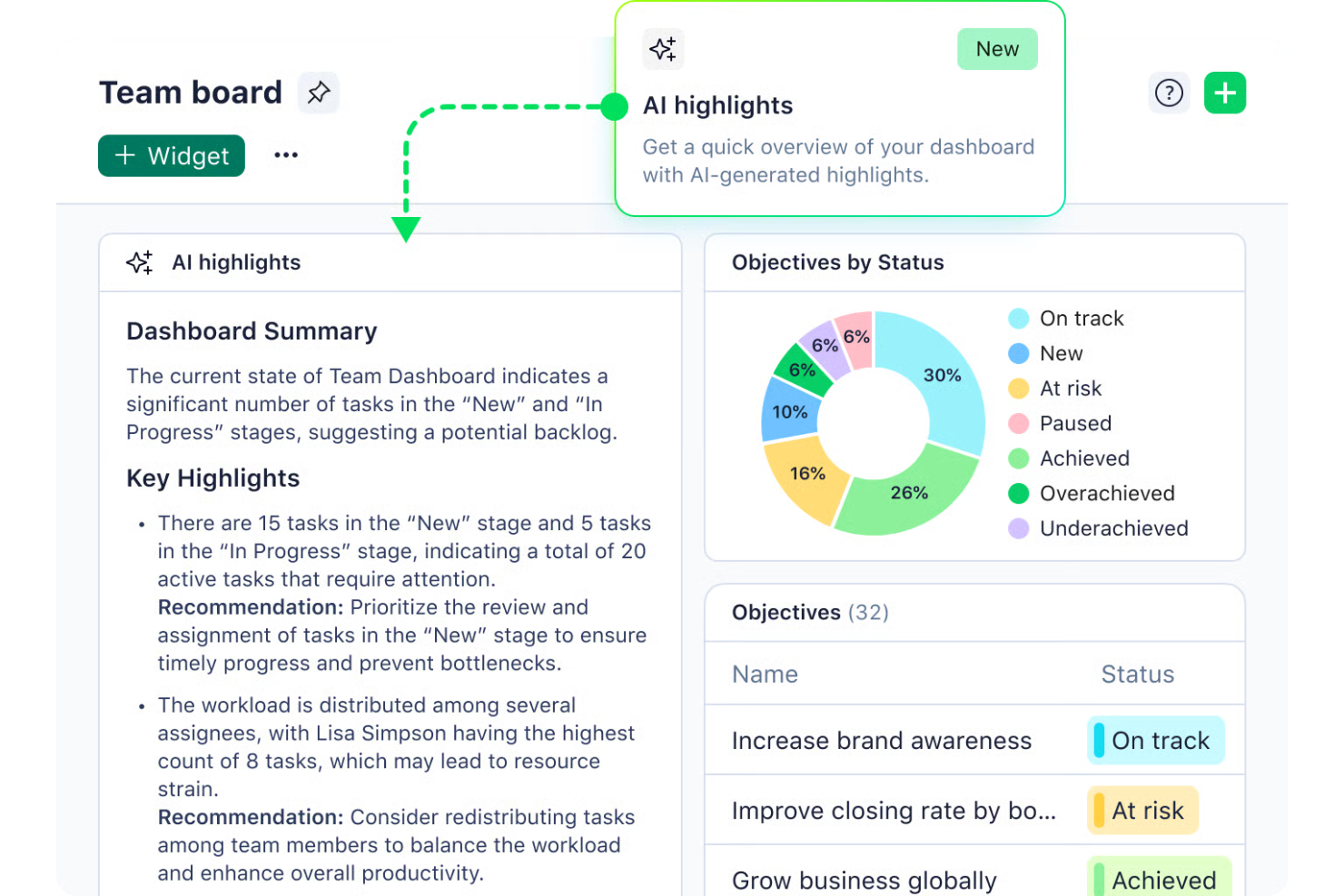
Wrike is an AI-driven project management software designed for businesses seeking to enhance productivity and streamline workflows. This tool is particularly appealing to industries such as marketing, IT, and finance, where managing complex projects and coordinating large teams can be challenging. By leveraging Wrike’s AI capabilities, teams can automate repetitive tasks, prioritize projects, and gain valuable insights, helping them overcome the challenge of juggling numerous responsibilities and deadlines.
Why I Picked Wrike
I picked Wrike for its standout AI capabilities that cater to enterprise project management needs. The Wrike Copilot serves as an AI assistant, aiding your team in prioritizing projects and identifying risks efficiently. Additionally, Wrike’s integration with AI tools like Microsoft Copilot further enhances collaboration and decision-making. These features are particularly beneficial for teams looking to optimize resource allocation and streamline workflows in a fast-paced environment.
Wrike Key Features
In addition to its AI capabilities, Wrike offers a variety of features to support your project management needs.
- Customizable Workflows: Tailor workflows to fit your team’s specific processes and requirements, allowing for seamless task management.
- Project Blueprints: Create reusable templates for recurring projects, ensuring consistency and saving time on project setup.
- In-Platform Communication: Facilitate collaboration directly within the platform to keep all team interactions and updates in one place.
- Time Tracking: Accurately track time spent on tasks for better invoicing and resource management.
Wrike Integrations
Integrations include Microsoft Teams, Slack, Salesforce, Dropbox, Google Drive, Box, GitHub, Adobe Creative Cloud, Microsoft OneDrive, and Jira.
Pros and Cons
Pros:
- Extensive integrations for large organizations
- Highly customizable workflows for teams
- AI supports enterprise project prioritization
Cons:
- Advanced AI features cost more
- Steep learning curve initially
New Product Updates from Wrike

Wrike Adds Quick Search to Table View
Wrike adds Quick Search to Table View with full-table search across titles, descriptions, and fields, plus highlighted matches. This helps users find tasks faster in large tables. For more information, visit Wrike’s official site.

Celoxis
Best for customizable project dashboards
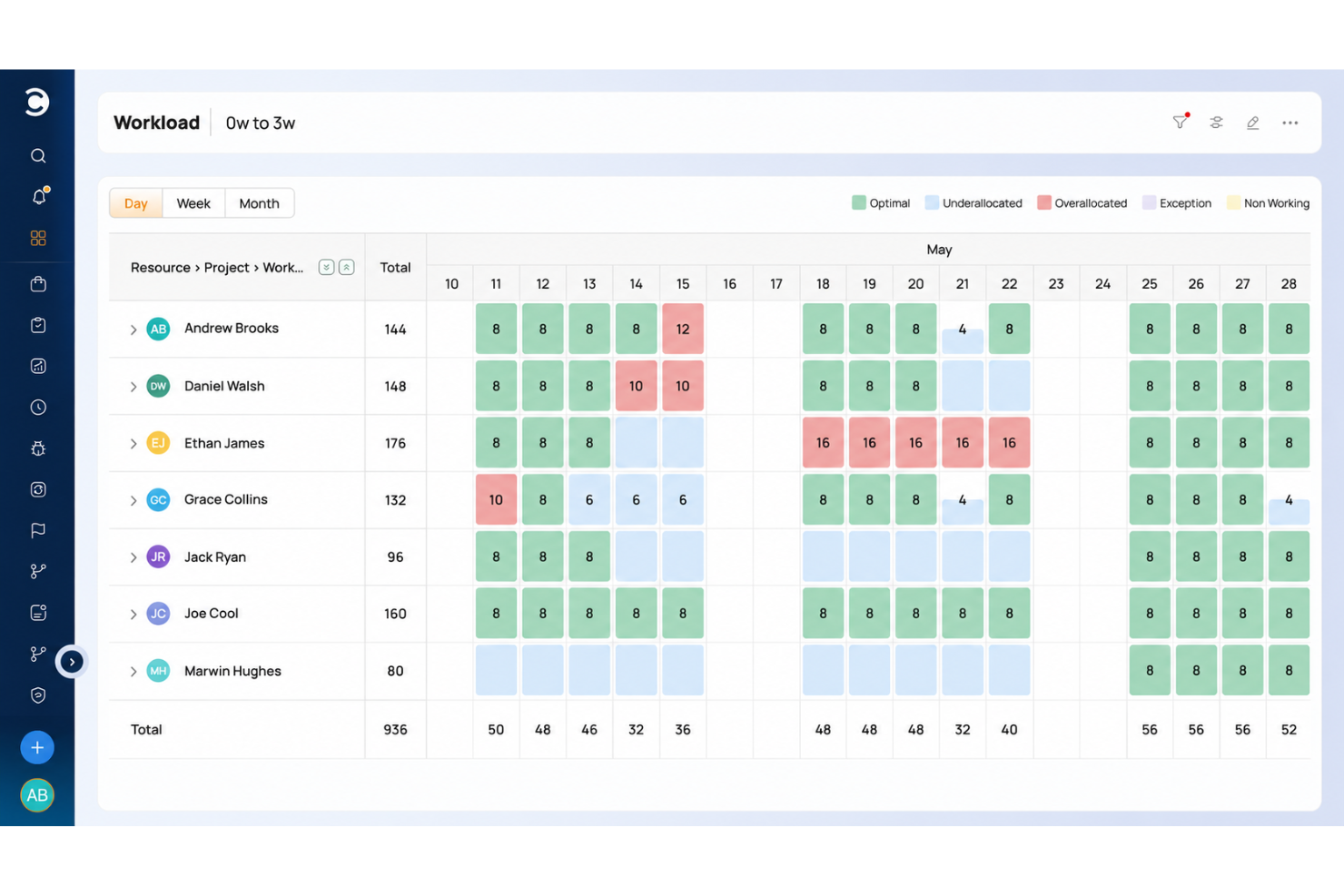
Celoxis is an AI-powered enterprise project management platform that combines portfolio tracking, resource planning, project accounting, risk management, and client collaboration tools in a single system.
Who Is Celoxis Best For?
Celoxis is a strong fit for mid-to-large enterprises managing complex, multi-project environments across teams in IT, professional services, or operations.
Why I Picked Celoxis
I picked Celoxis as one of the best because its dashboard capabilities replace what most teams would turn to a dedicated BI tool for. I love that you can build multiple shared dashboards with customizable widgets, and almost any report can be pinned directly to a dashboard and resized to fit. The custom drill-down charts are especially useful: you can click into a chart and take bulk actions on records without leaving the view.
Celoxis Key Features
- AI assistant (Lex): A built-in AI assistant that analyzes project data in real time, flags risks, and responds to natural language commands.
- Dynamic resource planning: Assign and manage resources across projects with load charts that show availability, allocation, and conflicts by role or person.
- Project accounting: Track budgets, costs, and revenue at the task or project level, with margin and profitability reporting built in.
- Portfolio management: View and manage multiple projects in a single portfolio workspace, with aggregated health indicators and milestone tracking.
Celoxis Integrations
Celoxis offers native integrations with Google Drive, Microsoft Excel, Microsoft Project, Jira, QuickBooks Online, and Salesforce, along with SSO support through Okta, OneLogin, and SAML 2.0. Many additional connections are available through Zapier, and an API is available for custom integrations.
Pros and Cons
Pros:
- Portfolio bubble charts with strategy alignment
- Supports both hourly and fixed-price models
- Built-in BI-grade reporting and analytics
Cons:
- Complex template setup slows onboarding
- Mobile app feels glitchy and limited

Best for AI project automation
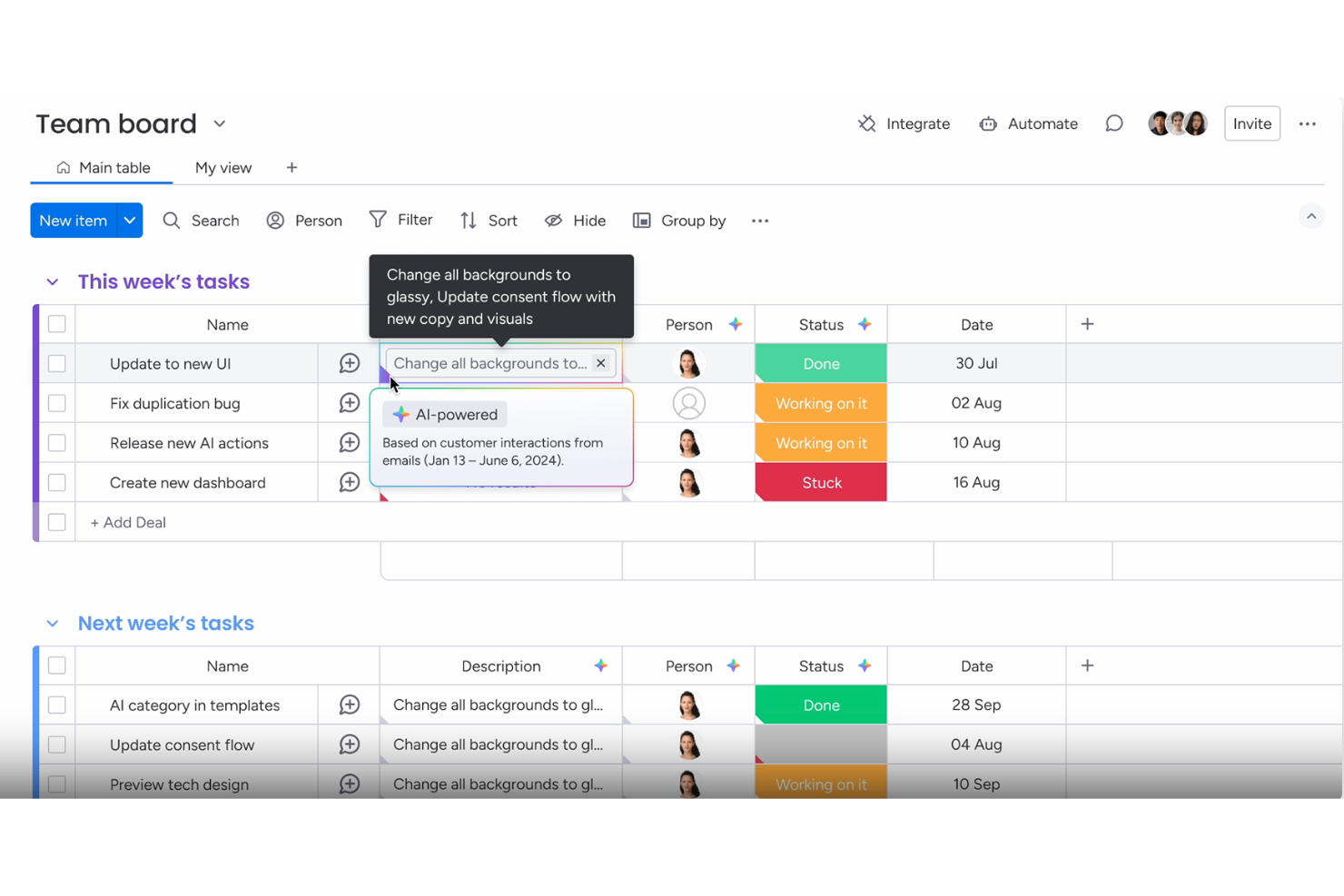
For enterprises seeking an AI project automation solution, monday.com provides a platform that helps teams manage projects, tasks, and resources in a single workspace. The system supports teams across departments such as marketing, IT, and operations, helping them organize work and keep projects moving. With AI-assisted automation, workflow tools, and customizable boards, monday.com helps enterprises coordinate tasks, track progress, and improve collaboration across large teams.
Why I Picked monday.com
I picked monday.com because it supports teams for AI project automation in enterprise project management. The platform helps automate tasks, organize workflows, and manage large projects across teams. Its AI features assist with planning timelines, tracking dependencies, and keeping project work organized, helping teams coordinate tasks and monitor progress. These capabilities help enterprises manage complex projects while maintaining visibility across tasks, resources, and project stages.
monday.com Key Features
In addition to AI project automation, monday.com offers:
- Dashboards: Customize dashboards to gain a real-time overview of project progress and team performance.
- Gantt Charts: Visualize project timelines and dependencies to optimize resource allocation.
- Integrations: Connect seamlessly with over 850 apps to enhance workflow and collaboration.
monday.com Integrations
Integrations include Slack, Google Drive, Trello, Salesforce, Microsoft Teams, Zoom, HubSpot, QuickBooks, Shopify, and Dropbox.
Pros and Cons
Pros:
- Integration options with popular tools improve workflow connectivity
- Automation capabilities help streamline repetitive workflows
- AI features assist with task summaries, automation, and content generation
Cons:
- Pricing may be expensive for small businesses or startups
- Some advanced features are only available on higher-tier plans
New Product Updates from monday AI Workspace
monday AI Workspace Adds Human Approval Routing
monday AI Workspace adds a human-in-the-loop approval block to AI Workflows, sending approval requests and routing workflow paths based on responses. For more information, visit monday AI Workspace's official site.

Timely
Best for AI time tracking

Timely is a time management software that primarily serves freelancers, teams, and businesses aiming to improve productivity and accountability. It offers AI-powered time tracking to automatically record work hours and project time, reducing manual entry and ensuring accuracy.
Why I picked Timely: Timely excels in AI time tracking, providing automatic time capture that saves your team a lot of manual effort. Its AI features include Memory, which logs activity across devices, and smart suggestions to improve time management. The platform also offers real-time project dashboards, giving you an overview of time spent across projects. I’ve seen several teams leverage Timely's AI capabilities to overhaul their manual processes, reducing administrative overhead and winning back time for more meaningful work.
Standout Features & Integrations:
Features include project budgeting to track project budgets and alert you when time logged exceeds projected estimates, team planning tools for resource allocation, and detailed reporting to generate reports that break down time spent per project, identify idle time, and highlight overworked team members.
Integrations include Slack, Asana, Trello, QuickBooks, Zapier, Todoist, Outlook Calendar, Google Calendar, Xero, and Microsoft Teams.
Pros and Cons
Pros:
- Detailed productivity reports
- Real-time project dashboards
- Automatic time tracking feature
Cons:
- It can be complex for new users
- Limited customization options

Taskade
Best for AI-driven productivity
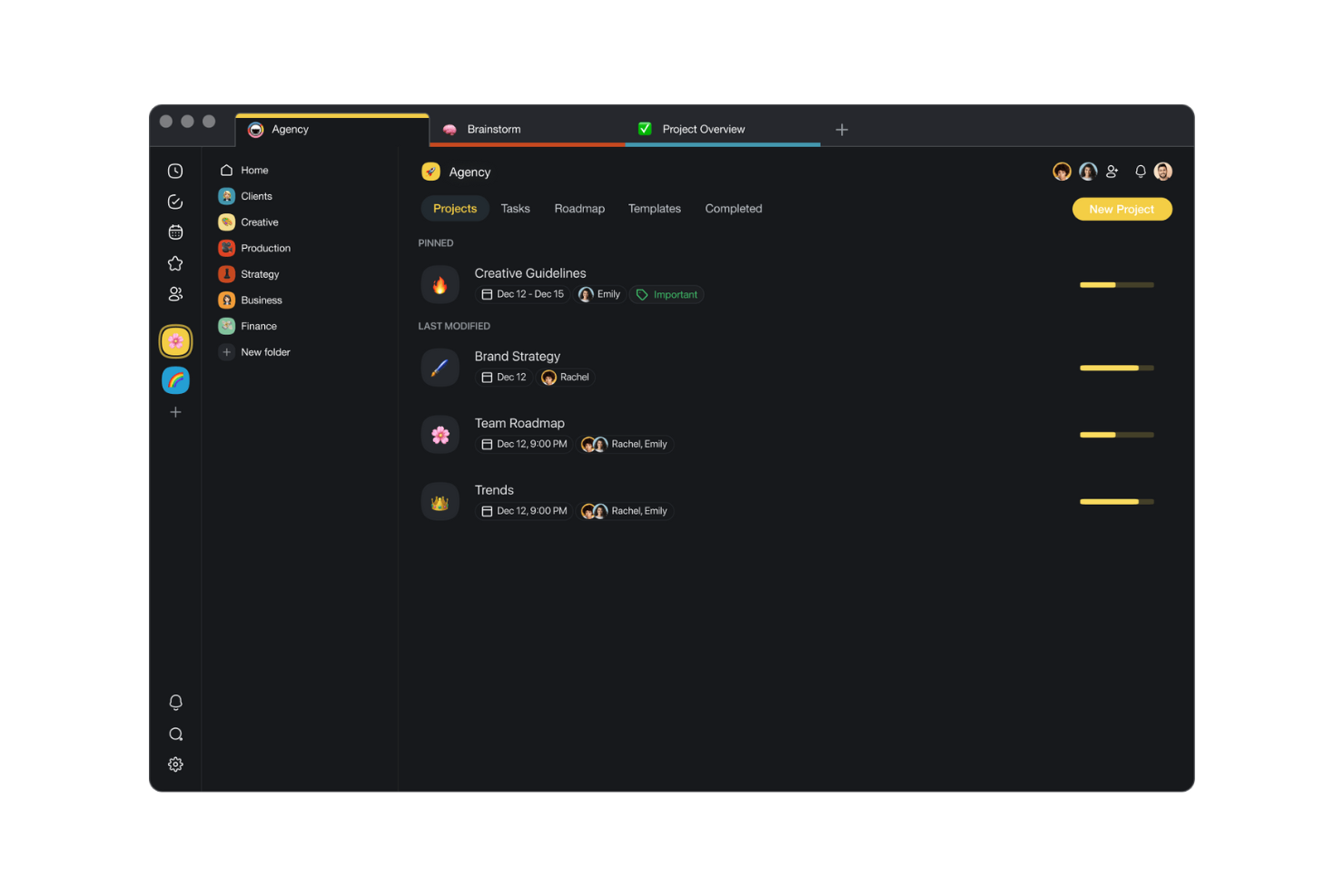
Taskade is a collaborative workspace designed for teams to manage tasks, projects, and workflows. Taskade’s AI Workflow Generator converts plain-English prompts into multi-step automations, including conditional logic, loops, and integrations.
Why I picked Taskade: Taskade stands out with its AI-driven productivity tools that help your team work more efficiently. You can build AI agents to suggest task automations. For example, proactively recommending workflows based on patterns in your projects. The platform also offers real-time collaboration, allowing your team to stay connected and productive.
Taskade’s AI connector supports actions like “Summarize with AI” (to condense long notes) and “Categorize with AI” (to classify inputs by sentiment, intent, or custom schema). I’ve found that Taskade's AI capabilities make it a uniquely valuable tool for teams working on minimizing repeat efforts and repetitive tasks.
Standout Features & Integrations:
Features include real-time editing, which allows your team to collaborate instantly. Task templates help you quickly set up projects without starting from scratch. The mind map view offers a visual representation of your projects, making planning easier.
Integrations include Slack, Google Drive, Dropbox, Zapier, GitHub, Trello, Asana, Microsoft Teams, Zoom, and Evernote.
Pros and Cons
Pros:
- Flexible view options
- Real-time collaboration features
- AI-driven task suggestions
Cons:
- Can be complex for beginners
- Lack of advanced project management

Trello
Best for simple AI task automation
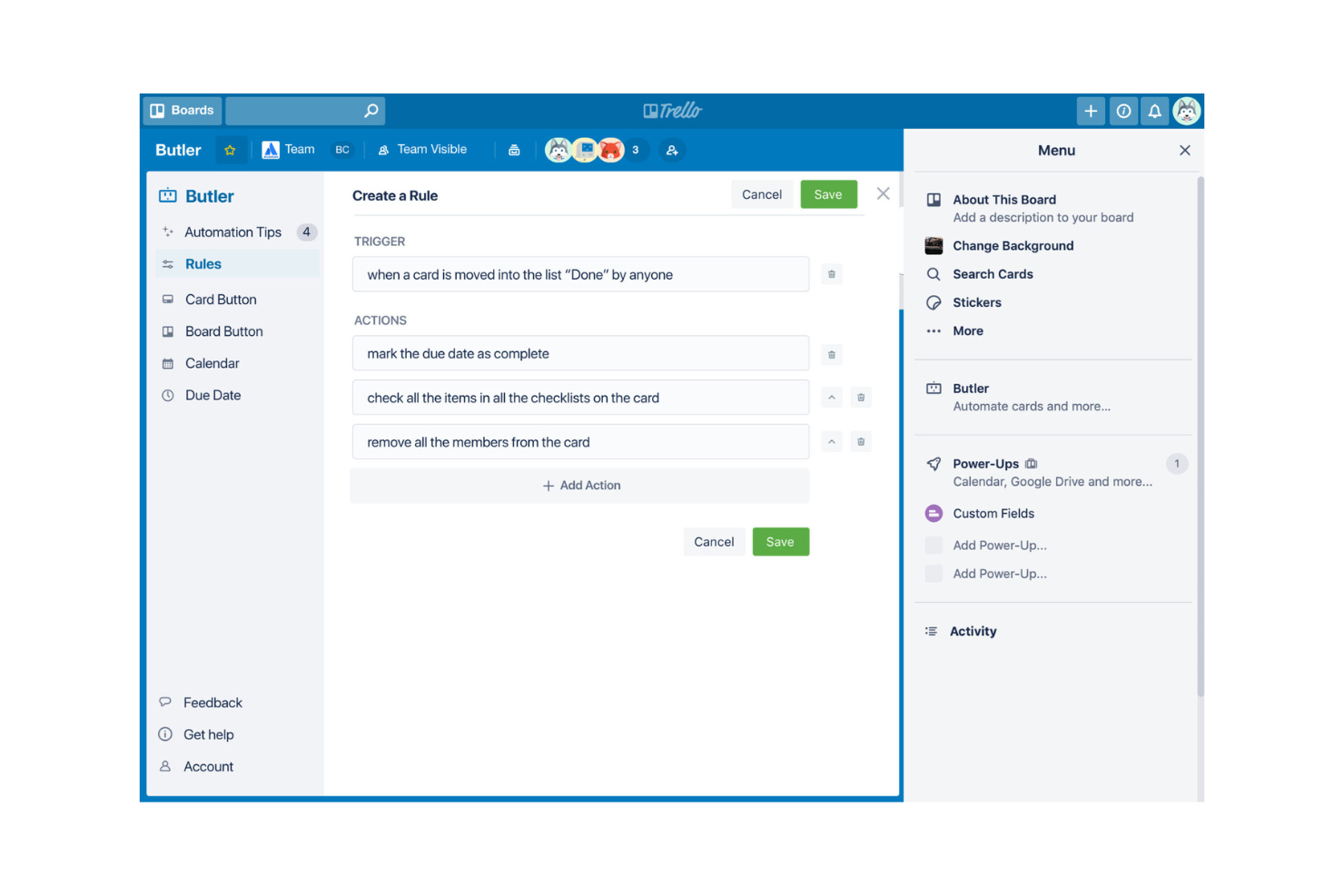
Trello is a visual project management tool that caters to teams seeking straightforward task organization and collaboration. It uses boards, lists, and cards to help teams manage projects and offers simple AI features to enhance task automation.
Why I picked Trello: Trello’s built-in Butler automation lets you define helpful constraints, set scheduled automations, and create custom buttons to trigger multi-step workflows. Butler can automate repetitive tasks like moving cards and setting due dates, plus no-code language makes building automation easy for everyone: you specify triggers (like a due date) and corresponding actions (like moving cards) via simple commands. The level of simplicity and automation that Trello offers makes it a great fit for teams looking to improve their task management efficiency.
Standout Features & Integrations:
Features include customizable boards that adapt to your workflow, card labels and due dates for easy prioritization, and drag-and-drop functionality.
Integrations include Slack, Google Drive, Dropbox, Microsoft Teams, Jira, Evernote, Salesforce, GitHub, Zapier, and Mailchimp.
Pros and Cons
Pros:
- Built-in task automation
- Customizable workflow options
- Easy-to-use interface
Cons:
- Basic reporting capabilities
- Limited advanced features

Asana
Best for AI meeting summaries
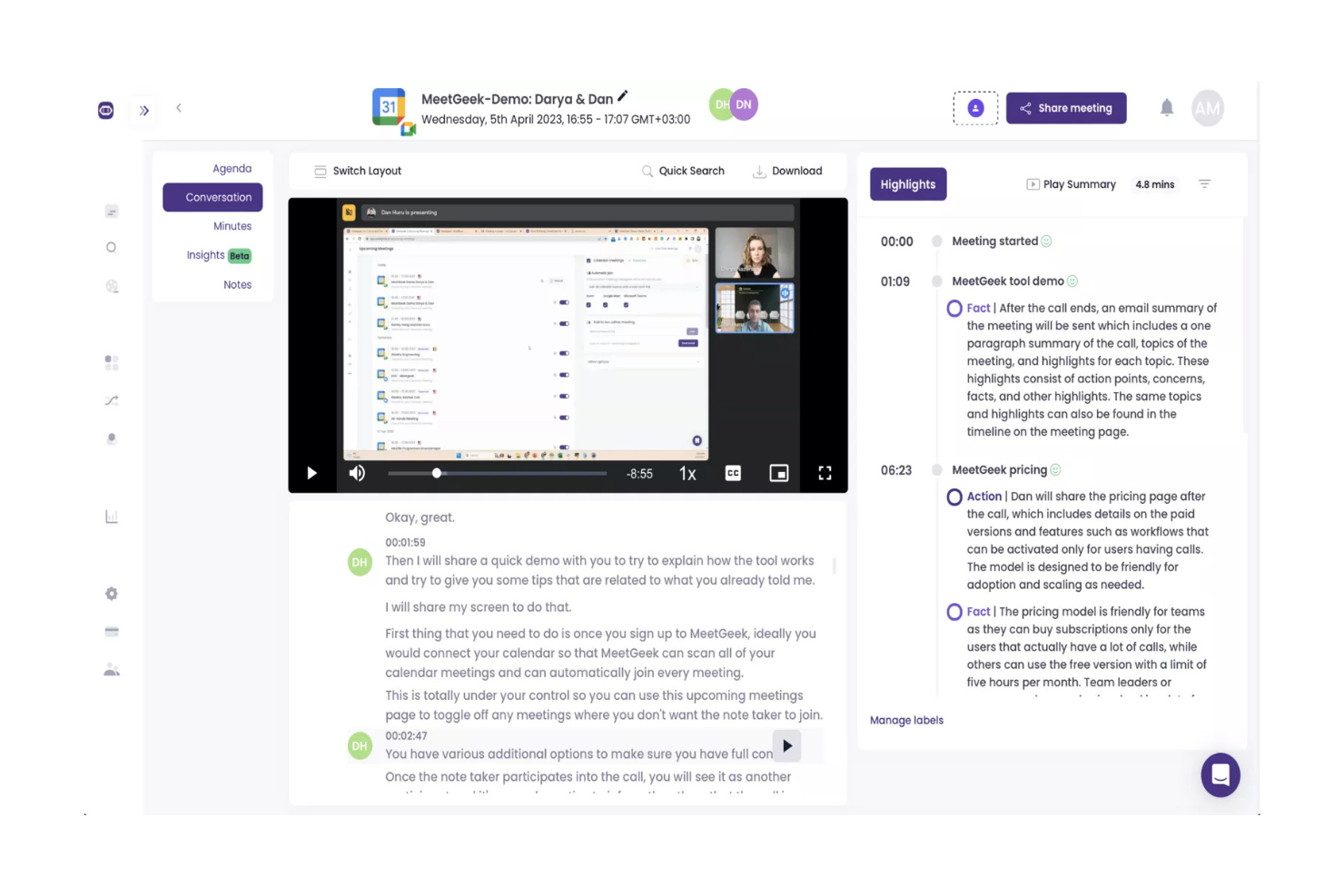
Asana is a project management platform that enhances team collaboration through project management, workflow automation, and goal tracking. Asana’s AI Teammates are collaborative agents that understand your organization’s context and assist with routine workflows, while learning and adapting over time.
Why I picked Asana: Asana AI Studio lets you set a rule to trigger on “Zoom transcript ready” and automatically extract meeting summaries, action items, and key decisions. Its AI features include automated task management and strategic goal alignment, which help prioritize your team's objectives.
The AI Studio offers tools for refining workflows, making it easier to manage complex projects. In my experience, the work done by the AI Teammates is transparent and regulated. They surface how a team arrived at a decision, and are governed by enterprise permissions, so you have control over access and behavior.
Standout Features & Integrations:
Features include customizable project templates that eliminate manual meeting note-taking by generating AI-powered summaries and actionable items, a timeline view for tracking project progress, and task dependencies that help manage workload effectively.
Integrations include Slack, Microsoft Teams, Google Drive, Dropbox, Salesforce, Zoom, Adobe Creative Cloud, Tableau, Okta, and Zendesk.
Pros and Cons
Pros:
- Wide range of project templates
- Strong task automation capabilities
- Extensive AI meeting summary features
Cons:
- Limited offline functionality
- It can be overwhelming for new users

Best for AI workflow automation

Process Street is a process management software designed for teams looking to create, track, and manage workflows efficiently. It serves businesses across various industries, offering AI capabilities that automate workflows and optimize operational processes.
Why I picked Process Street: Process Street excels in AI workflow automation, making it a great choice for teams needing streamlined processes. Its AI features include dynamic workflows that adapt to your needs and automated task assignments that save time. The platform also provides conditional logic to ensure tasks are executed in the right order. Teams harness Process Street’s automation to redesign huge ranges of manual processes. I’ve seen several agencies free up countless hours of strategic work using the software.
Standout Features & Integrations:
Features include a simple drag-and-drop editor for building workflows, checklist templates, and conditional logic to enforce repeatable, structured workflows for recurring operations, and real-time collaboration tools that automatically submit check-ins for team updates and distribute follow-up tasks from meeting summaries.
Integrations include Slack, Zapier, Google Drive, Dropbox, Salesforce, Trello, Asana, Microsoft Teams, Airtable, and HubSpot.
Pros and Cons
Pros:
- Real-time collaboration capabilities
- Easy-to-use checklist features
- Dynamic workflow automation
Cons:
- Can be complex for new users
- Limited customization options

Motion
Best for AI-powered scheduling
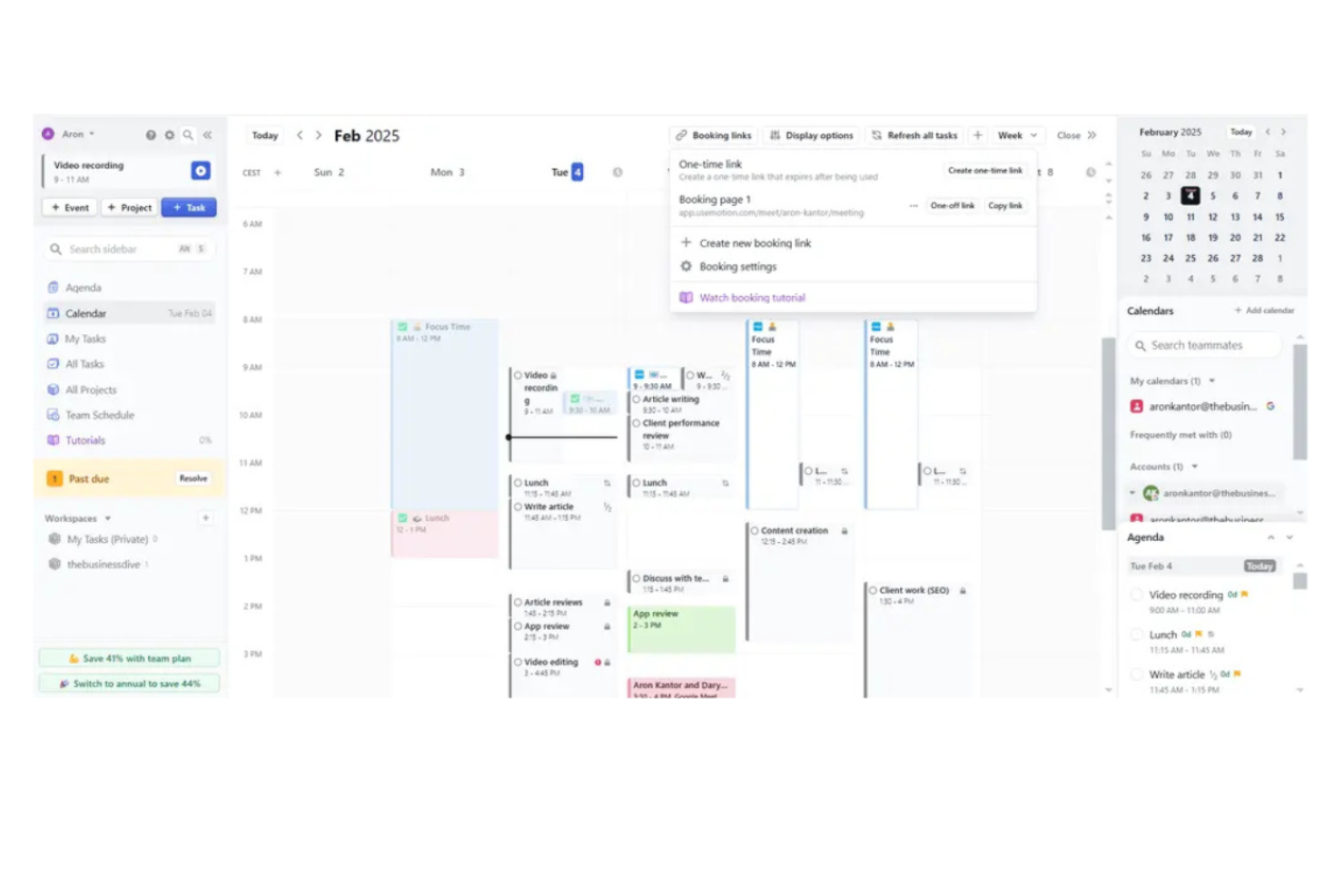
Motion uses AI employees (e.g., Millie, an AI Project Manager) to automatically build project plans, generate status reports, and update timelines. It primarily serves businesses looking to automate scheduling and task management through AI employees like Alfred and Millie.
Why I picked Motion: Motion differentiates itself with its AI-powered scheduling capabilities, making it useful for calendar management. Its scheduling assistant proposes optimal meeting times, prioritizes tasks, and blocks focus time, reducing back-and-forth and minimizing context switching. The AI features also include automated planning and insights that help your team focus on strategic tasks. In my experience, automating regular status updates with a tool like Motion helps cut down on manual reporting, allowing your team to spend more time on high-value work.
Standout Features & Integrations:
Features include AI-generated scheduling that analyzes your team’s work patterns and schedules meetings at optimal times while preserving focus blocks and automates task prioritization to automatically prioritize tasks based on deadlines and dependencies, helping the team concentrate on what’s most urgent. It also sends automated reminders for upcoming due dates and reschedules tasks proactively if timelines shift.
Integrations include Google Calendar, Outlook, Zapier, Microsoft Teams, Zoom, and many more through Motion’s open API, such as Asana, Trello, Salesforce, HubSpot, and Dropbox.
Pros and Cons
Pros:
- SOC 2 Type 2 compliance
- Customizable AI employees
- Efficient AI scheduling features
Cons:
- Steeper learning curve for new users
- Limited customization options

Can Do
Best for AI resource planning

Can Do is a project management software designed for businesses needing effective resource planning and project scheduling. It targets medium to large enterprises, providing AI-driven solutions to optimize resource allocation and project timelines.
Why I picked Can Do: Can Do is distinguished by its AI resource planning capabilities, which help your team allocate resources efficiently. Its AI features include predictive analytics for project timelines and automated resource allocation to minimize downtime. The tool also offers scenario planning to help your team anticipate potential project challenges. In my experience, these features make Can Do a great choice for teams looking to enhance resource management.
Standout Features & Integrations:
Features include interactive Gantt charts that provide a visual overview of your projects, capacity planning tools to manage workload effectively, and detailed reporting to track project progress.
Integrations include Microsoft Teams, Slack, Jira, Trello, Asana, Google Calendar, Outlook, SAP, Salesforce, and HubSpot.
Pros and Cons
Pros:
- Extensive capacity planning tools
- Scenario planning capabilities
- Advanced AI resource allocation
Cons:
- Rigid workflows limit quick adoption
- Features and notifications can be overwhelming
Other AI Enterprise Project Management Software
Here are some additional AI enterprise project management software options that didn’t make it onto my shortlist, but are still worth checking out:
- Ayanza
For AI team collaboration
- Smartsheet
For extensive enterprise app integrations
- Hive
For AI project planning
- Zoho Projects
For AI task management
- Forecast
For AI-driven project forecasting that clarifies timelines and resourcing
- Fireflies.ai
For AI meeting transcription that captures everything automatically
- Notion
For AI-enhanced team documentation that stays organized
- ClickUp
For AI task prioritization that keeps workloads manageable
- Google Workspace
For AI-powered collaboration tools that speed up daily work
- Sofia GPT (OnePlan)
For AI project insights that guide smarter decisions


How I Evaluate AI Enterprise Project Management Software
I only include tools where AI goes beyond marketing buzz—if the AI isn't saving PMO leaders real hours on planning, forecasting, or reporting, it doesn't make the cut. I split my evaluation into core functionality every enterprise platform must deliver and the differentiating factors that separate a good fit from a great one.
Core Functionality (Table Stakes For This List)
When I'm selecting tools for my list, I rank each one on a scale from 0 (does not offer the functionality) to 5 (excels in this area) for each core functionality listed below. Then, I calculate the tool's total score into a percentage. Each tool needs to achieve a minimum total score of 65% to be considered for inclusion.
- AI-Powered Task Automation: I look for AI that generates and assigns tasks from a brief or prompt, not just rule-based triggers dressed up as intelligence.
- Predictive Risk Analytics: Each tool should surface data-driven forecasts on delivery timelines and budgets, not just flag tasks that are already overdue.
- Intelligent Resource Allocation: I evaluate whether the AI recommends team assignments based on real inputs like skills, availability, and workload across projects.
- Generative Reporting & Insights: The platform should produce natural-language summaries and status updates from live project data on demand.
- Enterprise Portfolio Management: I check for multi-project views with cross-project dependencies, roll-up dashboards, and governance controls that scale to hundreds of projects.
- Enterprise Security & Integrations: SSO, role-based permissions, audit logs, and native connectors to tools like Jira, Salesforce, ServiceNow, or SAP are what I look for here.
Once I have a list of tools that meet this criteria, I consider what sets each platform apart.
Differentiating Factors (What Sets Vendors Apart)
Here's how I compare and contrast different vendors:
Standout Features
Natural language project creation is a big differentiator—I want to see a PMO director describe a product launch in a prompt and get a full plan with milestones, dependencies, and owners. AI meeting-to-task conversion adds real value too, pulling action items and deadlines straight from recorded standups into the project plan. I also evaluate whether a tool links execution to strategic OKRs, scoring each project's contribution to enterprise goals in real time.
Beyond Features
Data privacy and AI governance matter a lot at enterprise scale. I look at whether vendors are transparent about how project data trains their models and whether they offer opt-out controls or private deployments. Integration depth is another key factor—a platform that connects bi-directionally with Jira, ServiceNow, and Salesforce fits into an existing stack far better than one relying solely on Zapier. I also evaluate total cost of ownership, checking whether pricing scales predictably as teams, projects, and AI usage grow.
How to Choose AI Enterprise Project Management Software
It’s easy to get bogged down in long feature lists and complex pricing structures. To help you stay focused as you work through your unique software selection process, here’s a checklist of factors to keep in mind:
| Factor | What to Consider |
|---|---|
| Scalability | Can the software grow with your team? Consider user limits and pricing for higher tiers. Make sure it can handle increased project complexity as your organization expands. |
| Integrations | Does it integrate with your current tools? Check compatibility with your existing software stack to ensure seamless data flow and avoid manual data transfer. |
| Customizability | Can you tailor the software to fit your workflows? Look for options to customize dashboards, reports, and processes to match your team's specific needs. |
| Ease of Use | Is the interface intuitive for your team? Evaluate the learning curve and consider if training will be necessary for your team to get up to speed quickly. |
| Implementation and Onboarding | How long will setup take? Assess the resources needed for deployment and training. Look for tools with straightforward onboarding processes and available support during the transition. |
| Cost | Is it within your budget? Compare pricing models, including per-user costs and additional fees. Consider long-term costs and potential discounts for annual commitments. |
| Security Safeguards | Does it meet your security standards? Ensure the tool complies with industry standards like GDPR or ISO certifications, especially if you're handling sensitive data. |
| Support Availability | Is help available when you need it? Check support hours, available channels like chat or phone, and user reviews on support responsiveness to ensure you have backup when issues arise. |
What Is AI Enterprise Project Management Software?
AI enterprise PM software is a specialized type of project management software that helps organizations manage projects by utilizing artificial intelligence to automate and enhance various processes. These tools are generally used by project managers, team leaders, and other professionals seeking to improve efficiency and decision-making.
Automated scheduling, predictive analytics, and smart task assignments help with optimizing resources, forecasting project outcomes, and maintaining alignment within teams. Overall, these tools offer significant value by reducing manual effort and supporting strategic planning.
Features
When selecting AI enterprise project management software, keep an eye out for the following key features:
- Automated scheduling: Uses AI to automatically arrange tasks and meetings, automating calendar management to block optimal meeting times and focus periods, reducing back-and-forth scheduling.
- Predictive analytics: Analyzes data to forecast project timelines and potential risks, forecasting project timelines with predictive analytics and adjusting plans based on workload or risk indicators.
- Smart task assignments: Automatically assigns tasks based on team members’ skills and availability, assigning tasks based on real-time availability and skills, maximizing the use of your team’s capacity.
- AI-driven insights: Provides actionable insights and recommendations to providing data-driven insights (e.g., flagged risks, trend predictions) so managers can make proactive adjustments.
- Workflow automation: Automates repetitive tasks and processes, delegating routine scheduling and reporting to AI so your team can spend more time on high-priority, strategic work.
- Real-time collaboration: Enables team members to work together in real-time, centralizing meeting summaries and status updates in shared dashboards or chat, ensuring everyone stays aligned.
- Customizable dashboards: Allows users to create personalized views of project data, giving managers visibility through AI-generated dashboards and risk alerts, so they can identify issues early.
- Time tracking: Monitors how time is spent on tasks and projects, providing data to streamline workflows by automating repetitive tasks and reducing context switching between tools.
Benefits
Implementing AI enterprise project management software provides several benefits for your team and your business. Here are a few you can look forward to:
- Increased efficiency: Automated scheduling and task assignments reduce manual workload, freeing up time for more strategic activities.
- Improved decision-making: AI-driven insights and predictive analytics offer data-backed recommendations, offering predictive analytics and actionable intelligence to inform task reassignments or deadline adjustments.
- Enhanced collaboration: Real-time collaboration features ensure everyone stays on the same page, capturing meeting notes and action items automatically, then distributing them to relevant team members via shared workspaces.
- Better resource utilization: Smart task assignments optimize the use of team members’ skills and availability, using AI to suggest resource reallocation, flagging when team members are under- or over-utilized.
- Reduced errors: Workflow automation minimizes human errors by automating repetitive tasks, standardizing workflows with AI-driven checklist templates and conditional logic to reduce human error.
- Time savings: Time tracking and automated processes generate productivity reports that spotlight bottlenecks, idle time, and automation opportunities.
- Customizable views: Personalized dashboards allow users to focus on the most relevant data, enhancing their ability to monitor progress and performance.
Costs and Pricing
Selecting AI enterprise project management software requires an understanding of the various pricing models and plans available. Costs vary based on features, team size, add-ons, and more. The table below summarizes common plans, their average prices, and typical features included in AI enterprise project management software solutions:
Plan Comparison Table for AI Enterprise Project Management Software
| Plan Type | Average Price | Common Features |
| Free Plan | $0 | Basic task management, limited storage, and community support. |
| Personal Plan | $5-$15/user/month | Task management, basic integrations, and limited automation features. |
| Business Plan | $16-$30/user/month | Advanced project tracking, enhanced integrations, and priority support. |
| Enterprise Plan | $31-$60/user/month | Customizable workflows, AI-driven insights, dedicated support, and security features. |
AI Enterprise Project Management Software FAQs
Here are some answers to common questions about AI enterprise project management software:
How does AI enterprise project management software improve project management efficiency?
AI improves project management efficiency by automating repetitive tasks, predicting project risks, and providing data-driven insights. For instance, AI can automate scheduling and task assignments, delegating repetitive scheduling and data-entry work to AI so your team can prioritize high-impact tasks. Predictive analytics help you foresee potential bottlenecks and adjust plans accordingly.
By analyzing project data, AI tools can offer insights that aid in decision-making, using predictive analytics and early risk detection to proactively adjust timelines before delays occur.
Can AI enterprise project management software integrate with existing software?
Yes, most AI enterprise project management tools are designed to integrate with existing software like CRM systems, communication platforms, and data storage solutions. Check for compatibility with your current tech stack to ensure seamless data flow. Common integrations include Slack for communication, Salesforce for CRM, and Google Drive for file storage.
Integrations not only seamlessly integrate with tools you already use (like Slack, Google Drive, or CRM systems) so your workflows stay connected and automatic, but also make it easier for your team to adopt the new software.
Is AI enterprise project management software secure?
Yes, AI project management tools prioritize security by offering features like data encryption, user authentication, and compliance with industry standards such as GDPR. When evaluating tools, consider the security measures they implement to protect your data. Look for options that provide detailed access controls and regular security audits.
Ensuring the software meets your organization’s security requirements is crucial, especially if you handle sensitive information.
How do I measure the ROI of AI project management software?
To measure the ROI of AI project management software, track metrics like time saved, productivity gains, and project completion rates. Calculate the cost savings from reduced manual work and improved efficiency. For example, if AI automates scheduling, quantify the hours saved and translate that into monetary value.
Additionally, assess improvements in team collaboration and decision-making to measure ROI by tracking metrics like time saved, meeting reduction, and the number of automated tasks on your projects.
In what ways can AI enterprise project management software help teams stay ahead of risks?
It monitors ongoing activity and flags stalled tasks, unexpected delays, or workload spikes. Early alerts help you act before small issues turn into major setbacks. By leveraging AI, this software provides predictive analytics to forecast potential risks like budget overruns or timeline slippages by analyzing historical and current project data.
Furthermore, it can proactively detect early warning signs of risks, such as scope creep or emerging bottlenecks, by automatically analyzing developer communications and project updates for keywords signaling issues