10 Best Project Timeline Tools To Stay on Track In 2026

10 Best Project Timeline Management Software Shortlist


Managing project timelines effectively is essential for keeping your projects on track and your team aligned. However, without the right tools, it’s easy to lose sight of deadlines, dependencies, and key milestones. That's why it's important to have reliable project timeline managment software.
Project timeline management tools can help you visualize timelines, assign tasks, and track progress to give you the clarity and control you need to deliver projects successfully.
In this article, I’ve reviewed and tested the best options on the market. I’ll walk you through their key features, who they’re best suited for, and why they might be a good fit for your team. Here, you can evaluate your options and find the best solution to help you stay organized and focused.
Why Trust Our Software Recommendations
Our team has been testing and reviewing software since 2012. As project managers ourselves, we know how difficult—and important—it is to choose the right software.
For this guide, we evaluated tools using hands-on testing and independent research, scoring tools using our selection criteria. We also draw on insights from industry thought leaders and practicing project management experts.
Our reviews reflect our human editorial judgment, not a sales pitch.
Expert reviewers:
Project Timeline Management Software Comparison Table
Here is a convenient table that you can use to compare all the tools we just covered.
| Tool | Best For | Trial Info | Price | ||
|---|---|---|---|---|---|
| 1 | Best customizable workflow templates | Free plan available; 14-day free trial | From $9/user/month (billed annually) | Website | |
| 2 | Best for tracking projects across the teams | Free plan available; 14-day free trial | From $10/user/month (billed annually) | Website | |
| 3 | Best for setting and tracking task dependencies | Free plan available; 15-day free trial | From $5/user/month | Website | |
| 4 | Best for structured project timelines | Free demo available | Pricing upon request | Website | |
| 5 | Best for nested task hierarchies on a timeline | Free plan + 30-day free trial available | From $7.65/user/month (billed annually) | Website | |
| 6 | Best for full project lifecycle delivery | Free demo available | Pricing upon request | Website | |
| 7 | Best for a highly flexible solution | Free plan + 14-day free trial available | From $8/user/month (billed annually) | Website | |
| 8 | Best for real-time, collaborative planning | Free plan available | From $16/user/month | Website | |
| 9 | Best for freelancers | Free plan available | From $7/user/month (billed annually) | Website | |
| 10 | Best for software development teams | 30-day free trial and free plan available | From $35/month | Website |


Best Project Timeline Software Reviews
Here’s a brief description of each project timeline software to showcase each tool’s best use case and noteworthy features.

Best customizable workflow templates
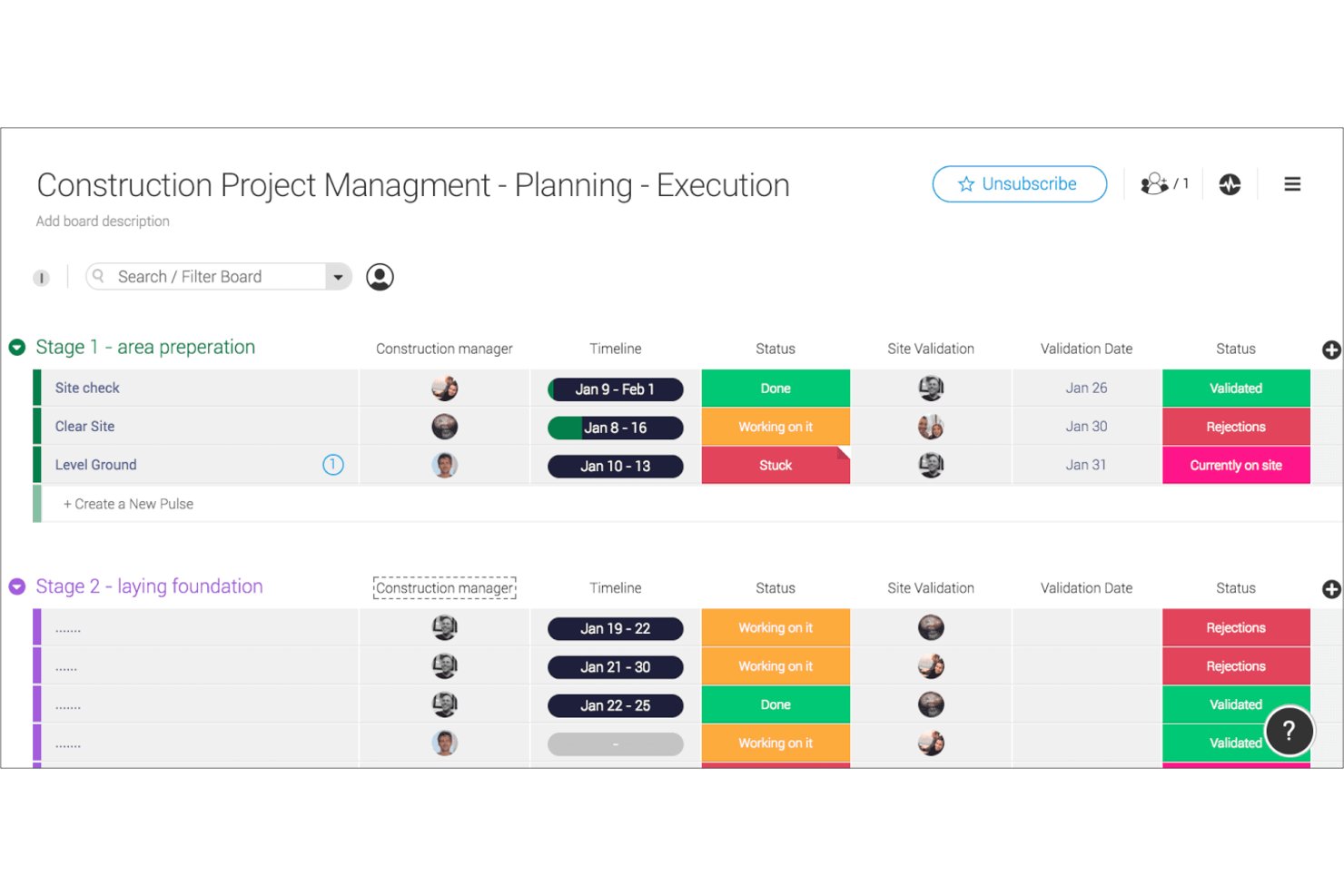
monday AI Workspace is a configurable work management platform that combines interactive Gantt and timeline views, AI-driven scheduling, task dependencies, milestone tracking, and portfolio dashboards in a single workspace.
Who Is monday AI Workspace Best For?
It's a strong fit for cross-functional teams and project managers who need flexible, visual project tracking without committing to rigid, purpose-built scheduling software.
Why I Picked monday AI Workspace
I picked monday AI Workspace as one of the best because its template library goes beyond generic project boards. Each timeline template ships with pre-built Gantt views, dependency columns, and automation rules already configured, so my team isn't rebuilding a scheduling structure from scratch for every new project. I particularly like that every template is fully editable: I can add milestone markers and deadline notifications without touching any code.
monday AI Workspace Key Features
- AI sidekick assistant: Embedded AI assistant provides timeline suggestions, data insights, and workflow recommendations right inside each project board.
- Portfolio dashboard views: Roll up multiple project timelines and milestones into one high-level dashboard for fast executive updates.
- Drag-and-drop Gantt editing: Reschedule tasks, update phases, and adjust dependencies live on interactive Gantt charts with instant board syncing.
- 200+ native integrations: Connects directly with tools like Slack, Google Drive, Jira, and Zoom to centralize communications and updates.
monday AI Workspace Integrations
monday AI Workspace offers hundreds of native integrations through its built-in integrations and marketplace, including Slack, Google Drive, Jira, Salesforce, GitHub, Zoom, Microsoft 365, Trello, HubSpot, and Asana. It also supports Zapier and provides an API for custom integrations.
Pros and Cons
Pros:
- Portfolio dashboards for multiple project timelines
- AI-assisted scheduling suggestions built in natively
- Highly customizable Gantt timeline templates available
Cons:
- Baseline comparison features lack depth
- Critical path calculation requires manual configuration
New Product Updates from monday AI Workspace
monday AI Workspace Adds Human Approval Routing
monday AI Workspace adds a human-in-the-loop approval block to AI Workflows, sending approval requests and routing workflow paths based on responses. For more information, visit monday AI Workspace's official site.

Wrike
Best for tracking projects across the teams

Wrike is a project timeline management platform that brings together interactive Gantt charts, task dependencies, real-time collaboration, and customizable dashboards for teams managing complex projects.
Who Is Wrike Best For?
Wrike is a good fit for mid-size to enterprise teams in tech, marketing, and professional services that need cross-functional project visibility across multiple departments.
Why I Picked Wrike
I picked Wrike as one of the best because of how well it handles project tracking across multiple teams simultaneously. What I like most is the cross-project Gantt chart view—you can pull tasks from different teams into a single timeline, set dependencies between them, and see exactly where one team's delay creates a bottleneck for another. When engineering is waiting on design sign-off before a sprint can start, that relationship is visible at a glance. I also use the cross-functional dashboards to surface real-time status across workstreams without having to chase down updates from each team lead.
Wrike Key Features
- Resource bookings: Reserve time from a specific team member or job role and check whether they have the bandwidth to take on a project before assigning work.
- Effort management: Assign an effort estimate to each task so you can forecast project delivery dates and choose assignees based on actual capacity.
- Custom request forms: Build dynamic intake forms that automatically generate tasks, projects, and workflows when submitted.
- Scrum boards: Manage Agile sprints with shared Scrum boards, backlog prioritization, and real-time progress tracking.
Wrike Integrations
Wrike offers hundreds of integrations via its marketplace and built-in connectors, including Google Workspace, Microsoft 365, Salesforce, and Slack. It also supports Zapier and provides an API for custom integrations.
New Product Updates from Wrike
Wrike Adds Klaxoon MCP Integration
Wrike’s Klaxoon MCP integration is now generally available, enabling AI agents to navigate between Wrike tasks and attached whiteboards, read task context, and manage whiteboard attachments via API. For more information, visit Wrike's official site.

Best for setting and tracking task dependencies
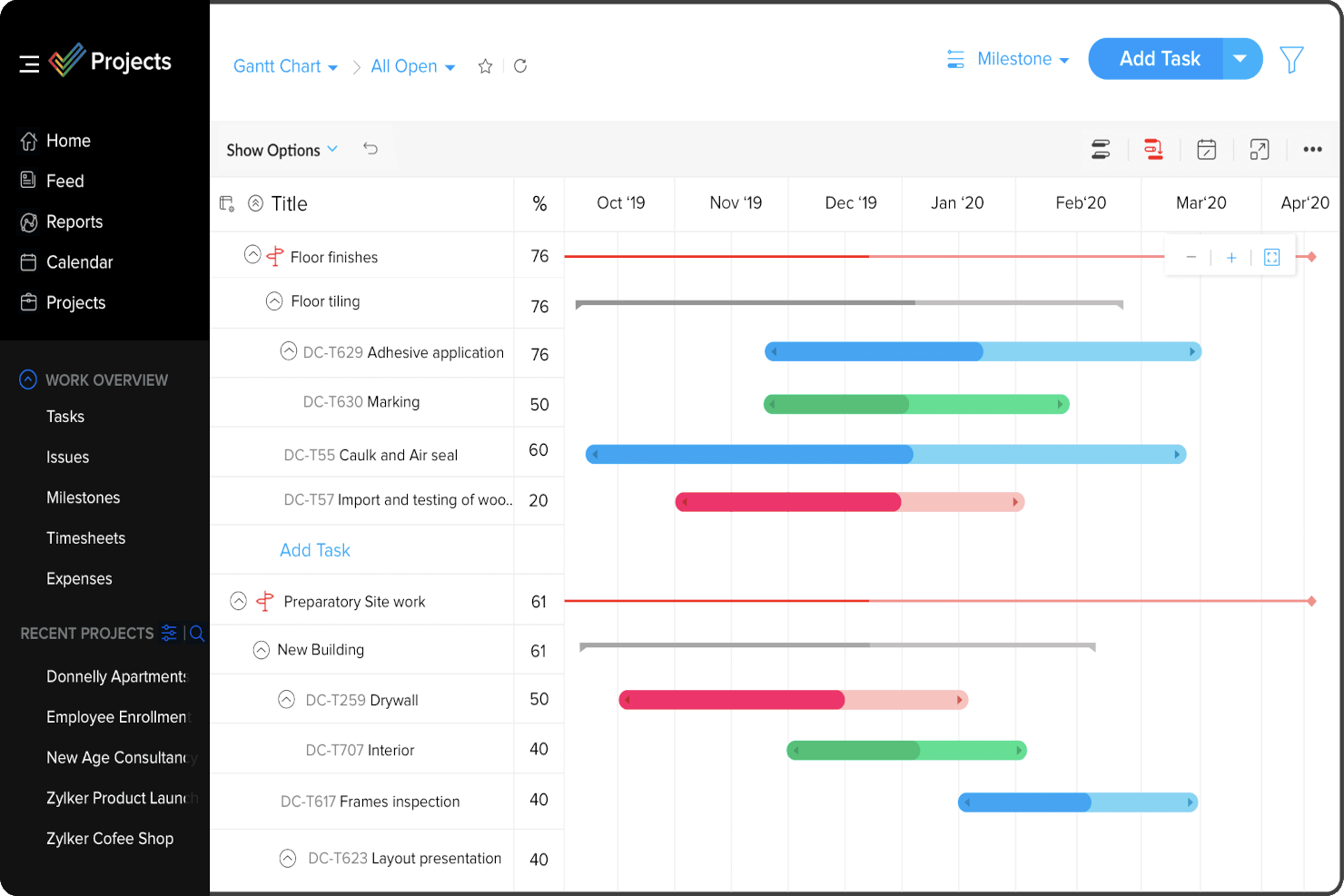
Zoho Projects is a project timeline management platform that offers Gantt charts, task dependencies, milestone tracking, and resource allocation tools for planning and monitoring project schedules.
Who Is Zoho Projects Best For?
Zoho Projects is a good fit for small to mid-sized teams that need structured project planning with detailed scheduling controls across product, engineering, or operations workflows.
Why I Picked Zoho Projects
I picked Zoho Projects as one of the best because of how thoroughly it handles task dependencies within the Gantt chart view. What I like most is that it supports all four dependency types—Finish to Start, Start to Start, Start to Finish, and Finish to Finish—which matters a lot when my team is managing multi-phase projects where sequencing isn't always linear. You can drag and drop between task bars directly in the Gantt to define those relationships, and hovering over any task shows you a full list of its predecessors and successors. I also like that you can introduce lag time between dependent tasks, which is something I've used when there's a mandatory waiting period between two sequential deliverables.
Zoho Projects Key Features
- Project baseline: Set a baseline at any point in your project to compare planned vs. actual progress over time, so you can spot schedule drift early.
- Critical path tracking: Identify the sequence of tasks that directly impact your project's end date, helping you prioritize what can't slip.
- Resource management: View each team member's workload and reassign tasks when someone is over- or under-allocated across your project.
- Blueprint workflow automation: Design task workflows that automatically update fields, assign users, and trigger notifications as task statuses change.
Zoho Projects Integrations
Zoho Projects offers native integrations with Slack, Google Drive, Microsoft 365, Dropbox, GitHub, Bitbucket, and Zoho’s own suite of apps, including Zoho CRM and Zoho Desk. It also connects with Zapier and provides an API for custom integrations.
New Product Updates from Zoho Projects
Zoho Projects Adds CodeX Scripts for Custom Modules
Zoho Projects now supports CodeX Scripts for custom modules, enabling conditional logic and rules for creating, updating, and deleting records. For more information, visit Zoho Projects' official site.
 .
.
Best for structured project timelines

Screendragon is a work management platform tailored for marketing, agency, and professional services teams. It combines project management, workflow automation, resource management, and budgeting in one solution.
It incorporates tools like Gantt charts and Kanban boards, which aid in task assignment and timeline adjustments, providing clarity and structure to project timelines. The software also enables real-time financial tracking and resource management, allowing you to keep budgets aligned with actual spending and anticipate future needs effectively.
I also like that it has customizable workflows and templates that assist in streamlining project delivery, and visual dashboards that deliver real-time updates on project status and key metrics. Overall, these features provide flexibility in managing workflows and contribute to a more organized project management experience.
Some integrations include MS Power BI, Slack, MS Teams, and Zapier.
New Product Updates from Screendragon
Screendragon Unveils New AI Hub
Screendragon introduced AI Hub, a new capability that lets teams build and manage AI agents directly within workflows. The update helps marketing teams automate tasks, maintain governance controls, and scale AI-driven operations more efficiently. For more information, visit Screendragon's official site.

Quire
Best for nested task hierarchies on a timeline
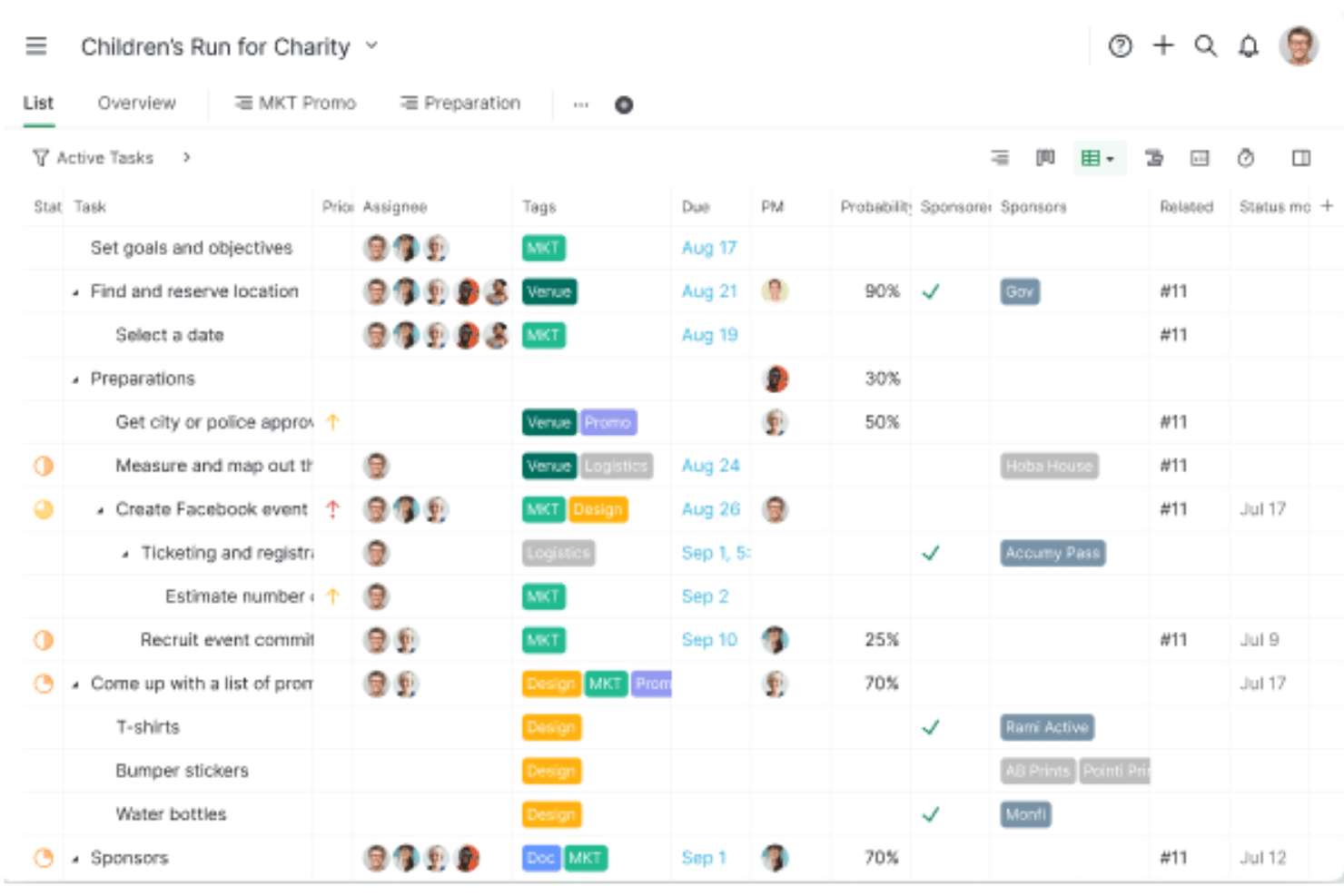
Quire is a project management tool with multi-view planning across nested task lists, Kanban boards, a dynamic Gantt-style timeline, and cross-project Smart Folder rollups.
Who Is Quire Best For?
Quire fits small-to-medium product and engineering teams that need deeply nested task breakdowns alongside a visual timeline without paying for an enterprise scheduler.
Why I Picked Quire
I picked Quire as one of the best because it's the only tool on my shortlist that lets you build deeply nested task hierarchies and visualize them directly on a Gantt-style timeline. I love that you can break a complex project into unlimited subtask levels in Tree view, then flip to Timeline view and see every layer as a horizontal bar with drag-and-drop rescheduling. When you shift a parent task, downstream dependencies auto-update across the entire chain.
Quire Key Features
- Smart Folder cross-project rollup: Aggregates tasks from multiple projects into a single Tree, Board, or Timeline view for lightweight portfolio-level scheduling.
- Assignee swim lanes: Groups timeline bars by team member so you can spot workload imbalances across overlapping tasks without leaving the Gantt view.
- Blocked tasks dashboard widget: Surfaces tasks that can't proceed because a predecessor is incomplete, giving you a real-time list of scheduling blockers.
- Public link sharing: Lets you share a live project view with clients or stakeholders via a link—no account required—on Professional and higher plans.
Quire Integrations
Quire offers native integrations with Google Drive, Microsoft OneDrive, Microsoft Teams, Slack, GitHub, Google Calendar, Dropbox, and Box. It also supports custom integrations through its open API and Zapier.
Pros and Cons
Pros:
- Public link sharing for live schedules
- Cross-project timelines with Smart Folder rollups
- Infinitely nested task hierarchy in timeline view
Cons:
- Only finish-to-start dependencies supported
- No baseline or critical path visualization
New Product Updates from Quire
Quire Adds Custom Field Locking and Comment Reaction API Support
Quire adds custom field locking and API support for reading and setting emoji reactions on comments. These updates give teams more control over field data and expand comment interaction options for developers. For more information, visit Quire’s official site.
 .
.
Kantata
Best for full project lifecycle delivery

Kantata is a project timeline management platform designed for professional services teams, offering project planning, resource management, Gantt chart timelines, and real-time project tracking in one system.
Who Is Kantata Best For?
Kantata is a strong fit for professional services firms—like consulting, marketing, and IT services companies—that need to manage complex, multi-phase projects from scoping through delivery.
Why I Picked Kantata
Kantata earns its spot as one of the best on my shortlist because it covers the full arc of project delivery in a single platform—from scoping and estimating new work all the way through invoicing and financial close. It connects sales and services: my team can build estimates, tie them to resource plans, and move directly into project execution without switching tools. I also like the AI-driven resource optimization, which evaluates staffing permutations across the portfolio to flag skill gaps and scheduling conflicts before they affect the timeline. For teams managing multi-phase, client-facing projects where budget, utilization, and delivery all need to stay in sync, Kantata keeps all of those signals in one place.
Kantata Key Features
- Gantt chart project scheduling: Build and manage project timelines with task dependencies, milestones, and drag-and-drop scheduling in a visual Gantt view.
- Time and expense tracking: Log billable hours and expenses directly against project tasks, with built-in automation to keep finance teams on track for period close.
- Kantata Pulse (client and employee sentiment): Collect real-time feedback from clients and team members alongside project health data to catch delivery risks early.
- Generative AI project assistant: Automatically draft status reports, executive updates, and project case studies by pulling data from active projects and pulse checks.
Kantata Integrations
Kantata offers native integrations with Salesforce, Jira, Slack, HubSpot, QuickBooks, Xero, Expensify, and Sage Intacct, and connects with Zapier. An API is available for custom integrations.
New Product Updates from Kantata

Kantata Adds Access Group Change History
Kantata adds Access Groups History, letting account administrators track changes to group details, membership, and permissions in Recent History. The update also makes these events available through the Subscribed Events API for broader monitoring. For more information, visit Kantata’s official site.
 .
.
Miro
Best for a highly flexible solution
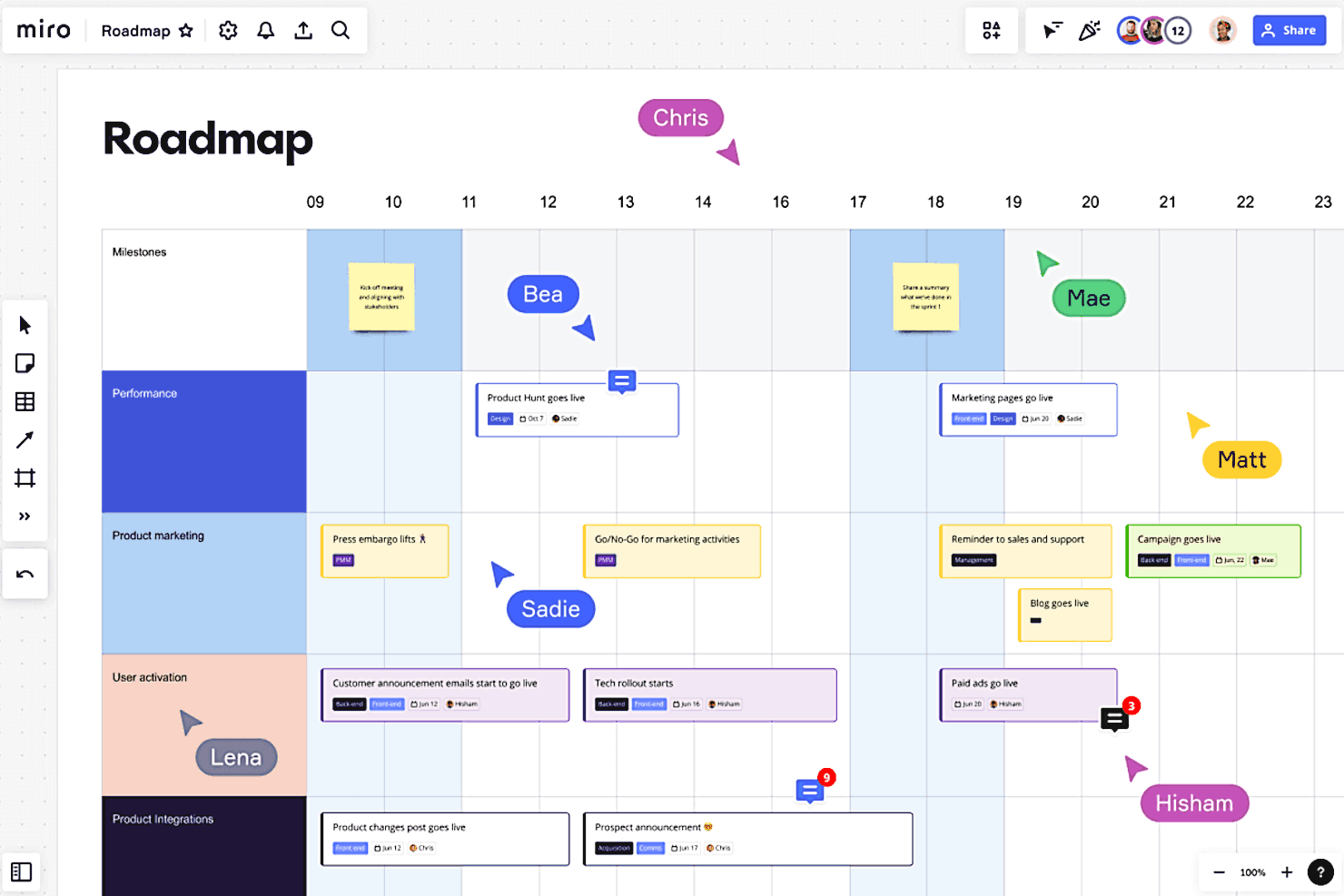
Miro is a visual collaboration platform for project timeline management that lets teams build interactive timelines, Gantt charts, and project boards using customizable templates and drag-and-drop tools.
Who Is Miro Best For?
Miro is a strong fit for cross-functional teams in product, design, and engineering who need a flexible visual workspace to plan and track projects collaboratively.
Why I Picked Miro
Miro earns its spot on my shortlist because no other timeline tool gives you this much freedom to shape the workspace around how your team actually thinks and works. What I love most is the ability to switch between table and timeline views with a single click—so when a sprint plan starts as a structured table, I can flip it into a visual timeline to spot deadline conflicts without rebuilding anything. The infinite canvas also means I can keep my timeline right next to the brainstorm, the stakeholder map, and the Jira-synced task cards that feed into it. That two-way sync with Jira and Azure DevOps is genuinely useful—updates flow back automatically, so the timeline stays current without anyone manually chasing it.
Miro Key Features
- Gantt chart templates: Pre-built Gantt chart templates let you map tasks, milestones, and dependencies without starting from scratch.
- Real-time collaboration: Multiple team members can edit, comment, and react on the same board simultaneously during planning sessions.
- Dependency mapping: Visually connect tasks and milestones with arrows to track relationships and sequencing across your timeline.
- Estimation tools: Built-in estimation features let teams assign effort and story points directly on the board during sprint planning.
Miro Integrations
Miro offers native integrations with Jira, Asana, monday.com, Trello, Microsoft Teams, Slack, Google Drive, Zoom, and Confluence, and connects with Zapier. An API is available for custom integrations.
New Product Updates from Miro
Miro Adds Japan Data Residency for Enterprise Customers
Miro has introduced Japan data residency for enterprise customers, offering in-region storage for production data, backups, and metadata, plus in-region compute infrastructure. For more information, visit Miro's official site.

FigJam
Best for real-time, collaborative planning
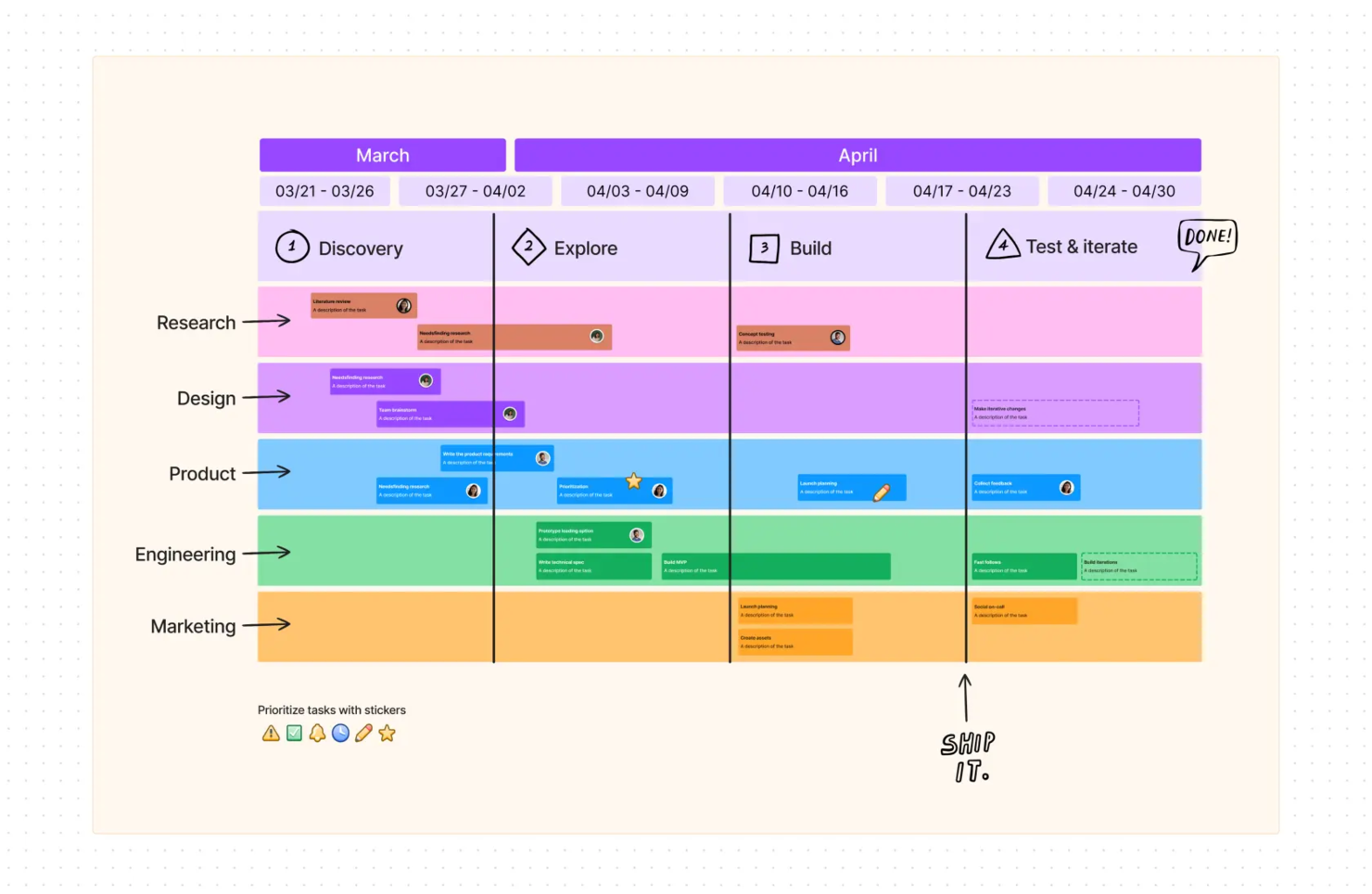
FigJam is an online whiteboarding and visual planning tool that lets teams map project timelines, organize milestones, and collaborate on schedules using interactive boards and templates.
Who Is FigJam Best For?
FigJam is a strong fit for cross-functional teams in product, design, and engineering who plan and map out project timelines together in real time.
Why I Picked FigJam
FigJam is one of my top picks because I love how it turns timeline planning into a genuinely collaborative activity rather than a solo task. My team uses FigJam's Gantt chart and project timeline templates to sketch out schedules together in real time, with multiple cursors visible on the board at once. I also rely on Spotlight mode to walk stakeholders through a timeline during planning sessions, keeping everyone focused on the same section of the board. The AI feature that generates and visualizes timelines from a simple prompt is a real time-saver when we're kicking off a new project.
FigJam Key Features
- Sticky notes and voting: Add sticky notes to a shared board and use built-in voting tools to prioritize tasks and decisions during planning sessions.
- Shapes and connectors: Build flowcharts and dependency maps using shapes that snap to a grid with auto-connecting lines.
- Audio and live chat: Talk through timeline decisions with teammates using in-board audio and live chat without leaving the board.
- Guest access: Invite external stakeholders to contribute to a board for 24 hours without requiring a login.
FigJam Integrations
FigJam natively integrates with Figma and includes built-in widgets for tools like Jira and Asana. It also benefits from Figma’s broader ecosystem integrations (e.g., Slack, Microsoft Teams, Google Workspace) and supports automation via Zapier and the Figma API.

ClickUp
Best for freelancers

Click Up has the most features you want in a timeline management software solution, such as flexibility, making it suitable for freelancers working in different industries. The tool is easy to use and intuitive, meaning that you will not be wasting valuable time learning the ropes. The software also has an app for every device, making it suitable for individuals or teams working on different devices at different times.
If there is one thing that makes Click Up beat the competition, it has to be the company's customer service. The company promises that someone will be available 24 hours a day, every day, even during the holidays. Added to this, when you use the tool, you get access to daily webinars and free coaching. This is why the tool is great for freelancers who often need support outside traditional business hours.
Click Up integrates with Slack, GitHub, GitLab, Webhooks, Everhour, Toggl, Harvest, Google Drive, One Drive, Dropbox, Outlook, Google Calendar, Figma, Vimeo, YouTube, Loom, Zoom, Bitbucket, Chrome, Amazon Alexa, Google Assistant, Google Hangouts Chat, Intercom, Box, Zendesk, Front, Clokify, Timely, PomoDone, TMetric, Timeneye, Promodone, and a host of other apps.
Click Up costs from $5/user/month and offers a free forever plan for personal use.
New Product Updates from ClickUp
ClickUp Adds Meetings Hub, Super Agent Templates, and ZoomInfo Integration
ClickUp adds a searchable Meetings Hub, new ways to clone and template Super Agents, and a ZoomInfo integration through the App Center. These updates improve meeting retrieval, agent reuse, and access to sales intelligence. For more information, visit ClickUp’s official site.
Backlog
Best for software development teams

Backlog is designed to ensure that all the different segments of a project easily connect with each other. The tool's Wikis make projects available to all team members and allow for easy editing, making it a great tool for software development teams. The Kanban boards make it easy to visualize different phases. Interactive Gantt charts permit users to visualize the timeline of an entire project.
Other features that put Backlog in this top ten list include giving users the ability to create parent and child tasks to enhance order and create custom fields relevant to a specific project. Its file-sharing feature makes it possible to keep all files in one workplace. The tool's drag and drop functionality allows for easy editing of timelines and durations or changing a task's status.
Backlog integrates with Typetalk, Cacoo, Nulab Pass, Slack, Redmine, Jira Importer, iOS App, LombdaTest, and Android App.
Backlog costs from $35/30users/month and offers a forever free plan for up to 10 users and a 30-day free trial on paid plans.
Other Project Timeline Management Software
Here are a few more that didn’t make the top list, but definitely worth looking at to expand your research.
- Workzone
For pre-built request forms
- Lucen
For visual project planning
- Bonsai Agency Software
For agency timeline management with resourcing
- Polaris PSA By Replicon
For sophisticated what-if scenario analysis
- ProjectManager
For remote teams
- GoodDay
Timeline management for its customizability
- Ravetree
For integrated project timelines
- GanttPRO
For professionals and students
- Smartsheet
For working with formulas
- Celoxis
For project portfolio management
- Scoro
For end-to-end work management
- Hive
For large and complex projects
- GoodDay
For Gantt chart features
- Hub Planner by Milient
For team analytics & dynamic reports
- TaskRay
For Salesforce-native integration
- PathPro
For public roadmaps
- Basecamp
Project timeline software for tracking progress for scattered teams
- Paymo
Project management software for tracking work time and client billing
- ProofHub
Time tracking, task management, file storage, and messaging software for project management teams
- Forecast
For specialized services firms


How I Evaluate Project Timeline Management Software
I evaluate these tools in two layers: the baseline scheduling capabilities every tool must have, and the differentiators that separate a simple Gantt viewer from a tool a PMO lead can rely on.
Core Functionality (Table Stakes For This List)
When I'm selecting tools for my list, I rank each one on a scale from 0 (does not offer the functionality) to 5 (excels in this area) for each core functionality listed below. Then, I calculate the tool's total score into a percentage. Each tool needs to achieve a minimum total score of 65% to be considered for inclusion.
- Gantt Chart Visualization: I look for interactive, zoomable Gantt views where you can group tasks by phase, team, or custom fields—not just a static bar chart you can't act on.
- Task Dependencies & Sequencing: Each tool should support all four dependency types (FS, SS, FF, SF) with auto-cascading, so shifting one task ripples the right dates forward.
- Milestone & Deadline Tracking: I check whether milestones are distinct markers with alerts—like flagging a go-live date at risk—rather than just regular tasks with a label.
- Critical Path Identification: The tool should auto-calculate the critical path and update it as the schedule changes, giving you a clear read on what's driving the end date.
- Baseline & Schedule Comparison: I evaluate whether you can save a baseline and overlay it against the live schedule to spot slippage, especially mid-project when scope shifts.
- Drag-and-Drop Timeline Editing: Rescheduling should happen directly on the timeline with real-time updates to linked tasks, not through a modal or a separate edit screen.
Once I have a list of tools that meet this criteria, I consider what sets each platform apart.
Differentiating Factors (What Sets Vendors Apart)
Here's how I compare and contrast different vendors:
Standout Features
Portfolio rollups matter when you're juggling multiple concurrent projects. I look for tools that let a PMO lead view cross-project dependencies on one screen without toggling between plans. What-if scenario planning is another differentiator—being able to model a two-week vendor delay before it happens saves real headaches downstream. I also evaluate whether a tool offers shareable, read-only timeline views for external stakeholders, so clients stay informed without needing a full license.
Beyond Features
Integration depth is one of the first things I evaluate. A timeline tool that syncs two-way with Jira or GitHub means your engineering team's updates flow directly into the project schedule. I also consider how fast a team can get started—import support for MS Project or Excel files and pre-built templates make a real difference during onboarding. Reporting rounds out the picture. I check whether the tool can generate exportable schedule health dashboards for steering committees without requiring manual assembly every status cycle.
How to Choose Project Timeline Management Software
It’s easy to get bogged down in long feature lists and complex pricing structures. To help you stay focused as you work through your unique software selection process, here’s a checklist of factors to keep in mind:
| Factor | What to Consider |
| Scalability | Make sure the software grows with your team. Look for tools that can handle an increasing number of projects and users. |
| Integrations | Check for integration with tools your team already uses, like CRMs, collaboration platforms, or accounting software. |
| Customizability | Opt for software that lets you tailor templates, workflows, and timelines to match your specific project needs. |
| Ease of Use | Choose an intuitive platform with a clean interface, drag-and-drop functionality, and minimal learning curve for your team. |
| Budget | Compare pricing plans to ensure they fit your budget. Look for value-packed solutions with flexible options and no hidden fees. |
| Security Safeguards | Prioritize tools with strong data protection, compliance certifications, and user access controls to keep your information safe. |
| Mobile Access | Ensure the software includes a mobile app so your team can view and update project timelines on-the-go. |
| Collaboration Tools | Look for features like real-time updates, task comments, and file sharing to keep your team aligned and productive. |
Trends in Project Timeline Management Software
In my research, I sourced countless product updates, press releases, and release logs from different project timeline management software vendors. Here are some of the emerging trends I’m keeping an eye on:
- AI-Driven Insights: Vendors are adding AI to predict delays, suggest timeline adjustments, and recommend task prioritization. For example, some tools now analyze historical data to optimize future timelines automatically.
- Collaborative Whiteboarding: Many tools now include shared digital whiteboards to help teams map out timelines visually. This makes brainstorming and planning more interactive, especially for remote teams.
- Scenario Planning: Tools are introducing features to simulate multiple "what-if" scenarios for project timelines. This helps teams prepare for potential risks and see how changes might impact deadlines and resources.
- Resource Allocation Analytics: Advanced analytics now focus on tracking resource availability and capacity in real time. Vendors are building dashboards to highlight overbooked or under-utilized team members directly on timeline views.
- Industry-Specific Templates: More vendors are providing pre-built timeline templates tailored to industries like construction, marketing, and IT. These save users time by aligning with common workflows in specific fields.
What is Project Timeline Management Software?
Project timeline management software is a tool that helps teams create, manage, and track project schedules visually. These tools are commonly used by project managers, team leads, and professionals in industries like marketing, construction, and IT to stay on top of deadlines and keep teams organized. Features like timeline creation, task assignment, and milestone tracking help teams visualize progress, identify bottlenecks, and adjust plans as needed. Overall, these tools simplify project planning and ensure everyone stays aligned with key goals and deadlines.
Features of Project Timeline Management Software
When selecting project timeline management software, keep an eye out for the following key features:
- Timeline visualization: Lets you create clear, visual timelines like Gantt charts or project management calendars to track project progress.
- Task dependencies: Lets you link tasks together so one cannot begin until another is completed. If this is a critical feature for your team, check out more project management software with dependencies here.
- Milestone tracking: Helps you set and monitor key deadlines or achievements within a project.
- Resource management: Lets you allocate team members, equipment, or budgets to specific tasks to avoid overbooking or shortages.
- Progress tracking: Provides real-time updates on task completion and timeline shifts to keep the team informed.
- Custom templates: Offers pre-built timeline formats tailored to common project types, saving time during setup.
- Collaboration tools: Allows teams to comment on tasks, share updates, and work together directly within the software.
- Scenario planning: Lets you test different timeline adjustments to see how changes might impact the overall project.
- Automated notifications: Sends alerts for approaching deadlines, task updates, or overdue items to keep everyone on track.
- Integrations: Connects with tools like CRMs, communication platforms, or time trackers for a more efficient workflow.
Benefits of Project Timeline Management Software
Implementing project timeline management software can provide several benefits for your team and your business. Here are a few you can look forward to:
- Improved organization: Helps you structure tasks and deadlines clearly, so everyone knows what to do and when.
- Better collaboration: Keeps everyone on the same page with shared timelines, task updates, and commenting features.
- Time savings: Reduces manual work by automating updates, notifications, and timeline adjustments.
- Enhanced visibility: Lets you see the big picture of your project’s progress and spot potential delays early.
- More accurate planning: Helps you account for dependencies, resources, and deadlines to create realistic project schedules.
- Reduced risks: Identifies bottlenecks or overloaded resources before they cause problems.
- Informed decision-making: Offers data and insights to adjust plans and prioritize tasks based on real-time updates.
Costs & Pricing of Project Timeline Management Software
Selecting project timeline management software requires an understanding of the various pricing models and plans available. Costs vary based on features, team size, add-ons, and more. The table below summarizes common plans, their average prices, and typical features included in project timeline management software solutions:
Plan Comparison Table for Project Timeline Management Software
| Plan Type | Average Price | Common Features |
| Free Plan | $0 | Basic timeline creation, limited task assignments, and basic collaboration tools. |
| Personal Plan | $5-$25/user/month | Timeline creation, task dependencies, milestone tracking, and integrations with a few external tools. |
| Business Plan | $30-$60/user/month | Advanced reporting, resource management, team collaboration features, and priority support. |
| Enterprise Plan | $70+/user/month | Custom workflows, scenario planning, dedicated account management, and enterprise-level security. |
Project Timeline Management Software FAQs
What is a project timeline?
A project timeline is a visual representation of the work you need to do in a project. You can find it in the best project management software as a special view and it contains task information, and details on milestones, dependencies, and task progress.
How do you create a timeline?
Creating a timeline is usually the easy part. After you have laid out all the tasks that need to be done, you can go to the timeline view. Then, you use the drag-and-drop functionality to start building your chart. Finally, once you finish you can connect bars to signal dependencies between tasks.
Why do projects get delayed?
If your team can deliver projects on time and within budget most of the time, congratulations; your project planning or project timeline management software is on point. You deserve a pat on the back because a recent survey concluded that only 29% of organizations said they mostly or always complete projects on time.
Several reasons can be attributed to projects that overrun their allocated timeframes, including poor teamwork or team collaboration, lack of automation, cumbersome approvals and permissions processes, general poor communication regarding due dates, poor resource management, and failure to manage remote teams effectively.
Undoubtedly, balancing all the elements attributed to project success can be challenging, especially for small businesses, when you use legacy project management solutions like excel spreadsheets and old-fashioned written to-do lists. However, the good news is that the market is awash with software geared explicitly at managing project timelines for all types of teams.
What are some limitations of project management charts?
Project management charts, such as Gantt charts, excel in visually representing project timelines, dependencies, and progress. However, their limitations include difficulty in handling complex projects with numerous tasks and dependencies, as the chart can quickly become cluttered and overwhelming. They also struggle with scalability, making it hard to adapt to changes in large or dynamic projects. Additionally, they often lack real-time updates unless integrated with software tools, which can lead to outdated information.
What are some alternatives to Gantt charts?
Gantt charts provide a timeline-based visual representation of tasks, showing start and end dates, dependencies, and project progress. While they are ideal for linear, schedule-focused projects, they struggle with complexity, scalability, and adaptability to dynamic workflows.
Alternatives to Gantt charts include:
- PERT Charts: Focus on task dependencies and critical paths, making them ideal for analyzing task sequencing and estimating durations in complex projects.
- Kanban Boards: Use a column-based layout to visualize workflows, promoting flexibility, real-time updates, and task prioritization, ideal for agile, iterative projects.
- Work Breakdown Structures (WBS): Break projects into manageable tasks hierarchically, useful for defining scope but lacking timelines.
- Timeline Charts: Provide high-level overviews of milestones and deadlines, ideal for presentations or status updates without showing dependencies.
- Scrum Boards: Divide tasks into “To Do,” “In Progress,” and “Done” categories, emphasizing collaboration and frequent deliverables in iterative workflows.
- Mind Maps: Non-linear visualizations great for brainstorming and evolving task relationships in creative projects.
- Flowcharts: Highlight processes and decision paths, focusing on workflows rather than timelines.
- RACI Matrix: Clarifies roles (Responsible, Accountable, Consulted, Informed), improving team collaboration and task ownership.
Each alternative suits specific needs, whether for flexibility, simplicity, or deeper analysis, addressing scenarios where Gantt charts may be too rigid or complex.
What are some features of free project management tools?
Free project management tools often include essential features to help teams stay organized and productive. These features typically include:
- Task Management: Tools to create, assign, and track tasks across multiple projects, with basic timelines or priority levels.
- Collaboration Options: Shared dashboards, comments, and file-sharing capabilities to facilitate team communication.
- Multiple Project Handling: Manage several projects simultaneously, with options to view tasks or progress across all projects.
- Integrations: Basic integrations with popular tools like Google Workspace, Slack, or calendar apps to streamline workflows.
- Reporting: Simple reports or progress tracking to monitor project performance.
- Limited Users/Storage: Often suitable for small teams or solo users, with restricted storage or user counts.
These tools are ideal for small teams or startups looking to manage projects without a financial commitment. However, it is important to note that they often come with limitations such as restricted storage, user caps, fewer advanced features, and fewer customization options.