

10 Best Resource Scheduling Software Tools For 2026

10 Best Resource Scheduling Software Shortlist


The best resource scheduling software helps you assign the right people to the right work, manage team availability, and resolve conflicts before they impact project delivery. Without it, you have to manually balance calendars, spreadsheets, and emails to keep projects on track, which makes it especially hard to see who’s overbooked or under-utilized.
With over 20 years of experience managing complex projects for global brands and 10 years as a software reviewer, I have extensively explored the project management software market. After testing more than 30 resource scheduling tools, I’ve identified those that effectively minimize scheduling friction, reveal real-time availability, and adapt to changing project demands.
In this guide, you’ll find software that improves visibility, balances workloads, and helps you make confident resourcing decisions. Each recommendation includes a comprehensive overview of the tool’s features, pricing, and unique advantages to ensure you find the best fit for your needs and budget.
Why Trust Our Software Recommendations
Our team has been testing and reviewing software since 2012. As project managers ourselves, we know how difficult—and important—it is to choose the right software.
For this guide, we evaluated tools using hands-on testing and independent research, scoring tools using our selection criteria. We also draw on insights from industry thought leaders and practicing project management experts.
Our reviews reflect our human editorial judgment, not a sales pitch.
Expert reviewers:
Resource Scheduling Software Comparison Table
This table summarizes some of the key features to help you make a decision.
| Tool | Best For | Trial Info | Price | ||
|---|---|---|---|---|---|
| 1 | Best for agencies and professional services | 14-day free trial + free demo available | From $10/user/month (billed annually) | Website | |
| 2 | Best for real-time workload visibility | 14-day free trial + free demo available | From $17/user/month | Website | |
| 3 | Best for multi-departmental complex organizations | Free demo available | Pricing upon request | Website | |
| 4 | Best for profitable resource scheduling | 30-day free trial available | From $7/scheduled user/month | Website | |
| 5 | Best for automated and interactive resourcing | Free demo available | Pricing upon request | Website | |
| 6 | Best for complex projects | 14-day free trial | From $10/user/month (billed annually) | Website | |
| 7 | Best for manufacturer resource planning | 30-day free trial | From $49/user/month | Website | |
| 8 | Best for people-centric resource scheduling | Free demo available | Pricing upon request | Website | |
| 9 | Best for multi-location shift scheduling | Free plan + 14-day free trial + free demo available | From $29/month (billed annually) | Website | |
| 10 | Best for Microsoft integrations | Not available | From $30/user/month (billed annually) | Website |


Best Resource Scheduling Software Reviews
Here is each tool and its standout features along with information on what makes it great for resource scheduling.

Best for agencies and professional services

Productive is purpose-built for agencies and professional services teams that need to manage people, projects, and profitability in one place. It’s especially useful for operations leads and resource managers who want to balance workloads, track billable hours, and forecast capacity across multiple clients. The platform’s focus on agency workflows and integrated financial tracking sets it apart from more generic resource scheduling tools.
Who Is Productive Best For?
Agencies and professional services firms that want integrated resource planning, budgeting, time tracking, and financial visibility.
Why I Picked Productive
Agencies and professional services teams have unique needs when it comes to resource scheduling, and Productive is built with those workflows in mind. The platform’s resource planning module lets you assign people to projects based on skills, availability, and billable rates, which is essential for managing client work. I appreciate how Productive connects scheduling with time tracking and project budgets, so you can see the impact of resource allocation on profitability in real time. This focus on agency-specific resource management makes it a strong fit for teams juggling multiple clients and shifting priorities.
Productive Key Features
Some other features that make Productive useful for agencies and professional services include:
- Customizable Project Templates: Let you create and reuse templates for common project types and workflows.
- Utilization Reporting: Tracks team member workload and utilization rates across projects.
- Integrated Document Management: Stores project files and documents directly within the platform.
- Client Portal: Provides clients with access to project updates, deliverables, and communication threads.
Productive Integrations
Integrations include Jira, Xero, Exact, Slack, QuickBooks, Microsoft Outlook, Fortnox, Personio, and Zapier. It also has an open API available for custom integrations.
Pros and Cons
Pros:
- Built-in time management can bill multiple business entities
- Plenty of custom tags to choose from
- Quite easy to set up collaborative tasks
Cons:
- Invoicing and quotation features are limited
- Roles/user rights are not as granular
New Product Updates from Productive
Productive Adds Voice Dictation, Slack Connector, Proposals, and Overtime
Productive adds voice dictation, a Slack Connector, proposal controls, and overtime tracking. These updates support faster AI interactions, client proposals, and time management. For more information, visit Productive’s official site.

Scoro
Best for real-time workload visibility

Scoro gives project managers and operations leads a real-time view of team workloads and project timelines. Agencies and consultancies use Scoro to spot bottlenecks, balance assignments, and adjust plans as priorities shift. Its live dashboards and visual planners help you make fast, informed decisions about resource allocation.
Who Is Scoro Best For?
Services businesses that need real-time insight into workloads, utilization, and business performance across projects and teams.
Why I Picked Scoro
Scoro stands out for its ability to give you instant visibility into team workloads and project progress. The real-time dashboards and interactive Gantt charts let you see who’s overloaded, who’s available, and where deadlines might slip. I appreciate how Scoro’s workload planner updates automatically as tasks shift, so you always have an up-to-date picture of resource allocation. This level of transparency is especially useful for agencies and consultancies managing multiple projects at once.
Scoro Key Features
In addition to its real-time workload visibility, Scoro offers several other features that support resource scheduling:
- Calendar Sync: Connects with Google Calendar and Outlook for unified scheduling across platforms.
- Task Dependencies: Lets you set and manage dependencies between tasks to control project flow.
- Billable and Non-Billable Time Tracking: Tracks both billable and internal hours for accurate reporting.
- Customizable Dashboards: Allows you to tailor dashboard widgets to display the metrics and data most relevant to your team.
Scoro Integrations
Integrations include Google Calendar, Xero, QuickBooks, Sage Intacct, Exact Online, Expensify, Stripe, Jira, HubSpot, Salesforce, Google Drive, Dropbox, Okta, Azure AD, and Zapier.
Pros and Cons
Pros:
- Real-time project tracking
- Robust utilization reports
- Good invoicing and financial management features
Cons:
- Mobile app is less robust than web version
- Its many customization options can feel overwhelming
New Product Updates from Scoro

Scoro Adds Time Mobile App and ELI Improvements
Scoro adds the Scoro Time mobile app for iOS/Android to track time anywhere and expands ELI with attachments, smarter filtering, and trigger-based actions. For more information, visit Scoro's official site.
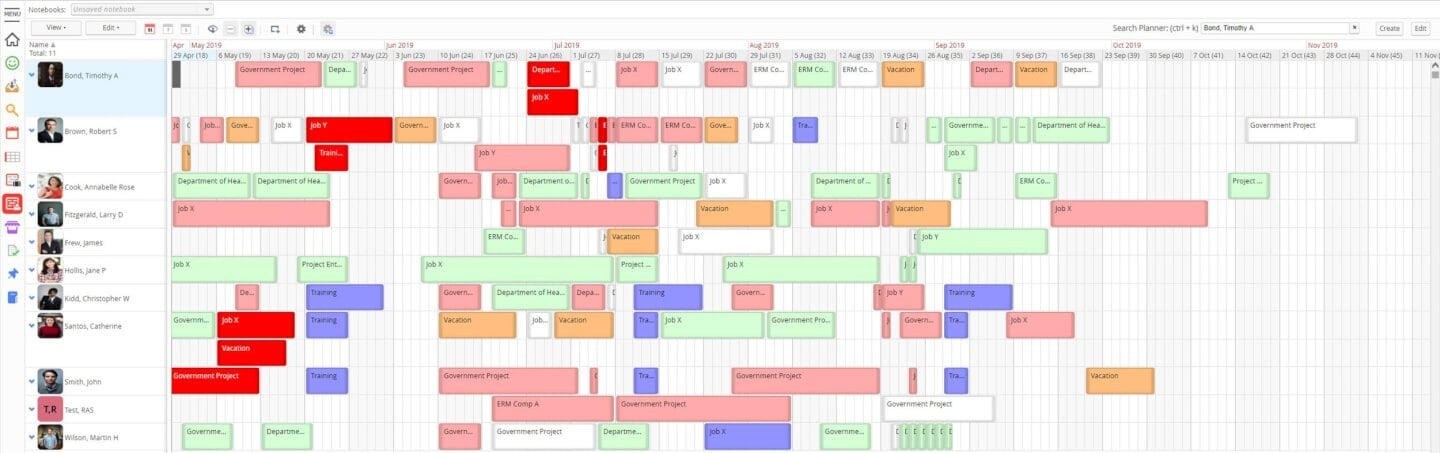
If your team needs resource scheduling with a focus on analytics, Retain is worth a look. It’s designed for organizations that want to dig into utilization, demand, and allocation trends across projects. Retain is especially useful for professional services and enterprise teams that rely on detailed reporting to guide resource planning decisions.
Who Is Retain Best For?
Enterprises that require detailed reporting and analytics to manage resource utilization and business performance.
Why I Picked Retain
What sets Retain apart for resource scheduling is its focus on comprehensive reporting and analytics. I picked Retain because it gives you detailed visibility into resource utilization, capacity, and future demand, which is essential for teams managing complex projects. The platform’s customizable dashboards and exportable reports help you analyze trends and make informed allocation decisions. For organizations that need more than just scheduling, Retain’s reporting depth is a clear advantage.
Retain Key Features
In addition to its reporting strengths, Retain offers several features that support resource scheduling:
- Drag-and-Drop Assignment: Quickly move resources between projects or tasks using a visual interface.
- Multi-Project Calendar: View and manage resource bookings across multiple projects in one place
- Absence and Leave Tracking: Monitor team availability by logging vacations, sick days, and other absences.
- Role-Based Permissions: Control access to sensitive scheduling data by assigning user roles and permissions.
Retain Integrations
Integrations include Microsoft Excel, Microsoft Power BI, Salesforce, SAP, Oracle, Workday, and Microsoft Dynamics.
Pros and Cons
Pros:
- Easy to duplicate bookings
- Data-rich dashboards
- Supports multiple currencies
- Drag-and-drop organization
Cons:
- Search functionality could use improvement
- Displays can get pretty busy

Best for profitable resource scheduling

Float.com offers a tailored approach to resource scheduling. By bringing together resource scheduling, capacity planning, time tracking, and delivery reporting, it helps teams make informed decisions and improve project delivery. With features like real-time tracking of roles and skills, along with finance and estimation capabilities, Float provides a comprehensive solution for organizations looking to forecast revenue and enhance operational efficiency.
Who Is Float.com Best For?
For creative and professional services teams, agencies, and consultancies that need a live view of team capacity, billable utilization, and profitability across projects.
Why I Picked Float.com
Float earns its spot on my shortlist because it excels in profitable resource scheduling, making it a strong choice for organizations looking to optimize project margins and resource allocation. The software's visual scheduling interface provides a clear overview of team workloads, allowing you to efficiently allocate and adjust resources in real time. Its capacity planning tools help you forecast revenue and manage project costs, ensuring that your team is working on the most profitable projects. Time tracking feeds directly from scheduled allocations, helping keep actuals accurate while reducing manual timesheet administration.
Float.com Key Features
In addition to its capacity planning and financial insights, Float offers several other features that enhance its appeal as a resource scheduling software.
- Visual Resource Schedule: Provides a live drag-and-drop view of team workloads with real-time capacity indicators and conflict flagging.
- Built-in Time Tracking: Log hours directly in the platform, with timesheets pre-populated from scheduled allocations to improve accuracy and reduce manual entry.
- Skill-Based Assignment: Match tasks to team members based on skills, helping optimize resource utilization and improve project outcomes.
Float.com Integrations
Integrations include Asana, Basecamp, ClickUp, Jira, Google Calendar, Aprimo, Hubspot, Karbon, monday.com, and Salesforce.
Pros and Cons
Pros:
- Built-in time tracking enhances project accuracy and timelines.
- Strong forecasting tools improve resource allocation decisions.
- Flexible dashboards help organize complex project management.
Cons:
- Interface complexity may overwhelm users with simple projects.
- Time tracking features require a higher plan.
New Product Updates from Float.com

Float Adds Rate Cards and Multi-Currency Billing
Float introduced centralized rate cards to standardize bill rates across projects and added multi-currency support to bill clients consistently across regions. For more information, visit Float's official site.

Best for automated and interactive resourcing
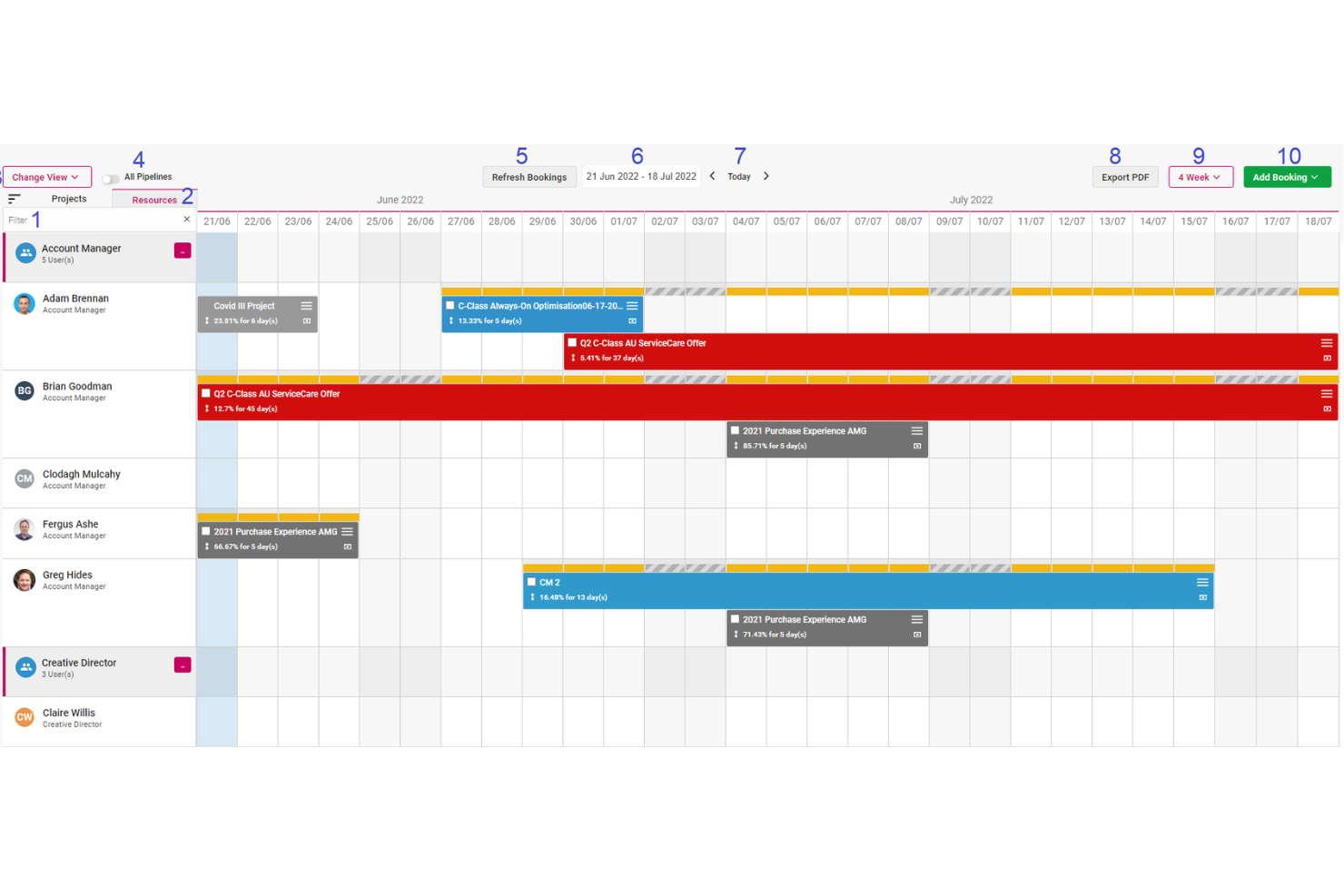
Screendragon is a work management platform designed for marketing, agency, and professional services teams. It combines project management, workflow automation, resource scheduling, financial tracking, and proofing tools to help teams improve operational efficiency and maintain visibility across complex campaigns and client work.
Who Screendragon Is Best For?
Marketing operations teams, in-house creative departments, agencies, and professional services organizations that need structured resource planning, budget oversight, and workflow control across multiple concurrent projects.
Why I Picked Screendragon
One of the main reasons Screendragon stands out is its automated and interactive resource scheduling. The platform can auto-populate schedules directly from scoped staff plans, reducing manual setup and aligning resources with approved budgets from the start. Teams can then adjust allocations using a drag-and-drop interface, with changes reflected in real time. This keeps budgets current and gives leadership immediate insight into resource allocation and financial performance.
Screendragon also offers capacity planning heatmaps that display utilization at both role and individual levels. These visual tools help management spot overbooking or underutilization early, preventing bottlenecks before they disrupt delivery timelines. By clearly showing who is assigned to what and when, teams can forecast more accurately and plan upcoming projects with greater confidence.
Screendragon Features
Features include AI-driven agentic workflows that automate repetitive tasks and support better operational decision-making. Smart forms with conditional logic guide users through required inputs and automatically route information to the appropriate stakeholders. The platform also provides online proofing tools that support markup across multiple media types, version control, and real-time collaboration between internal teams and clients.
Integrations
Integrations include MS Power BI, Slack, MS Teams, Zapier, Google Drive, Trello, Microsoft 365, Box, Jira, Microsoft OneDrive, and PeopleSoft.
Pros and Cons
Pros:
- Integrates various tools like project management and budget tracking
- Good resource planning features
- Can tailor the platform to your specific needs
Cons:
- The platform's depth can lead to complexity
- Time-consuming setup
New Product Updates from Screendragon
Screendragon Unveils New AI Hub
Screendragon introduced AI Hub, a new capability that lets teams build and manage AI agents directly within workflows. The update helps marketing teams automate tasks, maintain governance controls, and scale AI-driven operations more efficiently. For more information, visit Screendragon's official site.

Wrike
Best for complex projects

Wrike brings advanced resource management to teams handling complex, multi-phase projects with shifting priorities. Project managers in IT, marketing, and professional services use Wrike to coordinate cross-functional work, manage dependencies, and balance workloads across large teams. Its customizable workflows and real-time visibility help you keep projects on track, even as requirements change.
Who Is Wrike Best For?
Organizations managing complex, cross-functional projects that require structured workflows, detailed tracking, and enterprise-grade collaboration.
Why I Picked Wrike
When projects involve multiple teams, shifting deadlines, and complex dependencies, Wrike stands out for its ability to handle that level of complexity. Its workload charts and resource allocation tools let you visualize team capacity and adjust assignments as priorities change. I appreciate how Wrike’s dynamic Gantt charts and task dependencies help you manage overlapping schedules and avoid bottlenecks. These features make Wrike a strong fit for organizations that need to coordinate large, multifaceted projects with many moving parts.
Wrike Key Features
Some other features in Wrike help teams manage resources and projects more efficiently:
- Custom Request Forms: Collect project and resource requests with tailored forms that route work to the right teams.
- Time Tracking: Log hours directly on tasks to monitor effort and compare planned versus actual time spent.
- Document Sharing and Proofing: Upload, share, and review files within tasks, with markup and approval tools built in.
- Automated Workflows: Set up rules to automate task assignments, status updates, and notifications based on project triggers.
Wrike Integrations
Integrations include Salesforce, Microsoft Teams, Google Drive, QuickBooks, Tableau, Power BI, Miro, Adobe Creative Cloud, Google Sheets, and Microsoft SharePoint.
Pros and Cons
Pros:
- Building custom dashboards is great for highly specific resource tracking
- Good variety of dashboard views to accommodate different user needs
- Resource request and approvals are easy and well organized
Cons:
- May require additional training for an understanding of the full functionality
- Best resource tools are limited to the higher level paid plans
New Product Updates from Wrike
Wrike Adds Klaxoon MCP Integration
Wrike’s Klaxoon MCP integration is now generally available, enabling AI agents to navigate between Wrike tasks and attached whiteboards, read task context, and manage whiteboard attachments via API. For more information, visit Wrike's official site.
MRPeasy
Best for manufacturer resource planning
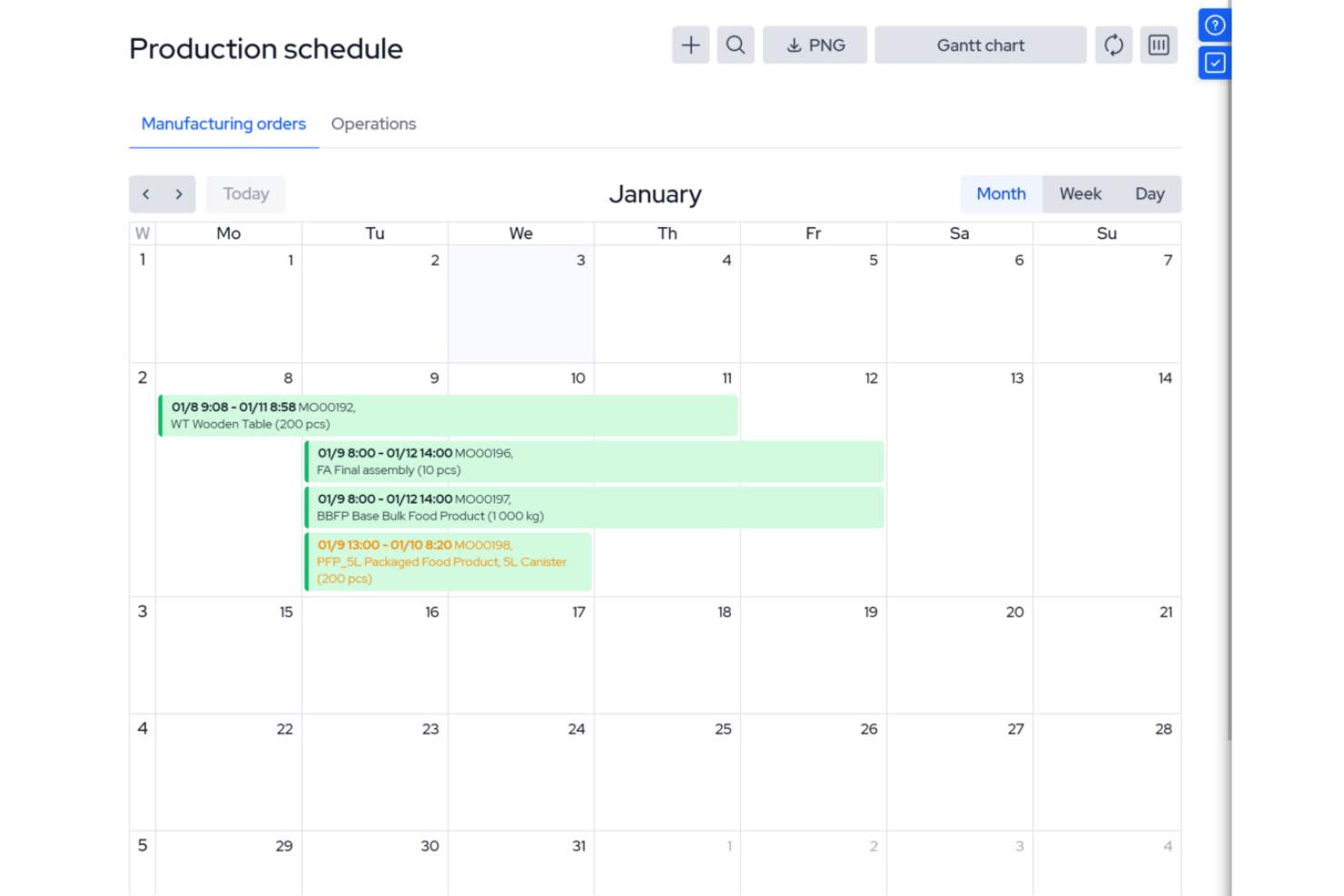
MRPeasy is a manufacturing resource planning (MRP) software, specifically tailored for the manufacturing sector. It integrates with industry processes, offering real-time visibility into production scheduling, inventory management, and operational efficiency. It’s especially useful for operations managers and production planners who want to automate job routing, track materials, and manage shop floor workloads. The platform’s focus on manufacturing resource planning sets it apart from general project scheduling tools.
Who Is MRPeasy For?
Small to mid-sized manufacturers that need integrated production scheduling and resource planning tied to inventory and operations.
Why I Picked MRPeasy
For manufacturers who need more than basic scheduling, MRPeasy offers resource planning tools built specifically for production environments. The platform’s visual production calendar and drag-and-drop job scheduling help you allocate machines, workstations, and labor with precision. I like that MRPeasy automatically factors in material availability and lead times when generating production schedules. This level of manufacturing-specific detail makes it a strong fit for teams managing complex shop floor operations.
MRPeasy Key Features
Some other features that stand out for manufacturers using MRPeasy include:
- BOM (Bill of Materials) Management: Lets you create, edit, and track multi-level BOMs for accurate production planning.
- Shop Floor Reporting: Provides real-time updates from the shop floor on job status and worker activity.
- Inventory Tracking: Monitors raw materials and finished goods across multiple locations.
- Purchase Order Management: Automates the creation and tracking of purchase orders for materials and components.
MRPeasy Integrations
Integrations include Amazon, Xero, WooCommerce, BigCommerce, Crossfire, Dropbox, Google Drive, OneDrive, HubSpot, QuickBooks, ShipStation, Salesforce, Shopify, Zapier, and more.
Pros and Cons
Pros:
- Comprehensive view of resource scheduling
- Automated production planning
- Simple, easy-to-use interface
Cons:
- Limited customizations
- Lack of advanced features due to a simple platform
New Product Updates from MRPeasy
MRPeasy Adds Stocktake for Physical Inventory Counts
MRPeasy adds Stocktake for planning, conducting, and documenting physical inventory counts. This supports both full warehouse counts and cycle counts for selected items. For more information, visit MRPeasy’s official site.
 .
.
Kantata
Best for people-centric resource scheduling

Kantata is designed for organizations that need to match the right people to the right projects based on skills, availability, and preferences. Professional services teams and consultancies use Kantata to manage resource allocation with a focus on individual strengths and workload balance. Its people-centric approach helps you optimize project outcomes while supporting employee satisfaction and retention.
Who Is Kantata Best For?
People-focused professional services organizations that need to balance resource planning with skills, availability, and project demand.
Why I Picked Kantata
What sets Kantata apart is its focus on aligning people’s skills and interests with project needs. The resource management dashboard lets you see individual availability, skill sets, and utilization rates, making it easier to assign the right person to each task. I like how Kantata’s talent profiles and forecasting tools help you plan for future project demands while considering employee preferences. This people-centric approach supports both project delivery and team satisfaction, which is especially valuable for professional services organizations.
Kantata Key Features
Some other features in Kantata help teams manage resources and projects more effectively:
- Project Portfolio Management: Track multiple projects and their resource needs in one centralized view.
- Role-Based Permissions: Control access to sensitive resource and project data based on user roles.
- Time and Expense Tracking: Capture billable hours and expenses directly within the platform.
- Scenario Planning: Model different resource allocation scenarios to see potential impacts before making changes.
Kantata Integrations
Integrations include Salesforce, SAP, Jira, Xero, BambooHR, Slack, Worday, QuickBooks, HubSpot, and NetSuite.
Pros and Cons
Pros:
- Distinguishes between soft and firm allocation
- Resourcing fully integrated with master planning
- Good reporting functionality for resource data
- Easy capacity management
Cons:
- Custom reports can be difficult to create without training
- Proofing solution is an add-on
New Product Updates from Kantata

Kantata Adds Access Group Change History
Kantata adds Access Groups History, letting account administrators track changes to group details, membership, and permissions in Recent History. The update also makes these events available through the Subscribed Events API for broader monitoring. For more information, visit Kantata’s official site.
 .
.
Best for multi-location shift scheduling

Connecteam is a resource scheduling and employee management platform designed for deskless teams. It combines scheduling, time tracking, and task management into one mobile-friendly system, making it easier for businesses to manage employees across multiple locations.
Who Is Connecteam Best For?
Multi-location businesses with deskless or frontline employees that need shift scheduling and workforce coordination.
Why I Picked Connecteam
When you need to manage shift scheduling across several locations, Connecteam stands out for its location-based scheduling and mobile-first design. The platform lets managers assign shifts to specific sites, track employee check-ins with GPS, and quickly fill open shifts with qualified staff. I like that you can set location-specific rules and notifications, which helps prevent scheduling conflicts and ensures coverage where it’s needed most. These features make Connecteam a strong fit for businesses with distributed teams and complex shift requirements.
Connecteam Key Features
Some other features that make Connecteam useful for resource scheduling include:
- Shift Templates: Create and reuse common shift patterns for faster scheduling.
- Automated Shift Reminders: Sends push notifications to employees before their shifts start.
- Time Off Requests: Allows staff to submit vacation or sick leave requests directly in the app.
- Payroll Export: Exports timesheets and attendance data for payroll processing.
Connecteam Integrations
Integrations include Gusto, QuickBooks, Paychex, Xero, ADP, Zapier, Wix Bookings, Lightspeed POS, and PrismHR.
Pros and Cons
Pros:
- Detailed time tracking with GPS stamping
- Customizable forms and task workflows
- Auto-scheduling reduces manual shift planning
Cons:
- Geolocation tools may struggle in remote areas
- Interface can feel complex for new users
New Product Updates from Connecteam

Connecteam Expands Break and Timesheet Controls
Connecteam adds flexible break thresholds, personalized policies, auto-end options, a centralized exceptions report, and improved timesheet issue visibility to help teams manage breaks and timesheets more effectively. For more information, visit Connecteam’s official site.
 .
.
Best for Microsoft integrations
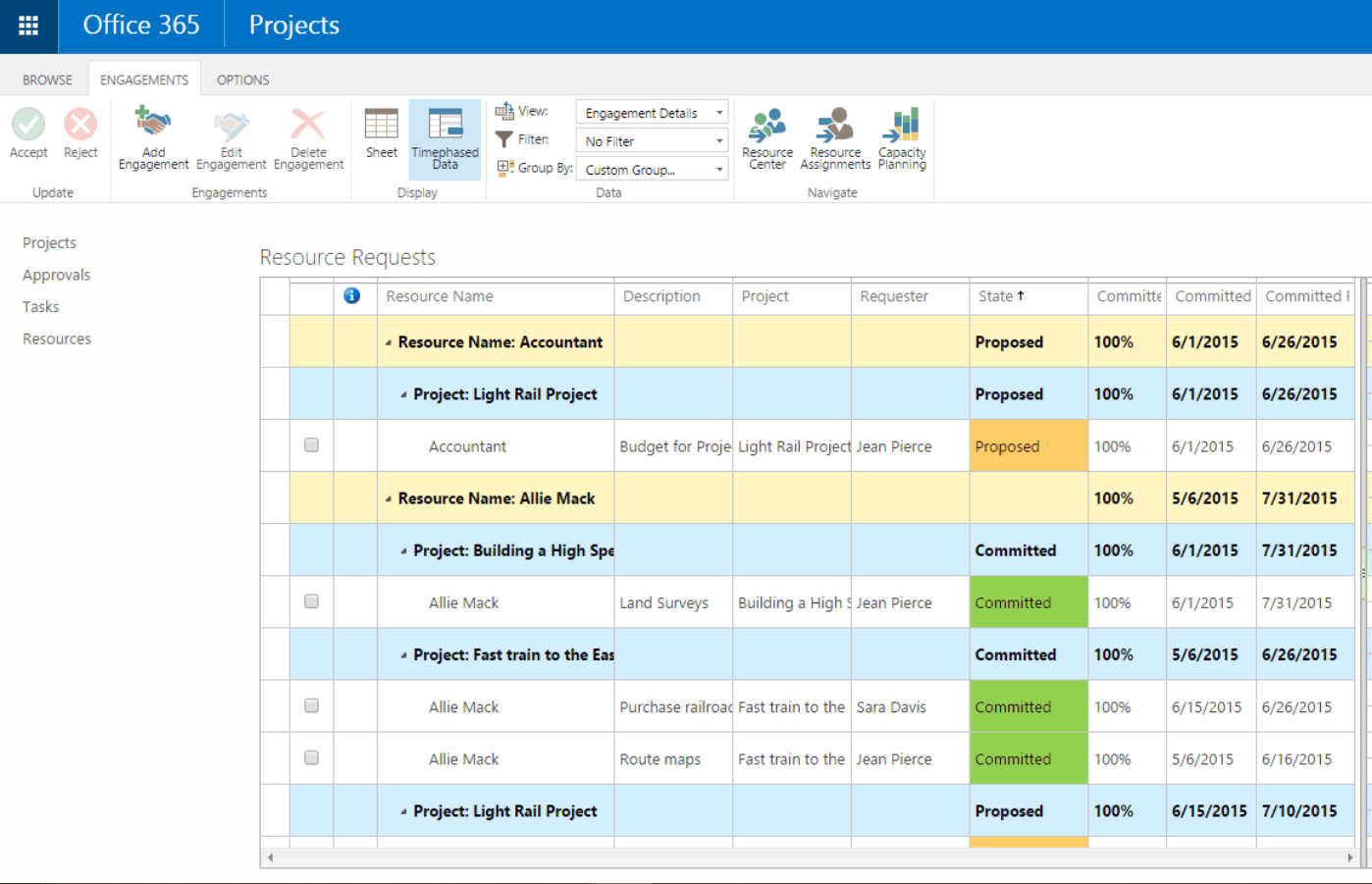
For teams already using Microsoft 365, Microsoft Project offers resource scheduling that fits right into your existing workflows. It’s a strong choice for project managers in organizations that rely on Microsoft tools for collaboration and reporting. With its deep integration across Microsoft apps, you can coordinate resources, track workloads, and manage dependencies without leaving your familiar environment.
Microsoft Project can be clunky (which is why many people search for MS Project alternatives), but MS Project is still a standard, well-supported, and widely adopted tool.
For Allan Hou, Sales Director at TSL Australia, the platform delivered clarity that spreadsheets couldn’t match: “Microsoft Project provided me with much clearer insight into time allocation compared to using a spreadsheet. I liked having the ability to frame each task in hours on the calendar instead of abstract time-based blocks, which allowed the project to progress without guesswork.”
Who Is Microsoft Project Best For?
Organizations already invested in the Microsoft ecosystem that need structured project and resource management tools.
Why I Picked Microsoft Project
Because Microsoft Project is built to work seamlessly with the Microsoft 365 suite, it’s a natural fit for teams already invested in that ecosystem. The tool’s resource scheduling features let you assign tasks, monitor workloads, and adjust allocations directly alongside your existing files and communications in Microsoft Teams, Outlook, and SharePoint. I appreciate how you can pull in data from other Microsoft apps to inform resource planning and reporting. This level of integration helps project managers keep everything connected and reduces the friction of switching between platforms.
Microsoft Project Key Features
Some other features that make Microsoft Project useful for resource scheduling include:
- Gantt Chart Visualization: Lets you build and adjust project timelines with drag-and-drop functionality.
- Resource Pool Management: Allows you to create a centralized pool of resources for use across multiple projects.
- Built-In Reporting Tools: Generates visual reports on resource allocation, project progress, and workload distribution.
- Task Dependency Mapping: Enables you to define and manage task relationships and constraints within your schedule.
Microsoft Project Integrations
Integrations include other Microsoft software, like Outlook, Excel, Skype, and more.
Pros and Cons
Pros:
- Integration with other Microsoft software
- Driver prioritization module for ranking strategies/objectives
- Helpful project template descriptions for guidance
- Can generate a Gantt chart from a spreadsheet
Cons:
- Few customization options
- Higher learning curve
- Limitations on collaboration tools
Other Resource Scheduling Software
Below is a list of additional tools for resource scheduling that didn’t make the top list:
- Rocketlane
For seamless onboarding collaboration
- ClickUp
For workload and box views
- Ezo
For centralized asset requests
- ActiveCollab
For client invoicing
- Jira
For project issue tracking
- Bonsai Agency Software
For resource planning and forecasting
- Birdview
For professional services companies
- Schedule It
For contractor scheduling
- Polaris PSA By Replicon
For combined PSA and PPM
- Planview AdaptiveWork
For enterprise project management
- elapseit
For integrated financial features
- Parallax
For software development firms
- Planview Vantage
For project portfolio management
- Silverbucket
For project-based work
- eResource Scheduler
Simple, standalone scheduling module
- Acuity PPM
For strategic portfolio resource alignment
- Primetric
For IT service companies
- monday AI Workspace
For customizable AI workflows
- Resource Guru
For capacity planning with timesheets
- Smartsheet
For custom workflow automations
- Celoxis
For advanced resource allocation
- ClickTime
For project schedule analytics
- Hive
For visualizing team availability
- Zoho Projects
For growing businesses
- Accelo
For dynamic scheduling
- VOGSY
For Google Workspace users
- GoodDay
For customizable workspaces
- Saviom
For multi-dimensional resource scheduling
- Runn
For real-time planning
- Hub Planner by Milient
For midsized to large companies


Related Resource Scheduling Software Reviews
If you still haven't found what you're looking for here, check out these other related tools that we've tested and evaluated:
- Project Management Software
- Web-Based Resource Scheduling Software
- Resource Management Software
- Workflow Automation Software
- Time Tracking Software
- Productivity Tools
- Project Scheduling Software
- Open Source Resource Management Software
How I Evaluate Resource Scheduling Software
Resource scheduling software is what a digital agency relies on to avoid double-booking its UX team across five client projects, or what a PMO lead uses to map future resource demand before a new project even kicks off. When I evaluate tools in this space, I work through two layers: a baseline that every pick on this list has to clear, and a set of differentiators that determine which tools actually rise to the top.
Core Functionality (Table Stakes for This List)
For resource scheduling software, the core functionality I test and evaluate is:
- Visual scheduling: I look for drag-and-drop timelines or Gantt views that let you see every assignment at a glance—like spotting a developer booked on three sprints at once.
- Resource allocation: Each tool should let you assign people, equipment, or spaces to tasks at full or partial capacity, such as booking a designer at 50% across two projects.
- Capacity tracking: I check whether the tool surfaces available hours vs. booked hours per resource so you can tell who's maxed out before the next project lands.
- Conflict detection: Double-bookings kill schedules. I evaluate how each tool flags overlapping assignments and whether it suggests alternatives or just alerts you.
- Resource pool management: A filterable, searchable database of resources with attributes like skills, roles, location, and cost rate is essential for matching the right people to the right work.
- Utilization reporting: I look for reports that compare planned vs. actual utilization, since that's the metric most services teams and PMOs use to measure scheduling health.
- Availability & time-off tracking: The tool needs to account for PTO, holidays, and non-working days so your schedule reflects real-world availability, not just headcount.
A tool has to deliver most of these capabilities to earn a spot on the list. From there, I consider what sets each tool apart.
Standout Features (What Separates the Picks)
Some tools stand out by offering deep scenario planning or forecasting, so you can model future demand and hiring needs before project start dates are even set. I also look for built-in integrations with project management, HR, and time tracking platforms, because real-time syncing with Jira or BambooHR can make or break scheduling workflows. Finally, API access and automation capabilities often let larger teams connect resource scheduling to custom internal processes or dashboards.
What I Weigh Beyond Features
I consider who each tool is actually built for, because a 15-person agency and a 500-person consulting firm have very different scheduling needs. Pricing structure matters too—per-resource pricing can get expensive fast when you're scheduling contractors alongside full-time staff. I also evaluate onboarding complexity, since tools like Float can be running in a day while enterprise platforms may need weeks of configuration. Finally, I check how well each tool fits common tech stacks in project-driven organizations.
How To Choose Resource Scheduling Software
It’s easy to get bogged down in long feature lists and complex pricing structures. To help you stay focused as you work through your unique software selection process, here’s a checklist of factors to keep in mind:
| Factor | What to Consider |
| Scalability | Will this tool still work for your team size six months from now? Look for solutions that can handle more users, projects, and resources without extra setup. |
| Integrations | Does the tool sync with your project management or time tracking tools? Make sure it connects with your current workflow to avoid double work. |
| Customizability | Can you tweak views, permissions, and tags to fit your team’s process? Avoid rigid systems that force you to change how you already work. |
| Ease of use | Can team members learn the software without heavy training? A clean interface and drag-and-drop scheduling help reduce support requests. |
| Implementation and onboarding | How fast can your team actually start using the tool? Ask about templates, walkthroughs, or live onboarding help to avoid long rollout delays. |
| Cost | Does the price match your use case? Watch for limits on users, projects, or schedule views that could force you into a higher tier too soon. |
| Security safeguards | What protections are in place for your team’s data? Ask about role-based access, data encryption, and where the data is hosted. |
| Internal resourcing needs | Who on your team will own setup and maintenance? If you’re stretched thin, choose a low-maintenance tool with reliable vendor support. |
Trends In Resource Scheduling Software For 2025
In my research, I sourced countless product updates, press releases, and release logs from different resource scheduling software vendors. Here are some of the emerging trends I’m keeping an eye on:
- AI-Driven Workload Forecasting: Tools are starting to use AI to predict workload imbalances and recommend resource allocations. This helps managers act before bottlenecks happen.
- Real-Time Availability Sync: More tools are syncing team calendars and PTO schedules in real time to show up-to-date availability. This reduces the chance of overbooking and helps with quick rescheduling—especially when paired with an AI scheduling assistant that can suggest optimal adjustments automatically.
- Scenario Planning for Resource Allocation: Some tools let teams build “what-if” resource scenarios to test how changes affect delivery timelines. This helps with contingency planning and hiring decisions.
- Granular Skill Tagging and Matching: Instead of just matching people to tasks by role, newer tools allow skill-level tagging for precise assignments. This gives better project-fit and helps junior staff develop.
- Deprioritization of Manual Time Allocation: Manually assigning hours per day to each team member is becoming less relevant. Tools now favor effort-based or outcome-based scheduling with built-in guardrails to prevent burnout.
What Is Resource Scheduling Software?
Resource scheduling software is a tool that helps organizations plan, assign, and manage resources such as personnel, equipment, or time across various projects.
It ensures the right resources are available for the right tasks at the right time, reducing conflicts and improving team efficiency. Key features often include calendar views, workload management, and real-time availability tracking to support effective resource planning and project execution.
Features of Resource Scheduling Software
When selecting resource scheduling software, keep an eye out for the following key features:
- Drag-and-drop scheduling: Lets users easily assign and move tasks on a visual timeline for quick updates and adjustments.
- Real-time availability tracking: Shows up-to-date resource availability by syncing employee calendars and time-off schedules.
- Workload balancing: Helps distribute tasks evenly across team members to avoid overbooking or underutilization.
- Skill-based assignment: Matches tasks to team members based on specific skills to improve project outcomes.
- Forecasting and capacity planning: Predicts future resource needs based on current and upcoming projects.
- Scenario planning: Allows users to test different scheduling outcomes without affecting live plans.
- Integrated time tracking: Captures hours worked directly within the tool to compare estimates vs. actuals.
- Role-based access control: Lets managers limit what different users can see and do based on their roles.
- Reporting and analytics: Provides data on resource utilization, project timelines, and team performance.
- Mobile access: Enables users to view and adjust schedules on-the-go through a mobile app or browser.
Benefits of Resource Scheduling Software
Implementing resource scheduling software can provide several benefits for your team and your business. Here are a few you can look forward to:
- Fewer scheduling conflicts: Real-time availability and calendar syncing help avoid double-booking people or missing deadlines.
- Better use of team capacity: Workload balancing and forecasting show where people are overbooked or have room for more tasks.
- Faster project planning: Drag-and-drop timelines and skill matching speed up assigning tasks and planning who does what.
- More accurate forecasting: Capacity planning and reporting tools make it easier to predict resource needs and delivery timelines.
- Easier change management: Scenario planning lets you test different options before adjusting live schedules.
- Improved visibility for managers: Dashboards and reports show how resources are used and where things might go off track.
- Less manual work: Automated updates and built-in time tracking reduce the need to constantly check in or update spreadsheets.
Costs & Pricing for Resource Scheduling Software
Selecting resource scheduling software requires an understanding of the various pricing models and plans available. Costs vary based on features, team size, add-ons, and more. The table below summarizes common plans, their average prices, and typical features included in resource scheduling software solutions:
Plan Comparison Table for Resource Scheduling Software
| Plan Type | Average Price | Common Features |
|---|---|---|
| Free | $0 | Basic scheduling, limited resources, standard reports, community support |
| Basic | $10-20/user/month | Enhanced scheduling capabilities, additional resources, basic integrations, email support |
| Professional | $20-40/user/month | Advanced scheduling options, unlimited resources, full suite of reports, priority email support |
| Enterprise | $40+/user/month | Custom integrations, advanced security options, dedicated support, onboarding and training services |
When choosing a plan, evaluate your current needs and think about future growth. A good plan should fit your budget and grow with your organization, offering the flexibility and tools needed for efficient resource management.
Common points where a company might upgrade its pricing plan include:
- Team growth: More employees or departments may need better scheduling tools to manage a larger workforce.
- Project expansion: More or bigger projects require more advanced scheduling features.
- More clients: A larger client base needs better scheduling, more customization, and stronger client management tools.
- Need for advanced features: Over time, companies may want features like real-time collaboration, analytics, automation, and system integrations.
- Geographic expansion: Managing resources across regions or time zones often calls for tools that support multi-location scheduling.
Resource Scheduling Software Frequently Asked Questions
Find answers to the most common questions about this topic.
How do I choose the right resource scheduling software for my team?
Start by listing your team’s must-have features, like integration options, reporting, or ease of use. Compare tools based on those needs, read real user reviews, and take advantage of free trials. Make sure the software fits your project size and workflow before making a decision.
Can resource scheduling tools integrate with my current project management software?
Yes, most resource scheduling tools work with popular project management software like Asana, Jira, or Trello. Check integration details on the software’s website or help docs to confirm it’ll fit your tech stack. Integrations save time by keeping data and timelines synced automatically.
How do these tools help prevent resource overallocation or burnout?
Resource scheduling software alerts you when someone’s overbooked. You’ll see dashboards or workload charts that make it easy to spot problems. Some tools even send reminders or warnings, so you can shift assignments and keep workloads realistic.
What's the best way to transition from spreadsheets to dedicated scheduling software?
Export your spreadsheet data, then use the import or setup tools provided by your new software. Organize a quick training session for your team, and start with a sample project to build comfort. Phase out old spreadsheets as everyone adjusts to the new system.
Do I need a dedicated resource manager to use resource scheduling software effectively?
No, you don’t need a dedicated resource manager. Project managers can handle resource planning themselves, especially with user-friendly tools. Some larger teams eventually add a dedicated manager, but most software is designed to be simple for anyone to use.