

10 Best Employee Calendar Software Reviewed in 2026

Best Employee Calendar Software Shortlist


Managing a team’s schedule can feel like juggling too much at once. The struggle of coordinating shifts, avoiding conflicts, and keeping everyone on the same page is a challenge that can weigh on your time and patience.
That’s where employee calendar software comes in, allowing you to say goodbye to using paper timesheets and tackling Excel spreadsheets. With these efficient tools, you can reduce scheduling headaches, keep your team organized, and improve its overall workflow.
In my experience reviewing software, I’ve seen how the right tool can make a world of difference. This article will guide you through my top picks for employee calendar software, showcasing their unique features and benefits, so that you can find the perfect fit for your team’s needs.
Why You Can Trust Us
We’ve been testing and reviewing project management software since 2012. As project managers ourselves, we know how critical and difficult it is to make the right decision when selecting software.
We invest in deep research to help our audience make better software purchasing decisions. We’ve tested more than 2,000 tools for different project management use cases and written over 1,000 comprehensive software reviews. Learn how we stay transparent & our software review methodology.
Best Employee Calendar Software Summary
This comparison chart summarizes pricing details for my top employee calendar software selections to help you find the best one for your budget and business needs.
| Tool | Best For | Trial Info | Price | ||
|---|---|---|---|---|---|
| 1 | Best for real-time attendance tracking | 30-day free trial | From $50/month | Website | |
| 2 | Best for restaurant teams | 14-day free trial + free plan available | From $39.99/month | Website | |
| 3 | Best for small business scheduling | Free trial available | From $2.50/user/month | Website | |
| 4 | Best for Microsoft ecosystem users | Free trial available | From $4.00/user/month (billed annually) | Website | |
| 5 | Best for large enterprise needs | Free demo available | Pricing upon request | Website | |
| 6 | Best for automated scheduling | 30-day free trial available | From $28/month | Website | |
| 7 | Best for complex shift patterns | Free demo available | Pricing upon request | Website | |
| 8 | Best for seasonal workforce | Free 14-day trial + free plan + free demo available | From $2/active member/month (billed annually) | Website | |
| 9 | Best for retail scheduling needs | Free trial + free plan available | From $1.70/user/month (billed annually) | Website | |
| 10 | Best for employee feedback tools | Free 21-day trial + free demo available | From $2.93/user/month (billed annually) | Website |
Best Employee Calendar Software Reviews
Below are my detailed summaries of the best employee calendar software that made it onto my shortlist. My reviews offer a thorough look at the key features, pros and cons, integrations, and ideal use cases of each tool, to help you find the one that’s right for you.

TimeTrex
Best for real-time attendance tracking
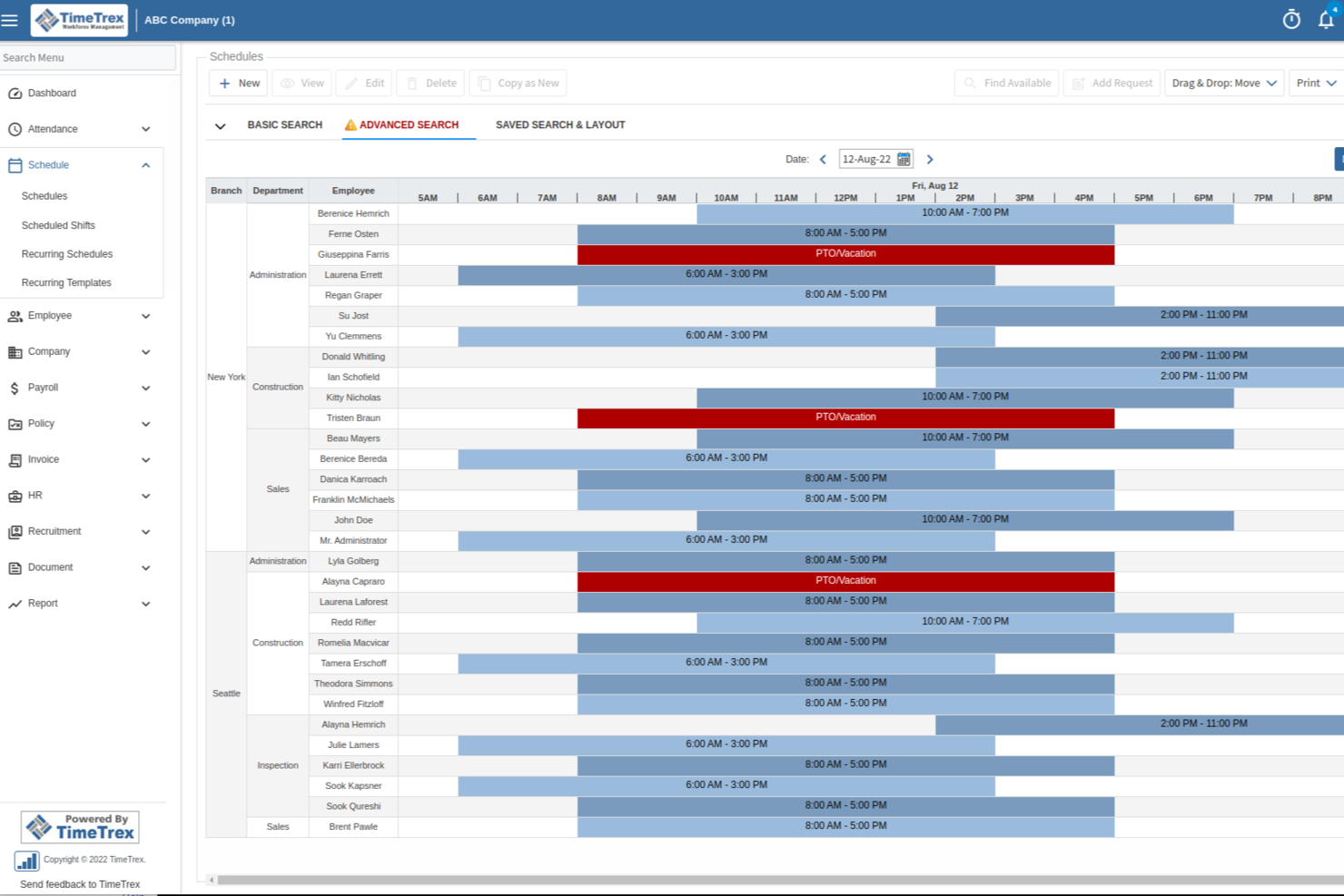
TimeTrex is a workforce management platform that ties employee scheduling and shift calendars directly to time and attendance tracking, leave management, and payroll processing.
Who Is TimeTrex Best For?
TimeTrex is a strong fit for operations and HR teams in shift-based industries like manufacturing, retail, and healthcare that need scheduling tied to time tracking.
Why I Picked TimeTrex
I've included TimeTrex in my top picks because real-time attendance tracking is genuinely central to how the platform works, not a bolt-on feature. When an employee punches in via the browser, mobile app, or a physical time clock, that attendance data surfaces immediately against the scheduled shift in the calendar. I also like that geofencing and GEO-enforcement let you define exactly where punch-ins are valid, so the live attendance view actually reflects who is on-site. Pair that with automated accrual tracking updating in real time, and managers always have an accurate picture of coverage without chasing down HR.
TimeTrex Key Features
- Drag-and-drop shift scheduling: Build and adjust employee schedules visually, with tools to detect and resolve conflicts before they affect coverage.
- Leave and absence management: Employees submit time-off requests through a self-service portal, and approvals automatically update both the schedule and payroll records.
- Calendar management: A centralized scheduling calendar keeps shifts, time-off, and workforce availability visible in one place across teams.
- AI-powered schedule optimization: TimeTrex uses an AI assistant to help automate shift creation based on employee availability, skills, and business demand.
TimeTrex Integrations
TimeTrex offers a smaller set of native integrations, limited to payroll providers like ADP, Paychex, Sage, Ceridian, and QuickBooks. The platform also supports two-way and flat-file integrations through its API, and provides an open API for custom needs.
Pros and Cons
Pros:
- Free open-source edition available for self-hosting
- Biometric facial recognition prevents buddy punching
- Built-in payroll with automatic tax calculations
Cons:
- Reporting dashboards lack ad hoc customization
- Initial setup requires significant configuration time
New Product Updates from TimeTrex
TimeTrex Adds Quick Punch App With Offline and QR Support
TimeTrex adds a new Quick Punch app, offline punching, QR code scanning, punch images, configurable messages, and punch warnings or lockouts to improve employee clock-ins across browsers and local computers. For more information, visit TimeTrex’s official site.
 .
.
7shifts
Best for restaurant teams
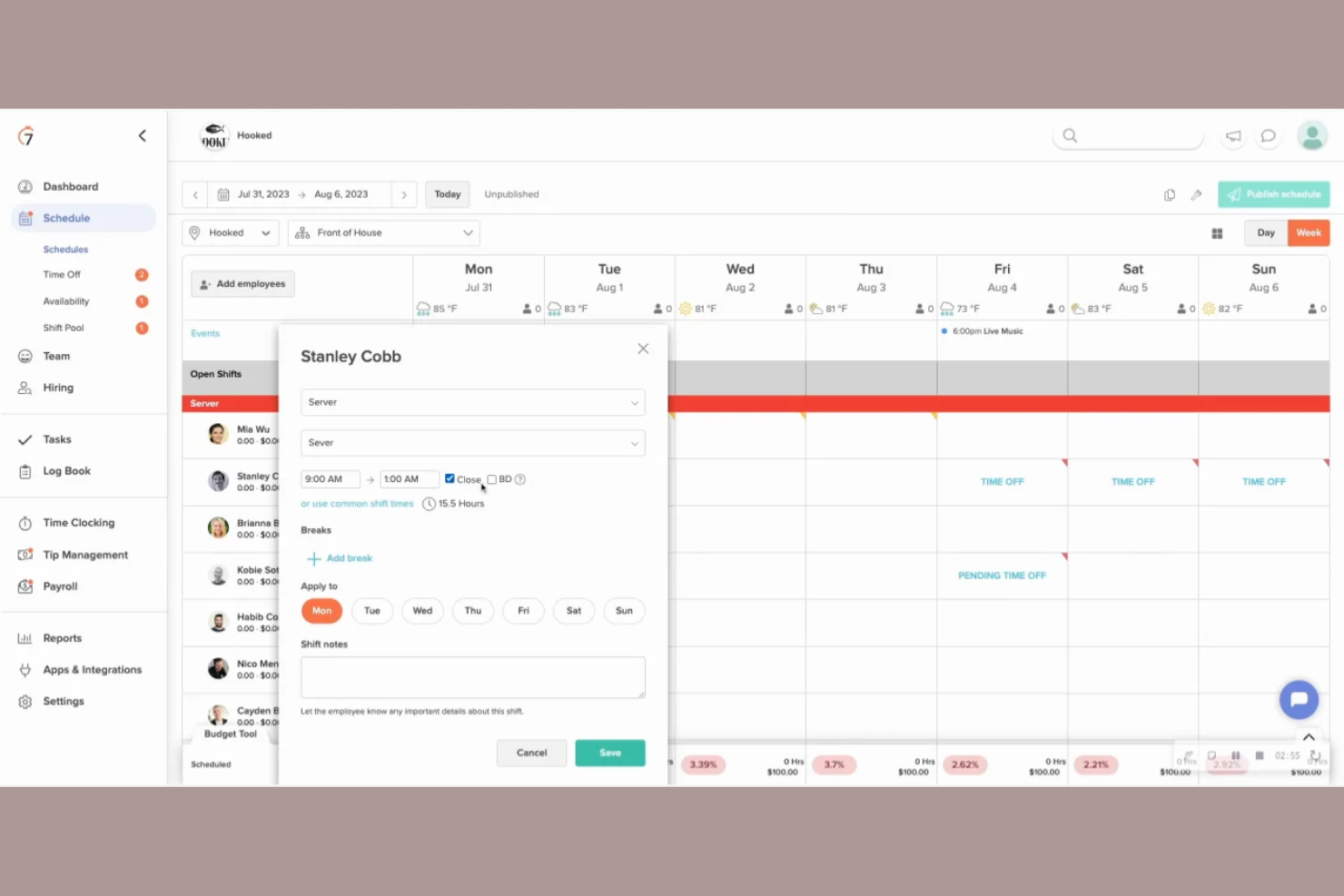
7shifts is a scheduling and workforce management tool specifically designed for the restaurant industry. It helps manage staff schedules, track labor costs, and improve team communication.
Why I picked 7shifts: It’s tailored for restaurant teams, providing features that address the unique challenges of the food service industry. Its shift-swapping feature makes it easier for your team to handle last-minute changes, while customizable tip management software provides accurate calculations and distribution to staff.
Standout Features and Integrations:
Features include labor cost forecasting to help you stay on budget, employee engagement tools to boost morale, and compliance management to ensure you meet industry regulations. All these features work together to strengthen your restaurant's scheduling efficiency.
Integrations include Toast, Square, Clover, ADP Workforce Now, Gusto, Paychex, TouchBistro, MarginEdge, and more.
Pros and Cons
Pros:
- Compliance management tools
- Effective labor cost management
- Tailored for restaurant needs
Cons:
- POS data discrepancies
- No break reminders for employees

Best for small business scheduling
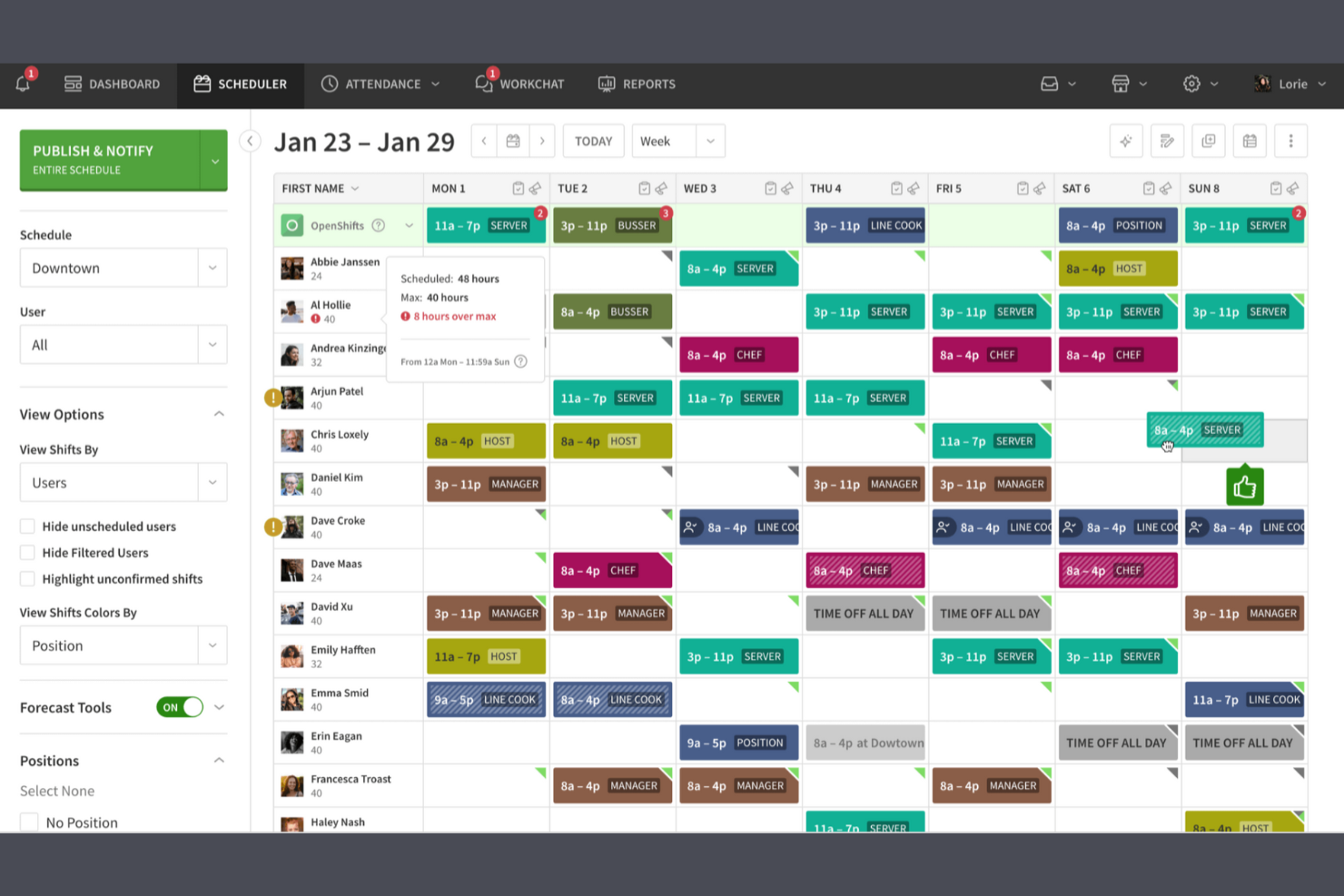
When I Work is a scheduling solution and workforce management tool designed to help small businesses across various industries keep everything they need in one place. It helps manage employee time schedules and ensures teams are well communicated.
Why I picked When I Work: It’s tailored for small businesses, offering tools that simplify shift management. The platform allows your team to swap shifts smoothly, and its user-friendly interface means your team can quickly adapt to using the tool without extensive training. It also offers time-clock functionalities that ensure accurate time tracking for payroll.
Standout Features and Integrations:
Features include an intuitive drag-and-drop schedule builder that simplifies shift planning, time-off management to handle employee requests, attendance tracking to increase employee accountability, and team messaging for instant communication. All these features help you keep your team organized and connected.
Integrations include QuickBooks, Gusto, ADP, Square, Rippling, OnPay, Zapier, GoCo, Paychex, and more.
Pros and Cons
Pros:
- Customizable shift templates
- Simple onboarding process
- Easy-to-use interface
Cons:
- Restricted staff visibility
- No automated employee break alerts

Best for Microsoft ecosystem users

Microsoft Teams is a communication and collaboration platform that includes staff scheduling features, catering primarily to businesses already using Microsoft products. It facilitates team communication, scheduling, and task management, making it a versatile tool for various industries.
Why I picked Microsoft Teams: It integrates smoothly with the Microsoft ecosystem, allowing you to leverage existing Microsoft tools for a cohesive workflow. You can manage schedules directly within Teams, reducing the need for additional software, and its features, such as shift swapping and time-off requests, are easy to manage. The integration with Microsoft 365 improves productivity by allowing straightforward access to documents and other resources.
Standout Features and Integrations:
Features include built-in video conferencing to facilitate remote meetings, file sharing to strengthen collaboration, and customizable notifications to keep your team informed. These features help maintain effective communication and coordination within your team.
Integrations include Microsoft 365, Outlook, OneDrive, SharePoint, Power BI, Trello, Asana, Salesforce, Dropbox, and more.
Pros and Cons
Pros:
- Built-in video conferencing
- Customizable notifications
- Blocks off-shift chat access
Cons:
- No back-to-back shift support
- Requires Microsoft account setup

Workday
Best for large enterprise needs
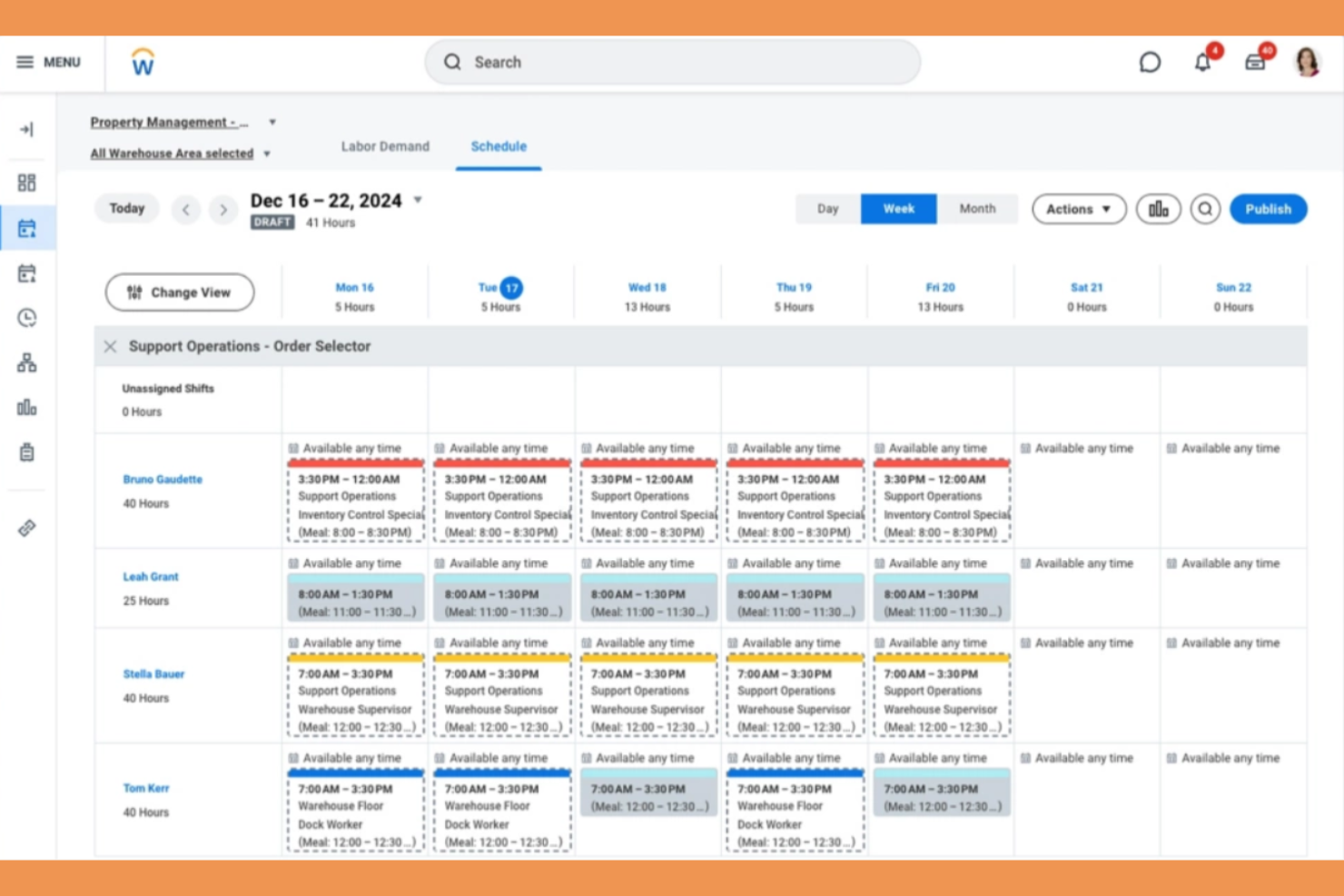
Workday is an extensive workforce management tool designed for large enterprises across various sectors. It facilitates employee scheduling, time tracking, and labor optimization, ensuring efficient workforce management.
Why I picked Workday: It addresses the complex needs of large enterprises with features such as AI-driven schedule generation and demand forecasting. Workday offers centralized scheduling, allowing managers and workers to control their schedules from mobile devices, while the open shifts board and shift-swapping features ensure flexibility and adaptability when managing large teams.
Standout Features and Integrations:
Features include automated shift assignments to simplify scheduling processes, labor optimization tools to maximize workforce efficiency, and demand forecasting to anticipate staffing needs. These features cater to the dynamic requirements of large enterprises.
Integrations include Workday Human Capital Management, Workday Payroll, and more.
Pros and Cons
Pros:
- Real-time demand forecasting
- Scalable for large teams
- AI-driven scheduling
Cons:
- Limited report filtering options
- Frequent loading delays

Best for automated scheduling
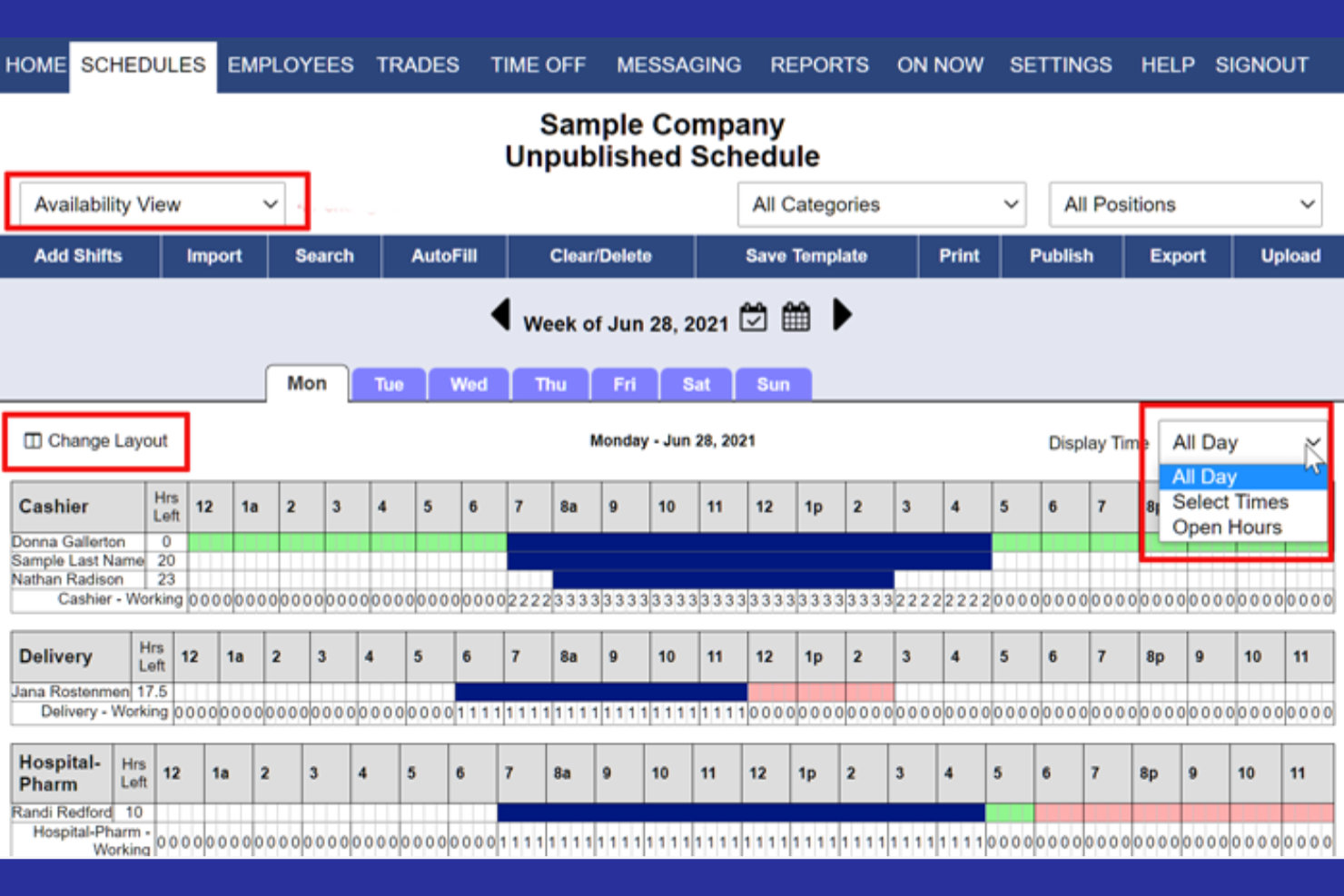
WhenToWork is an employee scheduling software designed for businesses that need efficient shift management. It caters to a variety of industries, helping manage schedules and ensure effective communication with employees.
Why I picked WhenToWork: It excels in automated scheduling so that you spend less time creating and adjusting shifts. The automatic shift assignment feature allows you to customize scheduling rules to fit your specific business needs, ensuring fair distribution of work among your team. WhenToWork’s notification system keeps your team informed of any changes so that everyone stays on the same page.
Standout Features and Integrations:
Features include shift swapping and availability management through a self-service, single-click autofill for employees, helping you accommodate employee preferences. The tool also provides reporting tools to analyze scheduling patterns and improve efficiency.
Integrations are not publicly listed.
Pros and Cons
Pros:
- Automated shift assignment
- Efficient notification system
- Customizable scheduling rules
Cons:
- Manual bulk assignments
- Lacks built-in GPS/geofencing


Shiftboard is a scheduling and workforce management tool designed for industries with complex staffing needs, such as healthcare and manufacturing. It helps you manage shifts, track time, and ensure compliance with labor regulations.
Why I picked Shiftboard: It's ideal for managing complex shift patterns, making it suitable for industries with intricate scheduling requirements. The automated scheduling feature allows your team to reduce manual errors and save time, while Shiftboard's reporting capabilities provide insights into workforce operations.
Standout Features and Integrations:
Features include compliance management to ensure adherence to labor laws, labor demand planning to scale staffing demand and meet service requirements, and straightforward timesheet management that reduces payroll errors. All these features help you manage your team efficiently and effectively.
Integrations include ADP, Workday, Salesforce, Microsoft Dynamics, Oracle, Circadian, UKG, and more.
Pros and Cons
Pros:
- Customizable reporting options
- Automated scheduling
- Handles complex shifts
Cons:
- Basic user interface
- Limited mobile features
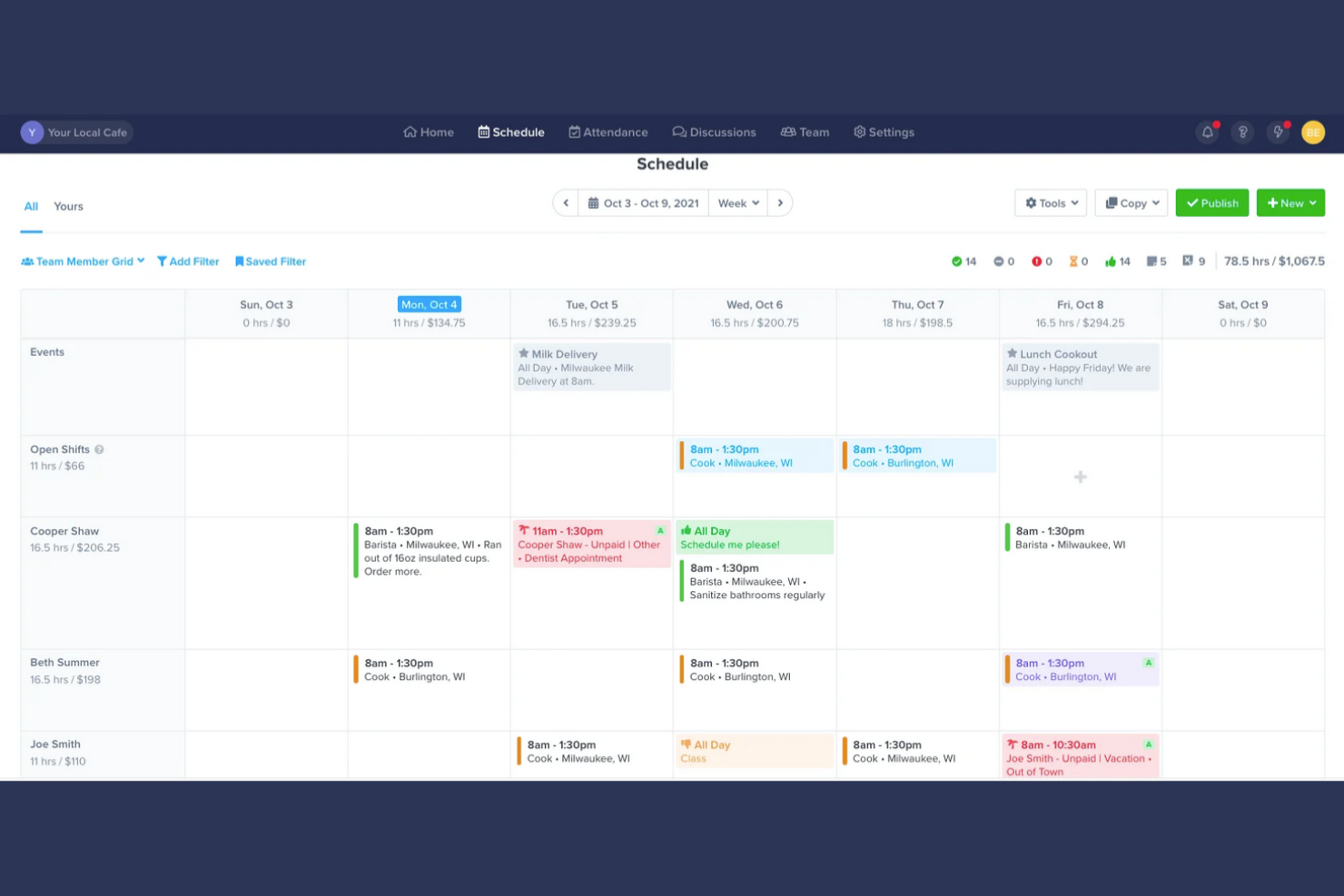
ZoomShift is a scheduling software designed for businesses with a seasonal workforce, such as in event planning and retail. It helps manage employee schedules, track time, and improve team communication.
Why I picked ZoomShift: It's ideal for managing a seasonal workforce, offering features that help you handle fluctuating staffing needs. With tools like shift swapping, your team can smoothly adjust their schedules, while time tracking ensures your payroll processing is always accurate. ZoomShift’s communication tools keep your team informed about any schedule changes, which is significant during busy seasons.
Standout Features and Integrations:
Features include a drag-and-drop schedule builder that simplifies shift creation, availability management to accommodate employee preferences, and payroll exports for easy processing. These features help refine your scheduling and payroll tasks.
Integrations include Google Calendar, iCalendar, and more.
Pros and Cons
Pros:
- Easy payroll exports
- Effective shift swapping tools
- Supports seasonal staffing needs
Cons:
- No individual task tracking
- No bulk employee data import

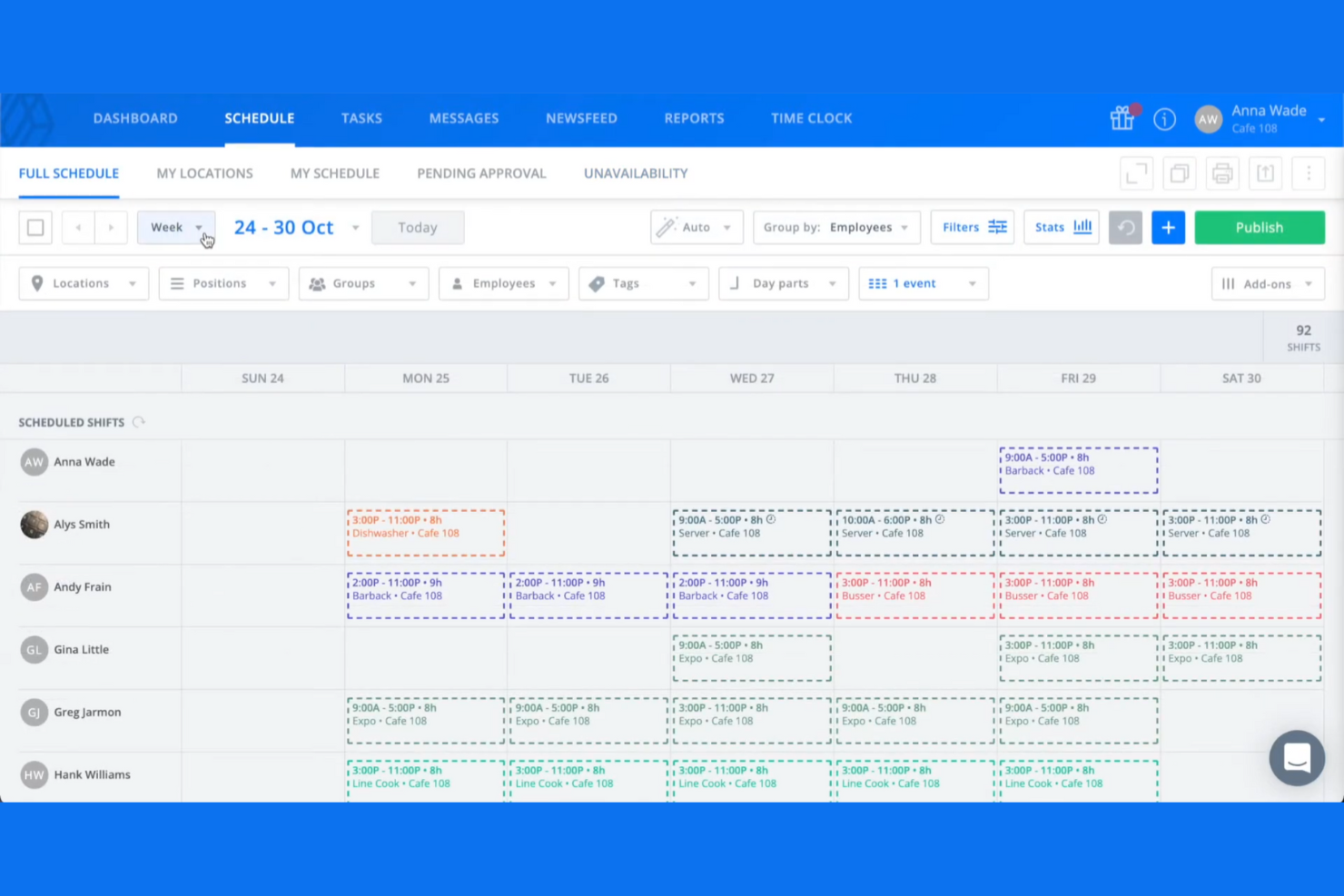
Sling is an employee scheduling app and shift planning tool designed primarily for industries like retail, restaurants, and healthcare. It focuses on simplifying workforce management by offering features such as time tracking, geofencing, task management, and team communication, all on one platform.
Why I picked Sling: It’s tailored for retail scheduling needs, providing tools that can help you manage shifts efficiently. The platform also allows you to manage time off, shift trades, and employee availability, making it easier to handle the dynamic nature of retail operations. Sling’s communication tools ensure your team stays informed and connected, which is essential in the fast-paced retail environment.
Standout Features and Integrations:
Features include labor cost optimization to help you manage your scheduling budget, time tracking to ensure accurate pay calculations, and task management to facilitate the assigning and monitoring of tasks. These features work together to improve your team’s efficiency and productivity.
Integrations include Harbortouch, POSitouch, Gusto, Square, Toast, and more.
Pros and Cons
Pros:
- Free plan with unlimited employees & locations
- Budget alerts for shifts
- Accurate time tracking
Cons:
- Limited customization options
- Limited advanced features

Agendrix
Best for employee feedback tools
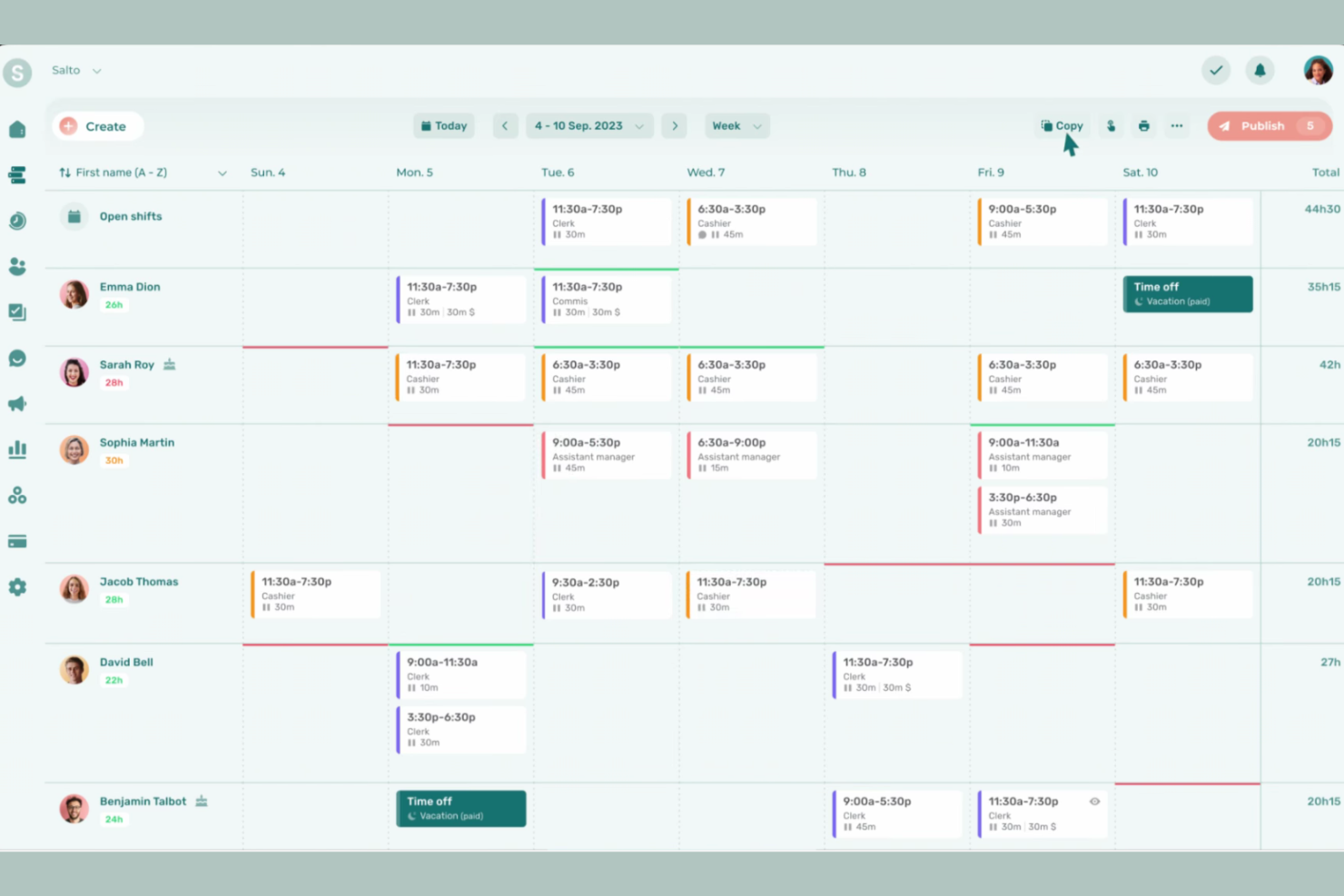
Agendrix is a scheduling and workforce management tool designed for small to medium-sized businesses across various industries. It helps manage employee schedules and time tracking, and improves communication within teams.
Why I picked Agendrix: It offers unique employee feedback tools that help you gather insights directly from your team. Features such as surveys and feedback forms allow you to understand employee satisfaction and make informed decisions. The platform supports two-way communication, ensuring your team feels heard and valued, and allowing you to foster a more engaged and productive workforce.
Standout Features and Integrations:
Features include a mobile app that’s compatible with an iPad, Android tablet, computer, or mobile phone to keep your team connected on the go. Team members receive shift reminders to reduce absenteeism, and you get time-clock functionalities for accurate payroll processing. All of Agendrix’s features work together to refine your scheduling process and improve team coordination.
Integrations include QuickBooks, Lightspeed, EasyPay, ADP Workforce Now, PayWorks, Sage 50, Acomba, and more.
Pros and Cons
Pros:
- Automatic shift seen confirmations
- Two-way communication features
- Effective employee feedback tools
Cons:
- Limited leave color-coding
- No cross-department view for managers
Other Employee Calendar Software
Here are some additional employee calendar software options that didn’t make it onto my shortlist, but are still worth checking out:
- Connecteam
For mobile-first teams
- Zoho Shifts
For integration with Zoho apps
- Homebase
For multi-location shift scheduling
- Deputy
For shift planning for large teams
- Google Calendar
For easy integration with Google apps
- actiPLANS
For leave management features
- ADP WorkForce Suite
For compliance with labor laws


How I Evaluate Employee Calendar Software
I split my evaluation into two layers: the baseline every tool must have—shared calendars, PTO visibility, and resource scheduling—and the differentiators that separate one tool from another.
Core Functionality (Table Stakes For This List)
When I'm selecting tools for my list, I rank each one on a scale from 0 (does not offer the functionality) to 5 (excels in this area) for each core functionality listed below. Then, I calculate the tool's total score into a percentage. Each tool needs to achieve a minimum total score of 65% to be considered for inclusion.
- Shared Team Calendar: I look for a centralized calendar where managers can view schedules across departments, filter by team or role, and set permissions so contractors see different details than full-time staff.
- Availability & PTO Tracking: Each tool should surface employee working hours, approved time off, and holidays directly on the calendar so you're not scheduling sprint work around someone's vacation.
- Resource Scheduling & Assignment: I evaluate how easily you can assign tasks or shifts from the calendar itself—tools like Float and Resource Guru handle this with drag-and-drop, while others require separate workflows.
- Calendar Integrations & Sync: Two-way syncing with Google Calendar, Outlook, and iCal matters, but I also check for connections to PM tools like Jira or Asana that keep project timelines aligned with employee schedules.
- Conflict & Overlap Detection: The tool should flag double-bookings or over-allocation automatically, especially when assigning the same developer to overlapping project phases or concurrent client engagements.
- Multiple Calendar Views: Day, week, and month views are baseline. I look for timeline or Gantt-style views that let you zoom out across a quarter to spot resourcing gaps before they become delivery risks.
Once I have a list of tools that meet this criteria, I consider what sets each platform apart.
Differentiating Factors (What Sets Vendors Apart)
Here's how I compare and contrast different vendors:
Standout Features
Workload heatmaps are a big differentiator. I look for color-coded utilization views that show at a glance which team members are at capacity and who has bandwidth for incoming work. Time zone intelligence also matters when your team spans multiple regions, since tools that auto-adjust schedules prevent you from booking a standup at someone's midnight. I also evaluate in-calendar time tracking, which lets team members log hours against scheduled tasks without switching apps, giving you a real-time view of planned versus actual effort.
Beyond Features
I evaluate how well each tool connects to the broader PM ecosystem—native integrations with Jira, Asana, or Monday keep project timelines and employee calendars in sync without manual updates. Scalability is another factor I weigh, since a tool that works for a 15-person team can fall apart when you're managing calendars across 200 employees and multiple project portfolios. I also check for mobile apps with real feature parity, because hybrid teams need managers who can approve PTO or reassign work from their phone between meetings.
How to Choose Employee Calendar Software
It’s easy to get bogged down in long feature lists and complex pricing structures. To help you stay focused as you work through your unique software selection process, here’s a checklist of factors to keep in mind:
| Factor | What to Consider |
|---|---|
| Scalability | Can the software grow with your team? Consider if the tool can handle more users or features as your business expands, without significant increases in cost or complexity. |
| Integrations | Does it connect with your existing tools? Check for compatibility with your current systems, like payroll or HR software, to avoid data silos and streamline workflows. |
| Customizability | Can you tailor it to your needs? Ensure the software allows adjustments to fit your specific scheduling policies and team structures. |
| Ease of use | Is the interface intuitive? Look for a user-friendly design that minimizes training time and helps your team adopt the tool quickly. |
| Implementation and onboarding | How long will it take to set up? Evaluate the time and resources needed for a smooth transition, including training sessions and data migration. |
| Cost | Is it within your budget? Compare the pricing plans and consider any hidden fees. Check if there's a free trial to test before committing. |
| Security safeguards | How secure is your data? Ensure the software has solid security measures like encryption and regular updates to protect sensitive information. |
| Support availability | Can you get help when needed? Consider the availability of customer support and the channels offered, such as live chat, phone, or email. |
What Is Employee Calendar Software?
Employee calendar software is a tool that helps businesses schedule and manage employee shifts and availability. These tools are commonly used by managers, HR professionals, and team leaders to organize work schedules efficiently. Time tracking, shift swapping, and automated reminders help reduce scheduling conflicts, improving communication and compliance with labor laws. Overall, these tools save time and boost team productivity by keeping everyone on the same page.
Features of Employee Calendar Software
When selecting employee calendar software, keep an eye out for the following key features:
- Shift scheduling: Allows managers to create and manage employee work schedules, ensuring coverage and minimizing conflicts.
- Time tracking: Monitors employee work hours for accurate payroll processing and compliance with labor regulations.
- Shift swapping: Enables employees to exchange shifts with coworkers, providing flexibility and reducing managerial workload.
- Availability management: Allows employees to input their availability, helping managers schedule shifts according to team preferences.
- Automated reminders: Send notifications to employees about upcoming shifts or changes, reducing no-shows and miscommunications.
- Labor cost tracking: Provides insights into scheduling costs, allowing businesses to optimize budgets and reduce overtime expenses.
- Mobile access: Offers a mobile app for on-the-go access to schedules and notifications, increasing accessibility for all team members.
- Customizable reporting: Generates tailored reports to analyze scheduling patterns, helping improve efficiency and decision-making.
- Compliance management: Ensures schedules adhere to labor laws and regulations, reducing legal risks for businesses.
- Integration capabilities: Connect the system to existing tools such as payroll and HR systems to create a cohesive workflow and avoid data silos.
Benefits of Employee Calendar Software
Implementing employee calendar software provides several benefits for your team and your business. Here are a few you can look forward to:
- Improved scheduling accuracy: Automated scheduling and time tracking reduce errors and ensure shifts are properly assigned.
- Strengthened communication: Features such as automated reminders and notifications keep everyone informed about schedule changes and upcoming shifts.
- Increased flexibility: Shift swapping and availability management allow employees to adjust their schedules and accommodate personal needs.
- Cost efficiency: Labor cost tracking helps businesses monitor expenses and optimize scheduling, reducing unnecessary overtime.
- Compliance assurance: Compliance management features ensure your schedules adhere to labor laws, minimizing legal risks.
- Better decision-making: Customizable reporting provides insights into scheduling patterns, helping managers make informed adjustments.
- Accessibility: Mobile access ensures employees can view and manage their schedules from anywhere, increasing convenience and engagement.
Costs and Pricing of Employee Calendar Software
Selecting employee calendar software requires an understanding of the various plans and pricing models available. Costs will vary based on features, team size, add-ons, and more. The table below summarizes common plans, their average prices, and typical features included in employee calendar software solutions:
Plan Comparison Table for Employee Calendar Software
| Plan Type | Average Price | Common Features |
|---|---|---|
| Free Plan | $0 | Basic scheduling, time tracking, and limited support. |
| Personal Plan | $5-$15/user/month | Advanced scheduling, mobile access, and shift swapping. |
| Business Plan | $15-$30/user/month | Extensive reporting, integration capabilities, and compliance management. |
| Enterprise Plan | $30-$50/user/month | Customizable solutions, priority support, and stronger security features. |
Employee Calendar Software FAQs
Here are some answers to common questions about employee calendar software:
How secure is employee calendar software?
Most employee calendar software prioritizes security to protect your data, using encryption and regular updates to safeguard information. Always check for security certifications and compliance with standards such as GDPR and ask vendors about their security measures. Consider solutions with multi-factor authentication to strengthen protection.
How can employee calendar software help my team manage project deadlines?
Employee calendar software lets you assign, view, and track deadlines across projects in a shared space. Having everything visible helps prevent missed tasks and makes it easy for your team to coordinate deliverables and quickly spot bottlenecks.
Can I automate repetitive scheduling tasks with employee calendar apps?
Yes, many calendar platforms let you automate recurring meetings, send reminders, and even auto-schedule based on team members’ availability. This reduces manual work and helps your team focus on higher-value tasks.
How long does it take to implement employee calendar software?
Implementation times vary. A straightforward tool might take a few days to implement, while more complex systems could take weeks, but many solutions offer quick, straightforward setups. Some vendors also provide onboarding support, such as training videos and product tours. Consider your team’s tech savviness and the complexity of your scheduling needs.
Is training required to use employee calendar software?
Yes, some training is usually required, but it’s often minimal. Many tools are user-friendly, with intuitive interfaces that help reduce the learning curve. Look for solutions that offer training resources such as tutorials, webinars, and chat support. This can help your team get up to speed quickly and start benefiting from the software.
What’s Next:
If you're in the process of researching employee calendar software, connect with a SoftwareSelect advisor for free recommendations.
You fill out a form and have a quick chat where they get into the specifics of your needs. Then you'll get a shortlist of software to review. They'll even support you through the entire buying process, including price negotiations.