
20 Best Project Planning Tools for Teams in 2026

10 Best Project Planning Tools Shortlist
Here's my pick of the 10 best software from the 20 tools reviewed.


Project planning tools help you build, schedule, and track your project timelines, organize tasks, and assign responsibilities throughout your team. Without them, it's hard to allocate resources, coordinate tasks, or anticipate roadblocks that could derail delivery. But how do you pick a tool from so many out there?
Well, I’ve tested a wide range of project planning tools, from simple timeline builders to robust platforms with Gantt charts, resource forecasts, and portfolio-level tracking.
Below, you’ll find my top picks based on that testing. Each tool offers a unique combination of features designed to support effective project planning, whether you’re managing a single project or juggling a full portfolio.
Table of Contents
Why You Can Trust Us
The Best Project Planning Tools Comparison Chart
Here’s a quick recap on everything we just discussed. Use it to see all the options side by side.
| Tool | Best For | Trial Info | Price | ||
|---|---|---|---|---|---|
| 1 | Best for Google Workspace users | Free plan available | From $9/seat/month (billed annually) | Website | |
| 2 | Best collaborative project planning tool | Free plan + free demo + 14-day free trial available | From $10/user/month (billed annually) | Website | |
| 3 | Best for a single scheduling view | Free 30-day trial available | From $4.16/user/month | Website | |
| 4 | Best for planning project financials | Free 14-day trial available + free demo available | From $19.90/user/month (billed annually) | Website | |
| 5 | Best for team scalability | Free plan + free demo available + 15-day free trial | From $4/user/month (billed annually) | Website | |
| 6 | Best for agency project and resource planning | 14-day free trial available | From $10/user/month (billed annually) | Website | |
| 7 | Best for team collaboration and communication | Free plan + free demo available | From $7/user/month (billed annually) | Website | |
| 8 | Best for people-centric project planning | Free demo available | Pricing upon request | Website | |
| 9 | Best for automating billing in project teams | Free plan available | $14/user/month | Website | |
| 10 | Best for dynamic work management | 30-day free trial | From $35/user/month (billed annually, min 20 users) | Website |


-

Insightful
Visit WebsiteThis is an aggregated rating for this tool including ratings from Crozdesk users and ratings from other sites.4.8 -
Accelo
Visit WebsiteThis is an aggregated rating for this tool including ratings from Crozdesk users and ratings from other sites.4.4 -
Forecast
Visit WebsiteThis is an aggregated rating for this tool including ratings from Crozdesk users and ratings from other sites.4.6




Best Project Planning Tool Reviews
Here’s a brief description of each of the project planning tools. If you get stuck, you can always get free advice on which software is best for you.


monday.com is a flexible project planning platform used by tech teams, agencies, and businesses who need to organize projects, manage timelines, and coordinate work across departments in one place.
Who Is monday.com Best For?
monday.com is a good fit for cross-functional teams in mid-size to enterprise companies who need a centralized, visual way to plan and track projects.
Why I Picked monday.com
I picked monday.com as one of the best because of how naturally it fits into a Google Workspace environment. The Gmail integration lets you turn incoming emails directly into board items without leaving your inbox, which means project requests and client messages don't get lost in a thread. I also like the two-way Google Calendar sync—when my team updates a task's date on a monday.com board, it reflects in Google Calendar automatically, and new calendar events can populate as board items in return. For teams already living in Google Docs, Sheets, and Slides, monday.com's Google Apps integration lets you embed and collaborate on those files directly within a board item.
monday.com Key Features
- Gantt chart view: Visualize project timelines, set task dependencies, and adjust schedules by dragging and dropping items directly on the chart.
- Workload management: See each team member's capacity across projects and reassign tasks based on availability without leaving the board.
- Customizable dashboards: Build real-time dashboards that pull data from multiple boards to track project status, budgets, and milestones in one view.
- Automated workflows: Set up no-code automation rules—like status change triggers and deadline notifications—to keep projects moving without manual follow-up.
monday.com Integrations
Integrations include Salesforce, QuickBooks, HubSpot, Zendesk, Active Directory, GitHub, GitLab, Slack, Gmail, and Google Calendar.
Pros and Cons
Pros:
- Intuitive interface for creative workflows
- Simple code-free automations
- Integrated proofing for file comments
- Forms within projects as views
- Easy to connect with other tools
Cons:
- Complex initial setup for projects
- Views like Calendar don’t auto-update
- Outdated UI in training videos
- Subtask columns need customization
- Gantt view not effective for planning
New Product Updates from monday.com

monday.com Enhances Governance With AI Spend and Activity Logs
monday.com introduces AI governance with user limits and scheduled cleaning activity logs. These updates help teams control AI usage costs and maintain better visibility into system actions for compliance. For more information, visit monday.com’s official site.


Wrike is a project planning platform built for teams in fast-paced industries who need to coordinate complex projects, manage shifting priorities, and keep everyone aligned with real-time updates and customizable workflows.
Who Is Wrike Best For?
Wrike is a strong fit for mid-size to enterprise teams in marketing, professional services, and tech who need to manage multiple projects across departments simultaneously.
Why I Picked Wrike
I picked Wrike as one of the best collaborative project planning tools because of how tightly it connects planning and real-time teamwork in a single workspace. I love that Wrike's Gantt charts aren't just read-only timelines—my team can drag and drop tasks, adjust dependencies, and instantly share updated snapshots with stakeholders inside or outside the organization via secure public links. The live document editor is another feature I rely on heavily: my team can edit files attached directly to tasks without downloading anything, so version confusion disappears. Wrike's external requester collaboration also lets us loop in clients and non-Wrike users through request forms, keeping all communication in one place instead of scattered across email threads.
Wrike Key Features
- Resource bookings: Reserve time from a specific team member or job role and check whether they have the bandwidth to take on a project before assigning work.
- Effort management: Assign an effort estimate to each task so you can forecast project delivery timelines and choose the right assignee based on workload.
- Scrum boards: Manage Agile sprints with shared Scrum boards, backlog prioritization, and real-time progress tracking via Agile dashboards.
- Custom project views: Switch between Board, Table, Gantt, Calendar, and Chart views to visualize project progress in the format that works best for your team.
Wrike Integrations
Integrations include Salesforce, Microsoft Teams, Google Drive, Adobe Creative Cloud, Zoom, Tableau, Power BI, QuickBooks, Miro, and Google Sheets.
New Product Updates from Wrike

Streamlining Workspaces with New Updates
Wrike announces custom space templates, AI Agents in Wrike Labs, and a new Guage widget to improve project management. For more information, visit Wrike's official site.


Resource Guru gives project managers and operations teams a clear way to schedule people, rooms, and equipment, helping agencies and consultancies avoid double-bookings and keep projects on track with real-time visibility into team availability.
Who Is Resource Guru Best For?
Resource Guru is a strong fit for agencies, consultancies, and professional services teams that need a straightforward way to manage people and project capacity.
Why I Picked Resource Guru
Resource Guru is one of my top picks because I love how it puts every person, piece of equipment, and meeting room on a single scheduling view—without tab-switching or cross-referencing separate lists. I use the color-coded heatmap to spot over- and under-utilization at a glance, so I can spot a capacity crunch before it becomes a missed deadline. The drag-and-drop booking system lets me expand, split, or reallocate work directly on the schedule, and tentative bookings let me plan ahead without locking anything in. The clash management and waiting list features are what really keep things clean when priorities shift mid-project.
Resource Guru Key Features
- Project milestone tracking: Set milestones within projects to mark key delivery points and monitor progress against timelines.
- Auto-fill timesheets: Timesheets populate automatically based on booked work, so team members can submit actuals with one click.
- Budget burn reporting: Track budget spent vs. budget booked across projects to catch overspend before it hits margins.
- Scenario planning with tentative bookings: Model future workloads by including tentative, unapproved, or placeholder bookings in utilization reports before confirming any work.
Resource Guru Integrations
Integrations include Google Calendar and Outlook Calendar; an API supports custom integrations.
Pros and Cons
Pros:
- Timesheets are pre-filled based on schedule
- You can reassign tasks from one resource to another simply by dragging
- You can create allocations for multiple people at once
- Effective clash management system
Cons:
- Allocations glitch sometimes (double check who it’s assigning it to)
- Insufficient pre-built integrations
- No financial-related features like budgets and expenses
New Product Updates from Resource Guru

Resource Guru Launches Asana Integration
Resource Guru now integrates with Asana to enhance task scheduling by providing insights into availability and skills. For more information, visit Resource Guru's official site.
 .
.

Scoro is a project management platform designed for agencies, consultancies, and professional services teams who need to coordinate projects, resources, and budgets in one place to keep work and financials aligned.
Who Is Scoro Best For?
Scoro is a strong fit for agencies and professional services firms that bill by the hour or project and need tight control over margins and resource costs.
Why I Picked Scoro
I picked Scoro as one of the best because of how deeply it connects project planning to financial outcomes. What I find genuinely impressive is the estimation matrix—you can break down a quote by role and effort level, so you're building a financial model for the project before a single task is assigned. That means my team goes into delivery with a clear cost baseline, not a rough guess. From there, Scoro's "Quoted vs Actual" tracking compares planned budget, labor costs, and profit against real-time numbers as the project progresses, so I can catch margin erosion early and course-correct before it's too late.
Scoro Key Features
- Gantt chart scheduling: Plan and adjust project timelines visually, with dependencies and milestones mapped across tasks.
- Resource allocation: Assign team members to tasks based on availability and capacity, with a real-time view of workload across projects.
- Time tracking: Log billable and non-billable hours directly against tasks and projects for accurate reporting.
- Project dashboard: View project status, deadlines, and progress in one centralized summary view.
Scoro Integrations
Integrations include Google Calendar, Xero, QuickBooks, Zapier, Microsoft 365, Slack, Dropbox, Sage, and Exact.
Pros and Cons
Pros:
- Customizable dashboards for personalization
- Comprehensive reporting features
- Real-time KPI tracking available
- Automated billing and invoicing
- Unified dashboard for business insights
Cons:
- May not suit very small businesses
- Limited offline functionality
- Learning curve for advanced features
- Requires consistent data input
- Can be complex to set up initially
New Product Updates from Scoro

Scoro Introduces Subtasks for More Granular Work Planning
Scoro introduces subtasks and improved price list deletion warnings, enabling teams to break down work into smaller units for detailed planning while protecting pricing data from accidental changes. For more information, visit Scoro’s official site.


Zoho Projects is a cloud-based project planning platform built for teams in tech, marketing, and professional services who need to manage tasks, timelines, and resources while keeping everyone aligned and on track.
Who Is Zoho Projects Best For?
Zoho Projects is a great fit for growing businesses that need a project planning tool that scales from small teams to large, multi-project operations without switching platforms.
Why I Picked Zoho Projects
Zoho Projects earns its spot on my shortlist because it handles team growth without forcing you to rethink your entire setup. Resource management shows each team member's workload in real time before assigning new tasks—so when your team doubles, you're not flying blind on capacity. The portal-level portfolio dashboard gives you a single view across all active projects, which becomes especially useful as the number of workstreams grows. Custom profiles and roles let you dial in access permissions as you bring on new people, without opening up everything to everyone.
Zoho Projects Key Features
- Gantt charts: Visualize project timelines, set task dependencies, and track progress against your baseline schedule.
- Time tracking and timesheets: Log hours directly against tasks and submit timesheets for approval within the platform.
- Task automation: Set up rules to trigger actions like status changes or assignments when specific conditions are met.
- Issue tracking: Log, assign, and monitor bugs or blockers directly within a project to keep delivery on track.
Zoho Projects Integrations
Integrations include Zoho CRM, Zoho Desk, Zoho Analytics, Zoho People, Google Calendar, Microsoft Teams, Slack, Dropbox, GitHub, and Jira.
Pros and Cons
Pros:
- The in-tool private chats let you coordinate communication better using only the tool
- It integrates well with other Zoho suite products
- Offers a comprehensive feature set for a relatively low price
Cons:
- Has some features that seem unnecessary, like ‘Email Alias’
- Does not have many pre-built integrations outside of Zoho’s suite of apps

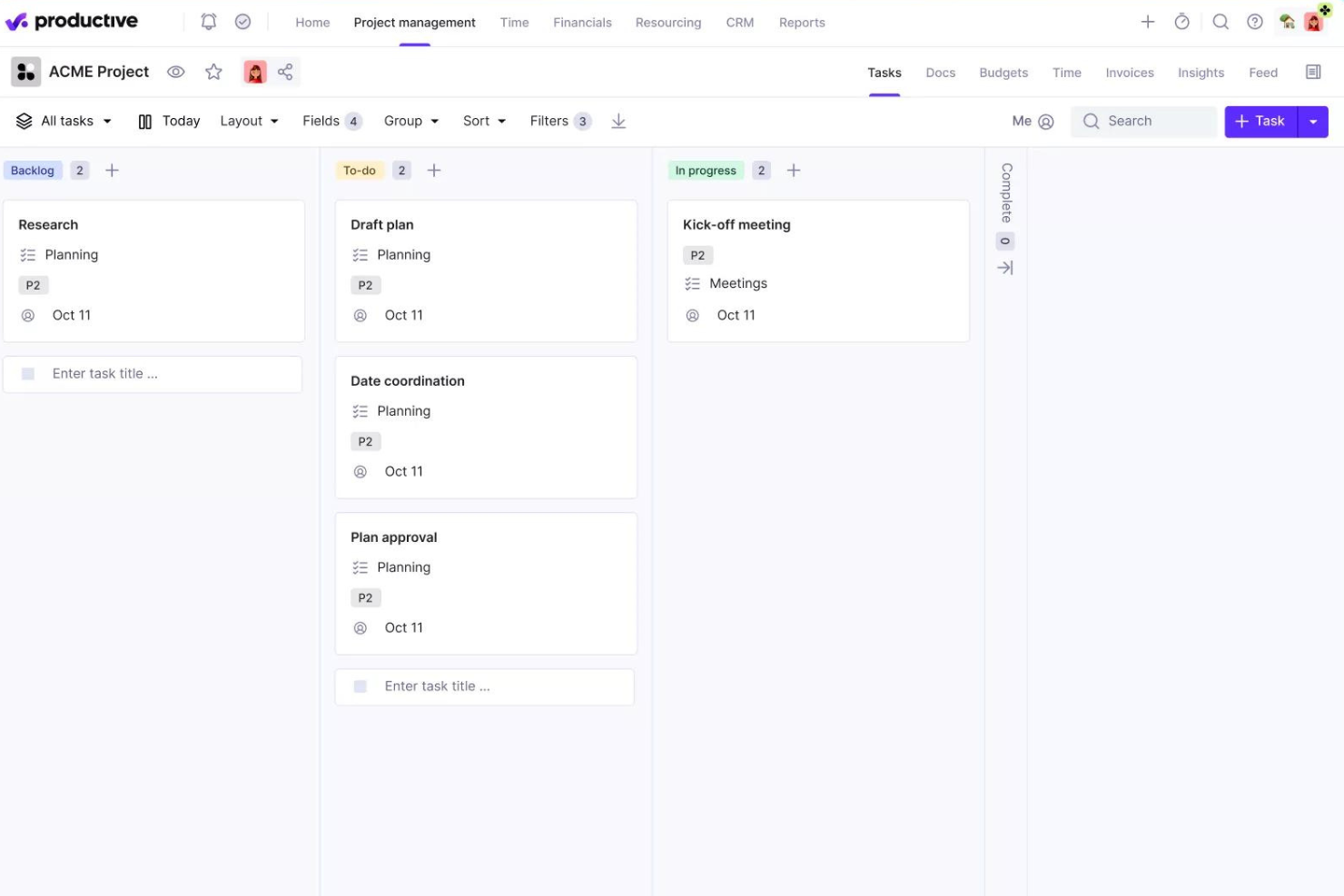
Productive is a project planning platform built for agencies and service businesses that need to manage projects, resources, budgets, and client collaboration in one place.
Who Is Productive Best For?
Productive is a strong fit for digital and creative agencies that need to connect project delivery with resource planning and financial tracking.
Why I Picked Productive
Productive earns its spot on my shortlist because it's one of the few project planning tools that genuinely connects project delivery with resource planning in a single platform. I love the resource planning view, which shows team capacity, time off, and utilization all at once—so I can see exactly who's available before committing to a project timeline. The Scenario Builder is another feature I keep coming back to: I can model different staffing configurations and cost outcomes side by side before a project even kicks off. For agencies juggling multiple client projects, that kind of pre-planning visibility is hard to find in a general-purpose project tool.
Productive Key Features
- Gantt view: Visualize project timelines with key milestones, deliverables, and task dependencies in a drag-and-drop layout.
- Project templates: Duplicate tasks, subtasks, descriptions, and assignees from a saved template to spin up new projects.
- Time tracking: Log billable and non-billable hours directly within tasks, with time entries feeding into budget and profitability reports.
- Client portal access: Invite clients into projects to view budget status, comment on tasks, and track progress in real time.
Productive Integrations
Integrations include Jira, HubSpot, Xero, Google Calendar, Sage, Gmail, Microsoft Outlook, Slack, BugHerd, and QuickBooks.
Pros and Cons
Pros:
- Strong client management features
- Supports comprehensive project budgeting
- Effective resource planning tools
- Customizable dashboards for KPIs
- Detailed financial insights available
Cons:
- May be too detailed for simple projects
- Requires consistent data input
- Limited offline capabilities
- Learning curve for new users
- Initial setup can be complex
New Product Updates from Productive

Productive Introduces Resource Request Feature
Productive introduces a resource request feature that helps teams request and allocate resources more efficiently. For more information, visit Productive's official site.

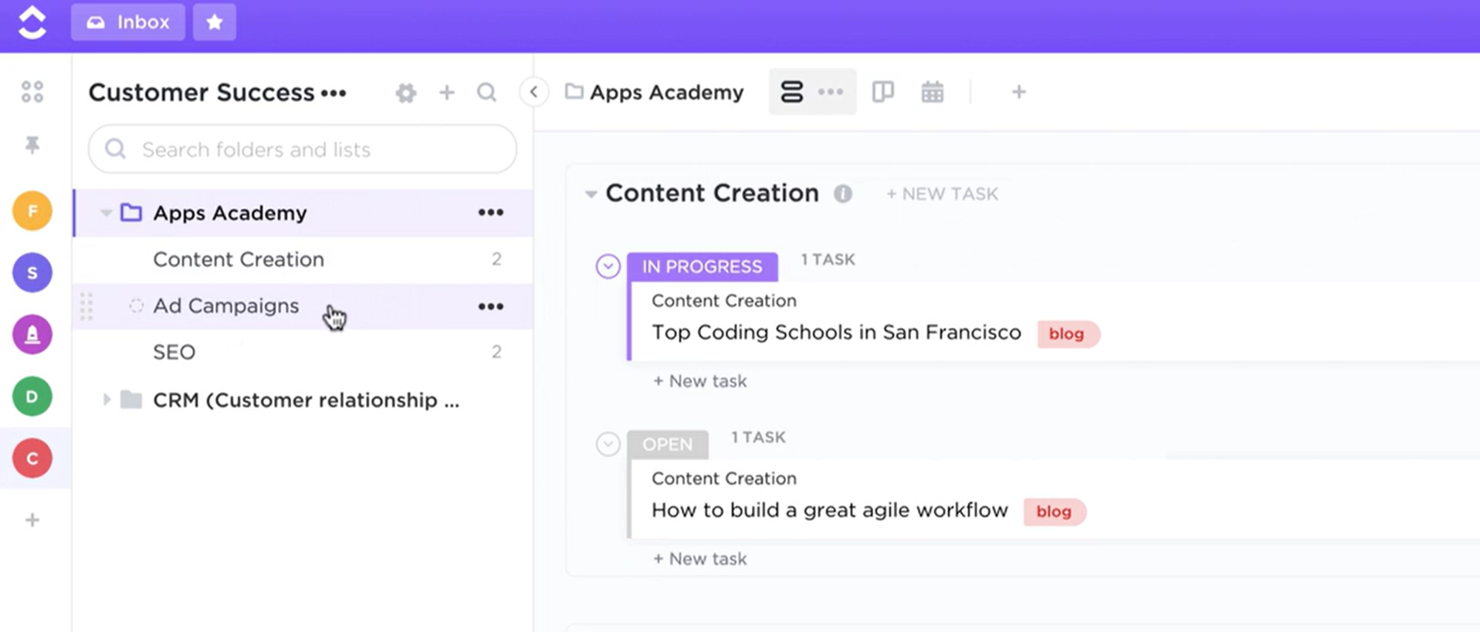
ClickUp gives project managers and cross-functional teams a flexible workspace to plan, organize, and track projects with customizable views, automation, and built-in collaboration tools.
Who Is ClickUp Best For?
ClickUp is a good fit for mid-sized to large teams in tech and digital industries who need a single platform to manage projects across product, engineering, and design functions.
Why I Picked ClickUp
ClickUp earns its spot as one of the best on my shortlist because of how tightly it connects communication to actual project work. I love that ClickUp Chat keeps conversations threaded directly to tasks and docs, so when my team is discussing a deliverable, that context lives right next to the work itself—not buried in a separate Slack channel. The FollowUps feature is particularly useful: it lets you triage comments and convert them into assigned tasks without leaving the conversation. I also rely on Clips, which lets team members record quick screen and voice walkthroughs instead of scheduling a meeting every time feedback needs to be shared.
ClickUp Key Features
- Custom views: Switch between List, Board, Gantt, Calendar, and Workload views to match how your team plans and tracks work.
- Goals and milestones: Set measurable targets and link tasks directly to goals to track progress against project objectives.
- Automations: Build rule-based automations to handle recurring task assignments, status changes, and notifications.
- Dashboards: Create custom dashboards with widgets to monitor task progress, workload distribution, and project health in one place.
ClickUp Integrations
Integrations include Slack, GitHub, HubSpot, Everhour, Google Drive, OneDrive, Dropbox, Outlook, Google Calendar, and Figma.
New Product Updates from ClickUp

ClickUp Enhances Task Management and Introduces AI Notetaker
ClickUp introduces an AI Notetaker for meetings and improves task type management in views. These updates help teams capture meeting insights automatically and organize work more efficiently. For more information, visit ClickUp’s official site.

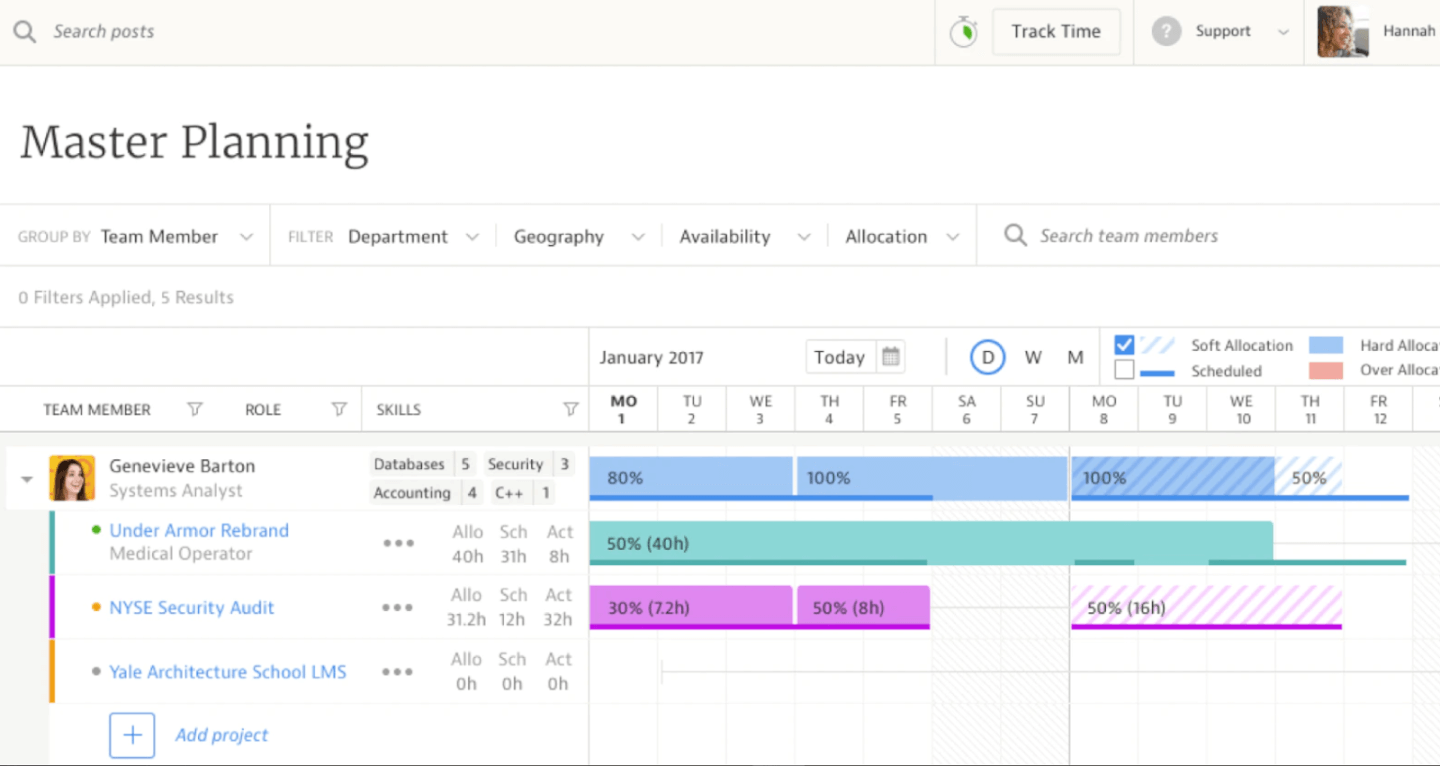
Kantata is a project planning platform built for professional services teams who need to manage resources, schedules, and collaboration across complex client projects.
Who Is Kantata Best For?
Kantata is a strong fit for mid-to-large professional services firms—like consulting, marketing, and IT services—that need to plan and deliver client projects around their people.
Why I Picked Kantata
I picked Kantata as one of the best because its resource management and scheduling tools are built around people rather than tasks. I like how the resource planning view lets my team see who's available by skill set and capacity in real time—so when a new project kicks off, we're not guessing who can take it on. Kantata's AI-powered resource optimization detects skill gaps and resourcing conflicts before they become problems—features most project planning tools lack. The Kantata Pulse feature also brings client and employee sentiment data directly into the project view, so I can see how the team is holding up alongside delivery metrics.
Kantata Key Features
- Project management: Track tasks, milestones, budgets, and schedules across all active projects in a single view.
- Financial management: Monitor invoicing, margins, and project costs with real-time financial reporting built into the platform.
- Business intelligence: Access pre-built and customizable reports covering utilization, fees, and project performance across your organization.
- Time tracking: Log billable and non-billable hours directly against projects to keep budget and margin data accurate.
Kantata Integrations
Integrations include Salesforce, Slack, Jira, HubSpot, QuickBooks, Xero, NetSuite, Google Drive, Microsoft Teams, and BambooHR.
Pros and Cons
Pros:
- Business intelligence tools
- Advanced resource management
- Tailored for professional services
Cons:
- May be overkill for small teams
- Limited customization options
New Product Updates from Kantata
Kantata Integrates E-Invoicing With Avalara
Kantata introduces integrated e-invoicing through its partnership with Avalara, enabling compliant, automated invoicing across regions. For more information, visit Kantata's official site.
 .
.

VOGSY is a project planning and automation platform for professional services teams that manage projects, resources, and billing in one place, helping agencies and consultancies keep projects on track and finances organized.
Who Is VOGSY Best For?
VOGSY is a strong fit for professional services firms—like agencies, consultancies, and IT services companies—that bill clients based on project work.
Why I Picked VOGSY
I picked VOGSY as one of the best because of how tightly it connects project delivery to billing. What I find genuinely useful is the mixed billing feature—you can run time & materials, fixed price, retainers, and subscriptions all within a single project. That's a real advantage when you're managing clients with different contract types at the same time. I also like the work-in-progress tracking, which flags unbilled work so nothing slips through before invoicing. Additionally, VOGSY's automated invoice reminders use customizable templates for each follow-up, so chasing overdue payments doesn't require manual effort from your team.
VOGSY Key Features
- Project templates: Save completed project structures as reusable templates to replicate work breakdown structures, deliverables, and tasks across new engagements.
- Resource planning: Allocate team members and contractors to projects based on skills, availability, and billability targets, with utilization forecasts for upcoming weeks and months.
- Milestone tracking: Define and monitor milestones within a project's work breakdown structure to keep delivery on schedule.
- Multi-currency invoicing: Send invoices to international clients in their local currency, independent of your base or operating currency.
VOGSY Integrations
Integrations include Xero, Sage, QuickBooks Online, Oracle, Tally, Wave, ABSS, Omie, Datev, and Jira.
Pros and Cons
Pros:
- Real-time global financial overview
- Fast setup and onboarding
- Robust resource planning tools
Cons:
- Limited mobile functionality
- Basic customization options feel restrictive
New Product Updates from VOGSY
VOGSY Enhances Cost Tracking and Reporting
VOGSY introduces enhanced cost tracking for external resources and reporting improvements. These updates provide more accurate financial visibility and improved project performance insights. For more information, visit VOGSY’s official site.
 .
.

Quickbase is a no-code project planning platform used by teams in industries like construction, manufacturing, and IT to manage complex workflows, automate processes, and adapt to changing project requirements.
Who Is Quickbase Best For?
Quickbase is a strong fit for mid-size to enterprise teams in operations-heavy industries that need to build custom workflows without relying on developer resources.
Why I Picked Quickbase
Quickbase earns its spot on my shortlist because of how well it handles dynamic work management across complex, multi-team projects. I particularly like the no-code app builder, which lets my team configure custom workflows, dashboards, and permissions without waiting on IT. When project requirements shift mid-delivery, I can restructure workflows on the fly rather than forcing work into a rigid template. The real-time Gantt and portfolio views also give me live visibility into task dependencies and budget vs. actuals across every active project.
Quickbase Key Features
- Automated notifications and reminders: Trigger alerts based on field changes, due dates, or status updates to keep project stakeholders informed.
- Role-based access controls: Assign granular permissions at the app, table, or field level to manage who can view or edit project data.
- Custom reporting and charts: Build tailored reports using filters, groupings, and visual chart types to surface the project data that matters most.
- Mobile app: Access and update project records, tasks, and workflows from iOS and Android devices while working in the field.
Quickbase Integrations
Integrations include Salesforce, SAP, Oracle, Microsoft Teams, SharePoint, Google Drive, and an API is available for custom integrations.
Pros and Cons
Pros:
- Role-based access controls
- Comprehensive reporting capabilities
- Supports dynamic form creation
- Real-time data management tools
- Custom workflows with low-code development
Cons:
- May need technical support
- Limited offline capabilities
- Requires regular data input
- Learning curve for new users
- Initial setup can be complex
Other Project Planning Tools
Here are a few more that didn’t make the top list. If you need additional suggestions for handy project planning tools, check these out.
- Miro
For collaborative brainstorming
- Nifty
For project communication
- Kintone
For building custom project workflows
- Teamwork.com
For real-time metrics
- Birdview
For professional services
- Confluence
For project planning templates
- Runn
For IT and software teams
- Office Timeline
For PowerPoint Gantt charts
- Nutcache
Time tracker with a planner
- GoodDay
For team productivity


Related Project Management Software Reviews
If you still haven't found what you're looking for here, check out these other related tools that we've tested and evaluated:
- Project Management Software
- Resource Management Software
- Workflow Automation Software
- Time Tracking Software
- Task Management Software
- Project Scheduling Software
- Project Management Software For Small Business.
- Risk Management Software
- Capacity Planning Software
- Time Blocking App
Selection Criteria for Project Planning Tools
Selecting the right project planning tools requires a meticulous evaluation of functionalities that align with specific use cases critical to the buyer's needs. Through personal trials and extensive research, I've identified key criteria that I believe are essential when choosing project planning tools. These criteria are tailored to enhance the organization, scheduling, and management of tasks, resources, and timelines effectively, and are weighted to reflect their importance to my overall evaluation.
Core Project Planning Tool Functionality (25% of total weighting score): To be considered for inclusion on my list of the best project planning tools, the solution had to support the ability to fulfill common use cases, including:
- Task and project tracking to ensure progress is measurable and visible
- Resource management to optimize the allocation and utilization of resources
- Collaboration features for seamless communication among team members
- Integration with other tools to streamline workflows and data exchange
- Reporting and analytics for informed decision-making and project insights
Additional Standout Features (25% of total weighting score): In a crowded marketplace, additional standout features distinguish superior project planning tools from average ones. This criterion assesses the presence of innovative and unique functionalities that enhance project planning beyond the basics, such as:
- Tools that offer unique functionalities, such as AI-driven analytics for project forecasting
- Innovative collaboration tools, like real-time document editing and in-app messaging, which enhance team synergy
- Advanced resource allocation features, including skill-based assignments and conflict resolution
- Customizable dashboards and reports that provide insights tailored to specific project or organizational needs
- Automation of routine tasks, freeing up team members to focus on more strategic activities
Usability (10% of total weighting score): Usability directly impacts the adoption and effectiveness of a project planning tool within an organization. This evaluation focuses on the tool's user interface, ease of navigation, and the overall user experience, ensuring that the tool is accessible to users of all skill levels. For this assessment, I look for:
- Intuitive design that requires minimal training for new users
- Drag-and-drop interfaces for scheduling and task management, enhancing ease of use
- Clear, concise, and customizable dashboard views that provide immediate access to critical project information
- Mobile compatibility, ensuring accessibility and functionality across various devices
Onboarding (10% of total weighting score): A smooth onboarding process is crucial for quick adoption and realization of the tool's value. This criterion examines the availability and quality of training resources, templates, and support mechanisms that facilitate easy integration of the tool into daily project management activities. This section of the evaluation assesses:
- Comprehensive training materials, such as videos, webinars, and tutorials, that cater to users with different levels of expertise
- Pre-designed templates that accelerate the project setup process
- Interactive product tours and chatbots that offer immediate assistance during the learning phase
- Community forums or support groups that enable users to share tips and best practices
Customer Support (10% of total weighting score): Effective customer support is vital for resolving issues and ensuring continuous productivity. This evaluation looks at the responsiveness, availability, and helpfulness of the support team, as well as the depth of self-help resources provided by the tool. I consider:
- Responsive support teams available through multiple channels, including live chat, email, and phone
- In-depth knowledge bases that provide answers to frequently asked questions and guides for troubleshooting
- Regular updates and maintenance, ensuring the tool remains compatible with evolving project needs
Value For Money (10% of total weighting score): Value for money assesses whether the tool's pricing is commensurate with its features, capabilities, and the benefits it brings to an organization. This criterion evaluates pricing transparency, flexibility, and the overall return on investment offered by the tool. I evaluate:
- Pricing models that offer flexibility based on the size of the team, project complexity, and required features
- Free trials or demo versions that allow users to assess the tool's suitability before committing financially
- Transparent pricing without hidden fees, ensuring businesses can budget effectively for their project management needs
Customer Reviews (10% of total weighting score): Customer reviews offer invaluable insights into a tool's performance in real-world scenarios. This evaluation considers user feedback on various aspects of the tool, including functionality, usability, and customer support, to gauge overall satisfaction and effectiveness. It also looks for:
- High satisfaction rates indicating that the tool meets or exceeds user expectations
- Positive feedback on specific features, usability, and customer support
- Case studies or success stories that highlight the tool's impact on project outcomes and organizational efficiency
By referencing these criteria, potential buyers can make informed decisions that align with their specific project management needs, ensuring they select a project planning tool that both addresses their immediate problems and supports their long-term success.
How To Choose Project Planning Tools
With so many different project planning solutions available, it can be challenging to make decisions on what project planning tool is going to be the best fit for your needs.
As you're shortlisting, trialing, and selecting project planning tools, consider the following:
- What problem are you trying to solve - Start by identifying the product planning software feature gap you're trying to fill to clarify the features and functionality the product planning tool needs to provide.
- Who will need to use it - To evaluate cost and requirements, consider who'll be using the software and how many licenses you'll need. You'll need to evaluate if it'll just be the project management professionals, or the whole organization that will require access. When that's clear, it's worth considering if you're prioritizing ease of use for all, or speed for your product planning tool power users.
- What other tools it needs to work with - Clarify what tools you're replacing, what tools are staying, and the tools you'll need to integrate with, such as accounting, CRM or HR software. You'll need to decide if the tools will need to integrate together, or alternatively, if you can replace multiple tools with one consolidated product planning tool.
- What outcomes are important - Consider the result that the software needs to deliver to be considered a success. Consider what capability you want to gain, or what you want to improve, and how you will be measuring success. For example, an outcome could be the ability to get greater visibility into performance. You could compare product planning tool features until you’re blue in the face, but if you aren’t thinking about the outcomes you want to drive, you could be wasting a lot of valuable time.
- How it would work within your organization - Consider the software selection alongside your workflows and delivery methodology. Evaluate what's working well, and the areas that are causing issues that need to be addressed. Remember every business is different — don’t assume that because a tool is popular that it'll work in your organization.
Trends In Project Planning Tools For 2025
In 2024, project planning tools are adapting in response to shifting priorities in project management, placing emphasis on efficiency, collaboration, and adaptability. Below are several key trends I have observed in project planning tools, each pointing towards the broader goals of facilitating better organization, scheduling, and management of tasks, resources, and timelines.
- Emphasis on Security and Compliance: With increasing concerns about data privacy and security, there's a significant uptrend in features designed to enhance the security posture of project planning tools. This includes advanced encryption, role-based access control, and compliance with global standards such as GDPR. Tools are prioritizing the protection of project data and user information, reflecting the critical nature of security in today’s digital project management environment.
- Sustainability and Eco-Friendly Features: An emerging trend is the integration of features that help project teams consider the environmental impact of their projects. This includes carbon footprint calculators and sustainability reporting tools. Such features are becoming more sought after, indicating a shift towards more socially responsible project management practices.
- Increased Use of Natural Language Processing (NLP): Tools are beginning to leverage NLP for more intuitive user interactions, such as chatbots for task management or voice commands for navigating planner software. This trend highlights the industry’s move towards making project planning tools more accessible and easier to use, reducing the learning curve for new users.
- Augmented Reality (AR) for Project Visualization: Following VR's footsteps, AR is starting to make its mark in project planning tools, offering real-world overlays for project plans and site work. This trend points towards a future where project planning and real-world execution are more tightly integrated, allowing for enhanced visualization and understanding of projects before physical work begins.
- Focus on Mental Health and Wellbeing: Recognizing the stress and burnout associated with project management, some tools are introducing features aimed at promoting mental health and wellbeing. This includes reminders to take breaks, integration with wellness apps, and analytics to identify overwork patterns among team members. This trend signifies a holistic approach to project management, where the wellbeing of the team is considered alongside project outcomes.
These trends illustrate the evolving landscape of project planning tools, driven by the need for more collaborative, integrated, and flexible solutions. As technology advances, so too do the expectations and requirements of project management professionals, guiding the development of tools that are not only responsive to current needs but also anticipate future challenges in project management.
What are Project Planning Tools?
Project planning tools are software that helps you define, schedule, and manage tasks, timelines, and resources across a project. With features such as task assignments, deadline reminders, and collaborative workspaces, these tools help ensure that all team members are aligned and informed.
It’s used by project managers, team leads, and operations professionals to visualize workflows, allocate workloads, and track dependencies. These tools solve common planning issues like unrealistic timelines, missed deadlines, or poor visibility across teams.
Features of Project Planning Tools
Project planning tools are essential for the streamlined execution of projects, ensuring that tasks are completed on time, resources are allocated efficiently, and project goals are met within the set timelines. The right tool can significantly impact the success of a project by providing the necessary framework for project managers and teams to stay organized and focused. Here, I highlight the ten most important features to look for when selecting the right project planning tool for your needs.
1. Task Management: This feature allows for the creation, assignment, and tracking of tasks. Task management is crucial, as it helps in breaking down the project into manageable units, making it easier to monitor progress and ensure that every component is addressed.
2. Resource Allocation: This enables the assignment of resources to specific tasks. Effective resource management and workload capacity planning ensures that each task has the necessary personnel and materials, optimizing productivity and preventing resource overuse or underutilization.
3. Multiple project views: This feature offers various ways to oversee your projects, tasks, and milestones, like Gantt charts, Kanban boards, calendar views, table views, and list views, ensuring that users can view and organize their project timelines in a way that makes the most sense to them.
4. Collaboration Tools: These facilitate communication and cooperation among team members. Team collaboration tools are essential for ensuring all team members can easily share information, updates, and feedback, thus enhancing teamwork and project coherence.
5. Time Tracking: This feature records the amount of time spent on tasks. Time tracking is important for monitoring productivity, estimating task durations more accurately, and managing the project schedule effectively.
6. Budget Management: Budget management tools help track project expenses and compare them against the allocated budget. This feature is crucial for ensuring the project remains financially viable, allowing for immediate corrective action if budget overruns are detected.
7. Reporting and Analytics: This offers insights into the project's performance through data analysis. Reporting and analytics are essential for identifying trends, forecasting potential issues, leveraging people data, and making informed decisions based on the project's current status.
8. Document Sharing and Management: This facilitates the centralized storage, sharing, and management of project documents. Efficient document management ensures that all team members have access to the necessary information and documentation, streamlining communication and reducing errors.
9. Risk Management: Risk management tools help identify, assess, and mitigate potential risks to the project. This feature is important for proactive planning, allowing teams to address potential issues before they impact the project adversely.
10. Integration Capabilities: The ability to integrate with other tools and software, such as a Google Calendar integration, ensures that scheduling, task deadlines, and milestones are automatically synchronized across platforms. Integration capabilities are essential for ensuring the project planning tool works seamlessly with other systems, enhancing functionality and reducing the need for multiple, disjointed tools.
Choosing the right project planning tool, equipped with these features, can empower project managers and their teams to tackle complex projects with greater confidence and efficiency. Ultimately, the aim is to streamline project delivery, reduce overheads, and achieve the set objectives with precision, making the selection of a project planning tool with these features a critical decision for any project manager.
Benefits of Project Planning Tools
Project planning tools offer a plethora of benefits that streamline processes, foster collaboration, and ensure the successful completion of projects within budget and time constraints. For potential buyers of project plan software, understanding these benefits is crucial in making an informed decision that aligns with their project management needs. Here are five primary benefits of project planning tools:
1. Enhanced Collaboration: Project planning tools centralize communication, making it easier for teams to work together. This benefit leads to improved coordination among team members, regardless of their location, ensuring that everyone is on the same page and significantly reducing misunderstandings and delays.
2. Improved Time Management: With features like Gantt charts and time tracking, these tools provide a clear overview of project timelines and individual responsibilities. Improved time management means projects are more likely to be completed on schedule, allowing businesses to meet their deadlines and avoid the costs associated with delays.
3. Increased Productivity: By automating routine tasks and organizing project information, project planning tools free up team members to focus on more critical aspects of their work. Increased productivity results from the efficient allocation of resources and tasks, leading to quicker project turnaround times and higher quality outcomes.
4. Better Resource Allocation: These tools offer visibility into all aspects of project management, including resource allocation. Better resource allocation ensures that every project component has the necessary tools and personnel, maximizing the use of available resources and minimizing wastage.
5. Enhanced Decision Making: With built-in reporting and analytics, project planning tools provide valuable insights into project performance. Enhanced decision making is facilitated by real-time data, allowing managers to make informed adjustments to project plans, resource allocation, and timelines to ensure project success.
Tools for project planning are more than just software; they are a catalyst for transforming the way projects are managed. For individuals and organizations, selecting a project planning tool that offers these benefits can be a game-changer, paving the way for successful project outcomes and organizational growth.
Costs & Pricing for Project Planning Tools
Project planning tools can vary widely in functionality, scalability, and—most importantly for many users—price. These tools are designed to cater to a range of needs, from small projects requiring basic task management, to complex initiatives that demand extensive resource planning and collaboration features. However, most plans generally fall into similar categories.
Moreover, while it might seem that the only relevant prices are those attached to your chosen plans software, it's also a good idea to understand pricing trends across the market. This can help ensure that you don't pay for features you don't need or overpay for common features.
To help you make an informed decision, we've broken down the typical plan options and pricing for project planning software:
Plan Comparison Table for Project Planning Tools
| Plan Type | Average Price | Common Features |
|---|---|---|
| Free | $0 | Basic task management, Limited users, Limited projects, Basic collaboration tools |
| Entry-Level | $5-10 per user/month | Enhanced task management, More users, Unlimited projects, Integration capabilities, Basic reporting |
| Mid-Range | $10-25 per user/month | All Entry-Level features, Advanced reporting, Resource management, Increased storage, Enhanced security |
| Premium | $25-50 per user/month | All Mid-Range features, Customizable dashboards, Advanced integration options, Priority support |
| Enterprise | Custom Pricing | All Premium features, Unlimited users and projects, Personalized onboarding, Advanced security features |
When considering which plan to choose, it is important to evaluate the specific needs of your teams and projects against the features and limitations of each plan. It is often a good idea to start out with a free plan, which is generally suitable for those just starting out or managing very small teams, and scale up your plan as necessary.
Moreover, when initially choosing a plan, it's important to consider both your immediate needs and potential future requirements to ensure that website planning tool can scale with your project.
Common stages where your company may want to upgrade their pricing plan include:
- Increased Project Volume: When the company begins managing a larger number of projects simultaneously, the current pricing tier might not support the higher volume efficiently.
- Need for Advanced Features: As the complexity and scope of projects increase, the company might require advanced features such as risk management, dependency tracking, and advanced scheduling options.
- Team Collaboration and Communication: When collaboration and communication needs grow due to larger or more dispersed teams, a higher pricing tier is often the best choice for enhanced collaboration tools.
- Resource Management Requirements: As the company scales, managing resources (both human and material) becomes more critical. Higher pricing tiers usually offer more sophisticated resource management features.
- Enhanced Security and Compliance: For companies handling sensitive data or working in regulated industries, upgrading to a higher pricing tier can provide enhanced security features and compliance tools.
Finding the right balance of functionality and cost can be difficult, but putting in the work to do so will help ensure your project planning tool supports your objectives without unnecessary expenditure.
Project Planning Tools Frequently Asked Questions
Find answers to common questions other people ask about this topic.
What is project planning?
Project planning is the second phase of the project life cycle and the one where you define all the work to be done and create the roadmap that you will follow for the remainder of the project.
This phase is critical to the success of the project because you will think about the tasks to be done, if you have the right resources to finish it on time, and if the budget will allow it. When project planning, expect to create a:
- Project plan
- Resource plan
- Financial plan
- Communication plan
Then, depending on the project, you might need other deliverables like a procurement plan and risk assessment.
What is project planning software used for?
Project planning software is used to define and prioritize tasks, track progress, and help streamline the work needed to deliver a project on time.
Additionally, thanks to the flexibility provided by scheduling software, it can be used to:
- Schedule a series of tasks in a Gantt chart that follow a chronological order
- Handle projects that require simultaneous execution of tasks
- Schedule a series of sprints in agile projects
What are some helpful project management organizational tools?
There are a ton of tools out there that can be used for project planning, from project management apps and software to more analog solutions. In fact, some of the best project management tools come in the form of a pen and paper. Here are a few organizational tools that can support your project planning:
- Templates: Creating project templates to help you outline different types of projects or specific tasks can be a huge time-saver. You won’t have to start from scratch every time you’re planning a new project, and you can easily use them for recurring tasks.
- Automation: Whether it’s using a workflow management software or setting up smart notifications, automation can be a big help in project execution. It can help your team stay up to date on project progress and move things along more smoothly.
- Checklists: These come in handy for breaking down tasks into specific subtasks as well as creating a daily to-do list for team members. Checklists are an excellent way to track projects and ensure important steps don’t get missed.
- Risk management plans: It’s important to know how your team will mitigate risks and issues before they arise. In software development and small business management alike, navigating uncertain territory is easier when you have a plan in place.
How do I measure the ROI of a product planning tool?
Adding a product planning tool to your tech stack means investing in software that will make your project team more productive. Having a place where people can collaborate in real time, exchange messages, and follow the progress of tasks and projects translates into better deliveries.
However, to make sure the investment is worth it, consider the following steps to calculate ROI:
- Calculate the total cost of acquiring and implementing the project planning software, including any licensing fees, hardware or infrastructure costs, and employee training expenses.
- Determine the net gain from the investment, which can include cost savings, increased revenue, or any other financial benefits directly attributed to the software. Subtract the total cost of the investment from this net gain.
- Divide the result by the cost of the investment, and multiply by 100 to express the ROI as a percentage.
How can I test out a new project planning tool?
To test out a new project planning tool, follow these steps to ensure it fits your team’s needs:
- Sign Up: Start by signing up for the project management planning tool via its website. Many online planning tools offer free trials, allowing you to explore features before committing.
- Onboarding: Most IT planning tools provide onboarding guides or tutorials. Utilize these to familiarize yourself with the interface and key features of the planning software solution.
- Create Projects and Tasks: Set up a high-level project plan by creating a project and breaking it into tasks. Then, test the project planning board to manage your work visually.
- Evaluate Unique Features: Note any unique features such as time tracking and AI-powered tools, which are often integrated into project management planning tools. If you’re testing for a solution to execute a software development project plan, ensure the tool handles milestones and task dependencies effectively.
By following these steps, you’ll be able to see how the project plan tool aligns with your specific projects planning needs.
What are some common challenges in project planning?
Effective project planning is crucial for the success of any project, yet it often comes with its own set of challenges. Here are some common issues encountered during the planning phase:
- Signup and Onboarding: Many project planning tools require a detailed signup process. Consequently, ensuring that team members are effectively onboarded can be time-consuming, which may delay project initiation.
- Creating Projects and Tasks: Setting up a clear software project plan is essential, but miscommunication can lead to poorly defined tasks. This can cause confusion and hinder progress in planning projects.
- Evaluation of Unique Features: Different planner tools offer various features like time tracking and AI capabilities. Determining which features best fit the needs of the project can be challenging, particularly when comparing multiple software planning options.
- Integration with Existing Systems: New planning software tools need to integrate seamlessly with existing systems. This can be a hurdle in IT project planning, as compatibility issues can disrupt workflows.
- Resource Allocation: Effectively utilizing resources is critical to project success. Without proper equipment planning software, teams may struggle to allocate resources efficiently, impacting the overall timeline.
- Adaptability to Change: Projects often evolve, requiring adjustments to the initial software development plan. Ensuring that your plan tools can adapt to changes is vital for ongoing success.
What are some criteria for evaluating free project planning software?
When selecting free project planning software, it’s essential to consider various criteria to ensure it meets your team’s needs. Here are some key factors to evaluate:
- Signup Process: A straightforward signup process is critical to starting things off on the right foot. Look for the best planning tools that offer easy registration without excessive requirements.
- Onboarding Experience: Effective onboarding helps teams quickly adapt to new technology. Evaluate how user-friendly the planning software solution is and whether it provides tutorials or support for new users.
- Creating Projects and Tasks: Assess how easily you can create and manage projects. The software should facilitate simple project planning and allow for efficient task assignment within your IT project plan.
- Unique Features: Consider features like time tracking and AI capabilities. These can enhance productivity and are essential for teams that require detailed analytics on project progress.
- Collaboration Tools: Check if the team planning tools encourage collaboration among team members, such as shared calendars or communication channels.
- Integration Options: The ability to integrate with existing systems is vital to successfully implementing a new planning software project. Look for site planning software that can connect seamlessly with other tools you use.
- Customization: Evaluate whether the software allows for customization to fit specific project needs, making it more adaptable for diverse plan projects.
- User Feedback and Support: Research user reviews and assess the level of community or official support available, which can be crucial for troubleshooting and maximizing the software’s potential.
Security and Data Privacy within Project Planning Tools
Data security and privacy are of great importance in software project planning tools. They often contain sensitive and confidential information about the organization, its employees, clients, and projects.
Therefore, improper security measures mean this data can be vulnerable to unauthorized access, theft, or breaches, potentially leading to significant financial and reputational damage.
Here are some of the security features you can expect to see:
- Compliance with European standards: With GDPR came a revolution in how SaaS companies handle data privacy for their customers. The common theme is for these companies to work with the hosting services of massive companies, like Amazon, and have servers in different parts of the world.
- Data encryption: Data encryption to keep your information hidden from 3rd parties. This encryption is normally in transit and at rest. This means your information is protected while being sent or simply stored.
- Security certifications: Expect the vendor to be certified in ISO 27001, SOC2 Type I, Type II, CSA STAR, and similar.
Some vendors will be more transparent than others when displaying their security and data privacy information, but they all have it. If you cannot see that right away, ask for clarification during your demo call.
What's Next?
If you're in the process of researching project planning tools, connect with a SoftwareSelect advisor for free recommendations.
You fill out a form and have a quick chat where they get into the specifics of your needs. Then you'll get a shortlist of software to review. They'll even support you through the entire buying process, including price negotiations.