

10 Best Time Blocking Apps Reviewed in 2026

Best Time Blocking Apps Shortlist


Time blocking apps help project managers structure their day, stay focused, and make the most of their working hours by scheduling tasks with intention. Instead of juggling scattered to-do lists or reacting to constant interruptions, these tools allow you to allocate time for deep work, meetings, and admin—so you stay in control of your schedule.
I’ve tested and reviewed a wide range of time blocking apps to find the ones that actually improve focus, reduce context switching, and help busy professionals plan more effectively. Whether you need AI-powered scheduling, calendar integrations, or a simple visual interface, you’ll find a tool that matches your workflow.
Why Trust Our Software Recommendations
Our team has been testing and reviewing software since 2012. As project managers ourselves, we know how difficult—and important—it is to choose the right software.
For this guide, we evaluated tools using hands-on testing and independent research, scoring tools using our selection criteria. We also draw on insights from industry thought leaders and practicing project management experts.
Our reviews reflect our human editorial judgment, not a sales pitch.
Expert reviewers:
Time Blocking App Comparison Table
The table below compares pricing details for my top time blocking app selections.
| Tool | Best For | Trial Info | Price | ||
|---|---|---|---|---|---|
| 1 | Best for non-intrusive project time logging | Free plan available | From $4.99/user/month | Website | |
| 2 | Best for Trello users | 14-day free trial | From $3.99/user/month (billed annually) | Website | |
| 3 | Best for integration | 14-day free trial | $7.56/month | Website | |
| 4 | Best for reminders | Free plan + free demo available | From $4.99/user/month (billed annually) | Website | |
| 5 | Best for AI scheduling | Free trial available | From $19/user/month (billed annually) | Website | |
| 6 | Best for adaptive scheduling | 14-day free trial | From $9.95/month (billed annually) | Website | |
| 7 | Best for visual time management | Not available | Pricing upon request | Website | |
| 8 | Best for habit tracking | Free plan available | From $49.99/year (billed annually) | Website | |
| 9 | Best for automatic scheduling | Free plan available | From $5/month (billed annually) | Website | |
| 10 | Best for customizable workspaces | Free plan available | From $6/user/month | Website |
Best Time Blocking App Reviews
Below are my detailed summaries of the best time blocking apps that made it onto my shortlist. My reviews offer a detailed look at the key features, pros & cons, integrations, and ideal use cases of each tool to help you find the best one for you.

Clockify
Best for non-intrusive project time logging
My Evaluation Score
- Calendar Integration
- Minimal
- Calendar Time Blocking
- Adequate
- Time Tracking & Insights
- Excels
- Priority & Task Management
- Adequate
- Recurring & Flexible Blocks
- Adequate
- Task-to-Calendar Scheduling
- Adequate
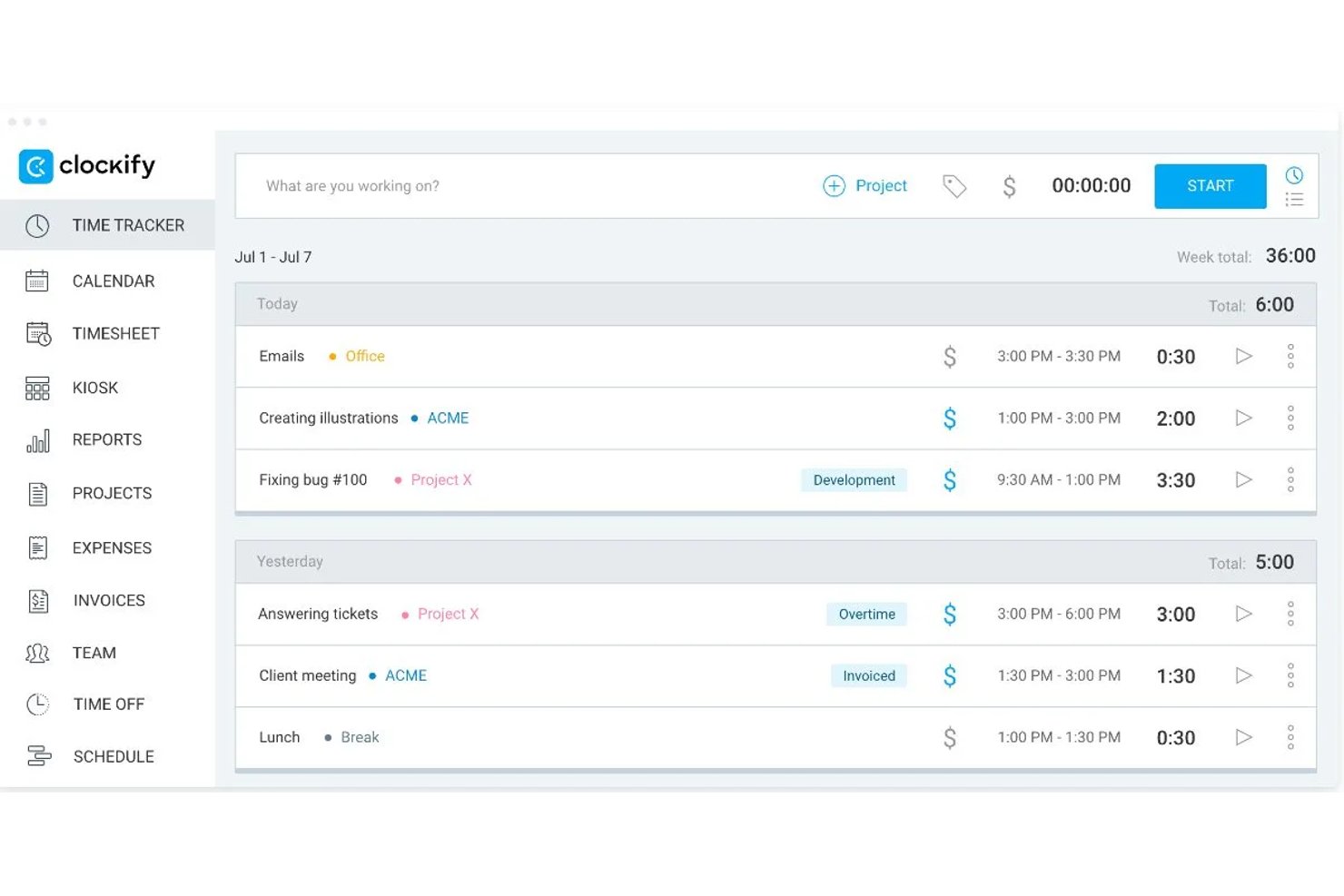
Clockify is a time tracking platform that pairs a visual calendar for creating and managing time blocks with detailed reporting, team scheduling, and integrations across 100+ tools.
Who Is Clockify Best For?
Clockify is a strong fit for freelance consultants and lean project teams who need to log time against project work without disrupting their existing workflow.
Why I Picked Clockify
I picked Clockify as one of the best because it treats time blocking as a tracking exercise, not a scheduling one, which is exactly what project teams doing billable or estimated work actually need. Its Calendar view lets you draw time blocks against specific projects, then run an Assignments Report to see how planned hours compare to what was actually logged. I've found that planned-vs-actual gap is where estimation debt hides, and Clockify surfaces it without requiring you to overhaul how your team already works.
Clockify Key Features
- Assignments report: Compares scheduled hours against actual tracked time per team member or activity, so you can see where estimation gaps are appearing across projects.
- Team scheduling module: Lets managers create, publish, and adjust recurring team assignments with drag-and-drop editing and capacity visibility across the week.
- Browser extension with in-app timer: Adds a one-click timer button inside 100+ tools—including Jira, Asana, and ClickUp—so you can log time without switching tabs.
- Project forecasting: Tracks estimated, scheduled, and actual hours side by side at the project level, giving you an early signal when a project is trending over budget or timeline.
Clockify Integrations
Clockify offers native integrations with Google Calendar, Outlook, Jira, Asana, Trello, ClickUp, monday.com, and Todoist. It also supports 100+ web app integrations through its browser extension, plus Zapier and an API for custom integrations.
Pros and Cons
Pros:
- Free tier supports unlimited time tracking
- Calendar blocks connect directly with tracked time
- Planned-versus-actual reports sharpen project estimates
Cons:
- Scheduling favors resource planning over personal blocking
- One-way calendar sync weakens schedule consolidation

Planyway
Best for Trello users

My Evaluation Score
- Calendar Integration
- Adequate
- Calendar Time Blocking
- Strong
- Time Tracking & Insights
- Strong
- Priority & Task Management
- Strong
- Recurring & Flexible Blocks
- Adequate
- Task-to-Calendar Scheduling
- Strong
Planyway is a time management and scheduling app integrated with Trello, designed for teams and individuals who use Trello to organize their projects. It helps users visualize their tasks and schedules on a calendar, allowing for better planning and coordination.
Why I picked Planyway: Planyway is ideal for Trello users who need a calendar view to manage their tasks effectively. You can drag and drop Trello cards directly into your calendar, making it easy to plan your workload. The timeline view helps your team track project progress and deadlines. Additionally, Planyway supports collaboration by allowing you to share your calendar with team members.
Standout features & integrations:
Features include a timeline view that provides a clear overview of project schedules, task dependencies to highlight the relationships between tasks, and customizable filters to focus on specific projects or team members. These features help you keep your projects organized and on track.
Integrations include Trello, Google Calendar, Outlook, Slack, Asana, Jira, Microsoft Teams, Zoom, Todoist, and Evernote.
Pros and Cons
Pros:
- Supports team collaboration
- Timeline view for projects
- Task dependencies feature
- Customizable calendar sharing
- Drag and drop Trello integration
Cons:
- May not suit non-Trello workflows
- Initial setup can be complex
- Basic customization options
- Requires internet connection
- Limited to Trello users

Best for integration

My Evaluation Score
- Calendar Integration
- Strong
- Calendar Time Blocking
- Strong
- Time Tracking & Insights
- Limited
- Priority & Task Management
- Adequate
- Recurring & Flexible Blocks
- Adequate
- Task-to-Calendar Scheduling
- Adequate
Google Calendar is a scheduling tool widely used by individuals and teams to organize meetings, events, and appointments. It helps users manage their time effectively by providing a straightforward interface for scheduling and reminders.
Why I picked Google Calendar: Google Calendar integrates effortlessly with other Google Workspace apps, making it a go-to choice for many. Its ability to sync across multiple devices ensures you and your team stay updated on all schedules. You can create multiple calendars for different purposes, helping you maintain a clear overview of personal and professional commitments. The shared calendar feature allows easy collaboration with your team.
Standout features & integrations:
Features include color-coded events to differentiate between various types of activities, customizable reminders to keep you on track, and the ability to set recurring events with ease. These features help you maintain an organized schedule and reduce the chance of missing important meetings.
Integrations include Gmail, Google Meet, Slack, Zoom, Microsoft Outlook, Trello, Asana, Todoist, Zapier, and IFTTT.
Pros and Cons
Pros:
- Integrates with Google Workspace
- Supports multiple calendars
- Customizable reminders
- Easy calendar sharing
- Syncs across multiple devices
Cons:
- Requires internet for updates
- No advanced task management
- Can be overwhelming with notifications
- Basic design customization
- Limited offline access

Any.do
Best for reminders

My Evaluation Score
- Calendar Integration
- Strong
- Calendar Time Blocking
- Adequate
- Time Tracking & Insights
- Strong
- Priority & Task Management
- Strong
- Recurring & Flexible Blocks
- Adequate
- Task-to-Calendar Scheduling
- Adequate
Any.do is a task management app that helps individuals and teams organize tasks, set reminders, and manage their schedules efficiently. It is designed for users who need a reliable tool to stay on top of their daily tasks and deadlines.
Why I picked Any.do: Any.do excels in providing timely reminders to keep you on track with your tasks. You can set one-time or recurring reminders, ensuring you never miss important deadlines. The app allows you to create lists and prioritize tasks, helping you manage your workload effectively. Additionally, its calendar integration provides a comprehensive view of your schedule.
Standout features & integrations:
Features include a daily planner that helps you organize tasks for the day, a focus mode that minimizes distractions while working, and a voice entry feature for quickly adding tasks. These features enhance your productivity by keeping you focused and organized.
Integrations include Google Calendar, Outlook, Slack, Trello, Gmail, Zapier, Alexa, Siri, Evernote, and Dropbox.
Pros and Cons
Pros:
- Daily planner feature
- Voice entry for tasks
- Customizable reminders
- Comprehensive calendar view
- Effective task prioritization
Cons:
- Requires internet connection
- May not suit complex workflows
- Basic customization options
- Complex initial setup
- Limited offline capabilities

Motion
Best for AI scheduling

My Evaluation Score
- Calendar Integration
- Strong
- Calendar Time Blocking
- Excels
- Time Tracking & Insights
- Excels
- Priority & Task Management
- Strong
- Recurring & Flexible Blocks
- Excels
- Task-to-Calendar Scheduling
- Excels
Motion is a time blocking app designed for individuals and teams seeking to enhance their productivity through effective scheduling. It primarily serves project managers and professionals who need to organize their time efficiently and reduce distractions.
Why I picked Motion: Motion uses AI to automate scheduling tasks, helping you allocate time effectively. Its AI-driven scheduler adapts to your changing priorities and workload. This feature sets it apart by intelligently managing your calendar without your constant input. It also offers task management and deadline tracking, ensuring you stay on top of your responsibilities.
Standout features & integrations:
Features include smart task prioritization, automatic rescheduling of tasks based on availability, and a focus mode to minimize distractions while working. These features help you and your team maintain productivity throughout the day.
Integrations include Google Calendar, Outlook, Slack, Zoom, Trello, Asana, Monday.com, Microsoft Teams, Salesforce, and Dropbox.
Pros and Cons
Pros:
- Real-time updates AI Employees
- Focus mode for distraction-free work
- Customizable task lists
- Automatic calendar management
- AI-driven task scheduling
Cons:
- Not suitable for large teams
- No offline mode
- Limited customization options
- Requires learning curve


My Evaluation Score
- Calendar Integration
- Strong
- Calendar Time Blocking
- Strong
- Time Tracking & Insights
- Strong
- Priority & Task Management
- Strong
- Recurring & Flexible Blocks
- Strong
- Task-to-Calendar Scheduling
- Excels
SkedPal is a time management app that utilizes AI to help users organize tasks into specific time slots, making it ideal for professionals who need dynamic scheduling solutions. It primarily assists individuals and teams in managing their time effectively, prioritizing tasks, and reducing interruptions.
Why I picked SkedPal: SkedPal offers adaptive scheduling that automatically reschedules tasks as your priorities change. Its AI-driven system allows you to update task durations, and the app will reorganize your schedule accordingly. This feature is particularly useful for managing unpredictable workloads. Additionally, SkedPal's ability to integrate time blocking with to-do lists provides a comprehensive approach to productivity.
Standout features & integrations:
Features include dynamic scheduling that adjusts to changes in your priorities, time blocking for effective task management, and a focus mode to minimize distractions. These features work together to enhance your productivity and ensure that important tasks are prioritized.
Integrations include Google Calendar, Outlook, Slack, Trello, Asana, Microsoft Teams, Todoist, Zapier, IFTTT, and Evernote.
Pros and Cons
Pros:
- Flexible time blocking
- Focus mode for reduced distractions
- Dynamic task rescheduling
- Integration with to-do lists
- Adaptive scheduling capabilities
Cons:
- May not suit all workflows
- Potential over-reliance on AI
- Limited offline features
- Initial setup complexity
- Requires internet connection
My Evaluation Score
- Calendar Integration
- Adequate
- Calendar Time Blocking
- Strong
- Time Tracking & Insights
- Strong
- Priority & Task Management
- Minimal
- Recurring & Flexible Blocks
- Adequate
- Task-to-Calendar Scheduling
- Strong
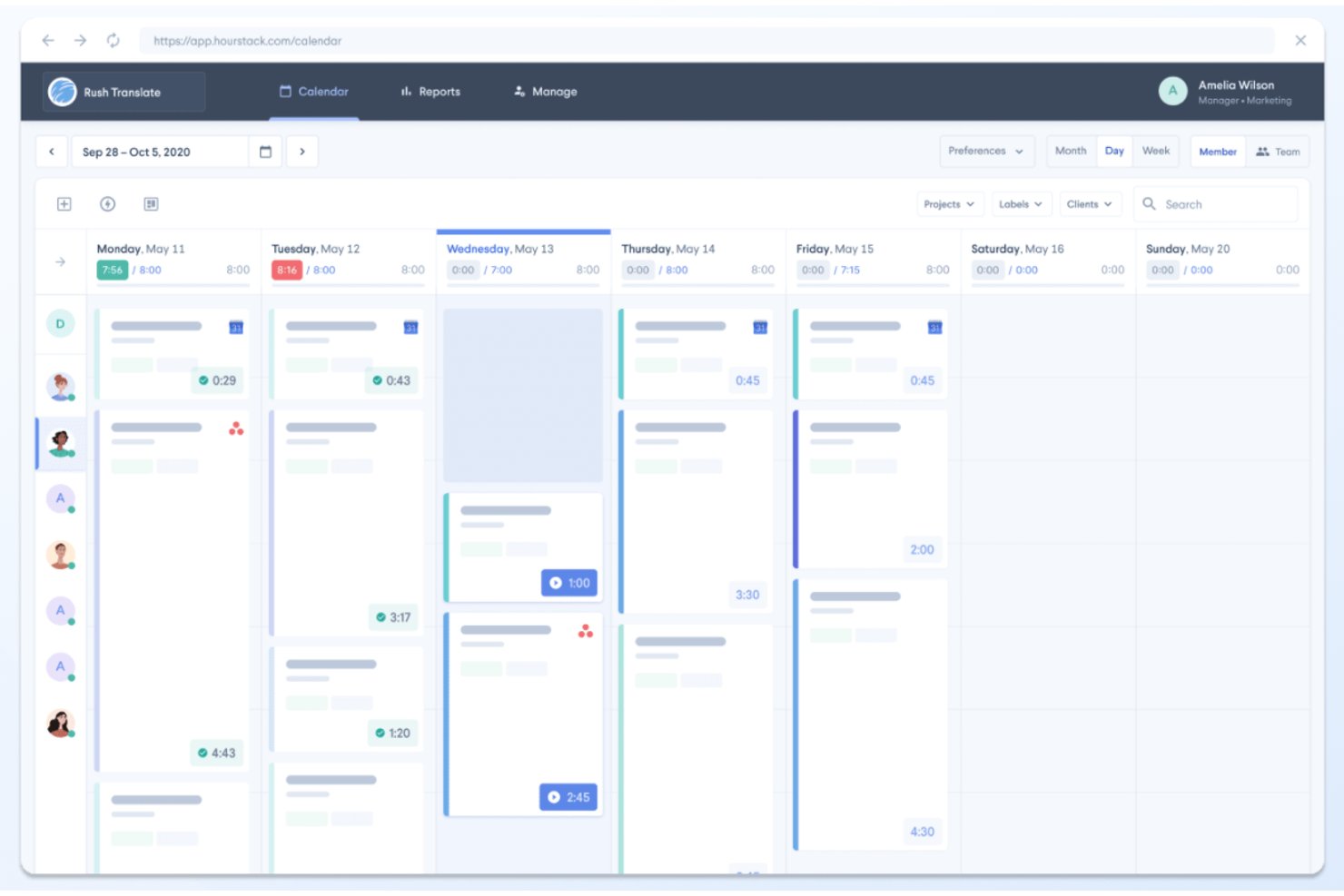
HourStack is a visual time blocking app that combines drag-and-drop calendar scheduling, allocated-vs-actual time tracking, and project-based reporting into a single web-based workspace.
Who Is HourStack Best For?
HourStack suits project managers and freelance consultants who need to see scheduled versus actual time in one visual workspace.
Why I Picked HourStack
I picked HourStack as one of the best because its visual calendar is purpose-built for seeing scheduled versus actual time in a single workspace. I love how allocated-vs-actual tracking flags overruns in real time, so I can spot where my estimates are off before they compound across a project. The unused time rollover feature is something I haven't found replicated elsewhere: unfinished blocks carry forward automatically instead of disappearing into the void.
HourStack Key Features
- Allocated vs. actual time tracking: Each time block records both your planned and real time spent, so you can see overruns as they happen.
- Task splitting across days: A single task can be divided into multiple time entries scheduled across different days.
- Reporting by client and project: Generate custom reports filtered by team member, client, or project, and export them to Excel, CSV, or Google Sheets.
- Slack timer commands: Start and stop timers, create entries, and check daily stats directly from Slack using
/hourstackslash commands.
HourStack Integrations
HourStack offered roughly 20 native integrations, including Asana, Google Calendar, Outlook, Slack, Trello, and Todoist, plus Zapier. The standalone product is discontinued, so these integrations are no longer available for new customers.
Pros and Cons
Pros:
- Tasks can span multiple scheduled days
- Unused blocks roll forward automatically
- Visual calendar clarates planned versus actual time
Cons:
- Native task prioritization remains limited
- Standalone product is no longer available

My Evaluation Score
- Calendar Integration
- Adequate
- Calendar Time Blocking
- Strong
- Time Tracking & Insights
- Adequate
- Priority & Task Management
- Strong
- Recurring & Flexible Blocks
- Adequate
- Task-to-Calendar Scheduling
- Strong
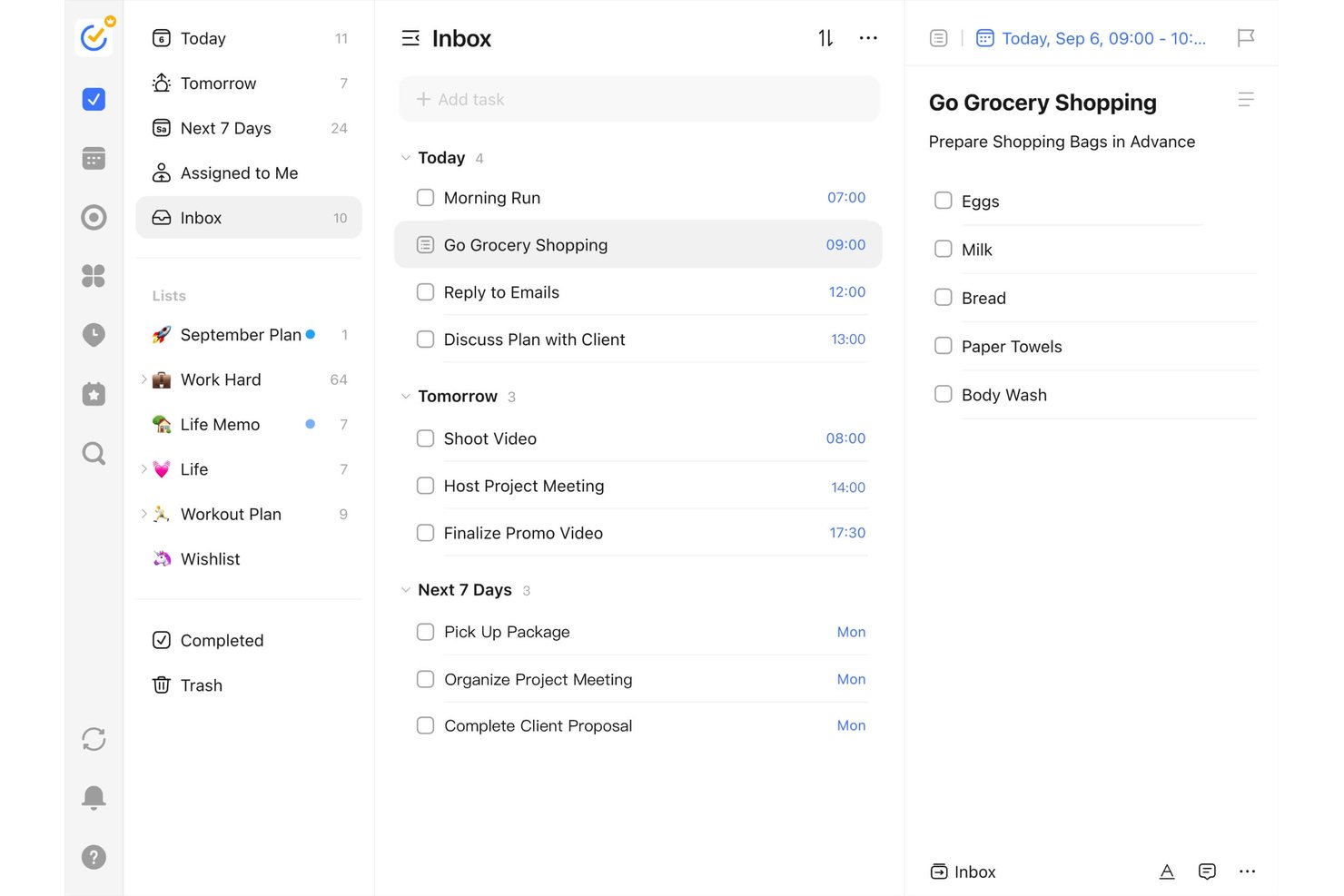
TickTick is a personal productivity and task management app that combines calendar time blocking, drag-and-drop scheduling, a built-in Pomodoro timer, habit tracking, and multiple task views including Kanban, Timeline, and Eisenhower Matrix.
Who Is TickTick Best For?
TickTick is a great fit for freelance consultants and solo contributors who want task management, habit tracking, and calendar time blocking in one affordable app.
Why I Picked TickTick
Habit tracking is what sets TickTick apart from other time blocking apps, and I've included it in my top picks because it bridges the gap between scheduling time and actually building consistent routines. I love that the built-in Habit Tracker runs alongside your task calendar, so you can block time for recurring behaviors (daily deep work, weekly reviews) and monitor streaks in the same app. The Pomodoro timer ties directly into this, letting you log focused work cycles against specific tasks and habits.
TickTick Key Features
- Multiple calendar views: TickTick offers daily, weekly, monthly, multi-day, and multi-week calendar views so you can visualize your schedule at whatever granularity fits your workflow.
- Task duration blocking: Drag tasks directly onto your calendar and assign durations to create sized, visual time blocks tied to specific work items.
- Kanban and timeline views: Switch between a Kanban board and a lightweight timeline view to manage tasks with adjustable start times and durations.
- Natural language task entry: Type tasks in plain text and TickTick auto-detects dates, times, and priorities without manual field entry.
TickTick Integrations
TickTick offers two native integrations, Google Calendar and Notion, plus calendar subscriptions through CalDAV/ICS. It also connects through Zapier.
Pros and Cons
Pros:
- Habit tracking reinforces recurring work routines
- Pomodoro timer links focus to tasks
- Drag tasks into sized calendar blocks
Cons:
- Focus statistics lack planned-versus-actual reporting
- No automatic scheduling around priorities


My Evaluation Score
- Calendar Integration
- Strong
- Calendar Time Blocking
- Strong
- Time Tracking & Insights
- Does not offer
- Priority & Task Management
- Adequate
- Recurring & Flexible Blocks
- Strong
- Task-to-Calendar Scheduling
- Excels
FlowSavvy is a time management app designed for individuals looking to optimize their schedules through automatic time blocking. It caters to users who need an efficient way to plan their tasks and manage their time without manual adjustments.
Why I picked FlowSavvy: FlowSavvy automates your schedule by intelligently finding time for tasks, ensuring that your week is planned efficiently. It automatically reschedules tasks when plans change, reducing the need for manual calendar adjustments. You can set recurring tasks, allowing the app to plan regular activities like workouts or meetings. The ability to visualize your workload with color-coded tasks helps you prioritize effectively.
Standout features & integrations:
Features include auto-scheduling that adapts to changes, color-coded tasks to easily visualize priorities, and recurring task management for building habits. These features help you stay organized and ensure that important tasks are not overlooked.
Integrations include Google Calendar, iCloud, Outlook, Slack, Zoom, Trello, Asana, Todoist, Microsoft Teams, and Evernote.
Pros and Cons
Pros:
- Custom scheduling hours
- Recurring task handling
- Color-coded task visualization
- Efficient time management
- Automatic task rescheduling
Cons:
- Basic customization options
- Requires internet connection
- May not suit rigid schedules
- Learning curve for new users
- Limited manual control

GoodDay
Best for customizable workspaces
My Evaluation Score
- Calendar Integration
- Adequate
- Calendar Time Blocking
- Adequate
- Time Tracking & Insights
- Strong
- Priority & Task Management
- Excels
- Recurring & Flexible Blocks
- Adequate
- Task-to-Calendar Scheduling
- Strong
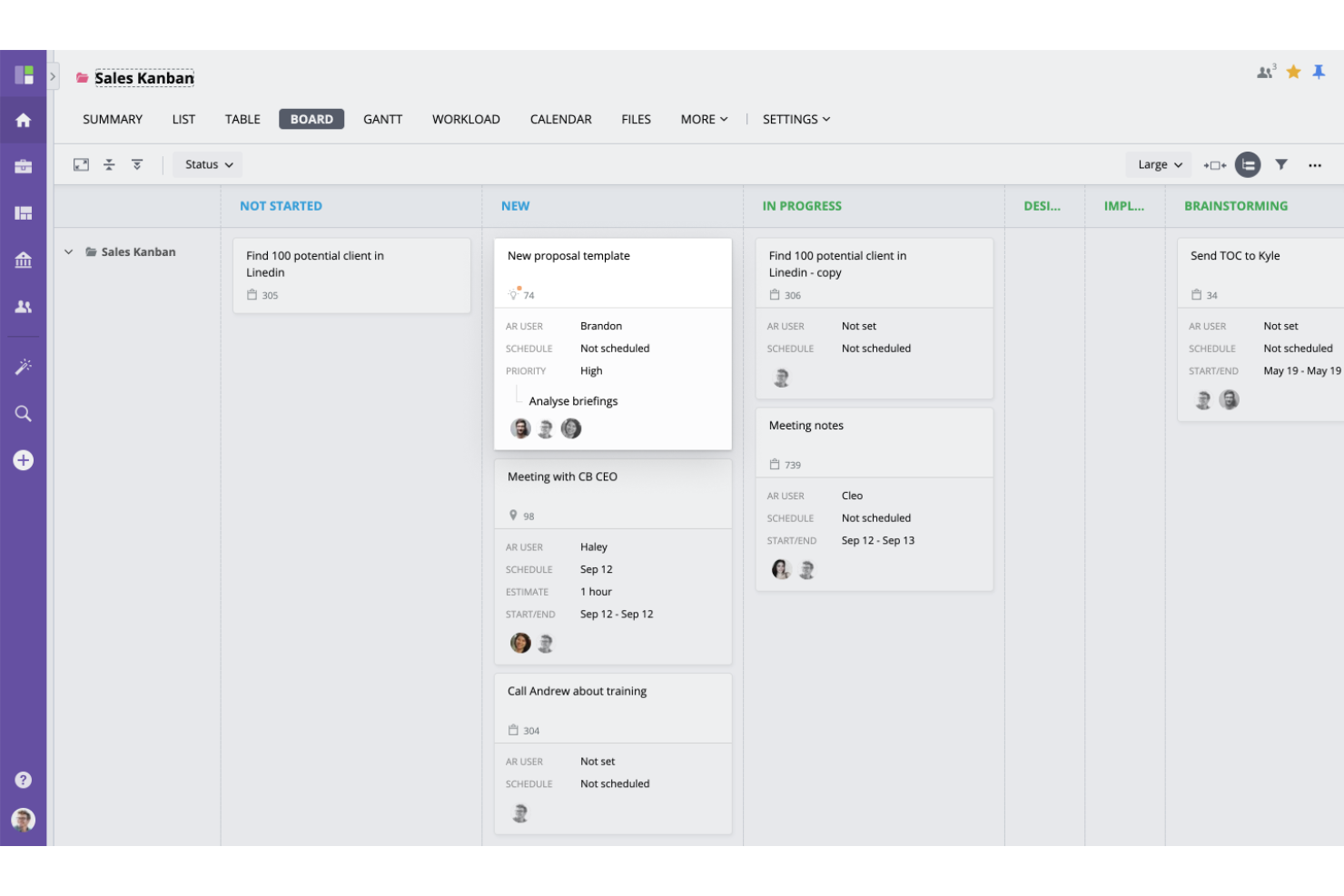
For teams seeking a time blocking solution to enhance productivity and streamline workflows, GoodDay offers a compelling work management platform. Tailored to meet the needs of diverse teams, such as project managers, team leaders, and remote workers, GoodDay stands out with its customizable workspaces and integration capabilities. By offering tools that consolidate project management, resource planning, and team collaboration, it addresses the challenges of managing multiple projects and enhancing team communication.
Why I Picked GoodDay
I picked GoodDay as a fitting choice for time blocking due to its versatile task visualization and customizable workspaces. These features allow you to organize your day into focused blocks of time effectively, catering to various project management methodologies like Waterfall and Scrum. The platform’s ability to adapt workflows to your specific needs ensures that you can maintain productivity and manage tasks efficiently, making it a suitable tool for those committed to time blocking strategies.
GoodDay Key Features
In addition to customizable workspaces, GoodDay offers:
- Multiple Views for Task Visualization: This feature allows you to see your tasks in different formats, such as timelines or Kanban boards, helping you allocate time blocks effectively.
- Goal Management Tools: These tools help you set and track goals, keeping your time blocks aligned with long-term objectives.
- Resource Planning: Plan and allocate resources efficiently, ensuring that your time blocks are realistic and achievable.
GoodDay Integrations
Integrations include Google Drive, Slack, Microsoft Teams, Dropbox, Google Calendar, Outlook, Jira, Trello, Asana, and GitHub.
Pros and Cons
Pros:
- Its Agile and Scrum support cater to flexible project methodologies
- Integrated time tracking connects your time blocks to actual logged hours
- Task-linked blocks ensure every time slot ties directly to project work
Cons:
- Mobile experience is less streamlined for detailed time blocking
- Some users report occasional slow system performance
Other Time Blocking Apps
Here are some additional time blocking app options that didn’t make it onto my shortlist, but are still worth checking out:


How I Evaluate Time Blocking Apps
I split my evaluation into two layers: baseline criteria every tool must meet—like blocking focused work time around a sprint review—and differentiators that separate the best options from the rest.
Core Functionality (Table Stakes For This List)
When I'm selecting tools for my list, I rank each one on a scale from 0 (does not offer the functionality) to 5 (excels in this area) for each core functionality listed below. Then, I calculate the tool's total score into a percentage. Each tool needs to achieve a minimum total score of 65% to be considered for inclusion.
- Calendar Time Blocking: I look for a visual daily and weekly calendar where you can create, resize, and color-code blocks—like reserving a two-hour window for sprint planning prep.
- Task-to-Calendar Scheduling: Each tool should let you pull tasks directly onto the calendar, so a backlog item with a Friday deadline can land in an open slot without manual re-entry.
- Calendar Integration: Two-way sync with Google Calendar, Outlook, or iCal matters here, because project managers live across multiple calendars and need blocks and meetings in one view.
- Priority & Task Management: I evaluate whether the app supports task lists with priorities, due dates, and project tags—enough structure to sort deliverables by urgency before blocking time.
- Recurring & Flexible Blocks: Recurring daily standups or weekly review blocks should be easy to template, and unfinished blocks should roll forward rather than disappear from the schedule.
- Time Tracking & Insights: Built-in tracking that captures planned vs. actual time per block helps project managers refine future estimates—like spotting that design reviews consistently run over.
Once I have a list of tools that meet this criteria, I consider what sets each platform apart.
Differentiating Factors (What Sets Vendors Apart)
Here's how I compare and contrast different vendors:
Standout Features
AI auto-scheduling is a big differentiator—I look for tools that place tasks into open calendar slots based on priority and deadlines, which saves project managers from manually puzzling together a packed week. Team visibility matters just as much, especially when you need to see who's in a focus block before scheduling a cross-functional sync. I also check for native integrations with tools like Jira, Asana, or ClickUp, so project tasks flow into time blocks without duplicate entry.
Beyond Features
Pricing structure is worth a close look—I evaluate whether a free tier gives individual project managers enough room to validate the tool before committing a team budget. Platform coverage also matters; a project manager bouncing between a laptop and their phone between meetings needs reliable sync across web, desktop, and mobile. I check onboarding resources too, since time blocking is a methodology shift for many teams, and guided templates or setup wizards help drive adoption faster than a blank calendar.
How to Choose Time Blocking App
It’s easy to get bogged down in long feature lists and complex pricing structures. To help you stay focused as you work through your unique software selection process, here’s a checklist of factors to keep in mind:
| Factor | What to Consider |
|---|---|
| Scalability | Consider if the app can grow with your team. Will it handle more users or larger projects as your needs evolve? Look for tiered pricing plans that offer flexibility without a huge cost increase. |
| Integrations | Check if the app works with your existing tools like calendars, email, or project management software. A lack of integrations might lead to workflow disruptions or duplicate data entry. |
| Customizability | Evaluate how much you can tailor the app to fit your workflow. Can you modify views or set custom rules? Limited customizability might mean the app won't fully align with your processes. |
| Ease of use | Assess how intuitive the app is for your team. Will they need extensive training, or can they dive right in? A complicated interface can lead to low adoption rates and frustration. |
| Implementation and onboarding | Consider the time and resources needed to get started. Does the provider offer onboarding support like tutorials or webinars? A lengthy setup phase could delay your team's productivity gains. |
| Cost | Compare the app's pricing with your budget. Are there hidden fees or long-term commitments? Ensure the cost aligns with the value you expect to gain from the app. |
| Security safeguards | Review the app's security measures. Does it comply with industry standards and protect your data? Weak security can expose your organization to risks and breaches. |
| Support availability | Determine the level of support offered. Is there 24/7 assistance, or will you be waiting for help? Reliable support ensures any issues are quickly resolved, minimizing downtime. |
What Is a Time Blocking App?
A time blocking app is a tool that helps users allocate specific time slots for different tasks and activities. Professionals like project managers, freelancers, and executives use these tools to manage their schedules and increase productivity. Calendar integration, task scheduling, and reminder features support efficient time management and task prioritization. Overall, these tools help users focus on tasks, reduce procrastination, and improve productivity.
Features of Time Blocking App
When selecting a time blocking app, keep an eye out for the following key features:
- Task scheduling: Allows you to allocate specific time slots for tasks, helping to organize your day effectively.
- Calendar integration: Syncs with existing calendars to provide a unified view of your schedule, reducing the need for manual updates.
- Reminders and notifications: Sends alerts to keep you on track with upcoming tasks and deadlines, minimizing the risk of forgetting important activities.
- Recurring tasks: Automates repetitive tasks, saving you time and ensuring consistency in your schedule.
- Focus mode: Minimizes distractions by blocking notifications during designated work periods, enhancing concentration.
- Color-coded tasks: Uses colors to differentiate between task types or priorities, making it easier to visualize and manage your workload.
- Customizable templates: Offers pre-set templates for common schedules, allowing quick setup and adjustments to fit your needs.
- Collaboration tools: Enables sharing of schedules and tasks with team members, facilitating coordination and teamwork.
- Analytics and reports: Provides insights into your time usage and productivity patterns to help you identify areas for improvement.
- Mobile access: Ensures you can manage your schedule on the go, keeping you connected and organized wherever you are.
Benefits of Time Blocking App
Implementing a time blocking app provides several benefits for your team and your business. Here are a few you can look forward to:
- Improved focus: By scheduling specific times for tasks, you can concentrate better and minimize distractions, thanks to features like focus mode.
- Enhanced productivity: Task scheduling and reminders help you stay on top of your workload and get more done in less time.
- Better time management: Calendar integration and recurring tasks ensure you make the most of your available time by organizing it efficiently.
- Reduced stress: Knowing exactly what needs to be done and when can alleviate the anxiety of managing overlapping tasks and tight deadlines.
- Increased accountability: Sharing schedules with teammates fosters a collaborative environment where everyone is aware of their responsibilities.
- Actionable insights: Analytics and reports provide data on your time use, enabling you to identify productivity trends and areas for improvement.
Costs and Pricing of Time Blocking App
Selecting a time blocking app requires an understanding of the various pricing models and plans available. Costs vary based on features, team size, add-ons, and more. The table below summarizes common plans, their average prices, and typical features included in time blocking app solutions:
Plan Comparison Table for Time Blocking App
| Plan Type | Average Price | Common Features |
|---|---|---|
| Free Plan | $0 | Basic task scheduling, limited calendar integration, and basic reminders. |
| Personal Plan | $5-$15/user/month | Full calendar integration, customizable templates, and recurring tasks. |
| Business Plan | $15-$25/user/month | Team collaboration tools, advanced analytics, and priority support. |
| Enterprise Plan | $25-$50/user/month | Custom integrations, dedicated account manager, advanced security features, and comprehensive analytics. |
Time Blocking App FAQs
Here are some answers to common questions about time blocking app:
How do time blocking apps improve productivity?
Time blocking apps improve productivity by helping you allocate specific time slots for tasks, minimizing distractions, and ensuring you focus on one task at a time. They provide reminders and notifications to keep you on track, which helps you manage your time more effectively and accomplish more throughout your day.
Can time blocking apps be used for team collaboration?
Yes, many time blocking apps support team collaboration by allowing you to share calendars, assign tasks, and coordinate schedules with team members. This functionality helps ensure everyone is aligned on priorities and deadlines, facilitating better communication and teamwork.
What should I look for in a time blocking app for business use?
For business use, look for a time blocking app that offers team collaboration features, integration with other business tools, and advanced analytics. These features help you coordinate with your team, streamline workflows, and gain insights into productivity trends, which can improve overall business efficiency.
Are there any drawbacks to using time blocking apps?
Some drawbacks of using time blocking apps include the potential for over-scheduling, which can lead to stress, and the need for regular updates, which could disrupt your workflow. It’s important to use these apps flexibly and adjust your schedule as needed to avoid these issues.
How do time blocking apps differ from traditional calendar apps?
Time blocking apps differ from traditional calendar apps by focusing on task management and time allocation. They offer features like recurring tasks, reminders, and focus modes, which help you manage your time more effectively and ensure that you dedicate specific periods to important tasks.
Can time blocking apps integrate with other productivity tools?
Many time blocking apps can integrate with other productivity tools like project management software, email clients, and communication platforms. These integrations help streamline your workflow by syncing tasks and calendars, reducing manual data entry, and ensuring all your tools work together efficiently.