

10 Best PPM AI Tools Reviewed in 2026

Best PPM AI Tools Shortlist


Managing multiple projects at once can be challenging, especially when you’re balancing timelines, resources, and organizational priorities. PPM, or Project Portfolio Management, focuses on overseeing and prioritizing projects across a business to ensure they align with strategic goals.
PPM AI tools enhance this process by using artificial intelligence to improve decision-making, forecast project outcomes, and optimize how resources are allocated. After testing and reviewing the leading PPM AI tools, I’ve identified the ones that offer meaningful value through features like predictive analytics, automated reporting, and real-time portfolio visibility.
In this article, you’ll find an unbiased, well-researched breakdown of the top options to help you improve efficiency, strengthen collaboration, and select the tool that best fits your team’s needs.
Why Trust Our Software Recommendations
Our team has been testing and reviewing software since 2012. As project managers ourselves, we know how difficult—and important—it is to choose the right software.
For this guide, we evaluated tools using hands-on testing and independent research, scoring tools using our selection criteria. We also draw on insights from industry thought leaders and practicing project management experts.
Our reviews reflect our human editorial judgment, not a sales pitch.
Expert reviewers:
PPM AI Tools Comparison Table
This comparison table summarizes pricing details for my top PPM AI tool selections.
| Tool | Best For | Trial Info | Price | ||
|---|---|---|---|---|---|
| 1 | Best for project scheduling | 14-day free trial | From $10/user/month (billed annually) | Website | |
| 2 | Best for AI-driven project planning | Free plan available | From $9/user/month (billed annually) | Website | |
| 3 | Best for Microsoft 365 users | Free trial available | From $10/user/month (billed annually) | Website | |
| 4 | Best for document management | Free demo available | Pricing upon request | Website | |
| 5 | Best for small businesses | Free demo + 14-day free trial available | From $8/user/month (billed annually) | Website | |
| 6 | Best for professional services | 14-day free trial + free demo available | From $19.90/user/month (billed annually) | Website | |
| 7 | Best for strategic planning | 14-day free trial | Pricing upon request | Website | |
| 8 | Best for spreadsheet users | 30-day free trial | From $9/user/month (billed annually) | Website | |
| 9 | Best for time tracking | Free demo available | From $20/user/month | Website | |
| 10 | Best for AI chat assistance | Free plan available | From $4/user/month (billed annually) | Website |


Best PPM AI Tool Reviews
Below are my detailed summaries of the best PPM AI tools that made it onto my shortlist. My reviews offer a detailed look at the key features, pros & cons, integrations, and ideal use cases of each tool to help you find the best one for you.

Celoxis
Best for project scheduling

Celoxis is a project management software tailored for enterprises seeking detailed scheduling and resource management. It offers AI-powered project management tools that enable real-time insights, trend exploration, and predictive analytics.
Why I picked Celoxis: Celoxis is its AI-supported dynamic scheduling, which adjusts timelines based on real-time data, including status reports on delays, resource constraints, or shifting priorities. Its workload tools help distribute work effectively, and teams can use predictive insights to anticipate risks. In my experience, Celoxis provides strong clarity across complex schedules.
Standout features & integrations:
Features include customizable dashboards for monitoring project metrics, AI-driven what-if analysis, financial forecasting for budget planning, and built-in time tracking that improves accountability.
Integrations include Jira, Azure DevOps, Salesforce, QuickBooks, Slack, Google Drive, Microsoft Project, Outlook, Excel, Trello, and Zapier.
Pros and Cons
Pros:
- Customizable dashboards for project metrics
- AI-enhanced workload distribution
- Intelligent scheduling adapts to project changes
Cons:
- Limited mobile app functionality
- Requires training for full utilization

Best for AI-driven project planning
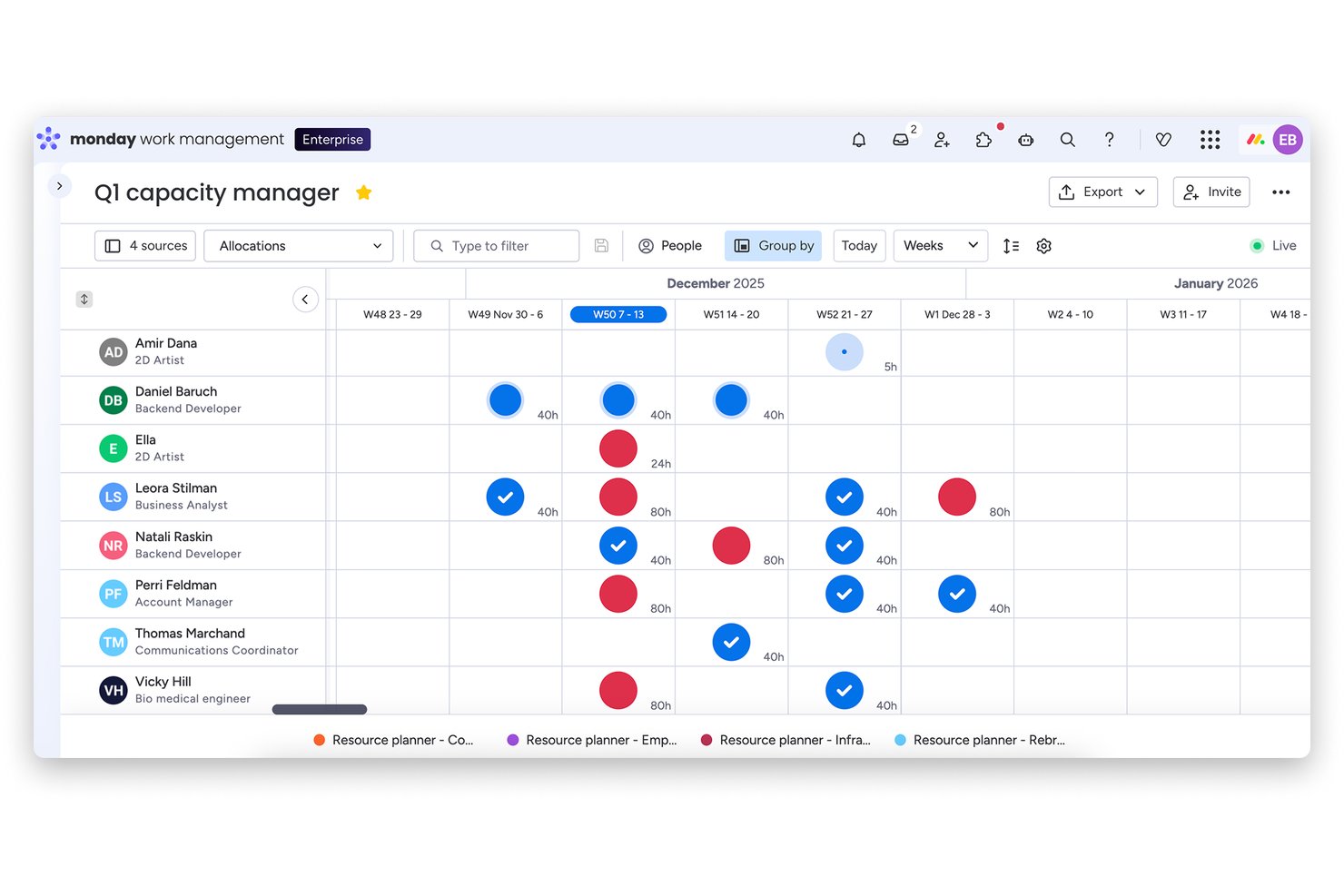
monday AI Workspace is an AI-powered work management platform that combines project planning, portfolio oversight, resource capacity management, automated risk detection, and generative AI reporting across multi-project environments.
Who Is monday AI Workspace Best For?
It's a strong fit for program managers and cross-functional teams at mid-size to enterprise companies running multiple concurrent projects across product, engineering, and marketing.
Why I Picked monday AI Workspace
I've included monday AI Workspace in my top picks because its AI-driven project planning goes beyond surface-level task management. I particularly like the Smart Project Planning feature, which generates timeline and milestone recommendations based on project context, and AI Smart Assignment, which suggests specific team members in the Capacity Manager rather than leaving placeholders. monday's AI also continuously scans live task statuses and dependencies to surface risk signals before they escalate.
monday AI Workspace Key Features
- AI-powered dashboards: Generate live dashboards that visualize project and portfolio metrics in real time.
- Bi-directional integrations: Sync tasks and data with 200+ connected tools, including CRMs and developer platforms.
- Portfolio snapshot views: Monitor hundreds of projects at once using centralized portfolio boards.
- Open API access: Build custom automations and integrations tailored to your organization’s needs.
monday AI Workspace Integrations
monday AI Workspace offers hundreds of native integrations, including Slack, Google Workspace, Microsoft 365, Salesforce, Jira, GitHub, Zoom, Dropbox, HubSpot, and Zendesk. It also supports Zapier and provides an API for custom integrations.
Pros and Cons
Pros:
- Smart risk detection flags issues proactively
- Portfolio-level dashboards update in real time
- AI automatically generates project timelines and milestones
Cons:
- Portfolio analytics lag behind dedicated PPM platforms
- AI features require significant setup and onboarding
New Product Updates from monday AI Workspace
monday AI Workspace Adds Human Approval Routing
monday AI Workspace adds a human-in-the-loop approval block to AI Workflows, sending approval requests and routing workflow paths based on responses. For more information, visit monday AI Workspace's official site.
Best for Microsoft 365 users

Microsoft Planner is a unified work management tool for teams using Microsoft 365. It brings together Planner, Project for the web, To Do, and Copilot, with AI capabilities that help generate plans, track goals, and adapt workloads.
Why I picked Microsoft Planner: Microsoft Planner is ideal for Microsoft 365 users who need integrated task management. The tool’s AI, through Copilot in Planner, helps teams generate project plans, monitor progress, and track project lifecycles all the way up to the project execution. It adjusts schedules as the workload changes and as the project status changes. This supports organizations that want task, schedule, and resource management inside the Microsoft ecosystem.
Standout features & integrations:
Features include task assignment with workload visibility, Gantt-style timeline views, people views for resource understanding, sprints, and AI-generated planning through Copilot. Teams also get goal tracking, baselines, and dependencies in the premium tiers.
Integrations include Microsoft Teams, Outlook, SharePoint, OneDrive, Power BI, Excel, Word, PowerPoint, Azure DevOps, and Microsoft To Do.
Pros and Cons
Pros:
- Visual dashboards improve project visibility
- Easy task assignment and tracking
- Integrated with the Microsoft 365 ecosystem
Cons:
- No built-in time tracking (requires integration)
- Requires a Microsoft 365 subscription

OpenText
Best for document management

OpenText is an enterprise information management software tailored for organizations needing advanced document management and data integration. It offers AI capabilities through OpenText Aviator, which supports search, summarization, and intelligent information handling.
Why I picked OpenText: OpenText excels in document management with AI-driven capabilities that improve data organization and retrieval. It supports organizations that need strong document and information governance. Its AI tools help analyze content, assist with retrieval, and automate processes, making large-scale document environments easier to manage. These capabilities improve compliance and operational consistency.
Standout features & integrations:
Features include content archiving that ensures data preservation, compliance management tools that help meet regulatory requirements, and workflow automation that reduces manual tasks. Your team can also utilize information governance to maintain data integrity.
Integrations include SAP, Microsoft Office 365, Salesforce, Oracle, IBM, Google Workspace, SharePoint, Box, Slack, and ServiceNow.
Pros and Cons
Pros:
- Strong compliance management features
- Workflow automation boosts operational efficiency
- AI analytics improves document retrieval
Cons:
- Outdated features hinder usability
- The Annotation tool lacks file compatibility

Best for small businesses

Businessmap is a business execution software designed for small businesses that are aiming to improve project visibility and strategic alignment. It supports planning, execution, and performance tracking with AI tools, including analysis, summaries, and an AI work assistant.
Why I picked Businessmap: Businessmap is best for small businesses due to its user-friendly interface and strong analytics capabilities. It’s a great option if you need structured planning tools without heavy complexity. Its AI features help analyze trends, summarize work, and support OKR tracking, which benefits teams needing guidance around prioritization. In my experience, Businessmap offers useful transparency and alignment across small teams.
Standout features & integrations:
Features include real-time performance monitoring that keeps you informed, customizable dashboards that allow for tailored views, and collaborative planning tools that improve teamwork. Your team can also visualize project dependencies to better understand workflow impacts.
Integrations include SAP, Salesforce, Microsoft Teams, Slack, Jira, Trello, Asana, Google Workspace, Dropbox, and GitHub.
Pros and Cons
Pros:
- Strong analytics capabilities for insights
- User-friendly interface for easy adoption
- Improves project management efficiency
Cons:
- Sparse layout reduces efficiency
- Lacks strong prioritization tools


Scoro is a business management software aimed at professional service firms looking to optimize their project and financial management. It centralizes quoting, delivery, invoicing, and reporting, with AI-powered actions and insights that support real-time decision-making.
Why I picked Scoro: Scoro aligns well with professional services teams that need visibility into project profitability and resource capacity. Its AI features provide instant insights and automate routine actions, helping teams track performance, allocate resources effectively, and make data-driven decisions. These capabilities support firms that manage fixed-fee, time-and-materials, and retainer-based projects in one system.
Standout features & integrations:
Features include AI-powered actions and insights, project templates for standard workflows, detailed resource planning tools, and profitability tracking that compares estimated vs. actual performance. Teams can also use the Gantt view, which uses generative AI to visualize timelines and track delivery.
Integrations include Xero, QuickBooks, Sage Intacct, Stripe, HubSpot, Salesforce, Jira, Google Calendar, Outlook, Google Drive, Dropbox, Expensify, and Zapier.
Pros and Cons
Pros:
- Customizable dashboards for performance tracking
- Automated invoicing simplifies billing
- AI-driven insights into project profitability
Cons:
- Interface lacks collapsible sections
- Document layouts lack customization


Triskell Software is a project and portfolio management tool aimed at organizations focusing on strategic planning and execution. It focuses on strategic portfolio management but does not list explicit AI features in the documentation, so AI references below are revised to ensure factual accuracy.
Why I picked Triskell Software: Triskell Software is tailored for strategic planning, offering AI-driven insights that align projects with business goals. It provides scenario analysis, portfolio alignment tools, and performance tracking, helping teams evaluate strategic options and maintain visibility across initiatives. These capabilities support long-term planning and organizational alignment.
Standout features & integrations:
Features include customizable dashboards for tracking initiatives, performance management tools, and resource management capabilities that help teams allocate work effectively. Teams can also use risk management features to anticipate potential issues.
Integrations include Microsoft Project, Jira, SAP, Salesforce, Slack, Microsoft Teams, Trello, Smartsheet, ServiceNow, and Asana.
Pros and Cons
Pros:
- Customizable dashboards for project overview
- Scenario analysis for strategic decision-making
- AI-driven insights for strategic alignment
Cons:
- Complex setup process
- Requires training for effective use

Best for spreadsheet users

Smartsheet is a versatile project management tool that caters to teams familiar with spreadsheet-based project planning. It supports task management, resource allocation, and collaborative workflows, with AI capabilities that generate formulas, summarize content, and analyze data.
Why I picked Smartsheet: Smartsheet is best for spreadsheet users who need advanced project management capabilities with AI-driven automation. The tool’s advanced AI features assist with formula building, content summarization, and data analysis, helping teams manage large projects more efficiently. Its predictive capabilities also support forecasting project outcomes.
Standout features & integrations:
Features include customizable dashboards for real-time visibility, automated workflows that reduce manual updates, and AI-powered project setup for new users. Teams can also use reporting tools to consolidate project data across sheets.
Integrations include Microsoft Teams, Slack, Google Workspace, Salesforce, Jira, Box, Dropbox, ServiceNow, Docusign, Tableau, and AI connectors such as Amazon Q Business, Glean, Atlassian Rovo, and Microsoft Copilot.
Pros and Cons
Pros:
- Predictive analytics aid in project forecasting
- AI automation reduces repetitive tasks
- Customizable dashboards for data visualization
Cons:
- Basic tasks dependent on Excel-style formulas
- Manual syncing needed for Interactive sheets
New Product Updates from Smartsheet
Smartsheet Introduces Custom Privacy Notices for Forms
Smartsheet introduces custom privacy notices that admins can apply across all organizational forms. This helps teams communicate data practices consistently. For more information, visit Smartsheet’s official site.

BigTime
Best for time tracking

BigTime is a time and billing software designed for professional service firms needing accurate time tracking and expense management. It provides AI-powered features through BigTime AI, supporting smarter time capture, billing suggestions, and operational insights.
Why I picked BigTime: Businessmap is best for small businesses due to its user-friendly interface and strong analytics capabilities. Its AI features support automated time capture, intelligent billing recommendations, and resource insights, helping firms manage utilization and improve billing accuracy. BigTime’s focus on precise time tracking is especially valuable for service-based teams.
Standout features & integrations:
Features include customizable invoicing that allows you to tailor billing to client needs, project budgeting tools that keep finances on track, and expense tracking that simplifies reimbursement processes. Your team can also use reporting tools to gain insights into project performance.
Integrations include QuickBooks, Salesforce, Slack, Zapier, Lacerte, Jira, Microsoft Outlook, Google Calendar, HubSpot, and PayPal.
Pros and Cons
Pros:
- Automated time capture
- Customizable invoicing
- AI-powered time tracking
Cons:
- Invoicing is limited to tracked time
- Time-tracking and reporting require manual adjustments

Best for AI chat assistance

Zoho Projects is a project management platform designed for teams that need structured planning, collaboration, and workflow automation. It supports task management, time tracking, and Gantt charts, with AI features that assist through Zia, Zoho’s AI, providing chat-based help, predictions, and insights.
Why I picked Zoho Projects: Zoho Projects is ideal for teams that benefit from AI chat assistance. Zia helps answer project questions, surfaces insights from project data, and supports task and deadline management, which improves clarity during daily work. These capabilities help teams communicate and organize tasks more effectively.
Standout features & integrations:
Features include task automation that reduces manual work, time tracking for accurate billing, and Gantt charts that provide a visual timeline of your projects. Your team can also use resource allocation tools to optimize workload distribution.
Integrations include Zoho CRM, Zoho Desk, Slack, Microsoft Teams, Google Workspace, Zapier, Dropbox, GitHub, Zendesk, and Bitbucket.
Pros and Cons
Pros:
- No minimum users on paid plan
- Built-in team chat included
- Unassigned tasks auto-assign on status change
Cons:
- Dashboard lacks contact organization features
- Templates locked behind paid plans
New Product Updates from Zoho Projects
Zoho Projects Adds CodeX Scripts for Custom Modules
Zoho Projects now supports CodeX Scripts for custom modules, enabling conditional logic and rules for creating, updating, and deleting records. For more information, visit Zoho Projects' official site.
 .
.Other PPM AI Tools
Here are some additional PPM AI tools options that didn’t make it onto my shortlist, but are still worth checking out:
- Planview
For portfolio management
- Meisterplan
For portfolio scenario planning
- AirSaaS
For Agile project teams


How I Evaluate PPM AI Tools
To earn a spot, a PPM tool's AI needs to deliver tangible value—like predicting resource bottlenecks or auto-ranking competing initiatives. I split my evaluation into two layers: core functionality a tool must have to qualify and the differentiating factors that set vendors apart.
Core Functionality (Table Stakes For This List)
When I'm selecting tools for my list, I rank each one on a scale from 0 (does not offer the functionality) to 5 (excels in this area) for each core functionality listed below. Then, I calculate the tool's total score into a percentage. Each tool needs to achieve a minimum total score of 65% to be considered for inclusion.
- AI-Driven Portfolio Prioritization: I evaluate whether the tool can score and rank competing projects against strategic goals, not just list them in a backlog.
- Predictive Resource Management: The tool should forecast capacity gaps and recommend allocation shifts before teams hit bottlenecks mid-sprint.
- AI Risk & Health Detection: I look for tools that flag at-risk projects using real signals like scope creep or velocity drops, not just manual RAG statuses.
- Intelligent Forecasting & Analytics: Budget and timeline predictions should adapt as project data changes, similar to how Planview and Sciforma handle what-if modeling.
- Automated Reporting & Insights: I check whether the tool generates portfolio summaries and status narratives on demand rather than requiring manual slide decks.
- Multi-Project Data Integration: Tools should pull data across the broader stack—Jira, ERP, finance systems—to give AI models full portfolio context.
Once I have a list of tools that meet this criteria, I consider what sets each platform apart.
Differentiating Factors (What Sets Vendors Apart)
Here's how I compare and contrast different vendors:
Standout Features
A conversational AI assistant adds real value when PMO directors can query portfolio health in plain language instead of building custom reports. I also look for scenario planning capabilities—modeling "what if we delay Project X and shift resources to Project Y" side by side. Financial intelligence matters here too, especially tools that combine EVM with AI forecasts to predict budget outcomes across the portfolio before variance becomes a leadership conversation.
Beyond Features
Integration depth matters a lot in this space. I check whether a tool connects bidirectionally with Jira, ERP, and finance systems, since AI models are only as good as the data feeding them. Data security and AI governance are equally important—I evaluate whether vendors provide model explainability and meet standards like SOC 2 and ISO 27001. Implementation support also shapes my assessment, because PPM tools with AI components typically require structured onboarding and change management to drive real adoption across the PMO.
How to Choose a PPM AI Tool
It’s easy to get bogged down in long feature lists and complex pricing structures. To help you stay focused as you work through your unique software selection process, here’s a checklist of factors to keep in mind:
| Factor | What to Consider |
|---|---|
| Scalability | Can the tool grow with your team? Consider if it supports increasing user numbers and project complexity without a drop in performance. |
| Integrations | Does it connect with your existing tools? Look for compatibility with your team's software stack to ensure smooth workflows and data sharing. |
| Customizability | How flexible is the tool? Check if you can tailor dashboards, reports, and workflows to fit your unique processes without needing extensive coding. |
| Ease of use | Is it intuitive for all team members? Assess the learning curve and user interface to ensure everyone can use it effectively without extensive training. |
| Implementation and onboarding | How quickly can you get started? Evaluate the setup time, available training resources, and support during the onboarding process. |
| Cost | Does it fit your budget? Compare pricing plans, including hidden fees, and weigh the cost against the value and benefits it offers. |
| Security safeguards | How secure is your data? Check for encryption, compliance with data protection regulations, and access controls to protect sensitive information. |
| Support availability | When can you reach support? Ensure there are multiple support channels available and that assistance is prompt and helpful when needed. |
What Are PPM AI Tools?
PPM, which stands for Project Portfolio Management, focuses on overseeing and prioritizing multiple projects to ensure they align with strategic goals and use resources effectively. PPM AI tools support this work by leveraging artificial intelligence to optimize tasks, resources, and decision-making processes. Used by project managers, team leads, and executives, these tools improve efficiency and visibility across an entire portfolio through AI-driven insights, predictive analytics, and automated reporting. They help organizations allocate resources wisely, assess risks, plan strategically, and ultimately make more informed decisions to achieve project goals.
Features
When selecting PPM AI tools, keep an eye out for the following key features:
- AI-driven insights: Provides valuable data analysis to improve decision-making by identifying trends and patterns in project performance.
- Predictive analytics: Forecasts project risks and outcomes, allowing teams to proactively manage potential challenges.
- Automated reporting: Generates reports automatically, saving time and ensuring accuracy in tracking project progress and performance.
- Resource optimization: Uses AI to allocate resources efficiently, ensuring the right team members are assigned to tasks for optimal productivity.
- Scenario planning: Allows users to evaluate different project strategies and outcomes, aiding in strategic decision-making.
- Customizable dashboards: Offers tailored views of project data, enabling teams to focus on key metrics that matter most to their objectives.
- Task automation: Reduces manual work by automating repetitive tasks, freeing up time for more strategic activities.
- Risk management tools: Identify potential project risks using AI, helping teams to mitigate issues before they escalate.
- Performance tracking: Monitors project metrics in real-time, providing a clear view of progress and areas needing attention.
- Workflow automation: Improves efficiency by automating workflows, ensuring tasks are completed in a timely and organized manner.
Benefits
Implementing a PPM AI tool provides several benefits for your team and your business. Here are a few you can look forward to:
- Improved decision-making: AI-driven insights give you data-backed information, helping you make better strategic choices.
- Improved efficiency: Automated reporting and task automation reduce manual work, freeing up time for more valuable activities.
- Predictive planning: Predictive analytics allow you to anticipate project risks and adjust plans proactively.
- Optimized resource use: AI helps in resource allocation, ensuring your team members are working on tasks that match their skills.
- Better risk management: AI tools identify potential risks early, allowing you to mitigate issues before they impact your projects.
- Increased project visibility: Customizable dashboards give you a clear view of project metrics, helping you stay on top of progress.
- Simplified workflows: Workflow automation ensures tasks are completed efficiently and deadlines are met.
Costs & Pricing
Selecting PPM AI tools requires an understanding of the various pricing models and plans available. Costs vary based on features, team size, add-ons, and more. The table below summarizes common plans, their average prices, and typical features included in PPM AI tools solutions:
Plan Comparison Table for PPM AI Tools
| Plan Type | Average Price | Common Features |
|---|---|---|
| Free Plan | $0 | Limited access to basic features, task management, and project tracking. |
| Personal Plan | $4-$25/user/month | Task management, basic reporting, AI-driven insights, and limited integrations. |
| Business Plan | $30-$75/user/month | Advanced reporting, resource allocation, AI analytics, and customizable dashboards. |
| Enterprise Plan | $80-$150/user/month | Full feature set, unlimited integrations, predictive analytics, and improved security features. |
PPM AI Tools FAQs
Here are some answers to common questions about PPM AI tools:
How can AI-powered PPM tools help identify project risks earlier?
AI-powered PPM tools detect risks early by analyzing project data for patterns and warning signs. They can flag missed deadlines, resource conflicts, or budget issues before they escalate. You get alerts and predictive insights, so you can proactively address obstacles and keep your projects on track.
How often should I update project data in an AI-powered PPM tool?
You should update project data regularly—ideally daily or weekly—so the AI has the latest information to analyze. Timely updates help the tool deliver relevant insights, accurate forecasts, and prompt alerts for your projects.
How do I measure ROI from using AI in PPM software?
You can measure ROI by tracking improvements in project delivery, resource utilization, and decision speed. Use key metrics like project completion rates, time saved, and reduction in budget overruns. Many AI PPM platforms include reporting tools to help you quantify value and demonstrate gains to stakeholders.
Can AI-powered PPM tools adapt to changes in my project portfolio’s priorities?
Yes, most AI PPM platforms can quickly adjust to shifting priorities by recalculating schedules, resource needs, and risk profiles when you make changes. This helps you stay flexible and keep your projects aligned with current business goals.
What’s Next:
If you're in the process of researching PPM AI tools, connect with a SoftwareSelect advisor for free recommendations.
You fill out a form and have a quick chat where they get into the specifics of your needs. Then you'll get a shortlist of software to review. They'll even support you through the entire buying process, including price negotiations.