
20 Best Financial Project Management Software For 2026

Best Financial Project Management Software Tools Shortlist
Here's my pick of the 10 best software from the 20 tools reviewed.


Tracking budgets, managing costs, and staying on top of billing can be tough—especially when you're running several projects at once. Without the right tools, things get messy fast.
That’s where financial project management software can help. It gives you a clear view of your project finances so you can make informed decisions and avoid surprises.
In this list, I’ll walk you through the best financial project management software available today. I’ve tested each one myself, and I’ll highlight what they do well, where they fall short, and who they’re best for.
Why Trust Our Financial Project Management Software Reviews
I’ve been testing and reviewing financial project management software since 2012. As a project manager myself, I know how critical and difficult it is to make the right decision when selecting software. I invest in deep research to help my audience make better software purchasing decisions.
I’ve tested more than 2,000 tools for different project management use cases and written over 1,000 comprehensive software reviews. Learn how we stay transparent and our review methodology.
Table of Contents
Best Financial Project Management Software Summary
This comparison chart summarizes pricing details for my top financial project management software selections to help you find the best one for your budget and business needs.
| Tool | Best For | Trial Info | Price | ||
|---|---|---|---|---|---|
| 1 | Best for professional services firms | Free 14-day trial available + free demo available | From $19.90/user/month (billed annually) | Website | |
| 2 | Best for tracking budgets | Free plan + free demo + 14-day free trial available | From $10/user/month (billed annually) + add-on fee | Website | |
| 3 | Best for financial oversight with time tracking | 15-day free trial + free plan + free demo available | From $4/user/month (billed annually) | Website | |
| 4 | Best for agency project profitability tracking | 14-day free trial available | From $10/user/month (billed annually) | Website | |
| 5 | Best for managing complex billing schedules | Free plan available | $14/user/month | Website | |
| 6 | Best for comprehensive project management | 30-day free trial | From $10/user/month (billed annually) | Website | |
| 7 | Best for accounting practice management | 14-day free trial | From $19/user/month (billed annually) | Website | |
| 8 | Best for project collaboration | Not available | From $39.97/month (billed annually) + free plan available | Website | |
| 9 | Best for predictive scheduling | Free trial available | Pricing upon request | Website | |
| 10 | Best for billing and expenses | Free trial + free demo available | From $29/user/month | Website |


-

Accelo
Visit WebsiteThis is an aggregated rating for this tool including ratings from Crozdesk users and ratings from other sites.4.4 -
Wrike
Visit WebsiteThis is an aggregated rating for this tool including ratings from Crozdesk users and ratings from other sites.4.2 -
Forecast
Visit WebsiteThis is an aggregated rating for this tool including ratings from Crozdesk users and ratings from other sites.4.6



Best Financial Project Management Software Reviews
Below are my detailed summaries of the best financial project management software that made it onto my shortlist. My reviews offer a detailed look at the key features, pros & cons, integrations, and ideal use cases of each tool to help you find the best one for you.

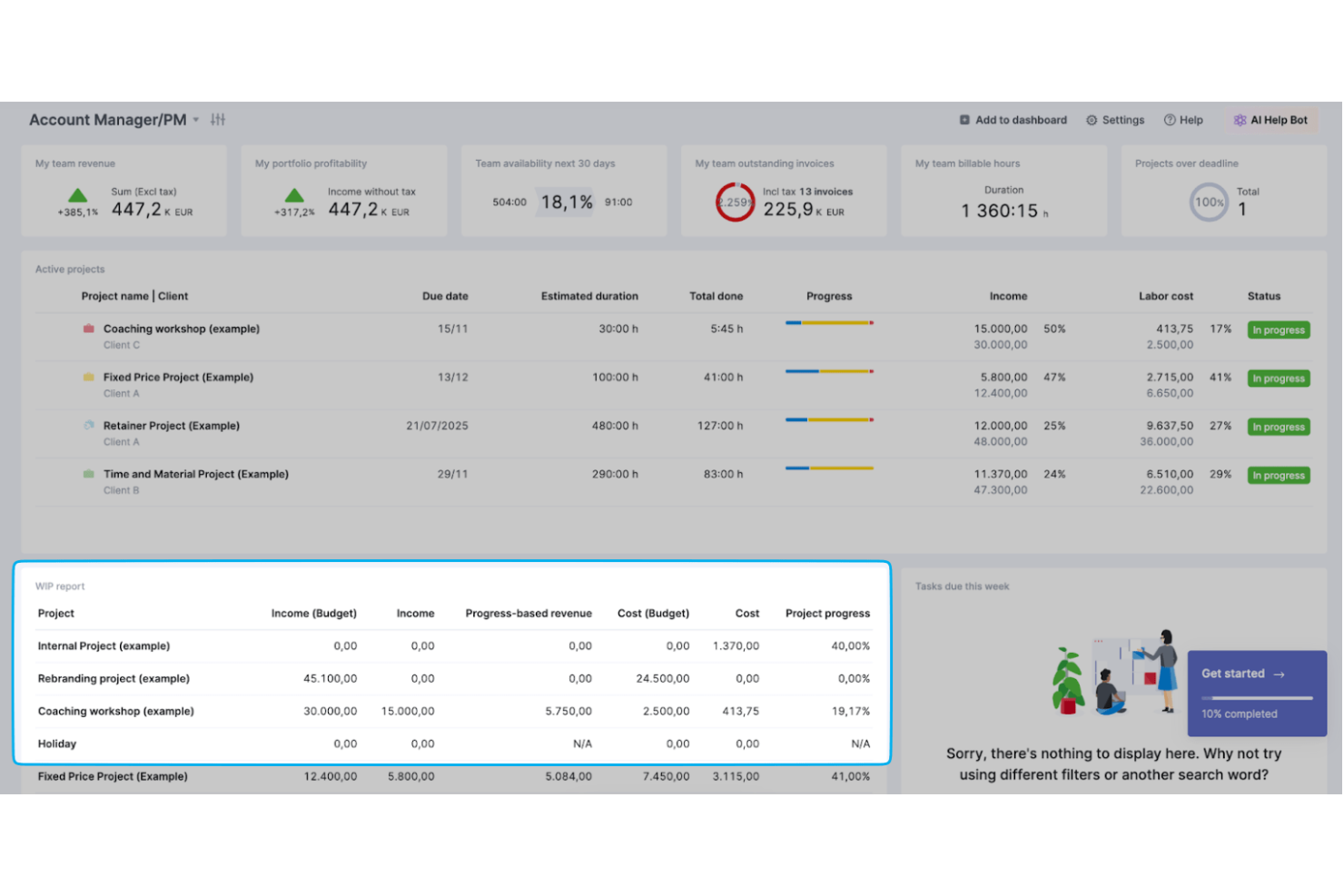
Keeping project margins in check gets complicated when your financial data lives in one system and your tasks in another. Scoro brings budgeting, billing, and resource planning into the same workspace, so you can see how every hour and expense affects profitability. If you run a consultancy, agency, or professional services firm that lives by project margins, this setup gives you tighter control over revenue, costs, and forecasting.
Why I Picked Scoro
I picked Scoro because it connects project delivery directly to financial performance and profitability, an important capability for any professional services firm. You can build detailed project budgets, track labor costs and expenses in real time, and compare them against quotes to see how margins shift as work progresses. Its built-in billing and revenue recognition tools tie completed work to invoices and financial reports, so your finance team doesn’t have to reconcile data across separate systems. I also like how utilization and capacity planning feed into financial forecasts, helping you plan future revenue based on actual team availability.
Scoro Key Features
In addition to its budgeting and billing controls, you also get tools that support day-to-day financial oversight across your projects.
- Customizable financial reports and dashboards: You can generate real-time reports on project profitability, cash flow, and revenue, all tailored to your leadership or finance team’s needs.
- Time tracking with cost rates: Your team can log hours against tasks with predefined cost and billable rates, automatically updating project financials.
- Expense management: You can record project-related expenses and link them directly to budgets and invoices for accurate cost tracking.
- Quote and estimate management: You can create detailed quotes that convert into active projects, carrying over financial data to maintain consistency from sale to delivery.
Scoro Integrations
Integrations include Google Calendar, QuickBooks, Xero, Salesforce, Stripe, HubSpot, Slack, Mailchimp, Dropbox, and Outlook.
Pros and Cons
Pros:
- Detailed financial reports tailored to service businesses.
- Built-in billing ties completed work directly to invoices.
- Strong project profitability tracking with real-time budget comparisons.
Cons:
- Mobile app offers fewer financial management capabilities.
- Setup can take time for complex service firms.
New Product Updates from Scoro

Scoro Introduces Subtasks for More Granular Work Planning
Scoro introduces subtasks and improved price list deletion warnings, enabling teams to break down work into smaller units for detailed planning while protecting pricing data from accidental changes. For more information, visit Scoro’s official site.


Wrike is a financial project management platform designed to help teams gain full control over budgets, timelines, and resources with powerful planning and reporting tools.
Why I Picked Wrike:
I picked Wrike because of how well it balances project control with financial oversight. The platform stands out for its ability to manage multiple financial workstreams at once—whether you're tracking budgets, allocating costs, or generating stakeholder reports. You can automate repetitive processes, standardize workflows, and visualize data across departments without needing to leave the tool. It’s ideal if you're handling client billing, resource forecasting, or financial reporting and want everything centralized in one place.
Standout Features & Integrations:
Features include in-platform communication for working with external partners, built-in time tracking tied to invoicing, and AI-powered risk detection to flag budget risks before they snowball. Wrike also supports cost allocation at the task level and lets you build custom dashboards for leadership or finance teams. Templates for contract management, approvals, and continuity planning help you get started faster.
Integrations include QuickBooks, Salesforce, Microsoft Teams, Google Sheets, Power BI, Adobe Creative Cloud, Tableau, Zoom, Jira, and more.
Pros and Cons
Pros:
- Customizable dashboards widgets
- Real-time updates and document collaboration
- Integrated proofing and approval tools
Cons:
- Time-consuming customization
- Complex task management for large projects
New Product Updates from Wrike

Streamlining Workspaces with New Updates
Wrike announces custom space templates, AI Agents in Wrike Labs, and a new Guage widget to improve project management. For more information, visit Wrike's official site.

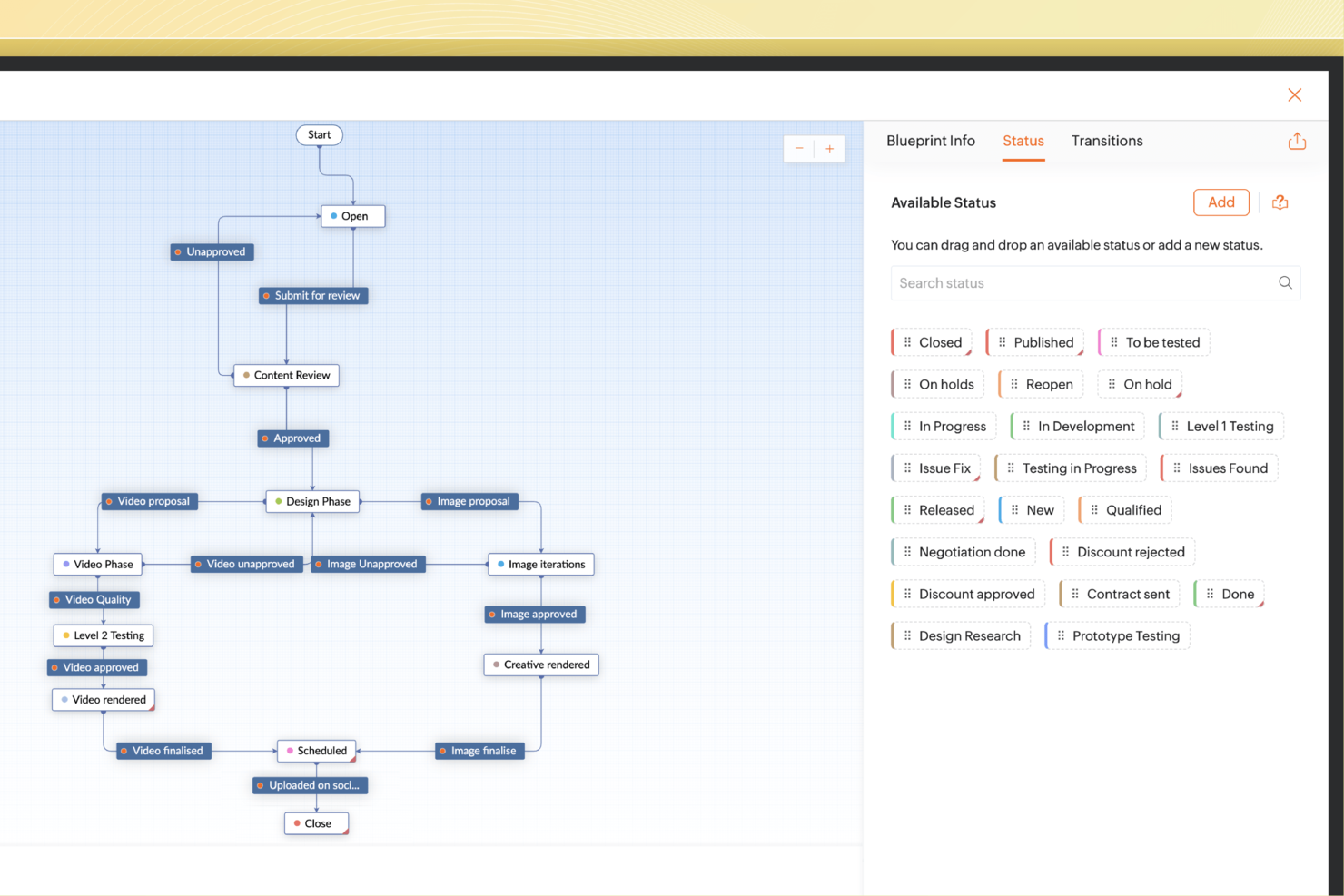
For businesses seeking a reliable financial project management solution, Zoho Projects offers an intuitive platform that caters to small and medium-sized enterprises. With features that address budget management, time tracking, and team collaboration, it’s designed to streamline complex workflows and enhance productivity. This software is particularly appealing to industries like IT, marketing, and construction, where detailed project oversight is crucial. By integrating financial tools and providing insights into project performance, Zoho Projects helps you tackle your project management challenges head-on.
Why I Picked Zoho Projects
I picked Zoho Projects because it excels in providing financial oversight through its robust time tracking and reporting capabilities. The platform's time tracking feature allows you to log work hours accurately, which is essential for managing budgets and ensuring that project costs are kept in check. Additionally, its comprehensive reporting tools provide insights into financial metrics, helping you make informed decisions. These features, combined with its seamless integration with financial tools, make Zoho Projects a top choice for managing your financial project needs.
Zoho Projects Key Features
In addition to its strong financial management capabilities, Zoho Projects offers several other features that enhance project management:
- Task Management: This feature allows you to organize and track project tasks efficiently, ensuring that nothing falls through the cracks.
- Gantt Charts: With Gantt charts, you can visualize project plans and schedules, highlighting critical tasks and dependencies.
- Client Portal: This feature provides a comprehensive client portal for enhanced client engagement and collaboration.
- Issue Tracking: Track and manage project issues effectively, ensuring that problems are addressed promptly.
Zoho Projects Integrations
Integrations include Zoho Invoice, Zoho Books, Slack, Google Drive, Microsoft Teams, Dropbox, Zapier, Google Calendar, Outlook, and GitHub. These integrations allow for seamless connectivity and enhanced functionality across various platforms.
Pros and Cons
Pros:
- Deep Zoho finance integrations
- Built-in earned value reporting
- Strong budget and cost tracking
Cons:
- Limited advanced resource planning
- Learning curve for new users


Productive is a comprehensive project management tool designed to help agencies organize their operations, manage projects, and optimize financial performance.
Why I Picked Productive:
Productive stands out as a financial project management software because of its robust financial management features. It excels in budget tracking, profitability forecasting, and real-time financial reporting, allowing businesses to maintain a clear view of their financial health. The platform’s ability to integrate salaries and operating expenses into project budgets offers a real-time, accurate view of project profitability, eliminating the need for manual calculations and separate financial reports.
Standout features & integrations:
Features include resource planning, time tracking, vacation tracking, sales CRM, document management, detailed reporting, workload management, Gantt charts, budgeting and profitability analysis, invoicing, forecasting, purchase orders, revenue recognition, and overhead calculations.
Integrations include Jira, Slack, QuickBooks, Xero, Trello, Zapier, Google Drive, Sage, BambooHR, Gusto, and HubSpot.
Pros and Cons
Pros:
- User-friendly interface
- Ability to track project profitability
- All-in-one platform
Cons:
- Could offer more integrations
- Initial setup can take time
New Product Updates from Productive

Productive Introduces Resource Request Feature
Productive introduces a resource request feature that helps teams request and allocate resources more efficiently. For more information, visit Productive's official site.


VOGSY is a versatile platform designed for global project teams, serving as an all-in-one CRM and ERP solution. It focuses on simplifying project and resource management across multiple countries and currencies.
Why I Picked VOGSY: I picked VOGSY because it helps you forecast revenue based on actual resource planning—not guesswork—so your financial projections are more accurate and aligned with team capacity. You also get consolidated revenue, cost, and margin reports, giving you a clear view of your financials across regions. I also like that you can manage complex billing schedules and keep project documents organized with Drive integrations, helping you stay on top of cash flow and financial records.
Standout features & integrations:
Features include the capacity to hook up multiple local accounting tools for a global yet localized accounts receivable and payable process. This flexibility supports your multinational financial operations with ease. VOGSY also highlights revenue opportunities and their capacity impact without the need for manual rework, which can save you time and reduce errors. Furthermore, it allows you to report revenue, cost, and margins for local offices, regions, and on a consolidated worldwide basis, providing you with a comprehensive view of your financial health.
Integrations include QuickBooks, Deltek, Xero, Sage, Certinia, Oracle Netsuite, Exact, PHC-GO, Tally, Wave, ABSS, and Omie.
Pros and Cons
Pros:
- Real-time global financial overview
- Fast setup and onboarding
- Robust resource planning tools
Cons:
- Limited mobile functionality
- Basic customization options feel restrictive
New Product Updates from VOGSY
VOGSY Enhances Cost Tracking and Reporting
VOGSY introduces enhanced cost tracking for external resources and reporting improvements. These updates provide more accurate financial visibility and improved project performance insights. For more information, visit VOGSY’s official site.
 .
.

Microsoft Project is a robust tool for managing projects, offering a suite of features to assist in planning, resource allocation, and progress tracking.
Why I Picked Microsoft Project:
I chose Microsoft Project for its ability to handle complex project requirements and its reputation for being a comprehensive solution in the project management space. It stands out for its depth and breadth of features that cater to detailed project planning and execution. I believe it is best for comprehensive project management because it provides a complete suite of tools that can manage every phase of a project lifecycle, which is essential for maintaining control over large and intricate projects.
Standout features & integrations:
Features include detailed Gantt charts, resource management, and built-in customizable templates. It also offers robust scheduling tools that can accommodate the complexities of large projects.
Integrations include Microsoft Teams, Microsoft Power BI, Microsoft Power Automate, Microsoft Azure, Microsoft 365, SharePoint, Skype for Business, Microsoft Dynamics 365, OneDrive for Business, and Outlook.
Pros and Cons
Pros:
- Advanced analytics and reporting capabilities
- Integration with other Microsoft products for a connected experience
- Comprehensive feature set for end-to-end project management
Cons:
- Requires annual commitment for best pricing options
- Relatively high cost for premium plans
- Steep learning curve for new users

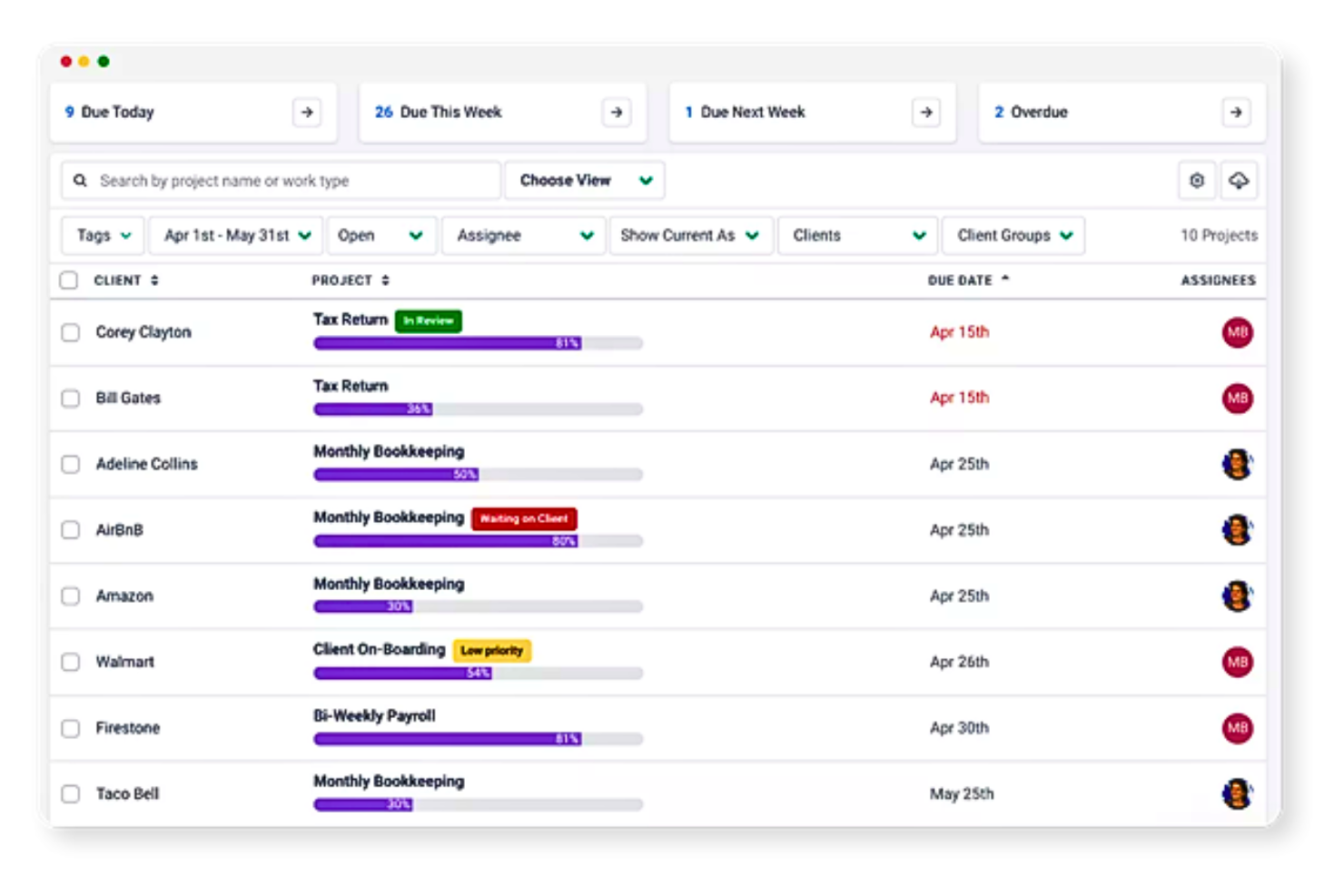
Financial Cents is a tool that simplifies accounting firm management. It offers specialized features for managing accounting workflows and client relationships effectively.
Why I Picked Financial Cents:
I chose Financial Cents because it provides a dedicated solution for the challenges faced by accounting practices. It's best for accounting practice management as it enables firms to manage their workload, automate repetitive tasks, and collaborate on client work in a centralized location, which is crucial for maintaining an organized and productive practice.
Standout features & integrations:
Features include task management, workflow automation, time tracking, and a client portal.
Integrations include QuickBooks Online, Stripe, Gusto, Google Workspace, Microsoft Office 365, and Zapier.
Pros and Cons
Pros:
- Client portal for streamlined communication
- Workflow automation to save time
- Tailored features for accounting firms
Cons:
- Base fee adds to the overall cost
- Minimum seat requirement may not suit solo practitioners
- Higher cost for monthly billing compared to annual

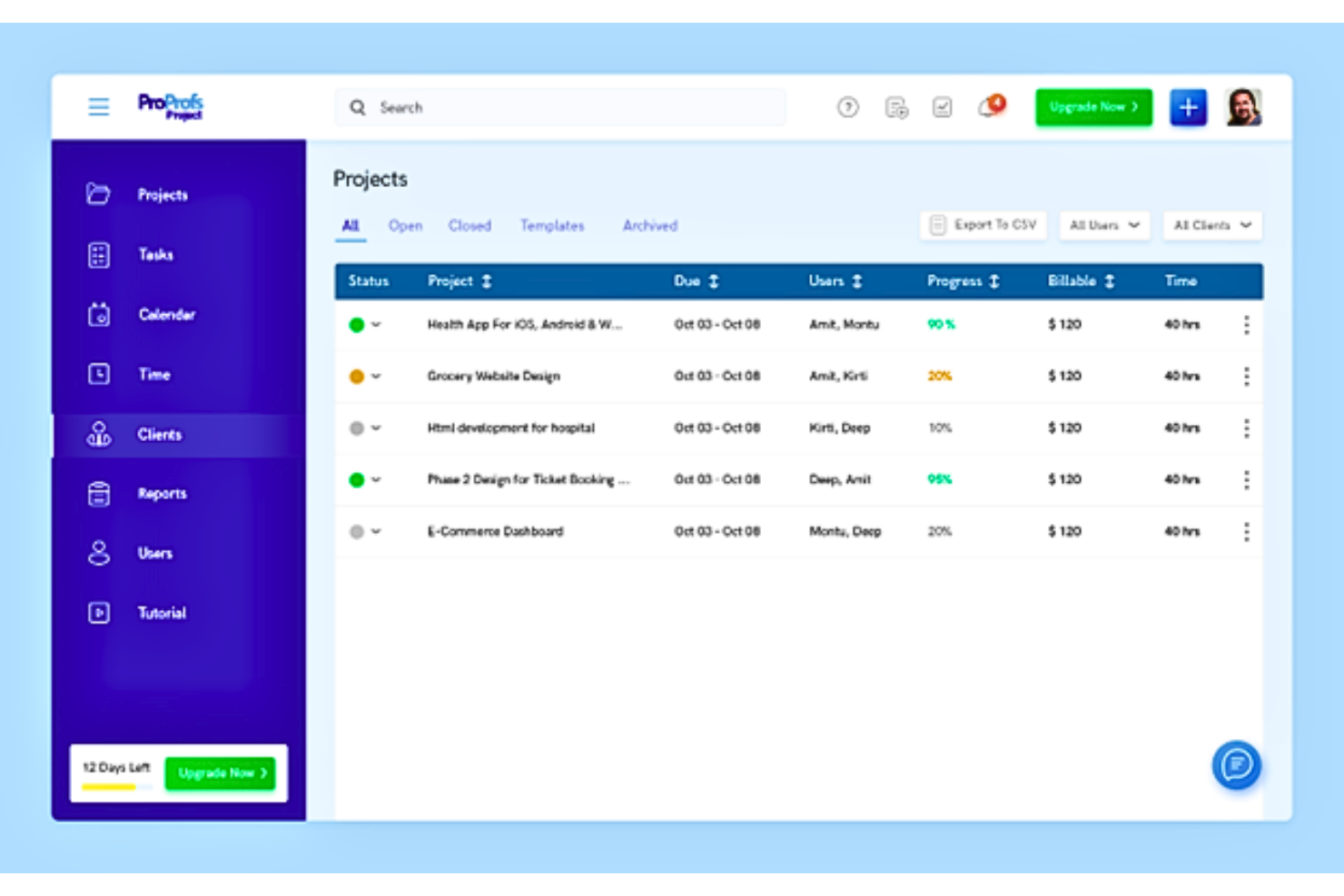
ProProfs Project is an online project management tool designed to facilitate team collaboration and ensure timely project delivery.
Why I Picked ProProfs Project:
I chose ProProfs Project for this list because it offers a unique blend of simplicity and power, making it different from other financial project management tools. Its user-friendly design and robust functionality make it an ideal choice for teams looking to collaborate effectively on financial projects. I believe it's best for project collaboration because it provides real-time communication capabilities, seamless file sharing, and customizable dashboards that keep everyone aligned and engaged.
Standout features & integrations:
Features include easy planning, tracking, and collaboration on projects. It offers various dashboard views, including List, Gantt, Kanban, and Calendar, to suit different preferences. The tool also enables efficient risk mitigation with smart reports and advanced analytics.
Integrations include Dropbox, Google Drive, Box, and other tools that facilitate file sharing and communication within teams. Additionally, it supports API access and single sign-on for secure and convenient user management.
Pros and Cons
Pros:
- Real-time communication and collaboration tools
- Comprehensive feature set for project management
- Intuitive interface for easy adoption
Cons:
- Limited information on advanced features without a trial or demo
- Annual commitment required for the best pricing
- Single pricing plan may not suit all budget levels


LiquidPlanner is a dynamic project management tool that specializes in handling project uncertainty and adapting to change.
Why I Picked LiquidPlanner:
I chose LiquidPlanner for its distinctive predictive scheduling capabilities, which set it apart from other financial project management software. I believe it is best for predictive scheduling because it employs an advanced scheduling engine that forecasts project timelines by considering project complexity and team capacity, which is vital for managing financial projects.
Standout features & integrations:
Features include its predictive scheduling, which provides realistic timelines, and its priority-based planning, which ensures the most important work is completed first. It also offers integrated time tracking and analytics for insightful reporting.
Integrations include Box, Google Drive and Dropbox. Other integrations can be built via their Open API or Zapier.
Pros and Cons
Pros:
- Integrated time tracking and analytics for detailed reporting
- Priority-based planning to focus on critical tasks
- Predictive scheduling for accurate forecasting
Cons:
- Limited customization options for certain features may restrict flexibility for some users
- Limited features on the free plan
- Annual billing is required, which may not suit all budgets


Ravetree is a comprehensive work management platform that facilitates project management, resource planning, time and expense tracking, and client relationship management.
Why I Picked Ravetree: Ravetree's financial tracking helps your team manage billing and expenses with features like time and expense tracking and real-time financial insights. You can compare estimated vs. actual revenues, which is great for checking project profitability. Retainer tracking also lets you handle client expectations and financial agreements. Another great aspect of Ravetree is its ability to create organized estimates and invoices, making billing straightforward.
Standout features & integrations:
Features include customizable approval workflows, file management, task management, calendar integration, agile and waterfall methodologies support, time tracking, expense tracking, reporting and analytics, budget management, milestone tracking, notifications and alerts, and customizable dashboards.
Integrations include Dropbox, Google Drive, OneDrive, Outlook, Gmail, QuickBooks, Google Calendar, Stripe, Exchange, Facebook, Instagram, and GitHub.
Pros and Cons
Pros:
- Efficient management of client relationships
- Allows customization of approval workflows
- Consolidates multiple functions
Cons:
- Could offer more integrations
- Extensive features may come with a learning curve
Other Financial Project Management Software
Here are some additional financial project management options that didn’t make it onto my shortlist, but are still worth checking out:
- Jetpack Workflow
For accounting firm efficiency
- Harvest
For intuitive time tracking
- Clarizen
For enterprise work management
- Smartsheet
For scalable project management
- Screendragon
For real-time budget tracking
- ProWorkflow
For financial management integration
- Bonsai Agency Software
For agencies and consultancies
- Adobe Workfront
For work automation
- Hub Planner by Milient
For visual resource planning
- GoodDay
For project expense tracking


Financial Project Management Software Selection Criteria
When selecting the best financial project management software to include on this list, I considered common buyer needs and pain points like tracking project budgets in real time and managing costs across multiple projects. I also used the following framework to keep my evaluation structured and fair:
Core Functionality (25% of total score)
To be considered for inclusion on this list, each solution had to fulfill these common use cases:
- Tracking project budgets and expenses
- Generating financial reports and forecasts
- Managing invoices and billing
- Allocating resources and costs to specific projects
- Integrating with accounting systems or project management software for accountants
Additional Standout Features (25% of total score)
To help further narrow down the competition, I also looked for unique features, such as:
- Visual dashboards for financial performance
- Automated cost variance alerts
- Time tracking tied directly to billing
- Multi-currency and tax handling
- Portfolio-level financial planning
Usability (10% of total score)
To get a sense of the usability of each system, I considered the following:
- A clean and intuitive user interface
- Logical navigation structure
- Minimal clicks to access key features
- Customization without coding
- Mobile accessibility
Onboarding (10% of total score)
To evaluate the onboarding experience for each platform, I considered the following:
- Availability of onboarding videos and tutorials
- Access to templates and setup guides
- Interactive product tours
- Onboarding webinars or live sessions
- In-app chat support during setup
Customer Support (10% of total score)
To assess each software provider’s customer support services, I considered the following:
- Availability of live chat or phone support
- Response times for support tickets
- Access to a searchable help center
- Community forums or user groups
- Quality of support documentation
Value For Money (10% of total score)
To evaluate the value for money of each platform, I considered the following:
- Pricing tiers relative to features offered
- Availability of a free trial or free plan
- Transparent pricing on the website
- Scalable plans for growing teams
- Cost savings from built-in financial tools
Customer Reviews (10% of total score)
To get a sense of overall customer satisfaction, I considered the following when reading customer reviews:
- Reported ease of setup and use
- Feedback on financial tracking accuracy
- Experiences with customer support
- Satisfaction with feature updates
- Overall value for the price
How to Choose Financial Project Management Software
It’s easy to get bogged down in long feature lists and complex pricing structures. To help you stay focused as you work through your unique software selection process, here’s a checklist of factors to keep in mind:
| Factor | What to Consider |
| Scalability | Make sure the tool can handle more projects, users, and data as your team grows. Look for flexible pricing and usage tiers. |
| Integrations | Check if the software connects easily with your existing tools—like QuickBooks, Excel, or your CRM—so you’re not duplicating work. |
| Customizability | You should be able to tailor reports, dashboards, and workflows to match your team’s financial tracking needs. |
| Ease of Use | The tool's interface should be intuitive enough that your team can start using it without much training or frustration. |
| Budget | Look at the total cost, including add-ons and user fees. Choose software that fits your budget without cutting out key features. |
| Security Safeguards | Confirm the platform uses encryption, role-based access, and audit logs to protect sensitive financial data. |
| Reporting Tools | You’ll want easy access to real-time data with customizable financial reports that help you make informed decisions. |
| Support Options | If issues come up, it helps to have access to live chat, a help center, or dedicated support that can get you back on track. |
Trends for Financial Project Management Software
In my research, I sourced countless product updates, press releases, and release logs from different financial project management software vendors. Here are some of the emerging trends I’m keeping an eye on:
- AI-Driven Forecasting: More tools now use machine learning to predict project costs, delays, and resource needs. This helps you make quicker decisions based on trends in your data, not guesswork.
- Real-Time Budget Adjustments: Some software now supports live budget changes based on actual spend. You can update financial plans without waiting for end-of-month reports.
- Granular Cost Tracking: Teams can now track costs at a more detailed level—by task, phase, or team member. This makes it easier to spot overspending and adjust plans in real time.
- Built-In Scenario Planning: More platforms let you run financial “what-if” scenarios to see how different choices might affect your budget. This helps you plan for both best- and worst-case outcomes.
- More Visual Financial Dashboards: Financial data is being presented in clearer, more interactive ways. You can see trends, progress, and issues without exporting spreadsheets or running custom reports.
What Is Financial Project Management Software?
Financial project management software is a specialized tool designed to manage and track the financial aspects of projects. It is used by project managers, finance teams, and stakeholders to plan, control, and monitor project costs and budgets.
The software includes features for budgeting, forecasting, expense tracking, and financial reporting. It is essential for users who need to maintain financial control over projects, ensuring costs stay within budget and financial objectives are met. In industries like manufacturing, financial project management software can also help manage production costs, supplier payments, and resource planning to align operational expenses with project goals.
Features of Financial Project Management Software
When selecting financial project management software, keep an eye out for the following key features:
- Permissions controls: Lets you manage who can view or edit financial data, protecting sensitive information.
- Budget tracking: Lets you set, monitor, and adjust project budgets in real time to avoid overspending.
- Expense logging: Allows your team to record and categorize costs so you can see where money is going.
- Invoicing tools: Helps you create, send, and track invoices tied to specific project milestones or hours worked.
- Resource cost allocation: Assigns financial values to team members, tools, or time so you can track true project costs.
- Forecasting tools: Uses past data to estimate future spending and help you plan ahead.
- Custom financial reports: Lets you build reports tailored to your needs so you can share insights with stakeholders.
- Time tracking integration: Connects logged hours to budgets and billing for accurate project accounting.
- Multi-currency support: Allows you to manage budgets and invoices in different currencies for global projects.
- Audit trail: Tracks all financial changes and approvals for accountability and compliance.
Benefits of Financial Project Management Software
Implementing financial project management software provides several benefits for your team and your business. Here are a few you can look forward to:
- Stronger audit trails: Logged financial changes and approval histories support compliance and accountability.
- Better budget control: Real-time tracking and alerts help you catch overspending early and stay within budget.
- Faster billing cycles: Built-in invoicing tools speed up how quickly you send bills and get paid.
- Improved forecasting: Historical data and trend analysis make it easier to plan future project costs.
- Increased visibility: Dashboards and reports show you exactly where your money’s going across projects.
- More accurate reporting: Custom financial reports reduce manual errors and give you data you can trust.
- Easier resource planning: Cost allocation tools help you match resources to budgets more effectively.
Costs & Pricing for Financial Project Management Software
Selecting financial project management software requires an understanding of the various pricing models and plans available. Costs vary based on features, team size, add-ons, and more. The table below summarizes common plans, their average prices, and typical features included in financial project management software solutions:
Plan Comparison Table For Financial Project Management Software
| Plan Type | Average Price | Common Features |
| Free | $0 | Basic task management, to-do lists, native calendar, limited users |
| Individual | $3.66 per month | Advanced boards, increased storage, improved customer support, third-party integrations |
| Small Business | $8.90 per month/user | Gantt chart view, embedded documents, automation, increased support, integration with other tools |
| Medium Business | $16.88 per month/user | Advanced security, unlimited users, real-time reporting, various project views |
| Enterprise | Negotiable | Custom permissions, advanced reporting, priority support, comprehensive feature set, minimum user policy |
Financial Project Management Software Frequently Asked Questions
What kind of data and analytics does financial project management software offer?
Financial project management software typically provides budget tracking, expense reporting, financial forecasting, and profitability analysis. These tools offer real-time insights into financial performance, allowing for informed decision-making based on up-to-date financial data. Advanced analytics can also identify trends, forecast future financial scenarios, and aid in resource allocation to keep projects within budget.
How easy is it to update the plan in financial project management software, and who makes the changes?
Updating plans in financial project management software is generally user-friendly, with most modern solutions designed for easy adjustments to project plans, budgets, and schedules. Authorized users, such as project managers and financial analysts, can make changes, and the software often includes audit trails and change logs for accountability.
What activities are required to get the most benefit from financial project management software?
Maximizing benefits from financial project management software involves setting clear financial goals, consistently updating and reviewing financial data, and utilizing reporting and analytics for decision-making. Effective team training and integrating the software with other business systems are also key activities for leveraging the software’s full potential.
How is financial project management software different from other project management solutions?
Financial project management software focuses on financial aspects of project management, such as budgeting, cost tracking, and financial reporting, unlike general project management solutions that may concentrate on task assignment and scheduling. This specialization allows for more detailed financial management within projects.
How will financial project management software help solve the top three problems currently faced in projects?
Financial project management software addresses common project issues like budget overruns, inefficient resource allocation, and lack of financial visibility. It provides accurate budgeting, real-time cost tracking, and financial forecasting tools, enabling project managers to monitor financial performance and address issues proactively.
What kind of support and training does financial project management software offer?
Support and training for financial project management software can include online help centers, user guides, and customer support via phone, email, or live chat. Providers may offer webinars, online tutorials, and in-person training sessions, as well as community forums for user interaction. The availability and quality of these services are important considerations when selecting software.
How does financial project management software integrate with other business systems?
Financial project management software can integrate with project accounting software, CRM systems, ERP systems, and HR software. These integrations facilitate the seamless transfer of financial data, minimize manual data entry, and reduce errors. For example, integration with accounting software can streamline invoicing and expense tracking, while CRM integration can offer financial insights into customer projects.
What's Next?
Want to connect with other digital project managers to share resources and best practices? Join our membership community and get access to 100+ templates, samples, and examples, and connect with 100s of other digital project managers in Slack.