

10 Best Construction Project Management Software For 2026

10 Best Construction Project Management Software Shortlist


Construction project management software helps teams plan, schedule, and execute construction projects more efficiently by centralizing timelines, budgets, tasks, and communications in one place. From tracking subcontractors and RFIs to managing site progress and compliance, the right software keeps your construction projects organized and on schedule.
To help you find the right fit, I tested and reviewed top construction project management tools based on features like field reporting, budgeting, team collaboration, and document control. Whether you're managing residential builds or large-scale infrastructure projects, this guide highlights the best tools available in 2025 for keeping construction projects on track.
What Is Construction Project Management Software?
Construction project management software is a tool that helps teams plan, coordinate, and control construction projects from start to finish.
It supports scheduling, budgeting, document management, and real-time collaboration—keeping projects on time and within budget. Designed for construction and manufacturing teams, it streamlines communication, improves visibility, and reduces costly errors across complex project workflows.
Why You Can Trust Our Construction Project Management Software Reviews
We’ve been testing and reviewing construction project management software since 2012. As project managers ourselves, we know how critical and difficult it is to make the right decision when selecting software.
We invest in deep research to help our audience make better software purchasing decisions. We’ve tested more than 2,000 tools for different Project Management use cases and written over 1,000 comprehensive software reviews. Learn how we stay transparent & our construction project management software review methodology.
The Best Construction PM Software Summary
You can use the following chart to find the best construction PM tool for your needs:
| Tool | Best For | Trial Info | Price | ||
|---|---|---|---|---|---|
| 1 | Best for efficient stakeholder coordination | 14-day free trial | From $9/user/month (billed annually) | Website | |
| 2 | Best for large-scale capital project controls | Free demo available | Pricing upon request | Website | |
| 3 | Best with a single database platform | Free demo available | Pricing upon request | Website | |
| 4 | Best for bridging field and office workflows | 30-day free trial + free demo available | From $9/user/month (billed annually) | Website | |
| 5 | Best for real-time data and analytics | 14-day free trial + free plan available | From $10/user/month (billed annually) | Website | |
| 6 | Best for deep ERP and accounting integrations | Free demo available | Pricing upon request | Website | |
| 7 | Best for guided onboarding and training | Free demo available | Pricing upon request | Website | |
| 8 | Best for built-in model coordination tools | Free demo available | From $29/user/month (billed annually) | Website | |
| 9 | Best with built-in budgeting tools | 15-day free trial + free plan + free demo available | From $4/user/month (billed annually) | Website | |
| 10 | Best resource and document management | 30-day free trial + free demo available | From $39/month (billed annually) | Website |


-

Celoxis
Visit WebsiteThis is an aggregated rating for this tool including ratings from Crozdesk users and ratings from other sites.4.4 -
Smartsheet
Visit WebsiteThis is an aggregated rating for this tool including ratings from Crozdesk users and ratings from other sites.4.5 -
Accelo
Visit WebsiteThis is an aggregated rating for this tool including ratings from Crozdesk users and ratings from other sites.4.4




Best Construction Project Management Software Reviews
These are the best construction PM software tools currently on the market:

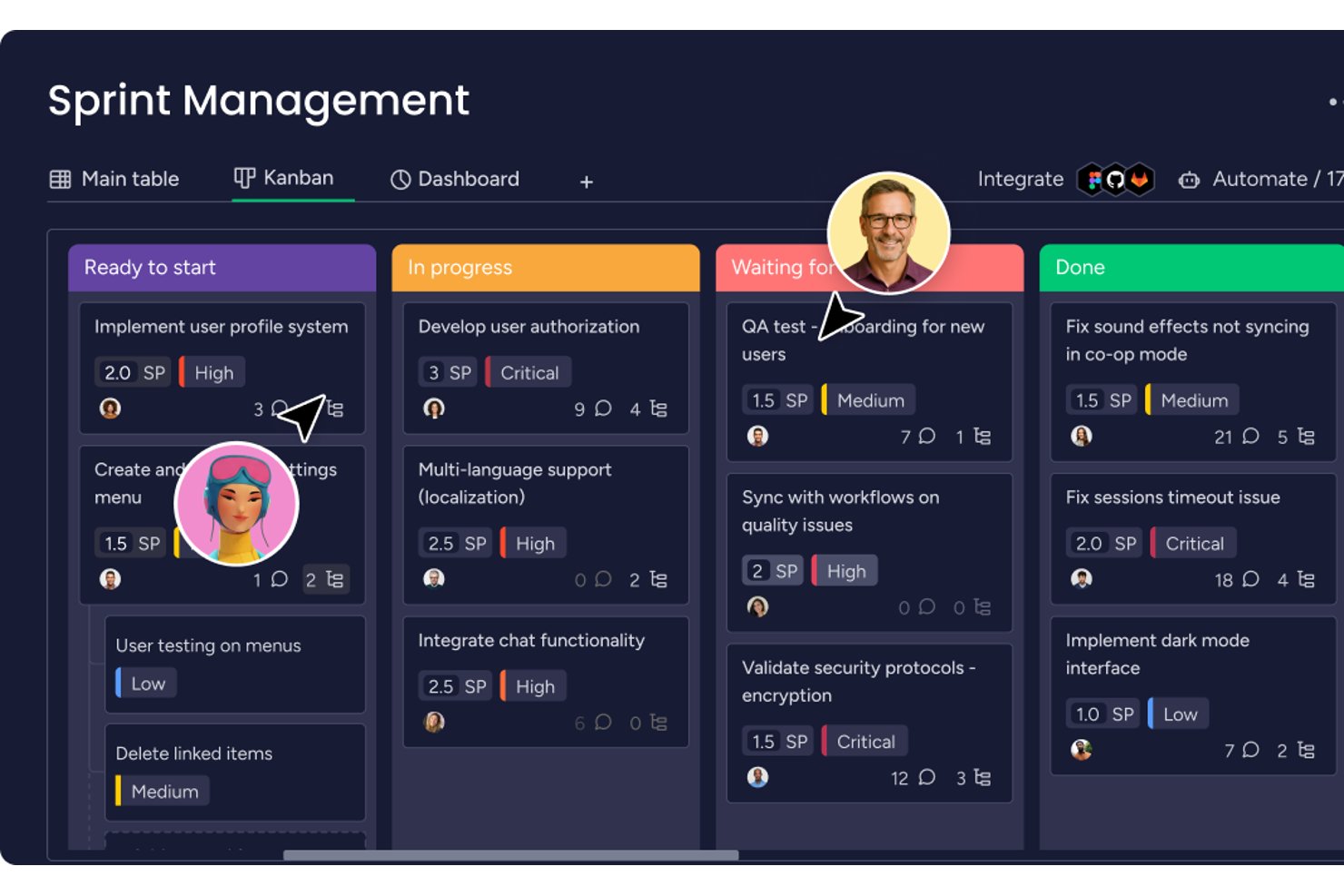
monday AI Workspace is a general-purpose work management platform that combines configurable project boards, Gantt-based scheduling, automation, and AI-assisted task coordination to help construction office teams track multiple projects from a single hub.
Who Is monday AI Workspace Best For?
It's a strong fit for construction office teams and project coordinators who need a flexible way to manage schedules, communications, and compliance across multiple concurrent projects.
Why I Picked monday AI Workspace
I picked monday AI Workspace because its automation engine handles the repetitive coordination work that eats into a project manager's day. I use it to automatically notify subcontractors when insurance certificates are expiring and flag overdue tasks across multiple job boards without any manual follow-up. The AI Sidekick also summarizes meeting outcomes and surfaces items that are falling behind, so I'm not chasing status updates across a dozen stakeholders by hand.
monday AI Workspace Key Features
- Configurable Gantt chart view: Visualize project timelines, phases, dependencies, and milestones in a dedicated Gantt interface.
- Custom board templates: Set up project boards tailored for tracking schedules, budgets, and field progress with reusable structures.
- Document upload and storage: Attach and organize contracts, specs, and project files directly within task boards and items.
- Role-based permission controls: Set access rights for users or guests to ensure sensitive project data remains protected.
monday AI Workspace Integrations
monday AI Workspace offers hundreds of native integrations, including Slack, Google Workspace, Microsoft 365, Salesforce, Jira, GitHub, Zoom, Dropbox, HubSpot, and Zendesk. It also supports Zapier and provides an API for custom integrations.
Pros and Cons
Pros:
- Visual workload views across project teams
- AI automation reduces manual coordination tasks
- Highly customizable boards for multi-project tracking
Cons:
- Limited job costing and budget tracking tools
- No native RFI or submittal workflows
New Product Updates from monday AI Workspace
monday AI Workspace Adds Human Approval Routing
monday AI Workspace adds a human-in-the-loop approval block to AI Workflows, sending approval requests and routing workflow paths based on responses. For more information, visit monday AI Workspace's official site.
 .
.
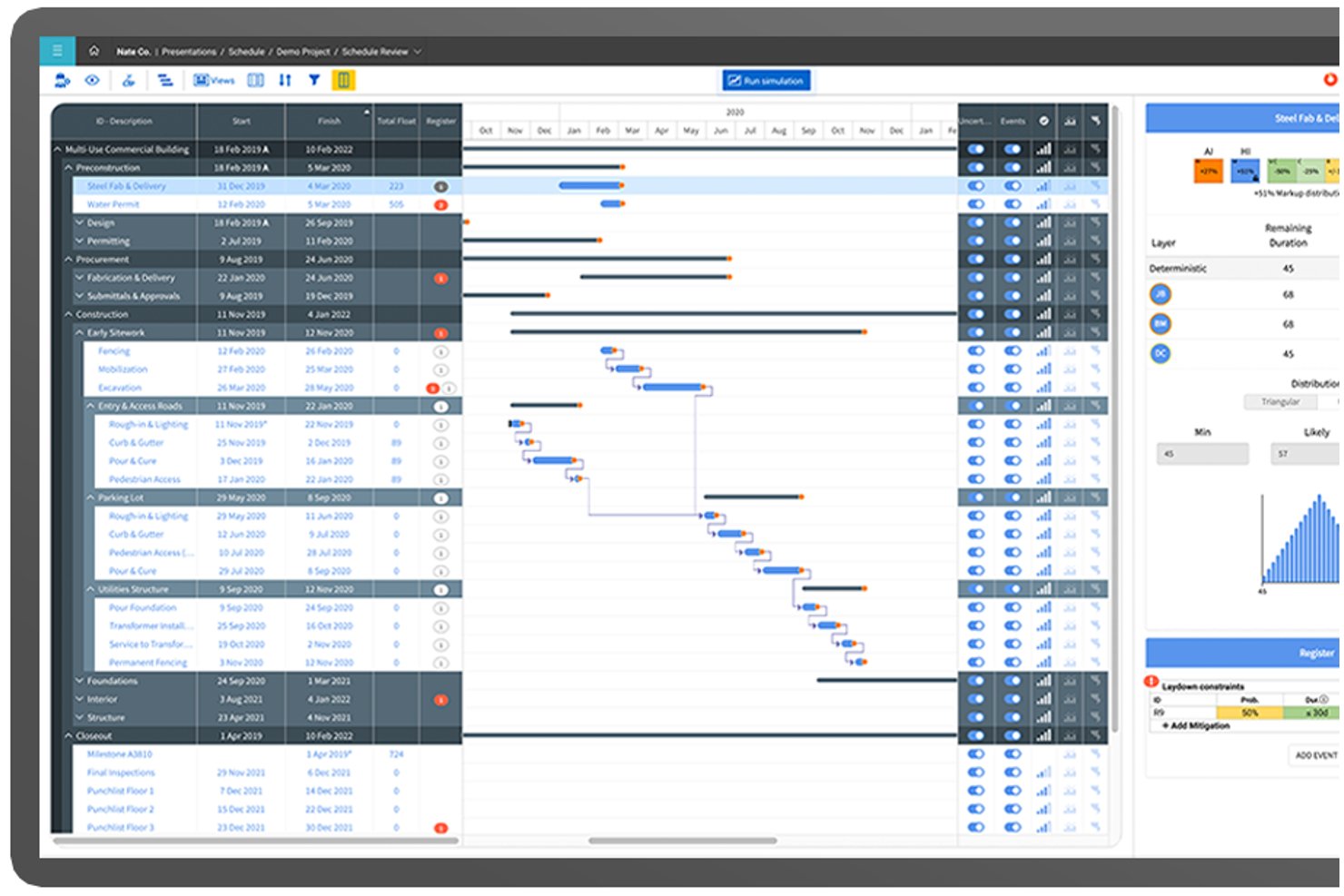
InEight is a modular construction project management platform built for capital projects, combining cost controls, CPM scheduling, contract management, document control, and field execution tools in one integrated suite.
Who Is InEight Best For?
InEight is a strong fit for enterprise contractors, owners, and EPC firms managing large-scale infrastructure, energy, mining, or government capital projects.
Why I Picked InEight
InEight earns its spot on my shortlist because no other platform matches its depth of cost control on mega-projects. InEight Control tracks budgets, committed costs, and real-time forecasts at a granularity that most construction tools simply don't support. The bidirectional P6 integration is what really sets it apart: schedule changes feed directly into cost projections, so when a phase slips on a project running 80,000+ schedule activities, my forecast updates automatically rather than requiring a manual reconciliation cycle.
InEight Key Features
- 3D BIM model integration: Connects live project data directly to 3D models to support field coordination and clash detection.
- Mobile field data capture: Lets teams submit daily logs, quantities, and photos from jobsites using in-field devices.
- Advanced document control: Centralizes contract documents, drawings, and revisions with comprehensive version tracking and secure sharing.
- ERP and scheduling integrations: Offers out-of-the-box connectivity with SAP, Oracle, Primavera P6, and other construction systems.
InEight Integrations
InEight offers native integrations with SAP, Oracle E-Business Suite, Oracle P6, QuickBooks Desktop, Sage 300, AdobeSign, Autodesk Civil 3D, and Ping Identity, and provides an open API for custom integrations.
Pros and Cons
Pros:
- Strong document and BIM model coordination
- Advanced CPM scheduling with P6 integration
- Handles cost control on massive capital projects
Cons:
- Mobile app has mixed field user feedback
- Limited subcontractor bidding and field tools
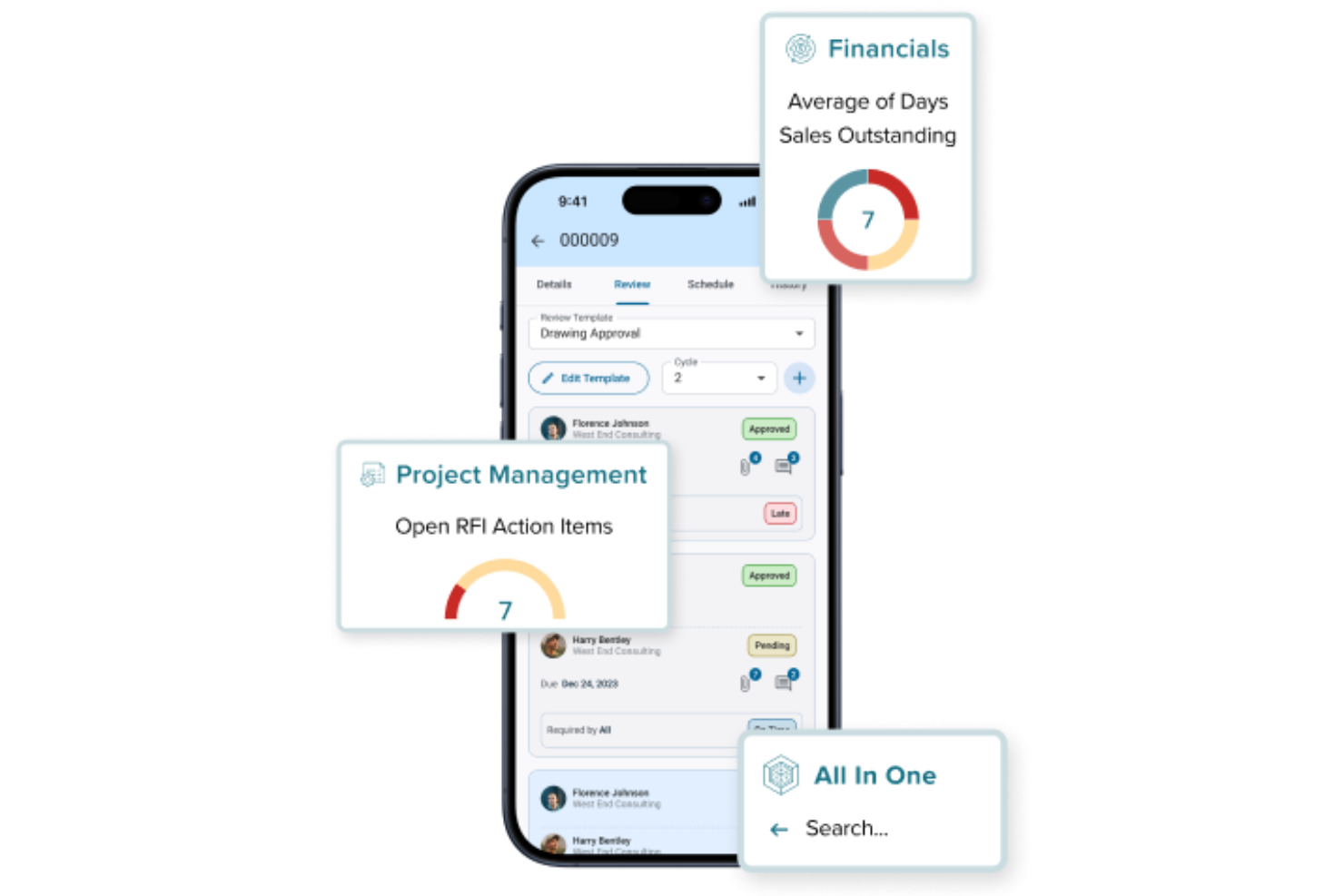
CMiC delivers a unified construction project management platform built specifically for the needs of contractors and construction firms. The software appeals to teams looking for deep integration between project controls, financials, and field operations. If your business needs a single source of truth for managing complex construction workflows, CMiC is designed to address those challenges.
Who Is CMiC Best For?
CMiC is a strong fit for mid-sized to large construction firms that need integrated project management and financial controls within a single platform.
Why I Picked CMiC
I picked CMiC because its single database platform stands out for construction teams that need consistent, real-time data across all project phases. With everything—from project management to financials—stored in one unified system, you avoid the data silos and version control issues that often slow down construction workflows. I appreciate how this architecture supports features like centralized document management and unified reporting, so teams always work from the same source of truth. This approach is especially valuable for firms managing multiple projects and stakeholders who rely on accurate, up-to-date information.
CMiC Key Features
Some other features in CMiC that construction teams might find useful include:
- Mobile field management: Access project data, submit daily logs, and manage punch lists directly from the field using mobile devices.
- Change order management: Track, review, and approve change orders within the platform to maintain control over project scope and costs.
- Resource scheduling: Allocate labor, equipment, and materials across multiple projects with a visual scheduling tool.
- Subcontractor management: Manage contracts, compliance documents, and communications with subcontractors in one place.
CMiC Integrations
Integrations include Arcoro, Prophix, Workday, Cosential, HammerTech, and SmartBarrel. An API is also available for custom integrations.
Pros and Cons
Pros:
- Built-in safety management and compliance tracking
- Daily journals and field reporting are included
- AI features support predictive project analytics
Cons:
- Limited out-of-the-box third-party integrations
- Initial setup and onboarding can be complex


Smartsheet offers a flexible, spreadsheet-based platform for construction teams who want to bring their office and field work together in a single view. If you’re managing building, infrastructure, or renovation projects and need both on-site tracking and longer-term scheduling visibility, Smartsheet can serve general contractors, project managers, site supervisors, and owners alike.
Who Is Smartsheet Best For?
Teams that need a spreadsheet-inclusive work and resource management platform to bridge office and field workflows with customizable views and automation.
Why I Picked Smartsheet
I picked Smartsheet because it enables you to connect field and office workflows through two key construction-relevant capabilities: its mobile-enabled data capture for site-based teams (so updates, inspections, and incident reports can be entered from job sites) and its automation and scheduling tools (so you can trigger alerts, update timelines, and manage dependencies automatically). These features matter when you need to keep multiple trade partners aligned and ensure that change orders, inspections, and close-out tasks don’t slip through the cracks.
Smartsheet Key Features
Aside from the mobile capture and automation I mentioned above, here are other features valuable for construction project management:
- RFI/RFP Management: Streamlines the process of managing requests for information and proposals to ensure timely responses and decision-making.
- Field Operations Tracking: Provides tools to monitor and manage field activities, ensuring that on-site operations align with project timelines and goals.
- Resource Allocation: Facilitates the efficient distribution and utilization of resources, helping you optimize project outcomes and reduce waste.
- Construction templates: Ready-built templates for schedules, budgets, punch-lists and inspection logs help you get started without building everything from scratch.
Smartsheet Integrations
Integrations include Procore, Microsoft 365, Google Workspace, Salesforce, Jira, Box, Slack, ServiceNow, Docusign, and Tableau.
Pros and Cons
Pros:
- Strong visibility for managers via dashboards and reports across projects.
- Good library of construction-specific templates shortens setup time.
- Automations help reduce repetitive follow-ups and ensure tasks trigger correctly.
Cons:
- For very simple task-list or sub-contractor management needs, it may feel heavier than necessary.
- While spreadsheet-based is familiar, the interface and setup can feel complex to non-technical users.
New Product Updates from Smartsheet
Smartsheet Adds Event Filtering for Sheet-Level Webhooks
Smartsheet adds event filtering for sheet-level webhooks, with controls for selecting which event types trigger callbacks. The update helps developers reduce unnecessary webhook activity and build more efficient sheet-based integrations. For more information, visit Smartsheet’s official site.

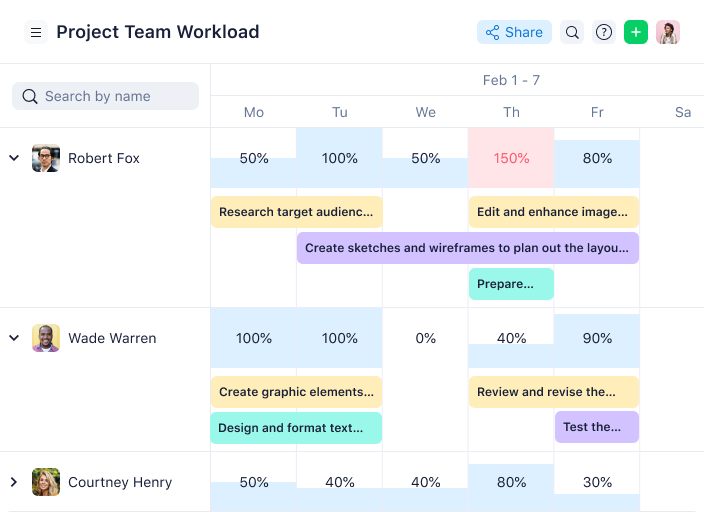
Wrike gives construction project managers a way to monitor project health with real-time analytics and customizable dashboards. This platform is a strong fit for teams that need to track budgets, timelines, and resource allocation as projects evolve. Its live reporting and data visualization tools help you quickly spot risks and keep stakeholders informed.
Caspar Matthews, Director of Electcomm Group Electrical and Data in Melbourne, shared: “Wrike has been useful in managing projects with multiple contractors and short timelines, as the dependencies of tasks make it very clear what needs to be completed before progressing to the next step. For big electrical jobs, that clarity has saved my team hours of back and forth and prevented costly delays.”
Who Is Wrike Best For?
Mid-sized to enterprise teams managing complex projects that require robust real-time data, analytics, and structured collaboration across departments.
Why I Picked Wrike
What sets Wrike apart for construction project management is its focus on real-time data and analytics. The platform’s live dashboards let you monitor project progress, budget status, and resource allocation as things change on site. I appreciate how Wrike’s custom reporting tools allow you to drill down into specific metrics, making it easier to identify bottlenecks or risks before they escalate. For teams that need to keep stakeholders updated with accurate, up-to-the-minute information, Wrike’s analytics features are a strong fit.
Wrike Key Features
Some other features in Wrike that construction teams may find valuable include:
- Blueprints: Create and reuse project templates for repeatable construction workflows.
- Request Forms: Collect project requests or site updates using customizable intake forms.
- Time Tracking: Log hours directly within tasks to monitor labor costs.
- Document Proofing: Review and annotate plans or documents without leaving the platform.
Wrike Integrations
Integrations include Salesforce, Microsoft Teams, Google Drive, QuickBooks, Tableau, Power BI, Miro, Zoom, Adobe Creative Cloud, and Google Sheets.
Pros and Cons
Pros:
- Provides advanced reporting capabilities to monitor project performance
- Facilitates team collaboration with features
- Allows users to create personalized dashboards
Cons:
- No built-in chat feature
- Comes with a steeper learning curve
New Product Updates from Wrike

Wrike Adds Flexible Board Grouping and Calendar Filters
Wrike adds custom field-based columns and swimlanes in Board View, expanded Calendar widget filters, and AND/OR logic to help teams organize and display work more precisely. For more information, visit Wrike’s official site.
 .
.
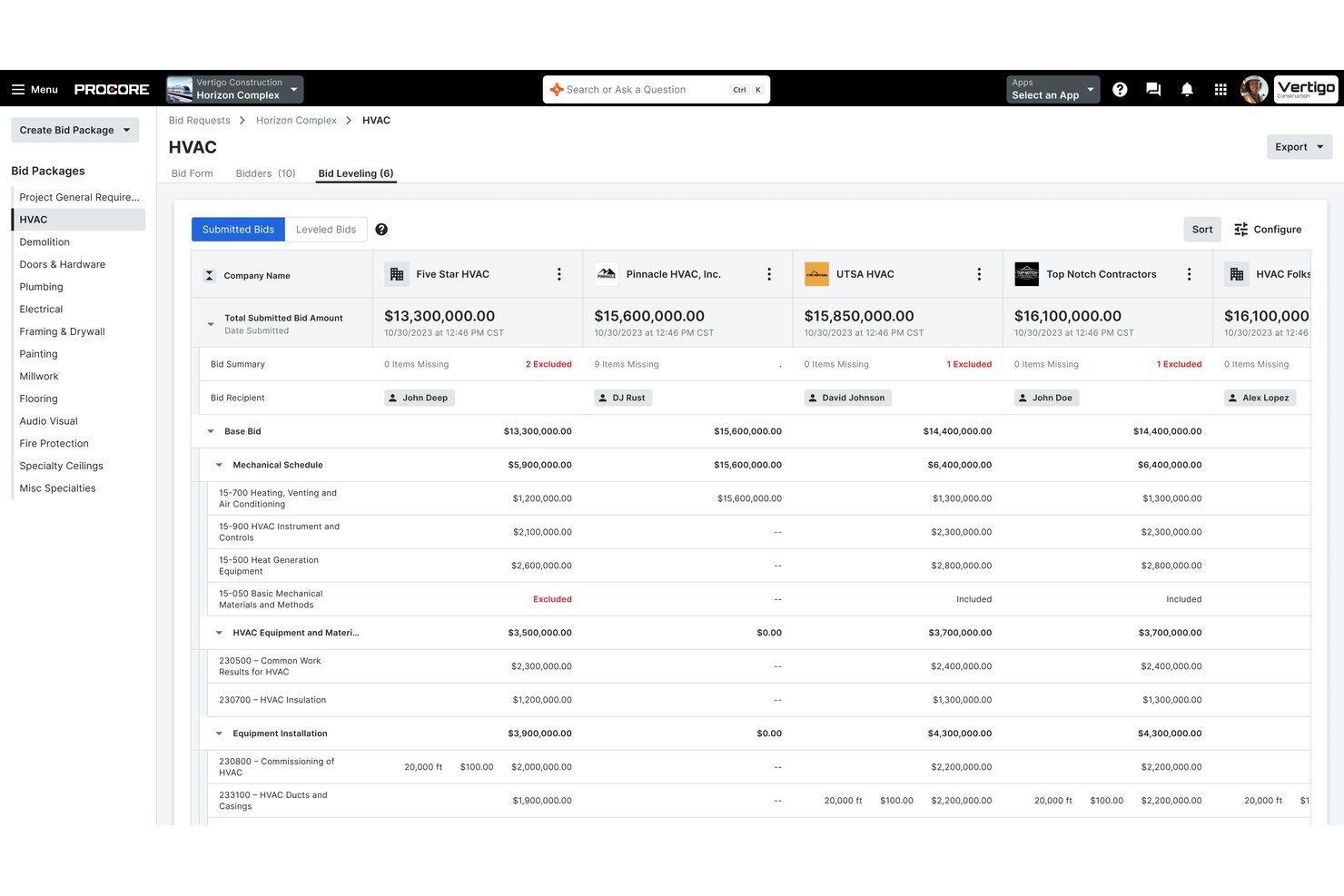
Procore is an end-to-end construction management platform covering project scheduling, document and drawing management, RFIs, submittals, job costing, field reporting, and bid management across the full project lifecycle.
Who Is Procore Best For?
Procore is a strong fit for mid-size to enterprise general contractors managing complex, multi-site projects with existing ERP or accounting systems they need to keep connected.
Why I Picked Procore
Procore earns its spot as one of the best on my shortlist because of how deeply it connects to construction-specific accounting systems like Sage 300 CRE, Viewpoint Vista, and Acumatica. I love that committed costs, change orders, and subcontractor invoices sync directly to the general ledger without manual re-entry. The two-way cost data flow means job cost updates in the field show up in the ERP the same day, keeping project financials and accounting records aligned in real time.
Procore Key Features
- BIM viewer and markup: Lets users view, navigate, and annotate 3D models from Revit and Navisworks directly in the web or mobile app.
- Configurable workflow automation: Supports custom approval flows for RFIs, submittals, contracts, and inspections.
- Mobile field app with offline mode: Enables field teams to capture daily logs, safety forms, and photos even in areas without connectivity.
- Prequalification and compliance management: Tracks subcontractor certifications, insurance, and prequalification status in one centralized system.
Procore Integrations
Procore offers more than 15 native integrations with construction accounting and ERP systems including Sage 100 Contractor, Sage 300 CRE, Viewpoint Vista, Viewpoint Spectrum, QuickBooks, Acumatica, MRI, Yardi, NetSuite, CMiC, Xero, and more. An API and app marketplace are available for custom integrations.
Pros and Cons
Pros:
- Built-in subcontractor prequalification and bid portal
- Automatic drawing versioning with markup history
- Real-time job cost updates visible across teams
Cons:
- Steep learning curve for new users
- Implementation timelines run long for enterprise deployments

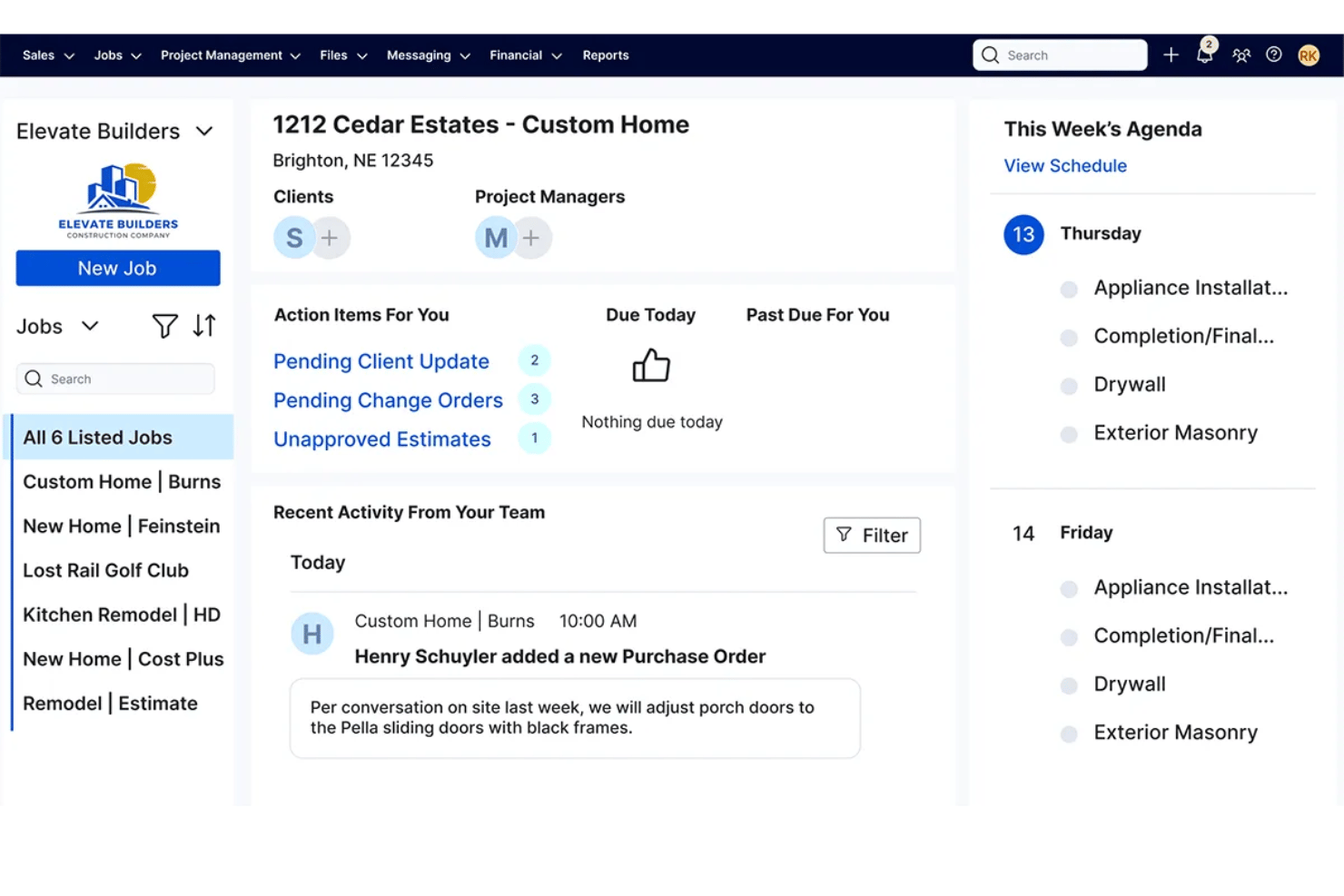
Buildertrend is a construction project management platform covering project scheduling, job costing, document management, subcontractor coordination, client communication, and field reporting across residential and commercial builds.
Who Is Buildertrend Best For?
Buildertrend is a strong fit for small to midsize residential builders and remodelers who manage multiple projects simultaneously and need one platform to run them end to end.
Why I Picked Buildertrend
Buildertrend earns its spot on my shortlist because of how seriously it takes getting construction teams up and running. I love the structured 12-week onboarding program, where a dedicated onboarding manager walks you through account setup and then runs a live job alongside you. Buildertrend University and the Learning Academy layer in role-based training that addresses the full team, from estimators reviewing job cost budgets to field crews logging daily site reports.
Buildertrend Key Features
- Change order management: Create, approve, and log project change orders with digital signatures and audit trails.
- Job costing budget: Track committed costs, forecasts, and actuals against budget by cost code and activity.
- Field time clock: Capture crew hours and location data from the jobsite using the mobile app.
- Bid invitations: Send bids to subcontractors, track responses, and manage contracts in one system.
Buildertrend Integrations
Buildertrend offers native integrations with QuickBooks, Xero, and Sage 100 Contractor. An API is available for custom integrations.
Pros and Cons
Pros:
- Mobile daily logs include photo documentation
- Client portal built for owner communication
- Structured 12-week onboarding with dedicated manager
Cons:
- Mobile app performance can feel slow
- Steep learning curve for field workers

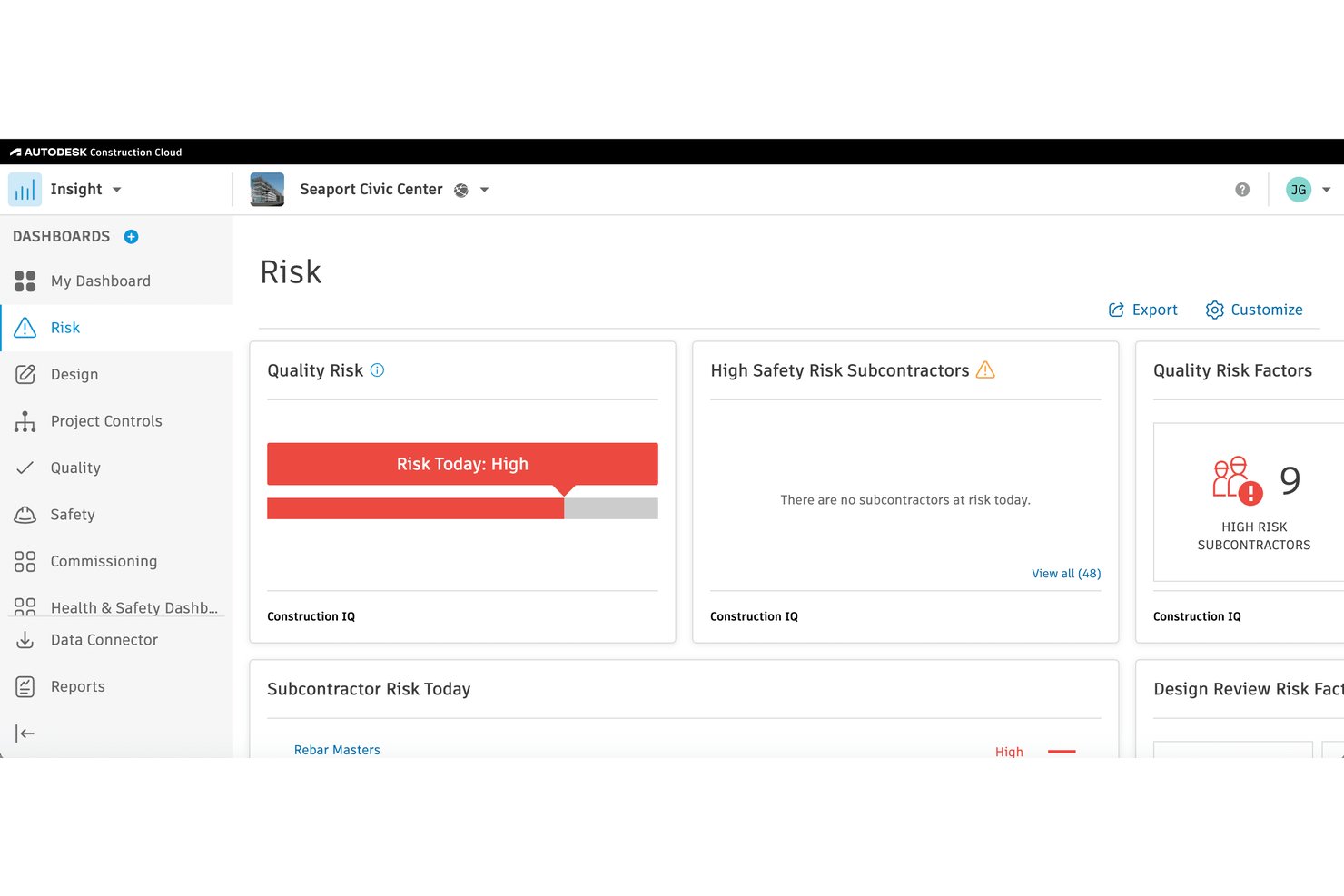
Autodesk Construction Cloud is a construction project management platform that unifies document management, BIM model coordination, RFIs, submittals, field reporting, cost tracking, and bid management across the full project lifecycle.
Who Is Autodesk Construction Cloud Best For?
It's a strong fit for large general contractors and construction firms managing complex, design-heavy projects that require tight coordination between office, field, and BIM workflows.
Why I Picked Autodesk Construction Cloud
Autodesk Construction Cloud earns its spot on my shortlist because of how deeply model coordination is woven into the platform itself. I love that automated clash detection runs directly against live Revit models without exporting files or switching tools. In practice, my team can catch and resolve design conflicts before breaking ground, right where they're cheapest to fix.
Autodesk Construction Cloud Key Features
- Document management: Centralizes all project files with version control, markup tools, and permission settings.
- RFIs and submittals workflow: Lets you create, track, and route RFIs, submittals, and change orders with custom approval paths.
- Bid management suite: Integrates BuildingConnected for managing bids, subcontractor invites, and prequalification.
- Field reporting tools: Enables mobile daily logs, punch lists, safety inspections, and photo capture from any jobsite.
Autodesk Construction Cloud Integrations
Autodesk Construction Cloud offers native integrations with Revit, Navisworks, Microsoft 365, Dropbox, Box, Procore, PlanGrid, and BIM 360. It also connects with Sage 300 CRE, Viewpoint Vista, QuickBooks, and provides an API for custom integrations.
Pros and Cons
Pros:
- Strong mobile field tools with offline sync
- End-to-end coverage from design through closeout
- Native BIM clash detection within the platform
Cons:
- Can feel overwhelming for smaller project teams
- Setup and onboarding takes significant time

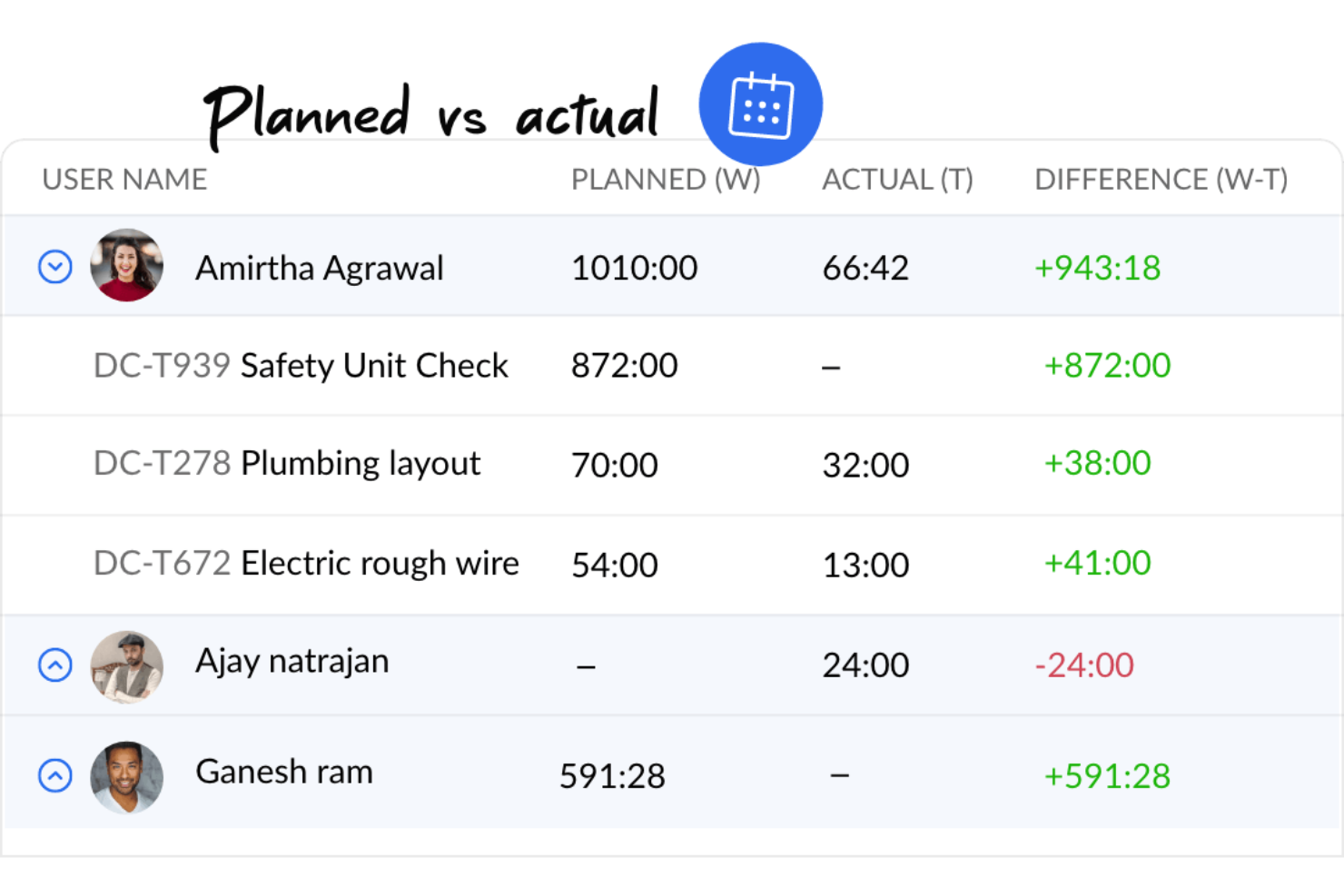
If you’re looking for construction project management software with built-in budgeting and cost control, Zoho Projects is worth a look. It’s a good fit for project managers and contractors who want to track expenses, allocate resources, and monitor budgets alongside schedules and tasks. The platform helps teams keep financials visible and connected to day-to-day project activity.
Who Is Zoho Projects Best For?
Small to mid-sized teams that want affordable project management with built-in budgeting and time tracking tools.
Why I Picked Zoho Projects
Budgeting and cost management are often top priorities for construction teams, which is why Zoho Projects stands out in this space. The platform includes built-in budgeting tools that let you set project budgets, track actual costs, and compare them against estimates in real time. I picked Zoho Projects because it also supports expense logging and resource allocation, so you can keep a close eye on where money is going throughout the project. These features help construction project managers maintain financial control without needing separate accounting tools.
Zoho Projects Key Features
Some other features construction teams may find useful include:
- Gantt Charts: Visualize project timelines, dependencies, and milestones in a single view.
- Task Automation: Set up rules to automate repetitive project tasks and notifications.
- Timesheet Management: Log work hours and generate timesheet reports for payroll or billing.
- Issue Tracking: Capture, assign, and monitor project issues or defects as they arise.
Zoho Projects Integrations
Integrations include Zoho CRM, Zoho Books, Zoho Invoice, Zoho Analytics, Zoho People, Google Drive, Microsoft Teams, Slack, Dropbox, and GitHub.
Pros and Cons
Pros:
- Includes task management, time tracking, and Gantt charts
- Allows customization of workflows and project templates
- Good integration with Zoho Suite
Cons:
- The platform lacks robust offline functionality
- Lacks advanced functionalities required for complex construction projects
New Product Updates from Zoho Projects

Zoho Projects Adds Time Log Grid View for Faster Tracking
Zoho Projects adds Time Log Grid View, a unified interactive grid for logging and reviewing hours across tasks and issues, helping teams enter time faster and identify work patterns more easily. For more information, visit Zoho Projects’ official site.
 .
.
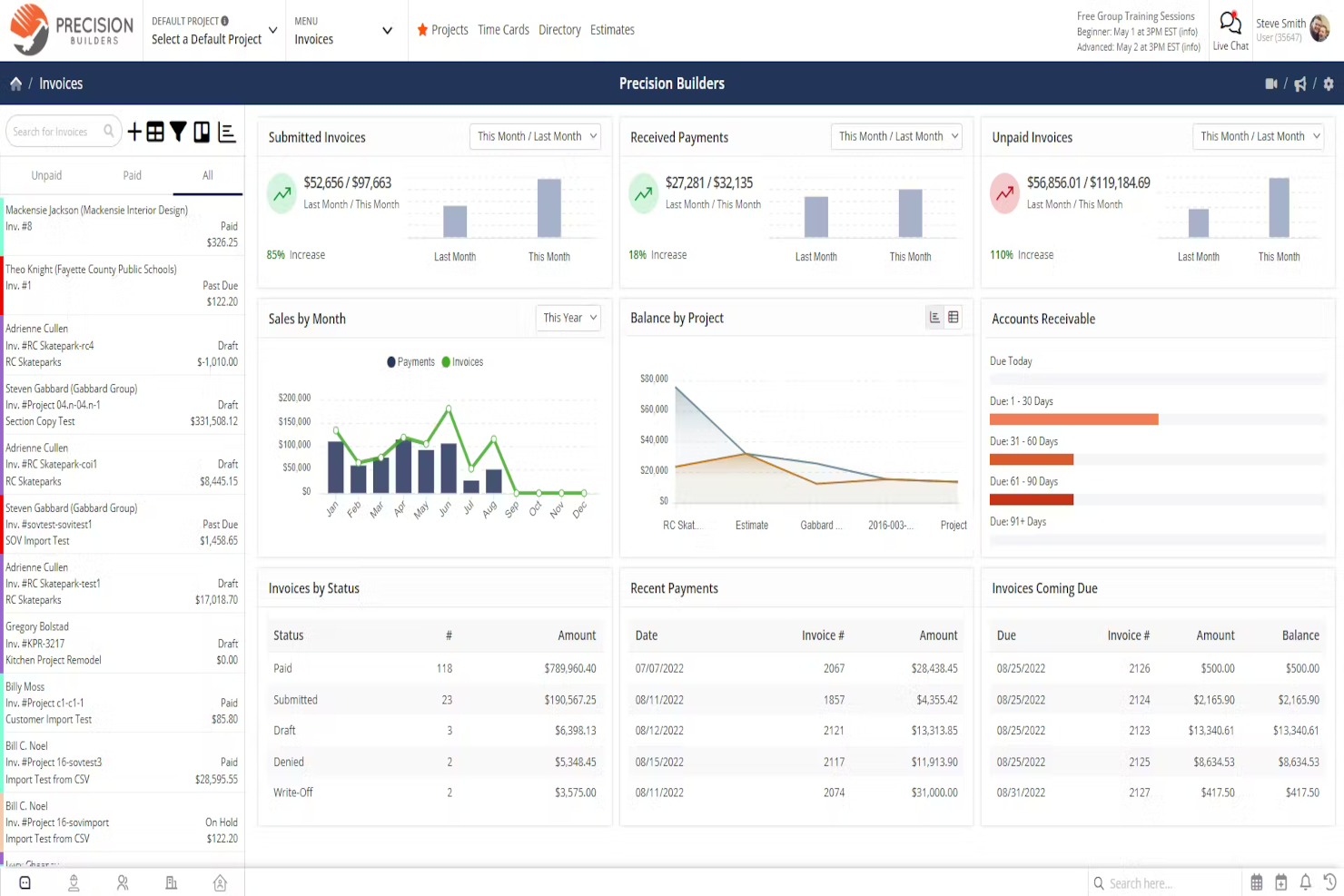
Contractor Foreman brings together resource tracking and document management for construction businesses that need to keep jobs organized and compliant. It’s a strong fit for small to mid-sized contractors who want to manage crews, equipment, and project files in one place. The platform’s focus on daily logs, safety forms, and centralized file storage helps teams stay on top of paperwork and resource allocation.
Who Is Contractor Foreman Best For?
Contractors and field service teams that want a project and resource management platform built specifically for construction workflows.
Why I Picked Contractor Foreman
What sets Contractor Foreman apart is its focus on resource and document management tailored for construction teams. The platform offers tools for tracking equipment, materials, and labor assignments, making it easier to allocate resources across multiple jobs. I picked Contractor Foreman because its document management features—like daily logs, safety forms, and centralized file storage—help keep project paperwork organized and accessible. These capabilities are especially useful for contractors who need to maintain compliance and manage documentation for inspections or audits.
Contractor Foreman Key Features
Some other features that construction teams may find useful include:
- Change Order Management: Create, track, and approve change orders directly within the platform.
- Scheduling Tools: Build project schedules and assign tasks to team members with drag-and-drop functionality.
- Client Portal: Share project updates, documents, and invoices with clients through a secure online portal.
- Invoice and Payment Tracking: Generate invoices and monitor payment status for each project.
Contractor Foreman Integrations
Integrations include QuickBooks, WePay, Outlook 365, Google Calendar, CompanyCam, Gusto, and Angi Leads. You can also use a paid Zapier account to unlock additional software integrations.
Pros and Cons
Pros:
- Integrates with QuickBooks for better financial management
- Offers a mobile app, enabling field teams to access and update information
- Designed specifically for contractors
Cons:
- Customization options may not be as extensive as other platforms
- Occasional slow loading times
Other Construction Project Management Tools
These construction management tools didn’t make my top 10 list, but they’re still worth checking out:
- ProjectManager
For project planning and scheduling
- Geniebelt
For syncing stakeholders
- Joist
Contractor app
- CMiC
For project controls
- ConstructionOnline
For job costing
- Jonas Construction
For complex construction projects
- Onware
For document collection
- VPO
For multi-device accessibility
- BrickControl
Cloud-based solution
- Candy CSS
For estimates
- Builterra
For contract administration
- PASKR
For automation
- GanttPRO
For dynamic Gantt charts
- ClickUp
For customizable workflows
- Scoro
For informed resource allocation
- ProWorkflow
For quote-to-invoice project control
- GoodDay
For customizable workflows
- CrewCost
For linking financials with operations
- Projectworks
For its robust reporting features


Related Project Management Software Reviews
- Project Management Software
- Resource Management Software
- Workflow Automation Software
- Time Tracking Software
- Task Management Software
- Collaboration Tools
- Capital Project Management Software
How I Evaluate Construction Project Management Software
I split my evaluation into two layers: the baseline every tool must clear—RFIs, job costing, field logs—and the differentiators that set the best options apart for specific teams and project types.
Core Functionality (Table Stakes For This List)
When I'm selecting tools for my list, I rank each one on a scale from 0 (does not offer the functionality) to 5 (excels in this area) for each core functionality listed below. Then, I calculate the tool's total score into a percentage. Each tool needs to achieve a minimum total score of 65% to be considered for inclusion.
- Project Scheduling & Gantt Charts: I check for dependency tracking, critical path visibility, and milestone management that reflects real construction phases like sitework, framing, and closeout.
- Document & Drawing Management: Version control, markup tools, and sheet comparison matter here—especially when teams are working off revised architectural or structural drawings.
- RFI & Submittal Workflows: I evaluate how each tool handles RFI creation, routing, ball-in-court tracking, and change order integration across the project lifecycle.
- Budget & Cost Tracking: Job costing with cost code structures, committed cost tracking, and change order financial impacts are what I look for to support real-time budget decisions.
- Field & Daily Reporting: Mobile daily logs, punch lists, safety checklists, and photo documentation should all work on-site, ideally with offline access for remote jobsites.
- Subcontractor & Bid Management: Bid invitations, prequalification workflows, and contract tracking help GCs manage their sub relationships from bidding through project completion.
Once I have a list of tools that meet the criteria, I consider what sets each platform apart.
Differentiating Factors (What Sets Vendors Apart)
Here's how I compare and contrast different vendors:
Standout Features
BIM integration is a big differentiator. I look for tools that let teams view and coordinate 3D models within the platform, catching design clashes before they reach the field. Owner and client portals also matter when your GC needs to give architects or developers real-time visibility into schedules and budgets without granting full system access. Equipment and resource tracking across multiple jobsites helps larger teams avoid idle machinery and crew scheduling conflicts during overlapping project phases.
Beyond Features
Integrations matter a lot in this space. I evaluate whether a tool connects to the accounting and ERP systems construction firms actually use, like Sage 300 CRE, Viewpoint Vista, or QuickBooks. Mobile and offline capability is another priority—field crews on remote sites need to capture daily logs and photos without relying on cell service. I also consider implementation support, because rolling out a new platform across office staff and field teams takes structured onboarding and role-based training to drive real adoption.
How To Choose Construction Project Management Software
As you're shortlisting, trialing, and selecting construction project management software consider the following:
- What problem are you trying to solve? Start by identifying the construction project management software feature gap you're trying to fill to clarify the features and functionality the construction project management software needs to provide.
- Who will need to use it? To evaluate cost and requirements, consider who'll be using the software and how many licenses you'll need. You'll need to evaluate if it'll just be your project team or the whole organization that will require access. Considering whether to prioritize ease of use for all, or speed for your power users.
- What other tools it needs to work with? Clarify what tools you're replacing, what tools are staying, and the tools you'll need to integrate with, such as accounting, CRM, HR, or estimating software. Check whether you can replace multiple tools with one consolidated construction project management software.
- What outcomes are important? Consider the result that the software needs to deliver to be considered a success, what capability you want to gain, what you want to improve, and how you will be measuring success. While general construction tools serve most needs, specialized architect project management tools provide industry-specific features for design workflows and can support different outcomes.
- How it would work within your organization? Consider the software selection alongside your workflows and delivery methodology. Evaluate what's working well, and the areas that need to be addressed. Remember every business is different—don’t assume that because a tool is popular that it'll work in your organization.
Trends In Construction Project Management Software
Here are several trends shaping the future of construction project management software.
- Integration with GPS and mobile capabilities: Tools like Contractor Foreman have enhanced GPS tracking and mobile app functionalities, which allows for real-time tracking of teams and resources and improves dispatch efficiency and project scheduling. In roofing projects, where material and labor costs fluctuate rapidly, roofing project management software is evolving to include AI-driven forecasting and real-time supplier integrations, helping contractors optimize costs and scheduling.
- Robust document management: This includes customizable forms, templates, and inspection checklists, which allows you to cater to the unique requirements of each project. Since documentation is at the center of construction projects, from contracts with contractors to permits and licenses, I expect more developments related to the searchability of documentation.
- Advanced budgeting and expense management: Platforms like Zoho Projects integrate powerful budgeting tools within the project management interface, which allows for closer monitoring of project finances and expenditures.
Features of Construction Project Management Software
When selecting construction project management software, keep an eye out for these essential features:
- Document management: Upload, store, and organize blueprints, contracts, and other vital project documents in one secure location. No more hunting through emails—everything you need is right at your fingertips.
- Scheduling and task tracking: Create project schedules, assign tasks, and set deadlines so everyone knows what’s next. This helps keep your project on track and reduces the risk of delays.
- Budget and cost control: Set budgets, monitor expenses, and compare actual costs to your projections. This feature helps you manage spending and avoid unwelcome financial surprises.
- Resource management: Track labor, equipment, and material usage to prevent shortages or overages. Efficient resource allocation keeps your project moving smoothly.
- Collaboration tools: Communicate with team members, subcontractors, and clients in real time. Built-in messaging and comment features streamline collaboration and problem-solving.
- Change order management: Easily document changes, track approvals, and update budgets or schedules as needed. Stay organized and responsive when plans shift.
- Reporting and analytics: Access detailed reports and dashboards on project progress, costs, risks, and more. Use these insights to make informed decisions and address issues early.
- Mobile access: Update information, review plans, and send updates from anywhere—whether you’re in the office or on the jobsite.
- Compliance and safety tracking: Monitor safety certifications, log incidents, and manage compliance tasks to keep your team safe and your project up to code.
- Integration capabilities: Connect with accounting software, BIM tools, and procurement systems to streamline workflows and reduce manual data entry.
Common AI Features in Construction Project Management Software
Modern construction project management software is increasingly powered by artificial intelligence to help teams work smarter, not harder. Here are some common AI features to look for:
- Automated scheduling: AI can analyze project timelines, resource availability, and dependencies to suggest optimal schedules and flag potential bottlenecks before they become issues.
- Risk prediction: AI algorithms scan project data to identify patterns and predict potential risks—such as cost overruns, delays, or safety incidents—so you can take action early.
- Document automation: AI can extract key information from contracts, invoices, and RFIs, reducing manual data entry and helping you stay organized.
- Smart reporting and analytics: AI-driven dashboards highlight trends, forecast outcomes, and provide actionable recommendations, making it easier to stay on top of your project’s health.
- Natural language processing: AI chatbots and assistants can answer questions, schedule meetings, or help locate documents, saving you time and streamlining communication.
Benefits of Construction Project Management Software
Here are five primary benefits of construction project management software.
- Enhanced project visibility: This allows users and businesses to stay informed about every aspect of the project, which facilitates proactive decision-making and timely adjustments to keep projects on track.
- Improved resource allocation: By enabling precise tracking and scheduling of resources, construction project management software helps reduce waste and make sure resources are used efficiently, which leads to cost savings and increased profitability.
- Streamlined communication: This reduces the likelihood of miscommunication and errors, and makes sure all parties have access to the latest updates, documents, and schedules, which ultimately improves collaboration and project outcomes.
- Automated documentation and compliance: Simplifies the management of critical documents and adherence to regulations. Construction project management software automates the storage, retrieval, and management of project documents, permits, and compliance reports, reducing the risk of lost documents or non-compliance penalties.
- Data-driven insights and reporting: Provides analytics and customizable reports on project performance. These insights enable project managers and organizations to understand project dynamics deeply, identify trends, and make informed decisions based on real-time data, enhancing strategic planning and future project success.
Costs & Pricing For Construction Project Management Software
Below is a simplified overview of common plan options available in construction project management software.
Plan Comparison Table For Construction PM Software
| Plan Type | Average Price | Common Features Included |
|---|---|---|
| Basic | $20 - $50 / month | Task and project tracking, document sharing, limited users |
| Standard | $50 - $150 / month | Advanced project management features, budgeting tools, unlimited projects, enhanced security |
| Premium | $150 - $300 / month | All Standard features, custom reporting, API access, priority support |
| Enterprise | Custom pricing | All Premium features, custom integrations, dedicated support, training and onboarding services |
| Free | $0 | Basic task management, limited document storage, access for a small team |
Construction Project Management Software FAQs
Here are some answers to common questions about construction project management software to help you understand more about this type of tool and what to consider when signing up for one.
What features should I look for in construction project management software?
Look for features that support scheduling, document management, collaboration, and job site communication. You’ll also want tools for budgeting, change order management, and tracking tasks in real time. Integration with accounting or design tools can streamline your workflows. The right platform should help you centralize information, reduce manual entry, and keep your whole team on the same page.
How can construction project management software improve communication on my job site?
Project management tools improve job site communication by centralizing updates, alerts, and document sharing in one hub. You can message your subs, send files, assign tasks, and track progress with fewer delays or misunderstandings. Real-time updates make it easier for everyone—field workers, office staff, and stakeholders—to stay connected and react quickly to changes.
Can construction project management software help with compliance and safety tracking?
Yes, many platforms have dedicated modules for safety incident reporting and compliance documentation. You can set automated reminders for inspections, store signed safety forms, and generate compliance reports. This keeps records accessible and helps your team meet requirements without digging through paperwork when audits happen.
How do integrations with accounting or BIM tools work in construction project management software?
Most leading solutions offer integrations with accounting software like QuickBooks or Sage and BIM platforms such as Revit. Integrations typically sync project budgets, invoices, and drawings between systems automatically. This reduces double-entry and ensures everyone works with the latest data, streamlining both your financials and planning.
Is cloud-based or on-premises construction project management software better for my team?
Cloud-based tools work best for most teams because they let you access data from anywhere—ideal for fieldwork. They’re easier to update and scale across multiple job sites. On-premises platforms may suit companies with strict security needs or unreliable job site connectivity. Choose based on your typical locations, team size, and security requirements.
What is the most used construction project management software?
Procore, Buildertrend, and Autodesk Construction Cloud are among the most widely used platforms by construction project managers. These tools are popular for their robust scheduling, document control, and collaboration features. The best choice depends on your project size and specific needs, but these brands are often top picks in the industry.
What is the difference between construction project management software and engineering project management software?
Construction project management tools focus on site coordination, scheduling, submittals, RFIs, and on-site team communication. Engineering project management software is more about design deliverables, technical workflows, and document control throughout the design and pre-construction phases. Choose construction-specific tools if your priority is field execution and subcontractor management.
What is the difference between construction project management software and real estate project management software?
Construction tools help manage active building projects, track job site tasks, and coordinate teams and budgets during construction. Real estate project management software is geared toward property acquisition, leasing, asset management, and long-term maintenance. If your daily focus is construction delivery rather than ongoing asset management, a construction-specific platform will fit better.