

10 Best AI Task Manager Software Reviewed in 2026

Best AI Task Manager Tools Shortlist


Juggling tasks for multiple projects and with multiple deadlines can be chaotic. You might find yourself spending more time organizing tasks than actually completing them. AI task managers offer a smarter way to handle your workload, prioritize tasks, automate repetitive actions, and keep your team on the same page.
In this article, I'll share my picks for the best AI task managers. Each recommendation is based on thorough research and testing. You'll get insights into their features, pros and cons, and how they can address your most pressing challenges.
Why Trust Our Software Recommendations
Our team has been testing and reviewing software since 2012. As project managers ourselves, we know how difficult—and important—it is to choose the right software.
For this guide, we evaluated tools using hands-on testing and independent research, scoring tools using our selection criteria. We also draw on insights from industry thought leaders and practicing project management experts.
Our reviews reflect our human editorial judgment, not a sales pitch.
Expert reviewers:
AI Task Manager Software Comparison Table
This comparison table summarizes pricing details for my top AI task manager software selections:
| Tool | Best For | Trial Info | Price | ||
|---|---|---|---|---|---|
| 1 | Best for visual project management | Free plan available; 14-day free trial | From $9/user/month (billed annually) | Website | |
| 2 | Best for project tracking | Free plan available; 14-day free trial; Free demo available | From $5/user/month (billed annually) | Website | |
| 3 | Best for automating routine tasks | Free plan available; 14-day free trial | From $10/user/month (billed annually) | Website | |
| 4 | Best for AI-powered project insights | Free plan available; 15-day free trial | From $5/user/month | Website | |
| 5 | Best for AI access via Claude or ChatGPT | Free plan + 30-day free trial available | From $7.65/user/month (billed annually) | Website | |
| 6 | Best for customizable tasks | Free plan available | From $7/user/month (billed annually) | Website | |
| 7 | Best for task prioritization | Free plan available | From $10.99/user/month (billed annually) | Website | |
| 8 | Best for automated scheduling | Free trial available | From $19/user/month (billed annually) | Website | |
| 9 | Best for app integration | Free plan available | From $19.99/month (billed annually) | Website | |
| 10 | Best for individual task scheduling | Free plan available and 7-day free trial | From $5/month (billed annually) | Website |


Best AI Task Manager Reviews
Below are detailed summaries of the best AI task manager software that made it onto my shortlist. Get a detailed look at the key features, pros & cons, integrations, and ideal use cases of each tool to help you find the right fit.

Best for visual project management
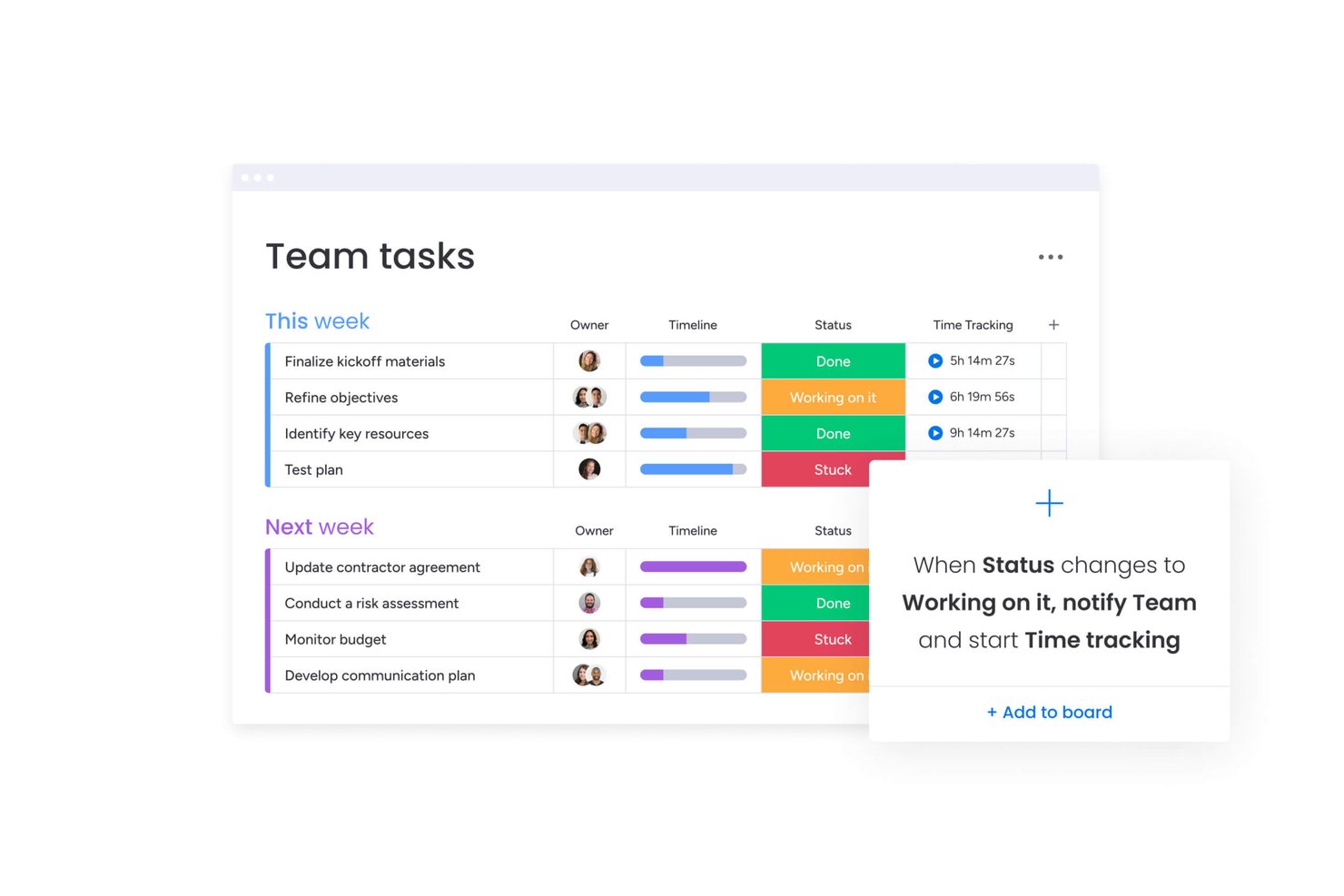
monday AI Workspace is a visual work management platform that combines AI agents, smart task generation, and workflow automation to help teams plan, assign, and track work across boards, timelines, and portfolios.
Who Is monday AI Workspace Best For?
It's a strong fit for mid-size to enterprise teams managing complex, cross-functional projects across product, engineering, and operations.
Why I Picked monday AI Workspace
monday AI Workspace earns its spot on my shortlist because of how well it layers AI directly into a visual board interface. I particularly like AI Blocks, which auto-populate boards with status updates, deadlines, and assignees based on project context, cutting out the manual data entry that slows teams down. I also use the AI Sidekick within board views to generate task updates and surface next steps without switching context or tools.
monday AI Workspace Key Features
- AI meeting notetaker: Transcribes meetings in real time, identifies speakers, and creates structured summaries.
- Custom AI agents: Allows you to configure agents that autonomously execute recurring project management tasks.
- Integration with 200+ tools: Natively connects with platforms like Slack, GitHub, Google Drive, Salesforce, and HubSpot.
- Portfolio dashboards: Lets you visualize, track, and report on multiple projects using customizable live dashboards.
monday AI Workspace Integrations
monday AI Workspace offers hundreds of native integrations, including Slack, Google Workspace, Microsoft 365, Salesforce, Jira, GitHub, Zoom, Dropbox, HubSpot, and Zendesk. It also supports Zapier and provides an API for custom integrations.
Pros and Cons
Pros:
- Strong portfolio-level tracking across multiple projects
- AI agents automate repetitive task management work
- Visual boards make project status instantly clear
Cons:
- Board setup can get cluttered at scale
- AI features locked behind higher-tier plans
New Product Updates from monday AI Workspace
monday AI Workspace Adds Human Approval Routing
monday AI Workspace adds a human-in-the-loop approval block to AI Workflows, sending approval requests and routing workflow paths based on responses. For more information, visit monday AI Workspace's official site.
Hive
Best for project tracking
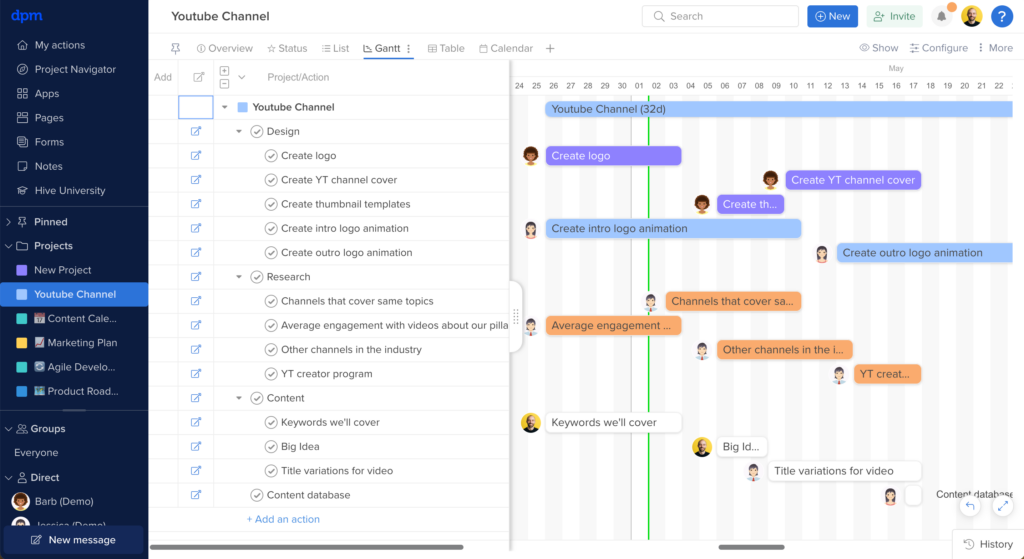
Hive is an AI-powered project and task management platform that brings together automated task creation, workflow optimization, project tracking, and team collaboration in one workspace.
Who Is Hive Best For?
Hive is a good fit for mid-sized teams in tech, marketing, and creative industries that need a centralized workspace for managing tasks, projects, and cross-functional collaboration.
Why I Picked Hive
I picked Hive as one of the best for project tracking because it gives you a flexible way to monitor work across every stage of a project. I like that you can switch between Gantt, Kanban, timeline, portfolio, and summary views without rebuilding anything—my team can track the same project from whatever angle makes sense for the work at hand. The portfolio view is especially useful when I'm juggling multiple projects at once, since it surfaces status across all of them in a single glance. Hive's customizable dashboards pull real-time data from across your workspace, so I can build a project-level view for my team and a high-level summary for leadership without duplicating any effort.
Hive Key Features
- Hive AI: Automatically generate tasks, write action items, and summarize project updates.
- Time tracking: Log hours directly on tasks and actions, with timesheets that roll up across projects for reporting.
- Proofing and approvals: Review and annotate files directly inside Hive, with approval workflows to move assets through sign-off stages.
- Resourcing: View team workload across projects to see who has capacity and reassign tasks based on availability.
Hive Integrations
Hive offers native integrations with Slack, Zoom, Google Drive, Dropbox, Box, Jira, Salesforce, GitHub, OneDrive, and Microsoft Teams. It also connects with Zapier and provides an API for custom integrations.
Pros and Cons
Pros:
- Suitable for large teams
- Comprehensive time tracking
- Customizable project views
Cons:
- Limited offline capabilities
- Can be complex for new users

Wrike
Best for automating routine tasks

Wrike is an AI-powered work management platform for teams that want to automate task workflows, manage projects, and centralize collaboration in one place.
Who Is Wrike Best For?
Wrike is a good fit for mid-size to enterprise teams in marketing, product, and professional services who need structured project workflows and cross-functional task visibility.
Why I Picked Wrike
Wrike earns its spot on my shortlist because its automation goes beyond simple rule-based triggers. I use Wrike's natural language automation builder to describe a workflow in plain English and watch it generate the full rule set—no manual configuration required. The AI agent layer is especially useful: agents parse intake form submissions, auto-populate custom fields, and score incoming tasks based on criteria like effort and impact, without manual intervention. Wrike Copilot lets me query an entire project folder and surface risks or status updates within seconds.
Wrike Key Features
- Custom project views: Toggle between Gantt, Board, Table, Calendar, and Chart views to match how your team tracks and visualizes task progress.
- Effort management: Assign effort estimates directly to tasks so you can forecast workload and choose the right assignee before work begins.
- AI insights: Wrike surfaces patterns and priorities from your project data, turning raw task activity into clear signals about what needs attention.
- Scrum boards: Run Agile sprints with backlog prioritization, real-time collaboration, and dashboards built directly into the platform.
Wrike Integrations
Wrike offers hundreds of integrations via its marketplace, including tools like Google Workspace, Microsoft 365, Salesforce, and Slack. It also supports Zapier and provides an API for custom integrations.
Pros and Cons
Pros:
- Predicts project risks proactively
- Generative AI drafts and edits
- Conversational Copilot answers instantly
Cons:
- Privacy concerns with AI data
- Advanced AI requires paid plan
New Product Updates from Wrike
Wrike Adds Klaxoon MCP Integration
Wrike’s Klaxoon MCP integration is now generally available, enabling AI agents to navigate between Wrike tasks and attached whiteboards, read task context, and manage whiteboard attachments via API. For more information, visit Wrike's official site.

Best for AI-powered project insights
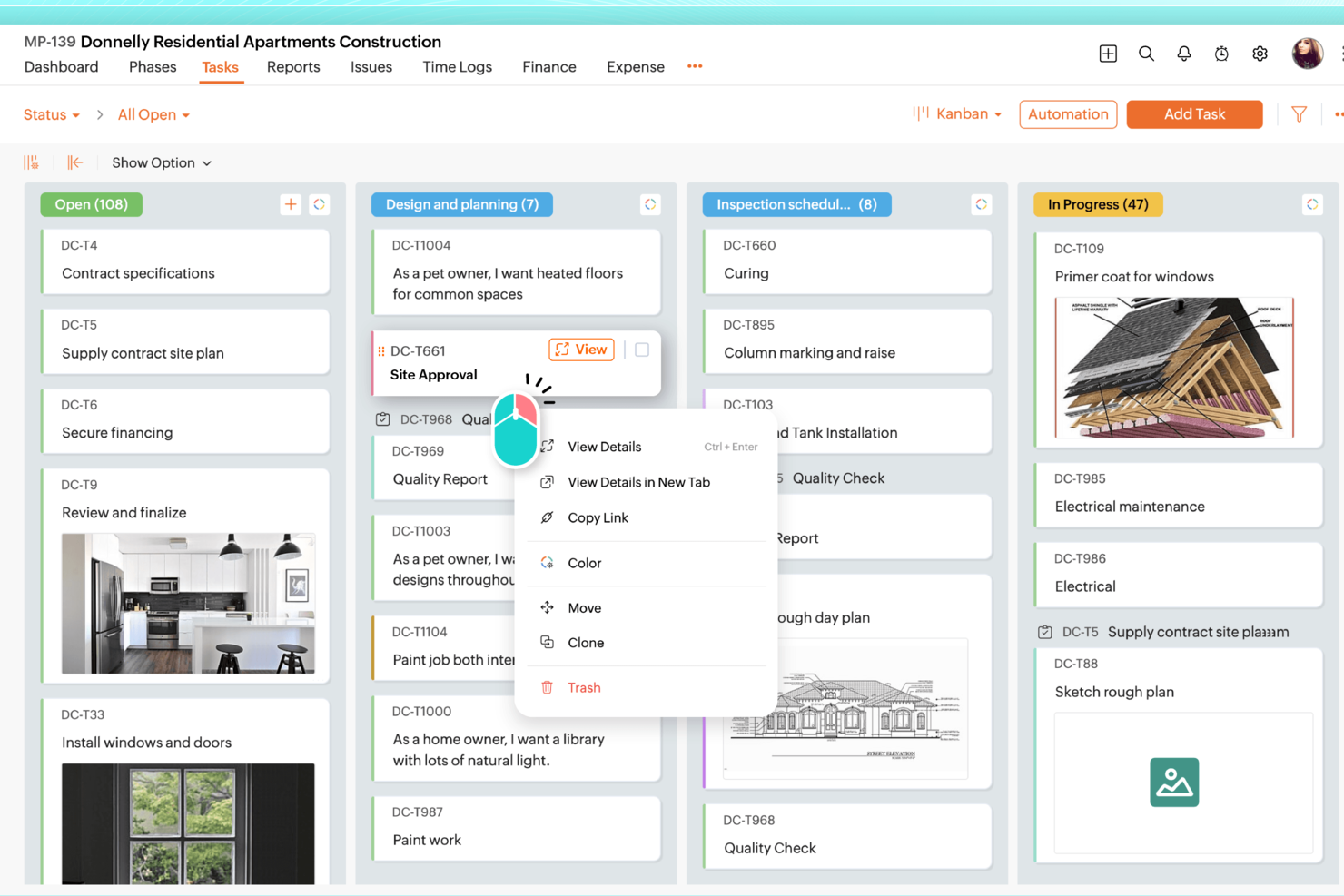
Zoho Projects is a project management platform for teams that want AI-driven task tracking, workflow automation, resource planning, and project analytics in one place.
Who Is Zoho Projects Best For?
Zoho Projects is a good fit for small to mid-sized teams already working within the Zoho ecosystem who need structured project management with built-in AI capabilities.
Why I Picked Zoho Projects
Zoho Projects earns its spot on my shortlist because of how Zia, its built-in AI assistant, surfaces project insights without requiring you to dig through reports manually. I particularly like Zia's data analytics feature, which breaks down task and project metrics into plain-language takeaways—so when a sprint is running behind, I can see exactly where the bottleneck is rather than piecing it together from raw charts. I also use Zia's AI-powered task creation, which generates task lists from a project description or milestone details, cutting down the time I'd otherwise spend on initial project setup.
Zoho Projects Key Features
- Blueprint workflow automation: Design step-by-step workflows that automatically update task fields, assign the right team members, and trigger alerts as task statuses change.
- Gantt chart with dependency tracking: Visualize task sequences, set finish-to-start or start-to-start dependencies, and reschedule tasks directly from the chart view.
- Resource management: View each team member's workload in real time and reassign tasks when someone is over- or under-allocated.
- Earned Value Management: Compare planned vs. actual schedule, cost, and time metrics to measure project performance and forecast outcomes.
Zoho Projects Integrations
Zoho Projects offers native integrations with Zoho CRM, Zoho Desk, Zoho Analytics, Google Drive, Microsoft Teams, Slack, GitHub, Bitbucket, Dropbox, and Zapier. An API is available for custom integrations.
Pros and Cons
Pros:
- Affordable pricing for growing teams
- Built-in time tracking and billing
- Strong automation and workflow customization
Cons:
- Mobile experience less fully featured
- Interface has steeper learning curve
New Product Updates from Zoho Projects
Zoho Projects Adds CodeX Scripts for Custom Modules
Zoho Projects now supports CodeX Scripts for custom modules, enabling conditional logic and rules for creating, updating, and deleting records. For more information, visit Zoho Projects' official site.
 .
.
Quire
Best for AI access via Claude or ChatGPT

Quire is a project management tool built around infinite nested task hierarchies, with multiple view types—Kanban, Timeline, Calendar, Table, and Dashboard—and an AI integration layer powered by a first-party Model Context Protocol (MCP) server that connects directly to Claude or ChatGPT.
Who Is Quire Best For?
Quire is a strong fit for tech-savvy project managers and Scrum teams who already use Claude or ChatGPT and want their AI to read and write directly to their project data.
Why I Picked Quire
I picked Quire as one of the best because it's the only major project management tool with a first-party MCP server, meaning Claude or ChatGPT can read and write directly to your live project data. I've used the MCP prompts to turn raw meeting notes into structured task hierarchies, with assignees and due dates, before approving a single write. The AI can also draft weekly status reports by pulling live task states grouped by assignee, no manual compilation needed.
Quire Key Features
- Infinite nested task list: Break projects into unlimited levels of subtasks, preserving the full parent-child hierarchy across all views and AI interactions.
- Kanban board with WIP controls: Manage workflow stages visually with swim lanes and work-in-progress limits to keep sprint capacity in check.
- Dynamic timeline view: Schedule tasks and milestones across dates with dependency tracking to keep sequencing visible across the full project.
- Workload flagging via MCP prompts: Ask your connected AI to list each team member's open tasks for the week and surface anyone exceeding a defined task threshold.
Quire Integrations
Quire has native integrations with Slack, Microsoft Teams, Google Calendar, Google Drive, GitHub, Microsoft OneDrive, Dropbox, and Box. Its first-party MCP server connects Claude and ChatGPT, while n8n, a REST API, and Zapier support custom workflows.
Pros and Cons
Pros:
- Human-in-the-loop approval for all AI actions
- Infinite task hierarchies with full parent-child structure
- AI reads and writes live project data
Cons:
- No built-in AI assistant for quick actions
- Requires connecting external AI like ChatGPT
New Product Updates from Quire
Quire Adds Custom Field Locking and Comment Reaction API Support
Quire adds custom field locking and API support for reading and setting emoji reactions on comments. These updates give teams more control over field data and expand comment interaction options for developers. For more information, visit Quire’s official site.
 .
.
ClickUp
Best for customizable tasks

ClickUp is an AI-powered task management platform that lets teams organize, automate, and track work using customizable workflows, natural language processing, and integrated collaboration tools.
Who Is ClickUp Best For?
ClickUp is well suited to tech and product teams that need a highly adaptable task management setup for complex, multi-layered workflows.
Why I Picked ClickUp
ClickUp is one of my top picks because I love how far you can push task customization without ever leaving the platform. I use custom fields to attach dropdowns, budget figures, regional tags, and deal sizes directly to tasks, so every item carries the exact context my team needs. ClickUp Brain's Self-Prioritizing Tasks automatically reorders work as priorities shift, preventing me from reshuffling backlogs whenever scope changes. The AI Task Builder pulls from chats and docs to generate fully structured tasks, ensuring nothing is lost in conversation threads.
ClickUp Key Features
- AI-generated subtasks: ClickUp Brain breaks down complex tasks into structured subtasks automatically based on the task description.
- Goals and milestones: Set measurable targets tied directly to tasks and track progress against them in real time.
- Sprint management: Plan and manage sprints with built-in velocity tracking, sprint points, and burndown charts.
- Whiteboards: Visually map out workflows, ideas, and project plans on a collaborative canvas linked directly to tasks.
ClickUp Integrations
ClickUp offers 50+ native integrations, including Slack, GitHub, GitLab, HubSpot, Everhour, Toggl, Harvest, Google Drive, OneDrive, Dropbox, Outlook, Google Calendar, Figma, Zoom, Bitbucket, Microsoft Teams, Intercom, Box, Zendesk, and Front. It also connects with Zapier and provides an API for custom integrations.
Pros and Cons
Pros:
- Suitable for various industries
- Strong automation features
- Extensive template library
Cons:
- Limited offline functionality
- Requires setup and configuration time
New Product Updates from ClickUp
ClickUp Adds Meetings Hub, Super Agent Templates, and ZoomInfo Integration
ClickUp adds a searchable Meetings Hub, new ways to clone and template Super Agents, and a ZoomInfo integration through the App Center. These updates improve meeting retrieval, agent reuse, and access to sales intelligence. For more information, visit ClickUp’s official site.

Asana
Best for task prioritization

Asana is a work management platform for teams that combines AI-powered task management, workflow automation, project tracking, and customizable views for organizing and managing tasks.
Who Is Asana Best For?
Asana is a good fit for mid-size to enterprise teams in tech and digital industries that need a structured way to manage cross-functional projects and workloads.
Why I Picked Asana
Asana earns its spot as one of the best on my shortlist because of how well it handles task prioritization at scale. The My Tasks view consolidates every assignment in one place, and I like that you can sort by due date, priority, or custom fields, then lock that order in with automation rules so tasks move to the right section without any manual sorting. When my team is juggling a sprint alongside a product launch, that kind of automatic organization keeps everyone focused on what actually needs to happen next. On top of that, Asana's AI auto-generates custom priority fields for a project the moment you name it, which cuts down the setup time when a new workstream kicks off.
Asana Key Features
- AI Teammates: Add AI agents directly into your workflows to take action on tasks, follow up on assignments, and move work forward autonomously.
- Reporting dashboards: Visualize project status and workload data with real-time charts built from live task and field data across projects.
- Portfolios: Monitor multiple connected projects from a single view, tracking status, progress, and dependencies across teams.
- Workflow rules: Set trigger-based automation rules that move tasks, update fields, or notify teammates when specific conditions are met.
Asana Integrations
Asana offers hundreds of native integrations, including Slack, Google Drive, Microsoft Teams, Jira, GitHub, Salesforce, Zoom, Dropbox, Figma, Zendesk, and ServiceNow. It also connects with Zapier and provides an API for custom integrations.
Pros and Cons
Pros:
- Team workload management
- Task dependencies management
- Visual project timeline
Cons:
- Limited offline capabilities
- Requires setup and configuration

Motion
Best for automated scheduling

Motion is an AI-powered task manager that combines intelligent scheduling, automated prioritization, and calendar management for teams and individuals.
Who Is Motion Best For?
Motion is a good fit for individual professionals and small teams who manage heavy workloads and need AI to handle scheduling decisions automatically.
Why I Picked Motion
Motion earns its spot on my shortlist because of how it handles automated scheduling—it's genuinely unlike anything else I've used. When I add a task with a deadline and estimated duration, Motion's AI automatically time-blocks it on my calendar and re-optimizes the entire schedule if something changes. I especially like the "Do Date vs. Due Date" distinction, where Motion proactively flags at-risk tasks days in advance rather than waiting for a deadline to slip. The AI Calendar Assistant also schedules meetings at times that protect focus blocks, so my deep work time doesn't get fragmented by back-to-back calls.
Motion Key Features
- AI Workflows: Build reusable templates for repeatable projects and SOPs so Motion can auto-assign and sequence tasks each time a new project kicks off.
- AI Gantt chart: Visualize project timelines with auto-scheduling built in, so the chart updates automatically as tasks shift or deadlines change.
- AI capacity planning: See each team member's workload in real time and let Motion balance task assignments based on available capacity across the team.
- AI Meeting Notetaker: Auto-captures meeting notes and summaries so action items get logged without anyone manually writing them up after a call.
Motion Integrations
Motion offers native integrations with Google Calendar, Outlook, Gmail, Zoom, Google Meet, Siri, HubSpot, Salesforce, Microsoft Teams, and Slack. It also connects with Zapier and provides an API for custom integrations.
Pros and Cons
Pros:
- Improves focus with time-blocking
- Provides detailed time analytics
- Adapts to changing schedules
Cons:
- Limited customization options
- Can be complex to set up


Zapier is an AI-powered task automation platform that connects and manages workflows across thousands of apps, letting you automate repetitive tasks and coordinate actions between different tools.
Who Is Zapier Best For?
Zapier is a strong fit for project managers and operations teams who need to automate task workflows across multiple apps without writing code.
Why I Picked Zapier
I've included Zapier in my top picks because no other tool comes close to its app integration depth for task automation. With connections to 8,000+ apps, my team uses Zapier to wire together tools like Jira, Asana, Slack, and Google Workspace into a single automated workflow—without writing a line of code. I particularly like the Paths feature, which lets you route tasks to different teams based on if/then logic, so a high-priority bug report in Jira can automatically trigger a Slack alert and create a follow-up task in Asana. The Zapier Agents feature takes this further, letting you build AI-powered agents that monitor activity and take action across your connected apps on command.
Zapier Key Features
- Zap templates: Pre-built automation workflows you can activate instantly to connect common app combinations without building from scratch.
- Multi-step Zaps: Chain multiple actions across different apps in a single automated workflow triggered by one event.
- Tables: A built-in database feature that stores, tracks, and triggers task data directly within your Zapier workflows.
- Task history: A log of every automated action Zapier has run, so you can audit, troubleshoot, and replay failed tasks.
Zapier Integrations
Zapier offers native integrations with over 8,000 apps, including Google Workspace, Slack, Asana, Trello, Jira, Salesforce, HubSpot, Microsoft 365, Airtable, and Dropbox. An API is available for custom integrations.
Pros and Cons
Pros:
- Multi-step automation
- No coding skills needed
- Extensive app library
Cons:
- Advanced features need higher plans
- Can be complex for beginners


Trevor AI is an AI-powered task management platform that helps you organize, schedule, and prioritize tasks using automated daily planning and smart time blocking.
Who Is Trevor AI Best For?
Trevor AI is a strong fit for individual contributors and freelancers who need to manage personal task loads and daily schedules without team collaboration features.
Why I Picked Trevor AI
Trevor AI earns its spot on my shortlist because of how well it handles individual task scheduling through AI-driven time blocking. I like that it lets you drag tasks from a connected to-do list directly onto your calendar, and the AI suggests the best available time slots based on your existing schedule. The one-day-at-a-time planning view keeps daily priorities clear without the noise of a full project board. For solo task management, that focused approach is genuinely hard to replicate in more team-oriented tools.
Trevor AI Key Features
- Focus mode: Lets you work on one task at a time using a built-in timer, note field, and AI-generated five-step task breakdown.
- Recurring tasks: Set both scheduled and unscheduled tasks to repeat, so you can track ongoing work and build consistent habits.
- Smart scheduling queue: Add tasks or entire lists to a prioritized queue that Trevor proactively helps you schedule, including in bulk.
- Personal AI model: Adapts to your scheduling patterns over time to improve the accuracy of task duration predictions and time-slot suggestions.
Trevor AI Integrations
Trevor AI offers native integrations with Google Calendar, Outlook Calendar, Todoist, and Google Tasks. An API is available for custom integrations.
Pros and Cons
Pros:
- Personalized AI suggestions
- Strong focus on user privacy
- Intuitive interface
Cons:
- No team collaboration features
- Pro plan required for advanced features
Other AI Task Manager Software Tools
Here are some additional AI task manager options that didn’t make it onto my shortlist, but are still worth checking out:
- Taskaid
For simple task management
- EchoPal
For voice-activated tasks
- Slack
For team collaboration
- GoodDay
For automating time estimates
- TaskRay
For Salesforce-native project workflows
- Any.do
For task reminders
- Easy8
For project templates
- AutoGPT
For autonomous task execution
- Twos
For note-taking tasks
- DeskSense
For desktop task management


How I Evaluate AI Task Managers
Every tool here needs to deliver real AI value—like auto-generating tasks from meeting notes or flagging schedule risks before they stall a sprint. I split my evaluation into two layers: the core functionality a tool must have to qualify and the differentiators that separate one option from another.
Core Functionality (Table Stakes For This List)
When I'm selecting tools for my list, I rank each one on a scale from 0 (does not offer the functionality) to 5 (excels in this area) for each core functionality listed below. Then, I calculate the tool's total score into a percentage. Each tool needs to achieve a minimum total score of 65% to be considered for inclusion.
- AI Task Generation: I check whether the tool can turn unstructured inputs—like a Slack thread, meeting transcript, or project brief—into organized tasks, subtasks, and checklists with minimal manual cleanup.
- Smart Prioritization & Scheduling: I look for AI that factors in deadlines, dependencies, and workload to sequence and schedule tasks, not just sort them by due date.
- Intelligent Assignment & Routing: I evaluate how the tool recommends or auto-assigns task owners—whether it accounts for team capacity, relevant skills, or past work patterns.
- AI Summaries & Status Reporting: I look for tools that generate project summaries and status updates from live task data, the kind you'd send to a stakeholder or share in a standup.
- Predictive Insights & Risk Detection: The tool should flag at-risk tasks and forecast potential delays based on historical and real-time data, giving you time to adjust before a sprint goes sideways.
- Workflow Automation & Integrations: I evaluate whether the tool connects to the platforms teams already use—like Slack, Jira, GitHub, or Confluence—and supports AI-driven automations across those systems.
Once I have a list of tools that meet the criteria, I consider what sets each platform apart.
Differentiating Factors (What Sets Vendors Apart)
Here's how I compare and contrast different vendors:
Standout Features
Meeting-to-task capture is a big differentiator—I look for tools that pull action items, owners, and due dates straight from a call transcript without someone manually writing them up after the fact. Cross-project dependency mapping matters too, especially for program managers juggling multiple workstreams where a delay in one project can cascade across others. I also evaluate whether a tool supports custom AI agents that teams can configure to handle recurring workflows like sprint triage or follow-up reminders.
Beyond Features
I pay close attention to AI transparency—whether the tool explains why it flagged a task as at-risk or recommended a specific assignee. That visibility matters when you're accountable for delivery decisions in front of stakeholders. Data security and AI governance are equally important, especially around whether customer data is used to train models. I also evaluate the integration ecosystem, checking for two-way sync with tools like Jira, Slack, and Confluence so the AI has enough context to generate accurate outputs.
How to Choose an AI Task Manager Tool
It’s easy to get bogged down in long feature lists and complex pricing structures. To help you stay focused as you work through your unique software selection process, here’s a checklist of factors to keep in mind:
| Factor | What to Consider |
|---|---|
| Scalability | Make sure the tool can grow with your team. Look for features that support larger teams and more complex workflows as your needs evolve. |
| Integrations | Check if the tool integrates with apps you already use like Slack, Google Workspace, or Salesforce, to streamline your workflows without switching platforms. |
| Customizability | Look for options to tailor workflows and interfaces to fit your team’s unique needs in order to improve efficiency and productivity. |
| Ease of Use | Evaluate the user interface and navigation. A tool that’s easy to use will help your team adopt it quickly without extensive training. |
| Budget | Consider the cost relative to the features offered. Make sure the pricing fits within your budget and assess if annual billing offers savings. |
| Security Safeguards | Check whether the tool offers security features, such as data encryption and compliance with industry standards, to protect your sensitive information. |
| Supports Options | Look for comprehensive support like 24/7 chat, email, and community forums to assist your team's needs. |
| Feature Set | Identify features that align with your project management needs and make sure the tool covers your fundamental requirements. |
Trends in AI Task Manager Software
In my research, I sourced countless product updates, press releases, and release logs from different AI task manager vendors. Here are some of the emerging trends I’m keeping an eye on:
- Voice command integration: More tools are adding voice command capabilities to let users manage tasks hands-free. This caters to busy professionals who need to update tasks quickly without manual input.
- Personalized user experiences: AI is being used to tailor interfaces and features based on user behavior and make the tools more intuitive. Personalized dashboards and adaptive task suggestions are becoming more common.
- Remote collaboration improvements: As remote work becomes more prevalent, AI task managers are adding features to support virtual team collaboration, such as virtual whiteboards and improved video conferencing tools.
What Is an AI Task Manager?
An AI task manager is a software tool that uses artificial intelligence to help manage, prioritize, and automate tasks. It’s commonly used by project managers, team leaders, and freelancers to boost productivity and stay organized.
Features like task automation, AI-generated insights, and personalized recommendations help you optimize your workflows, support collaboration, and adapt to individual work styles. These tools save time and make task management more efficient.
Features of AI Task Manager Software
When selecting an AI task manager, keep an eye out for the following key features:
- Task automation: Automates repetitive tasks to save time and reduce manual effort. These features are often shared with task automation software, making AI task managers valuable for both task execution and workflow streamlining.
- AI-powered insights: Analyzes data to provide productivity insights and identify inefficiencies.
- Voice command integration: Allows hands-free task management through voice inputs.
- Customizable workflows: Lets you tailor task management processes to suit your team's needs.
- Personalized user experiences: Offers interfaces and features based on user behavior for a more intuitive experience.
- Time-blocking capabilities: Helps allocate specific periods for tasks to improve focus and productivity.
- Visual timelines: Provides a clear overview of project progress and deadlines.
- Task prioritization: Makes sure important tasks are highlighted and completed first.
- Collaboration tools: Facilitates communication and cooperation among team members.
- Security safeguards: Protects sensitive information with data encryption and compliance standards.
Benefits of AI Task Manager Tools
Implementing an AI task manager tool provides several benefits for your team and your business. Here are a few you can look forward to:
- Increased productivity: Task automation and prioritization help your team focus on high-impact activities.
- Improved collaboration: Collaboration tools facilitate communication and keep everyone aligned and informed.
- Better time management: Time-blocking capabilities help allocate time effectively and reduce distractions.
- Data-driven decisions: AI-powered insights provide valuable data and help you make informed decisions.
- Adaptable workflows: Customizable workflows allow you to tailor processes to fit your team's specific needs.
- Improved user experience: Personalized interfaces and features make it easier for team members to navigate and use the tool efficiently.
- Secure data handling: Security safeguards protect your sensitive information and provide peace of mind.
Costs and Pricing of AI Task Manager Software
The table below summarizes common plans, their average prices, and typical features included in AI task manager solutions:
| Plan Type | Average Price | Common Features |
|---|---|---|
| Free Plan | $0 | Basic task management, limited integrations, and basic collaboration tools. |
| Personal Plan | $5 - $15/user/month | Task prioritization, customizable workflows, and basic analytics. |
| Business Plan | $20 - 40/user/month | Advanced automation, better collaboration features, and personalized user experiences |
| Enterprise Plan | $50 - $100/user/month | Comprehensive security safeguards, dedicated support, and extensive customization options. |
AI Task Manager FAQs
Here are the answers to some common questions about AI task manager tools:
Can AI help me prioritize tasks?
Yes, AI-based task managers can help you organize and prioritize tasks by analyzing deadlines, importance, and your work habits. They review your task list and recommend which tasks to tackle first, so you can manage your time more efficiently and complete high-priority items on time.
How secure are AI task managers?
AI task managers typically offer strong security features like data encryption and compliance with industry standards to protect your information. Choose a tool that prioritizes security, especially if you’re handling sensitive data. Always review a tool’s security policies before committing.
How do AI task managers integrate with other tools?
Most AI task managers integrate seamlessly with other productivity tools like Slack, Google Workspace, and Trello. This allows you to manage all your tasks and communications in one place, which boosts efficiency and reduces the need to switch between apps.
What is the learning curve for AI task managers?
The learning curve varies depending on the complexity of the tool and your team’s familiarity with similar software. Many AI task managers offer intuitive interfaces and tutorials to help you get started quickly. Look for tools with comprehensive onboarding resources to ease the transition.
Can AI task managers adapt to changing schedules?
Yes, many AI task managers, including AI scheduling assistants, use algorithms to adjust your schedule dynamically. These tools can automatically reschedule tasks based on new priorities or unexpected changes to keep your workflow efficient. This adaptability is a key benefit of using AI-driven tools.
What are the costs associated with AI task managers?
Costs can vary widely based on features, team size, and subscription plans. Many tools offer free plans with basic features, while more advanced capabilities are available in paid plans. It’s important to assess your team’s needs and budget to find the right balance.