

De 10 beste programvarene for byråer vurdert i 2026

10 Utvalg av den beste programvaren for byråer


I dag sliter mange byråer med kompleksiteten ved å håndtere kunderelasjoner, prosjektarbeidsflyter og økonomiske transaksjoner, noe som ofte fører til ineffektivitet som hindrer vekst. Derfor bruker stadig flere byråer programvare for å optimalisere driften og forbedre tjenesteleveransen.
Som teknologianalytiker innen PM har jeg også sett en økning i behovet for programvare som effektiviserer disse prosessene. Med min kunnskap om PM-programvare har jeg gjennomgått og testet de ledende programvarealternativene for byråer for å hjelpe ledere med å finne de beste alternativene for teamene sine.
Enten du ønsker å oppgradere den nåværende programvaren eller innføre et helt nytt system, vil denne veiledningen gi deg innsikten du trenger for å ta en informert beslutning.
Why Trust Our Software Recommendations
Our team has been testing and reviewing software since 2012. As project managers ourselves, we know how difficult—and important—it is to choose the right software.
For this guide, we evaluated tools using hands-on testing and independent research, scoring tools using our selection criteria. We also draw on insights from industry thought leaders and practicing project management experts.
Our reviews reflect our human editorial judgment, not a sales pitch.
Expert reviewers:
Sammenligningstabell for programvare for byråer
Tabellen nedenfor sammenligner priser, tilgjengelighet av gratis prøveperioder og demomuligheter for mine beste utvalgte programvareløsninger for byråer.
| Tool | Best For | Trial Info | Price | ||
|---|---|---|---|---|---|
| 1 | Best for end-to-end project management | 14-day free trial | From $17/user/month | Website | |
| 2 | Best for project and budget tracking | 14-day free trial | From $10/user/month (billed annually) | Website | |
| 3 | Best for proofing and approvals | 14-day free trial | Pricing upon request | Website | |
| 4 | Best for AI-powered agency management | Free demo available | Pricing upon request | Website | |
| 5 | Best for data visualization and business intelligence | 14-day free trial | Pricing upon request | Website | |
| 6 | Best for data integration and governance | Free demo available | Pricing upon request | Website | |
| 7 | Best for preventing scheduling conflicts | 14-day free trial + 30-day money back guarantee | From $8.50/user/month (billed annually) | Website | |
| 8 | Best for customizable marketing dashboards | 14-day free trial available | From $75/month | Website | |
| 9 | Best for project and time tracking | Free 7-day trial available | From $9/user/month (billed annually) | Website | |
| 10 | Best for website heatmaps | 30-day free trial available | From $29/month | Website |


Anmeldelser av den beste programvaren for byråer
Her får du en grundig analyse av og oversikt over hver programvareløsning for byråer. Vi går gjennom fordeler og ulemper ved hvert verktøy, funksjonene og de beste bruksområdene.

Scoro
Best for end-to-end project management

Scoro is a SaaS platform that brings together project management, billing, and resource planning. If your agency needs a single source of truth for projects, budgets, and client work, Scoro offers features to keep everything connected from quote to invoice.
Who Is Scoro Best For?
Agency principals and operations managers in small to mid-sized professional services firms. It supports organizations that want project management, billing, and reporting managed within a single operational platform.
Why I Picked Scoro
What sets Scoro apart for agency teams is its ability to manage the entire project lifecycle in one place. The platform connects quoting, project planning, time tracking, and invoicing, so you can follow work from the first client conversation through to final payment. I like that Scoro’s dashboards give you real-time visibility into project progress and profitability, which helps agencies make informed decisions quickly.
Scoro Key Features
Some other features in Scoro that agencies may find useful include:
- Task Board View: Organize and prioritize work visually with drag-and-drop task boards.
- Calendar Integration: Sync project schedules and deadlines with external calendars for better visibility.
- Client Portal: Share project updates, files, and invoices directly with clients in a secure portal.
- Customizable Reports: Build detailed reports on project performance, sales, and finances using flexible templates.
Scoro Integrations
Integrations include HubSpot, Google Calendar, Microsoft Exchange, Jira, Xero, QuickBooks, Sage Intacct, Exact Online, Expensify, Stripe, Google Drive, Bamboo HR, and more. You can also connect to other apps through its Zapier integration.
Pros and Cons
Pros:
- Built-in tools for client quotes
- Compares planned versus actual time
- Combines projects with sales tracking
Cons:
- No internal team chat
- Limited mobile app features
New Product Updates from Scoro

Scoro Adds Time Mobile App and ELI Improvements
Scoro adds the Scoro Time mobile app for iOS/Android to track time anywhere and expands ELI with attachments, smarter filtering, and trigger-based actions. For more information, visit Scoro's official site.

Best for project and budget tracking

Productive is an all-in-one agency management system designed to connect project delivery with financial tracking. With features for time tracking, resource planning, and budget management, Productive helps teams spot issues before they impact margins.
Who Is Productive Best For?
Finance leads and project managers in small to mid-sized agencies focused on margin control. It works well for teams that need consistent oversight of project budgets and resource utilization across client engagements.
Why I Picked Productive
Productive stands out for agencies that need to track both project progress and financial health in real time. The platform combines project management with detailed budget tracking, so you can monitor costs, revenue, and profitability as work happens. I appreciate how Productive links time tracking directly to budgets, making it easier to see where projects are running over or under. For agencies focused on maximizing margins and keeping projects on track financially, Productive offers the right mix of visibility and control.
Productive Key Features
Some other features in Productive that agencies may find valuable include:
- Sales Pipeline Management: The sales CRM integrates client relationship management into your workflow, helping you track leads and manage client interactions.
- Resource Scheduling: Allocate team members to projects based on availability and skill sets.
- Document Storage: Store and organize project files and client documents within the platform.
- Client Portal: Give clients access to project updates, files, and invoices in a secure online space.
Productive Integrations
Integrations include Jira, Slack, QuickBooks, SAP SuccessFactors, Xero, Zapier, Sage, BambooHR, Rippling, and HubSpot.
Pros and Cons
Pros:
- Scenario builder predicts project outcomes
- Simplified workflow from proposal to payment
- Tailored specifically for agencies
Cons:
- No free plan
- Requires at least three users
New Product Updates from Productive
Productive Adds Voice Dictation, Slack Connector, Proposals, and Overtime
Productive adds voice dictation, a Slack Connector, proposal controls, and overtime tracking. These updates support faster AI interactions, client proposals, and time management. For more information, visit Productive’s official site.

Wrike
Best for proofing and approvals

Wrike is an online project management tool designed to help teams plan, track, and collaborate on projects in real time. It offers a centralized workspace where users can manage tasks, deadlines, and resources efficiently.
Who Is Wrike Best For?
Project managers and account leads in small to enterprise agencies managing multi-stage client deliverables. It fits teams that require formal proofing and approval workflows across distributed stakeholders.
Why I Picked Wrike
For agencies that need to streamline creative reviews, Wrike’s proofing and approval features are hard to ignore. The platform lets you annotate images, videos, and documents directly within tasks, so feedback stays organized and actionable. I appreciate how Wrike tracks every version and comment, making it easy to resolve feedback loops and keep everyone aligned. These tools help agencies reduce email back-and-forth and speed up the sign-off process for creative work.
Wrike Key Features
Some other features in Wrike that agencies may find valuable include:
- Custom Request Forms: Collect project briefs and creative requests using tailored intake forms.
- Gantt Chart View: Visualize project timelines and dependencies with interactive Gantt charts.
- Time Tracking: Log hours directly within tasks to monitor team workload and project budgets.
- Resource Management: Allocate team members to projects based on availability and skill sets.
Wrike Integrations
Integrations include QuickBooks, Skyvia, Power BI, Tableau, Google Sheets, Miro, Salesforce, Microsoft Teams, Google Drive, Microsoft SharePoint, Adobe Creative Cloud, and Slack.
Pros and Cons
Pros:
- Centralized client feedback
- Customizable workflows and item types
- Effective proofing and approval tool
Cons:
- Complex user interface
- Some integrations are only available on higher-tier plans
New Product Updates from Wrike
Wrike Adds Klaxoon MCP Integration
Wrike’s Klaxoon MCP integration is now generally available, enabling AI agents to navigate between Wrike tasks and attached whiteboards, read task context, and manage whiteboard attachments via API. For more information, visit Wrike's official site.

Best for AI-powered agency management
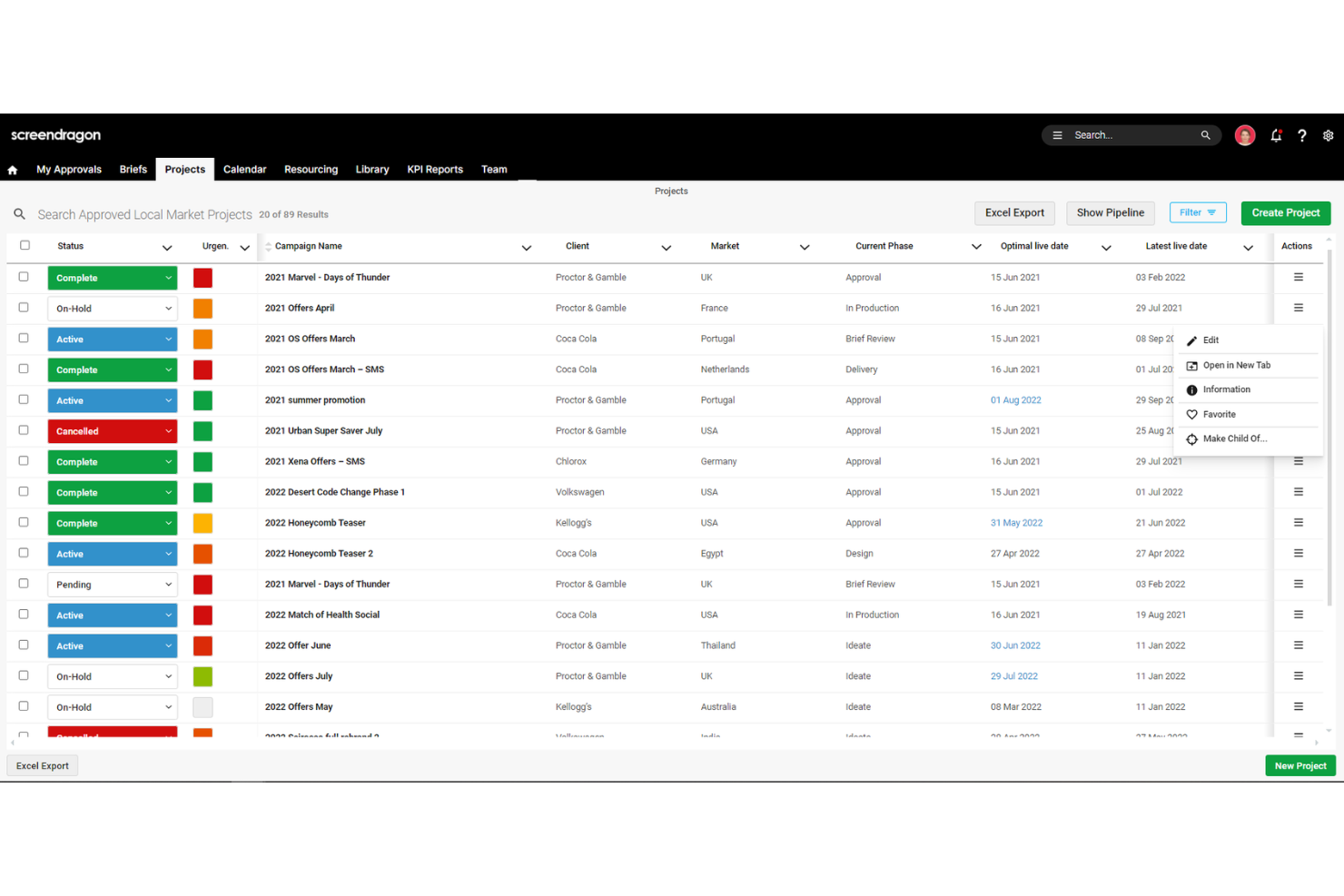
Screendragon is a work and workflow management platform designed for marketing, agency, and professional services teams. It combines project management, workflow automation, resource management, and budget tracking into one solution.
Who Is Screendragon Best For?
Operations leaders and resource managers in mid-sized to enterprise creative and marketing agencies. It suits organizations that need structured resource planning and automated allocation across complex client portfolios.
Why I Picked Screendragon
I chose Screendragon for this list because its automated resource management tools address a core challenge for agencies: balancing workloads and maximizing team capacity. The platform offers dynamic resource scheduling, letting you assign the right people to the right projects based on real-time availability and skill sets. I also like that Screendragon includes forecasting tools, so you can anticipate resource needs and avoid overbooking. These features help agencies reduce manual planning and keep projects moving without bottlenecks.
Screendragon Key Features
Some other features in Screendragon that agencies may find useful include:
- Custom Workflow Builder: Create and automate unique approval processes tailored to your agency’s needs.
- Budget Management Tools: Track project budgets, expenses, and financial performance in real time.
- Client Portal: Give clients access to project updates, deliverables, and feedback tools in a secure environment.
- Document Management: Store, organize, and share project files and assets directly within the platform.
Screendragon Integrations
Integrations include MS Power BI, Slack, MS Teams, Zapier, Google Drive, Trello, Microsoft 365, Box, Jira, Microsoft OneDrive, and PeopleSoft.
Pros and Cons
Pros:
- Live project-health dashboards
- Easy-to-customize creative workflows
- Good resource planning features
Cons:
- Complex admin settings
- Long setup time
New Product Updates from Screendragon
Screendragon Unveils New AI Hub
Screendragon introduced AI Hub, a new capability that lets teams build and manage AI agents directly within workflows. The update helps marketing teams automate tasks, maintain governance controls, and scale AI-driven operations more efficiently. For more information, visit Screendragon's official site.

Tableau
Best for data visualization and business intelligence

Tableau is a data visualization tool designed to help agencies transform raw data into interactive, shareable dashboards and insights. It enables users to explore data visually, create complex reports beyond spreadsheets, and drive data-driven decisions.
Who Is Tableau Best For?
Data analysts and strategy leads in mid-sized to enterprise agencies handling large data sets. It is appropriate for organizations that require advanced data visualization and business intelligence across client accounts.
Why I Picked Tableau
When agencies need to present data in a way that’s both visually engaging and actionable, Tableau delivers a specialized solution. Its drag-and-drop dashboard builder lets you create interactive charts and reports that help teams and clients quickly understand key metrics. I appreciate how Tableau supports real-time data updates, so agencies can monitor campaign performance or project KPIs as they happen. For agencies that want to turn raw data into compelling business intelligence, Tableau’s visualization tools make insights accessible to everyone on the team.
Tableau Key Features
Some other features in Tableau that agencies may find valuable include:
- Data Blending: Combine data from multiple sources to create unified reports and dashboards.
- Role-Based Permissions: Control access to sensitive data and dashboards by assigning user roles.
- Scheduled Data Refreshes: Automate updates to dashboards with scheduled data pulls from connected sources.
- Collaboration Tools: Share dashboards and visualizations with team members or clients directly within the platform.
Tableau Integrations
Integrations include Amazon Redshift, Google Analytics, Google Sheets, IBM BigInsights, Microsoft Excel, OneDrive, Oracle, Presto, and Salesforce.
Pros and Cons
Pros:
- Interactive drag-and-drop dashboards
- Multi-source data-blending features
- Executive-ready visual reports
Cons:
- High per-user licensing
- Resource-intensive for large datasets

Adverity
Best for data integration and governance

Adverity is designed for agencies and marketing teams that need to bring together data from dozens of sources and maintain strict data governance. It’s especially useful for organizations handling complex, multi-channel campaigns that want to automate data integration, validation, and transformation. With its focus on data quality and centralized control, Adverity helps agencies ensure reliable analytics and reporting across all client accounts.
Who Is Adverity Best For?
Data and analytics leaders in enterprise agencies managing multiple data sources. It is suited to organizations that require structured data integration and governance across global client operations.
Why I Picked Adverity
When agencies need to unify data from dozens of marketing platforms while maintaining strict control over data quality, Adverity offers a strong solution for data integration and governance. The platform’s automated data connectors and transformation tools help agencies centralize, clean, and standardize data from multiple sources. I appreciate how Adverity’s data governance features let teams set validation rules and monitor data lineage, which is essential for agencies managing sensitive client information. These capabilities make Adverity a good fit for agencies that want to deliver reliable analytics and maintain compliance across complex reporting environments.
Adverity Key Features
Some other features that agencies may find valuable in Adverity include:
- Custom Dashboard Builder: Create tailored dashboards to visualize campaign and performance data.
- Automated Data Scheduling: Set up recurring data imports and exports on a custom schedule.
- Collaboration Tools: Share data views and dashboards securely with team members or clients.
- API Access: Connect Adverity data to other business intelligence or analytics platforms through a native API.
Adverity Integrations
Integrations include Box, Google Ads, Google Analytics, HubSpot Marketing Hub, Instagram, Mailchimp, Microsoft SharePoint, SEMrush, Shopify, and Twitter.
Pros and Cons
Pros:
- 600+ data connectors
- Complete data governance
- AI-powered automation
Cons:
- Limited support for non-marketing data
- Requires setup for optimal use
New Product Updates from Adverity
Adverity Enhances Connectors and Adds TikTok GMV Max
Adverity updates connectors for Amazon Ads, SmartNews Ads, Indeed, and monday.com, and introduces the TikTok GMV Max connector. These updates improve data accuracy, control, and performance across integrations. For more information, visit Adverity’s official site.
 .
.
awork
Best for preventing scheduling conflicts

awork is a project management software that solves the issue of overlapping meetings or double-booked resources. This platform is built for creative and digital agencies that need to coordinate project schedules, team availability, and deadlines in one place.
Who Is awork Best For?
Project managers in small to mid-sized creative agencies managing overlapping timelines. It suits teams that need visibility into schedules to reduce resource conflicts across concurrent projects.
Why I Picked awork
What drew me to awork for agency teams is its focus on preventing scheduling conflicts, which is a common challenge in project-based environments. The platform offers a visual timeline that displays team workloads and project milestones side by side, making it easy to spot potential overlaps. I appreciate how awork’s resource management tools let you assign tasks based on real-time availability, reducing the risk of double-booking. For agencies juggling multiple projects and shifting deadlines, these features help keep schedules clear and projects on track.
awork Key Features
Some other features that agencies may find useful in awork include:
- Task Automation: Set up automated workflows to trigger actions based on project events.
- Time Tracking: Log hours directly on tasks and projects for accurate reporting.
- Custom Project Templates: Create and reuse templates for recurring project types or client work.
- Collaboration Tools: Use built-in chat and file sharing to keep project communication organized.
awork Integrations
Integrations include n8n, Zapier, Xero, sevdesk, Personio, Slack, Microsoft Teams, Salesforce, and more.
Pros and Cons
Pros:
- Integrated project timer tools
- Supports agile project management
- Easy-to-start task management
Cons:
- Limited integrations with other agency software tools
- Basic workflow-automation levels

Best for customizable marketing dashboards

ReportGarden is a marketing dashboard and analytics software that helps agencies create customizable marketing dashboards and automate reporting. It offers options for tailoring reports to specific needs, saving time and resources.
Who Is ReportGarden Best For?
Account managers and marketing analysts in small to mid-sized digital agencies. It works well for teams that require customizable dashboards to consolidate campaign performance data for clients.
Why I Picked ReportGarden
For agencies that need to present marketing data in a way that matches each client’s unique needs, ReportGarden’s customizable dashboards are a strong fit. The platform lets you build dashboards with drag-and-drop widgets, so you can tailor reports to highlight the metrics that matter most for each campaign or client. I like that you can apply custom branding and layouts, which helps agencies deliver a more professional and personalized experience. ReportGarden’s flexibility in dashboard design makes it easier to communicate results and value to clients with different goals and reporting preferences.
ReportGarden Key Features
Some other features that agencies may find useful in ReportGarden include:
- Automated Report Scheduling: Set up recurring delivery of reports to clients on a custom schedule.
- Multi-Channel Data Integration: Connect and pull data from platforms like Google Ads, Facebook Ads, and Analytics.
- Client Portal: Give clients access to a branded portal where they can view their reports and dashboards.
- Budget Tracking: Monitor and manage campaign budgets directly within the platform.
ReportGarden Integrations
Integrations include Google Ads, Google Analytics, Facebook Ads, Instagram Profiles, Google Search Console, Google Business Profile, Google Drive, Bing Ads, and LinkedIn Ads.
Pros and Cons
Pros:
- Drag-and-drop report widgets
- Cross-channel data aggregation
- White-label client reporting tools
Cons:
- Occasional data syncing glitches
- Slow report download speeds
Best for project and time tracking

Bonsai Agency Software is designed for agencies that want to manage projects and track time in one place. Bonsai brings together project tracking, time logging, and invoicing so agencies can keep work moving and get paid on time.
Who Is Bonsai Agency Software Best For?
Agency owners and project leads in small creative or digital agencies. It suits firms that require straightforward project oversight and time tracking for client-based work.
Why I Picked Bonsai Agency Software
For agencies that need to keep a close handle on both project progress and time spent, Bonsai offers a focused solution. The platform’s project tracking tools let you organize tasks, set deadlines, and assign responsibilities, all in one workspace. I like that Bonsai’s built-in time tracking links directly to projects, making it easy to log hours and generate accurate timesheets. If your agency needs to connect project delivery with time-based billing, Bonsai brings these workflows together in a way that’s practical for creative teams.
Bonsai Agency Software Key Features
Some other features in Bonsai that agencies may find useful include:
- Client CRM: Manage client contact details, communication history, and project records in one place.
- Proposal and Contract Templates: Create, send, and track professional proposals and contracts directly from the platform.
- Automated Invoicing: Generate and send invoices automatically based on project milestones or tracked time.
- Expense Tracking: Record and categorize expenses to keep agency finances organized and up to date.
Bonsai Agency Software Integrations
Integrations include QuickBooks Online, Zapier, Calendly, Xero, Google Drive, HubSpot, ClickUp, Slack, and Asana.
Pros and Cons
Pros:
- Automated invoices after signing contracts
- Ready-to-use contract templates
- One-click timer for billable hours
Cons:
- Basic reporting tools
- Slow payment-processing times

Crazy Egg
Best for website heatmaps

Crazy Egg is a website optimization tool that offers features such as heatmaps, recordings, surveys, A/B testing, and traffic analysis. It provides detailed visual reports and session recordings to understand user behavior and improve website design.
Who Is Crazy Egg Best For?
Digital strategists and UX teams in small to mid-sized agencies focused on website optimization. It supports firms that rely on heatmap data to inform client-facing design and conversion decisions.
Why I Picked Crazy Egg
When agencies need to show clients exactly how users interact with their websites, Crazy Egg’s heatmap tools stand out. This tool stands out for its ability to provide visual insights into user interactions, making it easier to identify areas for customer experience improvement. I appreciate that you can segment heatmap data by device type, which is essential for agencies working with clients across desktop and mobile. It offers detailed visual reports and session recordings that help make informed design changes that can improve customer relationships.
Crazy Egg Key Features
Some other features that agencies may find valuable in Crazy Egg include:
- A/B Testing: Run experiments to compare different versions of web pages and measure which performs better.
- User Recordings: Watch real-time visitor sessions to see exactly how users navigate a site.
- Confetti Reports: Visualize individual clicks segmented by referral source, search term, or device.
- Overlay Reports: View detailed click data for every element on a page to understand user interactions at a granular level.
Crazy Egg Integrations
Integrations include Convert Experiences, Drupal, Handshake, Joomla, Kameleoon, Optimizely, Rippling, Shopify, Sitejet, Squarespace, SurveyMonkey, Teamstack, Wix, and WordPress.
Pros and Cons
Pros:
- Simple one-script installation
- Visual click-activity hotspots
- Granular insights into specific page elements
Cons:
- No built-in CRM
- Limited pageview-tracking caps
Annen programvare for byråer
Nedenfor finner du en liste over ytterligere programvare for byråer som jeg vurderte, men som ikke kom med på topplisten. Det er absolutt verdt å ta en titt på disse også!
- Sprout Social
For social media analytics
- Funnelytics
For visualizing marketing funnels
- NinjaCat
For AI-powered marketing analytics
- Ravetree
For client work management
- Adzooma
For AI-driven PPC recommendations
- Justuno
For personalized website pop-ups
- Rankability
For AI-powered SEO content creation
- Zoho Analytics
For business analytics
- Google Analytics
For web analytics and traffic insights
- Semrush
For keyword research


Relatert prosjektstyringsprogramvare
Hvis du fortsatt ikke har funnet det du leter etter, kan du se på disse relaterte prosjektstyringsverktøyene som vi har testet og vurdert.
- Prosjektstyringsprogramvare
- Prosjektstyringsprogramvare for PR
- Programvare for kontrollpaneler med hvit etikett
- Programvare for ressursstyring
- Programvare for arbeidsflytautomatisering
- Programvare for oppgavestyring
- Samarbeidsverktøy
- Gantt-diagramverktøy
- Programvare for dokumentverifisering
How I Evaluate Agency Software
I split my evaluation into two layers: the baseline every agency tool must clear—client project tracking, time-to-billing, resource planning—and the differentiators that determine real fit.
Core Functionality (Table Stakes For This List)
When I'm selecting tools for my list, I rank each one on a scale from 0 (does not offer the functionality) to 5 (excels in this area) for each core functionality listed below. Then, I calculate the tool's total score into a percentage. Each tool needs to achieve a minimum total score of 65% to be considered for inclusion.
- Client Project Management: I evaluate whether the tool can handle multiple client accounts running in parallel, each with its own tasks, milestones, dependencies, and delivery timelines.
- Time Tracking & Billing: Every agency bills for time, so I check how tightly time entries connect to specific tasks, clients, and billable rates through to invoice generation.
- Resource & Capacity Planning: I look for workload views that show who's overbooked and who has bandwidth, especially when juggling overlapping client deadlines across departments.
- Budget & Profitability Tracking: The ability to monitor spend against project budgets in real time matters here, along with margin reporting at the project and client level.
- Client Collaboration & Approvals: Sharing deliverables with clients for review should happen inside the platform through portals, proofing tools, or structured approval workflows.
- Agency Reporting & Dashboards: Reports should surface agency-specific KPIs like utilization rates, project margins, and realization, not just generic task completion metrics.
Once I have a list of tools that meet this criteria, I consider what sets each platform apart.
Differentiating Factors (What Sets Vendors Apart)
Here's how I compare and contrast different vendors:
Standout Features
Retainer management is a big one for me. Agencies running monthly retainers need to track hours consumed against caps and handle rollovers automatically rather than reconciling in spreadsheets at month-end. I also evaluate creative proofing workflows, since design and content teams benefit from annotation, versioning, and structured approval routing inside the platform instead of scattered across email threads. For agencies serving international clients, multi-currency billing and localized tax handling can make or break invoicing accuracy.
Beyond Features
Pricing model matters a lot for agencies because headcount fluctuates with client wins and losses. I check whether guest or client seats come bundled or cost extra, since that adds up fast. Integration depth is another factor I weigh heavily. An agency tool that connects natively to QuickBooks or Xero, plus creative platforms like Figma or Adobe CC, saves hours of manual data transfer each week. I also evaluate how well a platform fits a specific agency type, whether that's a 10-person design studio or a 200-seat digital network with multiple service lines.
Slik velger du programvare for byråer
Mens du går gjennom din egen unike prosess for valg av programvare, bør du ha følgende punkter i bakhodet.
- Brukervennlighet: Programvaren må være intuitiv og enkel å bruke. Hvis verktøyet er unødvendig komplisert og krever omfattende opplæring, kan det hindre produktiviteten i stedet for å øke den. Hvis teamet for eksempel bruker mer tid på å lære programvaren enn på å bruke den, motvirker det formålet med å effektivisere driften.
- Funksjoner: Sørg for at programvaren har de riktige funksjonene for byråets behov. Mange «alt-i-ett»-løsninger kan være svært gode på ett område, men komme til kort på andre. Et verktøy kan for eksempel være utmerket for prosjektstyring, men mangle funksjonalitet for ressursplanlegging. Lag en liste over problemene du ønsker å løse, og sammenlign dem med programvarens funksjoner. Hvis teamet ditt har problemer med å overbooke prosjekter, kan et verktøy med oversiktlig planlegging være uvurderlig.
- Integrasjoner: Programvaren bør integreres med de eksisterende verktøyene dine. Dette er viktig for å opprettholde en smidig arbeidsflyt. Identifiser hvilke integrasjoner som er «helt nødvendige», og hvilke som er «kjekt å ha», for å begrense alternativene dine.
- Priser: Kostnaden for programvaren bør passe inn i budsjettet ditt og gi verdi. Beregn både kostnaden for verktøyet og tiden det vil spare byrået ditt for. Et verktøy kan for eksempel koste $10 per person per måned, men hvis det øker produktiviteten betydelig, kan det betale for seg selv på lang sikt. Sørg for at prisene er tydelige, slik at du unngår uventede kostnader.
- Leverandørstøtte og pålitelighet: Velg en leverandør som tilbyr pålitelig kundestøtte og har en dokumentert historikk. Dette omfatter støtte ved datamigrering, opplæring og løpende kundeservice. Hvis byrået ditt for eksempel går over fra et annet system, bør leverandøren tilby støtte for å sikre en smidig migrering. Sjekk anmeldelser og kundeuttalelser for å vurdere leverandørens pålitelighet og kundetilfredshet.
Trender innen programvare for byråer
Programvare for byråstyring er i rask utvikling. Her er noen viktige trender du bør følge med på.
- KI-drevet prosjektstyring: KI automatiserer rutineoppgaver innen prosjektstyring. Dette gjør at teamene kan fokusere på strategisk arbeid og forbedre nøyaktigheten i oppgaveprognoser.
- Integrerte kommunikasjonsverktøy: Programvaren har nå innebygde kommunikasjonsfunksjoner. Dette reduserer behovet for flere apper og forbedrer samarbeidet i teamet.
- Avansert dataanalyse: Byråer tar i bruk avansert analyse for bedre beslutningstaking fra start til slutt. Disse verktøyene gir dyp innsikt i digital markedsføring og prosjektresultater. De bidrar til å identifisere områder for byråets vekst og forbedring.
- Tilpassbare arbeidsflyter: Tilpassbare arbeidsflyter blir stadig mer vanlig. De gjør det mulig for byråer å tilpasse markedsføringskampanjer til sine behov. Denne fleksibiliteten støtter ulike prosjektkrav.
- Forbedrede sikkerhetstiltak: Sikkerhet er en høy prioritet med nye programvareoppdateringer. Forbedrede tiltak beskytter sensitive data og opprettholder kundenes tillit.
Disse trendene former fremtiden for programvare for byråer, fremmer innovasjon og øker effektiviteten.
Hva er programvare for byråer?
Programvare for byråer er et SaaS-verktøy som er utviklet for å hjelpe markedsførings-, reklame- og kreative byråer med å administrere prosjekter, kunder og ressurser effektivt. Den brukes ofte av prosjektledere, kundeansvarlige og kreative team for å forenkle automatiserte arbeidsflyter, følge fremdriften i prosjekter og administrere kunderelasjoner.
Programvare for byråer omfatter vanligvis prosjektstyring, tidsregistrering, programvare for kundeintroduksjon og økonomistyring. Disse funksjonene gjør det mulig for brukerne å planlegge og gjennomføre prosjekter, følge med på tiden som brukes på oppgaver, opprettholde kommunikasjonen med kundene og administrere budsjetter og fakturaer.
Funksjoner i programvare for byråer
Når du velger programvare for byråer, er det viktig å forstå hvilke sentrale programvarefunksjoner som kreves for at byrået ditt skal lykkes. De riktige verktøyene kan bidra til å administrere prosjekter, forenkle kommunikasjonen og forbedre den generelle effektiviteten. Her er de viktigste funksjonene du bør se etter:
- Prosjektplanlegging: Denne funksjonen hjelper med å organisere oppgaver, sette tidsfrister og følge fremdriften, slik at prosjekter blir ferdigstilt i tide. Den er spesielt nyttig for håndtering av flerfaseprosjekter som SEO-kampanjer, der koordinering og timing er avgjørende for å oppnå resultater.
- Klienthåndtering: Den lar deg lagre og administrere klientinformasjon, noe som gjør det enklere å opprettholde klientforhold.
- Tidsregistrering: Denne funksjonen hjelper med å overvåke tiden som brukes på ulike oppgaver, noe som er avgjørende for nøyaktig fakturering og produktivitetsanalyse. Les mer om hva tidsregistrering er.
- Fakturering: Automatisert fakturering sikrer at du får betalt i tide og reduserer den administrative belastningen ved manuell fakturering.
- Samarbeidsverktøy: Disse verktøyene legger til rette for kommunikasjon og samarbeid mellom teammedlemmer, noe som er avgjørende for at prosjekter skal lykkes.
- Rapportering og analyse: Denne funksjonen gir innsikt i byråets resultater og hjelper deg med å ta informerte beslutninger.
- Ressursstyring: Den hjelper med å fordele ressurser effektivt, slik at teamet ditt ikke blir overbelastet. Det er imidlertid viktig å vite hva en plan for ressursstyring i et prosjekt er på forhånd, slik at du får mest mulig ut av denne funksjonen.
- Fildeling: Sikker fildeling er viktig for å opprettholde konfidensialiteten og integriteten til klientinformasjon.
- Tilpasning: Muligheten til å tilpasse programvaren til byråets spesifikke behov kan gjøre den enklere å bruke.
- Integrasjon: Sømløs integrasjon med andre verktøy, som e-postmarkedsføringsprogramvare, CRM- og prosjektstyringsverktøy, sikrer at arbeidsflyten i byrået forblir uavbrutt.
Disse funksjonene hjelper byrået ditt med å arbeide mer smidig og effektivt, slik at du kan forbedre salgsprosessene og fokusere på å levere best mulig service til klientene dine.
Fordeler med byråprogramvare
Byråprogramvare har blitt et viktig verktøy for organisasjoner som ønsker å forenkle driften, øke produktiviteten og forbedre klienttilfredsheten. Nedenfor finner du fem hovedfordeler ved å bruke byråprogramvare for både brukere og organisasjoner.
- Økt effektivitet: Byråprogramvare automatiserer repetitive oppgaver, slik at de ansatte kan fokusere på mer strategiske aktiviteter og dermed øke den samlede produktiviteten.
- Forbedret samarbeid: Med sentraliserte data- og kommunikasjonsverktøy kan teammedlemmer enkelt samarbeide om prosjekter, slik at alle er oppdatert og risikoen for misforståelser reduseres.
- Forbedret klienthåndtering: Programvaren tilbyr funksjoner for klienthåndtering, slik at virksomheter kan føre detaljerte klientoppføringer, følge opp interaksjoner og levere tilpassede profesjonelle tjenester.
- Datadrevet innsikt: Avansert analyse og rapporteringsverktøy hjelper organisasjoner med å ta informerte beslutninger ved å gi verdifull innsikt i resultatmålinger og forretningstrender.
- Skalerbarhet: Etter hvert som virksomheten vokser, kan byråprogramvaren skaleres for å håndtere økt arbeidsmengde og flere brukere, slik at driften forblir smidig og effektiv.
Investering i byråprogramvare kan forbedre måten organisasjonen din drives på betydelig, noe som gir bedre resultater for både teamet ditt og klientene dine. Ved å utnytte fordelene som er beskrevet ovenfor, kan virksomheter forbli konkurransedyktige og nå målene sine.
Kostnader og priser for byråprogramvare
Når du vurderer byråprogramvare, er det viktig å forstå kostnadene og prisalternativene for å kunne ta en informert beslutning. Som programvareekspert vil jeg presentere de ulike tilgjengelige abonnementene, gjennomsnittsprisene deres og de vanligste funksjonene de inkluderer.
Sammenligningstabell for abonnementer for byråprogramvare
| Plantype | Gjennomsnittlig pris | Vanlige funksjoner |
| Gratisplan | $0 | Grunnleggende prosjektstyring, begrenset antall brukere, grunnleggende rapportering og oppgavehåndtering |
| Personlig plan | $9 - $60 per måned | Tidsregistrering, fakturering, grunnleggende CRM, begrensede integrasjoner og grunnleggende kundestøtte |
| Bedriftsplan | $60 - $600 per måned | Avansert prosjektstyring, ressursplanlegging, økonomistyring og analyse |
| Plan for store virksomheter | $600 - $1000+ per måned | Tilpassede integrasjoner, avansert sikkerhet, dedikert kundestøtte og analyse |
Når du velger den best egnede planen, bør du nøye vurdere størrelsen på byrået, de spesifikke behovene og budsjettbegrensningene. Ta deg tid til å vurdere hvordan hvert alternativ samsvarer med byråets mål og arbeidsflyter, slik at du kan ta en veloverveid beslutning.