

Time Tracking Guide: 5 Benefits & 10 Tools For 2026


When you and your project team track your time accurately, you can increase project efficiency and success, improve time management, and reduce pesky time wasters like refreshing your inbox or nodding off in meetings that could have been an email.
The most accurate (and least micromanage-y) way to do time tracking is via time tracking software. You'll be able to monitor hours as they're tracked and course correct if needed. Here's how it all works.
What Is Time Tracking?
Time tracking is a process by which project managers record the number of hours that team members are spending on project-specific tasks and the entire project. This helps measure and manage project team effectiveness, create project estimates, and set team schedules.

5 Time Tracking Benefits
Here are the main benefits of implementing time tracking tools.
1. Better Project Planning
You can use time tracking data to help team members leverage their highest-value skills and capabilities where and when it matters the most. This reduces stress and burnout and increases the chances of delivering quality work and meeting project goals.
Tracking time also plays a vital role in planning future projects. You can analyze time data to find trends and patterns, and then use those lessons learned to address mistakes and help your team step up their performance.
2. Increased Team Productivity
Team productivity has two components: personal productivity (which you can use productivity tools for) and team productivity, where time tracking software gives you better visibility.
Tracking time and keeping team members productive helps you deliver stakeholder value and achieve project success. Take meetings, for example. On average, employees attend 11 to 15 meetings per week. Without time tracking, there's no way to know if meeting time is well spent and start a conversation about what's not working.
Tracking time lets you isolate and reduce rework, errors, and team fatigue that could jeopardize project deadlines.

3. Clearer Expectations
Tracking time is more than invoicing the number of billable hours team members put into a project. You need to get a full view of how your teams are spending their time so you can prioritize and communicate information and concerns about tasks.
You can use time data to set clear expectations, which helps increase engagement and buy-in. Your teams will be able to remain highly productive and deliver exceptional results on time.
4. Improved Risk Management
You need accurate time data to assess risks and how effectively you're managing time, budgets, and resources in larger organizations. It can also help you answer questions like:
- Is your project on track?
- Is the project over budget?
- Which resources are available and where?
- How many hours have been used and are needed?
- Where has the most time been spent?
You can use time tracking data to assess project progress, answer tough questions, and see where the wheels could fall off the wagon. It also allows more time to make necessary changes for optimal risk mitigation.
5. Higher Project Profitability
Poor project time management and inaccurate time data leads to overspending. Tracking actual team hours versus budgeted hours is a key way to understand resourcing, burn rates, and projected financial gain or loss of a project. It makes sure you can accurately estimate, budget, and monitor project costs and adjust when and where needed to remain profitable.
Time Tracking Methods
Here are the main methods you can use to track time on your projects.
- Manual timesheets: Team members manually record their time on paper or spreadsheet-based logs. This is a time-consuming option that usually results in lots of human error.
- Punch or swipe cards: Team members clock in and out on a physical or digital card reader. It automatically keeps track of start and end times, but doesn't allow for details on what's being worked on.
- Time tracking software: Time clock software tools typically include features that let you track by task, project, or client, and can integrate with project management software or invoicing and budgeting tools.
- Automated time tracking: AI time tracking software tools offer features that can automatically track time using AI or automations (e.g. starting a timer when a specific tab is opened).
- Geofenced time tracking: Some time tracking software can use GPS to automatically track time based on location. This is more suited to projects that involved field workers, mobile teams, or distributed teams.
- Employee monitoring software: This software can track time, as well as URLs, keystrokes, and app usage. It's typically used for remote teams, but many find it invasive and indicative of micromanagement.
- Timeboxing: This method involves blocking out large periods of time to dedicate to specific tasks. You can do timeboxing on your own or with your team using Google Calendar or timeblocking specific software like Motion AI.
How to Use Project Time Data
Here are a few ways you'll typically use time data as a project manager.
- Estimating future project timelines: With historical data on how long your team typically spends on certain tasks or types of projects, you can create accurate forecasts for similar tasks and projects in the future.
- Budgeting and controlling costs: You can compare actual hours to estimates to make sure you're not over budget or using it too quickly. By catching this early, you can course correct and reduce the impact.
- Allocating resources: Time data lets you keep an eye on workload distribution amongst the team and make sure no one is being over or underutilized. Again, noticing these issues early helps you stay on track.
- Billing and invoicing clients: Time data informs the invoices you send clients, especially for hourly work. You can charge for the team's work accurately, and clients can see exactly where their money is going.
- Reporting to and communicating with stakeholders: You can use time data to provide accurate reports to everyone involved with the project about progress and where improvements can be made.
Time Tracking Best Practices
Here are some key time tracking best practices.
1. Identify What Data You Want To Collect And Analyze
Map out the type of data you need to collect and analyze. Some common details include employee time and related details, the different project(s) they're working on, their schedule, hourly rates, and budgeted hours.
Team members will need to complete fields like the actual amount of time they worked each day, the tasks, and the project to bill clients accurately.
2. Select Time Tracking Software
Resist the urge to use Excel spreadsheets and templates. Look for scalable and automated time tracking software that can summarize timesheets into time reports for quick and easy analysis. Find a solution that will meet the needs of all of your company's projects. Make sure to get feedback from the team members who will be using the software.
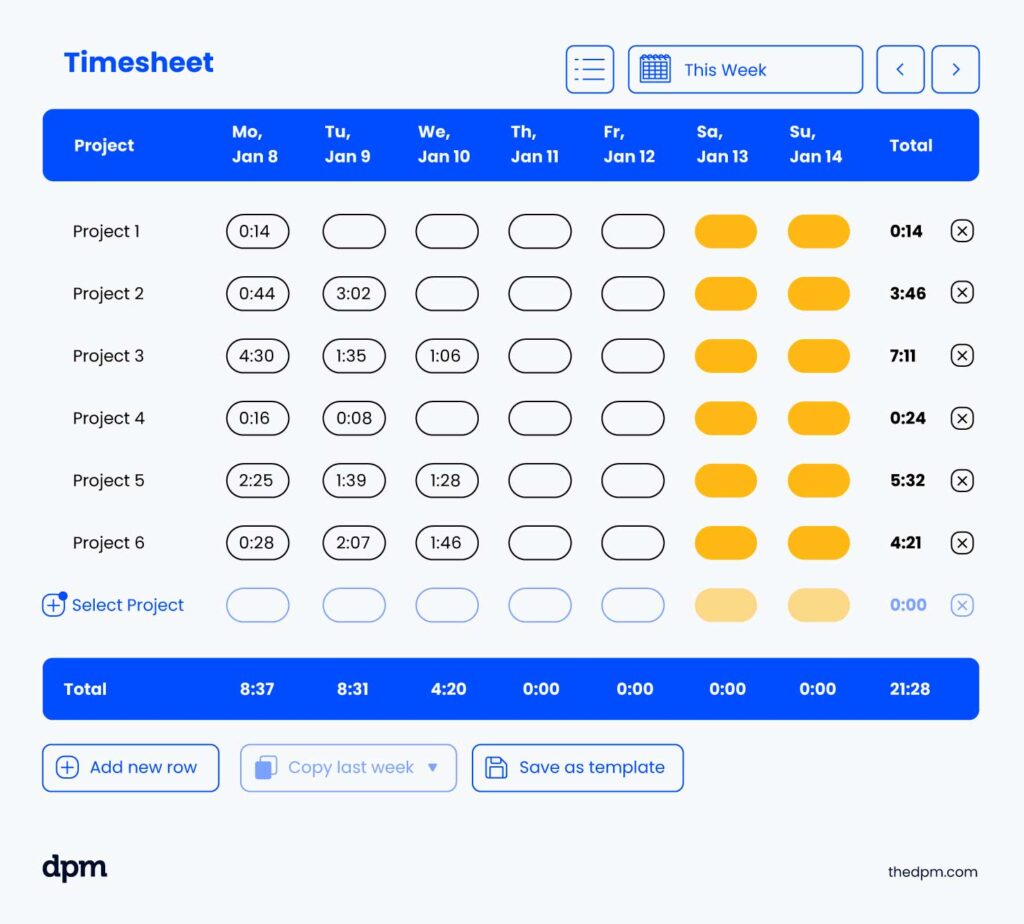

3. Train Your Team Members on the Software
Once you've landed on the right time tracking tool or project management tool, take the time to train your team members on how to use it. After all, they will be the primary users and the more knowledgeable they are, the better results you'll have.
Whether you’re working with large or small teams, be prepared to create a user manual to make timekeeping easy for current and future employees.
4. Analyze the Data and Discuss The Findings With Your Teams
Once your team members have started entering actual data, you're ready to analyze it and share the findings. This will help you and your team make important decisions about how work gets done and look for improvements.
Time Tracking Software For Project Management
Here are my picks for the best time tracking software tools:
Clicks on the links below may earn a commission, which supports our independent testing and review of software and services. Learn more about how we stay transparent.


How to Choose Time Tracking Software
Here are the steps to choose the right time tracking software for your needs.
- Assess your needs: Figure out who on your team needs to use the software and what they need to track. Think about your goals for implementing software as well: are you trying to increase productivity, improve compliance, or bill clients more accurately? You should also consider industry-specific tools, like time tracking software for consultants, for example.
- Consider usability: Look for software tools that are easy to use and to get up and running with. If you need mobile accessibility, make sure any options you're considering offer it.
- Determine a budget: How much can you spend on the tool, either monthly or annually? Don't forget to take into account scalability. Will you need to add more users or storage space in the future? What about add-ons or additional modules?
- Consider integrations: Make sure any software tools you're considering are able to integrate with other tools you're already using for things like project management, finance, invoicing, or resource management. Check whether tools offer API or Zapier access so you can build custom integrations.
- Evaluate features: Compare the core features offered by different tools, as well as any extra or stand-out tools that might offer more value for your money.
- Test trials and demos: Once you have a few options in mind, take them for a test drive and check out the user interface and key features. It can also be a good idea to get feedback from a few team members.
- Read reviews: It's also a good idea to read a few unbiased user reviews. These can give you insights on where the tool might fall short or not be fit for your use case, which can help narrow down your options.
Key Features of Time Tracking Software
Here are some key features to look for when you're evaluating time tracking software.
- Real-time tracking: Allows team members to start, pause, and stop timers instantly to capture work hours accurately without manual input.
- Timesheet management: Speeds up timesheet creation, approval, and submission and reduces administrative work for teams.
- Project-based tracking: Lets users log time for specific projects or tasks to maintain accurate client billing and productivity analysis.
- Billable and non-billable time: Differentiates between revenue-generating and internal work to help you optimize resource allocation.
- Payroll integration: Syncs tracked hours with payroll systems to streamline wage calculations and reduce manual data entry.
- Automated reminders: Sends alerts for missing time entries, idle tracking, and upcoming deadlines to improve compliance and accuracy.
- GPS and geofencing: Tracks employee locations for fieldwork and remote teams to maintain accountability and accurate jobsite logging.
- Custom reporting: Generates detailed reports on time usage, efficiency, and labor costs to support data-driven decision-making.
- Multi-device accessibility: Provides seamless tracking across desktop, mobile, and web platforms so team members can track flexibly.
- User roles and permissions: Controls access levels to safeguard sensitive data and make sure only authorized personnel can modify time records.
Is Time Tracking Just Micromanagement?
No, time tracking is not about having a time tracker to monitor employee time entries, absences, or when team members clock in for micromanagement purposes. It's quite the opposite. No one benefits from micromanagement.

The purpose of time tracking is to make sure project teams are working smarter, not harder.
Time tracking is a powerful tool for gathering accurate time-related data about precious work hours. It lets you as the project manager find areas for improvement in workflows, remove project bottlenecks, cut out waste, and increase impact through higher-value work (even as project teams tend to think time tracking is bad).
What’s Next?
If you're looking for time tracking software that is more remote-friendly, we recommend checking out our list of the best remote time tracking software.
Want to connect with other digital project managers to share resources and best practices? Join our membership community and get access to 100+ templates, samples, and examples and connect with 100s of other digital project managers in Slack.


