

10 Best Client Onboarding Software Reviewed in 2026

Best Client Onboarding Software Shortlist


The best client onboarding software lets you automate onboarding tasks, track deadlines, and make sure each client gets a smooth start. Without the right tool, you'll struggle to stay organized, handle onboarding efficiently, and keep your clients happy. This is makes it more difficult to build a good working relationship with your clients and meet their expectations throughout your engagement.
I’ve used my experience running an agency and 3+ years of testing software to review dozens of tools and curate my list of the best client onboarding software. Each of my recommendations below will reduce the amount of onboarding tasks on your plate so you can focus on priority work for clients. I cover key features of each tool and how they help, as well as pros and cons and typical use cases.
Why Trust Our Software Recommendations
Our team has been testing and reviewing software since 2012. As project managers ourselves, we know how difficult—and important—it is to choose the right software.
For this guide, we evaluated tools using hands-on testing and independent research, scoring tools using our selection criteria. We also draw on insights from industry thought leaders and practicing project management experts.
Our reviews reflect our human editorial judgment, not a sales pitch.
Expert reviewers:
Client Onboarding Software Comparison Table
The table below compares pricing details for my top client onboarding software selections.
| Tool | Best For | Trial Info | Price | ||
|---|---|---|---|---|---|
| 1 | Best for CRM-triggered onboarding automation | 14-day free trial | From €59/user/month | Website | |
| 2 | Best for interactive training and automation | 14-day free trial | Pricing upon request | Website | |
| 3 | Best for client communication management | Free demo available | From $5,000/year (billed annually) | Website | |
| 4 | Best for mobile-friendly client training | Free trial available | From $6.91/user/month (billed annually) | Website | |
| 5 | Best with 1,000+ prebuilt app connectors | 30-day free trial | Pricing upon request | Website | |
| 6 | Best for agentic AI capabilities | 14-day free trial + free demo available | From $19/user/month (billed annually) | Website | |
| 7 | Best for custom onboarding portals | Free plan + free demo available | From $350/month (billed annually) | Website | |
| 8 | Best for managing onboarding projects | Free plan + free demo available | From $10/user/month | Website | |
| 9 | Best for customer retention | Free demo available | Pricing upon request | Website | |
| 10 | Best for custom in-app experiences | 14-day free trial | From $299/month | Website |


Best Client Onboarding Software Review
Below are my detailed summaries of the best client onboarding software that made it onto my shortlist. My reviews offer a detailed look at the key features, pros & cons, integrations, and ideal use cases of each tool to help you find the best one for you.

Best for CRM-triggered onboarding automation
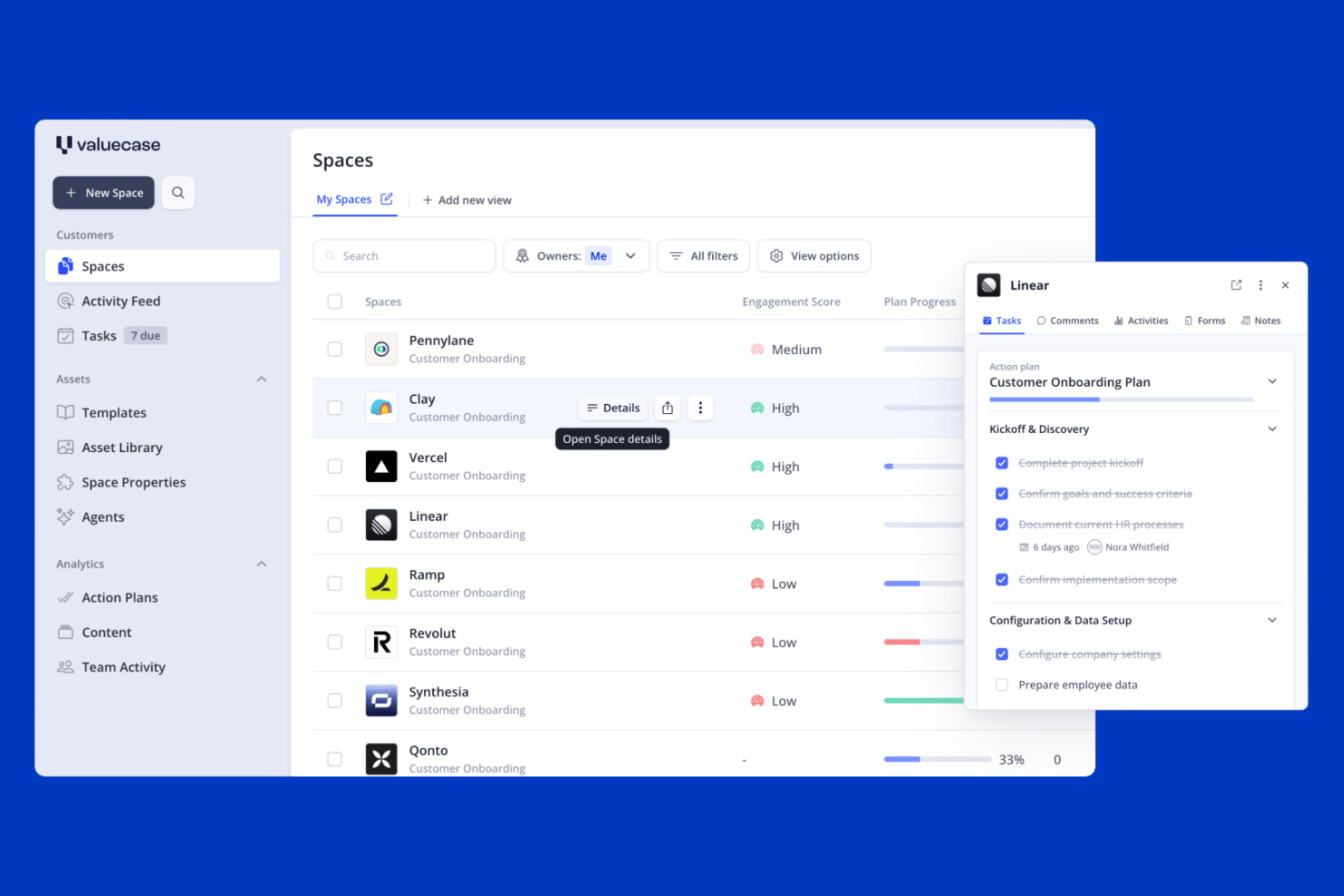
Valuecase is a client onboarding platform that combines branded client Spaces, CRM-triggered workflow automation, intake forms, and built-in live chat into a single workspace.
Who Is Valuecase Best For?
Valuecase is a strong fit for B2B SaaS teams that want to automate the handoff from sales to onboarding using CRM data from HubSpot or Salesforce.
Why I Picked Valuecase
Valuecase earns its spot on my shortlist because of how well it handles the sales-to-onboarding handoff using live CRM data. When a deal closes in HubSpot or Salesforce, Valuecase can automatically spin up a personalized client Space, pre-populated with the right tasks, forms, and milestones, without anyone touching it manually. I also like the built-in live chat inside each Space, which keeps client questions tied to the onboarding record instead of scattered across inboxes.
Valuecase Key Features
- No-login client access: Clients open their onboarding Space via a shared link without creating an account, with optional password protection available.
- Multilingual support: Spaces automatically detect and display content in the client's language across 7+ supported languages using AI-powered translation.
- Reusable Space templates: Build and save unlimited onboarding templates with tasks, milestones, forms, and embedded content to deploy across new accounts instantly.
- Engagement analytics: Track client activity, content usage, and time-to-completion across all active Spaces from a central dashboard to spot at-risk accounts early.
Valuecase Integrations
Valuecase offers native integrations with HubSpot, Salesforce, and Calendly, plus connections to Google Drive, Google Docs, Google Slides, Slack, and Microsoft Teams. It also supports Make, Albato, Zapier, and a REST API for custom integrations.
Pros and Cons
Pros:
- Built-in multilingual and AI-powered features
- CRM-triggered onboarding automates sales handoff
- Branded client portals with no-login access
Cons:
- E-signature features lack compliance depth
- No native project management tool integration
SkyPrep
Best for interactive training and automation
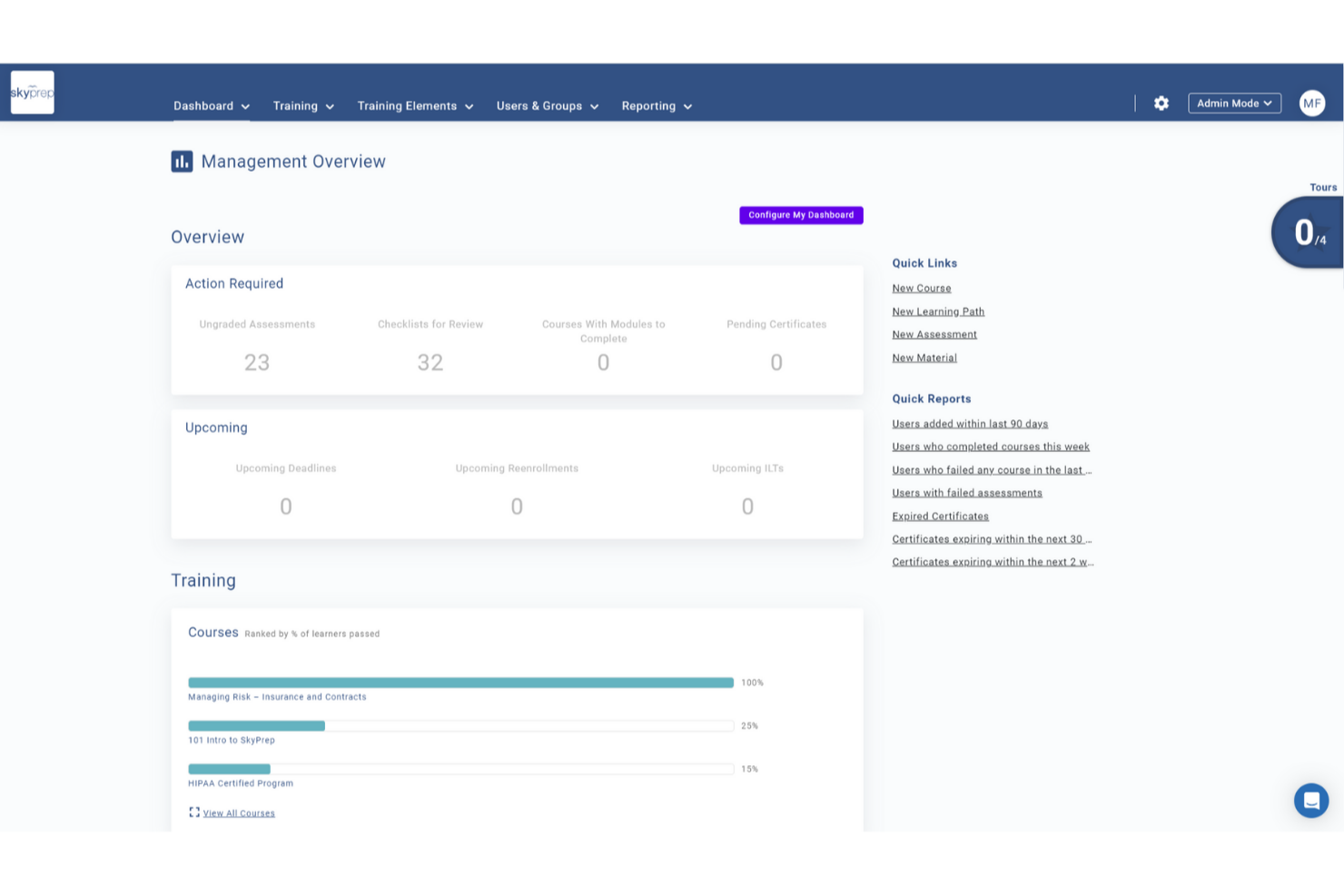
For teams looking to support client onboarding through structured training, SkyPrep offers a flexible learning platform used across industries such as corporate training, compliance, and customer education. Your team can leverage its dynamic course creation and user management capabilities to address the common challenge of engaging new clients effectively. By focusing on improving the onboarding experience, SkyPrep empowers businesses to foster stronger relationships with clients from the start.
Why I Picked SkyPrep
I picked SkyPrep for its exceptional ability to simplify client onboarding through its interactive training and automated notifications. The platform's interactive training allows you to customize and gamify content, keeping your clients engaged and motivated throughout the onboarding process. Additionally, automated notifications ensure clients receive timely reminders about their training requirements, helping them stay on track and reducing the manual effort on your team.
SkyPrep Key Features
In addition to its interactive training and automated notifications, SkyPrep offers:
- Course Auto-Enrollment: Automatically assigns new users to relevant training based on their profiles, ensuring they receive appropriate onboarding without manual intervention.
- Learning Paths: Organizes courses into structured sequences, allowing learners to progress through prerequisite training systematically.
- Resource Center: Centralizes training materials like videos and PDFs, providing easy access for new clients to support their learning.
- White Labeling: Customizes the LMS with branding options, enhancing the onboarding experience and fostering engagement.
SkyPrep Integrations
Integrations include PayPal, Stripe, Cisco Webex Meetings, ClickMeeting, GoToMeeting, Microsoft Teams, Zoom, Active Directory Connector, ADP, and BambooHR.
Pros and Cons
Pros:
- Offers robust data protection for secure client information handling
- Automated notifications keep clients informed about training progress
- Interactive training customizes content for engaging client onboarding
Cons:
- Some users find the reporting features lacking depth
- Users report occasional glitches with video uploads

Moxo
Best for client communication management

Moxo is a client collaboration and workflow automation platform aimed at businesses looking to enhance client communication and streamline processes. It serves industries like real estate and banking, focusing on client onboarding, document management, and task coordination.
Why I Picked Moxo
Moxo helps you manage client communication through role-based portals, so everyone knows where to go and what to do. Its AI handles the repetitive stuff, so your team can focus on real decisions. It also connects with your systems to keep everything running smoothly and organized.
Moxo Key Features
In addition to communication management, Moxo offers several other features for client onboarding.
- Workflow Automation: You can automate complex processes and eliminate manual tasks by creating customizable workflows that integrate forms, approvals, and e-signatures.
- Document Management: This includes document uploads, e-signature capabilities, version control, audit trails, and compliance tracking to help you manage documents efficiently and securely.
- Analytics and Reporting: You can track key metrics to identify bottlenecks and improve processes. This feature helps you optimize the onboarding workflow and improve overall efficiency.
- Zero-Login Access: This provide clients with easy access to portals and lets them engage without creating accounts, which increases completion rates.
Moxo Integrations
Integrations include Salesforce, Slack, Gmail, Box, Stripe, HubSpot, Jira, QuickBooks, Jotform, and Docusign.
Pros and Cons
Pros:
- Supports multiple industries
- Integrates AI effectively
- Boosts client communication
Cons:
- Requires technical setup
- Integration challenges

Best for mobile-friendly client training

iSpring LMS is a cloud-based learning management system (LMS) designed to make client onboarding efficient and engaging. It provides businesses with tools to deliver personalized learning paths, track progress, and keep clients engaged through interactive content.
Why I Picked iSpring LMS
I picked iSpring LMS for its strong mobile and offline learning capabilities, which make it easy for clients to complete training anytime, anywhere. It also supports development plans and compliance training, which can help businesses tailor onboarding experiences to different client needs. Additionally, iSpring LMS stands out for its robust reporting features that give you insights into client progress and training effectiveness.
iSpring LMS Key Features
In addition to being mobile-friendly, iSpring LMS offers a range of other features that can help with client onboarding.
- Launch and Engage: You can create and assign digital onboarding programs with interactive training paths that keep clients engaged from the start.
- Automation: This lets you automatically enroll clients, assign relevant training, and send notifications to reduce manual workload and ensure timely progress.
- Tracking: You can monitor client progress in real-time and adjust the training approach to better meet their needs.
- Newsfeed: This lets you keep clients informed and connected throughout their onboarding journey by sharing updates and important information.
iSpring LMS Integrations
Integrations include BambooHR, Tilda, Shopify, Zoom, Microsoft Teams, Google Meet, and Salesforce.
Pros and Cons
Pros:
- Robust reporting and analytics
- Strong mobile and offline learning support
- AI-assisted course creation tools
Cons:
- Fewer gamification features compared to competitors
- Limited customization for course layouts
New Product Updates from iSpring LMS

iSpring LMS Adds Multiple Observations to OJT Sessions
iSpring LMS now lets managers log multiple observations within one OJT session, grouping visits and auto-generating summary stats like averages, criterion results, and comparisons. For more information, visit iSpring LMS's official site.

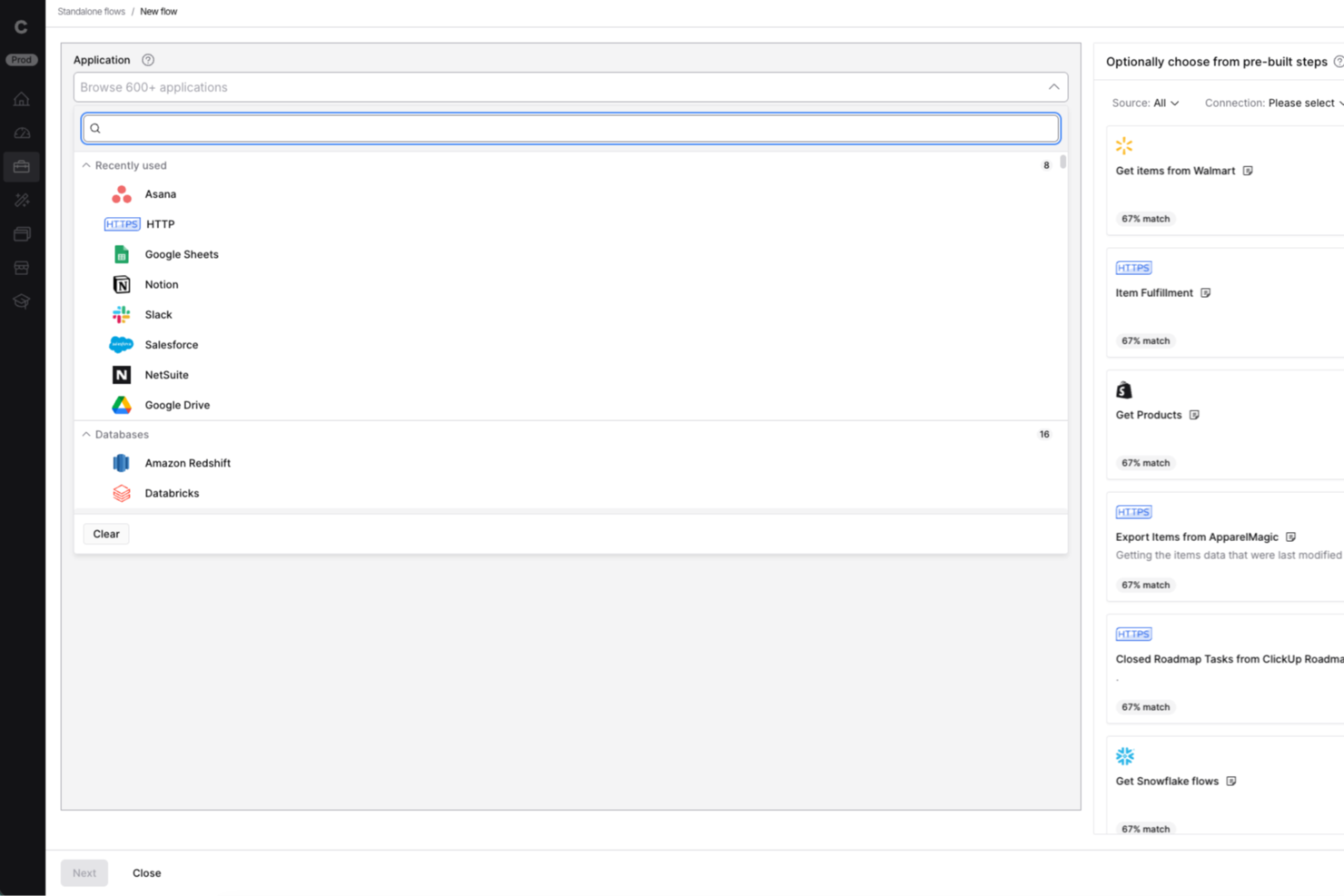
Celigo is an integration and automation platform for businesses that need to connect multiple apps and automate onboarding workflows, helping teams in IT, operations, and client services eliminate manual data entry and streamline client onboarding across systems.
Who Is Celigo Best For?
Celigo suits IT and operations teams at mid-sized to large businesses that need to automate onboarding across multiple apps and platforms.
Why I Picked Celigo
I picked Celigo as one of the best because I can connect over 1,000 apps right out of the box, which is a huge advantage when onboarding clients who use a mix of systems. My team uses the prebuilt connectors to automate data flows between CRMs, billing, and support tools without custom development. In practice, that means we can quickly set up onboarding workflows that sync client data across platforms like Salesforce, NetSuite, and Zendesk.
Celigo Key Features
- Visual flow builder: Design onboarding workflows using a drag-and-drop interface.
- Error management dashboard: Monitor and resolve integration errors from a single dashboard.
- Role-based access controls: Set permissions for team members managing onboarding processes.
- API management tools: Configure and manage custom API integrations for unique onboarding needs.
Celigo Integrations
Integrations include Salesforce, Microsoft Dynamics 365 Business Central, Oracle NetSuite, Walmart, SAP, Snowflake, Acumatica, Adobe, ADP, and 3PL Central.
Pros and Cons
Pros:
- Enables granular field-level data mapping
- Provides real-time error monitoring and alerts
- Offers protocol compatibility for legacy systems
Cons:
- Limited onboarding templates for niche industries
- Requires technical setup for advanced workflows
New Product Updates from Celigo
Celigo Expands Microsoft Entra Authentication for SQL Connectors
Celigo’s Azure Synapse and MS SQL connectors now support Microsoft Entra service principal authentication via client secrets and certificates, so you can connect securely without relying on SQL credentials. For more information, visit Celigo’s official site.
 .
.
Best for agentic AI capabilities

Rocketlane is a professional services automation (PSA) and customer onboarding tool built for project managers and service delivery teams. It combines project management, financial tracking, and resource planning to enhance team collaboration and drive better service delivery.
Adam Bushell, owner and director of AB Electrical and Communications, found the shared dashboards especially impactful: “Clients could log in at any point to see exactly where their project stood. That transparency reduced misunderstandings, minimized disputes, and made handovers seamless.”
Why I Picked Rocketlane
Rocketlane lets you and your team collaborate closely with clients using shared workspaces. You can use project templates and automations to stay efficient and on schedule. Its agentic AI updates help you keep clients in the loop without extra effort. It's built to make remote work and communication easier.
Rocketlane Key Features
In addition to remote collaboration, Rocketlane offers several other features that cater to effective client onboarding.
- SmartFill: This simplifies the process of filling out project information and creating updates and minimizes manual data entry.
- Customer Portals: This helps facilitate communication and accountability through shared portals and automated reminders for a seamless client experience.
- Unified Project Management: This combines various project management tasks into one platform, reduces the need for multiple tools, and increases efficiency.
- Performance Insights: This provides analytics on project performance, team utilization, and customer satisfaction to help you make informed decisions.
Rocketlane Integrations
Integrations include Salesforce, HubSpot, Slack, Google Calendar, Zapier, and Jira.
Pros and Cons
Pros:
- Automated task management
- Real-time client interaction
- AI-driven updates
Cons:
- Initial setup complexity
- Limited offline access
New Product Updates from Rocketlane

Rocketlane Introduces Governance and Workforce Agents
Rocketlane introduces Governance Agents and Workforce Agents to automate delivery processes and recurring tasks. These updates help teams enforce rules and streamline project execution. For more information, visit Rocketlane’s official site.
 .
.
Dock
Best for custom onboarding portals

Dock is a client onboarding and collaboration platform designed for businesses that need personalized client interactions. It serves teams in sales, customer success, and project management, helping them create custom onboarding portals and manage client communication.
Why I Picked Dock
It allows you to create custom onboarding portals tailored to your clients' needs. These portals can include personalized content, making client interactions more meaningful. The platform supports document sharing and tracking, ensuring your clients have everything they need in one place. Its focus on customization makes it ideal for businesses that value personalized client experiences.
Dock Key Features
Dock also offers several other features that make it a compelling choice for client onboarding software.
- Templated Workspaces: This lets you quickly set up onboarding workspaces, which saves time and helps maintain consistency across different clients.
- Survey Forms: You can create and distribute survey forms to collect valuable client feedback during the onboarding process, which helps with continuous improvement and client satisfaction.
- File Upload Buttons: This lets clients easily upload necessary documents without needing to navigate away from the onboarding portal, which streamlines the data collection process.
- Analytics and Reporting: You can track customer engagement and onboarding progress and get insights that can help refine and improve the onboarding experience.
Dock Integrations
Integrations include Salesforce, HubSpot, Slack, Google Drive, Microsoft Teams, Asana, Jira, ClickUp, and Zoom.
Pros and Cons
Pros:
- Tracks document engagement
- Supports collaborative editing
- Customizable client portals
Cons:
- Limited offline functionality
- Learning curve for new users

ClickUp
Best for managing onboarding projects

ClickUp is a productivity platform that brings together various tools for client management, project management, communication, and collaboration. By consolidating tasks, calendars, and other essential functions under one roof, ClickUp can help and your team onboard clients and manage and execute projects.
Why I Picked ClickUp
I picked ClickUp because of its ability to automate task assignments, which helps your team focus on more important aspects of client management without getting bogged down by manual processes. ClickUp lets you monitor onboarding progress and collect feedback and provides valuable insights into how to optimize the experience for new clients.
ClickUp's project tracking tools are another reason it stands out as a client onboarding software. These tools help you keep tabs on multiple aspects of your onboarding projects, so nothing falls through the cracks. The platform also provides features for collecting employee feedback and analyzing training performance, so you can keep improving your onboarding procedures.
ClickUp Key Features
ClickUp also offers several other features tailored for client onboarding.
- AI-Powered Assistance: This helps you generate checklists and summaries and makes it easier to organize and track client onboarding tasks.
- Centralized Documentation: ClickUp provides a single location to store client-related documents and make sure your team always has easy access to necessary information.
- Collaborative Spaces: This lets your team and clients communicate openly and share feedback, which fosters a more interactive onboarding process.
- Automated Follow-Ups: You can maintain client engagement by scheduling and sending follow-up messages automatically.
ClickUp Integrations
Integrations include Microsoft OneDrive, Outlook, Google Calendar, Slack, Trello, Asana, Jira, GitHub, Zoom, Twilio, Zendesk, and Salesforce.
Pros and Cons
Pros:
- Highly customizable interface
- Comprehensive task management features
- Effective for managing multiple projects and deadlines
Cons:
- Limited offline functionality
- Setup time may be excessive for short-term projects
New Product Updates from ClickUp
ClickUp Adds Meetings Hub, Super Agent Templates, and ZoomInfo Integration
ClickUp adds a searchable Meetings Hub, new ways to clone and template Super Agents, and a ZoomInfo integration through the App Center. These updates improve meeting retrieval, agent reuse, and access to sales intelligence. For more information, visit ClickUp’s official site.

Best for customer retention
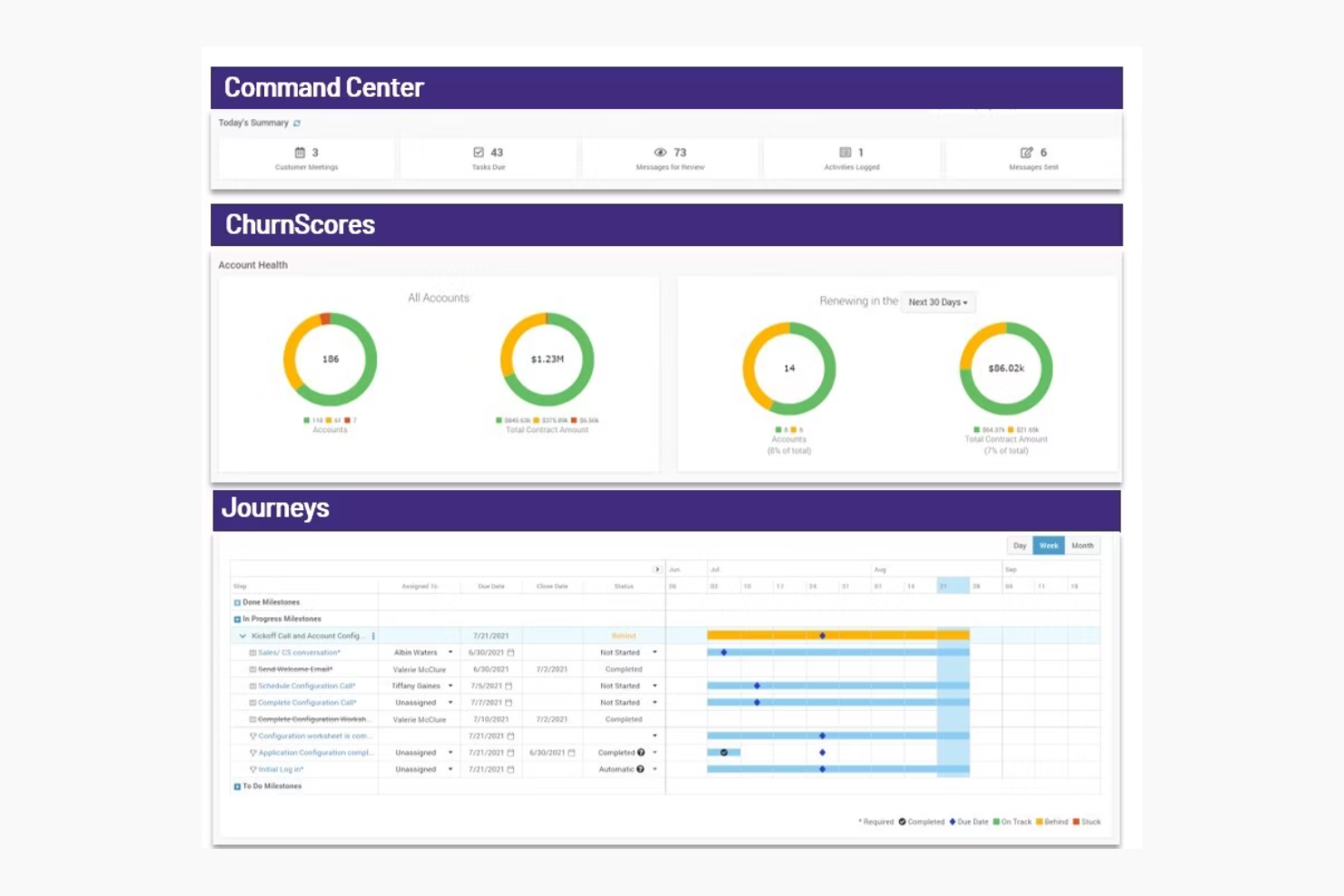
ChurnZero is a customer success platform designed for SaaS companies and customer success teams. It focuses on improving customer retention and engagement by providing insights, analytics, and communication tools.
Why I Picked ChurnZero
ChurnZero helps you keep customers by showing real-time health scores, so your team can spot at-risk accounts early. You can use automated playbooks to reach out before issues grow. Its in-app messaging lets you talk to users right where they are. It's built for SaaS teams focused on retention.
ChurnZero Key Features
ChurnZero also offers a variety of other features that can help you with client onboarding.
- Comprehensive Customer View: You get real-time insights into customer health and sentiment by integrating data from product usage, CRM, and support systems.
- AI-Powered Tools: You can automate administrative tasks to free up your team for more strategic customer interactions.
- Collaboration and Automation: This lets you use chatbots, customer playbooks, and real-time alerts to boost team efficiency.
- Advanced Analytics: You can monitor customer relationships and predict churn risk with tools like health scores and detailed reporting.
ChurnZero Integrations
Integrations include Salesforce, HubSpot, Zendesk, Slack, Intercom, Mailchimp, Microsoft Dynamics, and Pipedrive.
Pros and Cons
Pros:
- Ideal for SaaS companies
- Customizable success dashboards
- Automated engagement playbooks
Cons:
- Costly for smaller teams
- Complex setup process

Userpilot
Best for custom in-app experiences

Userpilot is a product growth platform that can improve client onboarding. It offers tailored in-app experiences that guide new users and make sure they're getting the most out of your product or services.
Why I Picked Userpilot
One of the reasons I picked Userpilot is its ability to create customized in-app experiences without the need for coding. This lets you guide users through your product in a way that feels natural and intuitive to them. Another feature is its in-app feedback collection, which lets you gather user insights directly from within the app so you can understand user needs and improve your product accordingly.
Userpilot also offers session replay capabilities, which lets you visualize user journeys and identify areas for improvement. This feature is invaluable for refining your onboarding process and making sure users can navigate your product with ease. Additionally, Userpilot provides mobile support so you can create mobile-first onboarding experiences that cater to users on the go.
Userpilot Key Features
Userpilot also offers a wealth of other features that can help you improve client onboarding and user engagement.
- Onboarding Checklists: This helps users learn about the product and reduce time-to-value. You can create them with a no-code builder that triggers specific actions and tracks progress through analytics.
- Resource Centers: This provides self-service support and lets users find answers without leaving the product. It's also built with a no-code editor for targeted modules.
- User Segmentation: You can set up personalized onboarding by segmenting users based on demographics and product usage, which allows for targeted flows and detailed analytics.
- NPS Surveys: You can create and analyze net promoter score surveys using a no-code builder, with options for audience targeting and AI-powered localization for translations.
Userpilot Integrations
Integrations include HubSpot, Salesforce, Segment, Google Tag Manager, Zendesk, Google Analytics, Intercom, Amplitude, Mixpanel, and Heap.
Pros and Cons
Pros:
- Track product growth goals and analyze feedback
- Fast implementation and deployment of features
- Offers customizable options
Cons:
- Integrations with other tools can be difficult
- Content creation plugin can be cumbersome to use
Other Client Onboarding Software
Here are some additional client onboarding software options that didn’t make it onto my shortlist, but are still worth checking out:
- Whatfix
For in-app guidance
- Appcues
For user onboarding flows
- GUIDEcx
For project transparency
- Process Street
For centralized policy management
- Intercom
For in-app messaging
- Userlane
For custom onboarding content
- Clustdoc
For document collection
- ShareFile
For secure file sharing
- Content Snare
For automated client reminders
- Fenergo
For regulatory compliance
- Leadsie
For managing multi-platform access
- Motion.io
For task automation
- Chameleon
For product tours
- Trupeer
For personalized video creation
- Travitor
For blended learning programs


How I Evaluate Client Onboarding Software
I evaluate every tool in two layers: the baseline capabilities—intake forms, client portals, workflow automation—and the differentiators that separate strong options for agencies and PMOs.
Core Functionality (Table Stakes For This List)
When I'm selecting tools for my list, I rank each one on a scale from 0 (does not offer the functionality) to 5 (excels in this area) for each core functionality listed below. Then, I calculate the tool's total score into a percentage. Each tool needs to achieve a minimum total score of 65% to be considered for inclusion.
- Client Intake Forms: I check whether a tool lets you build branded questionnaires with conditional logic—like surfacing different fields for a retainer client vs. a one-off project.
- Document & File Collection: The ability to send structured file requests, track what's missing, and nudge clients with reminders matters more than a simple upload button.
- Onboarding Workflow Automation: I look for trigger-based task sequences that move a client through stages automatically, such as assigning a PM after intake is submitted.
- Client-Facing Portal: I evaluate whether clients get a branded space to view their progress, complete tasks, and communicate—without needing a product login or seat.
- E-Signature & Approvals: Tools like HoneyBook and Dubsado handle signatures natively, while others rely on DocuSign or PandaDoc integrations—I check for both paths.
- Project Management Integration: I look at how onboarding data flows into your PM stack, whether that's syncing tasks to Asana, creating projects in ClickUp, or mapping fields into Monday.
Once I have a list of tools that meet the criteria, I consider what sets each platform apart.
Differentiating Factors (What Sets Vendors Apart)
Here's how I compare and contrast different vendors:
Standout Features
Onboarding analytics give you visibility into where clients stall—whether it's a delayed file upload or an unsigned SOW sitting in someone's inbox for days. I look for dashboards that track time-to-onboard and completion rates across accounts. Reusable playbook templates also matter. Being able to clone a proven onboarding sequence for a specific service line saves PMs from rebuilding workflows for every new engagement. I also check whether a tool handles payments within the onboarding flow, letting you collect deposits or retainers before kickoff.
Beyond Features
Integration ecosystem matters here. If your onboarding data doesn't flow into your CRM or PM tool—say, from HubSpot into Asana—you're stuck re-entering client details manually. I also evaluate pricing structures, especially how vendors handle client-facing seats. Some tools charge per external collaborator, which gets expensive fast when you're onboarding dozens of clients per quarter. Time-to-value is another factor I check—whether a platform ships with pre-built templates so your team isn't building everything from scratch during setup.
How to Choose Client Onboarding Software
It’s easy to get bogged down in long feature lists and complex pricing structures. To help you stay focused as you work through your unique software selection process, here’s a checklist of factors to keep in mind:
| Factor | What to Consider |
|---|---|
| Scalability | Can the software grow with your business? Consider whether it can support a growing client base or expanding team. Look for flexible plans or features that accommodate future needs. |
| Integrations | Does it work with your current tools? Make sure it connects with your CRM, email, and other essential platforms. Check for native integrations or API support to avoid extra costs and complexity. |
| Customizability | Can you tailor the software to fit your processes? Look for options to modify workflows, branding, and user roles. Avoid tools that lock you into rigid templates and don't match your needs. |
| Ease of Use | Is it user-friendly? Evaluate the interface and navigation. Software should be intuitive for all team members to reduce training time and errors. |
| Implementation and Onboarding | How quickly can you start using it? Assess the setup time and resources required. Look for tools with guided onboarding, training materials, and support to ease the transition. |
| Cost | What are the total expenses? Examine not just the subscription fee but also any hidden costs like add-ons or integration fees. Compare pricing tiers to find the best value for your budget. |
| Security Safeguards | How does it protect your data? Evaluate encryption methods, access controls, and compliance with data protection standards. Make sure it aligns with your organization’s security policies. |
| Support Availability | What support options are available? Check if they offer 24/7 support, live chat, or dedicated account managers. Reliable support can be crucial during critical moments or technical issues. |
What Is Client Onboarding Software?
Client onboarding software is a tool that lets you organize and automate everything you need to bring on a new client, including forms, tasks, messages, and document sharing.
It’s used by agencies, consultants, and service teams that serve clients in a variety of industries (e.g. marketing, finance, operations) to reduce onboarding time, maintain consistency, and create a structured experience so you can build trust and a rapport with clients. These tools help you avoid messy handoffs so clients feel confident working with you.
Features of Client Onboarding Software
When selecting client onboarding software, keep an eye out for the following key features:
- Customizable workflows: You can build onboarding steps that match your unique process, which lets you adapt to different client needs and industry requirements.
- Automated task management: This lets you automatically assign, track, and remind users of every task, which prevents missed deadlines and keeps work from slipping through the cracks.
- E-signature integration: You can securely collect digital signatures inside the platform, which prevents paperwork, contracts, and agreements from becoming bottlenecks.
- Client portals: This lets you give clients a personalized dashboard where they can upload documents, track progress, and communicate, which keeps everyone in sync with fewer back-and-forth emails.
- Document management: You can organize and store important files securely and easily find what you need without endless digging.
- Compliance tracking: This helps you stay on top of regulatory requirements by automating data collection, approvals, and documentation.
- Automated communication tools: You can set up welcome emails, reminders, or follow-up messages that go out automatically.
- Reporting and analytics: This lets you track progress, identify bottlenecks, get insights into your process, and make improvements that matter.
AI Features to Look for in Client Onboarding Software
Teams using AI-powered client onboarding software can take efficiency and personalization to the next level with features such as:
- AI-driven document processing: AI can automatically extract, validate, and organize information from uploaded documents to reduce manual data entry and errors.
- Smart task automation: You can let AI assign tasks and deadlines based on project complexity and client profiles, which maintains a smooth onboarding experience.
- Predictive analytics: AI can forecast potential delays, identify at-risk clients, and suggest proactive steps to keep onboarding on track.
- Chatbots and virtual assistants: You can set up AI chatbots that offer instant support to clients, answer common questions, guide users through forms, and escalate issues when needed.
- Personalized onboarding journeys: AI can analyze client data and recommend tailored onboarding steps, resources, and communication, which makes each client feel valued and understood.
- Natural language processing (NLP): AI can automatically analyze client communications to detect sentiment, urgency, or compliance issues, which helps your team respond more effectively.
Benefits of Client Onboarding Software
Implementing client onboarding software provides several benefits for your team and your business. Here are a few you can look forward to:
- Improved organization: Keeps all client information and documents in one place, making it easy for your team to access and manage.
- Enhanced client communication: Offers tools like in-app messaging and client portals to maintain clear and efficient communication with clients.
- Time savings: Automates repetitive tasks and workflows, freeing up your team to focus on more important activities.
- Increased client satisfaction: Provides clients with a smooth onboarding experience through interactive product tours and personalized portals.
- Data security: Stores client data securely and protects sensitive information from unauthorized access.
- Better decision-making: Delivers analytics and reporting features that give insights into the onboarding process and client engagement.
- Brand consistency: Allows for custom branding and maintains your company's identity throughout the client journey.
Costs and Pricing of Client Onboarding Software
Selecting client onboarding software requires an understanding of the various pricing models and plans available. Costs vary based on features, team size, add-ons, and more. The table below summarizes common plans, average prices, and typical features included in client onboarding software solutions:
Plan Comparison Table for Client Onboarding Software
| Plan Type | Average Price | Common Features |
|---|---|---|
| Free Plan | $0 | Basic document management, limited user access, and basic support |
| Personal Plan | $5 - $25 /user/month | Document management, task automation, basic analytics, and email support |
| Business Plan | $30 - $60 /user/month | Advanced document management, customizable workflows, in-app messaging, client portals, and priority support |
| Enterprise Plan | $70 - $100 /user/month | Comprehensive analytics, full customization options, a dedicated account manager, advanced security features, and 24/7 premium support |
Client Onboarding Software FAQs
Here are some answers to common questions about client onboarding software:
How can client onboarding software improve communication?
Client onboarding software streamlines communication by centralizing all client information, tasks, and updates in one platform. As a project manager, you can set automatic reminders, track messages, and provide clients with a single point of contact. This reduces back-and-forth emails and helps everyone stay on the same page during onboarding.
How does client onboarding software enhance client satisfaction?
The right onboarding software gives clients visibility into progress, timelines, and what comes next. When you use software to keep clients informed and manage expectations, you reduce confusion and delays. Additionally, automated checklists and timely updates help clients feel supported throughout the onboarding process.
Features like automated task assignments, personalized client portals, and interactive product tours help clients feel supported and informed.
How do project managers automate client onboarding tasks with software?
You can automate repetitive onboarding steps by setting up templates, triggers, and workflows in your onboarding software. For example, automatically sending welcome emails, assigning kickoff tasks, and scheduling follow-ups as soon as a new client signs up.
These automations cut down on manual work and make sure every client gets a consistent onboarding experience. Client onboarding software is a tool that lets you organize and automate everything you need when bringing on a new client, including forms, tasks, messages, and sharing documents.
How do I measure onboarding success using software dashboards or reports?
Use your onboarding platform’s built-in dashboards and reports to track key metrics like task completion rates, client feedback, and onboarding time.
- Task completion rates show how many onboarding steps your clients finish on time. If you see a high completion rate, you know your process is clear and manageable; a low rate means clients may be getting stuck or confused.
- Collecting client feedback, like surveys or ratings, helps you understand your clients’ experience during onboarding. Positive feedback tells you your onboarding is smooth, while negative feedback reveals areas to improve.
- Tracking onboarding time, or how long it takes for a new client to complete the process, helps you spot bottlenecks. Shorter onboarding times often mean your process is efficient, while long delays can signal unnecessary steps.