

10 Best Email Marketing Software For Agencies In 2026

Best Email Marketing Software For Agencies Shortlist


The best email marketing software for agencies lets you automate routine tasks, track campaign performance with detailed analytics, and make data-driven decisions to improve open and click-through rates. The right tool can help you save time and get better results—without it, you'll run into messy work handoffs between team members, campaigns that don't achieve the desired results, and trouble justifying the value of your work to clients.
I’ve used my experience running an agency and 3+ years of testing software to review dozens of tools and curate my list of the best email marketing software for agencies. Each of my recommendations will help you better manage and track your email campaigns, meet key campaign objectives, and deliver impactful work for your clients.
Why Trust Our Software Recommendations
Our team has been testing and reviewing software since 2012. As project managers ourselves, we know how difficult—and important—it is to choose the right software.
For this guide, we evaluated tools using hands-on testing and independent research, scoring tools using our selection criteria. We also draw on insights from industry thought leaders and practicing project management experts.
Our reviews reflect our human editorial judgment, not a sales pitch.
Expert reviewers:
Email Marketing Software for Agencies Comparison Table
Compare pricing and specs for each of my picks for the best email marketing software for agencies side-by-side:
| Tool | Best For | Trial Info | Price | ||
|---|---|---|---|---|---|
| 1 | Best for multi-brand management | Free plan + free demo available | From $30/month | Website | |
| 2 | Best for AI-powered marketing and service agents | Free plan available | From $20/month | Website | |
| 3 | Best for visual email design with built-in automation | Free plan + free trial available | From $19/user/month (billed annually) | Website | |
| 4 | Best for ease of use and support | 14-day free trial + free demo available | From $10.80/month | Website | |
| 5 | Best for user-friendly automation | 30-day free trial | From $7/month (billed annually) | Website | |
| 6 | Best for data-driven marketing automation | Free plan available | From $20/month | Website | |
| 7 | Best for B2C eCommerce brands | 14-day free trial | From $39/month | Website | |
| 8 | Best for automating outreach | Free trial available | From $12.50/month (billed annually) | Website | |
| 9 | Best for reliable email delivery | 60-day free trial available | From $19.95/month | Website | |
| 10 | Best for hyper-personalization | Free trial available | From $11.70/month (billed annually) | Website |
Best Email Marketing Software for Agencies Reviews
This in-depth analysis provides an overview of each agency’s email marketing software. I will get into the nitty-gritty pros and cons of each tool, including pricing, best features, available integrations, and best use cases.
Best for multi-brand management

BigMailer.io is an email marketing platform designed for agencies and franchises looking to efficiently manage multiple clients and projects. It consolidates both promotional and transactional emails, automates data flows, and allows for the customization of email templates.
Why I picked BigMailer: I like its brand management feature, which allows you to oversee all your clients or projects in one place. You can add unlimited brands to the main dashboard and invite team members or clients to manage their brands with controlled access levels. This setup simplifies workflows and ensures efficient collaboration across different teams and clients. BigMailer also supports all email types. You can consolidate promotional and transactional emails, leveraging a unified customer view with real-time engagement-based targeting.
Standout Features & Integrations
Features include customizable email templates, allowing you to bring your existing HTML templates into the classic editor or use the drag-and-drop editor to build mobile-optimized templates. Additionally, the platform provides real-time engagement tracking, helping you monitor how recipients interact with your emails and adjust your strategies accordingly.
Integrations include SparkLoop, Zapier, Integromat, Pabbly, Zoho, and SureTriggers.
Pros and Cons
Pros:
- Unlimited, flexible email templates
- Can host on your own domain
- Ability to manage multiple brands from a single dashboard
Cons:
- Not ideal for ecommerce email marketing
- Limited native integrations
Klaviyo
Best for AI-powered marketing and service agents
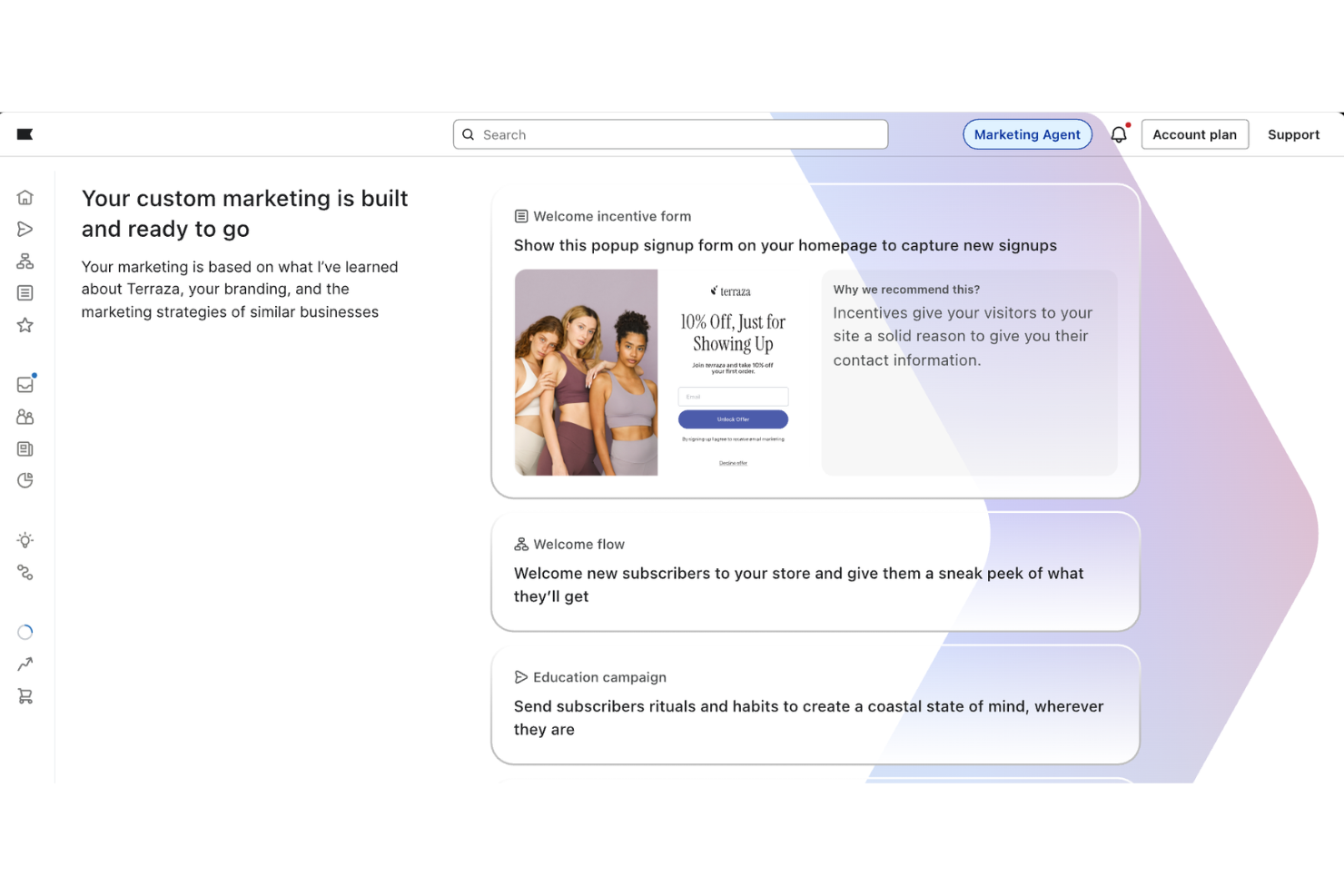
Klaviyo provides an affordable email marketing solution for startups, with support for AI-powered marketing and service agents. Built for growing businesses, it connects customer data, email, and messaging tools in one platform. This helps startups manage outreach, respond to customers, and organize campaigns without relying on multiple systems, while keeping communication grounded in real customer activity.
Why I Picked Klaviyo
I picked Klaviyo for its AI-powered marketing and service agents. These agents use customer data to support campaign creation, messaging decisions, and customer interactions across channels. The platform combines email, SMS, and other touchpoints into a single system, allowing agencies to manage communication from a central place. With built-in customer data and reporting, it helps teams plan campaigns based on actual engagement and behavior.
Klaviyo Key Features
In addition to AI-powered marketing and service agents, I also found Klaviyo offers:
- Unified Customer Profiles: This feature provides a comprehensive view of customer interactions, allowing your team to better understand and serve clients.
- Real-Time Data Activation: With this feature, you can take immediate action on customer data, enhancing responsiveness without additional tools.
- Scalability: Klaviyo is built to handle large data volumes, ensuring reliable performance even during high-traffic periods.
- Proactive Performance Monitoring: This feature offers instant alerts on key metrics, helping your team maintain campaign efficiency.
Klaviyo Integrations
Integrations include Shopify, WooCommerce, Magento, BigCommerce, PrestaShop, Salesforce Commerce Cloud, Stripe, Zendesk, Facebook (Meta), and Google Ads, with some connections supported through API or partner integrations.
Pros and Cons
Pros:
- Integration with numerous ecommerce platforms
- Omnichannel capabilities support varied customer outreach
- Real-time data activation enhances customer engagement
Cons:
- Pricing increases quickly as contact list grows
- Advanced tagging and organization less robust than some competitors
Flodesk
Best for visual email design with built-in automation

For agencies seeking an email marketing software that combines ease of use with aesthetic appeal, Flodesk offers a compelling solution. Designed for businesses that value brand consistency and visual impact, Flodesk empowers your team to craft stunning emails and sales pages with minimal effort. Whether you're launching campaigns or nurturing client relationships, Flodesk addresses the challenge of design limitations by providing tools that let even non-designers produce professional-looking communications.
Why I Picked Flodesk
I picked Flodesk as a fitting choice for agencies due to its emphasis on design and automation. The platform's ability to automate tasks like abandoned cart recovery and advanced segmentation aligns with the needs of agencies managing multiple client campaigns. Moreover, Flodesk's unique ability to upload custom fonts helps maintain brand integrity across all communications. Together, these capabilities and the platform’s visual, guided interface make it a practical choice for teams that want to improve their email marketing without needing advanced design skills or technical experience.
Flodesk Key Features
In addition to its design and automation strengths, Flodesk offers:
- Countdown Timers: This feature helps create urgency in campaigns by adding a visual countdown to emails.
- Embedded Polls: It enables real-time audience engagement by incorporating interactive polls directly into emails.
- Subscriber Growth Tools: Flodesk offers tools to capture subscribers from social media profiles, helping expand your list.
- Analytics Suite: Provides detailed insights into email performance, enabling agencies to make data-driven decisions.
Flodesk Integrations
Integrations include Shopify, Canva, Instagram, and Zapier, with the option for custom API integrations.
Pros and Cons
Pros:
- Flodesk offers visually appealing email templates, enhancing brand image
- Offers clean, visual form and popup builders
- Easy segmentation with visual filters
Cons:
- No native multi-client or agency account dashboards
- Lacks advanced CRM functionality
Best for ease of use and support

MailerLite is a user-friendly email marketing platform designed to help agencies grow their audience and enhance customer relationships. It is best for ease of use and support due to its intuitive interface and comprehensive customer service resources, including 24/7 support and extensive educational materials.
Why I picked MailerLite: I chose MailerLite for its ease of use and dedicated support system, which sets it apart from other email marketing tools. The platform's intuitive drag-and-drop editor and straightforward automation features make it accessible for users of all skill levels. Additionally, MailerLite's commitment to customer support, including 24/7 live chat and a wealth of educational resources, ensures that agencies can effectively utilize the software to meet their marketing goals.
Standout Features & Integrations
Features include a drag-and-drop editor for creating newsletters, robust email automation capabilities, and tools for building websites and landing pages. MailerLite also offers customizable signup forms and email verification to optimize email lists.
Integrations include Shopify, WordPress, WooCommerce, Zapier, Stripe, PayPal, Facebook, Squarespace, Google Analytics, and Slack.
Pros and Cons
Pros:
- Customizable landing pages
- Dedicated support
- Intuitive interface
Cons:
- Basic reporting tools
- Limited advanced features

Moosend
Best for user-friendly automation
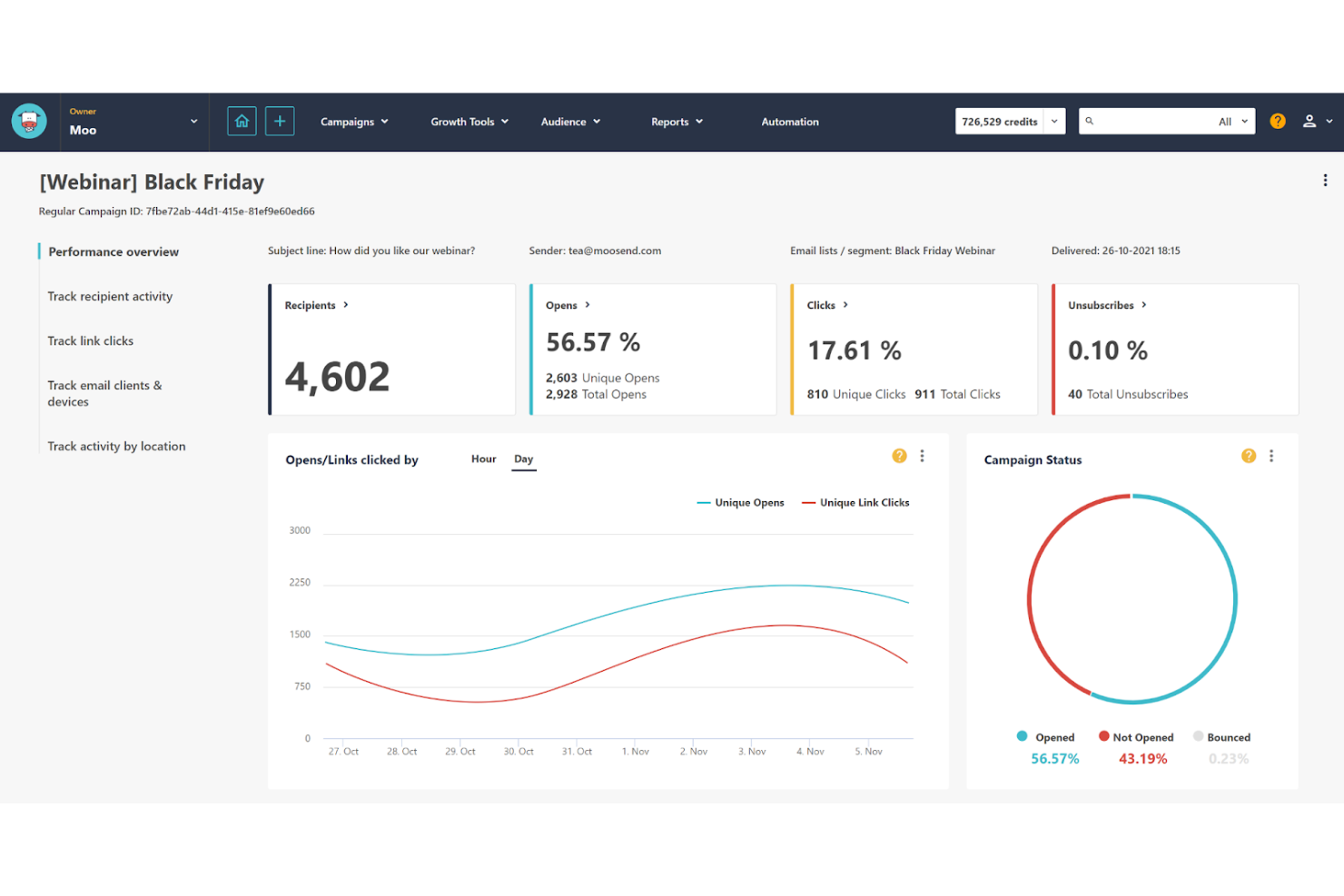
Moosend is a user-friendly email marketing platform designed to help businesses create and automate email campaigns. It is best for user-friendly automation, offering intuitive tools that simplify setting up automated workflows.
Why I picked Moosend: I chose Moosend for its exceptional ease of use and powerful automation capabilities. Unlike other email marketing tools, Moosend stands out with its intuitive interface and pre-made automation templates, making it accessible even for those with limited technical skills. Moosend is best for user-friendly automation because it allows agencies to set up complex workflows effortlessly, saving time and reducing the learning curve.
Standout Features & Integrations
Features include a drag-and-drop email editor, customizable templates, advanced segmentation, and detailed analytics. Moosend also offers a visual workflow builder and over 100 automation triggers, which are particularly useful for creating personalized customer journeys.
Integrations include Shopify, WooCommerce, Salesforce, Zapier, WordPress, Adobe Commerce, PrestaShop, BigCommerce, HubSpot, and Google Analytics.
Pros and Cons
Pros:
- Detailed analytics
- Advanced automation
- Easy to use
Cons:
- Fewer native integrations
- Basic template options
Klaviyo
Best for data-driven marketing automation

Klaviyo is a marketing automation platform for email marketing, SMS, and customer data management. It is best known for its data-driven marketing automation capabilities.
Why I picked Klaviyo: I chose Klaviyo for this list because of its data-driven approach to marketing automation, which sets it apart from other email marketing software. Klaviyo leverages customer data to create highly personalized and effective marketing campaigns, making it particularly suitable for agencies that must deliver targeted and data-driven marketing strategies for their clients.
Standout Features & Integrations
Features include advanced segmentation, automated workflows, and detailed analytics. These tools allow agencies to create highly personalized marketing campaigns that can adapt based on real-time customer behavior and data insights.
Integrations include Shopify, WooCommerce, Adobe Commerce, BigCommerce, Salesforce, Stripe, Facebook, Google Ads, Zendesk, and Slack.
Pros and Cons
Pros:
- Extensive integrations
- Real-time analytics
- Advanced segmentation
Cons:
- Slightly complex setup
- Limited automation triggers

Drip
Best for B2C eCommerce brands
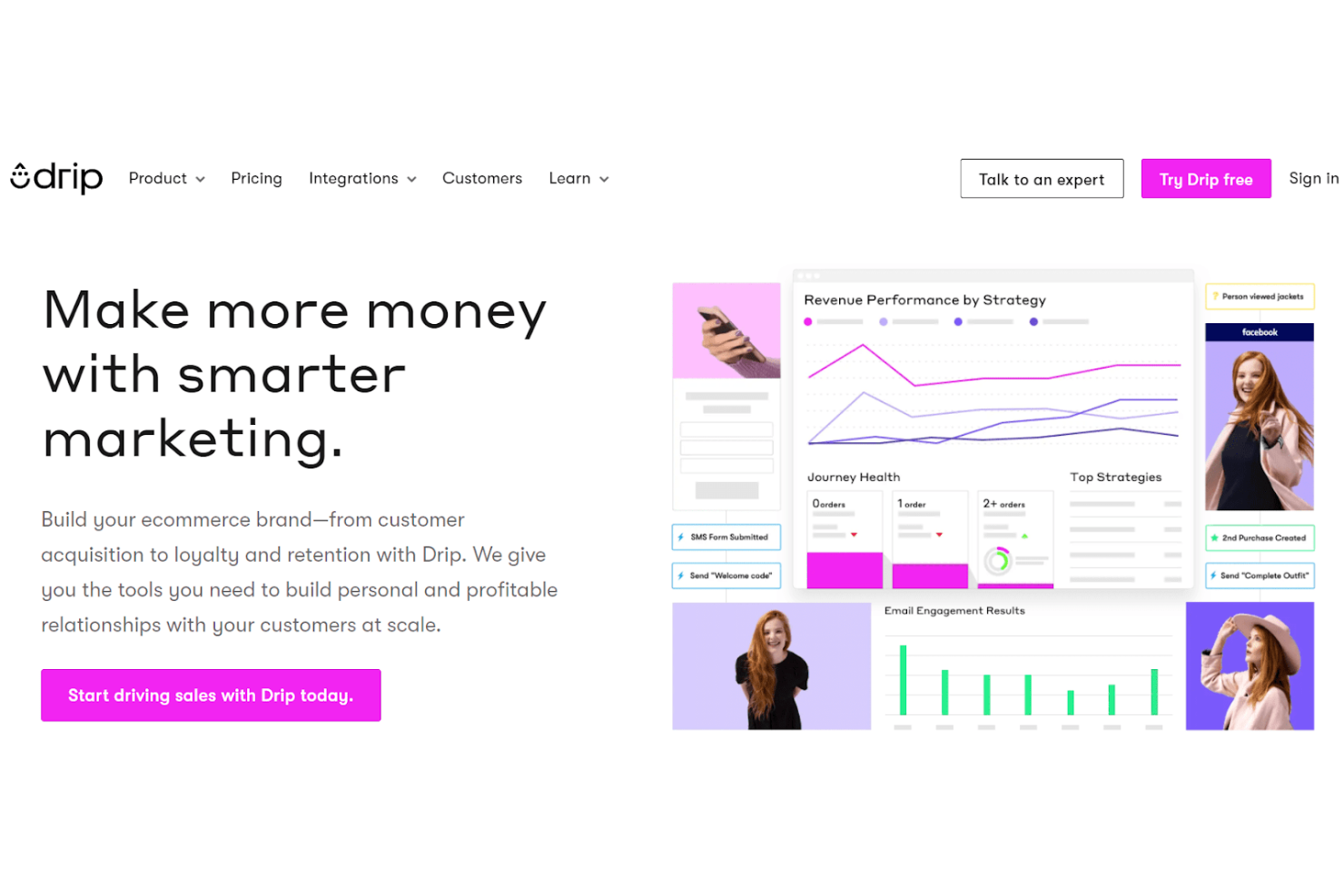
Drip is a powerful email marketing platform designed specifically for B2C eCommerce brands. It excels in providing advanced marketing automation and dynamic segmentation capabilities.
Why I picked Drip: I chose Drip for its exceptional focus on B2C eCommerce brands, which sets it apart from other email marketing tools. Drip's advanced features, like dynamic segmentation and multi-channel automation, make it ideal for agencies aiming to execute sophisticated marketing strategies. Its user-friendly interface and reliable functionality ensure that even complex campaigns can be managed effortlessly.
Standout Features & Integrations
Features include dynamic segmentation for targeted messaging, multi-channel automation for comprehensive marketing strategies, and an intuitive email design interface. Drip also offers onsite marketing capabilities, allowing users to create campaigns that engage visitors directly on their websites.
Integrations include Shopify, Zapier, Facebook, Instagram, WooCommerce, Adobe Commerce, BigCommerce, Privy, Justuno, and OptinMonster.
Pros and Cons
Pros:
- User-friendly interface
- Multi-channel automation
- Advanced segmentation
Cons:
- Limited template options
- Slow feature updates

AWeber
Best for automating outreach
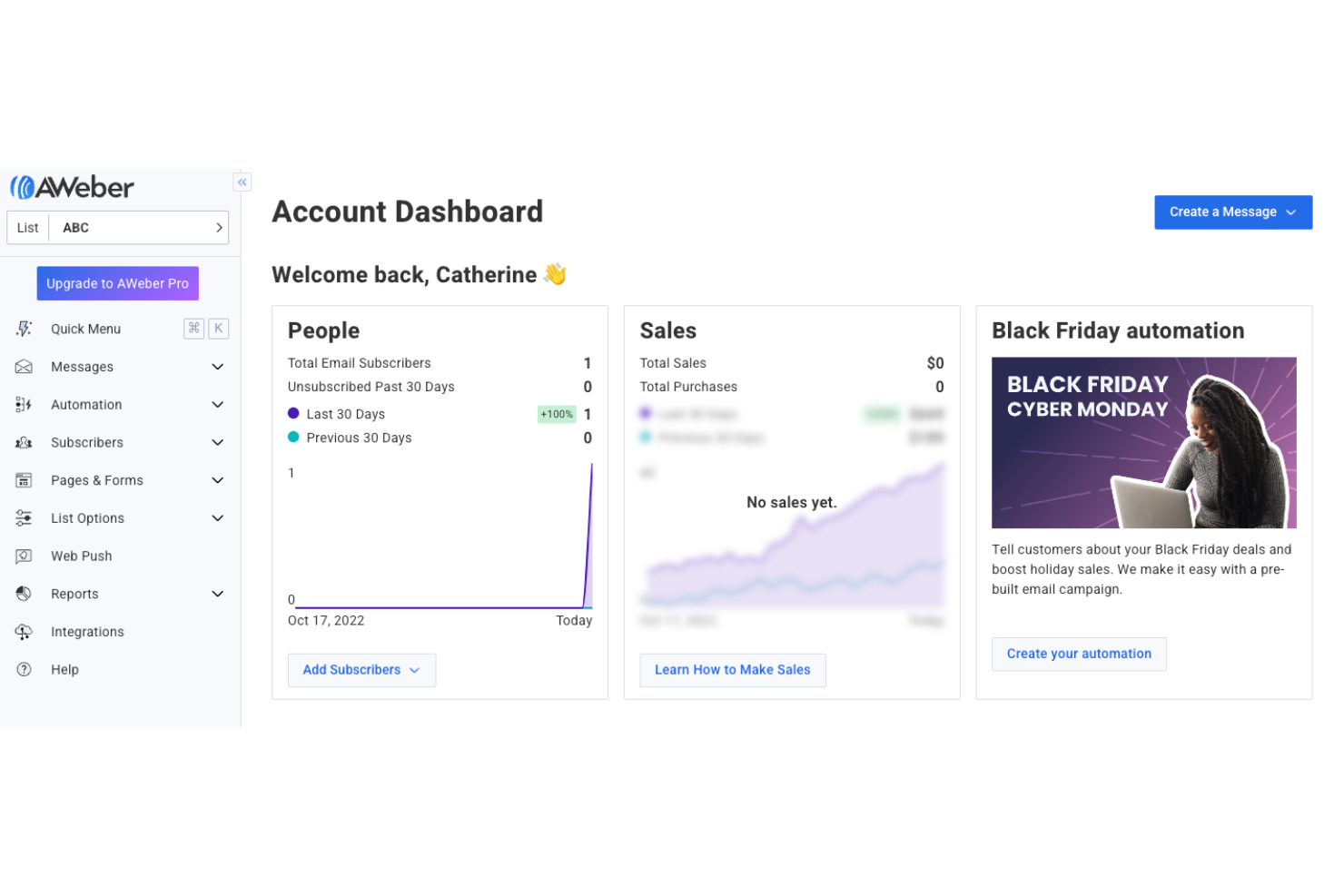
AWeber is versatile email marketing software designed for businesses of all sizes, from beginners to advanced users. It offers a range of features, including email marketing, automation, landing page creation, eCommerce capabilities, web push notifications, and an AI writing assistant.
Why I picked AWeber: I chose AWeber because of its useful automation features that are tailored to small businesses and agencies. AWeber stands out due to its user-friendly interface and tools that simplify email marketing for small businesses. Its automation capabilities make it the best choice for small business automation, allowing users to create personalized email campaigns effortlessly.
Standout Features & Integrations
Features include ready-made landing pages, customizable sign-up forms, and an AI writing assistant to help you write those click-worthy subject lines even faster. AWeber also supports eCommerce with quick online store setup and payment processing in over 100 currencies making it a great option for plugging in purchase links right in your email copy.
Integrations include WordPress, Shopify, PayPal, WooCommerce, Zapier, Salesforce, Facebook, Google Analytics, OptinMonster, and ClickFunnels.
Pros and Cons
Pros:
- Integrated eCommerce features
- Extensive automation tools
- User-friendly interface
Cons:
- Restricted segmentation options
- Slight learning curve

SendGrid
Best for reliable email delivery
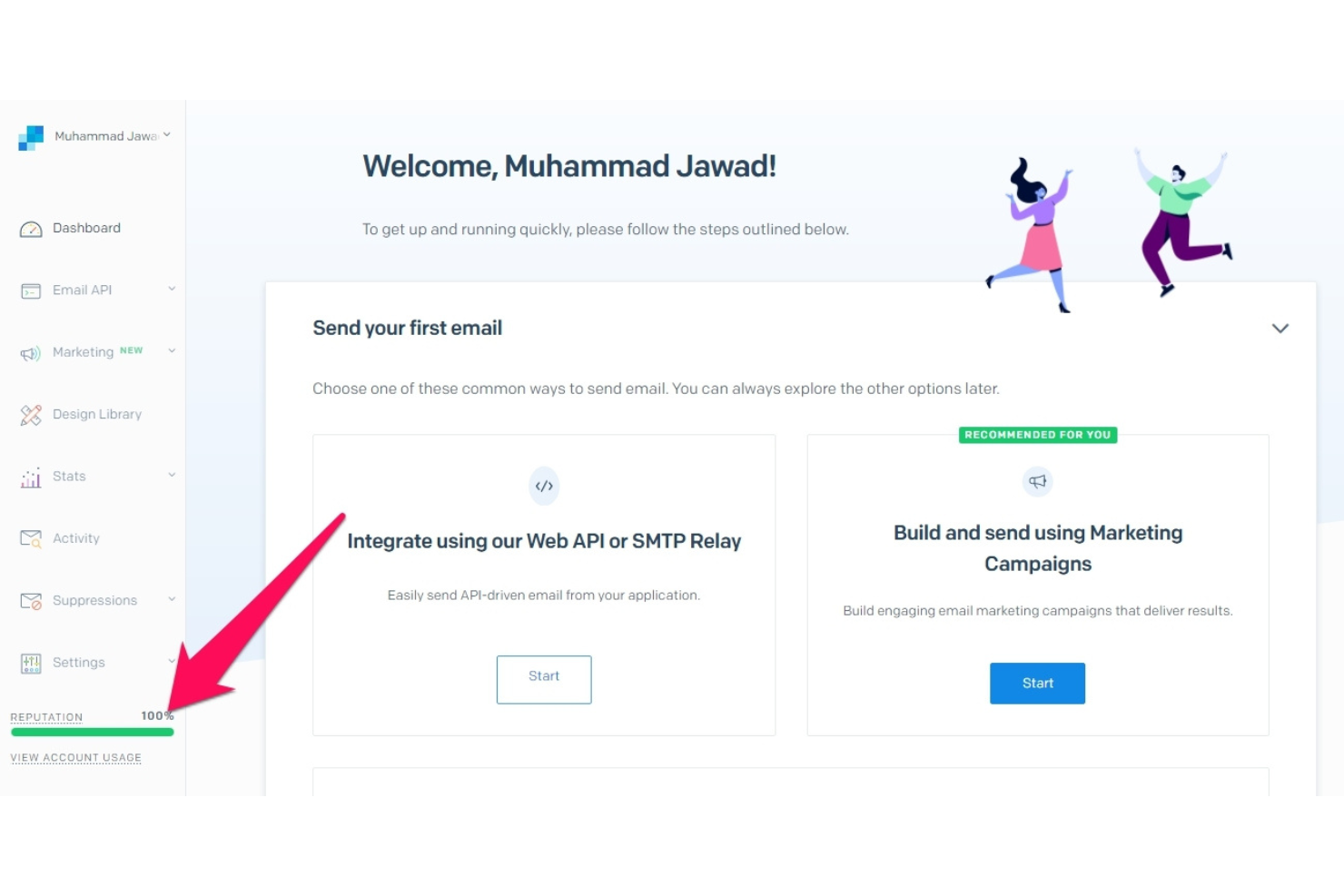
SendGrid is an email marketing platform built for reliable email delivery and is especially popular for high-volume senders. Its top-of-the-line Email API ensures high deliverability rates, making it an ideal choice for those who need to send a large number of emails at once without crashes or lagging.
Why I picked SendGrid: I chose SendGrid for its exceptional reliability in email delivery, which is an important consideration for agencies managing large-scale email newsletters and campaigns. Its powerful Email API and deliverability insights set it apart from other tools in this regard, helping to achieve high deliverability rates, and ensuring that emails reach their intended recipients.
Standout Features & Integrations
Features include email automation, dynamic templates, email validation, and deliverability insights. These features help users create engaging email campaigns and ensure successful email delivery.
Integrations include Salesforce, Shopify, WordPress, Zapier, Google Analytics, Microsoft Dynamics 365, HubSpot, Adobe Commerce, WooCommerce, and Marketo.
Pros and Cons
Pros:
- Dynamic templates
- Detailed analytics
- High deliverability rates
Cons:
- Variable deliverability rates
- Limited design customization

Best for hyper-personalization
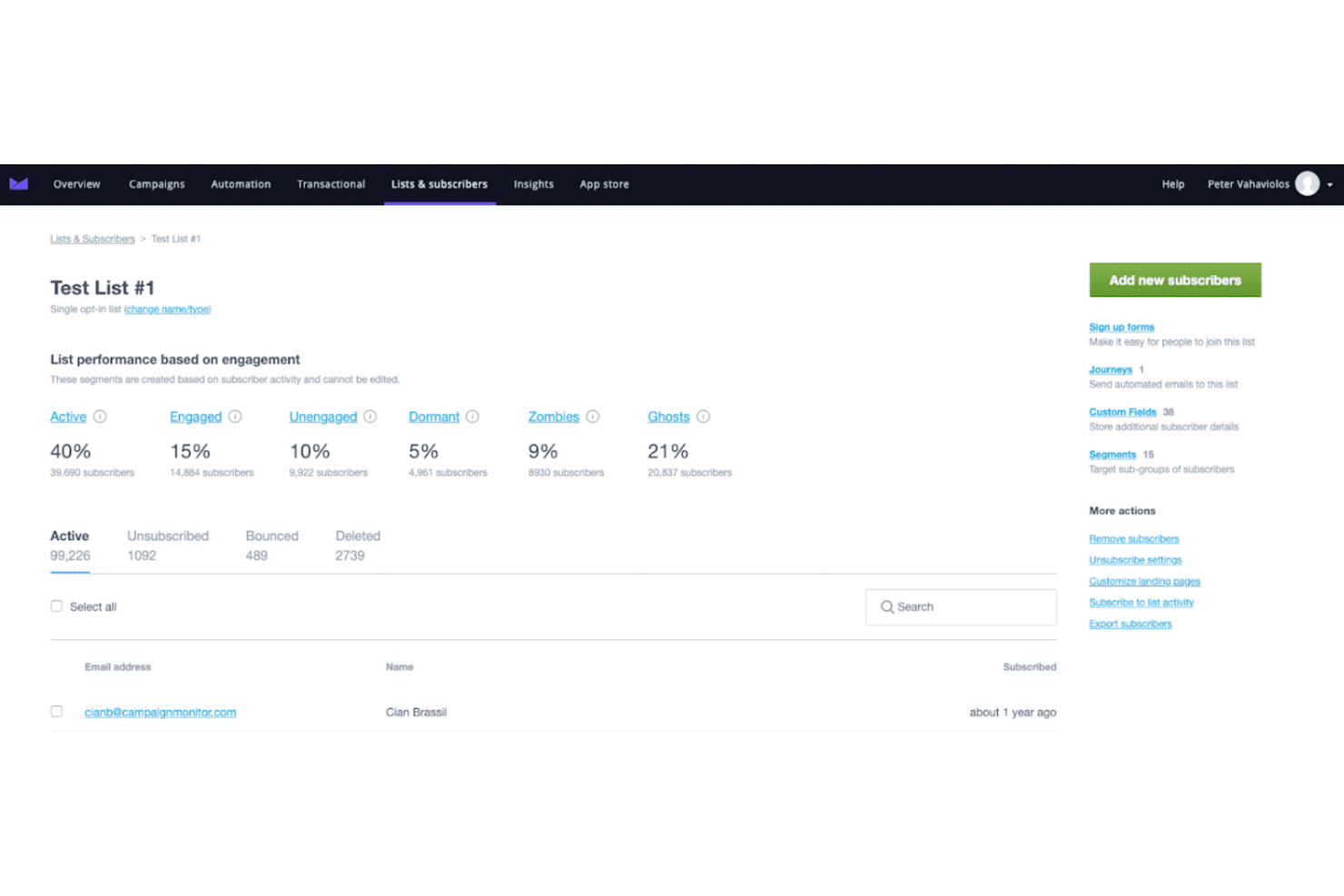
Campaign Monitor is a leading email marketing platform designed to help businesses effectively engage with their audiences through user-friendly tools and automation features. It is best known for its hyper-personalization capabilities, allowing users to create highly tailored email campaigns.
Why I picked Campaign Monitor: I chose Campaign Monitor for its exceptional ability to deliver hyper-personalized email content. This tool stands out due to its advanced segmentation and dynamic content features, allowing highly customized email experiences. Campaign Monitor is best for hyper-personalization because it offers real-time content updates and personalized email journeys that adapt to individual subscriber behaviors.
Standout Features & Integrations
Features include advanced segmentation, dynamic content personalization, and real-time analytics. Campaign Monitor offers a drag-and-drop email builder, mobile-optimized templates, and automated email journeys to enhance user engagement.
Integrations include Salesforce, Shopify, WordPress, Adobe Commerce, WooCommerce, Google Analytics, Zapier, Slack, Eventbrite, and Facebook.
Pros and Cons
Pros:
- Mobile-optimized templates
- Real-time content updates
- Advanced segmentation tools
Cons:
- Complex user interface
- Limited API functionality
Other Email Marketing Software for Agencies
Here are some additional options for email marketing software for agencies if you didn’t find what you’re looking for above.
- Elastic Email
For custom landing pages
- Constant Contact
For small business email marketing
- Campaigner
For advanced segmentation
- Brevo
For all-in-one marketing tools
- HubSpot Email Marketing
For integrated marketing and sales tools
- MailUp
For high-volume SMS and email
- Salesforce CRM
For enterprise-level email marketing
- GetResponse
For webinar and email marketing
- Braze
For personalized customer engagement
- Zoho Campaigns
For budget-friendly email marketing
- Mailmodo
For interactive email campaigns


Related Project Management Software Reviews
If you still haven't found what you're looking for here, check out these other related tools that we've tested and evaluated:
- Project Management Software
- Resource Management Software
- Workflow Automation Software
- Time Tracking Software
- Task Management Software
- Collaboration Tools
- Gantt Chart Maker
- Productivity Tools
- Project Tracking Software
- Project Scheduling Software
How I Evaluate Email Marketing Software for Agencies
I look at agency email tools in two layers: the baseline a platform must clear—think client sub-accounts and white-label reporting—and the differentiators that set the best apart.
Core Functionality (Table Stakes For This List)
When I'm selecting tools for my list, I rank each one on a scale from 0 (does not offer the functionality) to 5 (excels in this area) for each core functionality listed below. Then, I calculate the tool's total score into a percentage. Each tool needs to achieve a minimum total score of 65% to be considered for inclusion.
- Multi-Client Account Management: I check whether an agency can run 20+ client accounts from one login, with isolated lists, assets, and permissions per client workspace.
- Campaign Builder & Automation: The builder should support drag-and-drop design and multi-step automations like welcome sequences or re-engagement drips per client.
- White-Label & Client Branding: I look for custom domains, branded dashboards, and logo placement so client-facing deliverables carry the agency's identity, not the tool's.
- Approval & Collaboration Workflows: Teams juggling multiple stakeholders need review steps where a client can comment on a draft and approve it before it goes live.
- Client Reporting & Analytics: I evaluate whether reports can be filtered per client and exported or shared with agency branding, covering opens, clicks, and conversions.
- List Segmentation & Subscriber Management: Each client account should support dynamic segments, tagging, and list hygiene independent of other client data in the same platform.
Once I have a list of tools that meet this criteria, I consider what sets each platform apart.
Differentiating Factors (What Sets Vendors Apart)
Here's how I compare and contrast different vendors:
Standout Features
A cross-account asset library is a big time-saver when your team reuses proven templates and content blocks instead of rebuilding from scratch for every client. I also look for client portal access so stakeholders can review campaigns and pull reports without occupying an internal seat. Reseller billing is another factor worth evaluating—platforms that let you white-label pricing and invoice clients directly simplify the revenue side of running multiple accounts.
Beyond Features
Pricing structure matters a lot for agencies—I evaluate whether a platform charges per client account, per contact, or via pooled sending credits, since this directly impacts margins as your roster grows. Integration depth is another priority. Your email tool needs to connect with the project management and CRM platforms your teams already use, whether that's Asana, Jira, HubSpot, or Salesforce. Deliverability infrastructure also weighs heavily; dedicated IPs and per-client sending reputation isolation keep one account's issues from affecting another.
How to Choose Email Marketing Software for Agencies
As you work through your unique software selection process, keep the following points in mind:
- Feature Set: The software should offer comprehensive features catering to agencies' needs. This includes automation, segmentation, analytics, and CRM integration. For example, agencies managing multiple clients may benefit from advanced segmentation capabilities, allowing them to tailor messages to different audience groups based on behavior, demographics, or engagement history.
- Pricing Structure: Staying within budget is crucial, but you don’t want to sacrifice the features that make a real difference in your results. Start by listing out the must-have features that align with your agency’s goals—such as automation, segmentation, or multi-user access—and identify where you can be flexible. Look for software that offers tiered pricing, allowing you to start with a basic plan and scale up as your needs grow. Consider whether the platform offers a free trial or a money-back guarantee, so you can test its capabilities without a long-term commitment.
- Total cost of ownership: Does the software charge for extra contacts, additional users, or premium support? Do they offer a discount for annual pricing versus monthly? Keep these potential costs in mind to avoid surprises down the line.
- Ease of Use: No one wants to spend weeks figuring out a new tool. Determine whether a prospective software will be user-friendly and intuitive by scheduling a tailored demo once you’ve narrowed down your top options.
- Integration Capabilities: Make sure your email marketing software integrates smoothly with the tools and platforms your team already uses, like your CRM, ecommerce system, or project management tools. Look for a solution that offers a wide range of integrations with your key platforms to navigate data flow, improve team collaboration, and automate workflows. Consider whether the software provides APIs for custom integrations, or if it supports third-party tools like Zapier for connecting with other apps.
- Customer Support: When issues arise (and they inevitably will), having access to reliable support can be time-sensitive. Look for software that provides multiple support options, such as live chat, phone support, and a responsive help desk. An extensive knowledge base, video tutorials, or community forums can also be valuable for quick answers to common questions. In an ideal world, having a dedicated account manager who understands your agency's unique needs can offer personalized assistance and faster resolutions. However, keep your budget in mind—platforms that provide account managers or priority support may come at a higher cost.
Trends for Email Marketing Software for Agencies
Managing email marketing for an agency means juggling multiple clients, tight deadlines, and the pressure to show results. Keeping up with the latest trends can help you zero in on what actually drives success. Here are the must-know trends you should watch for this year:
- AI-Powered Personalization: You’re probably already personalizing emails, but AI takes this to a whole new level. Advanced AI tools analyze user behavior and preferences in real-time, enabling you to create hyper-personalized campaigns that truly connect with recipients. The result? Higher engagement, more conversions, and less time wasted on guesswork.
- Enhanced Analytics: Tracking the basics isn’t enough anymore. The latest tools offer deeper insights into metrics like subscriber lifetime value, optimal send times, and content effectiveness. These advanced analytics empower you to make smarter decisions, quickly adjust strategies, and prove ROI to your clients more effectively.
- Interactive Emails: Standing out in crowded inboxes is tough, but interactive elements like polls, quizzes, or image carousels can make your emails more engaging and memorable. They encourage real-time interaction, helping you pause the scroll to capture and hold attention longer.
- Automation Enhancements: If you’re tired of repetitive manual tasks, good news: automation tools are getting even smarter. New capabilities handle complex workflows and trigger-based campaigns more efficiently, freeing you up to fit in a game of Wordle before your next meeting.
- Privacy-Focused Features: With privacy regulations tightening, it’s essential to protect your reputation and your clients’ data. Look for tools that offer advanced privacy features and compliance management, helping you stay ahead of the curve and build trust with your audience.
What is Email Marketing Software for Agencies?
Email marketing software for agencies is a tool that helps you manage email campaigns for many clients in one place. Marketing professionals and agencies use it to create custom emails, organize contacts, automate sends, and check how campaigns perform. It saves you time juggling accounts and makes it easier to show clients results with clear reports and analytics.
Features of Email Marketing Software for Agencies
Here are the most essential features to look for in email marketing software for agencies:
- Client Management: Look for software that allows you to manage unlimited client accounts, assign roles, and create teams. This feature allows agencies to smoothly handle multiple clients and campaigns.
- Email Templates: Speed matters, and so does quality. Ready-to-use, premium templates can save you hours while ensuring your emails always look polished and professional. Aim for customizable templates that will maintain consistency and brand alignment across campaigns.
- User-Friendly Design: A drag-and-drop editor lets you create eye-catching emails without needing any coding skills. This feature makes it easy for anyone to jump in and contribute, keeping the workflow moving.
- Performance Metrics: The right software should give you a clear view of in-depth analytics on email performance. Understanding metrics like open and click rates helps agencies gauge audience engagement and refine their strategies.
- Unlimited Sends: Plans that include unlimited email sends allow agencies to send as many emails as needed without worrying about additional costs based solely on subscriber count.
- Segmentation and Personalization: Effective software should allow you to create targeted segments and personalize content based on customer data, enhancing engagement and conversion rates.
- Marketing Automation: Design automated customer journeys that send the right message at the right time based on user behavior, driving revenue and improving customer experience.
- Transactional Email: Ensure critical emails, like order confirmations or password resets are automatically triggered by user interactions maintaining trust with your clients' customers.
- Link Review Tool: Nothing ruins conversion funnels and credibility faster than a broken link. Automatically check for broken links in emails. Ensuring all links work correctly provides a seamless experience for subscribers.
- SMS Marketing Integration: Combine SMS with email campaigns. This multi-channel approach can improve audience connection and engagement by reaching them through different mediums.
Benefits of Email Marketing Software For Agencies
Here are five key benefits of using email marketing software:
- Automation and Efficiency: Email marketing software automates repetitive time-draining tasks such as sending emails, segmenting lists, and tracking performance, allowing agencies to focus on strategy and creativity.
- Personalization and Targeting: Never send generic email blasts again. These tools enable agencies to create highly personalized and targeted email campaigns, increasing the relevance and effectiveness of their messages.
- Analytics and Reporting: Make data-driven decisions that improve results over time with detailed analytics and reporting features that will help you measure campaign performance and understand subscriber behavior.
- Scalability: With email marketing software, agencies can quickly scale their campaigns to reach a larger audience without compromising quality or performance.
- Cost-Effectiveness: Email marketing software helps agencies reduce costs and maximize their return on investment by automating processes and improving targeting.
Costs and Pricing of Email Marketing Software For Agencies
This section provides an estimate of average email marketing software plans and costs for agencies.
| Plan Type | Average Price | Common Features |
| Free Plan | $0 | Basic email templates, limited subscribers, basic analytics |
| Personal Plan | $9 - $30/month | Advanced templates, up to 1,000 subscribers, basic automation, standard support |
| Business Plan | $50 - $150/month | Custom templates, up to 10,000 subscribers, advanced automation, A/B testing |
| Enterprise Plan | $200 - $500+/month | Unlimited subscribers, dedicated account manager, advanced analytics, priority support |
Email Marketing Software For Agencies FAQs
Here are some commonly asked questions about email marketing software for agencies.
How can I ensure high deliverability rates with email marketing software?
Ensuring high deliverability rates is crucial for the success of your email marketing campaigns. Here are some tips and best practices to keep you on track:
- Choose a reputable email marketing software known for its strong deliverability track record.
- Regularly clean your email list to remove inactive or invalid email addresses.
- Implement double opt-in processes to ensure that subscribers genuinely want to receive your emails.
- Personalize your emails and segment your audience to send relevant content, improving engagement rates and reducing the likelihood of your emails being marked as spam.
- Monitor your email deliverability metrics and make necessary adjustments based on the data.
What are the best practices for managing multiple client accounts within email marketing software?
Managing multiple client accounts efficiently requires email marketing software with robust multi-client management features. Look for platforms that provide agency-specific tools, such as sub-accounts, user permissions, and white-labeling options. Utilize project management features to keep track of different campaigns and client requirements. Automate repetitive tasks and set up standardized templates to save time. Regularly communicate with your clients to understand their needs and provide them with detailed reports on campaign performance. Data security and compliance with regulations like GDPR are also critical when handling multiple client accounts.
How can I integrate email marketing software with other marketing tools?
Integrating email marketing software with other marketing tools can streamline your workflow and enhance your marketing efforts. Most email marketing platformsoffer integrations with popular CRM systems, social media platforms, and e-commerce solutions. To integrate, navigate to the integrations section of your email marketing software and follow the instructions to connect with your desired tools. Using APIs (Application Programming Interfaces) can facilitate custom integrations if the built-in options do not meet your needs. Ensure that the data flows without interruptions between the tools to maintain consistency and accuracy in your marketing campaigns.
What are the key metrics to track for evaluating the success of email marketing campaigns?
Key metrics to monitor include:
- Open rates
- Click-through rates (CTR)
- Conversion rates
- Bounce rates
- Unsubscribe rates
Open rates indicate how many recipients opened your email, while CTR measures the percentage of recipients who clicked on a link within the email. Conversion rates show how many recipients completed a desired action, such as purchasing or filling out a form. Bounce rates reflect the percentage of emails that were not delivered, and unsubscribe rates indicate how many recipients opted out of your email list. Analyzing these metrics can help you identify areas for improvement and optimize your campaigns for better results.
How can I personalize email campaigns for different client segments?
Personalizing email campaigns for different client segments involves tailoring your content to meet each segment’s needs and preferences. Collect and analyze your clients’ data, demographics, purchase history, and engagement patterns. Use this data to create detailed buyer personas and segment your email list accordingly. Personalize your email content by addressing recipients by name, recommending products based on past purchases, and sending targeted offers and promotions. Utilize dynamic content blocks to display content to different segments within the same email. Testing and optimizing your personalization strategies can further enhance the effectiveness of your campaigns.
How can I measure the ROI of my email marketing campaigns?
Measuring the ROI of your email marketing campaigns involves calculating the revenue generated from your campaigns relative to the costs incurred. Start by tracking the revenue generated from email-driven sales, using tools like Google Analytics to attribute conversions to specific email campaigns. Compare this revenue to the costs associated with your email marketing efforts, including software subscriptions, design, content creation, and additional expenses.
Use the formula ROI = (Revenue – Cost) / Cost * 100 to calculate your ROI percentage.
Analyzing your ROI can help you identify the most effective strategies and allocate your resources more efficiently.
What are the common challenges agencies face in email marketing, and how can they be overcome?
Agencies often face challenges such as maintaining high deliverability rates, managing multiple client accounts, and keeping up with evolving regulations. To overcome these challenges, agencies should invest in reliable email marketing software with robust deliverability features, multi-client management capabilities, and integration with an agency management system to streamline operations and ensure compliance. Regularly cleaning email lists and implementing best practices for email deliverability can help maintain a good sender reputation. Staying informed about industry regulations, such as GDPR and CAN-SPAM, and ensuring compliance can prevent legal issues. Additionally, agencies should continuously educate themselves on the latest email marketing trends and technologies to stay competitive and deliver the best results for their clients.