10 Best Marketing Resource Management Software For 2026

Best Marketing Resource Management Software Shortlist


Marketing resource management software is the easiest way to properly allocate and optimize resources for your marketing projects. There are plenty of software tools out there, but not all of them will be the right fit for your needs.
I've shortlisted my picks for the best marketing resource management software based on my experience using dozens of different resourcing tools with large marketing teams and projects to help make your choice easy.
Why Trust Our Software Recommendations
Our team has been testing and reviewing software since 2012. As project managers ourselves, we know how difficult—and important—it is to choose the right software.
For this guide, we evaluated tools using hands-on testing and independent research, scoring tools using our selection criteria. We also draw on insights from industry thought leaders and practicing project management experts.
Our reviews reflect our human editorial judgment, not a sales pitch.
Expert reviewers:
Marketing Resource Management Comparison Table
Here is a convenient table where you can compare the tools I’ve picked.
| Tool | Best For | Trial Info | Price | ||
|---|---|---|---|---|---|
| 1 | Best for agile resource management | 14-day free trial | From $17/user/month | Website | |
| 2 | Best for agency profitability | 14-day free trial | From $10/user/month (billed annually) | Website | |
| 3 | Best workload balancing | Free plan + 14-day trial + demo available | From $10/user/month (billed annually) | Website | |
| 4 | Best AI-powered resourcing & workflow management | Not available | Pricing upon request | Website | |
| 5 | Best for people-centric resourcing | Not available | Pricing upon request | Website | |
| 6 | Best for first-time users | Free plan + 14-day free trial + free demo available | From $9/user/month (billed annually) | Website | |
| 7 | Best for creative collaboration | Free plan + 14-day free trial + free demo available | From $8/user/month (billed annually) | Website | |
| 8 | Best for compliance-led creative approvals | Free demo available | From $567/month (billed annually) | Website | |
| 9 | Best for Adobe-centered marketing operations | Not available | Pricing upon request | Website | |
| 10 | Best for virtual event management | Free demo available | Pricing upon request | Website |


Best Marketing Resource Management Software Reviews
Here’s a brief description of each of the marketing resource management software on my list and top features for each. Feel free to check out how I picked the software at any time.

Scoro
Best for agile resource management
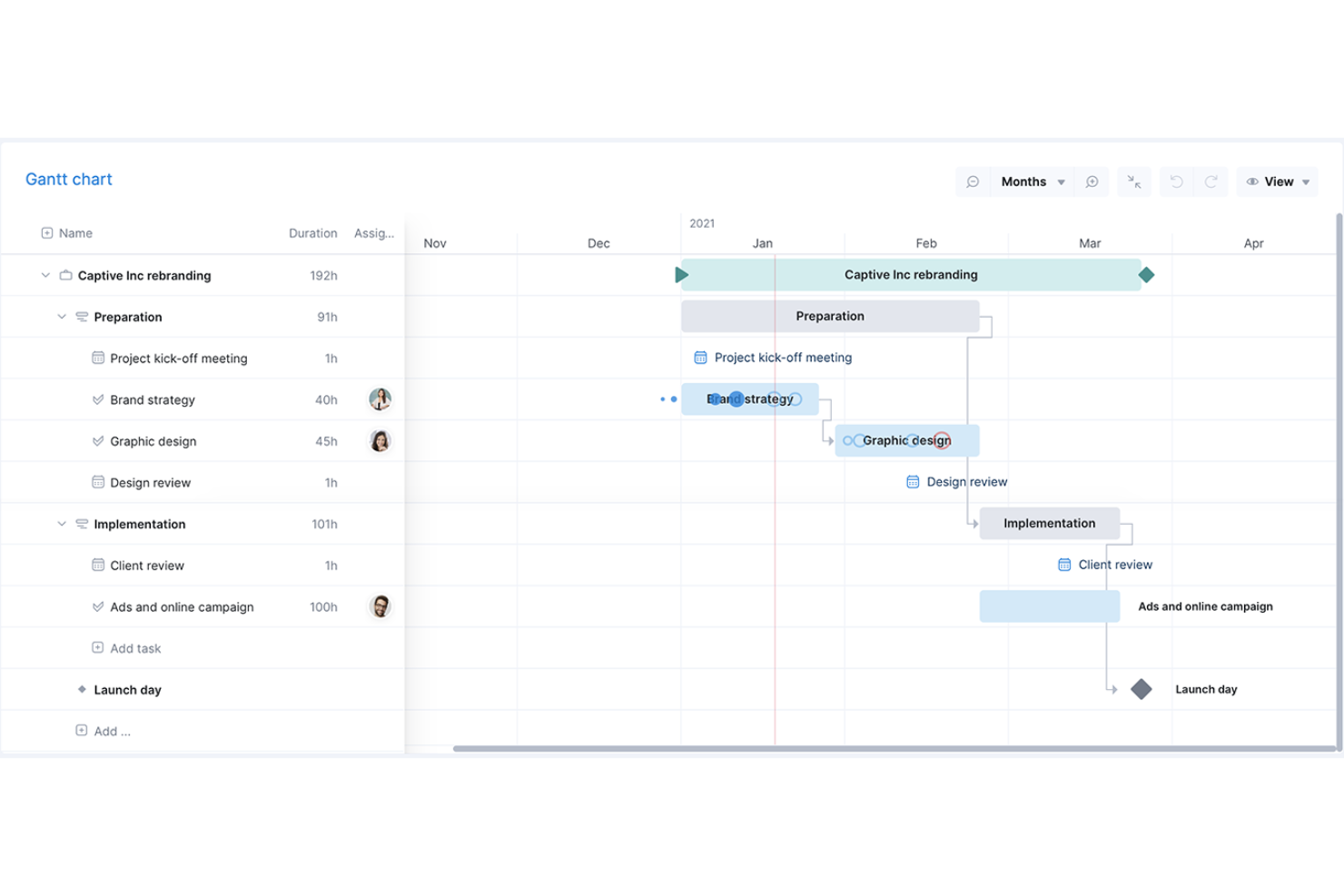
Scoro is a work management software that caters to professional services by offering a suite of tools to manage projects, finances, and resources within a single system.
Why I picked Scoro: The platform has an agile Gantt chart feature that facilitates better resource management for marketers. You can get a real-time view of everyone's scheduled workloads, so you can see when your team is available for certain projects or tasks. This feature also saves time because it automatically updates when tasks are linked, helping you minimize your effort toward manual updates.
Furthermore, I like that Scoro offers end-to-end project management capabilities so marketing teams can unify their sales, project delivery, and billing in a single platform, providing complete visibility and control over resource capacity and profitability.
Scoro Standout Features & Integrations
Features include reporting and analytics for agency operations as a whole (rather than just on a per-project basis), which provides insights into resourcing, progress, and overall results. The tool also includes a feature that automatically sends invoices for retainers to help your agency get paid faster and stay profitable.
Integrations include Xero, QuickBooks, Sage Intacct, Microsoft Exchange, Expensify, Stripe, Google Calendar, Jira, Slack, Asana, Dropbox, PayPal, and more.
Pros and Cons
Pros:
- Quotes, budgets and invoices in one platform
- Tentative bookings for unconfirmed campaigns and pitches
- Role-based workload views prevent team overbooking
Cons:
- Lacks creative proofing and asset management
- No built-in campaign or media planning
New Product Updates from Scoro

Scoro Adds Time Mobile App and ELI Improvements
Scoro adds the Scoro Time mobile app for iOS/Android to track time anywhere and expands ELI with attachments, smarter filtering, and trigger-based actions. For more information, visit Scoro's official site.

Best for agency profitability
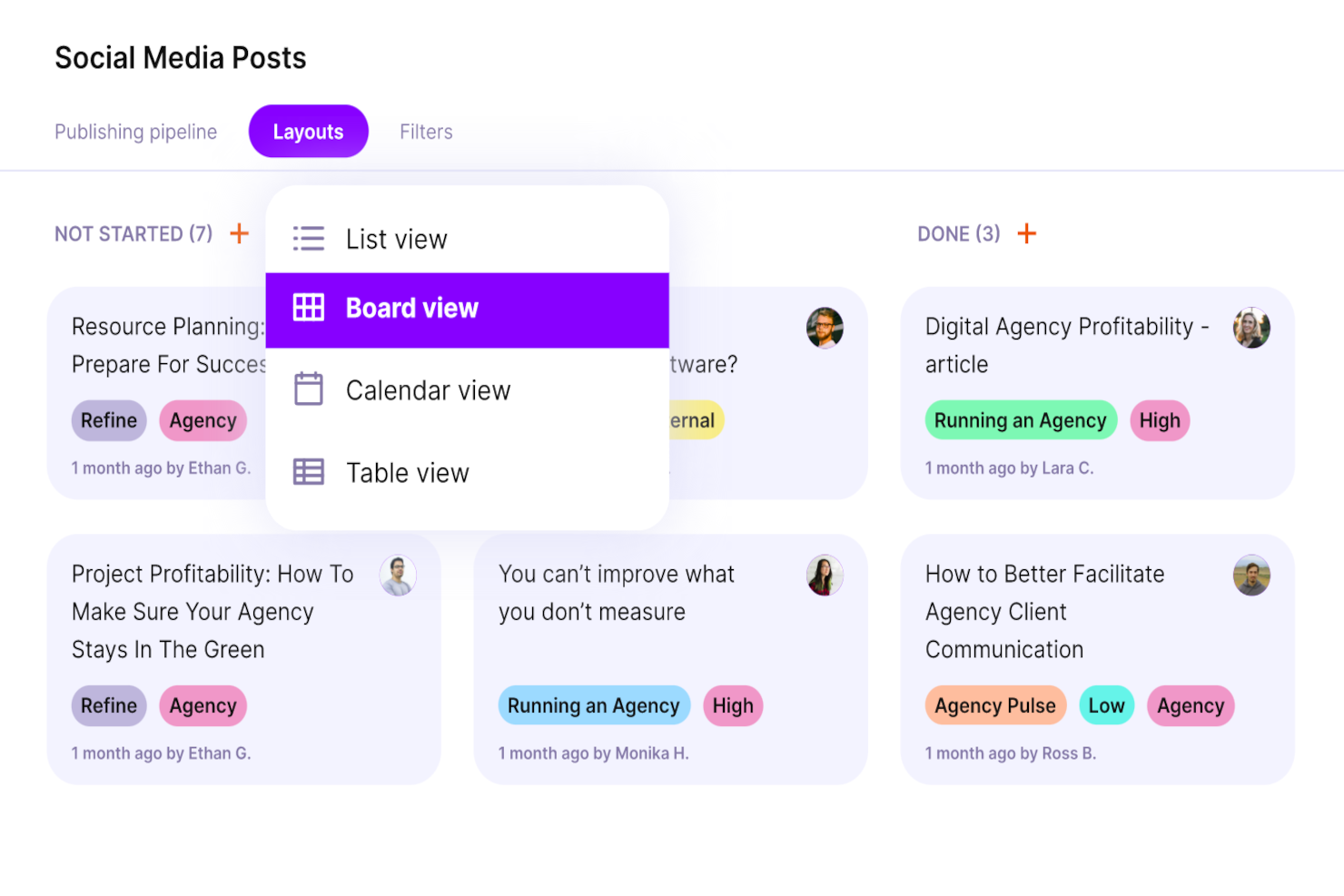
Productive is a comprehensive work management software ideal for agencies and professional services businesses. It combines project management, resource planning, time tracking, budgeting, and team collaboration in one solution.
Why I picked Productive: You can allocate work effectively across your team by assigning tasks within the context of everyone's workload. From there, you can keep track of who's working on which tasks and projects. Team members can track their time in the platform, helping you keep a log of hours allocated to various clients, projects, and tasks. This makes for more accurate billing.
The software offers a comprehensive task management system that allows users to assign tasks to specific team members, set deadlines, and track task progress through to completion. Users can also set up recurring tasks so they don’t have to worry about manually creating them each time. You can also upload documents in the platform or link them from other cloud storage services, and connect them with specific projects or tasks. Additionally, Productive has robust profitability tracking features, so you can align your agency resources with the projects that make the most impact on revenue.
Productive Standout Features & Integrations
Features include list, table, calendar, timeline, and board views; recurring tasks; time estimations; time tracking; budgeting; document management; resource planning; upcoming work placeholders; and client billing.
Integrations include Dropbox, Exact, Google Workplace, Jira, Harvest Economic, Outlook, Microsoft Calendar, Slack, QuickBooks, and Xero. A Zapier integration is also available, which can unlock more integrations with a paid account.
Pros and Cons
Pros:
- Scenario Builder compares alternative scheduling plans
- Allocates work by skills and seniority
- Heatmaps flag overbooked and available team members
Cons:
- Budget accuracy depends on strict time logging
- Mobile app lacks full scheduling features
New Product Updates from Productive
Productive Adds Email and Calendar Integrations for Agents
Productive adds Gmail, Outlook, Google Calendar, and Outlook Calendar connectors for its AI agents. These integrations let agents manage emails and create calendar events directly within Productive. For more information, visit Productive’s official site.

Wrike
Best workload balancing
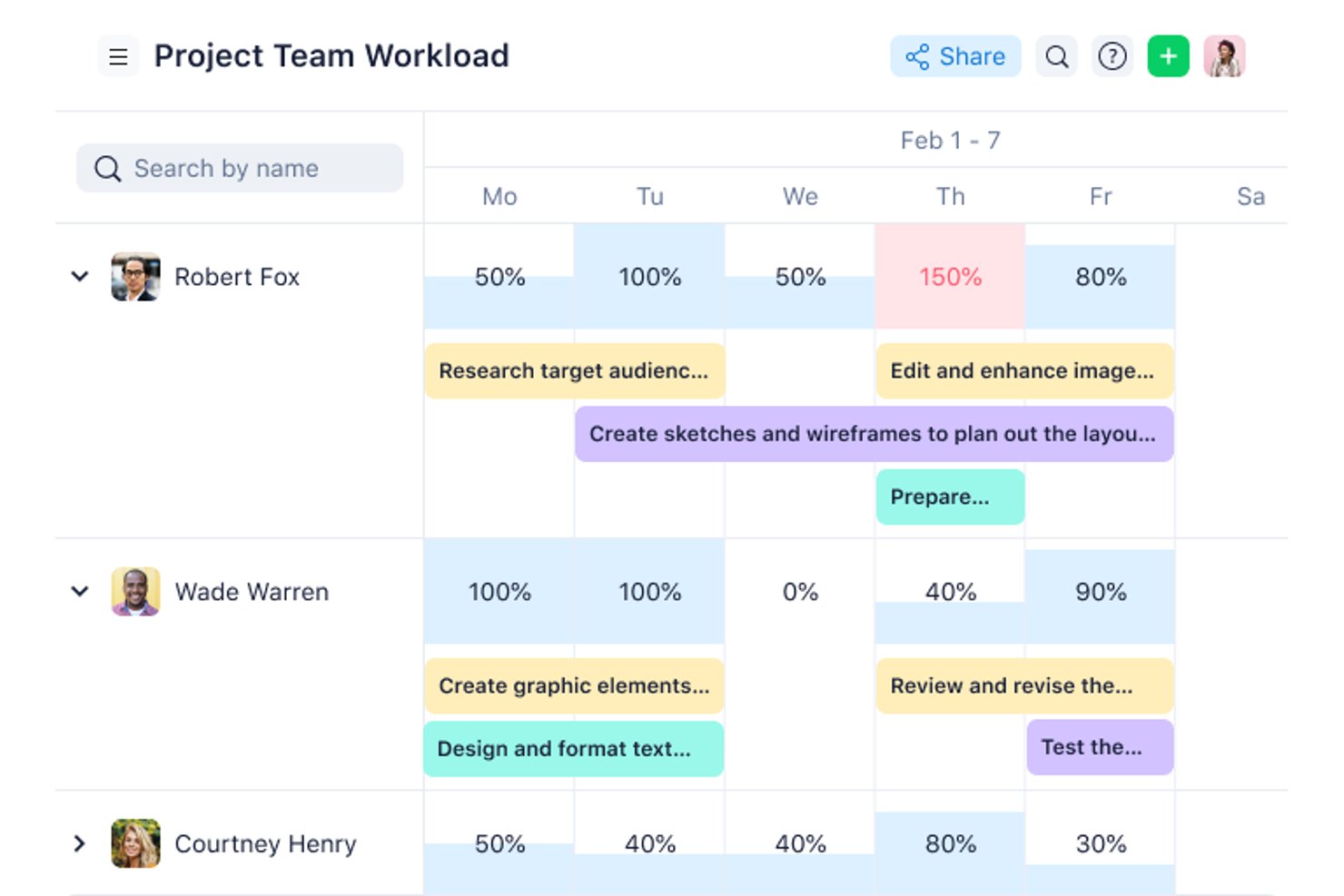
Wrike is a marketing project management software that provides visibility across an entire team’s work, so you can visualize capacity at a glance and balance resources appropriately.
Why I picked Wrike: It is highly configurable and allows users to customize workflows, dashboards, reports, and request forms to suit their specific needs. Wrike’s powerful resource management features enable consistent on-target delivery, ensure workload balance, and help your team deliver on time and on budget.
Wrike’s user-friendly interface enables users to work how they want, whether that’s switching between Kanban boards, using interactive drag-and-drop Gantt charts, or launching workload views to visualize priorities. Wrike features time and expense tracking, intuitive task and project management, visual proofing, pre-built templates for common marketing tasks, reporting, and resource management and allocation.
Wrike has an intuitive navigation with distinct Spaces, folders, and tasks. Easily switch from the home screen to timesheets, dashboards, calendars, reports, and the activity stream. Wrike also has a dedicated help center with interactive training, videos, and a helpful ‘Getting Started’ guide.
Wrike Standout Features & Integrations
Features include job role placeholders, visual allocation information, easy re-assigning of tasks, time tracking, and budget management.
Integrations include 400+ pre-built native integrations, including the most popular file management software from Microsoft, Google, and Dropbox, along with sales and marketing software from Salesforce and Marketo.
Pros and Cons
Pros:
- Request forms automatically turn into creative briefs
- Built-in proofing with guest reviewer approvals
- Workload charts rebalance team capacity in real time
Cons:
- Workload view lacks long-term capacity forecasting
- No native budgeting or invoicing tools
New Product Updates from Wrike

Wrike Redesigns Workspace Search With New Filters
Wrike introduces a redesigned Workspace Search interface with recent search shortcuts, item type and location filters, and parent-task context. These updates help users find relevant work items and navigate search results efficiently. For more information, visit Wrike’s official site.

Best AI-powered resourcing & workflow management
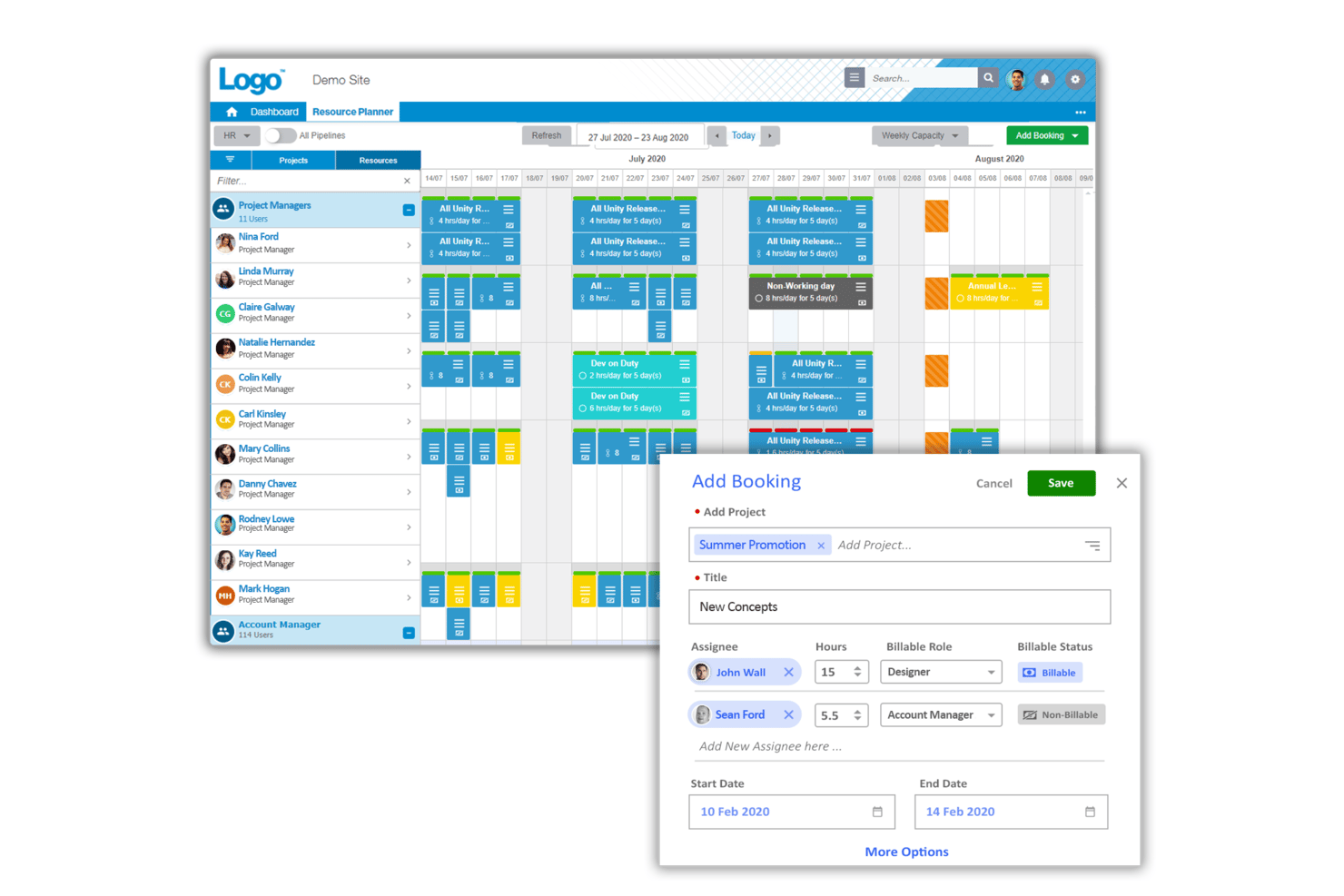
Screendragon is a marketing operations platform trusted by global brands and agencies like Kellogg’s, BP, The International Olympic Committee and McCann World Group. It is designed for scaling marketing teams with advanced resource management functionality including resource forecasting, real-time utilization, capacity heatmaps, AI staff recommendations and much more.
It comes with features for management, resource management, budget management, workflow automation and time and expense tracking. Screendragon is customizable, giving you control over branded UX, smart custom forms, personalized dashboards, custom reporting and advanced permission levels.
Screendragon's task management features include visual Kanban boards, interactive Gantt charts, and list views as options for interfaces.
Screendragon provides deep integrations with leading ERP systems such as SAP and PeopleSoft. It offers thousands of integrations with popular apps through Zapier like Jira, Trello, Slack, Box, Google Drive, Office 365 and Microsoft Dynamics. It also has an open API, enabling custom integrations with any system.
Screendragon starts from $20/user/month and a free demo is available.
Pros and Cons
Pros:
- Budgets tracked against live campaign plans
- Campaign-specific brief forms with automatic routing
- Demand forecasting by skills and availability
Cons:
- Configuration changes often need vendor support
- Built for enterprises, overkill for small teams
New Product Updates from Screendragon
Screendragon Unveils New AI Hub
Screendragon introduced AI Hub, a new capability that lets teams build and manage AI agents directly within workflows. The update helps marketing teams automate tasks, maintain governance controls, and scale AI-driven operations more efficiently. For more information, visit Screendragon's official site.

Kantata
Best for people-centric resourcing
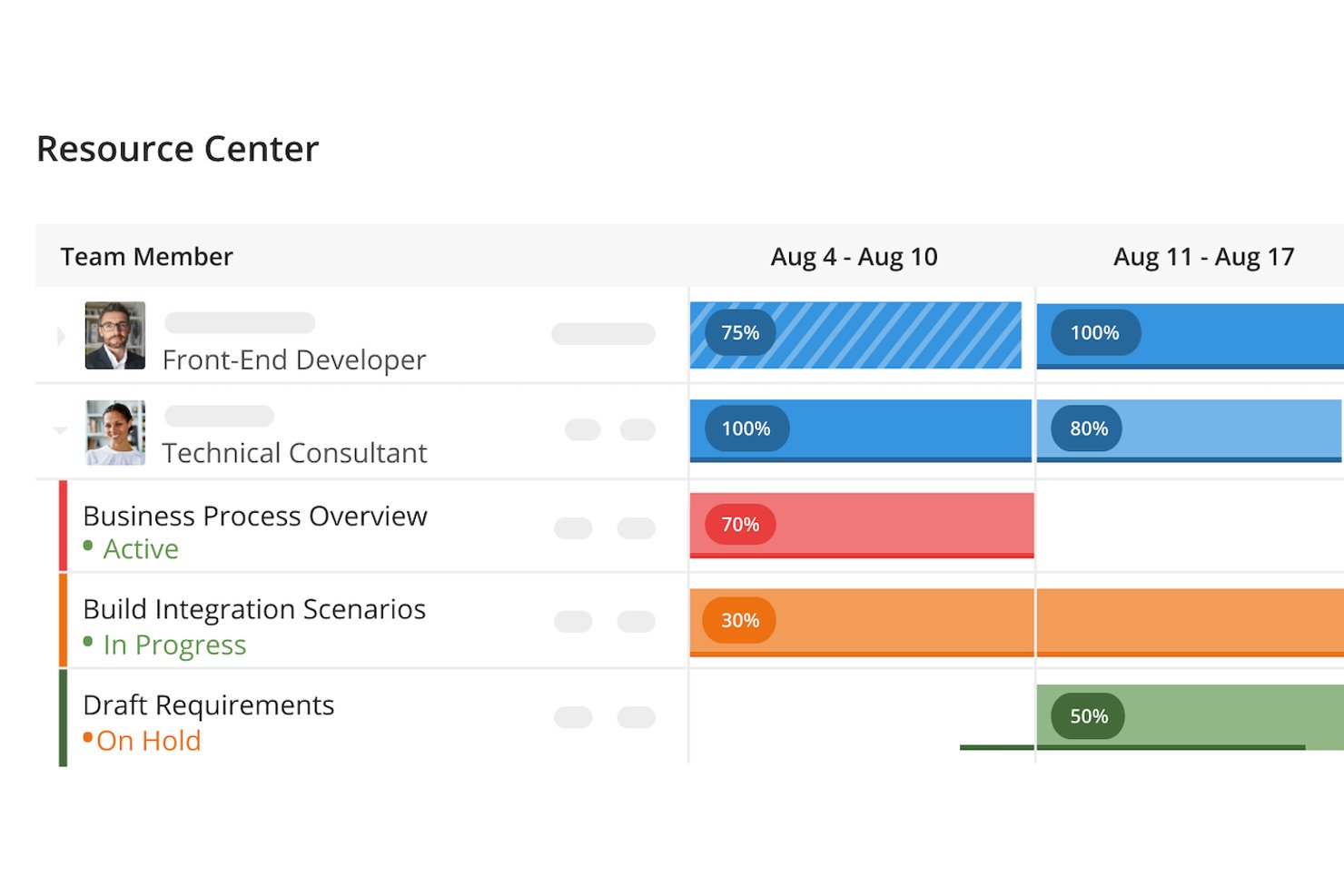
Kantata is a resource management platform built for professional services, including marketing teams and agencies. It helps you balance workloads, assign the right people to the right campaigns, and track profitability in real time. By unifying projects, resources, and financials, it ensures your team delivers consistently without burning out.
Why I picked Kantata: Kantata takes a people-centric approach to resource planning, which is especially valuable in fast-paced marketing environments. Its forecasting and capacity tools let you see when designers, copywriters, and strategists are at risk of overload, while skills-based staffing ensures projects get the right mix of talent. This reduces bottlenecks and keeps campaign delivery smooth, even across multiple client accounts.
Beyond staffing, Kantata gives you deeper insight into how resources connect to outcomes. Built-in BI tools let you measure utilization, profitability, and client satisfaction side by side, while accounting features like project costing and invoicing link resource decisions directly to financial performance.
Kantata Standout Features & Integrations
Features include dynamic dashboards that visualize campaign health, time and expense tracking with billable vs. non-billable distinctions, and task boards that flag risks like missed deadlines or misaligned dependencies. Kantata also supports collaboration with activity feeds and in-app notifications, keeping both internal teams and clients in the loop.
Integrations include BambooHR, Hubstaff, Desktop.com, Gigasheet, Salesforce, Microsoft 365, Slack, Hubspot CRM, Jira, Time Doctor, QuickBooks, and Google Drive.
Pros and Cons
Pros:
- Compares multiple resource plans side by side
- Skills inventory flags gaps before projects start
- Forecasts staffing needs from the sales pipeline
Cons:
- Pages load slowly with large datasets
- No creative brief or request intake
New Product Updates from Kantata

Kantata Adds Access Group Change History
Kantata adds Access Groups History, letting account administrators track changes to group details, membership, and permissions in Recent History. The update also makes these events available through the Subscribed Events API for broader monitoring. For more information, visit Kantata’s official site.
 .

Best for first-time users
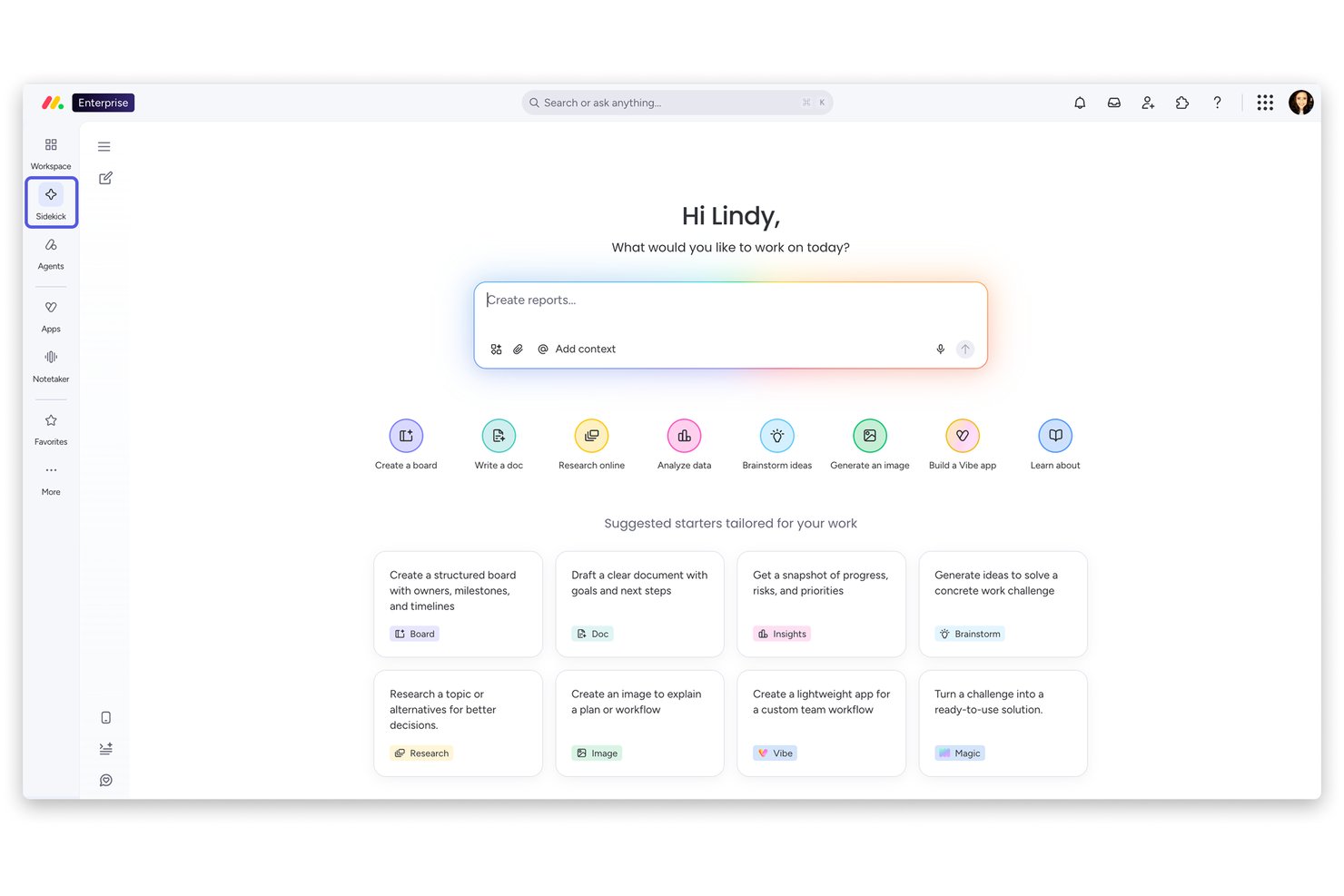
monday AI Workspace is a work management platform that combines marketing project planning, campaign tracking, resource management, and AI-powered workflow automation across teams.
Who Is monday AI Workspace Best For?
It's a natural fit for small-to-mid-size marketing teams that are new to structured project management and need a platform they can adopt quickly without heavy onboarding.
Why I Picked monday AI Workspace
I picked monday AI Workspace as one of the best because its 200+ pre-built templates mean a marketing team can go from sign-up to a running campaign board in under an hour. I particularly like how the AI Sidekick helps first-time users build workflows by answering plain-language prompts, which removes the usual setup barrier. The visual Gantt and timeline views are readable from day one, so new users can track campaign dependencies without any prior training.
monday AI Workspace Key Features
- Cross-platform integrations: Connects with marketing tools like Mailchimp, HubSpot, Adobe Creative Cloud, and Canva for smooth data flow.
- Automated workload management: Allocates resources and tracks team capacity using built-in workload boards and resource dashboards.
- Campaign performance dashboards: Offers customizable project dashboards to visualize campaign statuses, performance metrics, and timelines at a glance.
- Multi-view planning tools: Includes Kanban, Gantt, timeline, calendar, and custom board views for flexible project tracking.
monday AI Workspace Integrations
Pros and Cons
Pros:
- Visual workload boards simplify resource allocation across teams
- AI Sidekick generates workflows from plain-language prompts
- Pre-built marketing campaign templates accelerate setup
Cons:
- No built-in digital asset management or DAM
- Budget tracking lacks invoice and PO management
New Product Updates from monday AI Workspace
monday AI Workspace Adds Human Approval Routing
monday AI Workspace adds a human-in-the-loop approval block to AI Workflows, sending approval requests and routing workflow paths based on responses. For more information, visit monday AI Workspace's official site.

Miro
Best for creative collaboration
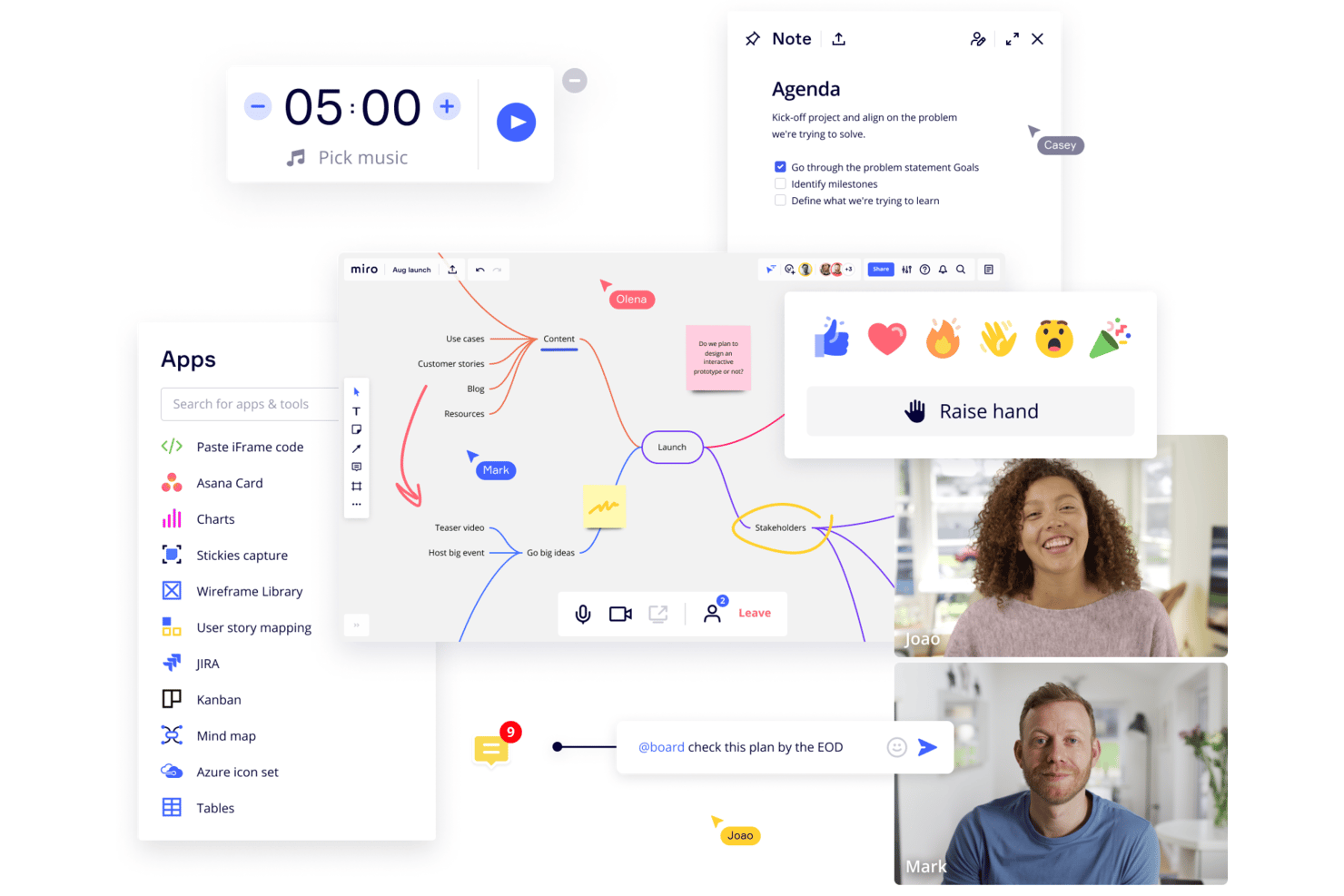
Miro is a collaborative online whiteboard with over 1,000 templates including mind maps, Kanban boards, Gantt charts, product wireframes, research boards, and flowcharts.
Why I picked Miro: This platform is an excellent resource for your brainstorming sessions with the creative team, especially if your team is largely remote. Its infinite canvas and a vast array of templates give you multiple options to present information to distributed teams. The platform also supports the expression of ideas in multiple formats, including text, images, and videos.
Moreover, features like Miro Assist help generate ideas from basic prompts, while TalkTrack enables the asynchronous explanation of process maps. Additionally, asynchronous collaboration features, such as comments and reactions, facilitates continuous input from team members.
Miro Standout Features & Integrations
Features include AI capabilities that you can use to help with tasks like clustering sticky notes and fleshing out rough ideas. The tool also has an extensive library of templates for specific project use cases and milestones like project timelines, kickoffs, and project planning.
Integrations with a whole suite of tools, including Zoom, Figma, Asana, Monday.com, Confluence, Microsoft Teams, Jira, Slack, Google Drive, Box, Airtable, Notion, Azure, and Webex. Some integrations are limited to paid plans only.
Pros and Cons
Pros:
- Real-time brainstorming across remote teams
- Visual campaign mapping with sticky notes
- Pre-built marketing planning templates
Cons:
- No time tracking for marketing work
- No capacity or workload management
New Product Updates from Miro
Miro Adds Japan Data Residency for Enterprise Customers
Miro has introduced Japan data residency for enterprise customers, offering in-region storage for production data, backups, and metadata, plus in-region compute infrastructure. For more information, visit Miro's official site.

Best for compliance-led creative approvals
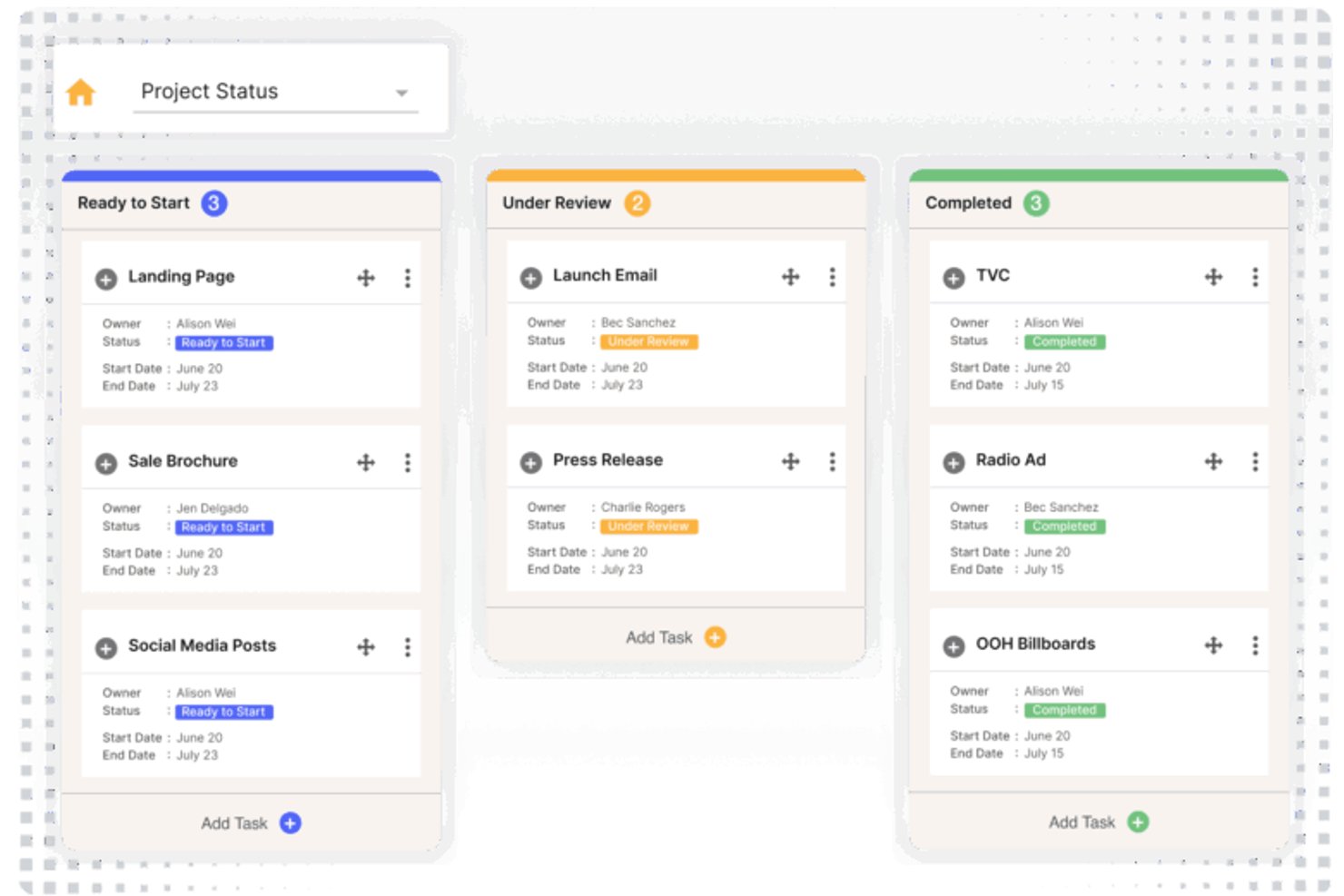
IntelligenceBank is a marketing resource management platform that connects digital asset management, creative review, compliance-led approval workflows, and workload reporting in a single system.
Who Is IntelligenceBank Best For?
IntelligenceBank is a strong fit for marketing operations teams in regulated or brand-sensitive industries that need compliance reviews built directly into their creative approval process.
Why I Picked IntelligenceBank
IntelligenceBank earns its spot on my shortlist because compliance reviews are built directly into the approval workflow, not bolted on afterward. I like that AI-powered risk detection flags legal, regulatory, and brand issues while content is still moving through review stages, before anyone signs off. The configurable multi-stage approvals, in-context markup, and time-stamped audit trails mean my team can prove exactly what was reviewed, who approved it, and when, which matters most in regulated or brand-sensitive environments.
IntelligenceBank Key Features
- Kanban boards and marketing calendar: Track tasks, ownership, and status across campaigns in customizable Kanban views or a shared marketing calendar.
- Proofing and markup: Annotate images, PDFs, videos, and audio files with in-context comments, threaded replies, and time-stamped media feedback.
- Briefs and intake forms: Build custom intake forms with conditional logic, multi-step layouts, and direct links to approval workflows and campaign calendars.
- Workload and workflow dashboards: Monitor task throughput, approval times, and team workload across active jobs in a dedicated reporting dashboard.
IntelligenceBank Integrations
IntelligenceBank offers native integrations with Adobe Creative Cloud, Adobe Experience Manager, Salesforce Marketing Cloud, Optimizely, Figma, Canva, Google Docs, Google Sheets, Google Slides, and Microsoft 365. Its Graph API supports custom integrations.
Pros and Cons
Pros:
- Review reminders reduce email back-and-forth
- Searchable asset library preserves version history
- Approval ownership and status stay visible
Cons:
- Workflow setup can require extensive configuration
- Long forms and dated navigation frustrate users
Best for Adobe-centered marketing operations
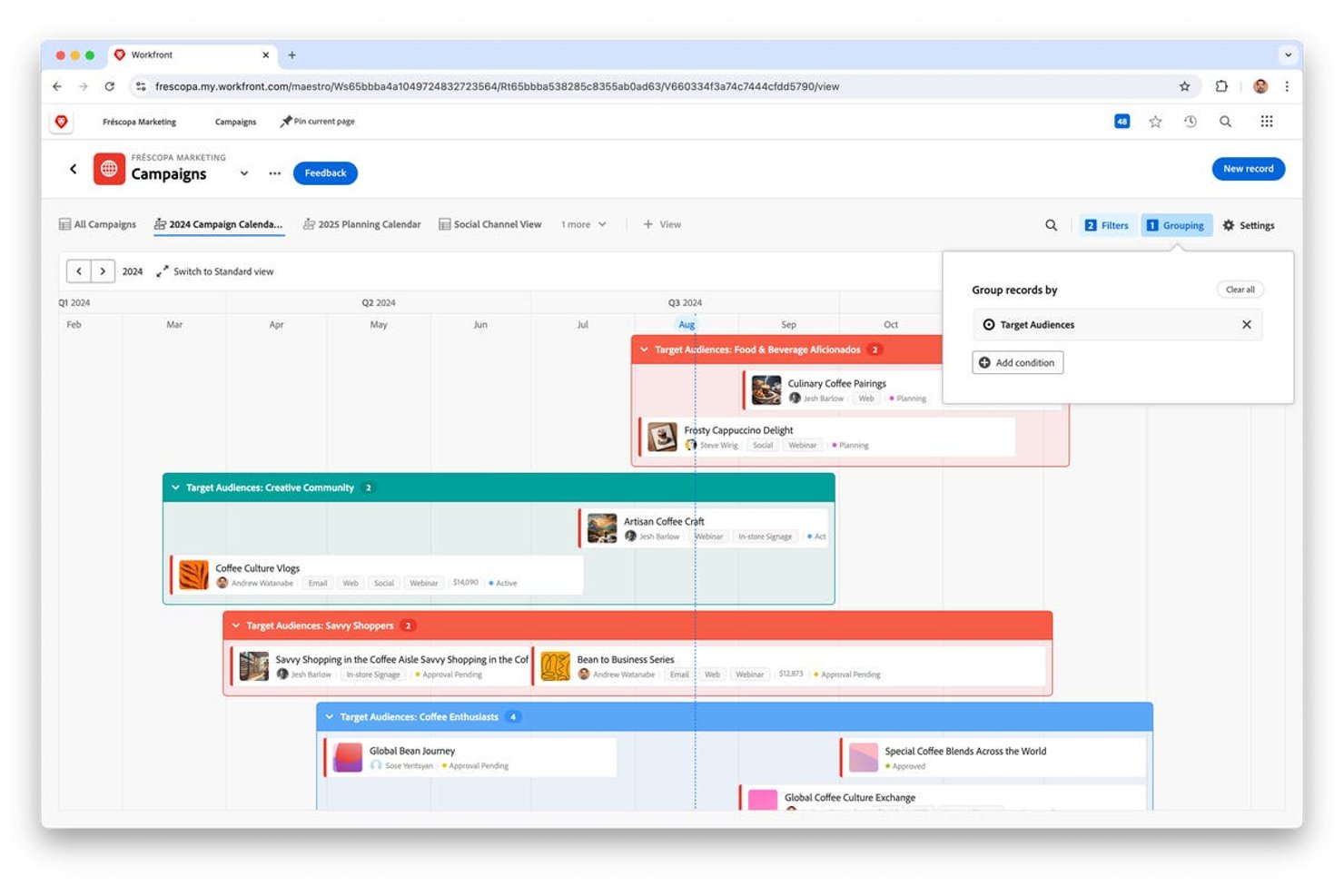
Adobe Workfront is an enterprise marketing resource management platform that combines campaign planning, resource and capacity management, creative review and approval workflows, and digital asset management within the Adobe ecosystem.
Who Is Adobe Workfront Best For?
Adobe Workfront is a strong fit for enterprise marketing teams already invested in the Adobe ecosystem—particularly those running complex, cross-functional campaigns who need deep integration between creative production and project management.
Why I Picked Adobe Workfront
Adobe Workfront earns its spot on my shortlist because it's purpose-built for marketing teams already running on Adobe tools, where the real value comes from keeping creative production and project management on a shared layer. I especially like how unified review and approval connects Workfront directly to Frame.io and Creative Cloud, so creative directors can run multistage approvals with up to 30 parallel paths and 100 stages without leaving the ecosystem. The AI Reviewer adds another layer by flagging when assets drift from brand voice or composition standards before they reach sign-off.
Adobe Workfront Key Features
- Resource Planner: Budget project time by resource availability and organize users into resource pools for cross-project capacity planning.
- Workload Balancer: Assign users to tasks based on actual task hours and availability, including unassigned work and job-role-based assignments.
- Campaign lifecycle visibility: View how campaign plans connect to strategic initiatives and execution workflows in table, timeline, and calendar views.
- Customizable reporting dashboards: Build and share dashboards with custom reports, widgets, and filters to give stakeholders a real-time view of project and campaign health.
Adobe Workfront Integrations
Adobe Workfront offers native integrations with Adobe Experience Manager Assets, Adobe Creative Cloud, Adobe Express, Frame.io, and Adobe GenStudio for Performance Marketing. It supports REST APIs and Workfront Fusion connections to Slack, Microsoft Teams, Figma, Salesforce, and HubSpot.
Pros and Cons
Pros:
- Dashboards surface cross-project campaign progress
- In-context proofing keeps feedback tied to assets
- Clear visibility into team capacity
Cons:
- Campaign spend and ROI tracking remain limited
- Workflow configuration takes time across teams
Optimizely
Best for virtual event management
Optimizely CMP is a content marketing platform that covers campaign planning, digital asset management, review and approval workflows, resource capacity tracking, and brand compliance checking in a single AI-assisted workspace.
Who Is Optimizely Best For?
Optimizely CMP is a strong fit for marketing operations teams at mid-to-large organizations that need to coordinate campaign planning, asset management, and approval workflows in one place.
Why I Picked Optimizely
I picked Optimizely as one of the best because its CMP brings campaign planning, asset management, and approval workflows into a single workspace in a way that genuinely reduces coordination overhead. I especially like how the compliance checker lets admins import brand rules by CSV and turns them into a structured reviewer checklist, so brand standards get checked as a named workflow step rather than an afterthought. The Adobe Creative Cloud plug-in is another strength: tasks, comments, and edits sync directly inside Photoshop, Illustrator, and Premiere Pro, keeping designers in their tools while reviewers annotate and send work back without leaving CMP.
Optimizely Key Features
- Campaign health tracking: Campaigns automatically calculate an On Track, At-Risk, or Off Track status based on the percentage of overdue task steps.
- Asset expiry notifications: Users can set expiry dates on library and task assets and receive email or in-app alerts up to 90 days before an asset expires.
- Resource workload dashboard: The Resources module shows estimated assigned hours per team member alongside a day-by-day planner and reports comparing estimated versus actual hours.
- SAML SSO and SCIM provisioning: CMP supports single sign-on via SAML and automates user provisioning and deprovisioning through Okta and Entra ID.
Optimizely Integrations
Optimizely CMP has a documented Adobe Creative Cloud plugin for Photoshop, Illustrator, InDesign, and Premiere Pro. It also provides an Open API and webhooks for custom integrations; the vendor doesn’t publish a total integration count.
Pros and Cons
Pros:
- Workload views expose estimated team capacity
- In-platform approvals reduce stakeholder back-and-forth
- Campaign calendars clarify cross-team ownership
Cons:
- Manual work limits project-management depth
- Asset search and filters impede discovery
Other Marketing Resource Management Software
Here are a few more options that did not make it on my top 10 list, but are still worth looking at if you want to expand your research.
- But when you choose a software application, there are people dedicated to providing you with the best possible customer experience.
- Uptempo
For built-in marketing calendars
- MARMIND
For marketing budget planning
- Celoxis
For advanced project cost analysis
- Ravetree
For a built-in CRM
- Bynder
For establishing a creative workflow
- Papirfly
For governed local campaign creation
- Lytho
For brand-governed creative approvals
- CampaignDrive by Pica9
For building and creating ads
- Vya
For marketing automations
- Infor Marketing Resource Management
For market segmentation


Related Project Management Software Reviews
If you still haven't found what you're looking for here, check out these other related tools that we've tested and evaluated:
- Project Management Software
- Resource Management Software
- Task Management Software
- Collaboration Tools
- Project Tracking Software
- Enterprise Resource Management Software
- Marketing Project Management Software
- Resource Guru Alternatives
- Media Resource Management Software
How I Evaluate Marketing Resource Management Software
I split my evaluation into three parts, weighting core functionality most: centralize approved assets, plan campaigns, and track delivery. Next, I look for differentiators such as AI asset tagging. Finally, I consider onboarding, support, and pricing value for teams coordinating agencies and reviewers.
Core Functionality (Table Stakes For This List)
When I'm selecting tools for my list, I score each one on a scale from 0 (does not offer the functionality) to 5 (excels in this area) for each core functionality listed below. I then convert the total into a percentage to help assess each tool's overall fit, with extra weight on any functionalities I’ve deemed essential.
- Digital Asset Management (Essential): I look for searchable asset libraries with tags and version history, so teams can find approved campaign creative and brand files.
- Campaign & Project Planning (Essential): I assess whether teams can map campaign milestones, owners, dependencies, and launch dates across connected projects.
- Review & Approval Workflows: I look for in-platform markup, clear review routing, and version comparisons that help stakeholders give feedback and sign off.
- Marketing Budget Tracking: I check whether teams can compare planned and actual campaign spend and see budget details across programs.
- Resource & Capacity Planning: I assess workload views across active projects to see whether managers can spot conflicts and balance assignments.
- Brand Compliance Management: I look for accessible brand guidelines and templates that help teams and agencies apply standards to campaign assets.
Once I have a list of tools that meet the criteria, I consider what sets each platform apart.
Differentiating Factors (What Sets Vendors Apart)
Here's how I compare and contrast different vendors:
Standout Features
I look for AI-powered tagging that uses image recognition to categorize incoming assets automatically. When a team uploads hundreds of campaign photos, manual tagging bogs everything down. I also check for usage rights expiration alerts, since a single expired stock license can create real legal exposure mid-campaign. Brand portal access matters too—I evaluate whether agencies and franchisees can self-serve approved assets without needing a full seat license, which keeps review cycles short and access costs low.
Beyond Features
I evaluate how easily non-marketing stakeholders can access the platform. Agencies, legal reviewers, and executives often need to approve assets or leave feedback, so I check whether guest or client-level permissions work without a full seat license. I also look at creative tool ecosystem compatibility—teams switching between Figma, Adobe Creative Cloud, and Canva need plugins that keep review and approval inside those tools. Finally, vendor-led onboarding matters because marketing teams rarely have dedicated IT support to manage a migration on their own.
How To Choose Marketing Resource Management Software
As you're shortlisting, trialing, and selecting marketing resource management software, consider the following:
- What problem are you trying to solve? Identify the marketing resource management feature gap you're trying to fill to clarify the features and functionality the software needs to provide.
- Who will need to use it? To evaluate cost and requirements, consider who'll be using the software and how many licenses you'll need. Evaluate if it'll just be your project managers or the whole organization that will require access. When that's clear, consider whether to prioritize ease of use for all or speed for your software power users.
- What other tools it needs to work with? Clarify what tools you're replacing, what tools are staying, and the tools you'll need to integrate with, such as accounting, CRM, productivity apps, or HR software. Decide if the tools will need to integrate together, or alternatively, if you can replace multiple tools with one consolidated marketing resource management tool.
- What outcomes are important? Consider the result that the software needs to deliver to be considered a success, what capability you want to gain, what you want to improve, and how you will be measuring success. For example, an outcome could be the ability to get greater visibility into performance.
- How it would work within your organization? Consider the software selection alongside your workflows and delivery methodology. Evaluate what's working well and areas that are causing issues. Every business is different—don’t assume that because a tool is popular that it'll work in your organization.
Trends In Marketing Resource Management Software For 2025
Here’s a closer look at current trends that I believe will continue to impact MRM software and the marketing industry as a whole in the future.
- Increased emphasis on AI and machine learning: AI-driven analytics and machine learning capabilities are becoming more prevalent and typically offer predictive insights and automation of routine tasks. These AI resource management technologies help forecast campaign performance, automate content tagging, and personalize marketing efforts at scale.
- Enhanced collaboration and remote work features: As remote work remains a staple in many organizations, MRM tools are introducing better collaboration features. Real-time editing, feedback loops, and virtual workspace integrations facilitate seamless teamwork, regardless of geographical barriers.
- Content personalization at scale: MRM tools are using AI to offer advanced content personalization capabilities. This includes dynamic content creation that adjusts in real-time based on audience behavior and preferences, so marketers can craft highly personalized and effective campaigns.
- Voice and conversational user interfaces: The integration of voice and conversational interfaces within MRM platforms is gaining traction. This allows users to interact with the software using natural language processing (NLP), so tools are more accessible and can speed up the execution of tasks through voice commands.
- Blockchain for transparency and efficiency: Software tools are exploring blockchain technology and its potential to bring transparency and efficiency to marketing operations. Features like secure and transparent digital asset tracking and smart contracts for managing vendor relationships are emerging, offering new ways to streamline workflows and enhance trust.
What Is Marketing Resource Management Software?
Marketing resource management (MRM) software is a tool that helps businesses plan, execute, and monitor their marketing activities. It organizes and streamlines marketing processes, manages digital marketing assets, and aligns marketing strategies with business goals.
This software aids in budgeting, scheduling, and resource allocation, making sure marketing efforts are efficient and effective. It's useful for keeping marketing teams coordinated and for tracking the performance of marketing campaigns with client resource management tools.
Features of Marketing Resource Management Software
Here, I outline some of the key features that you should look for when selecting an MRM platform.
- Centralized asset management: This feature makes sure all marketing assets are stored in a single, accessible location. It eliminates the time wasted searching for files across disparate systems, improving productivity.
- Workflow automation: By automating repetitive tasks, this functionality saves valuable time and reduces the chance for human error so teams can focus on more strategic initiatives.
- Collaboration tools: Collaboration tools within MRM software allow your team to communicate and work together effectively, which is crucial for aligning marketing efforts and avoiding silos.
- Budget tracking and management: This allows you to keep a close eye on marketing spend against the budget and helps make sure financial resources are utilized efficiently so you can maximize ROI.
- Performance analytics: With insights into marketing campaign performance, you can adjust your strategies in real-time for better outcomes and make data-driven decisions the norm.
- Brand compliance: This makes sure all marketing materials are consistent with brand guidelines so you can maintain a cohesive brand identity across all channels and touchpoints.
- Customizable dashboards: This provides a personalized overview of key metrics and KPIs, so you can quickly assess the health of your campaigns and make informed decisions.
- Content calendar and planning tools: These tools aid in planning and scheduling marketing activities, allowing for a strategic approach to content distribution and campaign execution.
- Resource allocation and scheduling: By efficiently managing team workloads and resources, this feature prevents burnout and makes sure you can deliver projects on time.
- Digital asset management (DAM): This goes beyond simple storage with features for tagging, categorizing, and optimizing the use of digital assets, as well as improving discoverability and reuse.
Benefits of Marketing Resource Management Software
Here are five primary benefits that highlight why MRM software is a smart investment for businesses looking to elevate their marketing efforts:
- Improved efficiency: MRM software streamlines marketing processes and reduces the time you spend on manual tasks. This means users can focus more on creative and strategic tasks, which boosts overall productivity.
- Enhanced collaboration: With features that facilitate communication and project tracking, team members can work together, regardless of their location. This leads to better-coordinated marketing efforts and faster project completion times.
- Better budget management: The software provides tools for tracking marketing expenses in real time, you can stay within your budgets and allocate funds more effectively. This financial oversight allows you to maximize the return on investment of marketing campaigns.
- Consistent brand messaging: MRM software makes sure that all marketing materials are aligned with brand guidelines, so you can maintain a consistent brand image across all channels. This consistency is vital for building trust and recognition with your audience.
- Data-driven decisions: MRM software allows you to measure the performance of your campaigns accurately and use this information to make informed decisions that can improve future marketing strategies.
Costs & Pricing for Marketing Resource Management Software
Here is a breakdown of typical plans, pricing, and features you may see as you select the right MRM software for you.
| Plan Type | Average Price | Common Features |
|---|---|---|
| Free | $0 | Basic asset management, limited users, essential collaboration tools, community support |
| Basic | $20-$100/user/month | Advanced asset management, workflow automation, basic analytics, email support |
| Professional | $100-$300/user/month | Full digital asset management (DAM), comprehensive analytics, API access, 24/7 support |
| Enterprise | Custom Pricing | Custom integrations, advanced security features, dedicated account manager, unlimited storage |
When selecting a plan, it is also important to consider both the immediate and future needs of your marketing team. Starting with a basic or professional plan might be more cost-effective, and it should offer you the flexibility to upgrade as your team grows and requires more advanced features.
Marketing Resource Management Software Frequently Asked Questions
Find answers to common questions other people ask about this topic.
How Do You Compare MRM Software?
- Features: No two solutions have the same feature list, so this is a good place to begin your comparison. From content management to marketing automation, there are features for every team or user. Make sure to choose something that will fit your use case.
- Price: You’re seeking a better workflow and a way to automate tasks, but only if it fits into your budget. Compare software solutions with your monthly and annual budget in mind.
- Usability: Marketers don’t want to spend hours on end learning how to use a new software application. For this reason, most solutions are user-friendly, but remember, some will suit you better than others.
Why is Resource Loading Important in Marketing Teams?
Resource loading is important because it is a calculation of the time it takes to complete project tasks based on resource availability, or the amount of work your project team is programmed to take on.
And contrary to what most people think, we can’t have people at 100% utilization rates! Maybe when AI takes over, but not with humans.