

10 Easiest AI Project Management Software Reviewed in 2026

Best Easiest AI Project Management Software Shortlist


The easiest AI project management software helps teams manage tasks, timelines, and priorities more efficiently by automating routine work. If you’re overwhelmed by spreadsheets, emails, and shifting deadlines, AI-powered tools can bring structure to the chaos—so you can focus on delivering results.
I’ve independently tested and reviewed the platforms considered the easiest AI project management tools to find the ones that actually boost team productivity, without the steep learning curves. From automated task scheduling to intelligent insights and smart notifications, each tool in this guide brings unique features designed to simplify your day-to-day workflow.
Why Trust Our Software Recommendations
Our team has been testing and reviewing software since 2012. As project managers ourselves, we know how difficult—and important—it is to choose the right software.
For this guide, we evaluated tools using hands-on testing and independent research, scoring tools using our selection criteria. We also draw on insights from industry thought leaders and practicing project management experts.
Our reviews reflect our human editorial judgment, not a sales pitch.
Expert reviewers:
AI Project Management Software Comparison Table
This comparison table summarizes pricing details for my top easiest AI project management software selections:
| Tool | Best For | Trial Info | Price | ||
|---|---|---|---|---|---|
| 1 | Best for intuitive task automations | Free plan available | From $9/user/month (billed annually) | Website | |
| 2 | Best for scalable project structures | 14-day free trial | From $10/user/month (billed annually) | Website | |
| 3 | Best for GitHub project management | Free plan + 14-day free trial + free demo available | From $4.99/user/month (billed annually) | Website | |
| 4 | Best for AI-driven task scheduling | Free trial available | From $19/seat/month (billed annually) | Website | |
| 5 | Best for customizable task views | Free plan available | From $7/user/month (billed annually) | Website | |
| 6 | Best for AI chatbot task management | Free plan + free demo available | From $3/user/month (billed annually) | Website | |
| 7 | Best for flexible team collaboration | Free plan + free demo available | From $10/member/month (billed annually) | Website | |
| 8 | Best for project tracking suggestions | Free plan available | From $10.99/user/month (billed annually) | Website | |
| 9 | Best for AI-powered project insights | Free plan and 30-day free trial available | From $10/user/month | Website | |
| 10 | Best for expansive brainstorming canvas | Free plan + 14-day free trial available | From $8/user/month (billed annually) | Website |


The Easiest AI Project Management Software Review
Below are my detailed summaries of the easiest AI project management software that made it onto my shortlist. My reviews offer a detailed look at the key features, pros & cons, integrations, and ideal use cases of each tool to help you find the best one for you.

Best for intuitive task automations
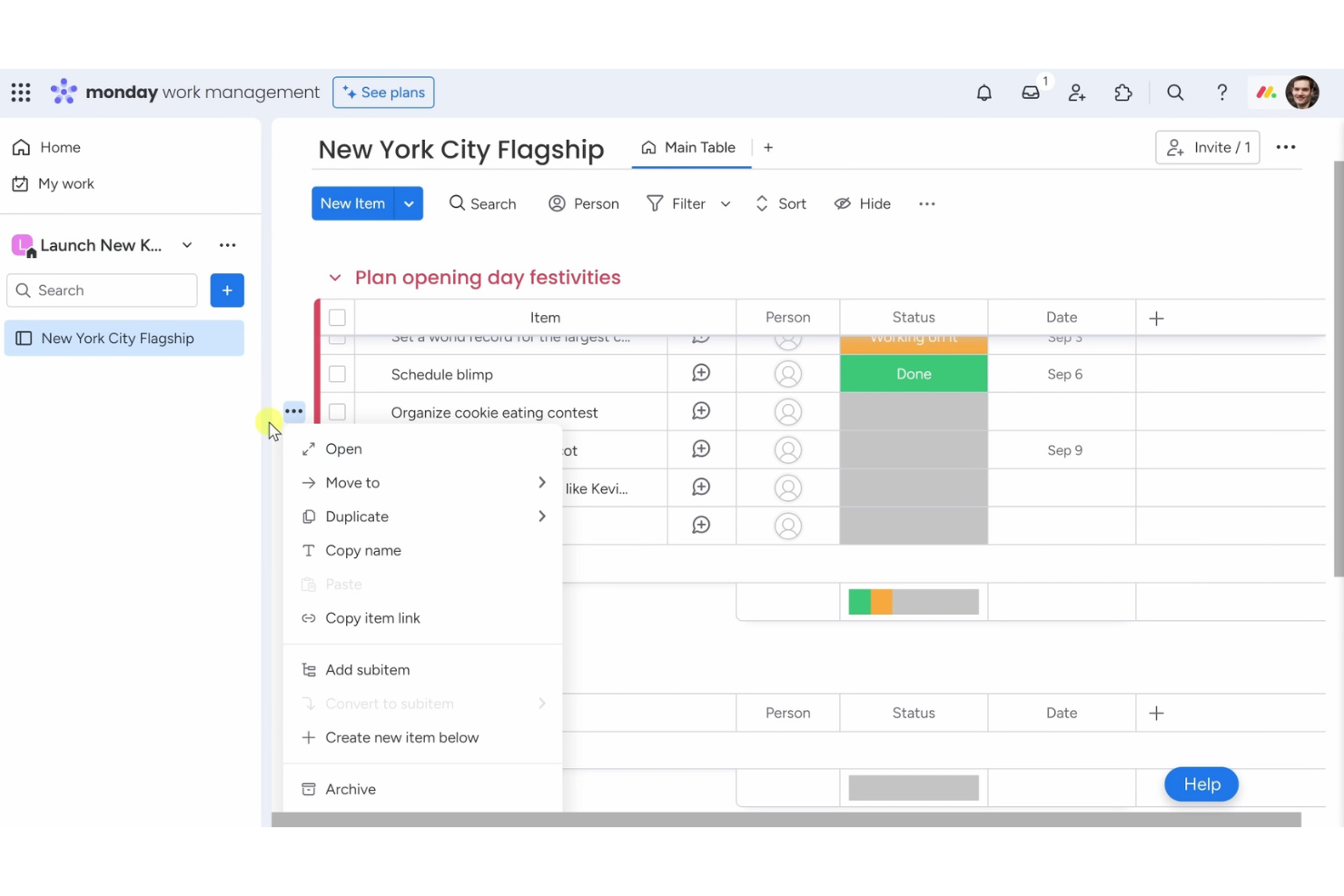
Monday AI Workspace is one of the easiest AI project management software tools for teams that want a simple way to organize tasks and workflows. It’s built for businesses that value ease of use while still benefiting from smart automation and AI assistance.
Why I picked Monday AI Workspace: Its no-code automation recipes let you cut out repetitive work with just a few clicks, so your team can focus on higher-priority tasks. AI features assist with task updates, summaries, and workflow adjustments, making project management less manual. The visual dashboard keeps everything clear at a glance, and customizable boards let you tailor processes to fit your team without complexity.
Standout features & integrations:
Features include a visual dashboard that lets you track project progress at a glance. You can create custom workflows to fit your team's processes, and automation recipes allow you to set up task triggers easily. The platform also offers a variety of templates to help you get started quickly.
Integrations include Slack, Google Drive, Zoom, Microsoft Teams, Dropbox, Trello, Zapier, Jira, Salesforce, and Shopify.
Pros and Cons
Pros:
- No coding required for automations
- Variety of templates available
- Flexible workflow creation
- Visual project dashboards
- Customizable automation recipes
Cons:
- Requires internet for full functionality
- Occasional slow loading times
- Complexity in advanced features
- Limited offline functionality
- Can be overwhelming for new users
New Product Updates from monday AI Workspace
monday AI Workspace Adds Human Approval Routing
monday AI Workspace adds a human-in-the-loop approval block to AI Workflows, sending approval requests and routing workflow paths based on responses. For more information, visit monday AI Workspace's official site.

Wrike
Best for scalable project structures

Wrike is one of the easiest AI project management software tools for teams that want a simple way to manage complex projects at scale. It’s designed to keep collaboration smooth and project visibility clear, even across large teams.
Why I picked Wrike: Its AI features help predict risks, suggest task priorities, and automate updates, so managing big projects feels less overwhelming. You can create custom workflows that fit your processes and set up automations to cut down on repetitive work. Real-time reporting keeps everyone aligned with accurate insights into progress and performance. Wrike’s mix of AI support and scalability makes it an easy choice for teams that need both simplicity and growth potential.
Standout features & integrations:
Features include custom workflows that let you tailor processes to fit your team's needs. You can automate recurring tasks to increase efficiency and reduce manual effort. The platform also offers real-time collaboration features, allowing team members to work together seamlessly.
Integrations include Slack, Microsoft Teams, Google Drive, Dropbox, Salesforce, Jira, Trello, Evernote, Box, and Adobe Creative Cloud.
Pros and Cons
Pros:
- Detailed reporting features
- Real-time collaboration capabilities
- Custom workflow options
- Flexible project structures
Cons:
- Initial setup can be time-consuming
- Limited offline functionality
- Learning curve for advanced features
- Requires time to fully customize
- Can be complex for new users
- Automates repetitive tasks
New Product Updates from Wrike

Wrike Adds Quick Search to Table View
Wrike adds Quick Search to Table View with full-table search across titles, descriptions, and fields, plus highlighted matches. This helps users find tasks faster in large tables. For more information, visit Wrike’s official site.

Zenhub
Best for GitHub project management

Zenhub is one of the easiest AI project management software tools for development teams working in GitHub. It’s designed to bring project planning and task tracking directly into the coding environment, reducing the need to switch between tools.
Why I picked Zenhub: Its AI features assist with task updates, prioritization, and sprint planning, helping your team stay focused on delivery. Boards make it simple to visualize progress, while burndown charts provide quick insights into timelines. By combining GitHub integration with AI-powered project support, Zenhub makes managing development projects easier and more efficient.
Standout features & integrations:
Features include burndown charts that help you track project progress and predict completion dates. You can create boards to organize tasks and visualize workflows easily. Zenhub also offers sprint planning tools that let your team focus on delivering work in manageable increments.
Integrations include GitHub, Slack, Microsoft Teams, Google Workspace, Jira, Trello, Asana, Bitbucket, GitLab, and Toggl.
Pros and Cons
Pros:
- Visual task boards
- Sprint planning capabilities
- Detailed burndown charts
- Supports agile workflows
- Direct integration with GitHub
Cons:
- Initial setup can be time-consuming
- Not ideal for non-developer teams
- Requires some technical knowledge
- Can be complex for beginners
- Limited to GitHub users

Motion
Best for AI-driven task scheduling

Motion is one of the easiest AI project management software tools for individuals and teams who want their schedules managed automatically. It focuses on using AI to handle time-blocking, task prioritization, and daily planning without extra effort.
Why I picked Motion: Its AI-driven scheduling automatically reorganizes tasks around deadlines, meetings, and changing priorities, so you don’t have to. You can set preferences for your workday, and Motion adapts in real time as new tasks arrive. This makes it especially useful if you want a project management tool that removes the stress of planning while keeping productivity high.
Standout features & integrations:
Features include a smart calendar that adjusts to changes in your schedule, task prioritization to focus on urgent work, and time blocking to allocate hours effectively. You can customize notifications to keep your team informed without overwhelming them, and the interface is designed to be intuitive, reducing the learning curve.
Integrations include Google Calendar, Outlook, Slack, Zoom, Microsoft Teams, Trello, Asana, Basecamp, Todoist, and Evernote.
Pros and Cons
Pros:
- Effective time blocking
- Intuitive user interface
- Customizable notifications
- Dynamic schedule adjustments
- AI-driven task organization
Cons:
- May lack advanced features
- Not ideal for complex projects
- Requires internet connection
- Can be overwhelming initially
- Limited customization options


ClickUp is one of the easiest AI project management software tools for teams that want flexibility without complexity. It’s built to adapt to different workflows while keeping task and project management simple to set up and use.
Why I picked ClickUp: Its AI features help with writing, summarizing, and generating task updates, making project management faster and less manual. Customizable views let your team switch between lists, boards, or timelines depending on preference. You can also create custom statuses and templates to save time on repetitive processes. With its adaptable hierarchy, ClickUp keeps projects organized while staying easy to navigate.
Standout features & integrations:
Features include a unique hierarchy structure that organizes tasks into spaces, folders, and lists. You can use custom fields to add specific data points to tasks, enhancing tracking and reporting. The platform also offers time tracking to help your team stay on top of deadlines.
Integrations include Slack, Google Drive, Dropbox, Zoom, Microsoft Teams, Trello, Todoist, Evernote, Zapier, and GitHub.
Pros and Cons
Pros:
- Detailed task templates
- Custom status creation
- Supports multiple project views
- Flexible workspace configuration
- Highly customizable task views
Cons:
- Complexity in managing large projects
- Limited offline functionality
- Requires time to fully customize
- Can be overwhelming for new users
- Steeper learning curve


Zoho is one of the easiest AI project management software tools for teams that want an all-in-one platform to handle tasks and collaboration. It’s designed to simplify work by combining automation, communication, and project tracking in one place.
Why I picked Zoho: Its AI assistant makes managing projects feel effortless, from assigning tasks to sending deadline reminders. You can automate routine processes and customize dashboards to match your team’s workflow. With its AI-driven interactions, Zoho helps reduce manual effort while keeping projects organized and productivity high.
Standout features & integrations:
Features include customizable dashboards that let you visualize your projects in a way that suits your team. You can automate recurring tasks to save time and reduce manual effort. The reporting tools provide insights into your team's performance, helping you make informed decisions.
Integrations include Slack, Google Workspace, Microsoft Office 365, Dropbox, Zapier, Trello, Zendesk, Evernote, QuickBooks, and Salesforce.
Pros and Cons
Pros:
- Integrates with multiple services
- Extensive reporting tools
- Automates recurring tasks
- Customizable dashboards available
- AI chatbot for task management
Cons:
- Can be overwhelming for small teams
- Limited offline capabilities
- May require technical knowledge
- Learning curve for new users
- Complexity in initial setup

Notion is one of the easiest AI project management software options for teams that want a simple yet flexible way to stay organized. It combines project tracking, task management, and documentation in a single workspace without overwhelming you with complexity.
Why I picked Notion: Its drag-and-drop interface makes it simple to set up workflows in minutes. AI support helps with organizing and refining content, keeping projects easy to manage. This combination of ease and adaptability makes Notion a strong choice for teams that want project management software that’s both simple and flexible.
Standout features & integrations:
Features include a drag-and-drop interface that lets you easily organize your projects, customizable templates to suit your team's specific needs, and a powerful search function to quickly find what you're looking for. You can create interconnected pages to build a knowledge base for your team, and the ability to embed various content types enhances collaboration.
Integrations include Slack, Google Drive, Trello, GitHub, Asana, Figma, Zapier, Typeform, Calendly, and Jira.
Pros and Cons
Pros:
- Flexible workspace design
- Embeddable content types
- Drag-and-drop organization
- Interconnected page linking
- Customizable page templates
Cons:
- Requires internet connection
- Complex setup for beginners
- No task dependencies
- Limited offline access
- Steep learning curve

Asana is one of the easiest AI project management software tools for teams that want to keep work organized without complexity. It’s designed to improve visibility across projects while supporting collaboration and accountability.
Why I picked Asana: Its AI-powered suggestions help you track tasks, deadlines, and priorities more efficiently. The timeline view makes it simple to map out project plans, while dependencies ensure tasks flow in the right order. With customizable fields and adaptable workflows, Asana gives you structure without being rigid, making it an easy choice for teams that need clarity and flexibility.
Standout features & integrations:
Features include a timeline view that helps you map out project plans visually. You can use task dependencies to ensure everything happens in the correct order. The custom fields feature allows you to add specific data points to your projects, enhancing tracking and reporting.
Integrations include Slack, Microsoft Teams, Google Drive, Dropbox, Zoom, Salesforce, Jira, Trello, Evernote, and Zapier.
Pros and Cons
Pros:
- Enhances project visibility
- Adaptable to different workflows
- Customizable project fields
- Task dependencies management
- Intuitive timeline feature
Cons:
- Complexity in advanced features
- Requires internet for full functionality
- Limited offline capabilities
- Overwhelming for small teams
- Learning curve for new users


Dart is one of the easiest AI project management software tools for teams that want smart task management without complexity. It’s built to support businesses in sales, IT, marketing, and startups by using AI to simplify organization and boost productivity.
Why I picked Dart: Its AI-powered insights help your team prioritize tasks and stay focused on what matters. Features like automatic property filling and subtask creation reduce manual work, while flexible views such as lists and boards make projects easy to visualize. With AI-generated reports and intelligent task management, Dart helps teams cut administrative overhead and manage projects more efficiently.
Standout features & integrations:
Features include intelligent task management that automates property filling and subtask generation. You can create and manage sprints with ease, and the document editor allows for detailed notes and AI-generated reports. Dart's various layout options, such as board and calendar views, help your team stay organized and meet deadlines.
Integrations include ChatGPT, Slack, Microsoft Teams, Google Calendar, GitHub, Jira, Trello, Asana, Dropbox, and Zoom.
Pros and Cons
Pros:
- Customizable workspaces
- AI-generated reports
- Various project views
- Automatic property filling
- AI-powered task insights
Cons:
- May require technical knowledge
- Limited offline capabilities
- Learning curve for new users
- Requires internet for full functionality
- Initial setup may be complex

Miro
Best for expansive brainstorming canvas

Miro is one of the easiest AI project management software tools for teams that prefer a visual, collaborative approach to planning and organizing work. It gives you a flexible space to brainstorm, map ideas, and align projects without adding complexity.
Why I picked Miro: Its AI tools help generate mind maps, summarize content, and organize workflows quickly, so your team can focus on ideas instead of setup. The infinite canvas supports real-time collaboration, letting teammates contribute from anywhere. By combining creativity with AI assistance, Miro makes project planning both simple and engaging.
Standout features & integrations:
Features include an infinite canvas that lets you map out projects and ideas without running out of space. You can use pre-built templates to get started quickly and customize them to fit your needs. Miro also offers sticky notes and drawing tools for flexible brainstorming sessions.
Integrations include Slack, Microsoft Teams, Google Drive, Dropbox, Zoom, Jira, Trello, Asana, Microsoft OneDrive, and Evernote.
Pros and Cons
Pros:
- Visualizes complex ideas easily
- Customizable for different needs
- Pre-built templates available
- Supports real-time collaboration
- Infinite canvas for brainstorming
Cons:
- Limited offline capabilities
- Interface may feel cluttered
- Can be overwhelming for new users
- Requires internet for collaboration
- Initial setup can be complex
New Product Updates from Miro
Miro Adds Japan Data Residency for Enterprise Customers
Miro has introduced Japan data residency for enterprise customers, offering in-region storage for production data, backups, and metadata, plus in-region compute infrastructure. For more information, visit Miro's official site.
Other Easiest AI Project Management Software
Here are some additional easiest AI project management software options that didn’t make it onto my shortlist, but are still worth checking out:
- Hive
For converting messages to tasks
- Productive
For agency profitability tracking
- CAFLOU
For small business cash flow management


How I Evaluate the Easiest AI Project Management Software
Every tool on this list needs to do more than slap an AI label on basic automations—I look for platforms where AI saves you real time, like generating a project plan from a one-line brief or surfacing risks before standup. I split my evaluation into core functionality a tool must have and differentiating factors that separate one option from another.
Core Functionality (Table Stakes For This List)
When I'm selecting tools for my list, I rank each one on a scale from 0 (does not offer the functionality) to 5 (excels in this area) for each core functionality listed below. Then, I calculate the tool's total score into a percentage. Each tool needs to achieve a minimum total score of 65% to be considered for inclusion.
- AI Task Automation: I check whether the AI can generate, assign, and reprioritize tasks from project context—like auto-creating subtasks when a sprint scope changes.
- Natural Language Interface: A good test is typing something like "show me all overdue tasks for the website redesign" and getting accurate, actionable results back.
- AI Project Planning: I evaluate whether the tool can turn a short brief into a structured plan with milestones and timelines, not just a blank template.
- AI Summaries & Insights: I look for tools that auto-generate status updates or flag at-risk workstreams so you're not manually pulling reports before every standup.
- Core PM Functionality: The foundation matters—multiple views (board, list, timeline), task dependencies, due dates, and collaboration features all need to be solid.
- Smart Notifications & Suggestions: Proactive AI nudges set tools apart, like suggesting you reassign a task when someone's workload spikes or reminding you of a missed dependency.
Once I have a list of tools that meet this criteria, I consider what sets each platform apart.
Differentiating Factors (What Sets Vendors Apart)
Here's how I compare and contrast different vendors:
Standout Features
Predictive risk detection is a big differentiator—I look for tools that flag potential delays based on historical patterns, like warning you a design review is likely to slip before it actually does. Cross-tool AI sync matters just as much, especially for small teams juggling Slack, Google Docs, and a CRM. Tools that pull context from connected apps and auto-update task status save hours of manual data entry. I also evaluate whether a platform lets you build custom AI agents to automate team-specific workflows, like auto-triaging incoming client requests at an agency.
Beyond Features
Time-to-value matters a lot when ease is the whole point. I evaluate how quickly a solo PM or small team can go from signup to running a real project—ideally within a single session, with AI-guided setup doing the heavy lifting. Pricing transparency is another factor I weigh, particularly whether AI features are included in affordable tiers or locked behind enterprise plans. I also check each vendor's data privacy posture, including whether they're clear about how project data is handled by their AI models and whether users can opt out of model training.
How to Choose Easiest AI Project Management Software
It’s hard not to get bogged down in long feature lists and complex pricing structures. To help you stay focused as you work through your unique software selection process, here’s a checklist of factors to keep in mind:
| Factor | What to Consider |
|---|---|
| Scalability | Will the software grow with your team? Consider if it can handle more users and projects as your business expands. Look for tools that offer flexible pricing tiers. |
| Integrations | Does it connect with your existing tools? Check if the software integrates smoothly with your current systems like Slack, Google Workspace, or Microsoft Teams. |
| Customizability | Can you tailor it to fit your processes? Ensure the software allows you to customize workflows and dashboards to match your team's unique needs. |
| Ease of use | Is the interface intuitive? Evaluate if your team can easily navigate the software without extensive training. Look for user-friendly designs. |
| Implementation and onboarding | How long will it take to get started? Consider the time and resources needed to implement and train your team. Look for tools with guided onboarding processes. |
| Cost | Is it within your budget? Compare the pricing plans and determine if the cost aligns with your budget. Watch out for hidden fees or charges. |
| Security safeguards | Does it protect your data? Verify that the software complies with security standards and offers features like data encryption and user access controls. |
What is the Easiest AI Project Management Software?
The easiest AI project management software uses artificial intelligence to simplify task management and boost productivity—without requiring users to spend hours learning complicated features. These tools are designed with simplicity in mind, combining intuitive UX/UI design with smart, AI-driven automation that helps teams stay organized and efficient.
The easiest AI project management software typically includes features like automated scheduling, task prioritization, and real-time analytics to reduce manual work and keep projects on track. The result is a faster, smarter, and more effortless way to manage projects from start to finish.
Features of the Easiest AI Project Management Software
When selecting easiest AI project management software, keep an eye out for the following key features:
- Automated scheduling: Automatically organizes tasks based on priority and deadlines, saving time and reducing manual planning.
- Task prioritization: Helps identify and focus on the most important tasks, ensuring critical work gets done first.
- Real-time analytics: Provides insights into project progress and team performance, helping you make informed decisions quickly.
- Customizable workflows: Allows you to tailor processes to fit your team's specific needs, enhancing flexibility and efficiency.
- Integration capabilities: Connects seamlessly with existing tools like Slack and Google Workspace to streamline workflows.
- AI-driven insights: Offers intelligent recommendations and predictions to optimize task management and resource allocation.
- User-friendly interface: Ensures ease of use, allowing team members to navigate the software without extensive training.
- Security safeguards: Protects data with encryption and user access controls, ensuring your information remains secure.
- Collaboration tools: Facilitates communication and collaboration among team members, improving teamwork and productivity.
Benefits of Easiest AI Project Management Software
Implementing easiest AI project management software provides several benefits for your team and your business. Here are a few you can look forward to:
- Increased efficiency: Automated scheduling and task prioritization reduce manual work, allowing your team to focus on important tasks.
- Improved collaboration: Integration capabilities and collaboration tools enhance communication, making it easier for team members to work together.
- Better decision-making: Real-time analytics provide insights into project progress, helping you make informed decisions quickly.
- Enhanced flexibility: Customizable workflows allow you to tailor processes to fit your team's needs, adapting to various project requirements.
- Time savings: AI-driven insights and automation features help streamline project management, freeing up time for other priorities.
- Data security: Security safeguards protect your information, giving you peace of mind that your data is safe.
- User satisfaction: A user-friendly interface ensures team members can easily navigate the software, reducing the learning curve.
Costs and Pricing of Easiest AI Project Management Software
Selecting the easiest AI project management software requires an understanding of the various pricing models and plans available. Costs vary based on features, team size, add-ons, and more. The table below summarizes common plans, their average prices, and typical features included in AI project management software solutions:
Plan Comparison Table for Easiest AI Project Management Software
| Plan Type | Average Price | Common Features |
|---|---|---|
| Free Plan | $0 | Basic task management, limited integrations, and community support. |
| Personal Plan | $5-$15/user/month | Task prioritization, customizable workflows, and basic analytics. |
| Business Plan | $20-$40/user/month | Advanced reporting, enhanced integrations, and collaboration tools. |
| Enterprise Plan | $50+/user/month | Custom security features, dedicated support, and unlimited customization options. |
AI Project Management Software FAQs
Here are some answers to common questions about easiest AI project management software:
How do AI project management tools handle data security?
AI project management tools prioritize data security by implementing features like encryption, user access controls, and compliance with industry standards. It’s essential to evaluate the software’s security measures to ensure your team’s data remains protected. Always check for certifications like ISO or GDPR compliance if applicable to your needs.
Can AI project management software integrate with existing systems?
Yes, most AI project management software offers integration capabilities with popular tools like Slack, Google Workspace, and Microsoft Teams. Before choosing a solution, ensure it can seamlessly connect with your current systems to maintain workflow efficiency. Check the software’s integration library for supported applications.
How do AI features improve project management?
AI features in project management software help by automating routine tasks, providing data-driven insights, and enhancing decision-making. They can optimize scheduling, predict project risks, and recommend resource allocation. This allows your team to focus on strategic tasks and reduces manual workload, improving overall productivity.
What should I consider when evaluating AI project management software costs?
When evaluating costs, consider the pricing model, included features, and potential add-ons. Compare the value provided by the software against its price and check for any hidden fees. It’s important to ensure the software fits within your budget while meeting your team’s needs, so look for flexible pricing plans.
How can AI project management tools enhance team collaboration?
AI project management tools enhance collaboration by integrating communication features, offering real-time updates, and providing shared workspaces. These tools help keep team members aligned and informed, reducing miscommunication and improving project outcomes. Evaluate the collaboration features to ensure they align with your team’s workflow.
Are there specific industries that benefit more from AI project management software?
While AI project management software can benefit various industries, it’s particularly useful for sectors requiring complex project coordination, such as IT, marketing, and construction. These tools help manage intricate workflows, automate repetitive tasks, and provide insights that are crucial for project success in these fields.