
35 Best Construction Project Management Software For 2026

20 Best Construction Project Management Software Shortlist
Here are the 10 tools I’ve evaluated as the best for managing construction projects:


Construction project management software helps teams plan, schedule, and execute construction projects more efficiently by centralizing timelines, budgets, tasks, and communications in one place. From tracking subcontractors and RFIs to managing site progress and compliance, the right software keeps your construction projects organized and on schedule.
To help you find the right fit, I tested and reviewed top construction project management tools based on features like field reporting, budgeting, team collaboration, and document control. Whether you're managing residential builds or large-scale infrastructure projects, this guide highlights the best tools available in 2025 for keeping construction projects on track.
What Is Construction Project Management Software?
Construction project management software is a tool that helps teams plan, coordinate, and control construction projects from start to finish.
It supports scheduling, budgeting, document management, and real-time collaboration—keeping projects on time and within budget. Designed for construction and manufacturing teams, it streamlines communication, improves visibility, and reduces costly errors across complex project workflows.
Why You Can Trust Our Construction Project Management Software Reviews
We’ve been testing and reviewing construction project management software since 2012. As project managers ourselves, we know how critical and difficult it is to make the right decision when selecting software.
We invest in deep research to help our audience make better software purchasing decisions. We’ve tested more than 2,000 tools for different Project Management use cases and written over 1,000 comprehensive software reviews. Learn how we stay transparent & our construction project management software review methodology.
Table of Contents
- What Is Construction PM Software?
- Why You Can Trust Our Reviews
- The Best Construction PM Software
- Related Project Management Software Reviews
- Selection Criteria For Construction Project Management Software
- How To Choose Construction Project Management Software
- Trends
- Features
- Benefits of Construction Project Management Software
- Costs and Pricing For Construction Project Management Software
- Plan Comparison Table For Construction PM Software
The Best Construction PM Software Summary
You can use the following chart to find the best construction PM tool for your needs:
| Tool | Best For | Trial Info | Price | ||
|---|---|---|---|---|---|
| 1 | Best for efficient stakeholder coordination | Free plan available | From $9/user/month (billed annually) | Website | |
| 2 | Best for real-time data and analytics | Free plan + free demo + 14-day free trial available | From $10/user/month (billed annually) | Website | |
| 3 | Best for bridging field and office workflows | Free trial + free demo available | From $9/member/month (billed annually) | Website | |
| 4 | Best for quote-to-invoice project control | 14-day free trial | From $18/user/month (billed annually) | Website | |
| 5 | Best with built-in budgeting tools | Free plan + free demo available + 15-day free trial | From $4/user/month (billed annually) | Website | |
| 6 | Best for dynamic Gantt charts | 14-day free trial + free demo available | From $7/user/month (billed annually) | Website | |
| 7 | Best for project planning and scheduling | 30-day free trial + free demo available | From $14/user/month (billed annually) | Website | |
| 8 | Best resource and document management | 30-day free trial + free demo available | From $39/month (billed annually) | Website | |
| 9 | Best for syncing stakeholders | Free trial available | Pricing upon request | Website | |
| 10 | Best contractor app | 14-day free trial available | From $8/month | Website | |
| 11 | Best for project controls | Free demo available | Pricing upon request | Website | |
| 12 | Best for job costing | 10-day free trial | From $200/month | Website | |
| 13 | Best for complex construction projects | Free demo available | Pricing upon request | Website | |
| 14 | Best for document collection | Free demo | Pricing upon request | Website | |
| 15 | Best for multi-device accessibility | Free demo | Pricing upon request | Website | |
| 16 | Best cloud-based solution | Free demo available | From $51/month | Website | |
| 17 | Best for estimates | Free demo and Free trial | Pricing upon request | Website | |
| 18 | Best for contract administration | Free demo | Pricing upon request | Website | |
| 19 | Best for automation | Not available | Website | ||
| 20 | Best for customizable workflows | Free plan + free demo available | From $7/user/month (billed annually) | Website |


-

Insightful
Visit WebsiteThis is an aggregated rating for this tool including ratings from Crozdesk users and ratings from other sites.4.8 -
Accelo
Visit WebsiteThis is an aggregated rating for this tool including ratings from Crozdesk users and ratings from other sites.4.4 -
Wrike
Visit WebsiteThis is an aggregated rating for this tool including ratings from Crozdesk users and ratings from other sites.4.2




Best Construction Project Management Software Reviews
These are the best construction PM software tools currently on the market:

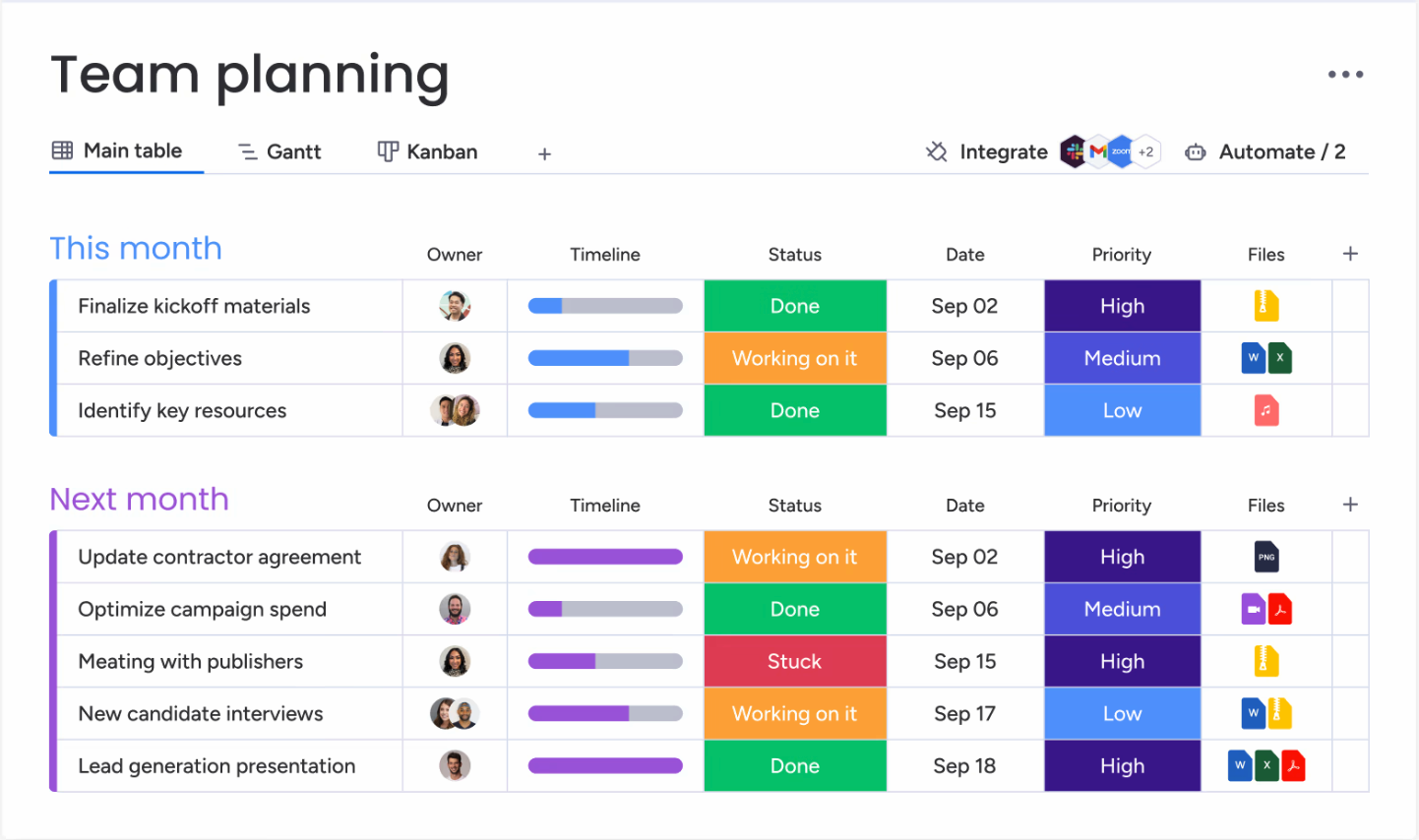
monday.com is a project management software that supports the planning, execution, monitoring, and closure of construction projects. It provides teams with customizable templates, visual dashboards, and centralized data management to improve project visibility and control.
For Aubrey Lanier, Estimator at GCM Contracting Solutions, monday.com has proven invaluable during the early phases of projects: “monday.com has been a game-changer for our preconstruction team. It helps us stay on top of RFP deadlines, bid schedules, and owner meetings, all while keeping everything organized in a way that works for us. The customizable boards are especially helpful, whether it’s a hard-bid project with a strict RFP schedule or a design-build project where we need to adjust the design process timeline based on an owner’s needs. It makes it easy to track updates, keep owners in the loop, and ensure nothing slips through the cracks.”
Who Is monday.com Best For?
Teams and organizations that need a flexible, visual work OS to coordinate stakeholders, standardize workflows, and align cross-functional work without heavy process overhead.
Why I Picked monday.com
I chose monday.com because it offers features that make stakeholder coordination much easier for construction teams. Its shared boards let you assign tasks, set deadlines, and update progress so everyone—from site managers to subcontractors—can see what’s happening in real time. I like how the platform’s communication tools, like comments and file attachments, keep all project discussions and documents in context. The ability to customize workflows for different project phases also helps teams adapt the platform to their unique coordination needs.
monday.com Key Features
Some other features in monday.com that construction teams may find useful include:
- Timeline View: Visualize project schedules and dependencies with a Gantt-style timeline to keep tasks on track.
- Forms: Collect site updates, incident reports, or change requests directly into your boards using customizable forms.
- Automations: Set up rule-based triggers to automate repetitive actions like status updates or notifications.
- Mobile App: Access project boards, update tasks, and communicate with your team from any job site using the mobile app.
monday.com Integrations
Integrations include project management apps like Slack, Google Drive, Gmail, Google Calendar, Jira, GitHub, Trello, Dropbox, Typeform and many more, accessible through a paid plan with Zapier. You can also access their API to build custom integrations with your tech stack.
Pros and Cons
Pros:
- Supports various views like Gantt, Kanban, and timelines
- Customizable workflows for specific construction needs
- Highly visual interface to track project progress
Cons:
- Could offer more construction-specific features
- Potential notification overload
New Product Updates from monday.com

monday.com Adds Time Range Support to Calendar Widget
monday.com introduces time range support in the Calendar Widget. This update allows users to visualize events across their full duration instead of single dates, improving scheduling clarity. For more information, visit monday.com’s official site.

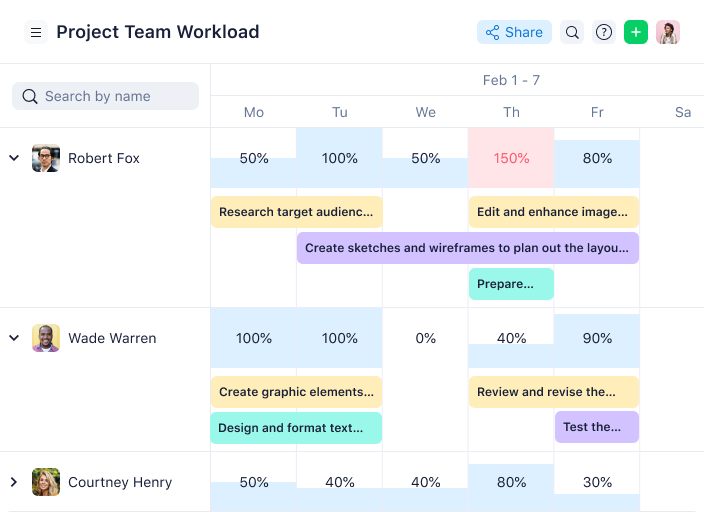
Wrike gives construction project managers a way to monitor project health with real-time analytics and customizable dashboards. This platform is a strong fit for teams that need to track budgets, timelines, and resource allocation as projects evolve. Its live reporting and data visualization tools help you quickly spot risks and keep stakeholders informed.
Caspar Matthews, Director of Electcomm Group Electrical and Data in Melbourne, shared: “Wrike has been useful in managing projects with multiple contractors and short timelines, as the dependencies of tasks make it very clear what needs to be completed before progressing to the next step. For big electrical jobs, that clarity has saved my team hours of back and forth and prevented costly delays.”
Who Is Wrike Best For?
Mid-sized to enterprise teams managing complex projects that require robust real-time data, analytics, and structured collaboration across departments.
Why I Picked Wrike
What sets Wrike apart for construction project management is its focus on real-time data and analytics. The platform’s live dashboards let you monitor project progress, budget status, and resource allocation as things change on site. I appreciate how Wrike’s custom reporting tools allow you to drill down into specific metrics, making it easier to identify bottlenecks or risks before they escalate. For teams that need to keep stakeholders updated with accurate, up-to-the-minute information, Wrike’s analytics features are a strong fit.
Wrike Key Features
Some other features in Wrike that construction teams may find valuable include:
- Blueprints: Create and reuse project templates for repeatable construction workflows.
- Request Forms: Collect project requests or site updates using customizable intake forms.
- Time Tracking: Log hours directly within tasks to monitor labor costs.
- Document Proofing: Review and annotate plans or documents without leaving the platform.
Wrike Integrations
Integrations include Salesforce, Microsoft Teams, Google Drive, QuickBooks, Tableau, Power BI, Miro, Zoom, Adobe Creative Cloud, and Google Sheets.
Pros and Cons
Pros:
- Provides advanced reporting capabilities to monitor project performance
- Facilitates team collaboration with features
- Allows users to create personalized dashboards
Cons:
- No built-in chat feature
- Comes with a steeper learning curve
New Product Updates from Wrike

Streamlining Workspaces with New Updates
Wrike announces custom space templates, AI Agents in Wrike Labs, and a new Guage widget to improve project management. For more information, visit Wrike's official site.


Smartsheet offers a flexible, spreadsheet-based platform for construction teams who want to bring their office and field work together in a single view. If you’re managing building, infrastructure, or renovation projects and need both on-site tracking and longer-term scheduling visibility, Smartsheet can serve general contractors, project managers, site supervisors, and owners alike.
Who Is Smartsheet Best For?
Teams that need a spreadsheet-inclusive work and resource management platform to bridge office and field workflows with customizable views and automation.
Why I Picked Smartsheet
I picked Smartsheet because it enables you to connect field and office workflows through two key construction-relevant capabilities: its mobile-enabled data capture for site-based teams (so updates, inspections, and incident reports can be entered from job sites) and its automation and scheduling tools (so you can trigger alerts, update timelines, and manage dependencies automatically). These features matter when you need to keep multiple trade partners aligned and ensure that change orders, inspections, and close-out tasks don’t slip through the cracks.
Smartsheet Key Features
Aside from the mobile capture and automation I mentioned above, here are other features valuable for construction project management:
- RFI/RFP Management: Streamlines the process of managing requests for information and proposals to ensure timely responses and decision-making.
- Field Operations Tracking: Provides tools to monitor and manage field activities, ensuring that on-site operations align with project timelines and goals.
- Resource Allocation: Facilitates the efficient distribution and utilization of resources, helping you optimize project outcomes and reduce waste.
- Construction templates: Ready-built templates for schedules, budgets, punch-lists and inspection logs help you get started without building everything from scratch.
Smartsheet Integrations
Integrations include Procore, Microsoft 365, Google Workspace, Salesforce, Jira, Box, Slack, ServiceNow, Docusign, and Tableau.
Pros and Cons
Pros:
- Strong visibility for managers via dashboards and reports across projects.
- Good library of construction-specific templates shortens setup time.
- Automations help reduce repetitive follow-ups and ensure tasks trigger correctly.
Cons:
- For very simple task-list or sub-contractor management needs, it may feel heavier than necessary.
- While spreadsheet-based is familiar, the interface and setup can feel complex to non-technical users.
New Product Updates from Smartsheet

Smartsheet Adds Direct Data Import to Existing Sheets
Smartsheet introduces direct data import to existing sheets in table view. This update lets you import CSV, XLS, and XLSX files directly into sheets, reducing manual work and speeding up data setup. For more information, visit Smartsheet's official site.
 .
.

ProWorkflow is designed for construction firms that want to manage projects from initial quote through to final invoice in one place. It’s a strong fit for contractors and project managers who need to track estimates, job progress, and billing without switching tools. The platform helps teams keep financials, timelines, and client communications tightly connected throughout the project lifecycle.
Who Is ProWorkFlow Best For?
Project-centric organizations that want end-to-end control from quotes and estimates through work delivery and invoicing revenue.
Why I Picked ProWorkflow
Managing the entire project lifecycle—from quoting to invoicing—can be a challenge for construction teams, and that’s where ProWorkflow stands out. The built-in quoting and invoicing tools let you generate estimates, track approvals, and convert quotes directly into invoices without leaving the platform. I picked ProWorkflow because it connects project tasks, time tracking, and billing in a single workflow, which helps reduce manual entry and errors. This approach is especially useful for contractors who want to keep financials and project progress tightly aligned.
ProWorkflow Key Features
Some other features construction teams may find valuable include:
- Gantt Chart View: Plan and visualize project timelines and dependencies in a drag-and-drop interface.
- Custom Fields: Tailor project templates and task details to match your construction workflows.
- Document Management: Upload, store, and share project files and drawings within each job.
- Internal Messaging: Communicate with team members directly inside the platform to keep conversations organized.
ProWorkflow Integrations
Integrations include Xero, QuickBooks Online, MYOB Business, FreshBooks, Zapier, Box, Kashflow, Google Drive, Dropbox, OneDrive, SharePoint, and Google Workspace.
New Product Updates from ProWorkflow

ProWorkflow Nexus Adds Billing and Project Enhancements
ProWorkflow Nexus introduces additional measurement units, staff pay rates, split time allocation, and combined invoicing. These updates improve billing accuracy, financial tracking, and project flexibility. For more information, visit ProWorkflow’s official site.
 .
.
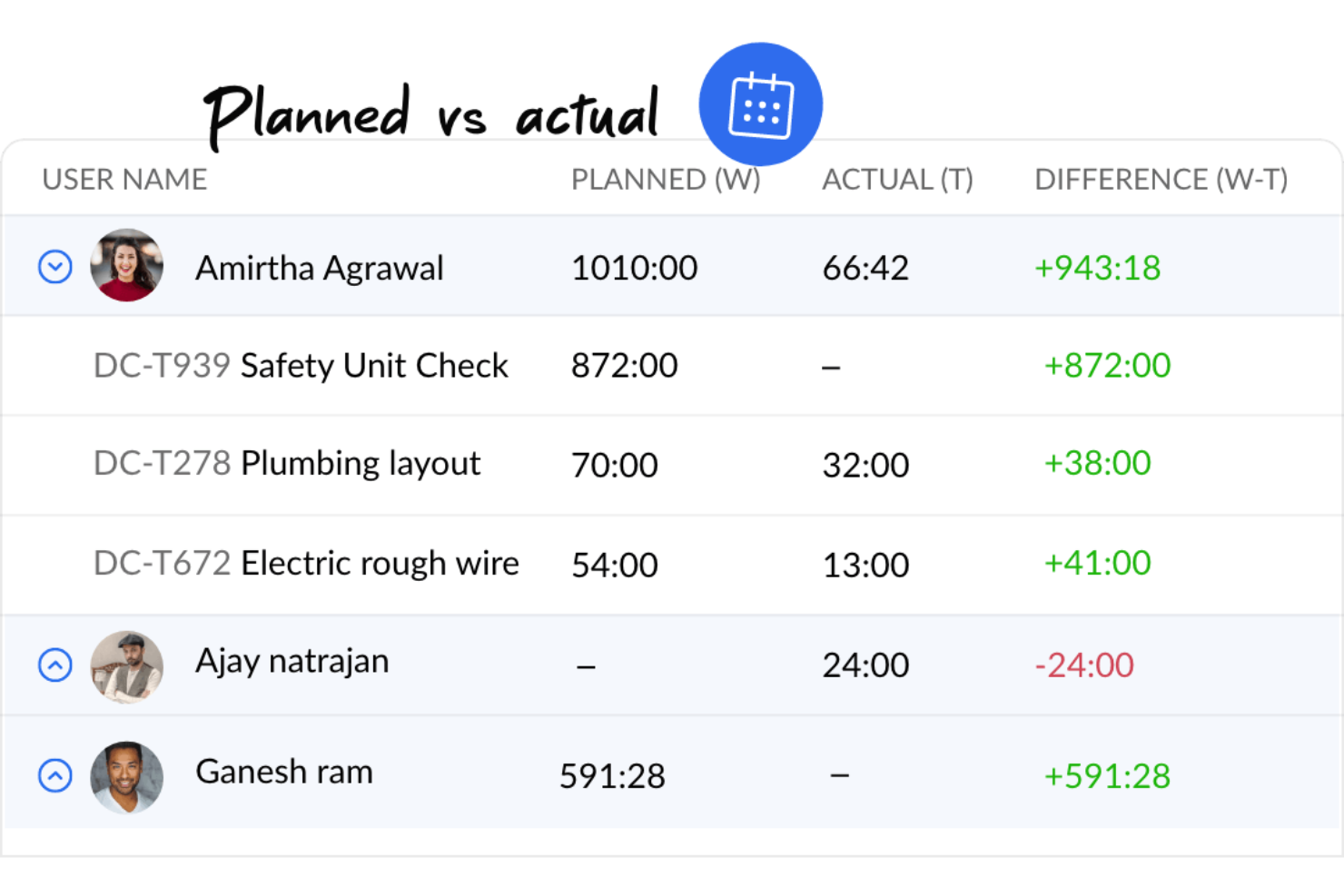
If you’re looking for construction project management software with built-in budgeting and cost control, Zoho Projects is worth a look. It’s a good fit for project managers and contractors who want to track expenses, allocate resources, and monitor budgets alongside schedules and tasks. The platform helps teams keep financials visible and connected to day-to-day project activity.
Who Is Zoho Projects Best For?
Small to mid-sized teams that want affordable project management with built-in budgeting and time tracking tools.
Why I Picked Zoho Projects
Budgeting and cost management are often top priorities for construction teams, which is why Zoho Projects stands out in this space. The platform includes built-in budgeting tools that let you set project budgets, track actual costs, and compare them against estimates in real time. I picked Zoho Projects because it also supports expense logging and resource allocation, so you can keep a close eye on where money is going throughout the project. These features help construction project managers maintain financial control without needing separate accounting tools.
Zoho Projects Key Features
Some other features construction teams may find useful include:
- Gantt Charts: Visualize project timelines, dependencies, and milestones in a single view.
- Task Automation: Set up rules to automate repetitive project tasks and notifications.
- Timesheet Management: Log work hours and generate timesheet reports for payroll or billing.
- Issue Tracking: Capture, assign, and monitor project issues or defects as they arise.
Zoho Projects Integrations
Integrations include Zoho CRM, Zoho Books, Zoho Invoice, Zoho Analytics, Zoho People, Google Drive, Microsoft Teams, Slack, Dropbox, and GitHub.
Pros and Cons
Pros:
- Includes task management, time tracking, and Gantt charts
- Allows customization of workflows and project templates
- Good integration with Zoho Suite
Cons:
- The platform lacks robust offline functionality
- Lacks advanced functionalities required for complex construction projects

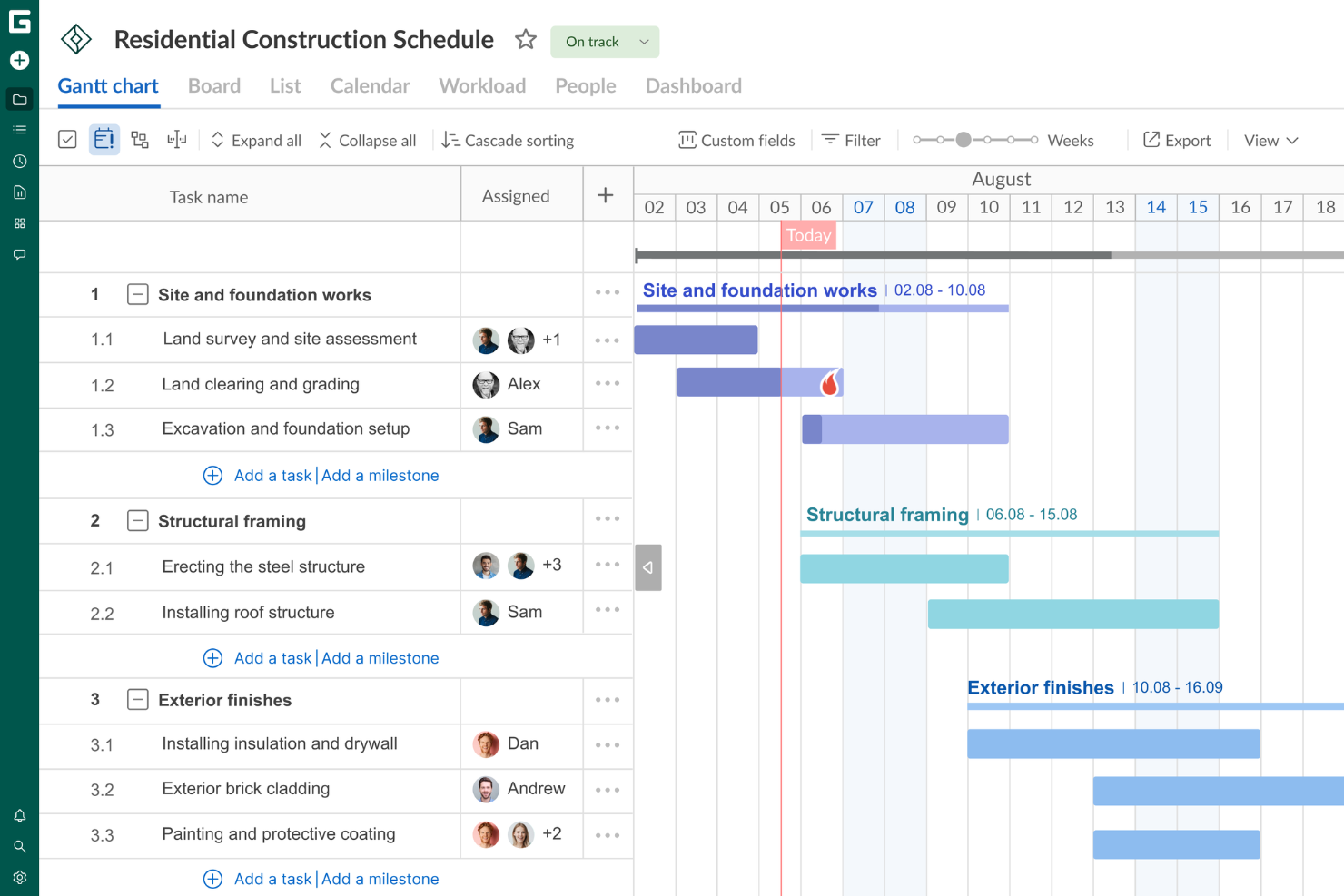
Whether you're overseeing a skyscraper's construction or managing a residential build, GanttPRO offers an intuitive blend of features to guide your projects from inception to completion. Notably, it provides a clear visual timeline through Gantt charts, helping you manage complex schedules and resources with ease.
Who Is GanttPRO Best For
Project managers and teams that rely heavily on Gantt charts for planning, scheduling, and visualizing project timelines and dependencies.
Why I Picked GanttPRO
I picked GanttPRO for its exceptional ability to cater to the intricate needs of construction project management through its dynamic Gantt charts. These charts allow you to visualize your entire project timeline, manage task dependencies, and adjust schedules as needed. The resource management feature also ensures that your team is optimally utilized, preventing overallocation and keeping projects on schedule. Real-time collaboration tools further enhance communication among team members, a critical aspect of managing construction projects efficiently.
GanttPRO Key Features
In addition to its standout Gantt chart capabilities, I like that GanttPRO offers:
- Project Calendars: These provide a clear overview of project timelines, milestones, and deadlines, helping you stay organized.
- Critical Path Analysis: This feature helps you identify the longest sequence of dependent tasks and highlights the project's critical path to optimize scheduling.
- Task Management: Manage and prioritize tasks with ease, ensuring that all aspects of the project are aligned and on track.
- Reporting Capabilities: Generate detailed reports to gain insights into project performance and make data-driven decisions.
GanttPRO Integrations
Integrations include Jira, Google Drive, Slack, and Microsoft Teams. For custom connections, GanttPRO provides an API.
Pros and Cons
Pros:
- Real-time collaboration enhances team communication and coordination.
- Robust task management supports detailed task assignment and tracking.
- Intuitive Gantt chart interface simplifies complex project planning.
Cons:
- While reporting tools are present, it lacks more advanced options for complex forecasting.
- Limited native integrations with other software tools.


ProjectManager offers construction teams a centralized platform for planning, scheduling, and tracking project progress. It’s especially useful for general contractors and project leads who need to coordinate multiple schedules, resources, and deadlines across complex builds. The tool’s real-time dashboards and flexible planning views help keep everyone aligned as project details shift.
Who Is ProjectManager Best For?
Teams and PMOs that need detailed planning and scheduling tools with resource tracking and collaborative dashboards.
Why I Picked ProjectManager
For construction teams that need to juggle multiple timelines and resources, ProjectManager stands out for its project planning and scheduling capabilities. The platform offers interactive Gantt charts and calendar views that make it easy to map out phases, assign tasks, and adjust schedules as site conditions change. I picked ProjectManager because its real-time dashboards let project managers track progress and spot delays before they become issues. These planning tools help keep complex construction projects on track, even when requirements shift mid-build.
ProjectManager Key Features
Some other features that construction teams may find valuable include:
- Resource Management: Allocate equipment, labor, and materials to specific tasks and monitor usage across projects.
- Document Management: Store, organize, and share project files, drawings, and permits within the platform.
- Timesheets: Track crew hours and approve timesheets directly in the system.
- Customizable Reports: Generate detailed reports on project status, resource allocation, and costs for stakeholders.
ProjectManager Integrations
Integrations include Salesforce, Dropbox, Desk.com, QuickBooks, Slack, Jira, Trello, Power BI, Microsoft Office, Google Drive, Microsoft Teams, Hubspot, Acumatica, OneDrive, and Xero.
Pros and Cons
Pros:
- Good project planning capabilities
- Has tools for real-time collaboration
- Supports multiple project views
Cons:
- Many resource management features are limited to higher-tier plans
- Could offer more native integrations
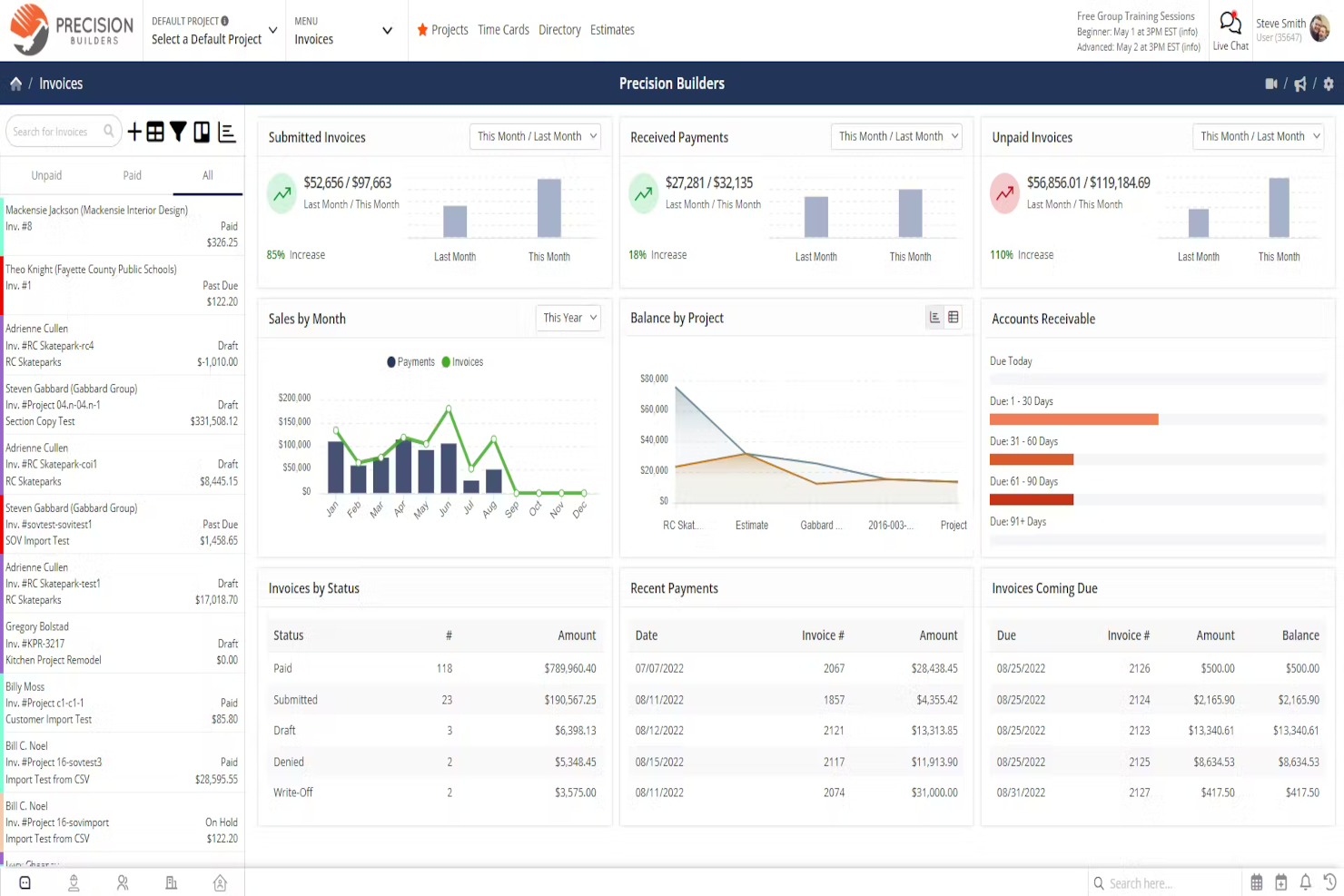
Contractor Foreman brings together resource tracking and document management for construction businesses that need to keep jobs organized and compliant. It’s a strong fit for small to mid-sized contractors who want to manage crews, equipment, and project files in one place. The platform’s focus on daily logs, safety forms, and centralized file storage helps teams stay on top of paperwork and resource allocation.
Who Is Contractor Foreman Best For?
Contractors and field service teams that want a project and resource management platform built specifically for construction workflows.
Why I Picked Contractor Foreman
What sets Contractor Foreman apart is its focus on resource and document management tailored for construction teams. The platform offers tools for tracking equipment, materials, and labor assignments, making it easier to allocate resources across multiple jobs. I picked Contractor Foreman because its document management features—like daily logs, safety forms, and centralized file storage—help keep project paperwork organized and accessible. These capabilities are especially useful for contractors who need to maintain compliance and manage documentation for inspections or audits.
Contractor Foreman Key Features
Some other features that construction teams may find useful include:
- Change Order Management: Create, track, and approve change orders directly within the platform.
- Scheduling Tools: Build project schedules and assign tasks to team members with drag-and-drop functionality.
- Client Portal: Share project updates, documents, and invoices with clients through a secure online portal.
- Invoice and Payment Tracking: Generate invoices and monitor payment status for each project.
Contractor Foreman Integrations
Integrations include QuickBooks, WePay, Outlook 365, Google Calendar, CompanyCam, Gusto, and Angi Leads. You can also use a paid Zapier account to unlock additional software integrations.
Pros and Cons
Pros:
- Integrates with QuickBooks for better financial management
- Offers a mobile app, enabling field teams to access and update information
- Designed specifically for contractors
Cons:
- Customization options may not be as extensive as other platforms
- Occasional slow loading times
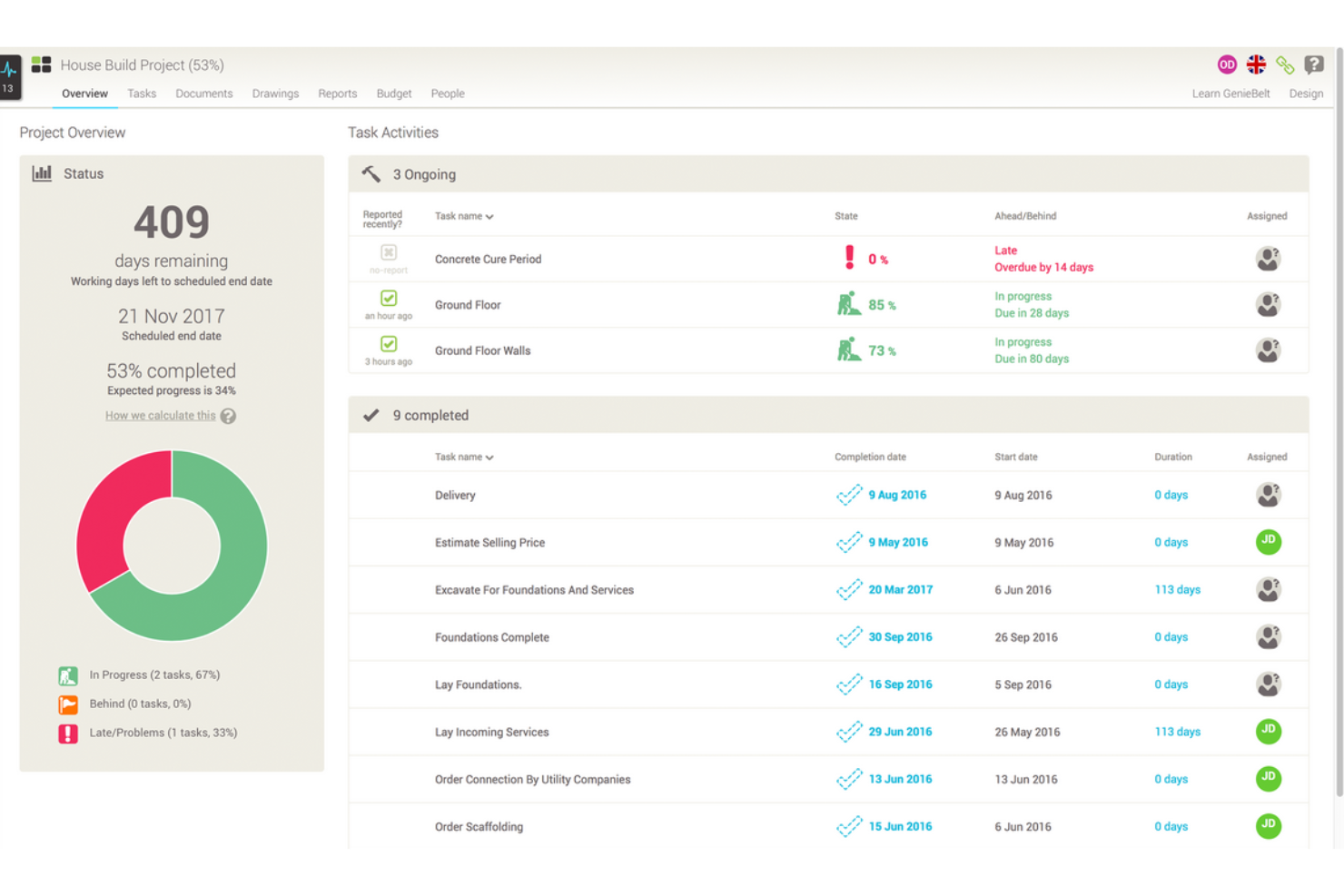
GenieBelt offers an intuitive platform designed specifically for construction professionals seeking to enhance project management with real-time communication, scheduling, and monitoring. Whether you're managing small or large-scale projects, it simplifies planning through interactive Gantt charts and provides a centralized view to keep your team aligned. By reducing downtime and improving workflow transparency, GenieBelt ensures you deliver projects on time and within budget, making it a valuable asset for your construction needs.
Who Is GenieBelt Best For?
Construction and delivery teams that need real-time collaboration and stakeholder sync across project tasks and updates.
Why I Picked GenieBelt
I picked GenieBelt for its exceptional capability in syncing stakeholders, a crucial need in construction project management. The software's real-time communication feature enables seamless context-based discussions, which minimizes the need to sift through endless email threads, ensuring everyone stays on the same page. Additionally, its interactive Gantt charts provide instant updates on project schedules, allowing you to visualize progress and make necessary adjustments that keep the team aligned and informed. With these features, GenieBelt tackles the challenge of maintaining clear and effective communication across diverse project teams, ultimately ensuring timely project delivery.
GenieBelt Key Features
In addition to its ability to sync stakeholders, GenieBelt offers several features that enhance construction project management for your team.
- Portfolio Progress Tracking: Provides a comprehensive dashboard to monitor the progress of all projects, allowing you to identify areas needing attention and make informed decisions.
- Project Overview: Offers detailed insights into individual projects, including milestones, tasks, and deadlines, helping you track performance and potential delays.
- Real-Time Notifications: Sends automatic updates on site activities, such as task completions and changes, enhancing collaboration and ensuring your team has the latest information.
- Task Dependencies & Milestones: Allows for the addition of task dependencies and milestones, aiding in the clear tracking and execution of your project plans.
GenieBelt Integrations
Native integrations are not currently listed by GenieBelt.
Pros and Cons
Pros:
- Facilitates tracking of project updates to minimize delays.
- Intuitive interface makes it easy for daily use.
- Real-time updates enhance team collaboration and project efficiency.
Cons:
- You have to pay for onboarding fees
- Offers limited options for customizing the platform


For contractors looking to streamline their construction project management, Joist offers a versatile solution that combines estimating, invoicing, and payment collection all in one app. Tailored for professionals across various trades, Joist helps you manage projects on the go, ensuring you can focus more on building and less on paperwork. By providing tools to create quick estimates and secure client payments, Joist addresses common challenges faced by contractors and enhances your business operations.
Who Is Joist Best For?
Independent contractors and small renovation businesses that want a mobile-friendly app for estimating, invoicing, and job management.
Why I Picked Joist
I picked Joist for its contractor app, particularly for its mobile estimating capabilities. The app allows you to create estimates in minutes by storing frequently used services in an items catalog, which simplifies future estimations. You can also get digital signatures from clients instantly, whether in person or online, making the approval process smooth and hassle-free. Additionally, Joist supports cost markups and payment schedules, offering you a comprehensive toolset for professional estimation.
Joist Key Features
In addition to its mobile estimating capabilities, Joist offers several key features that enhance construction project management:
- Customizable Invoices: Create invoices that reflect your brand and cater to specific client needs.
- Homeowner Financing Options: Offer financing solutions to your clients directly through the app, making your services more accessible.
- QuickBooks Synchronization: Seamlessly sync your financial data with QuickBooks, ensuring accurate and up-to-date accounting.
- Client Management Tools: Keep track of client interactions and project details, all in one centralized location.
Joist Integrations
Integrations include QuickBooks and various payment processing services. Joist also offers an API for custom integrations.
Pros and Cons
Pros:
- Supports homeowner financing options for job acquisition
- Quick payment collection process improves cash flow
- User-friendly interface for creating estimates and invoices
Cons:
- Limited integration options
- Lacks a built-in time-tracking solution for projects
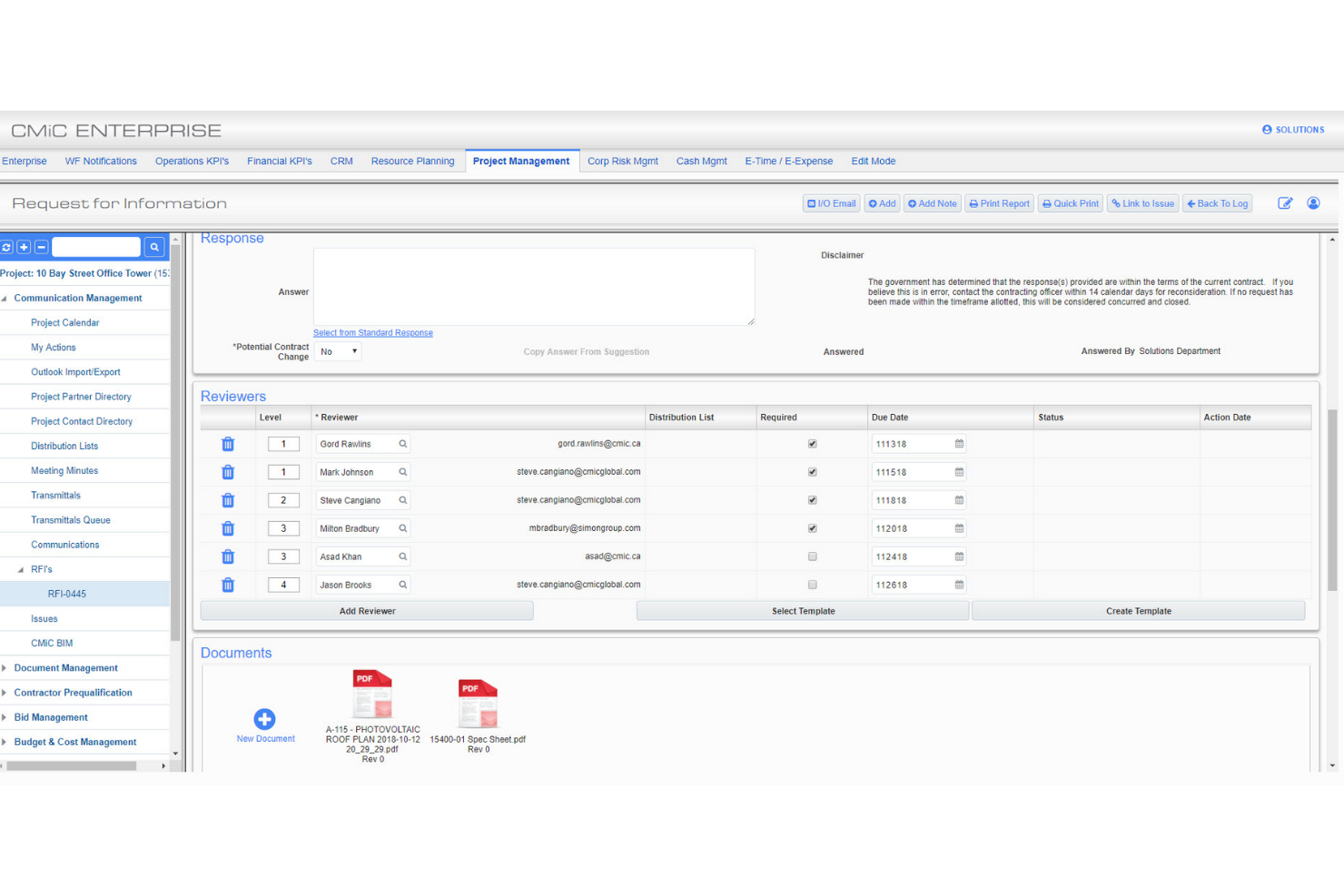
CMiC is designed for construction firms that need advanced project controls and integrated financial management. It’s a strong fit for general contractors and large project teams who want to connect field operations with back-office processes. The platform’s unified database helps teams manage budgets, contracts, and change orders with real-time accuracy.
Who Is CMiC Best For?
Large construction enterprises that need integrated project controls, financials, and resource visibility in a single platform.
Why I Picked CMiC
What makes CMiC a strong choice is its deep focus on project controls for construction teams managing complex projects. The platform brings together project budgeting, forecasting, and contract management in a single system, which helps teams keep a close eye on costs and changes as projects progress. I picked CMiC because its real-time data and reporting tools support better decision-making and risk management throughout the project lifecycle. These features are especially valuable for general contractors and project managers who need to maintain tight control over financials and compliance.
CMiC Key Features
Some other features that construction teams may find valuable include:
- Drawing Management: Store, share, and mark up project drawings within the platform.
- Daily Journals: Log daily site activities, weather, and labor details for each project.
- Subcontractor Management: Track subcontractor contracts, compliance documents, and communications.
- Mobile Field App: Access project data, submit forms, and capture photos from the job site.
CMiC Integrations
Integrations include Kofax, Docusign, PlanGrid, BlueBeam, Autodesk, Oracle/Textura, and other third-party applications.
Pros and Cons
Pros:
- Designed to support companies of various sizes
- Allows for the creation of tailored workflows
- Combines project management, financials, and enterprise resource planning
Cons:
- Potential challenges integrating with certain third-party apps
- Complex platform to learn


ConstructionOnline stands out for construction businesses that need detailed job costing and budget tracking. It’s especially useful for residential builders, remodelers, and specialty contractors who want to manage estimates, change orders, and client selections in one place. The platform’s cost management tools help teams keep projects profitable and transparent from start to finish.
Who Is ConstructionOnline Best For
Builders and construction teams that require integrated job costing, project tracking, and resource planning in a connected environment.
Why I Picked ConstructionOnline
For teams that need to keep a close watch on project costs, ConstructionOnline offers some of the most detailed job costing tools in the construction software space. The platform lets you build and manage estimates, track actual costs against budgets, and handle change orders with clear audit trails. I picked ConstructionOnline because its cost management features are tightly integrated with scheduling, client selections, and invoicing, which helps reduce errors and surprises. This makes it a strong fit for contractors and builders who want to maintain financial control and transparency throughout every phase of a project.
ConstructionOnline Key Features
Some other features that make ConstructionOnline useful for project teams include:
- Redline Planroom: Share, mark up, and collaborate on project drawings in real time.
- RFI Tracking: Manage requests for information and responses directly within the platform.
- Document Management: Store, organize, and control access to project files and photos.
- Client Portal: Give clients access to selections, schedules, and project updates online.
ConstructionOnline Integrations
Integrations include QuickBooks, Microsoft Project, AWS, Zero, Sage 300, Dropbox, Facebook, LinkedIn, Twitter, UDA ConstructionSuite, OnSite Mobile Apps, Houzz, and more.
Pros and Cons
Pros:
- Detailed scheduling tools
- Extensive project management suite
- Integrated sales management features
Cons:
- You may need to pay for more storage
- Some integrations are paid add-ons on lower-tier plans
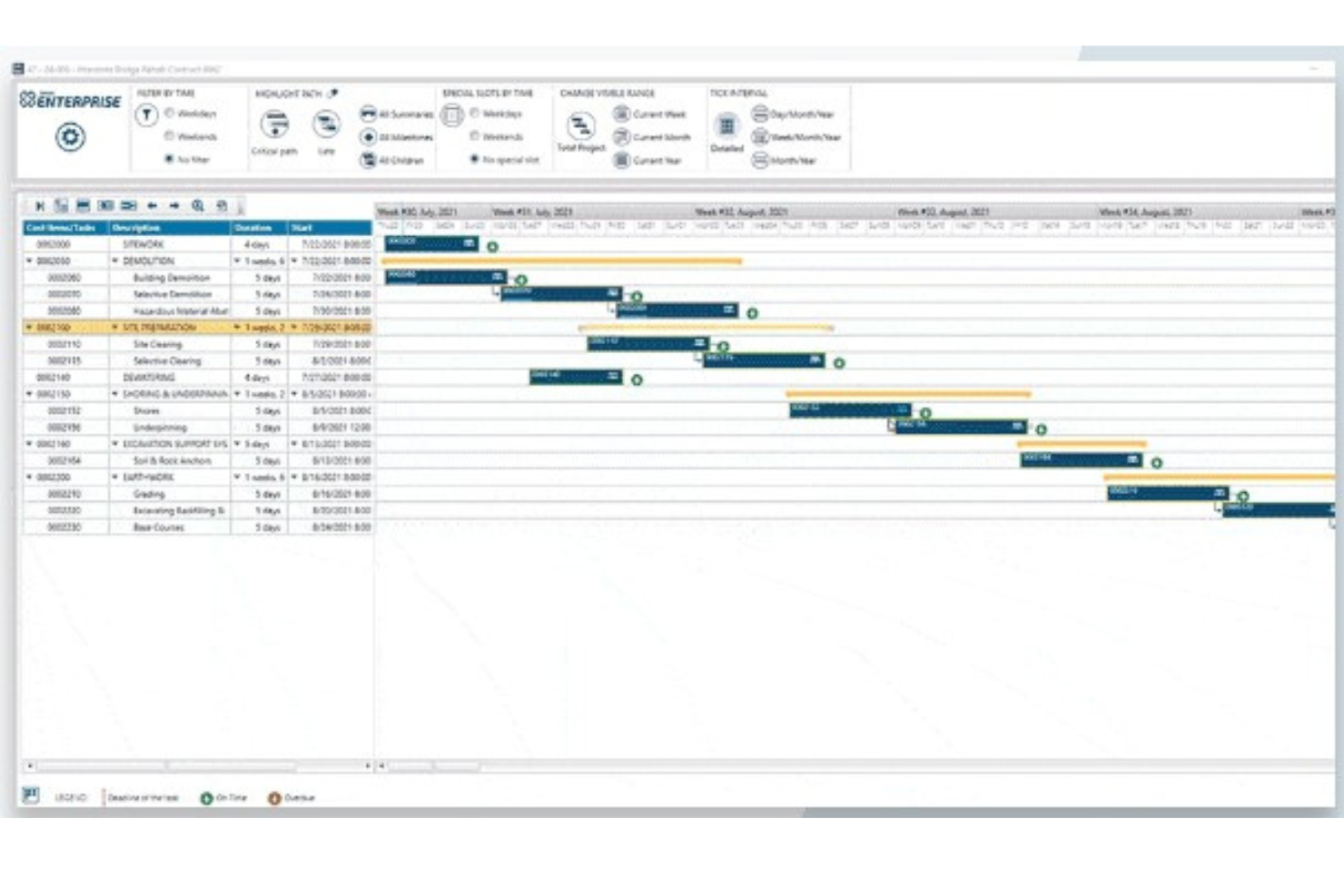
Jonas Construction is designed for contractors and specialty trades managing large, multi-phase projects with complex requirements. It’s a strong fit for commercial builders, mechanical contractors, and service-based construction firms that need integrated accounting, project management, and service management in one platform. The software’s depth in handling job costing, work orders, and contract billing helps teams coordinate every aspect of complex construction workflows.
Daniel Vasilevski, Owner and Director of Pro Electrical in Sydney, has seen firsthand how Jonas can streamline operations: “My experience with Jonas Construction has been the ability to keep the job costing and project tracking in one location. Being able to have cost reports, schedules, and updates linked to each other meant I was able to reduce the amount of time spent on administrative tasks by several hours per week and instead focus my energy on getting work completed quickly. I still trust Jonas Construction due to the fact that I have confidence in the assurance that each project detail is being handled without any form of excessive handling.”
Who Is Jonas Construction Best For?
Mid-sized to enterprise construction firms managing complex projects with deep scheduling, accounting, and resource requirements.
Why I Picked Jonas Construction
What sets Jonas Construction apart is its ability to handle the demands of complex, multi-layered construction projects. The platform brings together project management, accounting, and service management in a single system, which is especially valuable for firms juggling multiple contracts, phases, and service calls. I picked Jonas Construction because its job costing and contract billing features are built to support projects with intricate requirements and ongoing changes. This makes it a strong choice for commercial contractors and specialty trades that need to keep every detail organized across long project timelines.
Jonas Construction Key Features
Some other features that make Jonas Construction valuable for project teams include:
- Document Management: Store, organize, and share project files and drawings within the platform.
- Field Time Entry: Capture labor hours and crew activities directly from the job site.
- Equipment Management: Track usage, maintenance, and allocation of construction equipment.
- Subcontractor Management: Manage contracts, compliance documents, and payments for subcontractors.
Jonas Construction Integrations
Integrations with third-party software systems are not specified.
Pros and Cons
Pros:
- Provides tools for efficient document storage and retrieval
- Industry-specific platform design
- Combines project management, accounting, and service management
Cons:
- Mobile capabilities are not as advanced
- User interface may feel a bit complex


Onware is purpose-built for construction teams that need to manage and track large volumes of project documents. It’s especially useful for general contractors, architects, and consultants who handle submittals, RFIs, and change orders across multiple stakeholders. The platform’s focus on document collection and workflow transparency helps teams reduce delays and keep everyone accountable throughout the project lifecycle.
Who Is Onware Best For?
Architecture, engineering, and construction teams that need a centralized system for document collection, RFIs, and submittal workflows.
Why I Picked Onware
When document collection is a top priority, Onware stands out for its ability to centralize and track every project document in one place. The platform’s submittal and RFI management tools help teams organize, route, and monitor the status of critical documents throughout the project lifecycle. I picked Onware because its audit trails and automated workflow notifications keep everyone accountable and reduce the risk of lost or delayed paperwork. This makes it a strong fit for construction teams that need to manage high volumes of documentation and maintain transparency with multiple stakeholders.
Onware Key Features
Some other features that make Onware useful for construction teams include:
- Change Order Management: Track, review, and approve change orders within the platform.
- Meeting Minutes: Record, organize, and distribute meeting minutes to project stakeholders.
- Contract Management: Store and manage contract documents and related correspondence.
- Customizable Workflows: Configure approval processes and document routing to match your project requirements.
Onware Integrations
Integrations include Oracle NetSuite, JD Edwards, Computer Guidance Corporation eCMS, Viewpoint Spectrum, Vista, Microsoft Dynamics 365, Salesforce, Tableau, Microsoft Power BI, and SharePoint.
Pros and Cons
Pros:
- Suitable for large-scale projects
- Allows tailoring of workflows to fit specific project requirements
- Tools for managing RFIs, submittals, and change orders
Cons:
- Some users have experienced sluggishness and occasional errors
- Does not currently offer a public API
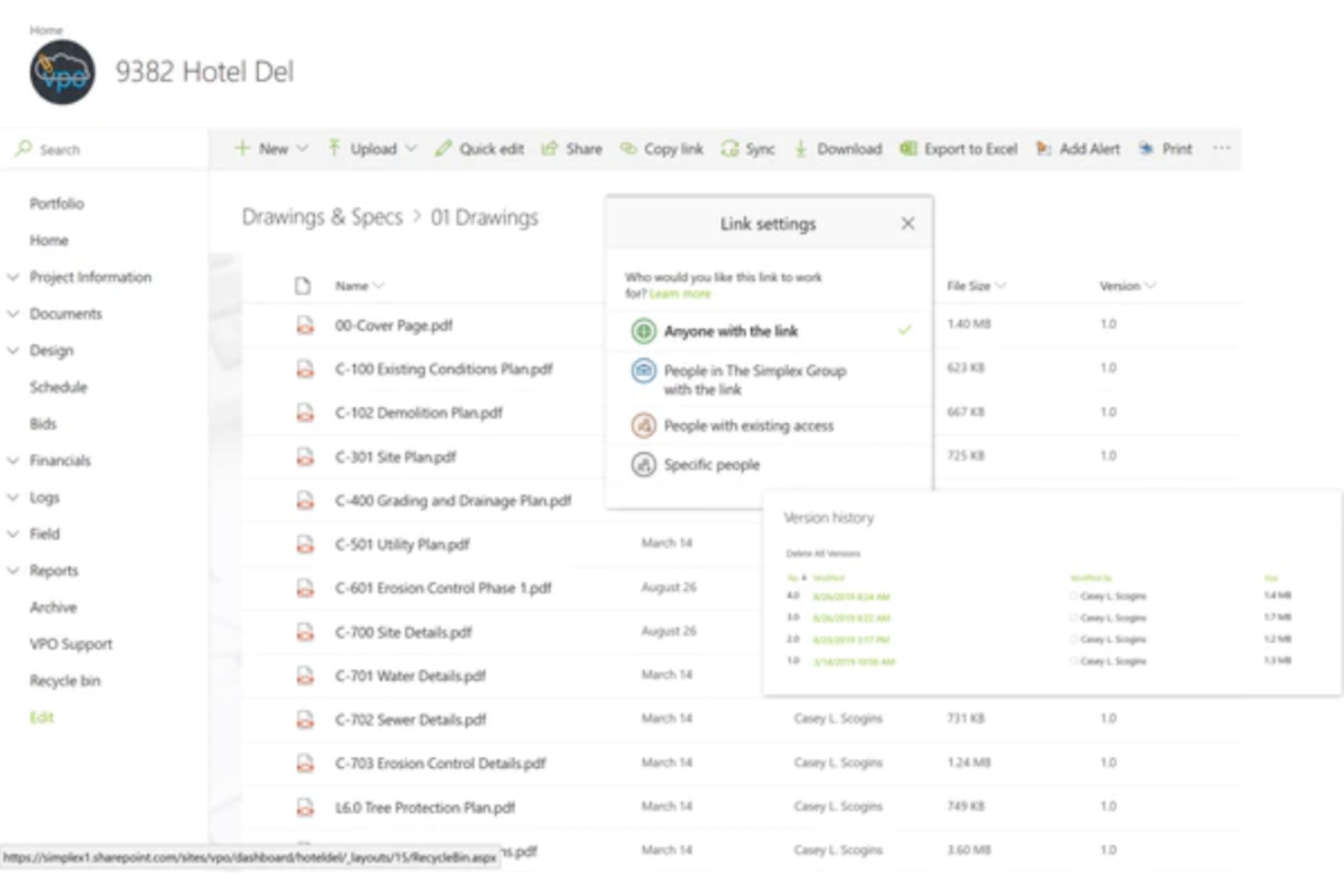
VPO is designed for construction teams that need reliable access to project data from any device, whether in the office or on the jobsite. The platform appeals to owners, contractors, and project managers who want to keep workflows moving without being tied to a single location. Its cloud-based approach helps teams collaborate, review documents, and manage tasks seamlessly across desktops, tablets, and smartphones.
Who Is VPO Best For?
Distributed teams that need mobile-friendly access to project planning and resource scheduling across many device types.
Why I Picked VPO
For teams that need to stay connected across devices, VPO offers a cloud-based platform that works on desktops, tablets, and smartphones without sacrificing functionality. Its responsive interface adapts to different screen sizes, making it easy to review documents, submit RFIs, or update tasks whether you’re in the office or on site. I picked VPO because it supports real-time collaboration and document sharing, so everyone can access the latest project information wherever they are. This focus on multi-device accessibility helps construction teams keep projects moving, even when team members are constantly on the go.
VPO Key Features
Some other features that make VPO useful for construction project management include:
- Submittal Tracking: Manage, route, and track submittals through customizable workflows.
- Change Order Management: Create, review, and approve change orders within the platform.
- Meeting Minutes: Record, organize, and distribute meeting minutes to all project stakeholders.
- Document Version Control: Maintain a complete history of document revisions and access previous versions as needed.
VPO Integrations
Native integrations are not currently listed.
Pros and Cons
Pros:
- Field reports and financial management
- Built in change management
- Offers flexibility in tailoring workflows
Cons:
- Not ideal for those who don't prefer Microsoft 365
- Pricing may not be ideal for smaller operations

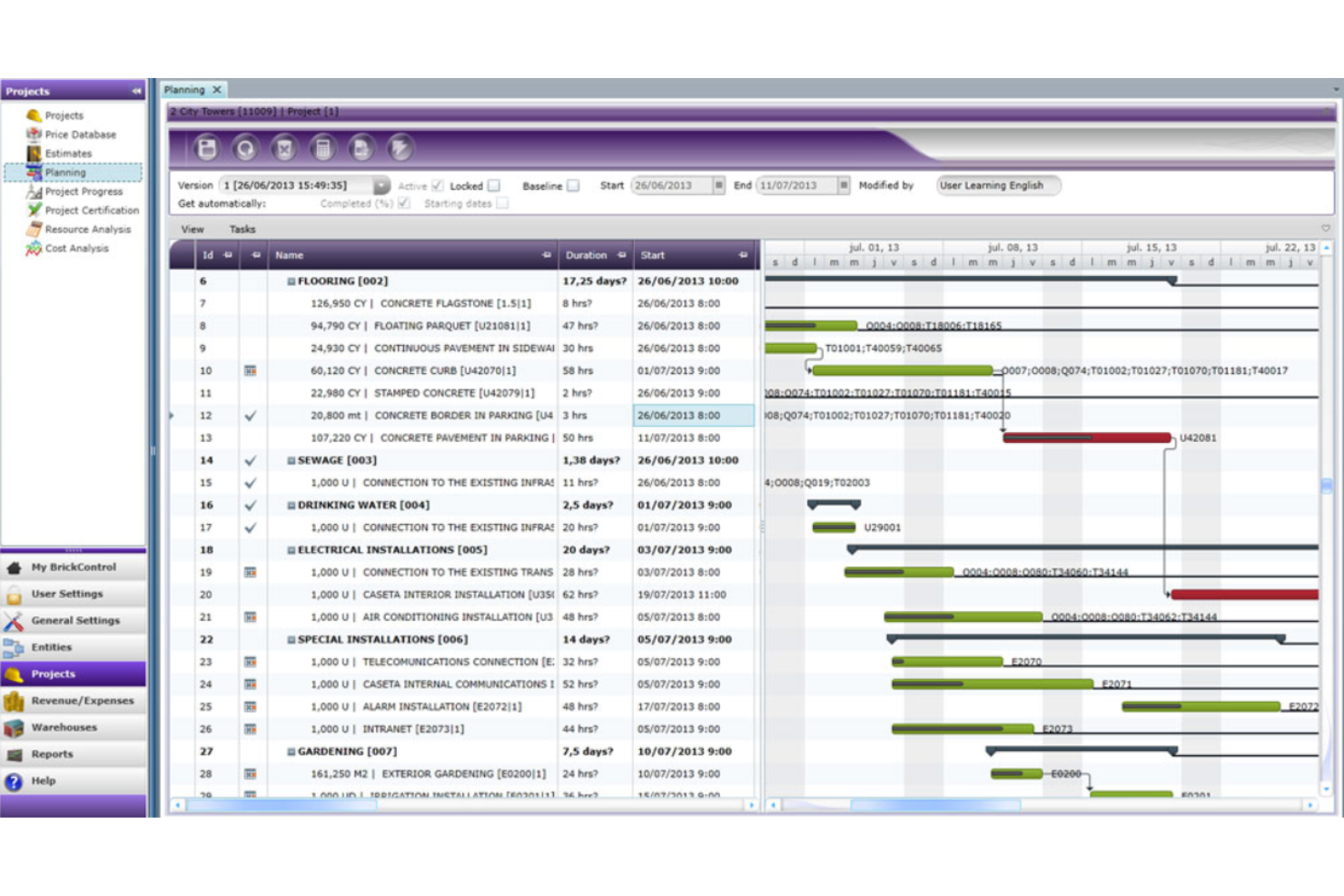
BrickControl is a cloud-based platform built for construction companies that need to manage projects from anywhere. It’s especially useful for teams working across multiple sites or countries who want real-time access to budgets, schedules, and documentation. With its multi-language and multi-currency support, BrickControl helps global construction teams keep projects organized and on track.
Who Is BrickControl Best For?
Project and construction teams that want a cloud-based solution for planning, tracking, and delivering projects across teams.
Why I Picked BrickControl
What sets BrickControl apart is its fully cloud-based architecture, which means you can access your project data from anywhere with an internet connection. This is especially valuable for construction teams that operate across multiple locations or need to coordinate with remote stakeholders. I picked BrickControl because it offers real-time project tracking and centralized document management, so everyone stays on the same page regardless of where they’re working. Its cloud-first approach helps construction businesses avoid the hassles of local installations and manual updates, making it a practical choice for distributed teams.
BrickControl Key Features
Some other features that make BrickControl stand out for construction teams include:
- Multi-currency Support: Track and manage project budgets in different currencies for international projects.
- Resource Allocation: Assign and monitor labor, equipment, and materials across multiple jobs.
- Gantt Chart Scheduling: Visualize project timelines and dependencies with interactive Gantt charts.
- Mobile App Access: Use the dedicated mobile app to update tasks and access project data on site.
BrickControl Integrations
Integration with other products is possible through a complete API.
Pros and Cons
Pros:
- Supports multiple languages and currencies
- Cloud-based accessibility
- BrickControl offers a full suite of tools tailored for construction projects
Cons:
- Constraints in customizing reports and dashboards
- Outdated interface design
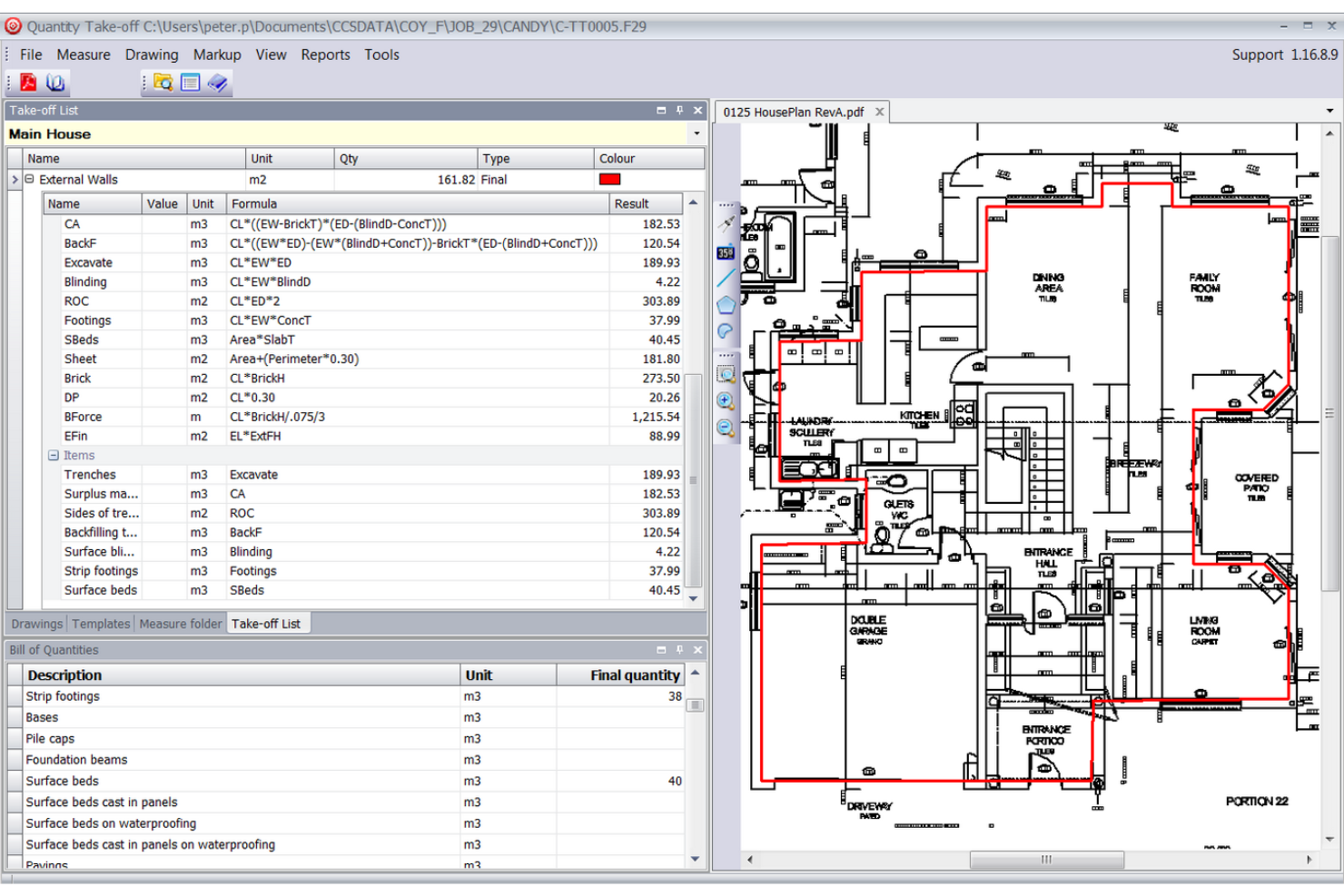
Candy (CCS Candy) is designed for construction professionals who need advanced estimating and project control tools. It’s a strong fit for contractors and quantity surveyors who want to manage bids, budgets, and cash flow with precision. Candy stands out for its integrated approach to cost estimation and project planning, helping teams reduce risk and improve accuracy on complex builds.
Why is Candy (CCS Candy) Best For?
Cost estimators, pre-construction teams, and quantity surveyors who need precise estimating and budgeting support in project workflows.
Why I Picked Candy (CCS Candy)
For construction teams that need precise and detailed estimates, Candy (CCS Candy) offers specialized tools built for the job. I picked Candy because it combines quantity takeoff, cost estimating, and project planning in a single platform, which helps reduce errors and improve bid accuracy. Its estimating module lets you break down costs by resource, activity, or work package, giving you granular control over every aspect of your budget. The integration between estimating and project controls also means you can track actuals against estimates throughout the project lifecycle.
Candy (CCS Candy) Key Features
Some other features that make Candy valuable for construction teams include:
- Subcontractor Management: Track subcontractor quotes, awards, and performance within the platform.
- Cash Flow Forecasting: Generate detailed cash flow projections based on project schedules and cost data.
- Valuations and Progress Claims: Manage interim valuations and automate progress claim calculations.
- Change Order Management: Log, track, and analyze change orders throughout the project lifecycle.
Candy (CCS Candy) Integrations
Integrations include Pastel’s Accounting Software and BuildSmart. No other information was available on their site.
Pros and Cons
Pros:
- Combines estimating, quantity take-off, planning, and forecasting
- Offers robust tools for cost control
- Tailored for the construction industry
Cons:
- Interface could be modernized and more intuitive
- Advanced features may require significant training


Builterra offers a unified platform specifically crafted for civil engineers and project managers, addressing the challenges of disconnected data systems that can lead to miscommunications and project delays. This construction project management software enhances collaboration by providing real-time cost estimates and automated bid preparation, which are vital for keeping projects on track. With features designed to expedite contractor payment approvals and improve inspection reporting, Builterra stands out as a reliable tool for professionals in both private and public sectors looking to deliver infrastructure projects efficiently.
Who Is Builterra Best For?
Construction administrators and contract managers that need centralized contract administration and communication tools tied to project data.
Why I Picked Builterra
I picked Builterra for its strong focus on construction contract administration, which is a crucial aspect of project management in this field. The software's capability to standardize bid items and unit cost data allows for accurate cost estimates and seamless bid preparation. Its integration with eProcurement systems and mobile inspection features empowers your team to connect directly to bid items and report daily progress efficiently. These functionalities not only streamline workflows but also ensure that you maintain control over project budgets and timelines.
Builterra Key Features
In addition to its strengths in contract administration, Builterra offers several other features that can benefit your team:
- Mobile Field Inspections: This feature allows your team to conduct inspections on-site and report findings in real-time through a mobile app.
- Centralized Document Management: Easily access project files and photos through a centralized repository, ensuring all team members have the information they need.
- Custom Reporting Tools: Create ad-hoc reports with customizable filters, and save templates for consistent reporting across projects.
- Automated Approval Workflows: Streamline document approvals with automated workflows and a centralized approval portal.
Builterra Integrations
Native integrations include eProcurement systems and Microsoft Azure for database management. Additionally, Builterra provides an API for custom integrations to meet specific project needs.
Pros and Cons
Pros:
- Facilitates real-time cost estimation for accurate budgeting
- Enhances contract administration with standardized bid packages
- Offers mobile accessibility for field data collection
Cons:
- User experience is noted to be somewhat dated
- Limited integration options

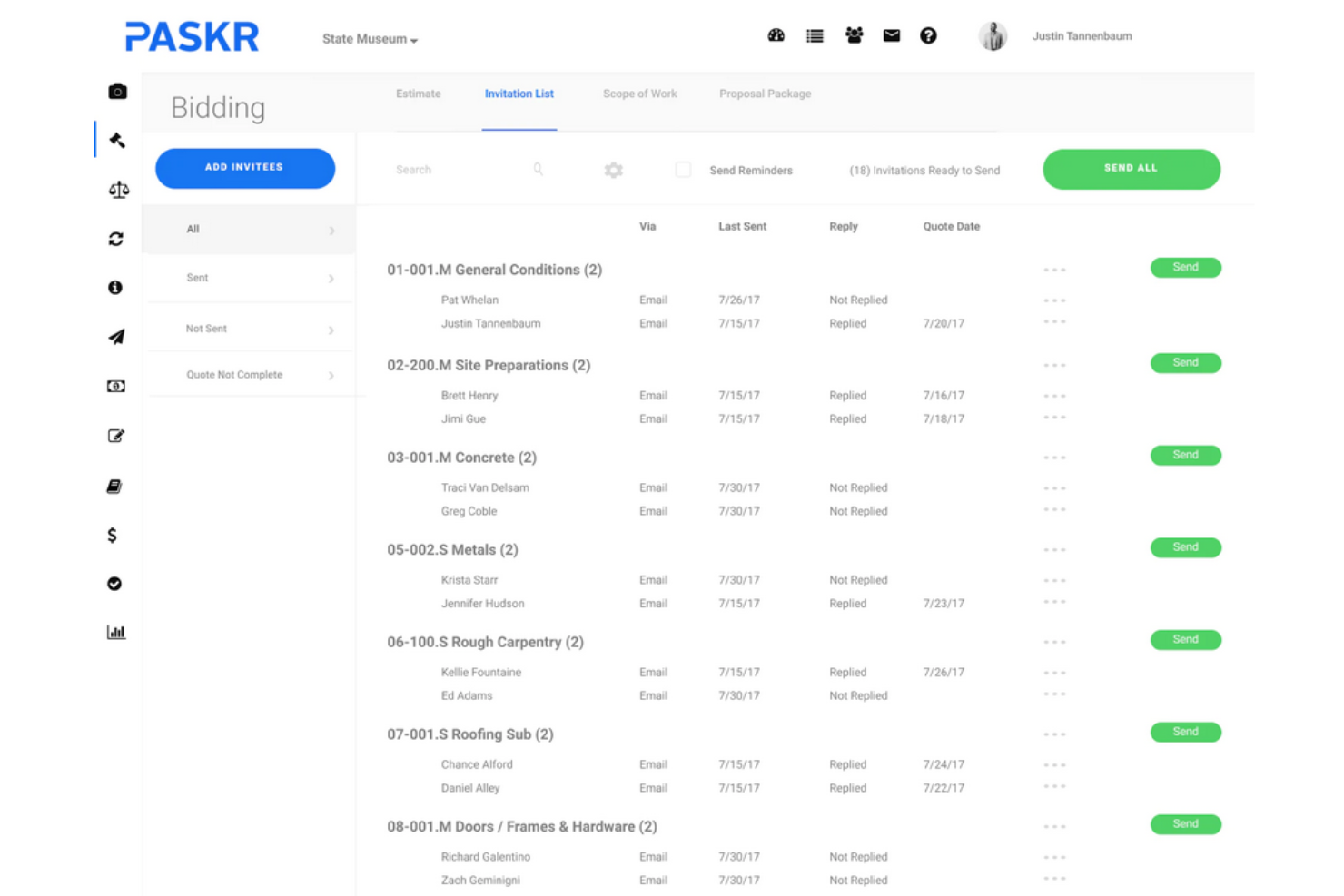
PASKR is designed for general contractors and construction managers who want to automate repetitive project tasks and documentation. It’s especially useful for teams looking to reduce manual entry and standardize workflows across bidding, project management, and closeout. PASKR stands out for its end-to-end automation, connecting preconstruction, field management, and back-office processes in one platform.
Who Is PASKR Best For?
Paskr is best suited for small to midsize teams, marketing and creative departments, and service-based businesses that need a simple but flexible platform to manage projects, tasks, and digital assets.
Why I Picked PASKR
Project and field teams that want automation-driven work management to streamline day-to-day operations and reduce manual steps.
Why I Picked PASKR
Automation is at the core of what makes PASKR a strong choice for construction project management. I picked PASKR because it automates tasks like bid management, submittal tracking, and daily reporting, which helps reduce manual work for project teams. The platform also auto-generates contracts and change orders based on project data, keeping documentation consistent and up to date. These automation features help construction teams maintain accuracy and save time across the project lifecycle.
PASKR Key Features
Some other features that make PASKR valuable for construction teams include:
- Document Storage: Store and organize project files, drawings, and correspondence in a centralized location.
- Mobile App: Access project information, submit updates, and manage tasks from the field using mobile devices.
- Budget Tracking: Monitor project budgets and expenses in real time with built-in financial tools.
- Punch List Management: Create, assign, and track punch list items to ensure project closeout tasks are completed.
PASKR Integrations
Integrations include Sage 100/300 and QuickBooks. No other integration data was available on their site.
Pros and Cons
Pros:
- Offers both mobile and desktop applications
- Cloud-based accessibility
- Covers the entire project lifecycle
Cons:
- Limited on-the-fly customization
- Some modules require extensive training


ClickUp gives construction project managers and teams a flexible platform to design workflows that match their unique processes. It’s a strong fit for firms juggling multiple project types or needing to adapt task structures for different clients and job sites. With its customizable task statuses, templates, and automation, ClickUp helps construction teams organize everything from pre-construction planning to punch lists in one place.
Who Is ClickUp Best For?
Teams that want highly customizable workflows, views, and work structure across projects and tasks, with flexible resource placement.
Why I Picked ClickUp
Customizable workflows are what set ClickUp apart for construction project management. I picked ClickUp because it lets you build project spaces with custom task statuses, fields, and templates that fit the way your team actually works. You can create workflow automations to handle repetitive steps, like moving tasks between phases or assigning checklists for inspections. This flexibility makes it easy to adapt ClickUp to different project types, subcontractor needs, or client requirements without forcing your team into a rigid structure.
ClickUp Key Features
Some other features that make ClickUp useful for construction teams include:
- Gantt Charts: Visualize project timelines and dependencies to manage schedules and milestones.
- Time Tracking: Log hours directly on tasks to monitor labor and project progress.
- Document Management: Store, share, and collaborate on project files within each workspace.
- In-App Chat: Communicate with team members in real time without leaving the platform.
ClickUp Integrations
Integrations include Slack, Google Drive, Dropbox, OneDrive, Microsoft Teams, Zoom, Outlook, Gmail, Zapier, Trello, Jira, Salesforce, HubSpot, Evernote, and Toggl.
Pros and Cons
Pros:
- Extensive features for managing tasks, time, and documents
- Offers a wide range of integration options
- Ability to create tailored workflows
Cons:
- Customizing the platform can take time
- Limited construction-specific features
Other Construction Project Management Tools
These construction management tools didn’t make my top 10 list, but they’re still worth checking out:
- Scoro
For informed resource allocation
- GoodDay
For customizable workflows
- CrewCost
For linking financials with operations
- Projectworks
For its robust reporting features


Related Project Management Software Reviews
- Project Management Software
- Resource Management Software
- Workflow Automation Software
- Time Tracking Software
- Task Management Software
- Collaboration Tools
- Capital Project Management Software
Selection Criteria For Construction Project Management Software
Through hands-on trials and comprehensive research, I've pinpointed the essential criteria for choosing software to track construction tasks, phases, documentation, and manages contractor relationships.
Core construction project management software functionality: 25% of final scoring
- Efficient task and phase tracking
- Centralized document management for easy access to plans, permits, and contracts
- Budget management and cost tracking to prevent project overruns
- Enhanced communication channels for seamless interaction among stakeholders
- Contractor and subcontractor management to streamline collaborations
Additional Standout Features: 25% of final scoring
- Advanced analytics and custom reporting tools that provide deeper project insights
- Integration with cutting-edge technologies like AI and machine learning for predictive analysis
- Mobile access and app functionality for on-site project management
- Environmental sustainability tracking features for green building projects
- Real-time collaboration and editing capabilities for blueprints and documents
Usability: 10% of final scoring
- Intuitive interfaces, such as drag-and-drop scheduling tools
- Clear and concise dashboards that provide at-a-glance project status
- Mobile app design that mirrors the desktop experience for seamless transition
- Customizable views that cater to different user roles and preferences
Onboarding: 10% of final scoring
- Comprehensive training videos and documentation
- Pre-built templates and interactive product tours
- Responsive customer support and chatbots for immediate assistance
- Community forums or webinars for deeper learning
Customer Support: 10% of final scoring
- Multichannel support, including live chat, email, and phone
- Availability of a knowledge base for self-service troubleshooting
- Response time and quality of support received
- Access to a dedicated account manager for enterprise clients
Value For Money: 10% of final scoring
- Transparent pricing with no hidden fees
- Scalability of plans to suit different project sizes and complexities
- Free trials or demos to evaluate software before purchase
- Comparison of feature sets against competitors at similar price points
Customer Reviews: 10% of final scoring
- Overall satisfaction and whether expectations were met
- Specific feedback on usability, features, and customer support
- Frequency of updates and responsiveness to user feedback
- Comparisons drawn with other software used by the reviewer
How To Choose Construction Project Management Software
As you're shortlisting, trialing, and selecting construction project management software consider the following:
- What problem are you trying to solve? Start by identifying the construction project management software feature gap you're trying to fill to clarify the features and functionality the construction project management software needs to provide.
- Who will need to use it? To evaluate cost and requirements, consider who'll be using the software and how many licenses you'll need. You'll need to evaluate if it'll just be your project team or the whole organization that will require access. Considering whether to prioritize ease of use for all, or speed for your power users.
- What other tools it needs to work with? Clarify what tools you're replacing, what tools are staying, and the tools you'll need to integrate with, such as accounting, CRM, or HR software. Check whether you can replace multiple tools with one consolidated construction project management software.
- What outcomes are important? Consider the result that the software needs to deliver to be considered a success, what capability you want to gain, what you want to improve, and how you will be measuring success. While general construction tools serve most needs, specialized architect project management tools provide industry-specific features for design workflows and can support different outcomes.
- How it would work within your organization? Consider the software selection alongside your workflows and delivery methodology. Evaluate what's working well, and the areas that need to be addressed. Remember every business is different—don’t assume that because a tool is popular that it'll work in your organization.
Trends In Construction Project Management Software
Here are several trends shaping the future of construction project management software.
- Integration with GPS and mobile capabilities: Tools like Contractor Foreman have enhanced GPS tracking and mobile app functionalities, which allows for real-time tracking of teams and resources and improves dispatch efficiency and project scheduling. In roofing projects, where material and labor costs fluctuate rapidly, roofing project management software is evolving to include AI-driven forecasting and real-time supplier integrations, helping contractors optimize costs and scheduling.
- Robust document management: This includes customizable forms, templates, and inspection checklists, which allows you to cater to the unique requirements of each project. Since documentation is at the center of construction projects, from contracts with contractors to permits and licenses, I expect more developments related to the searchability of documentation.
- Advanced budgeting and expense management: Platforms like Zoho Projects integrate powerful budgeting tools within the project management interface, which allows for closer monitoring of project finances and expenditures.
Features of Construction Project Management Software
When selecting construction project management software, keep an eye out for these essential features:
- Document management: Upload, store, and organize blueprints, contracts, and other vital project documents in one secure location. No more hunting through emails—everything you need is right at your fingertips.
- Scheduling and task tracking: Create project schedules, assign tasks, and set deadlines so everyone knows what’s next. This helps keep your project on track and reduces the risk of delays.
- Budget and cost control: Set budgets, monitor expenses, and compare actual costs to your projections. This feature helps you manage spending and avoid unwelcome financial surprises.
- Resource management: Track labor, equipment, and material usage to prevent shortages or overages. Efficient resource allocation keeps your project moving smoothly.
- Collaboration tools: Communicate with team members, subcontractors, and clients in real time. Built-in messaging and comment features streamline collaboration and problem-solving.
- Change order management: Easily document changes, track approvals, and update budgets or schedules as needed. Stay organized and responsive when plans shift.
- Reporting and analytics: Access detailed reports and dashboards on project progress, costs, risks, and more. Use these insights to make informed decisions and address issues early.
- Mobile access: Update information, review plans, and send updates from anywhere—whether you’re in the office or on the jobsite.
- Compliance and safety tracking: Monitor safety certifications, log incidents, and manage compliance tasks to keep your team safe and your project up to code.
- Integration capabilities: Connect with accounting software, BIM tools, and procurement systems to streamline workflows and reduce manual data entry.
Common AI Features in Construction Project Management Software
Modern construction project management software is increasingly powered by artificial intelligence to help teams work smarter, not harder. Here are some common AI features to look for:
- Automated scheduling: AI can analyze project timelines, resource availability, and dependencies to suggest optimal schedules and flag potential bottlenecks before they become issues.
- Risk prediction: AI algorithms scan project data to identify patterns and predict potential risks—such as cost overruns, delays, or safety incidents—so you can take action early.
- Document automation: AI can extract key information from contracts, invoices, and RFIs, reducing manual data entry and helping you stay organized.
- Smart reporting and analytics: AI-driven dashboards highlight trends, forecast outcomes, and provide actionable recommendations, making it easier to stay on top of your project’s health.
- Natural language processing: AI chatbots and assistants can answer questions, schedule meetings, or help locate documents, saving you time and streamlining communication.
Benefits of Construction Project Management Software
Here are five primary benefits of construction project management software.
- Enhanced project visibility: This allows users and businesses to stay informed about every aspect of the project, which facilitates proactive decision-making and timely adjustments to keep projects on track.
- Improved resource allocation: By enabling precise tracking and scheduling of resources, construction project management software helps reduce waste and make sure resources are used efficiently, which leads to cost savings and increased profitability.
- Streamlined communication: This reduces the likelihood of miscommunication and errors, and makes sure all parties have access to the latest updates, documents, and schedules, which ultimately improves collaboration and project outcomes.
- Automated documentation and compliance: Simplifies the management of critical documents and adherence to regulations. Construction project management software automates the storage, retrieval, and management of project documents, permits, and compliance reports, reducing the risk of lost documents or non-compliance penalties.
- Data-driven insights and reporting: Provides analytics and customizable reports on project performance. These insights enable project managers and organizations to understand project dynamics deeply, identify trends, and make informed decisions based on real-time data, enhancing strategic planning and future project success.
Costs & Pricing For Construction Project Management Software
Below is a simplified overview of common plan options available in construction project management software.
Plan Comparison Table For Construction PM Software
| Plan Type | Average Price | Common Features Included |
|---|---|---|
| Basic | $20 - $50 / month | Task and project tracking, document sharing, limited users |
| Standard | $50 - $150 / month | Advanced project management features, budgeting tools, unlimited projects, enhanced security |
| Premium | $150 - $300 / month | All Standard features, custom reporting, API access, priority support |
| Enterprise | Custom pricing | All Premium features, custom integrations, dedicated support, training and onboarding services |
| Free | $0 | Basic task management, limited document storage, access for a small team |
Construction Project Management Software FAQs
Here are some answers to common questions about construction project management software to help you understand more about this type of tool and what to consider when signing up for one.
What features should I look for in construction project management software?
Look for features that support scheduling, document management, collaboration, and job site communication. You’ll also want tools for budgeting, change order management, and tracking tasks in real time. Integration with accounting or design tools can streamline your workflows. The right platform should help you centralize information, reduce manual entry, and keep your whole team on the same page.
How can construction project management software improve communication on my job site?
Project management tools improve job site communication by centralizing updates, alerts, and document sharing in one hub. You can message your subs, send files, assign tasks, and track progress with fewer delays or misunderstandings. Real-time updates make it easier for everyone—field workers, office staff, and stakeholders—to stay connected and react quickly to changes.
Can construction project management software help with compliance and safety tracking?
Yes, many platforms have dedicated modules for safety incident reporting and compliance documentation. You can set automated reminders for inspections, store signed safety forms, and generate compliance reports. This keeps records accessible and helps your team meet requirements without digging through paperwork when audits happen.
How do integrations with accounting or BIM tools work in construction project management software?
Most leading solutions offer integrations with accounting software like QuickBooks or Sage and BIM platforms such as Revit. Integrations typically sync project budgets, invoices, and drawings between systems automatically. This reduces double-entry and ensures everyone works with the latest data, streamlining both your financials and planning.
Is cloud-based or on-premises construction project management software better for my team?
Cloud-based tools work best for most teams because they let you access data from anywhere—ideal for fieldwork. They’re easier to update and scale across multiple job sites. On-premises platforms may suit companies with strict security needs or unreliable job site connectivity. Choose based on your typical locations, team size, and security requirements.
What is the most used construction project management software?
Procore, Buildertrend, and Autodesk Construction Cloud are among the most widely used platforms by construction project managers. These tools are popular for their robust scheduling, document control, and collaboration features. The best choice depends on your project size and specific needs, but these brands are often top picks in the industry.
What is the difference between construction project management software and engineering project management software?
Construction project management tools focus on site coordination, scheduling, submittals, RFIs, and on-site team communication. Engineering project management software is more about design deliverables, technical workflows, and document control throughout the design and pre-construction phases. Choose construction-specific tools if your priority is field execution and subcontractor management.
What is the difference between construction project management software and real estate project management software?
Construction tools help manage active building projects, track job site tasks, and coordinate teams and budgets during construction. Real estate project management software is geared toward property acquisition, leasing, asset management, and long-term maintenance. If your daily focus is construction delivery rather than ongoing asset management, a construction-specific platform will fit better.