

10 Best AI PSA Software Reviewed in 2026

10 Best AI PSA Software Shortlist


Managing projects and client work can be challenging, especially when you are balancing tasks, timelines, budgets, and team coordination. You need tools that simplify operations instead of adding more complexity. That is where AI PSA (Professional Services Automation) software comes in, helping you unblock workflows, automate routine tasks, and improve the way you plan and allocate resources.
From my experience testing these platforms, the right AI capabilities can solve many day-to-day challenges by offering predictive insights, smarter scheduling, and more accurate forecasting. I have independently reviewed the top options to help you understand which tools deliver meaningful value.
In this article, I will share my top picks and highlight the features and benefits that set each one apart. The goal is to help you choose the AI professional services automation software that fits your team’s needs.
Why Trust Our Software Recommendations
Our team has been testing and reviewing software since 2012. As project managers ourselves, we know how difficult—and important—it is to choose the right software.
For this guide, we evaluated tools using hands-on testing and independent research, scoring tools using our selection criteria. We also draw on insights from industry thought leaders and practicing project management experts.
Our reviews reflect our human editorial judgment, not a sales pitch.
Expert reviewers:
AI PSA Software Comparison Table
This comparison table summarizes pricing details for my top AI PSA software selections.
| Tool | Best For | Trial Info | Price | ||
|---|---|---|---|---|---|
| 1 | Best for business dashboards | 14-day free trial | From $19.90/user/month (billed annually) | Website | |
| 2 | Best for service automation | Free demo available | Pricing upon request | Website | |
| 3 | Best for real-time resource & financial insights | Free demo available | Pricing upon request | Website | |
| 4 | Best for client onboarding | 14-day free trial + free demo available | From $19/user/month (billed annually) | Website | |
| 5 | Best for resource insights | 21-day free trial + free demo available | From $17.10/user/month (billed annually) | Website | |
| 6 | Best for IT service teams | 7-day free trial | Pricing upon request | Website | |
| 7 | Best for financial operations | Free demo available | Pricing upon request | Website | |
| 8 | Best for workflow automation | Free demo available | Pricing upon request | Website | |
| 9 | Best for project predictability | 14-day free trial | Pricing upon request | Website | |
| 10 | Best for billing management | Free demo available | From $20/user/month | Website |


Best AI PSA Software Reviews
Below are my detailed summaries of the best AI PSA software that made it onto my shortlist. My reviews offer a detailed look at the key features, pros & cons, integrations, and ideal use cases of each tool to help you find the best one for you.

Scoro
Best for business dashboards
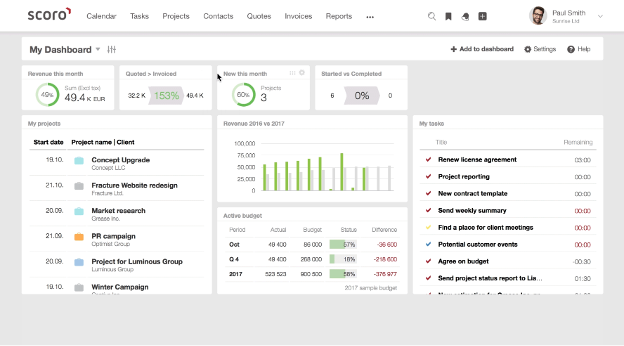
Scoro is a business management software aimed at small to medium-sized businesses, offering solutions for project management, billing, and reporting. Its AI-driven capabilities provide detailed insights and dashboards that help teams make informed decisions and track performance.
Why I picked Scoro: Scoro's AI capabilities offer real-time data visualization, enabling your team to monitor key metrics effortlessly. The software's customizable dashboards allow you to tailor the view to match your specific needs. With its AI-driven analytics, you can gain insights into business performance and identify areas for improvement.
Standout features & integrations:
Features include project and task management, real-time profitability tracking, budgeting tools, automated billing, and AI-powered actions through ELI. The budgeting feature allows you to plan and allocate resources effectively.
Integrations include QuickBooks, Xero, Stripe, Mailchimp, Dropbox, Google Calendar, Slack, Zapier, Microsoft Teams, and Trello.
Pros and Cons
Pros:
- Automated billing and invoicing
- Real-time data visualization
- Customizable business dashboards
Cons:
- Interface can feel cluttered and complex
- Can be too feature-heavy for basic task or project management
New Product Updates from Scoro

Scoro Adds Time Mobile App and ELI Improvements
Scoro adds the Scoro Time mobile app for iOS/Android to track time anywhere and expands ELI with attachments, smarter filtering, and trigger-based actions. For more information, visit Scoro's official site.

Accelo
Best for service automation
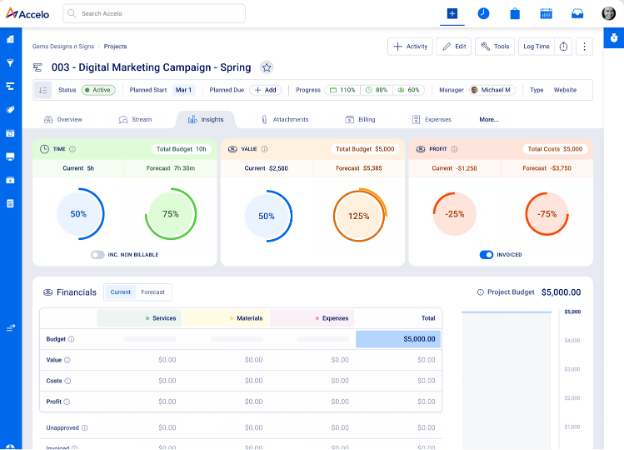
Accelo is a project management tool designed for service businesses, helping teams automate their operations and improve efficiency. It offers AI capabilities that assist in automating tasks and allocating resources, making it invaluable for professionals seeking to optimize their workflows.
Why I picked Accelo: Accelo's AI-driven automation helps you manage client work, from prospect to payment, without manual intervention. Its intelligent scheduling and task prioritization ensure that your team focuses on what matters most. The tool's predictive analytics also aid in making informed business decisions.
Standout features & integrations:
Features include automated task progression, real-time project tracking, revenue forecasting, and AI-supported capacity planning. These features work together to improve productivity and keep your team aligned.
Integrations include Google Workspace, Microsoft 365, Slack, QuickBooks, Xero, Salesforce, HubSpot, Jira, Trello, and Asana.
Pros and Cons
Pros:
- Client portal improves transparency
- Predictive analytics for decision-making
- Automated timesheets save time
Cons:
- Limited customization options
- Initial setup can be complex

Kantata
Best for real-time resource & financial insights
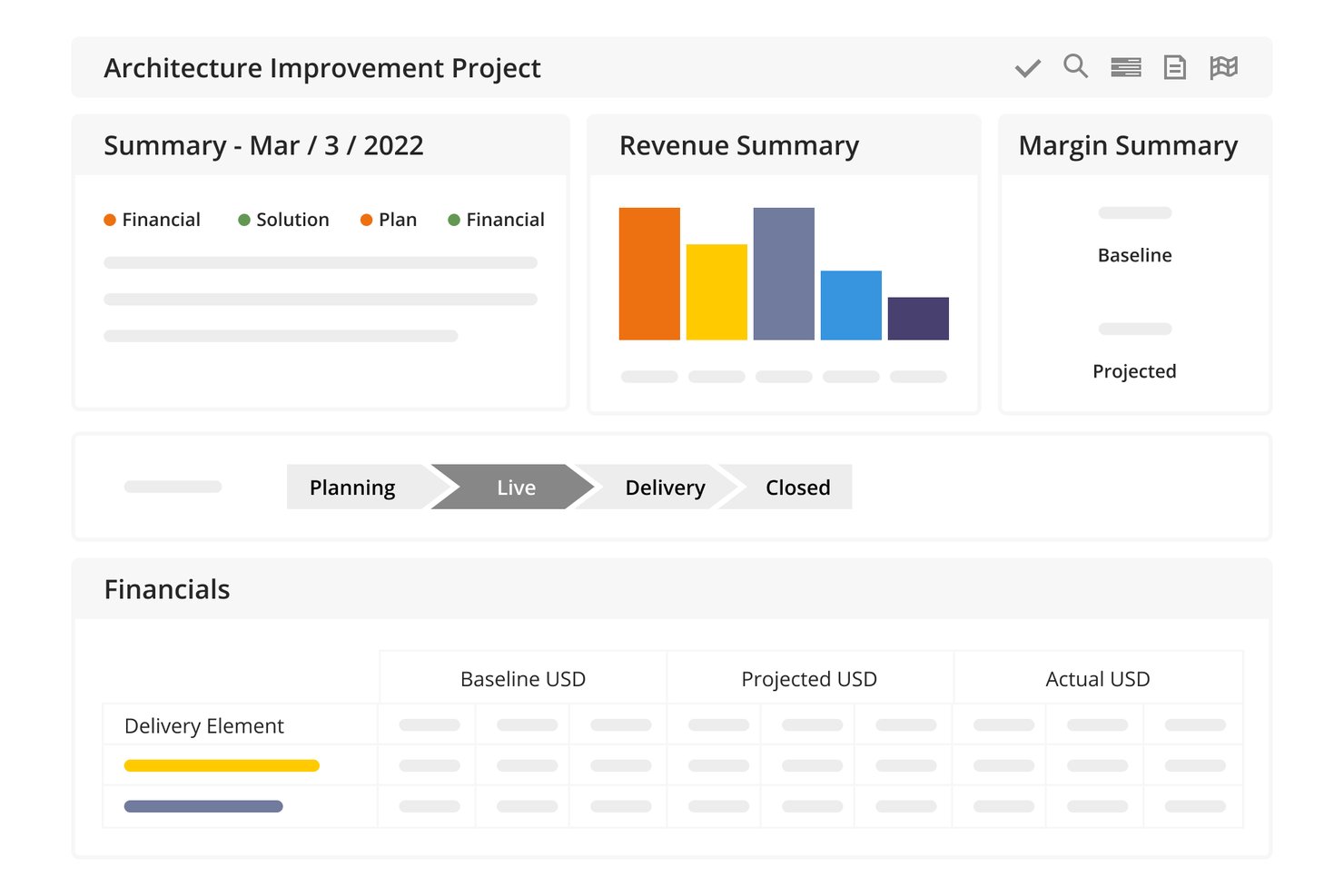
Kantata is a purpose-built AI PSA platform for professional services firms that covers resource management, project delivery, time tracking, billing, and financial analytics across the full engagement lifecycle.
Who Is Kantata Best For?
Kantata is a strong fit for mid-market to enterprise professional services firms—consultancies, agencies, and IT services organizations—that need a dedicated PSA platform at scale.
Why I Picked Kantata
Kantata earns its spot on my shortlist because of how tightly it connects resource visibility to financial outcomes in real time. The Resourcing Agent uses AI to match consultants to projects by skill and availability, surfacing earned value, profit margin, and estimate-at-completion metrics on demand. I also rate Kantata Pulse, which layers team sentiment onto operational data so I can catch margin risk well before a report flags it.
Kantata Key Features
- Skills intelligence graph: AI maintains up-to-date consultant skill profiles to refine project staffing recommendations over time.
- Scenario modeling tools: Simulate what-if changes in resources, pricing, or pipeline to visualize impacts on margins and capacity.
- Generative SOW drafting: Automatically produce statements of work and project plans from opportunity data or simple prompts.
- Pipeline-to-capacity forecasting: Blend CRM pipeline and resource bench data to predict utilization, hiring needs, and future gaps.
Kantata Integrations
Kantata offers native integrations with Salesforce, NetSuite, Sage Intacct, QuickBooks, Xero, Jira, Slack, HubSpot, and Microsoft 365. An API is available for custom integrations.
Pros and Cons
Pros:
- Deep project financial analytics at portfolio level
- AI-driven resource matching by skill and availability
- Real-time margin visibility across active engagements
Cons:
- Reporting customization requires significant admin effort
- Implementation takes months for enterprise deployments
New Product Updates from Kantata

Kantata Adds Access Group Change History
Kantata adds Access Groups History, letting account administrators track changes to group details, membership, and permissions in Recent History. The update also makes these events available through the Subscribed Events API for broader monitoring. For more information, visit Kantata’s official site.
 .
.
Best for client onboarding
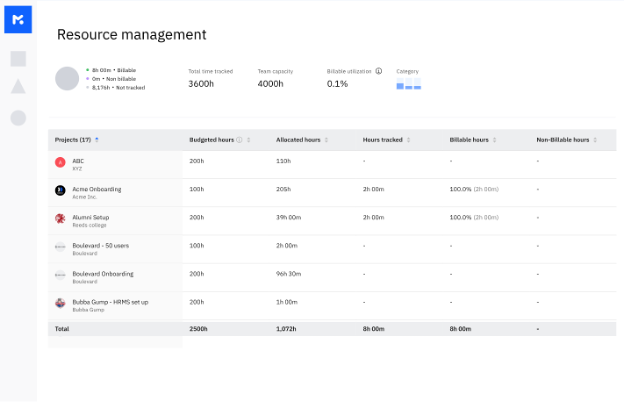
Rocketlane is an all-in-one PSA platform designed for teams that need to manage client projects efficiently and effectively. It offers AI-powered tools that improve onboarding experiences and collaboration between teams and clients.
Why I picked Rocketlane: Rocketlane's AI features include automated task assignments and predictive timelines, ensuring your onboarding processes run smoothly. Its real-time collaboration tools keep everyone aligned, reducing the chances of miscommunication. The software's analytics provide insights into onboarding performance, helping you refine your approach over time.
Standout features & integrations:
Features include AI agents that automate delivery tasks, customizable project templates, shared client portals, and real-time collaboration tools. Task management tools ensure that everyone knows their responsibilities and deadlines.
Integrations include Salesforce, HubSpot, Slack, Microsoft Teams, Google Workspace, Asana, Trello, monday.com, Jira, and Zendesk.
Pros and Cons
Pros:
- Predictive timelines for onboarding
- Real-time collaboration tools
- Automated task assignments
Cons:
- Limited customization in templates
- May require training for new users
New Product Updates from Rocketlane

Rocketlane Introduces Governance and Workforce Agents
Rocketlane introduces Governance Agents and Workforce Agents to automate delivery processes and recurring tasks. These updates help teams enforce rules and streamline project execution. For more information, visit Rocketlane’s official site.
 .
.
Best for resource insights

Projectworks is a project management and resource planning software designed for consulting firms, focusing on time tracking, resource management, invoicing, and financial reporting. It provides AI-driven insights into resource utilization, helping firms optimize their operations and improve profitability.
Why I picked Projectworks: Projectworks' AI capabilities analyze resource allocation and provide actionable recommendations for optimal utilization. Its real-time financial reporting offers insights into project profitability, helping you make informed decisions. Additionally, the software's integration of time tracking with invoicing ensures accurate billing and resource management.
Standout features & integrations:
Features include detailed financial reporting that helps your team keep track of project budgets. The time tracking feature integrates directly with invoicing, ensuring accurate billing. Resource management tools provide insights into utilization, helping your team allocate resources effectively.
Integrations include Xero, QuickBooks, Salesforce, HubSpot, MYOB, Stripe, Zapier, Microsoft Excel, Google Workspace, and Slack.
Pros and Cons
Pros:
- AI-driven resource allocation insights
- Accurate time tracking and invoicing
- Real-time financial reporting
Cons:
- Limited customization in reporting
- Can be complex to set up
Best for IT service teams
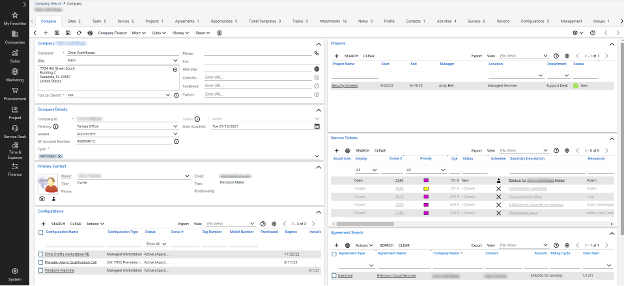
ConnectWise is a professional services automation tool tailored for IT service providers, focusing on project management, service delivery, and customer support. Its AI capabilities improve ticketing and resource management, providing valuable insights to improve IT operations.
Why I picked ConnectWise: ConnectWise's AI-driven ticketing system helps your team manage and resolve issues efficiently. Its automated resource scheduling ensures optimal team deployment, enhancing productivity. Its automated triage through ConnectWise Sidekick and centralized IT service features help teams prioritize issues, deploy resources effectively, and maintain service quality.
Standout features & integrations:
Features include a centralized ticketing system that helps you track and resolve client issues efficiently. Time tracking and billing features simplify your financial management processes. The tool also offers a customizable dashboard that provides a detailed view of your operations.
Integrations include Microsoft 365, QuickBooks, Xero, Salesforce, Slack, Google Workspace, HubSpot, Zoom, FreshBooks, and Stripe.
Pros and Cons
Pros:
- Customizable dashboards for operations overview
- Automated resource scheduling
- Efficient ticketing system for IT support
Cons:
- Support documentation is lacking for complex workflows
- Configuration may be overwhelming and require training

Certinia
Best for financial operations
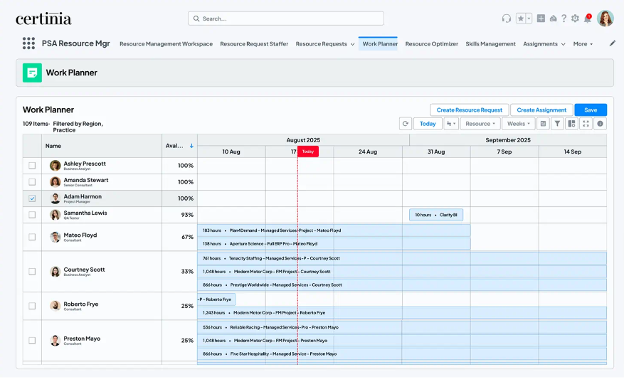
Certinia is a financial management and professional services automation tool designed for businesses looking to simplify their financial operations and project management. It offers AI-driven insights that help teams manage finances, resources, and project timelines effectively.
Why I picked Certinia: Certinia's AI capabilities offer predictive financial analytics, helping your team forecast budgets and manage cash flow. Its automated billing and invoicing ensure accuracy and save time. The software also provides real-time financial dashboards, giving you a clear view of your financial health.
Standout features & integrations:
Features include financial dashboards, automated billing, budgeting tools, expense tracking, and AI-powered financial analytics. Automated expense tracking simplifies your team's expense management processes.
Integrations include Salesforce, QuickBooks, Xero, Microsoft Dynamics 365, SAP, Oracle, NetSuite, Sage, Google Workspace, and Slack.
Pros and Cons
Pros:
- Real-time financial dashboards
- Automated billing and invoicing
- Predictive financial analytics
Cons:
- Requires financial knowledge to maximize features
- May be complex for new users

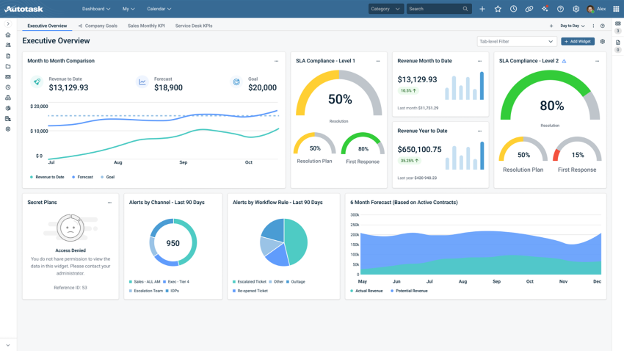
Autotask PSA is a PSA solution designed for IT service providers, offering solutions for project management, billing, and service delivery. Its AI capabilities focus on optimizing workflows and automating routine tasks, helping teams improve productivity and efficiency.
Why I picked Autotask PSA: Autotask PSA’s AI-driven ticketing system simplifies issue resolution and prioritization, ensuring your team focuses on critical tasks. Its automated billing and invoicing reduce manual errors and save time. The tool's analytics provide valuable insights into service performance, enabling you to make informed, data-driven decisions.
Standout features & integrations:
Features include project tracking that keeps your team on schedule and within budget. The customizable reporting feature provides insights into your service delivery and financial performance. Time tracking and billing integration ensure accurate and timely invoicing.
Integrations include QuickBooks, Microsoft 365, Salesforce, Xero, Slack, ConnectWise Manage, Dropbox, Google Workspace, HubSpot, and Zendesk.
Pros and Cons
Pros:
- Customizable reporting features
- Automated billing and invoicing
- AI-driven ticketing system
Cons:
- May require training for effective use
- Can be complex to configure

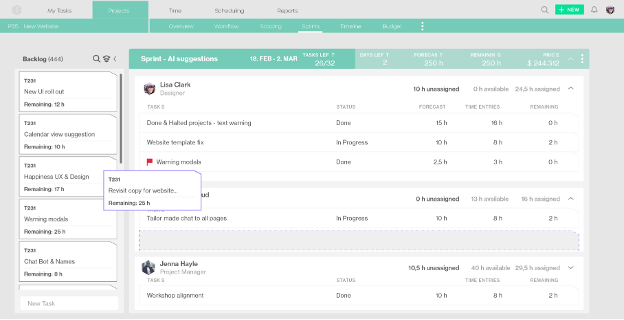
Forecast App is an AI-powered project management tool designed for industries like software and marketing, focusing on optimizing resource allocation and project execution. It offers AI-driven features that improve planning and ensure projects meet deadlines effectively.
Why I picked Forecast App: Forecast App uses AI for demand forecasting and capacity management, helping your team anticipate future needs. Its real-time dashboards and risk prediction alerts provide actionable insights to keep your projects on track. Moreover, the tool’s automated resource allocation ensures the right team members are assigned to the right tasks, boosting efficiency and preventing burnout.
Standout features & integrations:
Features include real-time workload scheduling that helps your team manage capacity effectively. Automated time tracking reduces the need for time-consuming manual entry. The app also provides real-time visibility into projects through Gantt charts and portfolio reports, giving you a clear view of progress.
Integrations include Jira, Salesforce, HubSpot, Google Calendar, Slack, Sage Intacct, Microsoft Teams, Asana, Trello, and QuickBooks.
Pros and Cons
Pros:
- Automated resource allocation saves time
- Real-time dashboards improve visibility
- AI-driven demand forecasting
Cons:
- Can have a steep learning curve
- Limited customization for reports

BigTime
Best for billing management

BigTime is a PSA platform designed for firms that need to manage billing, time tracking, and project management. It offers AI-driven insights that help your team simplify billing processes and improve financial accuracy.
Why I picked BigTime: BigTime's AI capabilities automate invoicing and time tracking, reducing manual errors. Its financial analytics provide insights into billing efficiency and profitability, helping your team make informed decisions. The software's customizable billing templates ensure that you can meet specific client needs with ease.
Standout features & integrations:
Features include detailed time tracking, billable hours, expense management, customizable invoicing templates, and AI-assisted billing insights. Customizable invoicing allows you to create invoices that match your branding and client requirements.
Integrations include QuickBooks, Xero, Salesforce, Zapier, Slack, Google Workspace, Microsoft Outlook, HubSpot, Dropbox, and Asana.
Pros and Cons
Pros:
- Detailed time tracking for accuracy
- Customizable billing templates
- Automated invoicing reduces errors
Cons:
- Limited reporting customization
- Can be complex for new users
Other AI PSA Software
Here are some additional AI PSA software options that didn’t make it onto my shortlist, but are still worth checking out:
- SuperOps
For MSPs
- Atera
For remote monitoring
- VOGSY
For Google Workspace users
- Polaris PSA
For project cost control
- Octayne PSA
For AI-driven analytics


How I Evaluate AI PSA Software
For a tool to make this list, its AI needs to do more than label existing dashboards—it should actively surface margin risks, recommend staffing moves, or flag delivery issues before they escalate. I split my evaluation into core functionality every PSA must cover and the differentiating factors that separate good options from great ones.
Core Functionality (Table Stakes For This List)
When I'm selecting tools for my list, I rank each one on a scale from 0 (does not offer the functionality) to 5 (excels in this area) for each core functionality listed below. Then, I calculate the tool's total score into a percentage. Each tool needs to achieve a minimum total score of 65% to be considered for inclusion.
- AI-Driven Resource Optimization: I look for platforms that go beyond drag-and-drop scheduling to recommend the best-fit consultant based on skills, availability, and cost.
- Predictive Project Analytics: Each tool should surface margin risks or timeline slippage through AI forecasting, not just display static budget vs. actuals dashboards.
- Integrated Time and Billing: I evaluate how tightly time entries flow into billing rules and invoices, especially across mixed engagement types like T&M and fixed-fee.
- Project Financial Management: Tools earn higher marks when they track cost, revenue, and margin at both the engagement and portfolio level with real-time visibility.
- Quote-to-Cash Workflow: I check whether SOW creation, project delivery, and invoicing connect natively or require manual handoffs between disconnected modules.
- AI Automation and Assistants: The platform should offer AI that handles real work like drafting status reports, generating project plans, or answering questions about project health.
Once I have a list of tools that meet this criteria, I consider what sets each platform apart.
Differentiating Factors (What Sets Vendors Apart)
Here's how I compare and contrast different vendors:
Standout Features
Scenario modeling is a big differentiator—I want to see whether a platform lets services leaders simulate changes to pricing, staffing, or project mix and preview the margin impact before committing. Pipeline-to-capacity forecasting takes this further by blending weighted CRM pipeline data with real-time bench availability to flag hiring needs or utilization gaps months ahead. I also look for a skills intelligence graph that learns from past project outcomes, improving staffing recommendations over time rather than relying on static consultant profiles.
Beyond Features
Ecosystem integrations matter a lot here. A PSA that syncs natively with your CRM, ERP, and HRIS means project data flows from opportunity through invoicing without manual re-entry. I also evaluate AI governance—specifically whether a vendor is transparent about how its models use customer data and offers opt-out controls. Implementation timelines vary widely in this space, so I check whether a platform ships with pre-built role libraries, rate cards, and services templates that shorten deployment from quarters to weeks.
How to Choose AI PSA Software
It’s easy to get bogged down in long feature lists and complex pricing structures. To help you stay focused as you work through your unique software selection process, here’s a checklist of factors to keep in mind:
| Factor | What to Consider |
| Scalability | Will the software grow with your business? Consider user limits, feature expansion, and whether the tool can handle increased data and user loads as you scale. |
| Integrations | Check if the software integrates with your existing tools like CRM, accounting, or communication platforms to avoid disruptions in your workflows. |
| Customizability | Can you tailor the software to fit your specific processes and preferences? Look for options to adjust dashboards, reports, and user permissions. |
| Ease of use | Is the interface intuitive for your team? Consider the learning curve and whether non-technical users can navigate the tool without frustration. |
| Implementation and onboarding | How quickly can you get up and running? Evaluate the resources available for training, such as tutorials, guides, and customer support during setup. |
| Cost | Are the pricing plans within your budget? Compare costs against the features offered and consider long-term pricing for scaling or additional users. |
| Security safeguards | Does the software provide adequate data protection? Look for encryption, compliance with data regulations, and regular security updates to protect your information. |
| Support availability | Is customer support accessible when you need it? Consider the availability of live chat, email, or phone support, and check for any additional fees for premium support. |
What Is AI PSA Software?
AI PSA software is a tool that combines artificial intelligence with professional services automation to optimize project management, resource allocation, and billing processes. It's generally used by IT professionals, project managers, and professional services firms who need to manage complex projects efficiently. Features like predictive analytics, automated task assignments, and real-time reporting help with planning, decision-making, and workflow management. Overall, these tools improve productivity and provide valuable insights to improve business processes.
Features
When selecting AI PSA software, keep an eye out for the following key features:
- Predictive analytics: Provides insights into future trends and project deliverables, helping you make informed decisions.
- Automated task assignments: Distributes tasks efficiently based on skills and availability, saving time and reducing manual errors.
- Real-time reporting: Offers up-to-date data on project progress and performance, allowing for quick adjustments and better management.
- Resource allocation optimization: Ensures optimal use of resources by predicting needs and adjusting allocations dynamically.
- AI-driven ticketing: Automates ticket management to prioritize and resolve issues swiftly, enhancing service delivery.
- Customizable dashboards: Allow you to tailor visual data displays to fit your specific business needs and preferences.
- Automated billing and invoicing: simplifies financial processes by generating invoices and tracking payments with minimal manual input.
- Predictive maintenance: Anticipates potential system failures and suggests preventive measures to avoid downtime.
- AI-powered collaboration tools: improve communication and teamwork by providing intelligent suggestions and streamlining workflows.
- Security safeguards: Protect sensitive data with encryption and compliance with data regulations, ensuring information security.
Benefits
Implementing AI PSA software provides several benefits for your team and your business. Here are a few you can look forward to:
- Improved efficiency: Automated task assignments and resource optimization reduce manual work and speed up processes.
- Better decision-making: Predictive analytics offer insights into future trends, helping you make informed choices.
- Improved collaboration: AI-powered collaboration tools improve communication and coordination among team members.
- Accurate billing: Automated billing and invoicing ensure timely and precise financial transactions.
- Proactive maintenance: Predictive maintenance features help you prevent issues before they disrupt operations.
- Increased visibility: Real-time reporting provides a clear view of project progress, milestones, and performance, aiding effective management.
- Data security: Security safeguards protect sensitive information and ensure compliance with data regulations.
Costs & Pricing
Selecting AI PSA software requires an understanding of the various pricing models and plans available. Costs vary based on features, team size, add-ons, and more. The table below summarizes common plans, their average prices, and typical features included in AI PSA software solutions:
Plan Comparison Table for AI PSA Software
| Plan Type | Average Price | Common Features |
| Free Plan | $0 | Basic project management, time tracking, and limited user support. |
| Personal Plan | $19-$109/user/month | Advanced project management, resource allocation, reporting, and email support. |
| Business Plan | $169-$179/user/month | Full project management suite, AI-driven insights, integrations, and chat support. |
| Enterprise Plan | $99-$209/user/month | Customizable solutions, predictive analytics, dedicated support, and improved security. |
AI PSA Software FAQs
Here are some answers to common questions about AI professional services automation software:
How does AI PSA software improve project accuracy?
AI PSA software improves project accuracy by using predictive analytics to forecast project timelines and resource needs. This helps your team make informed decisions and adjust plans proactively. For example, AI can analyze past project data to predict potential delays, prevent bottlenecks, and suggest adjustments. It also automates task assignments based on current workloads, ensuring that tasks are completed on time. This level of precision supports better project outcomes and client satisfaction.
Can AI PSA software integrate with existing systems?
Yes, AI PSA software can integrate with existing systems like CRM, accounting, and communication tools. Integration allows data to flow smoothly between systems, reducing manual entry and errors. Before selecting a tool, check if it supports integrations with the software you currently use. For example, many AI PSA tools integrate with platforms like Salesforce, QuickBooks, and Slack. This connectivity improves efficiency, ensuring that all your business tools work together harmoniously.
How do you evaluate the ROI of AI PSA software?
To evaluate the ROI of AI PSA software, compare the costs against the benefits it provides. Consider factors like increased efficiency, reduced errors, and improved project outcomes. Calculate the time saved through automation and how it translates to cost savings. For instance, if the software automates billing, assess how much time this saves your finance team. Additionally, consider improvements in client satisfaction and retention, as these can lead to increased revenue over time.
What challenges should I expect when implementing AI PSA software?
You may face hurdles such as user resistance, data migration issues, or process changes. Teams might need training on new workflows, and integrating with legacy systems can require extra time. Planning phased rollouts, clear communication, and stakeholder buy-in can help smooth the transition.
How does AI PSA software help manage remote or distributed teams?
AI PSA software supports remote teams by tracking project progress in real time, automating task assignments, and surfacing communication gaps. You receive automated updates and centralized dashboards, ensuring everyone stays informed and aligned, regardless of their location.
Can AI PSA software automate resource allocation?
Yes, most AI PSA tools automate resource allocation by analyzing team availability, project needs, and historical data. They recommend or assign the best-fit person for each task and can adjust workloads as project variables change. This saves you hours of manual planning and helps balance your team’s workload.
How do I get my team on board with using AI PSA software?
Begin by clearly explaining the benefits and involving your team in the setup process. Offer hands-on training and highlight how automation will help reduce repetitive work. Address concerns openly, collect feedback, and celebrate quick wins to build early momentum.