

10 Best AI Enterprise Resource Planning Software Reviewed in 2026

Best AI Enterprise Resource Planning Software Shortlist


AI enterprise resource planning (ERP) software takes everything a traditional ERP system does — tracking resources, managing workflows, and storing business data — and makes it faster, more adaptive, and insight-driven. Unlike older systems that rely on manual input and static rules, AI-enabled ERPs learn from your data, detect anomalies, and recommend next steps automatically.
For operations leaders and project managers, that means better visibility into what’s working, what’s at risk, and where to focus your attention. AI ERP tools can forecast demand, flag inefficiencies, and automate repetitive tasks, helping teams stay proactive instead of reactive.
I’ve independently tested and reviewed leading AI ERP solutions to give you an unbiased look at what they offer. In this article, I’ll share my top picks — highlighting what makes each unique and how they can support growing businesses and large enterprises alike.
Why You Can Trust Us
We’ve been testing and reviewing project management software since 2012. As project managers ourselves, we know how critical and difficult it is to make the right decision when selecting software.
We invest in deep research to help our audience make better software purchasing decisions. We’ve tested more than 2,000 tools for different project management use cases and written over 1,000 comprehensive software reviews. Learn how we stay transparent & our software review methodology.
AI Enterprise Resource Planning Software Comparison Table
This comparison table summarizes pricing details for my top AI enterprise resource planning software selections:
| Tool | Best For | Trial Info | Price | ||
|---|---|---|---|---|---|
| 1 | Best with AI-powered scenario planning | 14-day free trial | From $12/user/month (billed annually) | Website | |
| 2 | Best for real-time project tracking | 30-day free trial | Pricing upon request | Website | |
| 3 | Best for AI-driven task automation | Free plan + free demo + 14-day trial available | From $10/user/month (billed annually) | Website | |
| 4 | Best for advanced financial task automation | Free demo available | Pricing upon request | Website | |
| 5 | Best for integration with Microsoft tools | 30-day free trial | From $65/user/month (billed annually) | Website | |
| 6 | Best for fast-growing businesses | Free demo available | Pricing upon request | Website | |
| 7 | Best for mid-sized businesses | Free demo available | Pricing upon request | Website | |
| 8 | Best for customizability | Free plan available | From $8.95/user/month (billed annually) | Website | |
| 9 | Best for financial management | Free demo available | Pricing upon request | Website | |
| 10 | Best for manufacturing businesses | Free demo available | Pricing upon request | Website |


Best AI Enterprise Resource Planning Software Reviews
Below are my detailed summaries of the best AI enterprise resource planning software that made it onto my shortlist. My reviews offer a detailed look at the key features, pros & cons, integrations, and ideal use cases of each tool to help you find the best one for you.

Best with AI-powered scenario planning
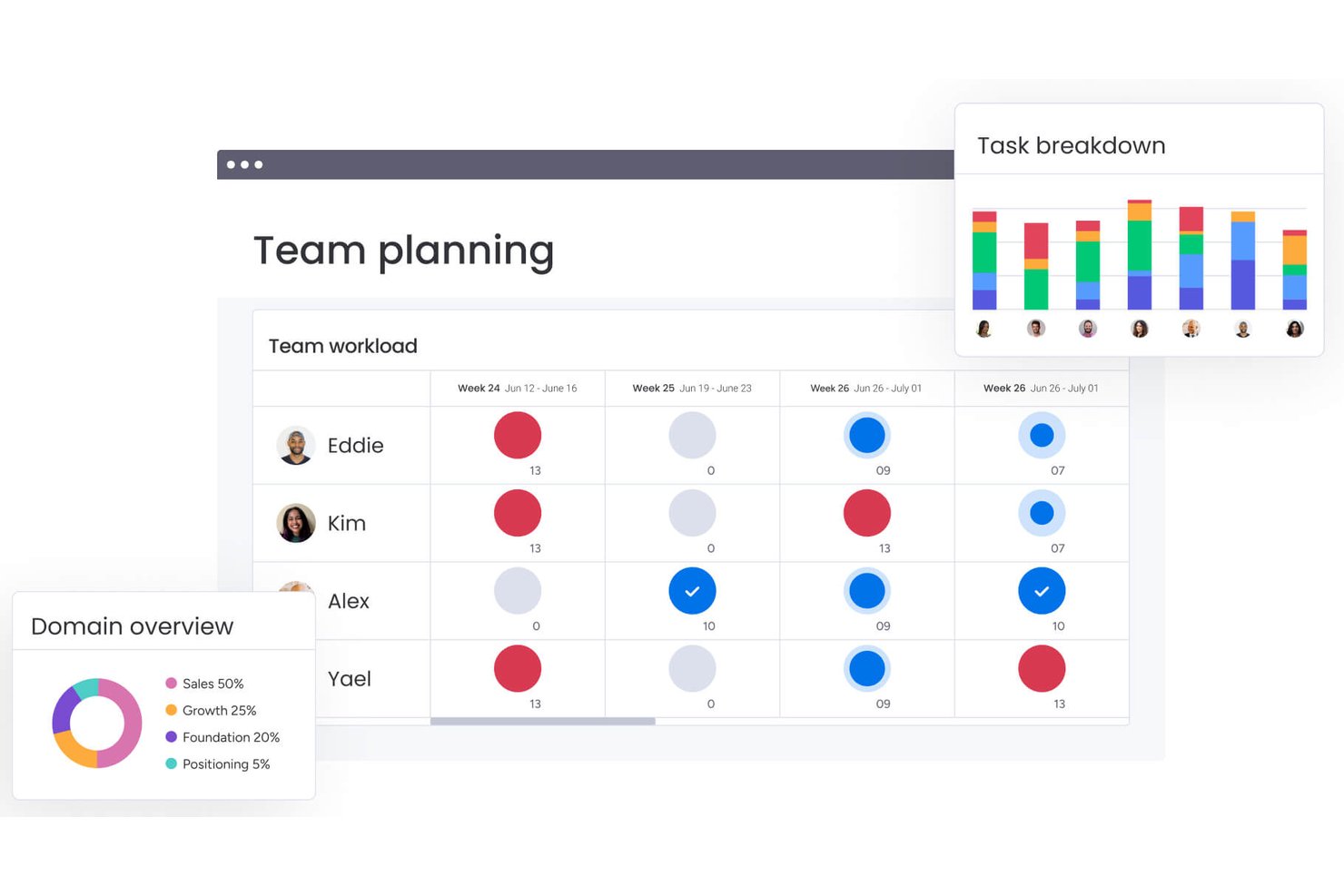
monday AI Workspace is an AI-powered work management platform that connects project planning, resource allocation, cross-departmental workflow automation, and real-time portfolio reporting through a suite of native AI agents and tools.
Who Is monday AI Workspace Best For?
It's a strong fit for PMO directors and portfolio managers at mid-to-large enterprises running cross-functional projects across multiple teams and departments.
Why I Picked monday AI Workspace
monday AI Workspace earns its spot on my shortlist because of how it handles scenario planning at the portfolio level. I use the AI agent builder to model competing resource allocation scenarios across active projects, and Sidekick surfaces dependency conflicts before they become timeline risks. What I find genuinely useful is that this happens in the same workspace where my team tracks execution, so scenario outputs feed directly into live dashboards.
monday AI Workspace Key Features
- AI-powered workflow automation: Create automated project workflows using AI agents to handle routing, approvals, and status updates.
- Native portfolio dashboards: Visualize project data in live dashboards with customizable, filterable widgets across multiple boards.
- Resource utilization tracking: Monitor team workload and allocations by project, skill, and availability from a unified view.
- Enterprise-grade security compliance: Supports GDPR and data residency requirements, plus role-based access controls for sensitive project data.
monday AI Workspace Integrations
monday AI Workspace offers hundreds of native integrations and marketplace apps, including Slack, Salesforce, HubSpot, Google Workspace, Microsoft 365, Jira, GitHub, Dropbox, Zoom, and Asana. It also supports Zapier and provides an API for custom integrations.
Pros and Cons
Pros:
- Real-time dashboards span multiple project boards simultaneously
- Native AI agents automate complex approval workflows
- AI scenario planning across entire project portfolios
Cons:
- AI features restricted to higher-tier plans
- Limited native ERP financial and procurement modules
New Product Updates from monday AI Workspace
monday AI Workspace Adds Human Approval Routing
monday AI Workspace adds a human-in-the-loop approval block to AI Workflows, sending approval requests and routing workflow paths based on responses. For more information, visit monday AI Workspace's official site.

Celoxis
Best for real-time project tracking
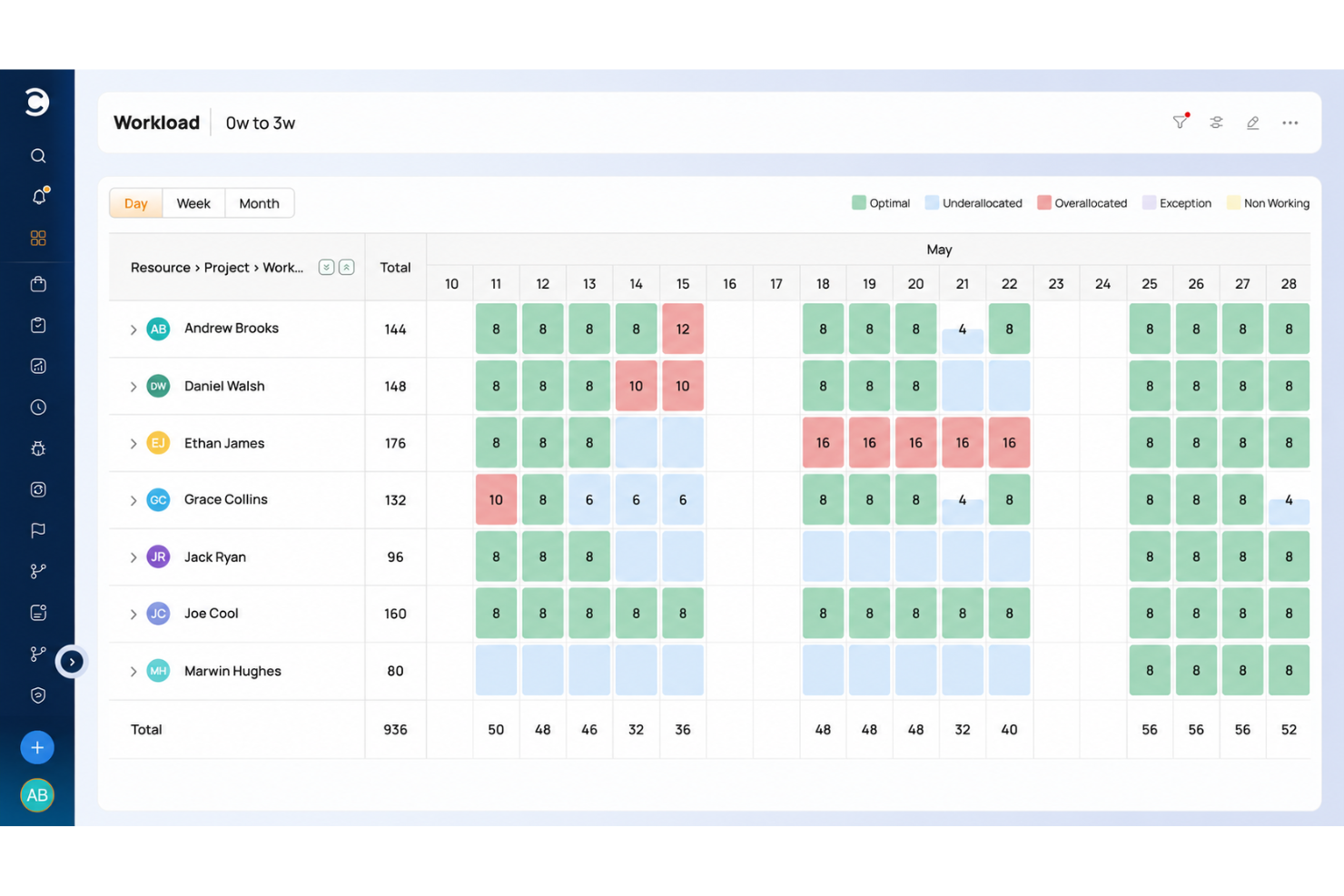
Celoxis is a project portfolio management platform with Gantt charts, resource planning, time tracking, project accounting, and real-time dashboards.
Who Is Celoxis Best For?
Celoxis is a good fit for mid-size to large organizations that manage multiple concurrent projects across cross-functional teams and need visibility into schedules, resources, and project finances in one platform.
Why I Picked Celoxis
Celoxis is one of my top picks because I love how its real-time project tracking actually eliminates the need for manual status updates. The platform rolls up task-level progress automatically, so when a team member updates their work, I can see the impact on the overall project health immediately, without chasing anyone down. I also use the baseline comparison feature to track planned vs. actual progress side by side, which makes it easy to flag slippage early and have an informed conversation with stakeholders.
Celoxis Key Features
- Resource workload management: View team capacity across projects and reassign tasks directly from the workload chart to avoid over-allocation.
- Project budget tracking: Set budgets at the project or task level and monitor actual spend against forecasts in real time.
- Custom dashboards: Build role-specific dashboards with widgets that surface the metrics most relevant to your team or stakeholders.
- Workflow automation: Create custom workflow apps with conditional logic to automate approvals, status changes, and task assignments.
Celoxis Integrations
Celoxis offers native integrations with Google Drive, Microsoft Excel, Microsoft Project, Salesforce, Jira, Zendesk, Slack, QuickBooks Online, and more. It also connects with Zapier, and an API is available for custom integrations.
Pros and Cons
Pros:
- Skill-based resource allocation built in
- On-premise deployment option available
- Detailed portfolio dashboards replace BI tools
Cons:
- Complex template setup slows onboarding
- Mobile app lacks full desktop functionality

Wrike
Best for AI-driven task automation
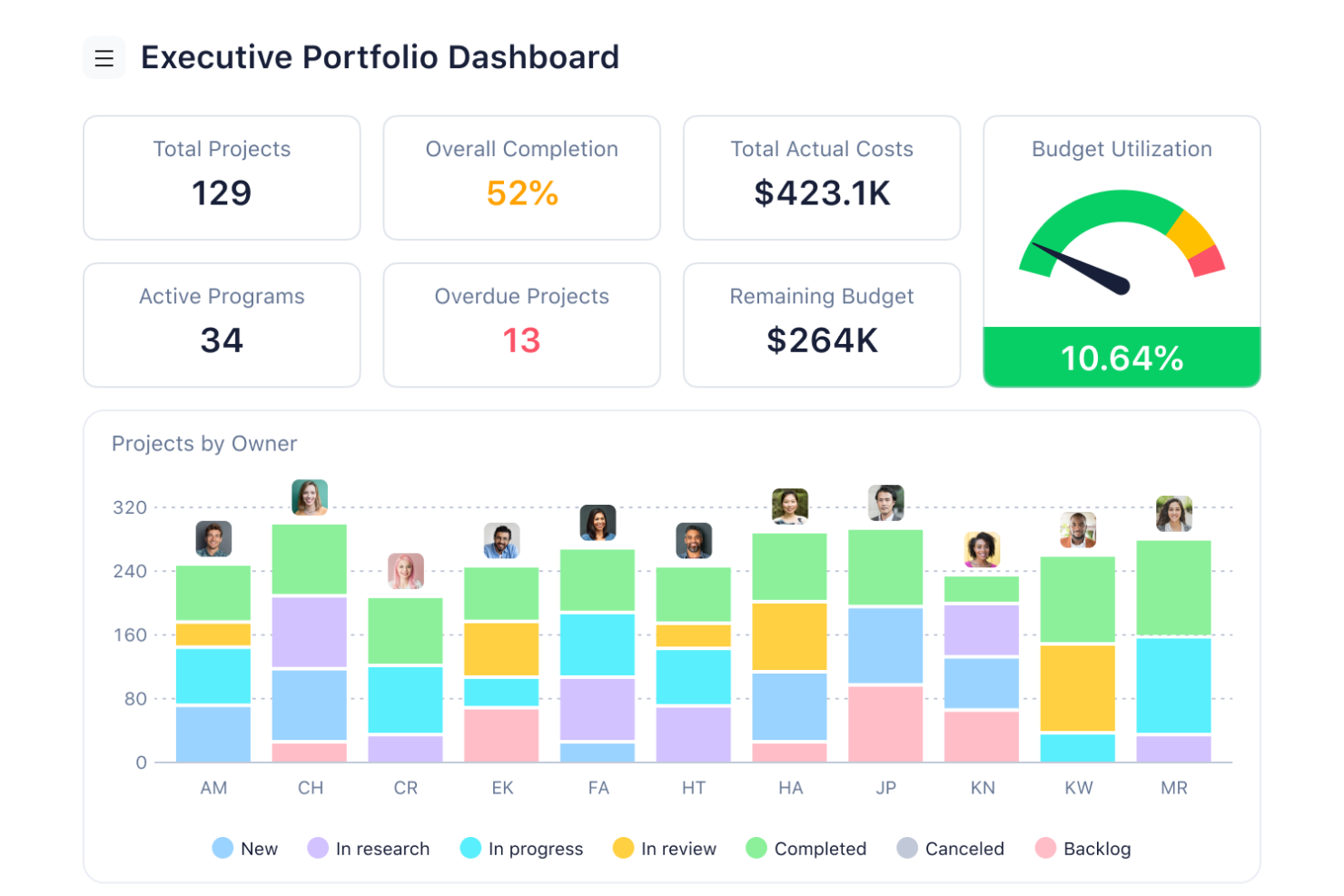
For businesses seeking an AI enterprise resource planning solution, Wrike emerges as a compelling choice. It caters to diverse industries, including marketing, creative, and project management sectors, by enhancing workflow efficiency and collaboration. Wrike automates mundane tasks, allowing your team to focus on strategic initiatives and drive impactful results. Its AI-powered capabilities and seamless integration with over 400 applications make Wrike an ideal partner for organizations looking to streamline processes and foster growth.
Why I Picked Wrike
I picked Wrike because its AI-driven features significantly enhance enterprise resource planning capabilities. Wrike's Work Intelligence automates repetitive tasks and provides data-driven insights, allowing your team to focus on high-value work. The customizable AI agents streamline workflows by predicting outcomes and minimizing manual interventions. Additionally, Wrike's seamless integration with AI assistants like Microsoft Copilot facilitates collaboration and project prioritization, making it an invaluable tool for businesses.
Wrike Key Features
In addition to its AI-driven capabilities, Wrike offers several other features that enhance its utility as an AI enterprise resource planning tool.
- Workflow Automation: Automates recurring tasks and integrates with over 400 applications, enhancing productivity.
- Resource and Capacity Planning: Offers tools for effective resource management.
- Work Management Tools: Includes Gantt charts, real-time reporting, and project portfolio management for comprehensive visibility.
- Collaboration Tools: Facilitates teamwork and communication with shareable dashboards and enhanced project tracking.
Wrike Integrations
Integrations include Microsoft Teams, Google Drive, Dropbox, Salesforce, Slack, Box, OneDrive, Adobe Creative Cloud, GitHub, and Jira.
Pros and Cons
Pros:
- Extensive integrations across business tools
- Strong resource and capacity planning
- AI automates enterprise workflows
Cons:
- Interface complexity for new users
- Advanced AI features cost more
New Product Updates from Wrike

Wrike Activity Reports Add Actor Type Details
Wrike’s Activity Report now displays actor type details, helping admins identify whether changes came from the UI, Automation, Wrike Agents, API, or AI via MCP. For more information, visit Wrike's official site.

Best for advanced financial task automation
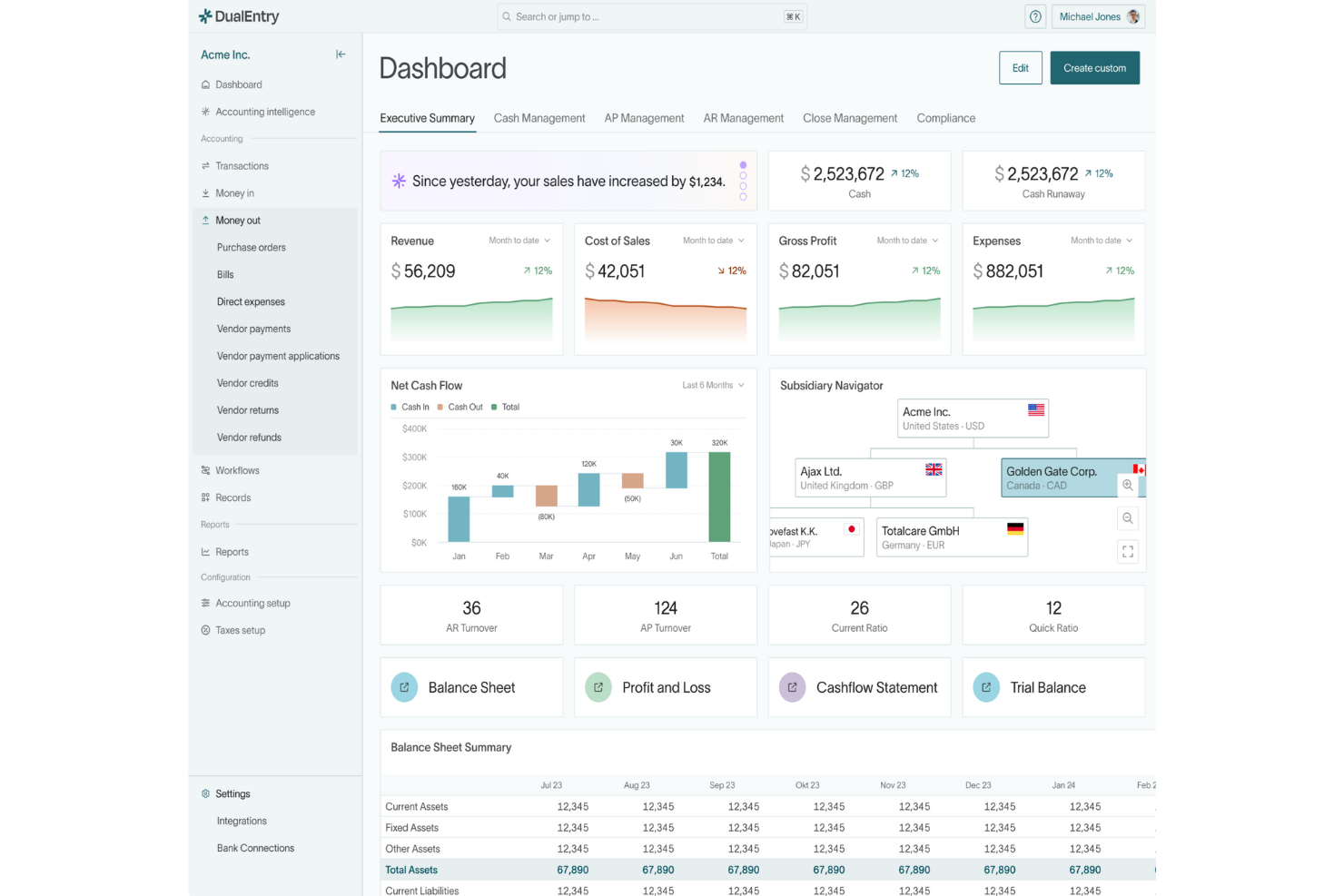
DualEntry is an AI-driven enterprise resource planning software designed to transform how finance teams manage their operations. Catering to businesses with complex financial needs, such as those experiencing rapid growth or dealing with multi-entity and multi-currency transactions, DualEntry offers an array of features that enhance financial management. It promises to address the challenges of financial accuracy and efficiency by automating routine tasks and providing real-time insights, making it an ideal solution for modern finance teams looking to streamline their processes.
Why I Picked DualEntry
I picked DualEntry for its standout ability to automate complex financial tasks, a crucial feature for any AI ERP software. Its AI-driven revenue recognition and flux analysis are particularly valuable, providing real-time insights that can significantly enhance decision-making. The platform's ability to handle multi-entity and multi-currency accounting without compromising on accuracy is another reason why it's a strong contender. These features, combined with its focus on automation, make DualEntry a compelling choice for businesses seeking to optimize their financial operations.
DualEntry Key Features
In addition to advanced financial task automation, DualEntry offers:
- OCR Technology: This feature enables automated document processing, reducing manual entry errors and speeding up data input.
- Transaction Categorization: AI-driven categorization helps in organizing transactions efficiently, ensuring smooth financial reporting.
- Automated Intercompany Transactions: Simplifies the management of transactions between subsidiaries, improving financial consolidation.
- Real-Time Risk Assessment: Provides continuous monitoring and assessment of financial risks, allowing for proactive management.
DualEntry Integrations
Integrations include live connections with over 13,000 banks and an open API for custom integrations.
Pros and Cons
Pros:
- Quick setup and migration process, minimizing downtime
- Ensures data security with compliance to industry standards
- Supports multi-entity and multi-currency accounting effectively
Cons:
- Integration with some third-party apps might be cumbersome
- Limited customization options for specific business needs

Best for integration with Microsoft tools

Microsoft Dynamics 365 combines ERP and CRM capabilities in a unified, AI-powered platform designed to help businesses connect data, automate processes, and improve decision-making. It’s built for organizations of all sizes, supporting finance, sales, operations, and customer engagement within a single, intelligent ecosystem.
Why I picked Microsoft Dynamics 365: Dynamics 365 stands out for its seamless integration of Microsoft Copilot, which brings generative AI into everyday workflows. Users can analyze data, generate reports, and receive predictive recommendations without leaving the app. This makes it an ideal choice for teams that rely on Microsoft tools and want deeper automation and intelligence across their operations. With its modular structure, businesses can scale Dynamics 365 to match their needs, whether they’re focusing on finance, supply chain, or customer experience.
Standout features & integrations:
Features include AI-powered forecasting and financial analytics that help teams predict trends and optimize budgets. Embedded Copilot tools assist with data analysis, report writing, and workflow automation. The supply chain module uses real-time data and predictive insights to enhance inventory control and demand planning. Dynamics 365 integrates natively with Microsoft 365, Power BI, and Azure AI services, creating a connected environment that improves collaboration and efficiency across departments.
Integrations include Microsoft Office 365, Microsoft Power BI, Microsoft Azure, LinkedIn, Outlook, SharePoint, Teams, OneDrive, Yammer, and Skype for Business.
Pros and Cons
Pros:
- Flexible deployment options
- AI-driven customer engagement
- Scalable modular design
Cons:
- Can be resource-intensive
- Frequent updates needed

NetSuite
Best for fast-growing businesses

NetSuite is a cloud-based ERP solution that leverages AI and automation to help fast-growing businesses operate more efficiently. It supports financial management, CRM, and e-commerce with intelligent insights that support informed decision-making and accelerate growth.
Why I picked NetSuite: NetSuite is built for businesses experiencing rapid expansion and needing flexible, scalable tools to adapt in real time. Its AI-powered analytics and automated workflows simplify financial management, while predictive insights help teams plan and respond faster to market changes.
With built-in CRM and e-commerce integrations, it provides a unified platform to manage customers, operations, and financials all in one place. The intuitive interface and customizable dashboards deliver relevant insights when you need them without digging through complex reports.
Standout features & integrations:
Features include AI-driven forecasting and real-time financial reporting. Intelligent automation offloads repetitive accounting and operational tasks, while predictive inventory management ensures optimal stock levels.
Integrations include Salesforce, Shopify, Adobe Commerce, WooCommerce, Zendesk, QuickBooks, HubSpot, Expensify, Box, and Slack.
Pros and Cons
Pros:
- Real-time financial tracking
- Customizable user interface
- Scales with business growth
Cons:
- Requires technical expertise
- Initial setup complexity

Best for mid-sized businesses

Acumatica is a cloud-based ERP solution that leverages AI and automation to give mid-sized businesses real-time visibility and control across finance, projects, and operations. It’s designed for organizations that need flexibility, scalability, and data-driven insights to support ongoing growth.
Why I picked Acumatica: Acumatica stands out for its adaptability and intelligent automation features that simplify complex financial and operational processes. Its AI-powered tools enable faster reporting, anomaly detection, and forecasting assistance. The project accounting module provides deep visibility into costs and resource allocation, while cloud-based access ensures smooth collaboration from anywhere. For mid-sized businesses looking for enterprise-grade capabilities without heavy infrastructure, Acumatica delivers an Agile, modern ERP experience.
Standout features & integrations:
Features include AI-enhanced financial management that automates reconciliation and compliance, real-time analytics for performance tracking, and predictive inventory management that optimizes supply chain operations. The customer management module helps you maintain strong client relationships, while its real-time analytics feature provides insights into business performance, aiding strategic decision-making. The inventory management system supports efficient stock control and logistics.
Integrations include Salesforce, Microsoft Office 365, Adobe Sign, Avalara, HubSpot, Shopify, Adobe Commerce, BigCommerce, Docusign, and PayPal.
Pros and Cons
Pros:
- Flexible cloud-based access
- Strong project accounting tools
- Scalable for growing businesses
Cons:
- Occasional learning curve for automation setup
- Predictive insights can vary in accuracy with limited data

Odoo
Best for customizability

Odoo is an open-source ERP platform that combines flexibility with emerging AI capabilities to help businesses manage sales, inventory, finance, and projects from a single, customizable system. Its modular design allows teams to build the exact ERP solution they need — without unnecessary complexity.
Why I picked Odoo: Odoo stands out for its adaptability and growing use of AI to enhance everyday business operations. Its modular structure lets organizations choose from hundreds of applications, from CRM and accounting to manufacturing and HR, and tailor them to specific workflows. With AI-driven automations, smart document handling, and predictive analytics, Odoo brings intelligence to its open-source foundation. The platform’s large developer community and extensive documentation make it a versatile choice for teams that want control, scalability, and innovation.
Standout features & integrations:
Features include AI-assisted document processing that automates data entry and reconciliation, predictive analytics for sales and inventory planning, and customizable dashboards that track real-time performance across departments.
Integrations include Google Calendar, QuickBooks, PayPal, eBay, Amazon, WooCommerce, Adobe Commerce, Shopify, Stripe, and Slack.
Pros and Cons
Pros:
- Modular application structure
- Extensive community support
- Highly customizable
Cons:
- Limited offline functionality
- Requires technical expertise

Xledger
Best for financial management

Xledger is a cloud-based ERP solution that leverages AI and automation to simplify financial management across industries. It provides advanced tools for accounting, project management, and reporting, giving businesses real-time visibility into their financial performance.
Why I picked Xledger: Xledger stands out for its intelligent automation and focus on financial control. Its AI-driven analytics enhance forecasting and reporting accuracy, while automated accounting processes reduce manual effort and minimize errors. Project and expense management tools help teams monitor budgets, resources, and approvals efficiently, making it ideal for organizations that value real-time insight and streamlined financial workflows.
Standout features & integrations:
Features include AI-powered invoicing and expense management that automate billing and approvals, predictive budgeting tools for more accurate financial planning, and real-time dashboards that visualize key performance indicators.
Integrations include Microsoft Office 365, Salesforce, HubSpot, QuickBooks, SAP, Oracle, Sage, Xero, PayPal, and Stripe.
Pros and Cons
Pros:
- Automated invoicing system
- Real-time reporting capabilities
- Strong financial management tools
Cons:
- Requires ongoing maintenance
- Requires financial expertise

Epicor
Best for manufacturing businesses

Epicor optimizes manufacturing operations with AI-driven production planning, supply chain management, and inventory control. Designed specifically for manufacturers, it helps businesses optimize resources, improve visibility, and increase efficiency across every stage of production.
Why I picked Epicor: Epicor is built for the manufacturing sector, offering industry-specific functionality and intelligent automation to simplify complex workflows. Its AI capabilities enhance forecasting accuracy, optimize scheduling, and detect potential disruptions before they impact production. The platform’s real-time insights help manufacturers make data-driven decisions to reduce downtime, control costs, and maintain product quality.
Standout features & integrations:
Features include AI-enhanced production scheduling that improves resource allocation and minimizes bottlenecks, predictive maintenance tools that identify issues before equipment failures occur, and quality management modules that ensure compliance and consistent standards. Epicor also integrates with Industrial IoT systems and third-party analytics tools, giving manufacturers end-to-end visibility into their operations.
Integrations include Microsoft Office 365, Salesforce, ADP, Avalara, DocStar, Dell Boomi, Paychex, QuickBooks, Shopify, and Amazon Web Services.
Pros and Cons
Pros:
- Advanced financial management
- Supports quality control
- Tailored for manufacturing
Cons:
- Requires specialized training
- Complex implementation process
Other AI Enterprise Resource Planning Software
Here are some additional AI enterprise resource planning software options that didn’t make it onto my shortlist, but are still worth checking out:
- SAP S/4HANA
For large enterprises
- Oracle Fusion Cloud
For scalability
- Infor CloudSuite
For industry-specific needs
- Rillet
For small teams
- Scoro
For service firms tracking project profitability
- Workday
For human resources management
- Sage X3
For compliance-heavy manufacturing


How I Evaluate AI Enterprise Resource Planning Software
Every tool on this list has to do more than slap an AI label on standard ERP workflows—I look for platforms where AI actually changes how PMOs forecast budgets, allocate resources, and flag project risks. I split my evaluation into core functionality every AI ERP must deliver and differentiating factors that separate the best fit from the rest.
Core Functionality (Table Stakes For This List)
When I'm selecting tools for my list, I rank each one on a scale from 0 (does not offer the functionality) to 5 (excels in this area) for each core functionality listed below. Then, I calculate the tool's total score into a percentage. Each tool needs to achieve a minimum total score of 65% to be considered for inclusion.
- Integrated ERP Modules: I check whether finance, procurement, HR, and inventory live in a single connected system rather than siloed add-ons bolted together.
- AI-Powered Forecasting: Real ML-based predictions matter here—I look for tools that forecast project costs, demand, or timelines from historical data.
- Intelligent Workflow Automation: I evaluate how the platform automates repetitive tasks like purchase approvals, invoice matching, and project status updates.
- Project & Resource Management: Native scheduling, capacity planning, and resource allocation tied to ERP data are what I look for, not just basic task lists.
- AI Analytics & Reporting: Dashboards are standard, so I focus on whether the AI surfaces anomalies, flags trends, and delivers insights you'd miss manually.
- Conversational AI Assistant: I look for a GenAI copilot that goes beyond FAQ support to answer queries, pull reports, or kick off actions in natural language.
Once I have a list of tools that meet this criteria, I consider what sets each platform apart.
Differentiating Factors (What Sets Vendors Apart)
Here's how I compare and contrast different vendors:
Standout Features
Scenario planning is a major differentiator—I look for platforms that let PMOs run what-if simulations across budgets, timelines, and headcount before committing to a direction. Predictive risk detection adds another layer, flagging at-risk projects or resource bottlenecks early enough to act. I also value generative reporting that turns live ERP data into executive-ready narratives, saving hours of manual status update writing each sprint cycle.
Beyond Features
Integration depth matters here. I check whether a platform connects natively to tools like Jira, Asana, or Teams, since PMOs rarely operate inside a single system. AI governance is another priority—I evaluate how transparent the vendor is about data residency, model explainability, and audit trails, especially when sensitive financial and HR data feeds the AI. I also look at vendor AI maturity, checking for a real track record of shipping production-ready AI features versus roadmap promises.
How to Choose AI Enterprise Resource Planning Software
It’s easy to get bogged down in long feature lists and complex pricing structures. To help you stay focused as you work through your unique software selection process, here’s a checklist of factors to keep in mind:
| Factor | What to Consider |
|---|---|
| Scalability | Can the software grow with your business? Look for scalable solutions that accommodate increased users, data, and transactions as your company expands. |
| Integrations | Does it connect with your existing tools? Ensure compatibility with your current systems, like CRM, HR, and financial software, to avoid data silos and process inefficiencies. |
| Customizability | Can you tailor it to fit your workflows? Evaluate if the tool offers customization options for dashboards, reports, and processes to match your team's specific needs. |
| Ease of use | Is the interface intuitive? Consider the learning curve and whether your team can easily adopt and use the software without extensive training. |
| Implementation and onboarding | How long will setup take? Ask about the average onboarding time and available resources like training and support to ensure a smooth transition. |
| Cost | Are there hidden fees? Look beyond the initial price tag to understand the total cost of ownership, including setup fees, maintenance, and potential upgrade costs. |
| Security safeguards | How is your data protected? Check for compliance with industry standards and inquire about data encryption, backup protocols, and user access controls. |
| Support availability | When can you get help? Verify the availability of customer support, including hours of operation and channels like phone, chat, or email, to ensure you can get assistance when needed. |
What Is AI Enterprise Resource Planning Software?
AI enterprise resource planning (ERP) software is a system that integrates and automates core business functions like finance, HR, supply chain, and operations. It’s used by leaders such as project managers, CFOs, and operations teams to centralize data and streamline decision-making across departments.
Where traditional ERP systems focus on data collection and process management, AI ERP software adds intelligence to the equation. It uses machine learning and predictive analytics to identify patterns, forecast outcomes, and recommend actions automatically. Instead of just showing you what’s happening, AI tools can tell you why it’s happening — and what to do next.
AI-driven features such as real-time analytics, anomaly detection, process automation, and natural language reporting help businesses move from reactive management to proactive optimization. The result is a smarter, faster, and more adaptable ERP experience that enhances productivity, reduces manual work, and supports strategic growth.
Features
When selecting AI enterprise resource planning software, keep an eye out for the following key features:
- Financial management: Automates accounting tasks like invoicing and reporting to improve accuracy and save time.
- Inventory control: Manages stock levels and logistics to prevent shortages and reduce waste.
- Real-time analytics: Provides up-to-date insights into business performance to aid strategic decision-making.
- Customizable dashboards: Allow users to tailor data views to focus on what's most relevant to their roles.
- Supply chain management: Optimizes the flow of goods and materials to maintain efficient operations.
- Human resources management: Supports HR processes such as payroll and employee records management.
- Automated reporting: Generates reports automatically to ensure timely and accurate data distribution.
- Project management: Helps plan, execute, and monitor tasks to keep projects on track and within budget.
- Customer relationship management: Enhances the management of client interactions and improves service delivery.
- Security safeguards: Protect sensitive data through encryption and access controls to maintain compliance and trust.
Benefits
Implementing AI enterprise resource planning software provides several benefits for your team and your business. Here are a few you can look forward to:
- Improved efficiency: Automates routine tasks like invoicing and reporting, freeing up your team to focus on more strategic activities.
- Better decision-making: Offers real-time analytics that provide insights into business performance, helping you make informed choices.
- Enhanced collaboration: Supports cross-departmental communication through integrated data and customizable dashboards.
- Cost savings: Reduces waste and optimizes resource use through features like inventory control and supply chain management.
- Scalability: Grows with your business, accommodating increased users and data as your needs evolve.
- Data security: Protects sensitive information with encryption and access controls, ensuring compliance and peace of mind.
- Customer satisfaction: Improves client interactions and service delivery through effective customer relationship management.
Costs and Pricing
Selecting AI enterprise resource planning software requires an understanding of the various pricing models and plans available. Costs vary based on features, team size, add-ons, and more.
The table below summarizes common plans, their average prices, and typical features included in AI enterprise resource planning software solutions:
Plan Comparison Table for AI Enterprise Resource Planning Software
| Plan Type | Average Price | Common Features |
|---|---|---|
| Free Plan | $0 | Basic financial management, limited reporting, and basic customer management. |
| Personal Plan | $10-$30/user/month | Advanced financial management, enhanced reporting, basic inventory control, and email support. |
| Business Plan | $25-$210/user/month | Comprehensive reporting, supply chain management, project management, and customer support. |
| Enterprise Plan | $200+/user/month | Full suite of features, advanced analytics, custom integrations, dedicated support, and training. |
AI Enterprise Resource Planning Software FAQs
Here are some answers to common questions about AI enterprise resource planning software:
What are the 5 biggest challenges of ERP implementation?
Common challenges include high costs, complex data migration, resistance to change, limited training, and integration issues. With AI ERP, you might face added hurdles like ensuring high-quality data for machine learning and adapting workflows to include automation. Careful planning and involving your team early can ease these obstacles and help your implementation run smoothly.
How does AI enhance supply chain management in ERP?
ERP AI solutions can improve supply chain management through demand forecasting, optimizing inventory levels, and enhancing supplier collaboration. These capabilities lead to reduced costs, better cash flow, and efficient resource allocation. Your team will benefit from more accurate forecasts and efficient logistics operations.
Can AI ERP systems be customized to fit specific business needs?
Yes, AI ERP systems are designed for customization. You can adjust modules, algorithms, workflows, dashboards, and reports to match your organization’s unique business processes. This flexibility makes the software more valuable for your team and helps you meet your project goals.
What are the security considerations for AI ERP systems?
AI-powered ERP systems need strong security like data encryption, strict access controls, and regular vulnerability checks. Be aware that AI features may use more data types, which increases privacy needs. Work with your vendor to set up security audits and ensure you’re following all compliance rules.
How can I measure ROI after implementing an AI ERP system?
Measure ROI by tracking project delivery times, error reduction, resource utilization, and cost savings after rollout. Use built-in analytics from your ERP platform to compare these metrics with pre-implementation results. Look for improved team productivity and fewer project delays.
What ongoing maintenance does AI ERP software require?
Both traditional ERP systems and those enhanced with artificial intelligence features require regular maintenance to stay effective. This includes routine updates, security patching, and system health checks. For AI-powered platforms, it’s also important to plan for periodic AI model retraining to address factors like natural language processing accuracy, human error, and potential bias in historical data.
In addition, schedule ongoing software optimizations to ensure performance and reliability. Work closely with your ERP vendor for continued support, and set aside time for your team to review new features, enhancements, and system improvements as they’re released.
What’s Next:
If you're in the process of researching AI enterprise resource planning software, connect with a SoftwareSelect advisor for free recommendations.
You fill out a form and have a quick chat where they get into the specifics of your needs. Then you'll get a shortlist of software to review. They'll even support you through the entire buying process, including price negotiations.