

10 Best Approval Workflow Software Solutions In 2026

10 Best Approval Workflow Software Shortlist


The best approval workflow software streamlines how your team submits, reviews, and signs-off on assets, documents, and decisions, so nothing gets stuck in limbo. These tools replace messy email chains and unclear sign-off processes with structured workflows, automated reminders, and clear accountability.
I've used my 10 years of experience leading digital projects across government, healthcare, retail, and transit to test more than 30 approval workflow tools. I'll cover which ones actually reduce back-and-forth and speed up decision-making. I’ve worked with teams where slow approvals caused costly delays, and I’ve seen how the right tool can prevent that.
In this guide, I’ll walk you through the top approval workflow software based on hands-on testing. I’ve highlighted how each one helps you formalize approvals, keep projects moving, and eliminate approval-related bottlenecks.
Why Trust Our Software Recommendations
Our team has been testing and reviewing software since 2012. As project managers ourselves, we know how difficult—and important—it is to choose the right software.
For this guide, we evaluated tools using hands-on testing and independent research, scoring tools using our selection criteria. We also draw on insights from industry thought leaders and practicing project management experts.
Our reviews reflect our human editorial judgment, not a sales pitch.
Expert reviewers:
Comparison Table: Approval Workflow Software for Project Managers
Compare pricing and specs for each of my picks for the best approval workflow software.
| Tool | Best For | Trial Info | Price | ||
|---|---|---|---|---|---|
| 1 | Best for workflows within client portals | Free trial available | From $5,000/year (billed annually) | Website | |
| 2 | Best for multi-stage creative approvals | Free plan available | From $169/month (billed annually) | Website | |
| 3 | Best for approval forms and boards | Free plan available | From $9/user/month (billed annually) | Website | |
| 4 | Best for no-code workflows | Free demo available | Pricing upon request | Website | |
| 5 | Best with bi-directional CRM data sync | Free demo available | From $399/month (billed annually) | Website | |
| 6 | Best for approval automations | 14-day free trial | Pricing upon request | Website | |
| 7 | Best for project management workflows | Free plan available | From $7/user/month (billed annually) | Website | |
| 8 | Best for marketing operations | Free demo available | Pricing upon request | Website | |
| 9 | Best for its drag-and-drop builder | Free demo available | Pricing upon request | Website | |
| 10 | Best for unlimited reviewers | 30-day free trial + free plan + free demo available | From $199/month | Website |


Best Approval Workflow Software Reviews
Below, you’ll find my choices for the best approval workflow software. I’ve provided a detailed summary of each, including screenshots, standout features, integrations, and some pros and cons.

Moxo
Best for workflows within client portals

Moxo is a workflow automation platform designed for project managers and client-facing teams who need to coordinate approvals, manage documents, and track tasks securely within a branded digital portal.
Who Is Moxo Best For?
Moxo is a strong fit for service-based businesses and project managers who handle client-facing workflows across industries like financial services, legal, and consulting.
Why I Picked Moxo
I picked Moxo as one of the best because of how it handles approvals within a client-facing portal rather than keeping everything locked inside internal tools. What I like most is that external stakeholders—clients, partners, vendors—can enter a workflow, see exactly what action they need to take, and complete it without needing a login tutorial or a back-and-forth email chain. I also use Moxo's conditional branching to route approval steps dynamically based on form inputs or prior decisions, which means a client submitting incomplete documentation automatically triggers a review-revise-resubmit loop instead of stalling the whole process. Additionally, every action is captured in a detailed audit trail tied to specific steps, so I always have a timestamped record of who approved what and when.
Moxo Key Features
- Role-based routing: Automatically assigns workflow steps to the right participants based on permissions and logic rules, without manual handoffs.
- SLA timers and escalations: Triggers automatic escalations when deadlines are missed, keeping approval steps from going stale.
- Parallel workflow paths: Runs multiple workflow branches simultaneously, so teams aren't blocked waiting on unrelated approvals.
- Embeddable SDK: Extends Moxo's workflow functionality directly into your existing applications via iOS, Android, and JavaScript SDKs.
Moxo Integrations
Integrations include Salesforce, HubSpot, Box, Stripe, Formstack, Jotform, and Zoom.
Pros and Cons
Pros:
- Workflow templates let you repeat processes
- Multi-party approvals in the same portal
- Branded portals for client workflows
Cons:
- Initial setup and customization require significant time
- Workflow builder may require complex logic training
Best for multi-stage creative approvals
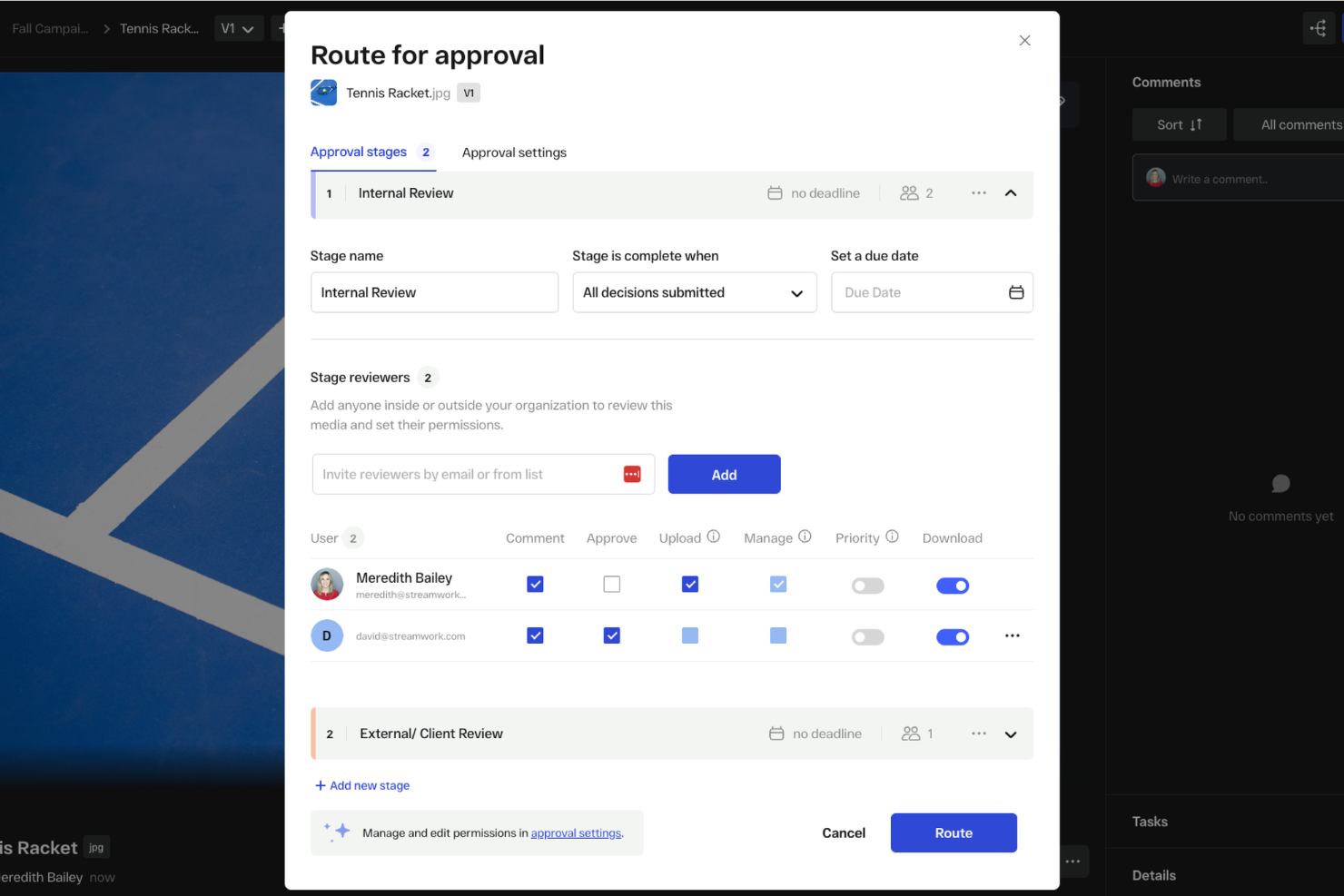
StreamWork is built for creative teams and project managers who need to coordinate complex approval workflows, centralize feedback, and keep projects moving with clear, trackable sign-offs at every stage.
Who Is StreamWork Best For?
StreamWork is a strong fit for creative and marketing teams that manage high volumes of visual content requiring structured, multi-stakeholder review and sign-off.
Why I Picked StreamWork
StreamWork earns its spot on my shortlist because of how well it handles multi-stage creative approvals without turning the process into a bottleneck. I like that you can map out distinct approval stages, assign specific reviewers to each one, and set deadlines per stage—so a campaign asset can move from a copywriter to a creative director to a legal reviewer in sequence, automatically. The approval routing updates in real time, so I can see exactly where a piece of content is stuck without chasing anyone down. On top of that, the version control ties directly into the approval history, so I always know who signed off on which version and when.
StreamWork Key Features
- Batch approvals with reusable templates: Run high-volume campaigns using pre-built approval templates that repeat across similar creative cycles without rebuilding workflows from scratch.
- Frame-accurate commenting: Leave time-stamped, pinpoint feedback directly on video frames, images, and documents so reviewers can annotate exactly what needs to change.
- Comment-to-task conversion: Turn any piece of feedback into an assignable task directly within the platform, keeping action items tied to the specific asset they reference.
- Reviewer access without logins: Share review links with external stakeholders or clients who can view and comment without creating an account or going through any setup.
StreamWork Integrations
Integrations include Asana, monday.com, Slack, Dropbox, Box, Google Drive, and Adobe Creative Cloud.
Pros and Cons
Pros:
- Built-in feedback tools on images, videos, and more
- Version control and asset stacking across reviews
- Custom multi-stage approval routes
Cons:
- Customization requires a learning curve
- Less suited for simple approval flows

Best for approval forms and boards

monday.com gives project managers in tech and digital teams a flexible platform to build, automate, and track approval workflows, making it easier to manage sign-offs, document reviews, and stakeholder feedback in one place.
Who Is monday.com Best For?
monday.com is a good fit for cross-functional teams in mid-size to enterprise tech companies that need a visual, customizable way to manage approvals across multiple projects and departments.
Why I Picked monday.com
monday.com earns its spot as one of the best on my shortlist because of how well its approval forms and boards work together as a single, connected system. I like that you can build a no-code intake form with conditional logic—so submitters only see the questions relevant to their request—and have responses land directly on a board where reviewers can act on them. From there, automations handle the routing: when a status column changes to "Pending Approval," the right reviewer is notified. I've found the Project Requests and Approvals template especially useful as a starting point, since it comes pre-wired with embedded forms, status tracking, and deadline reminders out of the box.
monday.com Key Features
- Approval status columns: Track where each request stands using customizable status labels like "In Review," "Approved," or "Rejected" directly on your board.
- Workload view: See reviewer capacity across your team to avoid bottlenecks when multiple approval requests are assigned simultaneously.
- Guest access: Invite external stakeholders—like clients or vendors—to review and approve items without giving them full account access.
- Audit log: View a timestamped record of every status change, comment, and update made to an approval item for accountability and compliance tracking.
monday.com Integrations
Integrations include Salesforce, QuickBooks, HubSpot, Zendesk, Active Directory, GitHub, GitLab, Slack, Gmail, and Microsoft Teams.
Pros and Cons
Pros:
- Highly customizable workflows
- Extensive integration options
- Built-in task tracking and reporting
Cons:
- Limited offline functionality
- Initial setup can be complex
New Product Updates from monday AI Workspace
monday AI Workspace Adds Human Approval Routing
monday AI Workspace adds a human-in-the-loop approval block to AI Workflows, sending approval requests and routing workflow paths based on responses. For more information, visit monday AI Workspace's official site.

Best for no-code workflows
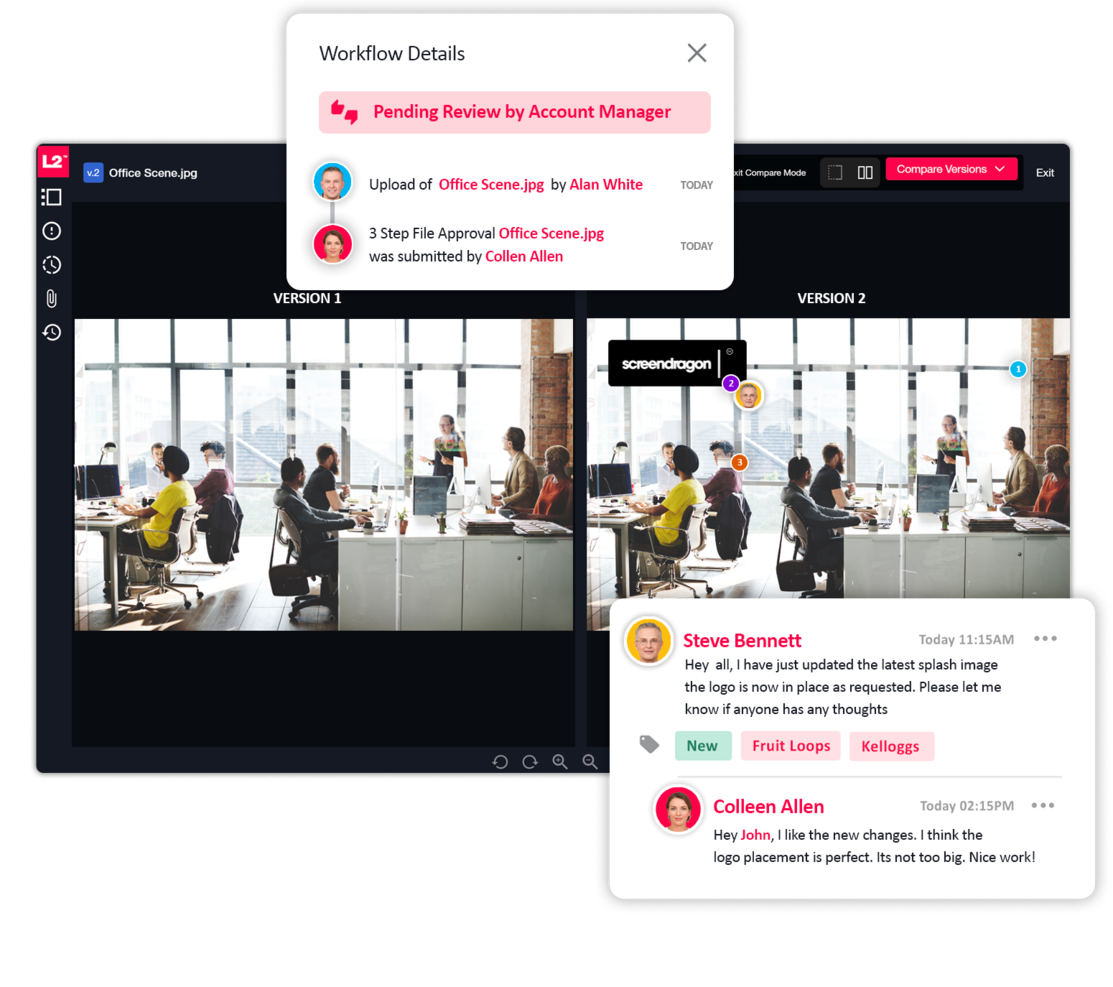
If you want to speed up and smooth out your approval processes, Screendragon is perfect for marketing and creative operations. The no-code platform is ideal for enterprise teams that are managing complex workflows, and it also offers built-in automation and project management tools so you can keep everything in one place. Screendragon's proofing and version control features can also help you improve productivity and decision-making on your projects.
Who is Screendragon Best For?
Screendragon supports project and creative operations teams at mid-sized to enterprise organizations that need no-code workflows for planning and approval processes. It fits companies with distributed contributors that require flexible, visual tools to design and manage structured work without development resources.
Why I Picked Screendragon
I picked Screendragon for its no-code workflow capabilities, which cater to the needs of marketing and creative teams that want to manage approval processes but lack coding expertise. The platform's visual workflow builder lets you easily create complex approval workflows and includes AI-driven automation tools that help you eliminate bottlenecks.
Screendragon also offers real-time insights into resource utilization, which helps you keep track of who's working on what and manage project approvals more effectively. The platform helps you focus more on creativity and strategic tasks, rather than getting bogged down by administrative hurdles.
Screendragon Key Features
Screendragon offers several other features that make it useful as an approval workflow software tool.
- Dynamic Custom Forms: This feature lets you create tailored forms that capture the specific data needed for approvals, so you can gather all necessary information efficiently.
- Advanced Permission Controls: You can set detailed permission levels to control access to sensitive information and tasks and make sure only authorized team members can approve or modify critical workflows.
- Real-time Insights and Reporting: With built-in analytics, you can see real-time data on workflow performance and approval timelines, which lets you make informed decisions quickly.
- Deadline Enforcement: Screendragon automatically enforces deadlines and sends notifications to keep your team on track. This minimizes the risk of missed approvals and helps you complete work on time.
Screendragon Integrations
Integrations include Microsoft Power BI, Slack, Microsoft Teams, Jira, Google Drive, Salesforce, HubSpot, Okta, Aprimo, and SugarCRM.
Pros and Cons
Pros:
- High adaptability to industry-specific workflow needs
- Comprehensive reporting provides visibility into progress
- Integrated feedback tools improve collaboration
Cons:
- Complexity may overwhelm small teams or orgs
- Setup and onboarding process can be time-consuming
New Product Updates from Screendragon
Screendragon Unveils New AI Hub
Screendragon introduced AI Hub, a new capability that lets teams build and manage AI agents directly within workflows. The update helps marketing teams automate tasks, maintain governance controls, and scale AI-driven operations more efficiently. For more information, visit Screendragon's official site.
altaFlow
Best with bi-directional CRM data sync
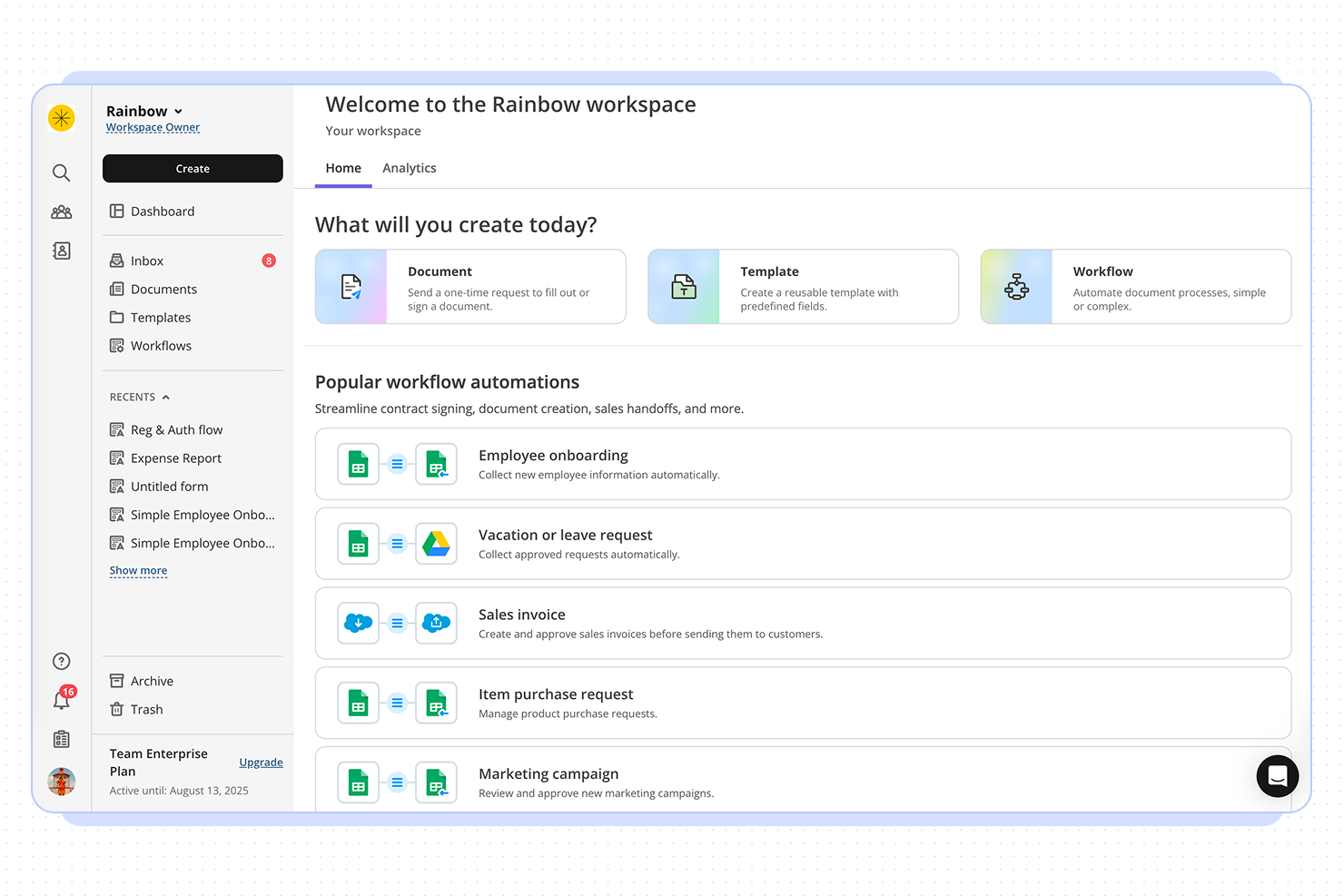
altaFlow is a workflow automation platform that helps project managers and teams streamline complex approval processes, automate document routing, and ensure compliance across multiple business systems.
Who Is altaFlow Best For?
altaFlow is a strong fit for mid-sized to enterprise teams that run approval-heavy processes across sales, operations, and finance functions.
Why I Picked altaFlow
altaFlow earns its spot on my shortlist because of how it handles the gap between document workflows and CRM data. Most approval tools treat the CRM as a destination—you finish a workflow, then someone manually updates the record. With altaFlow, the sync runs both ways: it pulls live Salesforce data into contracts and approval packets on generation, then writes signed document data, status updates, and timestamps back to the CRM automatically once a workflow completes. I also like the no-code conditional routing, which lets you set approval paths based on deal size, department, or risk level without touching a developer.
altaFlow Key Features
- Automated document routing: Route documents to the right approvers based on predefined rules, roles, or workflow triggers.
- Audit trail logging: Track every action taken on a document, including views, edits, approvals, and rejections, with timestamps.
- E-signature collection: Collect legally binding signatures directly within approval workflows without switching to a separate tool.
- Role-based access controls: Restrict document visibility and editing permissions based on team member roles or approval stage.
altaFlow Integrations
Integrations include Salesforce, NetSuite, SharePoint, Google Drive, OneDrive, Slack, Microsoft Teams, HubSpot, Microsoft Dynamics 365, and Box.
Pros and Cons
Pros:
- SOC 2, HIPAA, and GDPR compliance
- No-code workflow builder for approvals
- Supports multi-level and parallel approvals
Cons:
- API access only on premium plans
- Fewer prebuilt templates than some competitors

Wrike
Best for approval automations
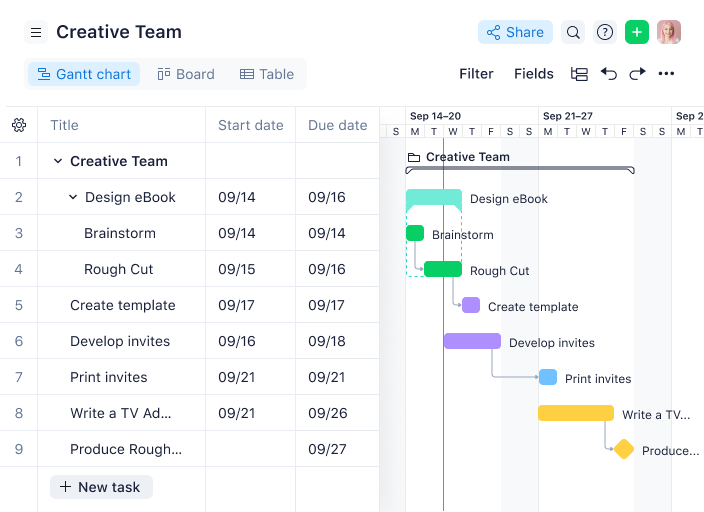
Wrike gives project managers in tech and digital teams a centralized platform to automate approvals, manage project workflows, and keep cross-functional work moving without bottlenecks.
Who Is Wrike Best For?
Wrike is a strong fit for mid-size to enterprise tech teams that need structured project delivery with built-in approval and review processes.
Why I Picked Wrike
Wrike earns its spot on my shortlist because of how deeply approval automation is built into its project workflows—not bolted on as an afterthought. I like that you can embed approvals directly into task and project workflows, so when a deliverable hits a specific status, the right approver is automatically notified without anyone having to chase them down. Wrike's dynamic request forms also do a lot of heavy lifting here—they use conditional logic to collect exactly the information approvers need upfront, which cuts down on back-and-forth before a sign-off even begins. The pending approvals dashboard gives my team a single view of everything waiting on a decision, so nothing quietly stalls mid-project.
Wrike Key Features
- Online proofing: Review and mark up images, videos, and documents directly within tasks, without downloading files or switching tools.
- Gantt chart view: Visualize project timelines, map task dependencies, and adjust schedules by dragging and dropping tasks on an interactive timeline.
- Custom workflow statuses: Define task stages that match your team's actual process, so work moves through clearly labeled steps from kickoff to completion.
- Resource bookings: Reserve team members for specific projects, estimate hours needed, and check availability before assigning work.
Wrike Integrations
Integrations include Salesforce, Microsoft Teams, Google Drive, Adobe Creative Cloud, Zoom, Tableau, Power BI, QuickBooks, Miro, and Google Sheets.
Pros and Cons
Pros:
- Attach files and track reviews in one task
- Automatic audit trail of decisions
- Define conditional approvals for specific scenarios
Cons:
- Extra setup of approval rules for non-standard cases
- May be overkill for simple sign-offs
New Product Updates from Wrike

Wrike Redesigns AI Agent Builder
Wrike redesigns its AI Agent Builder with a side-by-side setup, Scopes, sentence-style triggers and actions, and clearer filters. These changes make it easier to configure, test, and manage agent behavior. For more information, visit Wrike’s official site.

ClickUp
Best for project management workflows

ClickUp offers teams a flexible way to build and automate approval workflows alongside project management tasks. It’s a strong fit for organizations that want to customize approval processes for documents, creative assets, or operational requests within a single platform. With its mix of task statuses, automations, and custom fields, ClickUp helps teams adapt approval flows to fit their exact needs.
Who is ClickUp Best For?
ClickUp supports project and operations teams at small to enterprise organizations that need structured workflows embedded in project management. It fits companies across industries that require centralized task coordination, approval checkpoints, and visibility for distributed contributors.
Why I Picked ClickUp
What sets ClickUp apart from approval workflow software is its ability to let you design highly customizable approval processes for any team or project type. You can create custom task statuses to reflect each stage of your approval flow, from draft to review to final sign-off. I appreciate how ClickUp’s automation tools let you trigger notifications or status changes when approvals are completed, keeping everyone in the loop. The flexibility to add custom fields and templates means you can tailor approval workflows to fit everything from marketing campaigns to IT requests.
ClickUp Key Features
Some other features that stand out for approval workflows include:
- Proofing and Annotation: Reviewers can add comments and mark up documents or images directly within tasks.
- Task Dependencies: Set tasks to require approval before others can begin.
- Guest Access: Invite external stakeholders to participate in specific approval steps.
- Activity Log: Track every action and decision made throughout the approval process.
ClickUp Integrations
Integrations include Slack, GitHub, GitLab, HubSpot, Everhour, Toggl, Harvest, Google Drive, OneDrive, and Dropbox.
Pros and Cons
Pros:
- Automations reduce manual work
- Custom fields and statuses let you capture unique data
- Align project workflows with approval steps
Cons:
- Permissions and guest users need careful configuration
- Extensive features can overwhelm small teams
New Product Updates from ClickUp
ClickUp Adds Meetings Hub, Super Agent Templates, and ZoomInfo Integration
ClickUp adds a searchable Meetings Hub, new ways to clone and template Super Agents, and a ZoomInfo integration through the App Center. These updates improve meeting retrieval, agent reuse, and access to sales intelligence. For more information, visit ClickUp’s official site.

Best for marketing operations

IntelligenceBank is a workflow automation and digital asset management platform for marketing teams and project managers who centralize approvals, manage compliance, and streamline content collaboration across campaigns and projects.
Who Is IntelligenceBank Best For?
IntelligenceBank is a strong fit for marketing operations teams in mid-size to enterprise organizations that manage high volumes of content, assets, and multi-stakeholder approvals.
Why I Picked IntelligenceBank
I included IntelligenceBank on my shortlist because it connects approval workflows directly to compliance—something marketing operations teams genuinely need. I like how custom approval workflows sit inside the same platform as AI-powered compliance reviews, so when a piece of content moves through legal or brand sign-off, risk flags surface automatically rather than after the fact. The marketing work management module also lets my team run creative briefs, allocate tasks, and manage multi-stage approvals from Kanban boards and marketing calendars, keeping the full production cycle visible in one place. That end-to-end visibility—from brief to approved asset—is what makes IntelligenceBank a particularly good fit for marketing operations teams managing high volumes of content across multiple stakeholders.
IntelligenceBank Key Features
- Online proofing and annotation: Review and mark up creative assets directly in the platform, with threaded comments tied to specific areas of an image, video, or document.
- Version control: Track every iteration of an asset with a full version history, so approvers always review the latest file and can compare against previous versions.
- Role-based access controls: Set granular permissions by user role to control who can view, edit, upload, or approve assets at each stage of the workflow.
- Digital asset management: Store, search, and share all creative assets in a centralized library with AI-powered tagging and facial recognition for fast retrieval.
IntelligenceBank Integrations
Integrations include Adobe After Effects, Adobe InDesign, Figma, Salesforce Marketing Cloud, Microsoft Teams, Shopify, Contentful, Google Docs, and Asana.
Pros and Cons
Pros:
- Centralized brand portal with asset usage and permissions
- Create tasks directly from intake forms
- Version control across assets and approvals
Cons:
- Search and folder structure can be overwhelming
- Implementation requires significant internal resources

Best for its drag-and-drop builder

Process Street gives project managers in tech and digital teams a way to build, automate, and track approval workflows so they can manage complex processes, assign tasks, and ensure every step is completed with full visibility.
Who Is Process Street Best For?
Process Street is a good fit for operations and project teams at small to mid-sized companies that need to standardize and manage recurring approval processes without heavy technical setup.
Why I Picked Process Street
I picked Process Street as one of the best because I love how its drag-and-drop workflow builder lets my team design multi-step approval processes without writing a single line of code. My team can drag tasks into sequence, add conditional logic so the workflow branches based on specific inputs, and drop in stop tasks that block progress until a required approval is completed. That means a design review or budget sign-off can't get skipped—the workflow enforces the requirement. I also like that we can update a workflow mid-flight without disrupting runs already in progress; my team relies on this when approval requirements shift partway through a project.
Process Street Key Features
- Role-based task assignments: Assign specific approval steps to individuals or groups based on their role within the workflow.
- Audit trail logging: Every action, approval, and comment is automatically recorded with a timestamp for full process accountability.
- Form fields within tasks: Collect structured data directly inside a task, such as approval notes, file uploads, or sign-off confirmations.
- Workflow run dashboard: Monitor all active workflow runs in one view, with status indicators showing where each approval process currently stands.
Process Street Integrations
Integrations include Salesforce, Slack, Microsoft Teams, Google Sheets, Jira, Docusign, HubSpot, Mailchimp, Stripe, and BambooHR.
Pros and Cons
Pros:
- Automation features save time on repetitive tasks
- Facilitates compliance via audit-ready documentation
- Wide range of templates for various processes
Cons:
- Lacks advanced workflow customization
- Limited tools for sequential task management

Filestage
Best for unlimited reviewers

Filestage is an approval workflow platform designed for project managers and creative teams who need to manage feedback, track versions, and streamline document or media approvals across multiple stakeholders.
Who Is Filestage Best For?
Filestage is a good fit for marketing and creative teams at mid-sized companies that manage high volumes of content approvals across multiple internal and external reviewers.
Why I Picked Filestage
Filestage earns its spot on my shortlist because unlimited reviewers are available on every plan—including the free tier—which means you're never paying extra to loop in a client, a legal stakeholder, or a last-minute approver. I like that reviewers don't even need an account to leave feedback; they just enter their email and start annotating directly on the file. That removes a real barrier when you're managing approvals across agencies, freelancers, and internal teams simultaneously. The reviewer groups feature also lets me segment who sees what at each stage, so a legal reviewer and a brand reviewer can work through the same file in parallel without stepping on each other.
Filestage Key Features
- Version comparison: Upload new file versions and compare them side-by-side with previous iterations to track changes across review cycles.
- Due dates for review steps: Assign deadlines to individual review stages so approvals don't stall without accountability.
- File annotation tools: Leave time-stamped comments directly on videos, PDFs, images, and other file types without switching to a separate tool.
- Approval status tracking: Monitor the approval status of every file across all projects from a centralized dashboard.
Filestage Integrations
Integrations include Asana, monday.com, Jira, Slack, Microsoft Teams, Adobe Premiere Pro, Adobe InDesign, Adobe After Effects, Figma, Google Drive, and Dropbox.
Pros and Cons
Pros:
- Automated approvals reduce manual steps
- Version comparison simplifies spotting changes
- Invite unlimited reviewers without extra licenses
Cons:
- Dashboard may lag with large video files
- Custom roles and permissions need advanced configuration
Other Approval Workflow Software
Here are a few more tools that didn’t make the top list, but which are worth checking out if you didn’t find what you were looking for above.
- Adobe Workfront
For approval audit trails
- Admation
For routine approvals
- Birdview
For agencies and professional services
- Kissflow Workflow
For custom approval workflows
- Ravetree
For CRM and project approvals
- Pneumatic Workflow
For streamlining approvals
- Tallyfy
For experienced workflow builders
- Gain
For collaborative approval workflows
- Oppolis Cloud
For Adobe Creative Cloud integration
- ReptonPOD
For tracking document approvals
- Miro
For visual collaboration & innovation
- Jotform
For dynamic form approval
- Quire
For structured task approvals
- Jotform Workflows
For no-code workflow creation
- Ziflow
For creative teams
- Smartsheet
For external approvers
- Celoxis
For pre-built workflow apps
- Hive
For internal approvals
- Air
For creative asset approvals
- GoodDay
For advanced task visualization
- Hub Planner by Milient
For resource-based approval tracking
- Ziggu
For AEC client sign-offs and e-signatures
- Formstack
For customizable online forms
- InRule
For no-code AI-powered automations
- Process Plan
For AI workflow analysis


How I Evaluate Approval Workflow Software
I evaluate approval workflow tools in two layers: core must-haves that get a vendor on the list, and differentiators that reveal the best fit for teams managing multi-stage project sign-offs.
Core Functionality (Table Stakes For This List)
When I'm selecting tools for my list, I rank each one on a scale from 0 (does not offer the functionality) to 5 (excels in this area) for each core functionality listed below. Then, I calculate the tool's total score into a percentage. Each tool needs to achieve a minimum total score of 65% to be considered for inclusion.
- Customizable Approval Workflows: I evaluate whether you can build multi-step chains with conditional logic, like routing a creative brief through design review before legal sign-off.
- Automated Request Routing: Each tool should route requests to the right approver based on rules or triggers, not require someone to manually assign every change order or SOW.
- Status Tracking & Notifications: I look for real-time dashboards and configurable reminders that show exactly which approvals are pending, approved, or rejected across active projects.
- Audit Trail & Version History: A clear, timestamped record of every approval action matters, especially when you need to trace who approved a scope change and which version they reviewed.
- Project Management Integration: I check for native or API-based connections with tools like Jira, Asana, or Smartsheet so approvals stay linked to the deliverables they belong to.
- Approver Collaboration Tools: Reviewers should be able to comment, request changes, annotate files, or delegate approvals within the workflow rather than switching to email or chat.
Once I have a list of tools that meet the criteria, I consider what sets each platform apart.
Differentiating Factors (What Sets Vendors Apart)
Here's how I compare and contrast different vendors:
Standout Features
Mobile approval capabilities matter when stakeholders travel or work across time zones. I look for native apps that let approvers review and act on requests without holding up a project timeline. Proofing and annotation tools are a big differentiator for creative teams who need to mark up designs or video files directly inside the approval flow. I also evaluate whether a platform offers white-label client portals, which agencies and consultancies rely on to collect external sign-offs without forcing clients into a new account.
Beyond Features
I evaluate each vendor's integration ecosystem closely, checking for native connectors with the PM tools, document storage, and communication platforms your team already uses daily. Pricing structure is another key factor. Some tools charge per approver seat, which gets expensive fast when you loop in occasional reviewers like external clients or executives. I also look at security and compliance posture, especially SOC 2 and SSO support, since approval workflows often touch sensitive deliverables like contracts, budgets, and legal documents.
How to Choose Approval Workflow Software
It’s easy to get bogged down in long feature lists and complex pricing structures. To help you stay focused as you work through your unique software selection process, here’s a checklist of factors to keep in mind:
| Factor | What to Consider |
|---|---|
| Scalability | Make sure the software can handle your team’s growth, whether it’s increasing users, processes, or requests. Look for flexible licensing or tiered pricing models. |
| Integrations | Check if the software connects with your existing tools like CRMs, ERPs, or document storage systems. Integrations can streamline your workflows and save your team time. |
| Customizability | Ensure you can tailor approval processes to match your team’s unique needs, like setting custom approval stages or notifications. |
| Ease of Use | Your team shouldn’t need extensive training. Look for intuitive interfaces and straightforward workflows to get started quickly. |
| Budget | Consider the total cost of the software, including subscription fees, training, and potential add-ons. Check whether it aligns with your financial constraints. |
| Security Safeguards | Confirm the software meets your organization’s security standards, via features like role-based permissions and compliance with regulations like GDPR or SOC 2. |
| Mobile Accessibility | Check if the software offers a mobile-friendly interface or app, so your team can approve requests on-the-go. |
| Reporting Features | Look for robust analytics tools to track bottlenecks, approval times, and process efficiency for better decision-making. |
Trends in Approval Workflow Software
In my research, I sourced countless product updates, press releases, and release logs from different approval workflow software vendors. Here are some of the emerging trends I’m keeping an eye on:
- AI-Driven Recommendations: Tools are now offering AI to suggest approvers or flag unusual requests. This helps teams save time and spot issues faster. For example, an AI might flag expense approvals that fall outside of normal spending patterns.
- Blockchain for Audit Trails: Some vendors are adopting blockchain to ensure tamper-proof approval records. This trend is especially useful for industries with strict compliance needs, like finance or healthcare, where secure and verifiable audit trails are essential.
- No-Code Workflow Design: More platforms now allow users to build and modify workflows without writing code. This lowers the barrier for non-technical users and makes it easier for teams to adjust workflows to fit their needs without IT support.
- Dynamic Approvals Based on Context: Approval paths that adjust based on conditions like urgency or budget thresholds are gaining popularity. For example, a low-budget request might require only one approval, while a high-budget one routes through multiple levels automatically.
- Embedded Analytics: Platforms are including real-time data on approval times, bottlenecks, and user activity. Teams can use this data to identify delays and make processes more efficient. For example, a dashboard might highlight that a specific approval step consistently slows down requests.
What is Approval Workflow Software?
Approval workflow software is a tool that automates and tracks the process of submitting, reviewing, and approving documents or tasks. It’s used by project managers, marketers, legal teams, and operations leads to eliminate approval delays, reduce errors, and maintain an audit trail.
These tools help teams route requests to the right people, set deadlines, and keep work flowing smoothly.
Features of Approval Workflow Software
When selecting approval workflow software, keep an eye out for these key features:
- Customizable workflows: You can design unique approval pathways that match your team’s real-life processes, so you’re not stuck adapting your style to a rigid software structure.
- Role-based access control: This lets you limit who can view, edit, or approve requests by assigning specific permissions, which reduces mistakes and keeps sensitive information secure.
- Automated notifications: You can instantly alert the right people when action is needed to cut down on back-and-forth emails and “I never saw that!” moments.
- Audit trail and tracking: This lets you access a clear record of every step, comment, and approval and makes it easy to trace decisions and meet compliance requirements.
- Mobile compatibility: You can submit, review, or approve requests from your phone or tablet, which lets you take quick action from anywhere when needed.
- Integration with existing tools: You should be able to connect to apps like email, CRM, or document management systems in order to keep your processes smooth and information up to date.
- Template library: This helps you quickly set up new workflows using ready-made templates that are tailored for common approval scenarios.
- Deadline management: You can set due dates and reminders for approvals so work doesn't drag on forever and projects keep moving forward.
AI Features to Look for in Approval Workflow Software
Beyond the standard software features listed above, many approval workflow solutions offer AI features like:
- Intelligent routing: This AI feature can analyze request details and automatically assign them to the right approver to save you manual work and reduce delays.
- Predictive analytics: You can get insights into potential bottlenecks or delays before they happen, proactively address issues, and keep things moving.
- Smart suggestions: This AI tool can recommend next steps or approvers based on past behavior, which makes your workflow more efficient and reduces decision fatigue.
- Automated document processing: You can use AI to extract key information from attached documents, so you don’t have to enter data manually.
- Anomaly detection: This AI tool can flag unusual patterns or outlier requests to help you catch errors or potential compliance issues early.
- Natural language processing: You can submit and review requests using plain language commands, which makes the system easier and faster to use.
- Sentiment analysis: This AI feature can analyze comments and feedback within the approval process to identify potential concerns or conflicts and let you address them proactively.
Benefits of Approval Workflow Software
Implementing approval workflow software provides several benefits for your team and your business. Here are a few you can look forward to:
- Faster approvals: Automates repetitive steps and sends real-time alerts to keep processes moving quickly.
- Improved accuracy: Reduces errors by ensuring all requests follow the same predefined steps and rules.
- Better transparency: Tracks every action with detailed audit logs, so you always know who approved what and when.
- Increased compliance: Helps your team stick to company policies by enforcing rules and creating clear approval trails.
- Enhanced collaboration: Makes it easier for teams to work together by providing a shared platform for reviewing and approving requests.
- Cost savings: Cuts down on manual work and delays, saving time and reducing operational costs.
- Scalability: Adapts to your growing business by handling more users, requests, or processes as needed.
Costs & Pricing of Approval Workflow Software
Selecting approval workflow software requires an understanding of the various pricing models and plans available. Costs vary based on features, team size, add-ons, and more. The table below summarizes common plans, their average prices, and typical features included in approval workflow software solutions:
Plan Comparison Table for Approval Workflow Software
| Plan Type | Average Price | Common Features |
|---|---|---|
| Free Plan | $0 | Basic workflow automation, limited users, email notifications, and simple reporting. |
| Personal Plan | $5-$25/user/month | Customizable workflows, role-based permissions, mobile access, and basic integrations. |
| Business Plan | $30-$70/user/month | Advanced workflow customization, audit trails, conditional logic, and analytics tools. |
| Enterprise Plan | $100-$200/user/month | Dynamic workflows, enterprise-grade security, API access, and dedicated support. |
Approval Workflow Software Frequently Asked Questions
Find answers to common questions other people ask about this topic.
How do approvals impact project execution?
Approvals directly affect project speed, accountability, and quality. Quick, transparent approvals help you avoid delays and keep tasks moving.
Brian Tracey, a recognized Canadian-American self-development author, once said “Every minute you spend in planning saves ten minutes in execution”. I believe this quote is accurate in the context of approval workflows in project management.
Making the time to plan and set up your approval workflows properly will save you dozens if not hundreds of hours a year during your project execution. Using approval workflow software ensures every decision is tracked and no step is skipped, helping you deliver projects on time.
What common mistakes should I avoid when setting up approval workflows?
The first thing is to avoid creating overly complex approval chains that slow things down. Have an approval for every step that needs it and make sure everyone knows their role. Unclear responsibilities will lead to delays.
Another one to be wary of is skipping automated reminders as they can lead to missed deadlines. Finally, failing to regularly review your process can let bottlenecks persist.
Once you are ready to go, it is best to test your workflow with a small group first to spot issues before rollout.
How do approval workflow tools help with audit trails and compliance?
Approval workflow tools automatically log every action, decision, and comment, creating a clear audit trail. This record helps you show compliance with company policies or regulations without extra paperwork.
If you ever need to prove who approved what, and when, you can easily access that history, which is ideal for regulated industries or client audits.
How can I optimize approval workflows for remote or hybrid teams?
To optimize for remote or hybrid teams:
- Use cloud-based approval software so everyone can access it anywhere.
- Set up automatic notifications to keep tasks visible and on track.
- Be clear about deadlines and responsibility at each step.
- Use integrations with chat or project tools like Slack or Teams to make approvals part of daily routines.
Can approval workflow software integrate with my existing project management tools?
Yes, most approval workflow platforms offer integrations with popular project management tools like Asana or ClickUp. Integrations let you trigger approvals from task progress, see status updates in one dashboard, and reduce manual work. Always check compatibility with your current tools before choosing a new system.
Related List of Tools: