

As 10 melhores alternativas ao Planview para o planeamento de projetos em 2026

Melhores alternativas ao Planview — lista restrita


O Planview é uma ferramenta avançada de gestão de portefólios de projetos que disponibiliza funcionalidades para a gestão de recursos, o planeamento estratégico e a gestão de portefólios. É uma ferramenta valiosa, mas pode estar a descobrir que não é a opção certa para a sua equipa.
Para o ajudar a encontrar a alternativa certa ao Planview, avaliei várias opções com base na minha vasta experiência com software de gestão de projetos.
O que é o Planview?
O Planview é um software de gestão de projetos e portefólios que disponibiliza ferramentas para o planeamento estratégico, a gestão de portefólios e recursos e a colaboração no trabalho. Ajuda nos seus processos de tomada de decisão e melhora os resultados empresariais ao fornecer informações sobre a alocação de recursos, o progresso dos projetos e a otimização dos portefólios.
Why Trust Our Software Recommendations
Our team has been testing and reviewing software since 2012. As project managers ourselves, we know how difficult—and important—it is to choose the right software.
For this guide, we evaluated tools using hands-on testing and independent research, scoring tools using our selection criteria. We also draw on insights from industry thought leaders and practicing project management experts.
Our reviews reflect our human editorial judgment, not a sales pitch.
Expert reviewers:
Tabela de comparação de alternativas ao Planview
Esta tabela de comparação resume os detalhes de preços das minhas principais escolhas de alternativas ao Planview:
| Tool | Best For | Trial Info | Price | ||
|---|---|---|---|---|---|
| 1 | Best for enterprise-level strategic planning | 14-day free trial | From $17/user/month | Website | |
| 2 | Best for dynamic Gantt charts | Free plan + 14-day trial + demo available | From $10/user/month (billed annually) | Website | |
| 3 | Best for integrated project management and collaboration | Free plan + 15-day trial + demo available | From $4/user/month (billed annually) | Website | |
| 4 | Best for Microsoft 365-native project work | Not available | Pricing upon request | Website | |
| 5 | Best for collaborative client onboarding tracking | 14-day free trial | From $49/user/month (billed annually) | Website | |
| 6 | Best for all-in-one workspace and knowledge management | Free plan + free trial + free demo available | From $10/user/month | Website | |
| 7 | Best for unified project control and client proofing | 14-day free trial | From $45/month (billed annually) | Website | |
| 8 | Best for enterprise work management and reporting | Not available | Pricing upon request | Website | |
| 9 | Best for advanced analytics and process automation | 30-day free trial available | Pricing upon request | Website | |
| 10 | Best for simple Kanban boards and task tracking | Free plan + free trial available | From $5/user/month (billed annually) | Website |


Avaliações das melhores alternativas ao Planview
Eis a minha análise aprofundada e uma visão geral de cada alternativa ao Planview. Detalhei os prós e contras, as funcionalidades e os casos de utilização de cada ferramenta para orientar o seu processo de tomada de decisão.

Scoro
Best for enterprise-level strategic planning
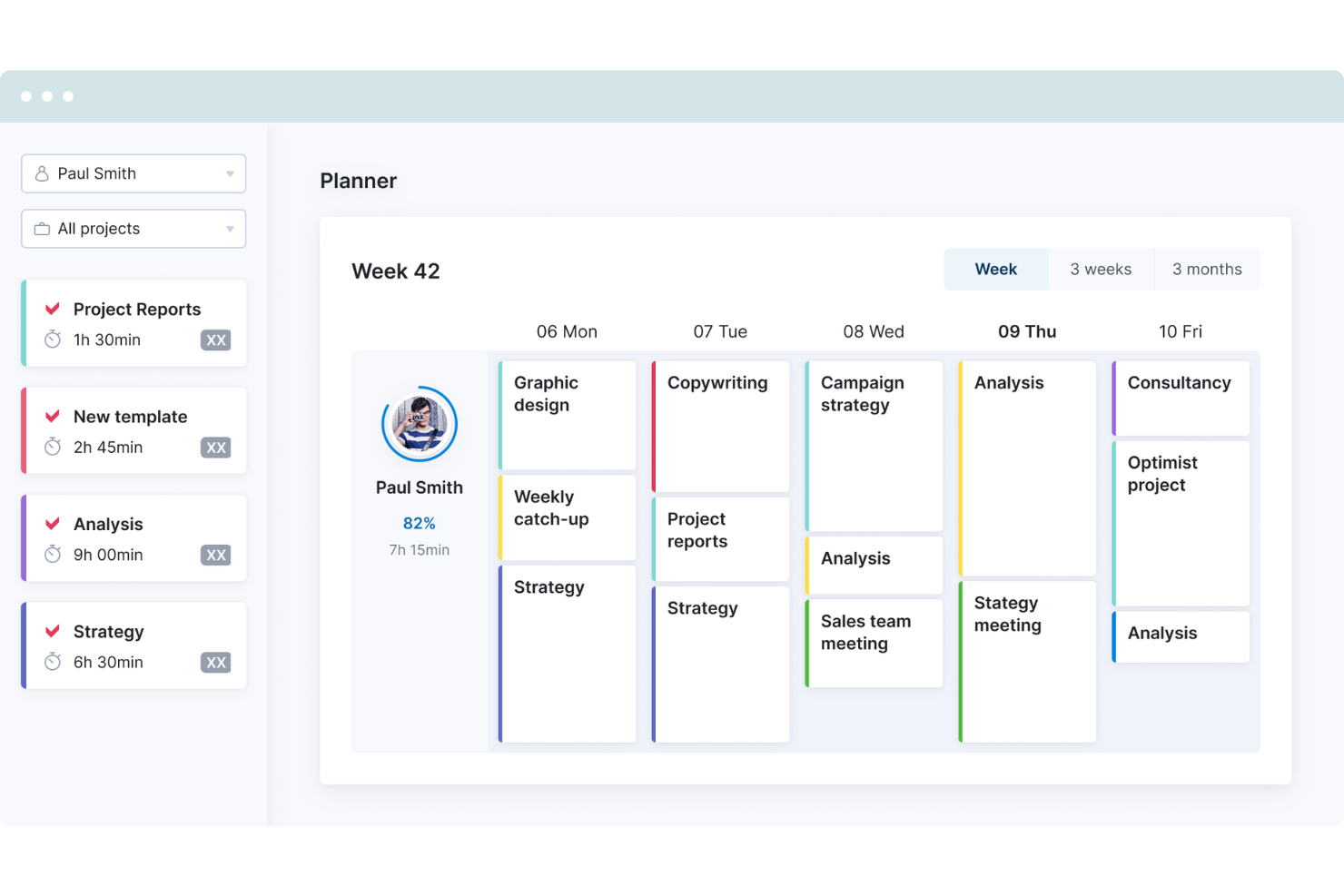
Scoro gives consulting and professional-services teams a Planview alternative that links project planning with resourcing, time tracking, and financials, helping leaders track delivery capacity and project profitability in one workspace.
Who Is Scoro Best For?
Scoro suits leaders at established organizations who need to connect strategic priorities with portfolio planning and delivery decisions.
Why I Picked Scoro
I picked Scoro as a Planview alternative because it earns the title “Best for enterprise-level strategic planning.” I like how it connects project plans with resource planning, so leaders can compare delivery capacity against strategic priorities. Time tracking and project financials also help me see whether active work is on track and profitable.
Scoro Key Features
- CRM pipeline: Track leads, opportunities, and sales stages in one place.
- Estimating: Create client estimates with scope, effort, pricing, and margin.
- Expense management: Record and categorize business expenses.
- Multi-entity support: Manage multiple entities and currencies within Scoro.
Scoro Integrations
Scoro’s app marketplace lists integrations with Xero, QuickBooks, Sage Intacct, HubSpot, Salesforce, Jira, Asana, Slack, Google Calendar, and Microsoft Exchange. Scoro also supports Zapier and provides an API and webhooks for custom integrations.
Pros and Cons
Pros:
- Links estimates, delivery, and invoicing records
- Tracks project margins alongside resource utilization
- Connects strategic priorities with delivery capacity
Cons:
- Custom reports can be difficult to configure
- Limited timeline views hinder detailed planning
New Product Updates from Scoro

Scoro Adds Time Mobile App and ELI Improvements
Scoro adds the Scoro Time mobile app for iOS/Android to track time anywhere and expands ELI with attachments, smarter filtering, and trigger-based actions. For more information, visit Scoro's official site.

Wrike
Best for dynamic Gantt charts
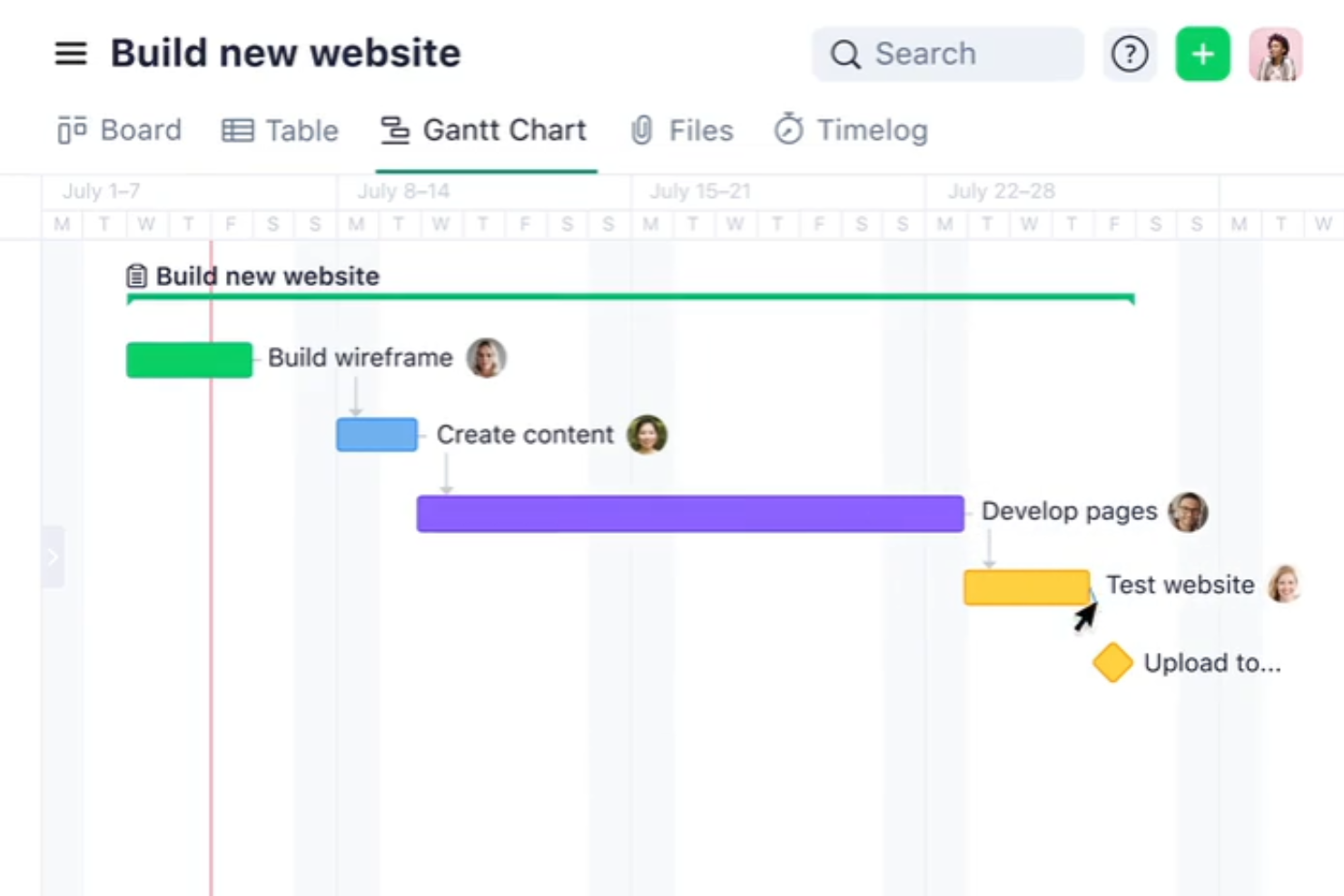
Wrike gives product, engineering, and digital teams a flexible work management platform for coordinating projects, dependencies, and shifting priorities while connecting day-to-day execution with portfolio-level visibility.
Who Is Wrike Best For?
Wrike suits project managers handling dependency-heavy projects who need dynamic Gantt charts to adjust schedules as priorities and timelines change.
Why I Picked Wrike
I picked Wrike, “Best for dynamic Gantt charts,” because its charts let me adjust dependency-heavy schedules as priorities shift. When an engineering release date changes, I can update connected work and keep schedule changes visible alongside portfolio-level plans.
Wrike Key Features
- Integrations: Offers 400+ pre-built native integrations, an open REST API, and Wrike Integrate.
- Time tracking: Lets teams log time starting with the Business plan.
- Budgeting: Budgeting features are available on the Pinnacle plan.
- Wrike Whiteboard: Available as a paid add-on on Business and Pinnacle, and included with Apex.
Wrike Integrations
Wrike offers 400+ pre-built native integrations, including Slack, Microsoft 365, Google Workspace, Salesforce, Jira, GitHub, and Zoom, and connects with Zapier. It also provides an open REST API and Wrike Integrate for custom connections and workflow automation.
Pros and Cons
Pros:
- Workload views reveal capacity conflicts across teams
- Cross-project dashboards expose schedule and workload risks
- Dependencies update alongside shifting Gantt schedules
Cons:
- Billing and invoicing require separate finance software
- Overlapping dependency lines can obscure complex schedules
New Product Updates from Wrike
Wrike Expands Gantt Planning, Approvals, and AI Work Intake
Wrike adds cross-project Gantt dependencies, flexible approval routing, and AI work intake through Wrike MCP. These updates give teams more control over planning, decision-making, and incoming work. For more information, visit Wrike’s official site.

Best for integrated project management and collaboration

Zoho Projects is an advanced project management solution that excels in integrating various aspects of project planning, execution, and collaboration. It's particularly suited for teams seeking a unified platform that combines task management, time tracking, and seamless communication.
Why it's a good Planview alternative: Zoho Projects offers a well-rounded suite of features that facilitate not just project management but also team collaboration in a cohesive environment. Its integration with the Zoho ecosystem and other business tools makes it a versatile choice for dynamic and collaborative teams.
Standout features & integrations:
Features include task management, milestone tracking, Gantt charts, time tracking, issue tracking, document sharing, collaboration tools, project forums, customizable reports, resource allocation, and budget management.
Integrations include Zoho CRM, Zoho Creator, Zoho Desk, Gmail, Google Calendar, Slack, and GitHub.
Pros and Cons
Pros:
- Wide range of integrations
- Strong suite of collaboration tools
- Comprehensive task and project management features
Cons:
- Customization options may require a learning curve
- Can be overwhelming due to feature density
New Product Updates from Zoho Projects
Zoho Projects Adds CodeX Scripts for Custom Modules
Zoho Projects now supports CodeX Scripts for custom modules, enabling conditional logic and rules for creating, updating, and deleting records. For more information, visit Zoho Projects' official site.
 .
Best for Microsoft 365-native project work
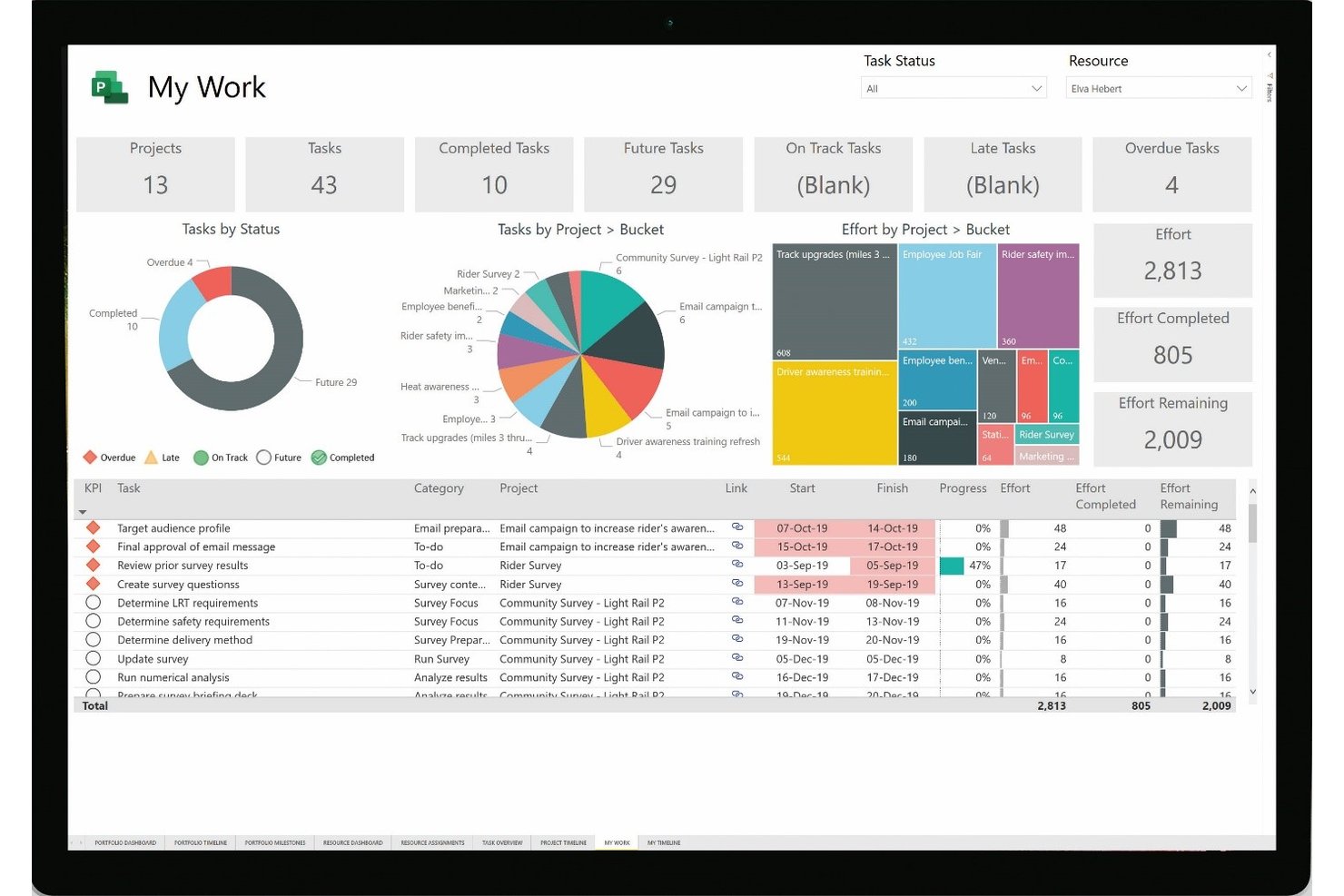
Microsoft Project is a project and portfolio management platform for organizations that want structured planning and delivery oversight within the Microsoft ecosystem, helping teams coordinate work and keep stakeholders aligned.
Who Is Microsoft Project Best For?
Microsoft Project suits project managers coordinating complex schedules, dependencies, and resource capacity across multiple teams.
Why I Picked Microsoft Project
I picked Microsoft Project as a Planview alternative for detailed project scheduling and resource management. I like how Gantt charts and task dependencies map release sequences, while resource assignments help project managers spot capacity conflicts across workstreams.
Microsoft Project Key Features
- Project templates: Start plans with reusable task structures and milestones.
- Timesheets: Record actual work hours against project tasks.
- Portfolio roadmaps: View work across projects on a shared timeline.
- Project reports: Generate built-in reports on progress, costs, and workloads.
Microsoft Project Integrations
Microsoft Project connects with Microsoft Teams through its Project app, and Microsoft provides Power BI templates for reporting on Project for the web and Project Online data. Project Online also has an official connector for Power Automate.
Pros and Cons
Pros:
- Built-in reports track costs and progress
- Resource allocation reveals workload conflicts
- Dependency-driven Gantt schedules expose critical paths
Cons:
- Collaboration gaps complicate cross-team updates
- Complex configuration adds administrator upkeep
Best for collaborative client onboarding tracking
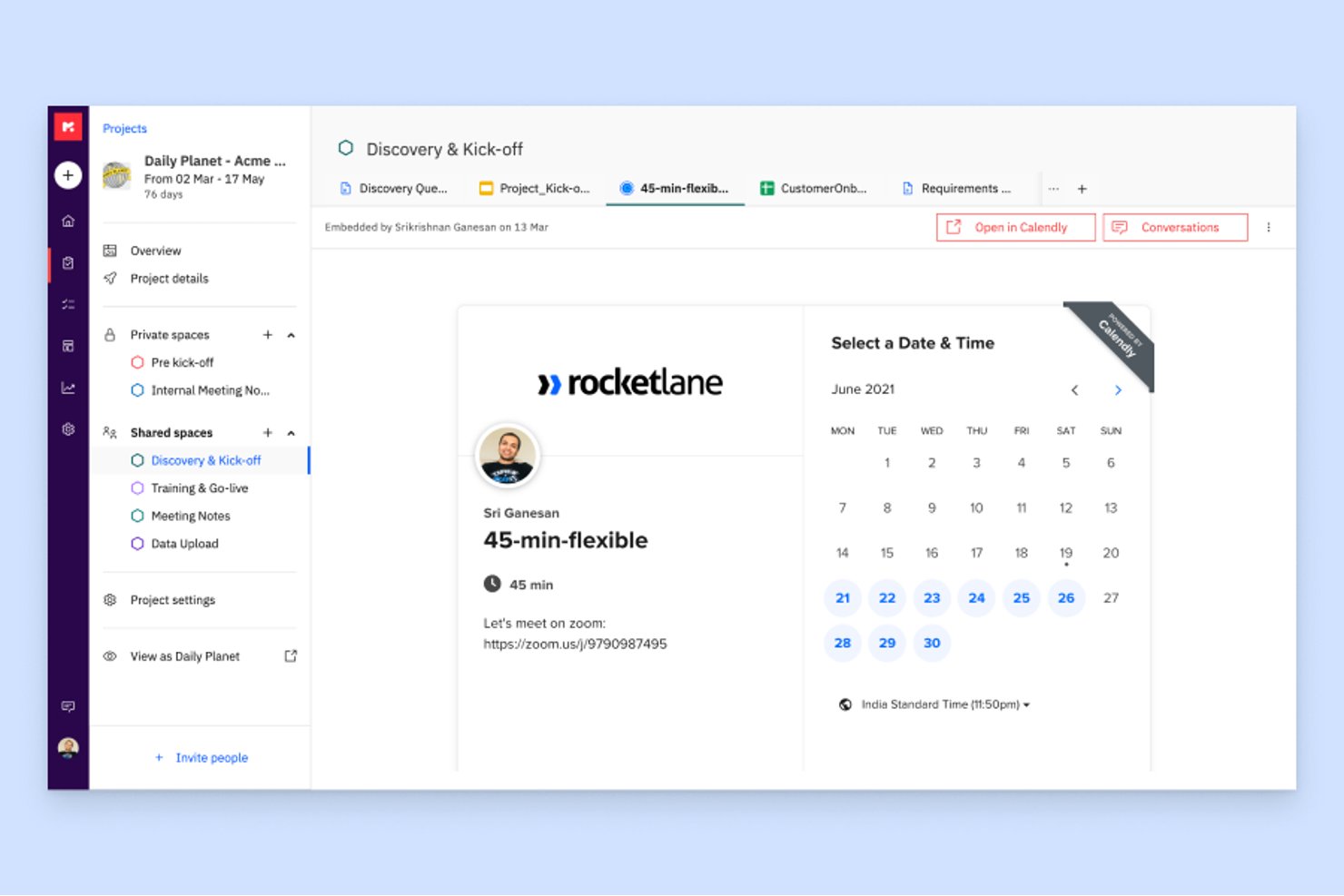
Rocketlane is a customer onboarding and project delivery platform for implementation and services teams that need to coordinate client work, track milestones, and see progress across projects.
Who Is Rocketlane Best For?
Rocketlane suits implementation and customer success teams coordinating onboarding tasks, timelines, and client input across multiple customer launches.
Why I Picked Rocketlane
I picked Rocketlane as a Planview alternative for collaborative client onboarding tracking. Shared onboarding tasks, milestone timelines, and progress across projects help me spot which customer launches are waiting on client input and where delivery dates are at risk.
Rocketlane Key Features
- Time tracking: Log billable and nonbillable hours against projects and tasks.
- Resource planning: View team availability and allocate people across projects.
- Expense tracking: Record project expenses alongside delivery costs.
- Project templates: Save reusable phases, tasks, and settings for future projects.
Rocketlane Integrations
Rocketlane lists integrations with Slack, Salesforce, Jira, Workato, HubSpot, Google Calendar, and Outlook Calendar, and connects with Zapier. It also provides public APIs for custom integrations.
Pros and Cons
Pros:
- Staffing and time tracking support service delivery
- Reusable templates standardize repeat onboarding projects
- Client portals expose milestones to customers
Cons:
- Large projects can experience slower performance
- Reporting customization can require data exports
Notion
Best for all-in-one workspace and knowledge management
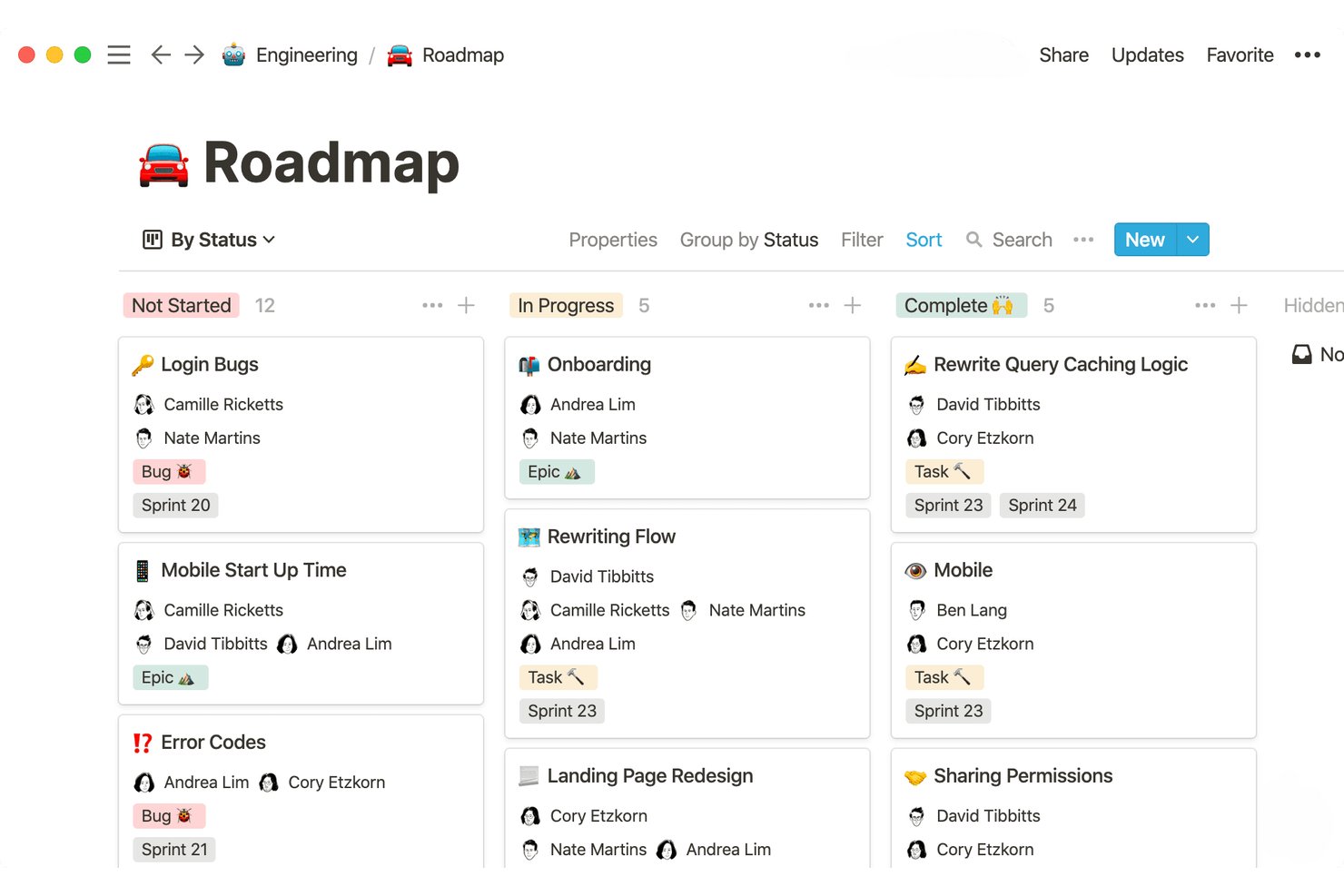
For tech teams seeking an alternative to Planview, Notion is a flexible workspace where project managers can connect initiative plans, team documentation, and shared work tracking to improve visibility across projects.
Who Is Notion Best For?
Notion is a good fit for growing teams that want to organize internal knowledge, documentation, and everyday workflows in one flexible workspace.
Why I Picked Notion
I picked Notion as a Planview alternative because it’s Best for all-in-one workspace and knowledge management. I use project databases with linked views to track owners, dates, and status alongside team documentation. That keeps delivery details and decision records connected to initiative plans.
Notion Key Features
- Task dependencies: Link tasks to show predecessor relationships and flag scheduling conflicts.
- Subtasks: Break larger work items into smaller, assignable tasks.
- Project templates: Reuse prebuilt project structures, task lists, and workflows.
- Database automations: Trigger actions when database properties change or a page is added.
Notion Integrations
Notion offers official connections with Slack, GitHub, Jira, and Google Drive, including Slack messaging and notifications, synced GitHub and Jira databases, and a Google Drive AI connector. It also connects with Zapier and provides an API for custom integrations.
Pros and Cons
Pros:
- Reusable templates speed project setup
- Linked database views adapt to team workflows
- Connects project tasks with decision records
Cons:
- Large databases can slow reporting
- No native enterprise resource capacity planning

ProofHub
Best for unified project control and client proofing
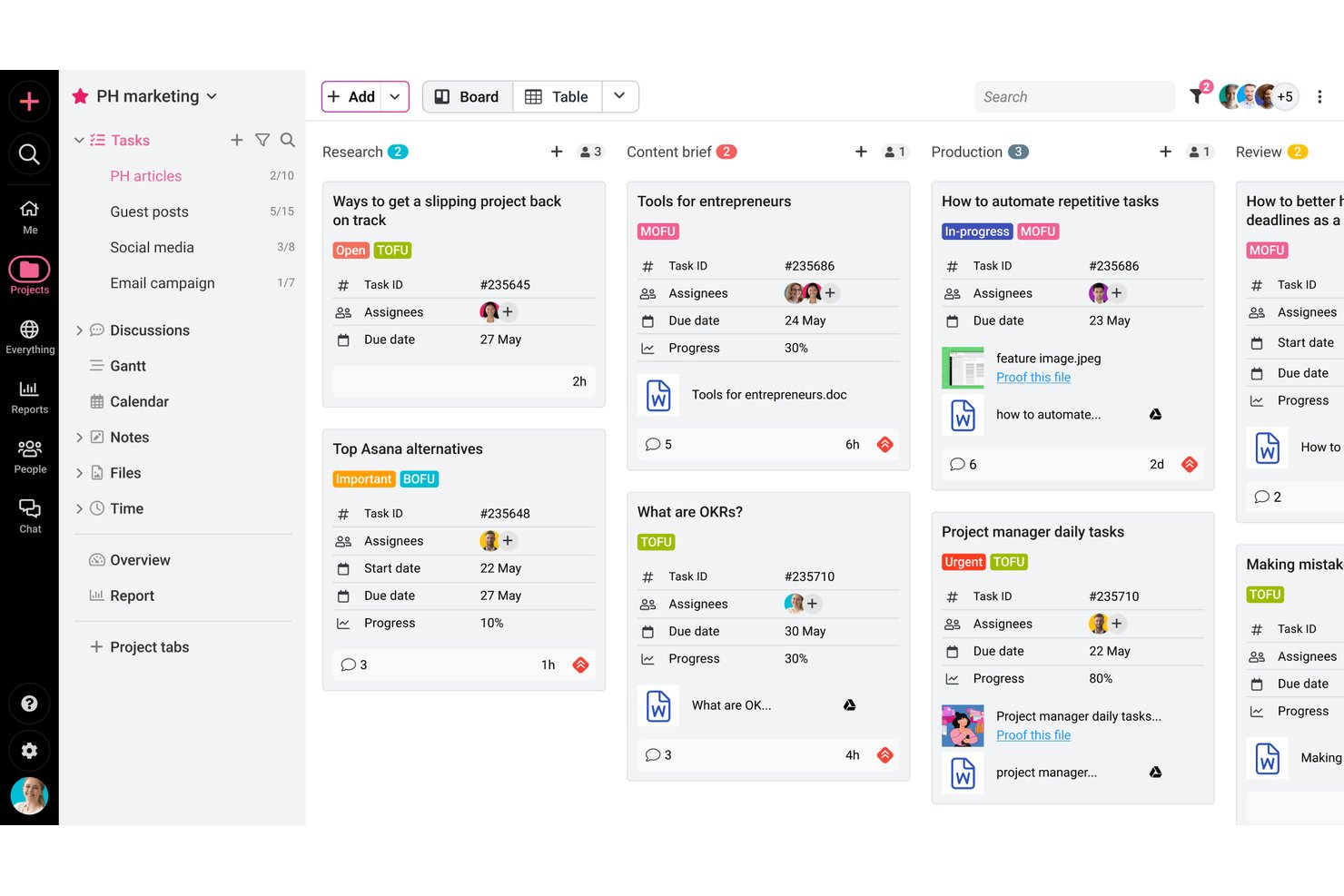
ProofHub is a project management platform for digital teams that brings project plans, tasks, discussions, and files together, helping project managers track cross-functional work without relying on disconnected tools.
Who Is ProofHub Best For?
ProofHub suits project managers at digital agencies who coordinate delivery and gather client feedback on creative files.
Why I Picked ProofHub
I picked ProofHub as a Planview alternative for unified project control and client proofing on agency projects. I like how project plans, tasks, discussions, and files live together, while clients can review and comment on creative proofs in one workflow.
ProofHub Key Features
- Time tracking: Log hours with timers or manual entries, then review timesheets and time reports.
- Shared calendar: Schedule events and milestones alongside tasks, with automatic reminders.
- Workload reports: Review resource and workload reports across projects.
- Custom roles: Set user roles with specific access permissions.
ProofHub Integrations
ProofHub lists integrations with Slack, Box, Dropbox, Google Calendar, iCal, OneDrive, FreshBooks, and QuickBooks. It also offers an API for custom integrations.
Pros and Cons
Pros:
- Shared workspace consolidates tasks, discussions, and files
- Gantt dependencies clarify project schedule impacts
- Client proofing keeps file feedback in context
Cons:
- Mobile apps omit Gantt, calendar, and reporting
- Portfolio-level reporting lacks depth for complex oversight

Best for enterprise work management and reporting
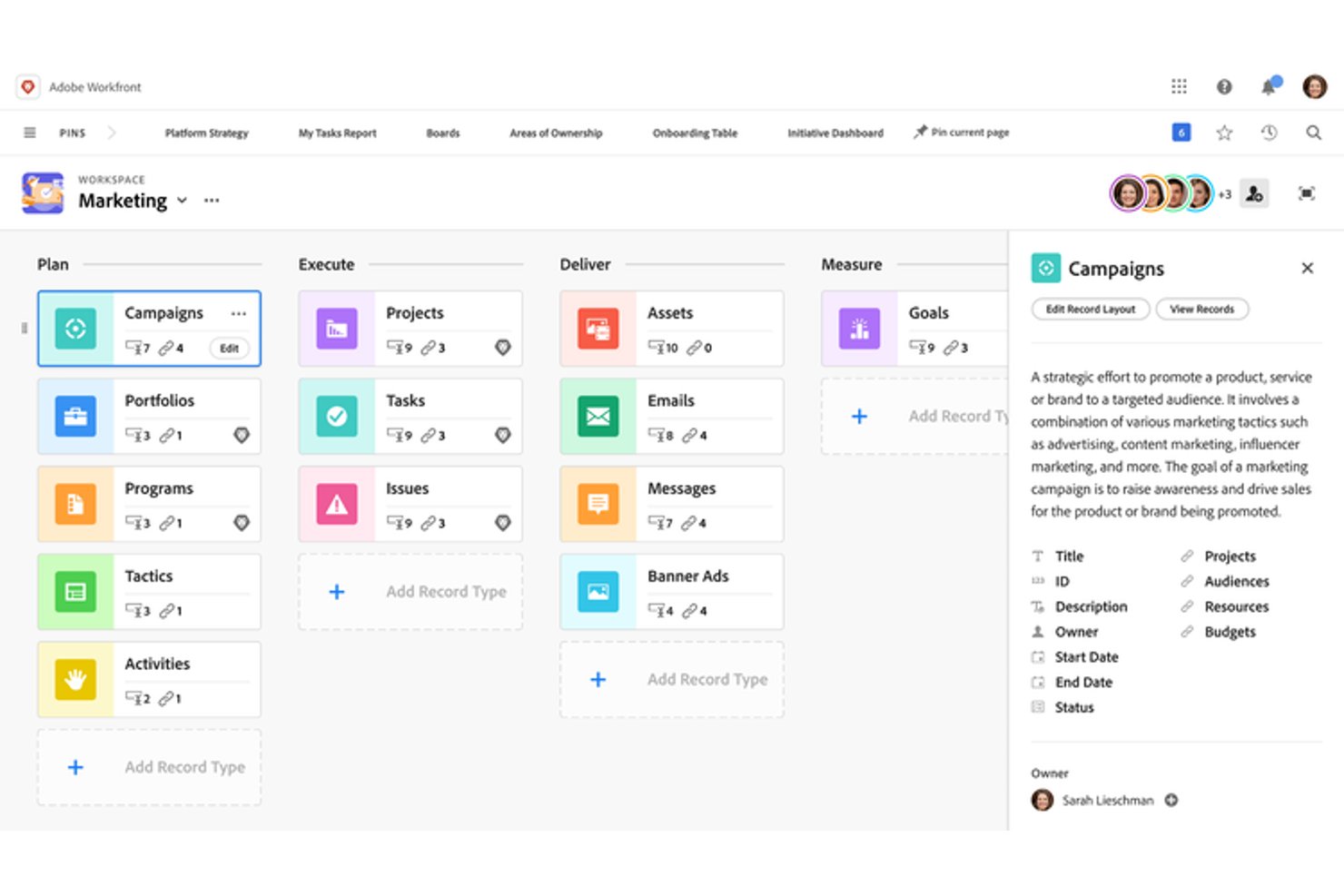
Adobe Workfront gives large organizations a connected work management platform for coordinating project portfolios, aligning cross-functional teams, and adapting delivery plans as priorities shift.
Who Is Adobe Workfront Best For?
Adobe Workfront fits PMO and portfolio leaders at large enterprises who need reporting to connect project delivery with business priorities.
Why I Picked Adobe Workfront
I picked Adobe Workfront as a Planview alternative: Best for enterprise work management and reporting is its stated fit. Portfolio management helps leaders prioritize high-value work, while dynamic dashboards and reporting show project status across teams. I also value capacity planning for matching workloads to available skills as priorities shift.
Adobe Workfront Key Features
- Request queues: Capture and route unplanned work requests through configurable queues.
- Proofing and approvals: Add comments to digital files and manage review stages.
- Project templates: Reuse project structures, settings, and repeatable processes.
- Workflow automation: Automate task assignments, notifications, and sequential or parallel review steps.
Adobe Workfront Integrations
Adobe Workfront has built-in integrations across Adobe products, including Creative Cloud and Experience Manager Assets, as well as Microsoft Teams, Slack, Box, Dropbox, Google Drive, OneDrive, and SharePoint. Workfront Fusion provides connectors for apps such as Figma, and the public API supports custom integrations.
Pros and Cons
Pros:
- Request queues and approvals structure unplanned work
- Capacity planning maps skills to shifting workloads
- Portfolio reports connect delivery to business priorities
Cons:
- Building custom dashboards can take extra effort
- Complex interface slows casual team contributors

Best for advanced analytics and process automation
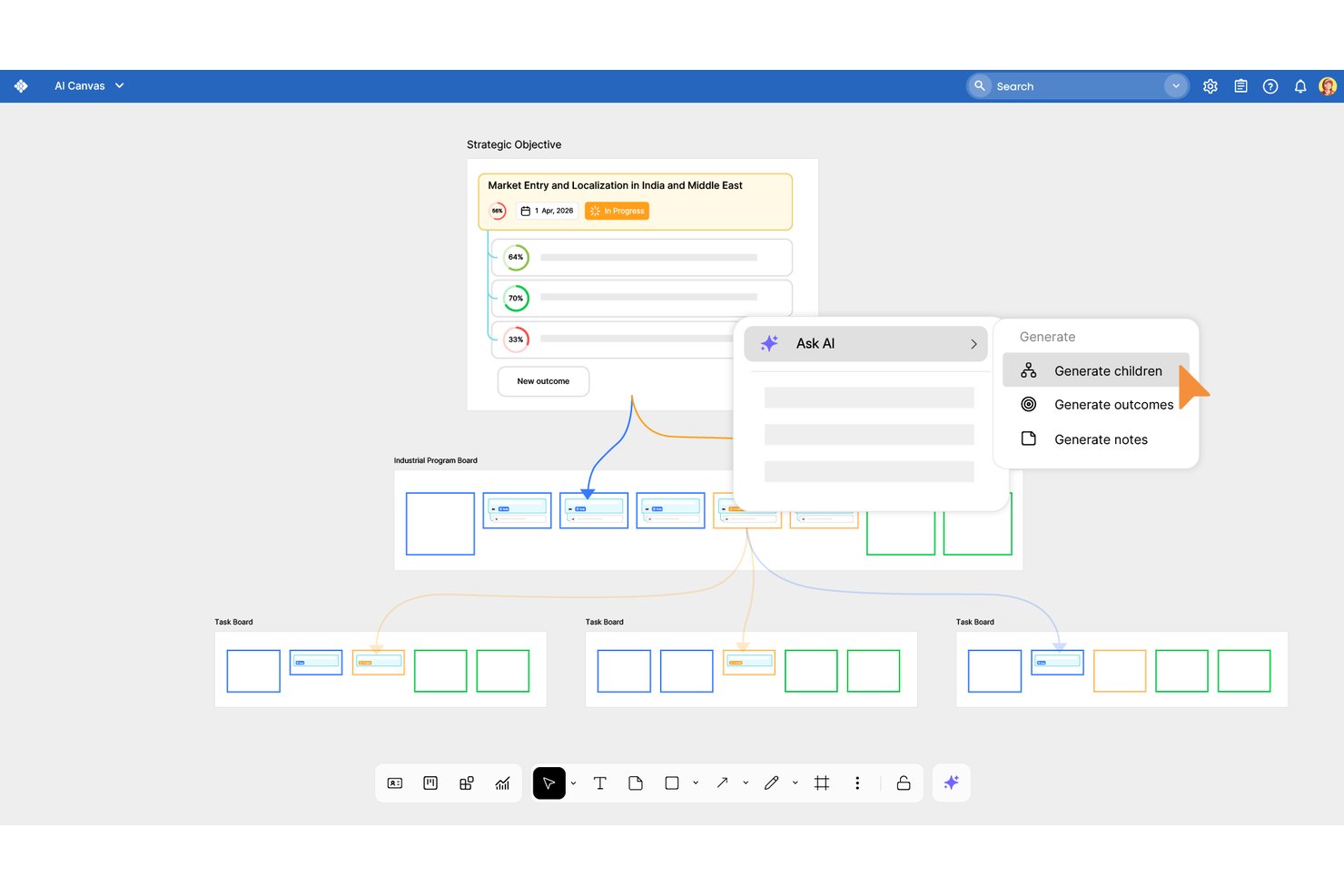
Businessmap is a portfolio and work management platform for tech teams that need to connect strategy with delivery, coordinate cross-functional projects, and gain clearer visibility into work than traditional Planview setups.
Who Is Businessmap Best For?
Businessmap suits portfolio and operations leaders who need analytics and automation across complex, cross-team workflows.
Why I Picked Businessmap
I picked Businessmap, best for advanced analytics and process automation, as a Planview alternative because it connects portfolio visibility with day-to-day delivery. Its analytics track flow metrics such as cycle time and throughput across work, while automation rules trigger actions when cards change states. I use those insights to spot bottlenecks and keep cross-team workflows moving.
Businessmap Key Features
- Portfolio workspaces: Organize projects and connect them to team boards.
- Timeline and Gantt views: Map schedules and dependencies, then compare planned and actual progress.
- OKR and KPI tracking: Link project work to measurable outcomes.
- Capacity planning: View workload and resource needs across the organization.
Businessmap Integrations
Businessmap documents integrations with Jira, Power BI, Tableau, GitLab, Bitbucket, Azure Active Directory, Okta, Make, Microsoft Power Automate, and Zapier. It also provides a REST API for custom integrations.
Pros and Cons
Pros:
- Portfolio views connect strategy to delivery
- Automations move cross-team workflows forward
- Flow metrics reveal bottlenecks across work
Cons:
- Board sprawl can weaken prioritization
- Report widgets can feel complicated

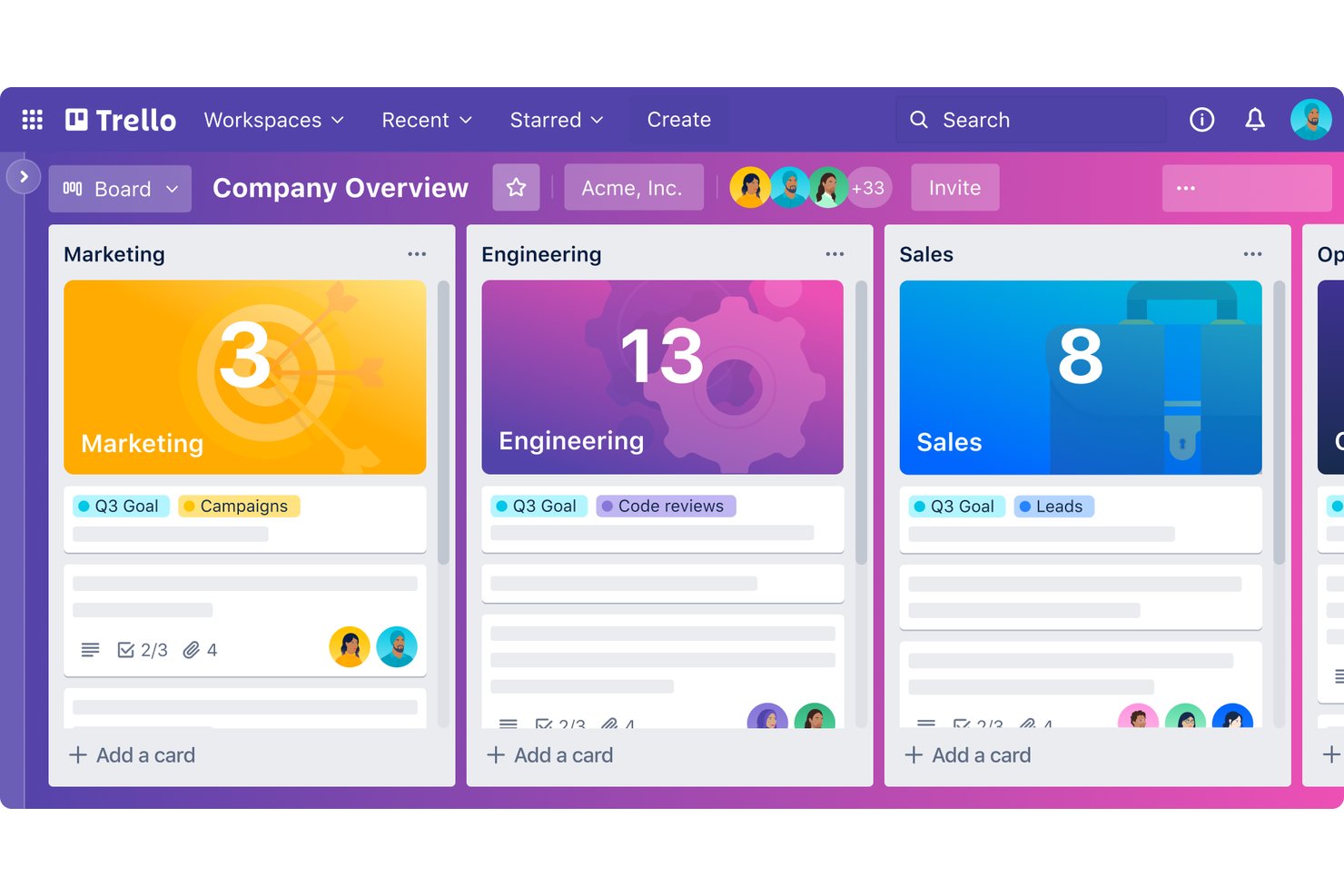
For product and delivery teams seeking a lighter alternative to Planview, Trello offers a visual work management platform to organize projects, coordinate contributors, and keep priorities visible.
Who Is Trello Best For?
Small product, design, and engineering teams that need simple Kanban boards to track tasks and coordinate day-to-day work.
Why I Picked Trello
I picked Trello as a Planview alternative because it’s best for simple Kanban boards and task tracking. Its boards, lists, and cards let a product team map a release workflow and move work from backlog to done. I like that labels and due dates help flag priorities and deadlines on individual cards.
Trello Key Features
- Butler automation: Create rules, buttons, and commands to automate board actions.
- Power-Ups: Add integrations and extra capabilities to boards.
- Checklists: Add and track subtasks within cards.
- Templates: Start boards from reusable project and workflow templates.
Trello Integrations
Trello lists 236 integrations in its directory, including Jira Cloud, Slack, Microsoft Teams, Miro, Google Drive, Gmail, and Zapier. Its REST API and Power-Ups support custom integrations.
Pros and Cons
Pros:
- Checklists and due dates keep tasks actionable
- Butler automates repetitive board actions
- Kanban cards make workflow status visible
Cons:
- Cross-board reporting offers little portfolio visibility
- No native dependency-driven scheduling
Outras alternativas ao Planview
Eis algumas alternativas adicionais ao Planview que selecionei. Não ficaram entre as 10 melhores, mas vale a pena analisá-las se não encontrou acima uma opção sólida.
- Jira
For Agile development and issue tracking
- monday AI Workspace
For automated workflow generation
- Celoxis
For cross-department project tracking
- Smartsheet
For versatile spreadsheet-based project management
- Asana
For workflow customization and team coordination
- Basecamp
For centralized communication and project tracking
- Paymo
For freelancers and small teams with time tracking
- Freedcamp
For essential project tools on a budget
- Kantata
For professional services automation and resource planning
- Teamwork.com
For client-focused projects and team collaboration
- MeisterTask
For intuitive Kanban boards and team task management
- GanttPRO
For detailed Gantt chart planning and project tracking
- Airtable
For flexible database-driven project planning
- Redmine
For open-source project management with flexibility
- ClickUp
For customizable task views and productivity features


Avaliações relacionadas de software de gestão de projetos
Se ainda não encontrou aqui o que procura, consulte estas outras ferramentas relacionadas que testámos e avaliámos:
- Software de gestão de projetos
- Software de gestão de recursos
- Software de automatização de fluxos de trabalho
- Software de controlo de tempo
- Software de gestão de tarefas
- Ferramentas de colaboração
- Criador de gráficos de Gantt
- Ferramentas de produtividade
- Software de acompanhamento de projetos
- Software de planeamento de projetos
How I Evaluate Planview Alternatives
I look at Planview alternatives in two layers: the non-negotiables like portfolio management and capacity planning, and the differentiators that set the best-fit options apart.
Core Functionality (Table Stakes For This List)
When I'm selecting tools for my list, I rank each one on a scale from 0 (does not offer the functionality) to 5 (excels in this area) for each core functionality listed below. Then, I calculate the tool's total score into a percentage. Each tool needs to achieve a minimum total score of 65% to be considered for inclusion.
- Portfolio Management: I evaluate whether I can group, prioritize, and govern multiple projects in a single view—like scoring and sequencing a backlog of funded initiatives across programs.
- Resource Capacity Planning: Allocating the right people across concurrent projects is where most PMOs feel pain, so I check for demand forecasting, utilization tracking, and skills-based assignment.
- Strategic Roadmapping: I look for roadmaps that connect upstream strategy to downstream execution—linking OKRs or business objectives directly to the projects and milestones they depend on.
- Financial & Budget Tracking: Budget rollups, variance tracking, and forecasting at both the project and portfolio level matter here—especially for teams reporting CapEx vs. OpEx to finance.
- Executive Dashboards & Reporting: Portfolio health views need to serve a VP or PMO director without requiring a data analyst, so I check for configurable KPIs, drill-downs, and scheduled reporting.
- Work & Task Management: The underlying execution layer matters too—I look for task dependencies, Gantt and Kanban views, and workflow automations that keep delivery teams moving day to day.
Once I have a list of tools that meet this criteria, I consider what sets each platform apart.
Differentiating Factors (What Sets Vendors Apart)
Here's how I compare and contrast different vendors:
Standout Features
Scenario planning is a big differentiator—I look for tools that let you model alternate timelines or resource shifts before committing to a portfolio decision. Agile and hybrid methodology support also matters, especially for teams running SAFe alongside traditional waterfall delivery. I check whether a platform offers structured demand intake with scoring models, since PMOs that lack a formal request pipeline end up triaging work in spreadsheets and email threads.
Beyond Features
Integration ecosystem is one of the first things I evaluate. If your delivery teams live in Jira or Azure DevOps, the alternative needs native connectors—not just an open API your team has to build around. Total cost of ownership deserves close attention too, since Planview's licensing and implementation costs are a common reason teams start looking elsewhere. I also consider time-to-value: how quickly a PMO can actually deploy the platform with pre-built templates and guided configuration versus months of professional services.
Por que motivo procurar uma alternativa ao Planview?
Deve considerar procurar uma alternativa ao Planview se:
- Têm preocupações com os custos: O Planview é uma opção relativamente económica, mas se precisar de menos licenças ou tiver um orçamento mais limitado, uma solução alternativa poderá ser mais adequada.
- Estão a enfrentar problemas de complexidade: A interface de utilizador do Planview pode ser complexa, o que poderá prejudicar o desempenho da equipa. As equipas que precisam de uma interface mais intuitiva poderão beneficiar de uma opção alternativa.
- Precisam de mais funcionalidades: O Planview oferece, de facto, funcionalidades abrangentes, mas as equipas e os projetos de maior dimensão poderão precisar de funcionalidades ainda mais extensas.
- Precisam de melhores integrações: Se o Planview não se integrar bem com o seu conjunto de ferramentas atual, poderá ter de adquirir uma solução alternativa que funcione bem com o software existente.
- Querem mais apoio ao cliente: Formação adicional e um apoio ao cliente alargado podem ajudá-lo a tirar o máximo partido do software escolhido.
Principais funcionalidades das alternativas ao Planview
Eis algumas das principais funcionalidades do Planview que a sua alternativa deverá oferecer ou melhorar:
- Gestão do portefólio de projetos: Esta funcionalidade ajuda a equilibrar a capacidade dos projetos com a procura e a garantir que os recursos são atribuídos de forma eficiente entre os projetos. Também pode manter o alinhamento entre a execução dos projetos e os objetivos empresariais, bem como otimizar a utilização dos recursos em toda a organização.
- Gestão ágil de programas: Esta funcionalidade apoia a definição da visão, o planeamento e a concretização de iniciativas importantes, ajuda a facilitar uma resposta flexível à mudança e a manter o foco na criação de valor. É essencial se quiser implementar ou melhorar as suas metodologias ágeis e a capacidade de resposta.
- Gestão enxuta de portefólios: Esta funcionalidade integra a gestão estratégica de portefólios com a entrega ágil, para que possa melhorar os resultados e alinhar os objetivos com a realidade da execução. É particularmente valiosa se precisar de se adaptar às mudanças e de manter uma visão clara dos objetivos a longo prazo.
- Kanban empresarial: Esta funcionalidade ajuda a melhorar a produtividade das equipas e a agilidade organizacional, a gerir os fluxos de trabalho de forma eficiente e a proporcionar às equipas uma visibilidade clara do progresso das tarefas e das dependências, o que é fundamental em ambientes ágeis.
- Inovação contínua: A capacidade de gerir o processo de geração de ideias, desde a conceção até à implementação, num único local facilita a inovação contínua. Esta funcionalidade também apoia a melhoria e o desenvolvimento contínuos, o que é crucial para se manter competitivo.
- Gestão da carga de trabalho: Esta funcionalidade disponibiliza às equipas as ferramentas necessárias para planear, gerir e visualizar o seu trabalho de forma colaborativa. Pode promover um trabalho de equipa eficaz e garantir que a equipa está alinhada com os objetivos e o progresso do projeto.
- Planeamento estratégico: Este processo envolve a utilização de roteiros estratégicos para delinear projetos e iniciativas futuras, sendo fundamental para alinhar os objetivos estratégicos de longo prazo com o planeamento operacional e garantir que a sua organização avança de forma coesa em direção aos seus objetivos.