

10 beste verktøy for fjernprosjektstyring vurdert for 2026

10 Liste over de beste verktøyene for fjernprosjektstyring


Å lede prosjekter på avstand medfører sine egne utfordringer, siden du må legge til rette for kommunikasjon, fordele oppgaver og overholde tidsfrister – alt uten ansikt-til-ansikt-interaksjon. Uten de riktige verktøyene for å holde alle samkjørte kan prosjekter lett komme ut av kurs.
Derfor har jeg satt sammen denne listen over verktøy for fjernprosjektstyring. Disse løsningene er utviklet for å hjelpe teamet ditt med å holde kontakten, være organisert og produktivt, uansett hvor de jobber fra.
Jeg har personlig vurdert hvert verktøy for å gi deg en ærlig og objektiv vurdering av funksjonene og fordelene. I denne artikkelen får du en tydelig oversikt over hva hvert alternativ for fjernprosjektstyring tilbyr, slik at du kan velge det som passer best for teamet ditt.
Hvorfor du kan stole på våre programvareanbefalinger
Teamet vårt har testet og anmeldt programvare siden 2012. Vi er selv prosjektledere, så vi vet hvor vanskelig og hvor viktig det er å velge riktig programvare.
I denne guiden har vi vurdert verktøyene gjennom praktisk testing og uavhengig research og gitt dem poeng ut fra våre utvelgelseskriterier. Vi bygger også på innsikt fra ledende eksperter i bransjen og erfarne prosjektledere.
Anmeldelsene våre bygger på vår egen redaksjonelle vurdering. De er ikke et salgsargument.
Ekspertanmeldere:
Sammenligningstabell for verktøy for fjernprosjektstyring
| Tool | Best For | Trial Info | Price | ||
|---|---|---|---|---|---|
| 1 | Best for real-time profitability tracking | 14-day free trial | From $10/user/month (billed annually) | Website | |
| 2 | Best for remote collaboration across departments | Free plan + 14-day free trial + free demo available | From $10/user/month (billed annually) | Website | |
| 3 | Best remote PM tool for 3rd-party integrations | Free plan + 14-day trial available | From $9/user/month (billed annually) | Website | |
| 4 | Best remote project management for growing portfolios | 14-day free trial | From $10/user/month (billed annually) | Website | |
| 5 | Best for remote screen recording in context | Free plan + free trial + free demo available | From $12/user/month | Website | |
| 6 | Best for goal-linked remote team tracking | Free plan + 14-day free trial available | From $10/user/month (billed annually) | Website | |
| 7 | Best for client-work project tracking | 14-day free trial | From $9.99/user/month (billed annually) | Website | |
| 8 | Best for breaking down complex projects | Free plan + 30-day free trial available | From $7.65/user/month (billed annually) | Website | |
| 9 | Best remote project management tool for sales reps | 30-day free trial | From $9/user/month (billed annually) | Website | |
| 10 | Best for managing remote team workflows | 14-day free trial | From $17/user/month | Website |


Anmeldelser av de beste verktøyene for fjernprosjektstyring
Her er en kort beskrivelse av hvert av verktøyene for fjernprosjektstyring på listen min, med informasjon om hva det er best til, samt skjermbilder som viser noen av funksjonene.

Best for real-time profitability tracking
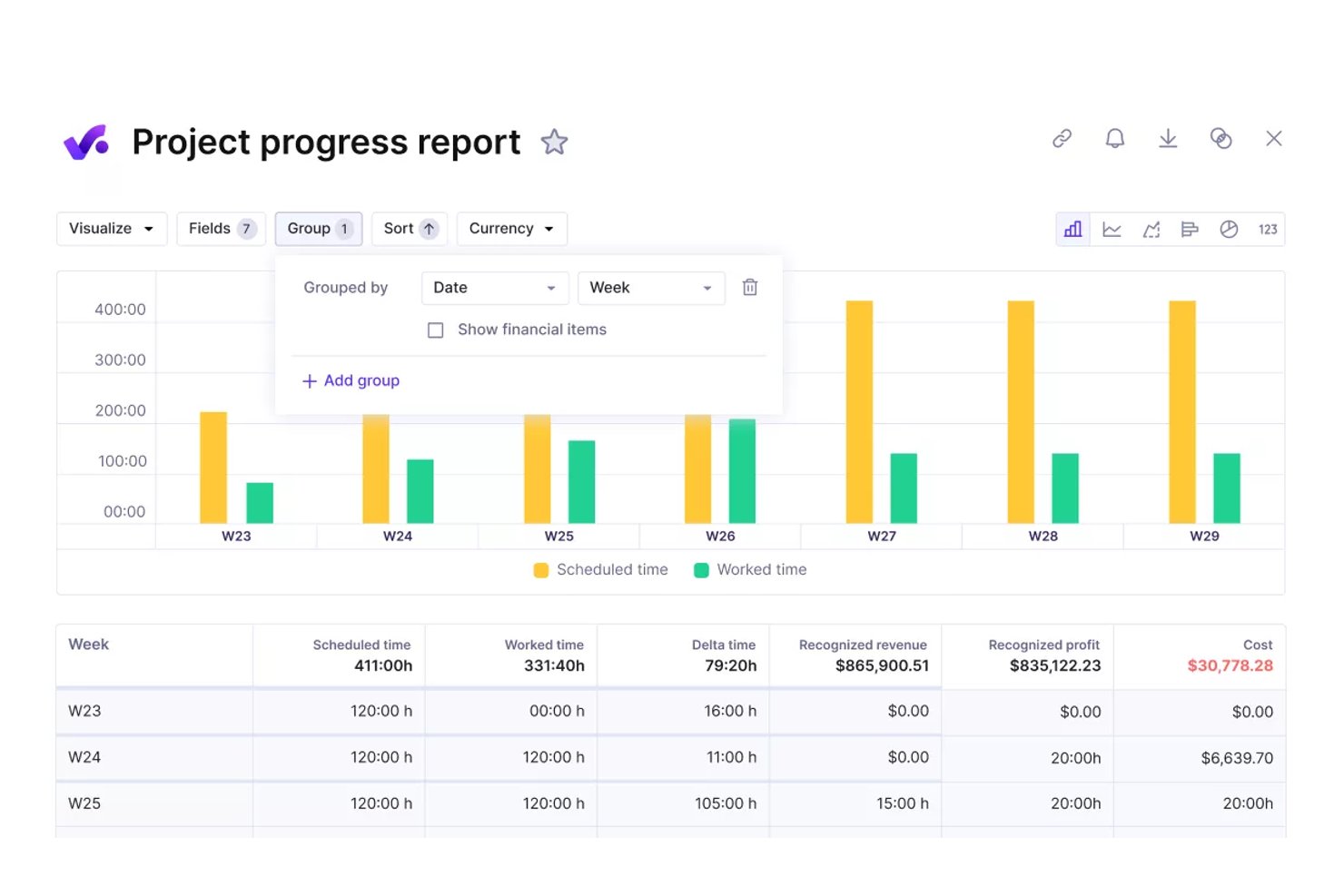
Productive is a professional services management platform that combines project and task management, resource planning, time tracking, budgets, and financial reporting in one workspace.
Who Is Productive Best For?
Productive is a strong fit for agencies and professional services teams that need to manage client work, budgets, and distributed team capacity in one place.
Why I Picked Productive
I picked Productive as one of the best because it's the only tool on my list that surfaces real-time budget burn, margin, and profitability data directly inside the project workflow. I especially like how the Scenario Builder lets you prototype budget and deal configurations before committing, so you can spot margin risk early rather than after a project goes sideways. The Capacity & Availability report adds another layer by comparing task-based workload hours against available time, giving distributed teams a clear picture of who has room and who's overloaded.
Productive Key Features
- Task dependencies: Link tasks with Blocking, Waiting on, or Linked dependency types so closing one task automatically updates the status of dependent tasks.
- Pulse reports: Schedule automated report delivery to email or Slack on a daily, weekly, or monthly cadence to keep distributed stakeholders informed.
- Time zone settings: Configure separate organization-level and individual-level time zones to govern task deadlines, overdue filtering, notifications, and calendar syncing.
- Client-facing comments: Control which task comments are visible to clients, letting you collaborate with external stakeholders without exposing internal discussion.
Productive Integrations
Productive offers native integrations with Jira, Slack, Google Calendar, Microsoft Outlook, Gmail, HubSpot, and Xero, plus HR and accounting platforms. It supports custom integrations through its open API and webhooks, with Zapier available.
Pros and Cons
Pros:
- Dependencies clarify cross-team task sequencing
- Capacity reports support async workload planning
- Project, budget, and profitability visibility
Cons:
- Capacity and time reports confuse reviewers
- Future recurring tasks may understate workload
New Product Updates from Productive
Productive Adds Voice Dictation, Slack Connector, Proposals, and Overtime
Productive adds voice dictation, a Slack Connector, proposal controls, and overtime tracking. These updates support faster AI interactions, client proposals, and time management. For more information, visit Productive’s official site.

Wrike
Best for remote collaboration across departments
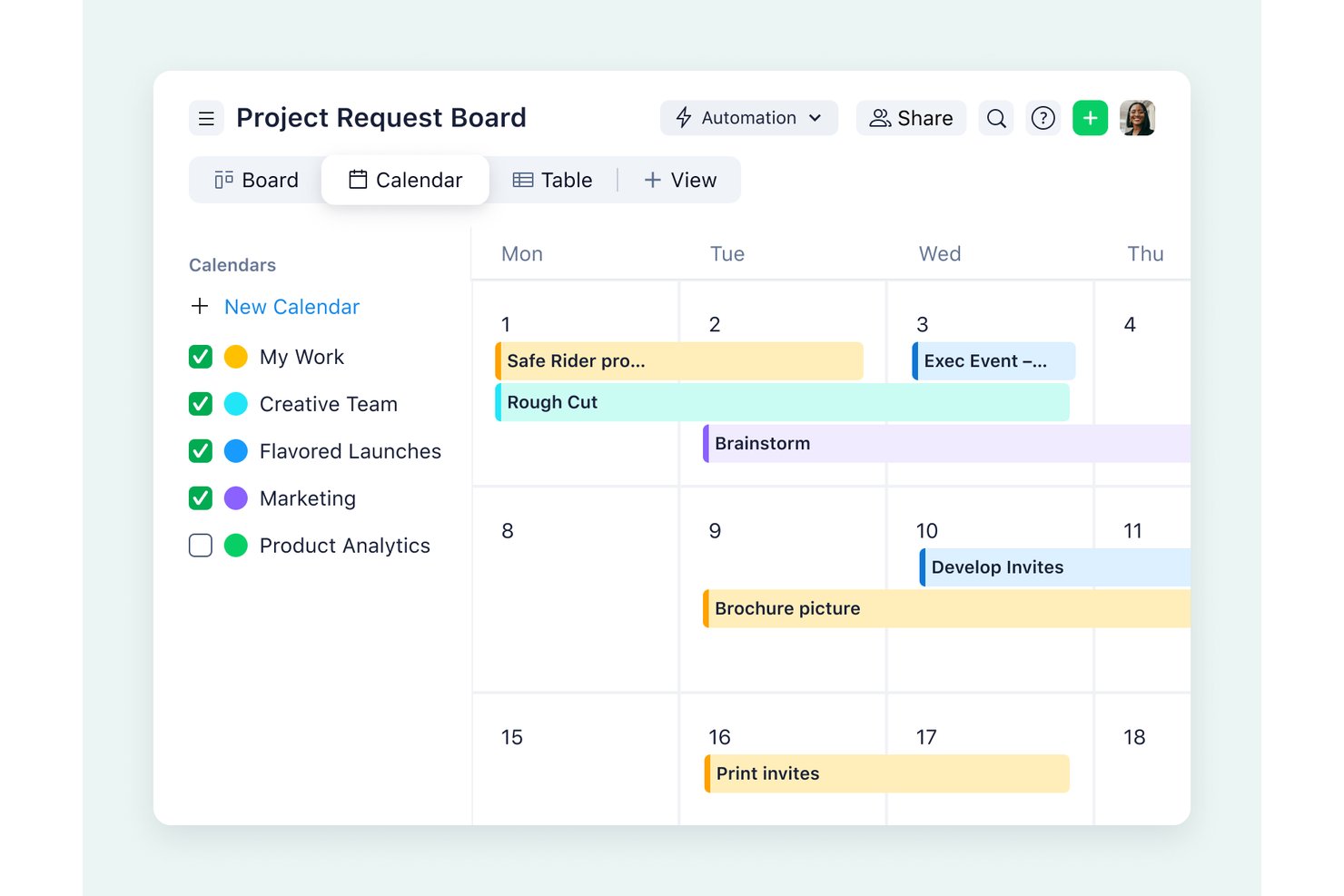
Wrike is a work management platform that brings together task tracking, project planning, cross-departmental collaboration, workload management, and real-time reporting across distributed teams.
Who Is Wrike Best For?
Wrike is a strong fit for mid-sized to large teams managing work across multiple departments, where cross-functional visibility and accountability are the priority.
Why I Picked Wrike
Wrike earns its spot on my shortlist because cross-departmental visibility is genuinely where it shines. I love how workload charts let managers see who's overloaded across multiple teams and redistribute tasks without a single meeting, and the cross-tagging feature means the same task surfaces in every relevant department's space without duplicating work. Real-time co-editing on task descriptions keeps distributed contributors aligned as work moves through review and approval.
Wrike Key Features
- Dynamic request forms: Collect and route incoming work requests to the right team members or workflows automatically.
- Automated workflow rules: Build no-code WHEN–IF–THEN automation rules to trigger actions across tasks, folders, and spaces.
- Proofing and approvals: Leave visual feedback directly on images, videos, PDFs, and Office files, and record formal sign-offs through approval chains.
- Cross-tagging: Surface the same task across multiple spaces, folders, or projects without duplicating it.
Wrike Integrations
Wrike lists 400+ integrations, including Slack, Microsoft Teams, Google Drive, Dropbox, Jira, and GitHub. Its REST API, webhooks, OAuth 2.0, MCP Server, Datahub API, and BI Export API support custom integrations.
Pros and Cons
Pros:
- Workload charts help redistribute overloaded teammates
- Task comments keep files and approvals together
- Shared dashboards reduce remote status-chasing
Cons:
- No direct messaging splits conversations across tools
- Dense menus complicate cross-team navigation
New Product Updates from Wrike

Wrike Redesigns AI Agent Builder
Wrike redesigns its AI Agent Builder with a side-by-side setup, Scopes, sentence-style triggers and actions, and clearer filters. These changes make it easier to configure, test, and manage agent behavior. For more information, visit Wrike’s official site.

Best remote PM tool for 3rd-party integrations
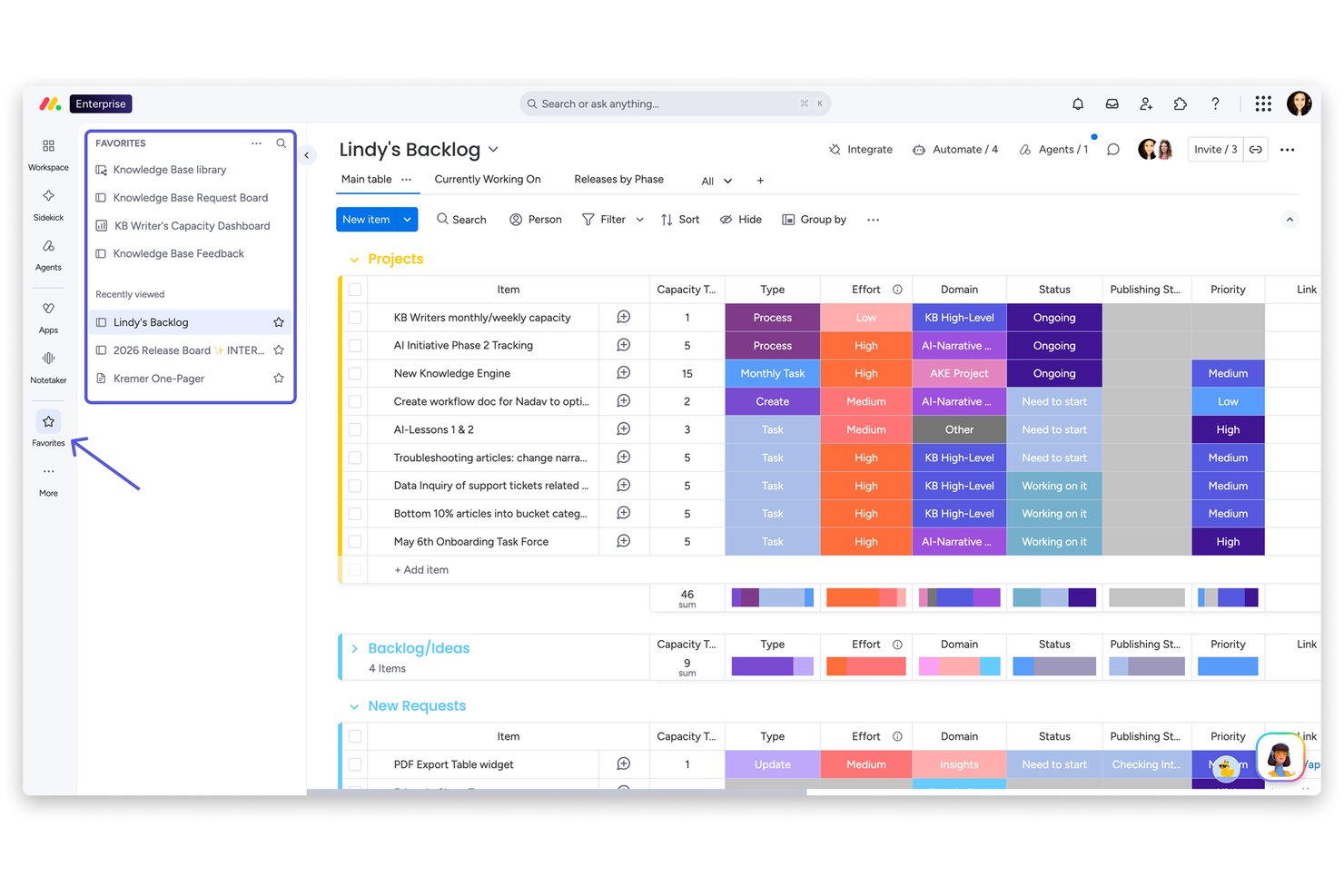
monday work management is a project management platform that combines task tracking, visual planning, automated workflows, AI-powered project agents, and cross-tool integrations across Kanban, Gantt, Timeline, and dashboard views.
Who Is monday work management Best For?
Teams managing multiple concurrent projects across distributed contributors will get the most value from monday work management, especially when they rely on a wide ecosystem of third-party tools.
Why I Picked monday AI Workspace
I've included monday work management in my top picks because no other tool on this list connects as many external platforms without requiring custom development. With 200+ out-of-the-box integrations covering tools like Slack, GitHub, Jira, Zoom, and Salesforce, distributed teams can keep work centralized without constantly switching contexts. I also like that its AI-powered project monitoring agents automatically flag schedule conflicts and notify owners, which removes a lot of the manual follow-up that slows remote teams down.
monday AI Workspace Key Features
- Scheduled board updates: Post comments and file updates at a future time, which monday.com specifically documents as useful for communicating across global time zones.
- AI meeting notetaker: Automatically transcribes Zoom, Microsoft Teams, and Google Meet calls, then links summaries and action items directly to boards and workflows.
- Workload widget: Visualizes team capacity across multiple boards by item count or effort, using work schedules that account for working days, hours, and time off.
- OKR board workflow: Build a dedicated objectives and key results board with subitems for initiatives, formula-calculated grades, and dashboard charts for progress reporting.
monday AI Workspace Integrations
monday work management offers 200+ out-of-the-box integrations, including Slack, Microsoft Teams, GitHub, Jira, Zoom, Google Drive, Salesforce, and HubSpot. It also supports 850+ marketplace integrations and apps, plus a GraphQL API and SDK for custom integrations.
Pros and Cons
Pros:
- Flexible boards adapt to changing team workflows
- Automated follow-ups reduce status-chasing for leads
- Cross-board dashboards surface progress and blockers
Cons:
- Mobile app offers less flexibility than desktop
- Complex resource planning can require workarounds
New Product Updates from monday AI Workspace
monday AI Workspace Adds Human Approval Routing
monday AI Workspace adds a human-in-the-loop approval block to AI Workflows, sending approval requests and routing workflow paths based on responses. For more information, visit monday AI Workspace's official site.

Celoxis
Best remote project management for growing portfolios
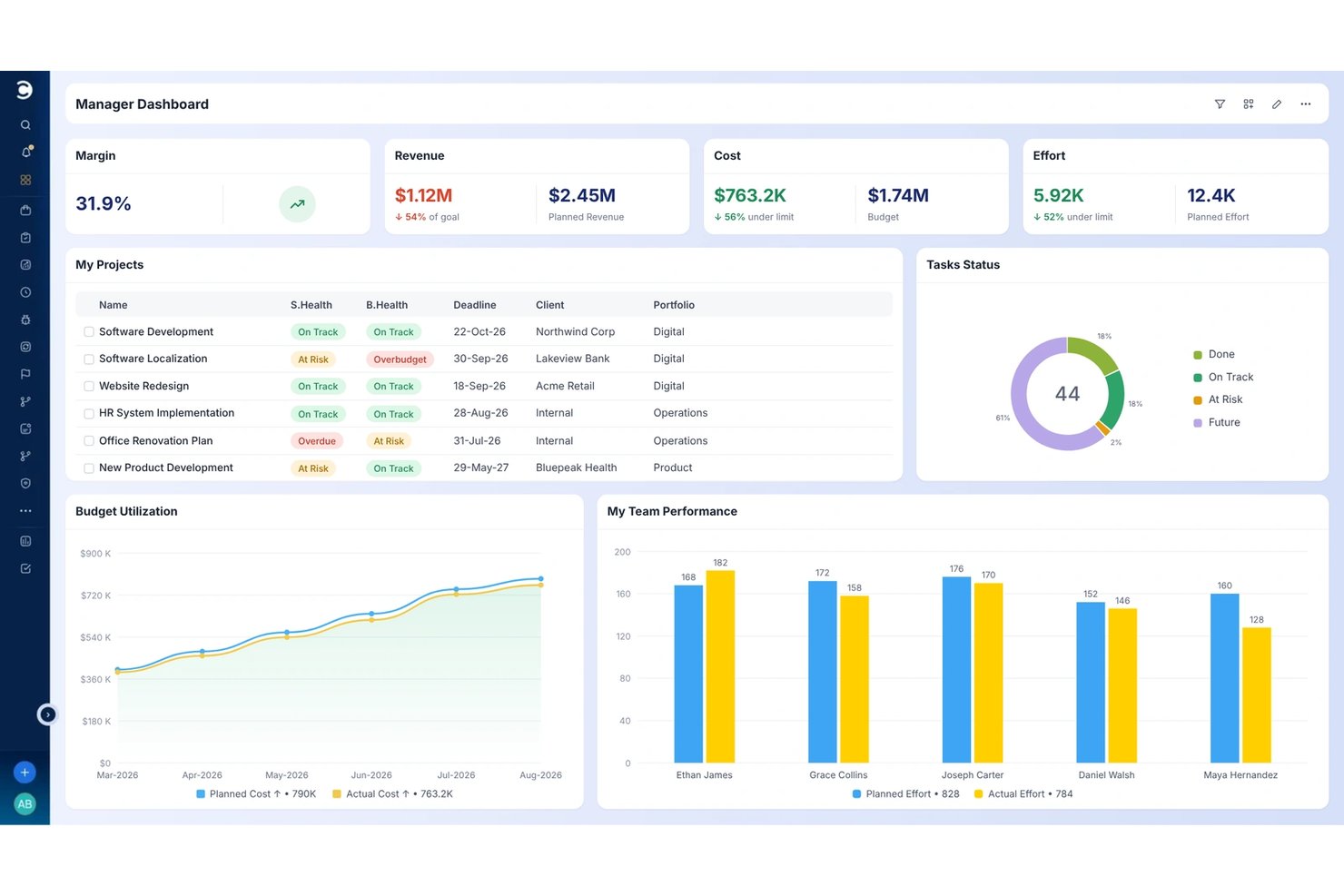
Celoxis is a project and portfolio management platform that combines Gantt scheduling, resource capacity planning, workload monitoring, financial tracking, and portfolio-level reporting across distributed teams.
Who Is Celoxis Best For?
Celoxis is a strong fit for operations directors and portfolio managers who need to oversee multiple projects across distributed teams from a single platform.
Why I Picked Celoxis
I picked Celoxis as one of the best because it's purpose-built for teams managing multiple projects at once, not just a single workstream. I love how its portfolio dashboards roll up RAG health, resource capacity, and financial data across every active project, so I can spot an overloaded team or a slipping milestone without chasing status updates. The time-zone-aware work calendars are especially useful: when I update a holiday exception for one region, Celoxis automatically recalculates dependent task dates across the whole schedule.
Celoxis Key Features
- Project intake and prioritization: Submit, rank, and route incoming project requests against business KPIs and available capacity before work begins.
- RAG health indicators: Automatically calculate red, amber, and green status for tasks, milestones, and projects to surface delivery risks across the portfolio.
- Multi-level timesheet approvals: Configure approval chains and policies for submitted time entries, with automated reminders for missing timesheets.
- Native Jira and Azure DevOps integrations: Sync development work tracked in Jira or Azure DevOps directly with project schedules and portfolio data in Celoxis.
Celoxis Integrations
Celoxis offers 21 configured integrations, including Jira, Azure DevOps, Slack, Google Drive, Microsoft 365, Salesforce, QuickBooks Online, GitHub, and Trello. It also supports REST API connections and 379 additional integrations through Zapier and the API.
Pros and Cons
Pros:
- Gantt dependencies clarify schedule impacts across projects
- Calendar exceptions recalculate dependent task dates
- Portfolio dashboards reveal cross-project workload and health
Cons:
- Mobile experience trails desktop for portfolio updates
- No in-app chat or file proofing

ClickUp
Best for remote screen recording in context
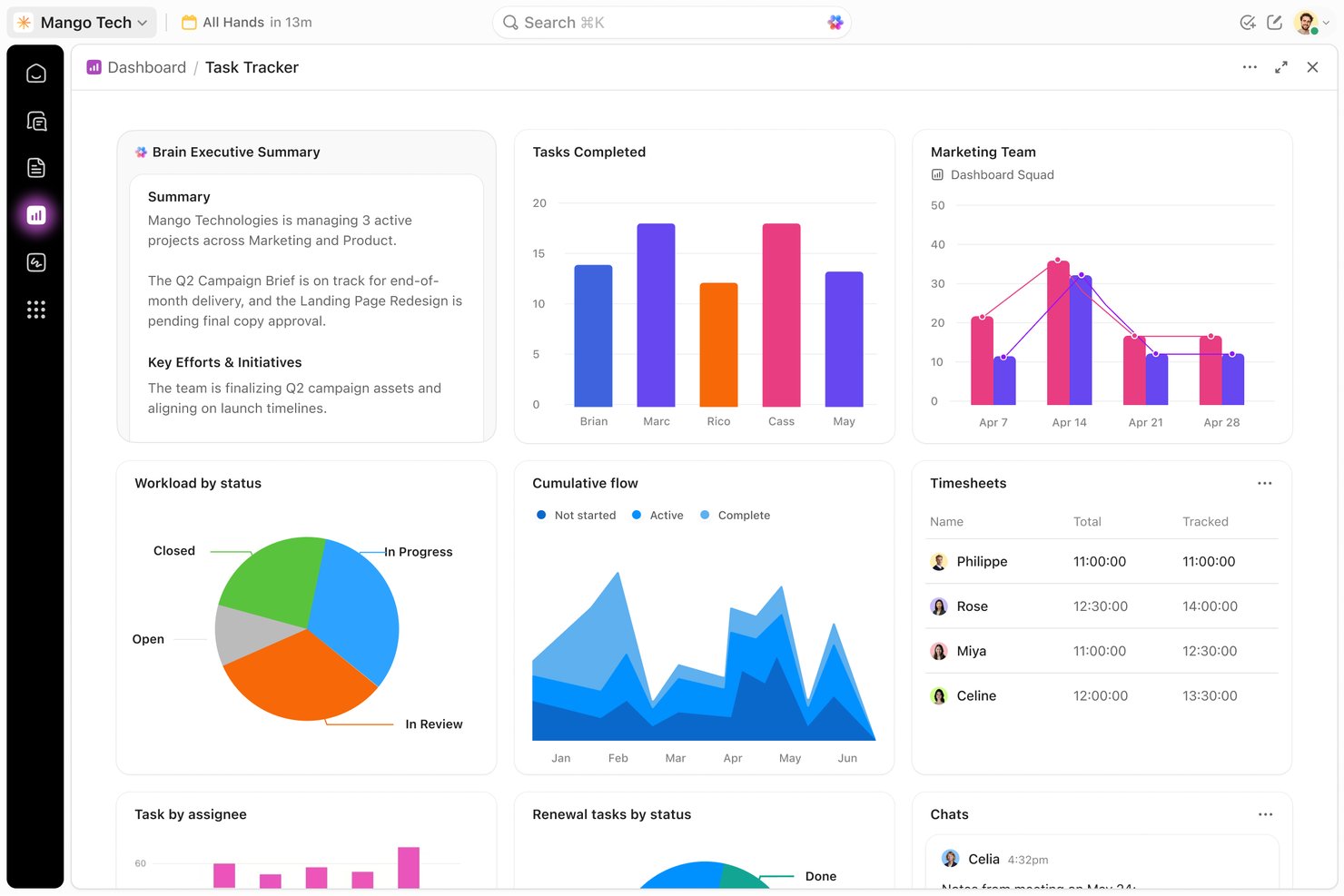
ClickUp is an all-in-one project management platform that combines task tracking, visual planning views, docs, chat, screen recording, and dashboards for distributed teams.
Who Is ClickUp Best For?
ClickUp fits distributed teams that need task tracking, async video, and project documentation in one workspace without juggling multiple tools.
Why I Picked ClickUp
I picked ClickUp as one of the best because its Clips feature lets you record your screen directly inside a task comment, which means async context travels with the work rather than getting buried in a separate thread or inbox. I also love that Clips aren't standalone recordings you have to track down later: they're embedded right where the conversation is happening, up to 45 minutes long, and accessible across web, desktop, and mobile. Paired with real-time co-editing in Docs and Chat that converts messages into trackable tasks, ClickUp keeps distributed teams genuinely connected without requiring a single scheduled call.
ClickUp Key Features
- Workload view: Visualize each team member's assigned work over a selected period, with capacity settings that members and admins can adjust individually.
- Goal tracking: Set and monitor OKRs, sprint targets, and weekly scorecards, then link them directly to the tasks driving progress.
- Workflow automations: Create rules that automatically update task statuses, reassign work, and trigger notifications based on conditions you define.
- Real-time collaborative Docs: Co-edit documents simultaneously with live cursors, inline comments, and direct links to related tasks and projects.
ClickUp Integrations
ClickUp offers 50+ native integrations, including Slack, GitHub, GitLab, Google Drive, Dropbox, Google Calendar, Figma, Zoom, and Microsoft Teams. It also supports a public API, MCP Server, webhooks, OAuth, and Zapier.
Pros and Cons
Pros:
- Multiple planning views keep schedules in sight
- Clips attach screen recordings to task discussions
- Task ownership keeps remote deadlines visible
Cons:
- Large workspaces can slow searches and boards
- Busy interface makes task details harder to find
New Product Updates from ClickUp
ClickUp Adds Meetings Hub, Super Agent Templates, and ZoomInfo Integration
ClickUp adds a searchable Meetings Hub, new ways to clone and template Super Agents, and a ZoomInfo integration through the App Center. These updates improve meeting retrieval, agent reuse, and access to sales intelligence. For more information, visit ClickUp’s official site.
Nifty
Best for goal-linked remote team tracking
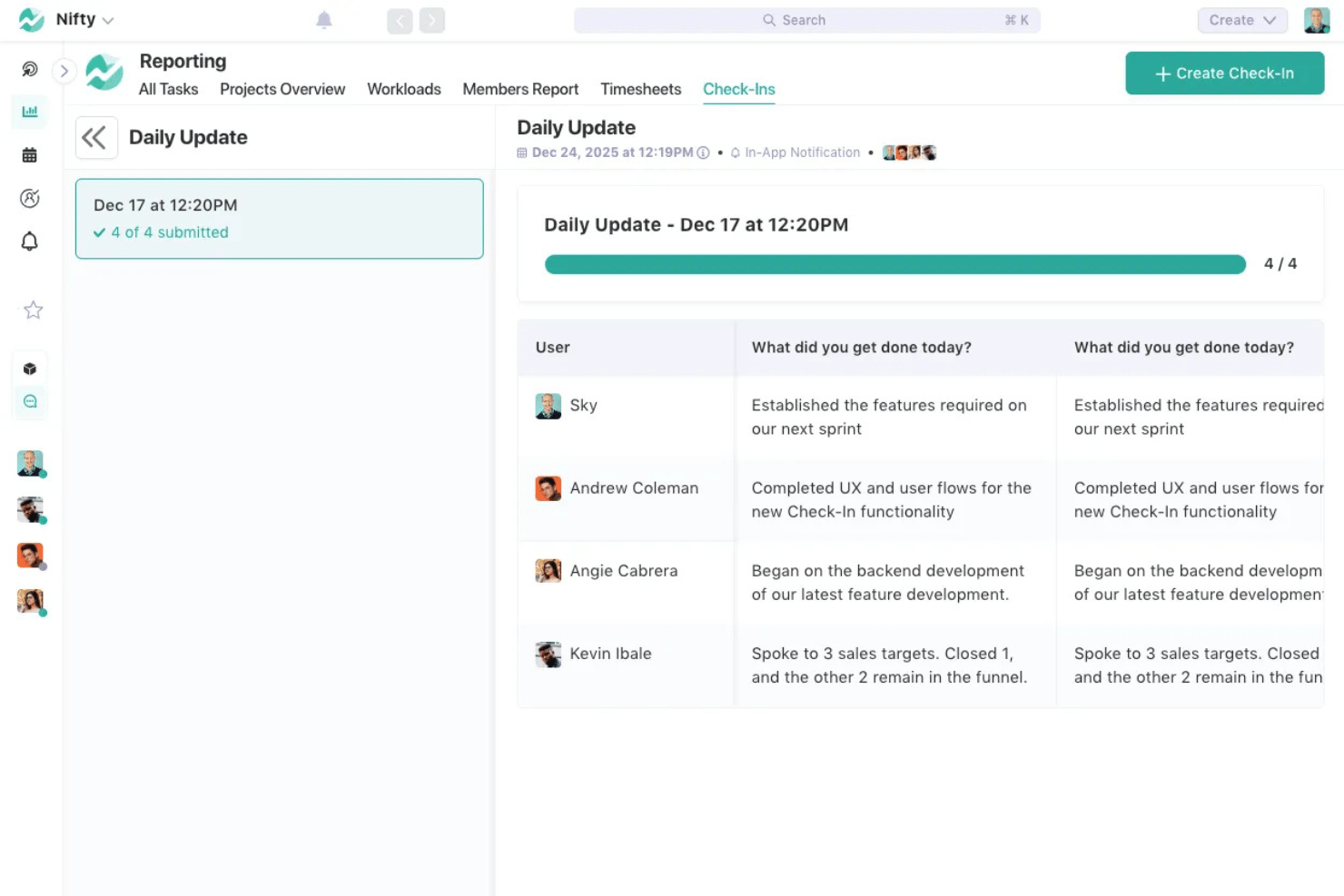
Nifty is a project management platform that brings together task tracking, roadmaps, team discussions, docs, time tracking, and workload visibility in a single workspace built for distributed teams.
Who Is Nifty Best For?
Nifty suits distributed project teams that need task tracking tied directly to goals and milestones, particularly remote leads coordinating across product, design, and freelance contributors.
Why I Picked Nifty
I've included Nifty in my top picks because it directly connects daily task work to goals and milestones, which is the piece most remote tools miss. When a task is completed, milestone progress updates automatically, so distributed teams always know where a project actually stands without anyone chasing status updates. I also like that roadmaps can be shared as read-only views with stakeholders who don't have Nifty access, keeping everyone aligned without adding seats.
Nifty Key Features
- Workflow automations: Build if/then rules that automatically assign tasks, update due dates, add subtasks, or post messages when triggered by task events or custom field changes.
- File proofing: Collect creative feedback directly on uploaded files and convert comments into subtasks without leaving the project.
- Portfolio organization: Group multiple projects into portfolios for cross-project visibility and high-level status tracking across teams or initiatives.
- Goal tracking: Create measurable goals tied directly to project work, with progress updated automatically as linked tasks and milestones are completed.
Nifty Integrations
Nifty offers native integrations with Slack, Zoom, Webex, Google Drive & Calendar, Microsoft Suite, GitHub, Miro, Figma, Harvest, and Typeform, plus a REST API for custom connections. It also supports over 2,000 integrations through Zapier.
Pros and Cons
Pros:
- Workload views reflect schedules and time off
- Project conversations turn decisions into tasks
- Milestones update as linked tasks finish
Cons:
- Mobile board functionality limited compared to desktop
- Reports offer limited customization and broad visibility

Teamwork
Best for client-work project tracking
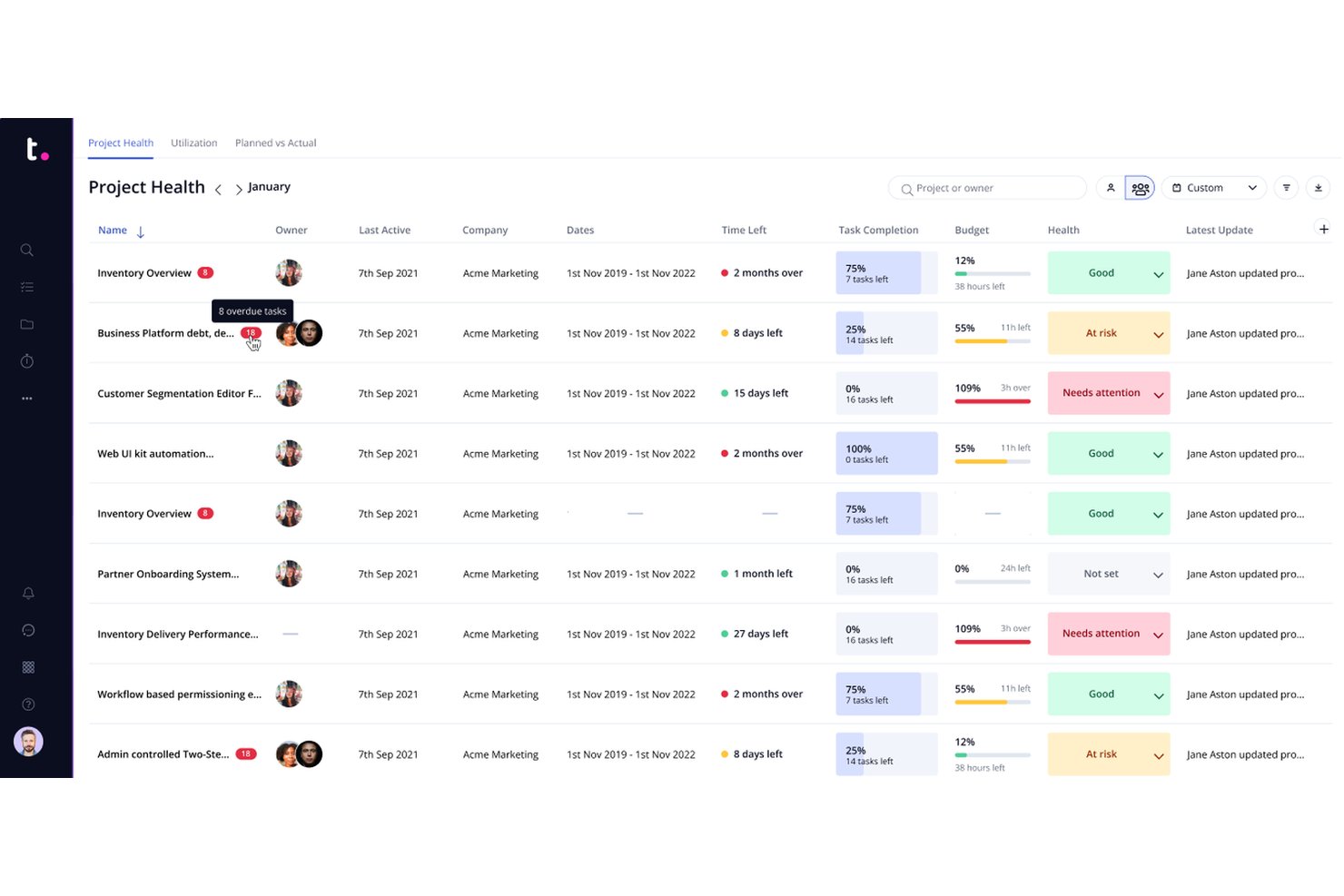
Teamwork is a project management platform built around client work, combining task tracking, time logging, resource planning, invoicing, and client collaboration tools in one place.
Who Is Teamwork Best For?
Teamwork is a strong fit for agencies and client-services teams that need to manage deliverables, track billable time, and keep clients in the loop—all within a single platform.
Why I Picked Teamwork
I picked Teamwork as one of the best because it's purpose-built for client work in a way that most remote project management tools simply aren't. I love that you can log billable time directly against tasks, pull that time into a client invoice, and view project health across your entire portfolio without switching tools. The Workload Planner also lets me see scheduled workload against real capacity, so I can reassign tasks before a remote team member hits a wall.
Teamwork Key Features
- Task dependencies and milestones: Link tasks to control sequencing and set project checkpoints that clients and team members can track.
- Customizable automations: Build trigger-based rules that move tasks through workflow stages, send notifications, or create follow-up tasks automatically.
- Client user access: Invite external client users to specific projects with defined permissions so they can view progress and collaborate directly.
- Custom fields: Add text, number, dropdown, date, and other field types to projects, tasks, and client records to capture the data your team actually needs.
Teamwork Integrations
Teamwork lists 150+ integrations, including Slack, Google Drive, Microsoft Teams, QuickBooks, HubSpot, Salesforce, and Microsoft Office, plus Zapier. It also supports API access and webhooks for custom connections.
Pros and Cons
Pros:
- Workload planner shows capacity for reassignment
- Clients can follow project progress and updates
- Billable time links directly to project tasks
Cons:
- Large projects can clutter navigation and reports
- Mobile app feels less intuitive to some

Quire
Best for breaking down complex projects
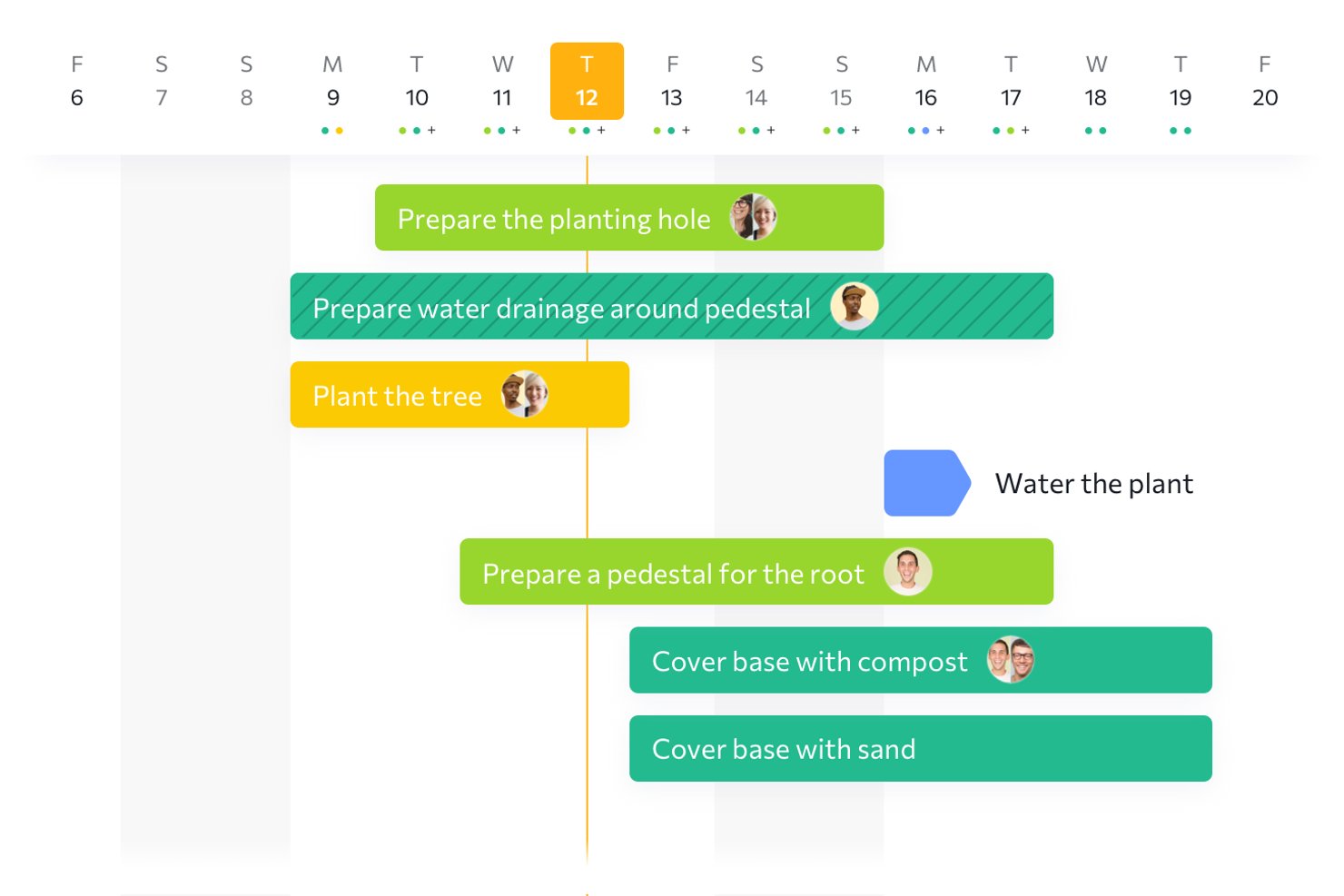
Quire is a project management tool built around hierarchical task lists, giving teams nested subtasks, Kanban boards, timelines, and dashboards to plan and track work across projects.
Who Is Quire Best For?
Quire is a strong fit for project managers and team leads who need to break large, complex projects into structured layers of tasks and subtasks without losing sight of the bigger picture.
Why I Picked Quire
I picked Quire as one of the best because it handles the kind of deep project breakdown that most remote tools handle awkwardly. Its nested task hierarchy lets you split a complex deliverable into unlimited subtask levels, then use sublists to pull out just the work relevant to each team member without losing the full structure. I also like that the Dashboard's At-Risk Tasks widget flags overdue and stale work automatically, so you're not waiting for a check-in to find out something's slipped.
Quire Key Features
- Project chat channels: Communicate with teammates directly inside each project using dedicated chat channels, keeping conversations tied to the work at hand.
- External teams access: Share specific tasks with clients or contractors through External Teams, giving outside collaborators scoped access without exposing your full project.
- Kanban board view: Visualize and move tasks across workflow stages using a Kanban board that runs alongside your nested task list.
- Billable time tracking: Log time on tasks using a stopwatch or manual entry, mark entries as billable, and pull time reports across projects.
Quire Integrations
Quire offers native integrations with Slack, Microsoft Teams, Google Drive, OneDrive, SharePoint, and GitHub, plus marketplace integrations with Dropbox and Box. It also provides a REST API, webhooks, MCP server, CLI, and Zapier access to 2,000+ apps.
Pros and Cons
Pros:
- Billable time tracking supports agency accountability
- Multiple planning views expose deadlines across schedules
- Nested task breakdown keeps complex projects organized
Cons:
- Offline access is limited to previously opened projects
- Reporting lacks depth for portfolio trends
New Product Updates from Quire
Quire Adds Custom Field Locking and Comment Reaction API Support
Quire adds custom field locking and API support for reading and setting emoji reactions on comments. These updates give teams more control over field data and expand comment interaction options for developers. For more information, visit Quire’s official site.
 .
.
Best remote project management tool for sales reps
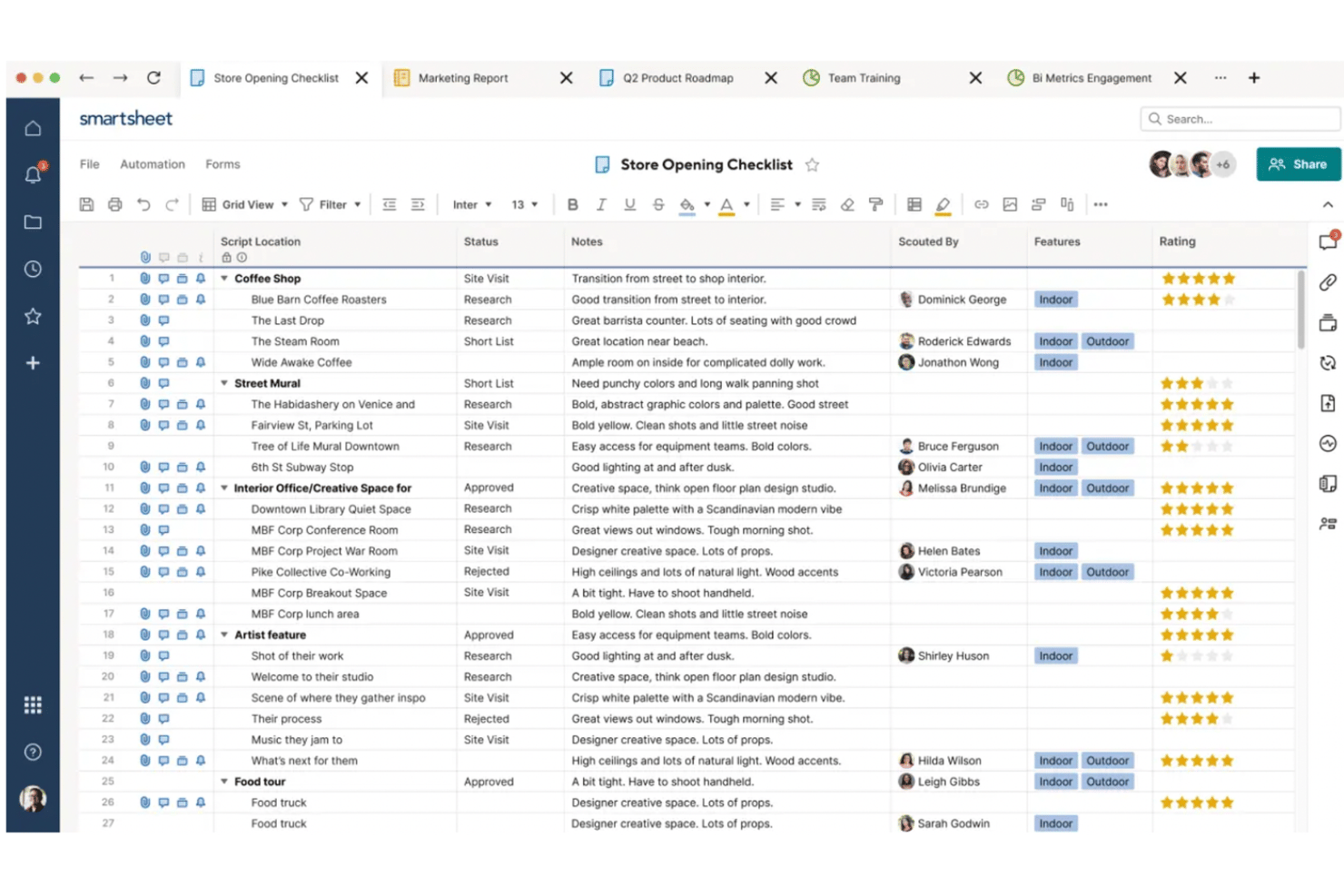
Smartsheet is a cloud-based work management platform that combines project planning, task tracking, workflow automation, resource management, and portfolio-level reporting across Gantt, board, grid, calendar, and timeline views.
Who Is Smartsheet Best For?
Smartsheet is a strong fit for operations-heavy teams and distributed project leads who need to manage multiple workstreams, automate repetitive processes, and roll up progress into shareable dashboards—all within a familiar spreadsheet-style interface.
Why I Picked Smartsheet
I picked Smartsheet as one of the best because it's genuinely built around how sales reps manage pipeline-linked projects across distributed teams. I love how the automated workflow engine handles approval chains and status updates without anyone chasing teammates manually. The workload heatmap gives sales ops managers a clear picture of who's over-allocated across multiple deal cycles, which I think is where Smartsheet earns its spot for sales-focused remote teams.
Smartsheet Key Features
- Portfolio-level dashboards: Roll up data from multiple sheets into a single real-time dashboard that refreshes automatically every 10 minutes.
- Dependency and critical path tracking: Flag task relationships, milestones, and critical paths directly within Gantt views to keep project timelines on track.
- Automated approval workflows: Build condition-based workflows that trigger approval requests, update assignments, and send alerts to Slack or Microsoft Teams without manual intervention.
- Workload heatmap: Visualize team member allocation and over-allocation across multiple projects in a single view, available on Business and Enterprise plans.
Smartsheet Integrations
Smartsheet supports over 175 integrations, including native integrations with Microsoft Office 365 and Google Workspace, plus marketplace integrations with Jira Software, Salesforce, Slack, Microsoft Teams, Power BI, Tableau, and Google Drive. Its REST API and SDKs support custom integrations on Business, Enterprise, and Advanced Work Management plans.
Pros and Cons
Pros:
- Dashboards clarify progress across workstreams
- Automated reminders reduce manual follow-ups
- Familiar spreadsheet layout eases project tracking
Cons:
- Cross-sheet formulas require extra setup
- Mobile app limits complex project edits
New Product Updates from Smartsheet

Smartsheet Adds Non-Plan User Management in Admin Center
Smartsheet adds a Non plan users tab to the Seat types and true-up page in Admin Center. This lets system admins review non-plan users and add them to the plan or remove them from the organization in one place. For more information, visit Smartsheet’s official site.

Scoro
Best for managing remote team workflows
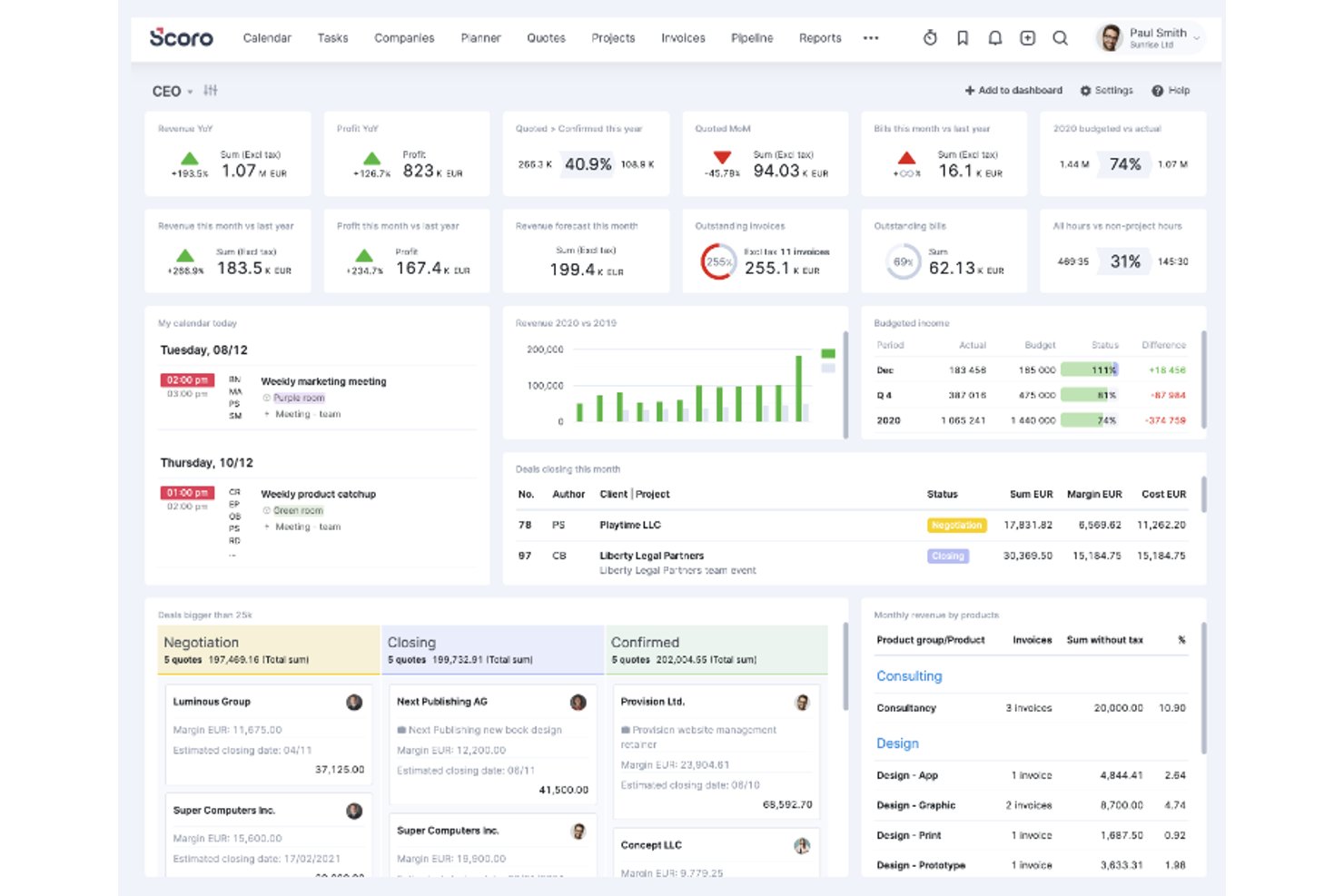
Scoro is a professional services automation platform that combines project management, resource planning, time tracking, and client billing in one system.
Who Is Scoro Best For?
Scoro is a strong fit for operations managers and project leads at professional services firms who need to manage delivery, capacity, and billing in one place.
Why I Picked Scoro
I've included Scoro in my top picks because it's one of the few tools that gives remote teams a genuine, end-to-end view of project delivery, from capacity planning through to client billing, without needing a separate system for each. I particularly like its resource planning module, which shows team workload and availability via heatmaps, so you can spot bottlenecks before they derail a sprint. The watchdog alerts for project thresholds mean my team gets notified automatically, not after a missed deadline.
Scoro Key Features
- Project templates: Create reusable templates that pre-load tasks and milestones so new projects start with a consistent structure.
- Trigger-and-action rules: Set up automated rules that fire notifications, webhooks, or ELI actions when specified project events or thresholds occur.
- Customer Portal: Give invited clients permission-controlled access to project files, comments, and progress updates without a paid seat.
- Native time tracking: Log time against tasks using a timer or timesheet, classify entries as billable or non-billable, and sync records to client invoices.
Scoro Integrations
Scoro lists 40+ integrations, including native integrations with Slack, Google Calendar, Google Drive, Dropbox, and Jira. It also offers REST API and webhooks for custom connections, plus Zapier.
Pros and Cons
Pros:
- Templates and Gantt charts coordinate delivery
- Portfolio dashboards surface project progress
- Workload heatmaps reveal team capacity
Cons:
- Mobile app focuses on time logging
- No built-in team chat
New Product Updates from Scoro

Scoro Adds Time Mobile App and ELI Improvements
Scoro adds the Scoro Time mobile app for iOS/Android to track time anywhere and expands ELI with attachments, smarter filtering, and trigger-based actions. For more information, visit Scoro's official site.
Andre verktøy for fjernprosjektstyring
Her er noen flere som ikke kom med på topplisten.
- Zoho Projects
For remote planning with the Zoho suite
- GoodDay
For Kanban-centric Agile project management
- ProjectManager
For hybrid methodology remote teams
- Teamwork.com
For large companies and enterprises
- Ravetree
Client-facing all-in-one work platform
- Hive
Tool for project templates
- Workzone
For project lifecycle management
- Height
For organizing and streamlining complex projects
- Asana
For tasks co-living in multiple pipelines
- monday.com
For visual workload balancing across remote teams


How I Evaluate Remote Project Management Tools
I split my evaluation into three parts, giving the most weight to core needs: assign tasks, track progress, and collaborate asynchronously across time zones. Next, I look for standout features like workload views. Finally, I consider what’s beyond features, including onboarding, support, and pricing.
Core Functionality (Table Stakes For This List)
When I'm selecting tools for my list, I score each one on a scale from 0 (does not offer the functionality) to 5 (excels in this area) for each core functionality listed below. I then convert the total into a percentage to help assess each tool's overall fit, with extra weight on any functionalities I’ve deemed essential.
- Task & Project Tracking (Essential): I look for task assignment, status updates, dependencies, and milestones that help teams track work from kickoff through delivery.
- Remote Collaboration (Essential): I assess comments, file sharing, mentions, and updates that let teammates resolve questions asynchronously across handoffs.
- Visual Planning Views: I check for synced list, board, calendar, or timeline views that help teams plan work and spot schedule changes.
- Progress Reporting: I look for dashboards or reports that surface overdue tasks, project status, and progress across workstreams.
- Cross-Platform Access: I consider whether teammates can view and update project work across web and mobile, wherever they’re working.
- Workload & Time Zones: I check whether planning views show availability, assigned workload, or time zone differences when coordinating handoffs.
Once I have a list of tools that meet the criteria, I consider what sets each platform apart.
Differentiating Factors (What Sets Vendors Apart)
Here's how I compare and contrast different vendors:
Standout Features
I look for workload balancing views that show each contributor's capacity across projects, so I can spot overallocation before it causes missed deadlines. Async video updates matter just as much—tools like Loom or built-in recorders in ClickUp let teammates share walkthroughs instead of scheduling calls across time zones. I also evaluate goal and OKR alignment features, checking whether tasks link up to strategic objectives so dispersed teams stay focused beyond daily to-dos.
Beyond Features
I check whether each tool's integration ecosystem connects with the communication and dev tools remote teams already use, like Slack, Microsoft Teams, or GitHub. Per-seat pricing models also matter—agencies with shifting contractor headcounts need guest-access tiers or flexible plans that don't penalize fluctuating team sizes. I also evaluate onboarding resources, since distributed teams rarely have the luxury of live walkthroughs; self-serve templates, academies, and async support channels like chat or ticketing make a real difference in getting new hires productive fast.
Slik velger du verktøy for fjernprosjektstyring
Det er lett å gå seg vill i lange funksjonslister og komplekse prismodeller. For å hjelpe deg med å holde fokus mens du går gjennom den unike prosessen med å velge programvare, får du her en sjekkliste over faktorer du bør ha i tankene:
| Faktor | Hva du bør vurdere |
| Skalerbarhet | Forsikre deg om at verktøyet kan vokse i takt med teamets behov, fra små prosjekter til arbeidsbelastninger på virksomhetsnivå. |
| Integrasjoner | Kontroller at det er kompatibelt med verktøyene du allerede bruker, for eksempel Slack, Google Workspace eller Asana. |
| Tilpasningsmuligheter | Se etter muligheter for å tilpasse oversikter, arbeidsflyter og oppgavevisninger etter teamets preferanser. |
| Brukervennlighet | Prioriter et ryddig grensesnitt og intuitiv utforming som ikke overvelder teamet. |
| Budsjett | Vurder om prisene samsvarer med teamets størrelse og behov for funksjoner, uten uventede tillegg. |
| Sikkerhetstiltak | Forsikre deg om at verktøyet tilbyr funksjoner som datakryptering, rollebasert tilgang og regelmessige sikkerhetskopier. |
| Samarbeidsfunksjoner | Bekreft at verktøyet støtter chat i sanntid, fildeling og fremdriftsoppdateringer, slik at alle holdes samkjørte. |
| Rapporteringsverktøy | Se etter detaljert analyse og egendefinerte rapporter for å følge fremdriften og identifisere flaskehalser. |
Trender innen verktøy for fjernprosjektstyring
I arbeidet med undersøkelsen min hentet jeg inn utallige produktoppdateringer, pressemeldinger og lanseringslogger fra ulike leverandører av verktøy for prosjektstyring på avstand. Her er noen av trendene som vokser frem, og som jeg følger med på:
- AI-drevne innsikter: Verktøy bruker i økende grad AI til å forutsi prosjektforsinkelser, fordele ressurser mer effektivt og gi handlingsrettet innsikt. Disse funksjonene analyserer tidligere prosjektdata og mønstre for å hjelpe team med å ta bedre beslutninger og optimalisere arbeidsflyter.
- Fokus på psykisk helse: Leverandører legger til funksjoner som balansering av arbeidsbelastning og målinger av teamets trivsel for å redusere utbrenthet. Verktøyene omfatter nå pulsmålinger og funksjoner som oppmuntrer til sunnere arbeidsvaner for distribuerte team.
- Avansert samarbeid for hybride team: Verktøy utvikles for å tilby virtuelle arbeidsområder der eksterne team og kontorbaserte team kan samarbeide effektivt. Dette omfatter delte visuelle områder, kommunikasjonsverktøy i sanntid som etterligner samhandling ansikt til ansikt, og funksjoner for skjermdeling til presentasjoner og samarbeid om problemløsning under møter.
- Sporing av bærekraft: Stadig flere verktøy for prosjektstyring inkluderer sporing av karbonavtrykk og overvåking av ressursbruk for å hjelpe virksomheter med å nå bærekraftsmålene sine.
- Visuelle grensesnitt først: Plattformene prioriterer Kanban-tavler, Gantt-diagrammer og andre visuelle arbeidsflyter for å forenkle håndteringen av komplekse prosjekter. Disse utformingene reduserer avhengigheten av teksttunge formater, slik at team lettere kan se prosjektets fremdrift med et blikk.
Hva er verktøy for prosjektstyring på avstand?
Verktøy for prosjektstyring på avstand er programvareløsninger som hjelper team med å planlegge, organisere og følge opp arbeid, selv når medlemmene befinner seg på ulike steder. Disse verktøyene brukes ofte av prosjektledere, teamledere og frilansere som trenger å samarbeide om og styre prosjekter på avstand. Funksjoner som oppgavesporing, teamkommunikasjon og fildeling hjelper team med å holde seg samkjørte, overholde tidsfrister og unngå misforståelser. Alt i alt gjør disse verktøyene det enklere å styre prosjekter effektivt, uansett hvor teammedlemmene befinner seg.
Funksjoner i verktøy for prosjektstyring på avstand
Når du velger verktøy for prosjektstyring på avstand, bør du se etter følgende viktige funksjoner i programvare for prosjektstyring:
- Oppgavehåndtering: Lar deg tildele, følge opp og prioritere oppgaver for å holde prosjekter organiserte og i rute.
- Teamkommunikasjon: Tilbyr innebygd meldingsfunksjon eller diskusjonsfora for å forenkle kommunikasjonen mellom teammedlemmene.
- Fildeling: Gjør det mulig for team å laste opp, dele og lagre dokumenter på ett sentralisert sted for enkel tilgang.
- Tidsregistrering: Hjelper med å følge med på hvor mye tid som brukes på oppgaver og prosjekter, slik at produktivitet og budsjettering kan forbedres. Se våre anbefalinger for beste programvare for tidsregistrering for fjernteam.
- Fremdriftssporing: Tilbyr visuelle verktøy som Gantt-diagrammer eller Kanban-tavler for å følge opp prosjektmilepæler og tidsfrister.
- Ressursfordeling: Sørger for at teammedlemmer og ressurser tildeles effektivt for å unngå overbelastning eller underutnyttelse.
- Mobil tilgang: Lar teammedlemmer håndtere oppgaver og samarbeide fra smarttelefoner eller nettbrett mens de er på farten.
- Prosjektrapportering: Genererer rapporter og innsikt for å evaluere prosjektresultater og identifisere områder som kan forbedres.
- Brukertillatelser: Lar administratorer angi rollebasert tilgang for sikker og kontrollert bruk av plattformen.
- Integrasjonsalternativer: Kobler seg til andre verktøy som kalendere, e-post og CRM-systemer for å holde arbeidsflytene sammenkoblet.
Fordeler med verktøy for prosjektstyring på avstand
Implementering av verktøy for prosjektstyring på avstand kan gi flere fordeler for teamet og virksomheten din. Her er noen av fordelene du kan se frem til:
- Bedre samarbeid: Hjelper teamet med å holde kontakten gjennom funksjoner som chat, fildeling og oppdateringer i sanntid, uansett hvor de arbeider.
- Økt produktivitet: Holder oppgavene organiserte og synlige, slik at teammedlemmene kan fokusere på det som betyr mest.
- Bedre ressursstyring: Følger opp arbeidsbelastning og tilgjengelighet for å sikre at ingen blir overbelastet eller underutnyttet.
- Økt åpenhet: Gir alle tilgang til oppdateringer om fremdrift og tidsfrister, noe som reduserer forvirring og misforståelser.
- Tidsbesparelser: Automatiserer gjentakende oppgaver som påminnelser og rapportering, slik at tid frigjøres til viktigere arbeid.
- Kostnadskontroll: Følger opp tid og ressurser som brukes på prosjekter, slik at du kan holde deg innenfor budsjettet.
- Skalerbarhet: Tilpasser seg et voksende team eller endrede prosjektbehov, slik at verktøyet forblir nyttig på lang sikt.
Kostnader og priser for programvare for fjernbasert prosjektstyring
Valg av programvare for fjernbasert prosjektstyring krever en forståelse av de ulike prismodellene og abonnementene som er tilgjengelige. Kostnadene varierer basert på funksjoner, teamstørrelse, tillegg og mer. Tabellen nedenfor oppsummerer vanlige abonnementer, gjennomsnittsprisene deres og typiske funksjoner som er inkludert i løsninger for programvare for fjernbasert prosjektstyring:
Sammenligningstabell for programvare for fjernbasert prosjektstyring
| Abonnementstype | Gjennomsnittspris | Vanlige funksjoner |
| Gratisabonnement | $0/bruker/måned | Grunnleggende oppgavehåndtering, begrenset lagringsplass, enkle samarbeidsverktøy og tilgang for små team. |
| Personlig abonnement | $5-$15/bruker/måned | Prioritering av oppgaver, grunnleggende rapporteringsverktøy, integrasjoner med kalendere og begrenset fildeling. |
| Bedriftsabonnement | $15-$40/bruker/måned | Avansert rapportering, tidsregistrering, automatisering av arbeidsflyter, ubegrenset lagringsplass og tilpassede oversikter. |
| Storkundeabonnement | $40+/bruker/måned | Dedikert brukerstøtte, avanserte sikkerhetsfunksjoner, tilpassede integrasjoner, skalerbarhet og API-tilgang. |
Vanlige spørsmål om programvare for fjernbasert prosjektstyring
Her er noen svar på vanlige spørsmål om programvare for fjernbasert prosjektstyring: