

10 beste Planview-alternativer for prosjektplanlegging i 2026

Kortliste over de beste Planview-alternativene


Planview er et avansert verktøy for prosjektporteføljestyring som tilbyr funksjoner for ressursstyring, strategisk planlegging og porteføljestyring. Det er et verdifullt verktøy, men du opplever kanskje at det ikke passer for teamet ditt.
For å hjelpe deg med å finne det riktige Planview-alternativet vurderte jeg en rekke alternativer basert på min omfattende erfaring med prosjektstyringsprogramvare.
Hva er Planview?
Planview er en programvare for prosjekt- og porteføljestyring som tilbyr verktøy for strategisk planlegging, portefølje- og ressursstyring samt arbeidssamarbeid. Den støtter beslutningsprosessene dine og forbedrer forretningsresultatene ved å gi innsikt i ressursfordeling, prosjektfremdrift og porteføljeoptimalisering.
Why Trust Our Software Recommendations
Our team has been testing and reviewing software since 2012. As project managers ourselves, we know how difficult—and important—it is to choose the right software.
For this guide, we evaluated tools using hands-on testing and independent research, scoring tools using our selection criteria. We also draw on insights from industry thought leaders and practicing project management experts.
Our reviews reflect our human editorial judgment, not a sales pitch.
Expert reviewers:
Sammenligningstabell for Planview-alternativer
Denne sammenligningstabellen oppsummerer prisdetaljene for mine beste utvalgte Planview-alternativer:
| Tool | Best For | Trial Info | Price | ||
|---|---|---|---|---|---|
| 1 | Best for enterprise-level strategic planning | 14-day free trial | From $17/user/month | Website | |
| 2 | Best for dynamic Gantt charts | 14-day free trial | Pricing upon request | Website | |
| 3 | Best for integrated project management and collaboration | Free plan + 15-day free trial + free demo available | From $4/user/month (billed annually) | Website | |
| 4 | Best for detailed project scheduling and resource management | 30-day free trial | From $10/user/month (billed annually) | Website | |
| 5 | Best for collaborative client onboarding tracking | 14-day free trial + free demo available | From $19/user/month (billed annually) | Website | |
| 6 | Best for all-in-one workspace and knowledge management | Free plan available | From $10/user/month (billed annually) | Website | |
| 7 | Best for unified project control and client proofing | 14-day free trial + free demo available | From $45/month (billed annually) | Website | |
| 8 | Best for enterprise work management and reporting | Free demo available | Pricing upon request | Website | |
| 9 | Best for advanced analytics and process automation | Free demo + 14-day free trial available | From $8/user/month (billed annually) | Website | |
| 10 | Best for simple Kanban boards and task tracking | Free plan available | From $5/user/month (billed annually) | Website |


Anmeldelser av de beste Planview-alternativene
Her er min grundige analyse og oversikt over hvert Planview-alternativ. Jeg har beskrevet fordeler og ulemper, funksjoner og bruksområder for hvert verktøy for å hjelpe deg i beslutningsprosessen.

Scoro
Best for enterprise-level strategic planning

Scoro is a Professional Services Automation (PSA) platform that helps you manage everything from quoting and planning to invoicing and profitability tracking. I like it for teams who want to ditch scattered tools and bring their operations into one place. You can keep your sales, project delivery, and financials connected, which makes it easier to understand what’s really going on in your business.
Why it’s a good Planview alternative: Planview works well for enterprise-level strategic planning, but I picked Scoro because it’s more approachable for small to mid-sized teams. You still get visibility across projects and resources, but with less setup complexity. I also appreciated how easy it was to get started—Scoro doesn’t bury you in features you don’t need. If you want to track project profitability in real time, it’s a solid choice that can grow with you.
Standout features & integrations:
Features includes quoting and budgeting tools, customer CRM, project accounting, billing and invoicing, time tracking, and capacity planning. You can also track retainers, manage recurring work, and break down team workloads so no one gets overloaded.
Integrations include Google Calendar, HubSpot, Slack, Xero, QuickBooks, Jira, Stripe, Microsoft Exchange, Sage Intacct, Zapier, Salesforce, Dropbox, and more.
Pros and Cons
Pros:
- Strong native accounting integrations
- Combines project, finance, and sales data
- Tracks project, client, and team-level profitability
Cons:
- Takes time to configure for complex use cases
- Mobile version has fewer features
New Product Updates from Scoro

Scoro Adds Time Mobile App and ELI Improvements
Scoro adds the Scoro Time mobile app for iOS/Android to track time anywhere and expands ELI with attachments, smarter filtering, and trigger-based actions. For more information, visit Scoro's official site.

Wrike
Best for dynamic Gantt charts

Wrike is a collaborative work management platform designed to help your team plan, execute, and monitor projects efficiently. It offers a centralized workspace where you can manage tasks, timelines, and resources, ensuring everyone stays aligned and informed.
Why it's a good Planview alternative: Wrike's advanced project planning capabilities make it a strong alternative to Planview. Its dynamic Gantt charts allow you to visualize project timelines, set dependencies, and adjust schedules with ease, helping you keep projects on track. Additionally, Wrike's resource management tools enable you to allocate tasks based on team members' availability and workload, ensuring optimal use of your team's capacity.
Standout features & integrations:
Features include workload charts, custom item types, approvals, calendars, dashboards, file sharing, document editing, time tracking, proofing, request forms, and cross-tagging.
Integrations include Salesforce, Microsoft Teams, Zoom, Adobe Creative Cloud, Google Drive, Microsoft SharePoint, OneDrive, Wrike for Gmail, Google Sheets, Power BI, Miro, and Trello.
Pros and Cons
Pros:
- Workflow automation capabilities
- Good resource management features
- Various project views
Cons:
- Limited storage on lower-tier plans
- Can be complicated to learn the platform
New Product Updates from Wrike
Wrike Adds Klaxoon MCP Integration
Wrike’s Klaxoon MCP integration is now generally available, enabling AI agents to navigate between Wrike tasks and attached whiteboards, read task context, and manage whiteboard attachments via API. For more information, visit Wrike's official site.

Best for integrated project management and collaboration

Zoho Projects is an advanced project management solution that excels in integrating various aspects of project planning, execution, and collaboration. It's particularly suited for teams seeking a unified platform that combines task management, time tracking, and seamless communication.
Why it's a good Planview alternative: Zoho Projects offers a well-rounded suite of features that facilitate not just project management but also team collaboration in a cohesive environment. Its integration with the Zoho ecosystem and other business tools makes it a versatile choice for dynamic and collaborative teams.
Standout features & integrations:
Features include task management, milestone tracking, Gantt charts, time tracking, issue tracking, document sharing, collaboration tools, project forums, customizable reports, resource allocation, and budget management.
Integrations include Zoho CRM, Zoho Creator, Zoho Desk, Gmail, Google Calendar, Slack, and GitHub.
Pros and Cons
Pros:
- Wide range of integrations
- Strong suite of collaboration tools
- Comprehensive task and project management features
Cons:
- Customization options may require a learning curve
- Can be overwhelming due to feature density
New Product Updates from Zoho Projects
Zoho Projects Adds CodeX Scripts for Custom Modules
Zoho Projects now supports CodeX Scripts for custom modules, enabling conditional logic and rules for creating, updating, and deleting records. For more information, visit Zoho Projects' official site.
 .
.
Best for detailed project scheduling and resource management
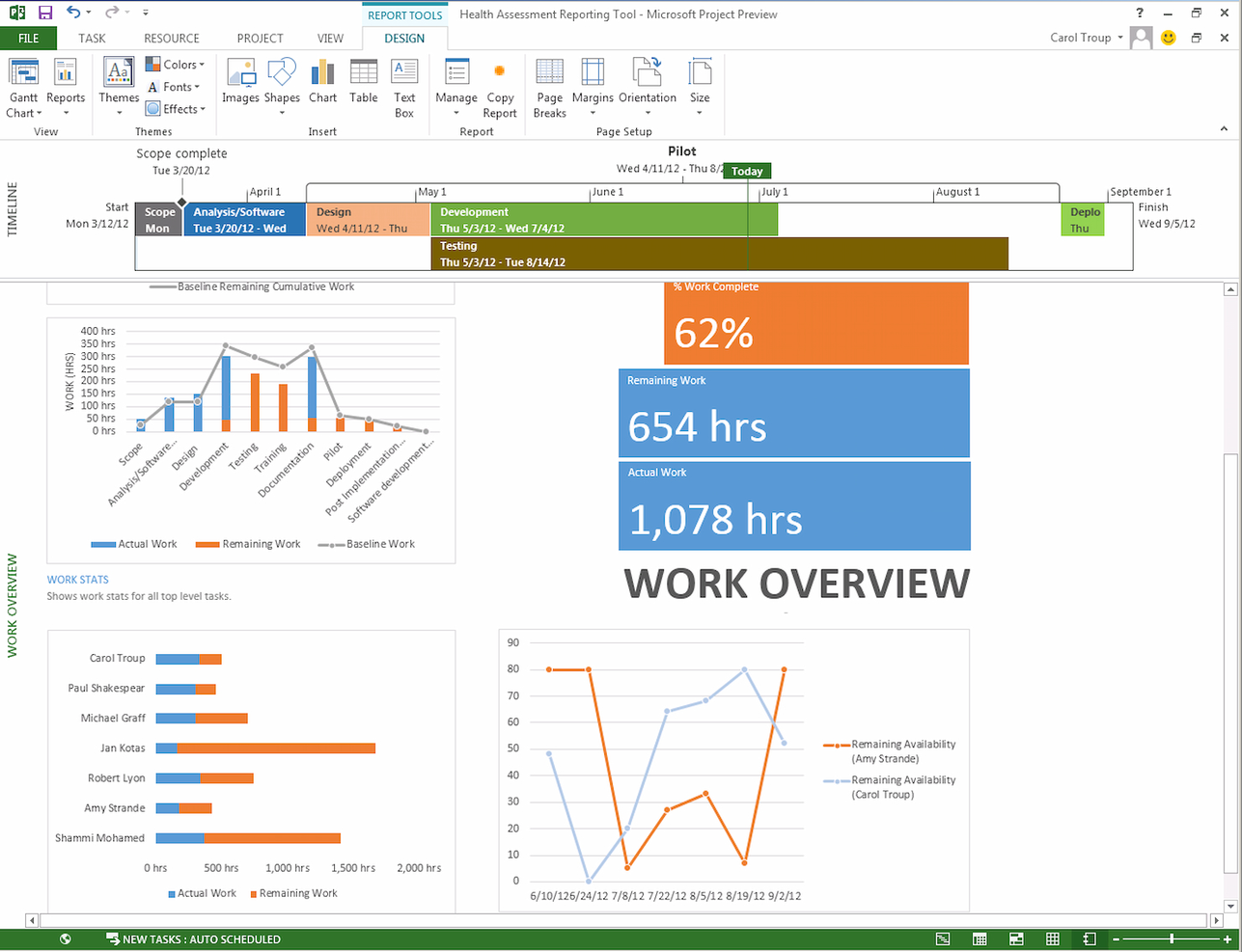
Microsoft Project is an advanced project management tool known for its detailed scheduling capabilities and comprehensive resource management. It's designed for project managers who require advanced tools to plan, execute, and monitor complex projects accurately.
Why it's a good Planview alternative: Microsoft Project offers users sophisticated project scheduling and resource management features that are unparalleled. This tool provides depth and precision in project planning, which is important for handling large-scale and intricate projects.
Standout features & integrations:
Features include Gantt charts project scheduling, resource management, budget analysis, task prioritization, customizable templates, progress tracking, collaboration tools, reporting functionalities, and demand management.
Integration includes Microsoft Excel, Microsoft Dynamics 365, Microsoft Word, Microsoft SharePoint, Procore, Microsoft Power BI, Wrike, Microsoft Office 365 Timesheet App, and GanttPRO.
Pros and Cons
Pros:
- Strong integration with Microsoft 365 suite
- Detailed resource management
- Comprehensive project scheduling tools
Cons:
- Limited flexibility outside Microsoft ecosystem
- Steep learning curve
Best for collaborative client onboarding tracking

Rocketlane is a project delivery platform designed for teams who want structured, transparent, and collaborative client-facing project management. It suits customer success, onboarding, and implementation teams looking to drive smoother project execution and stronger client engagement.
Who Is Rocketlane Best For?
Customer onboarding and implementation teams at SaaS companies who need structured, client-facing project management.
Why Rocketlane Is a Good Planview Alternative
I picked Rocketlane specifically because of how it handles client-facing project tracking during onboarding. Unlike Planview, which is built around internal portfolio and resource management, Rocketlane gives my team a shared project space where clients can see task progress, complete action items, and stay aligned without needing to ask for status updates. I particularly like the unified workspace that combines tasks, documents, and conversations in one place—so nothing gets lost across email threads. In practice, that means my team can run structured onboarding projects with full client visibility from day one.
- Project templates: Launch projects from pre-built templates that auto-populate with CRM data and past project context.
- Time tracking: Log billable hours directly within projects using built-in time tracking tied to project tasks.
- Resourcing and staffing: Assign team members based on availability, skills, and workload across active projects.
- Business IQ dashboards: View real-time reporting across project health, financials, utilization, and customer sentiment.
Rocketlane Integrations
Rocketlane offers native integrations with Slack, Salesforce, HubSpot, Jira, Google Calendar, Outlook, and Zapier. An API is available for custom integrations.
Pros and Cons
Pros:
- Progress tracking visible to clients and teams
- Real-time collaboration for customer-facing projects
- Built-in client onboarding workflow automation
Cons:
- Advanced reporting options can feel restrictive
- Limited support for portfolio resource management
New Product Updates from Rocketlane

Rocketlane Introduces Governance and Workforce Agents
Rocketlane introduces Governance Agents and Workforce Agents to automate delivery processes and recurring tasks. These updates help teams enforce rules and streamline project execution. For more information, visit Rocketlane’s official site.
 .
.
Notion
Best for all-in-one workspace and knowledge management

Notion is a versatile tool that serves as an all-in-one workspace, combining notes, documents, databases, and task management into a single platform. It's ideal for teams and individuals who seek to centralize their knowledge management and streamline their workflows in one accessible location.
Why it's a good Planview alternative: Notion offers a unique approach to blending various types of content and functionality into one unified workspace is unmatched. This adaptability makes it a strong Planview alternative, especially for teams that value flexibility and integration of knowledge management with their daily operations.
Standout features & integrations:
Features include note-taking, databases, Kanban boards, wikis, calendars, task management, reminders, document embedding, real-time collaboration, rich media support, templates, and customizable views.
Integration includes Slack, Google Calendar, Trello, and GitHub.
Pros and Cons
Pros:
- User-friendly interface
- Integrates notes, tasks, databases, and wikis
- Highly customizable workspace
Cons:
- Limited offline functionality
- Performance can lag with large data sets

ProofHub
Best for unified project control and client proofing

ProofHub is a centralized project management platform that excels in offering unified control over projects and streamlined client-proofing processes. It’s designed for teams that require tight coordination and a clear approval process to deliver projects efficiently and meet client expectations accurately.
Why it's a good Planview alternative: ProofHub’s integrated approach to project control and client proofing significantly helps to enhance team productivity and client satisfaction. This tool stands out for its ability to bring together project planning, collaboration, and client interactions in one platform, ensuring smooth workflows and clear communication.
Standout features & integrations:
Features include portfolio management, resource allocation, time tracking, project planning, demand management, strategic planning, financial management, product lifecycle management, capacity planning, collaboration tools, and advanced analytics and reporting.
Integrations include Google Drive, FreshBooks, Google Calendar, OneDrive, Dropbox, and Box.
Pros and Cons
Pros:
- Flat-rate pricing for unlimited users
- Flexible task and workflow customization
- Unified project management and client interaction
Cons:
- No mobile app functionality
- Limited advanced reporting features

Best for enterprise work management and reporting
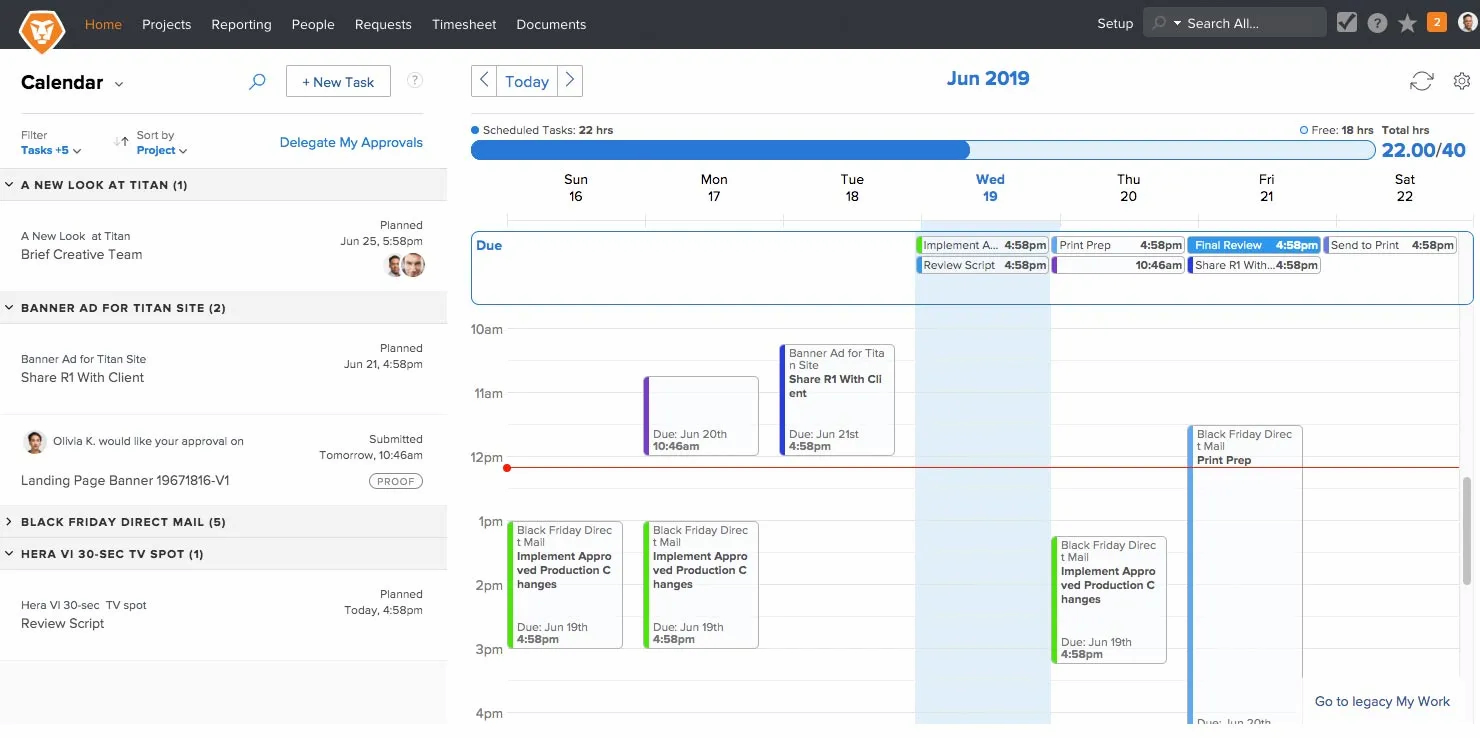
Workfront is an advanced project management solution designed for enterprises that require advanced work management and detailed reporting. It excels in providing strategic tools for planning, executing, and analyzing complex projects across various departments and teams.
Why it's a good Planview alternative: Workfront’s enterprise-level work management capabilities and sophisticated reporting are unmatched for large organizations. It stands out with its ability to integrate complex workflows and provide insights that drive efficiency and productivity at scale.
Standout features & integrations:
Features include customizable dashboards, real-time reporting with deep analytics, automation of routine tasks, and resource allocation and capacity planning tools.
Integrations include Adobe Creative Cloud, Jira, Salesforce, and Microsoft Office 365.
Pros and Cons
Pros:
- Comprehensive integration options
- Strong workflow customization
- Extensive reporting and analytics
Cons:
- The steep learning curve for new users
- Complex for smaller teams

Best for advanced analytics and process automation

Businessmap is a dynamic tool designed to enhance project visualization and workflow management. It allows teams to create detailed, customizable maps that represent different workflows, making it easier to understand complex processes at a glance.
Why it's a good Planview alternative: Businessmap succeeds in providing a clear visual representation of workflows, which is essential for effective project management. The ability to visually trace a process's steps helps pinpoint inefficiencies and streamline operations. This standout quality, combined with its user-friendly interface, makes Businessmap a distinctive choice among project management tools.
Standout features & integrations:
Features include strategic planning, risk management, performance monitoring, project management, data visualization, scenario analysis, budget tracking, customizable dashboards, and real-time reporting.
Integration includes Slack, Google Drive, Trello, Power BI, Looker Studio, Tableau, Asana, Microsoft Azure, Okta, One Login, and Box.
Pros and Cons
Pros:
- Robust integration options
- Real-time collaboration capabilities
- Detailed visualization tools
Cons:
- May require a learning curve for new users
- Limited analytics features


Trello is a user-friendly project management tool centered around Kanban boards that makes task tracking straightforward and visual. It's designed for teams and individuals who need a simple way to organize tasks and projects without complex setup or training.
Why it's a good Planview alternative: Trello simplifies project management with its intuitive drag-and-drop Kanban boards and minimalistic approach. This focus on simplicity and clarity makes it distinct in a market where many tools opt for more complex features and interfaces.
Standout features & integrations:
Features include its customizable Kanban boards, card sorting, due date assignment, checklist integration, collaboration tools, tagging and labeling, file attachments, customizable workflows, mobile and desktop access, automated notifications, and activity logging.
Integrations include Slack, Google Drive, Dropbox, and Jira.
Pros and Cons
Pros:
- Flexible and easy to customize
- Wide range of integrations
- Intuitive Kanban interface
Cons:
- Over-reliance on power-ups for extended features
- Limited functionality for complex project management
Andre Planview-alternativer
Her er noen flere Planview-alternativer som jeg valgte ut. De kom ikke med blant de 10 beste, men de er verdt å se nærmere på hvis du ikke fant et godt alternativ ovenfor.
- Jira
For Agile development and issue tracking
- monday AI Workspace
For automated workflow generation
- Celoxis
For cross-department project tracking
- Smartsheet
For versatile spreadsheet-based project management
- Asana
For workflow customization and team coordination
- Basecamp
For centralized communication and project tracking
- Paymo
For freelancers and small teams with time tracking
- Freedcamp
For essential project tools on a budget
- Kantata
For professional services automation and resource planning
- Teamwork.com
For client-focused projects and team collaboration
- MeisterTask
For intuitive Kanban boards and team task management
- GanttPRO
For detailed Gantt chart planning and project tracking
- Airtable
For flexible database-driven project planning
- Redmine
For open-source project management with flexibility
- ClickUp
For customizable task views and productivity features


Relaterte anmeldelser av prosjektstyringsprogramvare
Hvis du fortsatt ikke har funnet det du leter etter her, kan du se nærmere på disse andre relaterte verktøyene som vi har testet og vurdert:
- Prosjektstyringsprogramvare
- Ressursstyringsprogramvare
- Programvare for arbeidsflytautomatisering
- Programvare for tidsregistrering
- Oppgavestyringsprogramvare
- Samarbeidsverktøy
- Gantt-diagramverktøy
- Produktivitetsverktøy
- Programvare for prosjektoppfølging
- Programvare for prosjektplanlegging
How I Evaluate Planview Alternatives
I look at Planview alternatives in two layers: the non-negotiables like portfolio management and capacity planning, and the differentiators that set the best-fit options apart.
Core Functionality (Table Stakes For This List)
When I'm selecting tools for my list, I rank each one on a scale from 0 (does not offer the functionality) to 5 (excels in this area) for each core functionality listed below. Then, I calculate the tool's total score into a percentage. Each tool needs to achieve a minimum total score of 65% to be considered for inclusion.
- Portfolio Management: I evaluate whether I can group, prioritize, and govern multiple projects in a single view—like scoring and sequencing a backlog of funded initiatives across programs.
- Resource Capacity Planning: Allocating the right people across concurrent projects is where most PMOs feel pain, so I check for demand forecasting, utilization tracking, and skills-based assignment.
- Strategic Roadmapping: I look for roadmaps that connect upstream strategy to downstream execution—linking OKRs or business objectives directly to the projects and milestones they depend on.
- Financial & Budget Tracking: Budget rollups, variance tracking, and forecasting at both the project and portfolio level matter here—especially for teams reporting CapEx vs. OpEx to finance.
- Executive Dashboards & Reporting: Portfolio health views need to serve a VP or PMO director without requiring a data analyst, so I check for configurable KPIs, drill-downs, and scheduled reporting.
- Work & Task Management: The underlying execution layer matters too—I look for task dependencies, Gantt and Kanban views, and workflow automations that keep delivery teams moving day to day.
Once I have a list of tools that meet this criteria, I consider what sets each platform apart.
Differentiating Factors (What Sets Vendors Apart)
Here's how I compare and contrast different vendors:
Standout Features
Scenario planning is a big differentiator—I look for tools that let you model alternate timelines or resource shifts before committing to a portfolio decision. Agile and hybrid methodology support also matters, especially for teams running SAFe alongside traditional waterfall delivery. I check whether a platform offers structured demand intake with scoring models, since PMOs that lack a formal request pipeline end up triaging work in spreadsheets and email threads.
Beyond Features
Integration ecosystem is one of the first things I evaluate. If your delivery teams live in Jira or Azure DevOps, the alternative needs native connectors—not just an open API your team has to build around. Total cost of ownership deserves close attention too, since Planview's licensing and implementation costs are a common reason teams start looking elsewhere. I also consider time-to-value: how quickly a PMO can actually deploy the platform with pre-built templates and guided configuration versus months of professional services.
Hvorfor se etter et Planview-alternativ?
Du bør vurdere å se etter et Planview-alternativ hvis du:
- Har kostnadsbekymringer: Planview er et relativt rimelig alternativ, men hvis du trenger færre lisenser eller har et strammere budsjett, kan en alternativ løsning være best.
- Opplever kompleksitetsproblemer: Planviews brukergrensesnitt kan være komplekst, noe som kan hindre teamets ytelse. Team som trenger et mer brukervennlig grensesnitt, kan ha nytte av et alternativ.
- Trenger flere funksjoner: Planview tilbyr riktignok omfattende funksjoner, men større team og prosjekter kan ha behov for enda mer omfattende funksjonalitet.
- Krever bedre integrasjoner: Hvis Planview ikke integreres godt med den eksisterende teknologistakken din, kan det hende du må kjøpe en alternativ løsning som fungerer godt sammen med den eksisterende programvaren din.
- Ønsker bedre kundestøtte: Ekstra opplæring og utvidet kundestøtte kan hjelpe deg med å lykkes med programvaren du har valgt.
Viktige funksjoner i alternativer til Planview
Her er noen viktige funksjoner i Planview som alternativet ditt bør tilby eller forbedre:
- Porteføljestyring av prosjekter: Denne funksjonen bidrar til å balansere prosjektkapasitet med etterspørsel og sørge for at ressursene fordeles effektivt på tvers av prosjekter. Du kan også opprettholde samsvar mellom prosjektgjennomføring og virksomhetens mål og optimalisere bruken av ressurser i hele organisasjonen.
- Smidig programstyring: Dette støtter visualisering, planlegging og levering av viktige initiativer, bidrar til å legge til rette for en fleksibel respons på endringer og opprettholde fokus på å levere verdi. Dette er avgjørende hvis du ønsker å implementere eller forbedre smidige metoder og reaksjonsevne.
- Lean-porteføljestyring: Dette integrerer strategisk porteføljestyring med smidig leveranse, slik at du kan forbedre resultatene og tilpasse målene til realitetene i gjennomføringen. Det er spesielt verdifullt hvis du trenger å tilpasse deg endringer og opprettholde et tydelig bilde av langsiktige mål.
- Kanban for virksomheter: Dette hjelper deg med å forbedre teamets produktivitet og organisasjonens smidighet, administrere arbeidsflyter effektivt og gi teamene tydelig innsyn i fremdriften og avhengighetene mellom oppgavene, noe som er viktig i smidige miljøer.
- Vedvarende innovasjon: Muligheten til å administrere idéprosessen fra unnfangelse til implementering på ett sted legger til rette for vedvarende innovasjon. Dette støtter også kontinuerlig forbedring og utvikling, noe som er avgjørende for å holde deg konkurransedyktig.
- Arbeidsbelastningsstyring: Dette gir teamene de nødvendige verktøyene for å planlegge, administrere og visualisere arbeidet sitt i samarbeid. Du kan fremme effektivt teamarbeid og sørge for at teamet er samkjørt med prosjektmålene og fremdriften.
- Strategisk planlegging: Dette innebærer å bruke strategiske veikart til å skissere fremtidige prosjekter og initiativer, og er avgjørende for å samordne langsiktige strategiske mål med operativ planlegging og sørge for at organisasjonen beveger seg samlet mot målene sine.