

10 Best Project Management Software With Invoicing For 2026

10 Best Project Management Software with Invoicing Shortlist


With so many different project management solutions available, figuring out which ones have features to support your project financials is tough. You know you want to simplify the tracking of project progress and expenses while providing a seamless process for generating and managing invoices but need to figure out which tool is best for it. I've got you! In this post I'll help make your choice easy, using my personal experiences with dozens of different PM tools with large teams and projects to share my picks of the best project management software with invoicing tools.
Why Trust Our Software Recommendations
Our team has been testing and reviewing software since 2012. As project managers ourselves, we know how difficult—and important—it is to choose the right software.
For this guide, we evaluated tools using hands-on testing and independent research, scoring tools using our selection criteria. We also draw on insights from industry thought leaders and practicing project management experts.
Our reviews reflect our human editorial judgment, not a sales pitch.
Expert reviewers:
Project Management Software With Invoicing Comparison Table
The table below compares pricing details for my top project management software with invoicing.
| Tool | Best For | Trial Info | Price | ||
|---|---|---|---|---|---|
| 1 | Best for centralized global invoicing | 14-day free trial | From $19.90/user/month (billed annually) | Website | |
| 2 | Best for agencies operating globally | 14-day free trial + free demo available | From $10/month (billed annually) | Website | |
| 3 | Best time tracking & timesheets for easy invoicing | 14-day free trial | From $10/user/month (billed annually) | Website | |
| 4 | Best for timesheet modules | Free plan available | From $4/user/month (billed annually) | Website | |
| 5 | Best for branded invoice generation | Free plan + 30-day free trial + free demo available | From $6/user/month (billed annually) | Website | |
| 6 | Best for milestone-based billing workflows | 14-day free trial + free demo available | From $19/user/month (billed annually) | Website | |
| 7 | Best integration with your current PM system | Free plan available | From $8.50/user/month (billed annually) | Website | |
| 8 | Best for financial forecasting | Free demo available | Pricing upon request | Website | |
| 9 | Best for communication and collaboration | Free plan available | From $11.95/month | Website | |
| 10 | Best for agencies | Free 7-day trial available | From $9/user/month (billed annually) | Website |


Best Project Management Software With Invoicing Review
Below are my detailed summaries of the best project management software with invoicing that made it onto my shortlist. My reviews offer a detailed look at the key features, pros & cons, integrations, and ideal use cases of each tool to help you find the best one for you.

Scoro
Best for centralized global invoicing

Scoro is a project management and invoicing platform that brings together project planning, time tracking, quoting, billing, and financial management in one system.
Who Is Scoro Best For?
Scoro is a good fit for professional services teams—like agencies, consultancies, and IT firms—that need to manage projects and client billing in one place.
Why I Picked Scoro
Scoro earns its spot on my shortlist because of how well it handles invoicing across multiple markets and entities. I particularly like the multi-currency invoicing support, which lets my team bill clients in different countries without switching tools or manually converting figures. For agencies or consultancies with global offices, each entity can run its own financials independently while still feeding into group-level reporting. I also find the billing forecast feature genuinely useful—it shows exactly how much has been invoiced and what's still outstanding, so there are no surprises at month-end.
Scoro Key Features
- Gantt charts: Visualize project timelines and task dependencies with color-coded bars that update as work progresses.
- Quoted vs. actual budget tracking: Compare planned budgets against real-time labor costs and expenses as projects run.
- Resource bookings: Reserve team members' time tentatively before projects start, with drag-and-drop scheduling adjustments.
- Utilization reporting: View a heatmap of each team member's workload to spot overbooking or available capacity at a glance.
Scoro Integrations
Scoro offers native integrations with Google Workspace, Microsoft 365, Xero, QuickBooks, Sage, and Exact, and provides an API for custom integrations.
New Product Updates from Scoro

Scoro Adds Time Mobile App and ELI Improvements
Scoro adds the Scoro Time mobile app for iOS/Android to track time anywhere and expands ELI with attachments, smarter filtering, and trigger-based actions. For more information, visit Scoro's official site.

Best for agencies operating globally
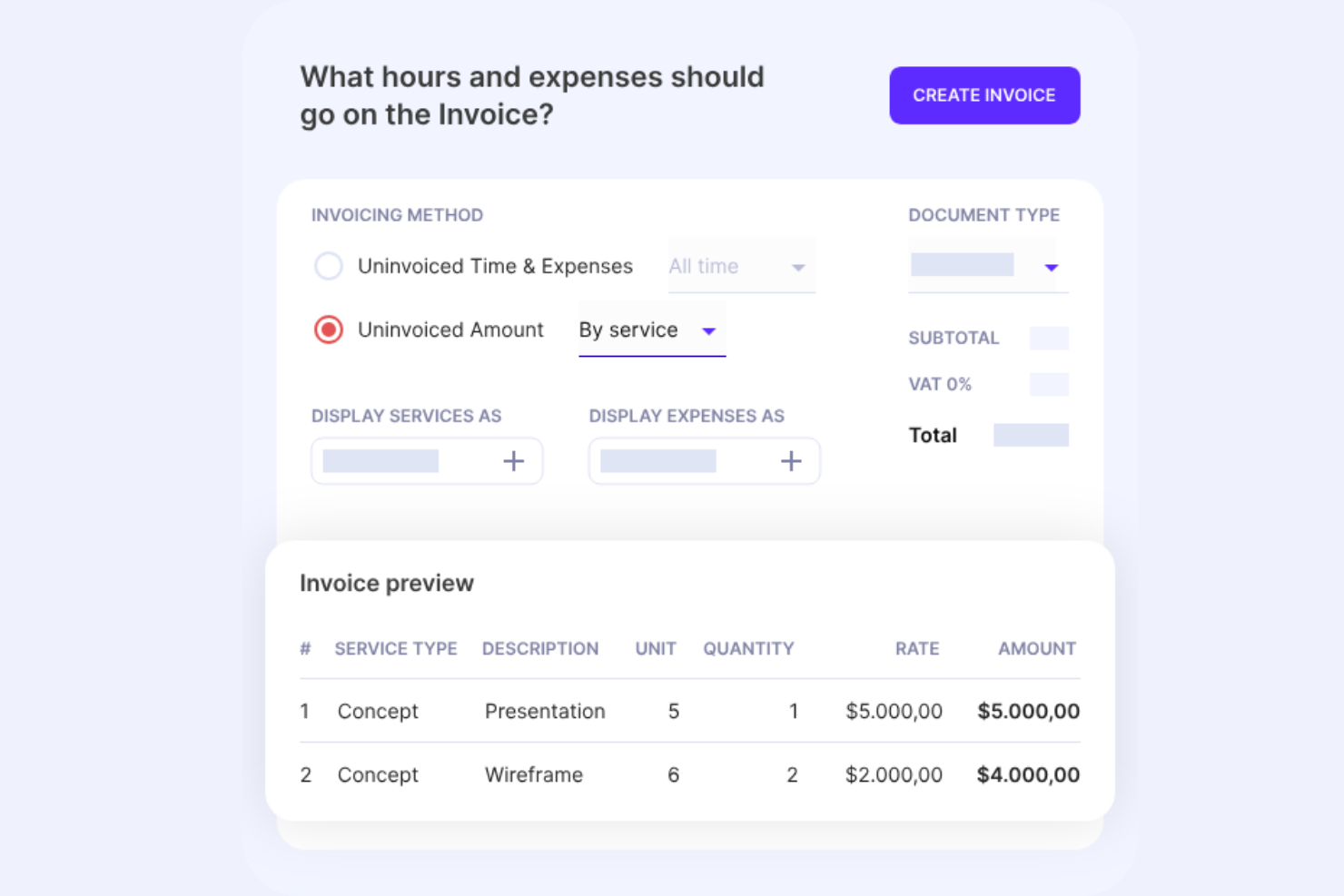
Productive is a project management platform designed for agencies that brings together project planning, time tracking, budgeting, invoicing, and resource management in one system.
Who Is Productive Best For?
Productive is a good fit for agencies of all sizes that manage client projects, billable hours, and invoicing across multiple currencies or international markets.
Why I Picked Productive
Productive earns its spot on my shortlist because of how well it handles the financial complexity that comes with running an agency across multiple markets. I particularly like the multi-currency invoicing support, which lets my team create invoices in any currency and track expenses in a currency that's different from the project budget. That's a real differentiator for agencies billing clients in Europe, North America, and beyond from a single account. I also use the multi-subsidiary support to keep each branch's accounting organized separately, without needing a separate tool or account for each office.
Productive Key Features
- Project templates: Duplicate tasks, subtasks, descriptions, and assignees from a saved template to spin up new client projects.
- Time approval workflow: Review submitted time entries, mark hours as billable or non-billable, and request changes before they hit a budget.
- AI-powered reporting: Ask AI to generate reports on profitability, utilization, or revenue, or choose from 50+ pre-built report templates.
- Real-time budget dashboards: Turn any report into a dashboard widget to monitor costs, profit, and hours worked across projects at a glance.
Productive Integrations
Productive offers native integrations with Xero, QuickBooks, Slack, Google Calendar, and HubSpot, and connects with Zapier. An API is available for custom integrations.
New Product Updates from Productive
Productive Adds Voice Dictation, Slack Connector, Proposals, and Overtime
Productive adds voice dictation, a Slack Connector, proposal controls, and overtime tracking. These updates support faster AI interactions, client proposals, and time management. For more information, visit Productive’s official site.

Wrike
Best time tracking & timesheets for easy invoicing
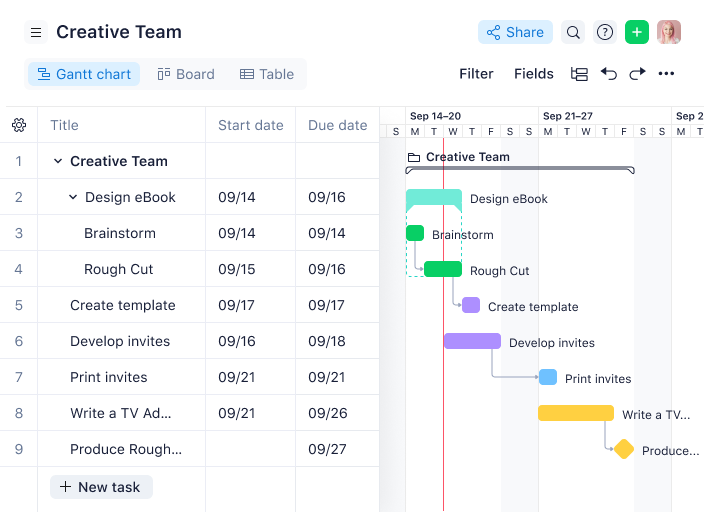
Wrike is a project management platform for teams that need task tracking, time tracking, timesheets, workflow customization, and invoicing features in one place.
Who Is Wrike Best For?
Wrike is a strong fit for mid-size to enterprise teams in professional services, marketing, and consulting who need to track billable hours across projects.
Why I Picked Wrike
Wrike earns its spot on my shortlist because of how well its time tracking and timesheet features connect to the billing side of project work. I like that you can log hours using a live timer directly on a task or add them manually after the fact—so nothing slips through the cracks when a team member forgets to start a timer. A standout invoicing feature is the timesheet approval workflow: managers can review, approve, and lock timesheets on a weekly or monthly basis before exporting them to billing or payroll. I also find the billable vs. non-billable reporting genuinely useful—my team can pull a report that separates client-facing hours from internal work, which makes building an accurate invoice much faster.
Wrike Key Features
- Gantt chart view: Visualize project timelines, task dependencies, and milestones in an interactive drag-and-drop Gantt chart.
- Custom request forms: Build dynamic intake forms that automatically generate tasks, projects, or workflows when submitted.
- Resource bookings: Reserve team members for specific projects, estimate hours needed, and check availability before assigning work.
- AI-powered automation: Use natural language to build no-code automation rules that move tasks through workflow stages automatically.
Wrike Integrations
Wrike offers hundreds of integrations through its built-in integrations and marketplace, including tools like Google Workspace, Microsoft 365, Salesforce, and Slack. It also supports Zapier and provides an API for custom integrations.
New Product Updates from Wrike

Wrike Adds Quick Search to Table View
Wrike adds Quick Search to Table View with full-table search across titles, descriptions, and fields, plus highlighted matches. This helps users find tasks faster in large tables. For more information, visit Wrike’s official site.

Best for timesheet modules

Zoho Projects is a project management platform that brings together task tracking, time tracking, resource allocation, and invoicing integrations for teams managing client projects.
Who Is Zoho Projects Best For?
Zoho Projects is a strong fit for small to mid-sized teams already using the Zoho ecosystem who need to manage client projects with time tracking and billing.
Why I Picked Zoho Projects
Zoho Projects earns its spot on my shortlist because of how well its timesheet module connects logged hours directly to billing. I like that you can set billable and non-billable hours at the task level, which makes separating client-facing work from internal overhead straightforward. The timesheet view gives my team a clear log of who worked on what and for how long, and that data flows into Zoho Invoice without manual re-entry. For client-facing project teams, that kind of traceability between time logged and invoices generated is genuinely hard to replicate in most standalone tools.
Zoho Projects Key Features
- Gantt chart: Visualize project timelines, map task dependencies, and reschedule tasks directly within the chart view.
- Blueprint workflow automation: Design step-by-step task workflows that automatically update fields and notify team members as work moves through each stage.
- Budget tracking: Monitor planned vs. actual project costs in real time, with budget forecasting based on current completion percentages.
- Resource management: View each team member's workload and reassign tasks when someone is over- or under-allocated.
Zoho Projects Integrations
Zoho Projects offers native integrations with Zoho Invoice, Zoho CRM, Zoho Books, Google Drive, Dropbox, GitHub, Bitbucket, Slack, Microsoft Teams, and Zapier. An API is available for custom integrations.
Pros and Cons
Pros:
- Broad Zoho ecosystem compatibility
- Built-in time tracking support
- Strong Zoho Invoice integration
Cons:
- Interface can feel complex
- Invoicing requires external Zoho app
New Product Updates from Zoho Projects
Zoho Projects Adds CodeX Scripts for Custom Modules
Zoho Projects now supports CodeX Scripts for custom modules, enabling conditional logic and rules for creating, updating, and deleting records. For more information, visit Zoho Projects' official site.
 .
.
actiTIME
Best for branded invoice generation
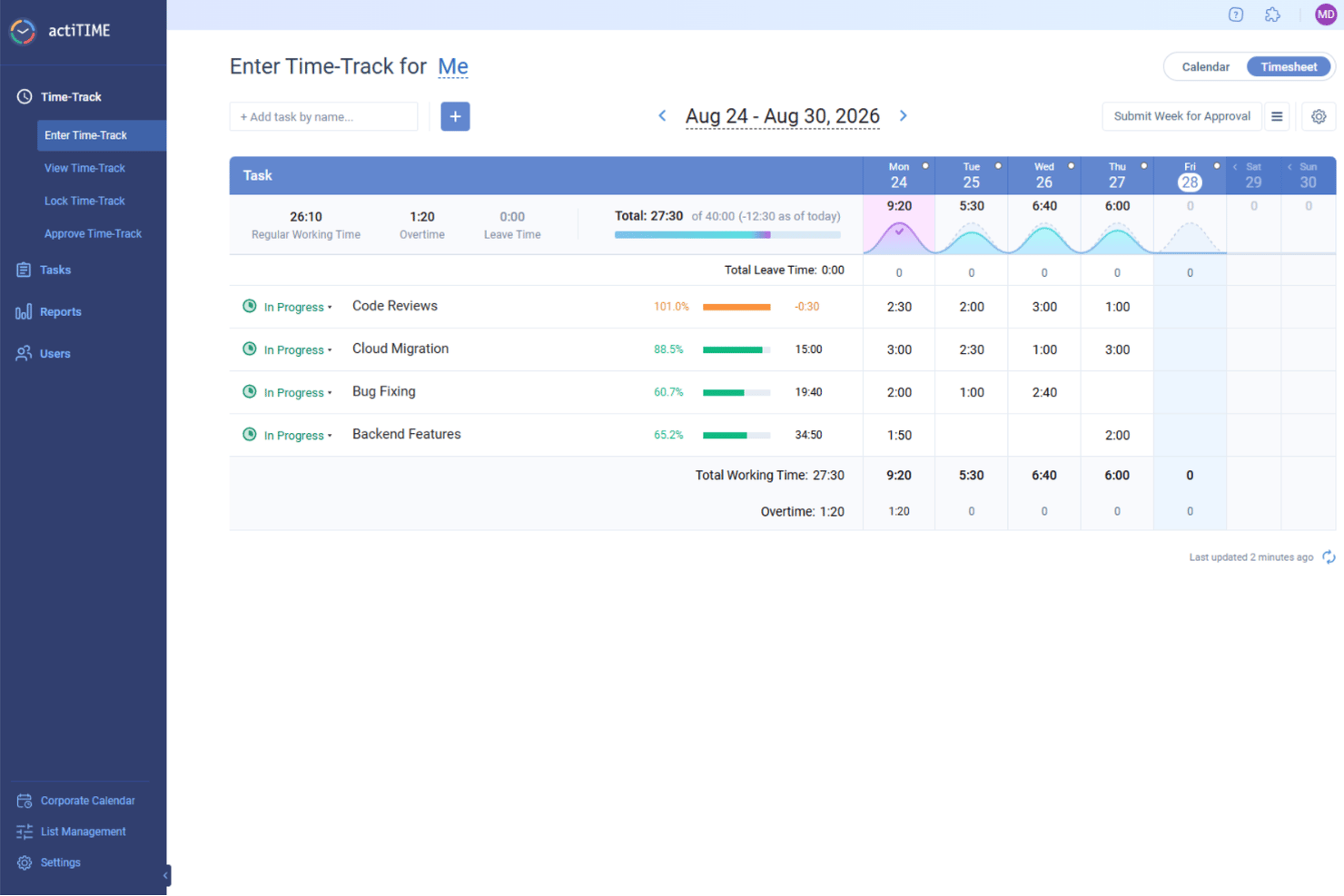
actiTIME is a project management and time tracking platform that lets you manage projects, track billable hours, and generate invoices from tracked data.
Who Is actiTIME Best For?
actiTIME is a good fit for freelancers and small-to-mid-sized service businesses that bill clients based on tracked hours.
Why I Picked actiTIME
actiTIME earns its spot on my shortlist because of how tightly its invoice generation ties into the time tracking data already in the system. I like that when it's time to bill a client, I can pull tracked billable hours directly into a PDF invoice without any manual data re-entry. Its branding layer is especially useful for client-facing work: you can add your company logo, name, and address to each invoice, which gives the output a polished, professional look rather than a generic export. I also appreciate the ability to add discounts, taxes, optional messages, and payment terms directly to the invoice, so the document covers everything a client needs to understand what they're being charged for and why.
actiTIME Key Features
- Task time estimates: Set estimated hours for individual tasks and compare them against actual tracked time to manage workload planning.
- Kanban view: Visualize project progress and spot bottlenecks by moving tasks across custom workflow status columns.
- PTO and leave tracking: Track paid time off balances, sick days, accrual rules, and blackout dates for your entire team in one place.
- Billing rate configuration: Set individual hourly billing rates per task type to automatically calculate billable amounts across projects.
actiTIME Integrations
actiTIME offers native integrations with QuickBooks and provides an API for custom integrations.
New Product Updates from actiTIME

actiTIME Visual Hour Indicator and Time-Track Report Redesign
actiTIME adds a wave-style hour indicator to the Timesheet and Calendar views and refreshes the Time-Track report for smoother navigation and clearer visuals. For more information, visit actiTIME's official site.

Best for milestone-based billing workflows
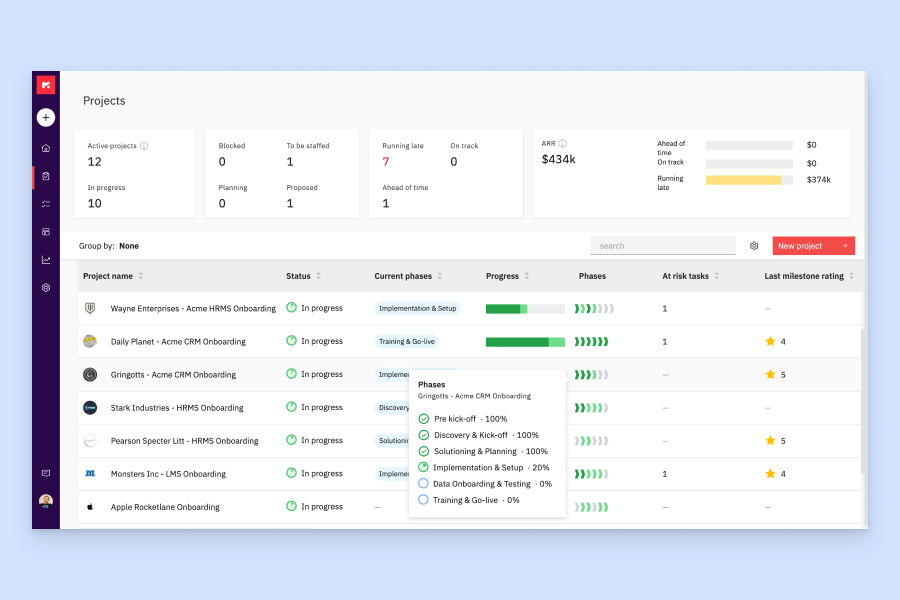
Rocketlane is an AI-powered professional services automation (PSA) platform that combines project delivery, resource management, financial tracking, and client portal tools in one system.
Who Is Rocketlane Best For?
Rocketlane is a strong fit for professional services teams at B2B SaaS companies that need to manage client onboarding, project delivery, and billing in one place.
Why I Picked Rocketlane
I picked Rocketlane as one of the best because of how tightly its invoicing connects to actual project delivery. When a milestone is marked complete, it flows directly into a client-ready invoice without manual checks or reconciliation. I also like that Rocketlane supports multiple revenue recognition models, including milestone-based, time-based, and percentage-complete, so teams can match how they actually bill to how they actually deliver. The real-time view of what's billed, pending, or paid makes it easy to stay on top of cash flow across a full project portfolio.
Rocketlane Key Features
- Time tracking and timesheet approvals: Log billable hours against tasks and projects, with an approval workflow before time feeds into invoices.
- Rate cards: Define custom bill rates by role or resource type, which apply automatically when generating project invoices.
- Expense tracking: Capture and categorize project expenses so they can be included in client invoices alongside time and milestones.
- Project budget monitoring: Track budgeted vs. actual spend in real time at the project level to manage billing accuracy.
Rocketlane Integrations
Rocketlane offers native integrations with Slack, Salesforce, Jira, HubSpot, Google Calendar, and Outlook Calendar. It also connects with Zapier and Workato for broader workflow automation. An API is available for custom integrations.
Pros and Cons
Pros:
- Supports multi-currency and multi-tax invoicing
- Multi-step invoice approval chains configurable
- Milestone and recurring invoice triggers built in
Cons:
- Only seven native third-party integrations available
- Advanced reporting filters are limited
New Product Updates from Rocketlane

Rocketlane Introduces Governance and Workforce Agents
Rocketlane introduces Governance Agents and Workforce Agents to automate delivery processes and recurring tasks. These updates help teams enforce rules and streamline project execution. For more information, visit Rocketlane’s official site.
 .
.
Everhour
Best integration with your current PM system

Everhour is a project management and invoicing platform that connects time tracking, budgeting, and billing directly to your existing project management tools.
Who Is Everhour Best For?
Everhour is a strong fit for small to mid-sized teams that already use a project management tool and need to layer time tracking and invoicing on top of it.
Why I Picked Everhour
I picked Everhour as one of the best because of how deeply it embeds into the PM tools your team already uses. Rather than asking engineers to open a separate app, Everhour surfaces time tracking controls directly inside Asana tasks, Jira issues, Linear tickets, and ClickUp cards. I've seen this make a real difference for dev teams—when a developer clicks "Start" on a Linear issue, the timer runs inside Everhour without any context switching. That tracked time then flows directly into invoices, so there's no manual data transfer between your PM tool and your billing workflow. Budget alerts at 75%, 90%, and 100% of project spend also give you a clear signal before scope creep quietly eats into your margins.
Everhour Key Features
- Billable vs. non-billable time tracking: Mark individual tasks as billable or non-billable so only the right hours flow into client invoices.
- Time approval and timesheet locking: Submit timesheets for manager approval and lock entries after a set period to prevent retroactive edits.
- Resource planning view: See your team's scheduled hours, availability, and workload across projects in a single interactive timeline.
- Expense tracking with receipt attachments: Log project expenses by category, attach receipts, and add them directly to invoices alongside tracked time.
Everhour Integrations
Everhour offers native integrations with Asana, Trello, Jira, Basecamp, ClickUp, GitHub, GitLab, Notion, Todoist, and QuickBooks. An API is available for custom integrations.

NetSuite
Best for financial forecasting
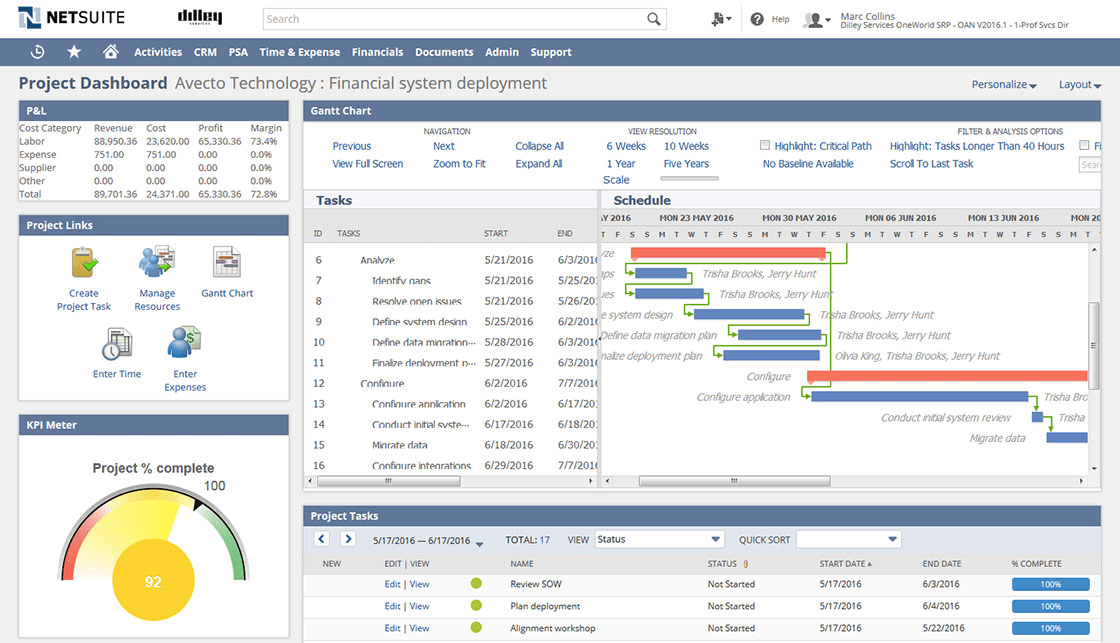
NetSuite is a cloud-based project management and invoicing platform that brings together project tracking, resource management, billing, and advanced financial tools in one system.
Who Is NetSuite Best For?
NetSuite is a strong fit for mid-size to enterprise businesses that need to manage projects alongside complex financial operations in a single platform.
Why I Picked NetSuite
NetSuite earns its spot on my shortlist because of how tightly its financial forecasting tools connect to actual project activity. NetSuite Planning and Budgeting uses AI-driven multivariate prediction to analyze multiple business drivers at once—so when I forecast project revenue, I'm not looking at a single variable in isolation. The scenario planning and modeling feature is useful: I can run "what if" analyses across dimensions like customer, product, or location to see how changes in project scope ripple through cash flow and revenue projections. The budget vs. actuals reporting in SuiteProjects automatically pulls in timesheet and expense data as it's entered, giving my team a live view of where a project stands financially.
NetSuite Key Features
- Project setup automation: Automatically create new projects from billed sales orders and use templates with preconfigured budgets, approval workflows, and billing rules to standardize delivery.
- Resource management: Assign resources to projects based on skills, availability, and experience, with a real-time project timeline that updates as the project evolves.
- Expense management: Automate expense reporting, submission, and approval workflows, with direct integration into project accounting and invoicing.
- Project dashboards: View Gantt charts, KPIs, and project health at a glance, with automatic updates as team members enter data at the task level.
NetSuite Integrations
NetSuite offers native integrations with Salesforce, Shopify, Magento, Avalara, and Oracle products, and provides an API for custom integrations.
Avaza
Best for communication and collaboration

Avaza is a project management and invoicing platform that brings together task tracking, time tracking, expense management, and client billing in one workspace.
Who Is Avaza Best For?
Avaza is a good fit for small to mid-sized service businesses—like agencies, consultancies, and professional services firms—that need to manage client projects and billing in one place.
Why I Picked Avaza
Avaza earns its spot on my shortlist because of how it handles communication without pulling you out of your project context. I really like that task discussions live directly inside the chat inbox alongside direct messages and channel conversations—so when my team is debating a deliverable, that conversation stays linked to the task and doesn't get buried in a general channel. Avaza Chat also supports project-specific channels, which means my team can keep client project discussions separate from internal ones. Clients can be invited directly into projects to collaborate and approve timesheets, reducing back-and-forth emails that slow billing.
Avaza Key Features
- Recurring invoices: Set a schedule to automatically send invoices to clients at regular intervals, with dynamic fields that auto-populate details like the billing period.
- Timesheet-to-invoice billing: Pull unbilled time entries directly onto an invoice, with options to group timesheets by project, category, user, or task.
- Kanban, list, and Gantt views: Switch between task views to plan and track work in whichever format suits your project or team.
- Expense tracking: Log expenses across multiple categories, add markups, and attach digitized receipts from your phone before adding them to client invoices.
Avaza Integrations
Avaza offers native integrations with Xero, QuickBooks Online, Slack, and Stripe, and connects with Zapier. An API is available for custom integrations.

Best for agencies

Bonsai Agency Software is a project management platform designed for agencies that brings together project tracking, invoicing, time tracking, proposals, and client CRM in one system.
Who Is Bonsai Agency Software Best For?
Bonsai Agency Software is a strong fit for small to mid-sized creative and digital agencies that need to manage client projects and billing in one place.
Why I Picked Bonsai Agency Software
Bonsai Agency Software earns its spot on my shortlist because it's one of the few project management tools built specifically around how agencies actually work. I love that the platform connects project scoping directly to resource allocation—you can define a project scope, convert it into allocated team hours, and track budget margins in real time as work progresses. That means scope creep shows up immediately in your numbers, not at the end of the month. I also use the integrated invoicing alongside time tracking, so billable hours flow directly into client invoices without any manual data entry.
Bonsai Agency Software Key Features
- Recurring billing: Set up automatic billing cycles for retainer clients so invoices go out on schedule without manual intervention.
- Client portal: Give clients a branded, secure space to view project status, invoices, and shared documents in one place.
- Sales pipeline: Track leads through customizable pipeline stages and convert closed deals directly into projects, contracts, and invoices.
- Tentative allocations: Assign resources to potential projects before they're confirmed, then finalize or adjust bookings as project scope solidifies.
Bonsai Agency Software Integrations
Bonsai Agency Software offers native integrations with QuickBooks, Calendly, and Zapier. An API is available for custom integrations.
Other Project Management Software With Invoicing
Here are some additional project management software with invoicing options that didn’t make it onto my shortlist, but are still worth checking out:
- Zoho Invoice
For those already in the Zoho app ecosystem
- FinancialForce
For Salesforce users
- Ravetree
For client invoicing and management
- Harvest
Free PM software with invoicing
- Plutio
For freelancers and entrepreneurs
- Taimer
For professional services
- Cenchu Passion App
Project management with invoicing for startups
- Hubstaff
To automate invoicing & track status
- Accelo
Integrated invoicing and profitability tracking
- ProWorkflow
For generating invoices from projects
- VOGSY
For invoicing subscriptions, retainers, installments
- GoodDay
For project teams needing built-in invoicing
- Kantata
For its financial management capabilities
- Paymo
For small & medium teams
- Zistemo
If you also need staffing tools


How I Evaluate Project Management Software Invoicing
My evaluation breaks into two layers: what a tool must do—like billing clients from tracked hours—and what makes certain tools stand out.
Core Functionality (Table Stakes For This List)
When I'm selecting tools for my list, I rank each one on a scale from 0 (does not offer the functionality) to 5 (excels in this area) for each core functionality listed below. Then, I calculate the tool's total score into a percentage. Each tool needs to achieve a minimum total score of 65% to be considered for inclusion.
- Invoice Creation & Customization: I check whether you can build branded, client-ready invoices with line items, taxes, and discounts directly inside the PM tool.
- Time & Expense Billing: Tracked hours and logged expenses should flow into invoice line items—no rekeying data from timesheets into a separate billing tool.
- Project-Based Billing Models: I look for support across hourly, fixed-fee, milestone, and retainer billing since most agencies juggle multiple contract types at once.
- Budget & Profitability Tracking: Each tool should tie invoiced revenue back to project budgets so you can see billed vs. unbilled amounts and margin per project.
- Client & Payment Management: I evaluate how clients receive and pay invoices—whether through integrated gateways like Stripe or PayPal, or a client-facing portal.
- Accounting Integrations: Syncing invoice data to tools like QuickBooks or Xero matters here, so I look at depth of integration and whether sync is one- or two-way.
Once I have a list of tools that meet the criteria, I consider what sets each platform apart.
Differentiating Factors (What Sets Vendors Apart)
Here's how I compare and contrast different vendors:
Standout Features
Multi-currency invoicing matters when your projects span multiple regions—I look for tools that handle currency conversion and local tax formats without manual workarounds. Approval workflows are another differentiator, especially for agencies where a finance lead needs to sign off on draft invoices before they reach the client. I also evaluate revenue recognition features, since tying recognized revenue to delivery milestones gives PMO leads a much clearer picture of project health than invoice-sent dates alone.
Beyond Features
Pricing structure matters a lot here—I check whether invoicing is bundled into the base plan or locked behind a premium tier, since that changes the real cost for smaller teams. I also evaluate buyer fit by team model. A tool built for a ten-person creative agency often feels bloated for a solo consultant, and vice versa. Security is worth a close look too, especially role-based permissions that keep billing data visible only to finance leads while project teams stay focused on delivery.
How to Choose Project Management Software With Invoicing
It’s easy to get bogged down in long feature lists and complex pricing structures. To help you stay focused as you work through your unique software selection process, here’s a checklist of factors to keep in mind:
| Factor | What to Consider |
|---|---|
| Scalability | Can the software grow with your business? Consider the number of projects and users you plan to have in the future and ensure the tool can accommodate that. |
| Integrations | Does the software connect with your existing systems? Check if it integrates with tools like your CRM, email, or accounting software. |
| Customizability | Can you tailor the tool to fit your workflows? Look for options to customize fields, dashboards, and reports to match your processes. |
| Ease of use | Is the interface user-friendly? A simple design helps your team adapt quickly without extensive training. |
| Implementation and onboarding | How long will it take to get started? Evaluate the ease of setting up the software and the support available during the onboarding process. |
| Cost | Is the pricing within your budget? Consider the total cost, including any hidden fees or costs for additional users or features. |
| Security safeguards | How does the software protect your data? Look for encryption, regular backups, and compliance with data protection standards. |
What is Invoicing in Project Management?
Project management software with invoicing combines project management functionalities with financial management tools such as timesheets and billable hour tracking, cashflow analytics, and invoicing tools.
This type of software typically includes features for project planning, task management, collaboration, and time tracking, allowing users to efficiently manage and monitor various aspects of a project.
Small teams, freelancers, and startups greatly benefit from using it. These groups normally have budget constraints and other places where they need to invest their money rather than paying for three or four different professional services tools.
Features
When selecting project management software with invoicing, keep an eye out for the following key features:
- Security safeguards: Protects sensitive project and financial data with encryption and regular backups.
- Task management: Organizes tasks and assigns them to team members, helping keep projects on track.
- Time tracking: Monitors the time spent on tasks, ensuring accurate billing and productivity insights.
- Invoice generation: Creates and sends invoices directly from the software, simplifying the billing process.
- Customizable dashboards: Allows users to tailor their view for quick access to important project data.
- Budget tracking: Keeps an eye on project expenses and ensures they stay within the allocated budget.
- Integration capabilities: Connects with other tools like CRMs and accounting software for seamless data flow.
- Multi-currency support: Facilitates billing for clients in different countries, accommodating various currencies.
- Reporting tools: Provides insights and analytics on project performance and financials.
- Collaboration features: Enhances team communication and file sharing within the platform.
- Client portals: Let clients view invoices, expenses, and tracked time, and may allow online payments.
Benefits
Implementing project management software with invoicing provides several benefits for your team and your business. Here are a few you can look forward to:
- Improved organization: Task management and customizable dashboards help keep projects orderly and on schedule.
- Accurate billing: Time tracking and invoice generation ensure clients are billed correctly for the work done.
- Enhanced collaboration: Built-in communication tools make it easy for team members to share ideas and updates.
- Better financial oversight: Budget tracking and reporting tools give insights into project costs and financial health.
- Simplified workflows: Integration capabilities connect with other tools to reduce manual data entry and errors.
- Global reach: Multi-currency support allows you to handle international clients with ease.
- Data security: Security safeguards protect your project and financial data from unauthorized access.
Costs & Pricing
Selecting project management software with invoicing requires an understanding of the various pricing models and plans available. Costs vary based on features, team size, add-ons, and more. The table below summarizes common plans, their average prices, and typical features included in project management software with invoicing solutions:
Plan Comparison Table for Project Management Software With Invoicing
| Plan Type | Average Price | Common Features |
|---|---|---|
| Free Plan | $0 | Basic task management, limited projects, and basic support. |
| Personal Plan | $5-$25/user/month | Task management, time tracking, invoice generation, and limited integrations. |
| Business Plan | $30-$50/user/month | Advanced reporting, budget tracking, enhanced integrations, and collaboration features. |
| Enterprise Plan | $60-$100/user/month | Customizable dashboards, multi-currency support, advanced security safeguards, and dedicated support. |
Project Management Software With Invoicing FAQs
Here are some answers to common questions about project management software with invoicing:
What integrations should I look for?
When selecting a project management tool with invoicing, consider integrations with time tracking and CRM software, such as Hubspot, Harvest, Pipedrive, and Salesforce, as well as communication platforms like Slack and Teams.
How can customizable dashboards improve project management software with invoicing?
Customizable dashboards let you tailor your view to focus on the most relevant data. This personalization helps you quickly access project statuses, billing information, and team performance, allowing for more informed decision-making and efficient project oversight.
Why is multi-currency support important in project management software with invoicing?
Multi-currency support is crucial if you work with international clients. It allows you to bill in different currencies without manual conversions, ensuring accuracy and professionalism in your invoicing process. This feature helps you accommodate clients globally, expanding your market reach.