2026 İçin En İyi 10 Pazarlama Proje Yönetimi Yazılımı

10 En İyi Pazarlama Proje Yönetimi Yazılımları Kısa Listesi


En iyi pazarlama proje yönetimi yazılımı, kampanyaları ve projeleri zamanında, bütçe dahilinde ve kapsamı aşmadan teslim etmenize yardımcı olur. Bu araç olmadan müşterilerle iletişim kopuklukları, kaçırılan teslim tarihleri ve görev sahipliği konusunda belirsizlik yaşarsınız; bunların tümü projenin başarısız olmasına yol açabilir.
Pazarlama ve proje yönetimindeki 15 yıllık deneyimimi kullanarak 25'ten fazla pazarlama proje yönetimi aracını değerlendirdim. Her aracın analizini, temel özelliklerini ve kullanım alanlarını aşağıda okuyabilirsiniz. Pazarlama projelerinizde görünürlüğü, hesap verebilirliği ve iş birliğini artırmak için doğru aracı bulmanıza yardımcı olurken ekip iş yüklerini, kullanılan zaman ve bütçe miktarını ve projenin yatırım getirisini takip etmenizi de sağlayacağım.
Why Trust Our Software Recommendations
Our team has been testing and reviewing software since 2012. As project managers ourselves, we know how difficult—and important—it is to choose the right software.
For this guide, we evaluated tools using hands-on testing and independent research, scoring tools using our selection criteria. We also draw on insights from industry thought leaders and practicing project management experts.
Our reviews reflect our human editorial judgment, not a sales pitch.
Expert reviewers:
Pazarlama Proje Yönetimi Yazılımları Karşılaştırma Tablosu
Bu karşılaştırma tablosu, pazarlama proje yönetimi yazılımı seçimlerimde öne çıkan araçların fiyatlandırma ayrıntılarını özetler:
| Tool | Best For | Trial Info | Price | ||
|---|---|---|---|---|---|
| 1 | Best for end-to-end solutions | Free plan + 14-day trial available | From $9/user/month (billed annually) | Website | |
| 2 | Best for financial performance tracking | 14-day free trial | From $17/user/month | Website | |
| 3 | Best for agencies & professional services | 14-day free trial | From $10/user/month (billed annually) | Website | |
| 4 | Best for creative review and approval workflows | Free plan + 14-day trial + demo available | From $10/user/month (billed annually) | Website | |
| 5 | Best for AI-powered marketing project workflows | Not available | Pricing upon request | Website | |
| 6 | Best for full lifecycle service delivery | Not available | Pricing upon request | Website | |
| 7 | Best for AI-driven asset search | Free plan + demo available | From $900/month (billed annually) | Website | |
| 8 | Best robust free plan | Free plan + free demo available | From $12/user/month (billed annually) | Website | |
| 9 | Best for various project views | Free plan + 14-day trial + demo available | From $5/user/month | Website | |
| 10 | Best for campaign goals and milestones | Free plan + 15-day trial + demo available | Pricing upon request | Website |


En İyi Pazarlama Proje Yönetimi Yazılımları İncelemeleri
Kullandığım en iyi pazarlama ajansı proje yönetimi yazılımları hakkındaki incelemelerim şunlar.

Best for end-to-end solutions
monday AI Workspace is a configurable work management platform that combines campaign planning, AI-powered workflows, resource management, and cross-team reporting across marketing projects and portfolios.
Who Is monday AI Workspace Best For?
It's a strong fit for mid-market to enterprise marketing operations and in-house agency teams managing multiple concurrent campaigns across cross-functional stakeholders.
Why I Picked monday AI Workspace
monday AI Workspace earns its spot on my shortlist because it's one of the few platforms where I can run a campaign from brief through launch without switching tools. I particularly like the AI Workflow Builder, which lets me chain agents and automations so tasks like brief intake and stakeholder updates run without manual intervention. The Human Approval Block makes this practical: I can embed approval gates directly inside a workflow, routing to the next stage automatically once sign-off lands.
monday AI Workspace Key Features
- Multiple planning views: Switch seamlessly between Gantt, Kanban, calendar, timeline, and table layouts for advanced campaign scheduling.
- Customizable intake forms: Capture, route, and triage creative briefs and marketing requests automatically within your workspace.
- Workload and capacity planning: Visualize and assign team resources based on availability and role across concurrent projects.
- Native marketing stack integrations: Connect directly with tools like Adobe Creative Cloud, HubSpot, Salesforce, and Google Ads to centralize campaign assets and activities.
monday AI Workspace Integrations
monday AI Workspace offers hundreds of native integrations, including Slack, Google Workspace, Microsoft 365, Salesforce, Jira, GitHub, Zoom, Dropbox, HubSpot, and Zendesk. It also supports Zapier and provides an API for custom integrations.
Pros and Cons
Pros:
- Cross-campaign portfolio views improve multi-project visibility
- Intake forms automate creative request routing
- AI-powered brief drafting speeds up campaign kickoff
Cons:
- Automation setup complexity grows with campaign scale
- Native proofing tools lag behind dedicated alternatives
New Product Updates from monday AI Workspace
monday AI Workspace Adds Human Approval Routing
monday AI Workspace adds a human-in-the-loop approval block to AI Workflows, sending approval requests and routing workflow paths based on responses. For more information, visit monday AI Workspace's official site.

Scoro
Best for financial performance tracking
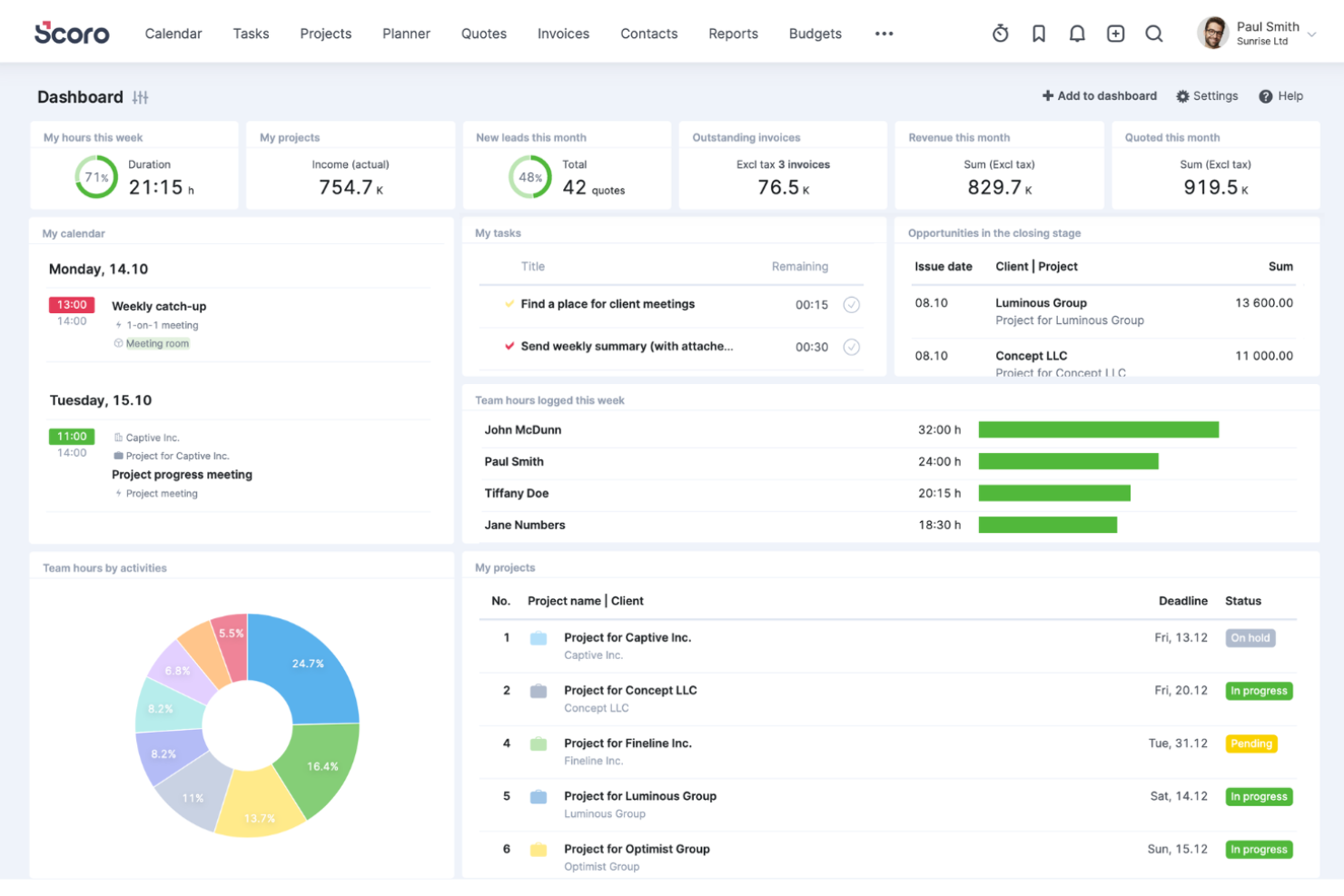
Scoro is a comprehensive work management software designed for different professional services, like marketing. It has a suite of tools to support the delivery of marketing projects from inception to billing.
Why I Picked Scoro
The platform is an all-in-one project management solution that provides control and visibility into every part of your marketing project, like quoting and invoicing, sales pipelines, customer accounts, resource planning, timelines, and task assignments. I liked that Scoro has an intuitive centralized dashboard that provides an overview of all marketing activities, allowing teams to track every campaign from beginning to execution.
Additionally, Scoro offers in-depth analytics and real-time reporting capabilities. Marketing managers can leverage these tools to assess campaign performance against KPIs and adjust strategies in real time.
Scoro Key Features
Scoro offers a variety of other tools that can further improve your team's marketing project management processes.
- Reporting and Analytics: Track and analyze profitability on a client, service, team, or project level with insights into agency performance and financials.
- Automation and Invoicing: Automate repetitive tasks and retainer invoicing to help your agency get paid faster and stay profitable.
- Collaboration Tools: Facilitate communication among team members through discussion threads and comments to keep everyone connected.
- Time and Calendar Management: Use built-in timers and a unified calendar to manage time tracking, meetings, and deadlines.
Scoro Integrations
Integrations include Google Calendar, HubSpot, Jira, Slack, Xero, QuickBooks, Zendesk, WooCommerce, Asana, Dropbox, PayPal, Expensify, Stripe, Mailchimp, Sage Intacct, Microsoft Exchange, and more. You can also connect to other apps through its Zapier integration.
Pros and Cons
Pros:
- Offers multi-currency and entity support
- Combines financials with project operations
- Links quotes directly to project plans
Cons:
- Customization in templates can be limited
- Interface may feel cluttered in deep use
New Product Updates from Scoro

Scoro Adds Time Mobile App and ELI Improvements
Scoro adds the Scoro Time mobile app for iOS/Android to track time anywhere and expands ELI with attachments, smarter filtering, and trigger-based actions. For more information, visit Scoro's official site.

Best for agencies & professional services

Productive is a well-rounded agency management software that gives you the tools and data you need to keep your agency and or professional services business running smoothly.
Danyon Togia, the Founder of the SEO agency Expert SEO, says Productive has been a great fit for his team. "Using Productive felt like finally having my internet, power, and gas bill all with one company," he says. It's made a big difference: "Having everything in one system meant less juggling, more focus, and a smoother workflow across every project for me and my team," he says.
Why I Picked Productive
Productive offers client and prospect management in the sales pipeline, which also lets you manage deal flow and get sales organized. The resource planning feature, time tracker, and task collaboration features help you make sure work is completed on time, bill clients accurately, and keep the team working together. You also get useful reports on profitability and costs to help with finance management, as well as real-time reports on margins, utilization, and individual employees’ or contractors’ history with the company and salary reports.
Productive Key Features
Productive also offers several features that can help you and your team improve your marketing project management processes.
- Task Management: You can streamlines task assignments and progress tracking so your team stays aligned with project goals.
- Client Portal: This provides a dedicated space for clients to view project updates and collaborate, which improves transparency and communication.
- Custom Dashboards: This lets you create personalized project data views and focus on the metrics that matter most.
- AI-Powered Insights: The artificial intelligence features offer predictive analytics and insights that help with proactive decision-making.
Productive Integrations
Integrations include Xero, QuickBooks, HubSpot, Jira, Slack, Zapier, Google Calendar, and Sage.
Pros and Cons
Pros:
- Flags projects trending off budget
- Lets you simulate staffing or budget changes
- Aligns delivery with financial tracking
Cons:
- Steep learning curve for full feature use
- Reporting depth can require setup
New Product Updates from Productive
Productive Adds Email and Calendar Integrations for Agents
Productive adds Gmail, Outlook, Google Calendar, and Outlook Calendar connectors for its AI agents. These integrations let agents manage emails and create calendar events directly within Productive. For more information, visit Productive’s official site.

Wrike
Best for creative review and approval workflows
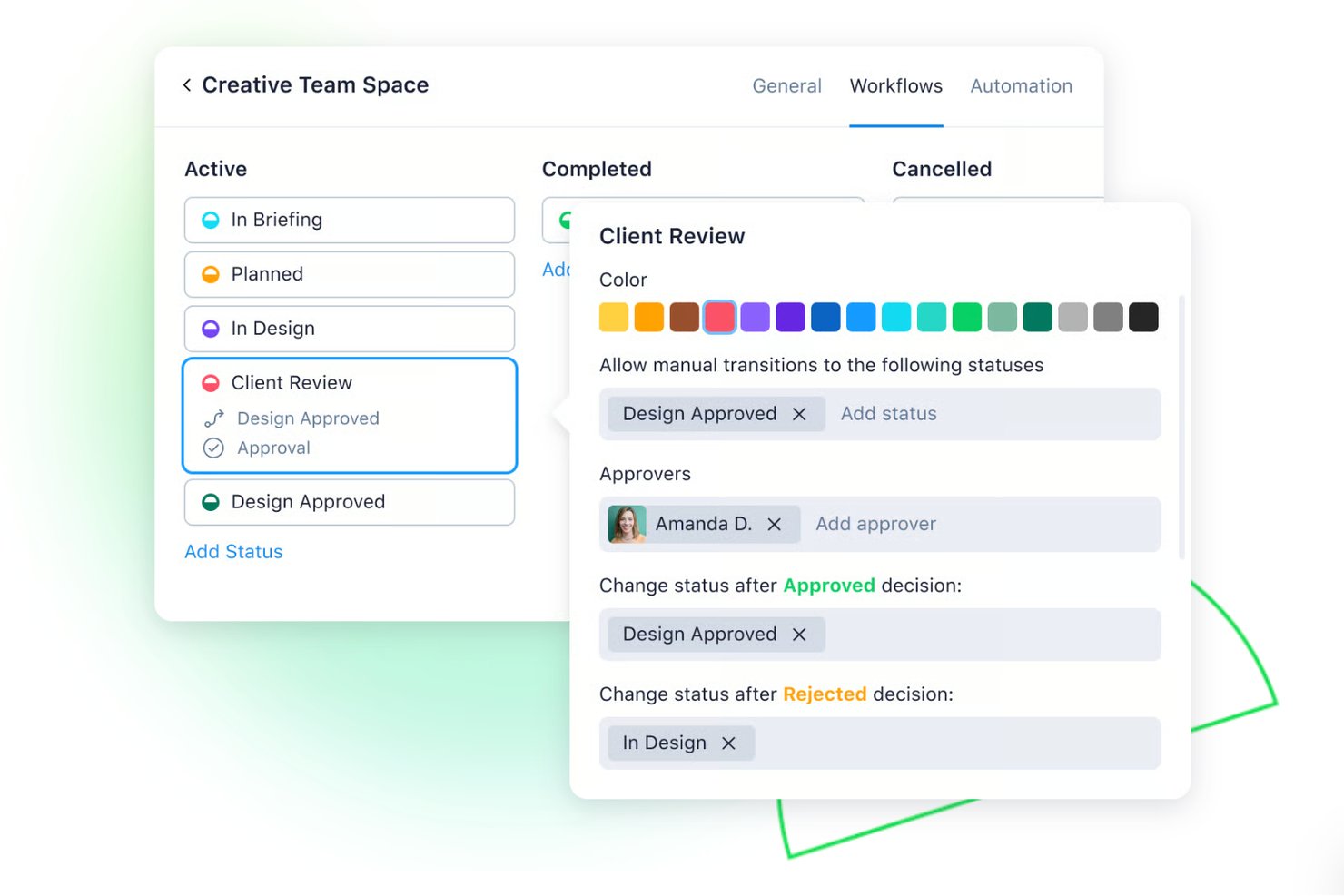
Wrike is a work management platform for marketing teams that combines project tracking, creative intake via request forms, visual proofing, multi-stage approval workflows, resource planning, and campaign calendar views.
Who Is Wrike Best For?
Wrike is a strong fit for marketing teams and agencies that run high-volume creative production and need structured intake, proofing, and approval workflows in one place.
Why I Picked Wrike
I picked Wrike as one of the best because it handles creative review and approval workflows more completely than most tools in this category. I specifically like how request forms capture structured briefs from internal teams or external agencies and route them directly into multi-stage approval chains, with status, approver decisions, and history all tracked in one place. On top of that, Wrike's proofing tool lets me mark up images, PDFs, and video files with inline comments and compare versions side by side, so feedback cycles stay connected to the actual deliverable rather than scattered across email threads.
Wrike Key Features
- Campaign calendar view: Display tasks and projects across multiple campaign layers on a shared calendar, with external sharing via public links.
- Workload charts: See team capacity by user or project over time in hours, percentages, or full-time equivalents, with a backlog box for unassigned work.
- Guest access: Bring agencies, freelancers, and external stakeholders into specific projects with controlled permissions and guest approvals, without requiring full licenses. Available from the Business plan.
- AI-generated project plans: Use Wrike's generative AI to produce task descriptions and full project plans from briefs or kickoff notes, with tasks, owners, and timelines populated automatically.
Wrike Integrations
Wrike connects with 400+ apps, with 60 results in its integrations directory, including HubSpot, Salesforce, Adobe Creative Cloud, Bynder, Mailchimp, Google Ads, Google Sheets, Slack, and Microsoft Teams. It also offers a REST API, webhooks, OAuth 2.0, and Wrike Integrate for custom connectivity.
Pros and Cons
Pros:
- Workload charts expose cross-project capacity
- Request forms route briefs into approval workflows
- Creative feedback stays tied to deliverables
Cons:
- No direct messages for stakeholder coordination
- Proofing and approvals require higher-tier plans
New Product Updates from Wrike

Wrike Redesigns Workspace Search With New Filters
Wrike introduces a redesigned Workspace Search interface with recent search shortcuts, item type and location filters, and parent-task context. These updates help users find relevant work items and navigate search results efficiently. For more information, visit Wrike’s official site.

Best for AI-powered marketing project workflows
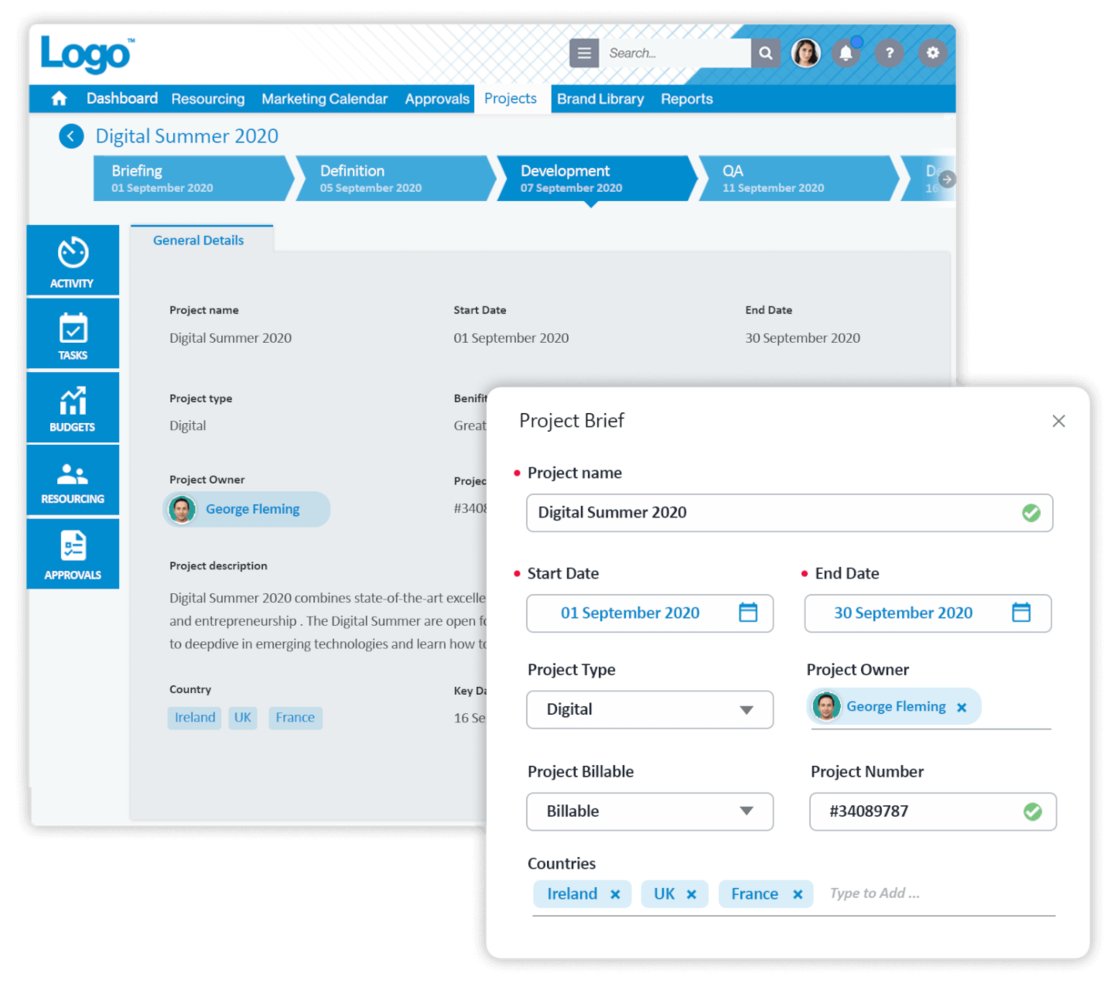
Screendragon is a highly configurable marketing project management software used and loved by Fortune 500 companies and global agencies like Kellogg’s, BP, The International Olympic Committee and McCann World Group.
I recently spoke with Gal Cohen, whose team uses Screendragon on their door repair and installation projects. "It brought all communication, tasks, and timelines into a single platform which has greatly enhanced the capacity of my team," he says. "The capability of having everything under one roof made it very easy to maintain order and deliver within the required deadlines," he explains.
Why I Picked Screendragon
Its AI-enhanced marketing workflows use automation to cut out repetitive tasks, speed up approvals, and simplify complex processes. This frees up creative and marketing teams to focus on higher-value work while keeping projects on track. Alongside its automation capabilities, Screendragon offers an easy-to-use, visual interface and robust end-to-end functionality. Teams also benefit from flexible customization options like branded UX, smart custom forms, personalized dashboards, and advanced permission levels—making it a strong fit for large, global organizations.
Additionally, task management allows for even more flexibility with visual Kanban boards, interactive Gantt charts and list views as options for interfaces.
Screendragon Key Features
Screendragon also offers several other features for marketing project management that cater to your team's needs.
- Customizable Dashboards: These let you personalize your reports and keep important metrics and project statuses front and center.
- Dynamic Forms: With this feature, you can create and modify forms to capture specific project data, and easily gather and analyze information tailored to your team's requirements.
- AI Resource Forecasting: This feature helps you predict and allocate resources effectively and minimize the risk of underutilization or overloading team members.
- Template Library: You get access to over 100 templates and samples that provide your team with a head start on projects, help maintain consistency, and save time on setup.
Screendragon Integrations
Integrations include leading ERP systems such as SAP and PeopleSoft. It offers thousands of integrations with popular apps through Zapier like Jira, Trello, Slack, Box, Google Drive, Office 365 and Microsoft Dynamics. It also has an open API that lets you set up custom integrations with any system.
Pros and Cons
Pros:
- Links creative reviews to project flows
- Enforces governance through audit trails
- Automates workload balancing across team members
Cons:
- Some modules may be overkill for small teams
- Setup and implementation require deep planning

Kantata
Best for full lifecycle service delivery

Kantata is a work management solution tailored to the needs of agencies and professional services teams. It helps you keep campaigns, client projects, and resources aligned in one place so your team can deliver work on time, on budget, and at scale.
I recently spoke with Cal Singh, the Head of marketing and partnerships at Equipment Finance Canada, about his team's use of Kantata. "We specifically used Kantata for keeping all the moving pieces of a marketing project tidy in one place," he says. This had a positive impact on projects and team morale: "We can see tasks, deadlines and team workloads together, making managing campaigns and partnerships (and our stress levels) clear and manageable," he explains.
Why I Picked Kantata
Kantata stood out to me because it unifies your projects, resources, and financials in a single system, supports the entire project lifecycle, and gives you a clear view of profitability and performance.
Its people-centric resource planning tools also make sure your designers, copywriters, and account managers are allocated effectively based on skill and availability, reducing burnout and improving outcomes. With real-time visibility into campaign progress, budget burn, and portfolio health, plus built-in business intelligence dashboards, your team can track productivity and client satisfaction while staying collaborative.
Kantata Key Features
Kantata offers several additional features that cater to marketing project management needs
- Project Templates: You can simplify project setup with customizable templates that are designed for various marketing activities, maintain consistency, and save time.
- Task Management: This lets you organize and prioritize tasks with ease, so you can provide your team with clear direction and improve overall productivity.
- Collaboration Tools: You can improve communication among team members and clients and foster a collaborative environment that drives project success.
- Reporting and Analytics: You can access detailed reports and analytics to monitor project performance, easily adjust strategies, and meet objectives.
Kantata Integrations
Integrations include Slack, Sage, Quickbooks, Expensify, BambooHR, NetSuite, Jira, Salesforce, Xero, and Google Workspace.
Pros and Cons
Pros:
- Supports multiple currencies and entities
- Unifies planning, delivery, and finance
- Detects project risk ahead of time
Cons:
- Customization complexity can increase with scale
- Implementation may require outside support
New Product Updates from Kantata

Kantata Adds Access Group Change History
Kantata adds Access Groups History, letting account administrators track changes to group details, membership, and permissions in Recent History. The update also makes these events available through the Subscribed Events API for broader monitoring. For more information, visit Kantata’s official site.
 .

Air
Best for AI-driven asset search

Air is a marketing project management platform built to centralize creative operations, helping teams manage, organize, and scale campaigns more efficiently. It combines digital asset management, workflow automation, and approval tracking into one visual workspace, making it easier for marketing teams to find, share, and deliver content on brand and on time.
Why I Picked Air
I picked Air because it gives marketing teams a highly visual workspace to manage design files, videos, and documents. The AI-driven search stood out to me, as it lets you find assets by color, object, or even spoken dialogue, which is a big advantage when you’re managing thousands of campaign materials.
I also liked Air’s version stacking, which helps you keep every iteration of creative work organized without losing original files. For marketing teams juggling multiple campaigns, Air’s ability to connect collaboration, approvals, and content access in one place makes it a strong fit.
Air Key Features
Air offers several other features that teams working on marketing projects can make use of.
- Collaborative Workspaces: This provides a shared space where ideas and feedback can flow freely and lets your team members collaborate in real-time.
- Automated Workflows: You can streamline repetitive tasks by setting up automated processes that make sure projects move smoothly from one stage to the next without manual intervention.
- Custom Permissions: This lets you control who sees and edits what by setting custom permissions so sensitive information is only accessible to the right team members.
- Integrated Feedback Tools: You can gather and manage feedback directly on visual assets and reduce the back-and-forth typically associated with email chains and meeting notes.
Air Integrations
Integrations include HubSpot, Google Sheets, ClickUp, Shopify, Asana, ChatGPT (OpenAI), Atom, Slack, monday.com, Gmail, Dropbox, and Instagram for Business.
Pros and Cons
Pros:
- Facial recognition improves asset organization
- Version stacking maintains project consistency
- AI-driven search enhances content findability
Cons:
- Limited customization options for project workflows
- Software occasionally experiences stability issues
New Product Updates from Air
Air Introduces Workspace Agent Automations
Air adds scheduled automations, reusable skills, and run history tracking to its workspace agent. These features help teams automate recurring tasks and manage workflows without manual intervention. For more information, visit Air’s official site.
ClickUp
Best robust free plan
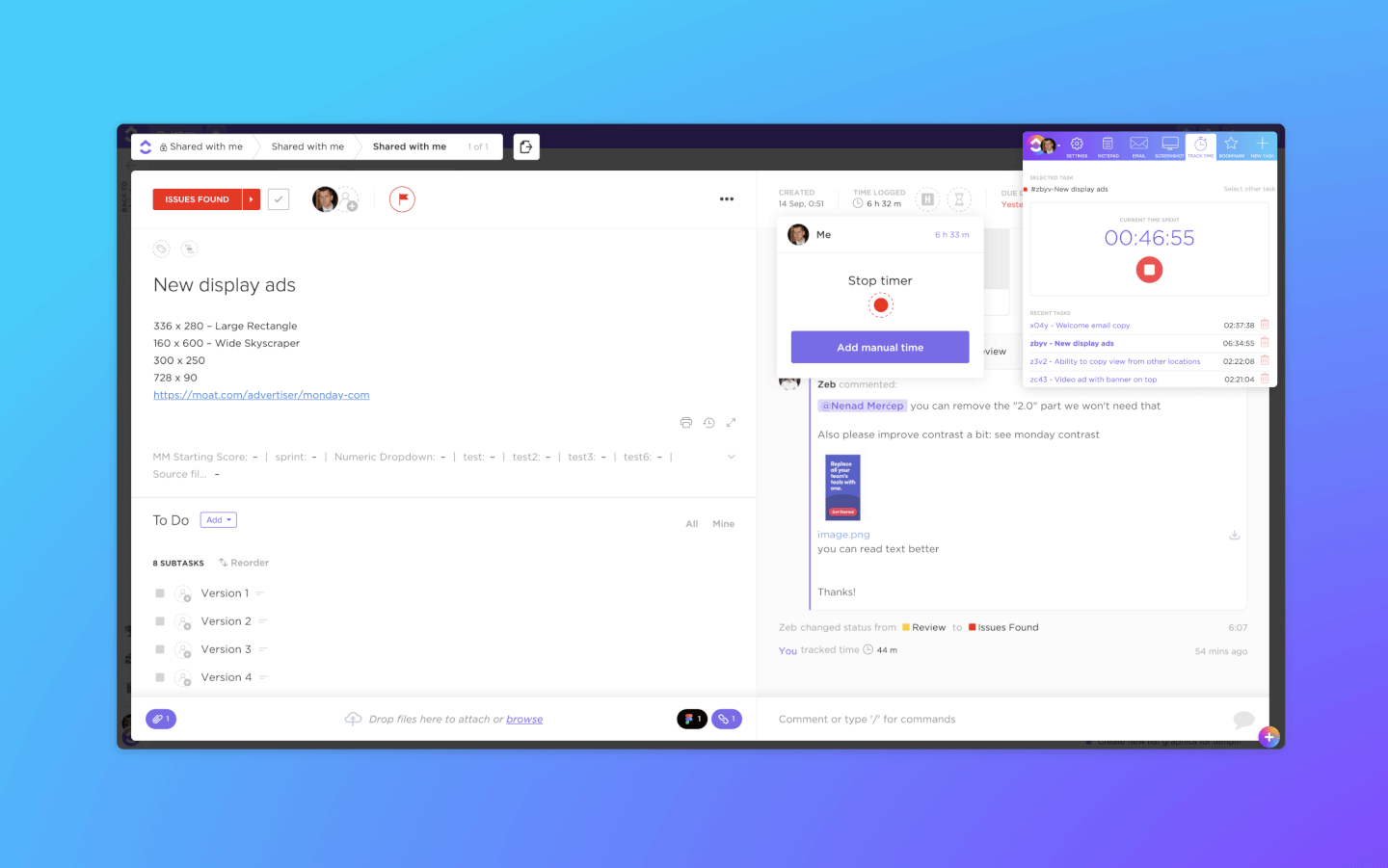
ClickUp is a marketing project management software for managing marketing tasks, campaigns, docs, and clients in one place. The software makes it easy to collaborate with your team, work with clients & contractors, connect your data, and create dashboards to gain data-driven insights from any workflow.
I recently spoke with Maryse Marius, a project manager and ClickUp expert. According to her, "for marketing, ClickUp's tagging and categorization tools help keep projects organized...I feel organized even when juggling multiple clients and deadlines."
Why I Picked ClickUp
Its highly customizable views allow you to visualize marketing campaigns and accounts on lists, Kanban boards, Gantt charts, calendars, and more. Task management features include task checklists, subtasks, and task templates, as well as the ability to filter, sort, search for, easily reorder, and view tasks in the manner most convenient for the team.
Additionally, it includes a native time tracker that your team can use to report on their work, and reporting features with the ability to create custom dashboards, and six built-in report types for team reporting. You can also design custom forms to collect client info, get approval, and distribute information. Custom statuses and automation enable you to establish an efficient intake system for affiliate sign-ups, client onboarding, co-marketing collaboration requests, and more.
ClickUp also features proofing and annotation capabilities for proofing, marking up, and approving files. You can assign comments for requested changes and approve them in real time.
ClickUp Key Features
ClickUp also offers several other features that can help you and your team better manage your marketing projects.
- Time Tracking: This lets your team monitor how much time is spent on various tasks and helps you optimize productivity and meet project deadlines.
- Goal Setting: ClickUp lets you to set, track, and achieve marketing objectives to maintain alignment with your broader business strategy.
- Task Prioritization: You can easily organize tasks by priority and make sure the most critical marketing activities are addressed first.
- Templates: ClickUp provides a variety of pre-built templates for marketing projects that let you quickly set up campaigns and standardize processes across your team.
ClickUp Integrations
Integrations include Slack, G Suite, and Dropbox, as well as over 1,000+ integrations through Zapier.
Pros and Cons
Pros:
- Versioning gives safety nets for docs
- Scaling later doesn’t break existing setup
- Custom views let you see work your preferred way
Cons:
- Complexity of automations & workflows can grow fast
- Some guest permissions restricted
New Product Updates from ClickUp
ClickUp Adds List Automations, Time Off Scheduling, and Org Charts
ClickUp adds template-based List automations, personal time off scheduling, a unified picker, automatic task date syncing, and Org Charts. These updates help teams automate project setup, manage availability, and organize work. For more information, visit ClickUp’s official site.
Hive
Best for various project views

Hive is a project management tool and collaboration platform that powers companies like Starbucks, Uber, WeWork, and IBM. Hive is the world's first community built software, with a roadmap comprised entirely of customer-voted features.
Why I Picked Hive
With flexible project views, dependencies, and thousands of integrations, Hive streamlines your work in one centralized platform and offers much more than just Gantt charts. Used by teams of varying sizes, from 10 people to 1,000, Hive is a great option for a marketing team with for a diverse range of work styles.
Hive’s time-tracking, analytics, and flexible view capabilities allow for a transparent understanding of other team member’s work and upcoming projects. Hive also has full email integrations within their project management tool, which allows you to send and receive Gmail and Outlook messages from the app. Choose Hive if you’re in the market for a well-laid-out, comprehensive tool that can be scaled up or down based on team needs.
Hive Key Features
Hive offers a suite of additional features that are tailored for marketing teams.
- Proofing & Approvals: You can streamline the design feedback process with tools that centralize comments and revisions.
- Goals: This lets you set and visualize project milestones to make sure your marketing campaigns stay on track.
- Forms: You can collect feedback and client requests effortlessly, which facilitates better communication and project alignment.
- Resourcing: This lets you manage team assignments and visualize availability to maintain optimal resource allocation for your marketing projects.
Hive Integrations
Integrations include over a thousand third-party apps but requires a paid plan through Zapier to do so.
Pros and Cons
Pros:
- Provides project templates for consistent campaign execution
- Built-in client portals for improved communication and transparency
- Provides customizable workflows to fit diverse marketing needs
Cons:
- Complexity in setup requires onboarding time
- Limited customization in certain dashboard elements

Best for campaign goals and milestones
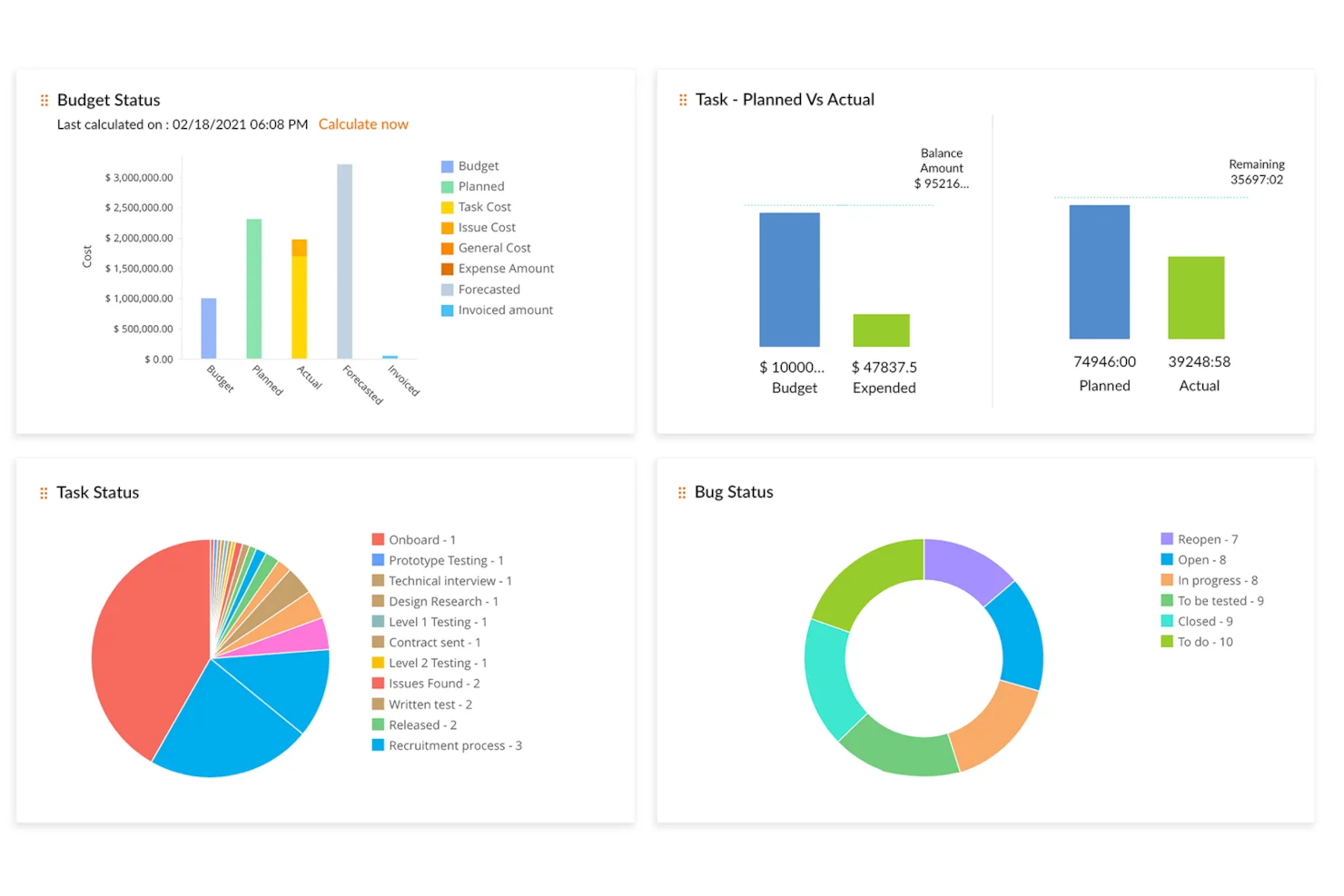
Zoho Projects is a cloud-based project management platform that's well-equipped for marketing teams. It has customizable features like individual views, custom project fields, project templates, and a reporting dashboard.
I spoke with Martin Cox, Director at the agency Postino, about how he and his team use this tool. "The software itself is fabulous—it is thorough, well put together, and seriously capable as a project management solution," he says. He mentioned a steep learning curve, but says it's a great tool "if you can get past this."
Why I Picked Zoho Projects
Marketing teams can break down their campaigns into smaller projects, tasks, and subtasks, which can be defined and assigned to the appropriate team members. Milestones and goals help team members see the bigger picture and track the progress and impact of their larger initiatives. Users can design visual workflows with the drag-and-drop Blueprints feature which can be saved and re-used for future projects.
The software's features cover project planning, scheduling, budgeting, and reporting. Marketing teams can use these tools to keep their projects and campaigns within budget, monitor their progress, and track each team member's time. Document collaboration allows marketing teams to easily organize and work on files with version control, notes, and revision history. The dashboard has pre-built and custom reporting abilities, allowing users to track the KPIs that are most important for them.
Zoho Projects Key Features
There are several other features of Zoho Projects that cater to the specific requirements of marketing teams.
- Integrations: Zoho Projects can connect seamlessly to other Zoho applications like CRM and analytics tools, which helps improve your overall project management process.
- Cloud Storage: This centralizes documents for easy access and organization and makes sure your team can collaborate effectively without the hassle of disorganized files.
- Custom Views and Dashboards: You can personalize your workspace for efficient task management and get a tailored project overview that suits your team's unique workflow.
- Recurring Tasks: This makes scheduling your recurring marketing activities easy, lets you automate repetitive tasks, and frees up your team to focus on more strategic initiatives.
Zoho Projects Integrations
Integrations include Box, Dropbox, GitHub, Google Workspace, Microsoft Teams, Slack, and Zendesk.
Pros and Cons
Pros:
- Resource workload insights built in
- Automated task transitions via blueprint rules
- Milestone visibility baked into project plans
Cons:
- AI features may need setup or configuration
- Some advanced features require higher plans
New Product Updates from Zoho Projects
Zoho Projects Adds CodeX Scripts for Custom Modules
Zoho Projects now supports CodeX Scripts for custom modules, enabling conditional logic and rules for creating, updating, and deleting records. For more information, visit Zoho Projects' official site.
 .
Diğer Pazarlama Proje Yönetimi Yazılımları
https://www.youtube.com/watch?v=oICi7bL1ZAkYukarıda aradığınızı bulamadıysanız, işte birkaç sağlam seçenek daha.
- Quickbase
For code-free automations
- Enji
For solopreneurs and small business marketing
- Miro
For visual collaboration
- Kintone
For building custom marketing apps
- Workzone
For intake, proofing and reviews
- Teamwork.com
For project visibility
- Adobe Workfront
For project workflows
- Bonsai Agency Software
For end-to-end agency projects
- Basecamp
For project boards
- Planview AdaptiveWork
For digital marketing
- Function Point
For usability and user experience
- Ravetree
For all-in-one marketing operations
- Workamajig Platinum
For teams of all sizes
- Height
For client collaboration
- GoodDay
For diverse project management methodologies
- RoboHead
For feedback collection features


En iyi 5 pazarlama proje yönetimi aracı hakkındaki videomuzu izleyin!


İlgili Proje Yönetimi Yazılımı İncelemeleri
Hâlâ aradığınızı bulamadıysanız, test edip değerlendirdiğimiz diğer ilgili araçlara göz atın:
- Proje Yönetimi Yazılımı
- Video Prodüksiyonu Proje Yazılımı
- Kaynak Yönetimi Yazılımı
- İş Akışı Otomasyonu Yazılımı
- Zaman Takibi Yazılımı
- Görev Yönetimi Yazılımı
- İş Birliği Araçları
- Halkla İlişkiler Proje Yönetimi Yazılımı
- SEO Proje Yönetimi Yazılımı
How I Evaluate Marketing Project Management Software
I evaluate tools across two layers: baseline requirements like campaign planning and creative proofing, and the differentiators that distinguish one option from another.
Core Functionality (Table Stakes For This List)
When I'm selecting tools for my list, I rank each one on a scale from 0 (does not offer the functionality) to 5 (excels in this area) for each core functionality listed below. Then, I calculate the tool's total score as a percentage. Each tool needs to achieve a minimum total score of 65% to be considered for inclusion.
- Campaign Planning & Scheduling: I check whether you can map a multi-channel campaign across Gantt, calendar, and board views with dependencies and milestones between tasks.
- Creative Workflow & Proofing: The review cycle matters—I look for visual annotations, version comparison, and structured approval routing for assets like ads and landing pages.
- Marketing Resource Management: Balancing workloads across designers, copywriters, and strategists requires capacity views, so I evaluate how each tool surfaces utilization data.
- Digital Asset Management: Teams juggle hundreds of files per campaign. I look for centralized asset libraries with versioning, tagging, and permissions beyond basic file attachments.
- Marketing Stack Integrations: A tool should connect to your creative apps, CRM, MAP, and social platforms—tools like Asana, monday.com, and Wrike each handle this differently.
- Marketing Reporting & Dashboards: I evaluate whether dashboards go beyond task completion to cover timeline health, team utilization, and campaign-level KPIs in one view.
Once I have a list of tools that meet the criteria, I consider what sets each platform apart.
Differentiating Factors (What Sets Vendors Apart)
Here's how I compare and contrast different vendors:
Standout Features
Intake automation is a big differentiator. When a product manager submits a campaign request through a structured form that auto-generates tasks and routes them to the right team, it cuts the back-and-forth that slows down kickoffs. I also evaluate AI capabilities—some tools now draft briefs or summarize feedback threads, which saves real time during review cycles. Stakeholder portals matter too, especially for teams fielding requests from sales or executives who need project visibility without a full license.
Beyond Features
I consider how well a tool fits your specific marketing team structure. A five-person content team has very different needs than a 50-person in-house agency running concurrent campaigns across brands. Time-to-value matters too—I look for prebuilt marketing templates like campaign launch playbooks and editorial calendars that get teams running fast. Pricing transparency rounds out my evaluation, particularly how vendors handle reviewer and stakeholder seats, since marketing teams typically have far more collaborators than licensed users.
Pazarlama Proje Yönetimi Yazılımı Nasıl Seçilir?
Pazarlama proje yönetimi yazılımı için kısa bir liste oluştururken, deneme yaparken ve seçim yaparken aşağıdakileri göz önünde bulundurun:
- Hangi sorunu çözmeye çalışıyorsunuz? Pazarlama proje yönetimi yazılımının sunması gereken özellikleri ve işlevleri netleştirmek için, öncelikle doldurmaya çalıştığınız pazarlama proje yönetimi özellik açığını belirleyin.
- Kimlerin kullanması gerekecek? Maliyeti ve gereksinimleri değerlendirmek için yazılımı kimlerin kullanacağını ve kaç lisansa ihtiyaç duyacağınızı göz önünde bulundurun. Erişime yalnızca pazarlama ekibinin mi yoksa kuruluşun tamamının mı ihtiyaç duyacağını değerlendirmeniz gerekir. Bu netleştiğinde, herkes için kullanım kolaylığına mı yoksa uzman kullanıcılarınız için hıza mı öncelik verdiğinizi düşünmeye değer.
- Hangi diğer araçlarla birlikte çalışması gerekiyor? Hangi araçları değiştireceğinizi, hangi araçları kullanmaya devam edeceğinizi ve muhasebe, CRM veya İK yazılımı gibi hangi araçlarla entegrasyon kurmanız gerektiğini netleştirin. Bu, Salesforce ile entegre olan proje yönetimi yazılımı aramak kadar spesifik olabileceği gibi genel olarak CRM içeren proje yönetimi yazılımı aramak kadar genel de olabilir. Araçların birbiriyle entegre olması gerekip gerekmediğine veya alternatif olarak birden fazla aracı tek bir bütünleşik dijital pazarlama proje yönetimi aracıyla değiştirip değiştiremeyeceğinize karar vermeniz gerekir.
- Hangi sonuçlar önemli? Başarılı sayılabilmesi için yazılımın sunması gereken sonucu, hangi yetkinliği kazanmak istediğinizi, neyi geliştirmek istediğinizi ve başarıyı nasıl ölçeceğinizi göz önünde bulundurun. Örneğin sonuç, performans hakkında daha fazla görünürlük elde etme olanağı olabilir.
- Kuruluşunuz içinde nasıl çalışır? Yazılım seçimini iş akışlarınız ve uygulama metodolojinizle birlikte değerlendirin. Nelerin iyi çalıştığını ve sorunlara neden olan alanları inceleyin. Her işletme farklıdır; bir aracın popüler olmasına dayanarak kuruluşunuzda da işe yarayacağını varsaymayın.
Pazarlama Proje Yönetimi Yazılımındaki Trendler
Bu trendler yalnızca yeniliklerin hızlı ilerleme hızını göstermekle kalmaz, aynı zamanda pazarlama ekiplerinin gelişmiş işlevsellik ve verimlilik aradığı alanları da öne çıkarır.
- Artırılmış gerçeklik (AR) ve sanal gerçeklik (VR) kullanımının artması: Daha fazla pazarlama proje yönetimi aracı, sürükleyici planlama ve görselleştirme deneyimleri sunmak amacıyla artırılmış gerçeklik ve sanal gerçeklik teknolojilerini entegre ediyor. Bu durum, pazarlama ajanslarına yönelik proje yönetimi yazılımlarında daha ilgi çekici ve deneyimsel planlama süreçlerine doğru bir geçiş olduğunu gösteriyor.
- Sürdürülebilirlik izleme özellikleri: Kurumsal sosyal sorumluluğa verilen önemin artmasıyla birlikte, en iyi pazarlama proje yönetimi araçlarından bazıları ekiplerin kampanyalarının sürdürülebilirliğini izlemesine yardımcı olan özellikler içeriyor. Buna karbon ayak izlerinin, sürdürülebilir kaynak kullanımının ve etik tedarikin izlenmesi de dahil. Giderek daha fazla reklam ajansı aracı, pazarlama faaliyetlerinin çevresel etkisi hakkında içgörüler sunuyor.
- Gelişmiş güvenlik ve şeffaflık için blok zinciri: Pazarlama proje yönetimi platformları, özellikle bütçeleme ve harcama gibi alanlarda güvenlik ve şeffaflığa yardımcı olmak için blok zinciri teknolojisi sunuyor. Pazarlama için kullanılan bu proje yönetimi araçları, blok zincirinden yararlanarak işlemlerin ve proje değişikliklerinin üzerinde oynama yapılamayan kayıtlarını sağlayabilir; bu da paydaşlar arasında güven oluşturur ve pazarlama verilerini güvende tutar.
- Pazarlama planlaması için özel yapay zekâ asistanları: Artık birçok araç, pazarlama proje yönetimine göre uyarlanmış özel yapay zekâ asistanları sunuyor. Bu asistanlar kişiselleştirilmiş rehberlik sağlıyor, görevlerin önceliklendirilmesini otomatikleştiriyor ve veri analizine dayalı içgörüler sunuyor.
- E-ticaret platformlarıyla entegrasyon: E-ticaret perakende ortamına hâkim olmaya devam ederken, pazarlama proje yönetimi araçları büyük e-ticaret platformlarıyla doğrudan entegrasyonları giderek daha fazla sunuyor. Bu sayede çevrim içi satış kanallarıyla doğrudan bağlantılı kampanyaları sorunsuz bir şekilde planlayabilir, yürütebilir ve izleyebilirsiniz. Bu durum, pazarlama çalışmalarının satış sonuçlarıyla yakından uyumlu hâle getirilmesine yönelik artan ihtiyacı yansıtıyor.
Pazarlama Proje Yönetimi Yazılımı Nedir?
Pazarlama proje yönetimi yazılımı, pazarlama ekiplerinin projelerini ve kampanyalarını planlamasına, yürütmesine ve izlemesine yardımcı olan bir araçtır. Görev atama, kaynak tahsisi ve ilerleme takibi gibi proje yönetimi özelliklerini; pazarlama takvimleri, kampanya şablonları ve pazarlama ile marka materyalleri için varlık yönetimi gibi pazarlama ekiplerinin kullandığı özelliklerle bir araya getirir.
Proje yönetimi yazılımı, iş yüklerini daha iyi yönetmenize, son teslim tarihlerini karşılamanıza ve pazarlama hedeflerine ulaşmanıza yardımcı olan bir pazarlama ajansları için yazılım türüdür; bu da hedef kitle üzerinde anlamlı bir etki yaratan daha başarılı kampanyalar anlamına gelir.
Pazarlama Proje Yönetimi Yazılımının Özellikleri
Pazarlama proje yönetimi yazılımı seçerken aşağıdaki temel özelliklere dikkat edin:
- Görev yönetimi: Ekibinizin neyin ne zaman tamamlanması gerektiğini bilmesi için görevleri düzenleyebilir, atayabilir ve önceliklendirebilirsiniz. Bu, herkesin yolunda kalmasına ve son teslim tarihlerine uymasına yardımcı olur.
- İş birliği araçları: Siz ve ekibiniz gerçek zamanlı olarak iletişim kurabilir, güncellemeleri paylaşabilir ve belgeler üzerinde birlikte çalışabilirsiniz; böylece herkes bağlantıda kalır ve projeler sorunsuz bir şekilde ilerler.
- Kaynak tahsisi: Bu özellik, kaynakları (ör. çalışanlar, zaman veya bütçeler) izlemenize ve atamanıza, darboğazlardan kaçınmanıza ve ekibinizin yeteneklerinden en iyi şekilde yararlanmanıza olanak tanır.
- Zaman takibi: Görevlerin ve projelerin ne kadar sürdüğünü takip edebilirsiniz; bu da geleceğe yönelik planlama yapmanıza yardımcı olur ve ekibinizin nerelerde daha verimli çalışabileceğini görmenizi sağlar.
- Dosya paylaşımı ve depolama: Proje dosyalarını yükleyebilir, depolayabilir ve paylaşabilirsiniz; böylece herkes en güncel sürümlere kolayca erişebilir.
- Proje şablonları: Projeleri hızlıca başlatmak, iş akışlarınızı standartlaştırmak ve her seferinde her şeye yeniden başlamak zorunda kalmamak için hazır şablonları kullanabilirsiniz.
- Takvim ve planlama: Toplantıları, son teslim tarihlerini ve kilometre taşlarını paylaşılan bir takvimde merkezileştirerek tüm ekibin yaklaşan gelişmeleri görmesini ve buna göre plan yapmasını sağlayabilirsiniz.
- Bütçe takibi: Maliyetleri kaydederek, bütçe aşımlarını erkenden fark ederek ve harcamalar konusunda akıllı kararlar alarak proje giderlerini izleyebilir ve bütçe dahilinde kalabilirsiniz.
Pazarlama Proje Yönetimi Yazılımındaki Yaygın Yapay Zekâ Özellikleri
Yukarıda listelenen standart pazarlama proje yönetimi yazılımı özelliklerinin yanı sıra, bu çözümlerin çoğu aşağıdaki gibi yapay zekâ özelliklerini de içeriyor:
- Otomatik görev önceliklendirme: Son teslim tarihlerini, iş yükünü ve bağımlılıkları analiz etmek, ardından önemli işlerin ön planda kalması için görevleri otomatik olarak önceliklendirmek üzere yapay zekâyı kullanabilirsiniz.
- Tahmine dayalı proje zaman çizelgeleri: Gerçekçi beklentiler belirleyebilmeniz için geçmiş performansı ve mevcut ilerlemeyi inceleyerek tamamlanma tarihlerini tahmin etmek üzere yapay zekâyı kullanabilirsiniz.
- Akıllı kaynak optimizasyonu: Bu yapay zekâ aracı, her proje için en iyi kaynak tahsisini önermek üzere ekibinizin becerilerini, kapasitesini ve geçmiş faaliyetlerini inceleyebilir.
- İçerik önerisi ve optimizasyonu: Bu yapay zekâ özelliği, popüler olan veya iyi performans gösterdiği kanıtlanmış unsurlara dayanarak pazarlama kampanyaları için başlıklar, anahtar kelimeler veya tasarım ögeleri önerebilir.
- Otomatik raporlama: Proje sağlığı hakkında anında içgörüler sunan, kolay anlaşılır raporlar oluşturmak ve temel metrikleri bir araya getirmek için yapay zekâyı kullanabilirsiniz.
Pazarlama Proje Yönetimi Yazılımının Faydaları
Aşağıda, en iyi pazarlama yönetimi yazılımının kullanıcılara ve kuruluşlara sunduğu beş temel faydayı açıklıyorum:
- Gelişmiş iş birliği: Ekip üyeleri gerçek zamanlı olarak iletişim kurabilir ve iş birliği yapabilir. Pazarlama için bir proje yönetimi aracı kullanarak iletişim engellerini ortadan kaldırır, fiziksel konumlarından bağımsız olarak herkesin aynı anlayışta olmasını ve birlikte çalışmasını sağlarsınız.
- Artan üretkenlik: Otomasyon ve kolaylaştırılmış süreçler, ekip üyelerinin daha stratejik ve yaratıcı görevlere odaklanması için zaman kazandırır; bu da kuruluş genelinde üretkenliği ve verimliliği artırır.
- Geliştirilmiş proje görünürlüğü: Gerçek zamanlı panolar ve raporlama özellikleri sayesinde paydaşlar proje ilerlemesine ilişkin kapsamlı bir genel bakış elde eder. Bu, hızlı bir şekilde bilinçli kararlar almanıza, gerektiğinde stratejileri düzenlemenize ve projelerin son teslim tarihlerini ve hedefleri karşılayacak şekilde ilerlediğinden emin olmanıza olanak tanır.
- Daha iyi kaynak yönetimi: Yazılım, bütçeler, zaman ve personel dahil olmak üzere kaynakları daha iyi tahsis etmenize ve izlemenize olanak tanır. Etkili kaynak yönetimi, kuruluşların kaynak kullanımını optimize etmesine, israfı azaltmasına ve projelerin bütçe kısıtları dahilinde tamamlanmasını sağlamasına yardımcı olur.
- Ölçeklenebilirlik: Pazarlama yönetimi proje yazılımı işletmenizle birlikte büyüyebilir ve zaman içinde daha fazla kullanıcıyı, projeyi ve karmaşıklığı destekleyebilir. Bu, işletmeniz büyüdükçe sistemi kullanmaya devam etmenize ve maliyetli ve zaman alıcı yazılım değişikliklerinden veya yükseltmelerinden kaçınmanıza olanak tanır.
Pazarlama Proje Yönetimi Yazılımının Maliyetleri ve Fiyatlandırması
İşte bilinçli bir karar vermenize yardımcı olacak yaygın plan seçeneklerinin dökümü:
Pazarlama Proje Yönetimi Yazılımları için Plan Karşılaştırma Tablosu
| Plan Türü | Ortalama Fiyat | Yaygın Özellikler |
|---|---|---|
| Ücretsiz | $0 | Sınırlı sayıda kullanıcı için erişim, temel proje yönetimi özellikleri, sınırlı depolama alanı, topluluk desteği |
| Temel | $10-20 kullanıcı başına/ay | Daha fazla kullanıcı için erişim, geliştirilmiş proje yönetimi araçları, diğer araçlarla entegrasyonlar, temel raporlama özellikleri, e-posta desteği |
| Profesyonel | $20-50 kullanıcı başına/ay | Gelişmiş proje yönetimi özellikleri, özelleştirilebilir panolar ve raporlar, iş birliği araçları, öncelikli destek, artırılmış depolama alanı |
| Kurumsal | Özel fiyatlandırma | Kuruluşun büyüklüğüne ve ihtiyaçlarına uyacak şekilde özelleştirilebilir, gelişmiş güvenlik özellikleri, özel hesap yöneticisi, işe alıştırma ve sürekli eğitim, sınırsız depolama ve entegrasyonlar |
Pazarlama Proje Yönetimi Yazılımları Hakkında Sıkça Sorulan Sorular
Bu konu hakkında sıkça sorulan soruların yanıtlarını bulun.
Pazarlama proje yönetimi yazılımı ekibimin daha iyi iş birliği yapmasına nasıl yardımcı olabilir?
Pazarlama proje yönetimi yazılımı, iletişimi, dosyaları ve geri bildirimleri tek bir platformda merkezileştirerek ekibinizin iş birliği yapmasına yardımcı olur. Uygulamalar arasında sürekli geçiş yapmak zorunda kalmadan görevler atayabilir, güncellemeleri paylaşabilir ve yaratıcı varlıklar hakkında geri bildirim verebilirsiniz. Bildirimler ve paylaşılan takvimler herkesin uyum içinde kalmasını sağlar ve iletişim kopukluklarını azaltır.
Çoğu araç yorum dizileri, onay iş akışları ve belge sürümleme gibi özellikler sunar; böylece ekibiniz, ekip uzaktan çalışsa bile verimli bir şekilde birlikte çalışabilir.
Pazarlama proje yönetimi araçları diğer pazarlama platformlarıyla (CRM, e-posta, DAM gibi) entegre olabilir mi?
Evet, çoğu pazarlama proje yönetimi aracı CRM’ler, e-posta pazarlama araçları ve dijital varlık yönetimi sistemleri gibi popüler platformlarla entegre olabilir. Bu sayede kişileri senkronize edebilir, pazarlama kampanyası planlarınıza göre görev oluşturmayı otomatikleştirebilir ve proje panonuzdan ayrılmadan yaratıcı varlıklara erişebilirsiniz.
Bir araç seçmeden önce entegrasyon listesini kontrol edin. Doğrudan bağlantı mevcut değilse özel entegrasyonlar oluşturmak için Zapier gibi araçları da kullanabilirsiniz.
Pazarlama ekibimi yeni proje yönetimi yazılımına alıştırmanın en iyi yolu nedir?
Ekibinizi yeni yazılıma alıştırmak için, ekibinizin en çok kullanacağı özellikler hakkında kısa bir eğitim oturumu veya video anlatımı sunarak başlayın. Ekip üyelerinin aracı uygulamalı olarak görmesi için ilk canlı projenizi birlikte oluşturun. Basit görevler atayın ve soruları teşvik edin.
Başvuru için kılavuzlar veya kısa başvuru dokümanları paylaşın. Sürekli destek sağlamak ve daha hızlı geri bildirim veya net teslim tarihleri gibi başarıları öne çıkarmak, ekibinizi yeni platformu benimsemeye motive edebilir.
Pazarlama proje yönetimi yazılımını kullanarak kampanya performansını ve teslim tarihlerini nasıl takip ederim?
Pazarlama kampanyalarınızı başlangıçtan sona kadar takip etmek için proje panoları, zaman çizelgeleri ve özelleştirilebilir raporlar gibi pazarlama proje yönetimi yazılımı özelliklerini kullanabilirsiniz.
Her aşama için net kilometre taşları ve teslim tarihleri belirleyin. Birçok araç, KPI’ları veya metrikleri doğrudan projelere eklemenize olanak tanır; böylece performansı gerçek zamanlı olarak izleyebilirsiniz. Otomatik hatırlatıcılar ve ilerleme çubukları, olası gecikmeleri erkenden fark etmenize yardımcı olur.
Hangi pazarlama proje yönetimi araçları uzaktan veya dağınık ekipler için uygundur?
Birçok pazarlama proje yönetimi aracı, uzaktan ve dağınık ekipler göz önünde bulundurularak tasarlanmıştır. Gerçek zamanlı sohbet, video entegrasyonu, dosya paylaşımı ve herhangi bir cihazdan bulut tabanlı erişim gibi özellikleri arayın. Zaman dilimi yönetimi, eşzamansız iletişim ve mobil uygulamalar sunan araçlar da uzaktan çalışan ekiplerin bağlantıda ve üretken kalmasını kolaylaştırır.
Proje yönetimi yazılımı kullanırken pazarlama verilerim ne kadar güvende?
Saygın pazarlama proje yönetimi platformlarının çoğu veri şifreleme, role dayalı izinler ve düzenli yedeklemeler gibi güçlü güvenlik özellikleri sunar. Sektörünüzle ilgili uyumluluk sertifikalarına (ör. GDPR veya SOC 2) sahip araçları seçin. Tedarikçinin veri gizliliği politikasını kontrol edin ve pazarlama verilerinizi güvende tutmak için etkili araçlar olan denetim günlükleri veya tek oturum açma seçeneklerini sorun.