
20 Best Manufacturing Project Management Software For 2026

10 Best Manufacturing Project Management Software Shortlist
Here's my pick of the 10 best software from the 20 tools reviewed.


Keeping track of parts, people, and deadlines in a manufacturing project isn’t easy. You’ve got supply chain issues, equipment schedules, and production targets—all moving at once. One delay can throw the whole thing off.
That’s where manufacturing project management software can help. The right tool gives you more control, fewer surprises, and a better view of what’s happening on the floor.
In this article, I’ll walk you through the best options available today. I’ve tested these tools myself, and I’ll break down what each one does best so you can pick what fits your team.
Table of Contents
Why You Can Trust Us
Best Manufacturing Project Management Software Summary
This comparison chart summarizes pricing details for my top manufacturing project management software selections to help you find the best one for your budget and business needs.
| Tool | Best For | Trial Info | Price | ||
|---|---|---|---|---|---|
| 1 | Best for small manufacturers' MRP needs' | Free trial available | From $49/user/month (up to 10 users) | Website | |
| 2 | Best for multi-project resource planning | 30-day free trial + free demo available | From $26/user/month (billed annually) | Website | |
| 3 | Best for a high level of customization | Free plan + free demo + 14-day free trial available | From $10/user/month (billed annually) | Website | |
| 4 | Best for end-to-end project visibility | 14-day free trial + free demo available | From $6/user/month | Website | |
| 5 | Best for team coordination and collaboration | Free plan + free demo available + 15-day free trial | From $4/user/month (billed annually) | Website | |
| 6 | Best for breaking down complex tasks | 30-day free trial + free plan available | From $7.65/member/month (billed annually) | Website | |
| 7 | Best for task visualization tools | Free plan + free 30-day trial available | From $35/month (up to 30 users) | Website | |
| 8 | Best for secure task collaboration | Free plan available | From $13/user/month (billed annually) | Website | |
| 9 | Best for creating custom business apps for any process | 30-day free trial + free demo available | From $24/user/month (billed annually) | Website | |
| 10 | Best for product launch and delivery tools | 14-day free trial + free demo available | From $45/month (billed annually) | Website |

-

Insightful
Visit WebsiteThis is an aggregated rating for this tool including ratings from Crozdesk users and ratings from other sites.4.8 -
Accelo
Visit WebsiteThis is an aggregated rating for this tool including ratings from Crozdesk users and ratings from other sites.4.4 -
Forecast
Visit WebsiteThis is an aggregated rating for this tool including ratings from Crozdesk users and ratings from other sites.4.6




Best Manufacturing Project Management Software Reviews
Here’s a brief overview of each software platform that I’ve evaluated. These will help you understand each tool’s main selling points and how it differs from other project management software for manufacturing:

MRPeasy is a cloud-based MRP software designed for small and midsize manufacturers.
Why I picked MRPeasy: MRPeasy helps manufacturers manage their production schedules, control inventory, and oversee the entire manufacturing process from customer order to delivery. The software includes features for production planning, which enable the creation of detailed production schedules, and inventory management, which helps maintain accurate stock levels and prevent overstocking or stockouts. MRPeasy also offers capabilities for tracking the progress of manufacturing orders, monitoring the workload of workstations, and managing bills of materials. Overall, the tool aims to support small manufacturers in maintaining control over their projects and ensuring that production goals are met as efficiently as possible.
MRPeasy Standout Features and Integrations
Standout Features include a CRM for sales management, which helps manage customer relationships and sales processes. It includes tools for managing customer information, tracking sales activities, and creating quotes and invoices. MRPeasy also includes a purchasing feature, which streamlines the procurement process by managing purchase orders and supplier relationships. It can generate pre-filled purchase orders based on inventory needs and track the status of orders and deliveries.
Integrations include Amazon, HubSpot, Magento, Shopify, Salesforce, QuickBooks Online, Pipedrive, Xero, WooCommerce, and Ware2Go.
Pros and Cons
Pros:
- Provides a comprehensive view of business operations
- Excellent sales and technical support
- Easy language switching
Cons:
- Some difficulties with tracking across multiple locations
- Some issues with error correction
New Product Updates from MRPeasy
MRPeasy Adds Estimated Weight Calculation for Items
MRPeasy introduces an estimated weight calculation feature, enhancing efficiency. For more information, visit MRPeasy's official site.
 .
.

Epicflow is an AI-based project and resource management platform built to handle the complex, multi-project environments common in manufacturing. The software helps production teams predict workloads, balance capacity, and prevent bottlenecks before they affect delivery timelines.
Why I picked Epicflow: I picked Epicflow because its AI-driven planning engine gives you early insight into potential slowdowns across multiple manufacturing projects. You can use real-time data and predictive analytics to spot overloaded teams, reassign work, and test “what-if” scenarios before making scheduling decisions. This makes it especially useful if you’re juggling several production lines or shared resources. I also like how Epicflow semi-automates task allocation based on team skills, helping you keep workflows balanced and deadlines intact.
Epicflow standout features and integrations:
Standout features include the Future Load Graph, which predicts upcoming resource demand and identifies where capacity shortfalls may occur, and real-time workflow control to monitor progress across every project. The What-If Analysis tool lets you simulate alternative schedules or staffing plans to assess impact before changes go live. Epicflow also includes an AI assistant for updates and notifications, plus competence management to ensure tasks are matched to the right team members.
Integrations include Jira, Microsoft Project, and Oracle Primavera.
Pros and Cons
Pros:
- Strong integration with ERP tools
- Real-time project bottleneck alerts
- AI-driven workload forecasting
Cons:
- Limited customization for dashboards
- No free version available


Wrike is a robust project management platform equipped with team collaboration and communication tools, and is suitable for teams of five or more.
Why I picked Wrike: This platform has a comprehensive toolkit for project management, but I picked it primarily because of how customizable it is. You can create and organize your project dashboards in whatever way best suits your team. For example, you can choose specific projects to pin on a board and filter only the most important metrics you want to monitor. When you’re tracking your project progress, you can easily switch between a traditional workload view, a Gantt chart view, or a Kanban board view. Cross-tagging allows for improved visibility across teams, departments, processes, projects, and workflows.
Wrike Standout Features and Integrations
One standout feature of this platform is its dynamic form builder. You can set up request forms to manage your intake process, whether it’s from external clients or internal teams. Filled-out forms can be turned into projects for your team to work on, and you can save the forms you build as templates for future use. You can even set it up so that completed forms are automatically assigned to team members to be actioned.
Integrations include Google Workspace, Microsoft Suite, Dropbox, Confluence, DocuSign, ADP, Airtable, Asana, SAP, Slack, Workday, and hundreds of others.
Pros and Cons
Pros:
- Holistic, comprehensive task modeling
- Highly customizable and user-friendly
- Excellent free plan for small businesses and teams
Cons:
- No mid-levels of priority, only none or High
- Sluggish when downloading large files for editing
New Product Updates from Wrike

Streamlining Workspaces with New Updates
Wrike announces custom space templates, AI Agents in Wrike Labs, and a new Guage widget to improve project management. For more information, visit Wrike's official site.

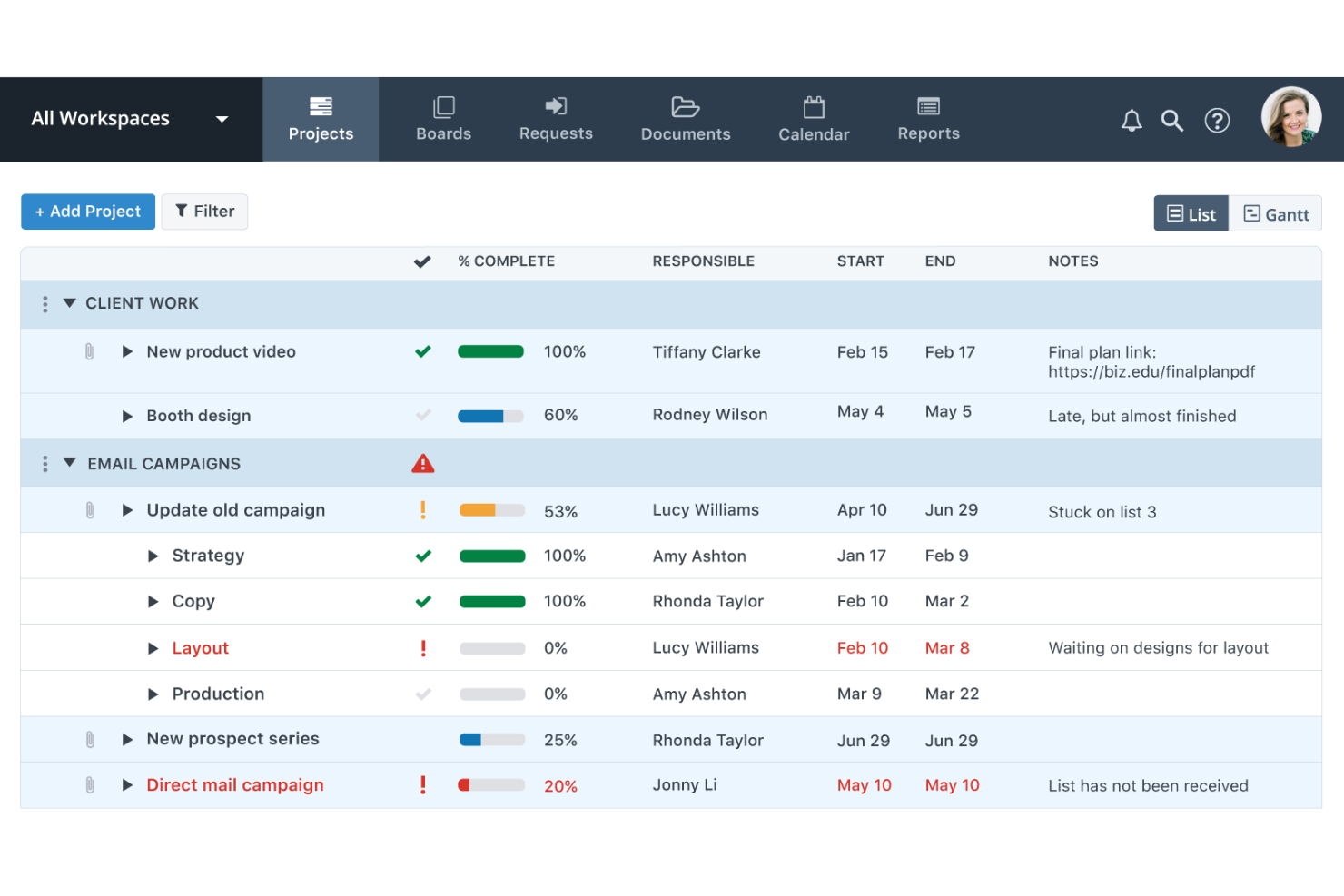
Workzone is a robust project management platform. It also offers time tracking, task and resource management, customizable reporting, and document management functionalities.
Why I picked Workzone: This project management platform has all the essential features you’d expect. You can use Gantt charts for a high-level view of project progress and individual to-do lists to keep employees on task. But the platform’s built-in file management system is particularly noteworthy, which is why I’ve included it in my list. It comes with file versioning, commenting, and approval workflows. Documents can be exchanged and managed in the software’s secure environment, keeping project planning and collaboration on the same platform.
Workzone Standout Features and Integrations
One standout feature is the image markup tool included in the software’s file management module. On PDF and image files alike, users can add comments and images to collaborate and communicate on documents. Communications are all documented and stored, making version histories clear and comprehensive. You’ll have a full understanding of how, why, and when documents have been updated or revised.
Integrations include Google Drive, Dropbox, Slack, Toggl, Jira, GitHub, Salesforce, Hubspot, Office 365, and QuickBooks Online, among others
Pros and Cons
Pros:
- Unlimited training and support
- Comprehensive reports and analytics
- Lots of integrations available
Cons:
- No free trial available
- No monthly billing option


Zoho Projects is a cloud-based project management tool that enables teams to organize their work, manage tasks, and collaborate on projects from inception to completion.
Why I picked Zoho Projects: Zoho Projects provides tools for planning, tracking, and executing manufacturing projects. For example, the platform includes task management to break down manufacturing processes into manageable units, Gantt charts to visualize project timelines and dependencies, and resource allocation features to assign tasks to workers based on their availability and skill sets. Time tracking and reporting tools also allow for monitoring the efficiency of manufacturing operations and the progress of projects. Overall, Zoho Projects supports collaboration among team members, which is critical in a manufacturing environment where coordination between different departments and stakeholders is essential.
Zoho Projects Standout Features and Integrations
One standout feature is the platform's issue tracking capabilities, which enable teams to report, track, and fix issues that arise during the project. Issues can be categorized, prioritized, and assigned to the appropriate team members for resolution. Zoho Projects also offers resource utilization features, which allow users to view the availability and workload of team members to manage resource allocation effectively. The platorm also features document management, which includes a centralized file storage system.
Integrations include Dropbox, Microsoft Office, Slack, GitHub, BugTracker, Google Apps, Jira, Basecamp, Zendesk, and the rest of the Zoho Apps, including CRM, Invoice, and Analytics.
Pros and Cons
Pros:
- Highly customizable
- Good value for money
- Single login with Zoho suite
Cons:
- Interface can be difficult to navigate
- Limited scalability

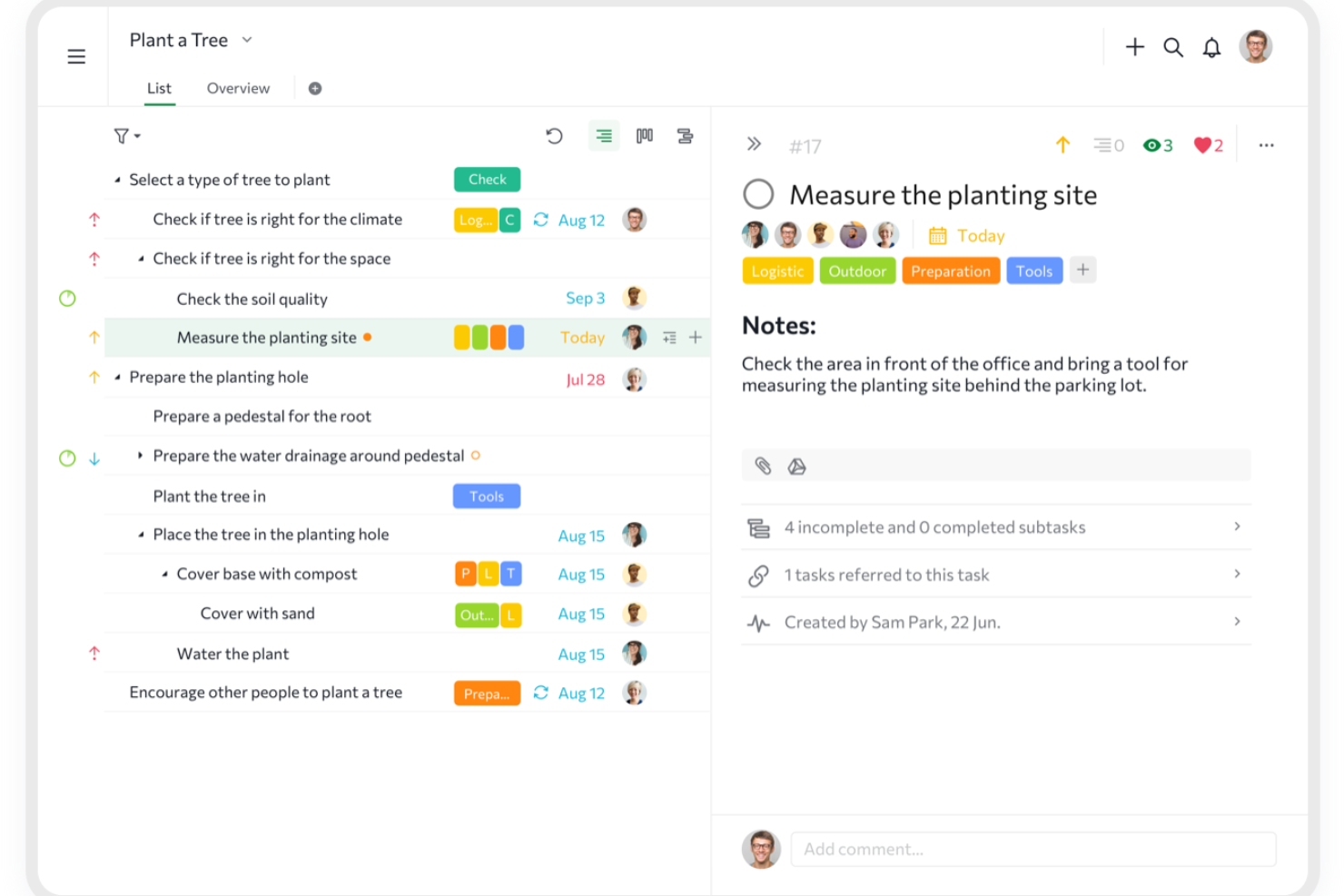
Quire is a cloud-based project management tool designed to help individuals and teams plan, organize, and track their work. It offers a structured approach to managing tasks, allowing users to break down complex projects into manageable components.
Why I picked Quire: Quire's nested list feature allows teams to deconstruct large manufacturing projects into smaller, actionable tasks. This hierarchical structure supports detailed project planning and efficient task delegation, which is essential for companies aiming to optimize workflow without overwhelming their teams. The platform’s clean interface provides multiple viewing options, including a list view for straightforward task tracking and a Kanban-style board to visualize task progress through various stages.
Quire Standout Features and Integrations
Features include a collaborative document function that provides a centralized space to keep all project-related information, notes, and updates. This ensures that all team members have access to the latest information, reducing miscommunication. Quire also offers a dynamic timeline feature with a Gantt chart view, enabling teams to plan and schedule project milestones and timelines.
Integrations include Google Calendar, Gmail, Slack, Outlook, Zoho Flow, GitHub, Apple Calendar Sync, Box, Dropbox, Google Drive, and Microsoft Teams.
Pros and Cons
Pros:
- Easy to collaborate with team members
- Multiple project views, including lists, boards, and timelines
- Ability to create nested tasks and subtasks, allowing for detailed project breakdowns
Cons:
- Lacks manufacturing-specific features
- Potential for notification overload, especially when working with large teams
New Product Updates from Quire
Quire Enhances Chat Editing and Text Formatting
Quire introduces updates to its chat functionality to improve collaboration and message formatting. These enhancements make it easier for teams to edit messages and structure text within conversations. For more information, visit Quire’s official site.
 .
.

Backlog is a project management software designed to help teams collaborate and manage projects more effectively. It offers a range of features that cater to different aspects of project management, making it a versatile tool for various industries, including manufacturing.
Why I picked Backlog: I picked Backlog because it offers strong scheduling and task visualization tools that manufacturing teams can use to manage production timelines more effectively. You can organize projects with Gantt charts, monitor progress through burndown charts, and adapt schedules in real time when priorities shift. I also like how Backlog supports Agile, Scrum, and Kanban frameworks, giving you the flexibility to manage both structured and fast-moving projects. Its built-in Wiki feature helps you document production processes, ensuring teams have consistent reference materials throughout each stage.
Backlog standout features and integrations:
Features include bug and issue tracking to prevent production blockers, built-in Git and SVN repositories for version control, and collaborative document tools for sharing manufacturing specs and reports. The platform also includes customizable workflows and security options like SAML authentication.
Integrations include Slack, Microsoft Teams, Cacoo, Jenkins, Redmine, Jira, Microsoft Copilot, Microsoft OneDrive, Google Chat, Google Drive, Google Sheets, Dropbox, and LambdaTest.
Pros and Cons
Pros:
- Supports Agile, Scrum, Kanban methodologies
- Built-in Git and SVN repositories
- Gantt charts enable dynamic scheduling
Cons:
- Steep learning curve for beginners
- Limited customization for complex workflows


MeisterTask is a project management and collaboration tool that assists teams in organizing and managing their workflows.
Why I picked MeisterTask: MeisterTask can help teams in manufacturing to manage their projects by providing a visual platform for tracking tasks and workflows. The customizable Kanban boards allow for the creation of stages that reflect different steps in the manufacturing process, from design to production to quality control. Moreover, the ability to assign tasks, set due dates, and attach files helps keep all project-related information in one place, which is crucial for maintaining organization in a manufacturing environment. Overall, MeisterTask is designed to facilitate improved collaboration and communication within teams, and it is accessible in multiple languages.
MeisterTask Standout Features and Integrations
Standout features include project documentation, which allows users to attach files and documents to tasks, which centralizes all relevant information and makes it easily accessible to team members. MeisterTask also employs security protocols such as SSL encryption and adheres to GDPR standards to ensure the protection of user data. Administrators can additionally define roles and set permissions for team members, controlling access to tasks and projects based on their responsibilities.
Integrations include Google Calendar, Outlook Calendar, Gmail, Slack, Microsoft Teams, GitHub, Zendesk, and Spark.
Pros and Cons
Pros:
- Provides a mobile app for on-the-go access
- Customizable project boards
- Includes time tracking and reporting features
Cons:
- Limited integration with other project management tools
- Limited options for setting reminders

Kintone is a workflow management software that can be customized to fit the needs of just about any production team, regardless of the size or complexity of their projects.
Why I picked Kintone: Kintone has a unique and interesting approach to manufacturing project management. It allows you to design and create no-code, customized business applications to manage various aspects of your operations. As such, the tool can be used for everything from project management to creating a customer database, managing equipment, running expense reports, collecting product feedback, and more. Its simple drag-and-drop interface makes it easy to build and automate unique workflows to suit your business needs.
Kintone Standout Features and Integrations
One standout feature is the large selection of elements you can add to your workflows. You can choose from dropdown menus, rich text fields, date fields, and number fields with built-in calculations to create your business processes. Another great feature is the platform’s project-tracking capabilities. You can filter and prioritize tasks based on various data fields when generating custom dashboard views and reports.
Integrations include QuickBooks, HubSpot, Salesforce, Dropbox, Google Calendar, Gmail, Slack, Outlook, Tableau, and Mailchimp. You can configure additional integrations with Zapier (available with the premium plan) or using the software’s API.
Pros and Cons
Pros:
- Highly customizable
- Flexible pricing with special deals
- Easily generate data reports
Cons:
- Limited storage with all plans
- No single-user plan

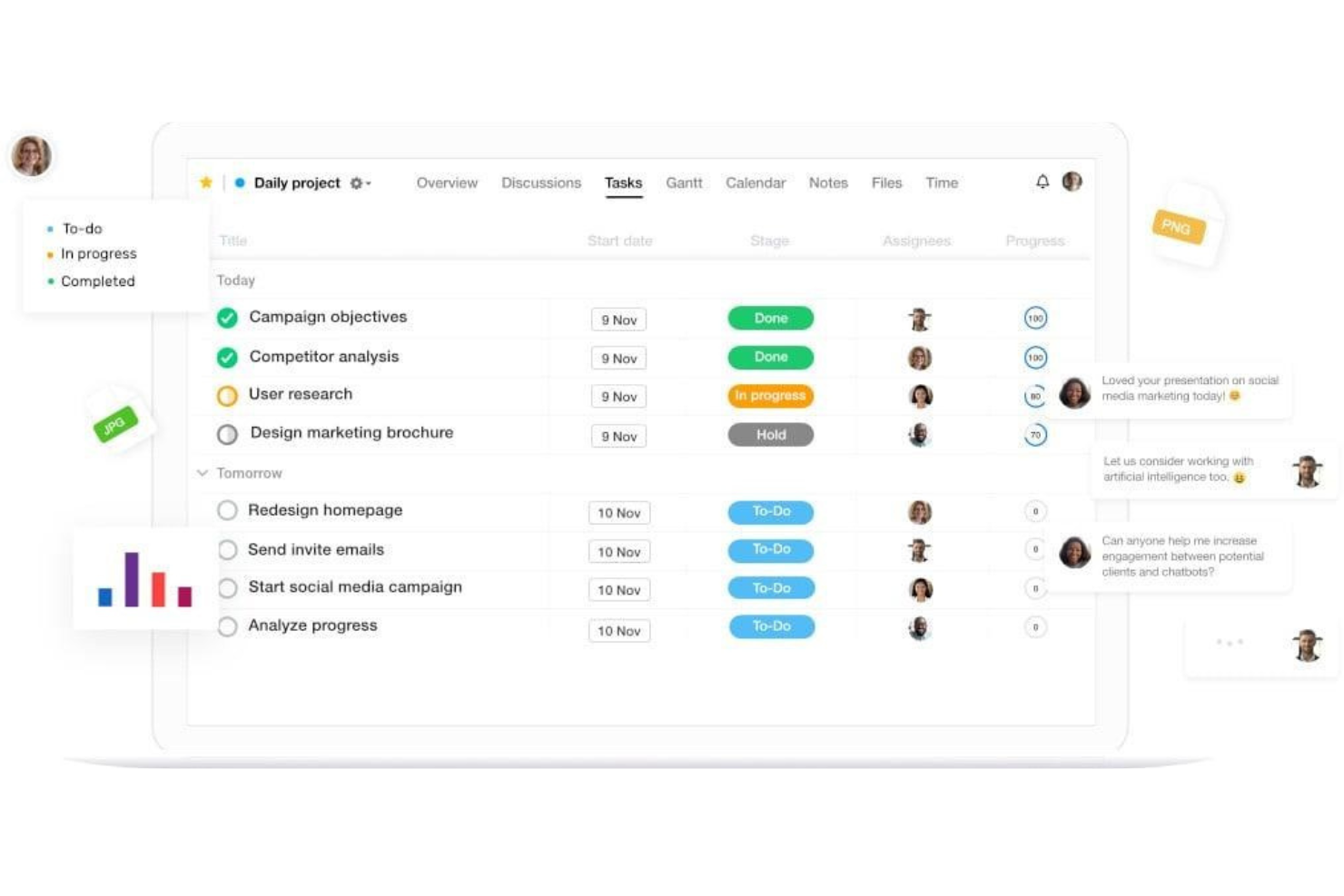
ProofHub is a product management software that offers team collaboration, reporting, and accessibility features.
Why I picked ProofHub: This software is a good choice for product development teams that include proofing stages as part of their production process. You can plan your projects, assign tasks, and allocate resources through the platform, but the real reason I picked it is because of its launch and delivery capabilities. Concept launches and product launches can be managed, and the proofing tool allows team members to exchange feedback and notes on new products.
ProofHub Standout Features and Integrations
Some standout features include the level of detail you can go into when planning projects. You can set up project categories and assign specific project managers to each project. At the task level, you can create unique task IDs to differentiate one task from another, set dependencies between tasks, and add subtasks to break work down into smaller pieces. Employees get a daily agenda in the platform, and you can see a detailed history of completed tasks so no details slip through the cracks.
Integrations include Google Drive, OneDrive, Box, and Dropbox. An API is also available for building custom integrations.
Pros and Cons
Pros:
- Flat-rate pricing structure, unlimited users
- Good balance of simplicity and functionality
- Quick and easy setup
Cons:
- No freemium version
- Lacks budgeting capabilities
Other Manufacturing Project Management Software
Here are a few more manufacturing project management tools that didn’t make the cut, but are still worth checking out:
- ProjectManager
For manufacturing-specific features
- Project Insight
For ease of use and scalability
- Netsuite OpenAir
For professional services automation
- Optessa
For advanced production planning and scheduling
- FactoryFour
For a complete manufacturing execution system
- ProductDossier
For pre-configured business processes
- Creatio CRM
For no-code workflow automation
- monday.com
For a flexible workflow builder
- Celoxis
For data-driven project decisions
- ProWorkflow
For resource planning features


Manufacturing Project Management Selection Criteria
When selecting the best manufacturing project management software to include on this list, I considered common buyer needs and pain points like tracking production timelines and coordinating across departments. I also used the following framework to keep my evaluation structured and fair:
Core Functionality (25% of total score)
To be considered for inclusion on this list, each solution had to fulfill these common use cases:
- Managing production schedules
- Tracking tasks and milestones
- Allocating and managing resources
- Monitoring progress and timelines
- Collaborating with cross-functional teams
Additional Standout Features (25% of total score)
To help further narrow down the competition, I also looked for unique features, such as:
- Integration with ERP or MES systems
- Visual production floor planning
- Automated inventory tracking
- Built-in quality control workflows
- Support for lean manufacturing processes
Usability (10% of total score)
To get a sense of the usability of each system, I considered the following:
- A clean and intuitive layout
- Simple navigation between project views
- A minimal learning curve for new users
- Dashboard clarity and visual hierarchy
- Flexibility in customizing views
Onboarding (10% of total score)
To evaluate the onboarding experience for each platform, I considered the following:
- Access to guided product tours
- Availability of tutorial videos and templates
- Live or recorded onboarding webinars
- A help center with clear documentation
- In-app chat or setup assistance
Customer Support (10% of total score)
To assess each software provider’s customer support services, I considered the following:
- Availability of live chat or phone support
- Response time to technical issues
- Helpfulness of support documentation
- Access to dedicated account reps
- Community forums or user groups
Value For Money (10% of total score)
To evaluate the value for money of each platform, I considered the following:
- Features included at each price tier
- Availability of free trials or freemium options
- Price transparency on the website
- Scalability of pricing as team size grows
- Comparison to similarly priced tools
Customer Reviews (10% of total score)
To get a sense of overall customer satisfaction, I considered the following when reading customer reviews:
- Reported ease of adoption
- Reliability and uptime performance
- Quality of customer support
- Fitness for manufacturing-specific needs
- Overall satisfaction with features and price
How to Choose Manufacturing Project Management Software
It’s easy to get bogged down in long feature lists and complex pricing structures. To help you stay focused as you work through your unique software selection process, here’s a checklist of factors to keep in mind:
| Factor | What to Consider |
| Scalability | Make sure the tool can grow with your team and support more projects, users, and workflows over time. |
| Integrations | Look for compatibility with your ERP, MES, inventory, and accounting systems to avoid data silos. |
| Customizability | Check if you can tailor fields, workflows, and dashboards to match how your team manages manufacturing projects. |
| Ease of Use | Choose a tool your team can pick up quickly—especially those on the production floor who may not be tech-savvy. |
| Budget | Look at total costs, including per-user fees, setup costs, and fees for premium features you actually need. |
| Security Safeguards | Verify the platform uses encryption, access controls, and audit logs to protect sensitive production and supplier data. |
| Scheduling Tools | Ensure the software supports Gantt charts, timelines, and dependency tracking that fit the pace of your production cycles. |
| Collaboration | Make sure your engineers, managers, and floor teams can share updates, comments, and documents in real time. |
Trends in Manufacturing Project Management Software
In my research, I sourced countless product updates, press releases, and release logs from different manufacturing project management software vendors. Here are some of the emerging trends I’m keeping an eye on:
- AI-Driven Scheduling: More tools are using AI to predict delays and adjust schedules automatically. This helps your team react faster to disruptions like material shortages or machine breakdowns without constant manual updates.
- Digital Twins for Project Planning: Some software now supports digital twins to model production processes before they’re rolled out. You can test layout changes or new workflows in a virtual setup, reducing trial-and-error on the factory floor.
- Built-In Quality Control Tracking: Quality checks are now being folded into the project workflow. Teams can log inspections, track issues, and flag corrective actions directly in the system, which helps ensure quality stays tied to delivery timelines.
- Visual Floor Mapping: A growing number of tools include visual layouts of your shop floor. These help assign tasks to specific zones or equipment and make it easier to coordinate people, machines, and materials all in one view.
- Sustainability Metrics Tracking: Tools are starting to include fields and reports for tracking energy use, emissions, and waste. This helps manufacturers manage environmental targets alongside production goals.
What is Manufacturing Project Management Software?
Manufacturing project management software is a type of tool that helps teams plan, track, and manage production-focused projects. It's mainly used by project managers, operations leads, and production planners who need to keep timelines, tasks, and resources on track.
Scheduling tools, quality control tracking, and visual floor mapping help with day-to-day coordination, problem-solving, and decision-making. These tools give your team a clearer view of progress, help avoid delays, and make it easier to manage complex manufacturing work.
Features of Manufacturing Project Management Software
When selecting manufacturing project management software, keep an eye out for the following key features:
- Production scheduling: Lets you plan tasks, set timelines, and manage dependencies across production stages.
- Resource management: Helps allocate labor, equipment, and materials to avoid overuse or downtime.
- Task tracking: Allows you to assign work, monitor progress, and keep teams accountable.
- Inventory tracking: Keeps tabs on material levels so you can order what you need without overstocking.
- Quality control tools: Lets you log inspections, track defects, and manage corrective actions within the project.
- Gantt chart views: Offers a visual timeline of tasks and milestones to see how work is progressing.
- Custom workflows: Allows you to tailor steps and approvals to match your team’s process.
- Document management: Stores specs, drawings, and instructions so teams can access the right files when needed.
- Collaboration tools: Supports team communication through comments, file sharing, and notifications.
- Reporting and analytics: Gives insight into timelines, resource use, and production performance.
Benefits of Manufacturing Project Management Software
Implementing manufacturing project management software can provide several benefits for your team and your business. Here are a few you can look forward to:
- Fewer production delays: Scheduling tools and task tracking help you spot issues early and keep work on time.
- Better resource planning: Resource management features help you use labor, machines, and materials more efficiently.
- Improved product quality: Built-in quality control tools make it easier to catch problems and fix them before they grow.
- Clearer team communication: Collaboration features keep everyone updated and reduce confusion across departments.
- Faster decision-making: Dashboards and reporting tools give you real-time data to act on issues right away.
- Easier compliance tracking: Document storage and audit logs help you stay organized for inspections or certifications.
- Stronger project visibility: Gantt charts and progress tracking let you see how everything is moving at a glance.
Costs & Pricing of Manufacturing Project Management Software
Selecting manufacturing project management software requires an understanding of the various pricing models and plans available. Costs vary based on features, team size, add-ons, and more. The table below summarizes common plans, their average prices, and typical features included in manufacturing project management software solutions:
Plan Comparison Table for Manufacturing Project Management Software
| Plan Type | Average Price | Common Features |
| Free Plan | $0 | Basic task tracking, limited project views, and restricted user access. |
| Personal Plan | $5–$15/user/month | Task management, simple scheduling, file attachments, and basic reporting. |
| Business Plan | $20–$40/user/month | Advanced scheduling, resource management, team collaboration, and custom workflows. |
| Enterprise Plan | $50–$100/user/month | Quality control tools, audit logs, advanced analytics, integrations, and priority support. |
Manufacturing Project Management FAQs
Here are some answers to common questions about manufacturing project management software:
Why should I use a manufacturing project management tool?
A project management solution helps you streamline your workflows, define and assign tasks, and facilitate team collaboration. It’s the best way to break away from spreadsheets and post-its to manage how work gets done. And because you can track projects in real-time, you can easily spot and eliminate bottlenecks and keep stakeholders up-to-date.
These platforms are especially beneficial for manufacturers and product developers. And this is true whether you’re a major corporation or a small business. Ensuring workflows run smoothly is key to your entire operation. So a cloud-based sidekick can really support your teams
Can manufacturing project management software work with ERP systems?
Yes, many tools offer integrations with ERP systems. This lets you sync data like inventory levels, order statuses, and job costs between systems. It helps reduce double entry and keeps your data accurate across departments
What’s the difference between general project management software and one made for manufacturing?
General tools focus on task lists, timelines, and collaboration. Manufacturing tools include extra features for things like production schedules, resource planning, and quality checks. They’re built to handle the physical workflows that come with making and shipping products.
Is cloud-based or on-premise software better for manufacturing?
Cloud-based tools are easier to access from multiple locations and get regular updates. On-premise software may offer more control over data and setup. It depends on your IT setup, security needs, and whether your team needs remote access.
How long does it take to implement manufacturing project management software?
What other types of software do manufacturing companies use?
In addition to project management software, manufacturing businesses use several other software tools to manage their operations. Here are a few other software types that manufacturing companies often rely on:
- Manufacturing execution systems (MES): Manages and monitors the overall manufacturing process, including machines, workers, schedules, and more.
- Inventory management software: Keeps track of manufacturing materials that are necessary for the production process.
- Supply chain management (SCM) software: Manages raw material suppliers, production needs and trends, and product distribution.
- Enterprise resource planning (ERP) software: Robust systems that often cover many different functionalities. These can include project, resource, inventory, and financial management. It might also handle risk and compliance management, procurement, and supply chain operations.
- Customer relationship management (CRM) software: Provides a client or customer database and manages customer communications. Also facilitates marketing, sales, and customer support activities.
- Human resource management software: Provides an employee database and facilitates core HR tasks. Often has payroll, time tracking, resource allocation, performance evaluations features.
What's Next?
If you're in the process of researching manufacturing project management software, connect with a SoftwareSelect advisor for free recommendations.
You fill out a form and have a quick chat where they get into the specifics of your needs. Then you'll get a shortlist of software to review. They'll even support you through the entire buying process, including price negotiations.