

10 Best AI Project Budget Software Reviewed in 2026

10 Best AI Project Budget Software Shortlist


Managing a project budget can get complicated fast, especially when costs shift or new expenses show up. AI project budget software helps make the process easier by giving you updated numbers, forecasts, and insights you can rely on. It gives you a clearer picture so you can act before small issues turn into overruns.
I’ve tested a wide range of tools and focused on the ones that deliver real value for project managers. My reviews zero in on efficiency, accuracy, and how well each option supports day-to-day budgeting work.
In this article, I’ll walk you through my top picks and explain how their AI capabilities can help you stay on top of your budget from start to finish.
Why Trust Our Software Recommendations
Our team has been testing and reviewing software since 2012. As project managers ourselves, we know how difficult—and important—it is to choose the right software.
For this guide, we evaluated tools using hands-on testing and independent research, scoring tools using our selection criteria. We also draw on insights from industry thought leaders and practicing project management experts.
Our reviews reflect our human editorial judgment, not a sales pitch.
Expert reviewers:
AI Project Budget Software Comparison Table
This comparison table summarizes pricing details for my top AI project budget software selections.
| Tool | Best For | Trial Info | Price | ||
|---|---|---|---|---|---|
| 1 | Best for advanced time tracking and invoicing | 14-day free trial | From $19.90/user/month (billed annually) | Website | |
| 2 | Best for AI-driven project management | 14-day free trial | From $10/user/month (billed annually) | Website | |
| 3 | Best for micro-budgets | Free demo available | Pricing upon request | Website | |
| 4 | Best for AI in project forecasting | Free demo available | Pricing upon request | Website | |
| 5 | Best for integrated accounting features | 30-day free trial | From $38/month | Website | |
| 6 | Best for AI assist tools | Free demo available | Pricing upon request | Website | |
| 7 | Best for team planner optimization | 34-day free trial | From $14.99/month | Website | |
| 8 | Best for AI-automation | 30-day free trial | From $25/user/month (billed annually) | Website | |
| 9 | Best for resource management | Free demo available | Pricing upon request | Website | |
| 10 | Best for scenario planning | Free demo available | Pricing upon request | Website |


Best AI Project Budget Software Review
Below are my detailed summaries of the best AI project budget software that made it onto my shortlist. My reviews offer a detailed look at the key features, pros & cons, integrations, and ideal use cases of each tool to help you find the best one for you.

Scoro
Best for advanced time tracking and invoicing

For businesses seeking a sophisticated AI project budget software, Scoro offers a compelling solution. This tool is ideally suited for small to medium-sized enterprises across various sectors, such as consultancies, IT, and engineering, that require robust project and financial management capabilities. Scoro helps address the common challenges associated with fragmented project management tools by providing a unified platform that enhances visibility and control over project finances.
Why I Picked Scoro
I picked Scoro for its unique ability to combine AI-driven insights with comprehensive project financial management features. With Scoro, you can track budget burn and forecast profitability in real-time, which is essential for maintaining financial oversight. Additionally, its user-friendly interface paired with advanced time tracking and invoicing capabilities makes it a standout choice for those looking to manage project budgets more effectively.
Scoro Key Features
In addition to its AI-driven insights, Scoro offers several other features that cater to your project budgeting needs:
- Time Tracking: This feature allows you to monitor the time spent on projects, ensuring accurate billing and time management.
- Invoicing: Create and send invoices directly from the platform, simplifying the billing process.
- Cost Management: Keep track of project expenses and budgets in one place, providing clear visibility into financial performance.
- Collaboration Tools: Facilitate teamwork and communication across your organization to enhance project delivery.
Scoro Integrations
Integrations include Google Calendar, Microsoft Exchange, Xero, QuickBooks, Sage Intacct, Expensify, Stripe, and Jira.
Pros and Cons
Pros:
- Strong financial management tools
- Advanced resource planning capabilities
- AI powered business insights
Cons:
- Steep learning curve initially
- Higher pricing for small teams
New Product Updates from Scoro

Scoro Adds Time Mobile App and ELI Improvements
Scoro adds the Scoro Time mobile app for iOS/Android to track time anywhere and expands ELI with attachments, smarter filtering, and trigger-based actions. For more information, visit Scoro's official site.

Wrike
Best for AI-driven project management
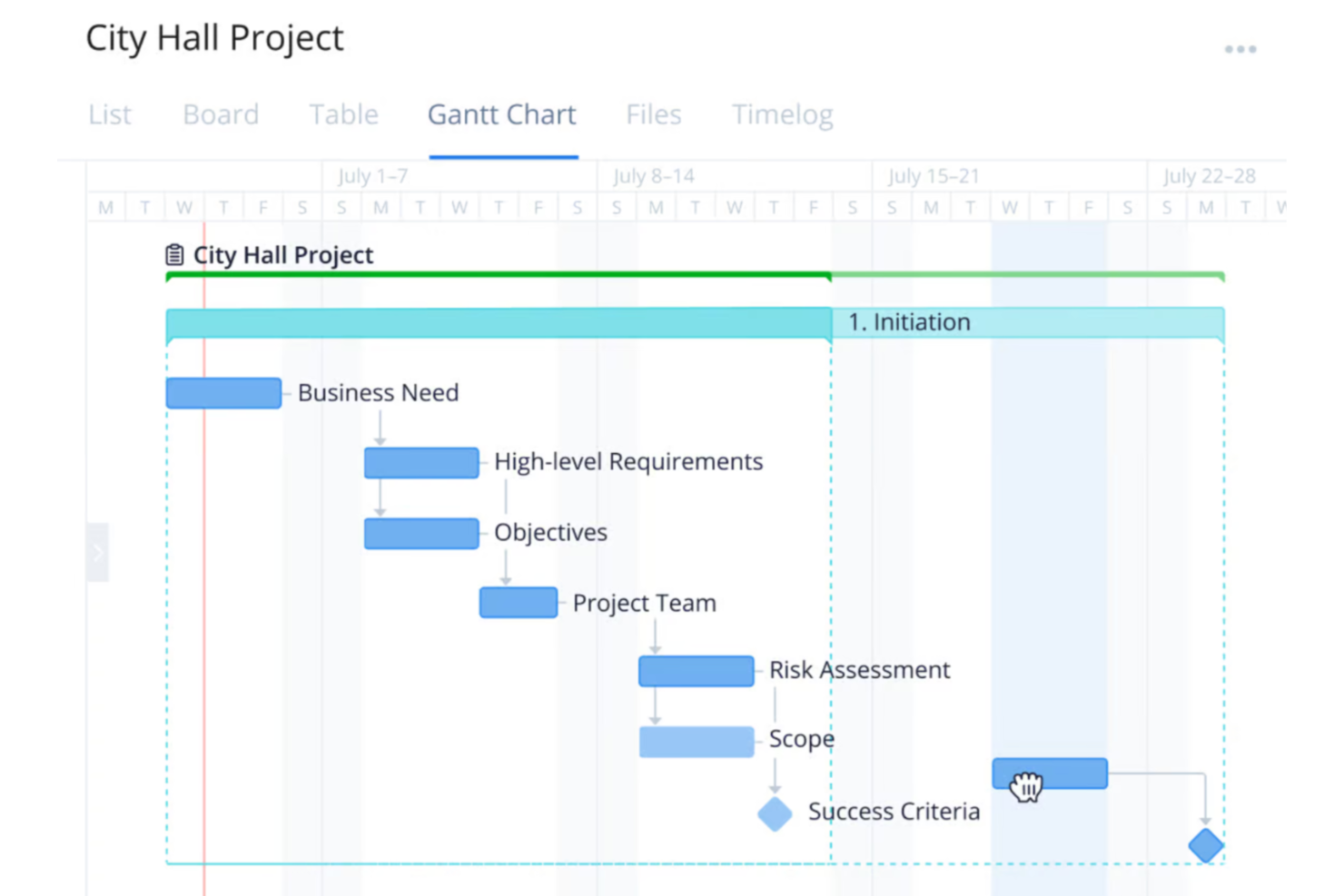
For your team seeking an AI project budget software solution, Wrike presents a compelling choice with its comprehensive project management capabilities. It appeals particularly to businesses and industries that require streamlined workflows and reduced busywork through automation and AI. Wrike addresses the challenge of managing complex projects by offering tools that facilitate efficiency and focus on essential tasks, allowing you to allocate resources effectively and maintain control over project budgets.
Why I Picked Wrike
I picked Wrike because it stands out with its integration of AI capabilities, which are particularly beneficial for project budget management. Wrike's AI tools assist in generating project plans and risk assessments, providing an analytical edge that enhances decision-making. Additionally, its real-time dashboards offer a transparent view of budget allocations and project progress, ensuring your team can quickly adapt to changes. These features align well with the needs of professionals seeking to optimize resource allocation and maintain budget control.
Wrike Key Features
In addition to its AI capabilities, Wrike offers several features that enhance its utility as a project budget software:
- Customizable Workflows: Tailor workflows to fit your team's specific budget management processes, ensuring a personalized approach to project execution.
- Generative AI: Use AI to generate project plans and translate comments, which aids in maintaining clarity and consistency across your team's communications.
- Real-Time Dashboards: Access up-to-date information on project budgets and progress, allowing for informed decision-making and timely adjustments.
- Data Hub: Centralize information access to streamline data management and enhance collaboration across different departments and teams.
Wrike Integrations
Integrations include NetSuite, QuickBooks, Jira, Microsoft Teams, Salesforce, Slack, Google Drive, Dropbox, Box, and GitHub, and the platform supports custom integrations through an API.
Pros and Cons
Pros:
- Integrates with financial accounting tools
- AI supports resource allocation decisions
- Real-time project budget visibility
Cons:
- Advanced budget features cost more
- Not purpose built budgeting software
New Product Updates from Wrike

Wrike Adds Quick Search to Table View
Wrike adds Quick Search to Table View with full-table search across titles, descriptions, and fields, plus highlighted matches. This helps users find tasks faster in large tables. For more information, visit Wrike’s official site.
Best for micro-budgets

Datarails is a financial planning and analysis platform designed for finance professionals, offering budgeting, forecasting, and reporting capabilities. Its AI-driven insights help you manage micro-budgets and optimize financial planning with precision.
Why I picked Datarails: The platform's AI capabilities excel in managing micro-budgets through automated data consolidation and real-time analytics. You can efficiently track financial data and generate reports with minimal manual intervention. Its predictive analytics provide insights into spending patterns, enabling you to make informed decisions. Datarails enhances your financial planning by offering detailed budget analysis and scenario planning.
Standout Features & Integrations:
Features include automated data consolidation from multiple sources, customizable dashboards that display key financial metrics, and real-time reporting. The platform offers scenario planning tools to anticipate financial changes. You can benefit from its detailed budget analysis capabilities that break down spending by category.
Integrations include Microsoft Excel, Google Sheets, QuickBooks, Xero, NetSuite, SAP, Oracle, Salesforce, Power BI, and Slack.
Pros and Cons
Pros:
- Supports scenario planning
- Provides detailed budget analysis
- Automates data consolidation
Cons:
- Setup requires time
- Learning curve for advanced features

Anaplan
Best for AI in project forecasting

Anaplan is a cloud-based planning and performance management platform aimed at large enterprises, offering solutions for scenario planning, budgeting, and forecasting. Its AI capabilities provide advanced project forecasting, helping businesses optimize their planning processes.
Why I picked Anaplan: The platform's AI-driven forecasting capabilities allow your team to predict project outcomes with precision. Its predictive analytics and scenario planning tools help you make data-driven decisions. Anaplan's flexible modeling lets you adjust plans in real-time as new data comes in. This ensures you can stay agile and responsive to changing business conditions.
Standout Features & Integrations:
Features include flexible modeling tools that adapt to your business structure, real-time data processing, and scenario planning capabilities. The platform provides advanced analytics to support strategic decision-making. Its collaborative features enhance teamwork by allowing multiple users to work on plans simultaneously.
Integrations include Salesforce, Workday, Microsoft Dynamics, SAP, Oracle, Google Cloud, AWS, Slack, Tableau, and Power BI.
Pros and Cons
Pros:
- Supports collaborative planning
- Provides real-time data
- Offers advanced forecasting
Cons:
- Technical expertise needed for setup
- Complex features require training

Best for integrated accounting features

QuickBooks is an accounting software solution designed for small to medium-sized businesses, providing tools for invoicing, payroll, and expense tracking. Its AI features enhance financial management by automating routine tasks and providing insights into business performance.
Why I picked QuickBooks: The software includes AI features across all its plans, making it accessible for any team size. Its AI-driven automation helps you manage invoices and expenses efficiently. QuickBooks provides predictive insights, allowing you to forecast cash flow and financial trends. This ensures that you can make informed decisions without needing extensive financial expertise.
Standout Features & Integrations:
Features include automated invoicing that sends reminders to clients, payroll management tools, and expense tracking. The software offers detailed financial reporting to help you understand business performance. Its mobile app allows you to manage finances on the go, providing flexibility for your team.
Integrations include PayPal, Shopify, Square, Stripe, HubSpot, Salesforce, Mailchimp, TSheets, Gusto, and BILL.
Pros and Cons
Pros:
- Offers a mobile app
- Provides detailed reporting
- Includes AI in all plans
Cons:
- Setup requires time
- Learning curve for new users

Prophix
Best for AI assist tools

Prophix is a corporate performance management software tailored for finance teams, offering budgeting, forecasting, and financial reporting solutions. Its AI capabilities enhance decision-making by providing predictive analytics and automated insights.
Why I picked Prophix: The software's AI assist tools help your team analyze financial data with precision. Its predictive analytics offer insights into future trends, allowing you to plan effectively. The AI-driven dashboard provides automated reporting, saving you time on manual tasks. You can also benefit from its scenario analysis feature, which helps in evaluating various financial outcomes.
Standout Features & Integrations:
Features include customizable dashboards that adapt to your needs, automated financial reporting that reduces manual work, and scenario analysis tools. The software allows you to create detailed budgets and forecasts tailored to your business. Its interface simplifies data visualization and enhances collaboration within your team.
Integrations include Microsoft Dynamics, NetSuite, Sage Intacct, QuickBooks, SAP, Oracle, Salesforce, Workday, Google Sheets, and Slack.
Pros and Cons
Pros:
- Offers predictive analytics
- Supports scenario analysis
- Provides automated reporting
Cons:
- Implementation takes time
- Learning curve for new users

YNAB
Best for team planner optimization

YNAB is a personal budgeting software designed for individuals and small teams, offering tools to manage finances and track spending. Its AI capabilities help optimize team planning by providing insights into spending habits and budget allocations.
Why I picked YNAB: The software's focus on team planner optimization allows you to manage your budget effectively. Its AI-driven insights help you track spending patterns and adjust your budget accordingly. YNAB's interface facilitates easy access to financial data and planning tools. You can rely on its forecasting features to anticipate future financial needs and make informed decisions.
Standout Features & Integrations:
Features include real-time budget tracking that updates as you spend, customizable spending categories that align with your needs, and goal-setting capabilities. The software offers detailed financial reports to help you understand your spending habits. Its mobile app ensures you can manage your budget on the go.
Integrations include Plaid, Venmo, PayPal, Square, Stripe, Capital One, Chase, Wells Fargo, Bank of America, and American Express.
Pros and Cons
Pros:
- Facilitates goal-setting
- Offers customizable categories
- Provides real-time tracking
Cons:
- Limited business features
- Limited trial available

PSOhub
Best for AI-automation

PSOhub is a project management solution designed for small to mid-sized businesses, offering features like time tracking, project planning, and contract management. Its AI capabilities focus on automating repetitive tasks and providing scenario planning tools to improve efficiency.
Why I picked PSOhub: The software's AI-driven automation helps your team save time by reducing manual data entry and repetitive tasks. Its scenario planning tools allow you to visualize different project outcomes and adapt accordingly. The interface makes it easier to manage projects and resources efficiently. You can rely on its AI features to enhance your team's productivity and decision-making processes.
Standout Features & Integrations:
Features include automated time tracking that captures work hours without manual input, contract management tools, and invoicing capabilities. The software provides project planning tools to help you allocate resources effectively. Its dashboards offer real-time insights into project progress and performance.
Integrations include HubSpot, Salesforce, Microsoft Dynamics, QuickBooks, Xero, Slack, Google Calendar, Outlook, Zapier, and Asana.
Pros and Cons
Pros:
- Provides real-time insights
- Supports scenario planning
- Automates repetitive tasks
Cons:
- Reporting dashboards lack depth compared to some competitors
- Learning curve for advanced features

Best for resource management

Workday Adaptive Planning is a cloud-based business planning software for finance teams, offering capabilities like budgeting, forecasting, and reporting. Its AI-driven analytics provide insights to improve resource management and optimize financial planning.
Why I picked Workday Adaptive Planning: The software's AI features, such as predictive analytics and scenario modeling, assist your team in effective resource management. These tools help you anticipate changes and allocate resources efficiently. The platform's interface makes it easier to visualize data and derive actionable insights. You can rely on its AI to enhance your planning accuracy and decision-making processes.
Standout Features & Integrations:
Features include dashboards that can be customized to display relevant metrics, reporting tools that generate detailed financial analysis, and collaborative planning capabilities. The software allows you to create flexible budgets and forecasts tailored to your needs. Its interface simplifies data visualization and planning tasks.
Integrations include Salesforce, NetSuite, Workday, Oracle, SAP, Microsoft Dynamics, Google Sheets, Slack, QuickBooks, and Xero.
Pros and Cons
Pros:
- Enables collaborative planning
- Offers customizable reports
- Enhances resource allocation and management
Cons:
- Setup can be time-intensive
- Learning curve for advanced features

Planful
Best for scenario planning

Planful is an AI-driven budget software designed for finance professionals to enhance financial management. It supports key business functions like finance, accounting, and operations with features like automated reporting and forecasting.
Why I picked Planful: The platform's AI capabilities, such as the Analyst Assistant, provide instant insights essential for scenario planning. Its AI tools detect anomalies and generate budget projections using historical data. You and your team can use these insights to make informed financial decisions quickly. The platform integrates with existing systems while maintaining data security.
Standout Features & Integrations:
Features include automated reporting tools that reduce manual work, forecasting capabilities that use historical data patterns, and an in-app help system for guidance. The Analyst Assistant delivers instant insights and scenario planning tools that allow you to model different financial outcomes. The platform provides dynamic reporting that adapts to your needs.
Integrations include Salesforce, NetSuite, Microsoft Dynamics, Oracle, SAP, QuickBooks, Xero, Workday, Google Sheets, and Slack.
Pros and Cons
Pros:
- Integrates with major ERPs
- Provides predictive analytics
- Supports scenario modeling
Cons:
- Learning curve for new users
- Setup requires technical knowledge
Other AI Project Budget Software
Here are some additional AI project budget software options that didn’t make it onto my shortlist, but are still worth checking out:
- PlanGuru
For long-range financial modeling
- Cube Software
For pre-filled timesheets
- Budgyt
For AI-resourcing
- Forecast
For real-time project health scoring
- Vena
For integrated planning
- BigTime
For billable hours tracking
- Hive
For AI task management
- Monograph
For architects and designers
- ClickUp
For customizable workflows
- Motion AI
For AI scheduling automation


How I Evaluate AI Project Budget Software
I look for tools where AI genuinely shifts how you handle project budgets—like catching a cost overrun weeks before it blows up your forecast. My evaluation splits into core functionality a tool needs to make the list and differentiating factors that separate the strongest fits.
Core Functionality (Table Stakes For This List)
When I'm selecting tools for my list, I rank each one on a scale from 0 (does not offer the functionality) to 5 (excels in this area) for each core functionality listed below. Then, I calculate the tool's total score into a percentage. Each tool needs to achieve a minimum total score of 65% to be considered for inclusion.
- AI Budget Forecasting: I evaluate whether the tool can generate forward-looking budget projections using historical project data—like predicting a Phase 2 cost overrun based on Phase 1 actuals.
- Automated Cost Tracking: The tool should capture labor, expenses, and resource costs against the budget in real time rather than relying on manual spreadsheet updates.
- AI Variance Detection: I look for proactive alerts when spending drifts from the plan, such as flagging a spike in contractor hours before it erodes your project margin.
- Predictive Estimating: A strong tool pulls from past project data to produce AI-assisted estimates, helping teams scope new projects with more accuracy than gut-feel guesswork.
- Project Financial Reporting: I check for AI-enhanced dashboards that roll up budget health across a portfolio, giving PMO leads a clear picture without hours of manual report building.
- PM Tool Integration: The platform should sync with the PM, accounting, or ERP tools your team already uses so budget data stays connected to tasks, time, and deliverables.
Once I have a list of tools that meet this criteria, I consider what sets each platform apart.
Differentiating Factors (What Sets Vendors Apart)
Here's how I compare and contrast different vendors:
Standout Features
Scenario simulation is a big one—I want to see what happens to the bottom line if a vendor rate increases or a timeline slips by three weeks before I commit to a change. AI risk scoring adds another layer by flagging projects most likely to blow their budget based on live indicators. I also look for tools that go further with auto-generated recommendations, like suggesting where to reallocate underspent funds across a portfolio.
Beyond Features
AI model transparency matters here. When a tool flags a budget overrun, I want to understand what data drove that prediction. Your finance team will ask the same questions during an audit. Integration depth is just as important—budget data in a silo loses value fast. I check whether the tool syncs bidirectionally with your accounting and ERP systems. Security posture is another key factor, since project financials are sensitive and typically require SOC 2 compliance and role-based access controls.
How to Choose AI Project Budget Software
It’s easy to get bogged down in long feature lists and complex pricing structures. To help you stay focused as you work through your unique software selection process, here’s a checklist of factors to keep in mind:
| Factor | What to Consider |
| Scalability | Can the software grow with your team? Consider if it supports your current size and future expansion without extra costs or complications. |
| Integrations | Does it work with your existing tools? Check compatibility with your CRM, accounting software, and other essential platforms. |
| Customizability | Can you tailor the tool to fit your processes? Look for options to adjust dashboards, workflows, and reports to match your needs. |
| Ease of Use | Is the interface intuitive? Ensure team members can navigate it without extensive training or frustration. |
| Implementation and onboarding | How quickly can you get started? Evaluate the setup time, availability of training materials, and support during the onboarding process. |
| Cost | Does it fit your budget? Compare pricing plans and ensure there are no hidden fees that could strain your finances. |
| Security Safeguards | Are your data protected? Look for encryption, compliance with industry standards, and regular updates to keep information secure. |
| Support Availability | What support options are available? Ensure access to live chat, email, and phone support, especially during critical hours for your operations. |
What Is AI Project Budget Software?
AI project budget software is a tool that uses artificial intelligence to help manage and optimize project budgets. Financial analysts, project managers, and business leaders typically use these tools to improve cost management and decision-making.
Predictive analytics, automated forecasting, and real-time data insights help with accurate budget planning and resource allocation. These tools provide value by enhancing efficiency and accuracy in financial planning.
Features
When selecting AI project budget software, keep an eye out for the following key features:
- Predictive analytics: Uses AI to forecast future financial trends, helping you plan budgets more accurately.
- Automated forecasting: Generates budget forecasts with minimal manual input, saving time and reducing errors.
- Real-time data insights: Provides up-to-date financial information, allowing for quick decision-making.
- Scenario planning: Allows you to model different financial outcomes, helping you prepare for various situations.
- AI-driven alerts: Notifies you of budget anomalies or potential issues, enabling proactive management.
- Customizable dashboards: Let you tailor data views to meet specific needs, enhancing usability and focus.
- Resource allocation: Optimizes distribution of resources based on AI analysis, improving efficiency.
- Integration capabilities: Connects with other tools to provide a seamless flow of financial data.
- Security safeguards: Protects sensitive financial information with encryption and compliance measures.
- Collaborative features: Supports teamwork by allowing multiple users to access and work on budgets simultaneously.
Benefits
Implementing AI project budget software provides several benefits for your team and your business. Here are a few you can look forward to:
- Improved accuracy: AI-driven analytics reduce manual errors in budget forecasts, leading to more reliable financial plans.
- Time savings: Automated forecasting and data processing free up time for your team to focus on strategic tasks.
- Enhanced decision-making: Real-time insights and predictive analytics provide the information needed for informed financial decisions.
- Proactive management: AI alerts notify you of potential budget issues, allowing you to address them before they escalate.
- Resource optimization: AI capabilities help allocate resources efficiently, ensuring optimal use of your budget.
- Increased collaboration: Collaborative features support teamwork by allowing multiple users to work on budgets together.
- Scalability: The software grows with your business, adapting to increased data and complexity without added hassle.
Costs and Pricing
Selecting AI project budget software requires an understanding of the various pricing models and plans available. Costs vary based on features, team size, add-ons, and more. The table below summarizes common plans, their average prices, and typical features included in AI project budget software solutions:
Plan Comparison Table for AI Project Budget Software
| Plan Type | Average Price | Common Features |
| Free Plan | $0 | Basic budgeting tools, limited reporting, and community support. |
| Personal Plan | $9-$83/user/month | Customizable dashboards, basic forecasting, email support, and limited integrations. |
| Business Plan | $45-$75/user/month | Advanced analytics, automated alerts, multi-user access, and enhanced security features. |
| Enterprise Plan | $80-$5000/user/month | Full integration capabilities, AI-driven insights, priority support, and scenario planning. |
AI Project Budget Software FAQs
Here are some answers to common questions about AI project budget software:
How can AI project budget software improve forecasting accuracy?
AI project budget software enhances forecasting accuracy by using predictive analytics to analyze historical data and identify trends. This allows you to make more informed predictions about future financial performance. For example, the software can highlight seasonal spending patterns, helping you allocate resources more effectively. By automating data analysis, it reduces human error and provides real-time insights, ensuring your forecasts are as accurate as possible.
Is it difficult to integrate AI project budget software with existing tools?
No, most AI project budget software solutions are designed to integrate easily with existing tools like CRMs, accounting software, and ERP systems. Before you choose a tool, check its compatibility with your current software stack. This ensures a smooth data flow between systems, which helps maintain data accuracy and saves time by eliminating the need for manual data entry.
Can AI project budget software support remote teams?
Yes, AI project budget software is particularly beneficial for remote teams as it offers cloud-based access to financial data. This ensures everyone on your team has real-time access to the same information, regardless of location. Features like collaborative planning and shared dashboards promote teamwork and keep everyone aligned on budget goals, making remote collaboration more efficient.
What security measures should I expect from AI project budget software?
AI project budget software typically includes security measures like data encryption, user authentication, and compliance with industry standards such as GDPR. Before selecting a tool, verify that it meets your organization’s security requirements and provides regular updates to protect against vulnerabilities. This will help safeguard your financial data from unauthorized access and potential breaches.
How do I evaluate the ROI of AI project budget software?
To evaluate the ROI of AI project budget software, consider both quantitative and qualitative benefits. Quantitatively, look at time saved on manual tasks and improvements in forecasting accuracy. Qualitatively, assess how the software has improved team collaboration and decision-making. Compare these benefits against the software’s costs to determine if it delivers value to your organization.