

10 Best AI Productivity Tools Reviewed in 2026

Best AI Productivity Tools Shortlist


AI productivity tools help teams streamline workflows, automate repetitive tasks, and focus on high-impact work. When deadlines are tight and priorities keep shifting, these tools can take the pressure off by organizing projects, summarizing updates, and making daily task management more efficient.
I’ve tested and reviewed dozens of AI-powered platforms to find the tools that truly enhance productivity. From smart scheduling and task automation to real-time insights and AI writing assistants, each tool in this list is built to support modern teams under pressure.
Why Trust Our Software Recommendations
Our team has been testing and reviewing software since 2012. As project managers ourselves, we know how difficult—and important—it is to choose the right software.
For this guide, we evaluated tools using hands-on testing and independent research, scoring tools using our selection criteria. We also draw on insights from industry thought leaders and practicing project management experts.
Our reviews reflect our human editorial judgment, not a sales pitch.
Expert reviewers:
AI Productivity Tools Comparison Table
This comparison table summarizes pricing details for my top AI productivity tools selections:
| Tool | Best For | Trial Info | Price | ||
|---|---|---|---|---|---|
| 1 | Best for automating routine team tasks | Free plan + 14-day free trial available | From $9/user/month (billed annually) | Website | |
| 2 | Best for small business pipeline customization | Free plan available | From $7/user/month (billed annually) | Website | |
| 3 | Best for office integration | Free plan available | From $21/user/month (billed annually) | Website | |
| 4 | Best for meeting transcription | Free plan + free demo available | From $10/user/month (billed annually) | Website | |
| 5 | Best for research organization | Free demo available | Pricing upon request | Website | |
| 6 | Best for quick answers | Free demo available | From $20/month | Website | |
| 7 | Best for task automation | Free plan available | From $29/user/month (billed annually) | Website | |
| 8 | Best for video creation | Free plan + free demo available | From $14/month (billed annually) | Website | |
| 9 | Best for research insights | Free plan + free demo available | From $10/user/month (billed annually) | Website | |
| 10 | Best for transforming workforce data into insights | Free demo + 7-day free trial available | From $8/user/month (billed annually) | Website |

Best AI Productivity Tool Reviews
Below are my detailed summaries of the best AI productivity tools that made it onto my shortlist. My reviews offer a detailed look at the key features, pros & cons, integrations, and ideal use cases of each tool to help you find the best one for you.

Best for automating routine team tasks
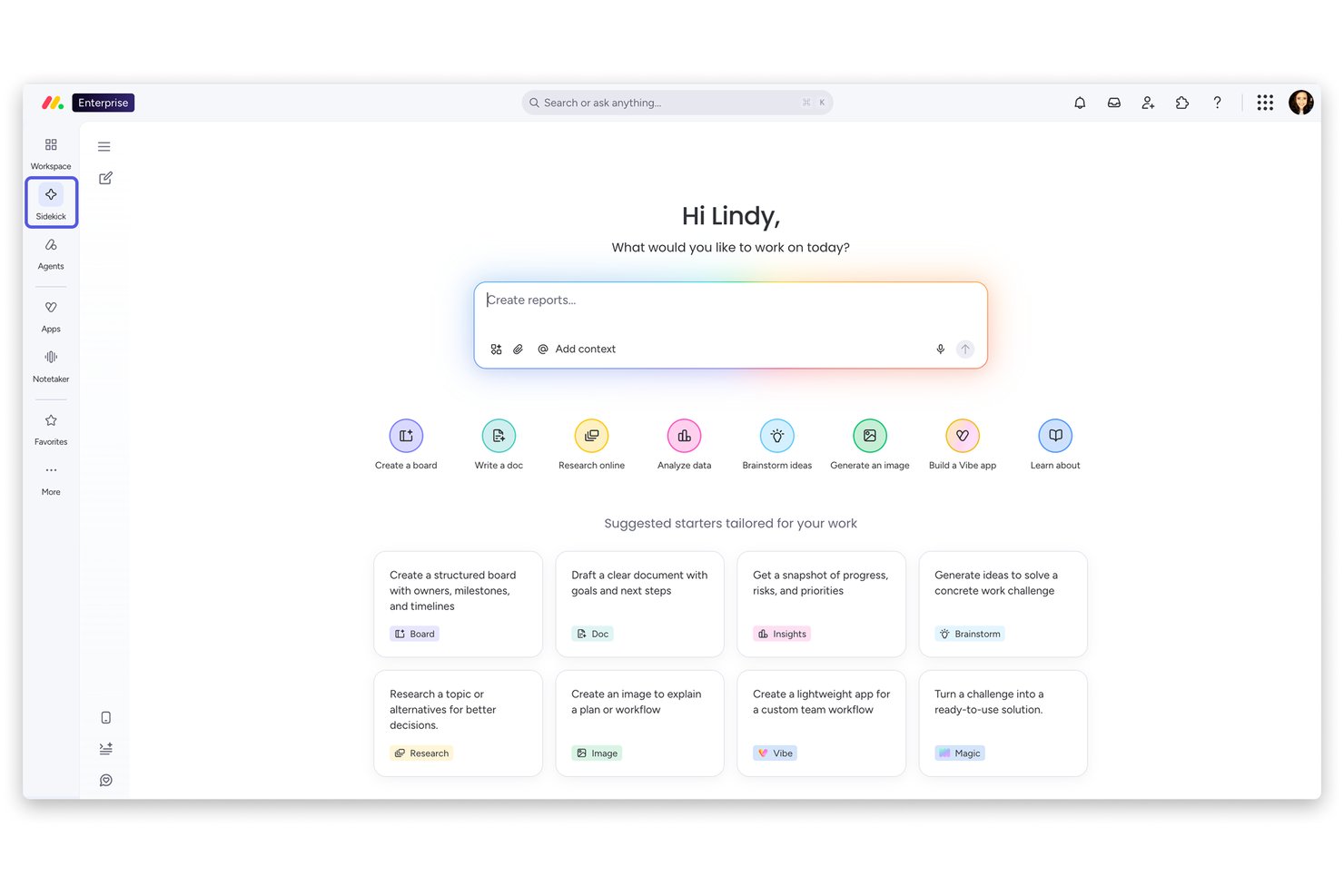
monday AI Workspace is an AI work platform that combines project planning, task automation, workflow orchestration, and cross-functional collaboration across work management, CRM, service, and dev products on a single connected platform.
Who Is monday AI Workspace Best For?
monday AI Workspace is a strong fit for mid-market and enterprise teams coordinating work across multiple departments on a single platform.
Why I Picked monday AI Workspace
I picked monday AI Workspace as one of the best because its automation capabilities go well beyond simple rule-based triggers. The monday agents layer evaluates context and chooses actions dynamically, so repetitive workflows like SLA escalations, supplier research, and bug triage run without manual intervention. My team also uses monday magic to generate full workflows from a single natural language prompt, which cuts the manual setup that usually slows adoption on new projects.
monday AI Workspace Key Features
- No-code workflow builder: Create and customize project workflows visually without writing code.
- Portfolio-level dashboards: Aggregate analytics, health metrics, and dependencies across multiple projects in one view.
- Methodology flexibility: Switch between Agile, Kanban, Waterfall, and hybrid project structures based on team needs.
- Role-based permissions: Set granular access controls for boards, dashboards, and data based on user roles.
monday AI Workspace Integrations
monday AI Workspace offers hundreds of native integrations and marketplace apps, including Slack, Gmail, Outlook, Zoom, GitHub, Microsoft Teams, Salesforce, HubSpot, Google Workspace, and Zapier, with an API available for custom integrations.
Pros and Cons
Pros:
- Custom AI agents for team-specific workflows
- Portfolio dashboards roll up cross-project AI insights
- Automation agents handle complex multi-step workflows
Cons:
- Resource optimization features lag leading competitors
- AI meeting notetaker is still maturing
New Product Updates from monday AI Workspace
monday AI Workspace Adds Human Approval Routing
monday AI Workspace adds a human-in-the-loop approval block to AI Workflows, sending approval requests and routing workflow paths based on responses. For more information, visit monday AI Workspace's official site.
Best for small business pipeline customization
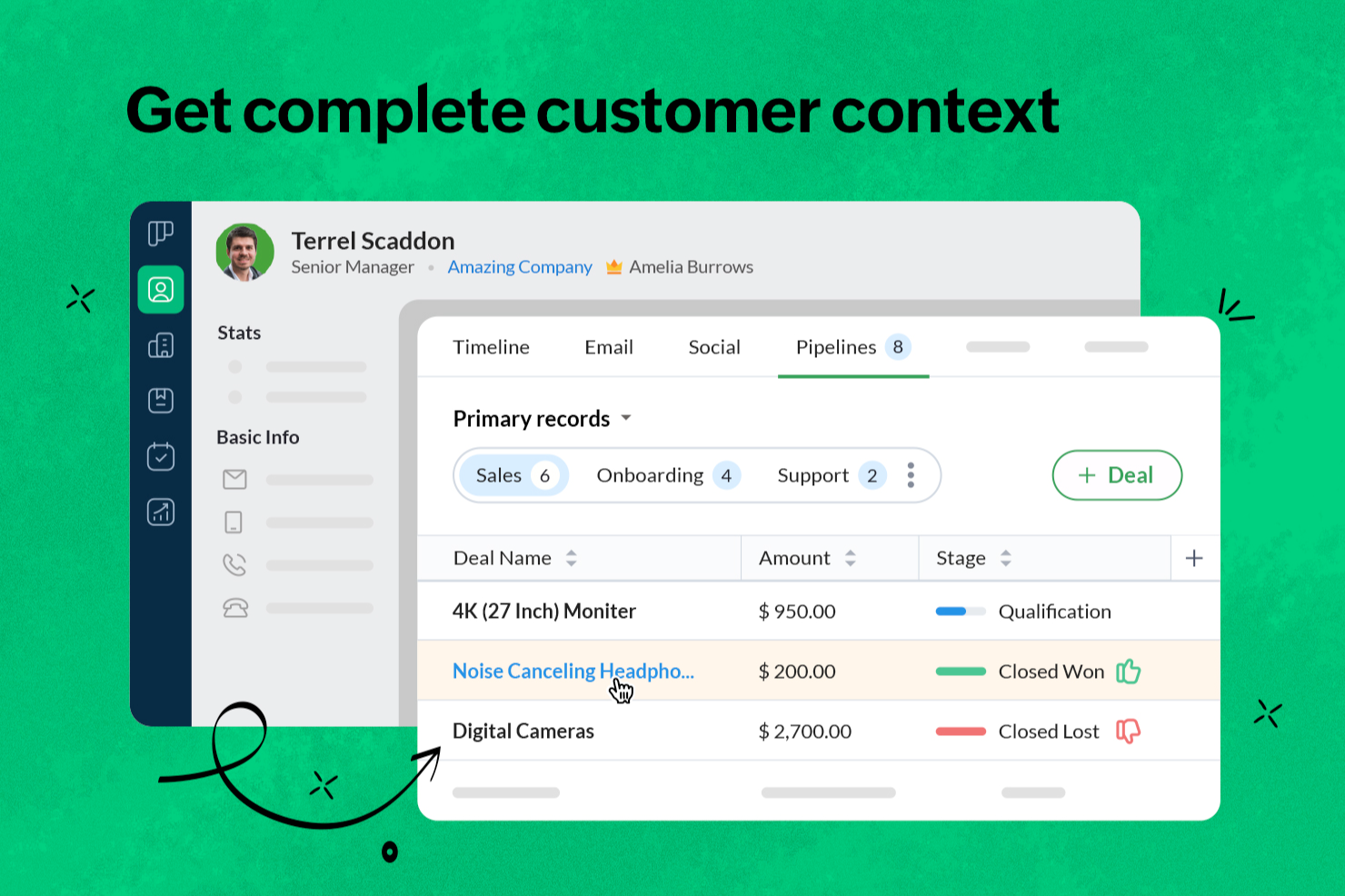
Bigin by Zoho CRM is a pipeline-focused CRM designed for small businesses that need to manage contacts, track deals, and automate sales workflows. It helps you organize customer relationships in customizable pipelines while keeping communication and activity tracking in one place.
Who Is Bigin by Zoho CRM Best For?
Small business owners and teams who need a simple, pipeline-focused CRM to manage customer relationships and sales activities.
Why I Picked Bigin by Zoho CRM
I picked Bigin by Zoho CRM because it allows my team to customize sales pipelines for different business processes instead of relying on a single generic structure. We can create multiple pipelines with unique stages, fields, and workflows, which makes it easier to track deals by product line or service type. The drag-and-drop builder also lets my team adjust processes quickly as priorities shift.
Bigin by Zoho CRM Key Features
- Workflow automation: Set up automated actions for repetitive tasks like follow-ups and status updates.
- Email integration: Connect your email accounts to send, receive, and track messages directly from Bigin.
- Mobile app: Access pipelines, contacts, and activities on iOS and Android devices.
- Telephony integration: Make and log calls from within the CRM using built-in phone system integrations.
Bigin by Zoho CRM Integrations
Bigin by Zoho CRM offers native integrations with Microsoft Outlook, Microsoft Teams, Google Workspace, Mailchimp, Shopify, and Zapier. An API is available for custom integrations.
Pros and Cons
Pros:
- Customizable pipelines for different sales processes
- Mobile app supports pipeline updates on the go
- Built-in telephony and unified communication tracking
Cons:
- Limited third-party integrations compared to competitors
- Fewer advanced reporting features than larger CRMs
New Product Updates from Bigin by Zoho CRM

Bigin iOS Adds Interactive WhatsApp Templates and Quick Replies
Bigin’s iOS app now supports interactive WhatsApp templates and Quick Replies, making it easier to preview and send instant messages to customers. For more information, visit Bigin by Zoho CRM's official site.
 .
.
Best for office integration

Microsoft CoPilot is an AI productivity tool that integrates seamlessly into the Microsoft ecosystem. It helps professionals save time by automating tasks and enhancing workflows across familiar applications.
Why I picked Microsoft CoPilot: Its AI support makes everyday work faster and smarter. You can rely on automation to draft content, analyze information, and simplify complex tasks. The tool adapts to different use cases, from data-heavy projects to polished communications. This makes it a powerful choice for teams aiming to maximize productivity within Microsoft Office.
Standout features & integrations:
Features include natural language processing for document creation, automated data insights, and task automation. These features help you manage large datasets and improve document accuracy. You can also receive intelligent suggestions to optimize your workflow.
Integrations include Microsoft Word, Excel, Outlook, PowerPoint, OneNote, Teams, SharePoint, Dynamics 365, Azure, and OneDrive.
Pros and Cons
Pros:
- Provides intelligent suggestions
- Enhances document accuracy
- Automates repetitive tasks
- AI-driven content generation
- Excellent office integration
Cons:
- Subscription for full features
- Relies on internet connection
- May have a learning curve
- Limited to Microsoft ecosystem
- Requires Microsoft 365 subscription

Best for meeting transcription

Fireflies.ai is an AI productivity tool that streamlines meeting documentation through automated transcription. It helps teams save time by capturing conversations and turning them into actionable insights.
Why I picked Fireflies.ai: Its AI support makes meetings more productive and less manual. You can automatically generate transcripts, highlight important details, and extract action items. The platform ensures information is easy to access and share across your team. This makes Fireflies.ai an ideal choice for organizations that want to improve efficiency in meeting management.
Standout features & integrations:
Features include keyword detection, sentiment analysis, and speaker identification. You can organize your meeting notes by tagging specific topics. The platform also allows you to set reminders for follow-up actions.
Integrations include Zoom, Microsoft Teams, Google Meet, Slack, Salesforce, HubSpot, Zapier, Dropbox, Evernote, and Trello.
Pros and Cons
Pros:
- Creates action items
- Highlights key points
- Automatic recording
- Searchable transcripts
- Accurate meeting transcriptions
Cons:
- Limited offline access
- Subscription for full features
- May need manual corrections
- Requires internet connection
- Occasional transcription errors

Best for research organization

NotebookLM is an AI productivity tool that simplifies research and writing by turning complex information into clear insights. It helps professionals, students, and teams save time while organizing and presenting knowledge effectively.
Why I picked NotebookLM: Its AI-driven support makes handling large volumes of information more efficient. You can automate the process of extracting key points and structuring your work. The platform adapts to different workflows, whether for research, learning, or professional projects. This makes it an excellent choice for anyone looking to boost productivity in knowledge-intensive tasks.
Standout features & integrations:
Features include audio overviews, personalized AI insights, and presentation outlines. You can listen to your sources with engaging audio discussions. The tool also helps you create structured outlines for presentations.
Integrations include Google Docs, Google Slides, YouTube, Gmail, Slack, Microsoft Teams, Dropbox, Evernote, Asana, and Trello.
Pros and Cons
Pros:
- Audio overview feature
- Supports multiple document types
- Clear citation tracking
- Instant insights from sources
- Effective research organization
Cons:
- Relies on internet connection
- Subscription required for full features
- May not suit all research needs
- Requires learning curve
- Limited offline access


Perplexity is an AI productivity tool that delivers fast, reliable answers to complex questions. It helps users save time by turning detailed queries into clear, actionable insights.
Why I picked Perplexity: Its AI-powered approach makes information retrieval efficient and accurate. You can quickly process complex inputs and get concise results tailored to your needs. The tool adapts to a wide range of professional and research workflows. This makes Perplexity an excellent choice for anyone looking to boost productivity through smarter access to knowledge.
Standout features & integrations:
Features include natural language processing, customizable query settings, and real-time feedback. These features help you refine your search criteria and get the most relevant results. The tool also offers a user-friendly interface for easy navigation.
Integrations include Google Sheets, Microsoft Excel, Slack, Trello, Asana, Zapier, Notion, Airtable, Jira, and Monday.com.
Pros and Cons
Pros:
- User-friendly interface
- Intuitive search capabilities
- Offers real-time feedback
- Handles large datasets efficiently
- Fast response to queries
Cons:
- Initial setup may be time-consuming
- Subscription needed for full features
- May have a learning curve
- Requires internet connection
- Limited offline functionality


Motion AI is an AI productivity tool built to automate work and streamline daily operations. It helps teams manage projects and schedules more efficiently by using intelligent automation.
Why I picked Motion AI: Its AI-first approach reduces the need for manual planning. You can rely on automation to handle repetitive tasks, while the system adapts to your team’s priorities. The clean interface makes it easy to adopt AI-driven workflows. This makes Motion AI an excellent choice for teams aiming to maximize efficiency and focus on high-value work.
Standout features & integrations:
Features include AI-driven scheduling, task management, and project planning. These features help you organize your workload effectively. With automated notifications, your team stays informed and on track.
Integrations include Zapier, Zoom, Google Meet, Gmail, Outlook, HubSpot, Salesforce, and Slack.
Pros and Cons
Pros:
- Supports remote work
- Enhances team collaboration
- Automates repetitive tasks
- Intuitive user interface
- AI-driven task scheduling
Cons:
- Subscription cost may be high
- Occasional glitches reported
- Requires learning curve
- Limited customization options
- Can be complex for new users


Synthesia is an AI productivity tool that streamlines video creation for businesses and teams. It uses AI to simplify production, helping you generate professional content without traditional filming resources.
Why I picked Synthesia: Its AI capabilities make video creation faster and more accessible. You can automate production steps, adapt content to multiple formats, and scale video output with ease. The platform’s intuitive setup ensures quick adoption across teams. This makes Synthesia a powerful choice for organizations aiming to save time while producing engaging video content.
Standout features & integrations:
Features include multi-language support, customizable templates, and a user-friendly interface. You can add subtitles to your videos effortlessly. The platform also offers a library of stock footage to enhance your content.
Integrations include YouTube, Vimeo, Wistia, HubSpot, Marketo, Mailchimp, Salesforce, Slack, Microsoft Teams, and Google Drive.
Pros and Cons
Pros:
- Stock footage library
- Easy branding options
- Customizable video templates
- Multi-language support
- AI-generated video avatars
Cons:
- Can be costly for small teams
- Subscription needed for full features
- May require creative input
- Relies on internet connection
- Limited editing capabilities


Elicit is an AI productivity tool that simplifies research by automating information gathering and analysis. It helps professionals save time while turning complex data into actionable insights.
Why I picked Elicit: Its AI-driven approach speeds up the research process and reduces manual effort. You can generate organized outputs that make findings easier to understand and apply. The tool adapts to different research workflows, whether for academics, teams, or business projects. This makes Elicit an excellent choice for anyone aiming to boost productivity through smarter research management.
Standout features & integrations:
Features include data extraction, customizable reports, and automated summaries. You can tailor reports to fit your specific research needs. The tool also offers visualization options to present data clearly.
Integrations include Google Sheets, Microsoft Excel, Tableau, Slack, Notion, Airtable, Trello, Asana, Zapier, and Miro.
Pros and Cons
Pros:
- Structured data organization
- Saves time on research
- Offers visualization options
- Customizable reporting
- Automates data extraction
Cons:
- Relies on internet connection
- Subscription required for full features
- May need technical knowledge
- Limited offline functionality
- Requires initial setup time

Insightful
Best for transforming workforce data into insights
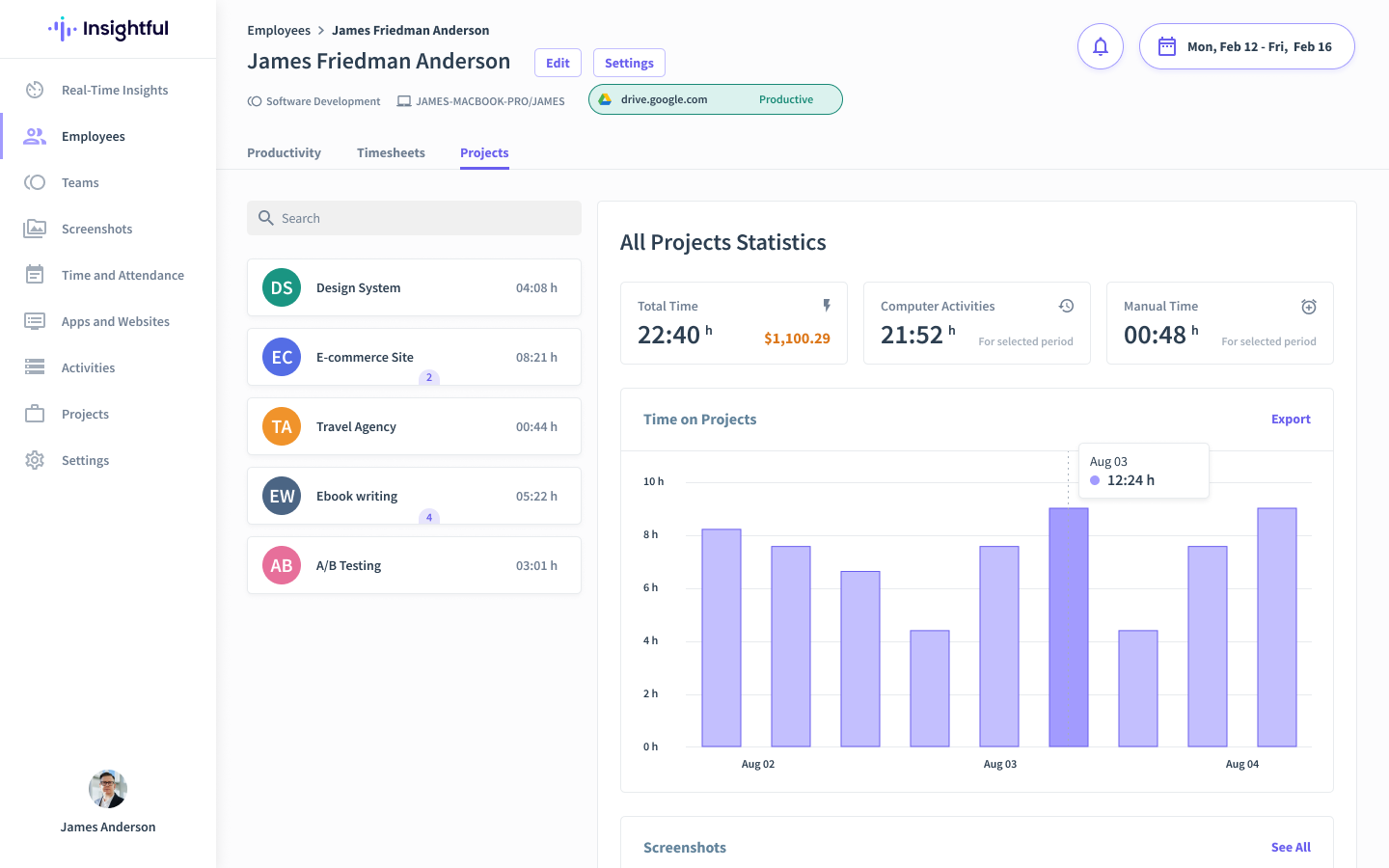
Insightful is an AI-powered workforce intelligence platform designed to elevate productivity and operational efficiency for remote and hybrid teams. With its automated activity mapping and predictive analytics, it provides real-time data on work dynamics, empowering managers to optimize workload management and make informed decisions that improve overall business outcomes.
Why I Picked Insightful
I selected Insightful for its ability to transform raw workforce data into actionable insights. Its non-intrusive time tracking captures task durations without interrupting workflows, ensuring accurate productivity assessments. Additionally, the platform’s employee monitoring features provide the transparency necessary for managing distributed teams effectively while maintaining high performance standards.
Insightful Key Features
Here are some features that make Insightful a worthy AI productivity tool:
- Screen Monitoring: Provides real-time visibility into employee screens to ensure focus and accountability.
- Risk Management: Identifies potential insider threats by analyzing user behavior patterns.
- Workflow Optimization: Offers insights to refine processes and balance workloads effectively.
- Attendance Tracking: Automates the tracking of employee attendance, integrating seamlessly with HR systems.
Insightful Integrations
Integrations include Asana, BambooHR, GitLab, ClickUp, Jira, and more.
Pros and Cons
Pros:
- Helps identify potential insider threats with behavior analysis
- Integrates with various HR systems
- User-friendly interface
Cons:
- Initial setup can be complex for large organizations
- May require employee training for effective utilization
New Product Updates from Insightful
Insightful Expands MCP and HRIS Integrations
Insightful adds OAuth connections for ChatGPT and Microsoft Copilot Studio through its MCP Server, while HRIS integrations gain manager scope syncing in Beta. These updates expand AI access and automate permission management. For more information, visit Insightful’s official site.
 .
.Other AI Productivity Tools
Here are some additional AI productivity tools options that didn’t make it onto my shortlist, but are still worth checking out:
- Grammarly
For writing assistance
- Smartsheet
For flexible project tracking views
- Zoho Projects
For budget tracking
- Any.do
For to-do lists
- Reclaim
For smart calendar scheduling


How I Evaluate AI Productivity Tools
Every tool on this list has to do more than slap an AI label on basic automations—I look for platforms that actually save PMs time on planning, risk detection, and status reporting. I split my evaluation into two layers: the core AI functionality a tool needs to qualify and the differentiating factors that separate good options from great ones.
Core Functionality (Table Stakes For This List)
When I'm selecting tools for my list, I rank each one on a scale from 0 (does not offer the functionality) to 5 (excels in this area) for each core functionality listed below. Then, I calculate the tool's total score into a percentage. Each tool needs to achieve a minimum total score of 65% to be considered for inclusion.
- AI-Driven Task Automation: I check whether the tool can auto-create, assign, and reprioritize tasks from inputs like emails, briefs, or sprint signals rather than just running static rules.
- Generative Planning Assistance: I look for AI that turns a plain-language brief into a structured plan with milestones, dependencies, and owners—not just a task list.
- Predictive Risk & Delay Detection: Each tool should surface at-risk work before it's overdue, flagging bottlenecks or slipping timelines based on real project data patterns.
- AI Content & Meeting Summarization: I evaluate whether summaries produce linked action items, not just transcripts—turning a 30-minute standup into assigned next steps.
- Natural Language Interaction: The AI should let PMs ask questions like "which tasks are blocked this sprint?" and get accurate, contextual answers or trigger actions directly.
- Intelligent Resource Optimization: I look for workload balancing that goes beyond utilization charts—recommending reassignments based on availability, skills, and capacity forecasts.
Once I have a list of tools that meet this criteria, I consider what sets each platform apart.
Differentiating Factors (What Sets Vendors Apart)
Here's how I compare and contrast different vendors:
Standout Features
Cross-tool AI orchestration is a big differentiator—I look for tools that pull context from Slack threads, GitHub commits, and shared docs to inform project decisions rather than operating in a silo. Portfolio-level intelligence matters when you're a program manager tracking health across dozens of projects at once. I also evaluate how transparent a tool's AI outputs are. When the AI flags a delivery risk, you should see the data driving that score, not just a red icon.
Beyond Features
Data security and AI governance deserve close attention—I check whether vendors clearly disclose how project data is handled and whether it trains their models. Integration depth also matters a lot. A tool that syncs bi-directionally with Jira, Confluence, and Slack fits into an existing PM stack without forcing a rip-and-replace. I also evaluate scalability, since a tool that works for a 10-person squad may struggle once you're running a portfolio across multiple business units with years of historical data.
How to Choose AI Productivity Tools
It’s easy to get bogged down in long feature lists and complex pricing structures. To help you stay focused as you work through your unique software selection process, here’s a checklist of factors to keep in mind:
| Factor | What to Consider |
|---|---|
| Scalability | Will the tool grow with your team? Consider if it can handle increased users or data without extra costs. Look for options that support your future business growth. |
| Integrations | Does it connect with your existing tools? Ensure it works smoothly with other software your team uses like CRM, email, and calendar apps. Avoid tools that isolate data. |
| Customizability | Can you tailor it to fit your processes? Check if you can adjust workflows, dashboards, or settings to match your team's unique needs. |
| Ease of use | Is the tool intuitive? A user-friendly interface reduces training time and increases adoption. Test it with a free trial to see how quickly your team can adapt. |
| Implementation and onboarding | How easy is it to get started? Evaluate the setup time and resources needed. Look for tools with clear guides and support to ease the transition. |
| Cost | Does it fit your budget? Compare pricing plans and consider total costs, including hidden fees or add-ons. Look for flexible pricing that aligns with your budget. |
| Security safeguards | How secure is your data? Verify if the tool offers encryption, user access controls, and compliance with data protection regulations to safeguard sensitive information. |
What Are AI Productivity Tools?
AI productivity tools are software applications that utilize artificial intelligence to automate tasks, analyze data, and improve efficiency. Professionals like project managers, marketers, and analysts often use these tools to save time and enhance their workflow. Task automation, data analysis, and integration capabilities help with managing workloads, improving collaboration, and making data-driven decisions. Overall, these tools increase productivity and allow users to focus on high-value tasks.
Features of AI Productivity Tools
When selecting AI productivity tools, keep an eye out for the following key features:
- Task automation: Automates repetitive tasks to save time and reduce manual effort.
- Data analysis: Provides insights and trends from data to support informed decision-making.
- Integration capabilities: Connects with existing software to ensure seamless data flow and collaboration.
- Customizability: Allows users to tailor workflows and dashboards to fit their specific needs.
- Real-time collaboration: Enables teams to work together simultaneously, improving communication and efficiency.
- Natural language processing: Understands and processes human language to facilitate user interaction.
- Security safeguards: Protects sensitive information with encryption and access controls.
- Scalability: Adapts to growing team sizes and increased data without additional costs.
- Ease of use: Features an intuitive interface that reduces the learning curve and boosts adoption.
- Reporting and visualization: Offers tools to create visual reports and dashboards for better data interpretation.
Benefits of AI Productivity Tools
Implementing AI productivity tools provides several benefits for your team and your business. Here are a few you can look forward to:
- Time savings: Automates routine tasks, freeing up time for more strategic work.
- Improved decision-making: Analyzes data to provide insights, helping you make informed choices.
- Enhanced collaboration: Real-time features allow teams to work together more effectively.
- Increased flexibility: Customizable options let you tailor the tool to fit your specific processes.
- Better data management: Integration capabilities ensure smooth data flow across different platforms.
- Scalability: Grows with your team and business needs without extra costs.
- Security assurance: Protects sensitive data with advanced security features.
Costs and Pricing of AI Productivity Tools
Selecting AI productivity tools requires an understanding of the various pricing models and plans available. Costs vary based on features, team size, add-ons, and more. The table below summarizes common plans, their average prices, and typical features included in AI productivity tools solutions:
Plan Comparison Table for AI Productivity Tools
| Plan Type | Average Price | Common Features |
|---|---|---|
| Free Plan | $0 | Basic task management, limited integrations, and essential support. |
| Personal Plan | $5-$25/user/month | Task automation, data analysis, and basic customization options. |
| Business Plan | $30-$60/user/month | Advanced integrations, enhanced collaboration tools, and priority support. |
| Enterprise Plan | $75-$150/user/month | Full customizability, dedicated account manager, and advanced security features. |
AI Productivity Tools FAQs
Here are some answers to common questions about AI productivity tools:
How can AI productivity tools integrate with existing systems?
AI productivity tools often offer integration capabilities that allow them to connect seamlessly with existing software like CRM systems, email platforms, and project management tools. It’s important to check if the tool supports the APIs or third-party connectors needed for your current systems. This ensures a smooth data flow and enhances workflow efficiency.
What should I consider regarding data security with AI tools?
When using AI productivity tools, it’s crucial to evaluate their data security measures. Look for features like encryption, user access controls, and compliance with data protection regulations. Ensure the tool aligns with your organization’s security policies to protect sensitive information and maintain trust.
Are AI productivity tools scalable?
Scalability is a key factor when choosing AI productivity tools. Consider whether the tool can handle increased data volume or users as your team grows. Scalable solutions should allow you to add features or capacity without significant additional costs, ensuring they remain effective as your business expands.
What are the costs associated with AI productivity tools?
AI productivity tools can vary widely in price, often based on features, user count, and additional services. It’s important to compare pricing models, such as subscription vs. one-time fees, and consider any hidden costs like setup or training. Look for plans that offer flexibility to match your budget.
How do AI productivity tools support collaboration?
AI productivity tools support collaboration by providing features like real-time document editing, shared workspaces, and communication channels. These capabilities help teams work together efficiently, regardless of location. Consider tools that offer seamless integration with your team’s preferred communication platforms to enhance collaboration.
What level of customer support do AI productivity tools offer?
Customer support levels can vary among AI productivity tools. Evaluate the availability of support channels, such as live chat, email, or phone support. Consider the provider’s response time and the quality of their support resources, like tutorials or FAQs, to ensure you can quickly resolve any issues.