10 Best Time Tracking Software for Accountants in 2026

10 Best Time Tracking Software For Accountants Shortlist


Tracking time efficiently can be a real challenge for accountants. With so many tasks to juggle, it’s easy to lose track of billable hours. Time tracking software can help you and your team manage this, ensuring every minute spent is accounted for.
I've independently tested and reviewed a range of time tracking tools tailored for accountants. In my experience, these tools not only improve accuracy but also save valuable time.
In this article, you’ll find my top picks for time tracking software. I’ll walk you through their features, benefits, and how they can fit into your workflow. Whether you're part of a small firm or a large accounting team, there’s something here for you.
Why Trust Our Software Recommendations
Our team has been testing and reviewing software since 2012. As project managers ourselves, we know how difficult—and important—it is to choose the right software.
For this guide, we evaluated tools using hands-on testing and independent research, scoring tools using our selection criteria. We also draw on insights from industry thought leaders and practicing project management experts.
Our reviews reflect our human editorial judgment, not a sales pitch.
Expert reviewers:
Time Tracking Software For Accountants Comparison Table
This comparison table summarizes pricing details for my top time tracking software for accountants selections:
| Tool | Best For | Trial Info | Price | ||
|---|---|---|---|---|---|
| 1 | Best for multi-entity billing and profitability | 14-day free trial | From $19.90/user/month (billed annually) | Website | |
| 2 | Best for tracking billable hours | 14-day free trial + free demo available | From $4.99/user/month + $19/month base fee (billed annually) | Website | |
| 3 | Best for flexible integrations | Free plan + 30-day free trial + free demo available | From $9/user/month (billed annually) | Website | |
| 4 | Best for detailed reporting & data analysis | Free plan + 30-day free trial + free demo available | From $6/user/month (billed annually) | Website | |
| 5 | Best for reporting features | Free plan available | From $4.99/user/month | Website | |
| 6 | Best for payroll integration | 30-day free trial | From $20/month + $10/user/month | Website | |
| 7 | Best for automatic tracking | Free 14-day trial + free demo available | From $9/user/month (billed annually) | Website | |
| 8 | Best for project management | Free plan + 14-day free trial + free demo available | From $4/user/month (billed annually) | Website | |
| 9 | Best for attendance tracking | 14-day free trial + free plan + free demo available | From $3.99/user/month (billed annually) | Website | |
| 10 | Best for accounting firms | Free demo available | From $79/user/month | Website |


Best Time Tracking Software For Accountants Reviews
Below are my detailed summaries of the best time tracking software for accountants that made it onto my shortlist. My reviews offer a detailed look at the key features, pros & cons, integrations, and ideal use cases of each tool to help you find the best one for you.

Scoro
Best for multi-entity billing and profitability
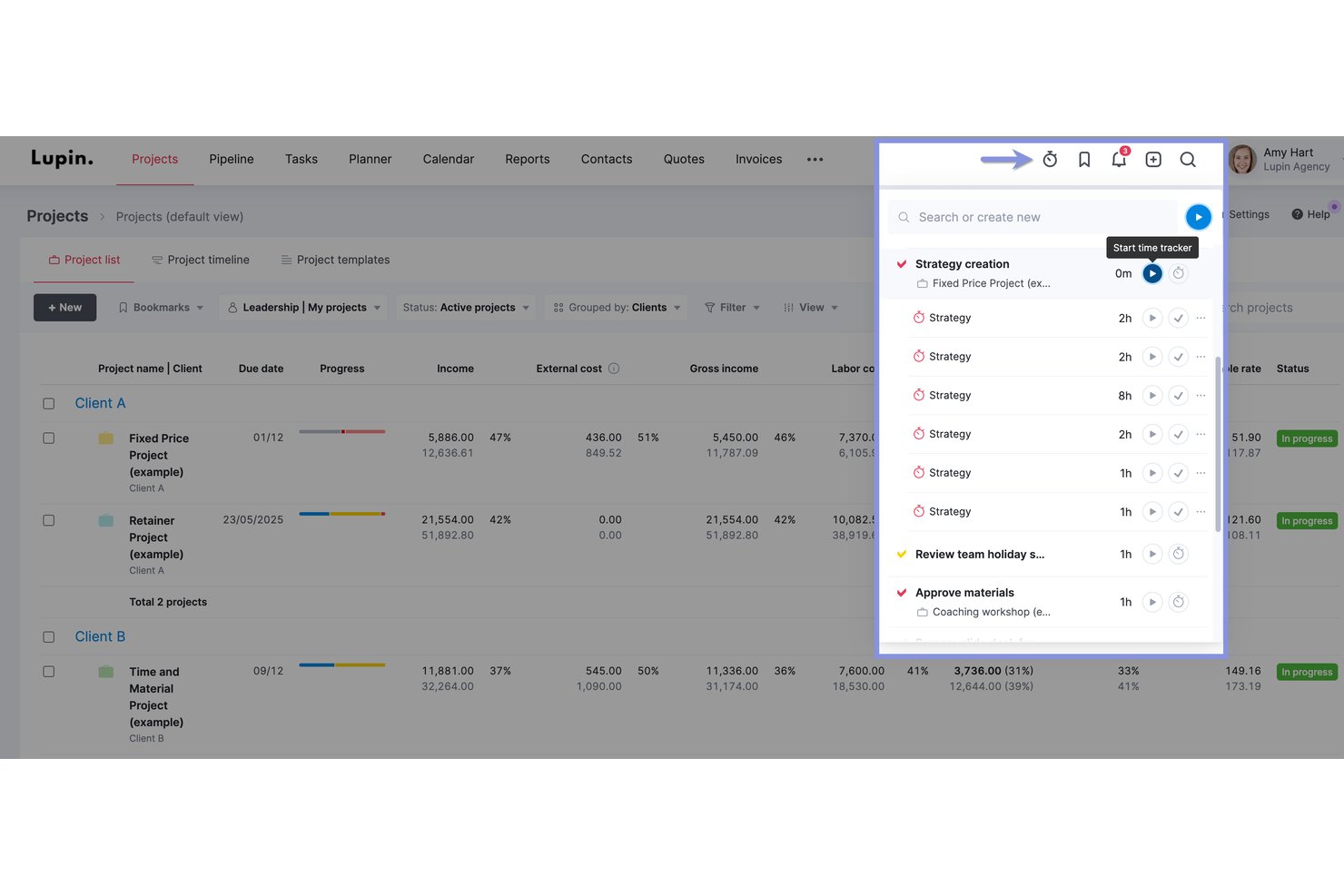
Scoro is a professional services automation platform that combines time tracking, project budgeting, invoicing, and profitability reporting with native two-way integrations with QuickBooks, Xero, and Sage Intacct.
Who Is Scoro Best For?
Scoro is a strong fit for mid-market accounting and professional services firms managing multiple client engagements, entities, or currencies across a team of five or more.
Why I Picked Scoro
I picked Scoro as one of the best because its multi-entity billing and real-time profitability reporting genuinely serve accounting firms running advisory and recurring engagements across multiple offices or legal entities. Each entity can carry its own currency and financial settings, while WIP reporting and retainer invoicing run in parallel. I also love that profit forecasting updates in real time as time is logged, so you're never guessing where a client engagement stands on margin.
Scoro Key Features
- Timesheet approval workflow: Managers review and approve prefilled timesheets submitted by team members before time is locked and billed.
- Automated timesheet reminders: Admins can configure up to five email reminders to prompt staff with unsubmitted timesheets from the past eight weeks.
- Multi-currency support: Each client engagement or entity can be managed in its own currency, with financial settings applied independently.
- Native two-way accounting integrations: Scoro syncs invoices, payments, and contacts bidirectionally with QuickBooks, Xero, Sage Intacct, and Exact Online.
Scoro Integrations
Scoro offers native two-way integrations with QuickBooks, Xero, Sage Intacct, and Exact Online, plus integrations with Jira, Google Calendar, Microsoft 365, HubSpot, Salesforce, Slack, and Avalara. It also supports custom integrations through its public REST API and Zapier.
Pros and Cons
Pros:
- Multi-entity billing supports global accounting teams
- Native two-way sync with major accounting platforms
- Real-time profitability forecasting across client engagements
Cons:
- Not purpose-built for accounting workflows
- Time locking and WIP features gated by tier
New Product Updates from Scoro

Scoro Adds Time Mobile App and ELI Improvements
Scoro adds the Scoro Time mobile app for iOS/Android to track time anywhere and expands ELI with attachments, smarter filtering, and trigger-based actions. For more information, visit Scoro's official site.

Best for tracking billable hours

Buddy Punch is a versatile employee time clock software designed to make time tracking, employee scheduling, and payroll management easier for businesses. It offers a variety of features that cater to the needs of teams looking to efficiently manage their time and attendance.
Why I Picked Buddy Punch: I picked Buddy Punch as a top time tracking tool for accountants because it enables real-time monitoring of employee hours and overtime from anywhere, helping you capture every billable hour. Its automated attendance and PTO tracking streamlines time-off management and ensures policy compliance. The platform also simplifies payroll with automated timesheets and fast approvals, letting you focus on accounting tasks rather than admin work.
Standout Features & Integrations
Features include GPS tracking, which monitors employee locations for remote work, ensuring accountability and transparency. Geofencing is another noteworthy feature, allowing you to set specific locations where employees can clock in and out, providing an extra layer of security. Additionally, customizable reporting lets you tailor reports to meet your specific business needs, giving you valuable insights into your team's performance.
Integrations include QuickBooks, ADP Workforce Now, Gusto, Paychex, Paylocity, Paycor, iSolved, Justworks, SurePayroll, Rippling, Zapier, and TriNet Payroll.
Pros and Cons
Pros:
- Real-time monitoring
- GPS tracking
- Customizable reports
Cons:
- Basic mobile app
- No offline mode

Toggl
Best for flexible integrations
Toggl is a versatile time tracking tool popular among freelancers and small to medium-sized businesses. It helps users track time, manage projects, and generate reports to improve productivity.
Why I picked Toggl: It stands out for its flexible integrations, allowing you to connect with over 100 different tools. This flexibility makes it easy to customize your workflow. Toggl also offers features like automated time tracking and customizable reports, aligning with its USP. The software's user-friendly interface makes it accessible for teams of all sizes.
Standout Features & Integrations
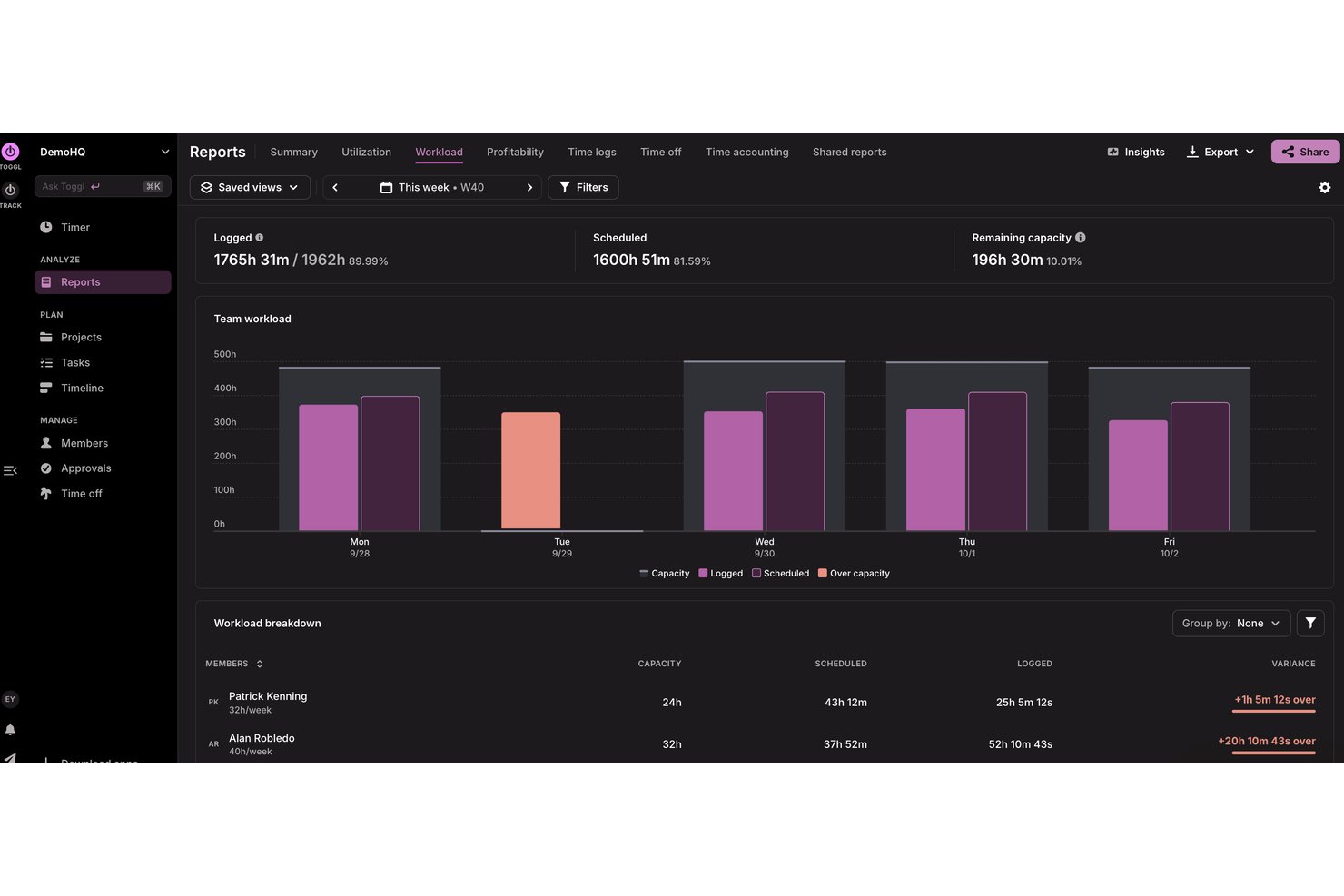
Features include automated time tracking that privately records your activity in the background, customizable reporting tools to fit your business needs, workload and utlization reports for accurate capacity planning, and a calendar view for easy integration and management of time entries.
Integrations include Jira, Asana, Slack, Todoist, Google Calendar, and Outlook, plus an API for custom integrations and MCP for connecting to AI assitants like Claude, Cursor, and Codex.
Pros and Cons
Pros:
- Supports multiple currencies
- Capacity and utilization tracking
- Billable and cost rates by person and project
Cons:
- No phone support
- No invoicing features

actiTIME
Best for detailed reporting & data analysis
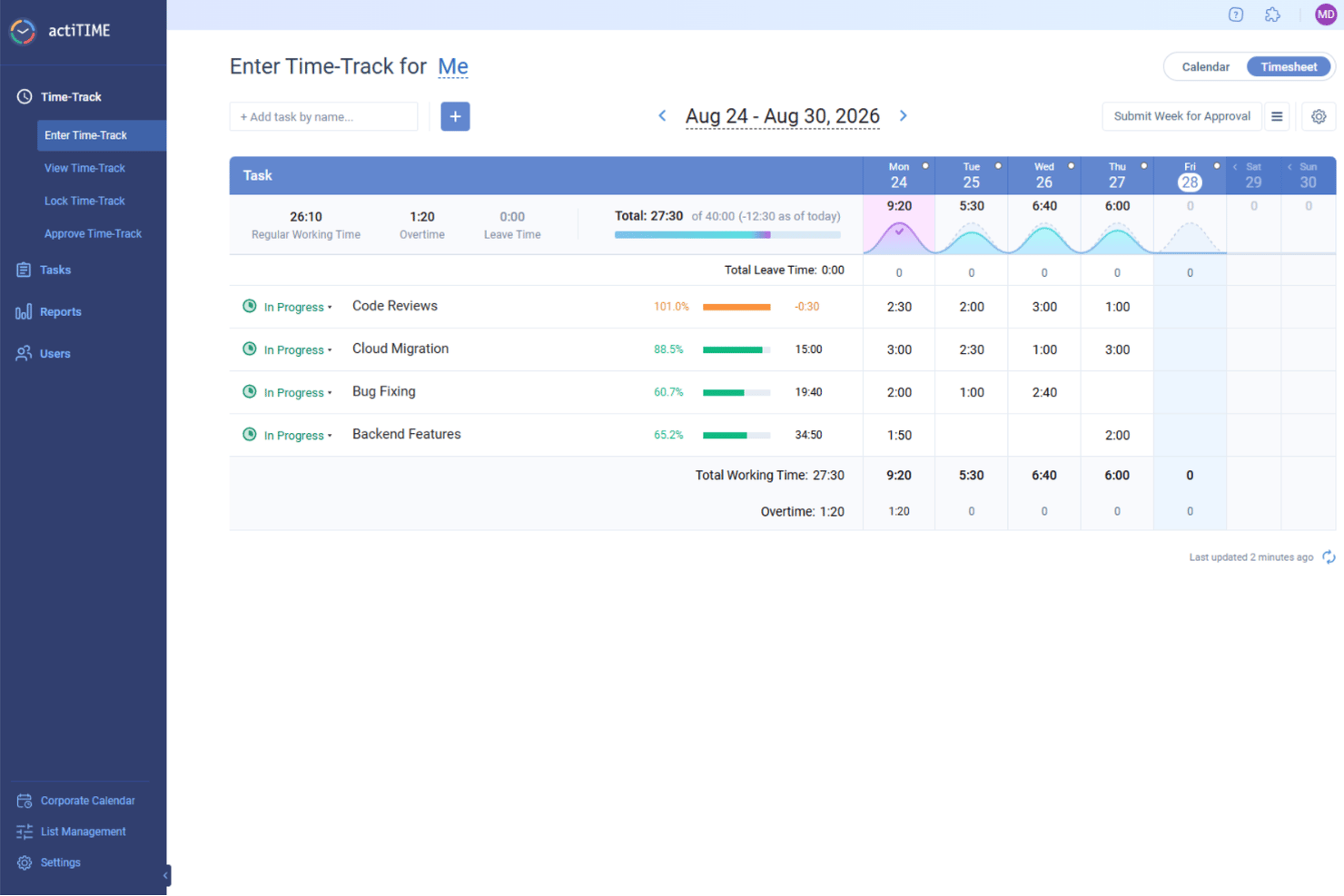
actiTIME is a versatile time tracking software designed to meet the needs of various industries, including accounting. With its focus on improving project cost-effectiveness, it offers a range of features that cater specifically to professionals like accountants who need precise time management.
Why I Picked actiTIME: I picked actiTIME for accountants because it offers comprehensive project management tools to track projects and monitor budgets effectively, ensuring financial control and profitability. Its detailed reporting and data analysis features provide insights into productivity and project performance, supporting informed decision-making. Additionally, actiTIME’s billing and invoicing automation helps save time and reduce errors, ensuring accurate client billing.
Standout Features & Integrations
Features include insightful analytics that provide a clear view of your team's productivity and project profitability, helping you make data-driven decisions. The software also streamlines leave tracking, allowing you to manage time-off requests and ensure that your team is adequately staffed. Additionally, actiTIME supports efficient cost analysis, enabling you to monitor expenses and resource allocation effectively.
Integrations include QuickBooks and Zapier.
Pros and Cons
Pros:
- Simple manual time entries
- Easy project setup
- Customizable billing rates
Cons:
- Limited advanced features
- Basic user interface
New Product Updates from actiTIME

actiTIME Visual Hour Indicator and Time-Track Report Redesign
actiTIME adds a wave-style hour indicator to the Timesheet and Calendar views and refreshes the Time-Track report for smoother navigation and clearer visuals. For more information, visit actiTIME's official site.

Clockify
Best for reporting features

Clockify is a time tracking tool ideal for teams of any size, offering unlimited users at no additional cost. It allows businesses to track work hours, manage projects, and generate reports efficiently.
Why I picked Clockify: I selected Clockify because its detailed reporting tools allow accounting professionals to quickly audit billable time across different clients and projects. Practice managers can generate broken-down time entries by task, client, or team member to simplify monthly billing and safeguard margin accuracy. This makes it ideal for accountants who need clear time tracking and reporting features to verify billing precision without manual spreadsheet management.
Standout Features & Integrations
Features include detailed reporting that helps analyze time usage, a timeline view to visualize your team's workday, and a Pomodoro timer to boost productivity by breaking work into intervals.
Integrations include Asana, Trello, Jira, Slack, QuickBooks, Google Calendar, Notion, Monday.com, GitHub, and Basecamp.
Pros and Cons
Pros:
- Scalable for growing teams
- Pomodoro timer feature
- Free for up to five users
Cons:
- No invoicing capabilities
- Basic free plan features

Best for payroll integration

QuickBooks Time is a time tracking software designed for businesses of all sizes, especially those needing payroll integration. It helps users track employee hours, manage schedules, and export data for payroll processing.
Why I picked QuickBooks Time: Payroll integration is key for many businesses, and QuickBooks Time excels in this area. It offers features like GPS tracking and mobile time entry, making it easy for your team to log hours from anywhere. The software allows seamless syncing with QuickBooks for payroll processing. This integration ensures that your payroll is accurate and efficient, saving you time and reducing errors.
Standout Features & Integrations
Features include GPS tracking to monitor where your team is working, mobile time entry for logging hours on the go, and scheduling tools that help organize shifts and manage time-off requests.
Integrations include QuickBooks, Xero, Square, Gusto, Expensify, ADP, Deputy, Tsheets, Sage, and BambooHR.
Pros and Cons
Pros:
- Detailed scheduling options
- GPS tracking available
- Strong mobile app functionality
Cons:
- Learning curve for new users
- Occasional sync delays

Timely
Best for automatic tracking

Timely is a time tracking software designed for professionals and teams who want to automate their time management. It helps users track work hours, manage projects, and optimize productivity without manual entry.
Why I picked Timely: Automatic tracking is the core of Timely's offering, making it a unique choice for those who want to reduce manual time entry. The software captures all activities across devices, providing a complete picture of your workday. It also offers memory tracking, which logs your time usage without needing to start or stop a timer. This helps ensure accuracy and saves time, making it ideal for busy professionals.
Standout Features & Integrations
Features include memory tracking, which logs your activity without timers, project dashboards that provide a visual overview of tasks, and privacy-first design that ensures your data is secure and private.
Integrations include Asana, Trello, Slack, QuickBooks, Google Calendar, Outlook, Xero, GitHub, Monday.com, and Zapier.
Pros and Cons
Pros:
- Detailed project dashboards
- Privacy-focused design
- Automatic time tracking
Cons:
- Requires consistent internet connection
- Limited customization options

My Hours
Best for project management

My Hours is a time tracking and project management tool designed for teams and freelancers who need to manage tasks and track billable hours efficiently. It helps users organize projects, allocate resources, and monitor time spent on tasks.
Why I picked My Hours: It excels in project management, offering tools that help you organize and manage your tasks effectively. With My Hours, you can set project budgets and track time against them, ensuring you stay within limits. The software provides detailed reports, which are crucial for evaluating project performance. This makes it a great choice for teams looking to enhance their project management capabilities.
Standout Features & Integrations
Features include task tracking that allows you to monitor progress in real-time, budget alerts to notify you when you're nearing project limits, and detailed reporting to analyze time and cost data effectively.
Integrations include QuickBooks, Zapier, Trello, Asana, Slack, Basecamp, Google Calendar, Microsoft Teams, Outlook, and Jira.
Pros and Cons
Pros:
- Real-time task tracking
- Budget alerts for projects
- Effective project management tools
Cons:
- Limited mobile app features
- Limited customization options

TimeCamp
Best for attendance tracking

TimeCamp is a time tracking software tailored for businesses seeking detailed insights into employee attendance and productivity. It serves companies of all sizes, helping them track work hours, manage projects, and improve efficiency.
Why I picked TimeCamp: Attendance tracking is a strong feature, providing tools to monitor employee presence accurately. TimeCamp offers automatic time tracking, capturing work hours without manual input. It also includes a feature for tracking billable and non-billable hours, making it easier to manage project budgets. The software's emphasis on attendance ensures you have precise data for payroll and performance assessments.
Standout Features & Integrations
Features include graphical timesheets that provide a visual representation of work hours, idle time tracking to identify productivity gaps, and invoicing capabilities to bill clients directly from the app.
Integrations include Trello, Asana, Slack, QuickBooks, Xero, Jira, Monday.com, Zapier, Google Calendar, and Microsoft Teams.
Pros and Cons
Pros:
- Graphical timesheets
- Automatic time tracking
- Detailed attendance tracking
Cons:
- No phone support
- Limited customization options

Karbon
Best for accounting firms
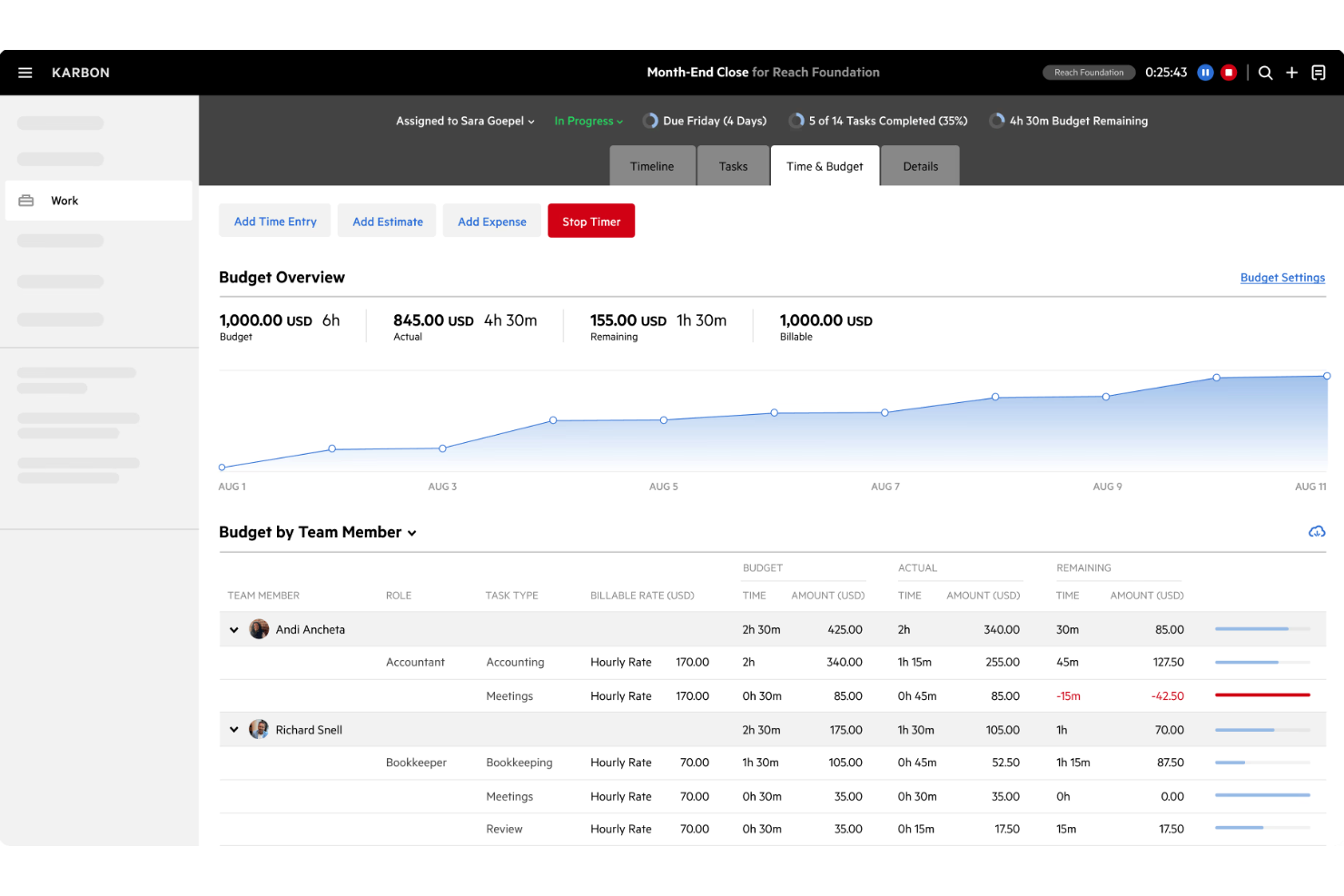
Karbon is a practice management software designed specifically for accounting firms, helping them manage workflows, collaborate with their teams, and communicate with clients effectively. It streamlines operations by combining email, tasks, and client data into a single platform.
Why I picked Karbon: It is tailored for accounting firms, offering features that support the unique needs of this industry. With Karbon, you can manage client emails directly within the platform and create tasks from emails. It also offers workflow automation, which saves time and reduces manual work. This focus on accounting firms ensures that you get the tools needed to manage your practice efficiently.
Standout Features & Integrations
Features include a client portal for secure communication and document sharing, customizable workflows to fit your firm's processes, and a timeline view that provides a complete overview of client interactions and tasks.
Integrations include Xero, QuickBooks Online, Gmail, Outlook, Office 365, Slack, Zapier, GoProposal, Microsoft Teams, and Mailchimp.
Pros and Cons
Pros:
- Secure client portal
- Workflow automation available
- Tailored for accounting firms
Cons:
- Limited third-party integrations
- Higher price point
Other Time Tracking Software for Accountants
Here are some additional time tracking software for accountants options that didn’t make it onto my shortlist, but are still worth checking out:
- Time Doctor
For remote teams
- Deltek Replicon Time
For global compliance
- Harvest
For expense tracking
- Time Tracker
For invoicing
- Insightful
For precise billing & productivity insights
- ClickTime
For smart cost allocation
- DeskTime
For offline tracking
- monday AI Workspace
With AI-powered project risk detection


How I Evaluate Time Tracking Software for Accountants
I split my evaluation into baseline criteria every tool must meet—like billable hour tracking and billing rate management—and differentiators that separate the best options for accounting firms.
Core Functionality (Table Stakes For This List)
When I'm selecting tools for my list, I rank each one on a scale from 0 (does not offer the functionality) to 5 (excels in this area) for each core functionality listed below. Then, I calculate the tool's total score into a percentage. Each tool needs to achieve a minimum total score of 65% to be considered for inclusion.
- Billable Time Tracking: I check whether each tool lets staff tag entries as billable or non-billable at the task level, like splitting hours between a client audit and internal admin.
- Client & Project Allocation: Each tool should support multi-level hierarchies so accountants can log time under a client, engagement type, and specific deliverable.
- Timesheet Approval Workflows: I look for structured submit-and-approve cycles that mirror how accounting firms operate, where a senior or partner signs off before time hits billing.
- Billing Rate Management: Tools need to handle multiple rate structures, since firms often set different rates per staff level, client agreement, or service type.
- Invoicing & Accounting Integration: I evaluate how each platform connects with systems like QuickBooks, Xero, or Sage to push approved time directly into invoices or the general ledger.
- Utilization & Realization Reporting: Dashboards that surface realization rates, write-offs, and staff utilization help firms understand where revenue leaks during busy season.
Once I have a list of tools that meet this criteria, I consider what sets each platform apart.
Differentiating Factors (What Sets Vendors Apart)
Here's how I compare and contrast different vendors:
Standout Features
Automatic time capture is a major differentiator. Tools that passively log hours spent in tax prep software or email save accountants from reconstructing timesheets at week's end. I also look for capacity planning features that help firms forecast workload during peak periods like year-end close. Client portals add another layer of value, letting clients review logged time and approve invoices without constant back-and-forth over email.
Beyond Features
Integration depth matters. I evaluate whether a tool connects with practice management platforms like Karbon or TaxDome, since that's where most accounting workflows live. Data security is another priority—firms handle sensitive client financials, so I check for SOC 2 certification and role-based access controls. Firm size fit also shapes my assessment. A solo practitioner needs simple per-user pricing, while a multi-office firm needs multi-entity support and scalable licensing that won't balloon costs as the team grows.
How to Choose Time Tracking Software for Accountants
It’s easy to get bogged down in long feature lists and complex pricing structures. To help you stay focused as you work through your unique software selection process, here’s a checklist of factors to keep in mind:
| Factor | What to Consider |
|---|---|
| Scalability | Consider if the software can grow with your team. Can it handle more users or projects without a hitch? Look for tools that offer scalable pricing plans that suit growing businesses. |
| Integrations | Check if the tool connects with your existing accounting software and other tools you use daily. Seamless integration can save time and reduce errors. Examine the list of available integrations and ensure they fit your current tech stack. |
| Customizability | Think about how adaptable the software is to your workflow. Can you tailor it to fit your specific processes and preferences? Customizable dashboards and reports can enhance usability. |
| Ease of use | Evaluate the user interface and navigation. Is it intuitive for your team members? A complex interface can slow down adoption and productivity, so prioritize user-friendly designs that require minimal training. |
| Implementation and onboarding | Consider the resources provided for onboarding. Are there tutorials, guides, and support to help your team get started? Quick and efficient onboarding can set the stage for successful implementation. |
| Cost | Review the pricing structure and ensure it aligns with your budget. Look for hidden fees or extra costs for additional features. Compare the value offered at different price points to find the best fit for your needs. |
| Security safeguards | Ensure the tool meets your security standards. Does it offer data encryption and secure authentication? Protecting sensitive financial data is crucial, so verify the software's security measures before committing. |
| Support availability | Determine the level of support offered. Is there 24/7 assistance available? Access to timely and effective support can be crucial in resolving issues quickly and maintaining productivity. |
What Is Time Tracking Software for Accountants?
Time tracking software for accountants is a tool that helps track billable hours, manage projects, and generate reports. These tools are generally used by accountants, financial professionals, and teams needing accurate time and expense tracking. Features like time logging, project tracking, and integration capabilities help with managing workflows and ensuring accurate billing. Overall, these tools enhance productivity and ensure efficient time management for accounting tasks.
Features of Time Tracking Software for Accountants
When selecting time tracking software for accountants, keep an eye out for the following key features:
- Time logging: Accurately records billable and non-billable hours to ensure precise billing and project management.
- Project tracking: Monitors progress and budgets for various projects, helping teams stay on schedule and within financial limits.
- Integration capabilities: Connects with existing accounting software and other tools to streamline data flow and reduce manual entry.
- Expense tracking: Logs and categorizes expenses, providing a clear view of project costs and financial management.
- Customizable reports: Offers tailored reports that provide insights into time usage, productivity, and financial performance.
- Automated invoicing: Generates invoices directly from time and expense data, simplifying the billing process and ensuring timely payments.
- Real-time dashboards: Provides an overview of key metrics and project status, allowing for informed decision-making and resource allocation.
- Security safeguards: Ensures data protection with encryption and secure authentication, safeguarding sensitive financial information.
Benefits of Time Tracking Software for Accountants
Implementing time tracking software for accountants provides several benefits for your team and your business. Here are a few you can look forward to:
- Improved accuracy: Tracks billable hours precisely, reducing errors in billing and ensuring clients are charged correctly.
- Enhanced productivity: Monitors time usage and identifies productivity gaps, helping teams optimize their workflows.
- Better financial oversight: Offers detailed reports on time and expenses, providing insights into project costs and financial health.
- Streamlined billing: Automates invoicing using tracked data, speeding up the billing process and ensuring timely payments.
- Increased transparency: Provides real-time dashboards and reports, allowing for better visibility into project progress and resource allocation.
- Secure data management: Protects sensitive financial information with security safeguards, ensuring compliance with data protection standards.
Costs and Pricing of Time Tracking Software for Accountants
Selecting time tracking software for accountants requires an understanding of the various pricing models and plans available. Costs vary based on features, team size, add-ons, and more. The table below summarizes common plans, their average prices, and typical features included in time tracking software for accountants solutions:
Plan Comparison Table for Time Tracking Software for Accountants
| Plan Type | Average Price | Common Features |
|---|---|---|
| Free Plan | $0 | Basic time tracking, limited projects, and simple reporting. |
| Personal Plan | $5-$15/user/month | Time tracking, project management, integrations, and basic reporting. |
| Business Plan | $15-$30/user/month | Advanced reporting, invoicing, multiple users, and integrations with accounting tools. |
| Enterprise Plan | $30-$50/user/month | Customizable features, priority support, enhanced security, and comprehensive analytics. |
Time Tracking Software for Accountants FAQs
Here are some answers to common questions about time tracking software for accountants:
How can time tracking software improve billing accuracy?
Time tracking software ensures that all billable hours are accurately recorded, reducing errors in client billing. By automating the tracking process, you can avoid manual entry mistakes and keep precise records. This leads to more accurate invoices and helps maintain trust with clients.
What integrations should I look for in time tracking software?
Look for software that integrates with your existing accounting and project management tools, such as QuickBooks, Xero, or Trello. Integrations help streamline your workflow by allowing data to flow seamlessly between systems, reducing manual input and potential errors.
How does time tracking software help with regulatory compliance?
Time tracking software can help ensure compliance by maintaining accurate and detailed records of work hours and billable time. This is crucial for audits and regulatory reporting, as it provides a clear and organized record of how time is spent across projects and clients.
Can time tracking software support remote teams?
Yes, many time tracking tools offer features specifically designed for remote teams, such as mobile access and real-time dashboards. These features help you monitor productivity and manage projects efficiently, no matter where your team is located.
What features should I prioritize for project management?
Prioritize features like project tracking, budget management, and team collaboration tools. These features help you manage resources effectively, keep projects on track, and ensure that your team is working efficiently towards project goals.
How does time tracking software enhance productivity?
By providing insights into how time is spent, time tracking software helps identify productivity gaps and optimize workflows. With accurate data, you can make informed decisions to improve efficiency and allocate resources more effectively.