

10 Best Daily Planner Apps Reviewed in 2026

Best Daily Planner App Shortlist


Managing multiple projects is no small feat. You juggle deadlines, tasks, and team dynamics daily. That's where a digital planner app comes in handy to help you keep everything on track.
In my experience, the right tool can make all the difference. It helps you organize tasks, prioritize work, and ensure nothing slips through the cracks. I test and review software independently, aiming to provide you with unbiased, well-researched insights.
In this article, I'll walk you through the top day planner apps that can benefit you and your team. You'll find out which one best suits your needs, helping you manage projects more efficiently. Let's dive in and find the perfect fit for your workflow.
Why Trust Our Software Recommendations
Our team has been testing and reviewing software since 2012. As project managers ourselves, we know how difficult—and important—it is to choose the right software.
For this guide, we evaluated tools using hands-on testing and independent research, scoring tools using our selection criteria. We also draw on insights from industry thought leaders and practicing project management experts.
Our reviews reflect our human editorial judgment, not a sales pitch.
Expert reviewers:
Daily Planner App Comparison Table
This comparison table summarizes pricing details for my top daily planner app selections:
| Tool | Best For | Trial Info | Price | ||
|---|---|---|---|---|---|
| 1 | Best for cross-platform integration | 7-day free trial | From $19/user/month | Website | |
| 2 | Best for Microsoft 365 task-tracking integration | Free-forever plan available | Free to use | Website | |
| 3 | Best for habit tracking features | Free plan available | From $49.99/year (billed annually) | Website | |
| 4 | Best for shared scheduling reliability | 14-day free trial | $7.56/month | Website | |
| 5 | Best for quick task entries | Free-forever plan available | Free to use | Website | |
| 6 | Best for to-do lists and project management | Free plan + free demo available | From $4.99/user/month (billed annually) | Website | |
| 7 | Best for automated AI-driven daily planning | Free trial available | From $19/seat/month (billed annually) | Website | |
| 8 | Best for personal task management | Free plan available | Pricing depends on region | Website | |
| 9 | Best for intentional guided daily rituals | 14-day free trial | From $17/user/month (billed annually) | Website | |
| 10 | Best for multi-calendar visibility | Free trial available | From $15/month (billed annually) | Website |
Best Daily Planner App Reviews
Below are my detailed summaries of the best daily planner apps on my shortlist. My reviews offer a detailed look at the key features, pros and cons, integrations, and ideal use cases for each tool to help you find the best one for you.

Akiflow
Best for cross-platform integration
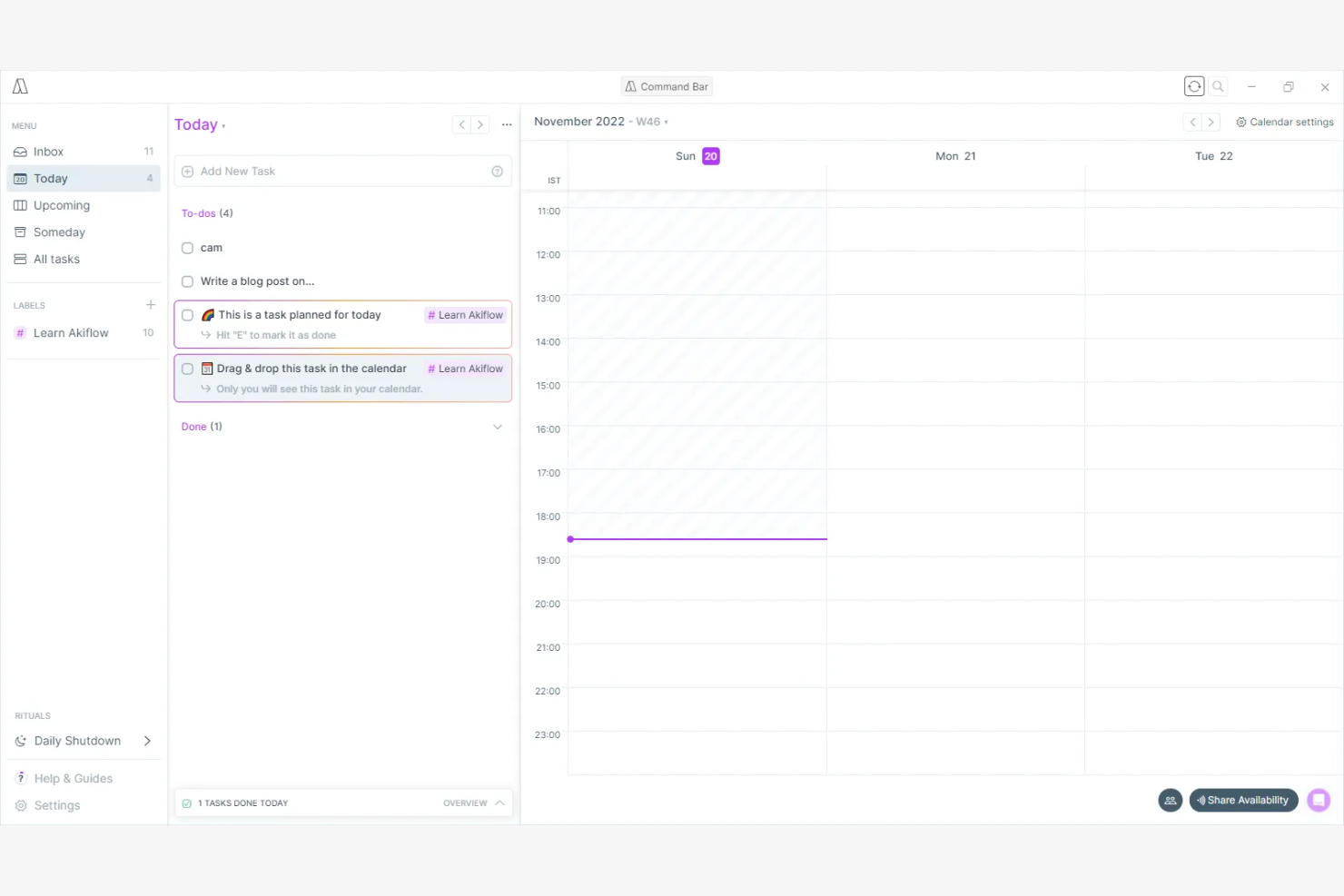
Akiflow is a task management app with productivity tools designed for professionals seeking efficient, cross-platform organization. It helps you centralize your tasks and schedules, making it easier to manage daily responsibilities.
Why I picked Akiflow: Akiflow excels in cross-platform integration, allowing you to sync tasks across multiple devices. Its intuitive interface provides a clear view of your action items and calendar events. The app's ability to aggregate items from various sources ensures you never miss important deadlines.
Standout Features and Integrations:
Features include a command bar for quick navigation and task management, keyboard shortcuts and a quick-add feature to speed up your workflow, and a focus mode that helps minimize distractions.
Integrations include Google Calendar, Slack, Trello, Todoist, Asana, Notion, and more.
Pros and Cons
Pros:
- Smart command bar
- Strong integration capabilities
- Efficient cross-platform sync
Cons:
- Collaboration is not in-built
- Feature overlap can be initially overwhelming

Best for Microsoft 365 task-tracking integration

Microsoft To Do is a task management app that works within the Microsoft ecosystem. It helps you organize tasks, set reminders, and collaborate within familiar Microsoft tools.
Why I picked Microsoft To Do: It's tightly integrated with other Microsoft services, making it ideal for those already using the Microsoft suite. You can sync tasks with Outlook for flawless task management. The My Day feature helps you focus on daily priorities, and the app's ability to share task lists improves team collaboration.
Standout Features and Integrations:
Features include the ability to create subtasks for better task breakdown, customizable themes to personalize your workspace, and a smart suggestions feature that recommends tasks for the day.
Integrations include Microsoft Outlook, OneNote, Microsoft Teams, and more.
Pros and Cons
Pros:
- My Day feature for priorities
- Syncs with Outlook tasks
- Smart list and custom views
Cons:
- Integration scope is narrow
- Not ideal for non-Microsoft users

TickTick
Best for habit tracking features
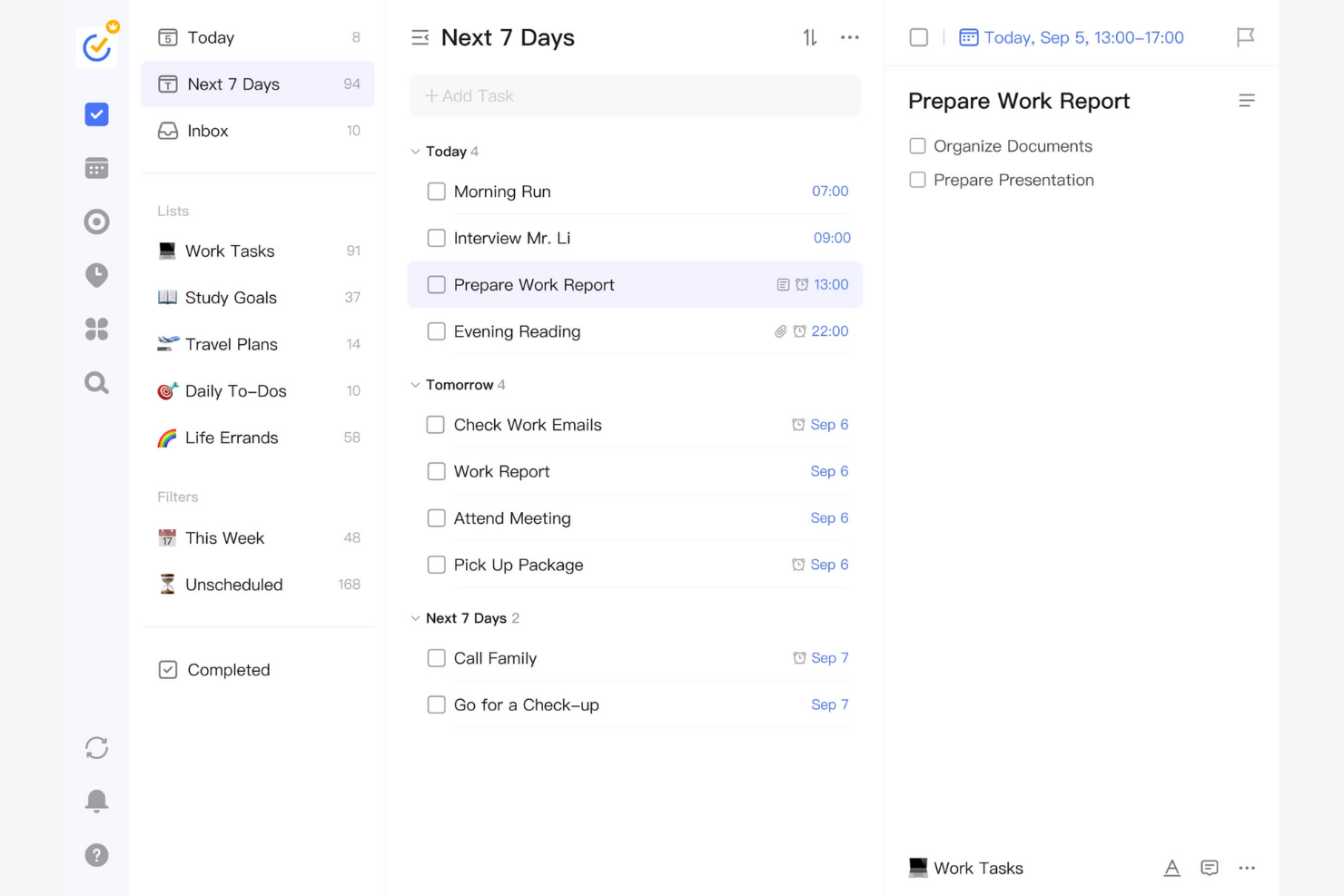
TickTick is a task management app you can use to increase productivity. It assists you in organizing tasks, setting reminders, and tracking daily habits to achieve your goals.
Why I picked TickTick: TickTick integrates a habit tracker directly into its task management system. You can set daily, weekly, or monthly habits and track your progress over time. The app's Pomodoro timer helps you stay focused and productive during work sessions. TickTick's flexible recurring tasks make it easy to manage ongoing responsibilities.
Standout Features and Integrations:
Features include a built-in calendar view that provides a visual representation of your tasks, the ability to create checklists within tasks for better organization, and a priority setting that helps you focus on the most important actions.
Integrations include Microsoft Outlook, Siri, Alexa, IFTTT, Slack, Zapier, and more.
Pros and Cons
Pros:
- Flexible recurring tasks
- Pomodoro timer included
- Integrates habit tracking
Cons:
- May not suit complex workflows
- Limited project management features

Best for shared scheduling reliability
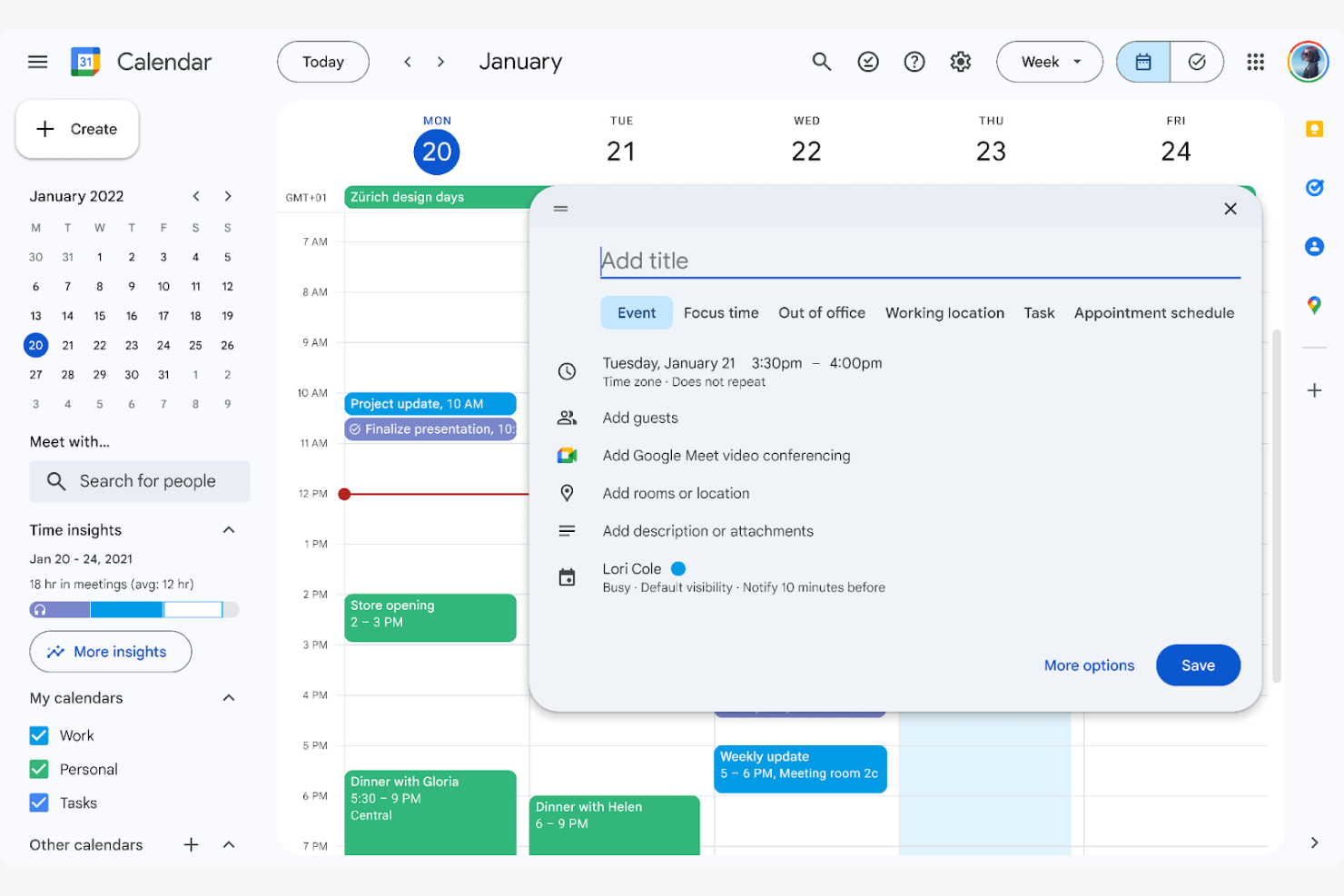
Google Calendar is a scheduling tool you and your team can use to manage events and appointments efficiently. It enables you to coordinate schedules and collaborate on shared calendars, making it ideal for team environments.
Why I picked Google Calendar: Google Calendar excels at team scheduling, allowing you to view and manage multiple team calendars in one place. Its event sharing feature lets you invite others to meetings and events. The ability to set reminders ensures your team stays on top of important tasks, and the color-coding feature helps differentiate between personal and professional commitments.
Standout Features and Integrations:
Features include customizable event notifications to keep you informed, timezone support to make scheduling across regions easier, and a simple drag-and-drop interface for rescheduling events.
Integrations include Google Meet, Notion, Google Sheets, Doodle, Zoom, Slack, and more.
Pros and Cons
Pros:
- Handles scheduling in differing time zones
- Color-coded calendar events
- Effective team scheduling and event sharing
Cons:
- Poor handling of recurring event changes
- Limited task management features

Best for quick task entries
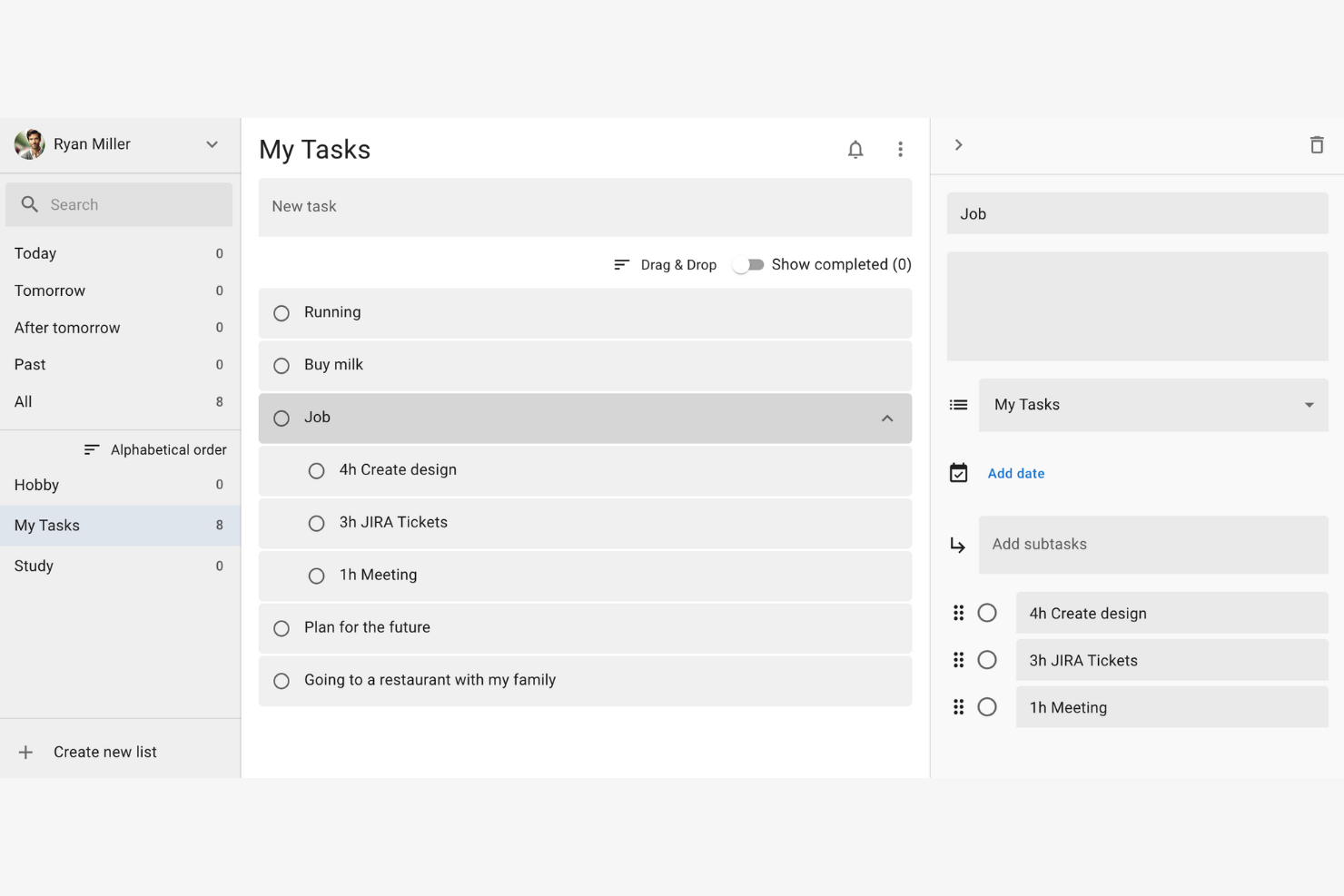
Google Tasks is a simple task management tool that organizes daily to-dos efficiently. It allows you to create, manage, and track tasks directly from your Google account.
Why I picked Google Tasks: It's perfect for quick task entries, letting you add tasks with minimal clicks. You can integrate tasks with your Gmail and Calendar, allowing for efficient task management. Its integration with other Google services elevates productivity by keeping everything in one place.
Standout Features and Integrations:
Features include creating subtasks for a more detailed task breakdown, setting due dates to ensure timely completion, and sorting tasks by date or priority for better organization.
Integrations include Google Gmail, Google Calendar, Google Assistant, Google Keep, and more.
Pros and Cons
Pros:
- Syncs across devices
- Task prioritization options
- Integrates with Google services
Cons:
- Missing built-in search functionality
- No collaborative sharing or team tools

Any.do
Best for to-do lists and project management

Any.do is a to-do list app for you to manage your personal daily tasks, family events, and team's work all in one place. It offers a straightforward interface that helps you manage your to-do lists, set reminders, and plan your schedule.
Why I picked Any.do: Any.do is known for its simplicity in task management, making it easy for you to create and organize tasks. The app's drag-and-drop functionality allows you to quickly rearrange tasks by priority. Any.do's reminder system ensures you never miss important deadlines.
Standout Features and Integrations:
Features include a focus mode to reduce distractions while working, a grocery list to manage shopping tasks, and voice entry for hands-free task management.
Integrations include Google Calendar, Microsoft Outlook, Slack, Zapier, and more.
Pros and Cons
Pros:
- Voice entry capability
- Drag-and-drop functionality
- Flexible reminder system
Cons:
- Majority of useful tools behind paywall
- Customer support can be inconsistent

Motion
Best for automated AI-driven daily planning
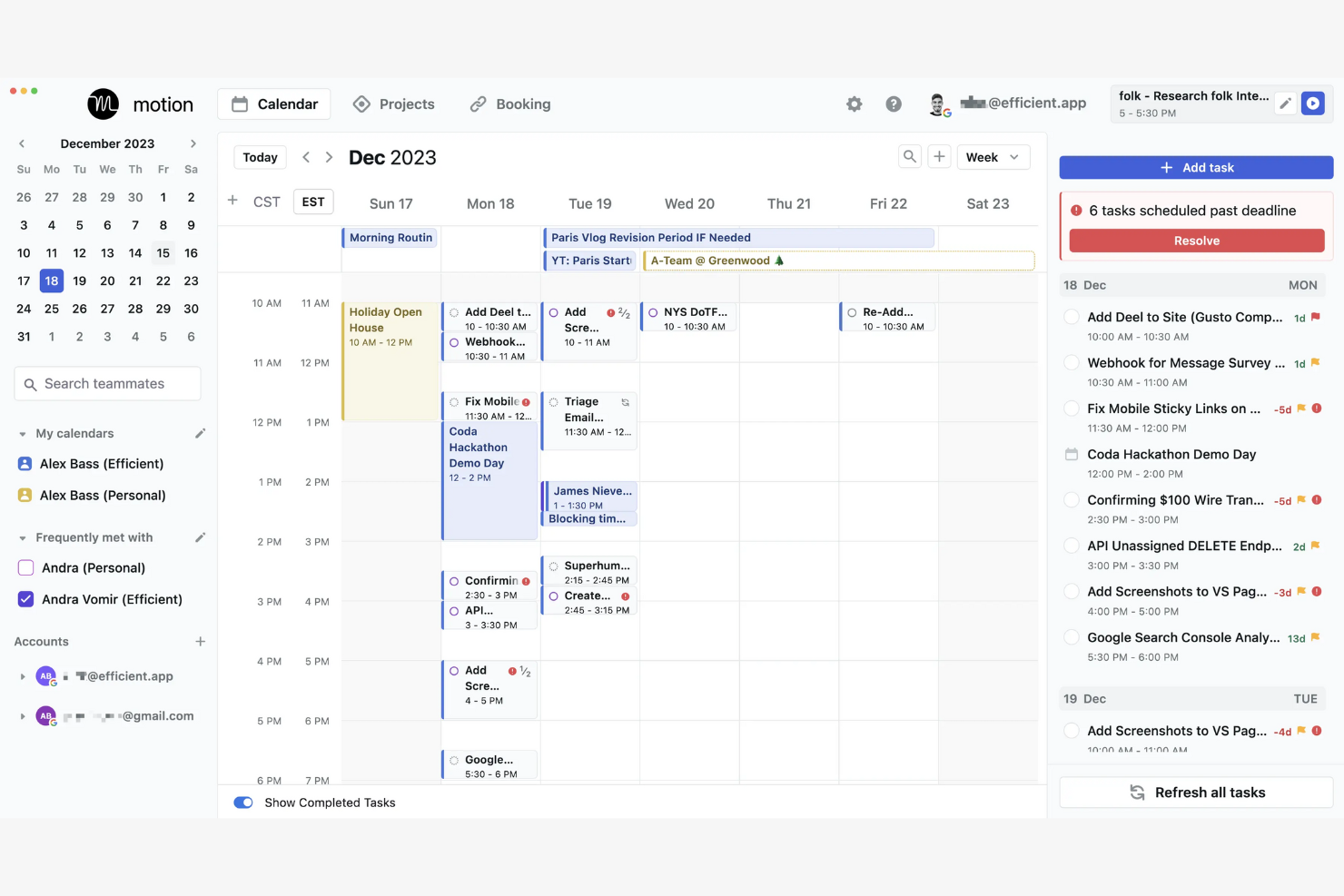
Motion is an AI-powered productivity app tailored for project management and scheduling. It primarily caters to teams and individuals looking to strengthen their task management and scheduling efficiency.
Why I picked Motion: It offers an AI-driven scheduling approach, with several unique tools. Its AI Project Manager automates project planning and helps you organize tasks efficiently. The AI-powered Gantt Chart provides a visual timeline for tracking progress, which is particularly useful for managing complex projects. These features help you manage your time and resources effectively.
Standout Features and Integrations:
Features include an AI Task Manager that efficiently prioritizes tasks, an AI Calendar that integrates scheduling and time management, and an AI Meeting Assistant that simplifies meeting scheduling, all of which work together to optimize your daily workflow.
Integrations include Zoom, Google Meet, Google Gmail, Microsoft Outlook, and more.
Pros and Cons
Pros:
- Integrates well with calendars
- Auto captures meeting notes
- AI-driven project management
Cons:
- High price point with no free version
- Complex user interface

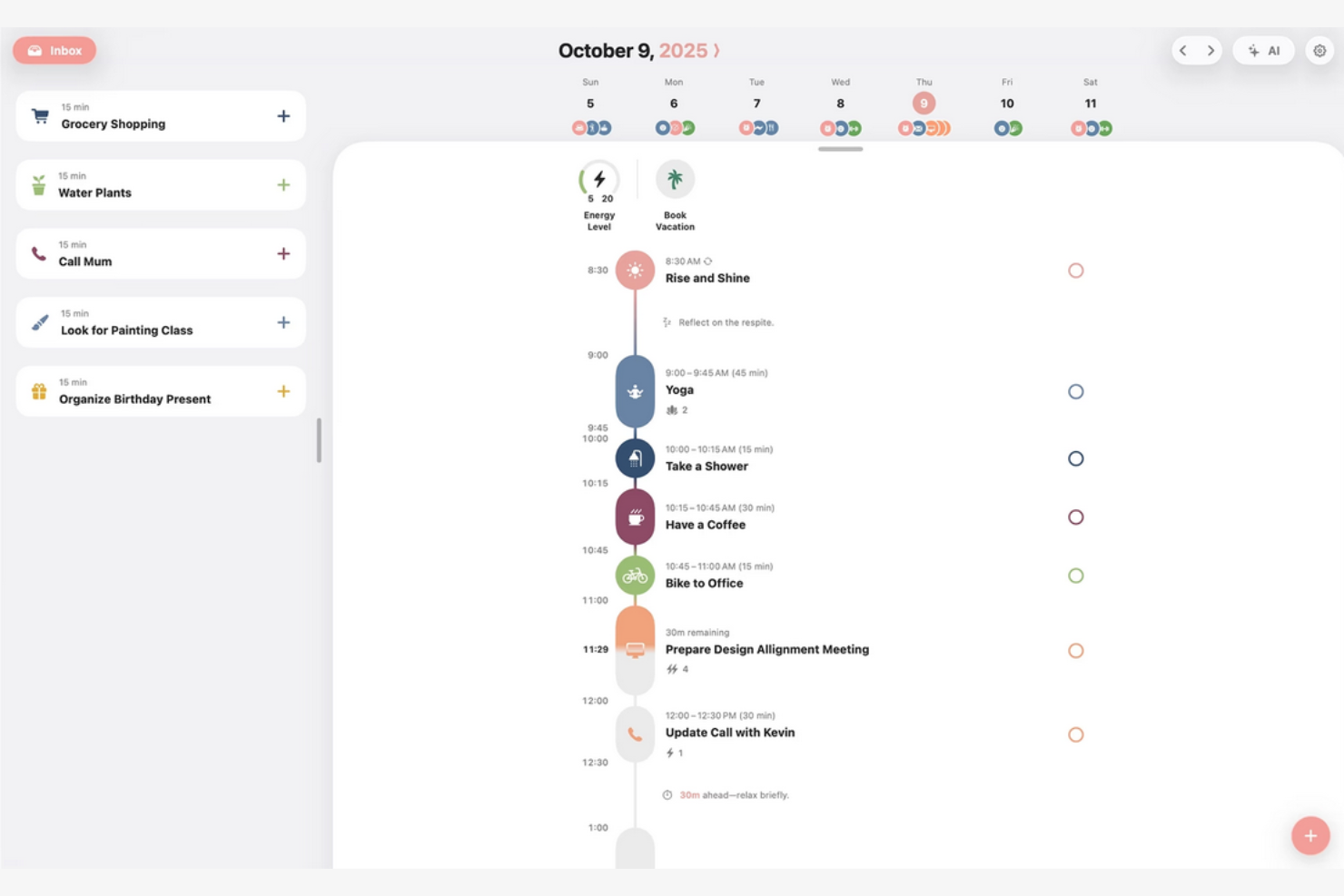
Structured is a daily planner app designed to make time management easier with its visual timeline. It caters to users looking to manage their personal schedules and boost daily productivity.
Why I picked Structured: Available through various app stores, Standard’s unique visual timeline helps you manage your tasks effectively by bringing your calendar, to-dos, routines, and habits together. Its quick task creation and calendar import features make it easy to set up your day. The app's device compatibility ensures you can plan on the go. Smartwatch integration conveniently allows you to access your schedule anytime.
Standout Features and Integrations:
Features include weekly and monthly planning views for a better overview, as well as notifications and widgets to keep you focused. These features work together to improve your daily planning experience.
Integrations include Google Calendar, Apple Calendar, and more.
Pros and Cons
Pros:
- Integrates with built-in calendars
- Quick task creation and drag-and-drop scheduling
- Clear visual timeline
Cons:
- Android and web versions still lag behind iOS
- No team collaboration

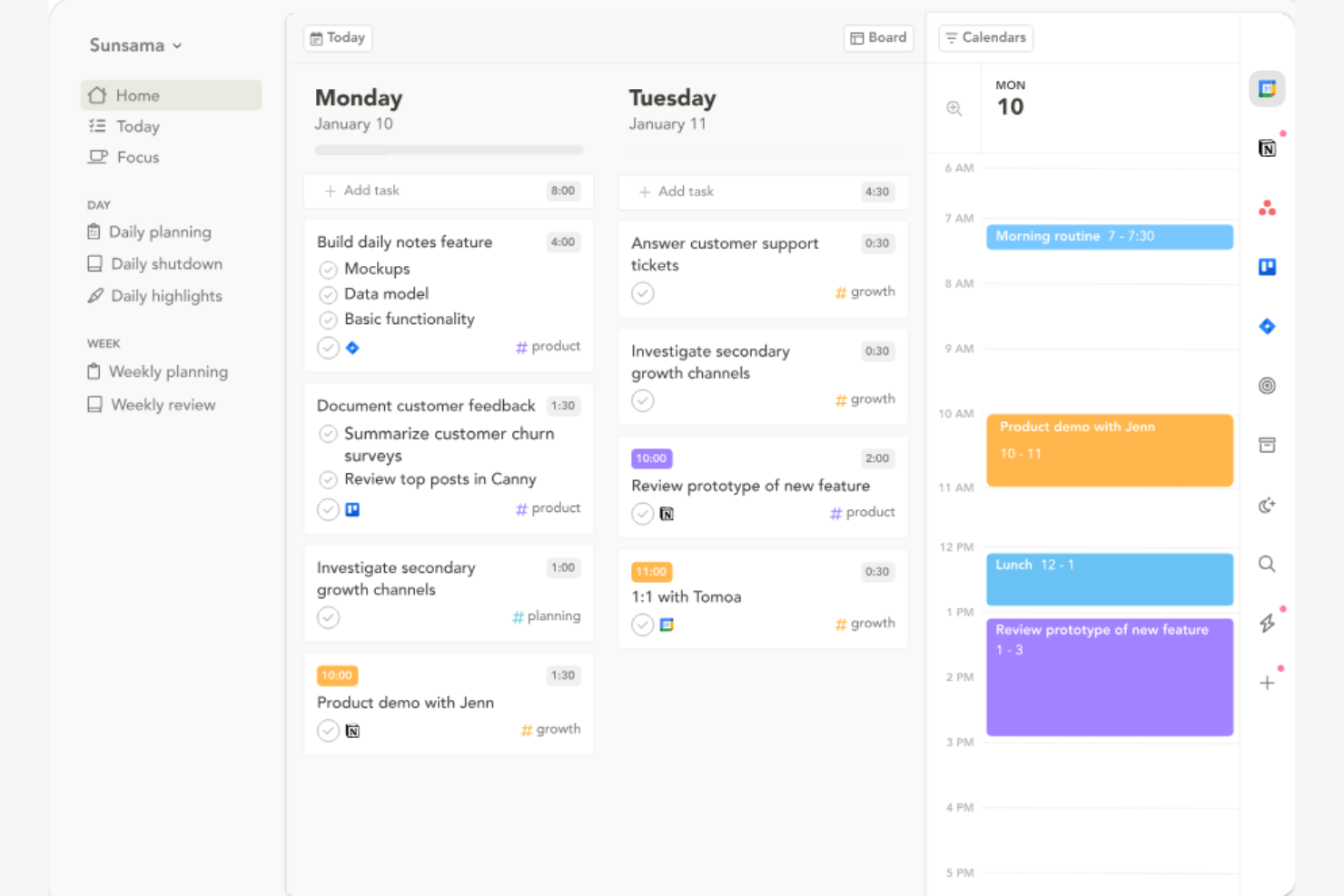
Sunsama is a daily planner app that uses time blocking to organize your workday effectively. It helps you focus on daily tasks and align them with your long-term goals.
Why I picked Sunsama: Its intuitive interface allows you to drag and drop tasks into your calendar. The app's ability to set daily goals helps you stay on track with your priorities. Sunsama's focus on reflection at the end of the day helps you evaluate your productivity.
Standout Features and Integrations:
Features include a day planner mode to outline your day, task drag-and-drop functionality for easy scheduling, and a reflection feature to promote end-of-day evaluation. These features work together to improve your daily workflow.
Integrations include Google Calendar, Todoist, Slack, and more.
Pros and Cons
Pros:
- Aligns tasks with goals
- Encourages daily reflection
- Intuitive drag-and-drop interface
Cons:
- Missing advanced task hierarchy
- No offline mode

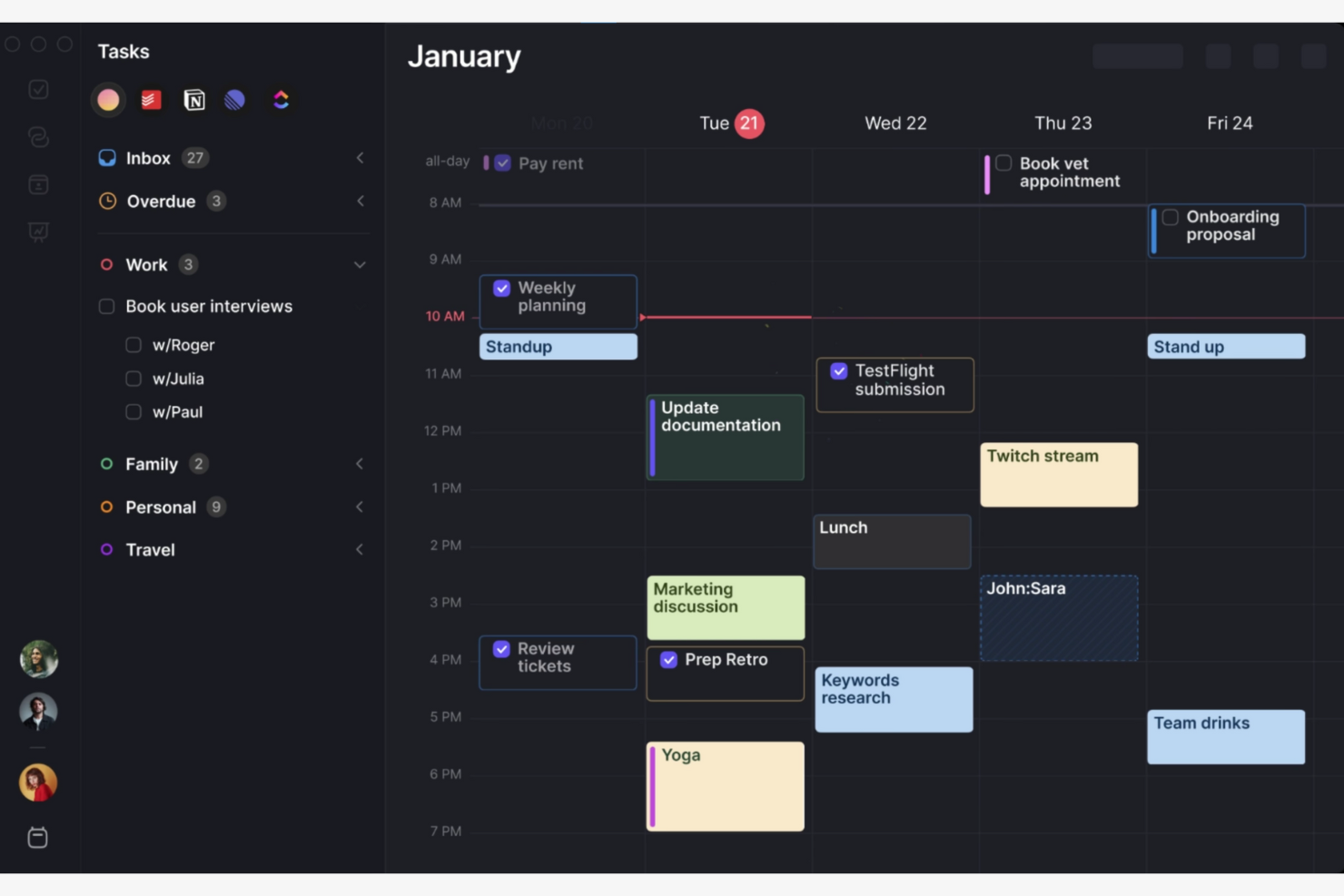
Morgen is a scheduling and calendar management tool you can use when you need to coordinate your time efficiently. It helps you manage multiple calendars and organize your daily schedule.
Why I picked Morgen: Morgen excels at calendar integration, allowing you to manage multiple calendars in one place. Its smart scheduling feature finds optimal meeting times across calendars. The task management functionality lets you integrate tasks directly into your schedule. In my experience, Morgen's interface makes it easy to switch between different calendar views.
Standout Features and Integrations:
Features include time zone management to schedule meetings across different time zones, customizable reminders to keep you on track with your tasks, and a unified calendar view to manage your time effectively.
Integrations include Google Calendar, Microsoft Outlook, Apple Calendar, and more.
Pros and Cons
Pros:
- Handles different time zones
- Integrates tasks into your schedule
- Manages multiple calendars
Cons:
- Occasional sync delays
- Limited task organization options
Other Daily Planner Apps
Here are some additional daily planner app options that didn’t make it onto my shortlist, but are still worth checking out:


How I Evaluate Daily Planner Apps
I evaluate in two layers: the baseline a daily planner must meet to make this list, and the differentiators that matter when a PM is time-blocking a sprint week or juggling parallel projects.
Core Functionality (Table Stakes For This List)
When I'm selecting tools for my list, I rank each one on a scale from 0 (does not offer the functionality) to 5 (excels in this area) for each core functionality listed below. Then, I calculate the tool's total score into a percentage. Each tool needs to achieve a minimum total score of 65% to be considered for inclusion.
- Daily Task Scheduling: I check whether the app offers a dedicated daily view where you can assign, reorder, and manage tasks for today—not just a filtered task list buried inside a broader project board.
- Time Blocking: The ability to slot tasks into specific windows on a timeline matters, especially when you're carving out deep work between back-to-back standups and stakeholder syncs.
- Prioritization & Reminders: I look for clear priority levels or flags paired with configurable reminders, so a PM juggling multiple workstreams can surface what's urgent before it's overdue.
- Calendar Integration: Two-way sync with Google Calendar or Outlook is what I evaluate here—your daily plan should reflect meeting changes in real time, not require manual updates.
- Recurring Tasks & Routines: Tools like Todoist and TickTick handle recurrence differently, so I look at whether the app supports custom patterns like "every other Monday" alongside simple daily repeats.
- Cross-Device Sync: Planning happens at a desk, on a commute, and between meetings. I check that the app syncs in real time across desktop, mobile, and web so nothing gets lost in transit.
Once I have a list of tools that meet this criteria, I consider what sets each platform apart.
Differentiating Factors (What Sets Vendors Apart)
Here's how I compare and contrast different vendors:
Standout Features
AI-powered scheduling is a big differentiator—I look for tools that can auto-reschedule missed tasks and suggest optimal time slots based on your existing commitments. Daily review and analytics features also matter. A PM wrapping up a sprint week benefits from seeing where time actually went versus what was planned. I also evaluate whether the app connects directly to platforms like Jira, Asana, or Trello, so project tasks flow into your daily plan without manual re-entry.
Beyond Features
I evaluate pricing models closely—freelance consultants and solo PMs need affordable individual plans, while teams rolling out daily planning across a department need transparent per-seat pricing. Cross-platform availability also weighs in. Planning happens everywhere, so I check for native mobile apps and offline mode for those in-transit moments between client sites. Onboarding speed matters too. I look for pre-built templates like time-blocking or GTD frameworks that let a PM start planning on day one.
How To Choose a Daily Planner App
It's easy to get bogged down in long feature lists and complex pricing structures. To help you stay focused as you work through your unique software selection process, here's a checklist of factors to keep in mind:
| Factor | What To Consider |
|---|---|
| Scalability | Will the tool grow with your team? Consider whether it can handle an increasing number of users or tasks without performance issues. Look for tools that offer scalable plans or additional features as your needs evolve. |
| Integrations | Does it connect with your existing tools? Ensure it integrates with key software like calendars, email, and project management tools. App integration can save time and reduce manual data entry. |
| Customizability | Can you tailor it to fit your workflow? Look for options that let you customize views, notifications, and task categories to match your workflow. Beware of tools that are too rigid and don't adapt to your processes. |
| Ease of use | Is it intuitive for your team? Evaluate the interface and user experience. A steep learning curve can hinder adoption. Test the tool with a few team members to gauge usability before committing. |
| Implementation and onboarding | How quickly can you get started? Assess the availability of tutorials, guides, and support during setup. A smooth onboarding process can lead to faster adoption and less disruption to your workflow. |
| Cost | Does it fit your budget? Compare pricing plans and what's included. Consider any hidden costs, such as add-ons or fees for extra features. Look for free trials to test the tool before making a financial commitment. |
| Security safeguards | Are your data and privacy protected? Check for features like encryption, two-factor authentication, and compliance with data protection regulations. Security is critical to protect sensitive information and maintain trust. |
| Support availability | Is help available when you need it? Consider the support channels offered, such as chat, email, or phone. Responsive support can resolve issues quickly and keep your team productive. |
What Is a Daily Planner App?
A daily planner app is a digital tool that helps you organize and manage your daily tasks and schedules. Professionals like project managers, executives, and freelancers often use these tools to increase productivity and ensure nothing falls through the cracks. Task management, calendar integration, and reminder capabilities help you stay organized, meet deadlines, and prioritize effectively. These tools provide overall value by simplifying daily planning and improving time management.
Features
When selecting a daily planner app, keep an eye out for the following key features:
- Task management: Allows you to create, organize, and prioritize tasks to help keep track of your to-do list.
- Calendar integration: Syncs with your existing calendar to manage appointments and deadlines all in one place.
- Reminders and notifications: Send alerts to ensure you don't miss important tasks or events.
- Customizable views: Let you adjust how your tasks and schedules are displayed, making it easier to focus on what matters.
- Collaboration tools: Enable you to share tasks and schedules with team members, fostering teamwork and communication.
- Habit tracking: Helps you monitor and develop new habits by tracking your progress over time.
- Time tracking: Allows you to monitor how much time you spend on tasks, improving productivity and time management.
- Recurring tasks: Automate repetitive tasks by setting them to repeat at regular intervals, saving you time.
- Note-taking: Provides a space to jot down important information or ideas related to your tasks.
- Goal setting: Helps you set and track long-term goals, keeping you motivated and focused on achieving them.
Benefits
Implementing a daily planner app provides several benefits for your team and business. Here are a few you can look forward to:
- Improved organization: Helps you keep tasks and schedules in one place, reducing clutter and confusion.
- Boosted productivity: Encourages efficient task management and time tracking, allowing you to focus on priorities.
- Better time management: Provides reminders and notifications to keep you on schedule and prevent missed deadlines.
- Increased collaboration: Facilitates sharing of tasks and schedules, improving communication and teamwork.
- Goal achievement: Supports goal setting and tracking, keeping you motivated and on track to achieve them.
- Habit development: Offers tools for habit tracking, helping you build and maintain productive routines.
- Stress reduction: Simplifies planning and organizing, reducing the mental load of managing daily tasks.
Costs and Pricing
Selecting a daily planner app requires an understanding of the various pricing models and plans available. Costs vary based on features, team size, add-ons, and more. The table below summarizes common plans, their average prices, and typical features included in daily planner app solutions:
Plan Comparison Table for Daily Planner Apps
| Plan Type | Average Price | Common Features |
|---|---|---|
| Free Plan | $0 | Basic task management, limited integrations, and essential reminders. |
| Personal Plan | $2.99-$29/user/month | Advanced task management, calendar sync, and basic collaboration tools. |
| Business Plan | $29+/user/month | Team collaboration features, priority support, and advanced analytics. |
| Enterprise Plan | On request | Custom integrations, dedicated account management, and upgraded security features. |
Daily Planner App FAQs
Here are some answers to common questions about the daily planner apps:
Can a daily planner app integrate with other tools I use?
Yes, many daily planner apps offer integrations with popular tools, such as calendars, email, and project management software. Check the app’s integration options to ensure compatibility with your existing systems. Straightforward integration reduces manual data entry and maintains consistency across platforms.
How do daily planner apps help me manage team projects?
Daily planner apps let you assign tasks, set deadlines, and track progress in one place. This helps your team stay on the same page, which reduces missed deadlines and keeps everyone accountable. Many apps also offer notifications, easy file sharing, and collaboration tools.
Are daily planner apps suitable for teams?
Yes, daily planner apps can be great for team collaboration. Look for features such as shared calendars, task assignments, and collaboration tools. These features help keep everyone on the same page and improve communication. Ensure the app supports multiple users and offers permission settings to manage access effectively.
How can a daily planner app help prevent project delays?
Planner apps give you a clear overview of tasks, deadlines, and dependencies. Real-time updates and reminders help you spot bottlenecks and adjust plans quickly, keeping projects on track and enabling you to respond to issues as they arise.
Is it secure to use a daily planner app?
Yes, most daily planner apps prioritize security with features like encryption and two-factor authentication. Check if the app complies with relevant data protection regulations. Ensure you use strong passwords and update them regularly to strengthen security. It’s important to choose an app that offers solid security measures to protect your information.
Is it worth paying for a premium daily planner app versus using a free version?
A paid subscription for a planner app usually offers more integrations, advanced reporting, automation, and priority support. If you manage larger projects or teams, these features can boost your productivity and save time, making a paid upgrade worth considering.