

10 Best AI Enterprise Workflow Software Reviewed in 2026

Best AI Enterprise Workflow Software Shortlist


Managing projects at an enterprise level means coordinating complex workflows, keeping teams aligned, and adapting quickly when priorities shift. AI enterprise workflow software supports this work by automating routine tasks, improving visibility, and helping teams move more efficiently across large, interconnected systems.
With years of experience testing project management and workflow platforms, I focus on identifying tools that truly improve day-to-day operations rather than adding extra layers of complexity. My goal is to offer an unbiased, well-researched review of the AI workflow solutions that deliver meaningful impact.
In this article, I’ll walk you through the top options available today, highlighting the AI-driven features and benefits that set each tool apart. You’ll find insights tailored to the realities of enterprise teams, helping you choose the solution that best enhances your workflow and supports your organization’s goals.
Why Trust Our Software Recommendations
Our team has been testing and reviewing software since 2012. As project managers ourselves, we know how difficult—and important—it is to choose the right software.
For this guide, we evaluated tools using hands-on testing and independent research, scoring tools using our selection criteria. We also draw on insights from industry thought leaders and practicing project management experts.
Our reviews reflect our human editorial judgment, not a sales pitch.
Expert reviewers:
AI Enterprise Workflow Software Comparison Table
This comparison table summarizes pricing details for my top AI enterprise workflow software selections.
| Tool | Best For | Trial Info | Price | ||
|---|---|---|---|---|---|
| 1 | Best for AI-driven project management | 14-day free trial | From $10/user/month (billed annually) | Website | |
| 2 | Best for client-facing portals | Free plan available | From $99/month | Website | |
| 3 | Best for enterprise-grade no-code governance | Free demo available | $40/user/month | Website | |
| 4 | Best for AI-powered enterprise workflows | Free demo available | Pricing upon request | Website | |
| 5 | Best with 1,000+ prebuilt app connectors | 30-day free trial | Pricing upon request | Website | |
| 6 | Best for document processing | Free trial available + free demo | Pricing upon request | Website | |
| 7 | Best for custom workflows | Free trial available | From €20/month (billed annually) | Website | |
| 8 | Best for data visualization | Free trial + demo available | Pricing upon request | Website | |
| 9 | Best for secure file sharing | 14-day free trial | From CAD$21/user/month (billed annually) | Website | |
| 10 | Best for AI orchestration and automation | Free plan available | From $19.99/month (billed annually) | Website |


Best AI Enterprise Workflow Software Reviews
Below are my detailed summaries of the best AI enterprise workflow software that made it onto my shortlist. My reviews offer a detailed look at the key features, pros & cons, integrations, and ideal use cases of each tool to help you find the best one for you.

Wrike
Best for AI-driven project management

Wrike offers a versatile project management solution tailored for teams looking to streamline their workflows and enhance productivity. Designed to reduce busywork through automation and AI, it appeals to businesses across various industries, from retail giants to tech innovators, who seek to optimize their operations without the hassle of complex setups. By integrating seamlessly with existing tools, Wrike addresses the need for improved efficiency and effective collaboration in managing projects.
Why I Picked Wrike
I picked Wrike for its unique ability to blend AI and automation into project management, making it an ideal choice for enterprises. The platform's generative AI capabilities, such as creating project plans and summarizing meetings, directly address the need for efficient task management. Additionally, Wrike's real-time dashboards offer an invaluable feature for monitoring project progress and ensuring alignment across teams, which is crucial for managing large-scale operations. These features together make Wrike a compelling option for businesses looking to enhance their workflow processes.
Wrike Key Features
In addition to its AI-driven project planning and real-time monitoring, I also found the following features to be useful:
- Customizable Request Forms: Allow your team to tailor project intake processes to fit specific needs and streamline task initiation.
- Gantt Charts: Provide a visual timeline of project tasks, helping your team to plan and adjust schedules dynamically.
- Kanban Boards: Enable your team to visualize work stages, making it easier to track progress and manage workloads.
- In-Platform Communication: Facilitate seamless collaboration by keeping all project-related discussions within the platform.
Wrike Integrations
Integrations include NetSuite, QuickBooks, Jira, Microsoft Teams, Salesforce, Dropbox, Google Drive, Slack, Box, and GitHub.
Pros and Cons
Pros:
- AI supports enterprise project prioritization
- Highly customizable workflows for teams
- AI supports enterprise project prioritization
Cons:
- Steep learning curve initially
- Advanced AI features cost more
New Product Updates from Wrike

Wrike Adds Quick Search to Table View
Wrike adds Quick Search to Table View with full-table search across titles, descriptions, and fields, plus highlighted matches. This helps users find tasks faster in large tables. For more information, visit Wrike’s official site.

Moxo
Best for client-facing portals
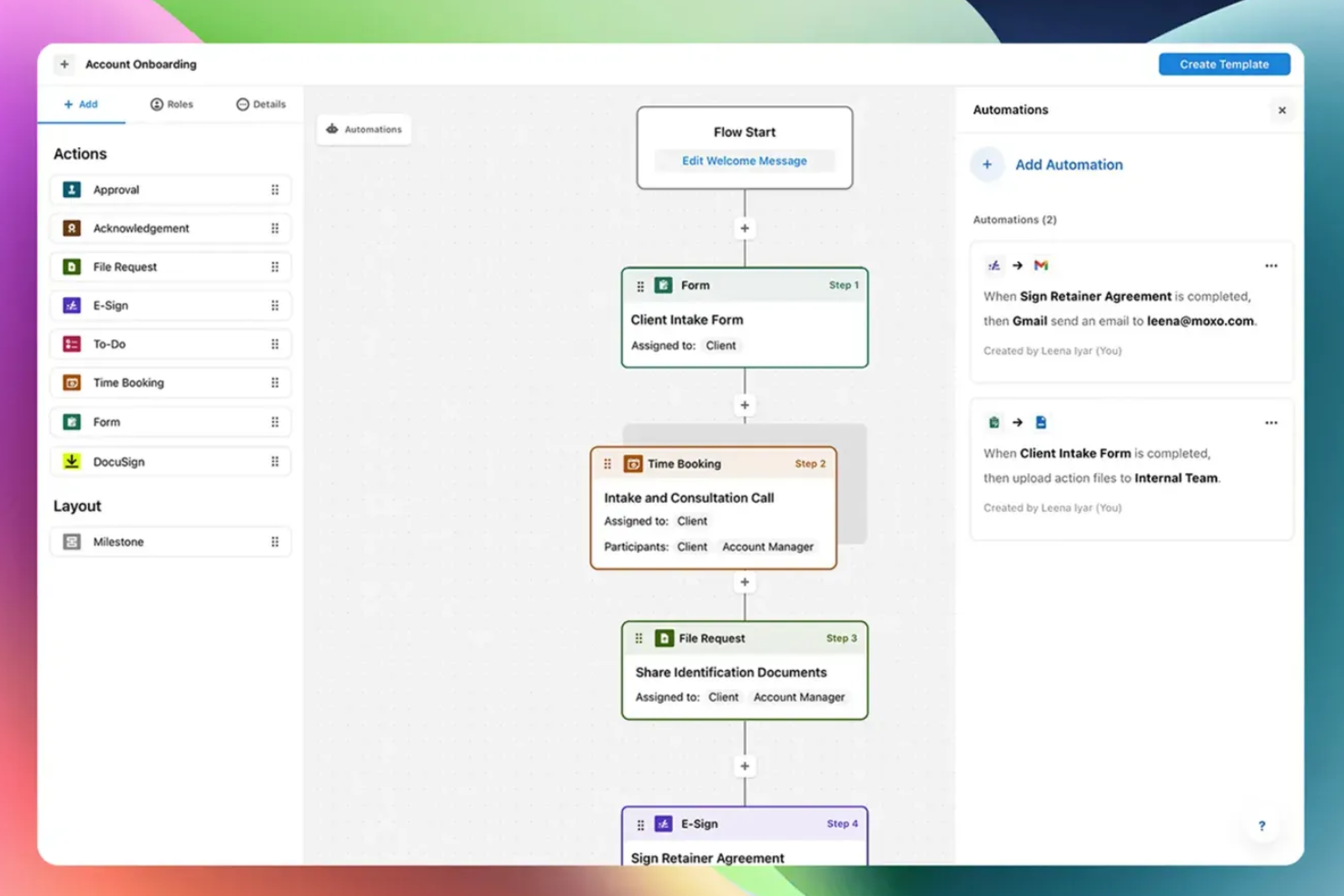
Moxo is an AI-powered workflow orchestration platform that combines visual workflow building, client-facing portals, AI agents, and built-in communication tools to manage multi-party business processes.
Who Is Moxo Best For?
Moxo is a strong fit for mid-size to enterprise teams in financial services, legal, or professional services that run high-touch, client-facing workflows with multiple external stakeholders.
Why I Picked Moxo
Moxo earns its spot on my shortlist because of how it handles external stakeholder participation in a live workflow. When a client needs to approve a document, submit a form, or sign a contract, they get a focused portal view showing exactly their action and the context around it, with no training required and no access to internal process logic. I also like that this portal experience is built directly into the workflow engine, so the moment a client completes their step, the next internal action triggers automatically, with no manual handoff needed.
Moxo Key Features
- AI agent framework: Deploy Assist, Automate, and Amplify agents to handle preparation, validation, and monitoring tasks around human decision points in a workflow.
- Visual workflow builder: Design multi-step processes with conditional branching, parallel paths, looping, and subflows using a drag-and-drop canvas.
- AI utilities: Apply built-in AI actions to extract, summarize, translate, or transcribe content at any step in a workflow.
- Audit logs: Access a timestamped record of every action taken across a workflow instance for compliance and accountability tracking.
Moxo Integrations
Moxo offers data sync connectors with Salesforce, HubSpot, Microsoft Dynamics, Zoho, Wealthbox, Redtail, Filevine, Global Relay, Smarsh, and Xero, along with integrations for tools like DocuSign, Jira, Slack, Stripe, QuickBooks, and file upload connections from Google Drive, Dropbox, Box, and OneDrive. It's available on Zapier and has a REST API and webhooks for custom integrations.
Pros and Cons
Pros:
- Drag-and-drop builder with reusable templates
- Built-in chat, video, and screen sharing
- White-label portals preserve your brand identity
Cons:
- No built-in annotation on documents
- No built-in timer for tracking task duration
Best for enterprise-grade no-code governance
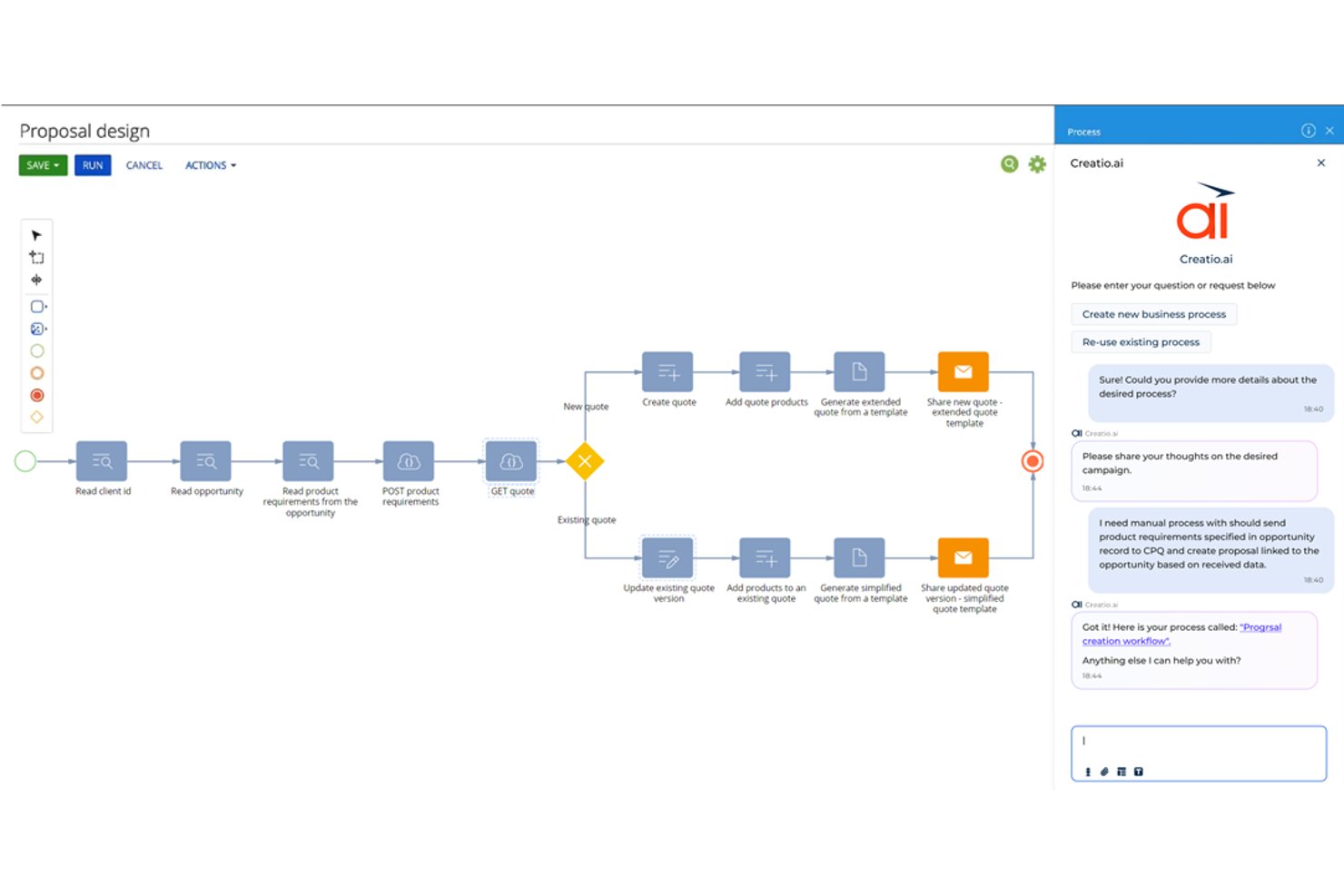
Creatio Studio is a no-code AI platform for building enterprise workflow automation, custom applications, and AI agents across cross-functional business processes.
Who Is Creatio Studio Best For?
Creatio Studio is a strong fit for mid-market and enterprise teams in regulated industries like banking, insurance, and the public sector that need customizable, governance-heavy workflow automation.
Why I Picked Creatio Studio
I picked Creatio Studio as one of the best because no-code governance is genuinely central to how it's built, not bolted on as an afterthought. It enforces GDPR, HIPAA, and SOC 2 compliance at the workflow level and automates internal compliance audits across IT, operational, and management processes. That means my team can build and deploy automated workflows that are already compliant by design, without running a separate audit cycle after the fact.
Creatio Studio Key Features
- Visual process designer: Drag-and-drop builder for designing complex multi-step workflows across teams.
- AI-driven app creation: Build applications from natural language prompts using generative AI tools.
- Composable component library: Access and reuse a wide range of prebuilt workflow building blocks.
- Marketplace integrations: Connect to a library of add-ons for ERP, CRM, ITSM, and collaboration systems.
Creatio Studio Integrations
Creatio Studio offers native integrations with Power BI, Microsoft 365, Twilio, WhatsApp, Zoom, Formstack, Avaya, and more. An API is available for custom integrations.
Pros and Cons
Pros:
- AI-powered process and app design capabilities
- Enterprise-grade governance and compliance controls
- Comprehensive workflow automation builder
Cons:
- Long implementation cycles for complex organizations
- Steep learning curve for beginners
New Product Updates from Creatio AI Studio
Creatio Studio Adds AI Automation for Chat Channels
Creatio Studio now supports channel-level Creatio.ai automation for chat channels like Facebook Messenger, Telegram, WhatsApp, and SMS, including out-of-the-box setup, assistant personality selection, and seamless human handoff. For more information, visit Creatio Studio's official site.

Best for AI-powered enterprise workflows

For organizations seeking an AI-driven enterprise workflow solution, Screendragon offers an adaptable platform designed to transform complex operations. By integrating AI agents with no-code workflow customization, it caters to creative and marketing teams looking to automate mundane tasks and focus on impactful work. With features that enhance team alignment and decision-making, Screendragon addresses the challenge of managing intricate workflows efficiently.
Why I Picked Screendragon
I picked Screendragon for its unique ability to combine advanced automation with a no-code visual workflow builder, making it highly suitable for enterprise teams. The platform's AI agents automate repetitive tasks, allowing your team to concentrate on strategic initiatives. Additionally, its digital approval workflow management centralizes data and comments, simplifying the review process and ensuring compliance. These features make Screendragon an excellent choice for those looking to enhance productivity and governance in their workflow management.
Screendragon Key Features
In addition to its standout automation capabilities, Screendragon offers:
- Dynamic Custom Forms: Create and connect forms to automated steps, customizing fields, language, and layout to fit your team's needs.
- Secure Workflow System with Advanced Permission Controls: Architect workflows with sophisticated permissions to suit decision-making and compliance requirements.
- Workflow Analytics with Real-time Insight and Reports: Build custom automated reports and track status updates or milestones in real-time using personalized dashboards.
- Enterprise-Grade Security: Benefit from high data security standards that can be scaled to thousands of users globally.
Screendragon Integrations
Integrations include Microsoft Power BI, Slack, Microsoft Teams, HubSpot, Okta, Aprimo, SugarCRM, and Adobe. Additionally, Screendragon can connect with over 1,000 apps via Zapier.
Pros and Cons
Pros:
- Easy to adapt to different project sizes and organizational needs
- Automation features streamline processes and improve efficiency
- No-code platform allows users to create workflows without coding
Cons:
- Reporting and manual report creation can feel limited or complex
- The admin console and settings may be confusing for new users
New Product Updates from Screendragon
Screendragon Unveils New AI Hub
Screendragon introduced AI Hub, a new capability that lets teams build and manage AI agents directly within workflows. The update helps marketing teams automate tasks, maintain governance controls, and scale AI-driven operations more efficiently. For more information, visit Screendragon's official site.

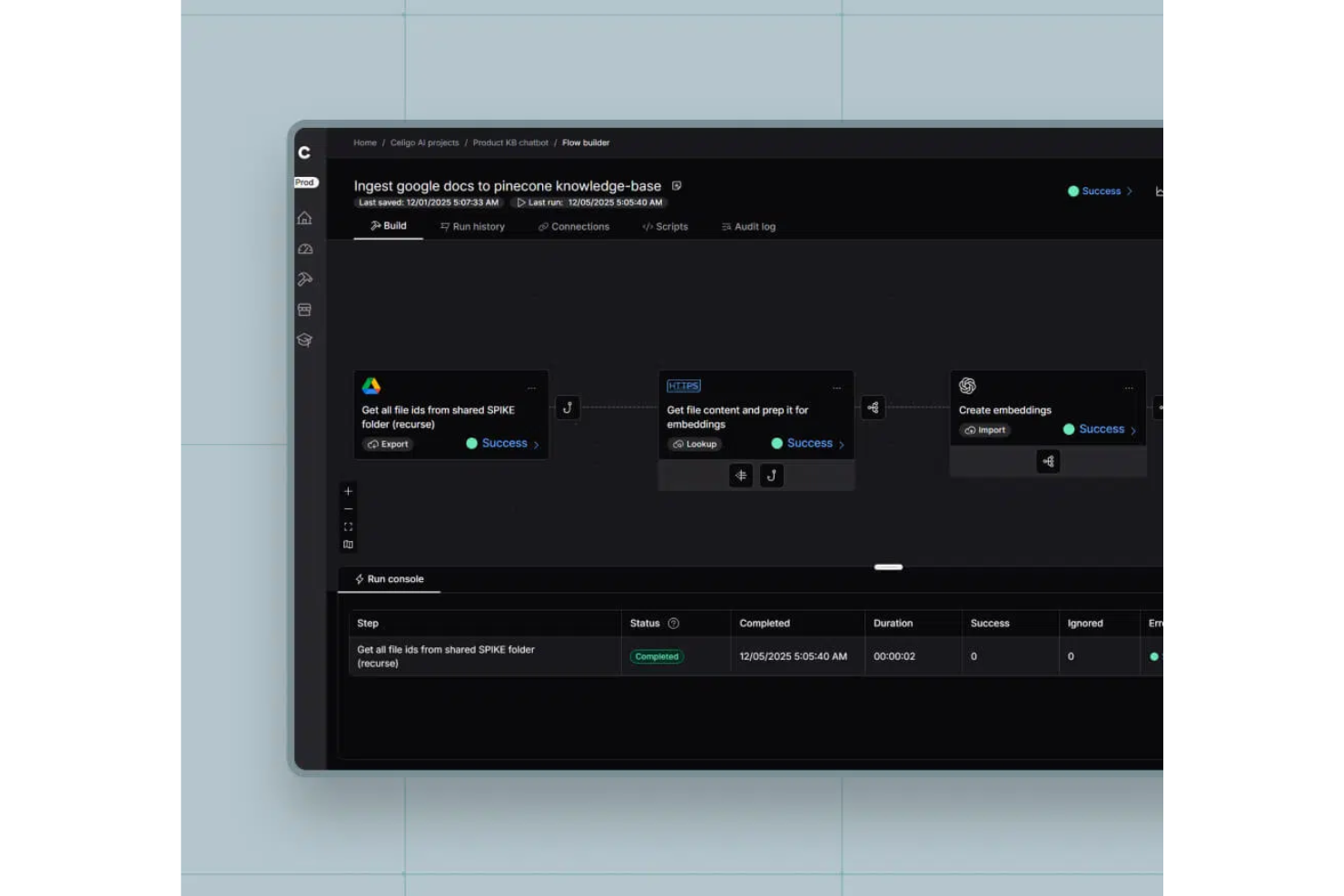
Celigo is an ai enterprise workflow software platform that lets you automate, integrate, and orchestrate business processes across cloud and on-premises applications using AI-driven tools and prebuilt connectors.
Who Is Celigo Best For?
Enterprise IT and operations teams who need to automate and connect workflows across a wide range of business applications.
Why I Picked Celigo
I picked Celigo as one of the best because its library of 1,000+ prebuilt app connectors lets my team quickly connect enterprise systems without custom development. I use these connectors to automate workflows between ERP, CRM, and ecommerce platforms. In practice, that means we can launch new integrations in days instead of weeks, even when working with legacy or niche applications.
Celigo Key Features
- AI-guided flow builder: Build and optimize workflows using AI-driven recommendations and automation.
- Error management dashboard: Monitor, troubleshoot, and resolve integration errors from a centralized interface.
- Role-based access controls: Set granular permissions for users and teams to manage workflow security.
- Workflow analytics: Track performance metrics and process efficiency with built-in analytics and reporting tools.
Celigo Integrations
Celigo offers 1,000+ native integrations, including Salesforce, NetSuite, Shopify, ServiceNow, Zendesk, Microsoft 365, Google Workspace, Amazon Redshift, Snowflake, Jira, and Slack. An API is available for custom integrations.
Pros and Cons
Pros:
- Supports multi-environment deployment and versioning
- Visual process mapping with real-time suggestions
- Built-in compliance controls for regulated industries
Cons:
- Limited offline workflow management options
- Initial setup can be complex for large orgs
New Product Updates from Celigo
Celigo Adds API Group Assignment During API Setup
Celigo adds API group assignment during create, clone, and move actions. This reduces extra setup steps by letting teams organize APIs before the relative URI is defined. For more information, visit Celigo’s official site.
 .
.
TrailHQ
Best for document processing

Nanonets is an AI-driven document processing tool designed for businesses that need to automate data extraction from documents. It primarily serves industries like finance, logistics, and healthcare, where handling large volumes of documents is common.
Why I picked Nanonets: Nanonets excels in document processing, providing AI models that learn and adapt to your specific needs. You can automate data extraction from invoices, receipts, and other documents with ease. The platform allows you to train custom models, ensuring accuracy and efficiency. Its scalability makes it suitable for businesses of all sizes, handling various document types effectively.
Standout features & integrations:
Features include customizable AI models that adapt to your documents, automated data extraction to save time, and scalability to handle varying document volumes. You can also benefit from its user-friendly interface that simplifies the setup process.
Integrations include Salesforce, QuickBooks, Google Drive, Dropbox, Slack, Microsoft Dynamics 365, SAP, Zoho CRM, HubSpot, and Box.
Pros and Cons
Pros:
- Enterprise SLAs with priority support
- SOC2-compliant secure infrastructure
- Granular permission and role-based access control
Cons:
- Limited controls for data file processing
- Training time varies by system performance

n8n
Best for custom workflows

n8n is an open-source workflow automation tool that allows users to create custom workflows without complex coding. It's popular among developers and tech-savvy users who want to automate repetitive tasks and data processes.
Why I picked n8n: n8n is perfect for custom workflows, offering a flexible and extendable platform. The visual workflow editor lets your team design processes tailored to your needs. With its open-source nature, you can modify and expand its capabilities to fit your unique requirements. The platform also supports complex logic, enabling sophisticated automation scenarios.
Standout features & integrations:
Features include a visual workflow editor to simplify process design, support for complex logic to create advanced automations, and the ability to run on your own server for full control. You also get access to a vibrant community that contributes to continuous improvements.
Integrations include Slack, Google Sheets, GitHub, Trello, Airtable, Dropbox, and Stripe.
Pros and Cons
Pros:
- Fully on-premise with version control support
- Advanced security with SSO, LDAP support, and encryption
- User-friendly interface and intuitive workflow
Cons:
- Requires coding for advanced tasks
- Costly execution-based pricing model
Domo
Best for data visualization

Domo is a cloud-based business intelligence platform that caters to data-driven enterprises seeking to visualize and analyze data effectively. Its main users include business leaders and analysts who need to make informed decisions quickly.
Why I picked Domo: Domo excels in data visualization, offering interactive dashboards that give your team real-time insights. Its drag-and-drop interface makes it easy to create custom visualizations without needing extensive technical skills. Domo's ability to handle large datasets allows your team to view trends and patterns effortlessly. The platform also includes built-in data governance to ensure data quality and security.
Standout features & integrations:
Features include interactive dashboards for real-time insights, drag-and-drop tools for custom visualizations, and built-in data governance to maintain data quality. You can also access mobile capabilities to view dashboards on the go.
Integrations include Salesforce, Microsoft 365, Slack, Google Analytics, HubSpot, Shopify, Zendesk, QuickBooks, Marketo, and Facebook.
Pros and Cons
Pros:
- Real-time data updates
- Handles large datasets
- Customizable dashboards
Cons:
- Requires consistent data management
- May require technical support

Box
Best for secure file sharing

Box is a cloud-based content management and collaboration platform designed for businesses that need secure file sharing and management. Its primary users include enterprises that prioritize data protection and workflow automation.
Why I picked Box: Box offers a secure environment for file sharing with advanced security measures like ransomware protection. It stands out with its AI-driven content management and no-code applications, enabling you to automate workflows. The platform's emphasis on security is ideal for industries requiring strict data compliance. Box also provides intelligent insights to manage your data effectively.
Standout features & integrations:
Features include advanced security measures to protect your data, AI-driven content management to automate your processes, and no-code applications for easy workflow customization.
Integrations include Microsoft 365, Google Workspace, Slack, Salesforce, IBM, Okta, Adobe, Zoom, Oracle, and ServiceNow.
Pros and Cons
Pros:
- No-code workflow automation
- AI-driven content insights
- Strong data security features
Cons:
- Document collaboration tools are insufficient
- Storage limitations reduce efficiency


Zapier is an AI orchestration platform that allows enterprise teams to connect thousands of apps and build multi-step automated workflows without code. It's used by teams across marketing, sales, RevOps, IT, HR, and operations to centralize workflows and reduce manual work across large, distributed tech stacks.
Why I picked Zapier: Zapier stands out for its deep automation capabilities combined with an accessible, no-code experience. Teams can build workflows using natural language with Zapier Copilot, add AI-powered steps, and manage automations at scale with admin controls, permissions, and audit logs. With thousands of app integrations, Zapier is especially strong for organizations with complex, multi-system environments.
Standout features & integrations:
Features include scalable, multi-step workflows with logic and AI actions, supported by built-in data tools like Zapier Tables and Forms. Enterprise plans add centralized administration, access controls, and security features to support large teams.
Integrations include Salesforce, HubSpot, Slack, Google Sheets, Gmail, Stripe, Airtable, ServiceNow, Shopify, OpenAI, and more.
Pros and Cons
Pros:
- Enterprise-scale automation with no-code and AI-first tools
- Extensive app and AI integration ecosystem
- Strong security, governance, and admin controls
Cons:
- Free plan limited to two-step workflows
- No mobile app
Other AI Enterprise Workflow Software
Here are some additional AI enterprise workflow software options that didn’t make it onto my shortlist, but are still worth checking out:
- Appian
For low-code development
- Jitterbit
For API integration
- Gumloop
For collaborative planning
- Atomicwork
For small teams
- Flowable
For BPM solutions
- AutoKitteh
For automated testing
- Miro
For AI-enhanced virtual collaboration
- Workato
For enterprise integration AI support
- Apache Airflow
For AI-management for data pipelines
- Moveworks
For IT service AI automation
- Sana
For AI-driven personalized learning
- Kognitos
For business process AI automation


How I Evaluate AI Enterprise Workflow Software
Every tool here has to deliver AI that actually helps cross-functional delivery teams—not just a chatbot layered onto a task board. I evaluate in two layers: core functionality a tool must offer to make the list, and differentiating factors that set one vendor apart from another.
Core Functionality (Table Stakes For This List)
When I'm selecting tools for my list, I rank each one on a scale from 0 (does not offer the functionality) to 5 (excels in this area) for each core functionality listed below. Then, I calculate the tool's total score into a percentage. Each tool needs to achieve a minimum total score of 65% to be considered for inclusion.
- AI-Driven Workflow Automation: I look for tools that go beyond simple if/then rules—like auto-routing approval requests, reassigning tasks when blockers arise, or triggering downstream handoffs between teams.
- Cross-Functional Process Orchestration: The tool should coordinate workflows across departments, such as syncing design reviews with engineering sprints and stakeholder sign-offs in one unified flow.
- Predictive Project Analytics: I evaluate whether the platform can forecast schedule risks, flag resource conflicts, or surface at-risk milestones using patterns from past project data.
- Generative AI Capabilities: Tools earn higher marks when their AI drafts status updates, summarizes meeting notes, or answers natural-language questions about project health and progress.
- Enterprise System Integrations: I check for native, bidirectional connections with tools teams already rely on—think Jira, Salesforce, ServiceNow, SAP, or Slack—so workflows span the full tech stack.
- Governance and Security Controls: Role-based access, audit trails, SSO, and compliance certifications like SOC 2 and ISO 27001 all factor into how well a tool fits enterprise requirements.
Once I have a list of tools that meet this criteria, I consider what sets each platform apart.
Differentiating Factors (What Sets Vendors Apart)
Here's how I compare and contrast different vendors:
Standout Features
I look for no-code AI builders that let operations leads design workflows visually, without waiting on engineering. Autonomous AI agents add another layer—tools where agents can triage incoming requests, assign tasks, and escalate blockers on their own save teams real time. Process mining capabilities also stand out, especially when the platform can analyze existing workflows and pinpoint where delays or redundancies live before you start automating.
Beyond Features
AI transparency matters a lot in this space. I check whether a platform explains why it made a recommendation or flagged a risk, so project leads can justify decisions to stakeholders. Pricing predictability is another big factor—some vendors charge per workflow execution, which can spike costs fast when you're running hundreds of automated processes daily. I also evaluate how quickly teams can go live, looking for pre-built templates and guided onboarding that shrink the gap between purchase and first production workflow.
How to Choose AI Enterprise Workflow Software
It’s easy to get bogged down in long feature lists and complex pricing structures. To help you stay focused as you work through your unique software selection process, here’s a checklist of factors to keep in mind:
| Factor | What to Consider |
|---|---|
| Scalability | Can the software grow with your business? Look for options that support increasing users and processes without a hitch. Consider if the tool can handle additional workload or if it will require costly upgrades. |
| Integrations | Does it integrate with your existing tools? Check for compatibility with your current systems, like CRM, ERP, or communication platforms. Avoid tools that require extensive workarounds or don't sync with your main software. |
| Customizability | How flexible is the tool for your needs? Consider if you can tailor workflows and dashboards to fit your processes. Beware of overly rigid systems that force you into predefined structures. |
| Ease of use | Is the interface user-friendly for your team? Test if non-technical users can navigate easily and perform tasks without frustration. A complex interface can lead to low adoption rates. |
| Implementation and onboarding | How long will it take to get up and running? Look for vendors offering extensive onboarding support, including training materials and setup assistance. Avoid tools with lengthy, complex implementation processes. |
| Cost | Does the pricing fit your budget? Compare costs against competitors and check for hidden fees. Ensure the features you need are included in the base price, and consider the potential ROI. |
| Security safeguards | Are your data and processes secure? Verify that the software complies with industry security standards and offers features like encryption and access controls. Consider the vendor's track record for data protection. |
| Compliance requirements | Does the tool meet your industry’s compliance needs? Check for features that support regulatory requirements like GDPR or HIPAA. Failing to comply can lead to fines and damage to your reputation. |
What Is AI Enterprise Workflow Software?
AI enterprise workflow software is a tool designed to automate and optimize business processes within an organization. It's typically used by professionals like project managers, IT specialists, and operations teams to improve efficiency and productivity. Automation, data integration, and real-time analytics capabilities help with managing workflows, reducing manual tasks, and ensuring accurate data flow. Overall, these tools provide significant value by enhancing operational efficiency and supporting informed decision-making.
Features
When selecting AI enterprise workflow software, keep an eye out for the following key features:
- Automation: Automates repetitive tasks to save time and reduce human error.
- Data integration: Connects with various data sources to ensure optimized data flow across systems.
- Real-time analytics: Provides insights and analytics to aid in decision-making and track performance.
- Customizable workflows: Allows you to tailor processes to fit specific business needs and objectives.
- User-friendly interface: Ensures ease of use for all team members, reducing the learning curve.
- Security features: Protects sensitive data with encryption and access controls.
- Compliance support: Helps meet industry regulations and standards, reducing risk.
- Scalability: Adapts to growing business needs, supporting increased workloads and users.
- Collaboration tools: Facilitates communication and teamwork across departments.
- Mobile access: Enables workflow management on the go, ensuring flexibility and responsiveness.
Benefits
Implementing AI enterprise workflow software provides several benefits for your team and your business. Here are a few you can look forward to:
- Increased efficiency: Automates repetitive tasks, allowing your team to focus on higher-value activities.
- Improved data accuracy: Integrates data across systems, reducing errors and ensuring consistent information flow.
- Enhanced decision-making: Offers real-time analytics and insights to support informed business decisions.
- Greater flexibility: Customizable workflows and scalable solutions adapt to your business needs and growth.
- Better compliance: Supports regulatory requirements with built-in compliance features, minimizing risk.
- Stronger collaboration: Provides tools that facilitate teamwork and communication across departments.
- Cost savings: Reduces manual labor and errors, leading to lower operational costs over time.
Costs and Pricing of AI Enterprise Workflow Software
Selecting AI enterprise workflow software requires an understanding of the various pricing models and plans available. Costs vary based on features, team size, add-ons, and more. The table below summarizes common plans, their average prices, and typical features included in AI enterprise workflow software solutions:
Plan Comparison Table for AI Enterprise Workflow Software
| Plan Type | Average Price | Common Features |
|---|---|---|
| Free Plan | $0 | Basic task automation, limited integrations, and community support. |
| Personal Plan | $15-$2,347/user/month | Task automation, basic analytics, integration with popular apps, and limited customizations. |
| Business Plan | $244-$3293/user/month | Advanced automation, enhanced analytics, increased integrations, and custom workflows. |
| Enterprise Plan | $50-$15,000/user/month | Full automation suite, real-time analytics, unlimited integrations, advanced security features, and dedicated support. |
AI Enterprise Workflow Software FAQs
Here are some answers to common questions about AI enterprise workflow software:
What is the difference between cloud-based and on-premise software?
Cloud-based software is hosted on the vendor’s servers and accessed online, while on-premise software is installed on your company’s servers. Cloud-based solutions offer easier access and scalability, while on-premise solutions provide more control over data and security. Consider your team’s needs and IT capabilities when deciding.
How do I ensure data security with workflow software?
Yes, data security is essential. Look for software that offers encryption, access controls, and compliance with industry standards like GDPR or HIPAA. Always review the vendor’s security measures and consider conducting a security audit to ensure they meet your organization’s requirements.
Can workflow software be customized to fit my business needs?
Yes, many workflow software solutions offer customizable features. You can often tailor workflows, dashboards, and reports to align with your specific processes. Look for tools with flexible customization options and consider your team’s ability to manage these customizations without external help.
How long does it take to implement workflow software?
Implementation time varies based on the complexity and scale of the software. Some tools offer quick setup with minimal customization, while others may require weeks or months for full integration. Plan for training and testing phases, and allocate resources to ensure a smooth transition.
What’s Next:
If you're in the process of researching AI enterprise workflow software, connect with a SoftwareSelect advisor for free recommendations.
You fill out a form and have a quick chat where they get into the specifics of your needs. Then you'll get a shortlist of software to review. They'll even support you through the entire buying process, including price negotiations.