

10 Best AI Collaboration Tools Reviewed in 2026

10 Best AI Collaboration Tools Shortlist


The best AI collaboration tools improve project management and let you centralize communication, automate task coordination, and meet deadlines without endless status updates or scattered information. When files are spread across platforms, updates get buried in chat threads, or task ownership isn’t clear, projects stall and your teams will lose focus.
The right platform can help you streamline your workflows, reduce duplicate effort, and keep priorities visible in real time. I’ve tested and reviewed 20+ AI collaboration tools and curated the best options. Find the right fit to keep your team organized, reduce friction, and deliver projects.
Why Trust Our Software Recommendations
Our team has been testing and reviewing software since 2012. As project managers ourselves, we know how difficult—and important—it is to choose the right software.
For this guide, we evaluated tools using hands-on testing and independent research, scoring tools using our selection criteria. We also draw on insights from industry thought leaders and practicing project management experts.
Our reviews reflect our human editorial judgment, not a sales pitch.
Expert reviewers:
AI Collaboration Tools Comparison Table
This comparison table summarizes pricing details for my top AI collaboration tools selections:
| Tool | Best For | Trial Info | Price | ||
|---|---|---|---|---|---|
| 1 | Best for cross-departmental collaboration | Free plan available | From $9/user/month (billed annually) | Website | |
| 2 | Best with multi-channel messaging integration | 30-day free trial | From $24/user/month (billed annually) | Website | |
| 3 | Best for complex projects | 14-day free trial | From $10/user/month (billed annually) | Website | |
| 4 | Best for design teams | Free plan available | From $3/user/month | Website | |
| 5 | Best for database projects | Free plan + free demo + 14-day trial available | From $20/user/month | Website | |
| 6 | Best for project timelines | 14-day free trial + free demo + free plan available | From $10/user/month (billed annually) | Website | |
| 7 | Best for video messaging | Free demo available | $18/month | Website | |
| 8 | Best for team inboxes | 14-day free trial | From $25/user/month (billed annually) | Website | |
| 9 | Best for freelancers | Free 7-day trial available | From $9/user/month (billed annually) | Website | |
| 10 | Best for knowledge management | Free trial + free plan available | From $5.42/user/month | Website |


Best AI Collaboration Tools Reviews
Read my detailed summary of each of my picks for the best AI collaboration tools. I cover key features, pros & cons, integrations, and ideal use cases so you can find the best one for you.

Best for cross-departmental collaboration
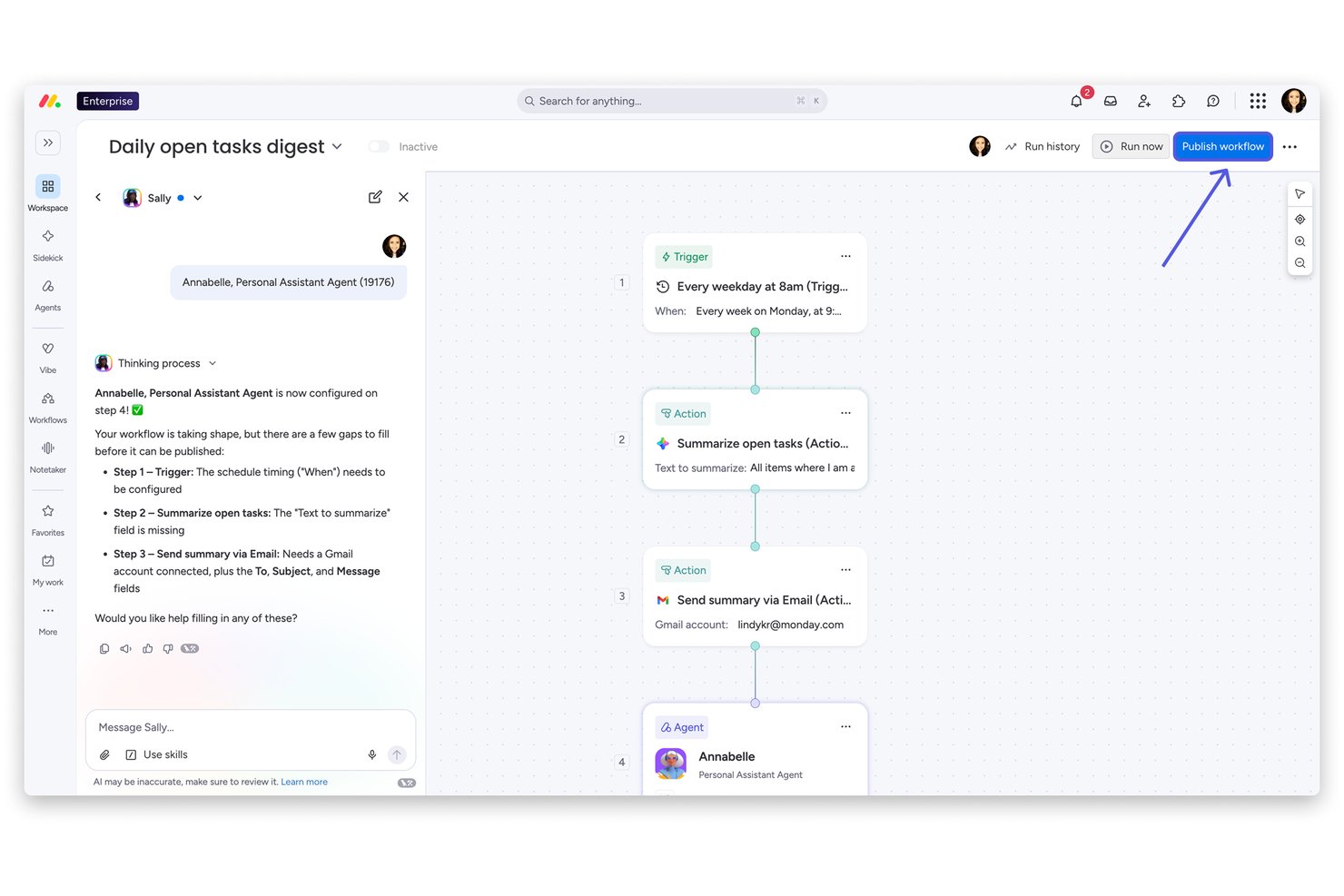
monday AI Workspace is an AI-powered work platform that brings together project management, document collaboration, workflow automation, and an AI agent workforce to connect teams across departments through a shared workspace.
Who Is monday AI Workspace Best For?
It's a strong fit for mid-to-large organizations running work across multiple departments who need a single platform to align teams without constant tool-switching.
Why I Picked monday AI Workspace
monday AI Workspace earns its spot on my shortlist because of how well it handles collaboration across departments that rarely share the same tools or workflows. I like that the AI agents lets marketing, engineering, and ops teams each deploy specialized agents that still feed into a shared board, so decisions don't get lost in handoffs. The AI Meeting Notetaker is one of my favorite features because it pulls action items directly from calls and routes them to the right board without any manual cleanup after the meeting.
monday AI Workspace Key Features
- AI Sidekick assistant: Generates task descriptions, summaries, and project briefs directly within your boards and docs.
- AI Columns: Automates repetitive data entry by generating field values and updates using workspace context.
- Portfolio and resource management: Lets you manage multiple projects, allocate resources, and track progress for the entire organization.
- MCP (Model Context Protocol) integrations: Connects external AI tools like Claude, Copilot, or ChatGPT for direct data and workflow sync.
monday AI Workspace Integrations
monday AI Workspace offers hundreds of native integrations through its built-in integrations and marketplace, including Slack, Jira, Salesforce, HubSpot, GitHub, Microsoft Teams, and Google Workspace. It also supports Zapier and provides an API for custom integrations.
Pros and Cons
Pros:
- Single workspace spans projects, docs, and dashboards
- AI meeting notes sync directly to project boards
- AI agents automate cross-departmental task routing
Cons:
- Board setup complexity grows with team size
- AI features gated behind higher-tier plans
New Product Updates from monday AI Workspace
monday AI Workspace Adds Human Approval Routing
monday AI Workspace adds a human-in-the-loop approval block to AI Workflows, sending approval requests and routing workflow paths based on responses. For more information, visit monday AI Workspace's official site.
Missive
Best with multi-channel messaging integration
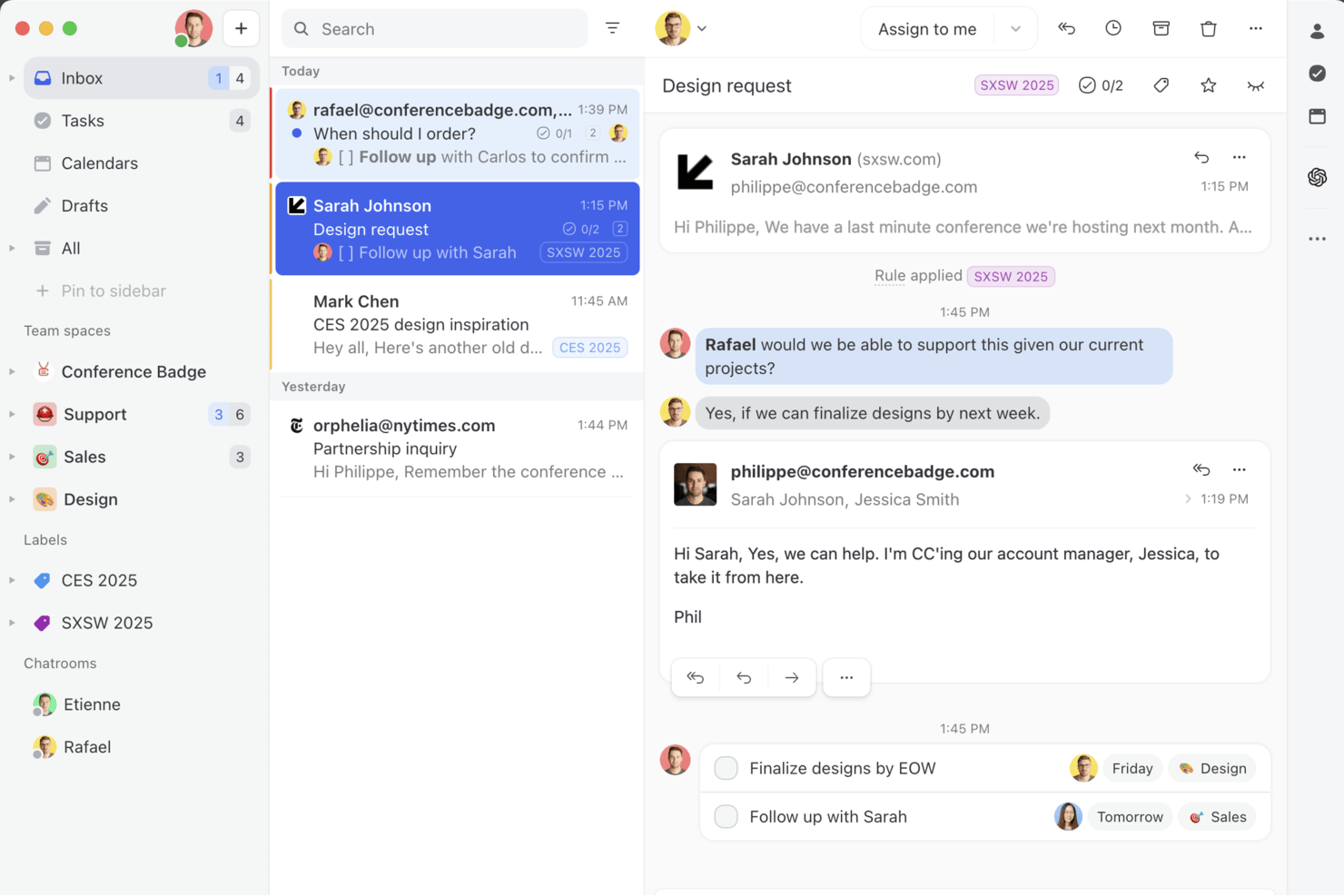
Missive is a collaborative shared inbox platform that unifies email, SMS, WhatsApp, and social messaging channels with AI-assisted drafting, thread summarization, automated task extraction, and team workflow tools in one workspace.
Who Is Missive Best For?
Missive is a strong fit for cross-functional team leads and communication-heavy teams who coordinate work across email, SMS, WhatsApp, and social channels in a single shared workspace.
Why I Picked Missive
Missive earns its spot on my shortlist because no other tool I've tested pulls email, SMS, WhatsApp, Facebook Messenger, and Instagram into a single shared workspace where your whole team can draft, assign, and summarize conversations together. I'm particularly impressed by how AI Summarization posts shared thread summaries as team-visible notes, so when a conversation is reassigned mid-thread, the next person picks up full context instantly. AI Rules take this further by auto-extracting action items directly from incoming emails and routing them to tools like Asana or ClickUp without manual triage.
Missive Key Features
- AI Rules engine: Automatically analyzes incoming emails using plain-language prompts to trigger routing, assignments, or escalations without manual triage.
- Collaborative drafting: Multiple team members can co-author a reply in real time within a shared thread before it's sent.
- BYOK AI provider support: Connect your own OpenAI, Anthropic, or Google Gemini API key to power AI features while controlling cost and model choice.
- Workload balancing: Distributes incoming conversations across team members using Round-Robin, Least Busy, All-at-Once, or Random assignment methods.
- MissiveMCP Server: Connect external AI tools (like Claude or ChatGPT) to query collaboration threads, check calendars, and draft replies—while keeping team review required before sending.
Missive Integrations
Missive offers native integrations with Asana, ClickUp, Trello, and Todoist, plus MCP connections to Linear and Notion. It supports OpenAI, Anthropic, and Google Gemini, has an API for custom integrations, and is available on Zapier.
Pros and Cons
Pros:
- Automates action item extraction from messages
- AI summarizes threads as shared team notes
- Unifies email, SMS, and social messaging
Cons:
- Lacks predictive project risk detection
- No AI meeting notes or voice support
New Product Updates from Missive
Missive Adds Conversation Pins
Missive now lets you pin key links, decisions, and notes inside a conversation, keeping them accessible in a dedicated Pins section in the Details sidebar. For more information, visit Missive's official site.
 .
.
Wrike
Best for complex projects

Wrike is a project management software designed to help your team manage projects through its automation and AI capabilities. It appeals to businesses and professionals who need efficient workflow solutions, offering features for creative production, marketing workflows, and agile planning.
Why I Picked Wrike
I picked Wrike for its AI-driven features that enhance collaboration for complex projects. Wrike's generative AI capabilities help your team draft project plans and summarize meeting notes, saving time and reducing manual workload. The platform also provides real-time dashboards offering analytics for informed decision-making, essential for teams needing to stay agile and responsive. These features make Wrike an ideal choice for businesses looking for a tool that facilitates collaboration and empowers teams with AI-enhanced insights.
Wrike Key Features
In addition to its AI-driven capabilities, I also found several other features that make Wrike a solid collaboration tool:
- Custom Request Forms: Streamline the intake process by allowing teams to create tailored forms for specific project needs.
- Online Proofing: Enhance collaboration by providing a space for teams to review and approve creative work directly within the platform.
- In-Platform Email Communication: Keep all project-related communications centralized by integrating email functionality within Wrike.
- Unlimited Workflows: Adapt to various project requirements by setting up as many workflows as your team needs.
Wrike Integrations
Integrations include Microsoft Teams, Google Workspace, Slack, Salesforce, Adobe Creative Cloud, NetSuite, QuickBooks, Jira, GitHub, and Box.
Pros and Cons
Pros:
- Comprehensive task management features improve team coordination.
- Customizable dashboards and workflows suit diverse needs.
- Dynamic file version comparison streamlines proofing processes.
Cons:
- Intricate workflows can take time to set up.
- Mobile app lacks features available in desktop version.
New Product Updates from Wrike

Wrike Adds Quick Search to Table View
Wrike adds Quick Search to Table View with full-table search across titles, descriptions, and fields, plus highlighted matches. This helps users find tasks faster in large tables. For more information, visit Wrike’s official site.

FigJam
Best for design teams

FigJam is a collaborative whiteboard tool that lets design teams and creatives brainstorm, plan, and work together visually. Designers and teams use it to sketch ideas, map out projects, and collaborate.
Why I picked FigJam: FigJam’s intuitive interface supports sketching and brainstorming sessions. Use FigJam’s AI to generate ideas, create diagrams, and summarize content on the board. Your team can combine sticky notes, shapes, and drawings with AI-generated inputs to move faster through workshops. The tool's ability to facilitate real-time collaboration lets your team work together seamlessly.
Standout features & integrations:
Features include templates that help you get started quickly, a voting feature so you can make decisions collaboratively, and a built-in timer to stay on track in meetings and sessions.
Integrations include Figma, Slack, Microsoft Teams, Zoom, Dropbox, Google Drive, Asana, Trello, Notion, and Jira.
Pros and Cons
Pros:
- Timer for meeting management
- Built-in voting feature
- Easy to sketch ideas
Cons:
- Complex for non-designers
- Requires stable internet connection

Airtable
Best for database projects

Airtable is a flexible database management tool that lets teams organize and collaborate on projects. It's used by marketers, project managers, and creatives who need a customizable solution for tracking and managing data.
Why I picked Airtable: Airtable can handle projects and databases with ease. It offers a user-friendly interface that lets you create customized tables and views. You can use Airtable’s AI features to generate content and suggest automations. The drag-and-drop functionality makes organizing data straightforward. In my experience, Airtable's ability to link records and automate workflows makes it useful for complex projects.
Standout features & integrations:
Features include color-coded records that make it easy to categorize and identify information quickly. You can also design custom interfaces to make complex data usable and accessible.
Integrations include Slack, Google Drive, Dropbox, Salesforce, and Zendesk.
Pros and Cons
Pros:
- Supports complex data relationships
- Visual project tracking
- Highly customizable fields
Cons:
- Advanced features require paid plans
- Limited offline functionality

Nifty
Best for project timelines

Nifty is a project management tool that helps teams manage timelines and tasks. Project managers and teams use it to keep track of project milestones and collaborate efficiently.
Why I picked Nifty: Nifty’s intuitive interface helps you manage project timelines and visualize project progress. The tool also offers milestone tracking to keep your team aligned on deadlines. Nifty’s AI features help you plan, prioritize, and execute tasks more effectively. Collaboration features like task discussions and file sharing helps improve communication and teamwork.
Standout features & integrations:
Features include time tracking to monitor the hours spent on tasks, which helps you manage resources better, and task dependencies help you organize and prioritize tasks effectively.
Integrations include Slack, Google Drive, Zoom, GitHub, Asana, Trello, and Notion.
Pros and Cons
Pros:
- Calendar sync feature
- Effective milestone tracking
- Intuitive timeline visualization
Cons:
- Occasional sync delays
- Limited advanced reporting

Loom
Best for video messaging

Loom is a video communication tool that lets your team create video messages. It's popular among remote teams, educators, and customer support for its ability to convey complex information visually.
Why I picked Loom: Loom excels in video messaging and lets you record your screen, voice, and face simultaneously. You can use AI to instantly clean up videos, generate transcripts, and repurpose recordings into text formats like messages or reports. The tool lets you share videos with a simple link and receive instant feedback through comments. Loom's speed and simplicity make it a favorite for teams that want to speed up communication and reduce lengthy emails.
Standout features & integrations:
Features include video trimming to edit out unnecessary parts, drawing tools to highlight key information, and a call-to-action button to direct viewers to a specific webpage.
Integrations include Slack, Gmail, Jira, Zoom, Notion, and Confluence.
Pros and Cons
Pros:
- High-quality video recording
- Easy sharing options
- Fast video processing
Cons:
- Basic analytics features
- Limited video customization

Front
Best for team inboxes

Front is a shared inbox platform that helps teams manage communications. It caters to customer support, sales, and operations teams who need to collaborate on email responses and manage team inboxes.
Why I picked Front: Front lets you manage team inboxes and centralize communications in one place. The AI features can help you draft replies, automate routing, and measure customer satisfaction without extra manual work. You can assign emails to specific team members, which maintains accountability and clear responsibility. The platform's internal comments feature lets your team discuss emails directly within the inbox. In my experience, Front's automated workflows help reduce repetitive tasks and improve productivity.
Standout features & integrations:
Features include email templates that save time, analytics for performance and email response times, and collision detection that prevents multiple people from responding to the same email.
Integrations include Salesforce, Slack, Asana, Trello, Zapier, HubSpot, Intercom, Aircall, and Dropbox.
Pros and Cons
Pros:
- Prevents duplicate email responses
- Assigns emails to team members
- Centralized communication hub
Cons:
- Requires stable internet connection
- Limited customization of templates

Best for freelancers

Bonsai Agency Software is a comprehensive platform that lets freelancers manage contracts, invoices, and projects. Independent professionals can use it to handle their business operations.
Why I picked Bonsai Agency Software: Bonsai’s AI features let you create proposals, contracts, and invoices faster with templates and automation, and you can customize the templates to fit your specific needs. The invoicing feature improves billing and lets you create and send professional invoices. Bonsai's project tracking helps you stay on top of deadlines, manage your workload, and collaborate with clients.
Standout features & integrations:
Features include task management and prioritization, time tracking so you can monitor hours spent on projects, and a client portal where clients can approve contracts and invoices.
Integrations include QuickBooks, Zapier, Xero, and Calendly.
Pros and Cons
Pros:
- Client portal for approvals
- Efficient invoicing process
- Customizable contract templates
Cons:
- Can be complex for new users
- Limited customization for reports

Confluence
Best for knowledge management

Confluence is a collaboration tool that helps teams create, share, and manage content. It's used by project managers, developers, and IT teams for knowledge sharing and documentation.
Why I picked Confluence: Confluence provides a centralized space for team documentation and collaboration. You can use Confluence’s AI features to generate content, summarize pages, and automate repetitive writing tasks.The page versioning feature lets you to track changes and revert to previous versions. The templates help you set up pages for use cases like meeting notes and project plans.
Standout features & integrations:
Features include a rich text editor for easy content formatting, a powerful search function to quickly find information, and permissions settings to control who can view or edit content.
Integrations include Jira, Trello, Slack, Google Drive, and Microsoft Teams.
Pros and Cons
Pros:
- Page versioning capability
- Customizable permissions
- Extensive template library
Cons:
- Complexity in setting permissions
- Can be slow with large data
Other AI Collaboration Tools
Here are some additional AI collaboration tools options that didn’t make it onto my shortlist, but which are still worth checking out:
- Bit.ai
For document collaboration
- Roam
For collaborative idea sharing
- Zoho Projects
For task tracking
- Quickbase
For app building
- TaskRay
For Salesforce AI-powered collaboration
- Asana
For project planning
- Slack
For team communication
- ClickUp
For task management
- Miro
For online whiteboards
- Trello
For visual task boards


How I Evaluate AI Collaboration Tools
Every tool here has to go beyond a chatbot add-on—I look for AI that saves real time, like auto-extracting action items or surfacing blockers. I split my evaluation into core functionality a tool must have to qualify and differentiating factors that separate good options from great ones.
Core Functionality (Table Stakes For This List)
When I'm selecting tools for my list, I rank each one on a scale from 0 (does not offer the functionality) to 5 (excels in this area) for each core functionality listed below. Then, I calculate the tool's total score into a percentage. Each tool needs to achieve a minimum total score of 65% to be considered for inclusion.
- AI-Powered Content Generation: I look for tools that use generative AI to help teams draft meeting agendas, project briefs, or task descriptions directly inside the workspace.
- AI Summarization Capabilities: Long Slack threads and hour-long standups drain time, so I evaluate how well each tool condenses conversations and docs into clear takeaways.
- Real-Time Collaboration Features: Teams need shared surfaces to work together, so I check for co-editing, commenting, and async collaboration across docs, tasks, or whiteboards.
- AI Task & Action Extraction: I evaluate whether the tool can pull action items, owners, and due dates from meetings or chat threads without someone manually logging them.
- Project Management Integrations: Tools like Jira, Asana, and Monday are where project work lives, so strong two-way sync with these platforms is something I always check for.
- AI-Driven Insights & Search: Beyond basic keyword search, I look for semantic retrieval and surfaced insights—like flagging stale tasks or unanswered blockers across a workspace.
Once I have a list of tools that meet the criteria, I consider what sets each platform apart.
Differentiating Factors (What Sets Vendors Apart)
Here's how I compare and contrast different vendors:
Standout Features
An AI meeting copilot that joins calls and auto-generates follow-ups is a huge time-saver for PMs running back-to-back syncs across multiple workstreams. I also evaluate cross-tool context awareness, where the AI pulls relevant info from connected apps like Slack or Jira without manual input. Custom AI agents are worth looking at too—teams can configure them to handle recurring tasks like sprint reminders or weekly status rollups tailored to specific project workflows.
Beyond Features
AI governance matters a lot here—I check whether vendors are transparent about how they handle project data and whether customer content trains their models. Scalability is another big factor, especially for PMO directors managing multiple portfolios with dozens of guest collaborators. I also evaluate implementation support, since rolling out an AI tool across distributed teams requires solid onboarding resources and change management guidance to drive real adoption beyond a pilot group.
How to Choose AI Collaboration Tools
It’s easy to get bogged down in long feature lists and complex pricing structures. To help you stay focused as you choose the right tool, here’s a checklist of factors to keep in mind:
| Factor | What to Consider |
|---|---|
| Scalability | Will the tool grow with your team? Consider future needs and whether the tool can handle increased users and data without performance issues. |
| Integrations | Does it work with your existing tools? Check for compatibility with the software your team already uses, like CRMs or file storage systems. |
| Customizability | Can you tailor it to your workflows? Look for options to adjust dashboards, reports, and user settings to match your team's processes. |
| Ease of use | Is it intuitive for everyone? Evaluate the learning curve and user interface. A tool that's hard to navigate can slow down your team. |
| Implementation and onboarding | How quickly can your team get started? Assess the resources available, such as tutorials and support, to maintain a smooth transition. |
| Cost | Does it fit your budget? Compare pricing plans and consider long-term costs, including any hidden fees or additional charges for premium features. |
| Security safeguards | How secure is your data? Verify the tool's data protection measures, encryption standards, and compliance with industry regulations like GDPR. |
| Support availability | What support options are available? Check for 24/7 support, response times, and access to a dedicated account manager if needed. |
What Are AI Collaboration Tools?
AI collaboration tools are digital platforms that boost teamwork and communication via artificial intelligence features. These tools are generally used by project managers, team leaders, and remote workers to improve productivity and coordination.
Features like real-time chat, project tracking, and document sharing help you organize tasks, manage deadlines, and facilitate effective communication. This simplifies collaboration and helps make the team more efficient.
Features of AI Collaboration Tools
When selecting AI collaboration tools, keep an eye out for the following key features:
- Real-time communication: Offers instant messaging and video calls to keep team members connected and engaged.
- Task management: Lets you assign, track, and prioritize tasks to keep projects on schedule.
- Document sharing: Facilitates easy access and collaboration on files and reduces the need for back-and-forth emails.
- Integration capabilities: Connects with existing tools and software to create a cohesive workflow across platforms.
- Customizable dashboards: Lets you personalize views and reports to match your team's specific needs and preferences.
- Automated workflows: Simplifies repetitive tasks and frees up time for strategic work.
- Security safeguards: Protects sensitive data with encryption and complies with industry regulations.
- Analytics and reporting: Provides insights into team performance and project progress to inform decision-making.
- Mobile access: Lets team members collaborate and access information from anywhere, at any time.
- User-friendly interface: Offers an intuitive design that minimizes the learning curve and boosts adoption rates.
Benefits of AI Collaboration Tools
Implementing AI collaboration tools provides several benefits for your team and your business. Here are a few you can look forward to:
- Better communication: Real-time messaging and video calls keep your team connected and reduce misunderstandings.
- Improved organization: Task management features help you keep track of assignments and deadlines so nothing falls through the cracks.
- Increased productivity: Automated workflows handle repetitive tasks so your team can focus on more valuable work.
- Better decision-making: Analytics and reporting provide insights into project progress and team performance so you can make informed decisions.
- Greater flexibility: Mobile access lets your team collaborate from anywhere, and can accommodate remote work and travel.
- Stronger data security: Security safeguards protect sensitive information, which gives you peace of mind about data safety.
- Customizable experience: Customizable dashboards let you tailor the tool to fit your team's unique workflows and preferences.
Costs and Pricing of AI Collaboration Tools
Costs for AI collaboration tools vary based on features, team size, add-ons, and more. The table below summarizes common plans, their average prices, and typical features included in AI collaboration tools solutions:
Plan Comparison Table for AI Collaboration Tools
| Plan Type | Average Price | Common Features |
|---|---|---|
| Free Plan | $0/user/month | Basic task management, limited storage, and essential communication tools. |
| Personal Plan | $5-$15/user/month | Task management, document sharing, and basic integrations. |
| Business Plan | $15-$30/user/month | Advanced integrations, analytics, and reporting, and better security features. |
| Enterprise Plan | $30-$50/user/month | Customizable workflows, priority support, and advanced security measures. |
AI Collaboration Tools FAQs
Here are some answers to common questions about AI collaboration tools:
How do AI tools impact team communication effectiveness?
AI collaboration tools can analyze your messages, highlight important threads, and suggest summaries or next steps. They help your team avoid duplicated conversations and context switching. You can use them to surface key info, and then respond faster and more clearly.
Do AI collaboration tools support compliance and data privacy?
AI collaboration tools support privacy with role-based access, audit logs, and encryption to protect sensitive data. Check whether a tool meets your region’s regulations like GDPR or SOC-2. You should also set clear rules on how AI features can use confidential content.
How scalable are AI collaboration tools for growing teams?
AI collaboration tools often scale by letting you adjust plans or performance tiers (e.g. for more users or storage). The architecture should let you add users and features without massive rework. But you’ll want to test performance as your team grows.
What are common pitfalls when implementing AI in collaboration tools?
Common pitfalls of AI collaboration tools include overdependence on AI, which can reduce team judgment, and AI may misinterpret vague inputs. Integration complexity with your existing stack (e.g. legacy systems) can slow adoption, and training takes time, so expect a ramp-up period.
How do I evaluate ROI for AI collaboration tools?
To evaluate the ROI of AI collaboration tools, you can track time saved on status updates, reductions in email volume, faster decision cycles, and fewer missed deadlines. Compare before-and-after metrics for similar projects. Ask your team whether they feel less friction in coordination after adoption.