

10 beste programvareløsninger for IT-ressursstyring gjennomgått i 2026

Kortliste over den beste programvaren for IT-ressursstyring


Hvis du ønsker å effektivisere ressursfordelingen og få bedre oversikt over prosjektene, er det viktig å finne et verktøy som dekker dine spesifikke behov. Det kan være krevende å velge riktig programvare for IT-ressursstyring.
Med min erfaring innen digital prosjektstyring kan jeg gjøre denne prosessen enklere og hjelpe deg med å velge programvare som optimaliserer ressursfordelingen. Her er noen av mine beste anbefalinger for programvare for IT-ressursstyring.
Why Trust Our Software Recommendations
Our team has been testing and reviewing software since 2012. As project managers ourselves, we know how difficult—and important—it is to choose the right software.
For this guide, we evaluated tools using hands-on testing and independent research, scoring tools using our selection criteria. We also draw on insights from industry thought leaders and practicing project management experts.
Our reviews reflect our human editorial judgment, not a sales pitch.
Expert reviewers:
Sammenligningstabell for programvare for IT-ressursstyring
Tabellen nedenfor sammenligner prisopplysningene for mine beste anbefalinger av programvare for IT-ressursstyring.
| Tool | Best For | Trial Info | Price | ||
|---|---|---|---|---|---|
| 1 | Best for managing projects, finances, and resources in one | 14-day free trial | From $17/user/month | Website | |
| 2 | Best for native CRM and sales pipeline tools | 14-day free trial | From $10/user/month (billed annually) | Website | |
| 3 | Best for professional services automation | Free demo available | Pricing upon request | Website | |
| 4 | Best for automated service request workflows | 14-day free trial | From $19/user/month (billed annually) | Website | |
| 5 | Best for capacity planning with real-time margins | 30-day free trial available | From $7/scheduled user/month | Website | |
| 6 | Best for visualizing team workloads | 14-day free trial | Pricing upon request | Website | |
| 7 | Best for hierarchical task structuring | Free plan + 30-day free trial available | From $7.65/user/month (billed annually) | Website | |
| 8 | Best for people-centric resourcing | Free demo available | Pricing upon request | Website | |
| 9 | Best for comprehensive project management and collaboration | 30-day free trial | From $10/user/month (billed annually) | Website | |
| 10 | Best integrated time and resource tracking | Free 7-day trial available | From $9/user/month (billed annually) | Website |


Anmeldelser av den beste programvaren for IT-ressursstyring
Det er avgjørende å finne riktig programvare for IT-ressursstyring for å optimalisere teamets arbeidsmengde og fordele ressurser effektivt på tvers av prosjekter. Nedenfor finner du mine anmeldelser av de beste tilgjengelige verktøyene for IT-ressursstyring, slik at du kan ta en informert beslutning, effektivisere driften og øke produktiviteten.

Scoro
Best for managing projects, finances, and resources in one

Scoro is a comprehensive business management software designed to improve workflows and enhance productivity across various business functions.
Why I picked Scoro:
Scoro is a good choice for IT teams because of its advanced resource scheduling capabilities, which offer a real-time overview of team availability and workload. This feature is crucial for IT teams that often juggle multiple projects and tasks, ensuring that resources are allocated efficiently and no team member is overburdened. Additionally, Scoro’s utilization reports provide detailed insights into how resources are being used, helping identify bottlenecks. Additionally, Scoro supports project, financial, and resource management in a unified platform, allowing users to handle project timelines, budget tracking, and resource allocation simultaneously.
Standout features & integrations:
Features include its comprehensive project management tool, which allows IT teams to plan, track, and manage projects, ensuring that they stay on schedule and within budget. The time tracking feature is another valuable tool, enabling users to log their hours accurately and gain insights into time spent on various tasks. Scoro's financial management tools also support budgeting and expense tracking.
Integrations include Jira, Memtime, HubSpot, Google Calendar, Microsoft Exchange, Xero, QuickBooks, Sage Intacct, Exact Online, Expensify, Stripe, Google Drive, BambooHR, and more. You can also connect to other apps through its Zapier integration.
Pros and Cons
Pros:
- Real-time project and resource tracking
- All-in-one business management
- Good invoice and reminder system
Cons:
- Mobile app lacks some functionality compared to the web app
- Customization can be overwhelming for new users
New Product Updates from Scoro

Scoro Adds Time Mobile App and ELI Improvements
Scoro adds the Scoro Time mobile app for iOS/Android to track time anywhere and expands ELI with attachments, smarter filtering, and trigger-based actions. For more information, visit Scoro's official site.

Best for native CRM and sales pipeline tools
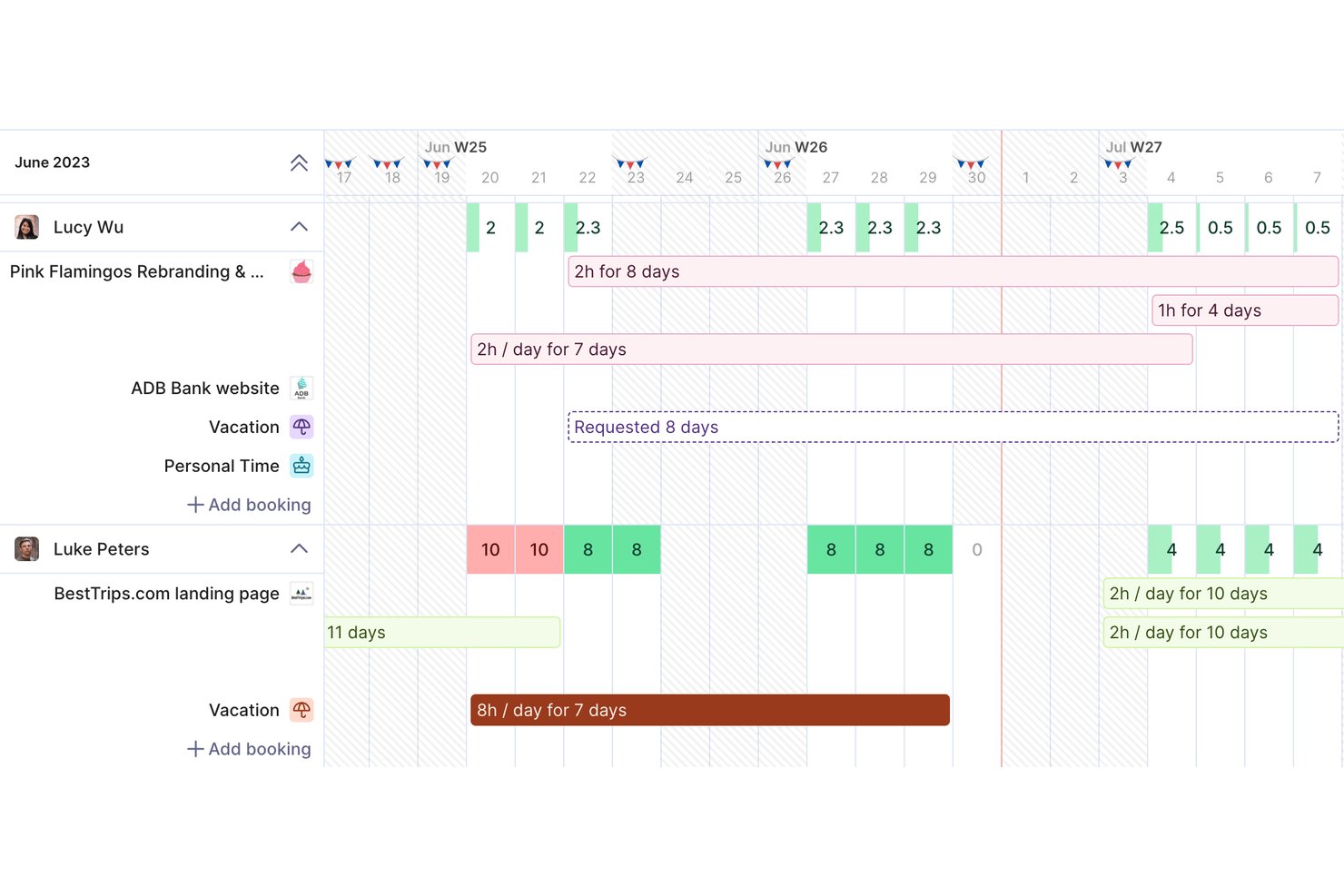
Productive is a professional services automation platform that combines resource planning, project management, time tracking, budgeting, and a native CRM into a single workspace for agencies and IT service teams.
Who Is Productive Best For?
Productive is a strong fit for IT consultancies and digital agencies that bill by the hour and need to manage client projects, team capacity, and financials in one place.
Why I Picked Productive
Productive earns its spot on my shortlist because its native CRM directly feeds into resource planning in a way most tools can't replicate. When a deal moves to "won," I can convert it into a project and immediately start booking team members against it. That pipeline-to-staffing connection means I'm forecasting capacity against real demand, not guesswork. The Scenario Builder then lets me model how upcoming opportunities will affect team availability before I've committed to anything.
Productive Key Features
- Resource planning module: Visually assign, reallocate, and track resource workload across multiple ongoing projects.
- Customized Employee Profiling: Maintain structured profiles for all team members using custom employee fields, department tags, organizational roles, active project assignments, and real-time availability data.
- Time tracking with approvals: Support for native timers, manual entries, and manager-approved timesheets.
- Financial Scenario Prototyping: Build dynamic budget and deal scenarios to prototype upcoming project services, allocate temporary resource placeholders, and calculate projected profit margins before going live.
Productive Integrations
Productive offers native integrations with GitHub, Slack, HubSpot, Notion, Amplitude, Stripe, Linear, Xero, Sage, Jira, and more. It also connects with Zapier, and has an API for custom integrations.
Pros and Cons
Pros:
- Scenario Builder models impact of pipeline deals
- Profitability tracking includes forecasted revenue and costs
- CRM pipeline connects directly to resource planning
Cons:
- Three-user minimum limits fit for small teams
- Some key features gated to higher tiers
New Product Updates from Productive
Productive Adds Voice Dictation, Slack Connector, Proposals, and Overtime
Productive adds voice dictation, a Slack Connector, proposal controls, and overtime tracking. These updates support faster AI interactions, client proposals, and time management. For more information, visit Productive’s official site.

Accelo
Best for professional services automation

Accelo is a professional services automation platform that combines resource scheduling, capacity planning, project management, time tracking, and project financials in one connected system.
Who Is Accelo Best For?
Accelo is a strong fit for IT services firms, consultancies, and agencies managing multiple concurrent client engagements across distributed teams.
Why I Picked Accelo
Accelo is one of my top picks because it connects resource scheduling, project delivery, and financials in a single PSA platform rather than forcing teams to reconcile data across separate tools. I like how AI-assisted resourcing evaluates team members by skill, certification, and availability to match the right person to the right project. In practice, my team is able to spot capacity gaps before they become delivery risks, using soft and hard allocations alongside dynamic placeholders for work that's forecasted but not yet confirmed.
Accelo Key Features
- Utilization reports: View real-time utilization data across your team to identify who's overallocated or underused.
- Automated timesheets: Time logged during project work auto-populates timesheets without manual entry.
- Project portfolio view: Monitor all active projects in a single view with status, budget, and progress tracking.
- AI-powered risk flagging: Accelo automatically flags projects at risk of missing deadlines or exceeding budget.
Accelo Integrations
Accelo offers 30+ native integrations, including Salesforce, HubSpot, Jira, QuickBooks, Xero, Sage Intacct, Slack, Microsoft 365, Google Workspace, and Azure DevOps. It also connects with Zapier and provides a RESTful API for custom integrations.
Pros and Cons
Pros:
- Sales-to-project handoff in one platform
- Automated time capture for billable hours
- AI flags scope drift and margin risk
Cons:
- Mobile app lacks full desktop functionality
- Reporting customization options feel limited
New Product Updates from Accelo

Accelo Rebuilds Mobile App for Project and Time Management
Accelo rebuilds its mobile app with task management, new work creation, and mobile timesheets for Forecast customers. This helps teams keep project and time data current while working away from a desktop. For more information, visit Accelo’s official site.

Best for automated service request workflows

Freshservice is an AI-powered IT service management platform that combines asset lifecycle tracking, incident management, workflow automation, and a CMDB to give IT teams a unified view of their resources and operations.
Who Is Freshservice Best For?
Freshservice is a strong fit for mid-size to enterprise IT teams that need a single platform to manage service requests, assets, and IT operations across complex environments.
Why I Picked Freshservice
I picked Freshservice as one of the best because its no-code Workflow Automator is one of the more capable tools I've seen for handling service request logic at scale. My team can build multi-step approval workflows that trigger automatically based on request type, requester department, or asset category, without writing a single line of code. I also like how Freshservice ties its AI-powered intelligent routing directly into these workflows, so incoming service requests get auto-assigned to the right team based on availability and load.
Freshservice Key Features
- Service catalog: A self-service portal where employees can browse and submit requests for IT resources, software, hardware, and services from a structured menu.
- CMDB: A configuration management database that maps relationships between assets, applications, and services to give IT teams a clear view of dependencies.
- SLA management: Lets you set, monitor, and escalate response and resolution time targets across different request types and priority levels.
- Asset discovery: Automatically scans and inventories hardware and software assets across on-premises, cloud, and hybrid environments without manual input.
Freshservice Integrations
Freshservice offers 1,000+ marketplace integrations through the Freshworks Marketplace, including Microsoft Teams, Slack, Jira, Azure AD, TeamViewer, Confluence, and Google Drive. It's available on Zapier and provides an API for custom integrations.
Pros and Cons
Pros:
- Offers sandbox environment for testing
- Service catalog extends to HR and facilities
- Unifies ticketing, assets, and contract management
Cons:
- Freddy AI locked behind higher-tier plans
- Custom report building options are restricted
New Product Updates from Freshservice
 Experience)
Freshservice Introduces a Reimagined IT Asset Management (ITAM) Experience
Freshservice introduces a reimagined IT Asset Management (ITAM) experience with continuous infrastructure discovery, dependency mapping, IPAM, and Software License Management. This update helps teams improve asset visibility and manage connected IT environments more effectively. For more information, visit Freshservice’s official site.

Best for capacity planning with real-time margins
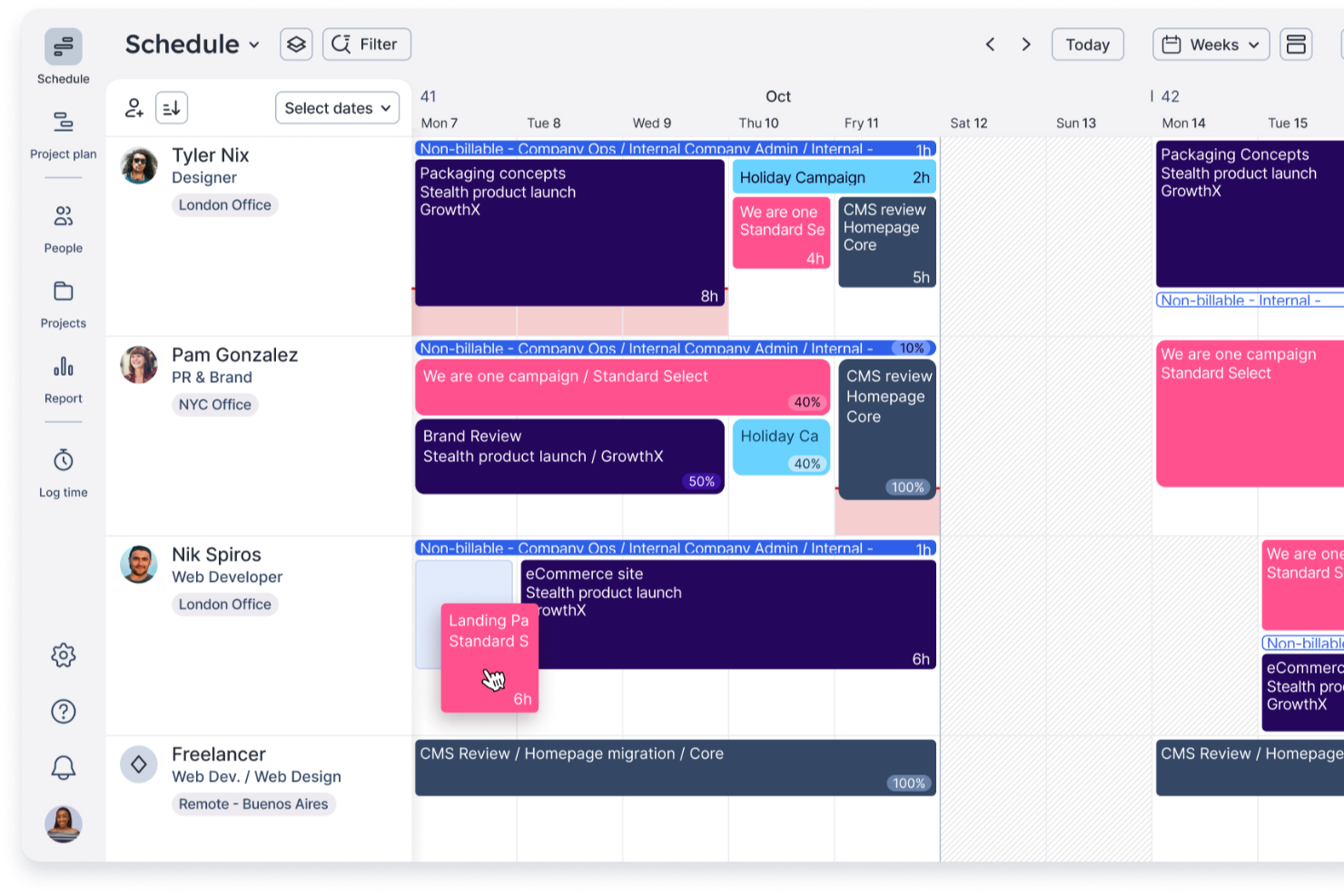
Float.com is a dedicated resource management platform for professional services teams in IT that need to plan work across projects, keep delivery realistic, and understand the financial impact of resourcing decisions before making commitments. It gives IT leaders and resource managers a live view of who’s available, what they’re allocated to, and what their time costs. This makes it easier to balance delivery demand, reduce overload risk, and protect margins across internal initiatives or client delivery.
Why I Picked Float
I picked Float because it excels at IT capacity planning while making costs and margins visible as plans evolve. Its live scheduling view shows who’s available, who’s booked, and where capacity constraints exist, so IT leaders can make informed resourcing decisions before resourcing issues turn into delivery risks. Float also connects planned work with actual hours worked, giving Finance and Operations leaders real insight into how staffing choices impact cost and margin over time. That level of financial visibility is especially valuable for IT teams managing complex workloads, shifting demand, and tight budgets. It’s also something many traditional project tools struggle to handle.
Float Key Features
In addition to its core offerings, Float provides several other features that enhance its utility for IT resource management:
- Capacity & utilization forecasting: forecast future demand vs. team availability to prevent over-allocation and reduce delivery bottlenecks before they happen.
- Cost & rate-based resourcing: plan allocations with cost and billable rates so staffing decisions reflect real financial impact, not just hours.
- Project estimation & scoping for IT services: build estimates grounded in actual capacity, costs, and planned delivery—then compare estimate baselines to actuals when time tracking is enabled.
- Time tracking with schedule-based prefill: streamline timesheets by prefilling from planned allocations to improve adoption and accuracy.
- Leave & availability controls: factor time off, holidays, and custom work hours directly into capacity views for cleaner planning and fewer surprises.
Float Integrations
Integrations include Slack, Google Calendar, Outlook Calendar, Asana, Jira, Trello, and Zapier. A public API is also available for custom integrations.
Pros and Cons
Pros:
- Custom settings support flexible workflows
- Real-time tracking enhances profitability insights
- Visual scheduling improves resource planning
Cons:
- No built-in task management
- Limited native mobile app access
New Product Updates from Float.com

Float Adds Rate Cards and Multi-Currency Billing
Float introduced centralized rate cards to standardize bill rates across projects and added multi-currency support to bill clients consistently across regions. For more information, visit Float's official site.

Wrike
Best for visualizing team workloads

Wrike is a scalable project management tool designed to help teams plan, execute, and monitor their work efficiently. It offers a range of features that facilitate collaboration, task management, and resource allocation, making it suitable for various industries and team sizes, including small, medium, and enterprise IT teams.
Why I picked Wrike:
Wrike's resource management capabilities make it a strong choice for IT teams seeking effective resource allocation. The platform provides a comprehensive workload view, allowing you to see each team member's assignments and availability. This visibility helps prevent overloading individuals and ensures a balanced distribution of tasks. Additionally, Wrike's effort management feature enables you to estimate the amount of work required for each task. By assigning appropriate effort levels, you can better forecast project timelines and allocate resources accordingly.
Standout features & integrations:
Features include custom workflows that let you tailor processes to fit your team's specific needs, ensuring consistency and efficiency. The platform also offers real-time reporting tools, providing insights into project progress and resource utilization, which support informed decision-making.
Integrations include QuickBooks, Skyvia, Power BI, Google Sheets, Miro, Salesforce, Tableau, Microsoft Teams, MediaValet, Zoom, Adobe Creative Cloud, and Google Drive.
Pros and Cons
Pros:
- Offers diverse resource management tools
- Custom workflows, dashboards, and reports
- Scalable for growing teams
Cons:
- Learning curve due to extensive features
- No built-in chat feature
New Product Updates from Wrike
Wrike Adds Klaxoon MCP Integration
Wrike’s Klaxoon MCP integration is now generally available, enabling AI agents to navigate between Wrike tasks and attached whiteboards, read task context, and manage whiteboard attachments via API. For more information, visit Wrike's official site.

Quire
Best for hierarchical task structuring

Quire is a cloud-based project management tool designed to help teams break down complex projects into manageable tasks. It offers a structured environment where teams can organize their work and resources hierarchically for more clarity around every step of the project.
Why I picked Quire:
For IT teams seeking simple resourcing capabilities related to task scheduling, Quire offers hierarchical task structuring. Its nested task lists allow teams to break down large projects into smaller, actionable items, providing clarity on responsibilities and timelines. This structure supports detailed project planning and efficient task delegation, essential for optimizing workflow and ensuring that every team member understands their role in the project's success.
Standout features & integrations:
Features include real-time collaboration among team members. Users can comment on tasks, receive notifications about updates, and share files directly within the platform. Additionally, Quire's calendar view organizes team agendas, helping everyone stay on track and be prepared for upcoming deadlines.
Integrations include Google Calendar, Gmail, Slack, Outlook, Zoho Flow, GitHub, Apple Calendar Sync, Box, Dropbox, Google Drive, and Microsoft Teams.
Pros and Cons
Pros:
- Easy to collaborate with team members
- Multiple project views, including lists, boards, and timelines
- Ability to create nested tasks and subtasks, allowing for detailed project breakdowns
Cons:
- Lacks some core resourcing capabilities, like capacity and workload planning
- Potential for notification overload, especially when working with large teams
New Product Updates from Quire
Quire Adds Custom Field Locking and Comment Reaction API Support
Quire adds custom field locking and API support for reading and setting emoji reactions on comments. These updates give teams more control over field data and expand comment interaction options for developers. For more information, visit Quire’s official site.
 .
.
Kantata
Best for people-centric resourcing

Kantata is a resource and project management software designed for a wide range of industries, including IT teams. It offers features for resource planning, financial management, and project forecasting.
Why I picked Kantata:
I like that Kantata’s people-centric approach makes it easier for IT managers to assign the right specialists to the right projects at the right time. Its advanced scheduling and capacity planning tools give real-time visibility into utilization, helping you avoid overbooking critical resources or leaving talent underused. With built-in analytics and reporting, IT leaders can make smarter, data-driven staffing decisions while keeping projects on track and profitable.
Standout features & integrations:
Features include a detailed skills inventory to align IT roles with project requirements, automated staffing suggestions based on availability, and integrated timesheets that support both billable and non-billable tracking. Kantata also offers customizable dashboards and reporting templates, so IT leaders can monitor KPIs like project health, budget adherence, and workload balance at a glance.
Integrations include Microsoft Office 365, Google Workspace, Jira, Trello, Slack, Salesforce, HubSpot, Asana, Smartsheet, QuickBooks, Xero, and many more.
Pros and Cons
Pros:
- Automated resource allocation features
- Gantt charts and boards for project visualization
- Robust, customizable reporting capabilities
Cons:
- May take time to learn the platform
- Approval workflows could be more flexible
New Product Updates from Kantata

Kantata Adds Access Group Change History
Kantata adds Access Groups History, letting account administrators track changes to group details, membership, and permissions in Recent History. The update also makes these events available through the Subscribed Events API for broader monitoring. For more information, visit Kantata’s official site.
 .
.
Best for comprehensive project management and collaboration

Microsoft Project includes tools for scheduling work, allocating resources, and tracking progress, allowing IT teams to maximize resource usage and project outcomes.
Why I picked Microsoft Project:
Microsoft Project stands out for its ability to handle a wide array of project management tasks effectively. It’s different from other project management tools due to its in-depth metrics and breadth of features. The software offers a full suite of tools that enable meticulous planning, and resource management, and facilitate communication among team members.
Standout features & integrations:
Features include automatic task and timeline adjustements based on available resource changes. Additionally, its business intelligence capabilities allow for the creation of detailed, interactive dashboards that provide insights into project health and progress.
Integrations include Microsoft Teams, Power BI, Microsoft 365, OneDrive, SharePoint, Skype for Business, Microsoft Power Platform, Microsoft Azure, Dynamics 365, and Excel.
Pros and Cons
Pros:
- Advanced business intelligence tools for project analytics
- Strong integration with Microsoft Teams for team collaboration
- Wide range of project management functionalities
Cons:
- Complex interface
- May be resource-intensive
Best integrated time and resource tracking

Bonsai Agency Software is an all-in-one platform designed to help IT agencies manage resources, projects, and client relationships. It offers tools for project planning, time tracking, and budget management, aiming to simplify operations and boost profitability.
Why I picked Bonsai Agency Software:
Bonsai's resource planning and forecasting tools let you allocate work based on your team's capacity and monitor utilization in real time. This helps ensure that projects are assigned efficiently, preventing overloading or underutilization of team members. Additionally, the ability to predict staff shortages before new projects begin allows for proactive hiring or resource adjustments. The time-tracking and timesheet features enable your team to log hours effortlessly, providing a clear view of project progress and individual contributions. With options to set custom billable and cost rates for members, tasks, and projects, you can maintain accurate billing and budget tracking.
Standout features & integrations:
Features include project planning tools that let you visualize timelines using Kanban boards, Gantt charts, and list views, making it easier to manage tasks and deadlines. The budget tracking and forecasting capabilities offer real-time updates on project budgets, helping you predict scope changes and make informed financial decisions. Additionally, the client portal provides a centralized space for your clients to access project information.
Integrations include Gmail, Google Calendar, Zapier, Slack, QuickBooks Online, Calendly, ClickUp, Trello, Google Drive, Google Sheets, Xero, and HubSpot.
Pros and Cons
Pros:
- Integrates time and budget tracking
- Good resource forecasting capabilities
- Professional-looking client portal
Cons:
- Lacks IT-specific features
- Mobile app could be enhanced with additional features
Annen programvare for IT-ressursstyring du bør vurdere
Nedenfor finner du en liste over annen programvare for IT-ressursstyring som ble vurdert. Selv om de ikke havnet øverst på listen, er disse programvarene fortsatt verdifulle og absolutt verdt å undersøke nærmere.
- Parallax
For digital service capacity planning
- Silverbucket
For project workload planning and profitability prediction
- eResource Scheduler
For workflow scheduling and resource capacity planning
- Resource Guru
For flexible scheduling and value for money
- Celoxis
For project portfolio balance and ease of use
- GoodDay
For customizable workspaces
- Saviom
For enterprise workforce optimization
- Runn
For real-time resource planning and project tracking
- Hub Planner by Milient
For capacity planning with real-time utilization insights
- Retain
For secure on-premise deployment options
- Smartsheet
For spreadsheet-like project tracking
- Ravetree
For work management versatility
- Hive
For collaborative project management
- TeamGantt
For Gantt chart enthusiasts


Relaterte anmeldelser av styringsprogramvare
Hvis du fortsatt ikke har funnet det du leter etter her, kan du ta en titt på disse andre relaterte verktøyene som vi har testet og evaluert:
- Programvare for prosjektstyring
- Programvare for ressursstyring
- Programvare for arbeidsflytautomatisering
- Programvare for tidsregistrering
- Programvare for oppgavestyring
- Samarbeidsverktøy
- Verktøy for lager- og ressursstyring
- Verktøy for å lage Gantt-diagrammer
- Produktivitetsverktøy
- Programvare for prosjektoppfølging
- Programvare for prosjektplanlegging
How I Evaluate IT Resource Management Software
I split my evaluation into two layers—what a tool needs to handle basics like scheduling and utilization, and what makes it worth recommending to a resource manager running a multi-project portfolio.
Core Functionality (Table Stakes For This List)
When I'm selecting tools for my list, I rank each one on a scale from 0 (does not offer the functionality) to 5 (excels in this area) for each core functionality listed below. Then, I calculate the tool's total score into a percentage. Each tool needs to achieve a minimum total score of 65% to be considered for inclusion.
- Resource Scheduling & Allocation: I check whether the tool lets you drag-and-drop assignments across a visual timeline, split bookings, and flag conflicts when two projects compete for the same person.
- Capacity Planning: The platform should show available hours against committed work so you can spot who's overloaded and who has bandwidth before the next sprint kicks off.
- Utilization Tracking & Reporting: I evaluate whether you can break down billable vs. non-billable hours per person, team, or project and pull those numbers into dashboards or exports.
- Skills & Availability Management: I look for searchable resource profiles with tags for skills, roles, and locations so you can quickly find, say, an available backend developer for a Q3 migration.
- Demand Forecasting: A good tool lets you model upcoming project demand with tentative bookings or pipeline data, helping PMO directors plan hiring or contractor needs months ahead.
- Time Tracking Integration: Whether native or through integrations with tools like Harvest or Toggl, I check that planned hours can be compared against actuals to catch scope creep early.
Once I have a list of tools that meet this criteria, I consider what sets each platform apart.
Differentiating Factors (What Sets Vendors Apart)
Here's how I compare and contrast different vendors:
Standout Features
Scenario planning is a big differentiator. I look for tools that let you clone a current resource plan, swap out variables like headcount or project timelines, and compare outcomes side by side. That's especially useful when a PMO director needs to pitch a hiring case to leadership. Financial tracking matters too—platforms that tie cost and bill rates to each assignment help services teams connect staffing decisions to margin targets. Portfolio-level heatmaps round this out by surfacing capacity gaps across departments at a glance.
Beyond Features
Ecosystem fit is one of the first things I evaluate. A resource management tool needs to connect with your existing project management platform—whether that's Jira, Asana, or Microsoft Project—so planned allocations stay in sync with actual project work. Pricing structure also matters more than most buyers expect. I check whether a vendor charges per managed resource or per viewer, since PMO teams often need read-only access for stakeholders without inflating costs. Implementation support is worth considering too, especially for teams migrating years of spreadsheet-based resource data into a new system.
Slik velger du programvare for IT-ressursstyring
Mens du går gjennom din unike prosess for valg av programvare, bør du ha følgende punkter i mente:
- Skalerbarhet: Etter hvert som virksomheten vokser, øker også behovene dine for styring av IT-ressurser. Velg programvare som kan håndtere en økning i brukere, prosjekter og data uten at det går ut over ytelsen.
- Integrasjonsmuligheter: Programvaren for styring av IT-ressurser bør fungere godt sammen med andre verktøy du allerede bruker. Se etter programvare som kan integreres med eksisterende systemer, for eksempel CRM-, ERP- eller regnskapsprogramvare, for å unngå datasiloer og sikre en smidig arbeidsflyt.
- Tilpasning: Alle organisasjoner har unike prosesser og behov. Velg programvare som kan tilpasses dine spesifikke arbeidsflyter og rapporteringsbehov. En virksomhet med en kompleks prosess for prosjektgodkjenning trenger programvare som kan tilpasses for å håndtere disse trinnene og gi nødvendig dokumentasjonsspor.
- Brukervennlig grensesnitt: Programvaren bør være enkel å bruke for å oppmuntre teammedlemmene dine til å ta den i bruk. Et brukervennlig grensesnitt kan redusere opplæringstiden og hjelpe teamet ditt med å bli mer produktivt raskt.
- Kundestøtte og opplæring: Sørg for at programvareleverandøren tilbyr omfattende alternativer for kundestøtte og opplæring. Dette er avgjørende for feilsøking og for å få mest mulig ut av programvaren.
Trender innen programvare for IT-ressursstyring i 2025
Her er noen trender jeg har lagt merke til innen programvare for IT-ressursstyring, som viser hvordan den utvikler seg og former fremtiden. Jeg undersøkte en rekke produktoppdateringer, pressemeldinger og versjonslogger for å hente ut de viktigste innsiktene.
- Integrasjon med miljøer for fjernarbeid: Behovet for fjernarbeid driver verktøy for IT-ressursstyring til å integreres med virtuelle arbeidsområder. Denne trenden muliggjør sentralisert kontroll over ressurser på tvers av distribuerte team. Dette er viktig for å opprettholde produktiviteten i et forretningslandskap der fjernarbeid står sentralt.
- Større vekt på cybersikkerhetsfunksjoner: Cybersikkerhet blir en kjernekomponent i programvare for IT-ressursstyring. Forbedrede sikkerhetsprotokoller bygges inn for å beskytte mot økende cybertrusler. Denne trenden er avgjørende for å beskytte organisasjonens verdier i et digitalt økosystem.
- AI og maskinlæring for prediktiv analyse: Kunstig intelligens og maskinlæring brukes til prediktiv analyse innen ressursstyring. Disse AI-teknologiene for ressursstyring forutsier ressursbehov og optimaliserer fordelingen. Bruken av dem er interessant på grunn av potensialet for å håndtere IT-utfordringer på forhånd.
- Brukersentrert design for bedre brukervennlighet: Det skjer en dreining mot brukersentrert design i programvare for IT-ressursstyring. Denne tilnærmingen prioriterer intuitive grensesnitt og personaliserte brukeropplevelser. Dette er viktig for å forbedre adopsjonsraten og driftseffektiviteten.
- Bærekraftsanalyse: Bærekraftsanalyse integreres i verktøy for IT-ressursstyring. Denne funksjonen hjelper organisasjoner med å overvåke og redusere karbonavtrykket sitt. Dette er fremtidsrettet fordi det bidrar til å tilpasse IT-praksis til mål for miljømessig bærekraft.
Hva er programvare for IT-ressursstyring?
Programvare for IT-ressursstyring er et digitalt verktøy som skal hjelpe organisasjoner med å styre ressursene sine effektivt. Den samordner ressursfordelingen med prosjektbehov og tidslinjer og sørger for at personell, utstyr og materialer er tilgjengelige ved behov, slik at prosjekter kan fullføres innenfor budsjettet og tidsplanen.
Med komponenter som ressursplanlegging, etterspørselsprognoser og sporing av ressursutnyttelse gir programvare for IT-ressursstyring en helhetlig oversikt over tilgjengelige ressurser og begrensninger. Dette muliggjør informerte beslutninger og proaktiv ressursstyring på tvers av prosjekter.
Funksjoner
Å velge riktig programvare for IT-ressursstyring er en strategisk beslutning som kan ha varig innvirkning på organisasjonens effektivitet og suksess. Hver funksjon spiller en spesifikk rolle i å forbedre styringen av IT-ressursene dine, og sammen gir de et omfattende verktøysett for styring av komplekse IT-miljøer.
Husk at målet er å finne programvare som ikke bare dekker dagens behov, men som også er fleksibel nok til å vokse sammen med organisasjonen din. Her er de viktigste funksjonene du bør se etter:
- Ressursallokering og planlegging: Denne funksjonen gjør det mulig å tildele oppgaver og ressurser på en effektiv måte. Den er avgjørende for å sikre at de riktige ressursene arbeider med de riktige oppgavene til riktig tid, noe som kan ha stor innvirkning på prosjektresultatene.
- Tidsregistrering og rapportering: Dette gir oversikt over hvor mye tid som brukes på bestemte oppgaver og prosjekter.
- Kompetansesporing: Kunnskap om ressursenes ferdigheter og kompetanse sikrer at du kan tildele oppgaver til de best kvalifiserte personene. Denne funksjonen er viktig for å maksimere effektiviteten i arbeidsstyrken.
- Kapasitetsstyring og planlegging: Dette bidrar til å forutse tilgjengeligheten av ressurser og planlegge fremtidige prosjekter. Det er viktig for å opprettholde en balanse mellom arbeidsmengde og ressurstilgjengelighet for å unngå overbelastning.
- Økonomistyring: Overvåking av kostnadene knyttet til ressurser er avgjørende for budsjettering og økonomisk planlegging. Det bidrar til å holde prosjektene innenfor budsjettet og forbedrer den samlede økonomiske ytelsen.
- Samarbeidsverktøy: Disse verktøyene legger til rette for kommunikasjon og samarbeid mellom ressursene. De er viktige for å opprettholde tydelig og effektiv kommunikasjon, noe som er avgjørende for at prosjekter skal lykkes.
- Sanntidsanalyse og dashbord: Tilgang til sanntidsdata bidrar til å ta velinformerte beslutninger raskt. Det er viktig for å ha oversikt over ressursutnyttelsen og prosjektfremdriften.
- Integrasjonsmuligheter: Muligheten til å integrere med andre systemer sikrer at programvare for ressursstyring fungerer godt i det eksisterende teknologiske økosystemet. Dette er viktig for å opprettholde datakonsistens og kontinuitet i arbeidsflyten.
- Tilpasning og skalerbarhet: Programvaren bør tilpasse seg virksomhetens endrede behov. Denne funksjonen er viktig for å sikre at programvaren fortsetter å dekke behovene dine etter hvert som organisasjonen vokser og utvikler seg.
- Brukervennlig grensesnitt: Et enkelt og intuitivt grensesnitt sikrer at teammedlemmene kan bruke programvaren effektivt. Dette er viktig for å sikre høy brukeradopsjon og minimere behovet for opplæring.
Fordeler
Ved vurdering av programvare for IT-ressursstyring bør potensielle kjøpere være oppmerksomme på de betydelige fordelene disse verktøyene tilbyr. De er utviklet for å hjelpe brukere og organisasjoner med å administrere IT-ressursene sine effektivt, slik at prosjekter gjennomføres effektivt og ressursene utnyttes fullt ut.
Her er noen av de viktigste fordelene som programvare for IT-ressursstyring gir:
- Bedre ressursallokering: Ved å bruke programvare for IT-ressursstyring kan organisasjoner fordele ressursene mer effektivt og sikre at riktig personell og riktige ressurser er tilgjengelige når det er nødvendig for å møte prosjektkravene.
- Bedre oversikt og kontroll: Denne programvaren gir brukerne en omfattende oversikt over alle IT-ressurser, slik at de kan overvåke bruken, følge fremdriften og ta velinformerte beslutninger raskt.
- Bedre prognoser og planlegging: Med muligheten til å analysere trender i ressursutnyttelsen bidrar programvare for IT-ressursstyring til å forutse fremtidige behov og planlegge deretter, noe som reduserer risikoen for ressursmangel eller overdimensjonering.
- Økt driftseffektivitet: Ved å effektivisere prosessen med å administrere IT-ressurser reduserer programvaren det administrative arbeidet og lar teamene fokusere på strategiske oppgaver i stedet for rutinemessig ressursstyring.
- Kostnadsbesparelser: Ved å optimalisere bruken av IT-ressurser bidrar programvaren til å minimere sløsing og redusere kostnader knyttet til underutnyttede ressurser eller overbemanning.
Kostnader og priser
Når du velger programvare for IT-ressursstyring, er det viktig å forstå hvilken rolle den spiller i optimaliseringen av virksomhetens ressurser. Disse verktøyene bidrar til å administrere personell, utstyr, økonomi, materialer og tid, samtidig som de øker produktiviteten og forenkler oppgaver som prosjekt- og ressurskapasitetsplanlegging. Nedenfor finner du en tabell som oppsummerer plantypene og prisene for programvare for IT-ressursstyring:
Sammenligningstabell for planer for programvare for IT-ressursstyring
| Plantype | Gjennomsnittspris | Vanlige funksjoner |
| Gratis | $0 | Grunnleggende ressursplanlegging, begrenset antall prosjekter og grunnleggende rapportering |
| Grunnleggende | $10 - $20/bruker/måned | Utvidet planlegging, tidsregistrering og grunnleggende analyse |
| Profesjonell | $20 - $40/bruker/måned | Avanserte verktøy for ressursplanlegging, sanntidssamarbeid og komplett pakke for prosjektstyring |
| Bedrift | Tilpasset pris | Tilpassede integrasjoner, avanserte sikkerhetsfunksjoner og personlig tilpasset introduksjon og kundestøtte |
Hver plan dekker ulike organisatoriske behov, fra teamstørrelse og prosjektkompleksitet til ønsket nivå på kundestøtten. Å velge en grunnleggende plan er kostnadseffektivt for enklere behov, mens en plan for profesjonelle tjenester tilbyr omfattende funksjoner.
Vurder alltid å starte med en gratis prøveperiode for å evaluere programvaren. Den ideelle planen bør samsvare med organisasjonens behov og budsjett, slik at den sikrer en balanse mellom kostnader, fordeler og støtte for effektiv håndtering av IT-ressurser.
Vanlige spørsmål om programvare for IT-ressursstyring
Her er noen vanlige spørsmål jeg får om programvare for IT-ressursstyring:
Passer programvare for IT-ressursstyring for virksomheter av alle størrelser?
Programvare for IT-ressursstyring er skalerbar og kan tilpasses behovene til virksomheter av alle størrelser, fra små oppstartsbedrifter til store selskaper. Mindre virksomheter, frilansere og konsulenter kan dra nytte av de grunnleggende funksjonene, mens større organisasjoner kan bruke avanserte funksjoner til å håndtere komplekse IT-miljøer.
Hva slags rapportering og analyse tilbyr programvare for IT-ressursstyring?
Programvare for IT-ressursstyring tilbyr ulike funksjoner for rapportering og analyse, for eksempel rapporter om ressursutnyttelse, prognoserapporter og budsjettoppfølging. Disse rapportene hjelper ledere med å ta informerte beslutninger ved å gi innsikt i ytelsen og effektiviteten til IT-ressursene.
Hvordan håndterer programvare for IT-ressursstyring endringer i prosjektomfang eller ressurser?
Programvare for IT-ressursstyring inneholder vanligvis funksjoner som gjør det enkelt å justere prosjektplaner og ressursfordelinger. Denne fleksibiliteten gjør det mulig for ledere å reagere raskt på endringer i prosjektomfang eller tilgjengelige ressurser, slik at prosjektene holder seg på rett spor.
Hvor sikker er programvare for IT-ressursstyring?
Sikkerhet er en høy prioritet for leverandører av programvare for IT-ressursstyring. De fleste løsninger tilbyr robuste sikkerhetsfunksjoner, inkludert datakryptering, brukerautentisering og tilgangskontroller. Det er viktig å evaluere sikkerhetstiltakene i hvert programvarealternativ for å sikre at sensitiv informasjon er tilstrekkelig beskyttet.
Tilbyr programvaren tilpassbare rapporter og analyser?
Ja, programvaren tilbyr tilpassbare funksjoner for rapportering og analyse, slik at brukerne kan generere detaljert innsikt som er tilpasset deres spesifikke behov.
Leveres programvaren med innebygde verktøy for risikostyring?
Mange løsninger for IT-ressursstyring inkluderer verktøy for risikostyring som hjelper med å identifisere, analysere og redusere risikoer knyttet til ressursfordeling.
Hvordan støtter programvaren eksterne eller distribuerte team?
utvalgskriterierVed å tilby skybasert tilgang og samarbeidsverktøy støtter programvaren sømløs kommunikasjon og ressursstyring mellom geografisk spredte team.