

I 10 migliori strumenti di gestione dei progetti con IA recensiti nel 2026

10 Selezione dei migliori strumenti di gestione dei progetti basati sull'IA


Mantenere i progetti in linea senza lasciarsi sopraffare da un'infinità di attività amministrative è una sfida. Gli strumenti di gestione dei progetti basati sull'IA stanno cambiando le regole del gioco automatizzando le attività ripetitive, ottimizzando i flussi di lavoro e fornendo informazioni intelligenti che aiutano a prendere decisioni migliori più rapidamente. Con lo strumento di IA giusto, puoi dedicare meno tempo agli aggiornamenti manuali e più tempo a portare avanti i progetti. Tuttavia, con così tante opzioni disponibili, può essere difficile capire quale offra davvero i risultati migliori.
Ho testato una serie di strumenti di gestione dei progetti basati sull'IA per capire quali migliorino davvero l'efficienza, l'usabilità e il successo complessivo dei progetti. In questo articolo ti illustrerò le opzioni migliori e come possono aiutarti a lavorare in modo più intelligente.
Perché fidarsi dei nostri consigli sui software
Il nostro team testa e recensisce software dal 2012. In quanto project manager noi stessi, sappiamo quanto sia difficile — e importante — scegliere il software giusto.
Per questa guida, abbiamo valutato gli strumenti attraverso test pratici e ricerche indipendenti, assegnando un punteggio agli strumenti in base ai nostri criteri di selezione. Ci basiamo inoltre sulle competenze di leader di pensiero del settore e di professionisti attivi nella gestione dei progetti.
Le nostre recensioni riflettono il nostro giudizio editoriale umano, non un discorso di vendita.
Revisori esperti:
Tabella comparativa degli strumenti di gestione dei progetti basati sull'IA
Questa tabella comparativa riassume i dettagli sui prezzi della mia selezione dei migliori strumenti di gestione dei progetti basati sull’IA:
| Tool | Best For | Trial Info | Price | ||
|---|---|---|---|---|---|
| 1 | Ideale per la pianificazione delle risorse e la valutazione dei rischi | Piano gratuito disponibile | Da $9/utente/mese (fatturato annualmente) | Website | |
| 2 | Ideale per flussi di lavoro di progetto assistiti dall'IA | Prova gratuita di 14 giorni + piano gratuito disponibile | Da $10/utente/mese (fatturato annualmente) | Website | |
| 3 | Ideale per informazioni sulla redditività in tempo reale | Prova gratuita di 14 giorni + demo gratuita disponibile | Da $10/mese (fatturazione annuale) | Website | |
| 4 | Ideale per l’assegnazione delle risorse in base alle competenze | Demo gratuita disponibile | Prezzi su richiesta | Website | |
| 5 | Ideale per la previsione delle risorse di progetto | Non disponibile | Prezzo su richiesta | Website | |
| 6 | Ideale per il tracciamento del tempo integrato | Prova gratuita + demo gratuita disponibile | A partire da $10/utente/mese (fatturazione annuale) | Website | |
| 7 | Ideale per flessibilità e scalabilità | Prova gratuita di 15 giorni + piano gratuito + demo gratuita disponibile | Da $4/utente/mese (fatturazione annuale) | Website | |
| 8 | Ideale per una programmazione robusta | Prova gratuita di 30 giorni | Da $10/utente/mese (fatturazione annuale) | Website | |
| 9 | Ideale per la gestione del lavoro tutto-in-uno | Piano gratuito + demo gratuita disponibile | Da $7/utente/mese (fatturazione annuale) | Website | |
| 10 | Ideale per l’organizzazione in tempo reale | Piano gratuito disponibile | Da $4/utente/mese (fatturazione annuale) | Website |


Recensioni dei migliori strumenti di gestione dei progetti basati sull'IA
Ecco le mie considerazioni dettagliate su ogni software presente in questo elenco, incluse le funzionalità migliori e i casi d’uso più adatti per ciascuno.

Ideale per la pianificazione delle risorse e la valutazione dei rischi
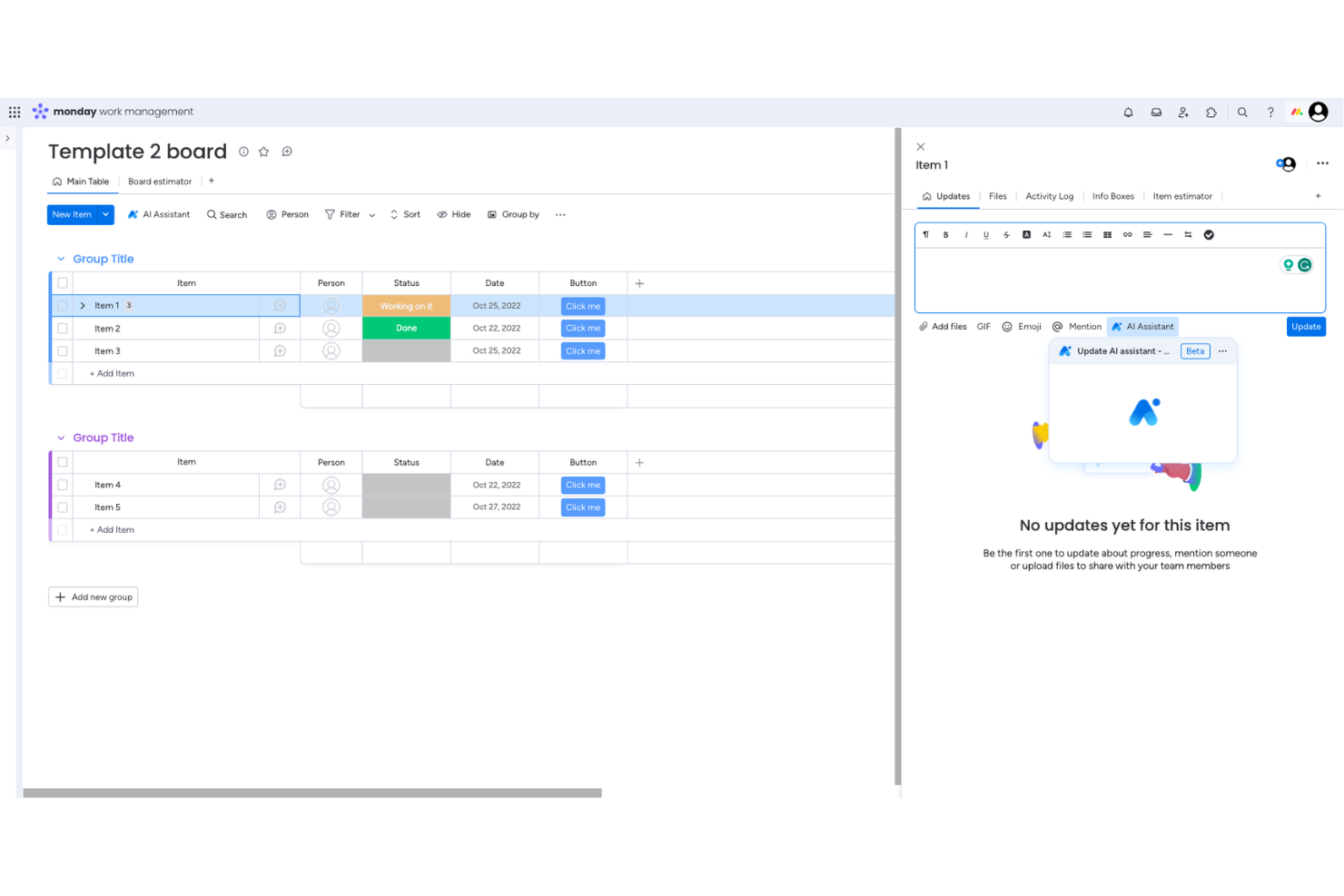
monday.com è una piattaforma di project management flessibile, alimentata dall'intelligenza artificiale, pensata per team tecnologici e aziende digitali che necessitano di automatizzare i flussi di lavoro, prevedere i rischi di progetto e ottimizzare l'allocazione delle risorse su progetti complessi.
Per chi è ideale monday.com?
monday.com è particolarmente adatto a team tecnologici di medie e grandi dimensioni che gestiscono più progetti in contemporanea con dipendenze trasversali tra le varie funzioni.
Perché ho scelto monday.com
Ho scelto monday.com come uno dei migliori strumenti di project management AI per la capacità avanzata della sua intelligenza artificiale nella pianificazione delle risorse e nel rilevamento dei rischi su progetti attivi. La funzione di gestione del carico di lavoro alimentata da AI offre al mio team una visualizzazione in tempo reale di chi è sovraccarico e chi ha ancora disponibilità, così possiamo riassegnare le attività prima che un collo di bottiglia si trasformi in una scadenza mancata. Trovo particolarmente utile l'agente Risk Analyzer, che monitora attivamente rischi relativi a tempistiche, dipendenze e carico di lavoro nei progetti e avvisa gli stakeholder quando serve prestare attenzione—piuttosto che attendere una riunione di aggiornamento per evidenziare il problema. Questa combinazione di segnalazione proattiva dei rischi e allocazione delle risorse guidata dall'intelligenza artificiale è davvero difficile da trovare su una singola piattaforma.
Funzionalità principali di monday.com
- monday sidekick: Un assistente AI contestuale integrato nel tuo spazio di lavoro che riassume aggiornamenti, genera piani di progetto con responsabili e scadenze, e avvia flussi di lavoro da un semplice comando.
- Dashboard e report generati da AI: Crea dashboard live e personalizzabili per singoli progetti o interi portafogli direttamente a partire da una richiesta in linguaggio naturale.
- Gestione del portafoglio: Collega i progetti in tutta l'organizzazione per monitorare le dipendenze, seguire i progressi e individuare rischi a livello di portafoglio in tempo reale.
- Monitoraggio di obiettivi e OKR: Collega gli obiettivi strategici ai progetti attivi e monitora i progressi verso i risultati aziendali direttamente dallo stesso spazio di lavoro.
Integrazioni di monday.com
Le integrazioni includono Slack, Gmail, Google Calendar, Outlook, Microsoft Teams, Salesforce, QuickBooks, HubSpot, Zendesk e GitHub.
Pros and Cons
Pros:
- Bacheca visiva del progetto con stati personalizzabili e assegnazione dei compiti
- Assistente AI per aggiornamenti sulle attività e gestione dell'avanzamento
- Pulsanti di accesso rapido per azioni comuni
Cons:
- Le bacheche possono diventare visivamente caotiche
- Funzionalità limitata quando offline
New Product Updates from monday AI Workspace
monday AI Workspace Adds Human Approval Routing
monday AI Workspace adds a human-in-the-loop approval block to AI Workflows, sending approval requests and routing workflow paths based on responses. For more information, visit monday AI Workspace's official site.

Wrike
Ideale per flussi di lavoro di progetto assistiti dall'IA
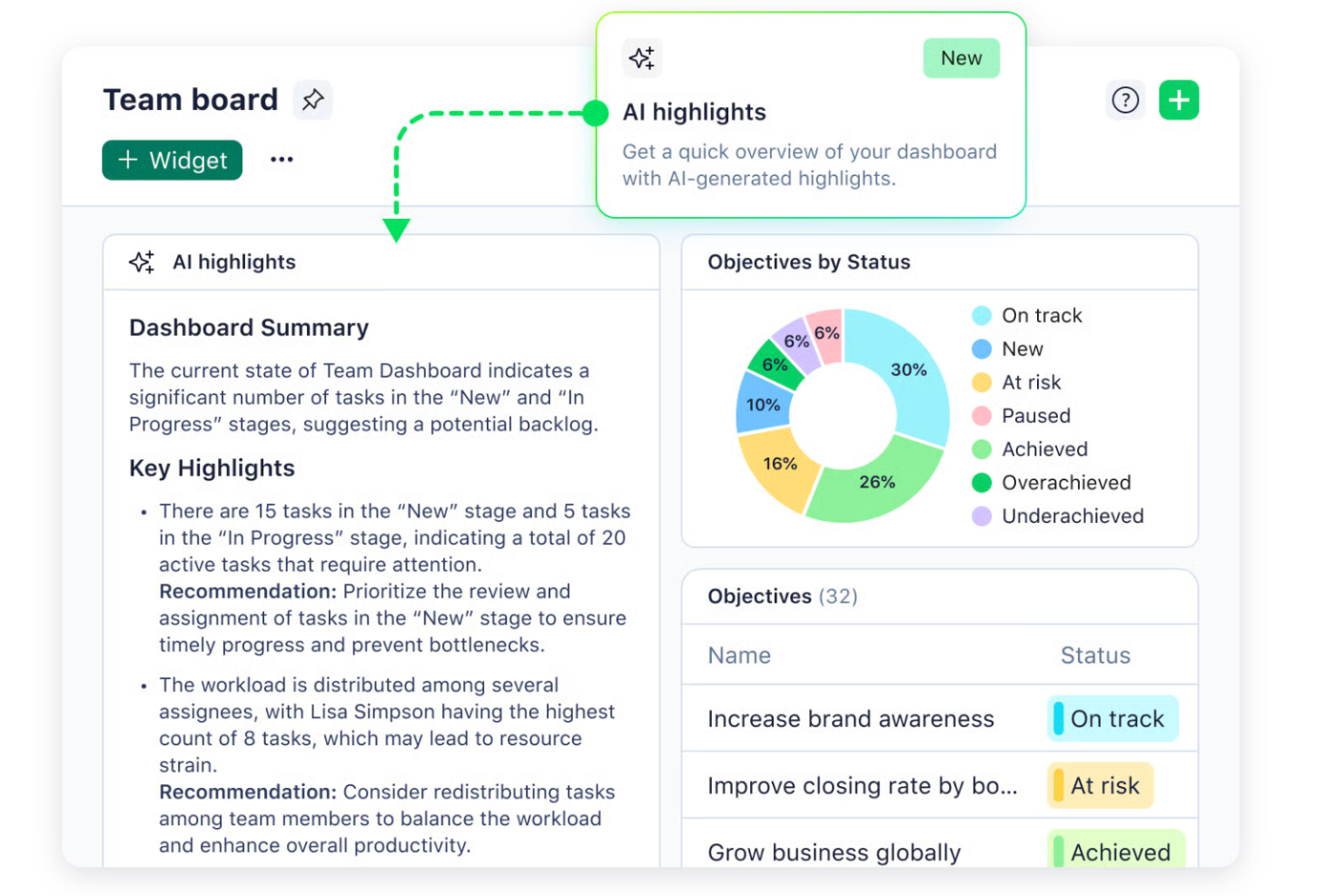
Wrike è una piattaforma di gestione progetti per team che operano in settori frenetici e necessitano di strumenti guidati dall'IA per organizzare il lavoro, gestire le risorse e mantenere i progetti in linea mano a mano che cambiano le priorità.
Per chi è Wrike la scelta migliore?
Wrike è particolarmente adatto a team di medie e grandi dimensioni nei settori marketing, servizi professionali e tecnologia che gestiscono più progetti complessi contemporaneamente.
Perché ho scelto Wrike
Wrike si è guadagnato un posto nella mia lista grazie all'integrazione profonda dell'IA nei flussi di lavoro dei progetti reali — non solo come funzione aggiuntiva laterale. Apprezzo particolarmente Wrike Copilot, che permette al mio team di porre domande in linguaggio naturale sullo stato dei progetti, individuare rischi e generare grafici dashboard senza dover analizzare manualmente i dati. Il costruttore di agenti IA è un'altra funzione che trovo davvero utile: puoi creare agenti personalizzati che popolano automaticamente i campi delle attività, assegnano un punteggio alle richieste in arrivo in base a impatto ed impegno, e indirizzano il lavoro in modo intelligente secondo i tuoi criteri. Wrike utilizza anche il linguaggio naturale per creare regole di automazione e moduli di richiesta, riducendo gran parte della configurazione che solitamente rallenta i team.
Funzionalità principali di Wrike
- Vista Gantt: Visualizza le tempistiche dei progetti, le dipendenze e le scadenze in un grafico interattivo drag-and-drop.
- Prenotazione risorse: Prenota membri del team o ruoli specifici per i progetti e verifica la disponibilità prima di assegnare il lavoro.
- Revisione online: Rivedi, annota e approva materiali creativi direttamente in Wrike senza passare ad altri strumenti.
- Moduli di richiesta personalizzati: Crea moduli dinamici di acquisizione che generano automaticamente attività, progetti e flussi di lavoro al momento dell'invio.
Integrazioni Wrike
Le integrazioni includono Salesforce, Microsoft Teams, Google Drive, Microsoft SharePoint, Zoom, Adobe Creative Cloud, QuickBooks, Power BI, Tableau e Miro.
Pros and Cons
Pros:
- Prevede proattivamente i rischi del progetto
- L'IA generativa redige e modifica i testi
- Copilot conversazionale risponde istantaneamente
Cons:
- Preoccupazioni relative alla privacy dei dati IA
- Le funzionalità IA avanzate richiedono un piano a pagamento
New Product Updates from Wrike

Wrike Adds Quick Search to Table View
Wrike adds Quick Search to Table View with full-table search across titles, descriptions, and fields, plus highlighted matches. This helps users find tasks faster in large tables. For more information, visit Wrike’s official site.

Ideale per informazioni sulla redditività in tempo reale

Productive è una piattaforma di gestione progetti potenziata dall'IA, progettata per agenzie e imprese di servizi che necessitano di funzionalità avanzate di previsione, pianificazione delle risorse e visibilità finanziaria per gestire i progetti e ottimizzare le prestazioni del team.
Per chi è più adatto Productive?
Productive è particolarmente indicato per i project manager di agenzie e i responsabili delle operazioni che devono collegare direttamente l'esecuzione dei progetti ai risultati finanziari.
Perché ho scelto Productive
Productive si è guadagnato un posto nella mia lista perché collega efficacemente le attività di progetto ai risultati finanziari in tempo reale. Apprezzo in particolare i dashboard di redditività in tempo reale, che mostrano i dati sui margini a livello di progetto e di cliente senza bisogno di report manuali. Il mio team può vedere esattamente la situazione finanziaria di un progetto man mano che il lavoro procede, rendendo molto più semplici le discussioni sul budget con gli stakeholder. Le funzionalità di previsione supportate dall'IA segnalano inoltre i rischi di redditività prima che diventino problemi.
Caratteristiche principali di Productive
- Pianificazione delle risorse: Assegna la capacità del team in base a disponibilità, competenze e assenze, con filtri IA per individuare le persone giuste per ogni lavoro.
- Automazione del flusso di lavoro senza codice: Crea automazioni multi-step per avviare azioni su attività, fatture, budget e moduli senza scrivere una riga di codice.
- Scenario builder: Modella diversi scenari di pianificazione e assegnazione per confrontare i risultati prima di finalizzare un piano.
- Modelli di progetto: Duplica configurazioni complete di progetti—including attività, sottoattività, assegnatari e descrizioni—per avviare nuovi progetti più rapidamente.
Integrazioni di Productive
Le integrazioni includono Jira, HubSpot, Xero, Google Calendar, Sage, Gmail, Microsoft Outlook, Slack, BugHerd e QuickBooks.
Pros and Cons
Pros:
- Gestione e reportistica finanziaria integrata
- Interfaccia intuitiva che semplifica la gestione delle attività
- Solida pianificazione e monitoraggio delle risorse
Cons:
- La configurazione iniziale può richiedere tempo
- Potrebbe avere più integrazioni
New Product Updates from Productive

Productive Adds Agent Triggers, Teams Integration, and Time Controls
Productive adds automated agent triggers, broader AI file support, Microsoft Teams integration, Resource Planner improvements, and new time entry controls. These updates expand automation while improving scheduling, collaboration, and time tracking. For more information, visit Productive’s official site.

Ideale per l’assegnazione delle risorse in base alle competenze
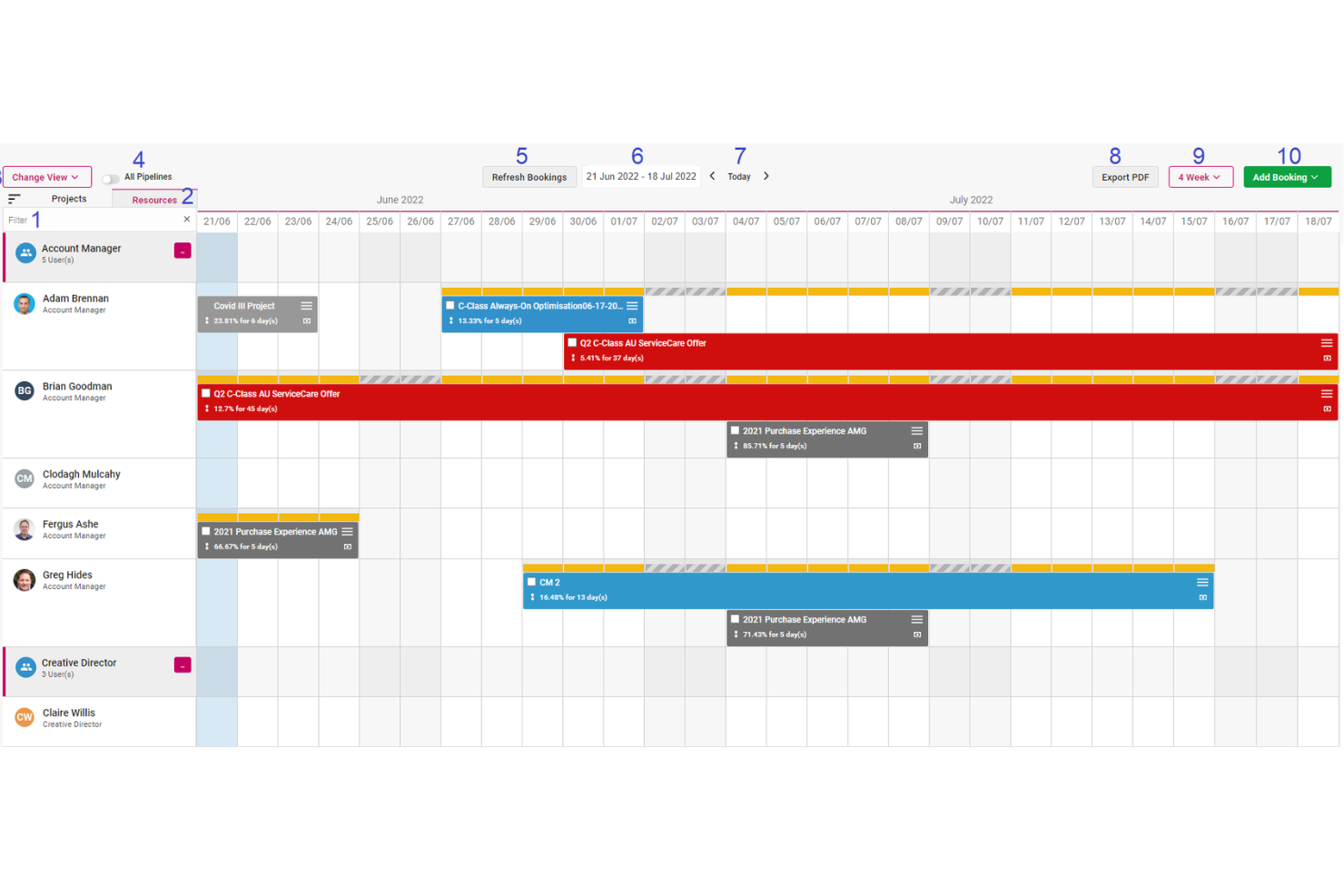
Screendragon è una piattaforma di gestione del lavoro pensata per team di marketing, agenzie e servizi professionali. Combina gestione dei progetti, automazione dei flussi di lavoro, gestione delle risorse e del budget in un’unica soluzione.
Perché ho scelto Screendragon: Apprezzo le funzionalità di assegnazione delle risorse basate sull’IA di Screendragon. Questa caratteristica ottimizza la distribuzione dei compiti nei team, abbinando le attività alle persone più adatte in base a competenze, disponibilità ed esperienze pregresse. In questo modo, ogni progetto viene gestito in modo efficace, sfruttando le performance passate per ottenere risultati eccellenti e incrementare la soddisfazione dei clienti. La piattaforma offre anche un motore di contenuti IA, che integra strumenti di scrittura generativa e generazione immagini direttamente nei flussi di lavoro. Questo significa poter produrre rapidamente contenuti coerenti con il brand e conformi alle normative su larga scala, con assegnazione automatica ai team corretti, semplificando il processo di revisione e approvazione.
Funzionalità principali e integrazioni:
Funzionalità includono gestione dei progetti, automazione dei flussi di lavoro, gestione delle risorse, gestione del budget, collaborazione sui contenuti, revisione online, gestione delle attività, diagrammi di Gantt, lavagne Kanban, dashboard personalizzabili, reportistica e monitoraggio del tempo.
Integrazioni includono MS Power BI, Slack, MS Teams, Zapier, Google Drive, Trello, Microsoft 365, Box, Jira, Microsoft OneDrive e PeopleSoft.
Pros and Cons
Pros:
- Integra vari strumenti come gestione dei progetti e monitoraggio del budget
- Ottime funzionalità di pianificazione delle risorse
- La piattaforma si può personalizzare secondo le esigenze specifiche
Cons:
- La profondità della piattaforma può renderla complessa
- Configurazione iniziale lunga
New Product Updates from Screendragon
Screendragon Unveils New AI Hub
Screendragon introduced AI Hub, a new capability that lets teams build and manage AI agents directly within workflows. The update helps marketing teams automate tasks, maintain governance controls, and scale AI-driven operations more efficiently. For more information, visit Screendragon's official site.

Kantata
Ideale per la previsione delle risorse di progetto
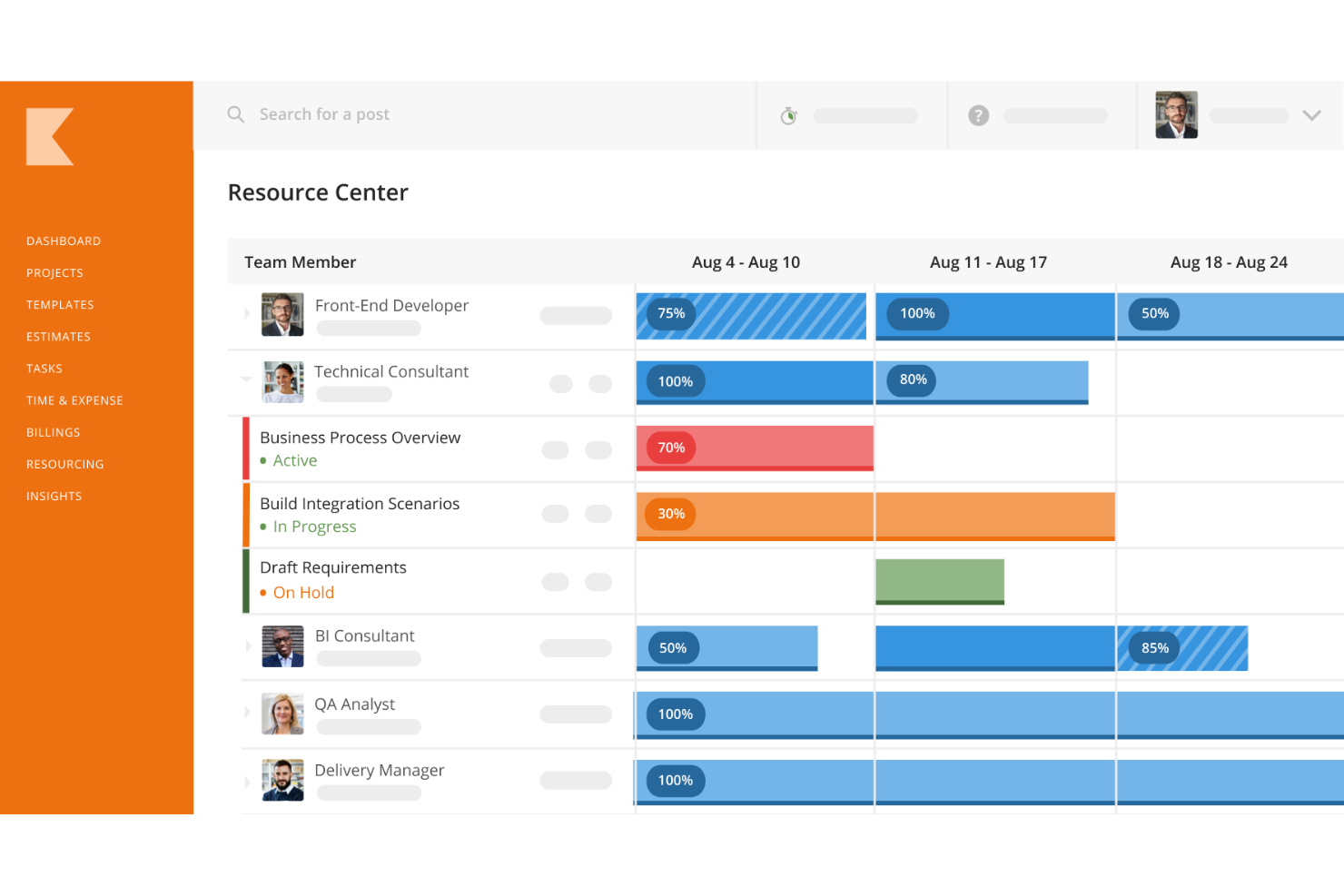
Kantata è una piattaforma di project management pensata per i team di servizi professionali che necessitano di una pianificazione avanzata delle risorse, visibilità sui progetti e approfondimenti guidati dall’IA per gestire attività complesse per i clienti e ottimizzare le prestazioni del team.
Per chi è più indicato Kantata?
Kantata si adatta perfettamente a società di servizi professionali di medie e grandi dimensioni—come aziende di consulenza, marketing e servizi IT—che devono gestire la capacità delle risorse su più progetti per diversi clienti.
Perché ho scelto Kantata
Ho scelto Kantata come uno dei migliori perché la sua previsione delle risorse va ben oltre le semplici visualizzazioni di capacità. Mi piace il fatto che sia possibile filtrare i membri del team disponibili in base alle competenze e alla capacità in tempo reale, così quando arriva un nuovo progetto il mio team può vedere immediatamente chi ha disponibilità per occuparsene, senza rischiare sovrapposizioni. La previsione della domanda alimentata dall’IA di Kantata ci permette anche di simulare i bisogni futuri di risorse rispetto al pipeline, il che ci evita di dover cercare personale all’ultimo minuto. Il livello di business intelligence connette tutto, mostrando i tassi di utilizzo e i dati di disponibilità in report predefiniti che offrono ai responsabili una visione chiara della situazione del team.
Funzionalità principali di Kantata
- Gestione progetti: Traccia attività, milestone, budget e scadenze di tutti i progetti attivi in un'unica visualizzazione.
- Rilevazione ore e spese: Registra le ore fatturabili e le spese direttamente all'interno dei progetti per mantenere i dati finanziari precisi e aggiornati.
- Assistente progetti generativo AI: Redige automaticamente report di stato, aggiornamenti per la direzione e case study dei progetti utilizzando dati dai progetti attivi.
- Kantata Pulse: Raccoglie in tempo reale il sentiment di clienti e dipendenti insieme a metriche operative per monitorare la salute dei progetti e individuare tempestivamente i rischi.
Integrazioni di Kantata
Le integrazioni includono Avalara, NetSuite, Slack, Sage, Microsoft 365, Xero, HubSpot, Expensify, Jira e Bamboo HR.
Pros and Cons
Pros:
- Gestione predittiva delle risorse
- Potenti funzionalità di gestione finanziaria
- Supporta la collaborazione in tempo reale
Cons:
- Le opzioni di personalizzazione potrebbero essere limitate per alcuni utenti
- Le funzionalità dell'app mobile sono limitate rispetto alla versione desktop
New Product Updates from Kantata

Kantata Adds Access Group Change History
Kantata adds Access Groups History, letting account administrators track changes to group details, membership, and permissions in Recent History. The update also makes these events available through the Subscribed Events API for broader monitoring. For more information, visit Kantata’s official site.
 .
.
Celoxis
Ideale per il tracciamento del tempo integrato

Celoxis è una piattaforma di gestione progetti e portafogli potenziata dall'intelligenza artificiale che combina pianificazione Gantt, gestione delle risorse, registrazione del tempo, dashboard configurabili e un assistente AI integrato per fornire approfondimenti in tempo reale sui progetti.
Per chi è indicato Celoxis?
Celoxis è particolarmente adatto per team di medie e grandi dimensioni che gestiscono più progetti complessi tra diversi dipartimenti e necessitano di una piattaforma centralizzata con reporting avanzato e supervisione supportata dall'intelligenza artificiale.
Perché ho scelto Celoxis
Ho incluso Celoxis tra le mie scelte principali perché il suo sistema di rilevazione delle ore è integrato realmente nel livello di progetto, non aggiunto successivamente come un ripensamento. Le ore registrate sui compiti aggiornano automaticamente i programmi dei progetti e si riflettono nei budget in tempo reale, così non devi riconciliare manualmente i fogli presenze con il piano di progetto a fine settimana. I timer integrati permettono ai membri del team di avviare il tracciamento direttamente da un'attività, e i flussi di lavoro di approvazione multilivello danno ai manager controllo su ciò che viene contabilizzato.
Funzionalità principali di Celoxis
- Assistente AI (Lex): Un livello di intelligenza artificiale conversazionale che consente di interrogare lo stato dei progetti, segnalare le attività a rischio e ricevere raccomandazioni sulle risorse usando il linguaggio naturale.
- Pianificazione della capacità delle risorse: Grafici visivi dei carichi di lavoro mostrano la disponibilità del team tra i vari progetti così puoi individuare facilmente sovraccarichi e riassegnare i compiti prima che vengano mancati i termini.
- Monitoraggio KPI a livello di portafoglio: Riunisce budget, programmi e indicatori di salute di più progetti in una sola vista di portafoglio.
- Dashboard BI configurabili: Crea dashboard personalizzate con grafici interattivi, filtri e report programmati su misura per diversi gruppi di stakeholder.
Integrazioni di Celoxis
Celoxis offre integrazioni native con Google Drive, Microsoft Excel, Microsoft Project, Jira, QuickBooks Online, Salesforce e Slack, oltre a potersi connettere con oltre 400 app tramite Zapier. È inoltre disponibile un'API per integrazioni personalizzate.
Pros and Cons
Pros:
- Supporta sia modelli a ore che a prezzo fisso
- Reporting e analisi di livello BI integrati
- Opzione di implementazione on-premise disponibile
Cons:
- App mobile sembra instabile e limitata
- Impostazione iniziale dei template di progetto lenta

Ideale per flessibilità e scalabilità
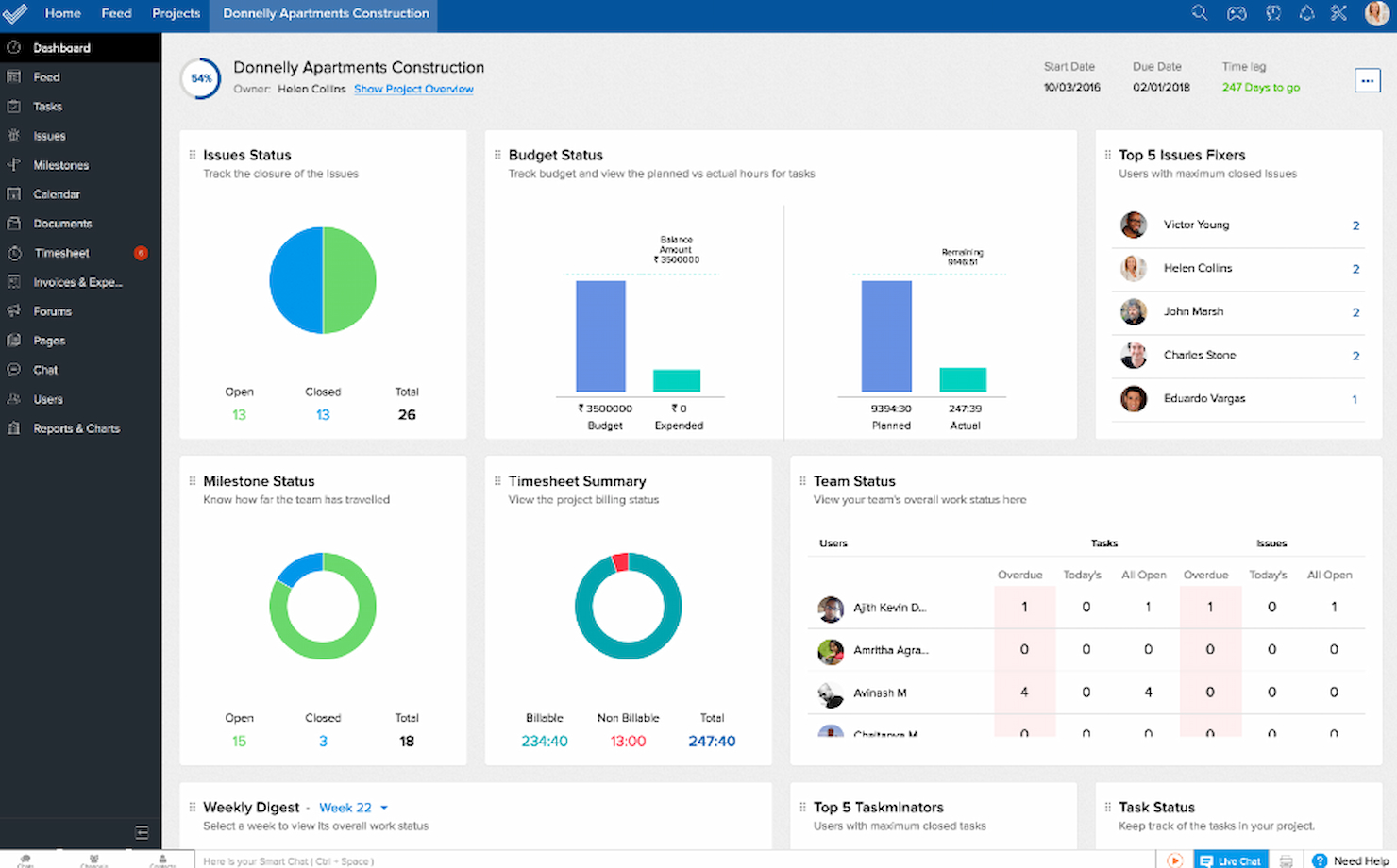
Zoho Projects è una piattaforma di project management basata su cloud per team tecnologici e aziende che desiderano automatizzare i flussi di lavoro, prevedere gli esiti dei progetti e gestire progetti complessi grazie a insight basati sull'intelligenza artificiale.
Per chi è ideale Zoho Projects?
Zoho Projects è adatto a team tecnologici in crescita e aziende di medie dimensioni che necessitano di uno strumento di project management in grado di adattarsi a flussi di lavoro mutevoli e scalare all'espandersi delle operazioni.
Perché ho scelto Zoho Projects
Zoho Projects si è guadagnato un posto nella mia lista perché offre ai team un livello di personalizzazione raro da trovare a questo prezzo. Puoi creare da zero layout, campi, stati e regole di flusso di lavoro personalizzati: che il tuo team utilizzi metodologie waterfall, agile o ibride, lo strumento si adatta ai tuoi processi e non il contrario. L'editor di automazione Blueprint è una funzione degna di nota: puoi mappare visivamente i flussi di lavoro multi-step delle attività, assegnare le persone giuste ad ogni transizione e aggiornare automaticamente i campi senza scrivere alcuna riga di codice. Man mano che il team cresce, la dashboard di portfolio offre una visione unica su tutti i progetti attivi, monitorando lo stato del budget, l'avanzamento delle attività e la responsabilità senza dover entrare in ogni progetto singolarmente.
Funzionalità principali di Zoho Projects
- Diagramma di Gantt: Visualizza le tempistiche dei progetti, monitora i progressi, imposta le dipendenze tra le attività e riprogramma le attività direttamente dalla vista del diagramma.
- Gestione delle risorse: Visualizza il carico di lavoro attuale di ciascun membro prima di assegnare attività e ridistribuisci il lavoro quando qualcuno è sovra o sotto allocato.
- Monitoraggio dei timesheet: Registra il tempo manualmente o tramite timer automatici, con controlli amministrativi per approvare o respingere le registrazioni a fini di paga e fatturazione ai clienti.
- Gestione del valore acquisito: Confronta le tempistiche, i costi e i tempi pianificati rispetto a quelli effettivi per misurare l'andamento dei progetti e prevedere i parametri chiave.
Integrazioni di Zoho Projects
Le integrazioni includono Zoho CRM, Zoho Desk, Zoho Analytics, Zoho Books, Google Calendar, Microsoft Teams, Slack, Dropbox, GitHub e Jira.
Pros and Cons
Pros:
- Alta personalizzazione per soddisfare esigenze progettuali diversificate
- Scalabile per supportare la crescita aziendale
- Ampie capacità di integrazione con la suite di Zoho e altri strumenti popolari
Cons:
- Le funzionalità premium sono disponibili solo con il piano Enterprise
- Costi aggiuntivi per componenti extra che possono aumentare il prezzo complessivo
New Product Updates from Zoho Projects
Zoho Projects Adds CodeX Scripts for Custom Modules
Zoho Projects now supports CodeX Scripts for custom modules, enabling conditional logic and rules for creating, updating, and deleting records. For more information, visit Zoho Projects' official site.
 .
.
Ideale per una programmazione robusta

Microsoft Project è una piattaforma di project management creata per team in settori come IT, costruzioni e servizi professionali che necessitano di strumenti avanzati per pianificare, monitorare e gestire progetti complessi con molteplici dipendenze.
Per Chi è Più Indicato Microsoft Project?
Microsoft Project è particolarmente adatto a team di medie e grandi imprese che richiedono una pianificazione strutturata dei progetti con programmazione dettagliata, gestione delle risorse e supervisione dei portafogli.
Perché Ho Scelto Microsoft Project
Microsoft Project rientra nella mia selezione perché gestisce brillantemente la complessità della pianificazione, superando la maggior parte degli altri strumenti. In particolare, apprezzo la gestione avanzata delle dipendenze nei livelli Planner e Project Plan 3: puoi impostare tempi di anticipo e ritardo tra le attività, una funzione indispensabile per gestire progetti multiphase in cui il lavoro si sovrappone o necessita di tempi cuscinetto. La vista cronologica a Gantt offre al mio team una chiara panoramica di tutto il programma del progetto e, quando qualcosa cambia, le catene di dipendenza si aggiornano di conseguenza. Microsoft 365 Copilot in Planner aggiunge inoltre un livello di pianificazione assistita dall’IA, aiutando a individuare le attività prioritarie e segnalare potenziali rischi senza dover approfondire manualmente ogni flusso di lavoro.
Caratteristiche Principali di Microsoft Project
- Allocazione delle risorse: Assegna i membri del team ai compiti e monitora la capacità di lavoro lungo tutta la durata del progetto.
- Gestione del portafoglio: Visualizza e gestisci più progetti in un unico luogo per monitorare l’avanzamento e bilanciare le priorità.
- Copilot in Planner: Utilizza suggerimenti di attività generati dall’IA e riepiloghi di progetto per restare aggiornato sui flussi di lavoro attivi.
- Dashboard di reportistica: Accedi a report integrati in tempo reale su stato del progetto, uso delle risorse e monitoraggio dei costi.
Integrazioni di Microsoft Project
Le integrazioni includono Microsoft Teams, Microsoft Outlook, Microsoft Loop, Power Apps, Power Automate, Power BI, SharePoint, Project for the web, Project Online, e Microsoft 365.
Pros and Cons
Pros:
- Strumenti completi per programmazione e gestione delle risorse
- Integrazione con Microsoft 365 per un'esperienza utente unificata
- Funzionalità avanzate per la gestione di progetti complessi
Cons:
- Relativamente costoso per piccoli team o progetti
- Concentrato su progetti di grandi dimensioni, può risultare troppo complesso per esigenze più semplici

ClickUp
Ideale per la gestione del lavoro tutto-in-uno
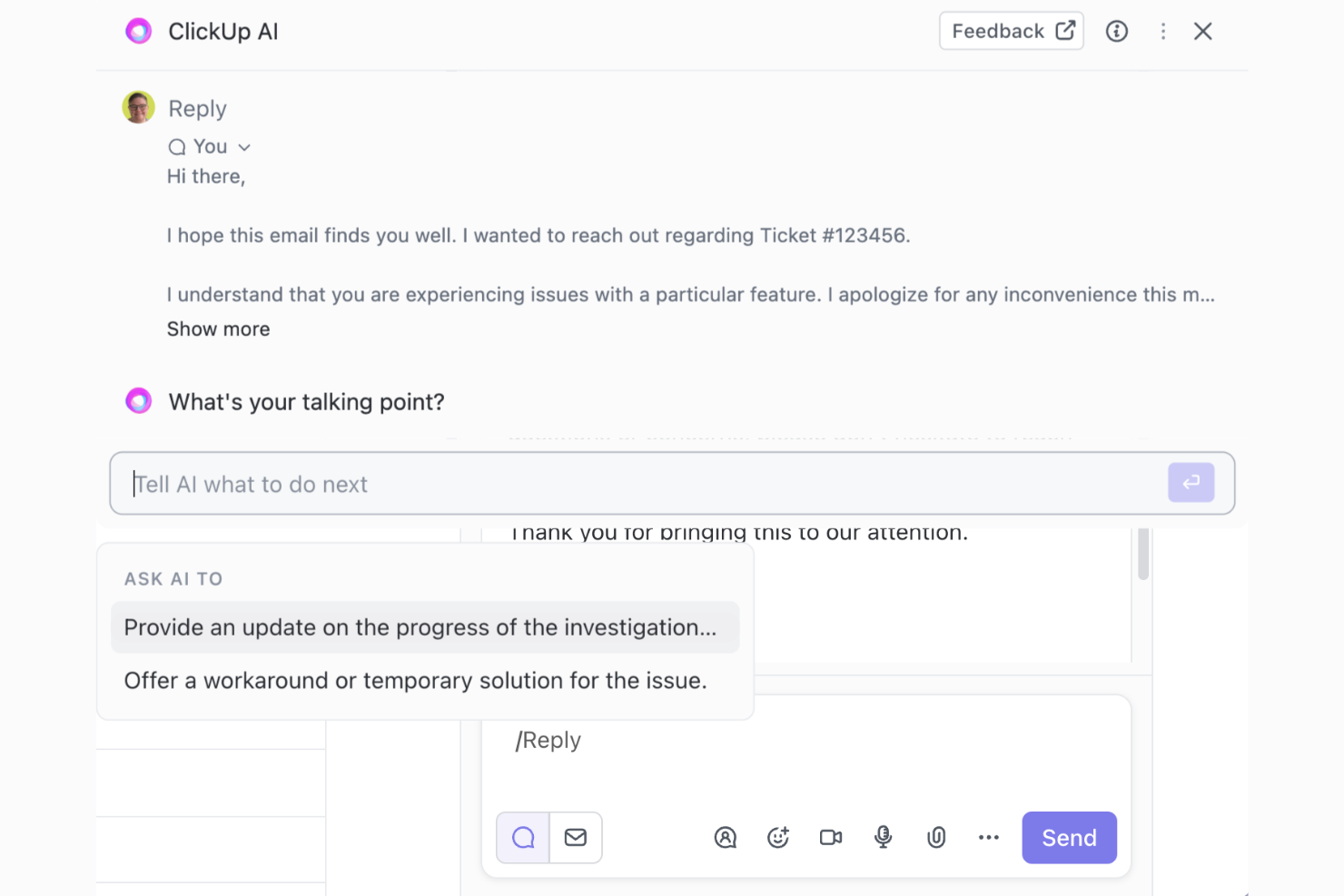
ClickUp porta la gestione dei progetti potenziata dall'AI ai team di tecnologia, marketing e operation che hanno bisogno di gestire attività, automatizzare flussi di lavoro e centralizzare la collaborazione in un'unica piattaforma.
Per chi è meglio ClickUp?
ClickUp è particolarmente indicato per team tecnologici di medie e grandi dimensioni che necessitano di una sola piattaforma per gestire progetti, documenti e comunicazione tra prodotto, ingegneria e design.
Perché ho scelto ClickUp
ClickUp si guadagna il suo posto nella mia shortlist perché è uno dei pochi strumenti che sostituisce realmente un insieme di app separate con un unico spazio di lavoro connesso tramite AI. Apprezzo il modo in cui ClickUp Brain assegna intelligentemente i compiti, indirizzando automaticamente il lavoro alla persona giusta in base a disponibilità e carico di lavoro—senza bisogno di smistamenti manuali. Trovo davvero utile anche la funzione AI Stand-ups: raccoglie gli aggiornamenti giornalieri sulle attività e i blocchi in un unico riepilogo senza dover convocare una riunione. Per i team che gestiscono più flussi lavorativi tra prodotto, ingegneria e design, avere attività, documenti, chat e AI tutti riuniti in un'unica gerarchia significa che il contesto non si perde mai tra gli strumenti.
Funzionalità principali di ClickUp
- AI Notetaker: Trascrive automaticamente le riunioni e genera riepiloghi e azioni direttamente in ClickUp.
- Vista carico di lavoro: Visualizza il lavoro assegnato e la capacità di ciascun membro del team in un determinato periodo, per aiutare a bilanciare la distribuzione delle attività.
- Automatismi: Imposta regole basate su trigger per aggiornare gli stati delle attività, riassegnare compiti o inviare notifiche senza interventi manuali.
- Obiettivi: Collega direttamente gli obiettivi di alto livello alle attività affinché gli aggiornamenti di avanzamento vengano seguiti automaticamente con il completamento del lavoro.
Integrazioni di ClickUp
Le integrazioni includono Slack, GitHub, HubSpot, Everhour, Google Drive, OneDrive, Dropbox, Outlook, Google Calendar e Figma.
Pros and Cons
Pros:
- Gestione di progetti, risorse e flussi di lavoro in un'unica soluzione
- Storage illimitato di file con tutti i piani a pagamento
- Piano freemium disponibile
Cons:
- Le funzionalità AI non sono incluse nel piano gratuito
- Nessun accesso ospite con il piano gratuito
New Product Updates from ClickUp
ClickUp Adds Meetings Hub, Super Agent Templates, and ZoomInfo Integration
ClickUp adds a searchable Meetings Hub, new ways to clone and template Super Agents, and a ZoomInfo integration through the App Center. These updates improve meeting retrieval, agent reuse, and access to sales intelligence. For more information, visit ClickUp’s official site.

Taskade
Ideale per l’organizzazione in tempo reale
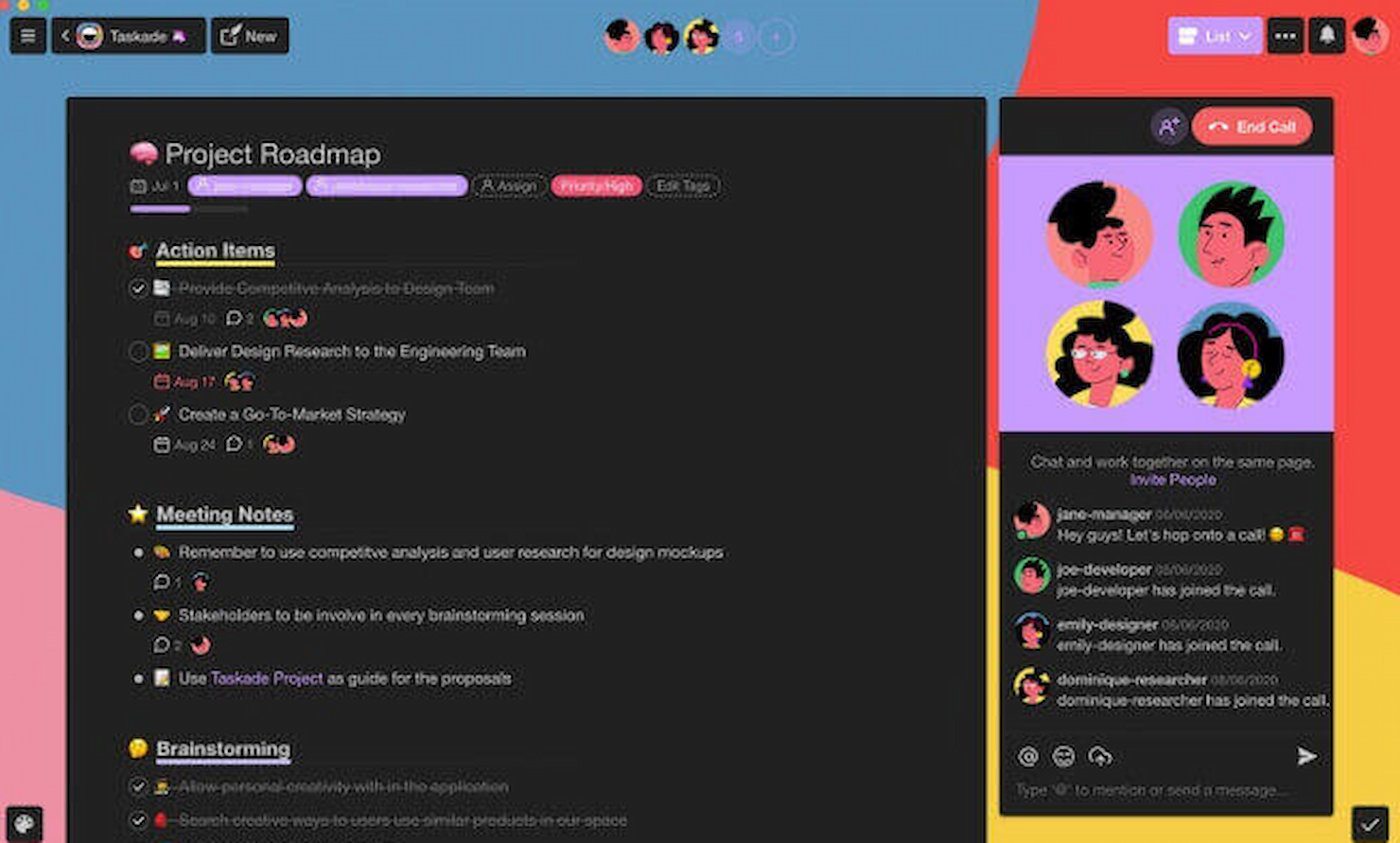
Taskade è una piattaforma di project management potenziata dall’intelligenza artificiale, pensata per i team che devono organizzare attività, collaborare in tempo reale e automatizzare i flussi di lavoro tra i progetti, risultando così particolarmente adatta a gruppi digitali dinamici e a contesti di lavoro da remoto.
Per chi è più adatto Taskade?
Taskade è ideale per team remoti e distribuiti di piccole e medie dimensioni che necessitano di uno spazio di lavoro unificato per la gestione delle attività, la collaborazione e la produttività assistita dall’IA.
Perché ho scelto Taskade
Ho scelto Taskade tra i migliori perché mantiene il lavoro di tutto il team organizzato in un unico spazio di lavoro attivo dove tutto si aggiorna in tempo reale. I progetti non sono documenti statici, ma substrati di dati attivi che gli agenti IA leggono e aggiornano man mano che il lavoro procede. Quando il mio team aggiorna lo stato di un’attività o aggiunge una nota, gli agenti e le automazioni collegate rispondono immediatamente a quel cambiamento, senza bisogno di attivazioni manuali. Le otto visualizzazioni integrate nei progetti (lista, bacheca, calendario, mappa mentale e altre) permettono anche di osservare gli stessi dati in tempo reale da diverse prospettive secondo le necessità.
Funzionalità principali di Taskade
- Costruttore di agenti IA: Crea e implementa agenti IA personalizzati con memoria persistente, modelli IA assegnati e oltre 22 competenze che operano autonomamente nei tuoi progetti.
- Automazione dei flussi di lavoro: Progetta flussi di automazione con attivatori basati su logiche di ramificazione e ciclo, collegati a più di 100 integrazioni, tra cui Slack, GitHub e Google Sheets.
- Libreria di template IA: Accedi a oltre 1.000 modelli predefiniti che si avviano come applicazioni completamente operative e collegate all’IA, e non semplici punti di partenza statici.
- Chat IA: Comunica direttamente con un assistente IA che dispone del contesto trasversale su progetti, database e dati dello spazio di lavoro, rispondendo alle domande e fornendo informazioni utili.
Integrazioni Taskade
Le integrazioni includono Slack, Discord, Microsoft Teams, Gmail, Google Drive, Dropbox, HubSpot, Stripe, Shopify e GitHub.
Pros and Cons
Pros:
- Sincronizzazione in tempo reale di attività e progetti
- Varie opzioni di visualizzazione dei progetti
- Ampie capacità di integrazione
Cons:
- Può richiedere una curva di apprendimento per i nuovi utenti
- Funzionalità principali disponibili solo nelle fasce di prezzo più alte
Altri strumenti di gestione dei progetti basati sull'IA
Di seguito trovi un elenco di ulteriori strumenti di gestione dei progetti basati sull’IA che ho selezionato, ma che non sono entrati nella lista principale. Vale la pena dare loro un’occhiata.
- ProofHub
Ideale per team remoti
- Teamwork.com
Ideale per la gestione del lavoro con i clienti
- Bonsai Agency Software
Ideale per il monitoraggio del budget di progetto
- Motion
Ideale per la pianificazione automatizzata
- Project Insight
Ideale per l'allocazione delle risorse
- SAP Project Intelligence Network
Ideale per l'integrazione con la catena di fornitura
- Ayanza
Ideale per la personalizzazione dei flussi di lavoro
- Miro
Ideale per la collaborazione su una canvas intelligente
- Project.co
Ideale per la collaborazione con i clienti
- Smartsheet
Ideale per insight di progetto potenziati dall'intelligenza artificiale


Recensioni correlate dei software di gestione dei progetti
Se non hai ancora trovato quello che cerchi, dai un'occhiata a queste altre recensioni di strumenti di gestione dei progetti che abbiamo selezionato per te:
- Strumenti per la produttività
- Software per il monitoraggio dei progetti
- Software per la pianificazione dei progetti
- Software di gestione dei progetti
- Software per la gestione delle risorse
- Software per l'automazione dei flussi di lavoro
- Strumenti di gestione delle attività basati sull'IA
- Strumenti di gestione dei progetti per team da remoto
Come valuto gli strumenti di gestione progetti con AI
Scompongo la mia valutazione in due livelli: le capacità di base di AI e PM che uno strumento deve possedere per qualificarsi, quindi i fattori differenzianti come la previsione dei rischi e la pianificazione con AI che distinguono i migliori.
Funzionalità di base (Requisiti imprescindibili per questa lista)
Queste capacità fondamentali servono come criteri di accettazione per l'inclusione nella mia lista di strumenti di gestione progetti con AI:
- Automazione delle attività tramite AI: Verifico se lo strumento può creare, assegnare e riprioritizzare automaticamente le attività da input come brief, thread di chat o note riunione, e non semplicemente suggerire un titolo di attività.
- Pianificazione di progetto generativa: Un prompt come "lancia una app mobile nel Q3" dovrebbe produrre un piano utilizzabile con fasi, traguardi e dipendenze, non semplicemente un modello vuoto.
- Analisi predittiva & Rischi: Cerco AI che evidenzi deadline a rischio o filoni di lavoro bloccati prima che il team li segnali manualmente durante i meeting.
- Sintesi e reportistica AI: Valuto se lo strumento genera aggiornamenti di stato o riepiloghi per gli stakeholder dai dati di progetto in tempo reale, e non solo esportazioni statiche della dashboard.
- Fondamenta del workflow PM: Ogni strumento deve comunque garantire elementi di base solidi come attività, bacheche, timeline, dipendenze e collaborazione in tempo reale tra team distribuiti.
- Integrazioni & acquisizione dati: Controllo quanto bene l'AI raccoglie contesto dagli strumenti collegati come Slack, Jira, GitHub o Google Docs per informare le risposte e i contenuti generati.
Valuto ogni fornitore su una scala da 0 (funzionalità assente) a 5 (eccelle in questo ambito) per ogni criterio.
I fornitori devono raggiungere un punteggio medio minimo per essere considerati nella mia lista. Da lì, considero cosa distingue ogni piattaforma.
Fattori differenzianti (Cosa distingue i fornitori)
Dopo aver selezionato la mia lista, ecco come confronto i diversi fornitori nel campo degli strumenti di gestione progetti AI:
Funzionalità distintive
L'intelligenza AI per le riunioni è un fattore chiave per i team che vogliono assegnare automaticamente ai progetti gli elementi d'azione e i responsabili senza inserimento manuale. Cerco anche la possibilità di porre domande in linguaggio naturale come, "Quali progetti sono a rischio questo trimestre?" e ottenere risposte immediate e pertinenti. Gli strumenti che offrono workflow AI personalizzati o agenti dedicati si distinguono per i responsabili operativi che necessitano di automazioni su misura, che riflettono processi aziendali specifici.
Oltre le funzionalità
La struttura dei prezzi è importante poiché molti fornitori fanno pagare separatamente le funzionalità AI, e i modelli basati su crediti possono far aumentare i costi man mano che il team cresce. Valuto anche la privacy dei dati e le politiche di governance dell'AI, in particolare se un fornitore utilizza i dati di progetto dei clienti per addestrare i propri modelli. Per i team che migrano da strumenti come Asana o Jira, considero quanto rapidamente sia possibile importare progetti esistenti e iniziare a ottenere output AI utili, senza trascorrere settimane nella configurazione iniziale.
Come scegliere gli strumenti di gestione dei progetti basati sull'IA
Quando affronti il tuo personale processo di selezione del software, tieni presenti i seguenti aspetti:
- Comprendere le esigenze specifiche: Prima di immergersi nella vasta gamma di strumenti di gestione dei progetti basati sull'AI disponibili, è fondamentale comprendere le esigenze specifiche della propria organizzazione. Considerate le dimensioni del vostro team, la complessità dei vostri progetti e il settore in cui operate. Ad esempio, un'azienda di sviluppo software potrebbe aver bisogno di strumenti con solide funzionalità di gestione agile dei progetti, mentre un'agenzia di marketing potrebbe cercare strumenti con efficaci funzionalità di collaborazione e pianificazione dei contenuti.
- Capacità di integrazione: Valutate quanto bene lo strumento di gestione dei progetti basato sull'AI si integri con gli altri sistemi software che utilizzate. Un'integrazione fluida può ridurre significativamente la curva di apprendimento e aumentare la produttività. Ad esempio, uno strumento che offre l'integrazione con il vostro software CRM può contribuire ad allineare meglio le attività di vendita e di gestione dei progetti.
- Scalabilità: Scegliete uno strumento in grado di crescere insieme alla vostra azienda. Con l'espansione dell'azienda, avrete bisogno di una soluzione di gestione dei progetti in grado di gestire un numero crescente di progetti e utenti senza compromettere le prestazioni. Una piccola startup potrebbe iniziare con uno strumento di base, ma dovrebbe valutare se lo strumento possa crescere man mano che l'azienda si trasforma in un'impresa più grande.
- Funzionalità e vantaggi dell'AI: Valutate le funzionalità di AI dello strumento e il modo in cui affrontano i problemi specifici. L'AI può offrire analisi predittive per le tempistiche dei progetti, automatizzare le attività di routine e fornire una gestione delle risorse basata sull'AI. Ad esempio, un responsabile di progetto sopraffatto dalla pianificazione può trarre vantaggio da uno strumento di AI che suggerisce un'allocazione ottimale delle risorse sulla base dei dati dei progetti passati.
- Costo rispetto al valore: Infine, considerate il costo dello strumento rispetto al valore che offre. Sebbene sia importante rispettare il budget, l'opzione più economica non sempre garantisce il miglior ritorno sull'investimento. Ad esempio, uno strumento leggermente più costoso, ma dotato di funzionalità avanzate di AI come la previsione dei rischi e le strategie di mitigazione, potrebbe evitare a un'azienda costosi sforamenti del budget dei progetti nel lungo periodo.
Tendenze negli strumenti di gestione dei progetti basati sull'AI
Ecco alcune tendenze attuali e interessanti che sto osservando nella tecnologia degli strumenti di gestione dei progetti basati sull'AI.
- Analisi predittive per la valutazione dei rischi: Le analisi predittive basate sull'AI stanno diventando fondamentali per prevedere i rischi dei progetti. Questi strumenti analizzano i dati storici per prevedere le future difficoltà dei progetti, consentendo strategie di mitigazione proattive. Questa tendenza è fondamentale per ridurre al minimo le interruzioni e garantire il successo dei progetti.
- Migliore allocazione delle risorse grazie all'apprendimento automatico: Gli algoritmi di apprendimento automatico stanno rivoluzionando l'allocazione delle risorse nella gestione dei progetti. Ottimizzano l'assegnazione dei team e l'utilizzo delle risorse in base alle esigenze dei progetti e alle competenze individuali. Questa tendenza è importante per massimizzare l'efficienza e ridurre i costi dei progetti.
- Collaborazione in tempo reale potenziata dall'AI: L'AI facilita la collaborazione in tempo reale tra team di progetto globali. Semplifica la comunicazione e il coordinamento delle attività, adattandosi alle dinamiche del team e ai cambiamenti del progetto. Questa tendenza è interessante per il suo potenziale di migliorare il lavoro di squadra e l'agilità dei progetti.
- Adeguamenti automatizzati della pianificazione dei progetti: Gli strumenti di AI offrono ora adeguamenti automatizzati delle pianificazioni dei progetti, rispondendo dinamicamente agli sviluppi del progetto e alla disponibilità dei membri del team. Un assistente alla pianificazione basato sull'AI può contribuire a garantire che le tempistiche rimangano realistiche ottimizzando continuamente la pianificazione sulla base dei dati in tempo reale. Questa tendenza è essenziale per mantenere lo slancio del progetto e rispettare le scadenze.
- Sistemi di supporto alle decisioni basati sull'AI: I sistemi di supporto alle decisioni basati sull'AI forniscono ai responsabili di progetto informazioni utili per agire. Analizzano grandi quantità di dati dei progetti per suggerire decisioni ottimali in merito a problemi complessi. Questa tendenza è all'avanguardia perché migliora la gestione strategica dei progetti.
L'AI sta trasformando significativamente il panorama degli strumenti di gestione dei progetti, rendendoli più adattivi e intelligenti.
Che cos'è uno strumento di gestione dei progetti basato sull'AI?
Gli strumenti di gestione dei progetti basati sull'AI sono sistemi software avanzati che incorporano l'intelligenza artificiale per migliorare i processi di gestione dei progetti. Questi strumenti vengono utilizzati da responsabili di progetto, responsabili dei team e organizzazioni per semplificare la pianificazione, l'esecuzione e il monitoraggio dei progetti.
Sono progettati per automatizzare le attività, prevedere i rischi dei progetti, ottimizzare l'allocazione delle risorse e migliorare il processo decisionale, aumentando così l'efficienza e la produttività negli ambienti di progetto.
Funzionalità degli strumenti di gestione dei progetti basati sull'AI
Quando selezionate strumenti di gestione dei progetti basati sull'AI, è essenziale considerare le funzionalità che semplificheranno i flussi di lavoro, miglioreranno il processo decisionale e ottimizzeranno i risultati complessivi dei progetti. Ecco fino a 10 funzionalità chiave da ricercare:
- Analisi predittiva: gli strumenti di gestione dei progetti basati sull'IA utilizzano dati storici per prevedere i risultati futuri dei progetti. Questa funzionalità è fondamentale per anticipare i potenziali rischi e prendere decisioni informate, mantenendo il progetto sulla buona strada.
- Pianificazione automatizzata: il software può generare e modificare automaticamente i programmi dei progetti. Ciò consente di risparmiare tempo e garantisce che le risorse siano allocate in modo efficiente, un aspetto essenziale per rispettare le scadenze dei progetti.
- Gestione dei rischi: l'IA può identificare e valutare i rischi dei progetti. In questo modo, consente di mitigarli in modo proattivo, un elemento fondamentale per il successo e il corretto svolgimento di qualsiasi progetto.
- Allocazione delle risorse: lo strumento ottimizza l'utilizzo delle risorse prevedendo le necessità e assegnando le attività di conseguenza. Un'allocazione efficace delle risorse è importante per evitare un utilizzo eccessivo o insufficiente del team di progetto.
- Prioritizzazione delle attività: l'IA aiuta a determinare la priorità delle attività. Ciò garantisce il raggiungimento delle tappe fondamentali del progetto, concentrandosi prima sulle attività più importanti.
- Collaborazione in tempo reale: il software facilita una comunicazione fluida tra i membri del team. La collaborazione in tempo reale è importante per mantenere la sintonia del team e garantire che tutti siano allineati agli obiettivi del progetto.
- Reportistica intelligente: gli strumenti di IA forniscono report dettagliati e approfonditi. Questi report sono importanti per monitorare i progressi e prendere decisioni basate sui dati, così da migliorare le prestazioni del progetto.
- Gestione del budget: l'IA può prevedere e monitorare le spese del progetto. Ciò è importante per garantire che il progetto rimanga entro i limiti finanziari e per individuare tempestivamente i potenziali superamenti dei costi.
- Controllo della qualità: l'IA può monitorare la qualità del lavoro e la conformità agli standard. Mantenere risultati di alta qualità è essenziale per il successo e la reputazione del progetto.
- Funzionalità di integrazione: la possibilità di integrarsi con altri software e strumenti è importante. Ciò garantisce un flusso di lavoro senza interruzioni e fa sì che tutti i dati necessari siano centralizzati e accessibili.
- Elementi d'azione: attività o compiti assegnati a singoli individui o team da completare entro un periodo di tempo specificato.
- Notifiche: avvisi o messaggi che informano gli utenti su aggiornamenti, promemoria o altre attività pertinenti all'interno di un'applicazione.
- Sottoattività: attività più piccole e gestibili che fanno parte di un progetto o di un'attività più ampia e aiutano a suddividere le attività complesse in fasi realizzabili.
Selezionare lo strumento di gestione dei progetti basato sull'IA più adatto, dotato di queste funzionalità, può migliorare significativamente l'efficienza e il successo dei progetti. In qualità di persona che gestisce progetti digitali, ritengo che questi strumenti siano indispensabili per mantenere un vantaggio competitivo.
Vantaggi degli strumenti di gestione dei progetti basati sull'IA
Gli strumenti di gestione dei progetti basati sull'IA stanno rivoluzionando il modo in cui le organizzazioni gestiscono i propri progetti, offrendo modalità più intelligenti ed efficienti per pianificare, eseguire e monitorare il lavoro. Ecco cinque vantaggi principali che gli strumenti di gestione dei progetti basati sull'IA offrono agli utenti e alle organizzazioni:
- Maggiore efficienza e produttività: gli strumenti di gestione dei progetti basati sull'IA automatizzano le attività di routine, liberando tempo per consentire ai membri del team di concentrarsi su questioni più complesse. Questa automazione porta a un flusso di lavoro più efficiente e a livelli di produttività più elevati, poiché i membri del team possono concentrarsi sul lavoro strategico che aggiunge valore all'azienda.
- Miglioramento del processo decisionale: grazie all'analisi e all'elaborazione dei dati basate sull'IA, questi strumenti forniscono informazioni che aiutano i responsabili a prendere decisioni informate. La possibilità di analizzare rapidamente grandi volumi di dati consente alle aziende di reagire in modo più efficace ai cambiamenti nel contesto del progetto e di prendere decisioni basate su informazioni in tempo reale.
- Mitigazione dei rischi: gli strumenti di IA possono prevedere i potenziali rischi e suggerire strategie di mitigazione. Analizzando i dati storici e le metriche correnti del progetto, l'IA può identificare schemi che potrebbero indicare problemi futuri, consentendo ai team di affrontarli proattivamente prima che si aggravino.
- Ottimizzazione delle risorse: il software di gestione dei progetti basato sull'IA può ottimizzare l'allocazione delle risorse prevedendo le esigenze del progetto e individuando i membri del team più adatti a determinate attività. Ciò garantisce un utilizzo efficiente delle risorse, riducendo gli sprechi e aumentando le probabilità di successo del progetto.
- Migliore collaborazione e comunicazione: questi strumenti sono spesso dotati di funzionalità di comunicazione integrate che favoriscono una migliore collaborazione. L'IA può suggerire gli orari migliori per le riunioni, ricordare ai membri del team quando è necessario il loro contributo e garantire che la comunicazione sia fluida ed efficace all'interno dell'intero team di progetto.
Gli strumenti di gestione dei progetti basati sull'IA non servono solo a mantenere i progetti sulla buona strada; servono a trasformare il panorama della gestione dei progetti. Questi strumenti rappresentano un investimento nel futuro del lavoro, in cui le decisioni basate sui dati e i processi automatizzati diventano lo standard di eccellenza nell'esecuzione dei progetti.
Costi e prezzi degli strumenti di gestione dei progetti basati sull'IA
Gli strumenti di gestione dei progetti basati sull'IA offrono una serie di opzioni di prezzo e piani adatti a diverse esigenze aziendali. Per gli acquirenti che non hanno mai utilizzato questo software, è fondamentale comprendere i vari livelli di servizio e le strutture tariffarie disponibili. Ogni livello offre generalmente un insieme unico di funzionalità e prezzi, adattandosi a progetti di diversa complessità.
Ecco un riepilogo dei tipi di piano più comuni, dei prezzi medi e delle funzionalità degli strumenti di gestione dei progetti basati sull'intelligenza artificiale:
Tabella comparativa dei piani per gli strumenti di gestione dei progetti basati sull'intelligenza artificiale
| Tipo di piano | Prezzo medio | Funzionalità comuni |
| Piano gratuito | $0 (funzionalità limitate) | Gestione di base delle attività, integrazioni limitate, alcune funzionalità di IA |
| Base/Standard | $5 - $10 per utente/mese | Automazione delle attività, monitoraggio dei progetti, assistenza alla scrittura basata sull'IA, integrazioni standard |
| Premium | $10 - $30 per utente/mese | Funzionalità avanzate di IA, viste complete dei progetti, analisi avanzate, integrazioni aggiuntive |
| Aziendale | Prezzo personalizzato | Soluzioni di IA personalizzate, sicurezza di livello aziendale, assistenza dedicata, ampie opzioni di personalizzazione |
Quando valuti uno strumento di gestione dei progetti basato sull'intelligenza artificiale, dovresti considerare l'equilibrio tra il costo del piano e le funzionalità che offre. È importante scegliere un piano che non solo rientri nel budget, ma che fornisca anche le funzionalità necessarie a soddisfare le esigenze di gestione dei progetti dell'organizzazione.
Domande frequenti sugli strumenti di gestione dei progetti basati sull'intelligenza artificiale
Ecco alcune domande frequenti che volevo affrontare per te.
In che modo gli strumenti di gestione dei progetti basati sull'intelligenza artificiale migliorano i risultati dei progetti?
Gli strumenti di gestione dei progetti basati sull’intelligenza artificiale migliorano i risultati dei progetti fornendo analisi avanzate dei dati, che possono prevedere potenziali problemi e suggerire azioni correttive. Possono automatizzare le attività ripetitive, consentendo ai responsabili di progetto di concentrarsi su attività più strategiche. Inoltre, l’IA può migliorare l’allocazione delle risorse, la gestione dei rischi e la comunicazione con i portatori di interesse, portando a un completamento più efficace dei progetti.
Gli strumenti di gestione dei progetti basati sull'intelligenza artificiale possono sostituire i responsabili di progetto umani?
No, gli strumenti di gestione dei progetti basati sull’intelligenza artificiale non sono progettati per sostituire i responsabili di progetto umani. Al contrario, fungono da assistenti che potenziano le capacità del responsabile di progetto. L’IA può gestire attività ad alta intensità di dati e fornire informazioni utili, ma l’esperienza umana è fondamentale per la leadership, il processo decisionale strategico e la gestione delle complesse dinamiche interpersonali proprie della gestione dei progetti.
Gli strumenti di gestione dei progetti basati sull'intelligenza artificiale sono adatti ad aziende di tutte le dimensioni?
Gli strumenti di gestione dei progetti basati sull’intelligenza artificiale sono scalabili e possono essere adatti ad aziende di tutte le dimensioni. Le piccole imprese possono beneficiare dell’efficienza e dell’automazione offerte da questi strumenti, mentre le grandi aziende possono sfruttare le loro funzionalità avanzate di analisi ed elaborazione dei dati per gestire progetti complessi tra più team e reparti.
Che tipo di dati analizzano gli strumenti di gestione dei progetti basati sull'intelligenza artificiale?
Gli strumenti di gestione dei progetti basati sull’intelligenza artificiale analizzano un’ampia gamma di dati, tra cui le tempistiche dei progetti, l’allocazione delle risorse, le spese di budget, le metriche delle prestazioni dei team e i modelli di comunicazione. Utilizzano questi dati per identificare le tendenze, prevedere i risultati e fornire raccomandazioni per migliorare l’efficienza e l’efficacia dei progetti.
Quanto sono sicuri gli strumenti di gestione dei progetti basati sull'intelligenza artificiale?
La sicurezza è una priorità assoluta per i fornitori di strumenti di gestione dei progetti basati sull’intelligenza artificiale. I migliori strumenti di IA spesso includono solide funzionalità di sicurezza, tra cui crittografia dei dati, controlli degli accessi e verifiche di sicurezza regolari. Tuttavia, il livello di sicurezza può variare a seconda del fornitore, quindi le aziende devono valutare le misure di sicurezza di ogni strumento e assicurarsi che soddisfino i propri requisiti specifici.
