

I 10 migliori software per agenzie recensiti nel 2026

10 Miglior software per agenzie: selezione


Oggi molte agenzie devono affrontare la complessità della gestione delle relazioni con i clienti, dei flussi di lavoro dei progetti e delle transazioni finanziarie, con conseguenti inefficienze che ostacolano la crescita. Per questo motivo, sempre più agenzie utilizzano software per ottimizzare le operazioni e migliorare l'erogazione dei servizi.
In qualità di analista di tecnologie per la gestione dei progetti, ho inoltre assistito a un aumento della necessità di software in grado di semplificare questi processi. Grazie alla mia conoscenza dei software per la gestione dei progetti, ho esaminato e testato le principali opzioni di software per agenzie per aiutare i responsabili a trovare le soluzioni migliori per i loro team.
Che tu voglia aggiornare il software attuale o implementare un sistema completamente nuovo, questa guida ti fornirà gli strumenti necessari per prendere una decisione informata.
Perché fidarsi dei nostri consigli sui software
Il nostro team testa e recensisce software dal 2012. In quanto project manager noi stessi, sappiamo quanto sia difficile — e importante — scegliere il software giusto.
Per questa guida, abbiamo valutato gli strumenti attraverso test pratici e ricerche indipendenti, assegnando un punteggio agli strumenti in base ai nostri criteri di selezione. Ci basiamo inoltre sulle competenze di leader di pensiero del settore e di professionisti attivi nella gestione dei progetti.
Le nostre recensioni riflettono il nostro giudizio editoriale umano, non un discorso di vendita.
Revisori esperti:
Tabella comparativa dei software per agenzie
La tabella seguente confronta i prezzi, la disponibilità di prove gratuite e le opzioni per le dimostrazioni delle mie migliori selezioni di software per agenzie.
| Tool | Best For | Trial Info | Price | ||
|---|---|---|---|---|---|
| 1 | Ideale per la gestione end-to-end dei progetti | Prova gratuita di 14 giorni + demo gratuita disponibile | Da $19,90/utente/mese (fatturato annualmente) | Website | |
| 2 | Ideale per il monitoraggio di progetti e budget | Prova gratuita di 14 giorni + demo gratuita disponibile | Da $10/mese (fatturazione annuale) | Website | |
| 3 | Ideale per processi di revisione e approvazione | Prova gratuita di 14 giorni + piano gratuito disponibile | A partire da $10/utente/mese (fatturato annualmente) | Website | |
| 4 | Ideale per la gestione agenziale potenziata dall'IA | Demo gratuita disponibile | Prezzo su richiesta | Website | |
| 5 | Ideale per la visualizzazione dei dati e la business intelligence | Piano gratuito disponibile | Da $15/utente/mese (fatturazione annuale) | Website | |
| 6 | Ideale per integrazione e governance dei dati | Demo gratuita disponibile | Prezzo su richiesta | Website | |
| 7 | Ideale per prevenire conflitti di pianificazione | Prova gratuita di 14 giorni + garanzia soddisfatti o rimborsati di 30 giorni | Da $8.50/utente/mese (fatturazione annuale) | Website | |
| 8 | Ideale per dashboard di marketing personalizzabili | Prova gratuita di 14 giorni | Da $75/mese | Website | |
| 9 | Ideale per tracciamento di progetti e ore lavorate | Prova gratuita di 7 giorni disponibile | A partire da $9/utente/mese (fatturato annualmente) | Website | |
| 10 | Ideale per heatmap dei siti web | Prova gratuita di 30 giorni disponibile | Da $29/mese | Website |


Recensioni dei migliori software per agenzie
Ecco un’analisi approfondita e una panoramica di ogni software per agenzie. Verranno illustrati i pro e i contro di ciascuno strumento, le sue funzionalità e i casi d’uso migliori.

Scoro
Ideale per la gestione end-to-end dei progetti
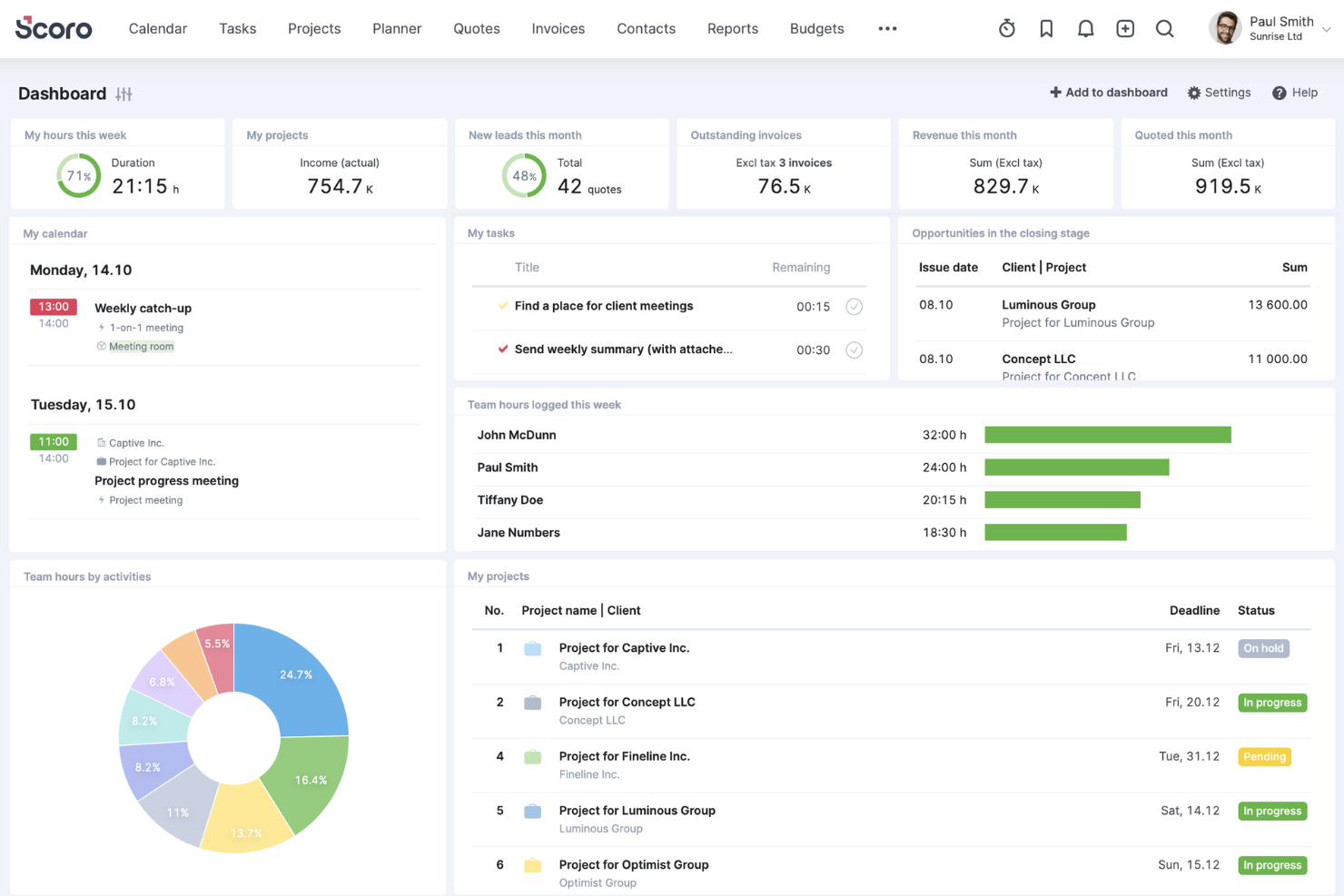
Scoro è una piattaforma SaaS che unisce gestione dei progetti, fatturazione e pianificazione delle risorse. Se la tua agenzia ha bisogno di un'unica fonte attendibile per progetti, budget e lavori per i clienti, Scoro offre funzionalità che mantengono tutto collegato, dal preventivo alla fattura.
Per chi è Scoro?
Titolari di agenzie e responsabili delle operazioni in studi di servizi professionali piccoli e medi. Supporta organizzazioni che desiderano gestire project management, fatturazione e reportistica all’interno di un’unica piattaforma operativa.
Perché ho scelto Scoro
Ciò che distingue Scoro per i team di agenzia è la sua capacità di gestire l’intero ciclo di vita del progetto in un solo luogo. La piattaforma collega preventivazione, pianificazione dei progetti, rilevazione dei tempi e fatturazione, così puoi seguire il lavoro dalla prima conversazione con il cliente fino al pagamento finale. Apprezzo che le dashboard di Scoro offrano una visibilità in tempo reale sull’avanzamento dei progetti e sulla redditività, aiutando così le agenzie a prendere decisioni informate rapidamente.
Funzionalità principali di Scoro
Altre funzionalità di Scoro che le agenzie possono trovare utili includono:
- Vista bacheca attività: Organizza e dai priorità al lavoro visivamente con bacheche attività drag-and-drop.
- Integrazione calendario: Sincronizza la pianificazione e le scadenze dei progetti con calendari esterni per una migliore visibilità.
- Portale clienti: Condividi aggiornamenti di progetto, file e fatture direttamente con i clienti in un portale sicuro.
- Report personalizzabili: Crea report dettagliati su andamento dei progetti, vendite e finanza utilizzando modelli flessibili.
Integrazioni di Scoro
Le integrazioni includono HubSpot, Google Calendar, Microsoft Exchange, Jira, Xero, QuickBooks, Sage Intacct, Exact Online, Expensify, Stripe, Google Drive, Bamboo HR e altro. Puoi anche collegare altre app tramite l’integrazione con Zapier.
Pros and Cons
Pros:
- Combina progetti con tracciamento delle vendite
- Confronta tempo pianificato e reale
- Strumenti integrati per preventivi clienti
Cons:
- Funzionalità limitate dell'app mobile
- Nessuna chat interna per il team
New Product Updates from Scoro

Scoro Adds Time Mobile App and ELI Improvements
Scoro adds the Scoro Time mobile app for iOS/Android to track time anywhere and expands ELI with attachments, smarter filtering, and trigger-based actions. For more information, visit Scoro's official site.

Ideale per il monitoraggio di progetti e budget
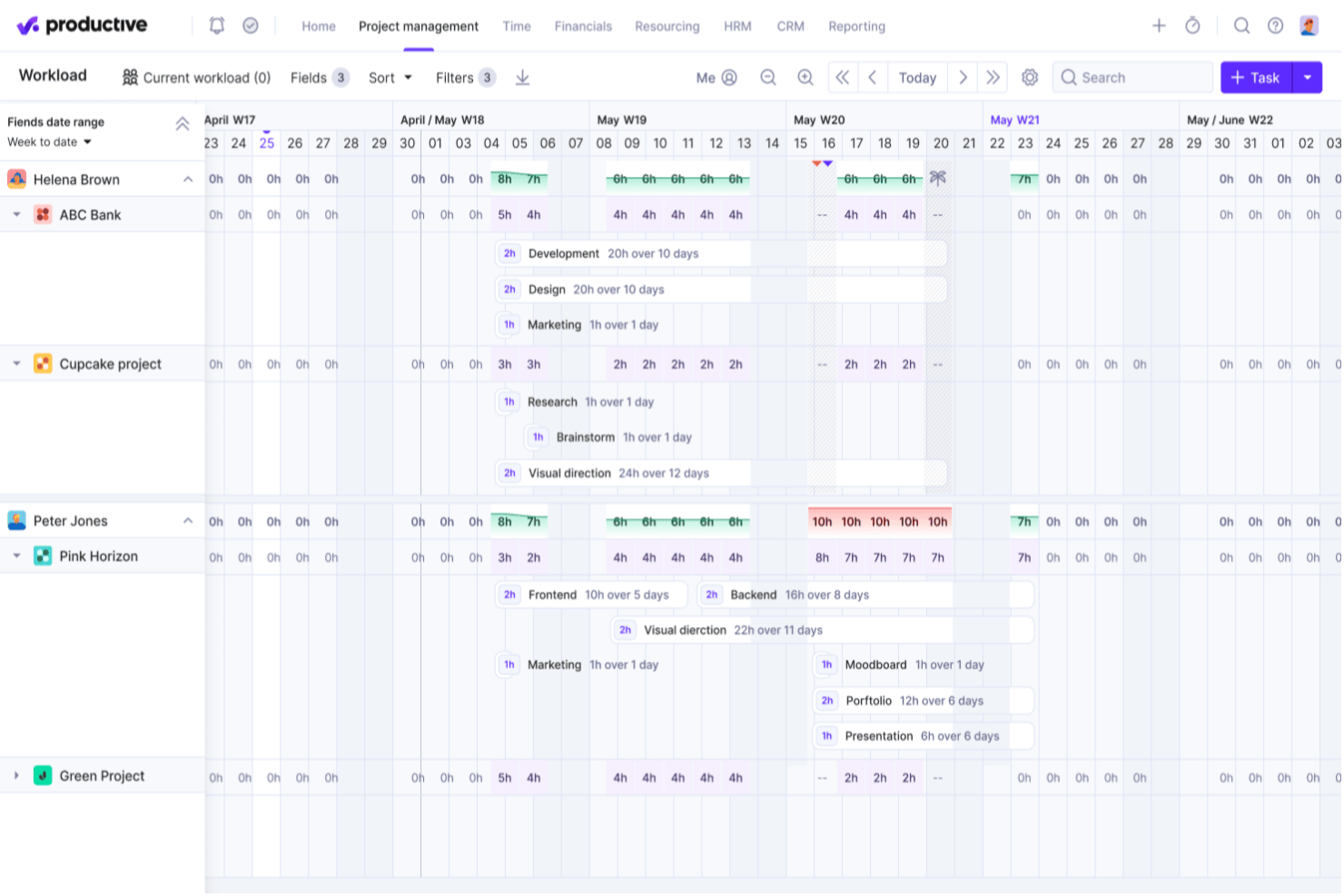
Productive è un sistema di gestione tutto-in-uno per agenzie, progettato per collegare la consegna dei progetti al monitoraggio finanziario. Con funzionalità per la rilevazione del tempo, la pianificazione delle risorse e la gestione del budget, Productive aiuta i team a individuare i problemi prima che incidano sui margini.
Per chi è ideale Productive?
Responsabili finanziari e project manager di agenzie piccole e medie focalizzate sul controllo dei margini. Funziona bene per team che necessitano di una supervisione costante dei budget di progetto e dell'utilizzo delle risorse nei rapporti con i clienti.
Perché ho scelto Productive
Productive si distingue per le agenzie che hanno bisogno di monitorare sia l'andamento dei progetti che la salute finanziaria in tempo reale. La piattaforma unisce la gestione dei progetti al monitoraggio dettagliato del budget, così puoi controllare costi, ricavi e redditività mentre si lavora. Apprezzo come Productive colleghi il tracciamento del tempo direttamente ai budget, rendendo più facile vedere dove i progetti vanno oltre o restano sotto le previsioni. Per le agenzie che si concentrano sull'ottimizzazione dei margini e sul mantenimento dei progetti in linea con le aspettative finanziarie, Productive offre il giusto mix di visibilità e controllo.
Caratteristiche principali di Productive
Altre funzionalità di Productive che potrebbero risultare utili per le agenzie includono:
- Gestione della pipeline di vendita: Il CRM di vendita integra la gestione delle relazioni con i clienti nel tuo flusso di lavoro, aiutandoti a monitorare i lead e gestire le interazioni con i clienti.
- Pianificazione delle risorse: Assegna i membri del team ai progetti in base a disponibilità e competenze.
- Archiviazione dei documenti: Conserva e organizza i file di progetto e i documenti dei clienti all'interno della piattaforma.
- Portale clienti: Dai ai clienti accesso ad aggiornamenti di progetto, file e fatture in uno spazio online sicuro.
Integrazioni di Productive
Le integrazioni includono Jira, Slack, QuickBooks, SAP SuccessFactors, Xero, Zapier, Sage, BambooHR, Rippling e HubSpot.
Pros and Cons
Pros:
- Pensato specificamente per le agenzie
- Flusso di lavoro semplificato dalla proposta al pagamento
- Il generatore di scenari prevede gli esiti dei progetti
Cons:
- Richiede almeno tre utenti
- Nessun piano gratuito
New Product Updates from Productive
Productive Adds Voice Dictation, Slack Connector, Proposals, and Overtime
Productive adds voice dictation, a Slack Connector, proposal controls, and overtime tracking. These updates support faster AI interactions, client proposals, and time management. For more information, visit Productive’s official site.

Wrike
Ideale per processi di revisione e approvazione
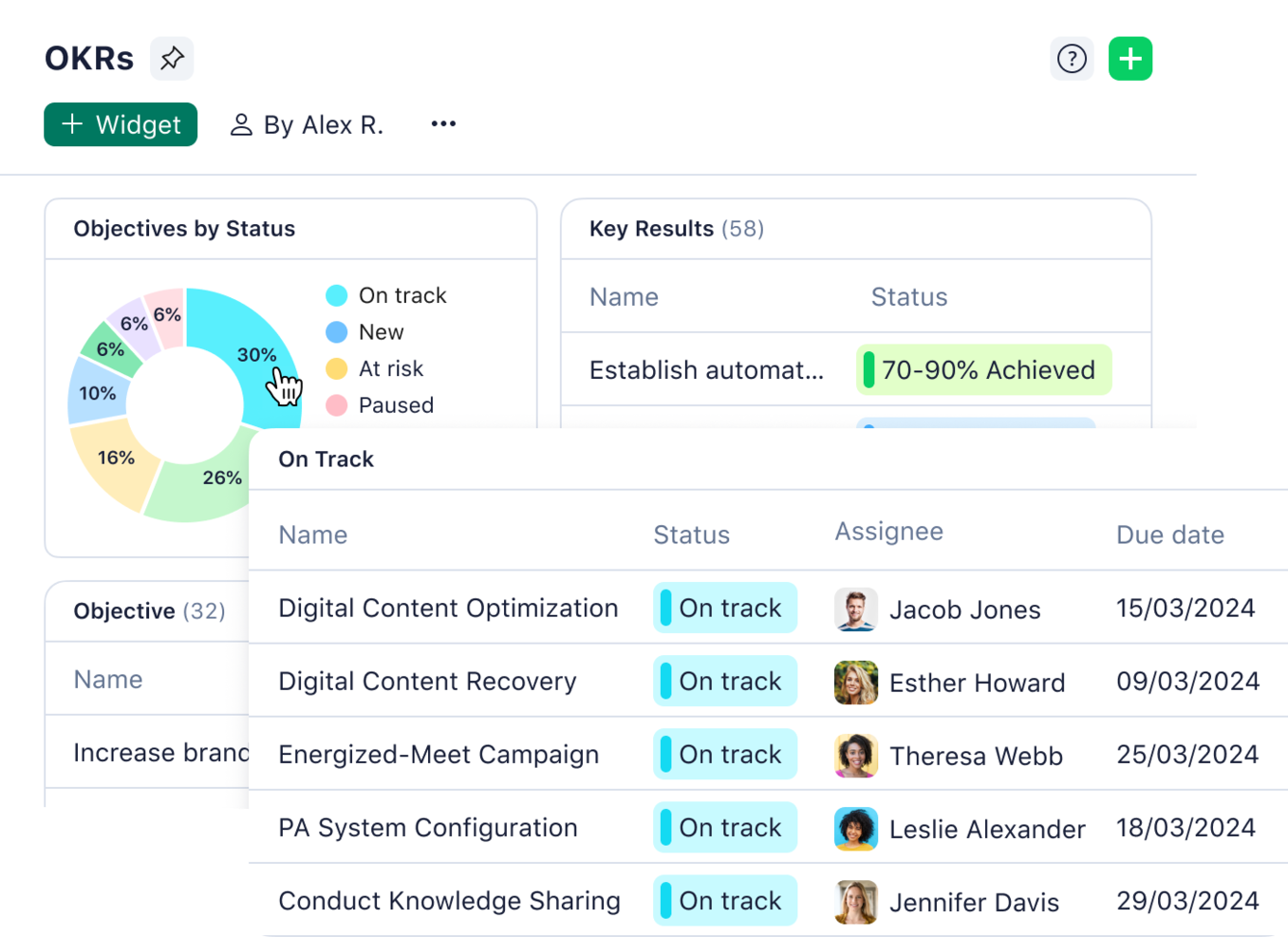
Wrike è uno strumento di gestione progetti online progettato per aiutare i team a pianificare, monitorare e collaborare sui progetti in tempo reale. Offre uno spazio di lavoro centralizzato dove gli utenti possono gestire attività, scadenze e risorse in modo efficiente.
Per chi è Wrike?
Wrike è ideale per project manager e account manager in agenzie di ogni dimensione che gestiscono consegne ai clienti suddivise in più fasi. È adatto a team che necessitano di workflow strutturati per la revisione e l’approvazione formale da parte di stakeholder distribuiti.
Perché ho scelto Wrike
Per le agenzie che vogliono ottimizzare la revisione creativa, le funzionalità di proofing e approvazione di Wrike sono davvero notevoli. La piattaforma consente di annotare immagini, video e documenti direttamente nelle attività, mantenendo i feedback organizzati e facilmente gestibili. Apprezzo molto il modo in cui Wrike tiene traccia di ogni versione e commento, facilitando la risoluzione dei cicli di feedback e assicurando l’allineamento di tutti. Questi strumenti aiutano le agenzie a ridurre la mole di email e a velocizzare il processo di approvazione dei lavori creativi.
Funzionalità principali di Wrike
Altre funzionalità di Wrike che possono risultare utili alle agenzie includono:
- Moduli di richiesta personalizzati: Raccogli brief di progetto e richieste creative tramite moduli di raccolta personalizzati.
- Vista diagramma di Gantt: Visualizza le tempistiche dei progetti e le dipendenze con diagrammi di Gantt interattivi.
- Monitoraggio del tempo: Registra le ore direttamente nelle attività per monitorare il carico di lavoro del team e il budget dei progetti.
- Gestione delle risorse: Assegna i membri del team ai progetti in base a disponibilità e competenze.
Integrazioni di Wrike
Le integrazioni includono QuickBooks, Skyvia, Power BI, Tableau, Google Sheets, Miro, Salesforce, Microsoft Teams, Google Drive, Microsoft SharePoint, Adobe Creative Cloud e Slack.
Pros and Cons
Pros:
- Strumento efficace per la revisione e approvazione
- Workflow e tipi di elemento personalizzabili
- Feedback dei clienti centralizzato
Cons:
- Alcune integrazioni sono disponibili solo nei piani di livello superiore
- Interfaccia utente complessa
New Product Updates from Wrike

Wrike Adds Quick Search to Table View
Wrike adds Quick Search to Table View with full-table search across titles, descriptions, and fields, plus highlighted matches. This helps users find tasks faster in large tables. For more information, visit Wrike’s official site.

Ideale per la gestione agenziale potenziata dall'IA
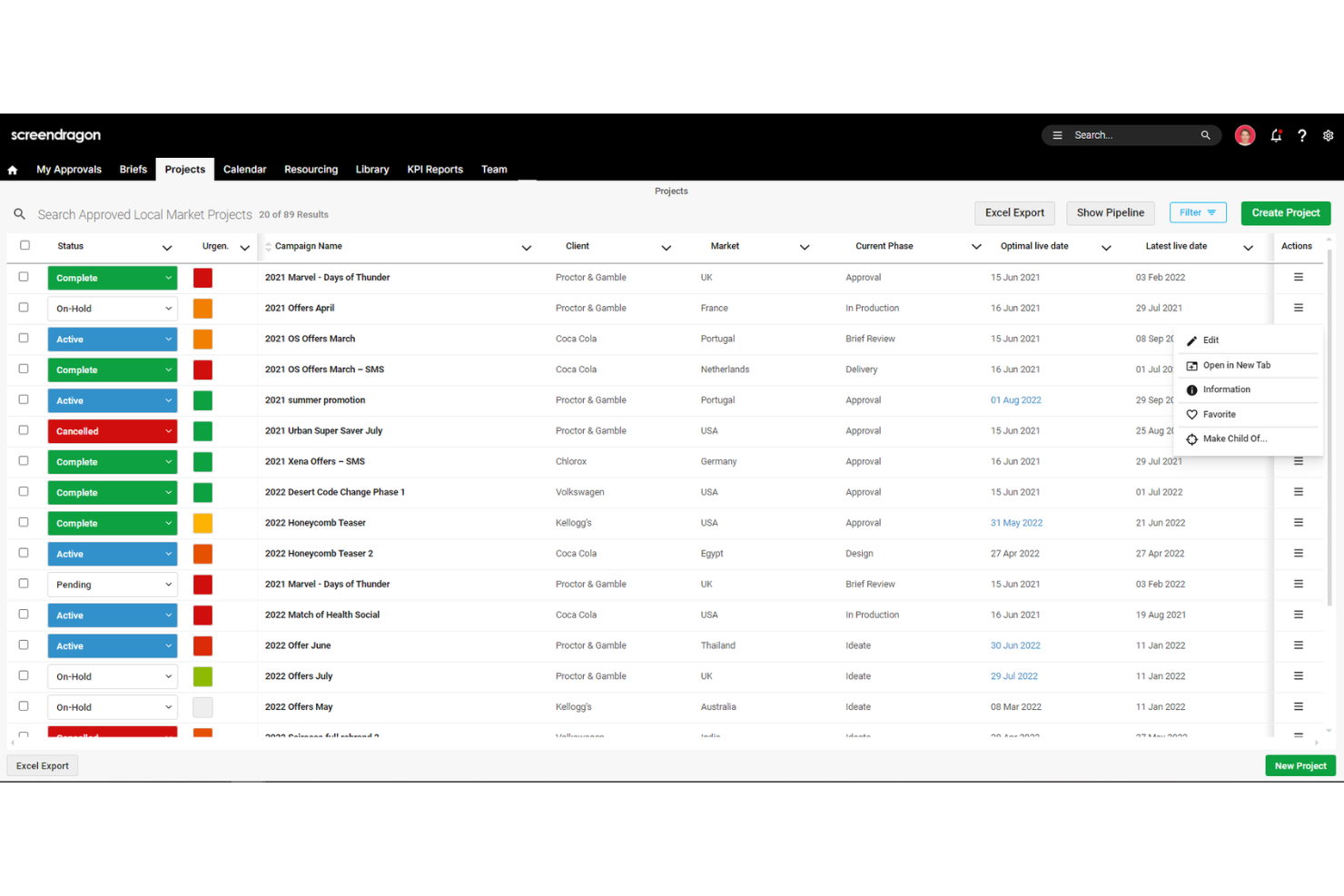
Screendragon è una piattaforma per la gestione del lavoro e dei flussi di lavoro progettata per team di marketing, agenzie e servizi professionali. Combina gestione dei progetti, automazione dei flussi di lavoro, gestione delle risorse e monitoraggio del budget in un'unica soluzione.
A chi è più adatto Screendragon?
Responsabili delle operazioni e manager delle risorse in agenzie creative e di marketing di medie e grandi dimensioni. Si adatta a organizzazioni che necessitano di una pianificazione strutturata delle risorse e di un'allocazione automatizzata su portafogli clienti complessi.
Perché ho scelto Screendragon
Ho scelto Screendragon per questa lista perché i suoi strumenti di gestione automatizzata delle risorse affrontano una delle principali sfide per le agenzie: bilanciare i carichi di lavoro e massimizzare la capacità del team. La piattaforma offre una pianificazione dinamica delle risorse, permettendoti di assegnare le persone giuste ai progetti giusti in base alla disponibilità in tempo reale e alle competenze. Mi piace anche il fatto che Screendragon includa strumenti di previsione, in modo da poter anticipare le necessità di risorse ed evitare il sovraccarico. Queste funzionalità aiutano le agenzie a ridurre la pianificazione manuale e a mantenere i progetti operativi senza colli di bottiglia.
Funzionalità principali di Screendragon
Altre funzionalità di Screendragon che le agenzie possono trovare utili includono:
- Creatore personalizzato di flussi di lavoro: crea e automatizza processi di approvazione unici e adattati alle esigenze della tua agenzia.
- Strumenti di gestione del budget: monitora il budget dei progetti, le spese e l'andamento finanziario in tempo reale.
- Portale clienti: offre ai clienti accesso agli aggiornamenti sui progetti, ai deliverable e agli strumenti di feedback in un ambiente sicuro.
- Gestione documentale: archivia, organizza e condividi file e materiali di progetto direttamente all'interno della piattaforma.
Integrazioni di Screendragon
Le integrazioni includono MS Power BI, Slack, MS Teams, Zapier, Google Drive, Trello, Microsoft 365, Box, Jira, Microsoft OneDrive e PeopleSoft.
Pros and Cons
Pros:
- Ottime funzioni di pianificazione delle risorse
- Flussi di lavoro creativi facilmente personalizzabili
- Dashboard di stato dei progetti in tempo reale
Cons:
- Lungo tempo di configurazione
- Impostazioni amministrative complesse
New Product Updates from Screendragon
Screendragon Unveils New AI Hub
Screendragon introduced AI Hub, a new capability that lets teams build and manage AI agents directly within workflows. The update helps marketing teams automate tasks, maintain governance controls, and scale AI-driven operations more efficiently. For more information, visit Screendragon's official site.

Tableau
Ideale per la visualizzazione dei dati e la business intelligence
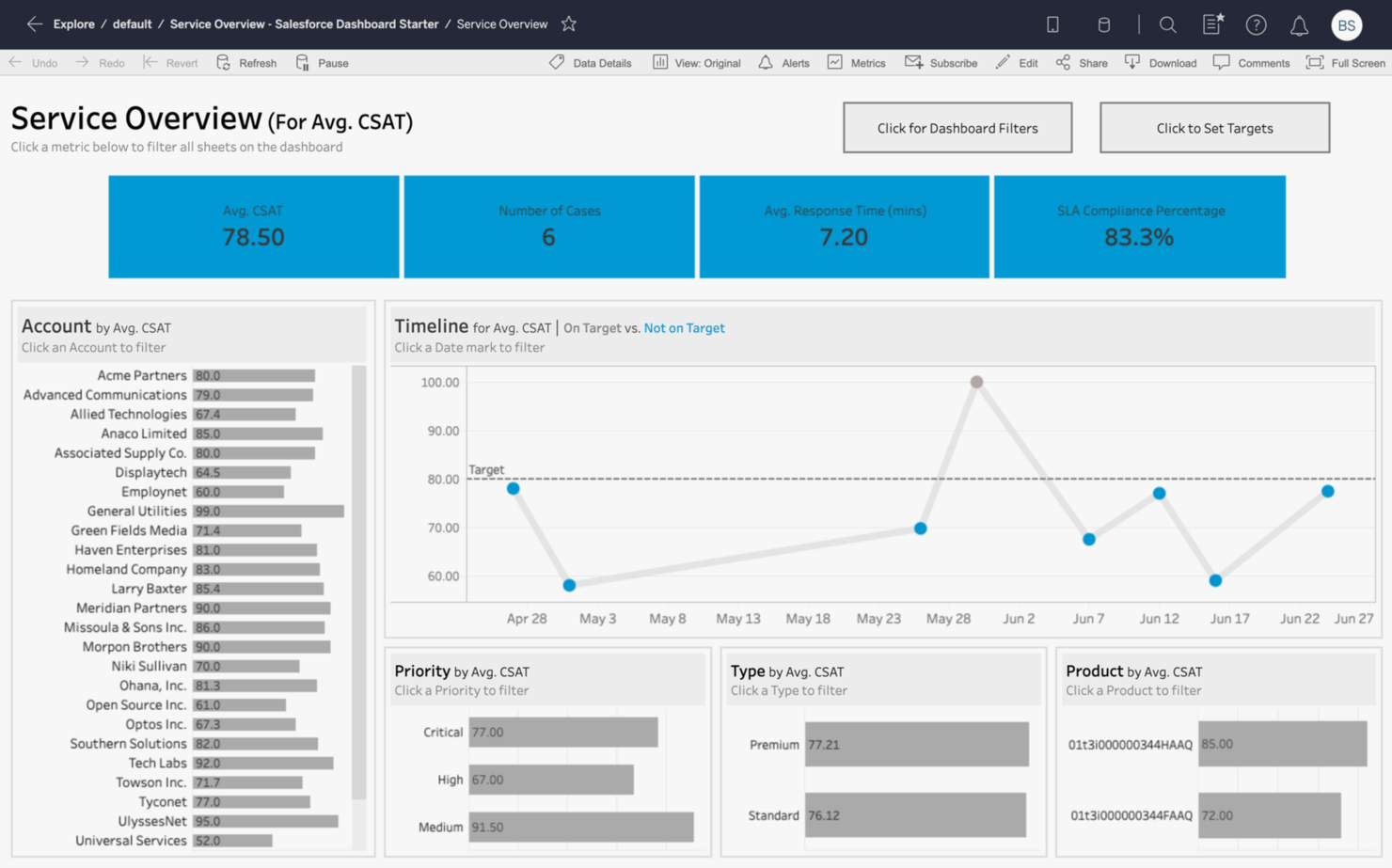
Tableau è uno strumento di visualizzazione dei dati progettato per aiutare le agenzie a trasformare i dati grezzi in dashboard e analisi interattive e condivisibili. Permette agli utenti di esplorare i dati visivamente, creare report complessi al di là dei fogli di calcolo e favorire decisioni basate sui dati.
Per chi è più adatto Tableau?
Analisti dei dati e responsabili della strategia in agenzie di medie e grandi dimensioni che gestiscono grandi quantità di dati. È adatto per organizzazioni che necessitano di funzionalità avanzate di visualizzazione dei dati e business intelligence su più account clienti.
Perché ho scelto Tableau
Quando le agenzie hanno bisogno di presentare i dati in modo sia visivamente coinvolgente che utilizzabile, Tableau offre una soluzione specializzata. Il suo costruttore di dashboard drag-and-drop consente di creare grafici e report interattivi che aiutano team e clienti a comprendere rapidamente i principali indicatori. Apprezzo il fatto che Tableau supporti aggiornamenti dei dati in tempo reale, così le agenzie possono monitorare le prestazioni delle campagne o i KPI dei progetti man mano che accadono. Per le agenzie che vogliono trasformare i dati grezzi in business intelligence efficace, gli strumenti di visualizzazione di Tableau rendono le analisi accessibili a tutto il team.
Caratteristiche principali di Tableau
Altre funzionalità che possono essere utili alle agenzie includono:
- Data Blending: Unisci dati provenienti da più fonti per creare report e dashboard unificati.
- Permessi basati sui ruoli: Controlla l'accesso ai dati sensibili e alle dashboard assegnando ruoli agli utenti.
- Aggiornamenti programmati dei dati: Automatizza l'aggiornamento delle dashboard con estrazioni programmate dei dati dalle fonti collegate.
- Strumenti di collaborazione: Condividi dashboard e visualizzazioni con membri del team o clienti direttamente dalla piattaforma.
Integrazioni di Tableau
Le integrazioni includono Amazon Redshift, Google Analytics, Google Sheets, IBM BigInsights, Microsoft Excel, OneDrive, Oracle, Presto e Salesforce.
Pros and Cons
Pros:
- Report visuali adatti a dirigenti
- Funzionalità di integrazione di più fonti dati
- Dashboard interattivi drag-and-drop
Cons:
- Elevato consumo di risorse per grandi insiemi di dati
- Licenza ad alto costo per utente

Adverity
Ideale per integrazione e governance dei dati

Adverity è progettato per agenzie e team di marketing che devono unificare dati da dozzine di fonti e mantenere rigidi standard di governance dei dati. È particolarmente utile per le organizzazioni che gestiscono campagne complesse e multicanale e desiderano automatizzare l’integrazione, la validazione e la trasformazione dei dati. Con il suo focus sulla qualità dei dati e sul controllo centralizzato, Adverity aiuta le agenzie a garantire analisi e report affidabili per tutti i clienti.
Per Chi è Più Indicato Adverity?
Responsabili dati e analytics in agenzie enterprise che gestiscono molteplici fonti di dati. È adatto a organizzazioni che necessitano di integrazione e governance strutturata dei dati su scala globale per i propri clienti.
Perché Ho Scelto Adverity
Quando le agenzie hanno bisogno di unificare dati da numerose piattaforme di marketing mantenendo uno stretto controllo sulla qualità dei dati, Adverity offre una soluzione robusta per integrazione e governance dei dati. I connettori di dati automatizzati e gli strumenti di trasformazione della piattaforma aiutano le agenzie a centralizzare, pulire e standardizzare i dati provenienti da più fonti. Apprezzo come le funzionalità di governance dei dati di Adverity permettano ai team di impostare regole di validazione e monitorare la provenienza dei dati, fondamentale per le agenzie che gestiscono informazioni sensibili dei clienti. Queste capacità rendono Adverity ideale per chi desidera fornire analisi affidabili e garantire la conformità in ambienti di reporting complessi.
Funzionalità Principali di Adverity
Altre funzionalità che le agenzie possono trovare preziose in Adverity includono:
- Costruttore di dashboard personalizzate: Crea dashboard su misura per visualizzare dati di campagne e performance.
- Programmazione automatica dei dati: Imposta importazioni ed esportazioni di dati ricorrenti secondo una programmazione personalizzata.
- Strumenti di collaborazione: Condividi visualizzazioni di dati e dashboard in modo sicuro con colleghi o clienti.
- Accesso API: Collega i dati di Adverity ad altre piattaforme di business intelligence o analytics tramite un’API nativa.
Integrazioni di Adverity
Le integrazioni includono Box, Google Ads, Google Analytics, HubSpot Marketing Hub, Instagram, Mailchimp, Microsoft SharePoint, SEMrush, Shopify e Twitter.
Pros and Cons
Pros:
- Automazione basata su IA
- Completa governance dei dati
- Oltre 600 connettori dati
Cons:
- È necessaria una configurazione per l’uso ottimale
- Supporto limitato per dati non di marketing
New Product Updates from Adverity
Adverity Enhances Connectors and Adds TikTok GMV Max
Adverity updates connectors for Amazon Ads, SmartNews Ads, Indeed, and monday.com, and introduces the TikTok GMV Max connector. These updates improve data accuracy, control, and performance across integrations. For more information, visit Adverity’s official site.
 .
.
awork
Ideale per prevenire conflitti di pianificazione

awork è un software di project management che risolve il problema di riunioni sovrapposte o risorse prenotate doppio. Questa piattaforma è pensata per agenzie creative e digitali che hanno bisogno di coordinare le pianificazioni dei progetti, la disponibilità del team e le scadenze in un unico posto.
Per chi è più indicato awork?
Project manager di piccole e medie agenzie creative che gestiscono scadenze sovrapposte. È ideale per i team che hanno bisogno di visibilità sulle pianificazioni per ridurre i conflitti di risorse tra progetti simultanei.
Perché ho scelto awork
Ciò che mi ha attratto di awork per i team di agenzia è la sua attenzione a prevenire conflitti di programmazione, una difficoltà comune negli ambienti orientati ai progetti. La piattaforma offre una pianificazione visiva che mostra i carichi di lavoro del team e le tappe principali dei progetti fianco a fianco, rendendo facile individuare eventuali sovrapposizioni. Apprezzo come gli strumenti di gestione delle risorse di awork permettano di assegnare le attività in base alla disponibilità reale, riducendo il rischio di doppie prenotazioni. Per le agenzie che gestiscono più progetti e scadenze in continua evoluzione, queste funzionalità aiutano a mantenere i calendari chiari e i progetti sulla buona strada.
Funzionalità principali di awork
Altre funzionalità che le agenzie possono trovare utili in awork includono:
- Automazione delle attività: Imposta flussi di lavoro automatici per avviare azioni in base agli eventi del progetto.
- Rilevamento del tempo: Registra le ore direttamente su attività e progetti per report accurati.
- Template personalizzati per i progetti: Crea e riutilizza template per tipi di progetto ricorrenti o lavori per clienti abituali.
- Strumenti di collaborazione: Usa chat integrata e condivisione file per mantenere la comunicazione di progetto organizzata.
Integrazioni di awork
Le integrazioni includono n8n, Zapier, Xero, sevdesk, Personio, Slack, Microsoft Teams, Salesforce e altre ancora.
Pros and Cons
Pros:
- Gestione delle attività semplice e immediata
- Supporta la gestione agile dei progetti
- Strumenti integrati per il timer di progetto
Cons:
- Livelli di automazione dei flussi di lavoro di base
- Integrazioni limitate con altri software per agenzie

Ideale per dashboard di marketing personalizzabili
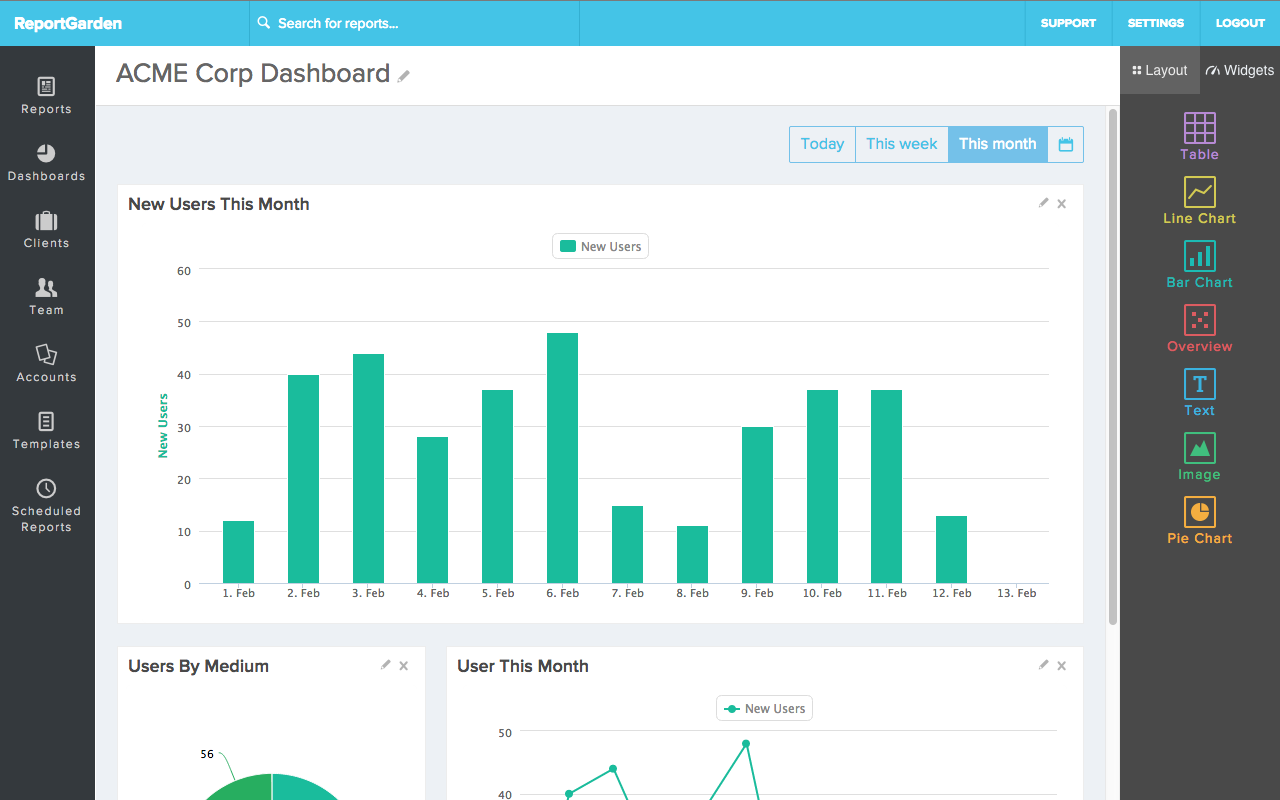
ReportGarden è un software di dashboard e analisi di marketing che aiuta le agenzie a creare dashboard di marketing personalizzabili e automatizzare la creazione dei report. Offre opzioni per adattare i report alle esigenze specifiche, risparmiando tempo e risorse.
Per chi è ReportGarden?
Responsabili clienti e analisti di marketing in agenzie digitali di piccole e medie dimensioni. Funziona bene per i team che necessitano di dashboard personalizzabili per consolidare i dati sulle performance delle campagne per i clienti.
Perché ho scelto ReportGarden
Per le agenzie che devono presentare i dati di marketing in base alle specificità di ciascun cliente, i dashboard personalizzabili di ReportGarden sono una soluzione ideale. La piattaforma consente di creare dashboard con widget drag-and-drop, facilitando l'adattamento dei report per mettere in evidenza le metriche più rilevanti per ogni campagna o cliente. Mi piace il fatto che sia possibile applicare branding e layout personalizzati, che aiutano le agenzie a offrire un'esperienza più professionale e su misura. La flessibilità di ReportGarden nella progettazione dei dashboard rende più semplice comunicare i risultati e il valore ai clienti con obiettivi e preferenze di reporting diversi.
Caratteristiche principali di ReportGarden
Altre funzionalità che le agenzie potrebbero trovare utili in ReportGarden includono:
- Pianificazione automatica dei report: Imposta l'invio ricorrente dei report ai clienti secondo una pianificazione personalizzata.
- Integrazione dati multi-canale: Collega e importa dati da piattaforme come Google Ads, Facebook Ads e Analytics.
- Portale clienti: Fornisci ai clienti l'accesso a un portale con il loro marchio tramite cui visualizzare report e dashboard.
- Monitoraggio del budget: Monitora e gestisci i budget delle campagne direttamente dalla piattaforma.
Integrazioni di ReportGarden
Le integrazioni includono Google Ads, Google Analytics, Facebook Ads, Profili Instagram, Google Search Console, Google Business Profile, Google Drive, Bing Ads e LinkedIn Ads.
Pros and Cons
Pros:
- Strumenti di reportistica white-label per i clienti
- Aggregazione dati cross-channel
- Widget drag-and-drop per i report
Cons:
- Velocità di download dei report lenta
- Occasionali errori di sincronizzazione dati

Ideale per tracciamento di progetti e ore lavorate
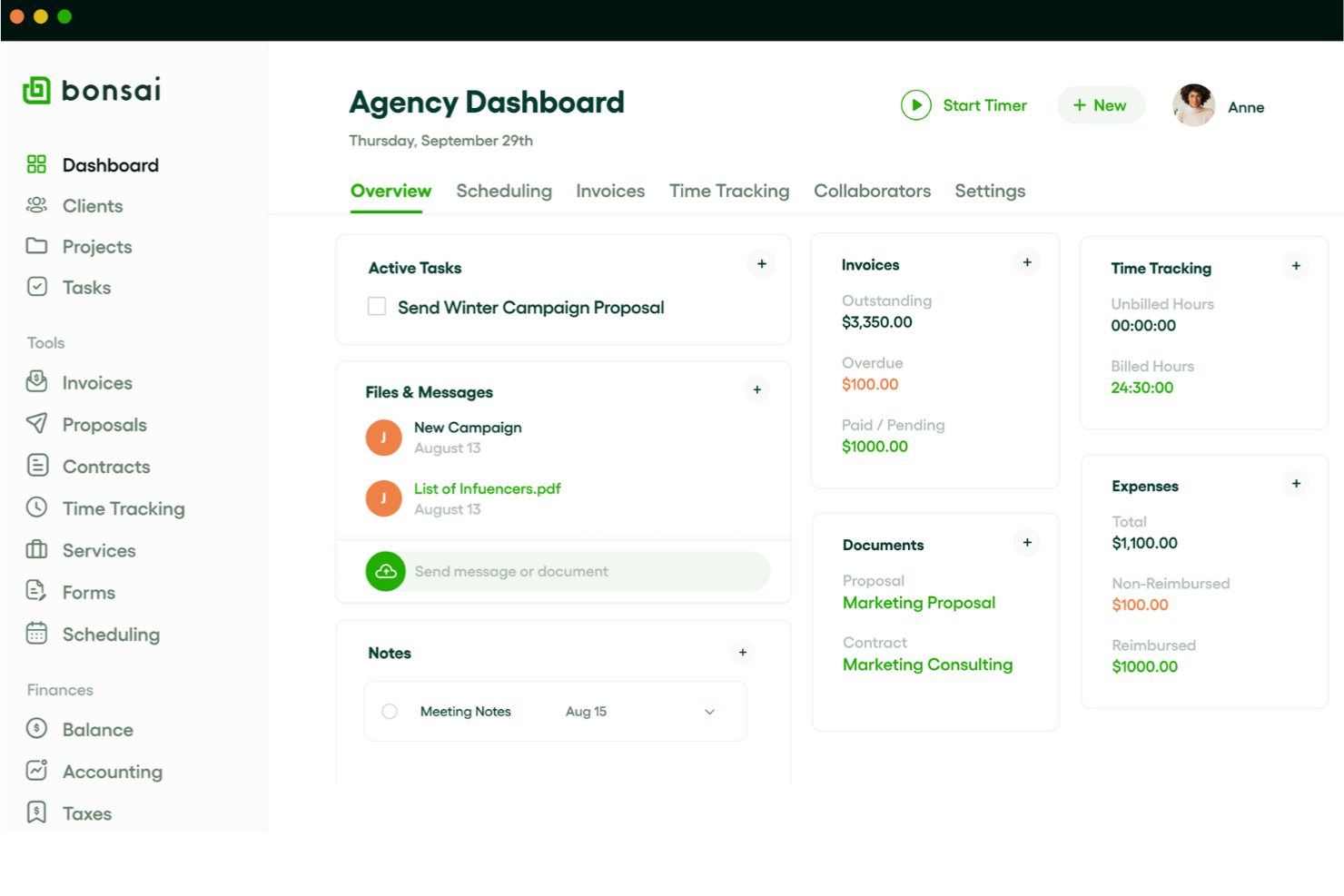
Bonsai Agency Software è pensato per le agenzie che desiderano gestire progetti e monitorare il tempo in un’unica soluzione. Bonsai riunisce il monitoraggio dei progetti, la registrazione delle ore e la fatturazione, così le agenzie possono mantenere il lavoro in movimento e ricevere i pagamenti puntualmente.
Per chi è ideale Bonsai Agency Software?
Titolari di agenzie e responsabili di progetto in piccole agenzie creative o digitali. Si adatta a realtà che necessitano di una supervisione semplice dei progetti e del monitoraggio delle ore per attività su commissione del cliente.
Perché ho scelto Bonsai Agency Software
Per le agenzie che desiderano tenere sotto controllo sia lo stato di avanzamento dei progetti che il tempo impiegato, Bonsai offre una soluzione mirata. Gli strumenti di monitoraggio dei progetti del sistema permettono di organizzare attività, definire scadenze e assegnare responsabilità all’interno di un unico spazio di lavoro. Mi piace che la funzione integrata di rilevazione del tempo di Bonsai sia direttamente collegata ai progetti, rendendo semplice registrare le ore e generare timesheet accurati. Se la tua agenzia ha bisogno di collegare la consegna dei progetti alla fatturazione a ore, Bonsai unisce questi flussi di lavoro in modo pratico per i team creativi.
Funzionalità principali di Bonsai Agency Software
Altre funzionalità che le agenzie possono considerare utili includono:
- CRM clienti: Gestisci i dati di contatto dei clienti, la cronologia delle comunicazioni e i progetti in un unico posto.
- Template per proposte e contratti: Crea, invia e traccia proposte e contratti professionali direttamente dalla piattaforma.
- Fatturazione automatica: Genera e invia fatture in automatico in base alle fasi del progetto o alle ore registrate.
- Gestione delle spese: Registra e classifica le spese per mantenere la contabilità dell’agenzia sempre aggiornata e organizzata.
Integrazioni di Bonsai Agency Software
Le integrazioni includono QuickBooks Online, Zapier, Calendly, Xero, Google Drive, HubSpot, ClickUp, Slack e Asana.
Pros and Cons
Pros:
- Timer a un clic per le ore fatturabili
- Template di contratto pronti all’uso
- Fatture automatiche dopo la firma dei contratti
Cons:
- Tempi di elaborazione dei pagamenti lenti
- Strumenti di reporting di base

Crazy Egg
Ideale per heatmap dei siti web
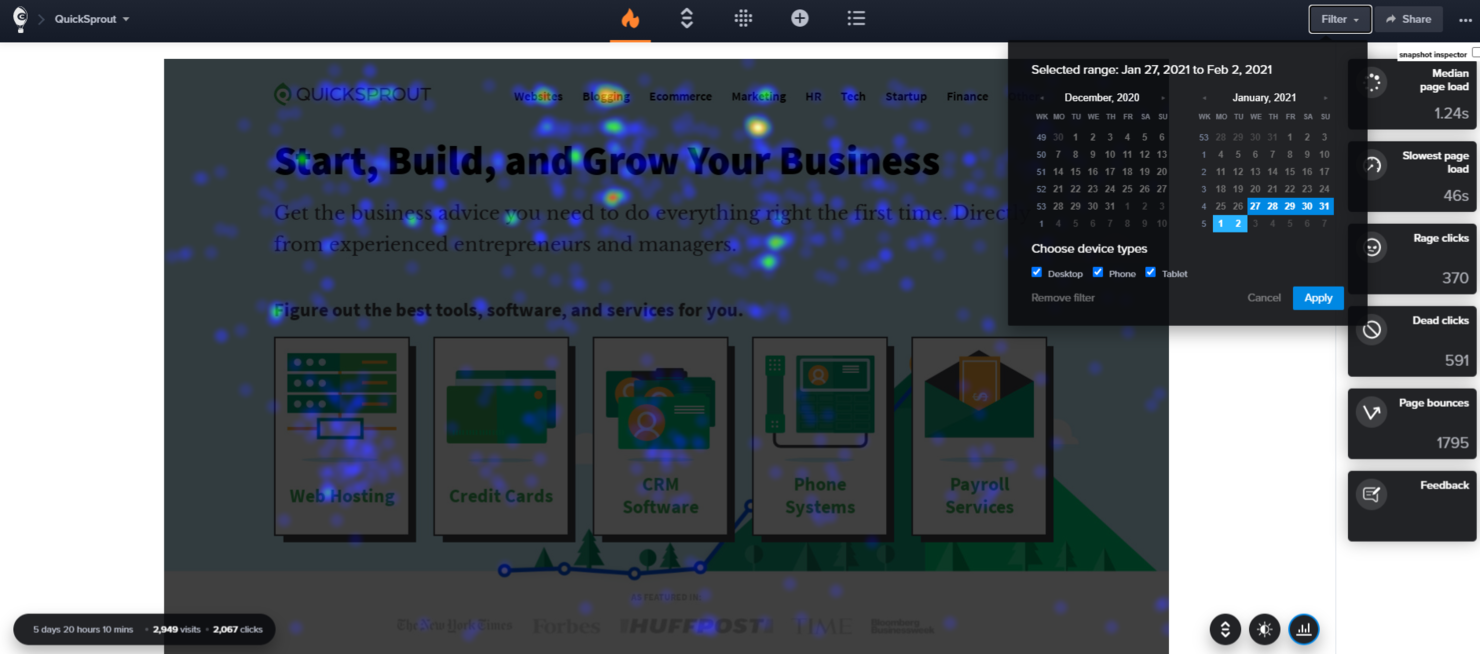
Crazy Egg è uno strumento di ottimizzazione dei siti web che offre funzionalità come heatmap, registrazioni, sondaggi, test A/B e analisi del traffico. Fornisce report visivi dettagliati e registrazioni delle sessioni per comprendere il comportamento degli utenti e migliorare il design del sito.
Per chi è più indicato Crazy Egg?
Strategisti digitali e team UX in piccole e medie agenzie focalizzate sull'ottimizzazione dei siti web. Supporta le aziende che dipendono dai dati delle heatmap per prendere decisioni in merito a design e conversioni orientate al cliente.
Perché ho scelto Crazy Egg
Quando le agenzie devono mostrare ai clienti esattamente come gli utenti interagiscono con i loro siti web, gli strumenti di heatmap di Crazy Egg si distinguono. Questo strumento si fa notare per la capacità di offrire informazioni visive sulle interazioni degli utenti, rendendo più semplice individuare aree di miglioramento nell'esperienza cliente. Apprezzo il fatto che sia possibile segmentare i dati delle heatmap per tipo di dispositivo, caratteristica essenziale per le agenzie che lavorano con clienti sia su desktop che su mobile. Offre report visivi dettagliati e registrazioni delle sessioni che aiutano ad apportare modifiche informate al design, migliorando così la relazione con i clienti.
Funzionalità principali di Crazy Egg
Altre funzionalità che le agenzie potrebbero trovare interessanti in Crazy Egg includono:
- Test A/B: Esegui esperimenti per confrontare diverse versioni di pagine web e misurare quale funziona meglio.
- Registrazioni utenti: Guarda le sessioni dei visitatori in tempo reale per vedere esattamente come navigano un sito.
- Report Confetti: Visualizza i singoli clic segmentati per fonte di riferimento, termine di ricerca o dispositivo.
- Report Overlay: Visualizza dati dettagliati sui clic per ogni elemento di una pagina per comprendere le interazioni degli utenti a un livello granulare.
Integrazioni di Crazy Egg
Le integrazioni includono Convert Experiences, Drupal, Handshake, Joomla, Kameleoon, Optimizely, Rippling, Shopify, Sitejet, Squarespace, SurveyMonkey, Teamstack, Wix e WordPress.
Pros and Cons
Pros:
- Analisi dettagliata di elementi specifici delle pagine
- Visualizzazione delle aree calde di attività di clic
- Installazione semplice con un solo script
Cons:
- Limitazioni nel tracciamento delle visualizzazioni di pagina
- Nessun CRM integrato
Altri software per agenzie
Di seguito è riportato un elenco di altri software per agenzie che ho selezionato, ma che non sono entrati nella lista principale. Vale comunque la pena dar loro un’occhiata!
- Sprout Social
Ideale per l’analisi dei social media
- Funnelytics
Ideale per visualizzare funnel di marketing
- NinjaCat
Ideale per analisi di marketing alimentate dall’IA
- Ravetree
Ideale per la gestione del lavoro con i clienti
- Adzooma
Ideale per raccomandazioni PPC guidate dall’IA
- Justuno
Ideale per pop-up altamente personalizzati sul sito web
- Rankability
Ideale per la creazione di contenuti SEO con IA
- Zoho Analytics
Ideale per l'analisi aziendale


Software correlati per la gestione dei progetti
Se non hai ancora trovato quello che cerchi, dai un'occhiata a questi strumenti correlati per la gestione dei progetti che abbiamo testato e recensito.
- Software per la gestione dei progetti
- Software per la gestione dei progetti di pubbliche relazioni
- Software per dashboard white label
- Software per la gestione delle risorse
- Software per l'automazione dei flussi di lavoro
- Software per la gestione delle attività
- Strumenti di collaborazione
- Creatore di diagrammi di Gantt
- Software per la verifica dei documenti
Come Valuto i Software per Agenzie
Divido la mia valutazione in due livelli: la base che ogni strumento per agenzie deve soddisfare—tracciamento dei progetti dei clienti, gestione del tempo e fatturazione, pianificazione delle risorse—e i fattori differenzianti che determinano la vera aderenza alle esigenze.
Funzionalità di Base (Requisiti Minimi per Questa Lista)
Quando seleziono gli strumenti per la mia lista, valuto ciascuno di essi su una scala da 0 (non offre la funzionalità) a 5 (eccelle in quest'area) per ogni funzionalità di base elencata qui sotto. Successivamente, calcolo il punteggio totale dello strumento come percentuale. Ogni strumento deve raggiungere un punteggio totale minimo del 65% per essere preso in considerazione.
- Gestione dei Progetti Clienti: Valuto se lo strumento può gestire più account clienti in parallelo, ognuno con le proprie attività, milestone, dipendenze e tempistiche di consegna.
- Monitoraggio del Tempo & Fatturazione: Tutte le agenzie fatturano in base al tempo, quindi verifico quanto strettamente le registrazioni delle ore siano collegate a compiti specifici, clienti e tariffe fatturabili, fino alla generazione della fattura.
- Pianificazione delle Risorse & Capacità: Cerco viste del carico di lavoro che mostrino chi è sovraccarico e chi ha disponibilità, soprattutto quando bisogna gestire scadenze cliente sovrapposte tra reparti diversi.
- Tracciamento di Budget & Redditività: Qui conta la capacità di monitorare in tempo reale le spese rispetto ai budget di progetto, insieme a rapporti di margine sia a livello di progetto che di cliente.
- Collaborazione & Approvazioni Cliente: La condivisione dei deliverable con i clienti per la revisione dovrebbe avvenire all'interno della piattaforma tramite portali, strumenti di revisione o flussi strutturati di approvazione.
- Reportistica & Dashboard per Agenzie: I report dovrebbero mostrare KPI specifici per le agenzie, come tassi di utilizzo, margini di progetto e realizzo, non solo metriche generiche di completamento attività.
Una volta raccolta una lista di strumenti che soddisfano questi criteri, considero ciò che distingue ogni piattaforma dalle altre.
Fattori Differenzianti (Cosa Distingue i Fornitori)
Ecco come confronto e metto a confronto i diversi fornitori:
Funzionalità Distintive
Per me, la gestione dei contratti ricorrenti è molto importante. Le agenzie che lavorano con contratti mensili devono tracciare le ore consumate rispetto ai limiti e gestire i roll-over automaticamente, invece di riconciliare tutto su fogli di calcolo a fine mese. Valuto anche i flussi di revisione creativa, dato che i team di design e contenuto traggono beneficio da strumenti di annotazione, versionamento e workflow di approvazione strutturati all'interno della piattaforma, invece di scambi sparsi via email. Per le agenzie che servono clienti internazionali, la fatturazione multivaluta e la gestione localizzata della tassazione possono determinare la precisione o meno della fatturazione.
Oltre le Funzionalità
Il modello di pricing conta molto per le agenzie, poiché il numero di persone varia al variare delle acquisizioni o perdite di clienti. Verifico se i posti per ospiti o clienti sono inclusi o hanno un costo extra, dato che questo può incidere notevolmente. La profondità delle integrazioni è un altro fattore che prendo molto in considerazione. Uno strumento per agenzie che si integra nativamente con QuickBooks o Xero, oltre che con piattaforme creative come Figma o Adobe CC, fa risparmiare ore di trasferimento dati manuale ogni settimana. Valuto anche quanto una piattaforma sia adatta a una specifica tipologia di agenzia, sia essa uno studio di design da 10 persone o una grande rete digitale da 200 postazioni e molteplici linee di servizio.
Come scegliere il software per agenzie
Mentre affronti il tuo processo di selezione del software, unico per le tue esigenze, tieni a mente i seguenti punti.
- Usabilità: Il software deve essere intuitivo e facile da usare. Se lo strumento è eccessivamente complicato e richiede una formazione approfondita, può ostacolare la produttività invece di migliorarla. Ad esempio, se il tuo team passa più tempo a imparare a usare il software che a utilizzarlo, viene meno lo scopo di semplificare le operazioni.
- Funzionalità: Assicurati che il software disponga delle funzionalità giuste per le esigenze della tua agenzia. Molte soluzioni "tutto-in-uno" possono eccellere in un'area, ma essere carenti in altre. Ad esempio, uno strumento potrebbe essere ottimo per la gestione dei progetti, ma non disporre di funzionalità di pianificazione delle risorse. Elenca i problemi che vuoi risolvere e confrontali con le funzionalità del software. Se il tuo team ha difficoltà a evitare la sovraprenotazione dei progetti, uno strumento con una pianificazione trasparente può essere prezioso.
- Integrazioni: Il software dovrebbe integrarsi con gli strumenti che già utilizzi. Questo è importante per mantenere un flusso di lavoro fluido. Individua quali integrazioni sono "indispensabili" e quali "utili da avere" per restringere le tue opzioni.
- Prezzo: Il costo del software dovrebbe rientrare nel tuo budget e offrire valore. Calcola sia il costo dello strumento sia il tempo che farà risparmiare alla tua agenzia. Ad esempio, uno strumento potrebbe costare $10 per persona al mese, ma se aumenta significativamente la produttività, può ripagarsi nel lungo periodo. Assicurati che i prezzi siano trasparenti per evitare addebiti imprevisti.
- Assistenza e affidabilità del fornitore: Scegli un fornitore che offra un'assistenza affidabile e abbia una comprovata esperienza. Questo include l'assistenza per la migrazione dei dati, la formazione e il servizio clienti continuativo. Ad esempio, se la tua agenzia sta passando da un sistema diverso, il fornitore dovrebbe fornire assistenza per garantire una migrazione fluida. Controlla recensioni e testimonianze per valutare l'affidabilità del fornitore e la soddisfazione dei clienti.
Tendenze per i software per agenzie
Il software per la gestione delle agenzie sta cambiando rapidamente. Ecco alcune tendenze importanti da tenere sotto controllo.
- Gestione dei progetti basata sull'IA: L'IA automatizza le attività di routine nella gestione dei progetti. Ciò consente ai team di concentrarsi sul lavoro strategico e di migliorare la precisione delle previsioni sulle attività.
- Strumenti di comunicazione integrati: Ora il software include funzionalità di comunicazione integrate. Questo riduce la necessità di utilizzare più app e migliora la collaborazione tra i membri del team.
- Analisi avanzata dei dati: Le agenzie sfruttano l'analisi avanzata per prendere decisioni migliori dall'inizio alla fine. Questi strumenti forniscono informazioni approfondite sul marketing digitale e sulle prestazioni dei progetti. Aiutano a individuare le aree di crescita e miglioramento dell'agenzia.
- Flussi di lavoro personalizzabili: I flussi di lavoro personalizzabili stanno diventando uno standard. Consentono alle agenzie di adattare le campagne di marketing alle proprie esigenze. Questa flessibilità supporta requisiti di progetto diversi.
- Misure di sicurezza rafforzate: La sicurezza è una priorità assoluta con i nuovi aggiornamenti del software. Misure rafforzate proteggono i dati sensibili e mantengono la fiducia dei clienti.
Queste tendenze stanno plasmando il futuro dei software per agenzie, promuovendo l'innovazione e migliorando l'efficienza.
Che cos'è un software per agenzie?
Il software per agenzie è uno strumento SaaS progettato per aiutare le agenzie di marketing, pubblicità e creative a gestire in modo efficiente progetti, clienti e risorse. Viene comunemente utilizzato da responsabili di progetto, responsabili degli account e team creativi per semplificare i flussi di lavoro automatizzati, monitorare l'avanzamento dei progetti e gestire le relazioni con i clienti.
Il software per agenzie include in genere la gestione dei progetti, il monitoraggio del tempo, il software per l'inserimento dei clienti e la gestione finanziaria. Queste funzionalità consentono agli utenti di pianificare ed eseguire i progetti, monitorare il tempo dedicato alle attività, mantenere le comunicazioni con i clienti e gestire budget e fatture.
Funzionalità dei software per agenzie
Quando selezioni un software per agenzie, è essenziale comprendere le principali funzionalità necessarie per il successo della tua agenzia. Gli strumenti giusti possono aiutarti a gestire i progetti, semplificare la comunicazione e migliorare l'efficienza complessiva. Ecco le funzionalità più importanti da ricercare:
- Pianificazione del progetto: questa funzionalità aiuta a organizzare le attività, impostare le scadenze e monitorare i progressi, garantendo il completamento puntuale dei progetti. È particolarmente utile per gestire progetti multistadio come le campagne SEO, in cui il coordinamento e la tempistica sono fondamentali per ottenere risultati.
- Gestione dei clienti: consente di archiviare e gestire le informazioni sui clienti, facilitando il mantenimento delle relazioni con i clienti.
- Monitoraggio del tempo: questa funzionalità aiuta a monitorare il tempo dedicato alle varie attività, un aspetto essenziale per una fatturazione accurata e per l'analisi della produttività. Scopri di più su che cos'è il monitoraggio del tempo.
- Fatturazione: la fatturazione automatizzata garantisce pagamenti puntuali e riduce il carico amministrativo della fatturazione manuale.
- Strumenti di collaborazione: questi strumenti facilitano la comunicazione e la collaborazione tra i membri del team, elementi fondamentali per il successo del progetto.
- Report e analisi: questa funzionalità offre una visione delle prestazioni della tua agenzia, aiutandoti a prendere decisioni informate.
- Gestione delle risorse: aiuta ad allocare le risorse in modo efficiente, garantendo che il team non sia sovraccaricato. Tuttavia, è importante sapere in anticipo che cos'è un piano di gestione delle risorse di progetto, così da sfruttare al meglio questa funzionalità.
- Condivisione dei file: la condivisione sicura dei file è importante per mantenere la riservatezza e l'integrità delle informazioni sui clienti.
- Personalizzazione: la possibilità di personalizzare il software in base alle esigenze specifiche della tua agenzia può migliorarne l'usabilità.
- Integrazione: la perfetta integrazione con altri strumenti, come il software per l'email marketing, il CRM e gli strumenti di gestione dei progetti, garantisce che il flusso di lavoro della tua agenzia rimanga ininterrotto.
Queste funzionalità aiuteranno la tua agenzia a operare in modo più fluido ed efficiente, consentendoti di migliorare i processi di vendita e concentrarti sull'offerta del miglior servizio possibile ai tuoi clienti.
Vantaggi del software per agenzie
Il software per agenzie è diventato uno strumento essenziale per le organizzazioni che desiderano semplificare le operazioni, migliorare la produttività e aumentare la soddisfazione dei clienti. Di seguito sono riportati cinque vantaggi principali dell'utilizzo di un software per agenzie per utenti e organizzazioni.
- Maggiore efficienza: il software per agenzie automatizza le attività ripetitive, consentendo ai dipendenti di concentrarsi su attività più strategiche e aumentando così la produttività complessiva.
- Collaborazione migliorata: grazie a dati e strumenti di comunicazione centralizzati, i membri del team possono collaborare facilmente ai progetti, garantendo che tutti siano aggiornati e riducendo il rischio di incomprensioni.
- Migliore gestione dei clienti: il software offre funzionalità di gestione dei clienti, consentendo alle aziende di mantenere registri dettagliati dei clienti, monitorare le interazioni e fornire servizi professionali personalizzati.
- Informazioni basate sui dati: strumenti avanzati di analisi e reportistica aiutano le organizzazioni a prendere decisioni informate fornendo informazioni preziose sulle metriche delle prestazioni e sulle tendenze aziendali.
- Scalabilità: con la crescita dell'azienda, il software per agenzie può adattarsi per supportare carichi di lavoro maggiori e utenti aggiuntivi, garantendo che le operazioni rimangano fluide ed efficienti.
Investire in un software per agenzie può migliorare significativamente il modo in cui opera la tua organizzazione, portando a risultati migliori sia per il team sia per i clienti. Sfruttando i vantaggi descritti sopra, le aziende possono rimanere competitive e raggiungere i propri obiettivi.
Costi e prezzi del software per agenzie
Quando si valuta un software per agenzie, comprendere i costi e le opzioni di prezzo è importante per prendere una decisione informata. In qualità di esperto di software, illustrerò i diversi piani disponibili, i loro prezzi medi e le funzionalità comuni che includono.
Tabella di confronto dei piani per il software per agenzie
| Tipo di piano | Prezzo medio | Funzionalità comuni |
| Piano gratuito | $0 | Gestione di base dei progetti, utenti limitati, reportistica di base e gestione delle attività |
| Piano personale | $9 - $60 al mese | Monitoraggio del tempo, fatturazione, CRM di base, integrazioni limitate e supporto di base |
| Piano aziendale | $60 - $600 al mese | Gestione avanzata dei progetti, pianificazione delle risorse, gestione finanziaria e analisi |
| Piano per aziende | $600 - $1000+ al mese | Integrazioni personalizzate, sicurezza avanzata, supporto dedicato e analisi |
Quando selezioni il piano più adatto, valuta attentamente le dimensioni della tua agenzia, i requisiti specifici e i vincoli di budget. Dedica del tempo a valutare in che modo ogni opzione si allinea agli obiettivi e ai flussi di lavoro della tua agenzia, per assicurarti di prendere una decisione consapevole.