10 Best Creative Agency Project Management Software 2026

10 Best Creative Agency Project Management Software Shortlist


Planning, managing, and controlling creative projects is no easy feat. Creative agency project management software can help you address risks and challenges on your projects, keep the team on track, and deliver the work on time and within the budget.
There are plenty of creative agency project management software solutions out there, but it can be tough to find the right fit for your agency or in-house team. I'll simplify this for you—I've shortlisted the best project management tools based on my extensive experience managing creative projects.
Why Trust Our Software Recommendations
Our team has been testing and reviewing software since 2012. As project managers ourselves, we know how difficult—and important—it is to choose the right software.
For this guide, we evaluated tools using hands-on testing and independent research, scoring tools using our selection criteria. We also draw on insights from industry thought leaders and practicing project management experts.
Our reviews reflect our human editorial judgment, not a sales pitch.
Expert reviewers:
Creative Agency Project Management Software Comparison Table
This comparison table summarizes pricing details for my top creative agency project management software selections:
| Tool | Best For | Trial Info | Price | ||
|---|---|---|---|---|---|
| 1 | Best for annotating and versioning | Free plan available; 14-day free trial | From $9/user/month (billed annually) | Website | |
| 2 | Best for visibility into agency operations | 14-day free trial + free demo available | From $17/user/month | Website | |
| 3 | Best for managing resources, projects, and finances | 14-day free trial + free demo available | From $10/user/month (billed annually) | Website | |
| 4 | Best for scaling organizations | 14-day free trial | From $10/user/month (billed annually) | Website | |
| 5 | Best for managing creative projects at scale for ROI | Free demo available | Pricing upon request | Website | |
| 6 | Best for full lifecycle creative service delivery | Free demo available | Pricing upon request | Website | |
| 7 | Best for complex project timelines | Free plan + 15-day free trial available | Pricing upon request | Website | |
| 8 | Best for small marketing agencies | 14-day free trial | From $29/month | Website | |
| 9 | Best for no-code business apps | 30-day free trial | From $35/user/month (billed annually) | Website | |
| 10 | Best for capacity planning | Free trial available | From $5/user/month (billed annually) | Website |


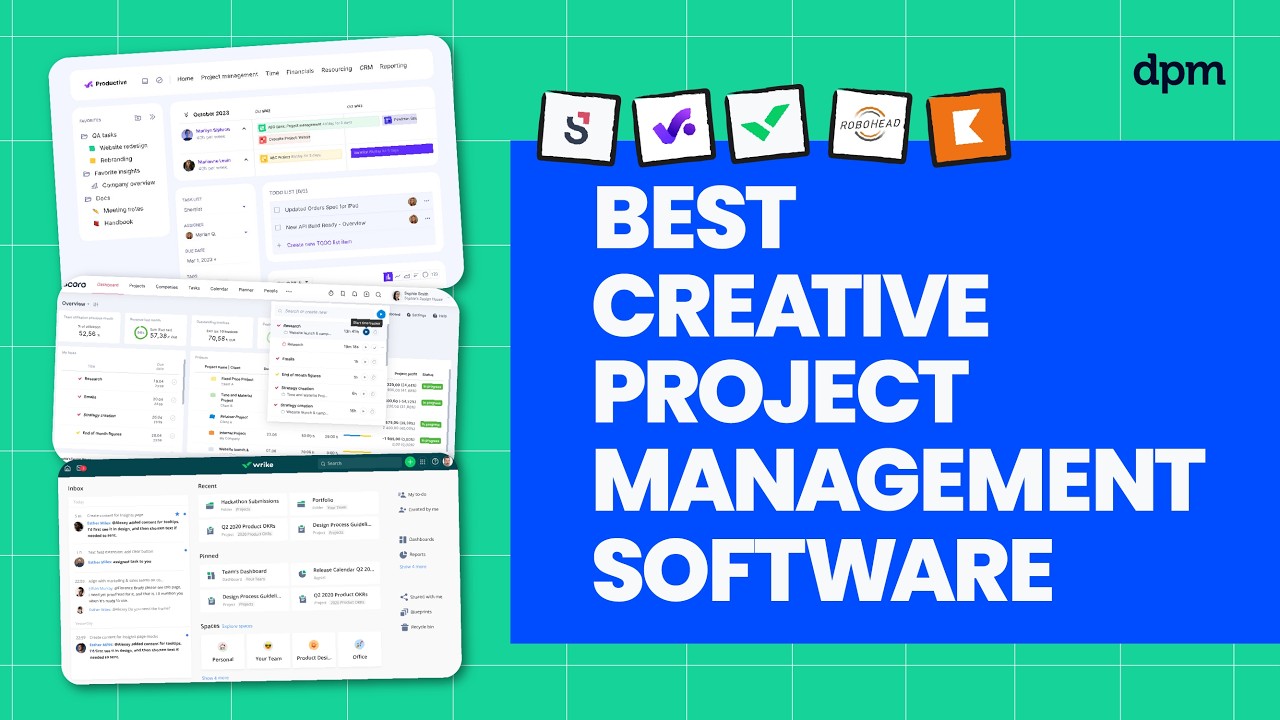
Best Creative Project Management Software Overviews
Read about each tool and get relevant information regarding its use in creative projects. Feel free to check out how I picked the software on this list.

Best for annotating and versioning
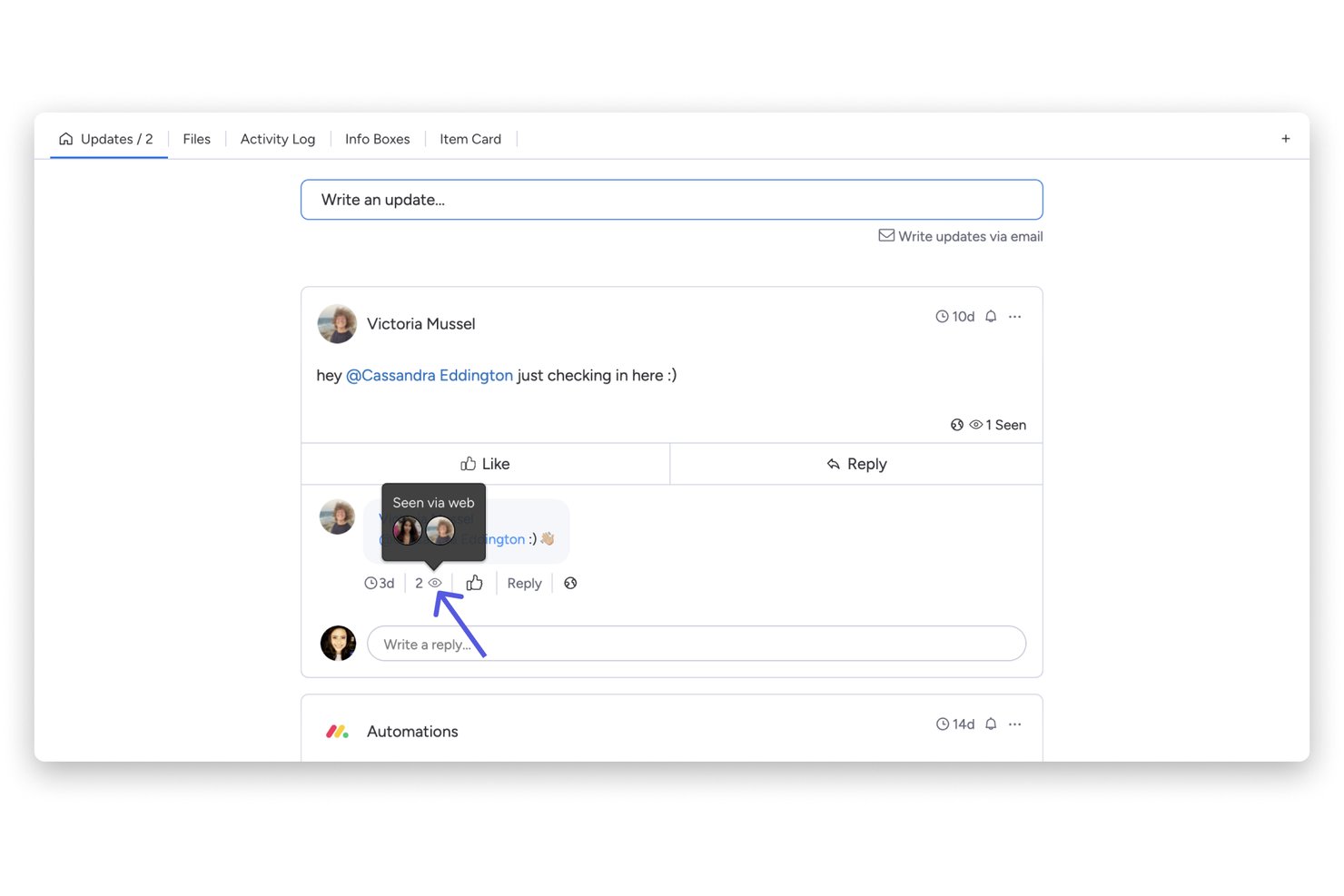
monday AI Workspace is a work management platform that combines AI-powered project boards, creative workflow templates, file annotation, version tracking, and approval routing for marketing and creative teams.
Who Is monday AI Workspace Best For?
It's a strong fit for in-house marketing and creative teams that manage high volumes of visual assets, iterative feedback cycles, and multi-stakeholder approvals.
Why I Picked monday AI Workspace
monday AI Workspace earns its spot on my shortlist because of how it handles file versioning natively within the board. Every asset upload creates a chronological version timeline, so my team can compare iterations without digging through email chains. I also like the in-board annotation tool, which lets us drop comments directly on specific image regions tied to tasks. The Adobe Creative Cloud connection means designers can push updates from Photoshop or InDesign without switching tabs.
monday AI Workspace Key Features
- Dynamic intake forms: Capture creative briefs through customizable forms that route requests to the correct projects automatically.
- Multi-stage approval workflows: Set up sequential or parallel sign-offs with tracked approval steps on deliverables.
- Resource workload boards: Visualize team members’ capacity and assign project roles using built-in workload views.
- Creative workflow templates: Access a library of pre-built templates for campaigns, content calendars, and design production.
monday AI Workspace Integrations
monday AI Workspace offers hundreds of native integrations and marketplace apps, including Slack, Adobe Creative Cloud, Figma, HubSpot, Salesforce, Google Workspace, Dropbox, Microsoft 365, Jira, and connects with Zapier. An API is available for custom integrations.
Pros and Cons
Pros:
- Conditional intake forms with auto-routing
- In-board annotation on images and PDFs
- Native asset versioning tied to tasks
Cons:
- Workload views aren't built for creative roles
- Video proofing lacks timecoded comment support
New Product Updates from monday AI Workspace
monday AI Workspace Adds Human Approval Routing
monday AI Workspace adds a human-in-the-loop approval block to AI Workflows, sending approval requests and routing workflow paths based on responses. For more information, visit monday AI Workspace's official site.

Scoro
Best for visibility into agency operations

Scoro is a project management platform built for creative agencies that need to manage projects, resources, and budgets in one place, helping teams coordinate client work, track time, and keep financials aligned with project delivery.
Who Is Scoro Best For?
Scoro suits mid-sized creative and professional services agencies that need a single platform to manage projects, people, and profitability.
Why I Picked Scoro
Scoro earns its spot on my shortlist because of how much visibility it gives you into every layer of agency operations. I particularly like the real-time dashboards that surface project progress, team utilization, and budget burn all in one view—without having to pull reports manually. The Gantt-style project timeline also lets my team spot scheduling conflicts and resource gaps before they become problems. Scoro's built-in quoting and invoicing tools tie financial performance directly to project delivery, preventing anything from slipping through the cracks.
Scoro Key Features
- Kanban task boards: View and manage task status across columns like "Planned," "In Progress," and "Completed" to track work at the individual task level.
- Retainer management: Track recurring client work, monitor budgets, and manage retainer hours directly within the platform.
- Time tracking: Log hours against tasks and projects using a built-in timer, manual entry, or calendar-based logging.
- Client portal: Share quotes and project updates with clients, collect approvals, and exchange messages without leaving Scoro.
Scoro Integrations
Integrations include Google Calendar, Xero, QuickBooks, Zapier, Slack, Dropbox, Microsoft 365, Outlook, and Sage.
Pros and Cons
Pros:
- Quote-to-invoice workflow keeps finances connected
- Resource planning shows creative team capacity
- Tracks project profitability in real time
Cons:
- Onboarding may feel generic for agency workflows
- Task creation can require too many steps
New Product Updates from Scoro

Scoro Adds Time Mobile App and ELI Improvements
Scoro adds the Scoro Time mobile app for iOS/Android to track time anywhere and expands ELI with attachments, smarter filtering, and trigger-based actions. For more information, visit Scoro's official site.

Best for managing resources, projects, and finances

Productive is a project management platform built for creative agencies that need to handle client projects, track time, manage resources, and oversee budgets all in one place.
Who Is Productive Best For?
Productive is a strong fit for small to mid-sized creative and digital agencies that need a single platform to manage client projects, team capacity, and profitability.
Why I Picked Productive
Productive earns its spot on my shortlist because it's one of the few agency tools that connects resource planning, project delivery, and financial performance in a single view. I like that when my team logs time against a project, that data feeds directly into budget tracking and profitability reporting, without manual reconciliation. The resource planning feature lets me see who's available, who's overbooked, and how scheduled work will affect project margins weeks in advance. And the budgeting module supports fixed-price, time and materials, and retainer models, so I can set up budgets that accurately reflect how my agency bills clients.
Productive Key Features
- Multiple project views: Switch between Gantt, Kanban board, timeline, calendar, and workload views to manage tasks in the format that fits your team.
- Project templates: Duplicate tasks, subtasks, descriptions, and assignees from a saved template to spin up new client projects.
- Client portal access: Invite clients directly into projects to review budgets, leave comments, and track progress without needing a separate tool.
- Workflow automations: Set triggers to automatically open projects, create invoices, or send Slack messages when specific conditions are met.
Productive Integrations
Integrations include Jira, HubSpot, Xero, Google Calendar, Sage, Gmail, Microsoft Outlook, Slack, BugHerd, and QuickBooks.
Pros and Cons
Pros:
- Forecasting predicts utilization and future margins
- Time tracking connects directly to project budgets
- Retainer budgets help prevent client overservicing
Cons:
- Budget setup has a learning curve
- Resourcing views can feel cluttered
New Product Updates from Productive
Productive Adds Voice Dictation, Slack Connector, Proposals, and Overtime
Productive adds voice dictation, a Slack Connector, proposal controls, and overtime tracking. These updates support faster AI interactions, client proposals, and time management. For more information, visit Productive’s official site.

Wrike
Best for scaling organizations

Wrike is a project management platform built for creative agencies and marketing teams who need to manage complex campaigns, streamline feedback, and keep projects moving across multiple clients and deliverables.
Who Is Wrike Best For?
Wrike is a strong fit for mid-size to enterprise creative agencies that need a project management platform capable of growing with their team and client base.
Why I Picked Wrike
I shortlisted Wrike because it's one of the few platforms that can grow with an agency without requiring a full workflow overhaul when the team expands. I particularly like the custom request forms, which automatically generate tasks, assign workflows, and route work when a new project arrives—so onboarding a new client or campaign doesn't create chaos. Wrike's resource bookings and effort management tools also let me see exactly who has bandwidth before assigning work, which matters when you're juggling multiple clients across a growing team.
Wrike Key Features
- Kanban and Gantt views: Visualize project timelines and task progress across multiple campaigns using switchable board and chart views.
- Proofing and approval tools: Review, annotate, and approve creative assets directly within tasks without switching to a separate tool.
- Cross-tagging: Add tasks to multiple project folders simultaneously so work stays visible across different client or team views.
- Real-time dashboards: Build custom dashboards that surface live project status, task completion, and workload data across your agency.
Wrike Integrations
Integrations include Adobe Creative Cloud, Salesforce, Google Drive, Microsoft Teams, Zoom, QuickBooks, Tableau, Power BI, Miro, and MediaValet.
Pros and Cons
Pros:
- Request forms standardize creative briefs
- Adobe integration simplifies asset workflows
- Built-in proofing speeds creative approvals
Cons:
- Limited real-time collaborative creation tools
- Advanced agency features sit on higher plans
New Product Updates from Wrike
Wrike Adds Klaxoon MCP Integration
Wrike’s Klaxoon MCP integration is now generally available, enabling AI agents to navigate between Wrike tasks and attached whiteboards, read task context, and manage whiteboard attachments via API. For more information, visit Wrike's official site.

Best for managing creative projects at scale for ROI
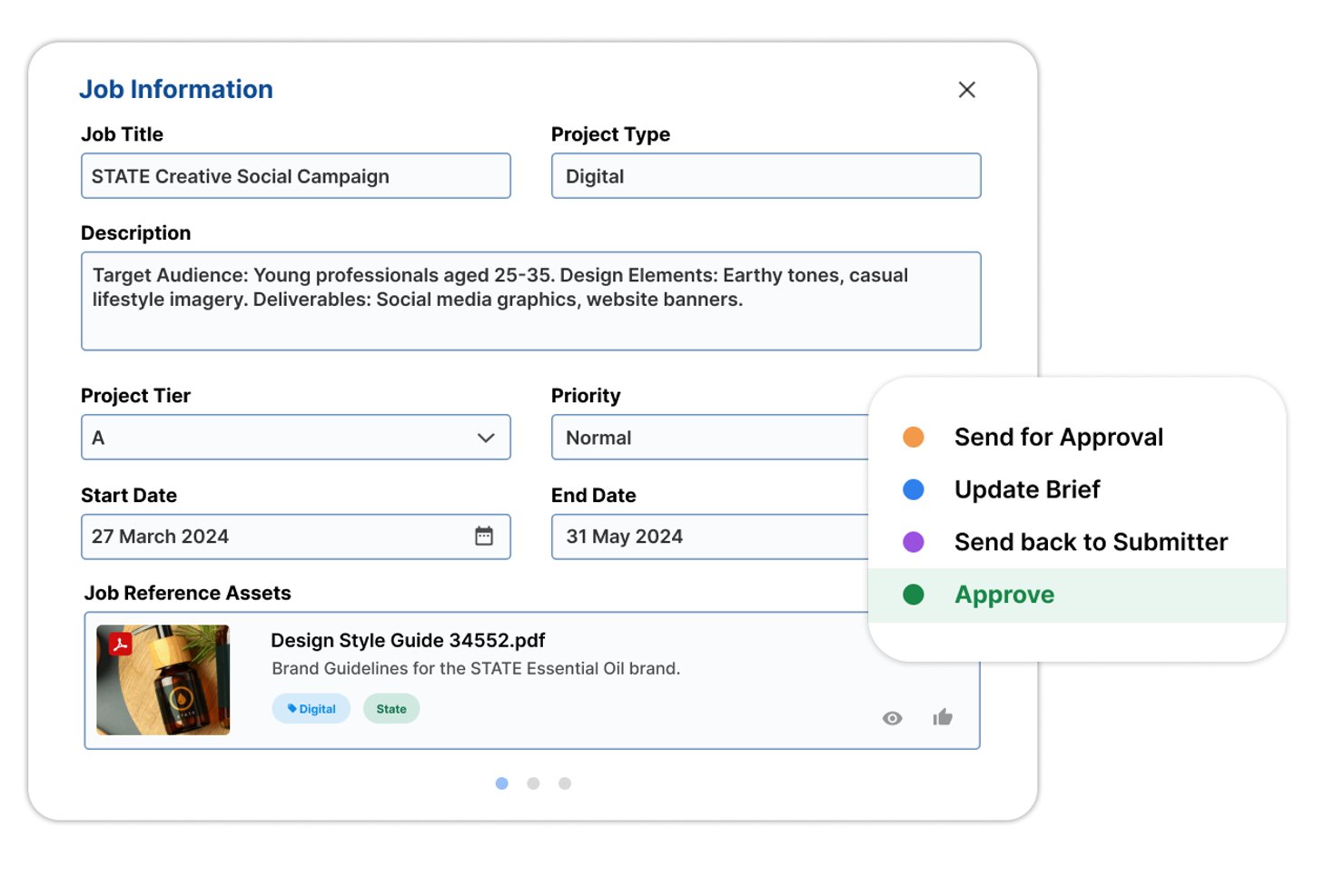
Screendragon is an AI-powered creative workflow and project management platform built for enterprise marketing teams and agencies, combining workflow automation, resource and capacity planning, proofing and approvals, digital asset management, and financial tracking.
Who Is Screendragon Best For?
Screendragon is a strong fit for enterprise marketing teams and creative agencies managing high-volume, multi-brand work that needs financial accountability alongside creative output.
Why I Picked Screendragon
Screendragon earns its spot on my shortlist because it's built specifically to connect creative output to financial outcomes, which is rare. I love that the AI Resourcing Agent can match people to work based on skills and availability and auto-assign an entire staffing plan in one click, so capacity decisions stop being guesswork. Pair that with real-time budget burn tracking and cost-per-job reporting, and you have a clear line from campaign activity to ROI.
Screendragon Key Features
- Dynamic brief automation: Briefs adjust their fields, layout, and language in real time based on what the requester enters, including multimedia previews and calculated outputs.
- No-code visual workflow builder: Teams can configure conditional, multi-stage, branching workflows with custom terminology and templates—no developer needed.
- Digital asset management: A built-in DAM module handles AI auto-tagging, natural-language search, rights management, and automatic publishing of approved assets.
- AI-powered compliance agent: An automated compliance step checks assets against brand and legal standards before they move forward in the approval workflow.
Screendragon Integrations
Screendragon lists 14 pre-built connectors, including Aprimo, Brandfolder, Ziflow, Workato, Microsoft Power BI, Slack, and Microsoft Teams. It also provides an API and supports Zapier integrations.
Pros and Cons
Pros:
- Users praise responsive implementation support
- Resource planning connects staffing with budgets
- Flexible workflows adapt to agency processes
Cons:
- Navigation and search strain large accounts
- Complex approval chains can slow projects
New Product Updates from Screendragon
Screendragon Unveils New AI Hub
Screendragon introduced AI Hub, a new capability that lets teams build and manage AI agents directly within workflows. The update helps marketing teams automate tasks, maintain governance controls, and scale AI-driven operations more efficiently. For more information, visit Screendragon's official site.

Kantata
Best for full lifecycle creative service delivery

Kantata is a project management platform built for creative agencies that need to manage client projects, resources, and financials from a single workspace, helping teams handle complex workflows and deliverables across the entire project lifecycle.
Who Is Kantata Best For?
Kantata is a strong fit for mid-to-large creative agencies and professional services firms that need to manage resourcing, project delivery, and client financials in one place.
Why I Picked Kantata
Kantata earns its spot as one of the best on my shortlist because it's one of the few platforms that genuinely covers the full arc of creative service delivery—from resource scheduling before a project kicks off to financial reporting after it wraps. I like that the resource management module lets my team filter available talent by skill set and capacity, so we're not just assigning whoever's free but actually matching the right people to the right work. The financial management layer is where Kantata really separates itself: my team is able to track project margins in real time, not just at billing time, which means we can catch scope creep before it quietly kills profitability. The built-in business intelligence layer also gives us pre-built reports on utilization, fees, and margins—the exact metrics agency leaders need to make staffing and pricing decisions with confidence.
Kantata Key Features
- Collaboration & feedback tools: Collect client and employee sentiment alongside project metrics in a single workspace to track satisfaction and flag issues during delivery.
- Time tracking: Log billable and non-billable hours directly against projects so your team's time data feeds directly into budget and margin calculations.
- AI expertise engine: Surfaces next-best actions and forecasting insights based on data from across your project portfolio.
- Invoicing: Generate invoices tied directly to project financials, keeping billing aligned with actual work delivered.
Kantata Integrations
Integrations include Salesforce, HubSpot, Slack, Jira, QuickBooks, Xero, NetSuite, BambooHR, Google Drive, and Microsoft Teams.
Pros and Cons
Pros:
- Client feedback can be captured during delivery
- Capacity forecasting helps prevent team overbooking
- Skills-based resourcing matches creatives to projects
Cons:
- PSA workflows may feel rigid for fast-moving creative work
- Feature depth can overwhelm smaller creative teams
New Product Updates from Kantata

Kantata Adds Access Group Change History
Kantata adds Access Groups History, letting account administrators track changes to group details, membership, and permissions in Recent History. The update also makes these events available through the Subscribed Events API for broader monitoring. For more information, visit Kantata’s official site.
 .
.
Best for complex project timelines

Zoho Projects gives creative agencies a flexible platform to manage client campaigns, track deliverables, and coordinate teams across complex projects with built-in collaboration and timeline tools.
Who Is Zoho Projects Best For?
Zoho Projects is a good fit for small to mid-sized creative agencies that need structured project workflows without the cost of enterprise-level tools.
Why I Picked Zoho Projects
Zoho Projects is on my shortlist because it handles complex, multi-phase timelines well—a frequent issue for creative agencies. I particularly like the Gantt chart's critical path analysis, which flags tasks that would delay the entire project if they slip. That lets my team see which deliverables need attention first, rather than discovering a bottleneck after it's already caused a cascade. The baseline comparison feature is also useful: I can set a project baseline at kickoff, then compare planned vs. actual progress at any point to show clients exactly where things stand.
Zoho Projects Key Features
- Task dependencies: Link related tasks so that changes to one automatically update the schedule for dependent work.
- Time tracking and timesheets: Log billable and non-billable hours directly on tasks and generate timesheet reports for client billing.
- Resource utilization chart: View workload distribution across team members to spot over-allocation before it affects delivery.
- Issue tracker: Log, assign, and monitor bugs or revision requests tied directly to project tasks.
Zoho Projects Integrations
Integrations include Zoho CRM, Zoho Desk, Zoho Analytics, Zoho Books, Google Calendar, Microsoft Teams, Dropbox, Box, Slack, and GitHub.
Pros and Cons
Pros:
- Affordable pricing for growing teams
- Built-in time tracking and billing
- Strong automation and workflow customization
Cons:
- Mobile experience less fully featured
- Interface has steeper learning curve
New Product Updates from Zoho Projects
Zoho Projects Adds CodeX Scripts for Custom Modules
Zoho Projects now supports CodeX Scripts for custom modules, enabling conditional logic and rules for creating, updating, and deleting records. For more information, visit Zoho Projects' official site.
 .
.
Enji
Best for small marketing agencies
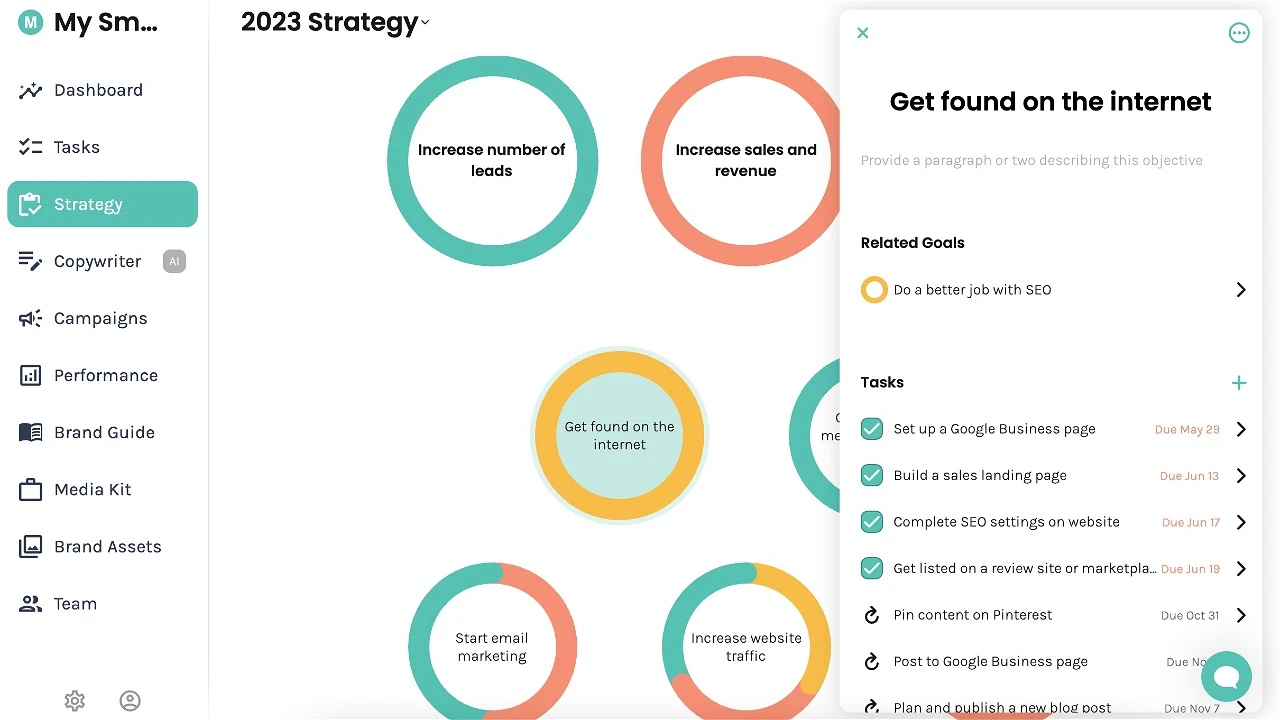
Enji is a creative project management platform for marketing teams and agencies that combines campaign planning, content creation, social media scheduling, and performance tracking in one workspace. The platform helps teams organize client marketing activities, automate campaign task planning, and monitor analytics across channels without relying on multiple disconnected tools.
Who Is Enji Best For?
Enji is a strong fit for small marketing teams and solo marketers managing multi-channel digital campaigns who need structured, AI-guided planning without a heavy tool setup.
Why I Picked Enji
Enji is one of my top picks because I love how it automatically suggests marketing tasks based on your goals and strategy inputs. Instead of building a task list from scratch, Enji generates recommended to-dos tied directly to your active campaigns, which keeps my team moving without the usual planning overhead. I also like the strategy-first setup, where you define your business goals, and Enji maps out the tactical steps needed to get there. That direct link between strategy and task generation is something I haven't seen done this cleanly in other creative project management tools.
Enji Key Features
- Marketing calendar: Visualize all scheduled campaigns, content, and deadlines in a single monthly or weekly calendar view.
- Content repurposing tool: Identify existing content pieces and get suggestions for adapting them across different channels.
- Performance tracking dashboard: Monitor marketing metrics and campaign results in one place without switching between tools.
- Channel management: Organize and manage tasks by marketing channel, such as email, social, or SEO, within a single workspace.
- Client collaboration workspace: Manage client marketing projects, content planning, scheduling, campaigns, and performance tracking in one place, with built-in client collaboration tools.
Enji Integrations
Native integrations are not currently listed by Enji.
Pros and Cons
Pros:
- Built-in marketing calendar with collaboration tools
- Progress and activity tracking over time
- Campaign and content planning in one workspace
Cons:
- Commenting and real-time chat features are limited
- Branding and customization options are basic

Best for no-code business apps
Quickbase is a no-code app-building platform that lets teams design custom workflows, automate approvals, track tasks, and manage resources without writing code.
Who Is Quickbase Best For?
Quickbase suits operations-minded teams that need to build custom tracking apps and approval workflows without relying on a developer.
Why I Picked Quickbase
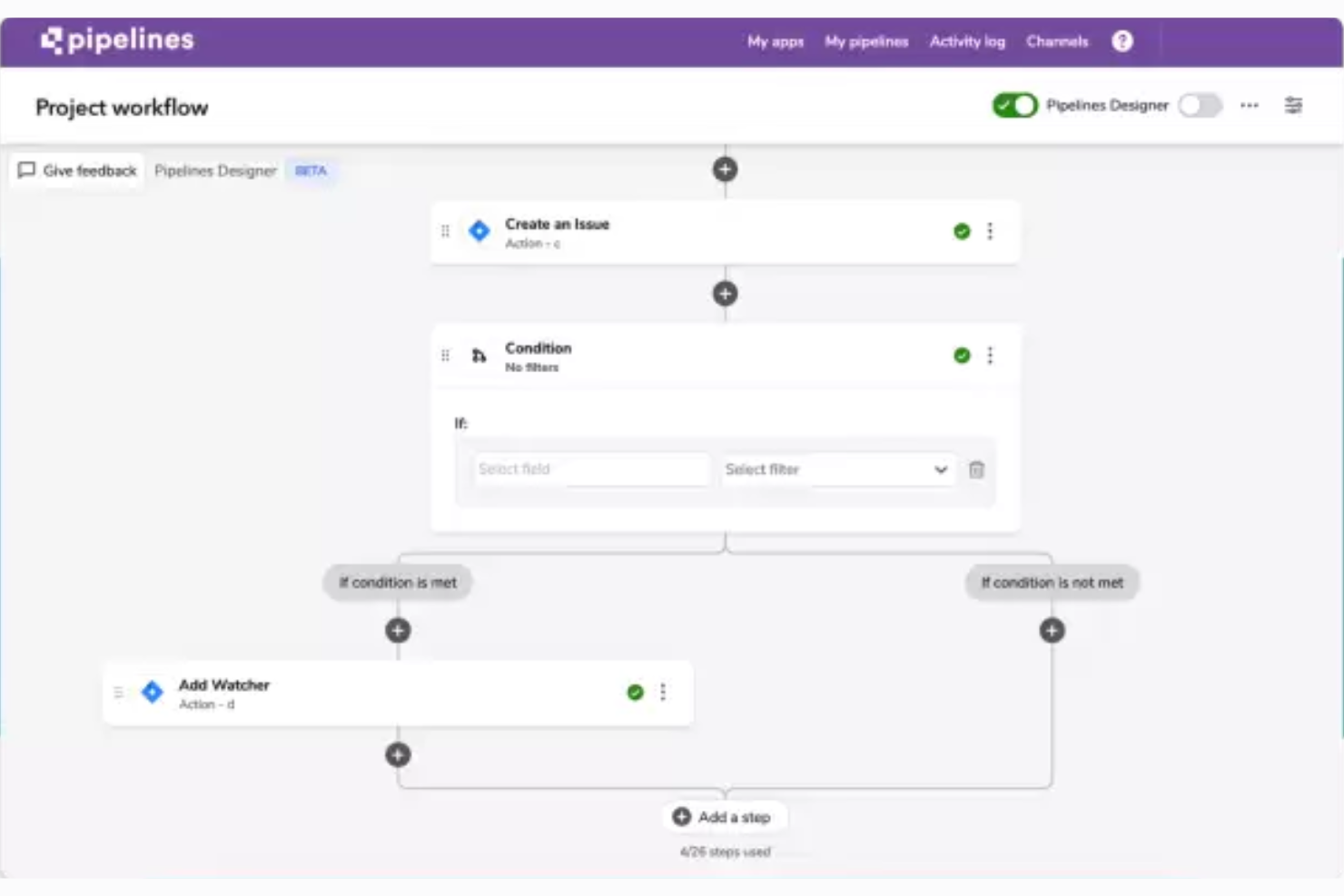
I picked Quickbase as one of the best because it's the only tool on this list that lets you build custom project apps from scratch without writing a single line of code. I love that its Pipelines Designer handles conditional approval routing for things like campaign asset review, and its intake forms support validation and hidden fields so you can capture structured creative briefs automatically. If your team's workflows don't fit a pre-built template, Quickbase gives you the flexibility to build exactly what you need.
Quickbase Key Features
- No-code app builder: A drag-and-drop interface lets you create custom project tracking apps, intake forms, and dashboards without writing code.
- Pipelines Designer: A visual workflow builder that supports conditional logic, loops, and multi-step automation across connected tools and teams.
- Role-based permissions: Access controls can be configured down to the app, form, and individual field level to manage what each team member or external stakeholder can view or edit.
- Real-time reporting dashboards: Customizable dashboards display live project data, budget vs. actuals, and utilization metrics across multiple apps in one view.
Quickbase Integrations
Quickbase offers 40+ pre-built Pipelines integrations, including Box, Dropbox, SharePoint, Google Drive, Slack, Microsoft Teams, Jira, HubSpot, Mailchimp, and DocuSign. It also supports REST APIs, webhooks, and Zapier for custom connectivity.
Pros and Cons
Pros:
- Track budgets and resource capacity
- Automate conditional approvals across teams
- Build custom campaign intake workflows
Cons:
- No agency billing or retainer tracking
- No in-context visual proofing or markup

Best for capacity planning

Resource Guru gives creative agencies a clear way to schedule people, projects, and resources, helping teams manage workloads and avoid overbooking as they juggle multiple client demands.
Who Is Resource Guru Best For?
Resource Guru is a strong fit for small to mid-sized creative agencies that need a dedicated tool for scheduling people and tracking team availability across multiple projects.
Why I Picked Resource Guru
Resource Guru earns its spot on my shortlist because of how well it handles capacity planning for agencies managing multiple projects at once. I like that the availability bar gives an instant visual read on who has bandwidth and who's overloaded—without having to dig through spreadsheets or chase down status updates. My team is able to use the utilization reports to see, at a glance, whether we're under- or over-allocating people across client work. That kind of visibility makes it much easier to make resourcing decisions before a bottleneck actually hits.
Resource Guru Key Features
- Drag-and-drop scheduling: Move bookings across the timeline view to adjust assignments without rebuilding your schedule from scratch.
- Leave and time-off management: Log vacation, sick days, and public holidays so they're automatically factored into resource availability.
- Project time tracking: Log billable and non-billable hours against specific projects and clients to keep timesheets accurate.
- Clash management: Resource Guru flags double-bookings automatically, so you can resolve conflicts before they affect delivery.
Resource Guru Integrations
Integrations include Outlook Calendar, Google Calendar, Jira, and Asana.
Pros and Cons
Pros:
- Clash management prevents double-booking talent
- Skills filtering helps match creatives to briefs
- Capacity heatmaps expose creative team overloads
Cons:
- Advanced forecasting is relatively lightweight
- Multi-day booking edits can be cumbersome
New Product Updates from Resource Guru

Resource Guru Adds More Control Over Calendar Sync
Resource Guru adds more control over Google and Outlook Calendar sync, including source calendar selection and destination calendar options. These updates help users manage external events and Resource Guru bookings with less clutter. For more information, visit Resource Guru’s official site.
 .
.Other Creative Agency Project Management Software
Need more creative software app ideas? After all, creative projects, and design agency project management, sometimes require thinking outside the box. Here are a few more suggestions to get you going.
- Quire
For breaking down complex tasks
- Synergist
For strategic agency management
- Asana
For agency client and project oversight
- Adobe Workfront
For Adobe ecosystem creative operations
- Teamwork.com
For monitoring team capacity and workload
- Ravetree
For retainer contracts
- ClickUp
For free plan for creative project management
- Filestage
For its variety of ways to gather feedback
- Nifty
For cross-organizational reporting
- COR
For agency profitability and rework tracking


Related Project Management Software
If you still haven't found what you're looking for here, check out these other related tools that we've tested and evaluated:
- Project Management Software
- Video Production Project Management Tools
- PR Project Management Software
- Resource Management Software
- Workflow Automation Software
- Time Tracking Software
- Collaboration Tools
- Productivity Tools
- Free Project Management Software
- Advertising Agency Software
- Design Collaboration Tools
How I Evaluate Creative Project Management Software
My evaluation splits into two layers: the baseline criteria a tool must clear to make the list, and the differentiators that matter for creative teams managing briefs, proofs, and rounds of feedback.
Core Functionality (Table Stakes For This List)
When I'm selecting tools for my list, I rank each one on a scale from 0 (does not offer the functionality) to 5 (excels in this area) for each core functionality listed below. Then, I calculate the tool's total score into a percentage. Each tool needs to achieve a minimum total score of 65% to be considered for inclusion.
- Creative Request Intake: I check whether teams can build structured brief forms and route requests automatically, rather than relying on email or Slack messages to kick off work.
- Proofing & Annotation: The ability to mark up images, PDFs, and video directly in the platform matters—I look for threaded comments pinned to specific frames or areas.
- Approval Workflows: I evaluate how each tool handles multi-step sign-offs, from a single design lead approving social graphics to layered legal and brand reviews on campaign assets.
- Asset & Version Management: Creative teams juggle dozens of file versions per deliverable. I look for automatic versioning, rollback options, and assets linked to their parent tasks.
- Resource & Capacity Planning: I check for workload views that show who's overbooked and who has bandwidth, especially across roles like designers, copywriters, and motion artists.
- Creative Workflow Templates: Pre-built or saveable templates for repeatable processes like campaign launches or video production help teams skip setup and start executing faster.
Once I have a list of tools that meet the criteria, I consider what sets each platform apart.
Differentiating Factors (What Sets Vendors Apart)
Here's how I compare and contrast different vendors:
Standout Features
Client and stakeholder portals are a major differentiator. I look for tools that let external reviewers submit briefs and approve deliverables without needing a full license. Creative analytics dashboards also matter, especially when a studio manager needs to report on revision cycles or on-time delivery rates to leadership. Time tracking tied directly to creative tasks helps agencies and in-house teams measure effort per project and support chargeback models.
Beyond Features
Native integrations with tools like Adobe Creative Cloud and Figma matter because designers shouldn't have to leave their design environment to update project status. I also evaluate how well a platform scales across team structures—whether it supports freelancers, multi-brand setups, or large enterprise creative departments. Security is another key factor. Creative teams often handle pre-release assets and sensitive brand IP, so I look for granular permissions, access expiration controls, and audit logging for external collaborators.
How to Choose Creative Agency Project Management Software
As you work through your own unique software selection process, keep the following points in mind:
| Factor | What to Consider |
|---|---|
| Ease of Use | Choose software that designers, account managers, and other team members can use without extensive training. A complicated interface can slow adoption and add friction to fast-moving creative work. |
| Creative Collaboration & Approvals | Look for commenting, annotations, version tracking, and approval workflows that keep feedback tied to the actual creative asset rather than scattered across email and chat. |
| Resource & Capacity Planning | Check whether you can see workloads, availability, utilization, and time spent across projects. This helps you spot overbooked creatives and available capacity before assigning work. |
| Time & Budget Tracking | Look for time tracking, project budgets, estimates, and profitability reporting so you can see when client work is consuming more hours than planned. |
| Client Management | Consider whether clients can review work, provide feedback, and approve deliverables without getting unnecessary access to your agency’s internal workspace. |
| Integration Capabilities | Make sure the platform connects with tools your agency already uses, such as Adobe Creative Cloud, file storage, communication, and accounting software. |
| Customization | Look for customizable workflows, templates, fields, and dashboards that can accommodate different project types, from one-off campaigns to ongoing retainers. |
| Reporting | Check whether you can report on utilization, billable hours, project progress, budgets, and profitability across clients and projects. |
Trends in Creative Agency Project Management Software for 2026
Here are some key trends in agency project management tools that I believe will be influential both now and in the future:
- AI is doing more of the busywork: AI project management tools are moving beyond summaries and suggestions to help create projects, update tasks, route work, and flag potential blockers.
- Resource planning is getting smarter: Agencies can increasingly plan work around availability, skills, workload, utilization, and project demand, not just assign tasks to whoever looks free.
- Creative reviews are happening in one place: Proofing, annotations, version comparisons, and approvals are becoming part of the project workflow, reducing feedback scattered across email, chat, and other tools.
- Project reporting requires less manual work: Teams can increasingly ask questions about project data, generate status updates, and identify delays without building every report from scratch.
- Turning requests into projects is getting easier: New tools can help convert briefs, client requests, and conversations into tasks and workflows, cutting down on project setup and repetitive data entry.
- Creative assets are getting closer to project workflows: Agencies are increasingly managing files, versions, feedback, and approvals alongside the work itself instead of treating asset management as a separate process. For teams managing large volumes of creative files, dedicated digital asset management software can provide more advanced organization, search, permissions, and asset control.
What is Creative Agency Project Management Software?
Creative agency project management software helps agencies manage client work from brief to final delivery. It gives account managers, project managers, designers, writers, and other creatives one place to track who’s working on what, when work is due, and where each deliverable stands.
Unlike basic task management tools, agency-focused software often supports creative briefs, resource planning, time and budget tracking, file reviews, feedback, versioning, and client approvals. This helps agencies manage both sides of the work: keeping creative projects moving while keeping an eye on capacity, deadlines, and profitability.
Project Management Software vs. DAM
The simplest distinction is that project management software manages the work, while digital asset management (DAM) software manages the files that work produces.
| If You Need To… | Better Fit |
|---|---|
| Plan projects, assign work, and manage deadlines | Project management software |
| Manage workloads, budgets, and dependencies | Project management software |
| Store and organize a large library of creative assets | DAM |
| Control file versions, permissions, and asset access | DAM |
| Find and reuse approved creative assets | DAM |
| Manage production and maintain a long-term asset library | Project management software + DAM |
There’s overlap—especially around files, proofing, versions, and approvals—so creative teams don’t always need both. If your biggest challenge is getting work delivered, prioritize project management. If it’s keeping a growing asset library organized and accessible, a DAM is likely the better fit.
Features
When selecting creative project management software, keep an eye out for the following key features:
- Task management: Solid task management capabilities help teams assign, track, and prioritize tasks, so everyone knows their responsibilities and deadlines. This helps to manage dependencies and reduce bottlenecks.
- Collaboration tools: Collaboration tools facilitate communication among team members, making it easy to share ideas, feedback, and updates in real-time.
- Time tracking: Time tracking allows teams to monitor how much time is spent on each task. This helps with project budgeting and identifying areas for improvement.
- Resource management: Resource management helps allocate resources like team members, tools, and materials efficiently, which can help prevent overallocation and optimize utilization.
- File sharing: File sharing capabilities make sure all team members have access to the latest versions of files and documents. This reduces the risk of errors and miscommunication.
- Creative briefs: Creative briefs help outline project objectives, the target audience, and deliverables, which provides clear direction and makes sure all stakeholders are aligned.
- Version control: Version control keeps track of changes made to documents and files, so teams can revert to previous versions if needed and maintain a clear history of revisions.
- Project templates: Project templates save time by providing pre-defined structures for common project types. This also helps with consistency and getting started quickly.
- Gantt charts: Gantt charts offer a visual representation of the project timeline, so teams can understand project progress and identify potential delays.
- Client review and approval: Client review and approval features streamline the process of getting feedback and sign-offs from clients, so projects stay on track and meet client expectations.
Benefits
Here are five key advantages of using creative workflow tools for both users and organizations:
- Enhanced collaboration: Project management software for advertising agencies can improve collaboration by providing a centralized platform for communication, so all team members are aligned and can easily share ideas and feedback.
- Improved efficiency: By streamlining workflows and automating repetitive tasks, the software helps teams work more efficiently, save time, and focus on high-impact creative work.
- Better resource management: Effective resource management features allow organizations to allocate team members and tools efficiently, prevent overwork, and make sure projects are completed on time and within budget.
- Increased transparency: With real-time updates and clear visibility into project progress, project management tools for creative agencies can increase transparency, so teams stay on track and you can make informed decisions quickly.
- Higher quality outputs: The structured approach and comprehensive tools provided by design agency management software lead to higher quality outputs, as teams can meticulously plan, execute, and review their work with greater precision.
Costs & Pricing
Here's a breakdown of the common plans, their average prices, and the features they typically include:
Plan Comparison Table
Here is a table that you can use to compare the different plans present in most creative agency PM software.
| Plan Type | Average Price | Common Features |
|---|---|---|
| Free | $0 | Basic task management, file sharing, limited storage and user access, basic collaboration tools |
| Basic | $10 - $20 per user/month | Task management, time tracking, resource allocation, basic reporting, integrations with essential apps |
| Standard | $25 - $40 per user/month | Enhanced collaboration tools, advanced reporting and analytics, project templates, version control, increased storage |
| Premium | $50 - $70 per user/month | All standard features, AI-powered resource management, workflow automation, advanced security features, priority support |
| Enterprise | Custom Pricing | All premium features, custom integrations, dedicated account manager, unlimited storage, enterprise-grade security |
Creative Agency PM Software FAQs
Find answers to common questions about project management at creative agencies.
What is a creative project?
A creative project is, in most cases, an original imaginative or artistic solution to a client’s problem. These types of projects are commonly handled by digital marketing firms, advertising agencies, branding studios, and other creative business types.
What is creative project management?
Creative project management refers to the specialized processes and methodologies used to plan, organize, and execute creative projects and initiatives. Unlike traditional project management, which focuses more on tangible deliverables and processes, creative project management deals with the unique challenges of managing creative work, such as iterative design processes, subjective feedback, and managing creative talent. It involves techniques like agile workflows, design sprints, and regular stakeholder collaboration to keep creative projects on track and deliver high-quality creative assets on time and within budget. As the project manager, you’re the “go-between” for technical, administrative, and creative teams.
Who uses creative project management software?
There are a number of types of teams and ways to use project management software. Some specific examples include creative agencies, marketing teams, design studios, and product development teams. Creative work involves collaboration, feedback, and proofing, so an agency project management system that has communication and collaboration features is especially well-suited to this type of work. Creative teams may also have extra appreciation for a friendly drag-and-drop interface or interactive checklists. As for agencies in particular, the ability to track progress — and to allow clients to track progress — is a big plus. Some agency management systems even offer client portals to facilitate this.
How do you manage a creative project?
There is no single way to manage a creative project. Depending on how your team works, you might take an agile or more waterfall approach. In the same sense, building a product might require a different approach from managing a marketing project. Whatever your context, here are some steps that you can take to get started:
- Go through a careful requirements gathering process.
- Kick-off the project with solid project kickoff meeting.
- Make sure you know how to make and use a robust project plan and budget.
- Monitor progress and maintain frequent communication (and mitigate against scope creep!).
- Once you’ve delivered the final product, make sure you get useful feedback from your teams (for example, in a retrospective meeting).
What does a project manager at a creative agency do?
So what does the day-to-day of project management look like at a creative agency? Here’s a typical to-do list for a PM working at an agency:
- Review project timelines and adjust schedules as needed.
- Conduct team meetings to track progress and address any issues.
- Coordinate with clients to clarify requirements and provide updates.
- Allocate resources and assign tasks to team members.
- Monitor project budgets and ensure cost-effectiveness.
- Oversee the quality of deliverables and ensure they meet client expectations.
- Manage risks and implement mitigation strategies.
- Update project documentation and maintain records.
- Communicate with stakeholders to manage expectations and report on progress.
- Facilitate problem-solving and decision-making processes.
Can you manage creative work directly from where the files are stored?
Sometimes. Platforms built around creative files may also let you assign work, collect feedback, manage versions, and move assets through approval. That can work well when the file is the center of the workflow. But if you also need detailed timelines, capacity planning, budgets, or dependencies, you’ll likely need dedicated project management functionality.
Should I use project management software or a DAM?
Think about what you’re trying to manage. Project management software keeps the work moving—who’s doing what, when it’s due, and how the project is progressing. A DAM keeps the assets under control—where files live, which version is approved, who can access them, and how they’re reused.