
30 Best Project Management Dashboard Software For 2026

Best Project Management Dashboard Tools
Here’s a shortlist of the best project management software with dashboards:


Without project management dashboard software, it's difficult to effectively visualize and manage project progress and performance—spreadsheets just don't cut it. But with so many different software solutions available, finding the right option is tough.
I'll help make your choice easy by sharing my personal experiences using dozens of different project dashboard tools and shortlisting my picks for the best software options available on the market.
Table of Contents
- Best Software Shortlist
- Why Trust Us
- Compare Specs
- Best Project Management Dashboard Tools
- Other Project Management Dashboard Software
- Related Reviews
- Selection Criteria
- How to Choose
- Trends in Project Management Dashboard Software
- What is Project Management Dashboard Software?
- Features
- Benefits
- Costs and Pricing
- FAQs
Why You Can Trust Us
Compare Software Specs Side-by-Side
Here’s a convenient table you can use to compare each tool’s specs side-by-side.
| Tool | Best For | Trial Info | Price | ||
|---|---|---|---|---|---|
| 1 | Best for cross-team collaboration | Free plan + free demo + 14-day free trial available | From $10/user/month (billed annually) | Website | |
| 2 | Best for portfolio and project management software capabilities | Free plan available | From $9/user/month (billed annually) | Website | |
| 3 | Best for a spreadsheet-like interface | Free trial + free demo available | From $9/member/month (billed annually) | Website | |
| 4 | Best for customizable project dashboards | Free 14-day trial available + free demo available | From $19.90/user/month (billed annually) | Website | |
| 5 | Best for flexible, customizable dashboards | Free plan available | From $8/user/month (billed annually) | Website | |
| 6 | Best with over 250 pre-built reports and dashboards | Free demo available | From $9/user/month (billed annually) | Website | |
| 7 | Best ITSM software with task tracking & data visualizations built-in | 7-day free trial | From $20/user/month (billed annually) | Website | |
| 8 | Best for user-friendly Gantt charts | Free plan available | From $9/month (billed annually) | Website | |
| 9 | Best Agile sprint planning dashboards | Free plan available (request via email) | From $12.49 project-planning/user/month (billed annually) | Website | |
| 10 | Best project dashboards with time tracking/timesheets built-in | Free plan + free demo available | From $7/user/month (billed annually) | Website |


-

Insightful
Visit WebsiteThis is an aggregated rating for this tool including ratings from Crozdesk users and ratings from other sites.4.8 -
Accelo
Visit WebsiteThis is an aggregated rating for this tool including ratings from Crozdesk users and ratings from other sites.4.4 -
Forecast
Visit WebsiteThis is an aggregated rating for this tool including ratings from Crozdesk users and ratings from other sites.4.6




Best Project Management Dashboard Tools
Here’s a brief overview of each of the project management dashboard software and its standout features.


Wrike is an award-winning, easy-to-use project dashboard software used by 20,000+ organizations worldwide. The tool is suitable for teams with anywhere from five members to an unlimited number of team members. It’s highly configurable and allows users to customize workflows, dashboards, reports, request forms, and more.
Wrike’s simple project dashboard software enables users to switch between Kanban boards, interactive drag-and-drop Gantt charts, and traditional workload views, allowing users to tailor their views and dashboards to their needs. Wrike also features task lists, shared workflows, file sharing, and project health analysis tools such as flagging roadblocks.
Wrike has an easy-to-use, intuitive interface and navigation with distinct spaces, folders, and tasks. Users can toggle between the home screen and timesheets, dashboards, calendars, reports, and an activity stream. Wrike has a dedicated help center with interactive training, videos, a ‘Getting Started’ guide, and a thriving community.
Wrike offers 400+ pre-built native integrations, including integrations with the most popular file management software from Microsoft, Google, and Dropbox, along with sales and marketing software from Salesforce and Marketo.
New Product Updates from Wrike

Streamlining Workspaces with New Updates
Wrike announces custom space templates, AI Agents in Wrike Labs, and a new Guage widget to improve project management. For more information, visit Wrike's official site.

Best for portfolio and project management software capabilities
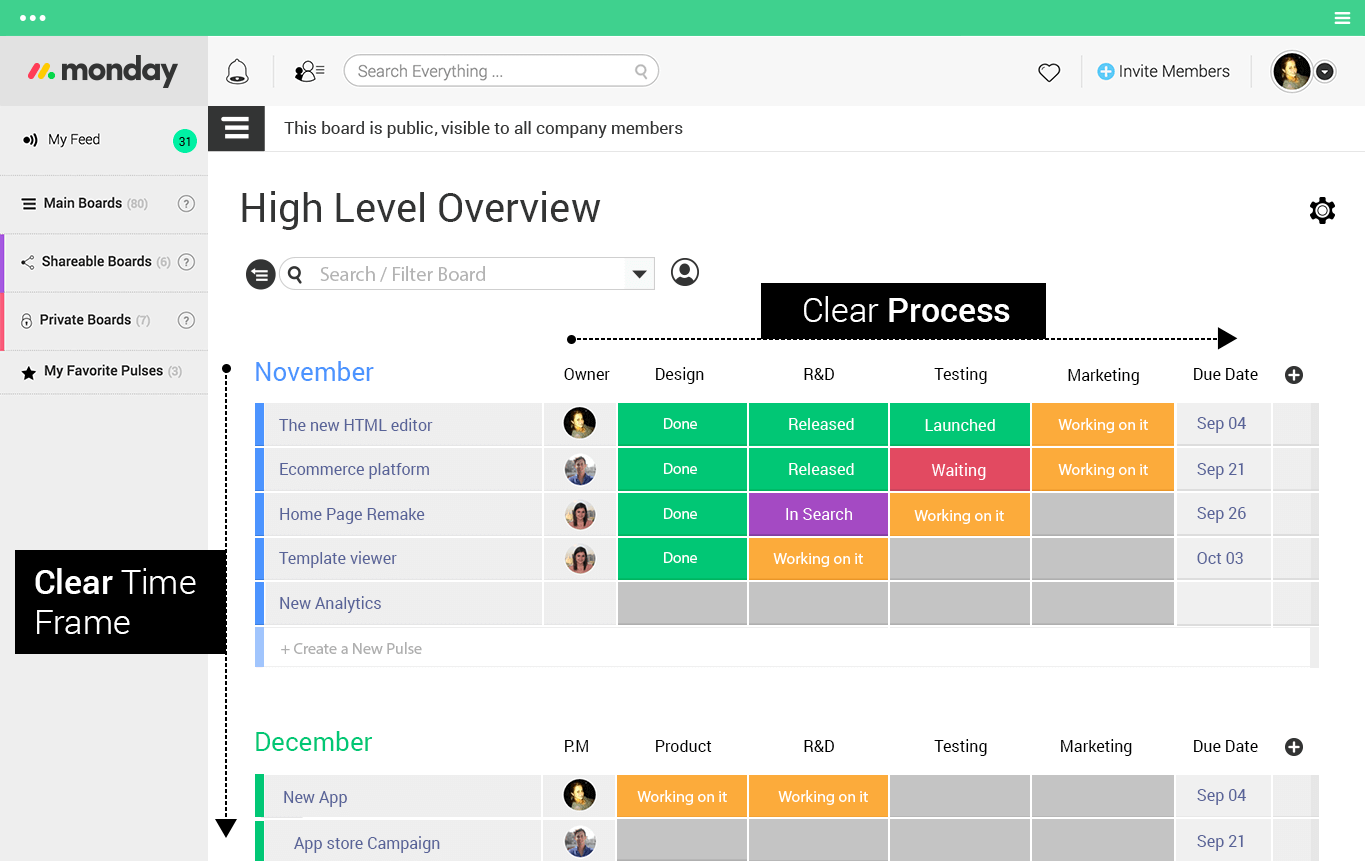
monday.com is an easy-to-use project management tool with flexible dashboards customizable with 15 drag-and-drop widgets for data like projects coming due, task progress bars, workload and capacity information, and total hours logged. The modern, colorful interface and easy to navigate UI makes it easy to onboard new users or teams.
monday.com does more than project dashboards, too, handling complex project and portfolio management with tasks, subtasks, dependencies, time tracking, collaboration tools, and file sharing. You can view your projects as task lists, Kanban boards, Gantt charts, and calendars and switch between views with a single click.
monday.com offers a healthy number of workflow automations and integrations, the number of which increases per subscription tier level. You can connect with other popular apps you already use, like Slack and JIRA. Activating automations is as simple and clicking through if/and/or rule pathways that use conversational language so that even beginners can figure it out.
monday.com’s integrations include project management apps like Slack, Google Drive, Gmail, Google Calendar, JIRA, GitHub, Trello, Dropbox, Typeform and many more, accessible through a paid plan with Zapier.
monday.com costs from $6/user/month and comes with a free 14-day trial. They offer a free plan for up to 2 users.
New Product Updates from monday.com

monday.com Adds Microsoft Teams Messaging In Workflows
monday.com introduces Microsoft Teams messaging within workflows. This update allows users to send messages to specific individuals directly from workflows, improving collaboration and communication. For more information, visit monday.com’s official site.


Smartsheet is a cloud-based platform that helps you manage projects, automate workflows, and collaborate with your team. Its spreadsheet-like interface makes it easy to organize tasks, track progress, and share information in real-time.
Smartsheet's project management dashboards let you create visual, high-level overviews of your projects. You can pull data from multiple sheets and timelines to build a comprehensive information hub, making it easier to track progress and anticipate roadblocks. This centralized view helps your team stay aligned and adapt quickly to changes.
Additionally, Smartsheet offers features like Gantt charts, Kanban boards, and calendar views, allowing you to visualize your project data in various formats. This flexibility enables you to choose the view that best suits your project's needs, enhancing your ability to monitor timelines, manage tasks, and allocate resources effectively.
The platform also offers resource management capabilities, helping you allocate team members and materials efficiently. Additionally, Smartsheet provides customizable templates, allowing you to jump-start your projects with pre-built sheets tailored to various industries and use cases.
Integrations include Power BI, Tableau, Adobe Creative Cloud, Salesforce, Microsoft Dynamics 365, ServiceNow, Jira, Slack, Microsoft Teams, DocuSign, Zapier, and UiPath.
New Product Updates from Smartsheet

Smartsheet Adds Direct Data Import to Existing Sheets
Smartsheet introduces direct data import to existing sheets in table view. This update lets you import CSV, XLS, and XLSX files directly into sheets, reducing manual work and speeding up data setup. For more information, visit Smartsheet's official site.
 .
.

Scoro is a professional services automation software designed to enhance project management through its integrated dashboards. It offers a comprehensive solution for managing projects, resources, and finances, making it a valuable tool for consultancies and agencies.
I picked Scoro because of its customizable dashboards that provide a clear visual representation of project data. This feature allows you to keep track of your project's progress and allocate resources effectively, ensuring that your team stays on top of deadlines and deliverables. Additionally, Scoro's advanced quoting and estimating tools are invaluable for planning and budgeting, giving you the confidence to manage project finances with precision.
Another reason for choosing Scoro is its AI-powered insights through its smart companion, ELI. This feature offers data-driven recommendations and automation, helping you make informed decisions and optimize workflows. Whether you're managing a small team or a large-scale project, Scoro's capabilities in real-time project tracking and financial oversight provide the support you need to maintain control and achieve your goals.
Features include thorough project financial tracking, which allows for detailed monitoring of budgets and expenses. The platform's collaboration tools centralize project information, making it easy for your team to work together and share updates seamlessly. Scoro also supports resource planning, ensuring that your team members are assigned tasks according to their availability and skill sets.
Integrations include Sage Intacct, Xero, QuickBooks Online, Exact Online, Expensify, Stripe, HubSpot, Salesforce, Microsoft Exchange, Google Calendar, Slack, and Jira Software.
New Product Updates from Scoro

Scoro Introduces Subtasks for More Granular Work Planning
Scoro introduces subtasks and improved price list deletion warnings, enabling teams to break down work into smaller units for detailed planning while protecting pricing data from accidental changes. For more information, visit Scoro’s official site.

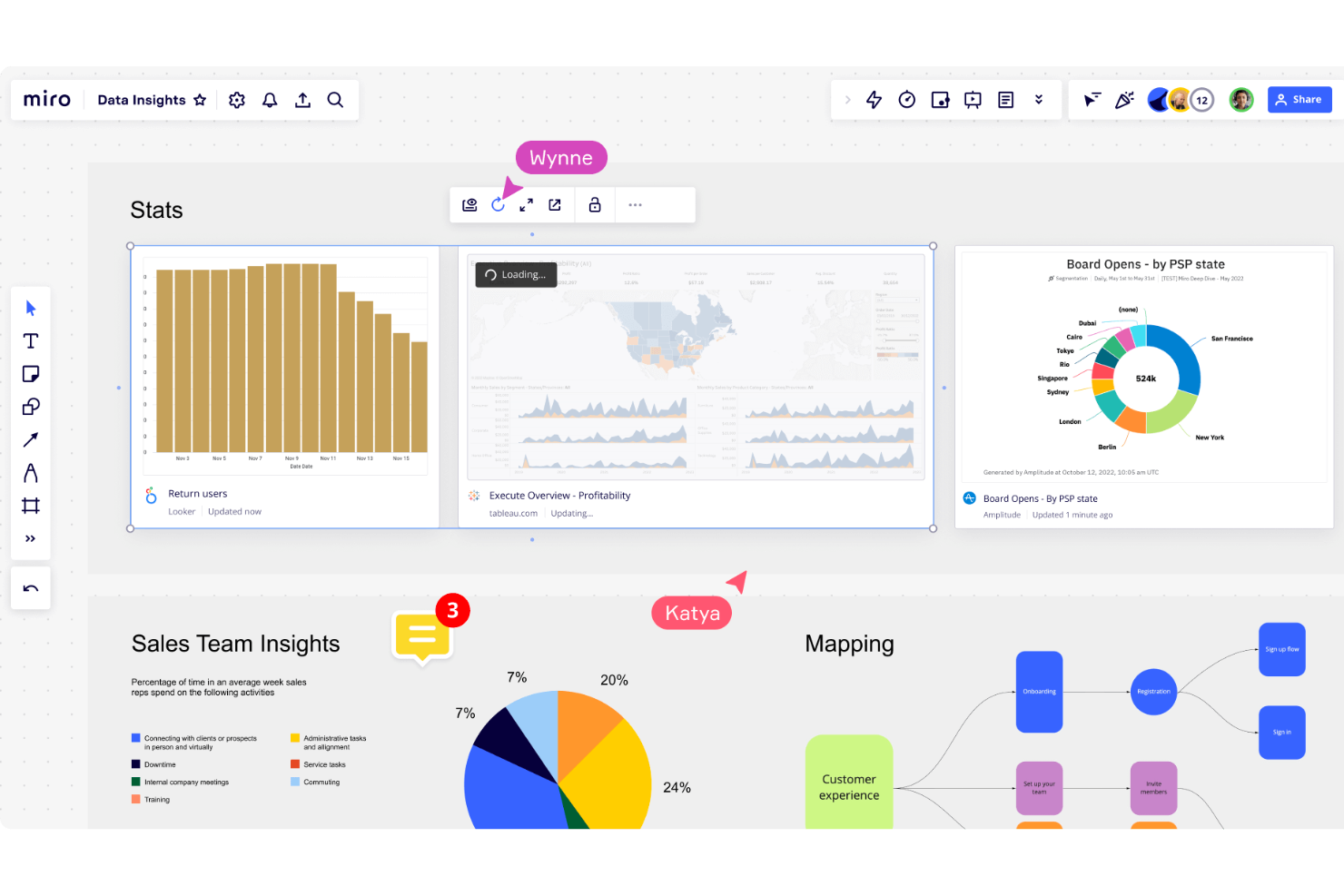
Miro is an online collaborative whiteboarding platform that serves as a tool for project management. Designed to cater to the needs of diverse teams, including project managers, designers, engineers, and marketers, Miro enables users to visualize, plan, and execute projects in a highly interactive and intuitive environment.
Miro stands out as a top project management dashboard software due to its ability to create highly flexible and customizable dashboards. Users can design dashboards that fit their specific project needs by utilizing Miro’s array of widgets and tools, such as Kanban boards, Gantt charts, timelines, and progress trackers. These features allow teams to visualize their workflows, set priorities, and monitor key metrics at a glance. The drag-and-drop interface makes it easy to update dashboards in real time, ensuring that everyone stays informed and aligned.
It also offers robust collaboration features that facilitate seamless team interactions. Real-time editing allows multiple team members to work on the same dashboard simultaneously, promoting transparency and collective ownership of the project. Additionally, the platform supports embedding multimedia elements, such as images, videos, and links, directly into dashboards.
Integrations include Slack, Microsoft Teams, Jira, Trello, Asana, Google Drive, Dropbox, OneDrive, Zoom, Microsoft Office, Notion, Confluence, Salesforce, Airtable, Zapier, and many more.
Pricing starts from $8/user/month (billed annually). A free plan is also available.
New Product Updates from Miro

Miro Enhances AI Workflows and Tables for Task Planning
Miro enhances AI workflows and Tables with AI-generated planning boards and web-aware automation. These updates help teams organize tasks faster and analyze external content within workflows. For more information, visit Miro’s official site.


Birdview PSA is a project, resource, and financial management software designed for professional service teams and organizations. You can plan, track, and manage multiple projects and portfolios through the system, as well as their allocated budgets and resources. The platform has comprehensive reporting dashboards to monitor your projects, people, and finances.
While the system has customizable reporting and analytics tools, it also comes with over 250 ready-made dashboards and reports you can easily set up. These include templates for executive summaries, project scorecards, demand projections, and expected vs actual budgets. Because you're tracking employee time, project costs, and workloads in the same platform, you can craft detailed reports on how work is getting done at your business.
Teams can manage projects using either Gantt charts and Kanban boards, and set milestones for large initiatives. The software's resource planning tools let you assign work based on people's availability, skill set, and workload. You can create project budgets, monitor expenses, and manage billing and invoices through the platform as well.
The software integrates with other tools including Microsoft Teams, Microsoft Project, Jira, Adobe Creative Cloud, MS Excel, Outlook, Hubspot, Salesforce, Oracle NetSuite, Gmail, Slack, Zoom, Github, Gitlab, HelpScout, HelpDocs, Olark, and other options for time tracking, design, ERP, and accounting software. You can also use their RESTful API to build additional integrations.
Paid plans start from $27 per user per month, when billed annually. A 12-day free trial is also available.
Best ITSM software with task tracking & data visualizations built-in
Jira Service Management is an ITSM software with robust project management dashboard capabilities. Jira Service Management provides a customizable platform for planning, tracking, and executing large scale project activities, supporting task managament, collaboration, and workflow automations to streamline the project management process.
Jira Service Management is best used for project management by providing a platform for planning, tracking, and coordinating project activities. Users can create custom issue types and workflows to track tasks, manage backlogs, and assign work to team members. Jira Service Management also offers powerful visualization and reporting tools, including agile boards, burndown charts, and velocity charts, that enable teams to track progress and identify potential roadblocks in real-time.
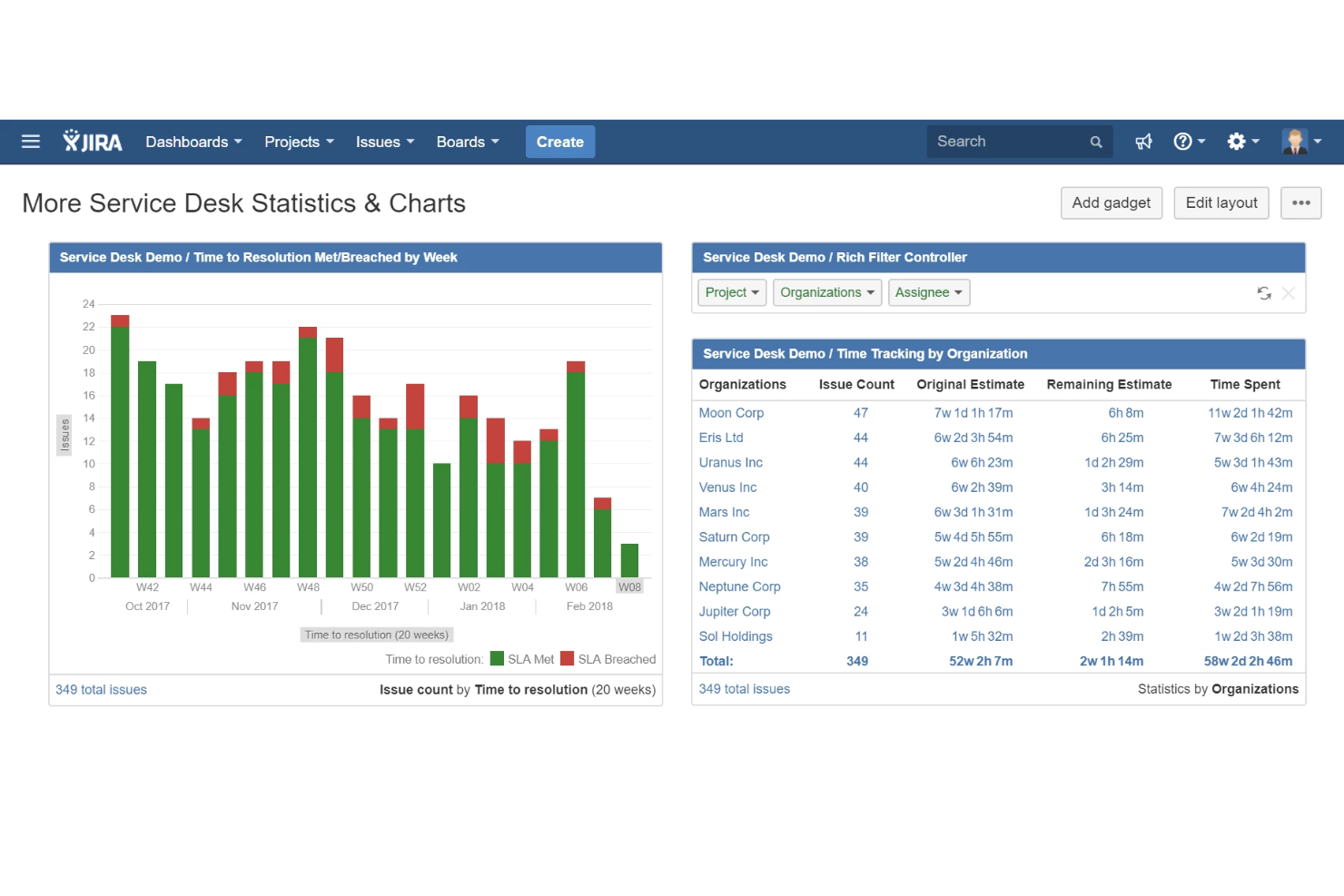
Jira Service Management dashboards provide a visual representation of key data and metrics related to service desk operations, allowing users to quickly and easily track and monitor performance. Users can create customized dashboards that display a variety of information, including service level agreement (SLA) compliance, ticket volumes, customer satisfaction ratings, and team performance metrics. Dashboards can be configured to display data in a variety of formats, including charts, graphs, and tables, and can be filtered based on a range of criteria, such as team, issue type, or time period. Additionally, users can share dashboards with other stakeholders, such as team members or leadership, to provide transparency and facilitate collaboration.
Jira Service Management integrates with other Atlassian platforms as well as third-party apps like Slack, Mircosoft, Google Workspace, Zoom, AdobeXD, Invision, Figma, Gliffy, Draw.io, Balsamiq, Lucidchart, Miro, Opsgenie, Jenkins, Dynatrace, GitHub, Zendesk, Trello, Optimizely, and hundreds of others via their apps marketplace. You can also build your own using their API.
Jira Service Management costs from $21/agent/month and comes with a 7-day free trial.


Office Timeline is a tool designed to help users create PowerPoint timelines and Gantt charts efficiently. It offers a PowerPoint add-in for Windows and a web-based tool, catering to professionals who require quick development of visually engaging project visuals, which justifies its reputation for being the best at providing user-friendly Gantt charts."
Why I picked Office Timeline: I selected Office Timeline because it provides the ability to craft visually appealing project timelines and Gantt charts that are straightforward for teams to follow. What differentiates it is its dual offering of a PowerPoint add-in for those who prefer working on the desktop and a web tool that facilitates online teamwork. I believe Office Timeline is particularly adept for creating user-friendly Gantt charts, given its automated features, compatibility with various project management platforms, and the availability of a free version that allows potential users to evaluate its capabilities.
Standout Features include a timeline maker, a Gantt chart maker, swimline diagrams, a variety of pre-designed templates that users can select and customize to create their timelines quickly, and online collaboration tools that enable multiple users to view and edit timelines in real-time.
Integrations include Jira, Microsoft Project, Microsoft Excel, Microsoft PowerPoint, Wrike, and Smartsheet.
Pricing starts at $99 per year and that includes a free plugin.

Nutcache is an affordable project management tool with smart, dynamic dashboards and solutions for task management, project budgeting, invoicing, and time tracking. You can leverage Kanban boards, collaboration tools, flexible workflow planning, and clean visualizations for your agile project team.
Nutcache's project dashboards can take many forms: traditional bar graphs, line charts, motion graphics, and even speedometer-like numerics. Dashboard segments track everything from time logged, tasks by assignee, tasks by priority, task progress, and tasks exceeding estimated time. Project planning can take the shape of dynamic task lists, calendar timelines, Kanban boards, and Gantt charts.
Nutcache's project budgeting dashboards are particularly useful and they support expenses, billing, and invoicing for a complete financial package. Track spending over time, set alerts for overages, and track by hour, amount, or cost. Nutcache definitely goes above and beyond when it comes to feature set and is best for those who need a holistic solution.
Nutcache integrates with PayPal, Stripe, QuickBooks, Dynacom Accounting, 2Checkout, Authorized.Net, Gmail, Google Drive, Github, Slack, and hundreds more using a paid plan through Zapier.
Nutcache is free to use for up to 20 users and paid plans cost from $6/user/month. They offer a free trial for 14 days.

ClickUp
Best project dashboards with time tracking/timesheets built-in

ClickUp is a cloud-based project management and collaboration software designed for businesses of all sizes in almost any industry. The platform brings together vital business applications and centralizes crucial company data into a unified online system. Project managers can assign tasks to individual team members, handle projects for clients, and collaborate with other teams, departments, and stakeholders on documents.
One of ClickUp’s core products is dashboards, an easy-to-use and robust tool that helps bring together all processes to provide a high-level overview for project leaders and teams. Users can use the software to create dashboards for various aspects of project development, including employee performance, resource management, time tracking, client portal, and business management.
ClickUp dashboards allow managers to distribute their team’s workload by utilizing assigned tasks or scrum points, specifically for development sprints. They can also host collaborative discussions around any build blockers, keep track of individual progress on tasks, as well as gain valuable insights into team performance, all in one unified solution.
Another key feature of ClickUp dashboards is resource management, which enables developers and project managers to allocate available resources more effectively by organizing them in a dedicated dashboard for better visualization. This function should help them identify project development assets and human resources that are being utilized inefficiently. It will also help generate detailed reports on the progress of active projects and ongoing business developments over time.
Integrations include native integrations with Slack, Google Workspace, Dropbox, and many more tools, as well as over 1,000+ integrations through Zapier (may incur additional costs).
ClickUp has a free version available with unlimited free plan members and unlimited tasks. Paid plans cost from $5/user/month.
New Product Updates from ClickUp

ClickUp Enhances Task Management and Introduces AI Notetaker
ClickUp introduces an AI Notetaker for meetings and improves task type management in views. These updates help teams capture meeting insights automatically and organize work more efficiently. For more information, visit ClickUp’s official site.
Other Project Management Dashboard Software
Here are a few more that didn’t make the top list, but which are worth considering if you didn’t find the right fit above.
- Hive
For automated workflow processes
- Celoxis
Enterprise-class features for dynamic dashboards
- Accelo
Dynamic dashboards for professional services
- Screendragon
For visualizing key metrics
- Bonsai Agency Software
For agencies and consultancies
- Zoho Projects
Project management dashboard with multiple reporting options
- Zoho Analytics
For its self-service data preparation and management module
- GoodDay
For diverse task visualization
- Bubble PPM
PPM tool for inbuilt best practices
- PathPro
For community-driven management and feedback
- Asana
Gamified dashboard for employee engagement (graphics & animations)
- Basecamp
Dashboard for real-time issue tracking
- Forecast
Dashboard software to manage your projects, resources, and finances in one
- ProjectManager
Reporting tools dashboard
- Trello
Kanban-style dashboard
- Microsoft Project
User-friendly option for users already in the MS ecosystem
- GanttPRO
Dashboard with a focus on Gantt charts
- Airtable
Free project management dashboard software
- Cyfe
Open source project dashboard
- Plecto
Dashboard software for low-tech team members


Related Reviews
If you still haven’t found what you’re looking for, check out these other tools that we’ve tested and evaluated:
- Project Management Software
- Resource Management Software
- Workflow Automation Software
- Time Tracking Software
- Task Management Software
- Collaboration Tools
- Gantt Chart Makers
- Productivity Tools
Selection Criteria for Project Management Dashboard Software
I used the following selection criteria when selecting project management dashboard tools, and considered common buyer needs and pain points like improving task tracking and team collaboration:
Core Functionality: 25% of total score
- Tracking project progress
- Assigning tasks and setting deadlines
- Providing real-time collaboration
- Generating automated reports
- Visualizing data in a dashboard format
Additional Standout Features: 25% of total score
- Customizable dashboard layouts
- Integration with multiple third-party apps
- AI-driven project insights
- Advanced time tracking and scheduling tools
- Automated task prioritization
Usability: 10% of total score
- Intuitive navigation design
- An easy learning curve for new users
- A clean, uncluttered interface
- Responsive design across devices
- Minimal clicks to complete tasks
Onboarding: 10% of total score
- Availability of training videos and tutorials
- Use of interactive product tours
- Access to ready-made templates
- Availability of live chat or chatbot assistance
- Access to webinars or live onboarding sessions
Customer Support: 10% of total score
- Availability of 24/7 support
- Multiple support channels (email, phone, chat)
- Access to a detailed knowledge base
- Presence of dedicated account managers
- Fast response times to inquiries
Value For Money: 10% of total score
- A transparent pricing structure
- Reasonable costs for added features or users
- Access to robust features in entry-level plans
- Availability of free trials or demos
- Competitiveness of pricing against similar tools
Customer Reviews: 10% of total score
- Positive feedback on ease of use
- High ratings for feature variety
- Positive comments on customer support quality
- Feedback on tool stability and reliability
- Comments on how well the tool solves user pain points
How to Choose Project Management Dashboard Tools
It’s easy to get bogged down in long feature lists and complex pricing structures. To help you stay focused as you work through your unique software selection process, here’s a checklist of factors to keep in mind:
| Factor | What to Consider |
|---|---|
| Scalability | Make sure the tool can grow with your team. Consider whether it can handle added users and larger projects without compromising performance or costing too much. |
| Integrations | Look for compatibility with software your team already uses, like Slack, Google Workspace, or Asana, to avoid disrupting workflows. |
| Customizability | Check whether the tool lets you tailor your dashboards, reports, and permissions to fit your team’s unique needs and preferences. |
| Ease of Use | Pick a tool that’s intuitive for your team to adopt. Avoid ones with steep learning curves so everyone can stay focused on project goals instead of tool training. |
| Budget | Assess whether the pricing fits your budget. Be mindful of hidden costs, like add-ons or per-user fees, to avoid going over budget. |
| Security Safeguards | Verify the tool’s security protocols, like data encryption and user access controls, especially if you're handling sensitive information. |
| Real-Time Tracking | Make sure the software provides up-to-the-minute updates on project progress, so you can make informed decisions with the latest data. |
| Collaboration Features | Look for tools that support real-time chats, file sharing, and comments. These features keep your team connected and on the same page. |
Trends in Project Management Dashboard Software
Here are some of the emerging trends in project management dashboard software that I’m keeping an eye on:
- AI-driven insights: Many dashboard tools now offer AI capabilities for tasks like analyzing project data, helping predict roadblocks, and recommending task priorities. For example, AI can suggest optimal timelines based on previous project performance.
- Real-time resource allocation: Instant updates to your dashboard mean you can see who’s working on what at any given time, which helps you reduce overlap and resource conflicts. You'll be able to make immediate adjustments to workload distribution, even on teams working on multiple projects.
- Personalized user dashboards: Role-specific task management dashboards are becoming more popular, as they allow you to adapt views and data to individual team members’ needs. Each user—whether in finance, project management, or design—sees only the most relevant information to keep them focused on their priorities.
- Integrated feedback loops: Feedback tools within project status boards let teams respond more quickly to changing project requirements. For instance, PMO reporting dashboards now allow team members to provide input directly within tasks. This minimizes delays and keeps feedback centralized and visible.
- Advanced visualization tools: More dashboard software and specialized tools, such as agile dashboard software, now include customizable charts, graphs, and data views to help users visualize complex project data in one place. For example, a project financial dashboard might show budget insights alongside progress indicators to give stakeholders a clear and immediate view of project health.
What is Project Management Dashboard Software?
Project management dashboard software is a tool that provides an at-a-glance view of key performance indicators and status updates for projects. It consolidates and visualizes data related to project progress, deadlines, resource allocation, and more, so you and your team can monitor and manage project health and performance.
Project management dashboard tools typically feature customizable dashboards, instant data updates, and integrations with other project management tools. This helps facilitate efficient tracking, decision-making, and communication within project teams.
Features of Project Management Software Dashboard Software
When selecting project management dashboard tools, keep an eye out for the following key features:
- Real-time updates and live data: This feature provides instant visibility into project progress, which lets teams make informed, timely decisions. Your dashboards should update as work is completed, so you're tracking the most up-to-date data at any given time.
- Customizable views: The tool should allow users to personalize dashboards. This is especially useful for PMO portfolio dashboards where different teams need specific data views tailored to their roles. For agencies, dashboards with custom branding is another way teams may need to customize views to make them look professional.
- Drag-and-drop interface: This features lets you easily reorder tasks and data on the dashboard in order to simplify task management.
- Task assignment and tracking: This feature lets users assign tasks and monitor their progress on a dashboard management system, which makes it easy to oversee who’s doing what.
- KPI tracking: The tool should display relevant metrics and help teams monitor whether they’re on track to meet project goals. This is also helpful when it comes to issue management—the dashboard should help you flag issues and bottlenecks and make adjustments before they become major problems.
- Budget tracking: This helps you keep an eye on costs and expenses and compare them against budget limits. This is especially valuable if you oversee multiple project financials. You should be able to compare planned budget vs actuals and make changes to keep the project on budget.
- Project timelines: The tool should allow you to visualize deadlines and phases, which helps keep teams aware of project pacing.
- Resource allocation: The tool should show how team members and resources are distributed across projects. You should be able to keep an eye on individual team member workloads and adjust assignments based on availability and capacity.
- Collaboration tools: The software should come with chat, file sharing, and comments capabilities.
- Reporting capabilities: The tool should be able to automatically generate reports on project metrics. This is ideal when you need to regularly share updates with stakeholders.
Benefits of Project Management Software Dashboard Software
Whether you're managing a single project or juggling multiple timelines, project dashboard software helps you maintain clarity and control across the board. Implementing project management dashboard tools provides several benefits for your team and your business. Here are a few you can look forward to:
- Improved visibility: With a centralized view of tasks and metrics, everyone on the team can see project updates and milestones.
- Improved accountability: Task assignments and tracking within management dashboard software keeps team members responsible for their work and makes it easy to track task completion.
- Better decision-making: Real-time data and KPI tracking in an executive project portfolio dashboard allow you to adjust plans based on current project insights and make sure teams are making well-informed choices.
- Simplified resource management: Clear resource allocation visuals on tools dashboards make it easy to balance workloads and avoid overloading team members, particularly on larger projects.
- Time savings: Automated reports and customizable views within dashboard project management software reduce the time spent gathering data, so your team can stay focused on core tasks.
- Increased collaboration: Built-in chat, comments, and file-sharing options allow your team to communicate in context directly within the online dashboard software. This fosters stronger teamwork.
- Budget control: Expense tracking and budget comparisons in business dashboard tools help teams stay on budget.
Costs & Pricing for Project Management Dashboard Software
The table below summarizes common plans, their average prices, and typical features included in project management dashboard tools:
| Plan Type | Average Price | Common Features |
|---|---|---|
| Free Plan | $0 | Basic task tracking, limited user access, simple dashboards, and basic reporting. |
| Personal Plan | $5-$25/user/month | Task tracking, project timelines, custom views, limited integrations, and basic analytics. |
| Business Plan | $30-$50/user/month | Team collaboration, advanced dashboards, resource management, automation options, and extensive integrations. |
| Enterprise Plan | $60-$100+/user/month | Customizable dashboards, dedicated support, enterprise-grade security, advanced reporting, and API access. |
Project Management Dashboard FAQ
Find answers to common questions about this topic.
What is a project management dashboard?
A project management dashboard is a digital tool that shows how your projects are going. It should provide real-time updates on overall project progress and the progress of each project component.
Project management dashboards help you make use of data. The dashboard template you wind up choosing for your project depends on what you need to see and how you’d like to manage the data
What are the types of dashboards?
Here are seven of the most popular project dashboards. You should be able to find templates for them in most project management tools.
- Revenue and customer display
- Customer satisfaction
- Sales performance
- Cash management
- Recruitment and hiring
- Web analytics
- Procurement
What should a project dashboard have?
The best project management software dashboard will be customizable enough to feature the information that you find most useful. This might include blocks of visual or text data for project tracking, task status, project timelines, resource management, and tools to track time spent or time needed.
Why is it important to have real-time data and updates?
Having real-time data and updates is essential for effective project management and decision-making, as it allows teams to respond quickly to changes, maintain accuracy, and ensure alignment across projects. Using a dashboard design software can simplify this process by centralizing data and keeping everyone informed.
Why Real-Time Data Matters:
- Instant project status: With a project status dashboard template, teams can view current metrics and project progress at a glance, as well as make sure everyone is aligned and can quickly address issues.
- Improved decision-making: Real-time data allows you to make informed choices based on the latest insights. The best performance dashboard can highlight key performance indicators (KPIs) that are essential for strategic decisions.
- Better collaboration: Teams working with both enterprise and small business dashboard software can share updates easily, which improves coordination and minimizes communication gaps.
- Improved monitoring: A dashboard creator software allows businesses to customize what they track, so it’s easy to monitor critical data and swiftly react to changes.
- Cost efficiency: Cheap dashboard software can provide small businesses with high-value insights without a hefty price tag, so they stay competitive without overspending.
How can project management dashboards be used for team workload monitoring and cost tracking?
Project management dashboards are invaluable for team workload monitoring and cost tracking. They provide a centralized view where you can oversee resources effectively and maintain budget control. By using one of the best project management dashboards, teams can stay informed and agile in their decision-making.
How Dashboards Help with Workload and Cost Management
- Visualized workload allocation: The best data dashboard software can display workload distribution across team members and help you see who is overloaded or underutilized. This tool on the dashboard makes it easier to rebalance tasks and optimize team productivity.
- Real-time cost tracking: Dashboards allow teams to monitor expenses in real-time and compare current costs against budgets. With the right dashboard tool, you can spot overspending early and adjust accordingly.
- Performance analytics: The best dashboards software should include performance metrics that help you track time and budget efficiency. This is essential for staying on target and identifying areas for improvement.
- Customizable views for small businesses: Dashboard software for small business typically offers templates that small teams can tailor to monitor specific workload and cost metrics. This helps make sure they stay within budget without compromising team capacity.
Can project management dashboard software be used for issue management?
Yes, project management dashboard software is highly effective for issue management. It offers a streamlined approach to tracking, prioritizing, and resolving project issues as they arise. With real-time insights and organized displays, dashboards help teams stay on top of problems and minimize project disruptions.
How Dashboards Support Issue Management
- Centralized issue tracking: Dashboards provide a single view for tracking all reported issues, so team members can see what needs attention and you can prevent issues from slipping through the cracks.
- Prioritization and status updates: Using the best project management dashboard, teams can categorize issues by priority and update their status in real-time. This helps everyone understand which problems need immediate attention.
- Detailed issue metrics: Dashboards can display metrics like issue severity, response time, and resolution rates. You’ll get insights into how efficiently the team is handling problems.
- Automated alerts and notifications: Many dashboards include alerts and notify relevant team members when an issue is assigned, escalated, or resolved. This keeps everyone informed and responsive.
By integrating project management dashboard software into your issue management processes, you can address problems proactively, maintain better communication, and improve project outcomes.
What's Next?
If you're in the process of researching project management dashboard software, connect with a SoftwareSelect advisor for free recommendations.
You fill out a form and have a quick chat where they get into the specifics of your needs. Then you'll get a shortlist of software to review. They'll even support you through the entire buying process, including price negotiations.