

10 Best Enterprise Time Tracking Software Reviewed For 2026

Best Enterprise Time Tracking Software Shortlist


Enterprise time tracking software can be a helpful tool for streamlining HR tasks such as recording work hours, managing payroll, and improving overall productivity. It solves issues like inaccurate time logs, late timesheets, common manual payroll errors, and spending time on tedious administrative tasks.
Choosing the right tool is tough with so many options out there. You need to track employee hours accurately and efficiently, but figuring out which tool fits best can be a challenge. I've got you!
With years of experience managing digital projects and using various productivity tools, I can help you find the best time tracking software. Here are my top picks.
Why Trust Our Software Recommendations
Our team has been testing and reviewing software since 2012. As project managers ourselves, we know how difficult—and important—it is to choose the right software.
For this guide, we evaluated tools using hands-on testing and independent research, scoring tools using our selection criteria. We also draw on insights from industry thought leaders and practicing project management experts.
Our reviews reflect our human editorial judgment, not a sales pitch.
Expert reviewers:
Enterprise Time Tracking Software Comparison Table
This comparison table summarizes pricing details for my top enterprise time tracking software selections:
| Tool | Best For | Trial Info | Price | ||
|---|---|---|---|---|---|
| 1 | Best for self-service payroll and HR automation | Not available | Pricing upon request | Website | |
| 2 | Best for advanced GPS-powered time clock | 14-day free trial | From $29/month (billed annually) | Website | |
| 3 | Best for tracking across projects | Free plan + 14-day free trial available | From $10/user/month (billed annually) | Website | |
| 4 | Best with anti-surveillance time tracking | Free plan + 30-day free trial + free demo available | From $9/user/month (billed annually) | Website | |
| 5 | Best for intuitive drag-and-drop scheduling | 14-day free trial + free demo available | From $4.99/user/month + $19/month base fee (billed annually) | Website | |
| 6 | Best for automatic desktop activity tracking | 14-day free trial + free demo available | From $6.42/user/month (billed annually) | Website | |
| 7 | Best for flexible time tracking | Free plan + 30-day free trial + free demo available | From $6/user/month (billed annually) | Website | |
| 8 | Best with biometric time clock options | 30-day free trial + free demo available | From $50/user/month | Website | |
| 9 | Best for GPS mobile time tracking | 30-day free trial | From $20/month + $10/user/month | Website | |
| 10 | Best for scheduling and shift management | 14-day free trial + free demo available | From $5/user/month | Website |


Best Enterprise Time Tracking Software Reviews
This in-depth analysis provides overviews of each enterprise time tracking software. I will walk through the pros and cons of each tool, their features, and their best use cases.

Paycom
Best for self-service payroll and HR automation

Paycom is a detailed enterprise time tracking software that offers a wide range of HR management, talent management, time and labor management, payroll, and talent acquisition software solutions.
Why I picked Paycom: I chose Paycom for this list because it stands out with its unique approach to self-service payroll, which is not commonly found in other enterprise time tracking software. This feature empowers employees to manage their own payroll data, reducing errors and administrative workload. I believe Paycom is best for self-service payroll and HR automation because it offers a truly single software solution that integrates all HR functions easily.
Standout Features & Integrations:
Features include a single database for all HR functions, employee self-service for payroll management, and comprehensive payroll tax management. Paycom's Beti tool finds the errors and guides the employee to make corrections.
Integrations are primarily delivered through Paycom's native HR and payroll suite, which includes built-in tools for talent management, time tracking, benefits administration, and employee self-service within a single database.
Pros and Cons
Pros:
- Single software solution
- HR automation tools
- Employee-managed payroll
Cons:
- Limited international availability
- Limited reporting tools
Best for advanced GPS-powered time clock

Connecteam is an employee management platform designed for enterprises with large, deskless teams. It combines precise time tracking, project oversight, workforce scheduling, and team communication into a single platform, making it especially valuable for industries like construction, healthcare, and retail.
Why I Picked Connecteam: I picked Connecteam for its advanced GPS-powered time clock functionality and geofencing capabilities, which help ensure employees clock in and out from the correct locations. This accuracy supports compliance and reduces time theft. Additionally, its automated timesheets make it easier to prepare payroll-ready data, while built-in scheduling tools help managers assign shifts and balance workloads efficiently. These features make Connecteam an excellent fit for enterprises managing large, distributed workforces.
Standout Features & Integrations
Features include Project time tracking, payroll integration, task management, digital forms and checklists, team chat, knowledge base, training tools, document storage, employee recognition and rewards, time-off management, and organizational charts.
Integrations include Gusto, QuickBooks, Xero, Zapier, Google Calendar, monday.com, Google Forms, Microsoft Outlook, Jotform, Google Drive, Asana, and Airtable.
Pros and Cons
Pros:
- Easy-to-use mobile app for on-the-go access
- GPS tracking and geofencing improve accountability
- Highly customizable features for different industries
Cons:
- Learning curve for new admins due to many features
- Geolocation tools may struggle in remote areas
New Product Updates from Connecteam

Connecteam Expands Break and Timesheet Controls
Connecteam adds flexible break thresholds, personalized policies, auto-end options, a centralized exceptions report, and improved timesheet issue visibility to help teams manage breaks and timesheets more effectively. For more information, visit Connecteam’s official site.
 .
.
Wrike
Best for tracking across projects

Wrike is a versatile project management tool that helps teams plan, organize, and track their work in one centralized platform. It offers features like task management, collaboration tools, and real-time updates to keep everyone aligned and productive.
Why I picked Wrike: Wrike's time tracking capabilities are integrated into its platform, making it a strong contender for enterprise time tracking software. You can start a timer directly within a task to log hours as you work, or manually add time entries later if needed. This flexibility ensures that all work hours are accurately recorded, which is crucial for effective project management and billing. Additionally, Wrike's timelog view provides a comprehensive overview of all tracked time across tasks and projects. This feature allows you to monitor your team's workload, identify areas where time is being spent, and make informed decisions to optimize productivity.
Standout Features & Integrations:
Features include customizable dashboards, Gantt charts, Kanban boards, workload management, file sharing, document editing, discussions, task prioritization, dashboards, request forms, custom fields, and custom workflows.
Integrations include QuickBooks, Skyvia, Power BI, Tableau, Google Sheets, Miro, Salesforce, Microsoft Teams, MediaValet, Zoom, Adobe Creative Cloud, and Google Drive.
Pros and Cons
Pros:
- Robust reporting and analytics capabilities
- Effective time tracking and workload management
- Comprehensive project management features with high customization
Cons:
- Mobile app lacks some desktop features
- Learning curve for new users
New Product Updates from Wrike
Wrike Adds Klaxoon MCP Integration
Wrike’s Klaxoon MCP integration is now generally available, enabling AI agents to navigate between Wrike tasks and attached whiteboards, read task context, and manage whiteboard attachments via API. For more information, visit Wrike's official site.

Toggl
Best with anti-surveillance time tracking
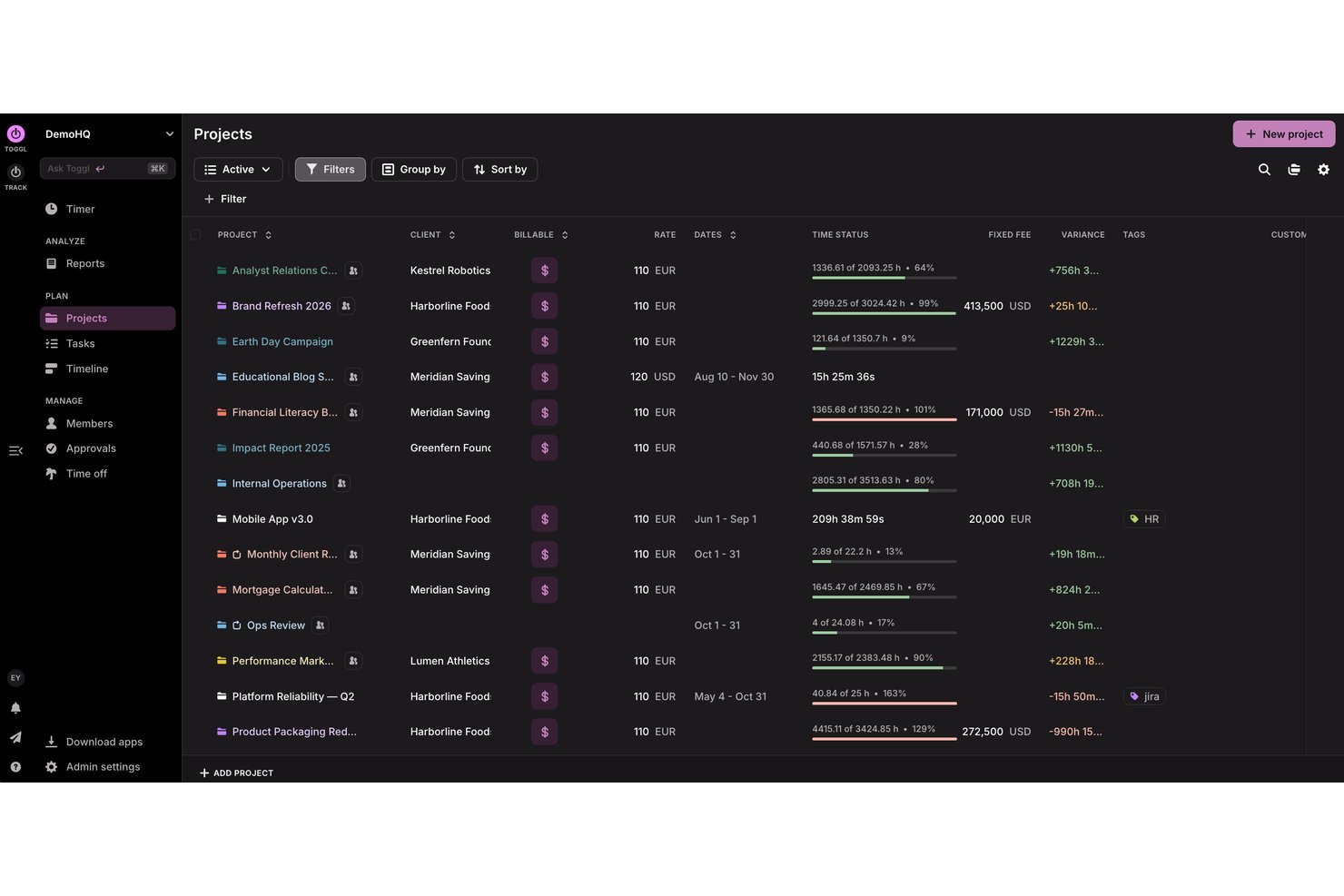
Toggl is an enterprise time tracking platform built for project-based organizations that need to capture hours across clients, teams, and tasks with flexible tracking, capacity, and reporting visibility.
Who Is Toggl Best For?
Project teams and professional services organizations that want flexible, user-friendly time tracking without invasive monitoring.
Why I Picked Toggl
I picked Toggl as one of the best because it builds anti-surveillance time tracking into its core, letting my team log hours on projects and tasks without sharing screenshots or keystrokes. I rely on its project, client, and task-level granularity.
Toggl Key Features
- Timesheet approval workflows: Managers can review and approve submitted hours before closeout.
- Bulk project and client import: Upload projects and client lists from CSV for rapid setup.
- Custom report builder: Filter, group, and export tracked time data with advanced report customization (or ask the Toggl AI assistant to do it for you, in plain language).
- Automated reminders: Set up automatic alerts to prompt users for missing or incomplete time entries.
Toggl Integrations
Toggl offers integrations with Jira, Asana, GitHub, Google Calendar, Outlook, and Todoist. An API is available for custom integrations, as well as a third-party MCP for connecting to Claude, Cursor, and Codex.
Pros and Cons
Pros:
- Supports team-based timesheet approvals
- Flexible project and phase time tracking
- Privacy-first time tracking approach
Cons:
- Approval workflows lack complex conditional logic
- Limited advanced resource forecasting tools

Best for intuitive drag-and-drop scheduling

Buddy Punch is an enterprise time tracking software that helps manage employee hours and schedules. It's designed to assist businesses in monitoring and organizing their workforce's time and attendance.
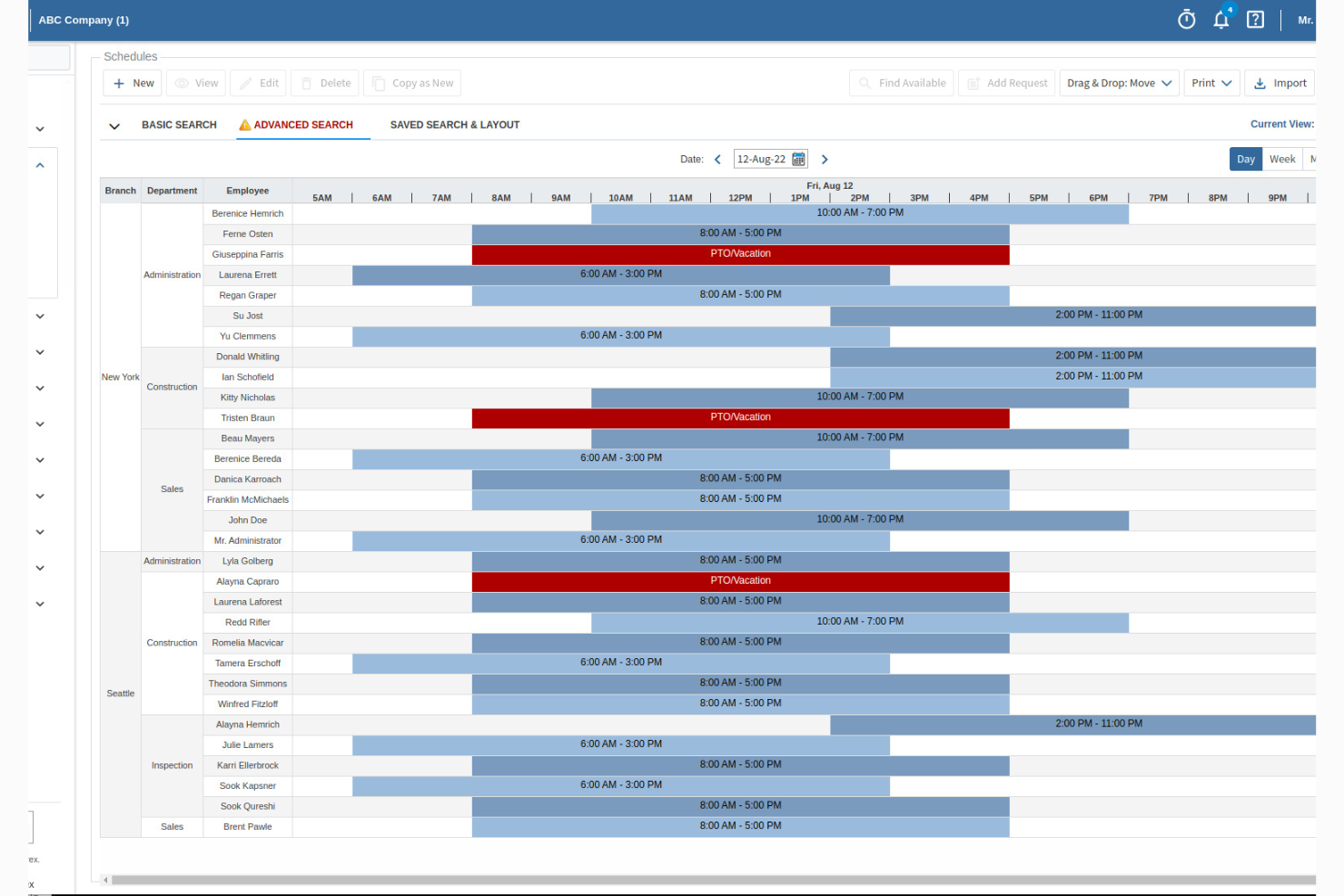
Why I Picked Buddy Punch: I chose Buddy Punch for its robust time tracking, real-time monitoring of employee hours and overtime, and intuitive drag-and-drop scheduling that simplifies shift management. It also streamlines attendance and PTO tracking by automating time-off requests, managing accruals, and flagging late arrivals or missed shifts—making it especially valuable for larger teams needing accurate records and better workforce oversight.
Standout Features & Integrations:
Features include location monitoring with GPS tracking and geofencing, ensuring employees clock in from approved locations. Buddy Punch also offers facial recognition and photo verification for secure clock-ins, reducing the risk of buddy punching. Additionally, the software provides comprehensive reporting, allowing you to generate detailed reports on employee hours, attendance, and more, which can be invaluable for decision-making and audits.
Integrations include QuickBooks Online, QuickBooks Desktop, ADP Workforce Now, Gusto, Paychex, Workday, Zapier, Paycor, Paylocity, Rippling, iSolved, and Justworks.
Pros and Cons
Pros:
- Customizable reports
- GPS tracking
- Real-time monitoring
Cons:
- No offline mode
- Basic mobile app

DeskTime
Best for automatic desktop activity tracking
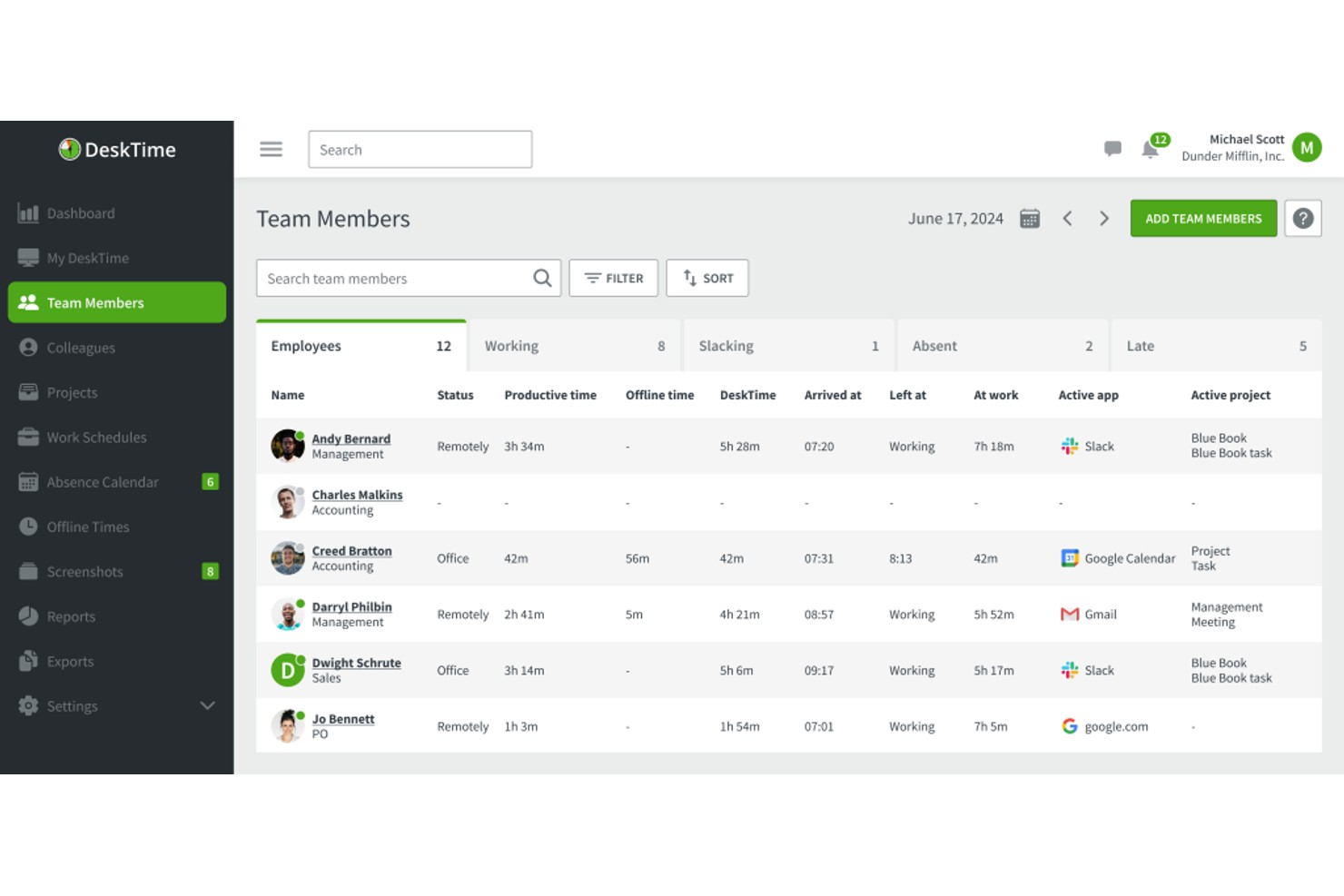
DeskTime is an automatic time tracking platform that monitors desktop app usage, URLs, and document activity across in-office, hybrid, and remote teams, with added features for project tracking, shift scheduling, absence management, and productivity reporting.
Who Is DeskTime Best For?
DeskTime is a good fit for mid-sized companies managing distributed or hybrid teams who need passive, automatic time tracking without relying on manual input from employees.
Why I Picked DeskTime
DeskTime is one of my top picks because I love how it removes the burden of manual input entirely. The desktop app starts tracking the moment someone turns on their computer, logging every app, URL, and document title without anyone needing to start a timer. I especially like the productivity calculation feature, which lets you label specific apps and URLs as productive, neutral, or unproductive per team, so a social media site can count as productive for your marketing team but not for engineering.
DeskTime Key Features
- Project and task time tracking: Assign tracked time to specific projects and tasks to monitor where billable hours are going.
- Shift scheduling: Build and assign employee work schedules so you can compare planned hours against actual tracked time.
- Automatic screenshots: Capture screenshots at set intervals to give admins a visual record of on-screen activity during work hours.
- Offline time tracking: Manually log time spent away from the computer, such as in meetings or on calls, as offline work entries.
DeskTime Integrations
DeskTime offers a small set of native integrations, including Google Calendar, Outlook Calendar, Trello, GitLab, Asana, and Jira, and it connects with Zapier. An API is also available for custom integrations.
Pros and Cons
Pros:
- Captures attendance, breaks, and leave data
- Lets you reclassify app productivity categories
- Tracks app and URL usage automatically
Cons:
- No built-in invoicing or budget tracking
- Weak mobile tracking for deskless teams

actiTIME
Best for flexible time tracking
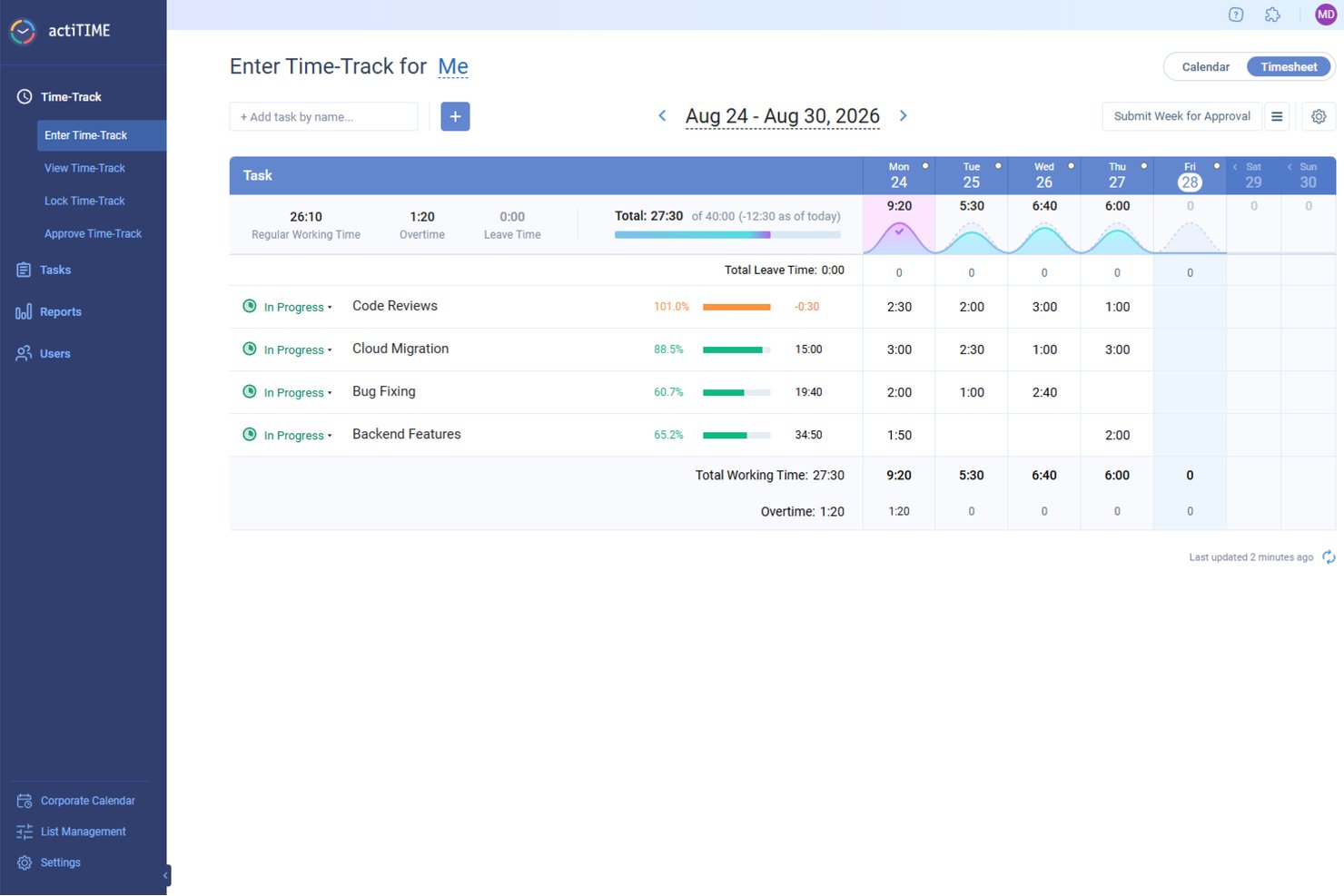
actiTIME is an enterprise time tracking software designed to help teams log hours, manage projects, and track budgets efficiently.
Why I picked actiTIME: I like its flexible time tracking options. You can log work hours manually through a weekly timesheet, use the calendar view to track start and stop times, or rely on its mobile app and Chrome extension for real-time tracking. The mobile app even works offline, letting your team log time without an internet connection and sync their entries later. actiTIME also offers budget tracking and project monitoring tools. You can set project budgets, track expenses, and compare them against time spent to keep costs under control. This is especially useful for businesses that bill clients based on hours worked.
Standout Features & Integrations:
Features include automated reports that help you analyze productivity, project profitability, and workload distribution. It also offers task statuses, workflow customization, approvals, billing and invoicing, data export, offline time-tracking comments, and leave management.
Integrations include QuickBooks, Zapier, actiPLANS, GitHub, Salesforce, Jira, Trello, Outlook, Evernote, Todoist, and Bamboo HR.
Pros and Cons
Pros:
- Offers multiple methods for time tracking
- Allows customization of work structures
- Provides detailed reporting tools
Cons:
- The mobile version lacks some features of the desktop version
- Some users find the user interface cluttered
New Product Updates from actiTIME

actiTIME Visual Hour Indicator and Time-Track Report Redesign
actiTIME adds a wave-style hour indicator to the Timesheet and Calendar views and refreshes the Time-Track report for smoother navigation and clearer visuals. For more information, visit actiTIME's official site.

TimeTrex
Best with biometric time clock options
TimeTrex is an enterprise time tracking platform that combines attendance tracking, scheduling, payroll integration, and compliance tools. It supports biometric and mobile clock-ins and keeps detailed records for workforce monitoring.
Who Is TimeTrex Best For?
TimeTrex is best for mid-to-large organizations with hourly or shift-based teams that need accurate time tracking, compliance control, and reliable payroll processing.
Why I Picked TimeTrex
TimeTrex stands out for its biometric clock-in options, including facial recognition. It works with standard devices like tablets and smartphones, so there’s no need for dedicated hardware. It also supports photo capture during clock-ins, which helps with attendance verification and audit tracking.
TimeTrex Key Features
- Automated scheduling: Create and manage shifts with templates and availability tracking.
- Payroll integration: Sync time data directly into payroll to reduce manual work.
- Overtime tracking: Track overtime using configurable rules.
- Absence management: Monitor absences, tardiness, and leave balances.
TimeTrex Integrations
TimeTrex integrates with QuickBooks, ADP, Paychex, Ceridian, and Sage. An API is available for custom integrations.
Pros and Cons
Pros:
- Detailed audit logs support compliance
- Strong overtime tracking with configurable rules
- Biometric and facial recognition clock-ins help prevent buddy punching
Cons:
- Setup can take time for larger organizations
- Interface feels outdated compared to newer tools
New Product Updates from TimeTrex
TimeTrex Adds Quick Punch App With Offline and QR Support
TimeTrex adds a new Quick Punch app, offline punching, QR code scanning, punch images, configurable messages, and punch warnings or lockouts to improve employee clock-ins across browsers and local computers. For more information, visit TimeTrex’s official site.
 .
.
Best for GPS mobile time tracking

QuickBooks Time is best for GPS mobile time tracking because it allows employees to clock in and out from their mobile devices, even when they are outside of cell service, ensuring accurate time tracking regardless of location.
Why I picked QuickBooks Time: I chose QuickBooks Time for its mobile time tracking features, which stand out in the enterprise time tracking software market. Its GPS functionality ensures accurate tracking of employee hours, making it ideal for businesses with mobile or remote workforces. The integration with QuickBooks Online and Desktop further enhances its utility by streamlining payroll and accounting processes.
Standout Features & Integrations:
Features include a mobile app with GPS tracking, streamlined payroll, job and shift scheduling, and real-time reporting. The software also offers geofencing technology to log clocked-in employees' locations and customizable reports to analyze project profitability.
Integrations include QuickBooks Online, QuickBooks Desktop, QuickBooks Payroll, Xero, Gusto, Square, Expensify, TSheets, ADP, and Paychex.
Pros and Cons
Pros:
- Geofencing technology
- Real-time reporting
- Mobile GPS tracking
Cons:
- Limited offline features
- Slight learning curve for new users

Deputy
Best for scheduling and shift management

Deputy is a comprehensive tool for employee scheduling and shift management. It excels in providing robust features for managing employee shifts efficiently.
Why I picked Deputy: I chose Deputy for its exceptional capabilities in scheduling and shift management. Unlike other tools, Deputy offers a user-friendly interface and advanced scheduling features that simplify complex shift planning. I believe Deputy is best for this use case due to its intuitive design and powerful scheduling algorithms.
Standout Features & Integrations:
Features include automated scheduling, time tracking, and task management. Deputy also offers real-time notifications and compliance management tools to ensure labor law adherence.
Integrations include Xero, QuickBooks, ADP, Gusto, Square, Vend, Lightspeed, MYOB, Netsuite, and Zapier.
Pros and Cons
Pros:
- Real-time notifications
- Advanced scheduling features
- User-friendly interface
Cons:
- Complex initial setup
- Limited offline functionality
Other Enterprise Time Tracking Software
Below is a list of additional enterprise time tracking software that I shortlisted, but did not make it to the top list. Definitely worth checking them out.
- Deltek Replicon Time
For AI-driven time capture
- SAP SuccessFactors
For time and attendance management
- UKG
For compliance and labor cost control
- Zoho People (Enterprise Plan)
For customizable HR workflows
- Workday Time Tracking
For unified time tracking and payroll
- Harvest
For invoicing and payment integration
- Deel HR
For global teams
- Monitask
For automated time tracking
- ClickTime
For labor data capture
- Hubstaff
For tracking productivity & workforce data


Related Project Management Software Reviews
If you still haven't found what you're looking for here, check out these other related tools that we've tested and evaluated:
- Project Management Software
- Resource Management Software
- Workflow Automation Software
- Time Tracking Software
- Task Management Software
- Collaboration Tools
- Gantt Chart Maker
- Productivity Tools
- ClickTime Alternatives
- Time Blocking Apps
How I Evaluate Enterprise Time Tracking Software
I look at every platform in two passes: first checking whether it clears the baseline—project-based tracking, approval workflows, enterprise integrations—then weighing what actually sets it apart.
Core Functionality (Table Stakes For This List)
When I'm selecting tools for my list, I rank each one on a scale from 0 (does not offer the functionality) to 5 (excels in this area) for each core functionality listed below. Then, I calculate the tool's total score into a percentage. Each tool needs to achieve a minimum total score of 65% to be considered for inclusion.
- Project-Based Time Tracking: I check whether users can log hours against a full hierarchy—portfolio, project, task, subtask, and client—using timers, manual entry, or both.
- Timesheet Approval Workflows: Multi-level approval chains matter here, especially for orgs where timesheets route through a project lead and then a PMO director.
- Resource Capacity Management: I evaluate whether the tool shows real-time utilization and availability so you can spot over-allocated team members before sprint commitments slip.
- Billable Hours & Cost Tracking: The platform should distinguish billable from non-billable time and support multiple bill and cost rates per role, client, or project.
- Enterprise Integrations: I look for native connectors to the systems enterprise teams already rely on—tools like Jira, SAP, Workday, QuickBooks, and Salesforce.
- Reporting & Compliance: Each tool should offer customizable reports, audit trails, and overtime compliance support suited to teams operating across multiple jurisdictions.
Once I have a list of tools that meet this criteria, I consider what sets each platform apart.
Differentiating Factors (What Sets Vendors Apart)
Here's how I compare and contrast different vendors:
Standout Features
AI-powered time capture sets tools apart. Platforms that suggest entries from calendar events and app activity cut manual logging for large teams. I also evaluate project profitability analytics—real-time margin views and forecast-to-actual dashboards at the portfolio level give PMO directors actionable data without waiting on finance. For distributed orgs, global workforce support matters. Multi-currency billing and regional labor rule handling mean less manual adjustment work for your operations team.
Beyond Features
Enterprise rollouts live or die on implementation support. I look for vendors that offer dedicated onboarding teams and structured migration paths—especially when you're moving thousands of users off spreadsheets or a legacy system. Security certifications like SOC 2 Type II and ISO 27001 also weigh heavily, since time data often touches sensitive client billing records. Total cost of ownership rounds out my evaluation. Volume licensing, module-based pricing, and predictable renewal terms tell you more about long-term fit than any sticker price.
How To Choose Enterprise Time Tracking Software
As you work through your own unique software selection process, keep the following points in mind:
- Scalability and Flexibility: Enterprise time tracking software must be able to grow with your business. As your company expands, the software should accommodate an increasing number of users and projects without compromising performance. For example, a rapidly growing tech startup needs a solution that can handle the addition of new employees and projects easily.
- Integration Capabilities: The software should easily integrate with other tools and systems your company already uses, such as payroll, project management, and HR systems. This ensures a smooth flow of data across platforms, reducing manual data entry and errors. For instance, a large corporation using multiple software solutions for different departments will benefit from a time tracking tool that integrates with their existing ecosystem.
- User-Friendly Interface: A complex or confusing interface can lead to low adoption rates among employees. The software should be easy to use, with a clean and intuitive design that requires minimal training. For example, a company with a diverse workforce, including non-technical staff, will need a solution that everyone can use without extensive training.
- Advanced Reporting and Analytics: Detailed reporting and analytics capabilities are crucial for making informed business decisions. The software should provide insights into employee productivity, project costs, and time allocation. For example, a consulting firm needs to track billable hours accurately to ensure clients are billed correctly and to analyze project profitability.
- Compliance and Security: Ensuring that the software complies with industry regulations and standards is essential, especially for companies handling sensitive data. The software should offer robust security features to protect employee information and company data. For instance, a healthcare organization must choose a time tracking solution that complies with HIPAA regulations to safeguard patient information.
Trends In Enterprise Time Tracking Software
Enterprise time tracking software is evolving rapidly to meet the demands of modern work environments. Here are some of the most significant trends shaping the industry in the coming future.
- Mobile Time Tracking and Geofencing: Mobile time tracking and geofencing are becoming increasingly popular. These technologies allow employees to log their hours and activities from anywhere, enhancing flexibility and accuracy. Geofencing uses GPS to automate clock-ins and clock-outs, reducing errors and saving time.
- Increased Use of AI Tools: Artificial intelligence is revolutionizing time tracking by automating data entry and providing advanced analytics. AI tools can track time spent on various tasks without interrupting workflows, offering valuable insights into productivity. This automation reduces manual work and helps in making data-driven decisions.
- Businesses Monitoring Employee Activity: Employee monitoring tools are gaining traction as companies seek to understand how time is spent. These tools help identify productivity bottlenecks and ensure that remote and hybrid workers are engaged. Monitoring software can track online activities, providing a comprehensive view of employee performance.
- More Efficient Task Tracking for Managers: Task-level time tracking is becoming a standard feature in project management platforms. This allows managers to see how time is allocated to specific tasks, helping to identify inefficiencies and redundant processes. Efficient task tracking aids in better resource management and project planning.
- Advanced Business Intelligence for Leadership Teams: Business intelligence tools integrated with time tracking software offer advanced reporting and analytics. These tools help leaders make informed decisions by providing detailed insights into time utilization and project progress. Automated reporting features save time and improve accuracy.
These trends in enterprise time tracking software focus on enhancing flexibility, accuracy, and efficiency through advanced technologies. From identifying productivity bottlenecks to monitoring employee engagement, these are a few key benefits leading trends seem to be offering. As you consider your next enterprise time tracking tool, keep an eye out for these trending features.
What Is Enterprise Time Tracking Software?
Enterprise time tracking software is a tool designed to help organizations monitor and record the time employees spend on various tasks and projects. It is commonly used by large companies and enterprises to ensure accurate billing, payroll, and productivity analysis. Users need it to track work hours, manage project timelines, and generate reports for better resource allocation and decision-making.
The components of enterprise time tracking software typically include time entry interfaces, project and task management modules, reporting and analytics tools, and integration capabilities with other enterprise systems. These elements work together to provide a comprehensive solution for tracking and managing employee time across the organization.
Features Of Enterprise Time Tracking Software
Enterprise time tracking software is essential for managing employee hours, improving productivity, and ensuring compliance with labor laws. When selecting such software, it's important to consider various features that can enhance the efficiency and effectiveness of your business operations. Below, I will outline the most important features to look for in enterprise time tracking software.
- Employee Scheduling: Allows you to plan and manage employee shifts effectively. It ensures that you have the right number of staff at the right times, which is crucial for maintaining productivity and meeting business demands.
- Attendance Tracking: This helps in monitoring employee attendance, including clock-in and clock-out times. Accurate attendance tracking is vital for payroll processing and ensuring that employees adhere to their schedules.
- Payroll Integration: Integrating time tracking software with payroll systems streamlines the payroll process by automatically calculating wages based on hours worked. This reduces errors and saves time in payroll processing.
- Reporting Capabilities: Robust reporting features provide insights into employee productivity, project progress, and overall time management. These reports help in making informed decisions and identifying areas for improvement.
- Project Management Tools: Allow you to assign tasks, set deadlines, and track the progress of various projects. Effective project management ensures that projects are completed on time and within budget.
- Task Management Tools: These help in organizing and prioritizing tasks. This ensures that employees focus on high-priority tasks and manage their time efficiently.
- Mobile Access: Allows employees to track their time and manage tasks from anywhere. This is particularly useful for remote teams and employees who work on the go.
- Geofencing: Uses GPS to track the location of employees. This is useful for businesses with mobile workforces, ensuring that employees are at the right location during work hours.
- Automatic Time Tracking: Automatically tracks the time spent on various tasks without manual input. It ensures accurate time tracking and reduces the chances of errors. Check out some of our favorite time tracking software picks.
- Integration with Other Tools: Integration with other tools such as project management software, invoicing systems, and communication platforms enhances the functionality of the time tracking software and streamlines workflows.
Selecting the right enterprise time tracking software involves considering various features that can enhance productivity, ensure compliance, and streamline business operations. By focusing on the features outlined above, you can choose a solution that meets the specific needs of your business and helps you manage your workforce more effectively.
Benefits Of Enterprise Time Tracking Software
Enterprise time tracking software offers a multitude of benefits for both users and organizations. By implementing such software, businesses can streamline operations, enhance productivity, and ensure compliance with labor laws. Below are five main benefits of enterprise time tracking software:
- Improved Productivity: Time tracking software helps employees manage their time more effectively by providing detailed insights into how they allocate their hours. A time tracker allows managers to identify and eliminate time-wasting activities and surface actionable insights, thereby boosting overall productivity.
- Enhanced Accountability: By tracking the time spent on various tasks, employees become more accountable for their work. This transparency ensures that employees are recognized for their contributions and are motivated to maintain high levels of efficiency.
- Accurate Payroll and Billing: Time tracking software automates the recording of work hours, tracks time off, and reduces the likelihood of human error. This ensures that payroll and client billing are accurate, saving time and reducing administrative burdens on team members.
- Compliance with Labor Laws: The software helps organizations stay compliant with labor laws by automatically tracking overtime and ensuring that employees do not exceed legal working hours. Avoiding legal issues and maintaining a fair work environment is a common pain point and concern for both the average small business and large enterprises alike.
- Improved Employee Wellbeing: By monitoring work hours and ensuring that employees are not overworked, time tracking software helps in identifying signs of burnout. These workload management features allow managers to take proactive steps to empower employees, support staff, and improve overall employee satisfaction.
Enterprise time tracking software is an essential tool for modern businesses looking to optimize their operations and enhance employee productivity. By providing detailed insights into how time is spent, these tools help organizations make data-driven decisions that improve efficiency and accountability.
Costs And Pricing Of Enterprise Time Tracking Software
This section provides an estimate of average enterprise time tracking software plans and costs. The data includes various pricing tiers and their common features.
Plan Comparison Table for Enterprise Time Tracking Software
| Plan Type | Average Price | Common Features |
| Free Plan | $0 | Basic time tracking, limited users, basic reporting, manual time entry |
| Personal Plan | $5 - $10/user/month | Unlimited tasks, data export, basic integrations, mobile app access |
| Business Plan | $10 - $20/user/month | Advanced reporting, project management, team collaboration, API access |
| Enterprise Plan | $20 - $50/user/month | Custom integrations, advanced security, dedicated support, unlimited projects |
Enterprise Time Tracking Software FAQs
Here are some answers to frequently asked questions you may have about enterprise time tracking software and how it works.
How can enterprise time tracking software integrate with existing payroll systems?
Enterprise time tracking software often includes integration capabilities with popular payroll systems such as ADP, Paychex, and QuickBooks. These integrations allow for automatic transfer of tracked hours to payroll, reducing manual data entry and minimizing errors. Some software solutions offer API access, enabling custom integrations with proprietary payroll systems.
What are the best practices for ensuring data accuracy in time tracking?
To ensure data accuracy, it is crucial to implement regular audits and reviews of time entries. Encourage employees to log their hours daily and provide training on how to use the software correctly. Utilize features like automated reminders and notifications to prompt timely entries. Additionally, consider using biometric or GPS tracking to verify the authenticity of logged hours.
How can time tracking software help with compliance and labor laws?
Time tracking software can assist with compliance by automatically calculating overtime, ensuring breaks are taken, and maintaining accurate records of hours worked. Many solutions offer compliance reporting features that align with local, state, and federal labor laws. This helps organizations avoid legal issues and potential fines related to labor law violations.
What are the security measures in place to protect sensitive employee data?
Security measures in enterprise time tracking software typically include data encryption, secure user authentication, and role-based access controls. Regular security audits and compliance with standards such as GDPR and HIPAA are also common. Ensure the software provider has a robust privacy policy and data protection protocols to safeguard sensitive information.
Can time tracking software handle multiple locations and remote employees?
Yes, most enterprise time tracking software is designed to handle multiple locations and remote employees. Features like cloud-based access, mobile apps, and GPS tracking enable employees to log their hours from anywhere. This flexibility ensures accurate time tracking regardless of the employee’s location.
How can time tracking software improve project management and resource allocation?
Time tracking software provides detailed insights into how time is spent on various tasks and projects. This data can be used to identify bottlenecks, allocate resources more effectively, and improve project timelines. Managers can analyze time reports to make informed decisions about staffing and project priorities.
Many popular project management tools such as Harvest, Paymo, and Teamwork also integrate time tracking directly into their platforms, which enables seamless monitoring and reporting within the project workflow.
What are the options for customizing time tracking software to fit specific business needs?
Many enterprise time tracking solutions offer customization options such as configurable dashboards, custom reports, and tailored workflows. Businesses can often set up custom fields, approval processes, and notifications to align with their specific operational requirements. Some providers also offer professional services to assist with more complex customizations.
How do you handle the transition from manual time tracking to an automated system?
Transitioning from manual to automated time tracking involves several steps. Start by selecting a software solution that meets your business needs. Next, plan and execute a phased rollout, beginning with a pilot group to test the system. Provide comprehensive training for all users and gather feedback to address any issues. Finally, fully implement the system across the organization, ensuring ongoing support and adjustments as needed.