

Die besten Productivity Apps: Steigere 2026

10 der besten Produktivitäts-Apps (einschließlich kostenloser Alternativen)


Wir leben in merkwürdigen Zeiten – neben einer schnell wachsenden Industrie von Mindfulness-Anwendungen, die uns helfen sollen, weniger zu tun, nutzen wir alle Arten von productivity apps, die uns helfen sollen, mehr zu erreichen.
Wenn du in der digitalen Branche tätig bist, hast du wahrscheinlich schon einmal eine bestimmte Produktivitätssoftware ausprobiert. Was ist aber eine Produktivitätssoftware? Die Produktivitäts-Tools decken einen weiten Bereich ab, von einfachen To-Do-Listen bis hin zu Produktivitäts-Tracker-Tools, die die Leistung messen, die du an einem bestimmten Tag erbringst.
Wenn du an Apps denkst, die für dich gut funktionieren, denk daran, dass die besten Organisations-Apps oder die besten Erinnerungs-Apps nur die “besten” sind, wenn sie dir in deinem speziellen Fall helfen, die richtige Arbeit auf die Weise zu erledigen, die für dich durchweg gut funktioniert.
Kurz gesagt, die besten productivity apps sind Tools, die dir dabei helfen, effektiv zu arbeiten.
Wie man effektiv und produktiv ist
Zu oft konzentrieren wir uns auf die Produktivität als eine Frage des Umfangs: Wie viel verdiene ich und wie schnell? Um wirklich effektiv arbeiten zu können, müssen wir unsere Überlegungen zur Produktivität neu ausrichten: Es geht eigentlich darum, deine Zeit besser zu nutzen.
Wie nutzt du deine Zeit besser?
Zuerst müssen wir herausfinden, wie wir unsere Zeit am produktivsten nutzen können. Halte inne und frage dich selbst:
- Was hat es für einen Einfluss, wenn ich diese scheinbar dringende Sache jetzt nicht durchziehe? (Weil diese dringende Sache eigentlich wahrscheinlich nicht so wichtig ist!)
- Welche Aktivitäten sind für mich am wichtigsten?
- Was kann ich (und nur ich) machen, was, wenn es gut gemacht wird, einen wahren Unterschied machen wird?
Eine gute Möglichkeit, diese Fragen zu beantworten, ist die Verwendung einer Prioritätenmatrix, um Aufgaben entsprechend ihrer Dringlichkeit und Bedeutung aufzulisten. Ich verwende gerne die untenstehende Matrix, basierend auf der Eisenhower Matrix:
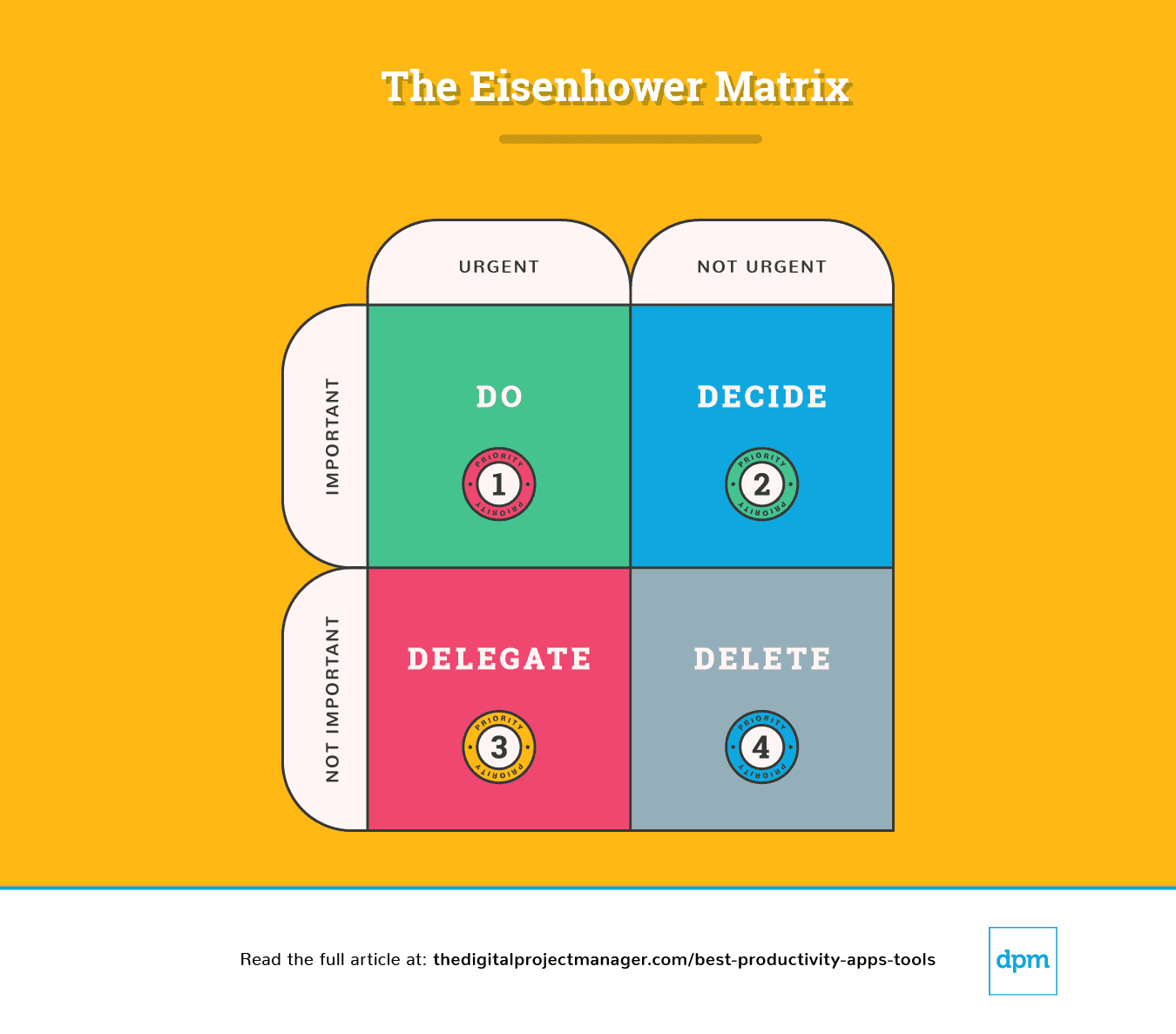
Eisenhower Matrix Erklärung
Eine einfache Aufteilung dieses Diagramms zeigt uns, wie wir eine Aufgabe angehen müssen:
Priorität #1: Es ist dringend und wichtig. Los, tu es.
Priorität #2:Es ist nicht dringend, aber trotzdem wichtig. Bestimme alle Punkte, die verhindern, dass der Prozess voranschreitet. Bestimme den idealen Zeitpunkt, die Person und die Methode, um die Aufgabe auszuführen.
Priorität #3:Es ist dringend, aber nicht wichtig. Delegiere die Aufgabe an die zuständige Person, damit du dich auf wichtige Aufgaben konzentrieren kannst.
Priorität #4:Es ist nicht dringend und auch nicht wichtig, es ist die vierte Priorität. Entferne die Aufgabe.
Am Ende eines jeden Tages solltest du 10 Minuten damit verbringen, herauszufinden, wie dein Tag morgen aussehen wird – was wirst du tun, entscheiden, delegieren und löschen?
Dann solltest du dir diese productivity apps ansehen. Ich habe diejenigen herausgesucht, die dir helfen können, die wichtige Arbeit zu erledigen, in deiner Zeit effektiv zu sein, indem du sie automatisierst, verfolgst, synchronisierst und erinnerst – so hast du mehr Zeit, die Arbeit zu erledigen, die am wichtigsten ist!
The Digital Project Manager ist Reader-unterstützt. Wenn du durch Links auf unserer Website klickst, erhalten wir möglicherweise eine Provision. Mehr dazu erfahren.
Priorität #1: Es ist dringend und wichtig. Los, tu es.
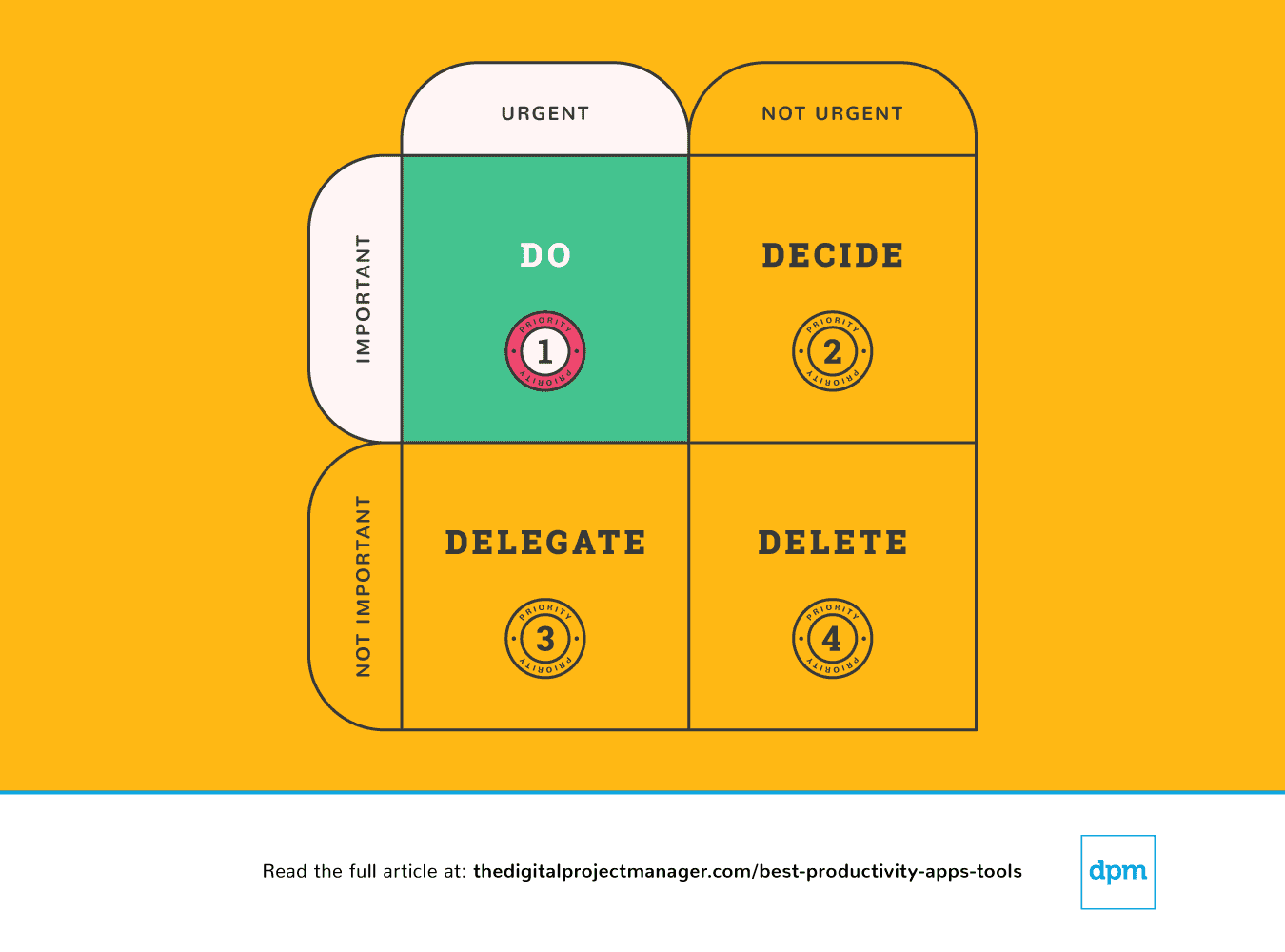
Deine wichtigsten Aufgaben bedürfen der Regel “Jetzt erledigen”. In diesem Sinne, wenn du eine Aufgabe siehst, die weniger als 2 Minuten dauert, dann erledige sie einfach sofort (Warum? Weil es mehr Zeit braucht, sie auf deine Aufgabenliste zu setzen und sie dann zu planen und zu priorisieren).
Eine Aufgabe mit hoher Priorität zu starten und mit dieser Aufgabe fortzufahren, bis sie zu 100% abgeschlossen ist, ist der wahre Härtetest für deinen Charakter. Es ist nicht einfach, aber es geht darum, wie produktiv du sein wirst. Das erfordert Selbstdisziplin, aber wir können es uns mit ein paar Produktivitätstools leichter machen.
Priorität #2: Es ist nicht dringend, aber trotzdem wichtig. Bestimme alle wichtigen Punkte.
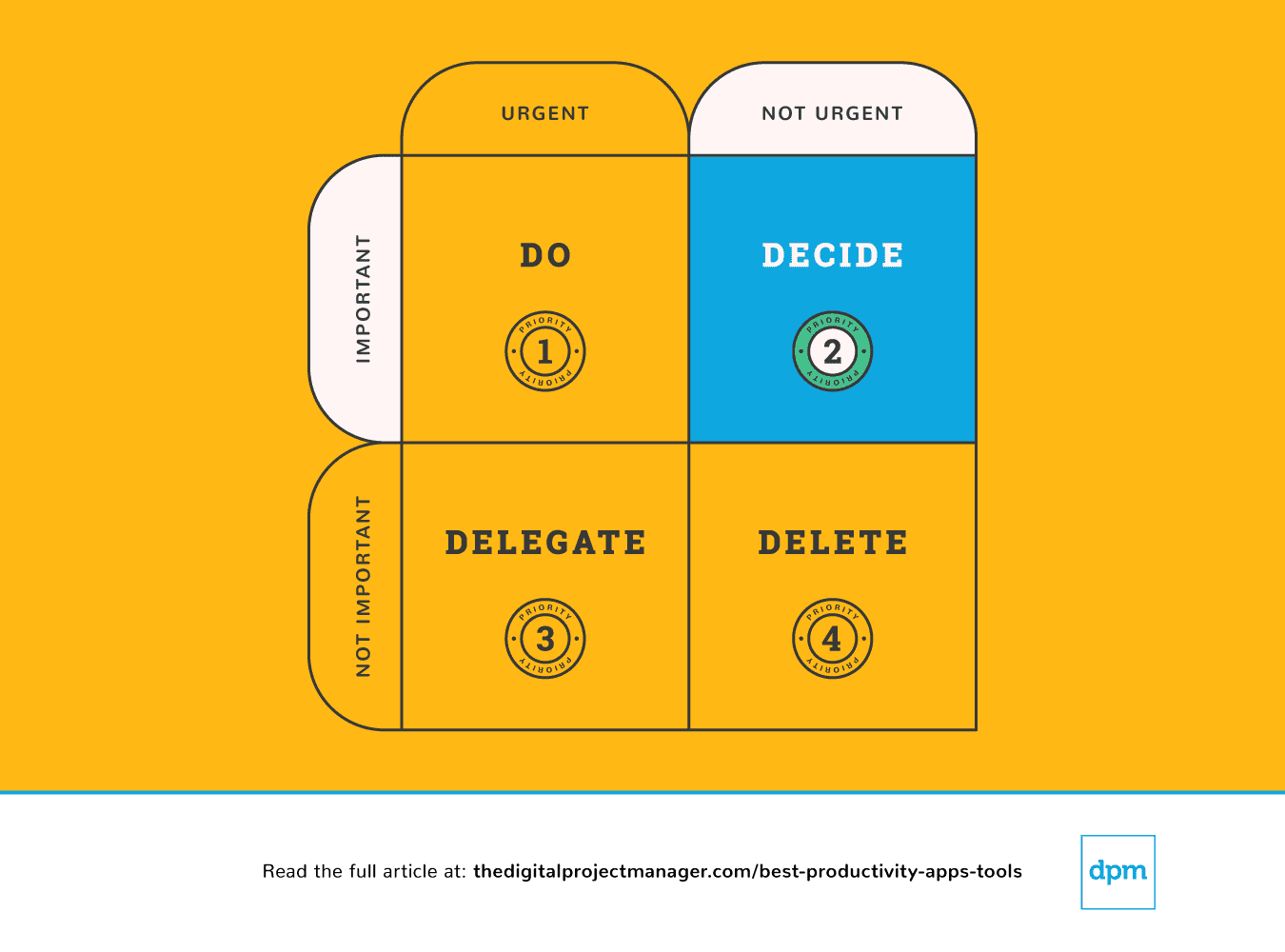
Wenn etwas wichtig, aber nicht unbedingt dringend ist, musst du dir einen Moment Zeit nehmen, um einen geeigneten Plan für den Umgang mit diesem Thema zu finden. Hör auf, dich abseits zu bewegen – plane, die wichtigen Dinge richtig zu erledigen.
Wir können uns total überfordert fühlen, weil wir in zu viele Richtungen gezogen werden – es fühlt sich an, als gäbe es zu viel auf dem Tisch und keine Möglichkeit, alle glücklich zu machen. Um Entscheidungen zu treffen, die für uns, unser Team und unsere Projekte am sinnvollsten sind, brauchen wir einen klaren Überblick über alle unsere Aufgaben, Prioritäten und Fortschritte.
Die folgenden Produktivitätsanwendungen helfen insbesondere bei der Priorisierung von Aufgaben – bei der Überprüfung der Pipeline, der Verfolgung des Fortschritts und der Bereitstellung aller Informationen, um solide Entscheidungen zu treffen, während wir unsere Arbeit verwalten.
Priorität #3: Es ist dringend, aber nicht wichtig. Delegiere.
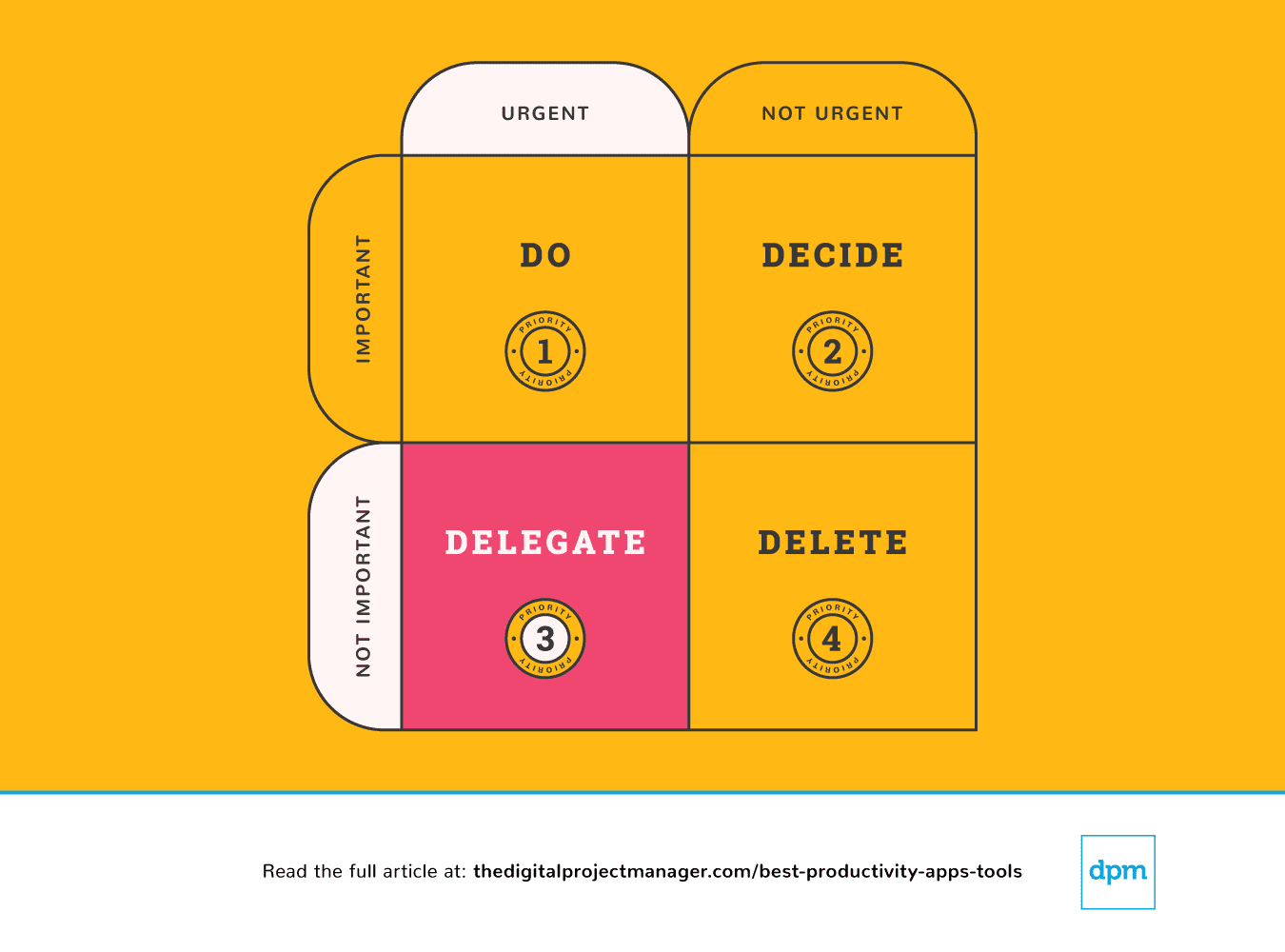 Einige Leute haben es leicht, Aufgaben zu delegieren, während andere einen sehr starken Impuls spüren, es einfach “selbst zu tun”. So schwer es auch sein mag, Aufgaben an andere Personen weiterzugeben, so einfach ist es doch, Aufgaben an eine Maschine weiterzugeben. Es gibt eine Vielzahl von productivity apps, mit denen wir in kürzester Zeit mehr erreichen können, indem wir unseren Workflows mehr Automatisierung hinzufügen und einen Algorithmus die geschäftige Arbeit erledigen lassen.
Priorität #4: Es ist nicht dringend und auch nicht wichtig. Lösche es.
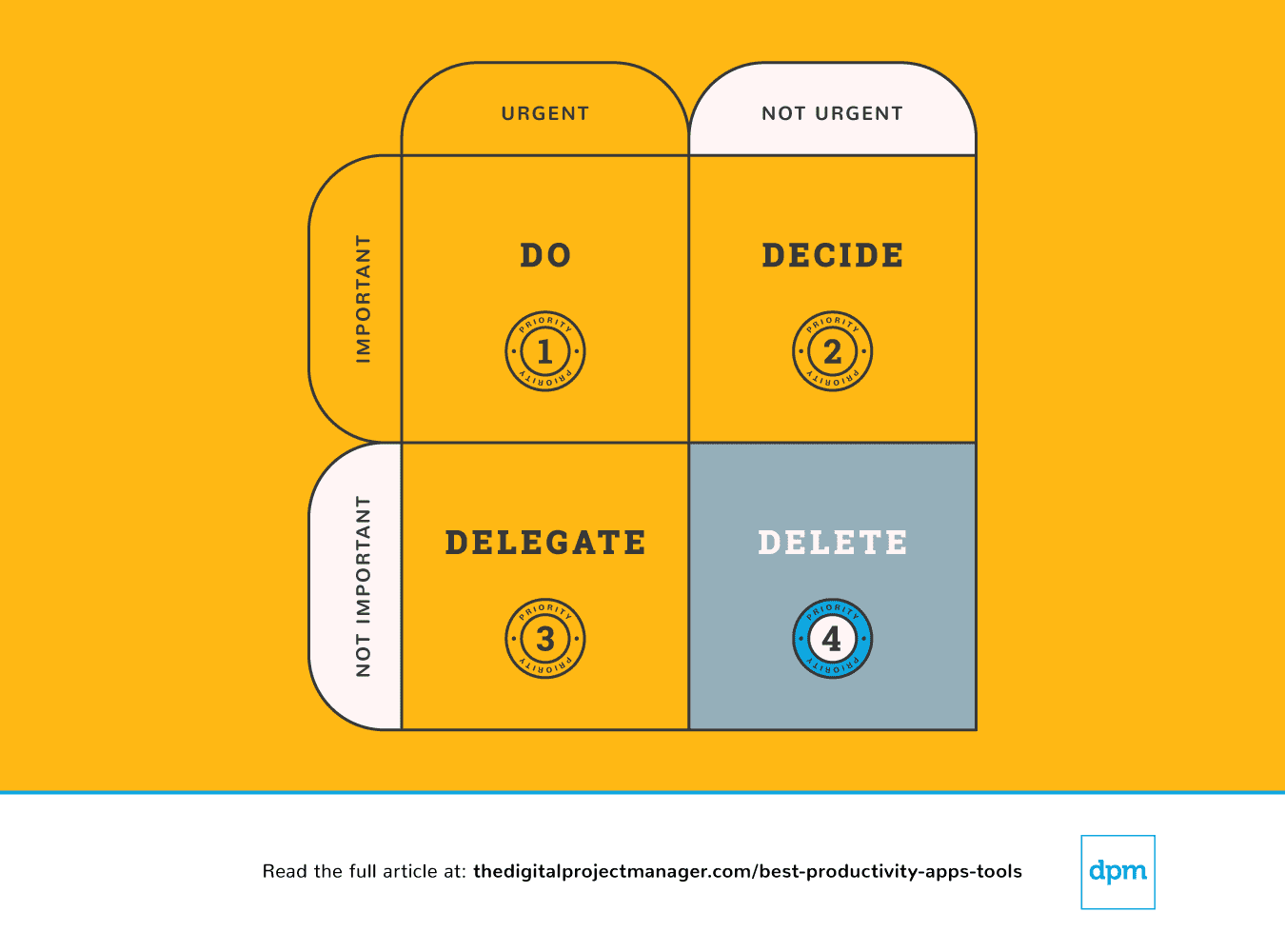 Letztendlich können wir manchmal effektiver sein, wenn wir weniger tun. Es gibt endlose Möglichkeiten (und viele productivity apps, die dir helfen), zu tollen Ideen “Ja” zu sagen. Zugleich bedeutet es, dass du “nein” zu den richtigen Dingen sagen musst, um sie ausführen zu können. Lerne, wie man Grenzen setzt und sage nein.
Es ist toll, nett und freundlich zu sein und den Leuten zu helfen. Das Problem ist, dass wir nicht immer die Zeit haben. Das gibt uns die Möglichkeit, zu wenig oder gar nichts zu liefern. Du wirst niemandem einen Gefallen tun, wenn du dich für etwas entscheidest, bei dem du nicht wirklich deine beste Arbeit abliefern kannst.
Hier ist eine großartige Produktivitäts-App, mit der du Aufgaben vom Tisch wischen und Grenzen entwickeln kannst, indem du dir ein System anlegst, mit dem du einfach “nein” sagen kannst:

Best for custom workflows and task boards
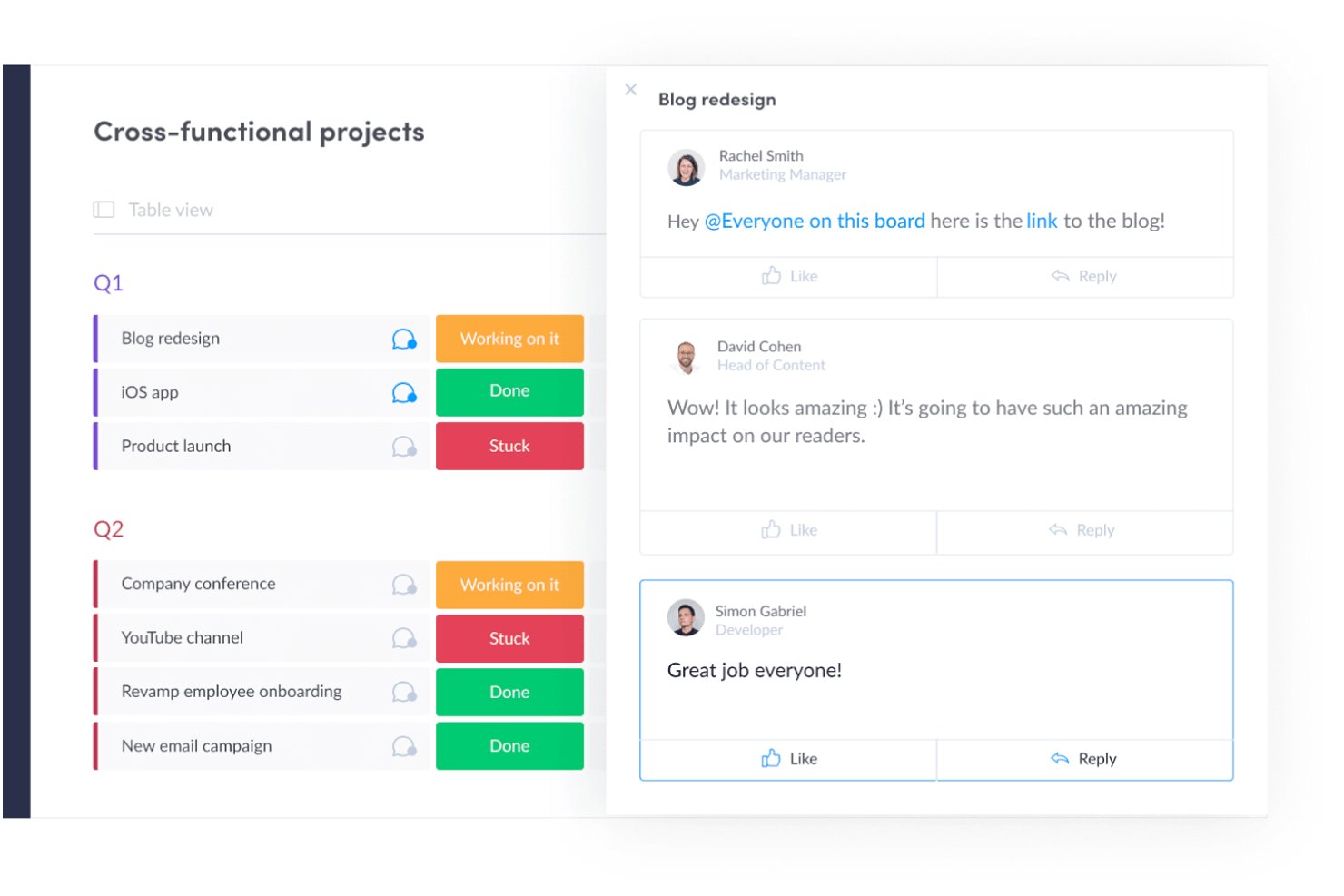
monday AI Workspace is a work management platform that combines customizable task boards, project planning, workflow automation, and AI-powered execution tools across project management, CRM, dev, and service operations.
Who Is monday AI Workspace Best For?
It's a strong fit for mid-to-large teams running multiple workstreams across product, marketing, operations, or engineering who need a single, highly configurable workspace.
Why I Picked monday AI Workspace
I've included monday AI Workspace in my top picks because no other tool makes it this easy to build workflows that match how your team works. The board system lets you configure custom columns, statuses, and automations around your specific process. I particularly like the AI Workflow Builder, which orchestrates multi-step automations across boards without needing a developer. My team can build a sprint board for engineering and a campaign tracker for marketing, each with its own automations.
monday AI Workspace Key Features
- AI Meeting Notetaker: Captures, summarizes, and distributes action items from project meetings automatically.
- Time tracking: Lets team members log hours directly within tasks for accurate project reporting.
- Integrated Docs: Supports collaborative note-taking and documentation tied to specific boards or projects.
- Custom dashboard reporting: Allows creation of real-time dashboards to visualize metrics across multiple workspaces.
monday AI Workspace Integrations
monday AI Workspace offers hundreds of native integrations through its built-in marketplace, including Slack, Microsoft Teams, Google Workspace, Salesforce, HubSpot, Jira, GitHub, Dropbox, Zoom, and Outlook. It also supports Zapier and provides an API for custom integrations.
Pros and Cons
Pros:
- Multiple project views including Gantt and workload
- AI workflow builder handles multi-step automations
- Highly customizable boards with flexible column types
Cons:
- Notification volume can become hard to manage
- Dashboards require manual configuration across boards
New Product Updates from monday AI Workspace
monday AI Workspace Adds Human Approval Routing
monday AI Workspace adds a human-in-the-loop approval block to AI Workflows, sending approval requests and routing workflow paths based on responses. For more information, visit monday AI Workspace's official site.
 .
.
Toggl
Best with automated time tracking
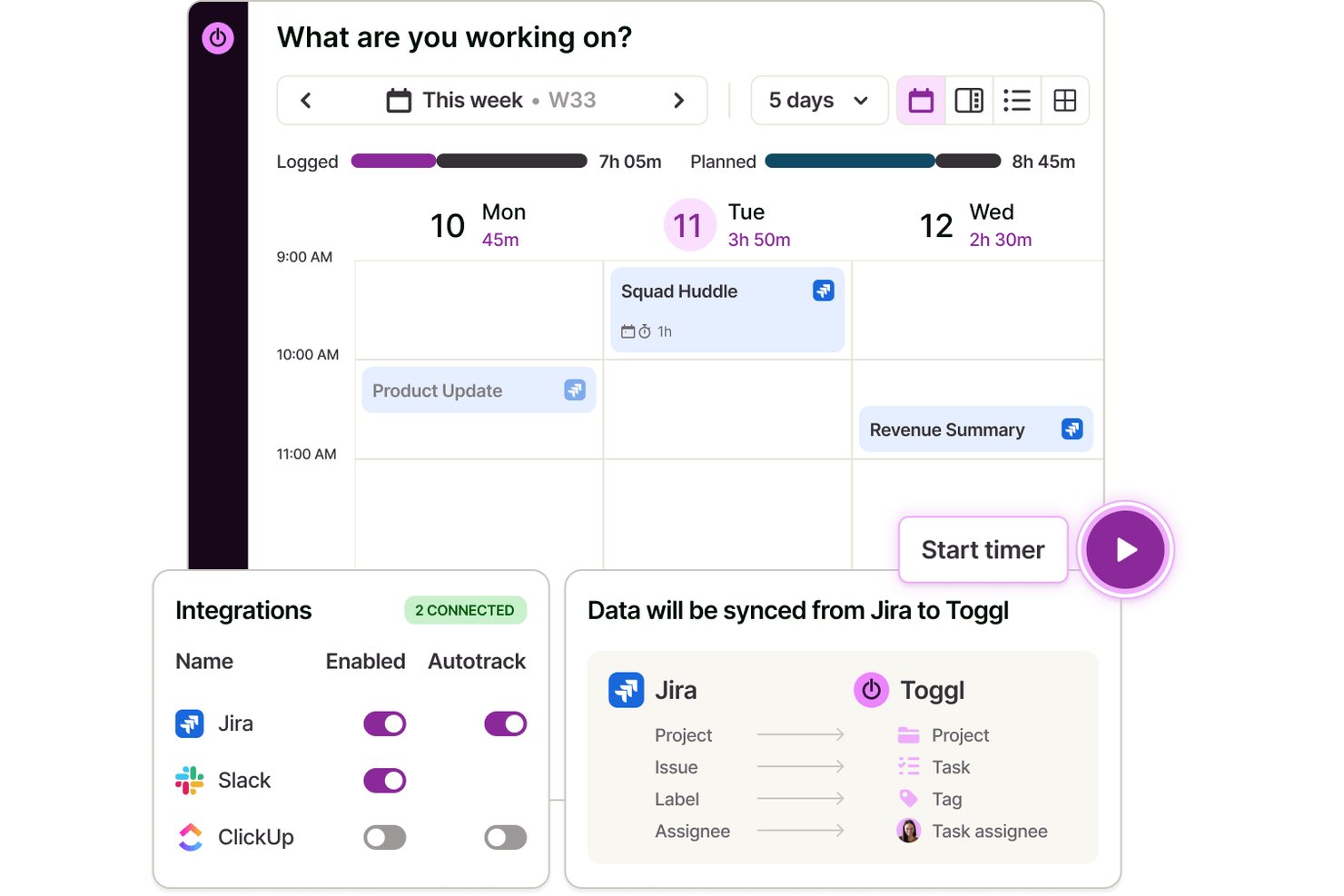
Toggl is a time tracking app that lets individuals and teams log hours across web, desktop, and mobile, with automated time capture, calendar integrations, and detailed productivity and profitability reporting.
Who Is Toggl Best For?
Toggl is a strong fit for freelancers, consultants, and agencies that bill by the hour and need accurate time data without invasive employee monitoring.
Why I Picked Toggl
I picked Toggl as one of the best because its approach to automated tracking is genuinely different. The desktop app silently logs every app and website you use for over 10 seconds, but that data stays private to you alone. You decide what becomes an official time entry, which means no screenshots, no keystroke logs, and no manager surveillance. It also converts calendar events into time entries automatically, so logging a client call takes zero extra effort. Toggl also has an AI assistant that lets you ask plain-language questions about your time and project data, making it easier to pull insights from what you've tracked.
Toggl Key Features
- Calendar view: See tracked time as blocks on a visual calendar and connect with Google or Outlook.
- Project and client tracking: Organize time entries by unlimited projects and clients for clean reporting.
- AI task creation and management: Create tasks from screenshots, notes, and ideas and manage them in Board, List, Calendar, or Timeline view
- Customizable reports: Build bar, donut, pivot, and line charts to analyze trends in tracked hours.
Toggl Integrations
Toggl offers native integrations with Asana, Trello, Jira, ClickUp, Salesforce, Google Calendar, Outlook Calendar, QuickBooks Online, Xero, and Slack.
Pros and Cons
Pros:
- Simple switching between projects and clients
- Full privacy controls on activity data
- Calendar events become time entries automatically
Cons:
- Mobile app can miss background tracking
- Lacks advanced task management features

Best productivity app for end-to-end project management
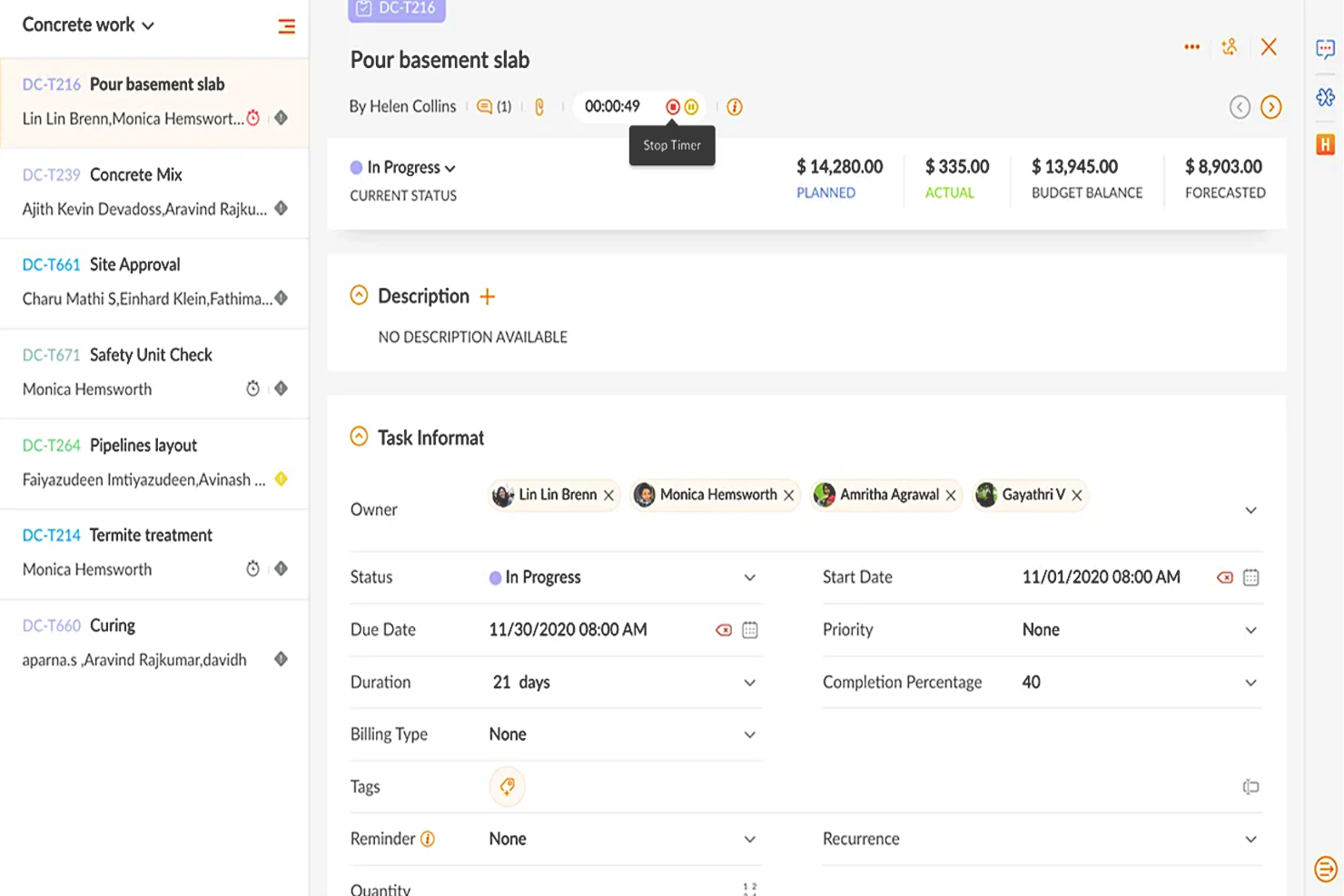
Zoho Projects is a cloud-based project management software that allows individuals and teams to collaborate, plan, and execute projects efficiently. The software enhances productivity by providing a centralized platform for task management, time tracking, document sharing, and team communication.
Why I picked Zoho Projects: It's a versatile software solution that different types of organizations and teams can use to manage their projects effectively. Its intuitive interface makes it easy to navigate and utilize, and it's user-friendly, with features that are easily accessible and organized logically. Their customizable user interface lets you choose the layout and features that best suit your needs.
You can create, manage, assign, and set task deadlines using Zoho Projects. You can also create task dependencies, ensuring that each job is completed in the correct order. It includes a calendar view allowing users to see their upcoming tasks and deadlines in one place.
Users can also track their time spent on each task, making it easier to manage their workload and allocate resources effectively. The time tracking feature can generate reports, providing valuable insights into team performance and project progress.
Zoho Projects Standout Features & Integrations
Features include collaboration tools that make it easy for team members to communicate and work together, a chat feature that supports real-time communication, and a comments section where team members can discuss specific tasks and projects. It also includes a document management system where team members can share and collaborate on documents, spreadsheets, and presentations.
Integrations are available with other Zoho apps, commonly used Google apps (Google Calendar, Drive, Spreadsheets, etc.), Microsoft apps (Calendar, Excel, Office 365, OneDrive, Teams, and SharePoint), and other third-party apps such as Basecamp, Jira, Slack, Zendesk, and Zapier.
New Product Updates from Zoho Projects
Zoho Projects Adds CodeX Scripts for Custom Modules
Zoho Projects now supports CodeX Scripts for custom modules, enabling conditional logic and rules for creating, updating, and deleting records. For more information, visit Zoho Projects' official site.
 .
.
Best for brainstorming, ideation, and task management in one

MeisterTask is a versatile project management tool that combines intuitive Kanban boards with powerful collaboration and customization features, making it ideal for teams of all sizes. Its seamless integration with MindMeister for brainstorming and ideation, along with robust task automation and real-time communication capabilities, streamlines workflow and enhances productivity across projects.
Why I picked MeisterTask: MeisterTask excels as a productivity app by offering a streamlined, intuitive interface that simplifies task and project management. It effectively combines customizable Kanban boards for visual workflow management with powerful features like task automation, due date reminders, and time tracking to enhance efficiency.
The app facilitates seamless collaboration through easy file sharing, commenting, and task assignments, keeping teams aligned and focused. Its integration with tools like MindMeister for mind mapping ensures a smooth transition from brainstorming to execution, making it easier for users to turn ideas into actionable tasks. MeisterTask's focus on user-friendly design and practical functionality makes it a valuable tool for individuals and teams aiming to boost productivity and achieve their goals more efficiently.
MeisterTask Standout Features and Integrations
Features include Kanban boards, task automation, mindmeister integration, customizable workflows, project templates, time tracking, file attachments, due date reminders, collaboration tools, activity streams, mobile apps, secure data encryption, multiple integrations with other tools, personalized dashboards, and flexible project views.
Integrations include Slack, Dropbox, Github, Google Drive, Microsoft Teams, Outlook, Trello, Asana, MindMeister, and hundreds more through a paid plan with Zapier.

ClickUp
Best for in-app communication tools

ClickUp is a productivity app that helps you and your team stay aligned on day-to-day tasks, projects, and company goals, among other things. Their platform brings your team together in one app to communicate, collaborate, simplify the work, and get more done.
Why I Picked ClickUp: You can work smarter as a team with real-time chat. Tag individuals or groups, assign comments for action items, and link tasks to ensure nothing gets lost in the daily grind. Stay on track to hit your goals with targets for task completions, numbers, and monetary values.
ClickUp Standout Features & Integrations
Features include task scheduling/tracking, project management, resource management, budgeting, contact management, data visualizations, employee database, expense tracking, file sharing, third-party plugins, collaboration support, timesheets, roadmapping, chat, customer management, email integration, feedback management, and process reporting.
Integrations include native integrations with Slack, Google Workspace, Dropbox, and many more tools, as well as over 1,000+ integrations through Zapier (may incur additional costs).
New Product Updates from ClickUp
ClickUp Adds Meetings Hub, Super Agent Templates, and ZoomInfo Integration
ClickUp adds a searchable Meetings Hub, new ways to clone and template Super Agents, and a ZoomInfo integration through the App Center. These updates improve meeting retrieval, agent reuse, and access to sales intelligence. For more information, visit ClickUp’s official site.
 .
.
Kintone
Best for building custom productivity apps
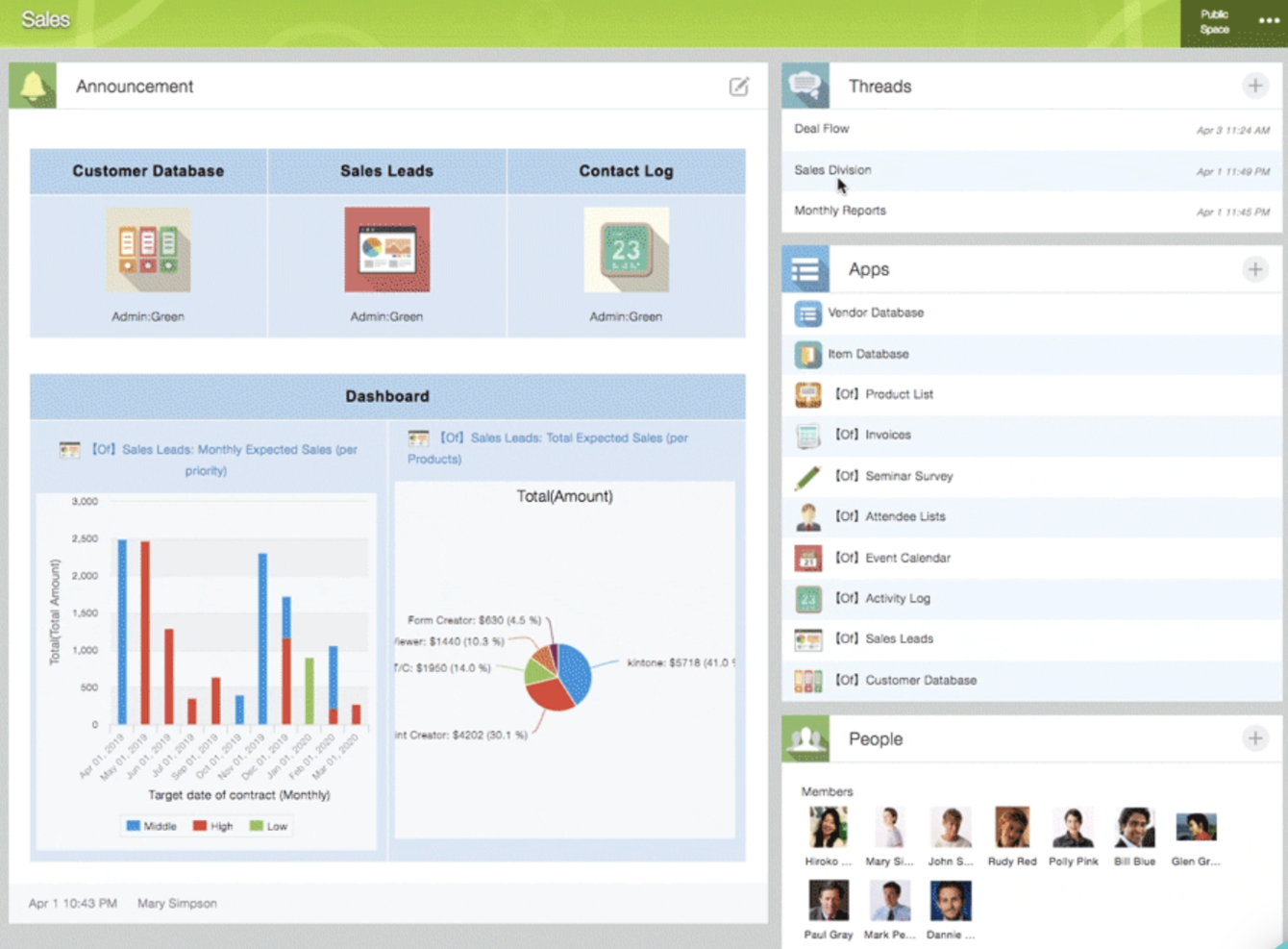
Kintone is a customizable app platform used by teams at Volvo Trucks North America, Japan Airlines, Shiseido, and over 23,000 organizations worldwide. Their unique approach allows you to build a wide variety of customizable “apps” either from scratch, using templates or from your existing spreadsheets, for data management, business processes, and workflows. Kintone apps can be customized for project management, sales CRM, customer databases, expense reports, shared to-do lists, equipment management, product feedback, and much more.
Why I Picked Kintone: Kintone lets you build no-code task management apps by dragging and dropping elements that you want to see onto the page: rich text fields, date fields, drop-down menus, number fields with built-in calculations, spaces for attachments, user or group selection menus, related data from other apps, tables, and more.
Once you’ve built the app you want, you can use it to more easily manage whatever data and tasks you and your team need to track. And with custom notifications and reminders as well as detailed permissions settings, your project tracking solution can look and work however you want it to.
What makes Kintone particularly great for project tracking are the features to filter and prioritize tasks by data field or team member to generate custom reports or dashboard views, as well as the ability to automate reminders and handoffs between team members for multi-step workflows.
Kintone’s built-in communication features also allow teams to discuss projects directly in the app and in topic or project-based threads. Dedicated “spaces” organize everything your team needs for your project, including task-tracking apps and searchable conversation threads.
Kintone Standout Features & Integrations
Features include project management, dashboards, resource management, analytics, calendar management, conversion tracking, employee onboarding, forecasting, lead scoring, timesheets, collaboration support, reports, pipeline management, budgeting, and process modeling.
Integrations include Slack, Gmail, Google Calendar, Outlook, Tableau, Dropbox, Salesforce, HubSpot, Eventbrite, WordPress, QuickBooks, MailChimp, and many more through a paid plan with Zapier or via API integrations.

Trello
Best for card-based task lists and Kanban boards
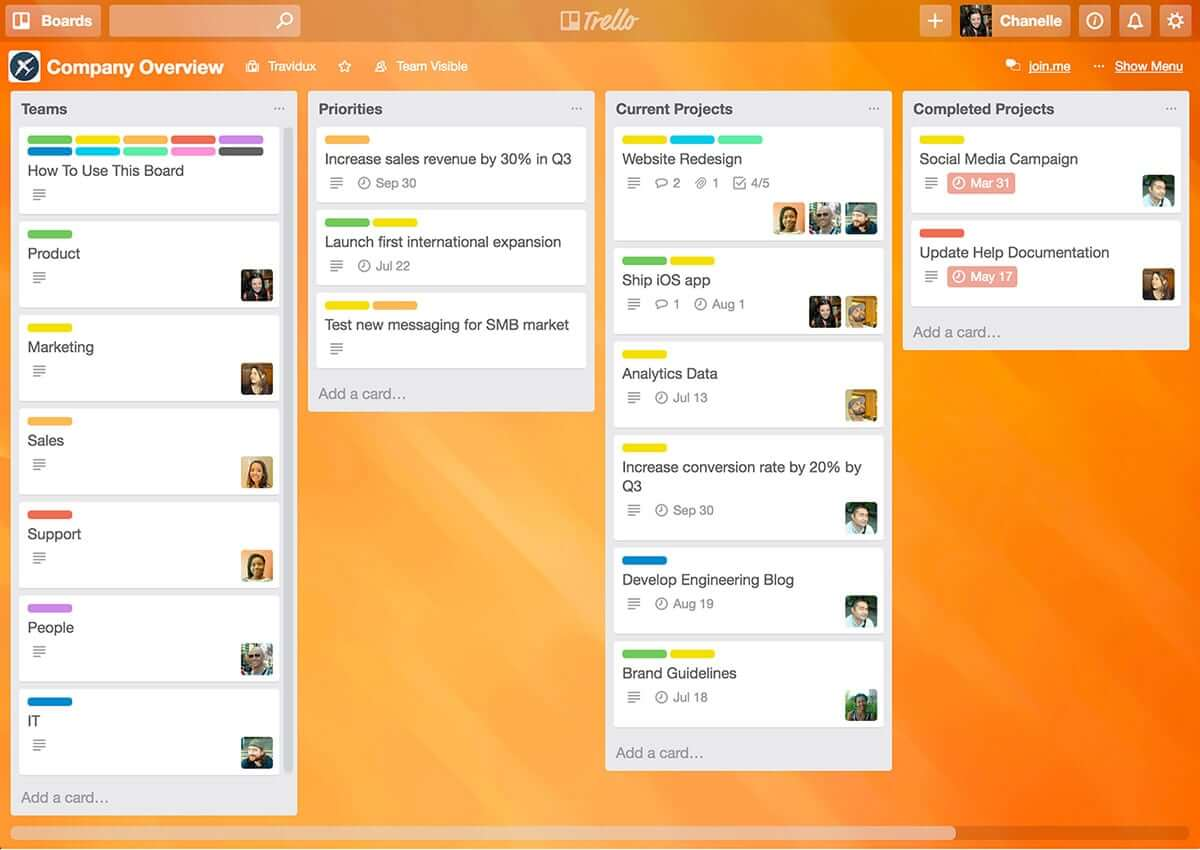
Trello is a Kanban board app that can be used to organize tasks visually. It’s user-friendly, with an intuitive drag-and-drop interface that makes it easy to learn. This popular tool can be used to help you visualize your deadlines, items in progress, and completed tasks, enabling you to make informed decisions about what to work on next according to the big picture.
Why I Picked Trello: Trello is a popular project management tool that helps teams organize tasks and collaborate on projects visually and intuitively. It uses a system of boards, lists, and cards to represent tasks and workflows, allowing team members to easily see what needs to be done, who is responsible for each task, and what the status of each task is. Trello can be customized to fit a wide range of project management needs, and it offers features such as due dates, checklists, attachments, and team member assignments. Its flexibility and ease of use make it a great tool for teams of all sizes and types, from small startups to large enterprises.
Trello Standout Features & Integrations
Features include boards, to-do lists, task management, workflow management, priority labels, due dates, file sharing, communication, a mobile app, and third-party integrations/add-ons.
Integrations include 200+ apps and tools your team depends on, like Slack, Google Drive, Salesforce, Dropbox directly into your Trello boards. (Note: Some connections require an additional subscription fee.)

Best for real-time collaboration

Whether you're leading a small business, managing a large enterprise, or navigating the educational sector, Google Workspace offers a suite of productivity tools designed to meet your diverse needs. With apps like Gmail, Drive, and Meet, you can seamlessly manage communications, storage, and virtual meetings while enhancing collaboration and maintaining strong security. With Gemini—Google’s premium AI—integrated across all plans, Workspace helps you draft emails faster, summarize documents instantly, generate ideas, and stay organized across devices. Whether you're handling client communication, creating content, or coordinating daily operations, Workspace boosts productivity and keeps your team connected.
Why I Picked Google Workspace
I picked Google Workspace for its unique blend of real-time collaboration, cloud accessibility, and AI-driven assistance. Tools like Google Docs and Sheets allow your team to work together simultaneously, eliminating version-control issues and reducing unnecessary email threads. Google Meet provides convenient video conferencing without relying on external software, making communication frictionless. Gemini is built directly into apps like Gmail, Docs, Sheets, and Meet, going beyond collaboration to actively enhance how you work. From drafting content to summarizing documents and managing tasks, having AI built in helps you stay efficient, responsive, and adaptive to changing business or project needs.
Google Workspace Key Features
In addition to its collaborative capabilities, Google Workspace offers several other features that boost productivity:
- Drive: Secure cloud storage with generous space options, ensuring your files are accessible anywhere, anytime.
- Calendar: Simplified scheduling with shared calendars and appointment booking pages to keep your team organized.
- Chat: Integrated messaging platform for real-time team communication and collaboration.
- NotebookLM: Instant insights and podcast-style Audio Overviews to accelerate team learning and content understanding.
Google Workspace Integrations
Integrations include Salesforce, Atlassian, Tableau, SAP, Okta, Microsoft Office 365, Slack, Zoom, Trello, and Asana.
Pros and Cons
Pros:
- Generous cloud storage options facilitate easy file access and sharing.
- Real-time collaboration tools improve team productivity and communication.
- Seamless integration with Google services enhances workflow efficiency.
Cons:
- Shared drive permissions and complex folder hierarchies can become difficult to manage if not structured carefully.
- Compatibility issues when collaborating externally with teams using non-Google file formats or Microsoft Office workflows.
Guru
Best tool for searching through all your apps to surface answers quickly
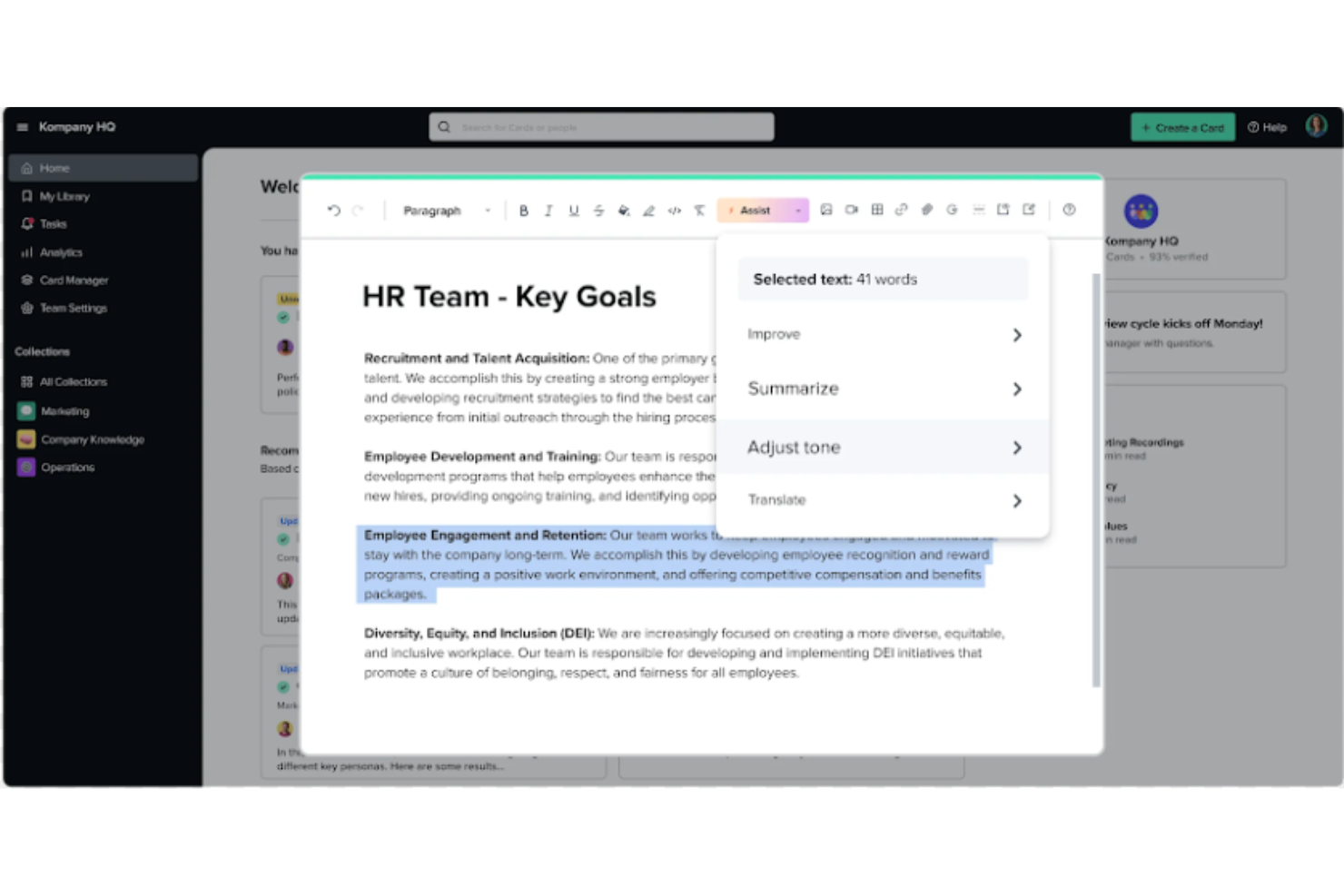
Guru is an advanced search and knowledge management platform that's designed to help users find relevant information quickly. Their advanced AI-driven search feature can search all your apps, documents, and slack #channels for answers — either directly in Slack or via a Chrome extension — making it easier to find information fast.
Why I Picked Guru: Guru employs AI to deliver instant answers within the user's workflow that are tailored to their specific role, location, and activities. The tool also facilitates the onboarding process for new hires, streamlines the creation, sharing, and organization of company documentation, and acts as a knowledge hub to disseminate educational content and troubleshooting guidance throughout an organization. The platform also integrates with a multitude of tools and services, enabling users to find answers and collaborate without leaving their workflow.
Overall, Guru is intended to eliminate the barriers created by knowledge silos and to improve productivity by automating information retrieval, thus allowing employees to concentrate on tasks that require human intelligence.
Guru Standout Features & Integrations
Features include enterprise AI search, an employee intranet, a company wiki, AI suggest and assist, custom branding tools, collaboration and feedback tools, mobile accessibility, and access controls and permissions.
Integrations include Trello, Cognito Forms, Jira Software Cloud, Confluence Cloud, HubSpot, Google Chat, Confluence Server, and GitHub.
Visor
Best for its user-friendly interface

Visor is a cloud-based SaaS product that aims to help individuals and businesses manage their time and tasks more efficiently. It's best suited for individuals and teams who need a comprehensive and easy-to-use productivity tool that allows them to manage their projects, tasks, and time all in one place.
Why I picked Visor: I chose Visor as one of the best productivity software because it's an all-in-one solution that brings together task management, project management, time tracking, and calendar features in a user-friendly interface. I appreciate that I can keep track of everything I need to do without having to switch between multiple tools or apps.
Another great feature is its real-time collaboration capabilities, which allow you to work with your team members on projects, assign tasks, and track progress. This feature makes it easy to communicate with team members and stay on top of everything that's going on in your projects. It also has an intelligent scheduling feature that suggests the best time slots for each task based on your availability and workload. This feature is particularly helpful when you have a lot of tasks to complete and you need to prioritize your time effectively.
Visor Standout Features & Integrations
Features include API, dashboards, data export/data import, data visualization, external integrations, Gantt charts, project management, task scheduling/tracking, resource management and third-party plugins/add-ons.
Integrations include Jira, HubSpot, and Salesforce.
Zusammenfassung der besten productivity apps
| Tool | Best For | Trial Info | Price | ||
|---|---|---|---|---|---|
| 1 | Best for custom workflows and task boards | Free plan + 14-day free trial available | From $9/user/month (billed annually) | Website | |
| 2 | Best with automated time tracking | Free plan + 30-day free trial + free demo available | From $9/user/month (billed annually) | Website | |
| 3 | Best productivity app for end-to-end project management | 15-day free trial + free plan + free demo available | From $4/user/month (billed annually) | Website | |
| 4 | Best for brainstorming, ideation, and task management in one | Free trial + free plan + free demo available | From $13/user/month (billed annually) | Website | |
| 5 | Best for in-app communication tools | Free plan + free demo available | From $9/user/month (billed annually) | Website | |
| 6 | Best for building custom productivity apps | 30-day free trial + free demo available | From $24/user/month | Website | |
| 7 | Best for card-based task lists and Kanban boards | 14-day free trial | From $5/user/month (billed annually) | Website | |
| 8 | Best for real-time collaboration | 14-day free trial available | From $7/user/month (billed annually) | Website | |
| 9 | Best tool for searching through all your apps to surface answers quickly | Free demo available | Pricing upon request | Website | |
| 10 | Best for its user-friendly interface | Free plan available | From $18/user/month | Website |
Weitere Produktivitäts-Tools
Ich hatte noch nicht die Gelegenheit, alle diese Tools eingehend zu überprüfen, aber hier sind noch ein paar weitere, um herauszufinden, ob die in diesem Bericht vorgestellten Tools nicht deinen Bedürfnissen entsprechen:
- Pneumatic Workflow
For unlimited workflow management
- Collabio Spaces
For iPhone & Mac
- Focus Booster
For the Pomodoro productivity technique
- SaneBox
For increasing productivity by streamlining your email inbox
- Slack
Instant messaging app for teams
- actiTIME
For detailed time tracking
- Hubstaff
For managing remote and field teams
- Hive
For flexible project views according to team needs
- Lucidspark
For ideation and collaboration using an infinite canvas
- Wrike
Productivity app for team collaboration


Brauchst Du Hilfe Bei Der Eingrenzung Der Optionen?
Dieses Tool ist ziemlich nützlich. In Zusammenarbeit mit Crozdesk haben wir uns bemüht, dir Zugang zu dem „Software-Finder“ zu geben.
Wenn du einige der Details über dein Projekt und die Funktionen, die du in einem Projektmanagement-Tool suchst, eingibst, wird eine Liste von Tools erstellt, die deinen Präferenzen entsprechen. Du gibst deine E-Mail an das Team weiter und es schickt dir einen nützlichen PDF-Leitfaden mit einer Zusammenfassung deiner besten Übereinstimmungen.
Auswahlkriterien für die productivity apps
Wenn du dir Produktivitätssoftware ansiehst, ist es wichtig, eines im Auge zu behalten: Weil Produktivität sehr stark von deinen Einstellungen und persönlichen Gewohnheiten abhängt, ist das Produktivitäts-Tool selbst nur so effektiv.
Allerdings haben wir bei der Überprüfung dieser Tools die folgenden Auswahlkriterien in dieser Liste der Apps für die Produktivität verwendet:
- Benutzerfreundlichkeit: Ist die Oberfläche einfach und das System der App leicht zu verstehen? Verwirren die Features in der App, oder sind sie nützlich? Wir haben nur Apps ausgewählt, die wirklich einfach zu bedienen sind, ohne zusätzlichen Aufwand!
- Organisation und Priorisierung: Verfügt die Produktivitäts-App für To-Do-Listen-Apps über ein klares System zur Organisation und Reorganisation von Aufgaben? Zur Kennzeichnung von Prioritäten und zur Bewältigung der wichtigsten Aufgaben?
- Zugänglichkeit: Ist es auf mehreren Betriebssystemen verfügbar? Es gibt mehrere Mac productivity apps, die auf Android nicht verfügbar sind, wie z.B. Omni Focus. Wir haben jedoch versucht, bei Anwendungen zu bleiben, die auf mehreren Geräten verfügbar sind.
- Berichterstattung: Welche Arten von Berichtsfunktionen umfasst die App? Kannst du die für Aufgaben aufgewendete Zeit verfolgen, die Produktivität über die Zeit vergleichen oder mithilfe von Analysen messen, ob diese tatsächlich für dich funktionieren?
- Integrationen: Lässt sie sich in einige der anderen besten Organisations-Apps, Erinnerungs-Apps, Produktivitäts-Tracker-Apps usw. integrieren? Wir sind auf der Suche nach Apps, die mit anderen Tools synchronisiert werden können, um so viel wie möglich von deinem Aufgabenmanagement zu automatisieren.
- Preis: Macht das Preissystem Sinn für den Nutzen, den die App bietet? In den meisten Fällen kannst du eine Freemium-Version für den persönlichen Gebrauch verwenden. Bezahlte Tarife kosten in der Regel etwa $6/Monat.
Was meinst du dazu?
Welche productivity apps verwendest du, um organisiert und effektiv zu arbeiten? Findest du, dass diese nützlich sind, oder bevorzugst du andere Priorisierungsmethoden? Erzähle uns den Tools, mit denen wir wirklich produktiv sein können.