
20 Best Team Task Management Software Reviewed In 2026

10 Best Team Task Management Software Shortlist
Here's my pick of the 10 best software from the 20 tools reviewed.


Choosing the right team task management software can be a daunting task. You know you need to streamline project coordination and enhance teamwork, but determining which tool suits your needs best is tough. That's where I come in! With extensive experience as a software expert, I understand the nuances of different tools in the market. Team task management software helps manage tasks, deadlines, and communications in one centralized platform. Here are my picks for the best team task management software.
Why Trust Our Software Reviews
We’ve been testing and reviewing team task management software since 2012. As digital project managers ourselves, we know how critical and difficult it is to make the right decision when selecting software.
We invest in deep research to help our audience make better software purchasing decisions. We’ve tested more than 2,000 tools for different Project Management use cases and written over 1,000 comprehensive software reviews. Learn how we stay transparent & our software review methodology.
Table of Contents
- Best Team Task Management Software Shortlist
- Why Trust Our Software Reviews
- Compare Specs
- Best Team Task Management Software Reviews
- Other Team Task Management Software
- Related Reviews
- How I Select Team Task Management Software
- How To Choose Team Task Management Software
- Team Task Management Software Trends
- What Is Team Task Management Software?
- Features Of Team Task Management Software
- Benefits Of Team Task Management Software
- Costs And Pricing Of Team Task Management Software
- Team Task Management Software FAQs
The Best Team Task Management Software Summary
| Tool | Best For | Trial Info | Price | ||
|---|---|---|---|---|---|
| 1 | Best for customizable dashboards | Free plan available | From $9/seat/month (billed annually) | Website | |
| 2 | Best for comprehensive project tracking | 15-day free trial + free plan + free demo available | From $4/user/month (billed annually) | Website | |
| 3 | Best for agile project management | Free plan + free demo available | From $7/user/month (billed annually) | Website | |
| 4 | Best for breaking down complex projects | 30-day free trial + free plan available | From $7.65/member/month (billed annually) | Website | |
| 5 | Best for bug tracking | Free plan + free 30-day trial available | From $35/month (up to 30 users) | Website | |
| 6 | Best for project lifecycle visibility | 14-day free trial + free demo available | From $6/user/month | Website | |
| 7 | Best for cross-team project visibility | Free plan + free demo + 14-day free trial available | From $10/user/month (billed annually) + add-on fee | Website | |
| 8 | Best for flexible task and projects | Free plan + free demo available | From $4/user/month (billed annually) | Website | |
| 9 | Best for detailed project schedulers | 30-day free trial | From $10/user/month (billed annually) | Website | |
| 10 | Best for agile teams | Free plan available | From $13/user/month (billed annually) | Website |


-

Accelo
Visit WebsiteThis is an aggregated rating for this tool including ratings from Crozdesk users and ratings from other sites.4.4 -
Wrike
Visit WebsiteThis is an aggregated rating for this tool including ratings from Crozdesk users and ratings from other sites.4.2 -
Forecast
Visit WebsiteThis is an aggregated rating for this tool including ratings from Crozdesk users and ratings from other sites.4.6



Overviews Of The 10 Best Team Task Management Software
Here are my detailed thoughts on each software on this list, including what they do best and where they struggle.


monday.com is a team task management platform that lets you organize projects, assign tasks, automate workflows, and visualize progress with flexible boards and dashboards.
Who Is monday.com Best For?
monday.com is a good fit for mid-sized to large teams that need a highly visual, flexible way to manage tasks and projects across multiple departments.
Why I Picked monday.com
monday.com earns its spot on my shortlist because of how far you can take dashboard customization without touching a single line of code. I use the dashboard widget library to pull in charts, battery progress indicators, Gantt timelines, and number summaries—all from different boards—into one consolidated view. That means my team can track task progress, workload distribution, and project milestones on a single screen instead of jumping between boards. The AI-generated executive summaries are also genuinely useful when I need to brief leadership on where things stand across multiple workstreams.
monday.com Key Features
- Automations: Set up no-code automation rules to trigger status changes, notifications, and task assignments based on conditions you define.
- Multiple board views: Switch between Kanban, timeline, calendar, and map views to see your tasks in the format that fits your workflow.
- Workload management: See how tasks are distributed across team members to spot bottlenecks and rebalance assignments in real time.
- Task dependencies: Link related tasks so your team knows exactly what needs to be completed before the next item can move forward.
monday.com Integrations
monday.com offers 200+ native integrations, including Slack, Google Drive, Google Calendar, Microsoft Teams, Outlook, Zoom, Jira, Salesforce, HubSpot, and GitHub. It's available on Zapier and has an API for custom integrations.
Pros and Cons
Pros:
- Effective collaboration tools with document sharing capabilities.
- Provides versatile project views like Kanban and Gantt charts.
- Offers highly customizable workflows to fit team needs.
Cons:
- Mobile app functionality is less robust than desktop version.
- Some features, like time tracking, require higher-tier plans.
New Product Updates from monday.com

monday.com's AI Blocks Now Available to All Users
monday.com AI Blocks are now available to all users, enabling teams to integrate AI directly into workflows. This rollout helps automate tasks and improve productivity across projects. For more information, visit monday.com's official site.


Zoho Projects is a team task management platform that helps you organize tasks, track progress, manage deadlines, and collaborate with your team using features like task lists, Gantt charts, and built-in communication tools.
Who Is Zoho Projects Best For?
Zoho Projects is a good fit for small to mid-sized teams that need a structured, all-in-one platform to manage tasks, timelines, and team collaboration.
Why I Picked Zoho Projects
I picked Zoho Projects as one of the best because of how much tracking depth it packs into a single platform. The Gantt chart is where I spend a lot of my time—it lets me set four types of task dependencies, compare baselines against actual progress, and flag delayed tasks using the End Variance feature. That level of detail means my team can catch schedule slippage before it compounds. I also like the critical path highlighting, which makes it easy to see exactly which tasks will derail the whole project if they slip.
Zoho Projects Key Features
- Task automation: Set up rules to automatically assign tasks, update statuses, or send notifications when specific conditions are met.
- Timesheets and time tracking: Log hours directly against tasks and generate timesheet reports to monitor how your team spends its time.
- Issue tracking: Create, assign, and track bugs or issues alongside your project tasks without switching to a separate tool.
- Project forums: Post updates, share files, and hold team discussions in threaded forum boards tied directly to each project.
Zoho Projects Integrations
Zoho Projects offers 50+ native integrations, including Slack, Google Drive, Microsoft Teams, GitHub, Bitbucket, Dropbox, Zoho CRM, Zoho Books, and Trello. It's available on Zapier and has an API for custom integrations.
Pros and Cons
Pros:
- Customizable workflows and reports
- Integration with Zoho ecosystem
- Rich project tracking features
Cons:
- Mobile app features limited compared to web version
- Some learning curve for new users
- Can be complex to set up

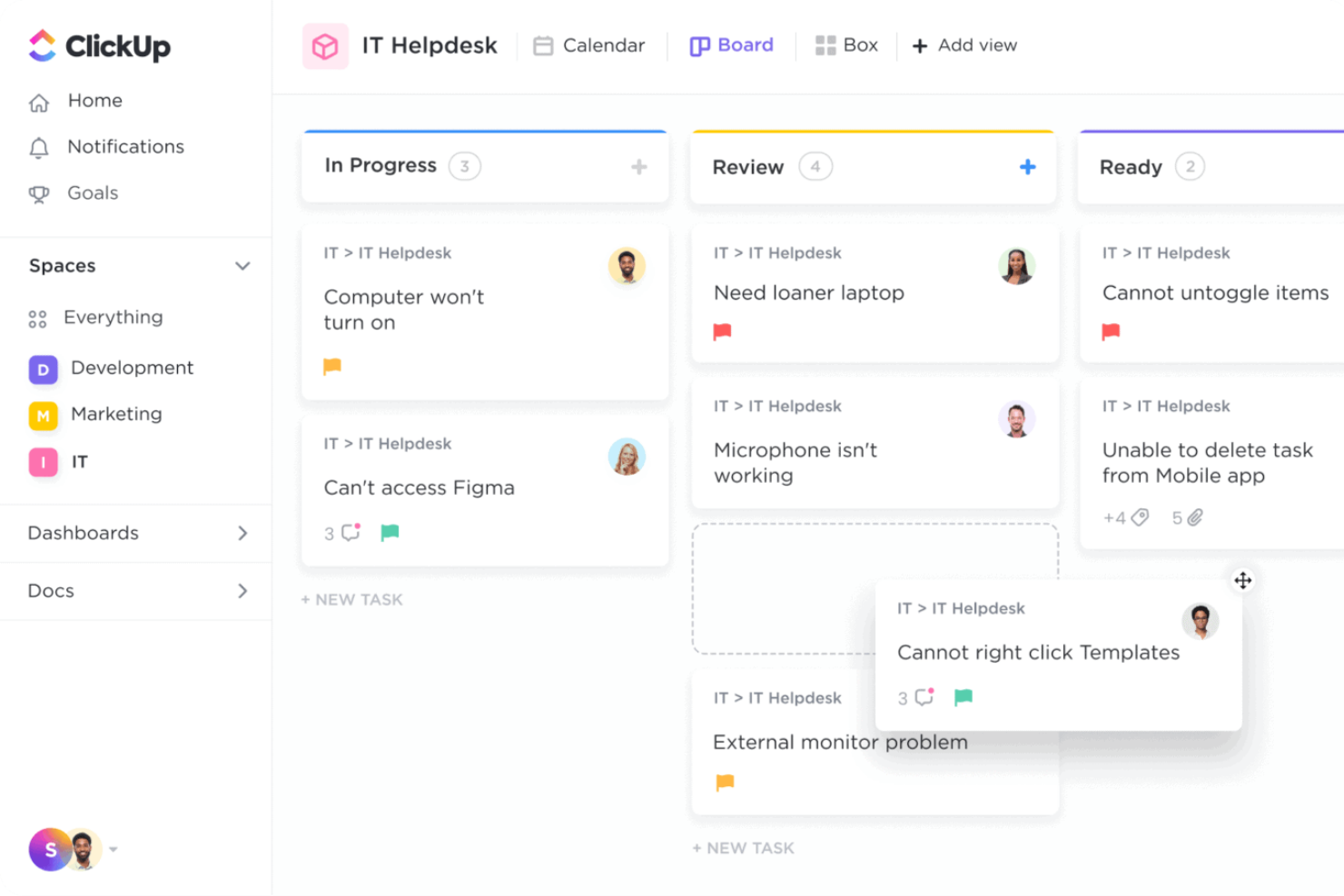
ClickUp is a team task management platform that brings together customizable task boards, timelines, and collaboration tools to help teams organize, track, and deliver work across projects of any size.
Who Is ClickUp Best For?
ClickUp is a good fit for tech and product teams that need a flexible, all-in-one workspace to manage tasks, sprints, and cross-functional projects in one place.
Why I Picked ClickUp
I picked ClickUp as one of the best for agile project management because it handles the full sprint lifecycle without requiring a separate tool. I use ClickUp Sprints to set sprint dates, assign story points, and automatically roll unfinished tasks into the next sprint—so my team isn't manually reshuffling the backlog at the end of every cycle. The burndown and burnup charts give me a real-time read on whether we're pacing against our target, which I find far more useful than a static status update. On top of that, the native GitHub and GitLab integrations mean my team's development work and task tracking stay in sync without any manual updates.
ClickUp Key Features
- Custom task statuses: Create workflow stages that match your team's process, from "In Review" to "Blocked" to whatever fits your pipeline.
- Workload view: See each team member's assigned tasks and capacity across a time period to spot overallocation before it becomes a problem.
- Automations: Set trigger-based rules to automatically update task statuses, reassign work, or send notifications when conditions are met.
- Goals: Set high-level objectives and link them directly to tasks so progress updates automatically as work gets completed.
ClickUp Integrations
ClickUp offers 100+ native integrations, including Slack, GitHub, GitLab, Microsoft Teams, Google Drive, Dropbox, Outlook, Zoom, Figma, HubSpot, Salesforce, and Zendesk, and it's available on Zapier. An API is available for custom integrations.
Pros and Cons
Pros:
- Different ways to visualize project progress
- Team collaboration features
- Highly customizable platform
Cons:
- Initial setup can take time
- Extensive customization may be overwhelming
New Product Updates from ClickUp

ClickUp Enhances Task Management and Introduces AI Notetaker
ClickUp introduces an AI Notetaker for meetings and improves task type management in views. These updates help teams capture meeting insights automatically and organize work more efficiently. For more information, visit ClickUp’s official site.


Quire is a team task management platform that helps you organize projects with nested task lists, visual boards, and real-time collaboration tools designed to keep teams aligned and productive.
Who Is Quire Best For?
Quire is a good fit for small to mid-sized teams that need a structured way to manage multi-layered projects without the overhead of enterprise-level tools.
Why I Picked Quire
Quire earns its spot on my shortlist because of how well its infinite nested task list handles complex project structures. I use it to break large initiatives into layers of subtasks, drilling down into specific branches without losing sight of the overall hierarchy. The "Zoom In" feature is particularly useful—I can focus on a single parent task and see only its subtasks, which cuts through the noise when my team is heads-down on one phase of a project. The Smart Sublist feature also lets each team member pull a focused view of just their assigned work from the master list, so nobody's wading through tasks that aren't relevant to them.
Quire Key Features
- Kanban board: Drag and drop tasks across customizable columns to manage workflow stages visually.
- Timeline view: Map tasks and milestones across a Gantt-style timeline to track project schedules.
- Real-time collaboration: Comment on tasks, tag teammates, and see updates instantly across your team.
- Recurring tasks: Set tasks to repeat on a schedule so routine work gets logged automatically.
Quire Integrations
Quire offers native integrations with Google Drive, Google Calendar, Slack, and GitHub. Additional connections (including tools like Microsoft Teams) are typically supported via Zapier or other connectors. An API is also available for custom integrations.
Pros and Cons
Pros:
- Ability to create nested tasks and subtasks, allowing for detailed project breakdowns
- Multiple project views, including lists, boards, and timelines
- Easy to collaborate with team members
Cons:
- Potential for notification overload, especially when working with large teams
- The mobile version lacks some features available on the desktop
New Product Updates from Quire
Quire Enhances Chat Editing and Text Formatting
Quire introduces updates to its chat functionality to improve collaboration and message formatting. These enhancements make it easier for teams to edit messages and structure text within conversations. For more information, visit Quire’s official site.
 .
.

Backlog is a team task management platform that brings together project planning, task tracking, and collaboration with built-in issue and bug tracking for teams who need to manage both development and non-development work in one place.
Who Is Backlog Best For?
Backlog is a strong fit for software development and IT teams that need to manage tasks and track bugs without juggling multiple tools.
Why I Picked Backlog
Backlog earns its spot on my shortlist because it handles bug tracking as a native part of the task management workflow, not as a bolt-on feature. I like how each issue can be assigned a bug type, priority level, and resolution status, so my team isn't improvising a workaround inside a generic task tool. The ability to link bugs directly to Git or SVN commits is something I've found genuinely useful—it connects the reported issue to the exact code change that fixed it. That kind of traceability is hard to get without switching to a dedicated developer tool.
Backlog Key Features
- Gantt charts: Visualize project timelines and task dependencies with drag-and-drop scheduling across your team's workstreams.
- Kanban boards: Manage task progress using customizable boards that let your team move work through defined workflow stages.
- Wiki: Create and store project documentation, meeting notes, and team knowledge directly within each project in Backlog.
- Watchlist: Follow specific tasks or issues to receive updates without being directly assigned to them.
Backlog Integrations
Backlog offers native integrations with GitHub, Slack, Redmine, Typetalk, and Jenkins. It's available on Zapier and has an API for custom integrations.
Pros and Cons
Pros:
- Version control integration with Git and Subversion
- Commenting and file attachments directly on tasks and issues
- Milestones help coordinate releases and deadlines
Cons:
- Performance and speed issues have been reported by users
- Limited customization and integrations for some use cases

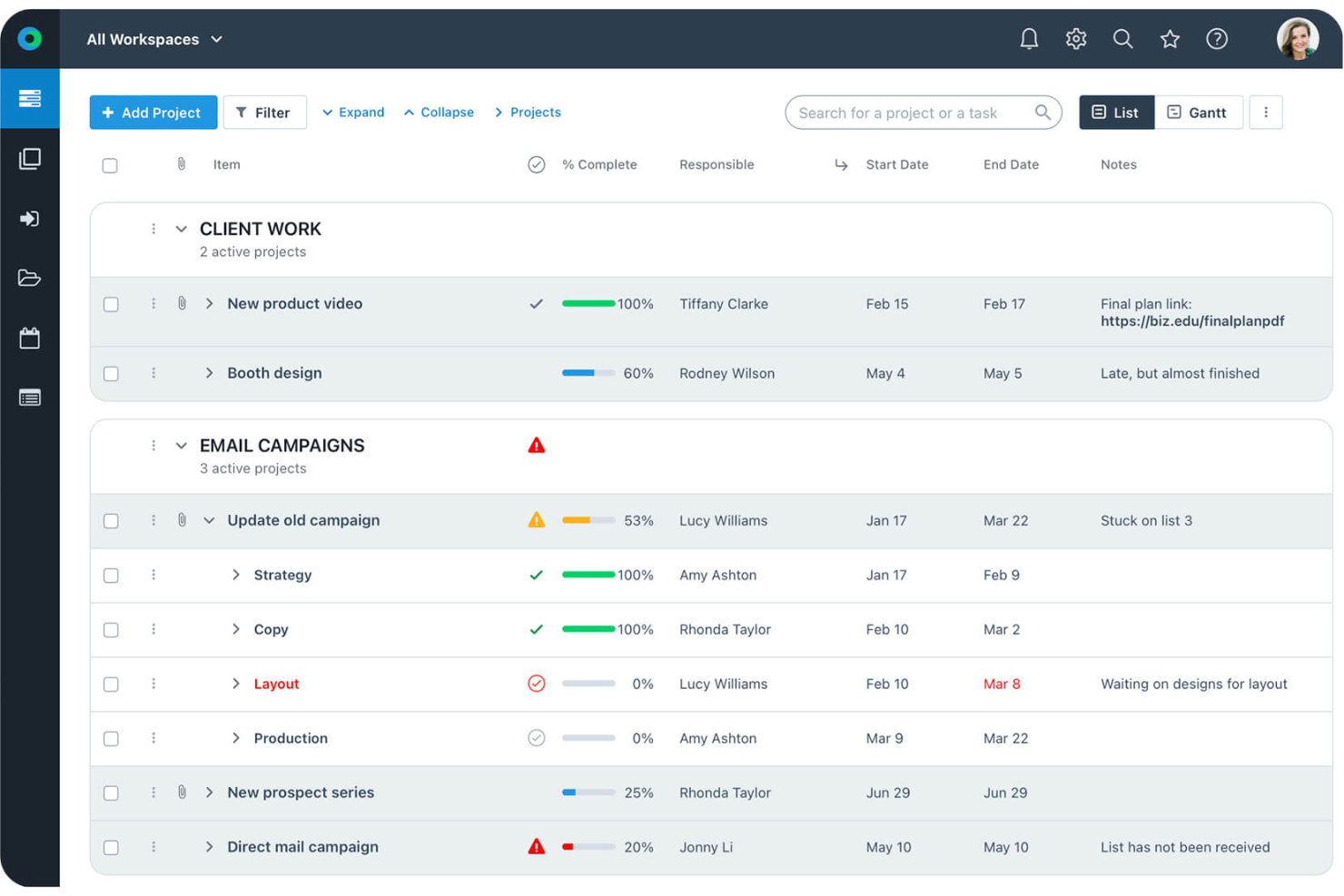
Workzone is a team task management platform built to help teams organize projects, assign tasks, track progress, and collaborate with clarity across every stage of their workflow.
Who Is Workzone Best For?
Workzone is a good fit for mid-sized teams in marketing, creative, and operations who need structured project oversight without the complexity of enterprise tools.
Why I Picked Workzone
Workzone earns its spot on my shortlist because of how well it handles project lifecycle visibility from a single interface. I like that you can move from portfolio-level dashboards all the way down to individual task status without losing context—that kind of top-to-bottom visibility is genuinely useful when I'm tracking multiple workstreams at once. The real-time workload management and reporting tools also let me spot bottlenecks before they become blockers. I've found the centralized request intake especially practical for keeping new work from slipping through the cracks before it's even assigned.
Workzone Key Features
- Creative proofing: Review and mark up creative assets directly in Workzone, with feedback centralized to reduce revision rounds.
- Customizable project templates: Build repeatable project structures using templates tailored to your team's specific workflows.
- Structured stakeholder collaboration: Keep conversations, files, and feedback tied directly to tasks so nothing gets lost between handoffs.
- Standardized request forms: Capture incoming work through a consistent intake form that tracks requests from submission through assignment.
Workzone Integrations
Workzone offers native integrations with Slack, Dropbox, Google Drive, Microsoft OneDrive, and Box, and it's also on Zapier. An API is available for custom integrations.
Pros and Cons
Pros:
- Offers real-time project visibility for better team coordination.
- Features pre-built templates for quick project initiation.
- Ensures unlimited training and support for all users.
Cons:
- May lack advanced features compared to larger competitors.
- Customization options may not meet all needs.


Wrike is a team task management platform designed for digital teams who need customizable workflows, real-time collaboration, and advanced visibility across projects and departments.
Who Is Wrike Best For?
Wrike is a strong fit for mid-size to enterprise teams in tech and digital industries managing complex, multi-team projects that require structured workflows and clear cross-functional coordination.
Why I Picked Wrike
Wrike earns its spot on my shortlist because of how well it handles visibility across multiple teams working on the same project. I particularly like the cross-functional dashboards, which let my team pull aggregated data from different workstreams into a single view—without having to chase down status updates from each team lead. In practice, that means I can see which tasks are on track, which are at risk, and where dependencies are stacking up, all from one place. Wrike's cross-tagging feature also lets tasks live in multiple project folders simultaneously, so each team sees only what's relevant to them while I maintain a full picture across the board.
Wrike Key Features
- Custom request forms: Build dynamic intake forms that automatically generate tasks, assign owners, and trigger workflows when submitted.
- Gantt chart view: Map task dependencies and project timelines visually, with drag-and-drop scheduling to adjust dates across the entire plan.
- Automated workflows: Set up no-code automation rules to move tasks between stages, escalate at-risk items, and notify the right people without manual follow-up.
- Resource bookings: Reserve team members or job roles for specific projects and check their availability against estimated effort before assigning work.
Wrike Integrations
Wrike offers 400+ native integrations, including Google Drive, Microsoft Teams, Salesforce, Slack, Jira, GitHub, Box, Dropbox, Adobe Creative Cloud, and Zoom, and it's available on Zapier. An API is available for custom integrations.
Pros and Cons
Pros:
- In-app chat to reduce switch cost for collaboration
- Individuals and teams can track workloads
- Easily visualize workflow performance
Cons:
- Not suitable for small organizations
- Limited to 10 workflows per space
New Product Updates from Wrike

Streamlining Workspaces with New Updates
Wrike announces custom space templates, AI Agents in Wrike Labs, and a new Guage widget to improve project management. For more information, visit Wrike's official site.


GoodDay is a team task management platform that lets you organize projects, customize workflows, and collaborate with your team using multiple task views, automation, and integrated communication tools.
Who Is GoodDay Best For?
GoodDay is a good fit for small to mid-sized teams that need a flexible tool to manage both tasks and projects without being locked into a single workflow structure.
Why I Picked GoodDay
GoodDay earns its spot on my shortlist because of how much flexibility it gives you in structuring both tasks and projects without forcing a single methodology on your team. I like that you can switch between board, list, timeline, and calendar views depending on what a project actually needs—not just what the tool defaults to. My team is able to set up custom workflows with task types, priorities, and statuses that match how we actually work. The recurring tasks and task dependency features are genuinely useful when managing multi-phase projects where sequencing matters.
GoodDay Key Features
- Request forms: Create and share custom intake forms to collect and route work requests from other teams or stakeholders.
- Workload view: See all task assignments alongside start and end dates on a timeline to spot capacity issues across your team.
- Action Required: Flags the specific team member responsible for the next step on any task, so nothing stalls waiting on an unclear owner.
- Guesstimates: An AI engine that analyzes work data across your team and auto-estimates time spent on tasks without requiring manual time entry.
GoodDay Integrations
GoodDay offers native integrations with Google Workspace, Slack, Microsoft Teams, Jira, Trello, GitHub, GitLab, Dropbox, and OneDrive. It's available on Zapier and has an API for custom integrations.
Pros and Cons
Pros:
- Offers multiple visualization tools like Gantt charts and timelines.
- Supports various project methodologies like Agile and Kanban.
- Extensive customization options for diverse project needs.
Cons:
- Reporting and analytics, while present, may not be as deep or advanced as specialist BI tools.
- Mobile app lacks full functionality compared to desktop version, which may limit on-the-go work.

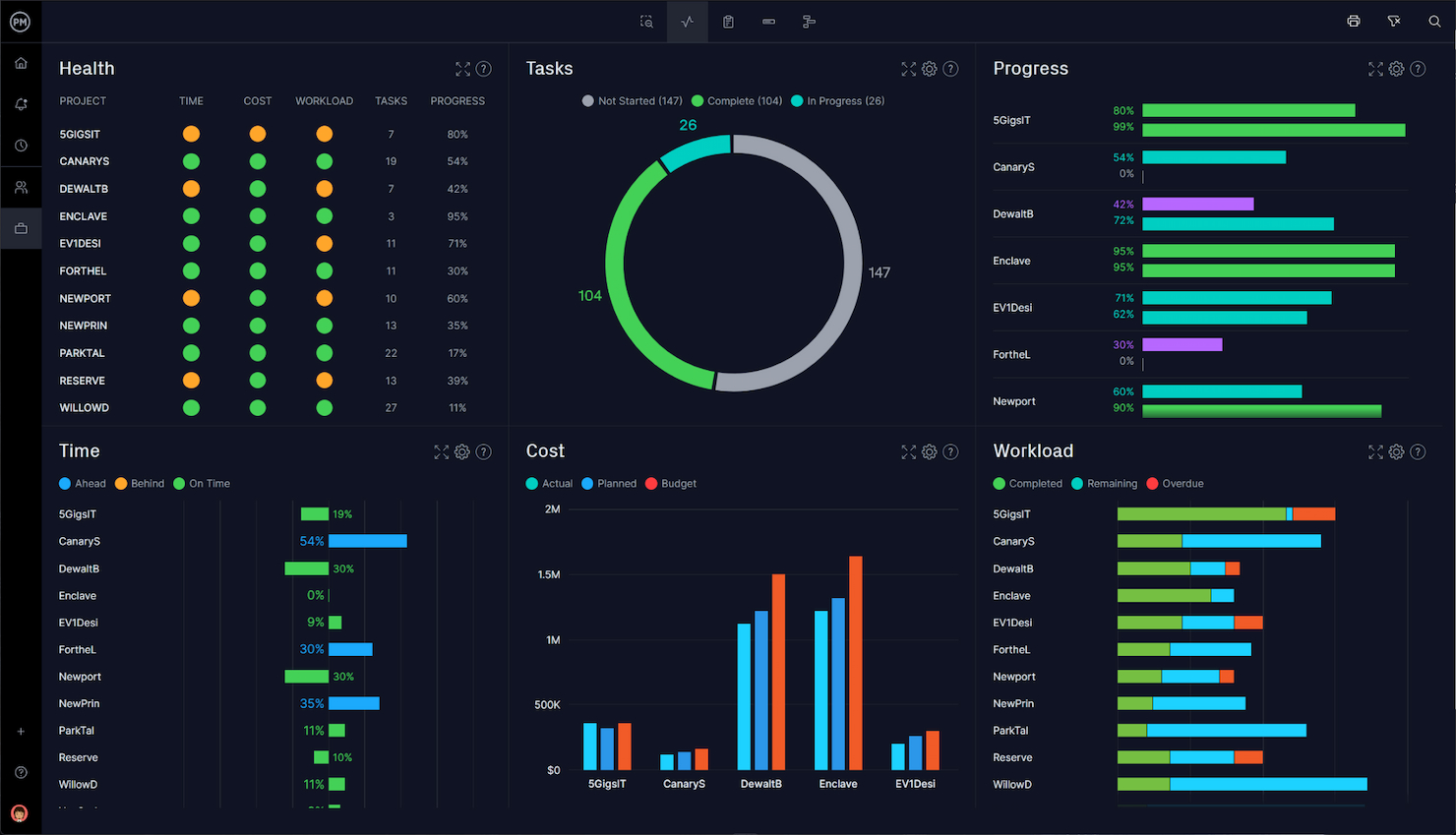
Microsoft Project is a team task management platform designed for project managers who need advanced scheduling, resource allocation, and detailed tracking tools to coordinate complex projects and keep teams aligned.
Who Is Microsoft Project Best For?
Microsoft Project is a strong fit for mid-size to enterprise teams that run structured, deadline-driven projects and need precise scheduling and resource management.
Why I Picked Microsoft Project
I picked Microsoft Project as one of the best because of its deep scheduling features. The timeline (Gantt) view lets my team map out task dependencies with precision—including advanced lead and lag settings—so we can model exactly how a delay in one workstream ripples through the rest of the plan. I also like the resource request capabilities, which let us flag capacity needs before they become blockers. For teams running multi-phase projects where sequencing matters, the combination of dependency tracking and people management in a single plan is particularly useful.
Microsoft Project Key Features
- Board view: Visualize tasks in a kanban-style board to track work status across team members and project phases.
- Backlogs and sprints: Organize upcoming work into a backlog and plan sprint cycles for teams running agile delivery.
- Project goals: Set measurable goals at the project or team level and link them directly to the tasks driving progress.
- Program management: Manage multiple related projects together to track dependencies and progress across a broader initiative.
Microsoft Project Integrations
Microsoft Project has native integrations across the Microsoft ecosystem, including Microsoft 365 and Azure. You can also connect it to data sources like Microsoft Access, SharePoint, SQL Server, Exchange Server, and Microsoft Entra ID. An API is available for custom integrations.
Pros and Cons
Pros:
- Advanced reporting capabilities
- Deep integration with Microsoft products
- Extensive project planning tools
Cons:
- Slight learning curve
- Primarily suitable for large or complex projects

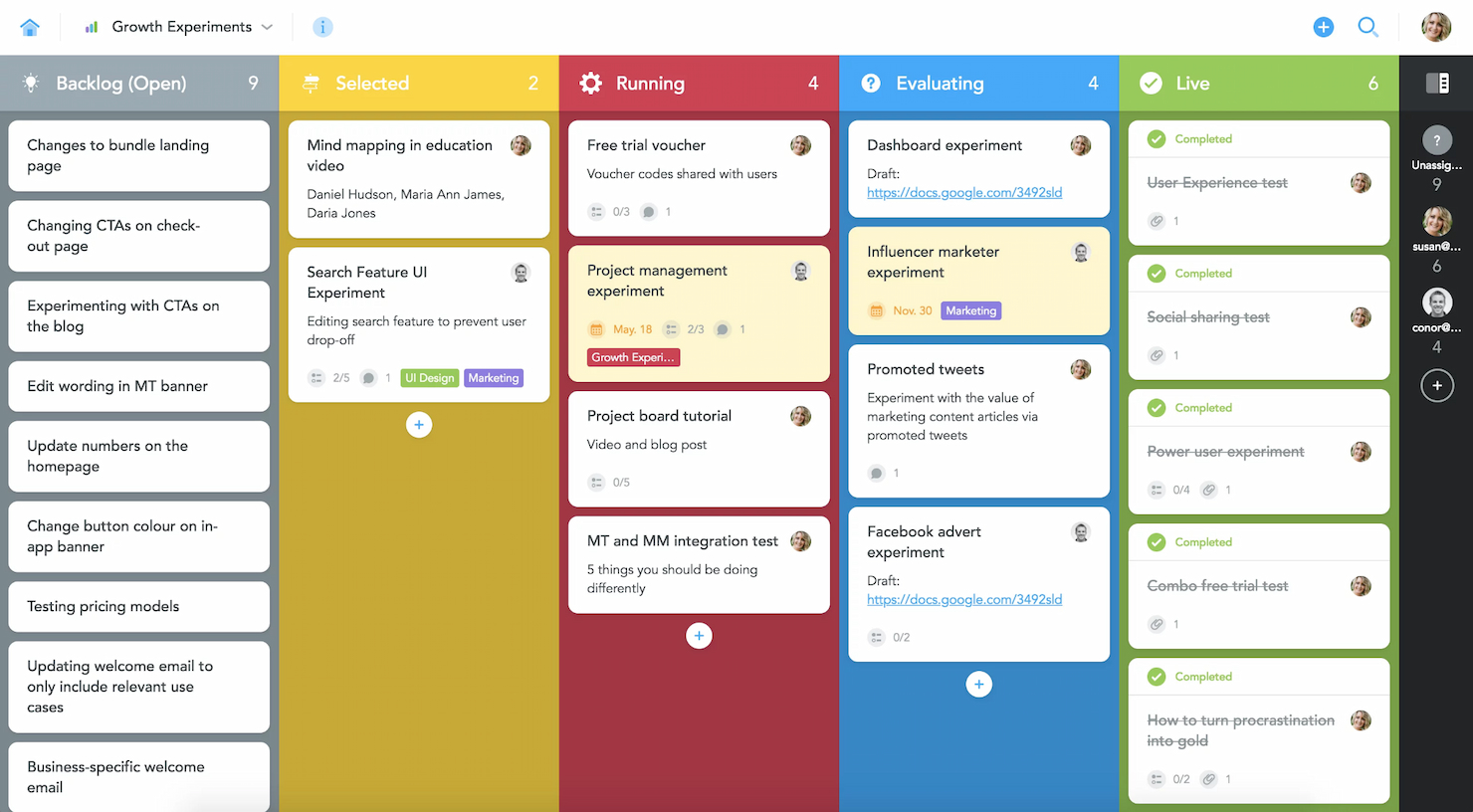
MeisterTask is a team task management platform designed to help teams organize projects, visualize workflows, and automate repetitive tasks with customizable Kanban boards and real-time collaboration features.
Who Is MeisterTask Best For?
MeisterTask suits small to mid-sized teams that need a visual, intuitive way to manage iterative work across product, design, and development.
Why I Picked MeisterTask
MeisterTask earns its spot on my shortlist because of how well its Kanban-style project boards map to agile workflows. Each board is fully customizable, so my team can set up columns that reflect our actual sprint stages rather than forcing work into a generic template. I also like the automation layer — it lets me trigger actions such as auto-assigning a task owner or moving a card to the next stage when a checklist is completed, keeping work moving between iterations without manual nudging. The timeline view lets me map tasks to specific dates, so I can track sprint commitments and flag deadline risks before they become blockers.
MeisterTask Key Features
- Projects overview: A centralized dashboard that shows status, deadlines, and overdue tasks across all active projects.
- Roles and permissions: Assign specific access levels to team members and control what external collaborators can see or edit.
- Reporting: Track project performance data with filters for task owner, status, and due date to monitor team output.
- Home dashboard: A personal view that surfaces each team member's upcoming tasks, notifications, and to-dos in one place.
MeisterTask Integrations
MeisterTask offers native integrations with Slack, Microsoft Teams, Google Workspace, GitHub, Zendesk, Dropbox, Box, Bitbucket, and Outlook, and it's also on Zapier. An API is available for custom integrations.
Pros and Cons
Pros:
- Effective real-time collaboration features
- Strong support for agile methodologies
- Highly intuitive interface
Cons:
- Fewer advanced customization options compared to competitors
- Pricing can be high for larger teams
- Limited reporting capabilities for complex analytics
Other Team Task Management Software To Consider
Below is a list of additional team task management software that we shortlisted, but did not make it to the top list. Definitely worth checking them out.
- Trello
For visual project planning
- ProofHub
For team communication tools
- ProjectManager
For real-time project dashboards
- nTask
For risk management features
- Pneumatic Workflow
For automated workflows
- Notion
For integrated notes and tasks
- PathPro
For turning feature requests into tasks
- Smartsheet
Good for spreadsheet-like task management
- Asana
For workflow customization
- Basecamp
For remote team collaboration


How I Select Team Task Management Software Based On Functionality And Meeting Specific Use Cases
Team task management software encompasses a variety of features aimed at improving collaboration, task tracking, and project management across teams. From my personal experience trying and researching these tools, I’ve developed specific criteria to evaluate them, ensuring they meet the distinct needs and pain points of their users.
Core team task management software functionality: 25% of total weighting score
- Efficient task delegation and tracking
- Seamless team collaboration and communication
- Effective project timeline visualization
- Comprehensive reporting and analytics
- Integration with other business tools
Additional standout features: 25% of total weighting score
- Identification of unique collaboration features that facilitate better team interaction, such as integrated chat or video conferencing
- Advanced reporting and analytics tools not commonly found in other team task management software, providing deeper insights into team productivity and project status
- Innovative use of AI and automation to streamline task management and reduce manual input
- Customization options that allow the software to adapt to the specific workflows of a team or project
- Examples of tools leveraging these innovative features include nTask for risk management and MeisterTask for agile team adaptation
Usability: 10% of total weighting score
- Evaluation of the software's interface design for clarity, simplicity, and modern aesthetics
- Balance between powerful features and user-friendly operation
- Assessment of learning curve required for new users to become proficient
Onboarding: 10% of total weighting score
- Availability of comprehensive onboarding resources such as training videos, user manuals, and quick-start guides
- Access to interactive product tours and live webinars to facilitate understanding and use
- Evaluation of customer support during the onboarding phase, including responsiveness and helpfulness
Customer support: 10% of total weighting score
- Responsiveness of the support team to user inquiries and issues
- Availability of various support channels such as live chat, email, and phone
- Quality of documentation and self-help resources available to users
Value for money: 10% of total weighting score
- Comparison of pricing models against the features and capabilities offered
- Evaluation of different pricing tiers to assess affordability for small to large teams
- Consideration of the software's scalability and the costs associated with upgrading
Customer reviews: 10% of total weighting score
- Analysis of overall user satisfaction and feedback on functionality, usability, and support
- Examination of recurring praises or complaints that indicate strengths or areas for improvement
- Consideration of the frequency and context of negative reviews to understand potential issues
These criteria are designed to ensure that the selected team task management software not only includes standard capabilities but also stands out through unique features, ease of use, and excellent customer support, providing real value for money.
How To Choose Team Task Management Software
As you work through your own unique software selection process, keep the following points in mind:
- Scalability: Choose software that can grow with your team and projects. As project sizes and team numbers increase, the software should be able to handle more complex workflows and a greater volume of tasks without compromising performance. For instance, if you expect your startup to double in size within a year, ensure the tool supports this growth
- Integration capabilities: Look for software that integrates seamlessly with other tools your team uses. Integration with email platforms, file sharing services, and other project management tools ensures that workflow remains uninterrupted and all information is centrally accessible. For example, a marketing team might need software that integrates well with CRM systems and email marketing tools.
- User experience: Opt for software with an intuitive interface. The ease of use directly impacts adoption rates among team members. A simple, clean interface reduces training time and helps maintain focus on tasks rather than on navigating the software. Consider whether new team members can easily understand the tool without extensive training.
- Customization: Ensure the software allows you to customize workflows and reports to fit your team's specific needs. Customizable dashboards and the ability to modify workflows mean that the software can adapt to various project management styles, be it agile, scrum, or waterfall. This is crucial for teams in creative industries where project types frequently change.
- Security features: Prioritize software with robust security measures to protect your data. This includes data encryption, secure data storage, and compliance with international data protection regulations, which is vital for teams handling sensitive information, such as those in healthcare or financial services.
Team Task Management Software Trends
Here are some current and interesting trends I'm noticing in team task management technology.
Evolving Features and Technology
- Integration with AI and Machine Learning: Many team task management platforms are incorporating AI to automate task prioritization, resource allocation, and risk assessment. This trend addresses the need for dynamic project management that can adapt to changes in real-time, enhancing decision-making processes. There are also already specific task management software tools with AI features.
- Enhanced Real-Time Collaboration Tools: As remote work persists, the demand for better real-time collaboration tools within team task management software has grown. Updates include more sophisticated chat tools, integrated video conferencing, and real-time document collaboration, reflecting the ongoing need for tools that support seamless communication across geographies.
Novel and Unusual Functionalities
- Virtual Reality (VR) Meetings and Workspaces: Some cutting-edge team task management tools are beginning to experiment with VR capabilities, where team members can interact in a virtual space. This novel feature is designed to enhance the feeling of presence in remote meetings, aiming to bridge the gap between remote and in-person collaboration.
Most Important and In-Demand Features
- Comprehensive Dashboards and Analytics: There is a high demand for advanced dashboards that provide comprehensive analytics on project health, team performance, and budget status. These features are critical for managers who need to keep track of multiple project variables and forecast outcomes effectively.
- Cross-Platform Accessibility: Ensuring that team task management software functions seamlessly across different devices and platforms remains a high priority. This feature is essential for supporting today's mobile and flexible workforce.
Declining Features
- Email-Based Notifications: With the rise of integrated real-time notifications and more direct communication tools within platforms, reliance on email notifications for task updates is decreasing. Teams are shifting towards more immediate and less cluttered forms of communication.
These trends reflect a broader movement towards creating more integrated, intuitive, and flexible management tools that can support the complex, varied needs of modern teams. By focusing on these areas, software developers are directly addressing the challenges faced by today's project managers and team leaders.
What Is Team Task Management Software?
Team task management software is a digital platform designed to facilitate the organization, tracking, and completion of tasks within a team or across multiple teams. This type of software is primarily used by businesses and organizations to enhance team collaboration, improve task visibility, and streamline project workflows. Common users include project managers, team leaders, and members who need a centralized system to manage daily tasks, project deadlines, and team assignments effectively.
The core components of team task management software include task creation and assignment features, progress tracking tools, communication and collaboration functionalities, and reporting capabilities.
Features Of Team Task Management Software
When selecting a team task management app, it’s essential to identify features that support effective task assignment, streamline communication, and enhance project visibility. Below, I detail the top features that contribute to these goals in team task management environments.
- Task Prioritization and Scheduling: Helps manage projects by allowing teams to set priorities and deadlines for tasks and subtasks, ensuring important project milestones are met on time.
- Real-Time Collaboration Tools: Essential for streamlining communication to facilitate instant discussion and updates between team members and stakeholders, regardless of their location.
- File Sharing and Document Management: Centralizes project docs in one accessible location, simplifying the process of sharing information and maintaining version control.
- Time Tracking: Enables teams to record the time spent on tasks, providing insights into productivity and resource allocation for better project management.
- Customizable Dashboards: Offers personalized overviews of projects and tasks, allowing users to quickly gauge progress and make informed decisions.
- Mobile Accessibility: Ensures team members can access the platform and remain productive while on the go using iOS, Android, and other popular devices.
- Integration Capabilities: Allows for great integration with other software tools such as email, calendar, CRM systems, and more, enhancing functionality and reducing the need for multiple disparate systems.
- Automated Notifications: Keeps team members informed of updates and changes, ensuring everyone is aware of new tasks, due dates, , or adjustments.
- Reporting and Analytics: Provides valuable data on project performance and team productivity, helping managers make data-driven decisions to improve project outcomes.
- Security Features: Protects sensitive project data with robust security measures, an essential aspect for any organization to maintain confidentiality and integrity of information.
- User Permissions: Ensure the most sensitive data can only be accessed by those with company approval.
- Timeline View: Ability to organize your tasks in an ‘over time’ perspective so you can set deadlines and see priority levels across the week, month, and quarter.
- Roadmap: Visual indication of how a project and tasks will progres overtime, including and dependencies.
- Color-coded tags/fields: Color code data according to who is working on what, what project a task it tied to, or even priority flags.
These features form the backbone of effective team task management software, ensuring that teams can operate efficiently and projects can proceed without delays. The ability to quickly adapt to changes, communicate effectively, and access critical data from anywhere at any time empowers teams to meet their project objectives successfully.
Benefits Of Team Task Management Software
Team task management software is a transformative tool for businesses aiming to boost productivity, enhance communication, and streamline project management. Here’s how the right team task management software can revolutionize your operations:
- Enhanced Collaboration: Fosters a collaborative environment by providing tools for messaging, file sharing, and real-time updates. This makes it easier for team members to work together effectively, regardless of their physical locations.
- Increased Productivity: Automates routine tasks and organizes work processes which helps reduce the time spent on managing task assignments and deadlines. Teams can focus more on executing tasks rather than planning them.
- Improved Project Visibility: Offers dashboards and reporting tools that provide a clear overview of project statuses and milestones. This visibility helps managers and team members stay informed about project progress and potential bottlenecks.
- Better Resource Allocation: Includes features for tracking time and analyzing workload distribution among team members. This ensures that resources are used efficiently and helps prevent burnout and overallocation.
- Scalability: Adapts to the growth of your business by accommodating an increasing number of projects and team members without sacrificing performance. The flexibility to scale helps ensure the longevity and continued relevance of the software within the organization.
By centralizing task management, enhancing communication, and providing key insights into project and team dynamics, organizations can achieve more structured and effective operations.
Costs And Pricing Of Team Task Management Software
Understanding the cost structure of team task management software is crucial for businesses aiming to integrate these tools effectively into their operations. Each paid plan can vary significantly based on features, scalability, and support options. Here's a breakdown of typical plan options you might encounter when selecting team task management software:
| Plan Type | Average Price | Common Features |
| Free Plan | $0 | Basic task management, limited users, essential integrations |
| Basic | $5 - $10/user/month | Enhanced task management, additional integrations, more users |
| Professional | $10 - $20/user/month | Full project planning, advanced reporting, priority support |
| Enterprise | $20 - $50/user/month | Custom features, unlimited projects, personal account manager |
When considering which plan to choose, reflect on the specific needs of your organization and the scale at which you operate. Pricing should align not only with your current requirements but also accommodate future growth and complexity.
Team Task Management Software FAQs
Here are some commonly asked questions about team task management software:
What is team task management software used for?
Team task management software helps organize, track, and prioritize tasks within a team or across multiple teams. It facilitates project management, enhances collaboration, and improves productivity by providing tools to manage deadlines, share documents, and communicate effectively.
How does team task management software improve productivity?
This software automates repetitive tasks, centralizes information, and provides real-time updates. It simplifies project tracking and reduces the likelihood of errors, allowing team members to focus more on their core responsibilities and less on administrative tasks.
Can team task management software be integrated with other tools?
Yes, most team task management platforms offer extensive integration capabilities with popular tools such as email clients, calendar apps, file sharing services, and CRM systems. This integration helps streamline workflows and keeps all project-related information in one accessible place.
Is team task management software suitable for small businesses?
Absolutely. Many solutions offer scalable features and flexible pricing plans that can fit the needs and budgets of small businesses. Some even offer free versions that can adequately support the project management needs of smaller teams.
Does team task management software support remote teams?
Yes, it is designed to support remote teams by providing tools that facilitate communication and collaboration across different locations. Features like cloud-based access, real-time updates, and integrated communication tools are particularly beneficial for remote team coordination.
Are there security risks with using team task management software?
Like any online platform, there are potential security risks, but most reputable providers implement robust security measures, including data encryption, secure servers, and regular audits to protect user data. Always check the security credentials of a software before adoption.
What Next?
Want to connect with other digital project managers to share resources and best practices? Join our membership community and get access to 100+ templates, samples, and examples and connect with 100s of other digital project managers in Slack.