

10 Best Project Management Software for iPad in 2026

Best Project Management Software for iPad Shortlist


Why Trust Our Software Recommendations
Our team has been testing and reviewing software since 2012. As project managers ourselves, we know how difficult—and important—it is to choose the right software.
For this guide, we evaluated tools using hands-on testing and independent research, scoring tools using our selection criteria. We also draw on insights from industry thought leaders and practicing project management experts.
Our reviews reflect our human editorial judgment, not a sales pitch.
Expert reviewers:
Project Management Software for iPad Comparison Table
This comparison table summarizes pricing details for my top project management software for iPad selections:
| Tool | Best For | Trial Info | Price | ||
|---|---|---|---|---|---|
| 1 | Best for budget tracking | 15-day free trial + free plan + free demo available | From $4/user/month (billed annually) | Website | |
| 2 | Best for custom workflows | Free plan available | From $20/user/month | Website | |
| 3 | Best for project visibility | 14-day free trial available | From $9/user/month (billed annually) | Website | |
| 4 | Best for creative teams | Free demo available | Pricing upon request | Website | |
| 5 | Best for mid-sized companies | Free demo available | From $3/user/month | Website | |
| 6 | Best for enterprise organizations | Free demo available | Pricing upon request | Website | |
| 7 | Best for note-taking | Free plan + free demo available | From $10/user/month (billed annually) | Website | |
| 8 | Best for software development | Free plan available | From $7.91/user/month | Website | |
| 9 | Best for small teams | Free plan available | From $10.85/user/month (billed annually) | Website | |
| 10 | Best for agency management | 14-day free trial + free demo available | From $10/user/month (billed annually) | Website |

Best Project Management Software for iPad Reviews
Read my detailed summary of each of my picks for the best project management software for iPad. I cover key features, pros & cons, integrations, and use cases so you can find the best fit.

Best for budget tracking

Zoho Projects earns a spot because it’s one of the rare options where you can track budgets on iPad as closely as you would from desktop. I recommend it when budget tracking is as important as task management and time tracking, especially without access to a full workstation.
What I like is how Zoho Projects gives you real-time budget status, expense logging, and timesheets right in the iPad app. This helps teams stay on top of spending while moving between meetings or sites.
Zoho Projects’ Best For
- Teams that require budget tracking on iPad
- Managers overseeing expenses, timesheets, and project progress
Zoho Projects’ Not Great For
- Teams needing deep Gantt chart features on mobile
- Organizations with complex resource management needs
What sets Zoho Projects apart
Zoho Projects expects you to keep financial oversight close to your project work, even when you’re away from your desk. It's clear the iPad app is built for people moving between projects and meetings, not just working at a desk. Compared to something like monday.com, Zoho pushes budget tracking and cost management to the front. This works best for project leads who need budget awareness as part of their daily workflow.
Tradeoffs with Zoho Projects
Zoho Projects optimizes around budget and expense tracking, but more visual planning tools (like advanced timelines or resource heatmaps) are basic in the iPad experience. That means if you’re managing heavy dependencies, you’ll probably feel boxed in.
Pros and Cons
Pros:
- Scalable for growing teams
- Detailed reporting options
- Effective task automation
Cons:
- Initial setup can be complex
- Limited offline functionality
New Product Updates from Zoho Projects
Zoho Projects Adds CodeX Scripts for Custom Modules
Zoho Projects now supports CodeX Scripts for custom modules, enabling conditional logic and rules for creating, updating, and deleting records. For more information, visit Zoho Projects' official site.
 .
.
Airtable
Best for custom workflows

Airtable makes my shortlist because it lets you build custom project tracking workflows directly on your iPad. When teams want more control over task fields, automations, and visual layouts than typical Kanban systems provide, Airtable is where I send them.
What I appreciate is how easy it is to tailor your own collaborative databases with forms, calendar views, and filtered lists, all touch-optimized for iOS.
Airtable’s Best For
- Teams who want to build custom project workflows on iPad
- Project managers who need no-code automation and flexible data views
Airtable’s Not Great For
- Teams that need advanced resource management features
- Organizations seeking classic gantt chart or dependency tools
What sets Airtable apart
Instead of forcing you into predefined project templates like Trello or Asana, Airtable expects you to design your own workflows. You build out task tracking, requests, or content calendars by combining databases, forms, and filtered views in whatever way fits your process. I often recommend this to project managers who want their iPad workspace to bend to team needs, not the other way around.
Tradeoffs with Airtable
Airtable optimizes for flexibility and customization, but you lose out on advanced project planning tools like detailed dependencies or resource management. This can leave you relying on extra workarounds if you manage complex project schedules.
Pros and Cons
Pros:
- Strong database capabilities
- Versatile project views
- Highly customizable templates
Cons:
- Some learning curve for advanced features
- Limited offline functionality

Birdview
Best for project visibility

Birdview joins my shortlist because of how it brings project status, schedules, and resource allocation into one clear view, especially on mobile. I recommend it when you need visibility into delivery across multiple projects and real-time updates while on the move with your iPad.
What I appreciate most is being able to monitor timelines, dependencies, and team workloads from a single dashboard, making it easier to head off issues before they disrupt delivery.
Birdview’s Best For
- Project managers needing real-time status on multiple projects
- Teams tracking resource allocation and dependencies from iPad
Birdview’s Not Great For
- Individuals wanting simple, task-based checklist tools
- Teams with highly specialized, niche workflow requirements
What sets Birdview apart
Birdview stands out by putting project visibility at the center of its workflow, which I don’t see as strongly emphasized in tools like ClickUp or Trello. When I use it, the platform expects you to oversee resource allocation, track deadlines, and catch schedule risks right from your iPad. It works best if you want a dashboard-driven, manager-centric way of keeping tabs on many projects rather than focusing mainly on individual task lists.
Tradeoffs with Birdview
By focusing on visibility and project oversight, Birdview can feel rigid if you want fast setup and less structure for handling ad hoc tasks or creative sprints.
Pros and Cons
Pros:
- AI project management features
- Customizable workflows
- Strong onboarding support
Cons:
- Limited mobile app features
- Learning curve for new users

Best for creative teams
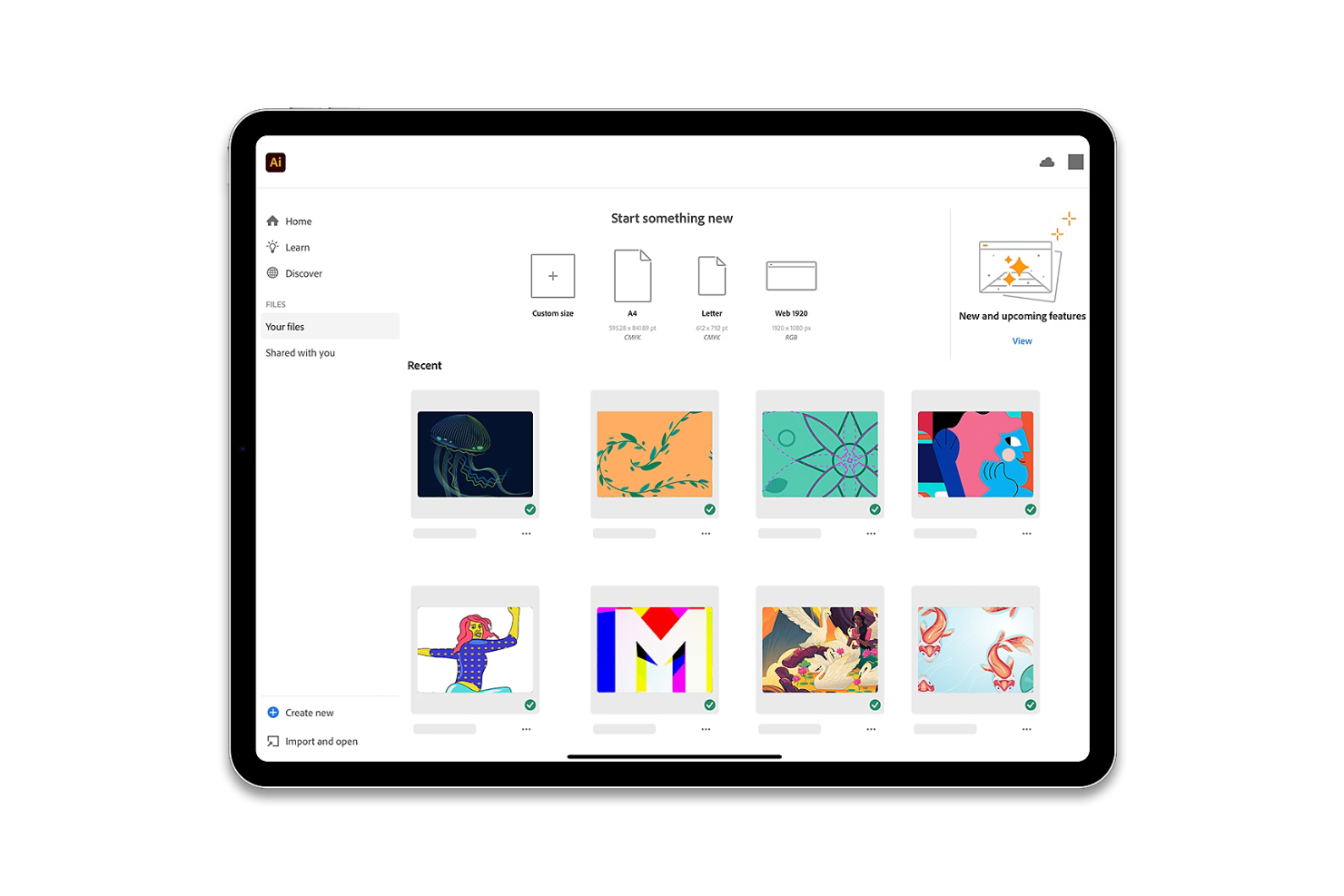
I picked Adobe Workfront after seeing how well it supports creative teams managing large volumes of work across devices, especially on iPad. Asset review, proofing, and Adobe Creative Cloud integration work smoothly in the app, so designers and marketers can share feedback right from their tablets.
What I really like is how the native mobile approvals keep everything moving, even when you’re away from your laptop.
Adobe Workfront’s Best For
- Creative and marketing teams using iPad for asset review
- Organizations that need integrated Adobe CC approvals on mobile
Adobe Workfront’s Not Great For
- Teams looking for simple, checklist-based task apps
- Agile software teams needing technical project tracking features
What sets Adobe Workfront apart
Adobe Workfront is built around the idea that creative and marketing teams need structured review and approval without losing flexibility. Unlike Trello or Asana, which focus on lightweight task management, Workfront bakes in proofing and collaboration tied closely to files and assets. In practice, this helps teams who handle creative deliverables keep feedback and approvals in one workflow.
Tradeoffs with Adobe Workfront
Workfront optimizes for review cycles and asset management, but technical project tracking and custom development workflows tend to feel less supported, so software teams may outgrow it.
Pros and Cons
Pros:
- Customizable workflows
- Strong resource management
- Excellent for creative workflows
Cons:
- Limited offline functionality
- High cost for small teams

Best for mid-sized companies

Project Insight is on my list because it balances depth and usability for mid-sized companies looking to manage complex projects on iPad. I think it stands out when teams start hitting limits with lighter apps and need more control over portfolio management, resource allocation, and dependencies from anywhere. When I test the iPad app, I like how custom dashboards and built-in time tracking stay functional on mobile without getting clunky.
Project Insight’s Best For
- Mid-sized organizations managing multiple, concurrent projects
- Teams needing portfolio, resource, and time tracking on iPad
Project Insight’s Not Great For
- Small groups with simple project tracking needs
- Teams looking for drag-and-drop, board-style project management
What sets Project Insight apart
Project Insight takes a structured approach to project and portfolio management, expecting teams to set up workspaces, standardize workflows, and manage resources centrally. Compared to ClickUp, which is more flexible and adaptable, Project Insight emphasizes formal structure. This tends to work best when organizations need governance, track dependencies closely, and keep resource management visible across projects.
Tradeoffs with Project Insight
Project Insight optimizes for governance and formal workflows, but it’s less suited to rapid, ad hoc planning. If you want quick setup or board-based work, you’ll find it slower and less adaptable.
Pros and Cons
Pros:
- Customizable user interface
- Detailed reporting options
- Scalable for growing teams
Cons:
- Can be overwhelming for small teams
- Requires some technical knowledge


NetSuite gets my recommendation for enterprise organizations needing in-depth expense management within project workflows on iPad. What I like is how NetSuite lets you enforce controls around expense policies, automate approvals, and tightly connect project spending to financials in real time. Teams with complex cost tracking or audits to handle on the go are going to benefit most from this setup.
NetSuite’s Best For
- Enterprises needing project-level expense controls on iPad
- Organizations with complex cost tracking and audit needs
NetSuite’s Not Great For
- Small teams with basic project management needs
- Users who want fast setup and minimal onboarding
What sets NetSuite apart
NetSuite expects you to run project financials, resource management, and expense tracking within the same connected environment. I tend to see organizations choose it when their finance and project teams need strict controls and unified data, compared to lighter tools like monday.com that focus more on flexibility and quick setup.
Where monday.com assumes you need flexibility, NetSuite assumes you want structure, policy enforcement, and traceability for compliance.
Tradeoffs with NetSuite
NetSuite optimizes for control and integration, but you give up simplicity and fast onboarding. For teams that want to get started quickly or have minimal project requirements, it can feel heavy.
Pros and Cons
Pros:
- Customizable modules
- Comprehensive financial management
- Highly scalable for enterprises
Cons:
- Not suited for small teams
- Complex implementation process

Notion earns its place on this list because it’s the first app I see teams use for project management when notes, tasks, and documentation need to live side by side. Its iPad app makes capturing meeting notes, creating flexible project dashboards, and referencing knowledge pages straightforward—especially using drag-and-drop and quick page creation.
I appreciate how customizable everything is, so you can structure projects, timelines, and docs the way your team actually works.
Notion’s Best For
- Teams combining note-taking, documentation, and project tracking
- Managers who customize project pages and workflows on iPad
Notion’s Not Great For
- Large organizations needing advanced automations or granular permissions
- Teams handling complex Gantt charts or detailed resource planning
What sets Notion apart
Notion approaches project management from a documentation-first perspective, blending notes, tasks, and wikis into one workspace. I see this working best when you want project information, requirements, and decisions to live alongside your day-to-day task lists.
Unlike tools like Asana or Trello that focus on task boards, Notion expects you to structure your workspace your way—mixing content and action in whatever format fits.
Tradeoffs with Notion
Notion optimizes for flexible organization and customization, which means you give up built-in structure for dependencies and reporting. As projects grow, you spend more time building and maintaining your own systems.
Pros and Cons
Pros:
- Supports multiple content types
- Flexible organization options
- Highly customizable pages
Cons:
- Can be overwhelming initially
- Not ideal for complex projects


Jira earns its spot here because it’s unmatched when project managers want to manage complex software development from an iPad. When I work with engineering teams, I see the agile boards and backlog prioritization making it easy to move work forward, even on the go.
What I appreciate is how custom workflows and issue types let you mirror real software processes and handle deep sprint tracking in a way few mobile apps do. This is where Jira feels purpose-built for technical project tracking, review, and rapid iteration right from your iPad.
Jira’s Best For
- Software development teams managing agile workflows on iPad
- Project managers who need custom issue types and sprints
Jira’s Not Great For
- Teams seeking a simple, lightweight project tracker
- Creative projects not centered on technical delivery
What sets Jira apart
Jira is designed with the assumption that projects need structure, traceability, and continuous iteration, especially for technical work. It expects you to define detailed workflows, standardize how tasks move through sprints, and surface blockers right where engineers work. Unlike monday.com or Trello, Jira is built for teams who need to tie work closely to code, releases, and agile practices.
This works best when you care about tracking issues and changes at a granular level, not just moving cards across boards.
Tradeoffs with Jira
Jira optimizes for granular control over software projects, but that complexity can feel demanding for non-technical work or teams who just want lightweight task tracking.
Pros and Cons
Pros:
- Customizable workflows
- Detailed reporting capabilities
- Strong support for agile methodologies
Cons:
- Complex setup process
- Requires technical knowledge


Morningmate earns its place here because it sticks to the essentials, which really helps small teams who want clarity and speed. I picked it for iPad because every core feature translates well to mobile—including creating boards, group chats, and task comments that stay tightly organized.
I like how you can view everything you need on one screen. Teams who prefer simple visual workflows tend to appreciate how lightweight the whole experience feels without losing important collaboration options.
Morningmate’s Best For
- Small teams who need clear, simple project tracking
- Groups managing tasks and messages on iPad
Morningmate’s Not Great For
- Teams needing advanced reporting or automation
- Organizations with complex, multi-stage workflows
What sets Morningmate apart
Morningmate keeps things as straightforward as possible, focusing on conversation-driven work instead of heavy process or templates. Unlike tools like Asana or ClickUp that nudge you into detailed planning, Morningmate expects you to manage projects mostly through shared boards and chat threads. This works best for groups that value talking things out and moving tasks as needed, especially from an iPad.
Tradeoffs with Morningmate
Morningmate optimizes for simplicity and quick collaboration, but that means you lose out on advanced reporting and structured automations larger teams depend on.
Pros and Cons
Pros:
- Large storage capacity
- Personalized support
- Intuitive interface
Cons:
- Not ideal for very large teams
- Limited feature set compared to others

Productive
Best for agency management

Productive stands out as my top pick for agency management on iPad, mainly because of how it links project tracking, time management, and resource planning all in one mobile experience. What I like most is that agency teams can manage client budgets, profitability, and pipeline without hopping between apps. This is the tool I see agencies using when they want a true command center from their tablet.
Productive’s Best For
- Agencies managing projects, budgets, and time from iPad
- Teams needing a unified view of client work and profitability
Productive’s Not Great For
- Solo freelancers managing simple task lists
- Product teams needing detailed backlog and sprint tools
What Sets Productive Apart
Productive is built for agencies that want to keep project delivery, time tracking, and resourcing tied closely to client management. Instead of treating projects and resource management as separate workflows like Asana or ClickUp, Productive approaches everything through the lens of client work and profitability. In practice, this works best when agency teams want financials, sales, and execution linked on an iPad.
Tradeoffs with Productive
Productive is designed to keep everything client-focused, so teams lose out on more advanced backlog management and release planning compared to dedicated product or engineering platforms.
Pros and Cons
Pros:
- Supports profitability analysis
- Detailed budgeting tools
- Effective time tracking
Cons:
- Complex setup for large teams
- Some learning curve for new users
New Product Updates from Productive
Productive Adds Voice Dictation, Slack Connector, Proposals, and Overtime
Productive adds voice dictation, a Slack Connector, proposal controls, and overtime tracking. These updates support faster AI interactions, client proposals, and time management. For more information, visit Productive’s official site.
Other Project Management Software for iPad
Here are some additional best project management apps for iPad that didn’t make it onto my shortlist, but which are still worth checking out:
- Scoro
For business analytics
- Wrike
For task management
- GoodDay
For customizable workspaces
- Asana
For task dependencies
- Basecamp
For simple team collaboration
- monday AI Workspace
For visual project tracking
- Teamwork.com
For client management
- Trello
For Kanban boards
- ClickUp
For all-in-one workspace


How I Evaluate Project Management Software for iPad
I consider two things when evaluating these tools: baseline capabilities a field-based project manager actually needs on an iPad, and the differentiators that set the strongest options apart.
Core Functionality (Table Stakes For This List)
When I'm selecting tools for my list, I rank each one on a scale from 0 (does not offer the functionality) to 5 (excels in this area) for each core functionality listed below. Then, I calculate the tool's total score into a percentage. Each tool needs to achieve a minimum total score of 65% to be considered for inclusion.
- Native iPadOS App: I check whether the app is truly built for iPad—with touch-optimized controls, Split View, and multitasking—or just an upscaled iPhone layout.
- Task & Project Management: Each tool should let you create tasks with assignees, due dates, dependencies, and priorities so a site supervisor can plan sprints or phases on the fly.
- Visual Project Views: I look for multiple views like Kanban, Gantt, calendar, and list that render fully on an iPad screen—not cropped desktop layouts you have to pinch and scroll through.
- Offline Mode & Sync: Field teams often work in spotty-connectivity environments, so I evaluate whether you can view and edit project data offline with reliable background syncing.
- Team Collaboration Tools: Comments, @mentions, file attachments, and real-time notifications should all be accessible from the iPad app during a client walkthrough or standup.
- Cross-Device Continuity: Project updates made on an iPad during a meeting should appear instantly on desktop and web, so I evaluate sync reliability and feature consistency across platforms.
Once I have a list of tools that meet this criteria, I consider what sets each platform apart.
Differentiating Factors (What Sets Vendors Apart)
Here's how I compare and contrast different vendors:
Standout Features
Apple Pencil support matters when your team reviews designs or markups on-site—I look for tools that let you annotate deliverables directly within tasks. Built-in time tracking is another differentiator, especially for agency producers logging billable hours between meetings. I also evaluate no-code automation builders, since setting up auto-assignments or status triggers from an iPad saves real time when you're managing multiple projects away from your desk.
Beyond Features
Pricing structure matters here—I check whether iPad and mobile features are included in base plans or locked behind higher tiers. Ecosystem integration is equally important; tools that connect natively with Apple Files, iCloud, and Siri Shortcuts feel far more natural on iPad than those bolted onto iOS as an afterthought. For enterprise teams, I also evaluate MDM compatibility and SSO support, since IT departments deploying managed iPads across a workforce need that layer of control baked in.
How to Choose Project Management Software for iPad
It’s easy to get bogged down in long feature lists and complex pricing structures. To help you focus during your software selection process, here’s a checklist of factors to keep in mind:
| Factor | What to Consider |
|---|---|
| Scalability | Consider whether the software can grow with your team. Will it handle more projects or users without extra costs? Think about future needs and expansion. |
| Integrations | Check whether the software connects with your existing tools. Does it sync with your email, calendar, or CRM? Avoid tools that require manual data transfer. |
| Customizability | Determine whether you can tailor the software to fit your workflows. Can you adjust settings or create custom templates? Make sure it adapts to your processes, not the other way around. |
| Ease of Use | Evaluate whether the software is intuitive. Can new users quickly understand it without extensive training? Look for a clean interface that simplifies tasks instead of complicates them. |
| Implementation and Onboarding | Assess the ease of getting started. Are there resources like tutorials or support teams to help your team onboard? Avoid tools with complex setup that delay productivity. |
| Cost | Review the total cost, including hidden fees. Does the pricing align with your budget? Consider whether the features justify the expense, and compare with competitors. |
| Security Safeguards | Make sure the software protects your data. Does it offer encryption, regular backups, and compliance with industry standards? Avoid tools with weak security measures. |
| Support Availability | Check the level of support offered. Is there 24/7 help if you need it? Look for responsive support channels like chat or phone, and avoid tools with limited assistance that could leave you stranded. |
What Is Project Management Software for iPad?
Project management software for iPad are digital tools that help you organize and manage projects via your iPad. They are also typically available on other Apple products that run on iOS, like Macs and iPhones. Professionals like project managers, team leaders, and freelancers use these tools to increase productivity and maintain organization.
Task management, collaboration, and time tracking features help coordinate tasks, facilitate communication, and monitor progress so you can improve efficiency and keep projects on track.
Features of Project Management Software for iPad
Keep an eye out for the following key features of project management software for iPad.
- Task management: Organizes tasks and deadlines to keep teams on track and make sure no detail is overlooked.
- Collaboration tools: Facilitates communication among team members, so it’s easier to share updates and feedback.
- Time tracking: Monitors time spent on tasks to improve productivity and maintain accurate billing.
- Customizable dashboards: Lets users tailor their workspace to their needs and provides quick access to important information.
- Gantt charts: Visualizes project timelines and helps users plan and track progress.
- Budgeting tools: Manages financial resources to keep projects within budget and maintain profitability.
- KPI dashboards: Displays key performance indicators to help teams make informed decisions based on data.
- Resource planning: Optimizes team utilization so resources are allocated efficiently for project delivery.
- Security safeguards: Protects sensitive data with encryption and compliance with industry standards.
- Integration capabilities: Connects with other tools and platforms to create a seamless workflow across different applications.
Benefits of Project Management Software for iPad
Implementing project management software for iPad provides several benefits for your team:
- Increased mobility: Access projects and task lists on the go so your team can work from anywhere with their iPad.
- Better collaboration: Communication tools help team members stay connected and share updates, which improves teamwork and project outcomes.
- Better time management: Time tracking features help make sure tasks are completed efficiently and due dates are met.
- Improved organization: Task management and customizable dashboards keep projects organized, so it’s easier to prioritize work.
- Effective budget control: Budgeting tools help monitor expenses and keep projects within financial limits.
- Data-driven decisions: KPI dashboards provide insights into performance and help teams make informed choices based on real data.
- Efficient resource allocation: Resource planning helps you use your team effectively and optimize productivity and project delivery.
Costs and Pricing of Project Management Software for iPad
Costs for project management software for iPad vary based on features, team size, add-ons, and more. The table below summarizes common plans, average prices, and typical features included in project management platforms for iPad:
Plan Comparison Table for Project Management Software for iPad
| Plan Type | Average Price | Common Features |
|---|---|---|
| Free Plan | $0 | Basic task management, limited storage, and basic collaboration tools. |
| Personal Plan | $5-$15/user/month | Task management, basic integrations, and limited customization options. |
| Business Plan | $15-$30/user/month | Advanced task management, time tracking, budget management, and more collaboration features. |
| Enterprise Plan | $30-$60/user/month | Customizable dashboards, advanced security features, dedicated support, and comprehensive integrations. |
Project Management Software for iPad FAQs
Here are some answers to common questions about project management software for iPad:
Can I use project management software for iPad offline?
Yes, many project management apps offer offline access, so you can continue working without an internet connection. Once you’re back online, your data should sync automatically. Check if the specific app you’re considering supports this feature, as offline capabilities can vary.
Are there any security concerns with using project management apps on iPad?
Security should be a priority when choosing an app. Make sure the software provides encryption, regular updates, and compliance with industry standards. Check whether the app offers user authentication and access controls to protect your data, and always read reviews to see how other users rate the app’s security.
What kind of support can I expect from project management software providers?
Most providers offer support channels such as email, chat, and phone support. Some also provide help centers with FAQs and tutorials. Before choosing a tool, check whether the support hours align with your needs and whether there’s a dedicated account manager for larger teams.
Can I integrate other tools with my project management app on iPad?
Yes, integrations are available with other tools like email, calendar, and CRM systems. Check the app’s options to make sure it supports your existing tools so you can maintain your workflow.
How customizable are project management apps for iPad?
Customization can vary between apps. Look for the ability to tailor dashboards, workflows, and notifications to suit your team’s needs. The ability to create custom fields and templates can also improve the app’s adaptability to your specific processes.