



Smartsheet vs. Airtable: Expert Comparison & Reviews 2026



Smartsheet offers a high-level work management platform for managing complex projects. Its strong project tracking, automation, and portfolio management features make it particularly appealing to enterprises. It also supports customizable workflows, Gantt charts, resource management, and advanced reporting to streamline operations across large teams.
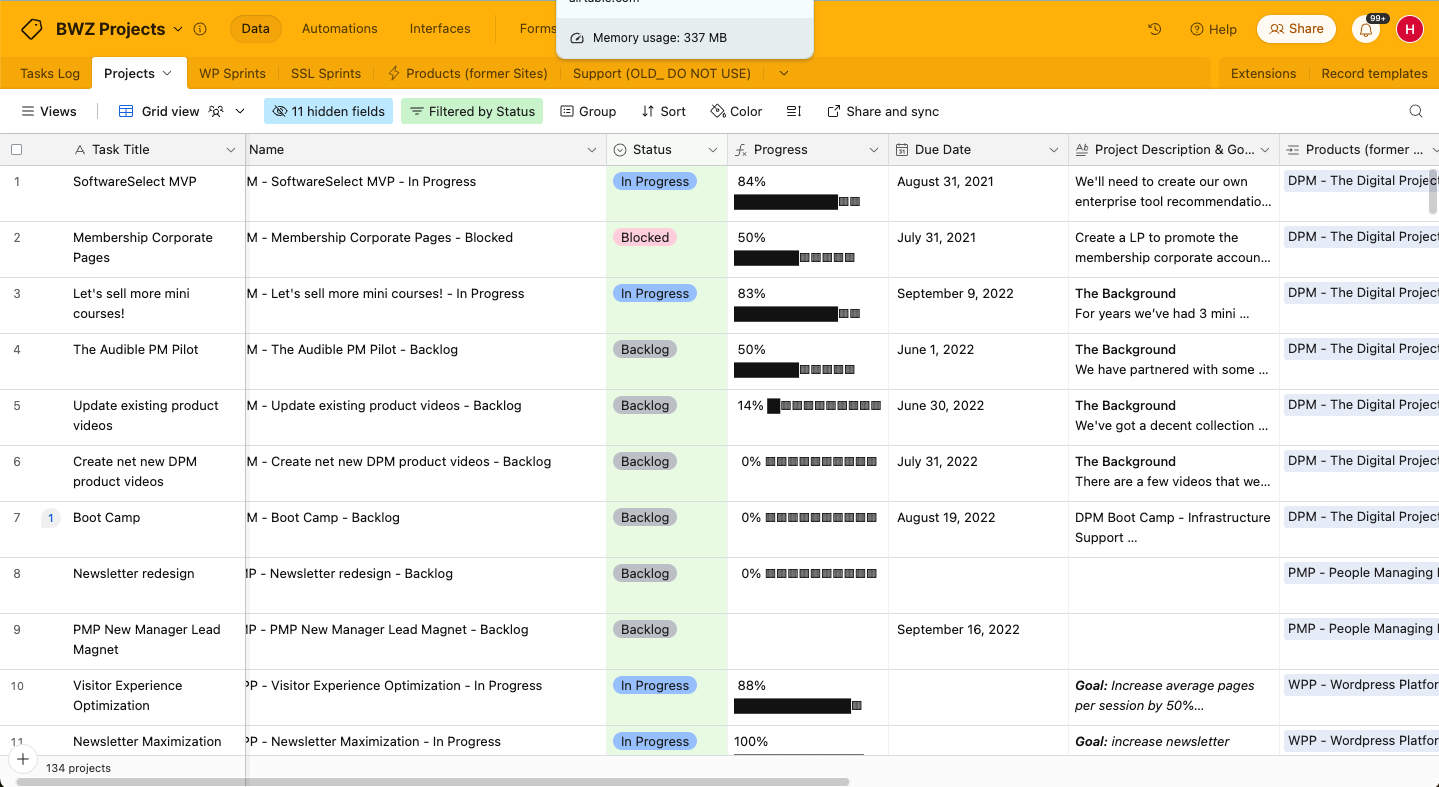
Airtable provides a versatile, no-code project management tool that adapts to unique workflow needs, offering flexibility through relational databases, views, and integrations. Users can design tailored applications using Airtable’s intuitive interface, switching between grid, Kanban, calendar, and gallery views.
While both tools aim to enhance productivity, Smartsheet is often favored by larger organizations for its enterprise-grade controls and reporting capabilities, whereas Airtable is known for its user-friendly interface and visual customization options.
In this article, you'll find a detailed comparison of these project management software tools, covering features, pros and cons, and pricing to help you make the best decision for your team.
Smartsheet vs. Airtable: An Overview
Smartsheet

Airtable
Why Trust Our Software Recommendations
Our team has been testing and reviewing software since 2012. As project managers ourselves, we know how difficult—and important—it is to choose the right software.
For this guide, we evaluated tools using hands-on testing and independent research, scoring tools using our selection criteria. We also draw on insights from industry thought leaders and practicing project management experts.
Our reviews reflect our human editorial judgment, not a sales pitch.
Expert reviewers:
Smartsheet vs. Airtable Pricing Comparison
| Smartsheet | Airtable | |
|---|---|---|
| Free Trial | 30-day free trial + free demo available | Free plan available |
| Pricing | From $9/user/month (billed annually) | From $20/user/month |
Smartsheet vs. Airtable Pricing & Hidden Costs
Smartsheet pricing, which can result in additional costs if your team needs access to advanced features such as resource management, AI tools, portfolio-level reporting, or integrations with enterprise tools. The platform currently offers three main plans—Pro, Business, and Enterprise. The more advanced Business and Enterprise tiers unlock features like dashboards, activity logs, and enhanced automation.
Airtable pricing also follows a tiered model and includes a free plan for beginners that offers essential functionality such as grid views, limited automation runs, and up to five creators per base. However, as your need for advanced collaboration features increases, you may find it necessary to upgrade to paid plans such as the Team or Business options.
To select the tool with the right pricing for your needs, evaluate your team's current use cases and long-term growth expectations. Consider whether your future workflows will demand more advanced features like automated workflows, enhanced user permissions, or integrations with external tools. Choosing a platform with flexible pricing and scalable capabilities can help ensure your team avoids hitting usage limits too early.
Smartsheet vs. Airtable Feature Comparison
Smartsheet’s familiar spreadsheet-like capabilities combined with powerful automations allow users to streamline repetitive tasks in complex project timelines, which makes it invaluable for managing large-scale corporate projects. Through features like automated alerts, update requests, and conditional workflows, teams can reduce manual work and improve consistency across projects. These tools help ensure that important updates are shared in real time and tasks move forward without bottlenecks.
In contrast, Airtable’s customizable grid view is ideal for creative teams that need a flexible layout to organize and visualize their tasks. It supports a variety of field types such as attachments, checkboxes, and dropdowns that allow teams to shape their workspace around specific project needs. The grid view also connects with other visual layouts like calendar, Kanban, and timeline views for easier tracking and collaboration.
While Smartsheet enhances structured project management with tools designed for precision and scale, Airtable excels in offering adaptability for dynamic workflows that require frequent changes and visual flexibility.
Both platforms support common project management features such as task management, project planning, data management, dependencies, notifications, automation, and team collaboration tools. However, their strengths align with different work styles: Smartsheet emphasizes rigor and long-term planning, while Airtable focuses on creativity and agility.
| Smartsheet | Airtable | |
|---|---|---|
| API | ||
| Batch Permissions & Access | ||
| Budgeting | ||
| Calendar Management | ||
| Contact Management | ||
| Contact Sharing | ||
| Customer Management | ||
| Dashboard | ||
| Data Export | ||
| Data Import | ||
| Data Visualization | ||
| Expense Tracking | ||
| External Integrations | ||
| Gantt Charts | ||
| Multi-User | ||
| Notifications | ||
| Project Management | ||
| Resource Management | ||
| Scheduling | ||
| Task Scheduling/Tracking | ||
| Third-Party Plugins/Add-Ons | ||
| Travel Management |
Smartsheet vs. Airtable Integrations
| Integration | Smartsheet | Airtable |
|---|---|---|
| Google Drive | ✅ | ✅ |
| Salesforce | ✅ | ✅ |
| Slack | ✅ | ✅ |
| Jira | ✅ | ❌ |
| Microsoft Teams | ✅ | ✅ |
| Stripe | ✅ | ✅ |
| GitHub | ✅ | ✅ |
| Miro | ✅ | ✅ |
| API | ✅ | ✅ |
| Zapier | ✅ | ❌ |
In the integrations department, both are solid picks. Smartsheet leans toward operational and enterprise workflows with its structured project management features and strong integrations. Airtable, on the other hand, thrives in creative and developer-centric environments where adaptability, visual organization, and integration flexibility are key.
Smartsheet vs. Airtable Security, Compliance & Reliability
| Factor | Smartsheet | Airtable |
|---|---|---|
| Data Privacy | Uses user-level permissions, group management, and role-based access to protect sensitive information | Offers granular permissions, workspace-level controls, and audit logs to manage data privacy |
| Encryption | Employs AES-256 encryption for data at rest and TLS 1.2+ for data in transit | Uses SSL/TLS encryption for data in transit and AES-256 for data at rest |
| Regulatory Compliance | Complies with GDPR, ISO/IEC 27001, ISO/IEC 27018, and SOC 2 Type II standards | GDPR compliant and SOC 2 Type II certified. HIPAA support available on request |
| Reliability | Offers a 99.9% uptime SLA and maintains strong global infrastructure with redundancy | Provides high availability with consistent uptime and routine system backups |
Smartsheet and Airtable both offer solid security, encryption, and compliance measures suitable for most professional use cases. However, Smartsheet's broader list of compliance certifications (including ISO standards and enterprise-grade SLAs) may be more reassuring for organizations in heavily regulated industries such as healthcare, finance, or government.
To choose the right platform, evaluate your industry’s compliance needs and ensure the tool's standards align with those requirements.
Smartsheet vs. Airtable Ease of Use
| Factor | Smartsheet | Airtable |
|---|---|---|
| User Interface | Features a spreadsheet-style interface, ideal for users familiar with Excel and grid-based layouts | Offers a visually intuitive interface with drag-and-drop elements and multiple view options. |
| Onboarding Experience | Provides structured onboarding through tutorials, webinars, and a comprehensive learning center | Offers a fast setup with interactive guides, templates, and minimal configuration requirements |
| Customization | Supports extensive customization via dashboards, automated workflows, and advanced reporting | Enables flexible customization through views (grid, Kanban boards, calendar) and customizable field types. Customization can take time to get used to. |
| Support | Offers 24/7 support on Business and Enterprise plans, including live chat, help center, and training | Provides email support, a searchable knowledge base, and a community forum |
Smartsheet's strong features and spreadsheet-like interface may come with a learning curve, especially for teams new to structured project management tools. However, its detailed onboarding resources and support infrastructure help users ramp up effectively.
Airtable shines in its user experience, though it may come with a learning curve when customizing the platform and can require additional add-ons or workarounds to support more complex enterprise-level workflows.
Smartsheet vs Airtable: Pros & Cons
Smartsheet
- Gives your team a lot of flexibility with how you set up sheets, dashboards, and workflows
- Proofing and approval tools can help you better collaborate with your team
- Handles complex projects and cross-team coordination better than most tools
- It takes time to set up and isn’t very intuitive for new users
- Interactive spreadsheets don’t automatically sync changes
- You can’t easily build simple task lists without doing extra setup
Airtable
- Its automation rules make it easy to notify stakeholders, even if they are outside the platform.
- Airtable's forms feature lets you efficiently gather information from external sources.
- You can connect and perform calculations across multiple bases.
- Customizing the templates requires a big time investment.
- It's not a traditional project management platform.
- The learning curve can be challenging for new users.
Best Use Cases for Smartsheet and Airtable
Smartsheet
- Marketing Teams You can manage campaign timelines, creative approvals, and content calendars in one place using built-in forms, reminders, and dashboards.
- Construction Projects Smartsheet is great for tracking tasks, permits, and inspections across vendors and crews using Gantt charts and status columns.
- PMO Departments You get a clear portfolio view of all your projects, timelines, and risks with built-in reports and resource views.
- Healthcare Operations Smartsheet helps you track compliance tasks, training, and onboarding with audit-ready logs and approval workflows.
- IT Teams Smartsheet is useful for managing system rollouts, support requests, and change logs with forms, automations, and sheet linking.
- Mid-Sized & Enterprise-Level Companies You get enough structure to handle complex operations and scale without needing a full custom solution.
Airtable
- Creative agencies Airtable lets your team design custom project pipelines to foster creativity and improve task management.
- Marketing teams You can track campaigns with Airtable’s flexible and visual database and make sure every detail is covered.
- Small businesses Airtable adapts to your unique business processes and can scale with you as your team grows.
- Event planners Its visual calendar and task management features help you coordinate every detail efficiently.
- Consulting firms Track client projects and deliverables with Airtable’s customizable views and data organization.
- Product development You can manage product roadmaps and feature backlogs with Airtable’s powerful database tools.
Who Should Use Smartsheet, and Who Should Use Airtable?
Smartsheet is best suited for large organizations or teams in industries like construction, IT, and professional services, where detailed project tracking, custom workflows, and advanced reporting are critical. Its features support complex, multi-layered projects and provide the level of control that enterprise teams often need.
However, if you're in a creative field or a startup environment, where flexibility, speed, and easy collaboration are top priorities, Airtable is the better fit. Its low-code customization options, multiple view types, and user-friendly interface make it ideal for dynamic teams that need to organize content, iterate quickly, and adapt workflows on the fly.
Overall, Smartsheet's solid structure is a strong match for managing highly coordinated, large-scale projects, while Airtable's adaptable interface better supports fast-paced, evolving work. And if budget is a concern, Airtable’s free tier offers great value for small teams or early-stage ventures looking for basic functionality without upfront costs.
Differences Between Smartsheet and Airtable
| Smartsheet | Airtable | |
|---|---|---|
| Automation | Provides advanced automation features such as conditional workflows, approval requests, and recurring tasks. | Offers easy-to-set-up automation rules for basic actions and integrations, ideal for lightweight use cases. |
| Customization | Enables detailed customization with dashboards, formulas, and reporting tools. | Supports customization with flexible views, field types, and drag-and-drop layouts. |
| Pricing | Uses tiered pricing starting with Pro plans and Business plans, with customizable Enterprise options for large teams. | Offers a tiered pricing model, including a free plan suitable for individuals or small teams. |
| Reporting | Supports complex, automated portfolio reporting for high-level executives. | Highly customizable to build your own reports, though a bit more lightweight and less structured than Smartsheet. |
| User Interface | Spreadsheet-style layout optimized for structured data entry and grid-based workflows. | Visually dynamic database-style interface with drag-and-drop support and multiple view options like Kanban boards and calendars. |
| Visit SmartsheetOpens new window | Read Airtable ReviewOpens new window |
Similarities Between Smartsheet and Airtable
| Cloud-Based | Both platforms are cloud-based, which ensures anytime, anywhere access for remote and distributed teams. Smartsheet includes full-featured mobile access, and Airtable delivers user-friendly mobile apps for on-the-go updates. |
|---|---|
| Collaboration | Both Smartsheet and Airtable support real-time collaboration, which enables teams to work together seamlessly. |
| Integrations | Smartsheet and Airtable integrate with a wide range of third-party apps to extend their functionality. |
| Project Management | Both tools help you manage projects, with options to customize workflows, assign tasks, set due dates, and visualize different project stages. |
| Setup and Onboarding | Both platforms are designed for quick onboarding with walkthroughs, a learning center, and drag-and-drop builders. |
| Visit SmartsheetOpens new window Read Airtable ReviewOpens new window | |
Join For More Project Management Insights
Want to learn more about project management and project management software? Join our membership community to access 100+ templates, samples, and examples, and connect with 100s of other digital project managers in Slack.