

10 Best OneNote Alternatives for Meeting Notes in 2026

Best OneNote Alternatives Shortlist


Managing information in a fast-paced work environment is important. As project managers, you face challenges such as organizing vast amounts of data and ensuring team collaboration. Digital note-taking apps can help with these tasks, but sometimes OneNote may not meet all your needs.
You may be seeking an alternative due to compatibility issues, specific feature requirements, or a desire for a fresh interface. In my experience, exploring other options can uncover better solutions for your team.
In this article, I'll share my unbiased review of the best OneNote alternatives. You'll get insights into their unique features and how they can address your specific needs. Let's find the right tool to boost your productivity.
What is OneNote?
OneNote is a digital note-taking app that helps you organize and manage information. It's commonly used by professionals such as project managers, students, and educators who need to capture and categorize large amounts of data. You and your team can benefit from OneNote's ability to keep everything in one place. Features such as multi-device syncing, collaboration tools, and customizable templates help with organizing thoughts, sharing ideas, and maintaining project consistency. Overall, OneNote offers a practical solution for managing your notes and increasing productivity.
Best OneNote Alternatives Summary
This comparison chart summarizes pricing details for my top OneNote alternative selections to help you find the best one for your budget and business needs.
| Tool | Best For | Trial Info | Price | ||
|---|---|---|---|---|---|
| 1 | Best for Apple ecosystem | Free plan available | Free to use | Website | |
| 2 | Best for team collaboration | Free plan available | From $12/user/month (billed annually) | Website | |
| 3 | Best for offline access | Free plan available | From $4/user/month (billed annually) | Website | |
| 4 | Best flexible visual knowledge mapping | Free plan available | From $8.25/user/month (billed annually) | Website | |
| 5 | Best for AI-powered advanced search | Free plan + 7-day free trial available | From $8.25/month (billed annually) | Website | |
| 6 | Best for privacy | Free plan + free trial available | From $1.67/month (billed annually) | Website | |
| 7 | Best for Google integration | Free plan available | From $7/user/month | Website | |
| 8 | Best for simplicity | Free to us | Free to use | Website | |
| 9 | Best for networked thought | 14-day free trial + free demo available | From $19.50/user/month | Website | |
| 10 | Best for task management | Free-forever plan available | From $5.84/month + tax (billed annually) | Website |
Why Trust Our Software Recommendations
Our team has been testing and reviewing software since 2012. As project managers ourselves, we know how difficult—and important—it is to choose the right software.
For this guide, we evaluated tools using hands-on testing and independent research, scoring tools using our selection criteria. We also draw on insights from industry thought leaders and practicing project management experts.
Our reviews reflect our human editorial judgment, not a sales pitch.
Expert reviewers:
Best OneNote Alternatives Reviews
Below are my detailed summaries of the best OneNote alternatives that made it onto my shortlist. My reviews offer a detailed look at the key features, pros and cons, integrations, and ideal use cases of each tool to help you find the best one for you.

Best for Apple ecosystem
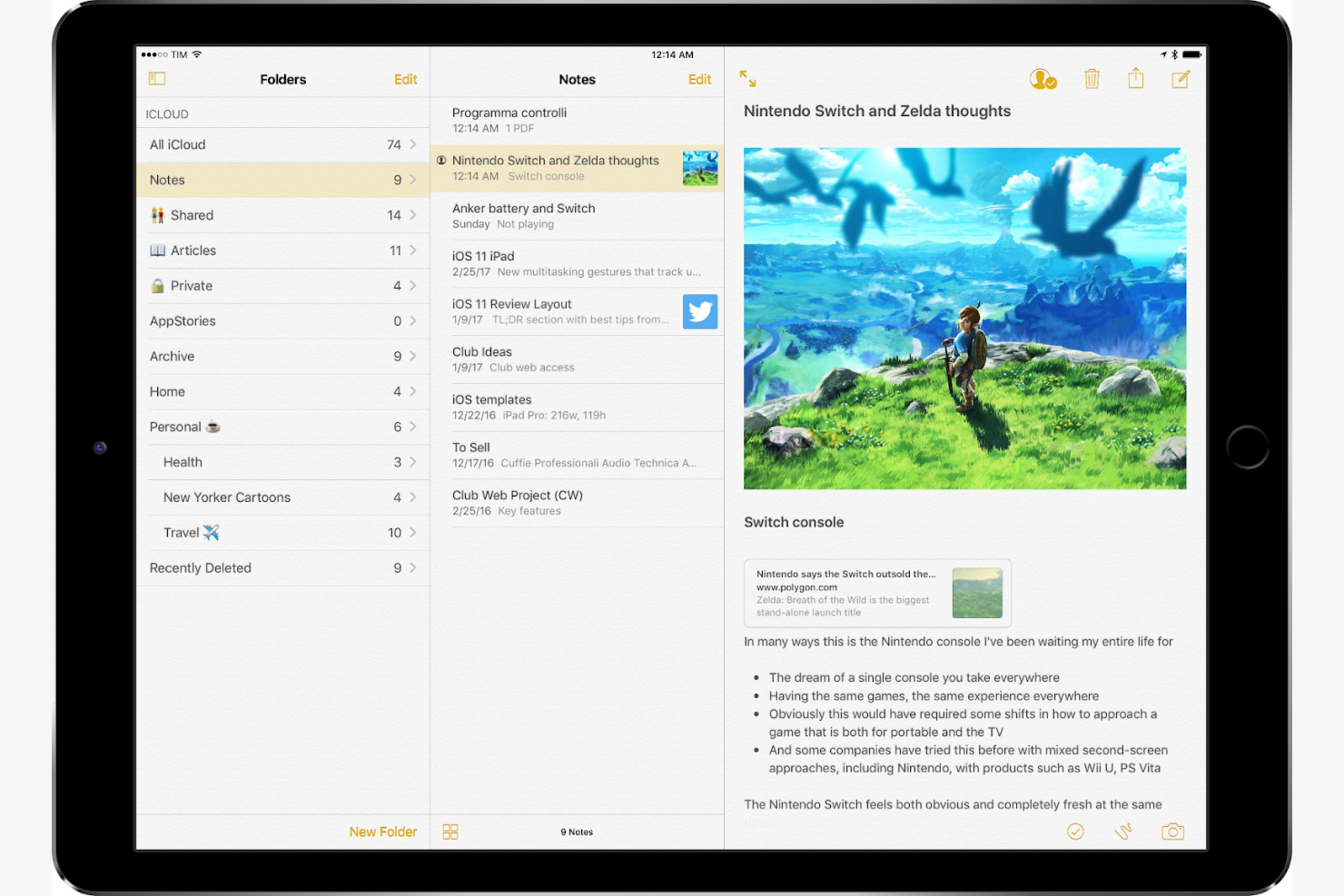
Apple Notes is a note-taking app designed for users within the Apple ecosystem, syncing well across Apple devices. It's widely used by individuals and teams who need a simple way to take quick notes.
Why it's a good OneNote alternative: Apple Notes offers deep integration with Apple devices, making it a natural choice if you already own a Mac, iPad, or iPhone. You can also create notes hands-free using Siri. The app supports rich text formatting, allowing you to add checklists, images, and sketches to your notes. With iCloud, your notes sync automatically across all your Apple devices, ensuring you always have access to your latest information.
Standout Features and Integrations:
Features include password locks for sensitive information and folders for your notes to keep everything tidy and easy to find. Apple Notes also allows you to collaborate in real-time, making it easy for your team to work together on shared notes.
Integrations include iCloud, Siri, and more.
Pros and Cons
Pros:
- Easy voice note creation
- Supports rich text formatting
- Syncs across Apple devices
Cons:
- No markdown support
- Limited cross-platform support
Coda
Best for team collaboration
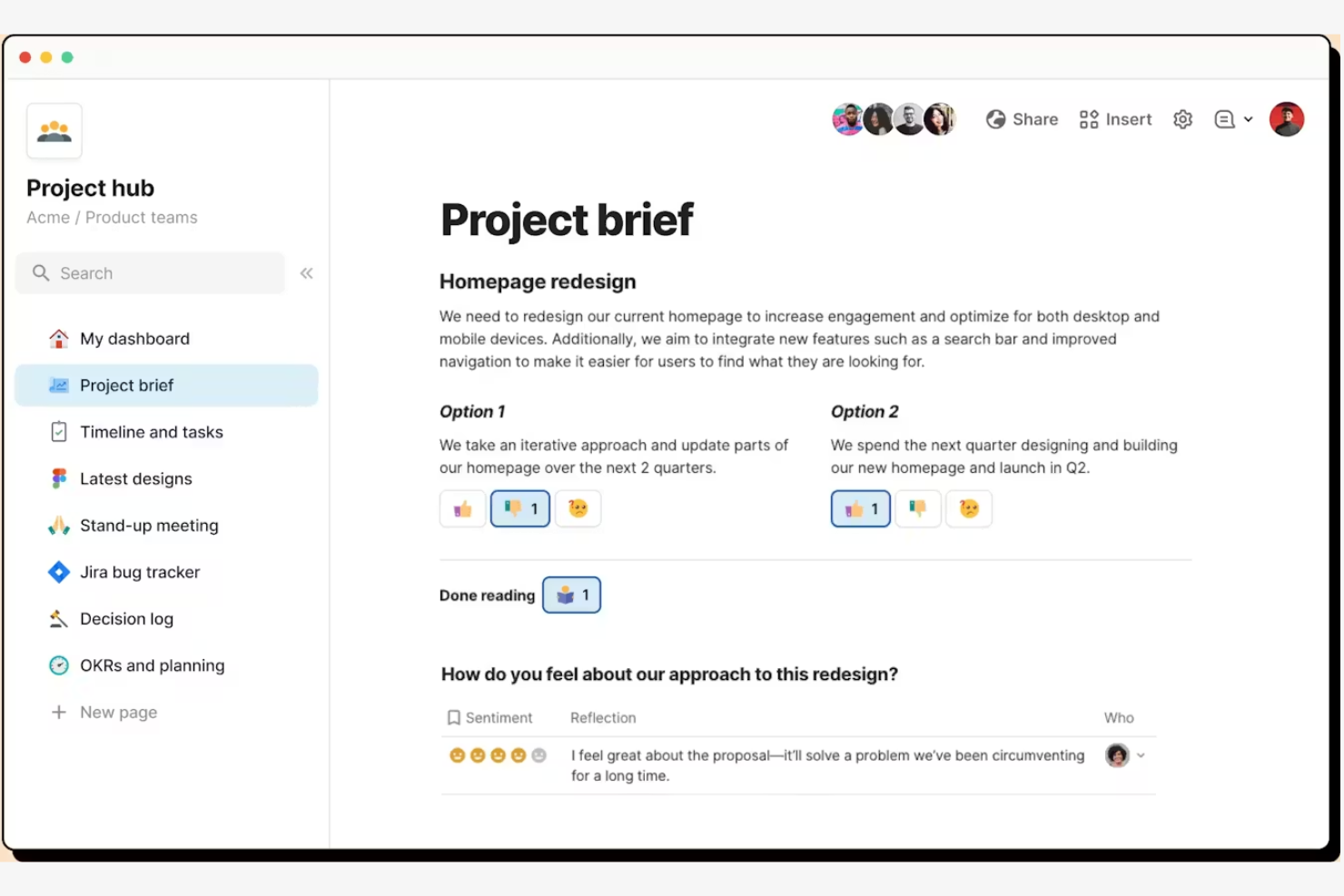
Coda is a versatile document editor that combines the functionality of documents, spreadsheets, and applications into one customizable platform. It's designed for teams and businesses that need a collaborative workspace to manage projects and data effectively.
Why it's a good OneNote alternative: Coda offers collaboration features that make it easy for your team to work together on documents in real-time. You can create interactive tables and charts that update automatically, so everyone stays informed with the latest data. Coda's flexibility lets you build custom workflows and templates tailored to your team's needs.
Standout Features and Integrations:
Features include a drag-and-drop interface that makes it simple to organize your documents and data and conditional formatting to highlight important information. Coda's formula language allows you to create complex calculations and automate repetitive tasks, saving you time.
Integrations include Slack, Google Calendar, GitHub, Salesforce, Todoist, Microsoft Teams, and more.
Pros and Cons
Pros:
- Advanced formula capabilities
- Real-time collaboration
- Highly customizable workflows
Cons:
- Mobile app is less feature-rich
- Requires setup and customization

Obsidian
Best for offline access
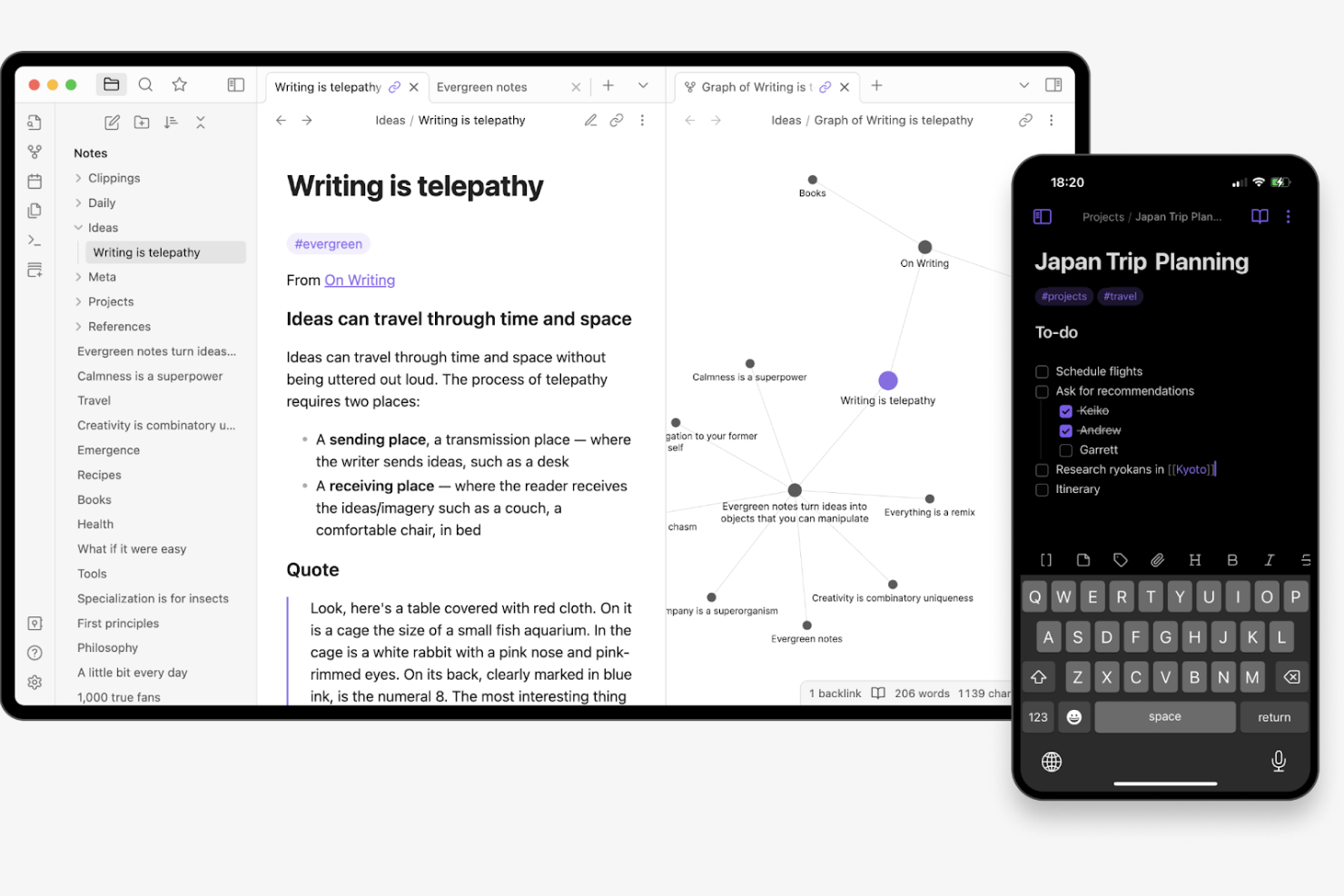
Obsidian is a personal knowledge base and note-taking app designed for users who need a reliable way to organize their thoughts and ideas. It's popular among writers, researchers, and individuals who value privacy and data ownership.
Why it's a good OneNote alternative: Obsidian offers offline access on multiple devices and operating systems, including Linux and macOS. Its markdown-based system allows for easy formatting and linking between notes, making it ideal for creating interconnected ideas. You can customize your workspace with various themes and plugins, offering flexibility that OneNote lacks. Additionally, Obsidian's local-first approach ensures your data stays on your device for increased privacy.
Standout Features and Integrations:
Features include a graph view that visually maps out the connections between your notes to help you see relationships at a glance and daily notes to keep track of thoughts and tasks. The app also supports backlinks, allowing you to create a network of linked notes, which is great for building complex knowledge systems.
Integrations are not publicly listed.
Pros and Cons
Pros:
- Extensive plugin options
- Markdown support
- Offline access
Cons:
- Requires manual setup
- No built-in collaboration

xTiles
Best flexible visual knowledge mapping

xTiles is a visual workspace for organizing notes, ideas, and plans in one place. It’s used by individuals and teams who want to manage personal knowledge, projects, and daily work more creatively.
Why xTiles is a good OneNote alternative: xTiles' flexible canvas with blocks and tiles lets you arrange information in a way that matches how your brain works. You can break work into small visual sections, which makes it easier to focus and avoid overload. Custom layouts and reusable templates help you build simple systems you can stick with. Visual hierarchy, spacing, and structure support attention and reduce distractions when you’re working.
Standout Features and Integrations:
Features include customizable pages with movable tiles and blocks andreusable templates for consistency across projects. Visual grouping helps you separate ideas without burying them in long pages.
Integrations are not publicly listed.
Pros and Cons
Pros:
- Templates support repeatable routines
- Flexible structure fits personal workflows
- Visual layouts reduce mental clutter
Cons:
- Fewer enterprise-level controls
- Not ideal for text-heavy notes

Evernote
Best for AI-powered advanced search
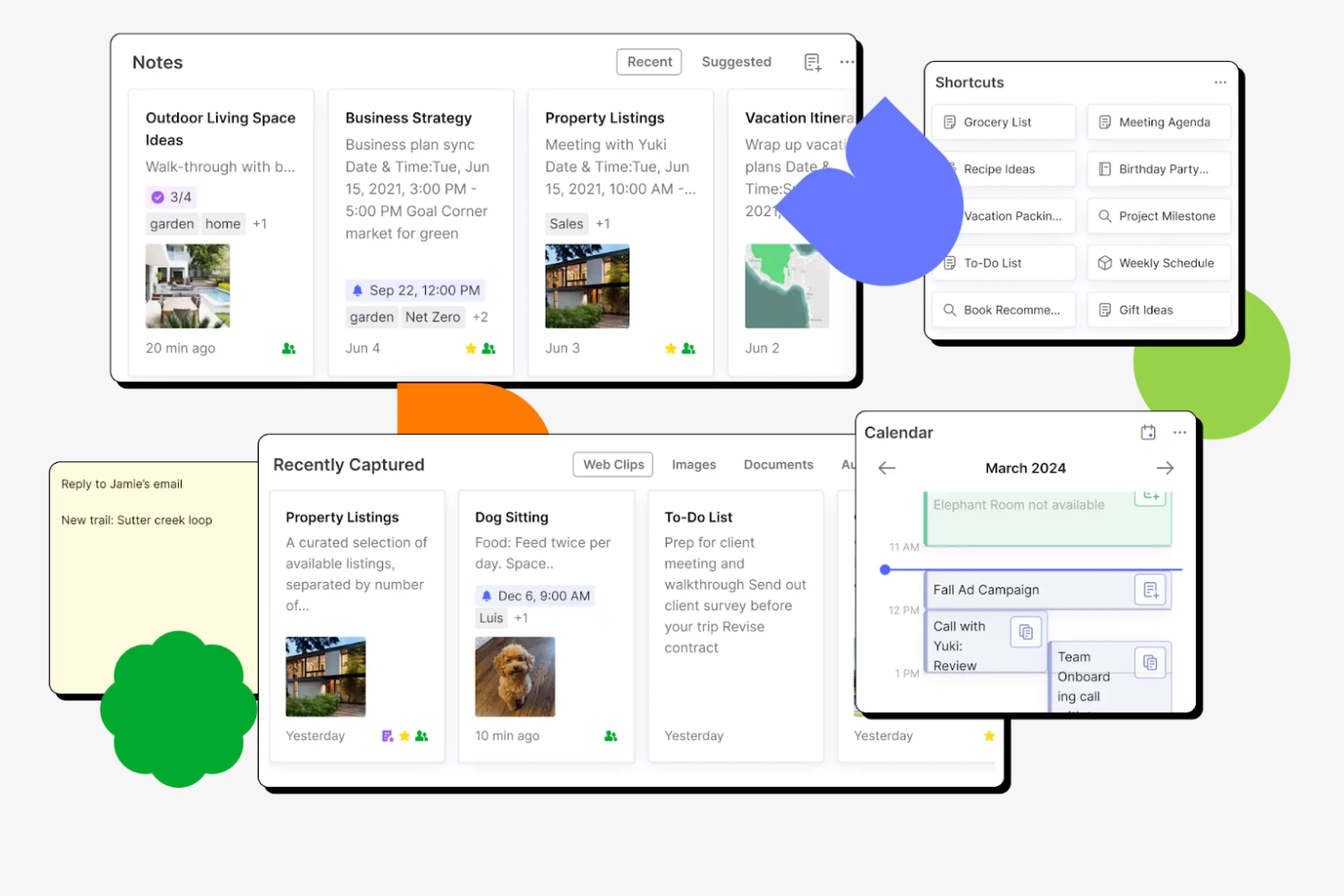
Evernote is a digital note-taking app primarily used by professionals who need to organize and manage information efficiently. It caters to users such as project managers and students who require a reliable way to capture and categorize data.
Why it's a good OneNote alternative: Evernote offers advanced search capabilities, using features such as tagging to filter notes by keywords or AI-powered search to find notes in seconds. The app's OCR functionality helps you search within images, making it easier to locate specific content. You can also organize notes into notebooks for a more structured way to manage your information.
Standout Features and Integrations:
Features include web clipping that lets you save articles and webpages directly to your notes, and templates to save time on formatting by quickly creating notes with predefined layouts. Evernote also allows you to set reminders for important tasks and deadlines.
Integrations include Google Drive, Slack, Microsoft Outlook, Google Calendar, Gmail, and more.
Pros and Cons
Pros:
- Customizable templates
- Web clipping feature
- Advanced search functionality
Cons:
- Limited collaboration features
- Limited offline access

Best for privacy

Zoho Notebook is a digital note-taking app designed for users who value privacy and simplicity. It caters to individuals and teams looking for a user-friendly way to organize their thoughts and ideas.
Why it's a good OneNote alternative: Zoho Notebook emphasizes privacy, ensuring that your notes are secure and accessible only to you. The note app's straightforward interface offers a distraction-free environment for creating and sorting notes. You can use features such as color-coded notebooks to keep your information organized. Zoho Notebook lets note-takers add images and checklists in addition to text notes.
Standout Features and Integrations:
Features include audio notes tocapture ideas on the go and a smart card feature to organize content visually, making it easy to find what you need. Zoho Notebook also offers a web clipper, allowing you to save content from the web directly into your notebooks.
Integrations include Zoho Mail, Zoho CRM, Zoho Projects, Slack, Google Workspace, Zapier, and more.
Pros and Cons
Pros:
- Audio note creation
- Visual organization with smart cards
- Strong focus on privacy
Cons:
- No offline web access
- Limited advanced note formatting

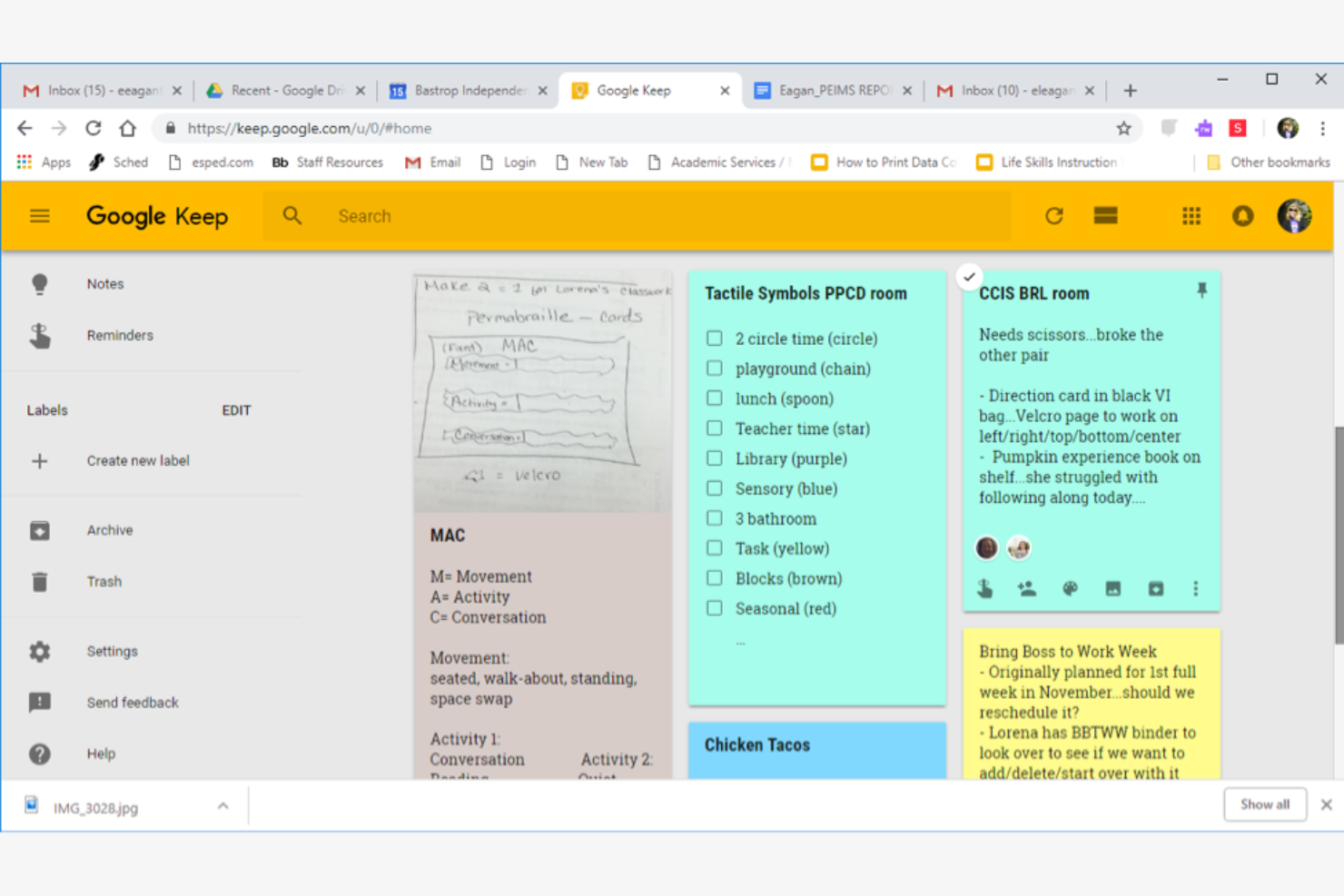
Google Keep is a digital note-taking app that caters to users who want a simple and efficient note-taking experience. It's ideal for individuals and teams who rely on Google services for their daily tasks.
Why it's a good OneNote alternative: Google Keep is a natural choice if you’re already using Google's ecosystem, especially if you own an Android device. You can record notes with text, voice, or images. The app allows you to set reminders based on time or location, ensuring you don't miss important tasks. With color-coded notes and labels, you can quickly organize and find your information.
Standout Features and Integrations:
Features include the ability to pin important notes to keep them at the top of your list for accessibility and note sharing that allows your team to work together on ideas. Google Keep also offers a simple and clean interface, helping you focus on your content without distractions.
Integrations include Google Drive, Google Calendar, Gmail, Google Docs, Google Sheets, and more.
Pros and Cons
Pros:
- Simple interface
- Location-based reminders
- Excellent Google service integration
Cons:
- Lacks advanced features
- Limited formatting options

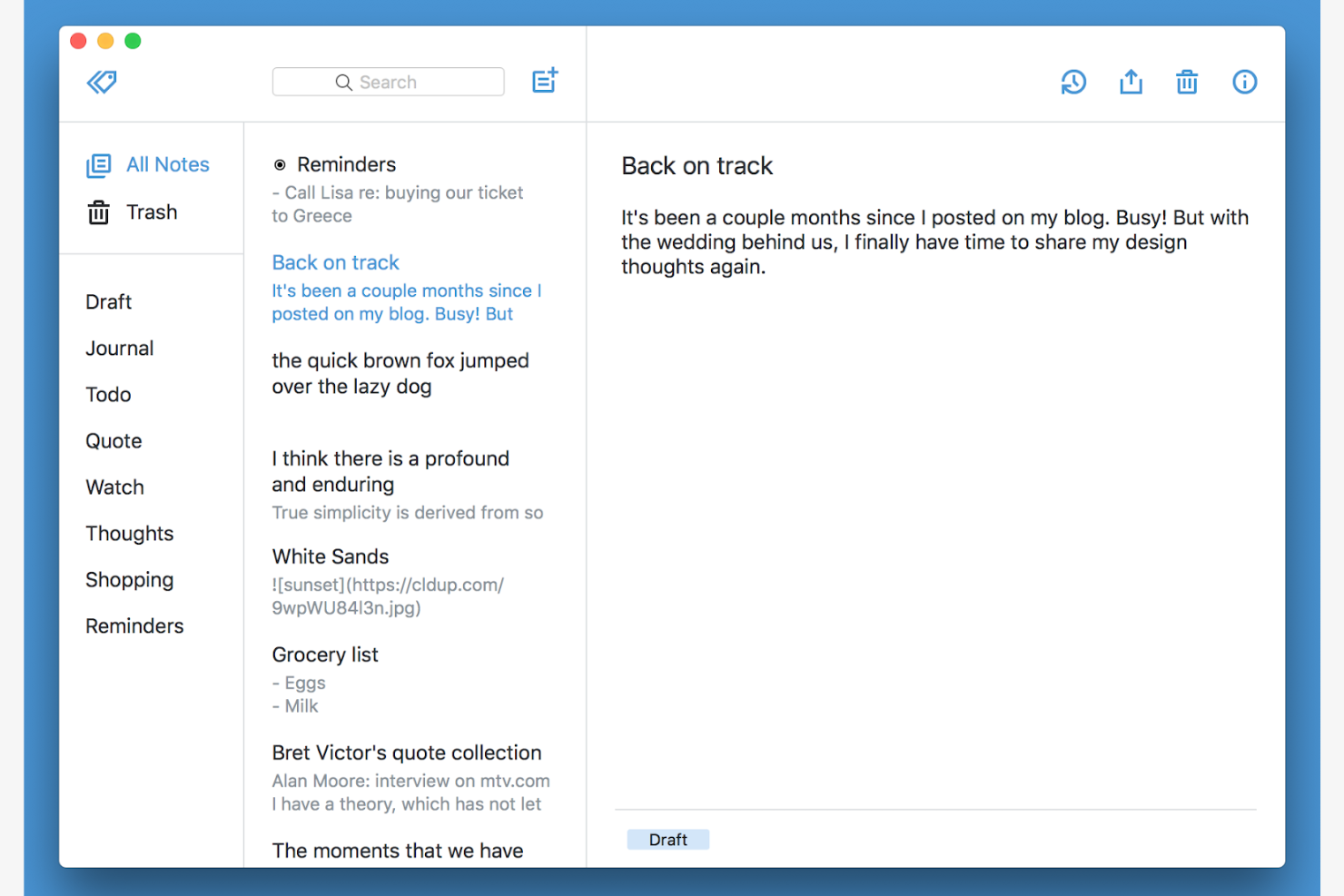
Simplenote is a straightforward note-taking app designed for users who value simplicity and speed. It's ideal for individuals and teams who need a quick way to jot down ideas and keep their notes organized.
Why it's a good OneNote alternative: Simplenote offers a clutter-free interface that makes it easy for you to focus on your notes. You can quickly input ideas and access them across all your devices, thanks to its fast syncing capability. The app provides basic text formatting to let you organize your thoughts with tags and pins. With its lightweight design, Simplenote ensures a smooth experience if you prefer a minimalist approach.
Standout Features and Integrations:
Features include version history that lets you view and revert to previous versions of your notes and note-sharing for efficient collaboration on projects. Simplenote also offers a dark mode, providing a comfortable viewing experience in low-light environments.
Integrations are not publicly listed.
Pros and Cons
Pros:
- Version history feature
- Fast syncing across devices
- Minimalist design
Cons:
- Lacks multimedia support
- Lacks built-in task or project management tools

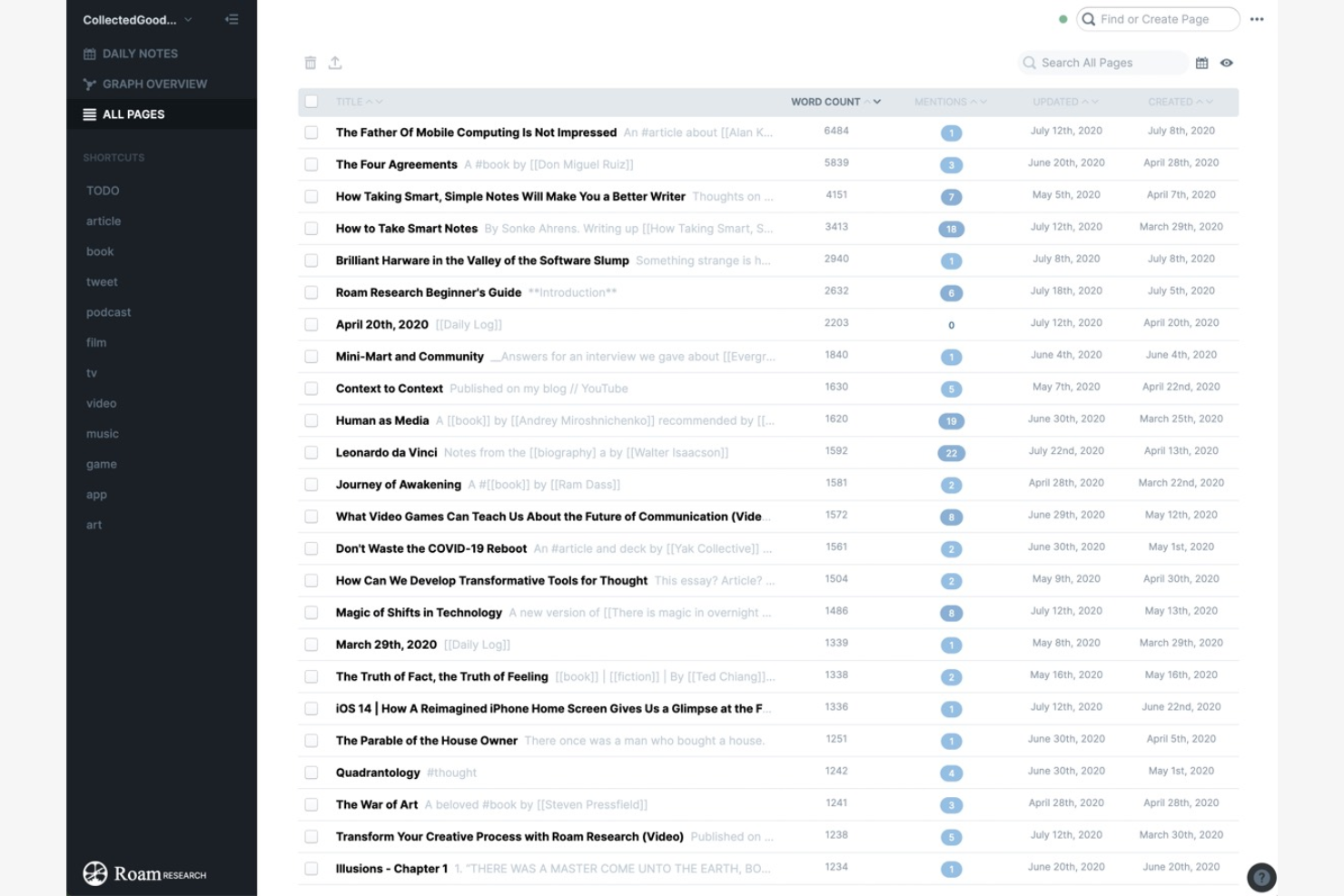
Roam is a note-taking tool designed for users who want to organize their thoughts in a non-linear way. It's popular among researchers, writers, and thinkers who need to create complex interconnections between notes.
Why it's a good OneNote alternative: Roam offers a unique approach to note-taking by allowing you to link ideas and notes for better knowledge management. This networked thought process helps you see connections between different pieces of information. You can use bidirectional links to create a web of knowledge, making it easier to explore related topics. The daily notes feature fosters creativity and insight, letting you capture thoughts and ideas as they appear in your mind.
Standout Features and Integrations:
Features include a graph view that visually represents the connections between your notes, block references to include the same piece of content in multiple places, and markdown formatting that allows you to style your notes with ease.
Integrations are not publicly listed.
Pros and Cons
Pros:
- Graph view for visualizing connections
- Bidirectional linking
- Supports networked thought process
Cons:
- Not budget-friendly for solo users
- Exporting data requires extra steps

Amplenote
Best for task management

Amplenote is a note-taking and task management app designed for users who need to organize their thoughts and tasks efficiently. It's perfect for professionals and teams looking for a project management tool combined with note-taking to manage tasks in one platform.
Why it's a good OneNote alternative: Amplenote integrates task management directly into your notes, making it easy for you to track tasks alongside related information. You can create to-dos within your notes without needing a separate app. The app supports rich text formatting, allowing you to customize your notes to fit your needs. With its focus on task prioritization, Amplenote helps you and your team stay on top of deadlines and priorities.
Standout Features and Integrations:
Features include a flexible tagging system that lets you categorize and retrieve notes with ease and a calendar view to see your tasks and deadlines in a visual format for more effective planning. Amplenote's focus mode reduces distractions, allowing you to concentrate on your most important tasks.
Integrations include Google Calendar, Raindrop.io, and more.
Pros and Cons
Pros:
- Focus mode for concentration
- Rich text formatting
- Integrated task management
Cons:
- Basic project tracking depth
- Limited integration ecosystem
Other OneNote Alternatives
Here are some additional OneNote alternatives that didn’t make it onto my shortlist but are still worth checking out:
- Joplin
For open-source security
- Goodnotes
For digital handwriting
- Slite
For remote team communication
- Miro
For visual collaboration
- Otter.ai
For AI-assisted voice transcription
- Tana
For AI-powered hierarchical data organization
- Hive Notes
For meeting notes
- Notion
For team wikis
- Bear
For markdown editing
- Saner.AI
For AI-driven insights
- Notesnook
For privacy features
- Xournal++
For PDF annotation
- ClickUp Docs
For project documentation
- Notability
For multimedia notes


How I Evaluate OneNote Alternatives
I split my evaluation into two layers—core requirements like hierarchical organization and real-time co-editing, and differentiators like PM integrations—to find tools that genuinely replace OneNote.
Core Functionality (Table Stakes For This List)
When I'm selecting tools for my list, I rank each one on a scale from 0 (does not offer the functionality) to 5 (excels in this area) for each core functionality listed below. Then, I calculate the tool's total score into a percentage. Each tool needs to achieve a minimum total score of 75% to be considered for inclusion.
- Rich Note-Taking: I check whether a tool supports rich text, embedded media, tables, checklists, and file attachments—enough to capture everything from sprint retro notes to stakeholder feedback.
- Hierarchical Organization: Nested structures like notebooks, sections, and pages matter when you're managing documentation across multiple projects, clients, or workstreams at once.
- Real-Time Collaboration: I evaluate co-editing, inline comments, mentions, and permission controls to see how well distributed teams can work on shared meeting notes or project docs simultaneously.
- Task & Project Linking: Each tool should connect notes to actionable work—whether through native task management, integrations with tools like Jira or Asana, or bi-directional linking.
- Cross-Platform Sync: I look at availability across desktop, web, and mobile with reliable sync, since project managers often switch devices between a planning session and a site visit.
- Search & Knowledge Retrieval: Full-text search across notes, tags, and attachments is essential when you need to locate a decision log or requirement buried three sprints back.
Once I have a list of tools that meet this criteria, I consider what sets each platform apart.
Differentiating Factors (What Sets Vendors Apart)
Here's how I compare and contrast different vendors:
Standout Features
AI-powered assistance is a major differentiator—I look at whether a tool can summarize long meeting notes or generate action items automatically, which saves real time after a packed sprint review. I also evaluate database and wiki views, since tools like Notion and Coda let you turn notes into structured project knowledge bases with filtered views. A strong templates library matters too, especially prebuilt formats for retrospectives, project briefs, and status reports that teams can adopt on day one.
Beyond Features
PM stack integrations are a top priority—I check whether a tool connects natively with Jira, Asana, Slack, or Teams, since project managers need notes tied to their existing workflows. Migration from OneNote also matters a lot here. I evaluate whether a platform supports direct .one imports or markdown migration while preserving hierarchy and attachments. For enterprise PMOs, I consider security and compliance factors like SOC 2 certification, SSO/SAML support, and granular permission controls that protect sensitive project documentation across departments.
Why Look for a OneNote Alternative?
While OneNote is a good digital note-taking app, there are a number of reasons why some users seek out alternative solutions. You might be looking for a OneNote alternative because…
- You need better offline access
- Your team requires more collaboration features
- You want a simpler interface
- You're looking for more customization options
- You need support for non-Windows devices
- You're seeking a more budget-friendly solution
If any of these sound like you, you’ve come to the right place. My list contains several digital note-taking app options that are better suited for teams facing these challenges with OneNote and looking for alternative solutions.
OneNote Features
Here are some of the key features of Microsoft OneNote you can compare with the alternative solutions above:
- Notebook organization: Create notebooks, sections, and pages to manage your notes efficiently.
- Versatile note-taking: Supports typed, handwritten, and audio or video notes.
- Rich formatting tools: Offer text styles, lists, tables, and background colors to customize notes.
- Content insertion: Insert images, files, and Excel spreadsheets directly into your notes.
- Drawing and sketching: Use tools for sketching and converting ink to text or shapes.
- Sharing and syncing: Share notebooks with others and sync across all your devices.
- Tagging and searching: Tag notes and search for specific content to stay organized.
- Collaboration features: CShare and edit notes with your team.
- Accessibility: Access your notes on PCs, phones, tablets, and web browsers.
- Integration with Microsoft Teams: Add or link notes with Teams hassle-free.
What’s Next:
If you're in the process of researching a digital note-taking app, connect with a SoftwareSelect advisor for free recommendations.
You fill out a form and have a quick chat where they get into the specifics of your needs. Then you'll get a shortlist of software to review. They'll even support you through the entire buying process, including price negotiations.