

10 Google Keep Alternatives for Notes & To-Dos in 2026

Google Keep Alternatives Shortlist


A strong Google Keep alternative gives you flexible note-taking, reliable syncing, and features that fit your workflow—whether you need privacy, collaboration, or advanced organization. If you’re searching for Google Keep alternatives, you’re likely frustrated by its limitations or looking for tools that better match your team’s needs.
With so many note-taking apps available, it’s tough to know which ones actually deliver on privacy, cross-platform access, or unique features like markdown support and kanban organization. This list will help you quickly compare the top Google Keep alternatives for 2026, so you can find the right fit for your projects and daily work.
What Is Google Keep?
Google Keep is a cloud-based note-taking app that lets you create, organize, and share notes, lists, and reminders across devices. It offers a simple interface for capturing ideas quickly, supports voice notes and image attachments, and syncs with your Google account. Google Keep is popular for its ease of use and integration with other Google Workspace tools, making it a go-to option for personal and collaborative note-taking.
Google Keep Alternatives Comparison Table
This comparison table highlights pricing details for my top Google Keep alternatives.
| Tool | Best For | Trial Info | Price | ||
|---|---|---|---|---|---|
| 1 | Best with Apple ecosystem integration | Free plan available | Free to use | Website | |
| 2 | Best for linking and knowledge graphs | Free plan available | From $4/user/month (billed annually) | Website | |
| 3 | Best for cross-platform syncing | 30-day free trial + free plan available | From $6/user/month (billed annually) | Website | |
| 4 | Best for multimedia content support | Free plan + free trial available | From $1.67/month (billed annually) | Website | |
| 5 | Best for distraction-free writing | Free to us | Free to use | Website | |
| 6 | Best with end-to-end encryption | Free plan available | From $90/year | Website | |
| 7 | Best for markdown editing features | 7-day free trial + free plan available | From $2.99/month (billed annually) | Website | |
| 8 | Best for privacy-focused documentation | Free trial available | From $1.67/month (billed annually) | Website | |
| 9 | Best for elegant interface design | Free plan available | From $1.99/month | Website | |
| 10 | Best for kanban-style organization | Free plan available | From $1.79/month | Website |
Why Trust Our Software Recommendations
Our team has been testing and reviewing software since 2012. As project managers ourselves, we know how difficult—and important—it is to choose the right software.
For this guide, we evaluated tools using hands-on testing and independent research, scoring tools using our selection criteria. We also draw on insights from industry thought leaders and practicing project management experts.
Our reviews reflect our human editorial judgment, not a sales pitch.
Expert reviewers:
Google Keep Alternatives Reviews
Below are my detailed summaries of the Google Keep alternatives that made it onto my shortlist. My reviews offer a detailed look at the features, best use cases, and integrations of each tool to help you find the best one for you.

Best with Apple ecosystem integration
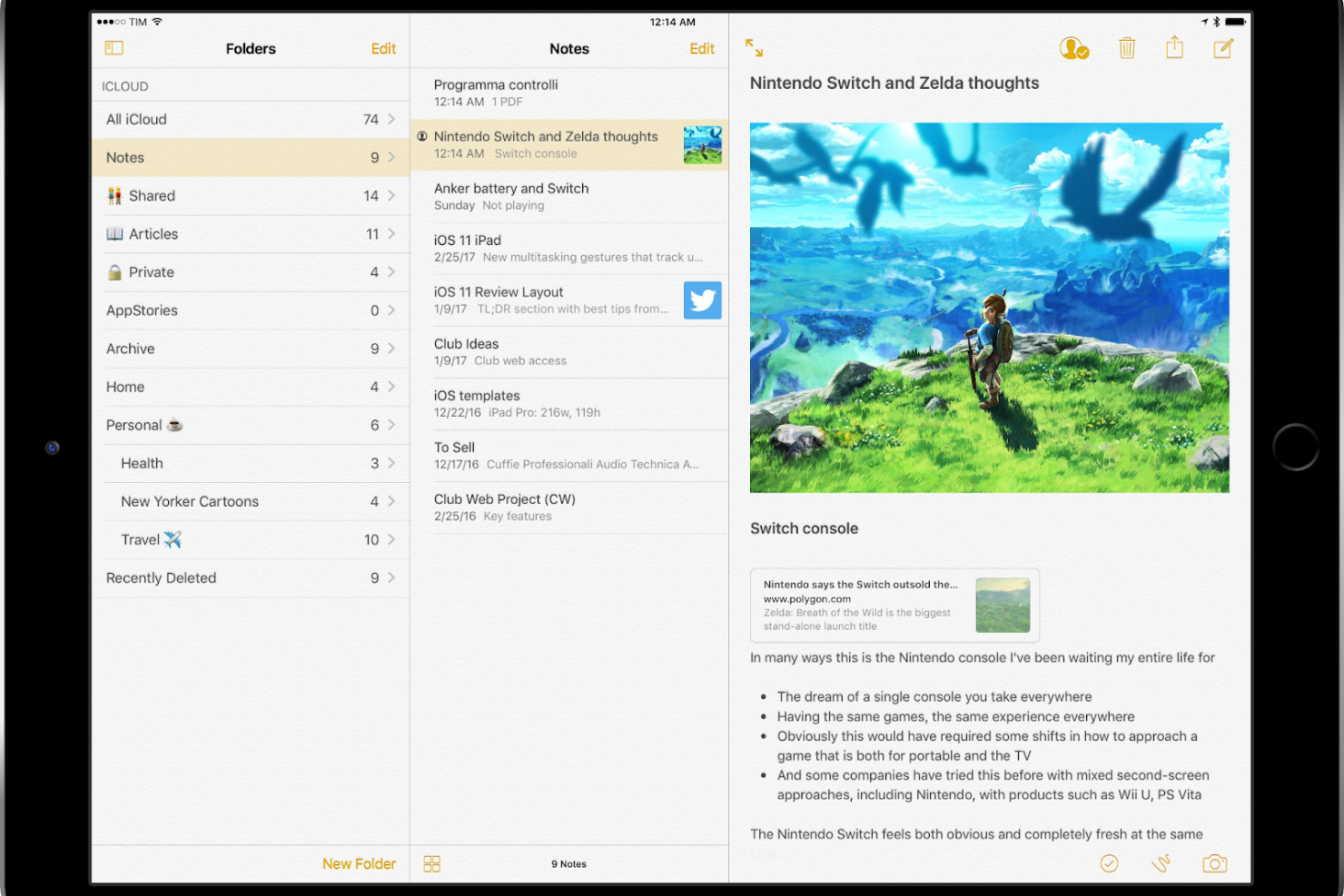
For anyone deeply invested in Apple devices, Apple Notes offers a note-taking experience built for integration across the Apple ecosystem. This tool is especially useful for professionals and teams who rely on Macs, iPhones, and iPads to keep their notes synced and accessible everywhere. If you want a solution that works natively with Apple apps and services, Apple Notes stands out from Google Keep and other alternatives.
Why Apple Notes Is a Good Google Keep Alternative
If you’re already using Apple devices, Apple Notes offers a level of integration that Google Keep can’t match. I picked Apple Notes because it syncs instantly across iPhone, iPad, and Mac, letting you access and edit your notes from any Apple device without extra setup. The app also supports features like annotations, inline checklists, and document scanning directly from your device’s camera. For anyone who wants their notes to work with Apple’s built-in apps and services, Notes is a natural fit.
Apple Notes Key Features
Some other features in Apple Notes make it even more useful for Apple users:
- Rich Text Formatting: Format your notes with bold, italics, headings, and lists for better organization.
- Folder Organization: Group notes into folders to keep projects and topics separate.
- Note Sharing: Share individual notes with others for viewing or editing.
- Password Protection: Lock specific notes with a password or Face ID for added privacy.
Apple Notes Integrations
Integrations include Apple Calendar, Apple Reminders, Apple Mail, iCloud Drive, Apple Numbers, Apple Keynote, Safari, and more.
Pros and Cons
Pros:
- Built-in document scanning feature
- Allows password or Face ID protection
- Syncs notes instantly across all Apple devices
Cons:
- Limited search functionality
- No official Android app or Windows desktop
Obsidian
Best for linking and knowledge graphs
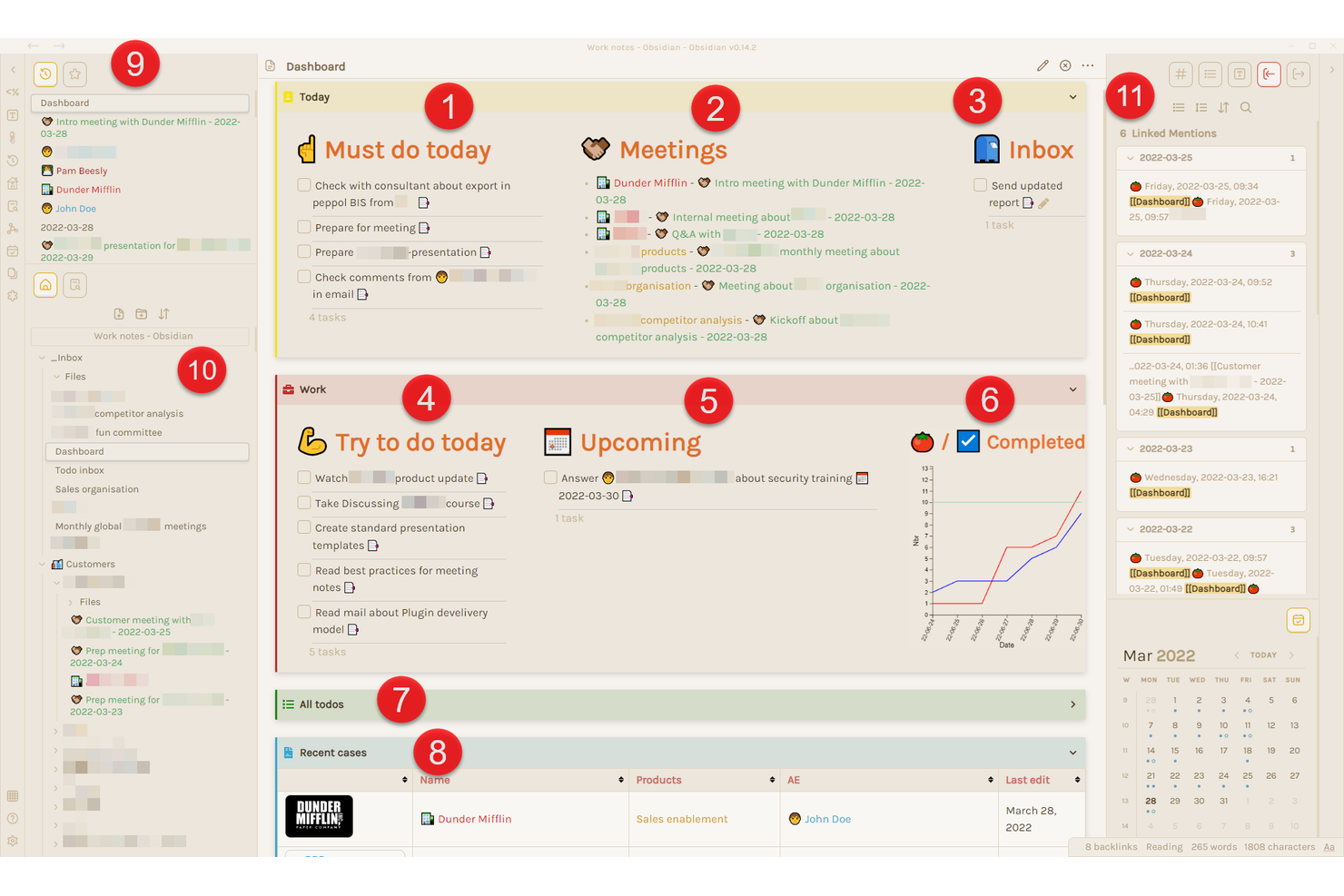
Obsidian is a knowledge management system, designed for users who want to build a connected, visual knowledge base from their notes. Researchers, writers, and anyone managing complex information will appreciate its unique approach to linking ideas and visualizing relationships through knowledge graphs. If you need more than just simple lists or reminders, Obsidian’s networked note system offers a level of structure and insight that Google Keep doesn’t provide.
Why Obsidian Is a Good Google Keep Alternative
For anyone who wants to turn their notes into a connected web of knowledge, Obsidian offers features that go far beyond what Google Keep provides. I picked Obsidian because it lets you create bi-directional links between notes, making it easy to map out relationships and ideas as your knowledge grows. The built-in knowledge graph visually displays how your notes connect, helping you spot patterns and gaps in your thinking. If you’re looking for a note-taking app that supports deep research and idea development, Obsidian’s linking and visualization tools are a clear advantage.
Obsidian Key Features
Some other features in Obsidian make it a flexible choice for different workflows:
- Markdown Support: Write and format notes using markdown syntax for consistency and portability.
- Custom Plugins: Extend functionality with a wide range of community and official plugins.
- Local-First Storage: Store all notes locally on your device for privacy and offline access.
- Tagging System: Organize and filter notes using tags for quick retrieval.
Obsidian Integrations
Integrations are available via an API.
Pros and Cons
Pros:
- Provides local storage to keep notes private
- Offers knowledge graph view
- Bi-directional linking to relate notes
Cons:
- Lack of integrated cloud backup system
- Mobile sync requires a paid subscription
Onenote
Best for cross-platform syncing
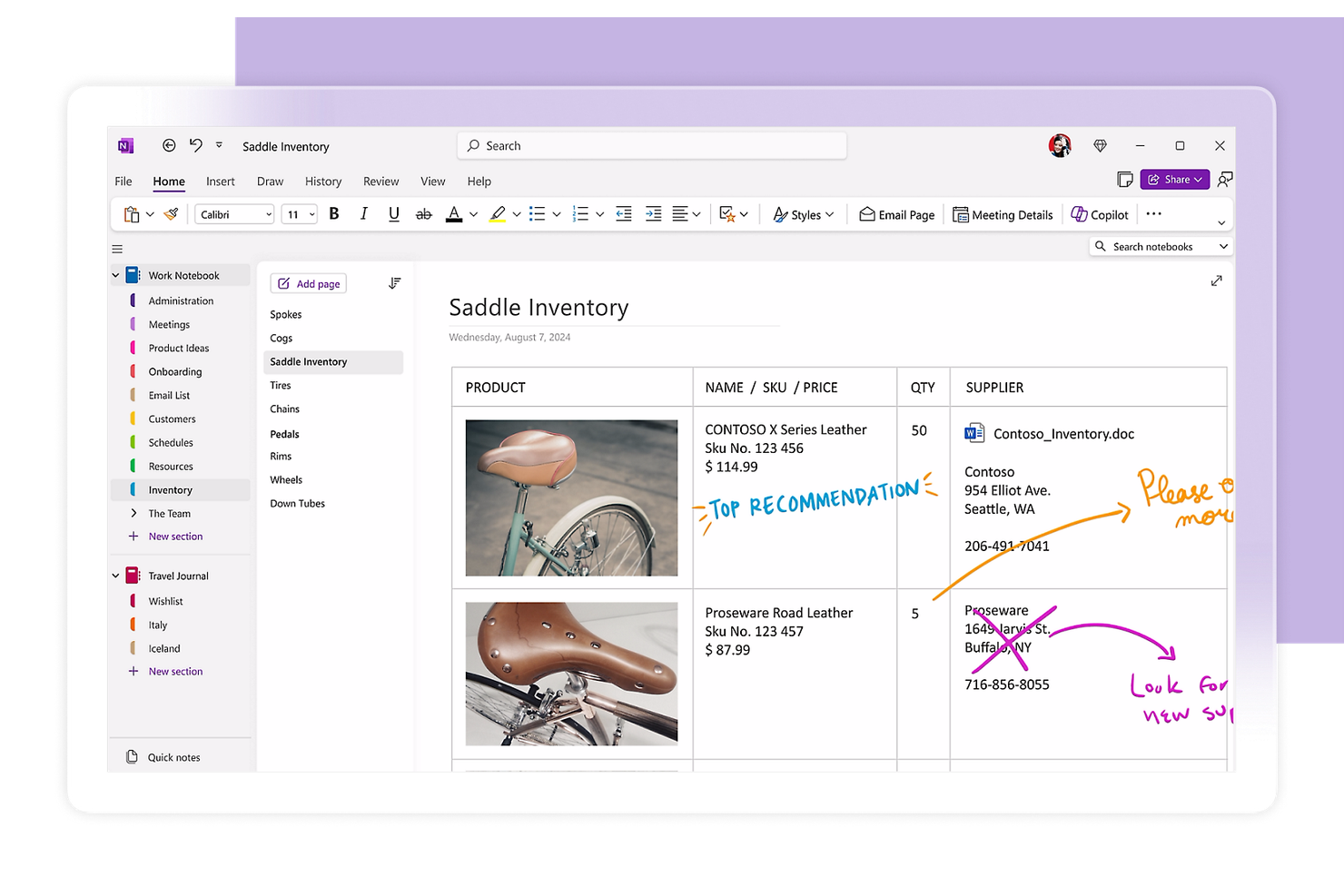
If you need an all-in-one note-taking solution that works across every device and operating system, OneNote by Microsoft is worth a close look. It’s especially useful for teams and professionals who want to organize detailed notes, sketches, and files in a digital notebook that syncs everywhere. Unlike Google Keep, OneNote supports rich formatting, nested notebooks, and integration with other Microsoft 365 tools.
Why OneNote Is a Good Google Keep Alternative
Unlike many note-taking apps, OneNote truly excels at keeping your notes in sync across Windows, Mac, iOS, Android, and the web. I picked OneNote because you can start a note on your phone and finish it on your laptop without missing a beat. The app’s notebook structure lets you organize information in a way that feels familiar, while its cross-platform syncing ensures you always have access to your latest updates. If you need a Google Keep alternative that works reliably on every device you use, OneNote’s syncing capabilities are hard to match.
OneNote Key Features
Some other features in OneNote make it a versatile choice for different note-taking needs:
- Handwriting and Drawing Tools: Capture handwritten notes or sketches using a stylus or your finger.
- Audio Recording: Record audio directly into your notes for meetings or lectures.
- File Attachments: Add documents, images, and other files directly to any note page.
- Tagging and Search: Use tags and advanced search to quickly find specific notes or content.
OneNote Integrations
Integrations include Microsoft Outlook, Microsoft Teams, Microsoft Word, Microsoft Excel, Microsoft PowerPoint, OneDrive, SharePoint, and Outlook Calendar
Pros and Cons
Pros:
- Built-in image optical character recognition (OCR)
- Integrates with other Microsoft 365 apps
- Native math equation solving
Cons:
- No individual page password locking
- Search can be slow with large notebooks

Best for multimedia content support
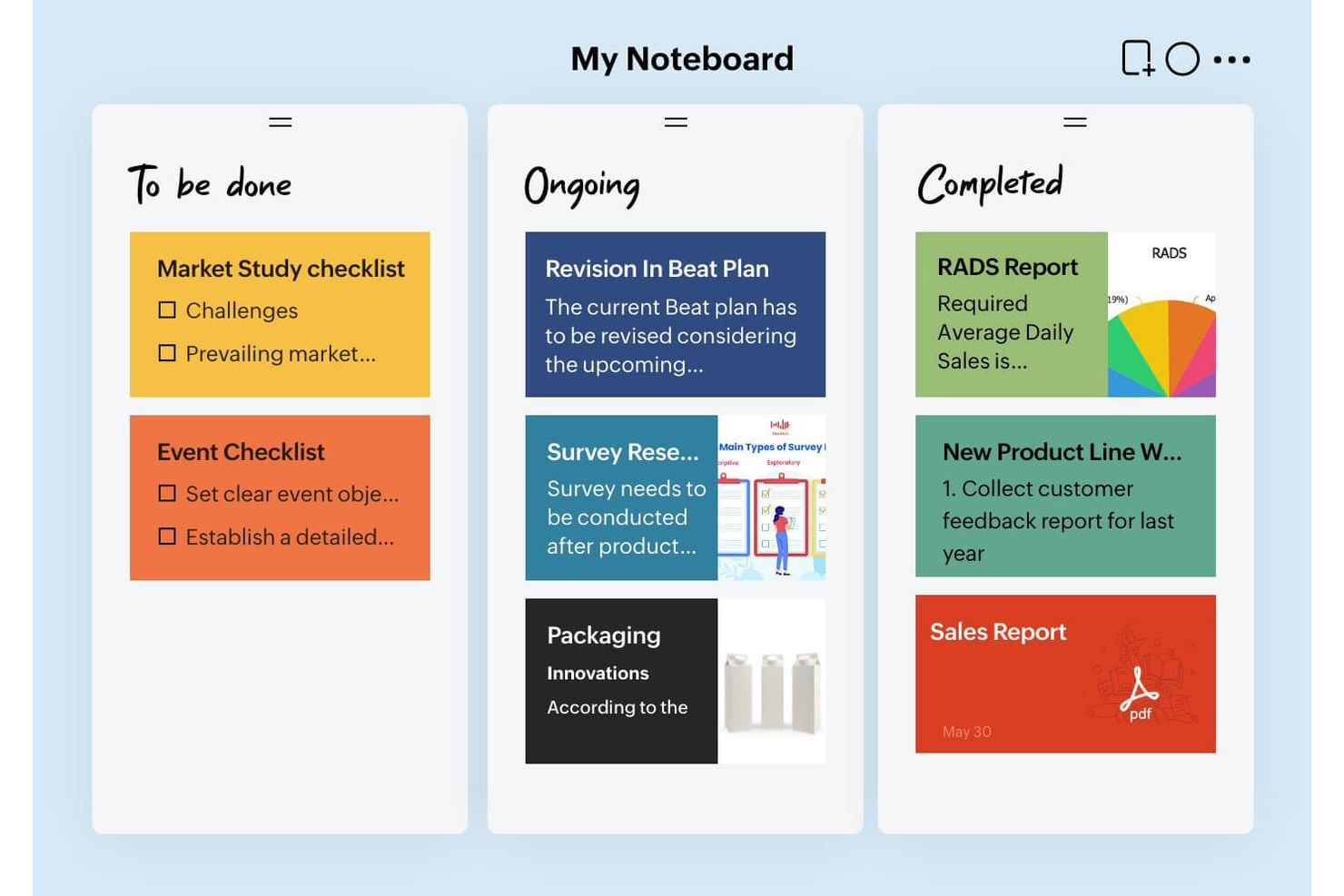
If you need a productivity tool that handles more than just text, Zoho Notebook is worth a look. This tool is designed for users who want to capture and organize multimedia content like images, audio, and files alongside written notes. For creative professionals, students, or anyone who works with a variety of content types, Zoho Notebook offers flexibility that goes beyond what Google Keep provides.
Why Zoho Notebook Is a Good Google Keep Alternative
Zoho Notebook stands out for anyone who wants to capture more than just text in their notes. I picked Zoho Notebook because it lets you add images, audio recordings, and file attachments directly to your notes, which is something Google Keep doesn’t handle as flexibly. The app also supports sketch cards for handwritten notes and drawing, making it useful for visual thinkers. If you need a note-taking tool that supports a wide range of content types, Zoho Notebook is a strong alternative.
Zoho Notebook Key Features
Some other features in Zoho Notebook make it even more versatile for note-taking:
- Customizable Notebook Covers: Choose from a variety of cover designs to visually organize your notebooks.
- Web Clipper: Save articles, images, and text from your browser directly into your notes.
- Note Locking: Protect sensitive notes with passcodes or biometric authentication.
- Tagging System: Add tags to notes for easier searching and organization.
Zoho Notebook Integrations
Integrations include Zoho Mail, Zoho CRM, Google Drive, Slack, Microsoft Teams, and more.
Pros and Cons
Pros:
- Offers custom notebook covers for organization
- Web clipper allows saving content from browsers
- Supports audio, images, and files
Cons:
- Inconsistent syncing across devices
- No real-time collaboration feature

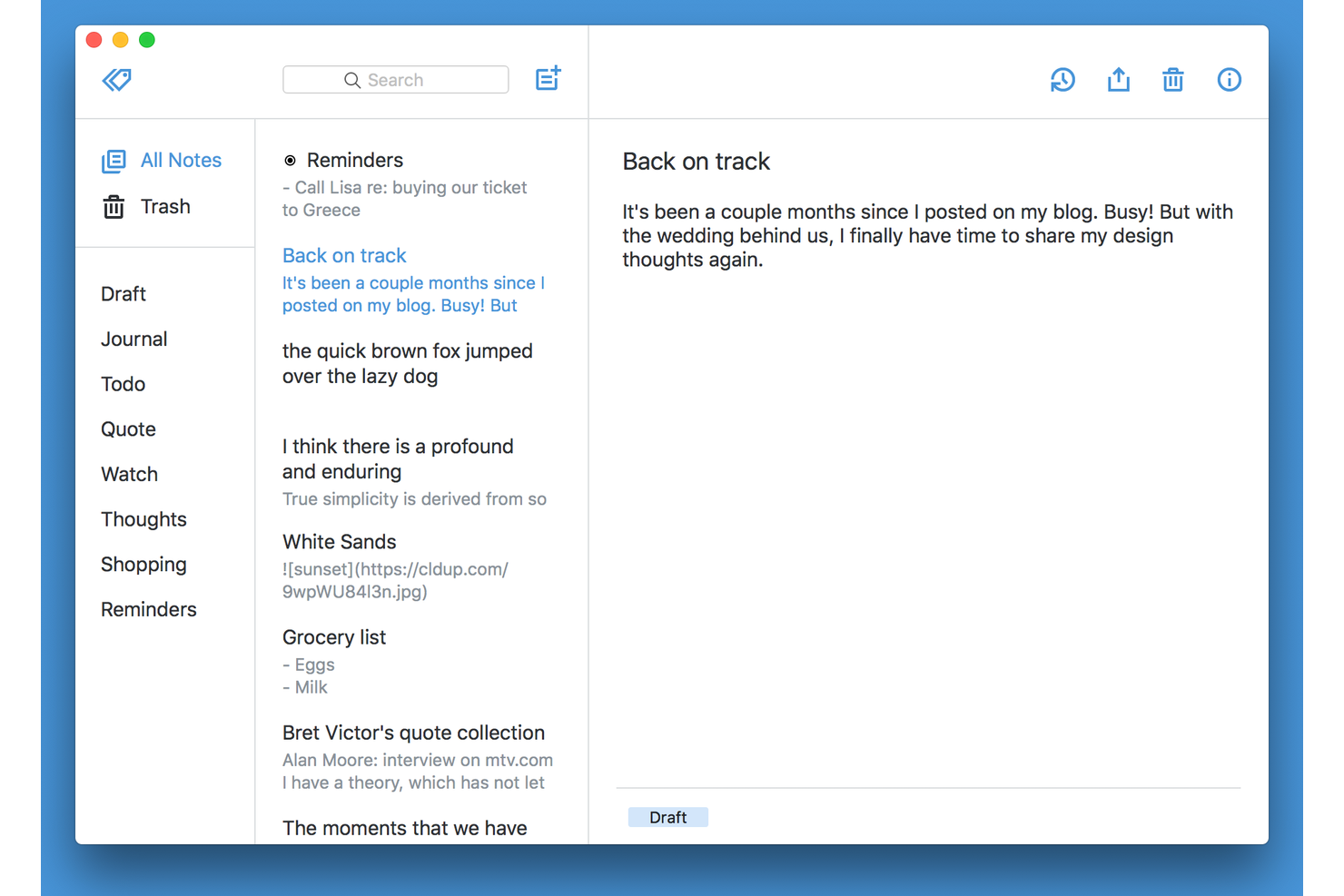
Writers and professionals who want a clean, focused space for capturing ideas often turn to Simplenote. This app is built for anyone who values a distraction-free environment to jot down ideas and fast, plain text note-taking. If you’re looking to avoid clutter and keep your notes organized without extra features getting in the way, Simplenote offers a straightforward alternative to Google Keep.
Why Simplenote Is a Good Google Keep Alternative
If you want a note-taking app that keeps distractions to a minimum, Simplenote is worth considering. I picked Simplenote because it offers a clean, minimal interface that helps you focus on writing without pop-ups or visual clutter. The app supports fast plain text entry and instant search, so you can capture and find ideas quickly. For anyone who values a simplified writing experience over extra features, Simplenote is a strong alternative to Google Keep.
Simplenote Key Features
Some other features in Simplenote make it useful for a range of note-taking needs:
- Tagging System: Organize notes with tags for quick sorting and retrieval.
- Version History: View and restore previous versions of any note.
- Cross-Platform Sync: Keep notes updated across Windows, macOS, Linux, iOS, Android, and web.
- Markdown Support: Write and preview notes using Markdown formatting.
Simplenote Integrations
Integrations are not publicly listed.
Pros and Cons
Pros:
- Public web publishing functionality
- Instantaneous version history restoration
- Full markdown support for formatting
Cons:
- Lack of reminder functionality
- No image attachment support
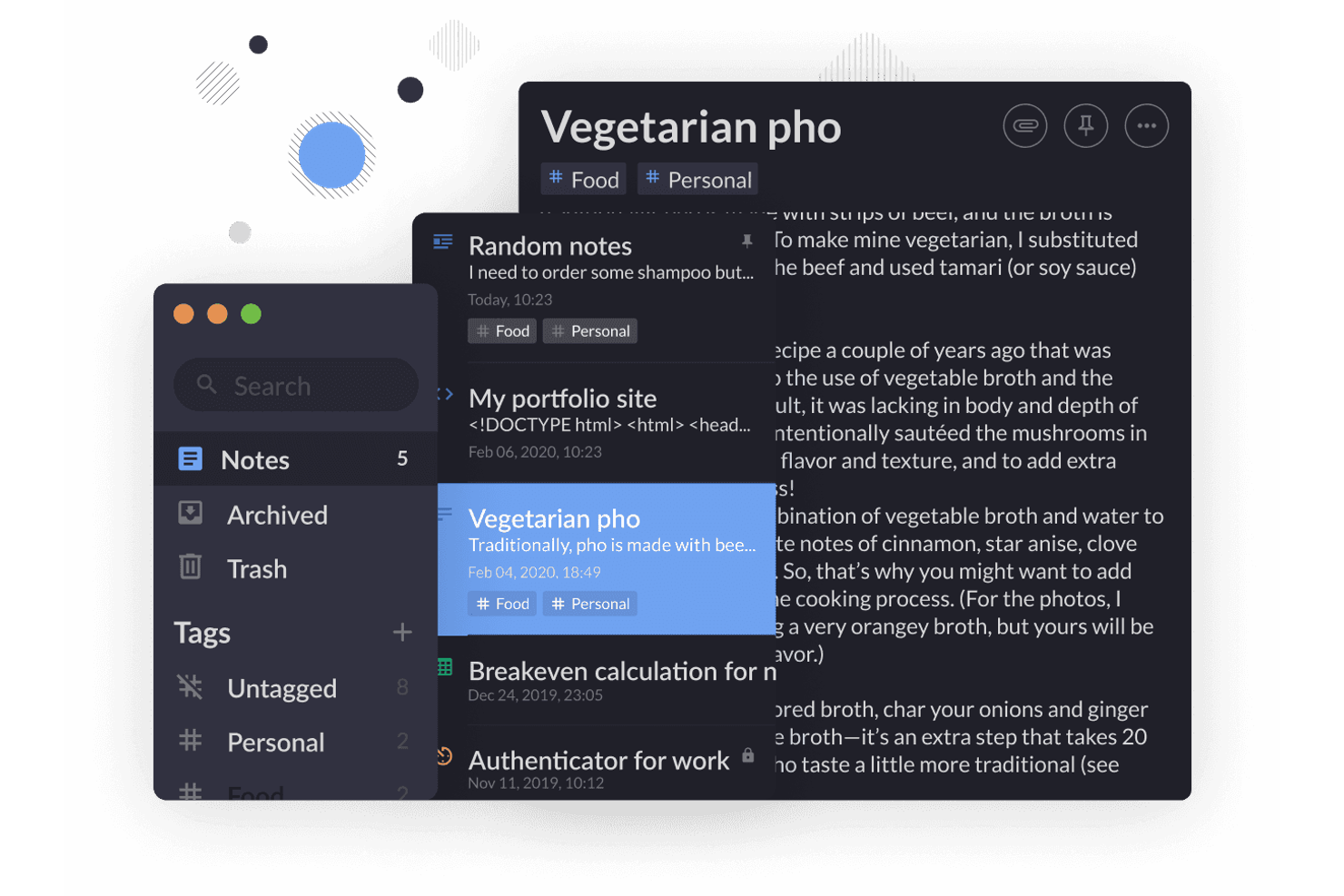
If you need a note-taking app that puts privacy first, Standard Notes is designed for you. This tool appeals to professionals and teams who handle sensitive information and want end-to-end encryption for every note. Unlike Google Keep, Standard Notes ensures your data stays private—even from the app’s own servers.
Why Standard Notes Is a Good Google Keep Alternative
For anyone who needs their notes to stay private, Standard Notes offers a level of security that Google Keep doesn’t match. I picked Standard Notes because it uses end-to-end encryption by default, so only you can access your content. The app also supports encrypted backups and secure syncing across devices, which means your information is protected even if you use multiple platforms. If privacy is your top concern, Standard Notes is a strong alternative to Google Keep.
Standard Notes Key Features
Some other features in Standard Notes make it versatile for different note-taking workflows:
- Rich Text and Markdown Editors: Switch between plain text, rich text, and Markdown for flexible note formatting.
- Tag Organization: Use tags to categorize and quickly find notes.
- Customizable Themes: Choose from a variety of themes to personalize your workspace.
- Automated Backups: Set up scheduled encrypted backups to your preferred cloud storage service.
Standard Notes Integrations
Integrations are not publicly listed.
Pros and Cons
Pros:
- No limit on synced devices
- Customizable editors including spreadsheets
- XChaCha-20 end-to-end encryption
Cons:
- Limited internal note linking
- Rich formatting requires paid plan
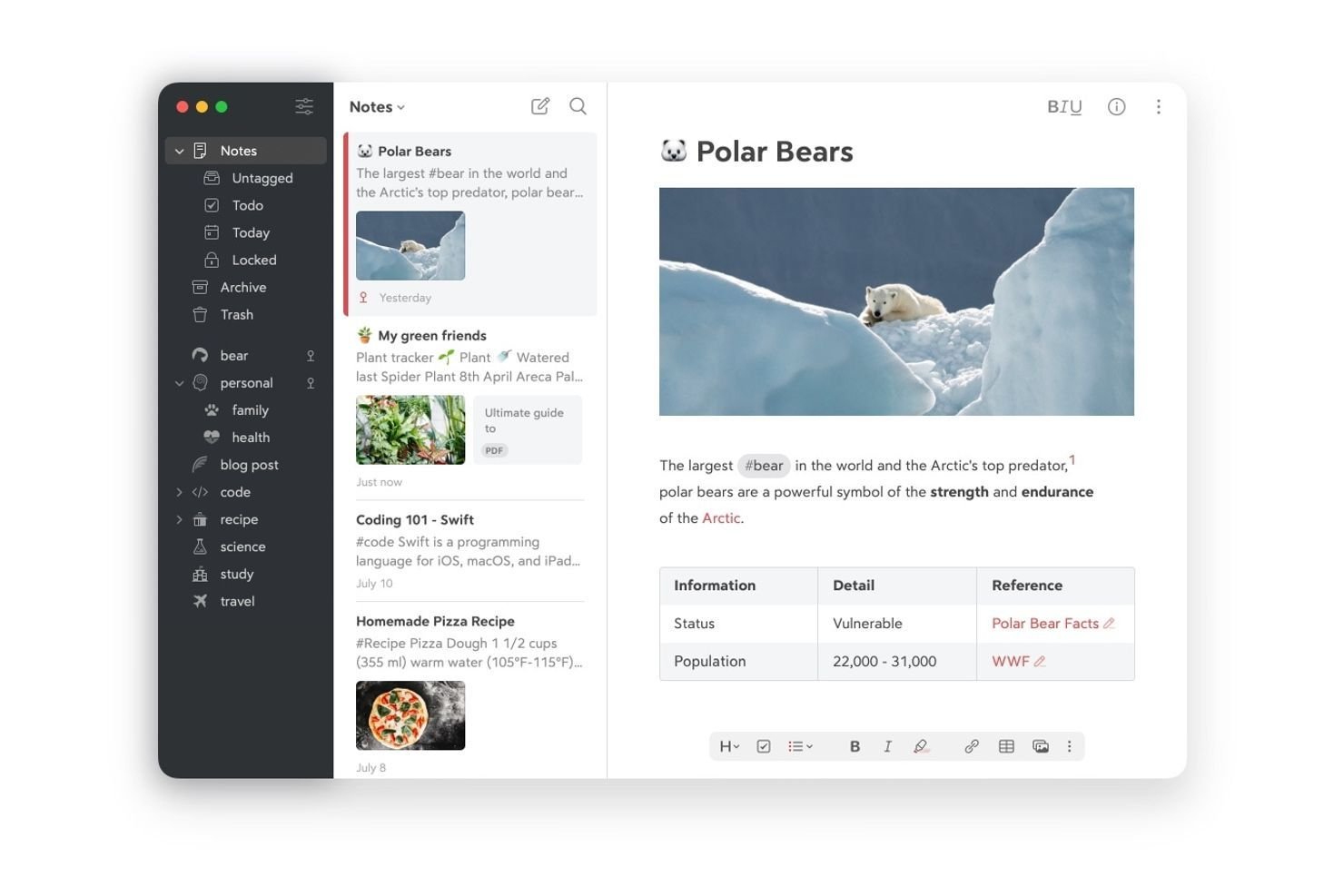
Writers, developers, and anyone who values clean, distraction-free note-taking will find Bear especially appealing. This app is built around advanced markdown editing, making it easy to format, link, and organize notes with precision. If you need more control over your note structure than Google Keep offers, Bear’s flexible tagging and export options set it apart.
Why Bear Is a Good Google Keep Alternative
If you want a note-taking app that excels at markdown editing, Bear is a strong choice. I picked Bear because it lets you use markdown to format text, add code snippets, and create checklists all within a single note. The app also supports in-line image embedding and advanced tagging, which makes organizing and referencing your notes much more flexible than Google Keep. For anyone who needs precise formatting and structure in their notes, Bear’s markdown-first approach is a clear advantage.
Bear Key Features
Some other features in Bear help it stand out for users who want more than just markdown editing:
- Custom Themes: Choose from a variety of visual themes to personalize your workspace.
- Focus Mode: Hide interface elements to minimize distractions while writing.
- Hashtag Organization: Use hashtags to quickly group and find related notes.
- Multi-Device Sync: Sync notes across iPhone, iPad, and Mac with iCloud.
Bear Integrations
Integrations include WordPress, Dropbox, Google Drive, Evernote, iCloud, Trello, Slack, Notion, Asana, and Microsoft OneNote.
Pros and Cons
Pros:
- Focus mode removes distractions
- Hashtag system makes searching notes flexible
- Advanced markdown support
Cons:
- No web application supported
- Limited to Apple devices

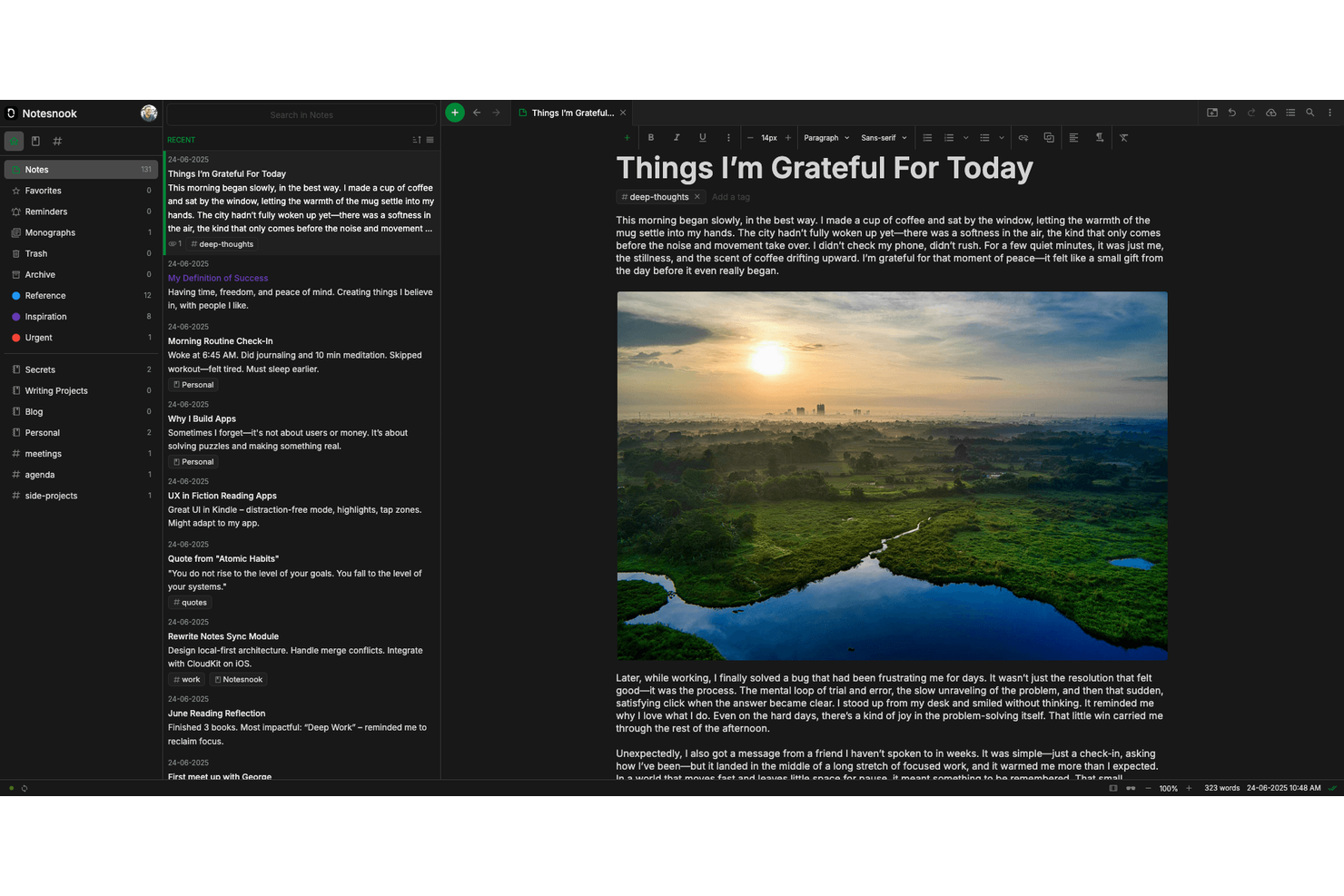
If you need a note-taking app that puts privacy first, Notesnook is worth a look. This tool is designed for users and teams who want end-to-end encryption and control over their data. It’s a strong choice for anyone handling sensitive information or working in fields where confidentiality is a top priority.
Why Notesnook Is a Good Google Keep Alternative
Notesnook stands out for its commitment to privacy and open-source code available on GitHub, making it a strong choice if you need more security than Google Keep offers. I picked Notesnook because it provides end-to-end encryption for all notes, so your data stays protected at every stage. The app also lets you lock individual notes with a password, adding another layer of confidentiality. If you’re handling sensitive documentation or want full control over your information, these privacy-focused features set Notesnook apart.
Notesnook Key Features
Some other features in Notesnook make it a flexible option for different note-taking needs:
- Rich Text Editor: Create notes with formatting options like headings, lists, and checkboxes for better organization.
- Notebook Organization: Group notes into notebooks to keep related information together and easy to find.
- Cross-Platform Sync: Access your notes on Windows, macOS, Linux, Android, and iOS with automatic syncing.
- Offline Access: View and edit your notes even when you don’t have an internet connection.
Notesnook Integrations
Integrations are available via an API.
Pros and Cons
Pros:
- No account or email required
- Monospace and code block support
- Fully open-source zero-knowledge architecture
Cons:
- No collaborative shared note folders
- Subscription needed for image attachments
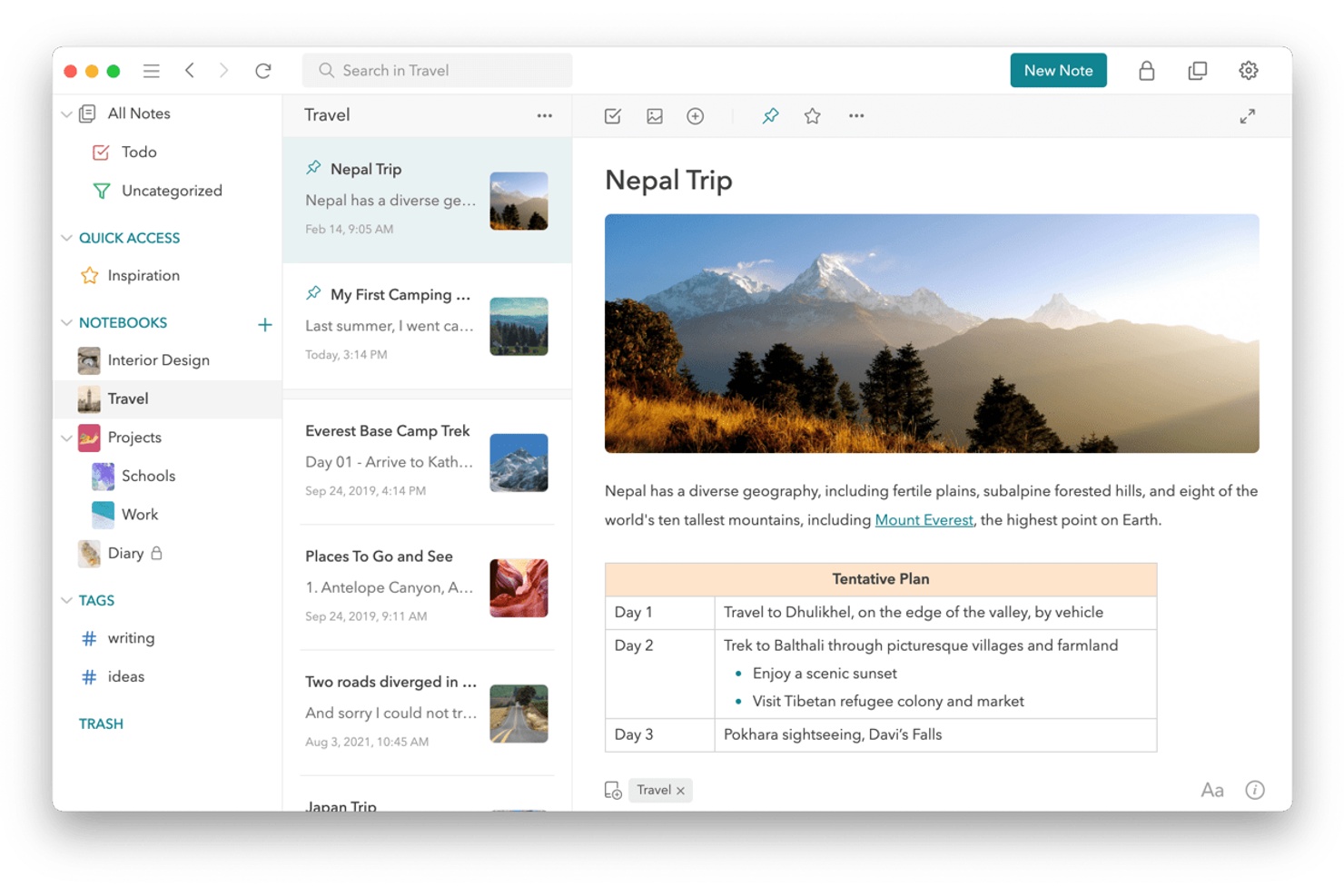
UpNote stands out for anyone who values a distraction-free, visually polished note-taking experience without complex automation getting in the way. This app is a strong fit for professionals, writers, and students who want a clean interface that makes organizing and focusing on notes simple. If you find Google Keep’s layout too basic or cluttered, UpNote’s elegant design and thoughtful layout may be what you’re looking for.
Why UpNote Is a Good Google Keep Alternative
If you want a note-taking app that feels refined and visually calming, UpNote is worth considering. I picked UpNote because its interface design is minimal, distraction-free, and highly polished compared to Google Keep’s more utilitarian look. The app offers customizable themes and typography, letting you tailor the workspace to your preferences. For users who care about aesthetics and focus, UpNote’s design-forward approach sets it apart from other options.
UpNote Key Features
Some other features in UpNote help it stand out for different note-taking needs:
- Nested Notebooks: Organize notes into notebooks and sub-notebooks for deeper structure.
- Focus Mode: Hide all toolbars and menus to concentrate fully on writing.
- Offline Access: Create and edit notes without an internet connection.
- Note Pinning: Pin important notes to the top of your list for quick access.
UpNote Integrations
Integrations are not publicly listed.
Pros and Cons
Pros:
- Cross-platform sync without account creation
- Automatic collapsible note content sections
- Permanent lifetime license purchase option
Cons:
- Maximum twenty megabyte file upload limit
- Fifty note limit in free version
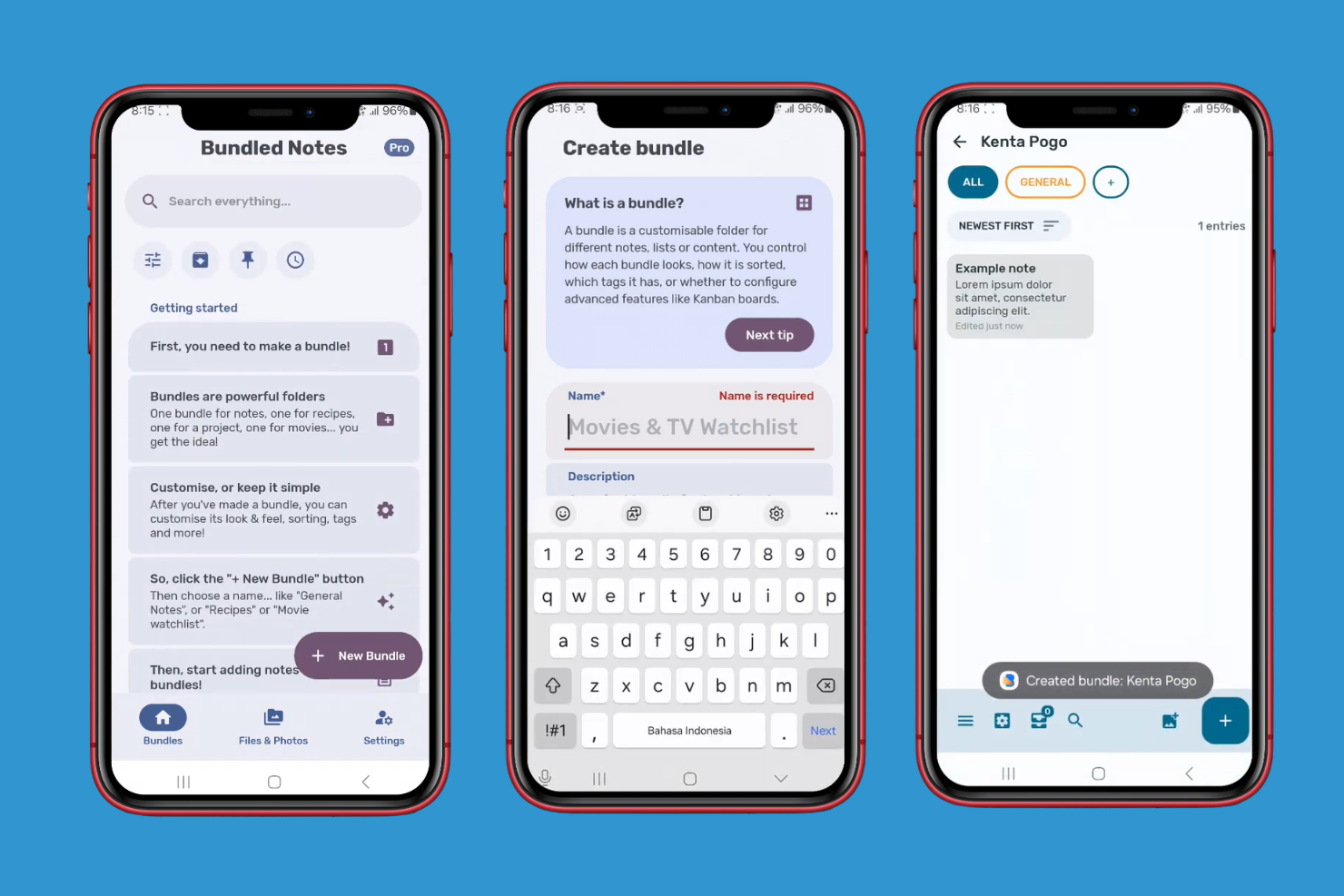
Project managers and professionals who want more structure in their note-taking will find Bundled Notes especially appealing. This tool combines kanban boards with note organization, making it easier to manage tasks, ideas, and projects in one place. If you’re looking for a Google Keep alternative that supports kanban-style workflows, Bundled Notes offers a unique approach.
Why Bundled Notes Is a Good Google Keep Alternative
Unlike most note-taking apps, Bundled Notes lets you organize your notes using kanban boards, which is ideal for managing projects and workflows visually. I picked Bundled Notes because it allows you to create bundles that act as customizable lists, each with its own kanban board for tracking progress. You can add tags, sort notes with filters, and move items between columns to match your process. For anyone who wants more than just simple note storage, Bundled Notes brings project management structure to everyday note-taking.
Bundled Notes Key Features
Some other features in Bundled Notes help it stand out for structured note-taking:
- Markdown Support: Write and format notes using markdown syntax for better readability.
- Customizable Widgets: Add widgets to your device’s home screen for quick access to specific bundles or notes.
- Advanced Sorting and Filtering: Organize notes with custom filters, tags, and sorting options.
- Web App Access: Use Bundled Notes from any browser, making your notes accessible across devices.
Bundled Notes Integrations
Integrations are not publicly listed.
Pros and Cons
Pros:
- Offers mobile widgets for quick access
- Bundle-specific tag and filter sets
- Native Kanban board organizational view Bundle-specific tag and filter sets Offers mobile widgets for quick access
Cons:
- No built-in voice recording tool
- Android and web only availability
Other Google Keep Alternatives
Here are some additional Google Keep alternative options that didn’t make it onto my shortlist, but are still worth checking out:
- Supernotes
For collaborative card-based notes
- GQueues
For Google Workspace task management
- Todoist
For task and checklist integration
- Evernote
For web clipping capabilities
- Notion
For customizable workspace layouts
- Goodnotes
For handwritten note support
- Easy Notes
For colorful folder organization


How I Evaluate Google Keep Alternatives
I first check that any alternative handles what Google Keep does—quick notes during standups, shared checklists, reminders, and cross-device sync. Then I look at differentiators like templates and PM integrations that set certain tools apart.
Core Functionality (Table Stakes For This List)
When I'm selecting tools for my list, I rank each one on a scale from 0 (does not offer the functionality) to 5 (excels in this area) for each core functionality listed below. Then, I calculate the tool's total score into a percentage. Each tool needs to achieve a minimum total score of 75% to be considered for inclusion.
- Note Creation & Editing: I look for rich text formatting, headers, and link support so teams can draft structured meeting minutes or capture sprint retrospective notes without switching apps.
- Checklists & Reminders: Whether it's a pre-launch QA checklist or a reminder to follow up on a vendor contract, I evaluate how well each tool handles to-dos with time-based and recurring alerts.
- Organization & Tagging: Sorting notes by project, client, or priority matters when you're juggling multiple initiatives. I check for labels, color coding, folders, and filtering options.
- Real-Time Collaboration: Project teams need shared notes that update live during brainstorms or planning sessions. I look at co-editing, permission controls, and whether teammates can comment or mention each other.
- Cross-Device Sync: A note captured on your phone during a site visit should appear instantly on your laptop. I evaluate platform coverage across web, desktop, and mobile, plus offline access.
- Search & Media Capture: I check whether full-text search extends to attachments and images, since project teams often embed screenshots, voice memos, or reference files alongside their notes.
Once I have a list of tools that meet the criteria, I consider what sets each platform apart.
Differentiating Factors (What Sets Vendors Apart)
Here's how I compare and contrast different vendors:
Standout Features
I look for tools that convert notes into assignable tasks with due dates and statuses, so a brainstorm from sprint planning can become a backlog item without leaving the app. Templates for meeting notes, retros, and standups save real time when your team runs the same ceremonies weekly. AI-powered features like note summarization and auto-generated action items are a meaningful differentiator for PMs in back-to-back meetings. Wiki-style linking between pages also matters—it turns scattered notes into a connected knowledge base.
Beyond Features
Since Google Keep is free, I evaluate whether each alternative offers a comparable free tier or reasonable per-user pricing that won't surprise you as your team scales. Integrations with your PM stack also matter—tools that connect to Jira, Asana, or Slack let you link notes directly to active projects and conversations. I also consider onboarding speed, because a tool your team won't adopt is a tool that doesn't help. Migration importers from Google Keep make that transition much smoother for teams with years of stored notes.
Why Look For a Google Keep Alternative?
While Google Keep is a good choice of note-taking app, there are a number of reasons why some users seek out alternative solutions. You might be looking for a Google Keep alternative because…
- You need advanced organization with folders or nested tags
- You want built-in task management or checklist features
- You require better collaboration tools for team projects
- You need offline access or desktop app support
- You want more control over data privacy and security
- You need integration with non-Google tools and platforms
If any of these sound like you, you’ve come to the right place. My list contains several note-taking app options that are better suited for teams facing these challenges with Google Keep and looking for alternative solutions.
Google Keep Key Features
Here are some of the key features of Google Keep, to help you contrast and compare what alternative solutions offer:
- Color-coded notes for easy visual organization
- Voice note recording and transcription
- Real-time syncing across all devices
- Checklist and to-do list creation
- Image and photo attachment to notes
- Location-based and time-based reminders
- Simple label and search functionality
- Note sharing and basic collaboration
- Pinning important notes to the top
- Integration with other Google Workspace apps, like Google Docs and Google Calendar